04Card spotlight glow
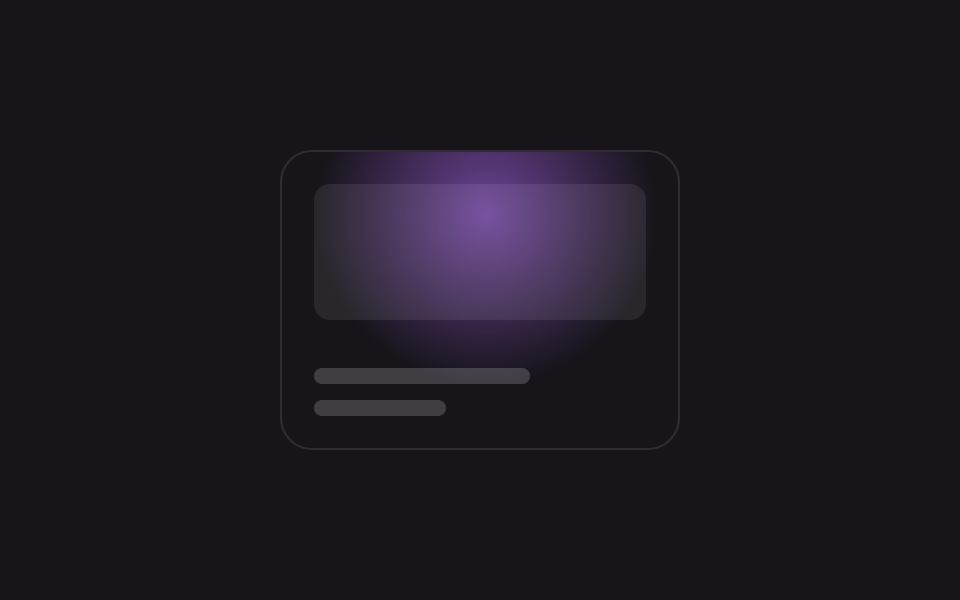
A pair of --x/--y custom properties registered via @property move the center of a radial-gradient across the card, and when no cursor is present the same variables are driven by keyframes so the spotlight sweeps on its own.
Best forPortfolio project cards, pricing-plan card hovers
@propertyradial-gradient@keyframes sweep
<main class="stage is-demo">
  <div class="card">
    <span class="thumb" aria-hidden="true"></span>
    <span class="bar bar--lg" aria-hidden="true"></span>
    <span class="bar bar--sm" aria-hidden="true"></span>
  </div>
</main>
@use "../../../../site/static/demo-tokens" as *;
// ── 변수 3개 ──────────────────────────────────────────
$duration: $dur-loop; // 2s — 스포트라이트 한 바퀴
$easing: ease-in-out;
$color: #b36bff; // 네온 바이올렛
@include stage($stage-ink);
// 등록 없는 커스텀 프로퍼티는 키프레임으로 보간이 안 된다 — 반드시 @property 로 등록한다 (원리 섹션 재료)
@property --x { syntax: '<percentage>'; inherits: false; initial-value: 50%; }
@property --y { syntax: '<percentage>'; inherits: false; initial-value: 50%; }
.card {
position: relative;
overflow: hidden;
box-sizing: border-box;
width: clamp(200px, 62vmin, 300px);
aspect-ratio: 4 / 3;
border-radius: $r-card;
background: $stage-ink;
border: 1px solid rgba($stage-paper, .1);
padding: $sp-4;
display: flex; flex-direction: column; justify-content: flex-end; gap: $sp-2;
}
.card::before {
content: '';
position: absolute; inset: 0;
background: radial-gradient(circle at var(--x) var(--y), rgba($color, .55), transparent 55%);
pointer-events: none;
}
.thumb { position: absolute; top: $sp-4; left: $sp-4; right: $sp-4; height: 46%; border-radius: $r-sm; background: rgba($stage-paper, .08); }
.bar { display: block; height: $sp-2; border-radius: $r-xs; background: rgba($stage-paper, .18); }
.bar--lg { width: 65%; }
.bar--sm { width: 40%; }
// --x·--y 만 움직인다 — @property 등록 덕에 keyframes 가 보간할 수 있다
.stage.is-demo .card::before {
animation: sweep $duration $easing infinite;
}
@keyframes sweep {
0% { --x: 18%; --y: 20%; }
25% { --x: 85%; --y: 22%; }
50% { --x: 78%; --y: 80%; }
75% { --x: 20%; --y: 76%; }
100% { --x: 18%; --y: 20%; }
}
@media (prefers-reduced-motion: reduce) {
.stage.is-demo .card::before { animation: none; --x: 50%; --y: 50%; }
}html, body {
margin: 0;
overflow: hidden;
}
.stage {
box-sizing: border-box;
min-height: 100vh;
display: grid;
place-items: center;
margin: 0;
background: #17141a;
font-family: -apple-system, "Segoe UI", "Noto Sans KR", sans-serif;
padding: clamp(8px, 4vw, 24px);
}
@property --x {
syntax: "<percentage>";
inherits: false;
initial-value: 50%;
}
@property --y {
syntax: "<percentage>";
inherits: false;
initial-value: 50%;
}
.card {
position: relative;
overflow: hidden;
box-sizing: border-box;
width: clamp(200px, 62vmin, 300px);
aspect-ratio: 4/3;
border-radius: 16px;
background: #17141a;
border: 1px solid rgba(255, 255, 255, 0.1);
padding: 16px;
display: flex;
flex-direction: column;
justify-content: flex-end;
gap: 8px;
}
.card::before {
content: "";
position: absolute;
inset: 0;
background: radial-gradient(circle at var(--x) var(--y), rgba(179, 107, 255, 0.55), transparent 55%);
pointer-events: none;
}
.thumb {
position: absolute;
top: 16px;
left: 16px;
right: 16px;
height: 46%;
border-radius: 8px;
background: rgba(255, 255, 255, 0.08);
}
.bar {
display: block;
height: 8px;
border-radius: 4px;
background: rgba(255, 255, 255, 0.18);
}
.bar--lg {
width: 65%;
}
.bar--sm {
width: 40%;
}
.stage.is-demo .card::before {
animation: sweep 2s ease-in-out infinite;
}
@keyframes sweep {
0% {
--x: 18%;
--y: 20%;
}
25% {
--x: 85%;
--y: 22%;
}
50% {
--x: 78%;
--y: 80%;
}
75% {
--x: 20%;
--y: 76%;
}
100% {
--x: 18%;
--y: 20%;
}
}
@media (prefers-reduced-motion: reduce) {
.stage.is-demo .card::before {
animation: none;
--x: 50%;
--y: 50%;
}
}// 실제 커서가 카드 위를 지나가면 --x·--y 를 좌표로 갱신하고 데모 루프를 뗀다 (8줄).
(function () {
var card = document.querySelector('.card');
card.addEventListener('pointermove', function (e) {
var r = card.getBoundingClientRect();
card.style.setProperty('--x', ((e.clientX - r.left) / r.width * 100) + '%');
card.style.setProperty('--y', ((e.clientY - r.top) / r.height * 100) + '%');
document.querySelector('.stage').classList.remove('is-demo');
});
})();import { useCallback, useRef } from "react";
import type { CSSProperties, PointerEvent } from "react";
import styles from "./CardSpotlightGlow.module.scss";
export type CardSpotlightGlowProps = {
duration?: number;
easing?: string;
color?: string;
};
export default function CardSpotlightGlow({
duration = 2000,
easing = "ease-in-out",
color = "#b36bff",
}: CardSpotlightGlowProps) {
const cardRef = useRef<HTMLDivElement | null>(null);
const onPointerMove = useCallback((e: PointerEvent<HTMLDivElement>) => {
const el = cardRef.current;
if (!el) return;
const r = el.getBoundingClientRect();
el.style.setProperty("--x", `${((e.clientX - r.left) / r.width) * 100}%`);
el.style.setProperty("--y", `${((e.clientY - r.top) / r.height) * 100}%`);
}, []);
const vars: CSSProperties = { "--duration": `${duration}ms`, "--easing": easing, "--color": color } as CSSProperties;
return (
<div ref={cardRef} className={styles.card} style={vars} onPointerMove={onPointerMove}>
<span className={styles.thumb} aria-hidden="true" />
<span className={`${styles.bar} ${styles.barLg}`} />
<span className={`${styles.bar} ${styles.barSm}`} />
</div>
);
}04 Card spotlight glow — Measured area 20.233% · moving frames 16/23Original by GODRICH · SCSS and React ship in the zip · 9 CSS Glow Effect Animations — Neon, Copy-Paste
The post this demo lives in
 9 CSS Glow Effect Animations — Neon, Copy-PasteA glowing button or headline looks lit from the inside like a neon sign, the trick gaming sites, streamers, and portfoli See all demos in this post