09Password eye toggle
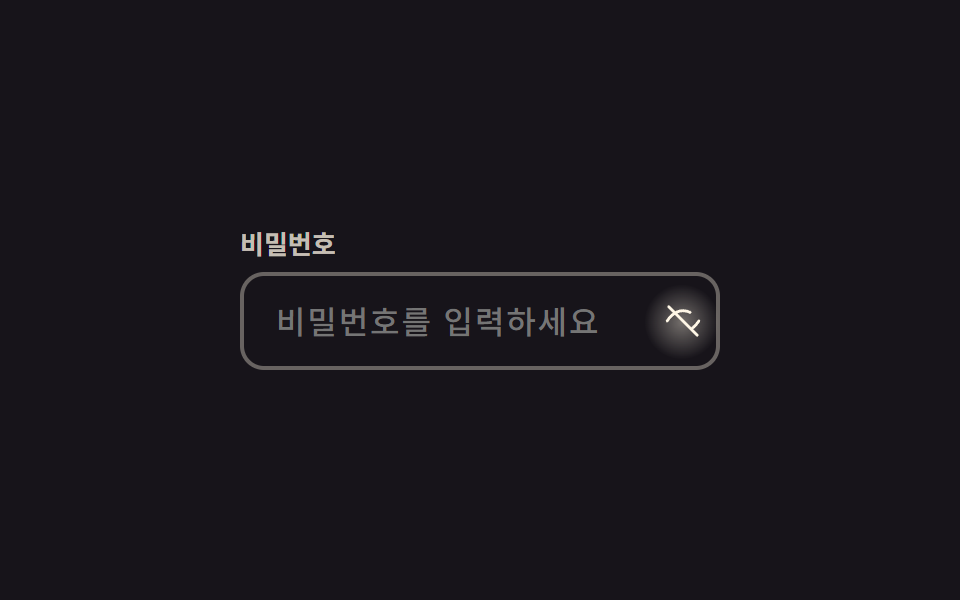
Clicking the eye icon actually flips the input's type while the icon itself cross-fades to a slashed eye via opacity and scale.
Best forLogin form password fields, checkout password fields
type toggleopacity scale220ms
<main class="stage">
  <div class="pw is-demo">
    <label class="pw__label" for="pw-input">Password</label>
    <div class="pw__frame">
      <input id="pw-input" class="pw__input" type="password" placeholder="Enter your password" autocomplete="current-password">
      <button type="button" class="pw__eye" aria-label="Show password" aria-pressed="false">
        <svg class="pw__icon pw__icon--eye" viewBox="0 0 24 24" aria-hidden="true"><path d="M2 12s3.6-6.5 10-6.5S22 12 22 12s-3.6 6.5-10 6.5S2 12 2 12Z"/><circle cx="12" cy="12" r="2.6"/></svg>
        <svg class="pw__icon pw__icon--off" viewBox="0 0 24 24" aria-hidden="true"><path d="M2 12s3.6-6.5 10-6.5c1.7 0 3.2.4 4.5 1.1M22 12s-1.4 2.5-4 4.4M6.5 6.5 3 3m1.5 1.5L21 21"/></svg>
      </button>
    </div>
  </div>
</main>
@use "../../../../site/static/demo-tokens" as *;
// ── 변수 3개 ──────────────────────────────────────────
$duration: $dur-quick; // 아이콘이 바뀌는 시간
$easing: cubic-bezier(.3, 1.6, .4, 1); // 스프링 오버슛 — 아이콘 스케일이 1 을 지나 1.12 까지 뻗었다가 돌아온다
$color: $subject-cream; // 아이콘·포커스 색
@include stage($stage-ink);
.pw { width: min(240px, 82vw); }
.pw__label { display: block; margin-bottom: $sp-2; font-weight: 700; font-size: 13px; line-height: 1; font-family: inherit; color: rgba($subject-cream, .75); }
.pw__frame { position: relative; }
.pw__input {
box-sizing: border-box;
width: 100%;
border: 2px solid rgba($subject-cream, .35);
border-radius: $r-control;
padding: $sp-3 $sp-10 $sp-3 $sp-4;
font-weight: 500;
font-size: clamp(14px, 4vw, 16px);
line-height: 1;
font-family: inherit;
color: $subject-cream;
background: transparent;
letter-spacing: .06em;
&:focus { outline: none; border-color: $color; }
}
.pw__eye {
position: absolute;
right: $sp-1; top: 50%;
transform: translateY(-50%);
width: 30px; height: 30px;
border: 0;
border-radius: 50%;
background: transparent;
display: grid;
place-items: center;
cursor: pointer;
}
// 토글 누르는 순간 버튼 중심에서 번지는 radial 글로우 확산 한 겹
.pw__eye::after {
content: "";
position: absolute;
inset: -4px;
border-radius: 50%;
background: radial-gradient(circle, rgba($color, .4) 0%, rgba($color, 0) 70%);
opacity: 0;
pointer-events: none;
}
.pw__eye.is-shown::after { animation: pw-bloom $dur-quick $ease-out; }
@keyframes pw-bloom {
0% { opacity: 0; transform: scale(.5); }
40% { opacity: 1; transform: scale(1); }
100% { opacity: 0; transform: scale(1.3); }
}
.pw__icon {
position: absolute;
width: 19px; height: 19px;
fill: none;
stroke: $color;
stroke-width: 1.8;
stroke-linecap: round;
stroke-linejoin: round;
transform: scale(1);
opacity: 1;
transition: transform $duration $easing, opacity $duration $easing;
}
.pw__icon--off { transform: scale(.5); opacity: 0; }
.pw__eye.is-shown .pw__icon--eye { transform: scale(.5); opacity: 0; }
.pw__eye.is-shown .pw__icon--off { transform: scale(1); opacity: 1; }
@media (prefers-reduced-motion: reduce) {
.pw__icon { transition: none; }
.pw__eye.is-shown::after { animation: none; }
}html, body {
margin: 0;
overflow: hidden;
}
.stage {
box-sizing: border-box;
min-height: 100vh;
display: grid;
place-items: center;
margin: 0;
background: #17141a;
font-family: -apple-system, "Segoe UI", "Noto Sans KR", sans-serif;
padding: clamp(8px, 4vw, 24px);
}
.pw {
width: min(240px, 82vw);
}
.pw__label {
display: block;
margin-bottom: 8px;
font-weight: 700;
font-size: 13px;
line-height: 1;
font-family: inherit;
color: rgba(255, 247, 230, 0.75);
}
.pw__frame {
position: relative;
}
.pw__input {
box-sizing: border-box;
width: 100%;
border: 2px solid rgba(255, 247, 230, 0.35);
border-radius: 12px;
padding: 12px 40px 12px 16px;
font-weight: 500;
font-size: clamp(14px, 4vw, 16px);
line-height: 1;
font-family: inherit;
color: #fff7e6;
background: transparent;
letter-spacing: 0.06em;
}
.pw__input:focus {
outline: none;
border-color: #fff7e6;
}
.pw__eye {
position: absolute;
right: 4px;
top: 50%;
transform: translateY(-50%);
width: 30px;
height: 30px;
border: 0;
border-radius: 50%;
background: transparent;
display: grid;
place-items: center;
cursor: pointer;
}
.pw__eye::after {
content: "";
position: absolute;
inset: -4px;
border-radius: 50%;
background: radial-gradient(circle, rgba(255, 247, 230, 0.4) 0%, rgba(255, 247, 230, 0) 70%);
opacity: 0;
pointer-events: none;
}
.pw__eye.is-shown::after {
animation: pw-bloom 220ms ease-out;
}
@keyframes pw-bloom {
0% {
opacity: 0;
transform: scale(0.5);
}
40% {
opacity: 1;
transform: scale(1);
}
100% {
opacity: 0;
transform: scale(1.3);
}
}
.pw__icon {
position: absolute;
width: 19px;
height: 19px;
fill: none;
stroke: #fff7e6;
stroke-width: 1.8;
stroke-linecap: round;
stroke-linejoin: round;
transform: scale(1);
opacity: 1;
transition: transform 220ms cubic-bezier(0.3, 1.6, 0.4, 1), opacity 220ms cubic-bezier(0.3, 1.6, 0.4, 1);
}
.pw__icon--off {
transform: scale(0.5);
opacity: 0;
}
.pw__eye.is-shown .pw__icon--eye {
transform: scale(0.5);
opacity: 0;
}
.pw__eye.is-shown .pw__icon--off {
transform: scale(1);
opacity: 1;
}
@media (prefers-reduced-motion: reduce) {
.pw__icon {
transition: none;
}
.pw__eye.is-shown::after {
animation: none;
}
}// 실사용: 클릭으로 input type 을 바꾼다. 데모(.is-demo)는 주기적으로 토글 (7줄)
var btn = document.querySelector('.is-demo .pw__eye');
var input = document.querySelector('.is-demo .pw__input');
var t = function () {
var show = input.type === 'password';
input.type = show ? 'text' : 'password';
btn.setAttribute('aria-pressed', String(show));
btn.classList.toggle('is-shown', show);
};
t(); setInterval(t, 450);import { useState } from "react";
import type { CSSProperties, ChangeEvent } from "react";
import styles from "./PasswordEyeToggle.module.scss";
export type PasswordEyeToggleProps = {
id?: string;
label?: string;
placeholder?: string;
showLabel?: string;
duration?: number;
easing?: string;
color?: string;
};
type Vars = CSSProperties & { "--duration"?: string; "--easing"?: string; "--color"?: string };
export default function PasswordEyeToggle({
id = "pw-input",
label = "Password",
placeholder = "Enter your password",
showLabel = "Show password",
duration = 220,
easing = "cubic-bezier(.3,1.6,.4,1)",
color = "#fff7e6",
}: PasswordEyeToggleProps) {
const [value, setValue] = useState("");
const [shown, setShown] = useState(false);
const vars: Vars = { "--duration": `${duration}ms`, "--easing": easing, "--color": color };
return (
<div className={styles.pw} style={vars}>
<label htmlFor={id} className={styles.label}>{label}</label>
<div className={styles.frame}>
<input
id={id}
className={styles.input}
type={shown ? "text" : "password"}
placeholder={placeholder}
autoComplete="current-password"
value={value}
onChange={(e: ChangeEvent<HTMLInputElement>) => setValue(e.target.value)}
/>
<button
type="button"
className={shown ? `${styles.eye} ${styles.shown}` : styles.eye}
aria-label={showLabel}
aria-pressed={shown}
onClick={() => setShown((v) => !v)}
>
<svg className={`${styles.icon} ${styles.eyeIcon}`} viewBox="0 0 24 24" aria-hidden="true"><path d="M2 12s3.6-6.5 10-6.5S22 12 22 12s-3.6 6.5-10 6.5S2 12 2 12Z" /><circle cx="12" cy="12" r="2.6" /></svg>
<svg className={`${styles.icon} ${styles.offIcon}`} viewBox="0 0 24 24" aria-hidden="true"><path d="M2 12s3.6-6.5 10-6.5c1.7 0 3.2.4 4.5 1.1M22 12s-1.4 2.5-4 4.4M6.5 6.5 3 3m1.5 1.5L21 21" /></svg>
</button>
</div>
</div>
);
}09 Password eye toggle — Measured area 0.572% · moving frames 6/23Original by GODRICH · SCSS and React ship in the zip · 9 CSS Input Focus Animations: One Line, Copy-Paste
The post this demo lives in
 9 CSS Input Focus Animations: One Line, Copy-PasteA css input focus animation is what a text field does in one line of CSS the moment :focus, :focus-within, or a validity See all demos in this post