08Hybrid-swap marker — marker kind changing with a state value
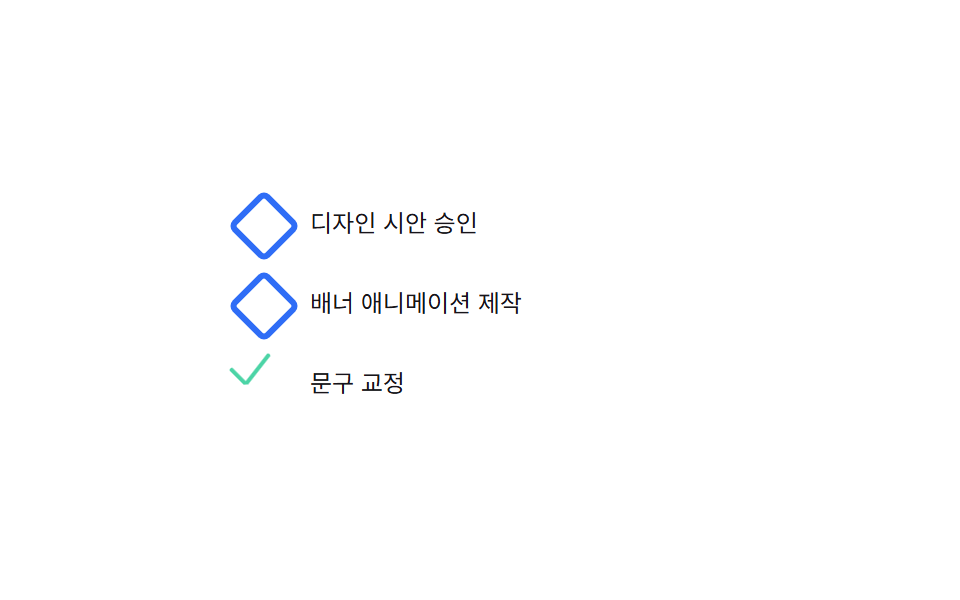
Marker kind swaps with a state value, and on each swap size and thickness interlock into a morph.
Best forA task-status list, a progress-stage list
BASE_AREAthicknessFor$subject-mint
<main class="stage">
<div class="wrap is-demo" id="wrap">
  <ul class="task-list" id="list">
    <li data-state="0"><button class="marker" type="button" aria-label="Toggle state: queued">Queued</button><span class="label">Approve the design mockup</span></li>
    <li data-state="1"><button class="marker" type="button" aria-label="Toggle state: in progress">In progress</button><span class="label">Build the banner animation</span></li>
    <li data-state="2"><button class="marker" type="button" aria-label="Toggle state: done">Done</button><span class="label">Copy edit</span></li>
  </ul>
</div>
</main>
@use "../../../../site/static/demo-tokens" as *;
// 계산 겹은 index.html 의 면적 보존 역산(BASE_AREA / size^2 * 3) 에 있다 — 여기는 세 형태(점·다이아·체크)만 맡는다.
// ::marker 는 border·transform(rotate)·다중 셀렉터(::after) 를 함께 쓸 수 없어 상태에 따라 모양 자체가
// 바뀌는 마커를 표현하지 못한다 — list-style:none 으로 지우고 실제 <button> 을 마커 자리에 둔다(클릭 가능해야 하므로
// 애초에 대화형 요소가 필요하다 — 장식 pseudo 로는 aria 상태를 못 준다).
@include stage($stage-paper);
.task-list {
list-style: none;
margin: 0;
padding: 0;
display: flex;
flex-direction: column;
gap: $sp-3;
width: 250px;
}
.task-list li {
display: flex;
align-items: center;
gap: $sp-3;
}
.marker {
position: relative;
width: 28px;
height: 28px;
flex-shrink: 0;
display: inline-flex;
align-items: center;
justify-content: center;
border: none;
background: transparent;
padding: 0;
margin: 0;
cursor: pointer;
color: transparent;
font-size: 0; // 접근성 이름은 aria-label·버튼 텍스트가 맡고, 화면엔 모양(pseudo)만 보인다
&:focus-visible { outline: 2px solid $subject-blue-light; outline-offset: 3px; }
}
.marker::before,
.marker::after {
content: '';
position: absolute;
transition: width $dur-base $ease-out, height $dur-base $ease-out,
border-width $dur-base $ease-out, transform $dur-base $ease-out, opacity $dur-quick $ease-out;
}
// state-0: 점 — ::before 원, ::after 는 숨김
.marker.state-0::before {
left: 50%; top: 50%;
width: var(--size); height: var(--size);
margin-left: calc(var(--size) / -2);
margin-top: calc(var(--size) / -2);
border-radius: 50%;
background: $subject-blue-light;
}
.marker.state-0::after { opacity: 0; width: 0; height: 0; }
// state-1: 다이아몬드 — ::before 회전한 정사각 테두리(두께는 면적 보존 값)
.marker.state-1::before {
left: 50%; top: 50%;
width: var(--size); height: var(--size);
margin-left: calc(var(--size) / -2);
margin-top: calc(var(--size) / -2);
border-radius: $r-xs;
border: var(--thick) solid $subject-blue;
background: transparent;
transform: rotate(45deg);
}
.marker.state-1::after { opacity: 0; width: 0; height: 0; }
// state-2: 체크 — ::before(짧은 막대)·::after(긴 막대) 가 같은 꼭짓점에서 출발한다 (BD16)
.marker.state-2::before,
.marker.state-2::after {
left: 30%;
top: 55%;
height: var(--thick);
background: $subject-mint;
border-radius: $r-pill;
transform-origin: left center;
}
.marker.state-2::before {
width: calc(var(--size) * .45);
transform: rotate(225deg);
}
.marker.state-2::after {
width: calc(var(--size) * .8);
transform: rotate(-52deg);
}
.label {
color: $subject-ink;
font-size: 12px;
}
@media (max-width: 340px) {
.task-list { width: 200px; }
.label { font-size: 11px; }
}
@media (prefers-reduced-motion: reduce) {
.marker::before,
.marker::after { transition: none; }
}html, body {
margin: 0;
overflow: hidden;
}
.stage {
box-sizing: border-box;
min-height: 100vh;
display: grid;
place-items: center;
margin: 0;
background: #ffffff;
font-family: -apple-system, "Segoe UI", "Noto Sans KR", sans-serif;
padding: clamp(8px, 4vw, 24px);
}
.task-list {
list-style: none;
margin: 0;
padding: 0;
display: flex;
flex-direction: column;
gap: 12px;
width: 250px;
}
.task-list li {
display: flex;
align-items: center;
gap: 12px;
}
.marker {
position: relative;
width: 28px;
height: 28px;
flex-shrink: 0;
display: inline-flex;
align-items: center;
justify-content: center;
border: none;
background: transparent;
padding: 0;
margin: 0;
cursor: pointer;
color: transparent;
font-size: 0;
}
.marker:focus-visible {
outline: 2px solid #5b8cf8;
outline-offset: 3px;
}
.marker::before,
.marker::after {
content: "";
position: absolute;
transition: width 300ms ease-out, height 300ms ease-out, border-width 300ms ease-out, transform 300ms ease-out, opacity 220ms ease-out;
}
.marker.state-0::before {
left: 50%;
top: 50%;
width: var(--size);
height: var(--size);
margin-left: calc(var(--size) / -2);
margin-top: calc(var(--size) / -2);
border-radius: 50%;
background: #5b8cf8;
}
.marker.state-0::after {
opacity: 0;
width: 0;
height: 0;
}
.marker.state-1::before {
left: 50%;
top: 50%;
width: var(--size);
height: var(--size);
margin-left: calc(var(--size) / -2);
margin-top: calc(var(--size) / -2);
border-radius: 4px;
border: var(--thick) solid #2f6df6;
background: transparent;
transform: rotate(45deg);
}
.marker.state-1::after {
opacity: 0;
width: 0;
height: 0;
}
.marker.state-2::before,
.marker.state-2::after {
left: 30%;
top: 55%;
height: var(--thick);
background: #4cd4a6;
border-radius: 999px;
transform-origin: left center;
}
.marker.state-2::before {
width: calc(var(--size) * 0.45);
transform: rotate(225deg);
}
.marker.state-2::after {
width: calc(var(--size) * 0.8);
transform: rotate(-52deg);
}
.label {
color: #17141a;
font-size: 12px;
}
@media (max-width: 340px) {
.task-list {
width: 200px;
}
.label {
font-size: 11px;
}
}
@media (prefers-reduced-motion: reduce) {
.marker::before,
.marker::after {
transition: none;
}
}(function () {
var BASE_AREA = 400; // 마커 기준 면적(px^2) — 두께는 면적/지름 으로 역산해 커질수록 얇아진다
var STATES = ['Queued', 'In progress', 'Done'];
var reduce = window.matchMedia('(prefers-reduced-motion: reduce)').matches;
var wrap = document.getElementById('wrap');
var list = document.getElementById('list');
var rows = Array.prototype.slice.call(list.querySelectorAll('li'));
var isDemo = true;
var SIZE_BY_STATE = [14, 20, 24]; // 대기(점) < 진행(다이아) < Done(체크) 지름
// 계산 겹: 두께는 "면적 보존" 식(BASE_AREA / size)으로 역산한다 — 커지는 마커일수록 선이 얇아져
// 시각적 무게가 서로 비슷하게 맞물린다. 임의의 고정 두께 3종을 나열한 것이 아니다.
function thicknessFor(size) {
return Math.max(1.5, BASE_AREA / (size * size) * 3);
}
function apply(li) {
var state = parseInt(li.getAttribute('data-state'), 10);
var btn = li.querySelector('.marker');
var size = SIZE_BY_STATE[state];
var thick = thicknessFor(size);
btn.style.setProperty('--size', size + 'px');
btn.style.setProperty('--thick', thick.toFixed(2) + 'px');
btn.className = 'marker state-' + state;
btn.setAttribute('aria-label', 'Toggle state: ' + STATES[state]);
btn.textContent = STATES[state];
}
function human() { if (isDemo) { wrap.classList.remove('is-demo'); isDemo = false; } }
function advance(li) {
var state = (parseInt(li.getAttribute('data-state'), 10) + 1) % 3;
li.setAttribute('data-state', String(state));
apply(li);
}
rows.forEach(function (li) {
li.querySelector('.marker').addEventListener('click', function () {
human();
advance(li);
});
apply(li);
});
var last = 0;
var STEP_MS = 700;
var cursor = 0;
function loop(ts) {
if (!last) last = ts;
if (isDemo) {
if (reduce) {
rows.forEach(function (li, i) { li.setAttribute('data-state', String(i % 3)); apply(li); }); // 계산은 유지, 시간 축소 대신 서로 다른 상태로 즉시 고정
} else if (ts - last >= STEP_MS) {
last = ts;
advance(rows[cursor]);
cursor = (cursor + 1) % rows.length;
}
}
requestAnimationFrame(loop);
}
requestAnimationFrame(loop);
})();// HybridSwapMarker — vanilla 판(run/373/demo/08-list-style-hybrid-marker-swap/index.html) 의 React 포트.
// ::marker 는 자식·box-shadow 를 가질 수 없어 점·다이아·체크 모양 마커를 그릴 수 없다 — 실제 <button class="marker">
// 로 마커 자리를 대신하고, 상태마다 크기와 두께를 면적 보존 식으로 함께 바꾼다.
import { useEffect, useRef } from "react";
import styles from "./HybridSwapMarker.module.scss";
type Box<T> = { current: T };
const BASE_AREA = 400; // 마커 기준 면적(px^2) — 두께는 면적/지름 으로 역산해 커질수록 얇아진다
const SIZE_BY_STATE = [14, 20, 24]; // 대기(점) < 진행(다이아) < 완료(체크) 지름
const STATES = ["대기 중", "진행 중", "완료"];
const STEP_MS = 700; // 자동 루프에서 다음 행의 상태를 넘기는 간격
const TASKS = [
{ label: "디자인 시안 승인", state: 0 },
{ label: "배너 애니메이션 제작", state: 1 },
{ label: "문구 교정", state: 2 },
];
export default function HybridSwapMarker() {
const rootRef = useRef(null) as unknown as Box<HTMLDivElement>;
const listRef = useRef(null) as unknown as Box<HTMLUListElement>;
const rafRef = useRef(0) as unknown as Box<number>;
useEffect(() => {
const reduce = window.matchMedia("(prefers-reduced-motion: reduce)").matches;
const root = rootRef.current;
const list = listRef.current;
if (!root || !list) return;
const rows = Array.prototype.slice.call(list.querySelectorAll("li"));
let isDemo = true;
// 계산 겹: 두께는 "면적 보존" 식(BASE_AREA / size)으로 역산한다 — 커지는 마커일수록 선이 얇아져
// 시각적 무게가 서로 비슷하게 맞물린다. 임의의 고정 두께 3종을 나열한 것이 아니다.
function thicknessFor(size: number) {
return Math.max(1.5, BASE_AREA / (size * size) * 3);
}
function apply(li: HTMLElement) {
const state = parseInt(li.getAttribute("data-state") || "0", 10);
const btn = li.querySelector("." + (styles.marker || "marker")) as HTMLElement | null;
if (!btn) return;
const size = SIZE_BY_STATE[state];
const thick = thicknessFor(size);
btn.style.setProperty("--size", size + "px");
btn.style.setProperty("--thick", thick.toFixed(2) + "px");
btn.className = (styles.marker || "marker") + " state-" + state;
btn.setAttribute("aria-label", "상태 전환: " + STATES[state]);
btn.textContent = STATES[state];
}
function human() { if (isDemo) { root!.classList.remove(styles.isDemo); isDemo = false; } }
function advance(li: HTMLElement) {
const state = (parseInt(li.getAttribute("data-state") || "0", 10) + 1) % 3;
li.setAttribute("data-state", String(state));
apply(li);
}
rows.forEach(function (li: HTMLElement) {
const btn = li.querySelector("." + (styles.marker || "marker"));
const onClick = function () {
human();
advance(li);
};
btn!.addEventListener("click", onClick);
apply(li);
});
let last = 0;
let cursor = 0;
function loop(ts: number) {
if (!last) last = ts;
if (isDemo) {
if (reduce) {
rows.forEach(function (li: HTMLElement, i: number) { li.setAttribute("data-state", String(i % 3)); apply(li); }); // 계산은 유지, 시간 축소 대신 서로 다른 상태로 즉시 고정
} else if (ts - last >= STEP_MS) {
last = ts;
advance(rows[cursor]);
cursor = (cursor + 1) % rows.length;
}
}
rafRef.current = requestAnimationFrame(loop);
}
rafRef.current = requestAnimationFrame(loop);
return () => {
cancelAnimationFrame(rafRef.current);
};
}, []);
return (
<main className={styles.stage}>
<div className={styles.wrap + " " + styles.isDemo} ref={rootRef}>
<ul className={styles.taskList} ref={listRef}>
{TASKS.map(function (t) {
return (
<li key={t.label} data-state={t.state}>
<button className={styles.marker} type="button" aria-label={"상태 전환: " + STATES[t.state]}>{STATES[t.state]}</button>
<span className={styles.label}>{t.label}</span>
</li>
);
})}
</ul>
</div>
</main>
);
}08 Hybrid-swap marker — marker kind changing with a state value — Measured area 1.21% · moving frames 11/23Original by GODRICH · SCSS and React ship in the zip · CSS List Style: 9 Marker Design Patterns
The post this demo lives in
 CSS List Style: 9 Marker Design PatternsNine list markers: one turns each bullet like a clock as a dial angle stacks per item, one rolls a counter into odometer See all demos in this post
If you like this effect - similar demos
 Lists & tables04 Empty-List Message That Appears When the Last Row Is GoneInfinite Scroll Implementation — 9 List UI Basics
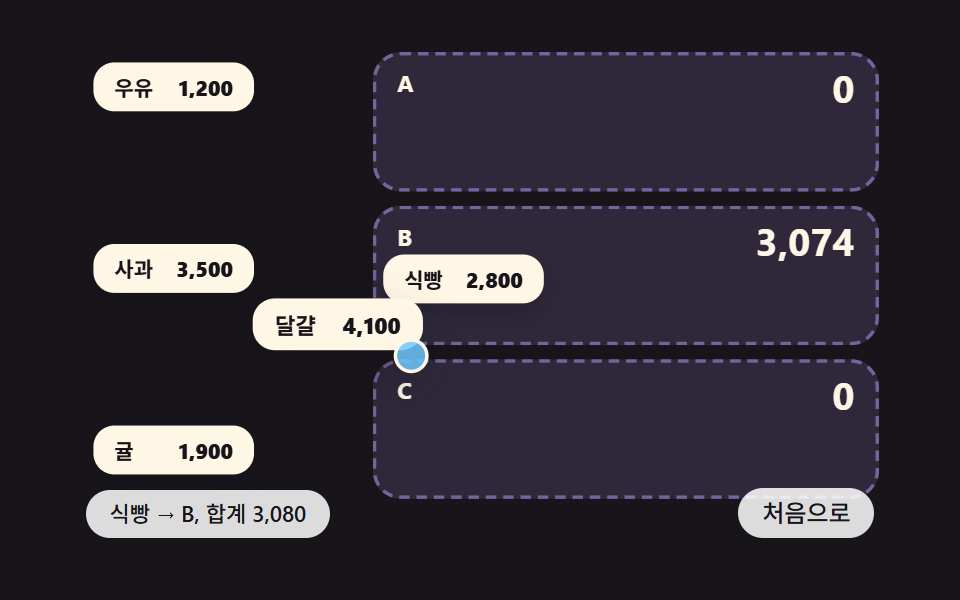 Lists & tables09 A Split-Bill List Where Dragging an Item Into a Person's Slot Makes Each Slot Total Ease Toward Its New ValueCSS Receipt: 9 Thermal Print and Tear-Off Scenes
 Lists & tables07 Skeleton shimmer rows9 Swipe to Delete List UI Patterns (Copy-Paste)