06Ink Rising Off the Impact Ring and Falling Back as a Crown
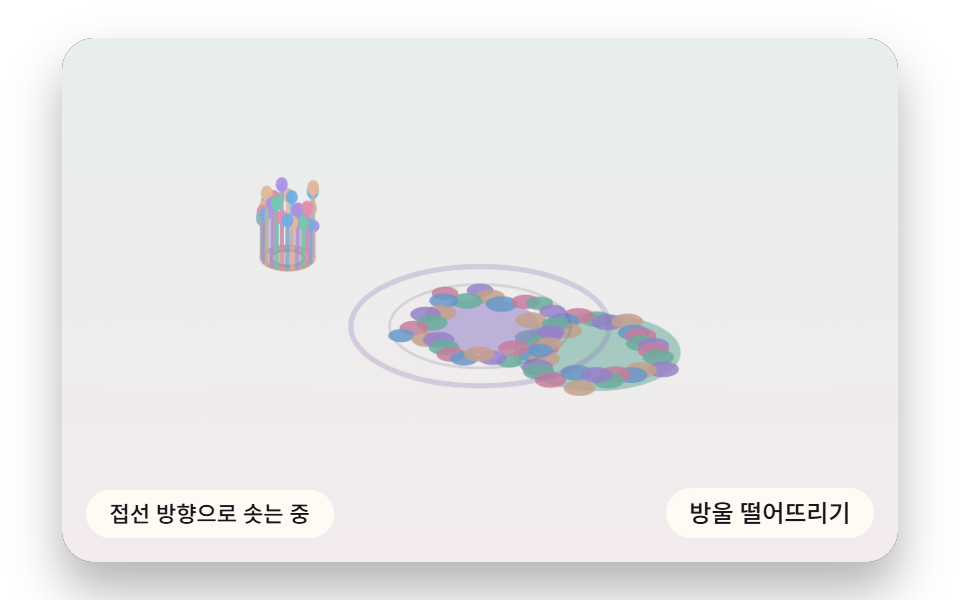
The landing impact becomes a ring pulse, and ink is ejected along the ring's tangent to rise. What rises falls back under gravity and settles into dots.
Best forClick feedback moments and hero entrances
RING_PULSETANGENT_EJECTGRAVITY_FALL
<main class="stage">
<div class="hs is-demo" id="hs">
  <canvas class="hs__canvas" data-role="canvas" width="480" height="300" tabindex="0" aria-label="Ink rising off the impact ring and falling back as a crown"></canvas>
  <p class="hs__status" data-role="status" aria-live="off">The ring is spreading</p>
  <div class="hs__tools">
    <button class="hs__btn" data-role="btn" type="button">Drop a bead</button>
  </div>
</div>
</main>
@use "../../../../site/static/demo-tokens" as *;
@include stage($stage-paper);
.hs {
position: relative;
width: min(92vw, calc(160vh - 12.8vw));
aspect-ratio: 480 / 300;
margin: 0 auto;
border-radius: $r-card;
overflow: hidden;
box-shadow: $shadow-raised;
background: $subject-ink;
}
.hs__canvas {
display: block;
width: 100%;
height: 100%;
cursor: crosshair;
}
.hs__canvas:focus-visible {
outline: 2px solid rgba(58, 48, 76, .9);
outline-offset: -6px;
}
.hs__status {
position: absolute;
left: $sp-3;
bottom: $sp-3;
max-width: 46%;
margin: 0;
padding: $sp-1 $sp-3;
border-radius: $r-control;
background: rgba(255, 252, 244, .92);
color: $subject-ink;
font: inherit;
font-weight: 500;
font-size: 11px;
line-height: 1.4;
pointer-events: none;
}
.hs__tools {
position: absolute;
right: $sp-3;
bottom: $sp-3;
display: flex;
gap: $sp-2;
}
.hs__btn {
margin: 0;
padding: $sp-1 $sp-3;
border: 0;
border-radius: $r-pill;
background: rgba(255, 252, 244, .92);
color: $subject-ink;
font: inherit;
font-weight: 500;
font-size: 12px;
line-height: 1.4;
cursor: pointer;
transition: background-color $dur-quick ease-out;
}
.hs__btn:hover {
background: $subject-cream;
}
.hs__btn[aria-pressed="true"] {
background: $subject-mint;
}
.hs__btn:focus-visible {
outline: 2px solid rgba(58, 48, 76, .9);
outline-offset: 2px;
}
// 포인터로는 잉크를 다루고, 쓸어 넘기는 손가락 제스처는 브라우저에 남겨 페이지 스크롤이 막히지 않게 한다
.hs__canvas { touch-action: pan-y; }
@media (max-width: 340px) {
.hs__btn { font-size: 10px; padding: $sp-1 $sp-2; }
.hs__status { font-size: 10px; padding: $sp-1 $sp-2; }
}
@media (prefers-reduced-motion: reduce) {
.hs__btn { transition: none; }
}html, body {
margin: 0;
overflow: hidden;
}
.stage {
box-sizing: border-box;
min-height: 100vh;
display: grid;
place-items: center;
margin: 0;
background: #ffffff;
font-family: -apple-system, "Segoe UI", "Noto Sans KR", sans-serif;
padding: clamp(8px, 4vw, 24px);
}
.hs {
position: relative;
width: min(92vw, 160vh - 12.8vw);
aspect-ratio: 480/300;
margin: 0 auto;
border-radius: 16px;
overflow: hidden;
box-shadow: 0 14px 24px rgba(23, 20, 26, 0.32);
background: #17141a;
}
.hs__canvas {
display: block;
width: 100%;
height: 100%;
cursor: crosshair;
}
.hs__canvas:focus-visible {
outline: 2px solid rgba(58, 48, 76, 0.9);
outline-offset: -6px;
}
.hs__status {
position: absolute;
left: 12px;
bottom: 12px;
max-width: 46%;
margin: 0;
padding: 4px 12px;
border-radius: 12px;
background: rgba(255, 252, 244, 0.92);
color: #17141a;
font: inherit;
font-weight: 500;
font-size: 11px;
line-height: 1.4;
pointer-events: none;
}
.hs__tools {
position: absolute;
right: 12px;
bottom: 12px;
display: flex;
gap: 8px;
}
.hs__btn {
margin: 0;
padding: 4px 12px;
border: 0;
border-radius: 999px;
background: rgba(255, 252, 244, 0.92);
color: #17141a;
font: inherit;
font-weight: 500;
font-size: 12px;
line-height: 1.4;
cursor: pointer;
transition: background-color 220ms ease-out;
}
.hs__btn:hover {
background: #fff7e6;
}
.hs__btn[aria-pressed=true] {
background: #4cd4a6;
}
.hs__btn:focus-visible {
outline: 2px solid rgba(58, 48, 76, 0.9);
outline-offset: 2px;
}
.hs__canvas {
touch-action: pan-y;
}
@media (max-width: 340px) {
.hs__btn {
font-size: 10px;
padding: 4px 8px;
}
.hs__status {
font-size: 10px;
padding: 4px 8px;
}
}
@media (prefers-reduced-motion: reduce) {
.hs__btn {
transition: none;
}
}(function () {
const root = document.getElementById("hs");
if (!root) return;
const W = 480;
const H = 300;
const FIXED_DT = 16;
// 마블링 팔레트 — 종이 물면(PAPER) 위에 파스텔 잉크 결이 흐른다
const PAPER = [252, 246, 234];
const INK = [58, 48, 76];
const MINT = [126, 226, 192];
const SKY = [124, 196, 255];
const LILAC = [190, 164, 255];
const PINK = [255, 160, 190];
const PEACH = [255, 208, 168];
const TINTS = [SKY, PINK, MINT, LILAC, PEACH];
function clamp(v, lo, hi) { return v < lo ? lo : (v > hi ? hi : v); }
function lerp(a, b, k) { return a + (b - a) * k; }
function smooth(x) { const c = clamp(x, 0, 1); return c * c * (3 - 2 * c); }
function rgba(c, a) {
return 'rgba(' + Math.round(c[0]) + ',' + Math.round(c[1]) + ',' + Math.round(c[2]) + ',' + clamp(a, 0, 1).toFixed(3) + ')';
}
function mix(a, b, k) { return [lerp(a[0], b[0], k), lerp(a[1], b[1], k), lerp(a[2], b[2], k)]; }
const canvasEl = root.querySelector('[data-role="canvas"]');
const statusEl = root.querySelector('[data-role="status"]');
const ctxRaw = canvasEl ? canvasEl.getContext('2d') : null;
if (!canvasEl || !ctxRaw || !statusEl) {
return;
}
const cv = canvasEl;
const ctx = ctxRaw;
const status = statusEl;
const reduceQuery = window.matchMedia('(prefers-reduced-motion: reduce)');
const still = reduceQuery.matches;
// 자동 시연 중인가 — 사람이 처음 만지는 순간 시연을 멈추고 상태 줄을 읽어 주기 시작한다
let demo = root.classList.contains('is-demo');
function wake() {
if (!demo) {
return;
}
demo = false;
root.classList.remove('is-demo');
status.setAttribute('aria-live', 'polite');
}
function say(text) {
if (status.textContent !== text) {
status.textContent = text;
}
}
// 시연 시계가 loop 주기 안의 at 시각을 이번 스텝에 막 지났는가
function crossed(t, at, loop) {
const p = t % loop;
return p >= at && p - FIXED_DT < at;
}
function fitCanvas() {
// 캔버스 내부 해상도는 480x300 고정, 배율은 devicePixelRatio 에 상한 2 를 둔다
const dpr = Math.min(window.devicePixelRatio || 1, 2);
cv.width = Math.round(W * dpr);
cv.height = Math.round(H * dpr);
ctx.setTransform(dpr, 0, 0, dpr, 0, 0);
}
function onResize() {
fitCanvas();
draw();
}
fitCanvas();
window.addEventListener('resize', onResize);
// 화면 좌표(CSS px) → 장면 좌표(480x300). 리사이즈 뒤에도 늘 현재 크기로 다시 잰다
function toScene(ev) {
const r = cv.getBoundingClientRect();
return [((ev.clientX - r.left) / r.width) * W, ((ev.clientY - r.top) / r.height) * H];
}
// ── 필드 버퍼(077 방식) — 항목이 정한 낮은 해상도 버퍼에 픽셀 값을 굽고 drawImage 로 부드럽게 확대한다
const small = document.createElement('canvas');
let sctx = null;
let buf = null;
let px = null;
// 종이 결은 시간이 지나도 안 변한다 — 필드를 만들 때 한 번만 구워 두고 픽셀마다 꺼내 쓴다
let grainF = new Float32Array(0);
function initField(nw, nh) {
small.width = nw;
small.height = nh;
const c = small.getContext('2d');
if (!c) {
return;
}
sctx = c;
buf = c.createImageData(nw, nh);
px = buf.data;
grainF = new Float32Array(nw * nh);
for (let y = 0; y < nh; y += 1) {
for (let x = 0; x < nw; x += 1) {
grainF[y * nw + x] = paperGrain(x * W / nw, y * H / nh);
}
}
}
function blitField(nw, nh) {
if (!sctx || !buf) {
return;
}
sctx.putImageData(buf, 0, 0);
ctx.imageSmoothingEnabled = true;
ctx.imageSmoothingQuality = 'high';
ctx.drawImage(small, 0, 0, nw, nh, 0, 0, W, H);
}
// ── 결정적 값노이즈 — 난수 소스를 못 쓰므로 정수 해시로 같은 시드에 같은 값
const SEED = 463;
function hash1(n, seed) {
let h = Math.imul(n ^ seed, 374761393);
h = Math.imul(h ^ (h >>> 13), 1274126177);
return ((h ^ (h >>> 16)) >>> 0) / 4294967296;
}
function hash2(x, y, seed) {
return hash1((Math.imul(x, 73856093) ^ Math.imul(y, 19349663)) | 0, seed);
}
function fade(t) { return t * t * (3 - 2 * t); }
function vnoise2(x, y, seed) {
const xi = Math.floor(x), yi = Math.floor(y);
const u = fade(x - xi), v = fade(y - yi);
const a = hash2(xi, yi, seed), b = hash2(xi + 1, yi, seed);
const c = hash2(xi, yi + 1, seed), d = hash2(xi + 1, yi + 1, seed);
return lerp(lerp(a, b, u), lerp(c, d, u), v);
}
function fbm2(x, y, oct, seed) {
let sum = 0, amp = 0.5, norm = 0, f = 1;
for (let i = 0; i < oct; i += 1) {
sum += vnoise2(x * f, y * f, seed + i * 131) * amp;
norm += amp;
amp *= 0.5;
f *= 2;
}
return sum / norm;
}
// 종이 결 — 옅은 얼룩으로 종이가 느껴지게 하는 바닥 값(0~1)
function paperGrain(x, y) {
return fbm2(x * 0.021, y * 0.021, 3, 71);
}
// 06 왕관 튐 — 충격 링 펄스 + 접선 분사·중력 재낙하 낙점
const RING_PULSE = 1.1; // 충격 링 반경이 16ms 스텝마다 자라는 양(px)
const TANGENT_EJECT = 6.2; // 링 벽을 따라(위로) 튀어 오르는 처음 속도(px/스텝)
const GRAVITY_FALL = 0.36; // 중력 가속도(px/스텝²) — 되떨어져 낙점에 앉는다
const CROWN_N = 28; // 왕관 알갱이 수
const TILT = 0.46; // 비스듬히 내려다보는 시점 — 수면의 원이 이 비율로 눌린 타원이 된다
const RING_LIFE = 1500; // 링이 살아 있는 시간(ms)
const DEMO_LOOP = 3800;
const TXT_RING = 'The ring is spreading';
const TXT_RISE = 'Ink is rising along the tangent';
const TXT_FALL = 'It falls back under gravity and lands';
const TXT_GUIDE = 'Arrow keys move the spot, Enter drops the bead';
let splashes = [];
let splashCount = 0;
let cursorX = W / 2;
let cursorY = H * 0.55;
let showCursor = false;
function newSplash(x, y, t0) {
const beads = [];
for (let i = 0; i < CROWN_N; i += 1) {
const a = (i / CROWN_N) * Math.PI * 2 + (hash1(i, 55) - 0.5) * 0.2;
beads.push({ a: a, r: 6, h: 0, vh: TANGENT_EJECT * (0.6 + hash1(i + splashCount * 31, 77) * 0.5), land: 0, tint: (i + splashCount) % TINTS.length });
}
splashCount += 1;
return { x: x, y: y, t0: t0, beads: beads, tint: splashCount % TINTS.length };
}
// 알갱이 한 스텝 — 링과 함께 바깥으로 실려 가며(RING_PULSE) 위로는 중력에 감속한다. 높이가 0 아래로 내려가면 낙점
function stepBead(b) {
if (b.land > 0) {
b.land = Math.min(1, b.land + 0.025);
return;
}
b.r += RING_PULSE;
b.vh -= GRAVITY_FALL;
b.h += b.vh;
if (b.h <= 0 && b.vh < 0) {
b.h = 0;
b.land = 0.01;
}
}
function step() {
for (let s = 0; s < splashes.length; s += 1) {
const sp = splashes[s];
for (let i = 0; i < sp.beads.length; i += 1) {
stepBead(sp.beads[i]);
}
}
if (splashes.length > 3) {
splashes.shift();
}
}
function drawScene() {
const g0 = ctx.createLinearGradient(0, 0, 0, H);
g0.addColorStop(0, rgba(mix(PAPER, SKY, 0.16), 1));
g0.addColorStop(1, rgba(mix(PAPER, LILAC, 0.14), 1));
ctx.fillStyle = g0;
ctx.fillRect(0, 0, W, H);
for (let s = 0; s < splashes.length; s += 1) {
const sp = splashes[s];
const age = clock - sp.t0;
const fade = clamp(1 - age / (RING_LIFE + 400), 0, 1);
const tint = TINTS[sp.tint];
// 잉크 고임 — 착탄점에 남아 서서히 번지는 타원
const poolR = 14 + Math.min(Math.max(age, 0) * 0.02, 34);
ctx.fillStyle = rgba(mix(tint, INK, 0.3), 0.55);
ctx.beginPath();
ctx.ellipse(sp.x, sp.y, poolR, poolR * TILT, 0, 0, Math.PI * 2);
ctx.fill();
// 충격 링 — 알갱이와 같은 속도로 퍼지며 옅어지는 두 겹 펄스
const rr = 6 + Math.max(age, 0) * RING_PULSE / FIXED_DT;
if (fade > 0.02) {
ctx.lineWidth = 3;
ctx.strokeStyle = rgba(mix(tint, INK, 0.4), 0.6 * fade);
ctx.beginPath();
ctx.ellipse(sp.x, sp.y, Math.min(rr, 330), Math.min(rr, 330) * TILT, 0, 0, Math.PI * 2);
ctx.stroke();
ctx.lineWidth = 1.5;
ctx.strokeStyle = rgba(INK, 0.3 * fade);
ctx.beginPath();
ctx.ellipse(sp.x, sp.y, rr * 0.7, rr * 0.7 * TILT, 0, 0, Math.PI * 2);
ctx.stroke();
}
// 뒤쪽 알갱이부터 그린다(화면 위쪽 = 먼 쪽)
const order = sp.beads.slice().sort(function (p, q) { return Math.sin(p.a) - Math.sin(q.a); });
for (let i = 0; i < order.length; i += 1) {
const b = order[i];
const bx = sp.x + Math.cos(b.a) * b.r;
const groundY = sp.y + Math.sin(b.a) * b.r * TILT;
if (b.land > 0) {
const st = 3 + b.land * 3;
ctx.fillStyle = rgba(mix(TINTS[b.tint], INK, 0.3), 0.85);
ctx.beginPath();
ctx.ellipse(bx, groundY, st * 1.5, st * 0.75, 0, 0, Math.PI * 2);
ctx.fill();
continue;
}
// 솟는 알갱이 — 링 벽에서 튀어 오른 줄기와 끝의 방울
const by = groundY - b.h;
ctx.strokeStyle = rgba(mix(TINTS[b.tint], INK, 0.2), 0.7);
ctx.lineWidth = 2.4;
ctx.beginPath();
ctx.moveTo(bx, groundY);
ctx.lineTo(bx, by);
ctx.stroke();
const stretch = 1 + clamp(Math.abs(b.vh) * 0.08, 0, 1.2);
ctx.fillStyle = rgba(mix(TINTS[b.tint], INK, 0.15), 0.95);
ctx.beginPath();
ctx.ellipse(bx, by, 3.4, 3.4 * stretch, 0, 0, Math.PI * 2);
ctx.fill();
}
}
}
// 키보드로 고른 자리 — 화살표를 쓰면 다음 방울이 떨어질 곳을 눌린 타원으로 보여 준다
function draw() {
drawScene();
if (!showCursor) {
return;
}
ctx.beginPath();
ctx.ellipse(cursorX, cursorY, 10, 10 * TILT, 0, 0, Math.PI * 2);
ctx.strokeStyle = rgba(INK, 0.8);
ctx.lineWidth = 1.5;
ctx.stroke();
}
// reduce — 알갱이가 모두 앉은 뒤의 장면을 같은 식으로 끝까지 돌려 만든다
function finishSplash(sp) {
for (let i = 0; i < sp.beads.length; i += 1) {
const b = sp.beads[i];
for (let n = 0; n < 400 && b.land < 1; n += 1) {
stepBead(b);
}
}
}
function settle() {
splashes = [newSplash(W * 0.38, H * 0.5, -1e9), newSplash(W * 0.64, H * 0.6, -1e9)];
finishSplash(splashes[0]);
finishSplash(splashes[1]);
say(TXT_FALL);
}
function drop(x, y) {
const sp = newSplash(x, y, still ? -1e9 : clock);
splashes.push(sp);
if (splashes.length > 3) {
splashes.shift();
}
if (still) {
finishSplash(sp);
say(TXT_FALL);
draw();
return;
}
say(TXT_RING);
}
function demoTick(t) {
if (crossed(t, 220, DEMO_LOOP)) {
splashes.push(newSplash(W * 0.5, H * 0.55, clock));
say(TXT_RING);
}
if (crossed(t, 700, DEMO_LOOP)) {
say(TXT_RISE);
}
if (crossed(t, 1100, DEMO_LOOP)) {
splashes.push(newSplash(W * 0.27, H * 0.42, clock));
}
if (crossed(t, 1500, DEMO_LOOP)) {
say(TXT_FALL);
}
}
settle();
const btn = root.querySelector('[data-role="btn"]');
if (btn) {
btn.addEventListener('click', function () {
wake();
drop(W * (0.3 + hash1(splashCount, 21) * 0.4), H * (0.42 + hash1(splashCount, 5) * 0.2));
});
}
cv.addEventListener('pointerdown', function (ev) {
wake();
const p = toScene(ev);
drop(clamp(p[0], 40, W - 40), clamp(p[1], 60, H - 40));
});
cv.addEventListener('keydown', function (ev) {
const k = ev.key;
if (k !== 'ArrowLeft' && k !== 'ArrowRight' && k !== 'ArrowUp' && k !== 'ArrowDown' && k !== 'Enter' && k !== ' ') {
return;
}
ev.preventDefault();
wake();
showCursor = true;
if (k === 'Enter' || k === ' ') {
drop(cursorX, cursorY);
return;
}
cursorX = clamp(cursorX + (k === 'ArrowLeft' ? -20 : (k === 'ArrowRight' ? 20 : 0)), 40, W - 40);
cursorY = clamp(cursorY + (k === 'ArrowUp' ? -14 : (k === 'ArrowDown' ? 14 : 0)), 60, H - 40);
say(TXT_GUIDE);
if (still) {
draw();
}
});
let rafId = 0;
let lastTs = -1;
let acc = 0;
let clock = 0;
function frame(ts) {
if (lastTs < 0) {
lastTs = ts;
}
// 탭이 숨었다 돌아와도 한 번에 100ms 까지만 따라잡는다 — 순간이동 대신 이어서 움직인다
acc += Math.min(ts - lastTs, 100);
lastTs = ts;
let n = 0;
while (acc >= FIXED_DT && n < 6) {
clock += FIXED_DT;
if (demo) {
demoTick(clock);
}
step();
acc -= FIXED_DT;
n += 1;
}
draw();
rafId = window.requestAnimationFrame(frame);
}
if (still) {
settle();
draw();
}
else {
rafId = window.requestAnimationFrame(frame);
}
return function () {
window.cancelAnimationFrame(rafId);
window.removeEventListener('resize', onResize);
};
})();// MblInkDropCrownSplash - vanilla 판(06-mbl-ink-drop-crown-splash) 의 React 포트. 같은 계산을 useEffect 안에서 돌린다.
import { useEffect, useRef } from "react";
import styles from "./MblInkDropCrownSplash.module.scss";
const cx = (s: string): string => s.split(" ").map((n) => styles[n] ?? n).join(" ");
export default function MblInkDropCrownSplash() {
const rootRef = useRef<HTMLDivElement | null>(null);
useEffect(() => {
const rootEl = rootRef.current;
if (!rootEl) return;
const root: HTMLElement = rootEl;
type RGB = [number, number, number];
const W = 480;
const H = 300;
const FIXED_DT = 16;
// 마블링 팔레트 — 종이 물면(PAPER) 위에 파스텔 잉크 결이 흐른다
const PAPER: RGB = [252, 246, 234];
const INK: RGB = [58, 48, 76];
const MINT: RGB = [126, 226, 192];
const SKY: RGB = [124, 196, 255];
const LILAC: RGB = [190, 164, 255];
const PINK: RGB = [255, 160, 190];
const PEACH: RGB = [255, 208, 168];
const TINTS: RGB[] = [SKY, PINK, MINT, LILAC, PEACH];
function clamp(v: number, lo: number, hi: number): number { return v < lo ? lo : (v > hi ? hi : v); }
function lerp(a: number, b: number, k: number): number { return a + (b - a) * k; }
function smooth(x: number): number { const c = clamp(x, 0, 1); return c * c * (3 - 2 * c); }
function rgba(c: RGB, a: number): string {
return 'rgba(' + Math.round(c[0]) + ',' + Math.round(c[1]) + ',' + Math.round(c[2]) + ',' + clamp(a, 0, 1).toFixed(3) + ')';
}
function mix(a: RGB, b: RGB, k: number): RGB { return [lerp(a[0], b[0], k), lerp(a[1], b[1], k), lerp(a[2], b[2], k)]; }
const canvasEl = root.querySelector('[data-role="canvas"]') as HTMLCanvasElement | null;
const statusEl = root.querySelector('[data-role="status"]') as HTMLElement | null;
const ctxRaw = canvasEl ? canvasEl.getContext('2d') : null;
if (!canvasEl || !ctxRaw || !statusEl) { return; }
const cv: HTMLCanvasElement = canvasEl;
const ctx: CanvasRenderingContext2D = ctxRaw;
const status: HTMLElement = statusEl;
const reduceQuery = window.matchMedia('(prefers-reduced-motion: reduce)');
const still = reduceQuery.matches;
// 자동 시연 중인가 — 사람이 처음 만지는 순간 시연을 멈추고 상태 줄을 읽어 주기 시작한다
let demo = root.classList.contains('is-demo');
function wake(): void {
if (!demo) { return; }
demo = false;
root.classList.remove('is-demo');
status.setAttribute('aria-live', 'polite');
}
function say(text: string): void {
if (status.textContent !== text) { status.textContent = text; }
}
// 시연 시계가 loop 주기 안의 at 시각을 이번 스텝에 막 지났는가
function crossed(t: number, at: number, loop: number): boolean {
const p = t % loop;
return p >= at && p - FIXED_DT < at;
}
function fitCanvas(): void {
// 캔버스 내부 해상도는 480x300 고정, 배율은 devicePixelRatio 에 상한 2 를 둔다
const dpr = Math.min(window.devicePixelRatio || 1, 2);
cv.width = Math.round(W * dpr);
cv.height = Math.round(H * dpr);
ctx.setTransform(dpr, 0, 0, dpr, 0, 0);
}
function onResize(): void {
fitCanvas();
draw();
}
fitCanvas();
window.addEventListener('resize', onResize);
// 화면 좌표(CSS px) → 장면 좌표(480x300). 리사이즈 뒤에도 늘 현재 크기로 다시 잰다
function toScene(ev: PointerEvent): [number, number] {
const r = cv.getBoundingClientRect();
return [((ev.clientX - r.left) / r.width) * W, ((ev.clientY - r.top) / r.height) * H];
}
// ── 필드 버퍼(077 방식) — 항목이 정한 낮은 해상도 버퍼에 픽셀 값을 굽고 drawImage 로 부드럽게 확대한다
const small = document.createElement('canvas');
let sctx: CanvasRenderingContext2D | null = null;
let buf: ImageData | null = null;
let px: Uint8ClampedArray | null = null;
// 종이 결은 시간이 지나도 안 변한다 — 필드를 만들 때 한 번만 구워 두고 픽셀마다 꺼내 쓴다
let grainF: Float32Array = new Float32Array(0);
function initField(nw: number, nh: number): void {
small.width = nw;
small.height = nh;
const c = small.getContext('2d');
if (!c) { return; }
sctx = c;
buf = c.createImageData(nw, nh);
px = buf.data;
grainF = new Float32Array(nw * nh);
for (let y = 0; y < nh; y += 1) {
for (let x = 0; x < nw; x += 1) { grainF[y * nw + x] = paperGrain(x * W / nw, y * H / nh); }
}
}
function blitField(nw: number, nh: number): void {
if (!sctx || !buf) { return; }
sctx.putImageData(buf, 0, 0);
ctx.imageSmoothingEnabled = true;
ctx.imageSmoothingQuality = 'high';
ctx.drawImage(small, 0, 0, nw, nh, 0, 0, W, H);
}
// ── 결정적 값노이즈 — 난수 소스를 못 쓰므로 정수 해시로 같은 시드에 같은 값
const SEED = 463;
function hash1(n: number, seed: number): number {
let h = Math.imul(n ^ seed, 374761393);
h = Math.imul(h ^ (h >>> 13), 1274126177);
return ((h ^ (h >>> 16)) >>> 0) / 4294967296;
}
function hash2(x: number, y: number, seed: number): number {
return hash1((Math.imul(x, 73856093) ^ Math.imul(y, 19349663)) | 0, seed);
}
function fade(t: number): number { return t * t * (3 - 2 * t); }
function vnoise2(x: number, y: number, seed: number): number {
const xi = Math.floor(x), yi = Math.floor(y);
const u = fade(x - xi), v = fade(y - yi);
const a = hash2(xi, yi, seed), b = hash2(xi + 1, yi, seed);
const c = hash2(xi, yi + 1, seed), d = hash2(xi + 1, yi + 1, seed);
return lerp(lerp(a, b, u), lerp(c, d, u), v);
}
function fbm2(x: number, y: number, oct: number, seed: number): number {
let sum = 0, amp = 0.5, norm = 0, f = 1;
for (let i = 0; i < oct; i += 1) {
sum += vnoise2(x * f, y * f, seed + i * 131) * amp;
norm += amp;
amp *= 0.5;
f *= 2;
}
return sum / norm;
}
// 종이 결 — 옅은 얼룩으로 종이가 느껴지게 하는 바닥 값(0~1)
function paperGrain(x: number, y: number): number {
return fbm2(x * 0.021, y * 0.021, 3, 71);
}
// 06 왕관 튐 — 충격 링 펄스 + 접선 분사·중력 재낙하 낙점
const RING_PULSE = 1.1; // 충격 링 반경이 16ms 스텝마다 자라는 양(px)
const TANGENT_EJECT = 6.2; // 링 벽을 따라(위로) 튀어 오르는 처음 속도(px/스텝)
const GRAVITY_FALL = 0.36; // 중력 가속도(px/스텝²) — 되떨어져 낙점에 앉는다
const CROWN_N = 28; // 왕관 알갱이 수
const TILT = 0.46; // 비스듬히 내려다보는 시점 — 수면의 원이 이 비율로 눌린 타원이 된다
const RING_LIFE = 1500; // 링이 살아 있는 시간(ms)
const DEMO_LOOP = 3800;
const TXT_RING = '링이 퍼지는 중';
const TXT_RISE = '접선 방향으로 솟는 중';
const TXT_FALL = '중력으로 되떨어져 앉는다';
const TXT_GUIDE = '화살표로 위치, 엔터로 방울';
type Bead = { a: number; r: number; h: number; vh: number; land: number; tint: number };
type Splash = { x: number; y: number; t0: number; beads: Bead[]; tint: number };
let splashes: Splash[] = [];
let splashCount = 0;
let cursorX = W / 2;
let cursorY = H * 0.55;
let showCursor = false;
function newSplash(x: number, y: number, t0: number): Splash {
const beads: Bead[] = [];
for (let i = 0; i < CROWN_N; i += 1) {
const a = (i / CROWN_N) * Math.PI * 2 + (hash1(i, 55) - 0.5) * 0.2;
beads.push({ a: a, r: 6, h: 0, vh: TANGENT_EJECT * (0.6 + hash1(i + splashCount * 31, 77) * 0.5), land: 0, tint: (i + splashCount) % TINTS.length });
}
splashCount += 1;
return { x: x, y: y, t0: t0, beads: beads, tint: splashCount % TINTS.length };
}
// 알갱이 한 스텝 — 링과 함께 바깥으로 실려 가며(RING_PULSE) 위로는 중력에 감속한다. 높이가 0 아래로 내려가면 낙점
function stepBead(b: Bead): void {
if (b.land > 0) {
b.land = Math.min(1, b.land + 0.025);
return;
}
b.r += RING_PULSE;
b.vh -= GRAVITY_FALL;
b.h += b.vh;
if (b.h <= 0 && b.vh < 0) {
b.h = 0;
b.land = 0.01;
}
}
function step(): void {
for (let s = 0; s < splashes.length; s += 1) {
const sp = splashes[s];
for (let i = 0; i < sp.beads.length; i += 1) { stepBead(sp.beads[i]); }
}
if (splashes.length > 3) { splashes.shift(); }
}
function drawScene(): void {
const g0 = ctx.createLinearGradient(0, 0, 0, H);
g0.addColorStop(0, rgba(mix(PAPER, SKY, 0.16), 1));
g0.addColorStop(1, rgba(mix(PAPER, LILAC, 0.14), 1));
ctx.fillStyle = g0;
ctx.fillRect(0, 0, W, H);
for (let s = 0; s < splashes.length; s += 1) {
const sp = splashes[s];
const age = clock - sp.t0;
const fade = clamp(1 - age / (RING_LIFE + 400), 0, 1);
const tint = TINTS[sp.tint];
// 잉크 고임 — 착탄점에 남아 서서히 번지는 타원
const poolR = 14 + Math.min(Math.max(age, 0) * 0.02, 34);
ctx.fillStyle = rgba(mix(tint, INK, 0.3), 0.55);
ctx.beginPath();
ctx.ellipse(sp.x, sp.y, poolR, poolR * TILT, 0, 0, Math.PI * 2);
ctx.fill();
// 충격 링 — 알갱이와 같은 속도로 퍼지며 옅어지는 두 겹 펄스
const rr = 6 + Math.max(age, 0) * RING_PULSE / FIXED_DT;
if (fade > 0.02) {
ctx.lineWidth = 3;
ctx.strokeStyle = rgba(mix(tint, INK, 0.4), 0.6 * fade);
ctx.beginPath();
ctx.ellipse(sp.x, sp.y, Math.min(rr, 330), Math.min(rr, 330) * TILT, 0, 0, Math.PI * 2);
ctx.stroke();
ctx.lineWidth = 1.5;
ctx.strokeStyle = rgba(INK, 0.3 * fade);
ctx.beginPath();
ctx.ellipse(sp.x, sp.y, rr * 0.7, rr * 0.7 * TILT, 0, 0, Math.PI * 2);
ctx.stroke();
}
// 뒤쪽 알갱이부터 그린다(화면 위쪽 = 먼 쪽)
const order = sp.beads.slice().sort(function (p: Bead, q: Bead): number { return Math.sin(p.a) - Math.sin(q.a); });
for (let i = 0; i < order.length; i += 1) {
const b = order[i];
const bx = sp.x + Math.cos(b.a) * b.r;
const groundY = sp.y + Math.sin(b.a) * b.r * TILT;
if (b.land > 0) {
const st = 3 + b.land * 3;
ctx.fillStyle = rgba(mix(TINTS[b.tint], INK, 0.3), 0.85);
ctx.beginPath();
ctx.ellipse(bx, groundY, st * 1.5, st * 0.75, 0, 0, Math.PI * 2);
ctx.fill();
continue;
}
// 솟는 알갱이 — 링 벽에서 튀어 오른 줄기와 끝의 방울
const by = groundY - b.h;
ctx.strokeStyle = rgba(mix(TINTS[b.tint], INK, 0.2), 0.7);
ctx.lineWidth = 2.4;
ctx.beginPath();
ctx.moveTo(bx, groundY);
ctx.lineTo(bx, by);
ctx.stroke();
const stretch = 1 + clamp(Math.abs(b.vh) * 0.08, 0, 1.2);
ctx.fillStyle = rgba(mix(TINTS[b.tint], INK, 0.15), 0.95);
ctx.beginPath();
ctx.ellipse(bx, by, 3.4, 3.4 * stretch, 0, 0, Math.PI * 2);
ctx.fill();
}
}
}
// 키보드로 고른 자리 — 화살표를 쓰면 다음 방울이 떨어질 곳을 눌린 타원으로 보여 준다
function draw(): void {
drawScene();
if (!showCursor) { return; }
ctx.beginPath();
ctx.ellipse(cursorX, cursorY, 10, 10 * TILT, 0, 0, Math.PI * 2);
ctx.strokeStyle = rgba(INK, 0.8);
ctx.lineWidth = 1.5;
ctx.stroke();
}
// reduce — 알갱이가 모두 앉은 뒤의 장면을 같은 식으로 끝까지 돌려 만든다
function finishSplash(sp: Splash): void {
for (let i = 0; i < sp.beads.length; i += 1) {
const b = sp.beads[i];
for (let n = 0; n < 400 && b.land < 1; n += 1) { stepBead(b); }
}
}
function settle(): void {
splashes = [newSplash(W * 0.38, H * 0.5, -1e9), newSplash(W * 0.64, H * 0.6, -1e9)];
finishSplash(splashes[0]);
finishSplash(splashes[1]);
say(TXT_FALL);
}
function drop(x: number, y: number): void {
const sp = newSplash(x, y, still ? -1e9 : clock);
splashes.push(sp);
if (splashes.length > 3) { splashes.shift(); }
if (still) {
finishSplash(sp);
say(TXT_FALL);
draw();
return;
}
say(TXT_RING);
}
function demoTick(t: number): void {
if (crossed(t, 220, DEMO_LOOP)) { splashes.push(newSplash(W * 0.5, H * 0.55, clock)); say(TXT_RING); }
if (crossed(t, 700, DEMO_LOOP)) { say(TXT_RISE); }
if (crossed(t, 1100, DEMO_LOOP)) { splashes.push(newSplash(W * 0.27, H * 0.42, clock)); }
if (crossed(t, 1500, DEMO_LOOP)) { say(TXT_FALL); }
}
settle();
const btn = root.querySelector('[data-role="btn"]') as HTMLButtonElement | null;
if (btn) {
btn.addEventListener('click', function (): void {
wake();
drop(W * (0.3 + hash1(splashCount, 21) * 0.4), H * (0.42 + hash1(splashCount, 5) * 0.2));
});
}
cv.addEventListener('pointerdown', function (ev: PointerEvent): void {
wake();
const p = toScene(ev);
drop(clamp(p[0], 40, W - 40), clamp(p[1], 60, H - 40));
});
cv.addEventListener('keydown', function (ev: KeyboardEvent): void {
const k = ev.key;
if (k !== 'ArrowLeft' && k !== 'ArrowRight' && k !== 'ArrowUp' && k !== 'ArrowDown' && k !== 'Enter' && k !== ' ') { return; }
ev.preventDefault();
wake();
showCursor = true;
if (k === 'Enter' || k === ' ') { drop(cursorX, cursorY); return; }
cursorX = clamp(cursorX + (k === 'ArrowLeft' ? -20 : (k === 'ArrowRight' ? 20 : 0)), 40, W - 40);
cursorY = clamp(cursorY + (k === 'ArrowUp' ? -14 : (k === 'ArrowDown' ? 14 : 0)), 60, H - 40);
say(TXT_GUIDE);
if (still) { draw(); }
});
let rafId = 0;
let lastTs = -1;
let acc = 0;
let clock = 0;
function frame(ts: number): void {
if (lastTs < 0) { lastTs = ts; }
// 탭이 숨었다 돌아와도 한 번에 100ms 까지만 따라잡는다 — 순간이동 대신 이어서 움직인다
acc += Math.min(ts - lastTs, 100);
lastTs = ts;
let n = 0;
while (acc >= FIXED_DT && n < 6) {
clock += FIXED_DT;
if (demo) { demoTick(clock); }
step();
acc -= FIXED_DT;
n += 1;
}
draw();
rafId = window.requestAnimationFrame(frame);
}
if (still) {
settle();
draw();
} else {
rafId = window.requestAnimationFrame(frame);
}
return function (): void {
window.cancelAnimationFrame(rafId);
window.removeEventListener('resize', onResize);
};
}, []);
return (
<div className={cx("hs") + " is-demo"} ref={rootRef}>
<canvas className={cx("hs__canvas")} data-role="canvas" width={480} height={300} tabIndex={0} aria-label="닿는 순간 잉크가 링 위로 솟았다 되떨어지는 왕관 튐"></canvas>
<p className={cx("hs__status")} data-role="status" aria-live="off">링이 퍼지는 중</p>
<div className={cx("hs__tools")}>
<button className={cx("hs__btn")} data-role="btn" type="button">방울 떨어뜨리기</button>
</div>
</div>
);
}06 Ink Rising Off the Impact Ring and Falling Back as a Crown — Measured area 14.168% · moving frames 23/23Original by GODRICH · SCSS and React ship in the zip · Marble Effect CSS: 9 Ink, Comb and Agate Patterns
The post this demo lives in
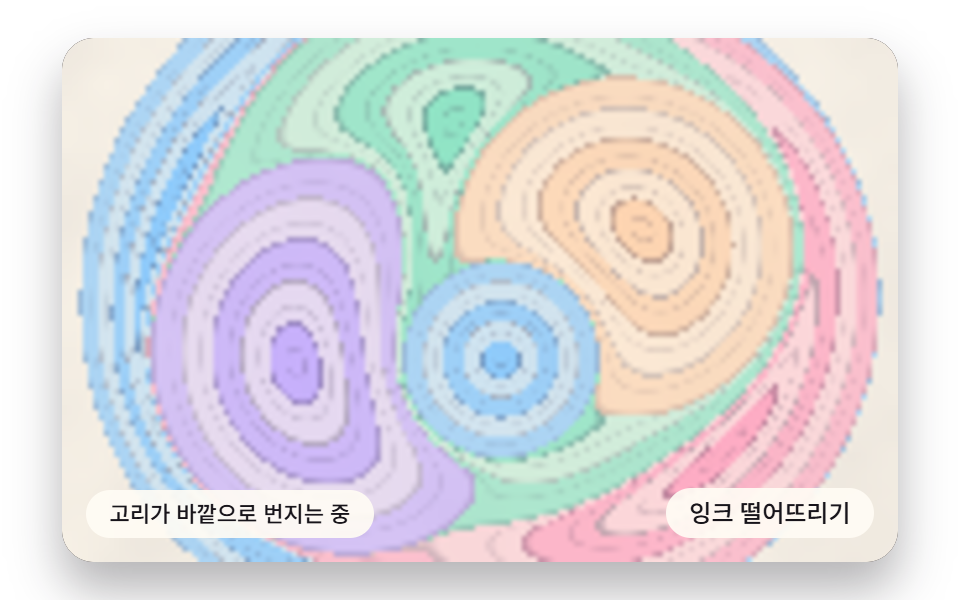 Marble Effect CSS: 9 Ink, Comb and Agate PatternsIn this marble effect css set, ink on water is a thin film held by surface tension — 04 pushes it into skewed wave bands See all demos in this post
If you like this effect - similar demos
 Creative UI03 Torus ring — the donut distance and rim light9 Ray Marching Scenes in Canvas (No WebGL)
 Creative UI08 Strike flash — the whole scene cools off exponentially right after impact9 Lightning Effect Background Scenes, No WebGL
 Creative UI07 Move Where Lines and Boxes Reflow Together When the Parent ChangesCSS Org Chart: 9 Tidy Tree Layout Demos