04Crow walking across a wordmark
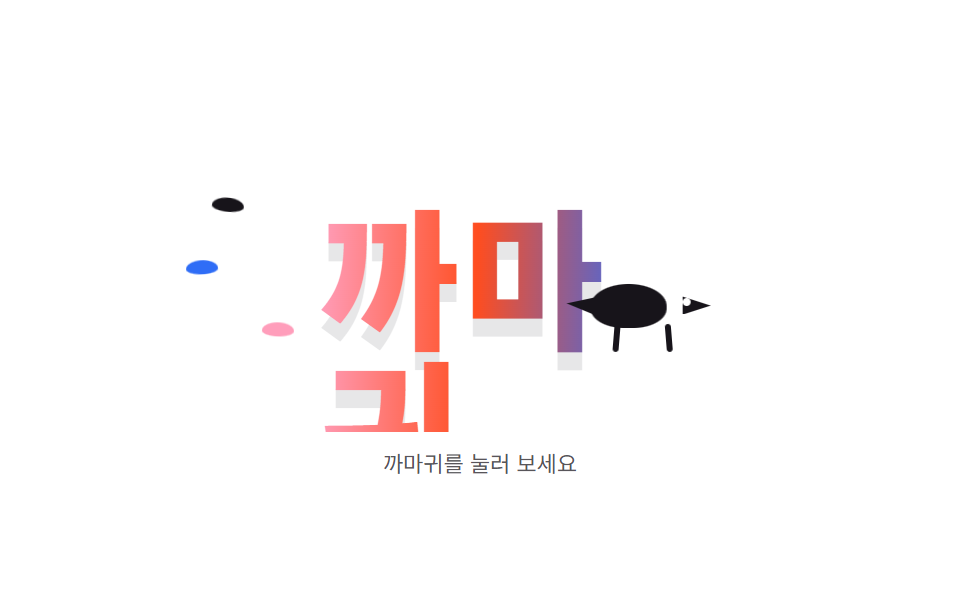
A black crow struts across candy-gradient letters — click the crow and a single feather shakes loose and drifts down.
Best forBrand wordmarks, 404 page backdrops
background-clip: texttranslateXanimation-delay
<main class="stage">
<div class="cr is-demo" id="crRoot">
  <div class="cr__scene">
    <span class="cr__wordghost" aria-hidden="true">CROW</span>
    <span class="cr__word">CROW</span>
    <span class="cr__feather cr__feather--a"></span>
    <span class="cr__feather cr__feather--b"></span>
    <span class="cr__feather cr__feather--c"></span>
    <span class="cr__drop"><span class="cr__dropleaf"></span></span>
    <button class="cr__crow" id="crCrow" type="button" aria-label="CROW">
      <span class="cr__body"></span>
      <span class="cr__tail"></span>
      <span class="cr__beak"></span>
      <span class="cr__eye"></span>
      <span class="cr__leg cr__leg--l"></span>
      <span class="cr__leg cr__leg--r"></span>
    </button>
  </div>
  <p class="cr__hint">Click the crow</p>
</div>
</main>
@use "../../../../site/static/demo-tokens" as *;
// 까마귀가 지나가는 워드마크 — 글자에 그라디언트를 입히고(background-clip: text)
// 까마귀 실루엣을 그 위에서 걷게 한다. 걸음은 translateX 횡단 + 다리 회전,
// 깃털 세 장은 animation-delay 로 시차를 둔다. 누르면 깃털이 한 장 떨어진다.
$duration: $dur-loop;
$easing: $ease-out;
$color: $subject-ink;
$grad-a: $subject-pink;
$grad-b: $stage-orange;
$grad-c: $subject-blue;
@include stage($stage-paper);
.cr {
display: flex; flex-direction: column; align-items: center; gap: $sp-2;
width: min(100%, 320px);
}
.cr__scene {
position: relative; box-sizing: border-box;
width: 100%; height: 156px; overflow: hidden;
border-radius: $r-card;
}
// 워드마크: 그라디언트 글자(본체)와 그 아래 고스트 그림자(text-shadow, 읽는 글자가 아니다)
.cr__word {
position: absolute; left: 50%; top: 40px; transform: translateX(-50%);
font-weight: 900; font-size: 76px; line-height: 1; letter-spacing: 2px;
background: linear-gradient(92deg, $grad-a 0%, $grad-b 48%, $grad-c 100%);
-webkit-background-clip: text; background-clip: text;
color: transparent;
text-shadow: none;
}
.cr__wordghost {
position: absolute; left: 50%; top: 44px; transform: translateX(-50%);
font-weight: 900; font-size: 76px; line-height: 1; letter-spacing: 2px;
color: transparent;
text-shadow: 0 5px 0 rgba(23, 20, 26, .1);
}
// 깃털 세 장: 왼쪽에서 떠다닌다
.cr__feather {
position: absolute; width: 16px; height: 7px;
border-radius: 50% 50% 50% 50% / 60% 60% 40% 40%;
background: $subject-ink;
animation-name: crFloat; animation-duration: $duration;
animation-timing-function: ease-in-out; animation-iteration-count: infinite;
animation-direction: alternate; animation-fill-mode: both;
}
.cr__feather--a { left: 8%; top: 22%; animation-delay: 0ms; }
.cr__feather--b { left: 16%; top: 64%; animation-delay: 300ms; background: $grad-a; }
.cr__feather--c { left: 4%; top: 46%; animation-delay: 600ms; background: $grad-c; }
// 눌렀을 때 떨어지는 깃털 한 장
.cr__drop {
position: absolute; left: 50%; top: 108px; width: 16px; height: 7px;
margin-left: -8px; opacity: 0;
}
.cr__dropleaf {
display: block; width: 16px; height: 7px;
border-radius: 50% 50% 50% 50% / 60% 60% 40% 40%;
background: $subject-ink;
}
.cr__drop {
transition: transform 900ms $ease-pop, opacity 200ms linear;
}
.cr.is-drop .cr__drop {
opacity: 1; transform: translateY(34px) rotate(140deg);
}
// ── 까마귀: 버튼(키보드·터치 가능). 글자 위층에서 성큼성큼 가로지른다
.cr__crow {
position: absolute; top: 76px; left: -80px;
width: 76px; height: 46px; padding: 0; border: 0; background: none;
cursor: pointer;
animation-name: crWalk; animation-duration: $duration;
animation-timing-function: linear; animation-iteration-count: infinite;
}
.cr__body {
position: absolute; left: 12px; top: 6px; width: 38px; height: 22px;
border-radius: 50% 50% 44% 44%;
background: $color;
}
.cr__tail {
position: absolute; left: 0; top: 12px; width: 16px; height: 10px;
clip-path: polygon(100% 0, 100% 100%, 0 34%);
background: $color;
}
.cr__beak {
position: absolute; right: 4px; top: 12px; width: 14px; height: 9px;
clip-path: polygon(100% 50%, 0 0, 0 100%);
background: $color;
}
.cr__eye {
position: absolute; right: 14px; top: 13px; width: 4px; height: 4px;
border-radius: 50%; background: $stage-paper;
}
.cr__leg {
position: absolute; top: 26px; width: 3px; height: 14px;
border-radius: $r-pill; background: $color;
transform-origin: top center;
animation-name: crStep; animation-duration: 250ms;
animation-timing-function: linear; animation-iteration-count: infinite;
}
.cr__leg--l { left: 24px; }
.cr__leg--r { right: 24px; animation-delay: 125ms; }
.cr__hint {
margin: 0; font-size: 11px; line-height: 1.4;
color: rgba(23, 20, 26, .72);
}
@keyframes crWalk {
from { transform: translateX(0); }
to { transform: translateX(400px); }
}
@keyframes crStep {
0%, 100% { transform: rotate(-14deg); }
50% { transform: rotate(14deg); }
}
@keyframes crFloat {
from { transform: translateY(-6px) rotate(-8deg); }
to { transform: translateY(6px) rotate(8deg); }
}
// 사람이 누른 상태: 걸음과 다리만 멈춘다(까마귀가 서서 깃털이 떨어지는 걸 본다)
.cr:not(.is-demo) .cr__crow,
.cr:not(.is-demo) .cr__leg { animation-name: none; }
@media (max-width: 340px) {
.cr__scene { height: 126px; }
.cr__word, .cr__wordshadow { font-size: 58px; top: 34px; }
.cr__crow { top: 62px; }
.cr__hint { font-size: 10px; }
}
@media (prefers-reduced-motion: reduce) {
.cr__crow, .cr__leg, .cr__feather { animation-name: none !important; }
.cr__drop { transition: none !important; }
}html, body {
margin: 0;
overflow: hidden;
}
.stage {
box-sizing: border-box;
min-height: 100vh;
display: grid;
place-items: center;
margin: 0;
background: #ffffff;
font-family: -apple-system, "Segoe UI", "Noto Sans KR", sans-serif;
padding: clamp(8px, 4vw, 24px);
}
.cr {
display: flex;
flex-direction: column;
align-items: center;
gap: 8px;
width: min(100%, 320px);
}
.cr__scene {
position: relative;
box-sizing: border-box;
width: 100%;
height: 156px;
overflow: hidden;
border-radius: 16px;
}
.cr__word {
position: absolute;
left: 50%;
top: 40px;
transform: translateX(-50%);
font-weight: 900;
font-size: 76px;
line-height: 1;
letter-spacing: 2px;
background: linear-gradient(92deg, #ff9ebb 0%, #ff4d1f 48%, #2f6df6 100%);
-webkit-background-clip: text;
background-clip: text;
color: transparent;
text-shadow: none;
}
.cr__wordghost {
position: absolute;
left: 50%;
top: 44px;
transform: translateX(-50%);
font-weight: 900;
font-size: 76px;
line-height: 1;
letter-spacing: 2px;
color: transparent;
text-shadow: 0 5px 0 rgba(23, 20, 26, 0.1);
}
.cr__feather {
position: absolute;
width: 16px;
height: 7px;
border-radius: 50% 50% 50% 50%/60% 60% 40% 40%;
background: #17141a;
animation-name: crFloat;
animation-duration: 2s;
animation-timing-function: ease-in-out;
animation-iteration-count: infinite;
animation-direction: alternate;
animation-fill-mode: both;
}
.cr__feather--a {
left: 8%;
top: 22%;
animation-delay: 0ms;
}
.cr__feather--b {
left: 16%;
top: 64%;
animation-delay: 300ms;
background: #ff9ebb;
}
.cr__feather--c {
left: 4%;
top: 46%;
animation-delay: 600ms;
background: #2f6df6;
}
.cr__drop {
position: absolute;
left: 50%;
top: 108px;
width: 16px;
height: 7px;
margin-left: -8px;
opacity: 0;
}
.cr__dropleaf {
display: block;
width: 16px;
height: 7px;
border-radius: 50% 50% 50% 50%/60% 60% 40% 40%;
background: #17141a;
}
.cr__drop {
transition: transform 900ms cubic-bezier(0.2, 1.4, 0.4, 1), opacity 200ms linear;
}
.cr.is-drop .cr__drop {
opacity: 1;
transform: translateY(34px) rotate(140deg);
}
.cr__crow {
position: absolute;
top: 76px;
left: -80px;
width: 76px;
height: 46px;
padding: 0;
border: 0;
background: none;
cursor: pointer;
animation-name: crWalk;
animation-duration: 2s;
animation-timing-function: linear;
animation-iteration-count: infinite;
}
.cr__body {
position: absolute;
left: 12px;
top: 6px;
width: 38px;
height: 22px;
border-radius: 50% 50% 44% 44%;
background: #17141a;
}
.cr__tail {
position: absolute;
left: 0;
top: 12px;
width: 16px;
height: 10px;
clip-path: polygon(100% 0, 100% 100%, 0 34%);
background: #17141a;
}
.cr__beak {
position: absolute;
right: 4px;
top: 12px;
width: 14px;
height: 9px;
clip-path: polygon(100% 50%, 0 0, 0 100%);
background: #17141a;
}
.cr__eye {
position: absolute;
right: 14px;
top: 13px;
width: 4px;
height: 4px;
border-radius: 50%;
background: #ffffff;
}
.cr__leg {
position: absolute;
top: 26px;
width: 3px;
height: 14px;
border-radius: 999px;
background: #17141a;
transform-origin: top center;
animation-name: crStep;
animation-duration: 250ms;
animation-timing-function: linear;
animation-iteration-count: infinite;
}
.cr__leg--l {
left: 24px;
}
.cr__leg--r {
right: 24px;
animation-delay: 125ms;
}
.cr__hint {
margin: 0;
font-size: 11px;
line-height: 1.4;
color: rgba(23, 20, 26, 0.72);
}
@keyframes crWalk {
from {
transform: translateX(0);
}
to {
transform: translateX(400px);
}
}
@keyframes crStep {
0%, 100% {
transform: rotate(-14deg);
}
50% {
transform: rotate(14deg);
}
}
@keyframes crFloat {
from {
transform: translateY(-6px) rotate(-8deg);
}
to {
transform: translateY(6px) rotate(8deg);
}
}
.cr:not(.is-demo) .cr__crow,
.cr:not(.is-demo) .cr__leg {
animation-name: none;
}
@media (max-width: 340px) {
.cr__scene {
height: 126px;
}
.cr__word, .cr__wordshadow {
font-size: 58px;
top: 34px;
}
.cr__crow {
top: 62px;
}
.cr__hint {
font-size: 10px;
}
}
@media (prefers-reduced-motion: reduce) {
.cr__crow, .cr__leg, .cr__feather {
animation-name: none !important;
}
.cr__drop {
transition: none !important;
}
}// 까마귀를 누르면 깃털이 한 장 떨어진다(.is-drop).
// 손이 닿는 순간 미리보기 루프(.is-demo)를 떼고 걸음을 멈춘 채 결과를 보여준다.
(function () {
var root = document.getElementById('crRoot');
var crow = document.getElementById('crCrow');
crow.addEventListener('click', function () {
root.classList.remove('is-demo');
root.classList.remove('is-drop');
// 같은 프레임에 지웠다 붙이면 transition 이 안 걸리므로 틀을 벌린다
window.requestAnimationFrame(function () {
root.classList.add('is-drop');
});
});
})();// CrowWordmark — vanilla 판(run/078/demo/04-object-crow-wordmark/index.html) 의 React 포트.
// 까마귀를 누르면 깃털이 한 장 떨어진다(drop). 첫 클릭에 미리보기 루프(is-demo)를 뗀다.
import { useState } from "react";
import type { CSSProperties } from "react";
import styles from "./CrowWordmark.module.scss";
export type CrowWordmarkProps = {
duration?: number;
easing?: string;
color?: string;
word?: string;
};
type Vars = CSSProperties & { "--duration"?: string; "--easing"?: string; "--color"?: string };
export default function CrowWordmark(props: CrowWordmarkProps) {
const duration = props.duration ?? 2000;
const easing = props.easing ?? "ease-out";
const color = props.color ?? "#17141a";
const word = props.word ?? "까마귀";
const [drop, setDrop] = useState<boolean>(false);
const [preview, setPreview] = useState<boolean>(true);
const vars: Vars = { "--duration": duration + "ms", "--easing": easing, "--color": color };
const rootClass = ["cr", preview ? "is-demo" : "", drop ? "is-drop" : ""]
.filter(Boolean).map((c) => (styles as { [k: string]: string })[c]).join(" ");
return (
<main className={styles.stage}>
<div className={rootClass} style={vars}>
<div className={styles["cr__scene"]}>
<span className={styles["cr__wordghost"]} aria-hidden="true">{word}</span>
<span className={styles["cr__word"]}>{word}</span>
<span className={styles["cr__feather"] + " " + styles["cr__feather--a"]}></span>
<span className={styles["cr__feather"] + " " + styles["cr__feather--b"]}></span>
<span className={styles["cr__feather"] + " " + styles["cr__feather--c"]}></span>
<span className={styles["cr__drop"]}><span className={styles["cr__dropleaf"]}></span></span>
<button
className={styles["cr__crow"]}
type="button"
aria-label="까마귀"
onClick={() => { setPreview(false); setDrop(false); requestAnimationFrame(() => setDrop(true)); }}
>
<span className={styles["cr__body"]}></span>
<span className={styles["cr__tail"]}></span>
<span className={styles["cr__beak"]}></span>
<span className={styles["cr__eye"]}></span>
<span className={styles["cr__leg"] + " " + styles["cr__leg--l"]}></span>
<span className={styles["cr__leg"] + " " + styles["cr__leg--r"]}></span>
</button>
</div>
<p className={styles["cr__hint"]}>까마귀를 눌러 보세요</p>
</div>
</main>
);
}04 Crow walking across a wordmark — Measured area 6.609% · moving frames 23/23Original by GODRICH · SCSS and React ship in the zip · CSS Art Animation — 9 Objects From Pure Shapes
The post this demo lives in
 CSS Art Animation — 9 Objects From Pure ShapesCSS art animation draws everyday objects — a washer, a house, a car — with a few colored boxes and makes them move, not See all demos in this post