07A Highlight Pill That Springs Between Menu Items
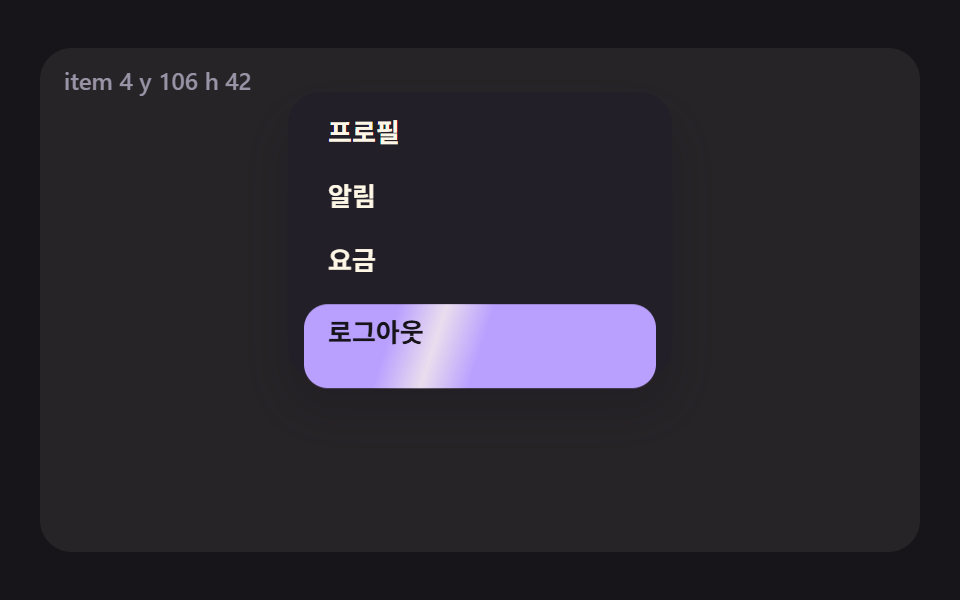
In a popover menu the highlight pill follows the hovered item's position and height by spring, and a band of light sweeps across it once.
Best forAccount dropdown menus
PILL_STIFFPILL_DAMPSHEEN_WITEM_H
<main class="stage">
<div class="pm is-demo" id="pm" data-demo="1">
  <p class="pm__live" data-r="live" aria-live="off" aria-atomic="true"></p>
  <div class="pm__menu" data-r="menu">
    <i class="pm__pill" data-r="pill"><i class="pm__sheen" data-r="sheen"></i></i>
    <button class="pm__it" data-r="it" type="button">Profile</button>
    <button class="pm__it" data-r="it" type="button">Alerts</button>
    <button class="pm__it" data-r="it" type="button">Billing</button>
    <button class="pm__it pm__it--tall" data-r="it" type="button">Log out</button>
  </div>
</div>
</main>
@use "../../../../site/static/demo-tokens" as *;
// 핵심: 알약은 항목마다 켜졌다 꺼지지 않고 하나가 위치와 높이를 스프링으로 따라 움직이며, 바뀔 때마다 빛줄기가 한 번 훑는다.
@include stage($stage-ink);
.pm {
position: relative;
box-sizing: border-box;
overflow: hidden;
width: min(100%, 440px);
height: min(252px, calc(100vh - 2 * clamp(8px, 4vw, 24px)));
border-radius: $r-card;
background: rgba($subject-cream, .07);
color: $subject-cream;
font-size: 12px;
line-height: 16px;
font-weight: 600;
user-select: none;
}
.pm b { font-weight: 800; font-variant-numeric: tabular-nums; }
.pm__live {
position: absolute;
left: $sp-3;
top: $sp-2;
margin: 0;
z-index: 9;
color: $tick-mute;
font-variant-numeric: tabular-nums;
white-space: nowrap;
pointer-events: none;
}
.pm button { font-family: inherit; }
.pm button:focus-visible { outline: 3px solid $subject-pink; outline-offset: 2px; }
.pm__menu {
position: absolute;
left: 50%;
top: 22px;
box-sizing: border-box;
width: min(192px, calc(100% - 24px));
margin-left: calc(min(192px, 100% - 24px) / -2);
padding: $sp-1 $sp-2;
border-radius: $r-card;
background: $tick-panel;
box-shadow: $shadow-raised;
}
.pm__pill {
position: absolute;
left: $sp-2;
right: $sp-2;
top: 0;
height: 32px;
overflow: hidden;
border-radius: $r-control;
background: $subject-lilac;
will-change: transform;
}
.pm__sheen {
position: absolute;
left: 0;
top: 0;
height: 100%;
background: linear-gradient(90deg, transparent, rgba($subject-cream, .7), transparent);
pointer-events: none;
}
.pm__it {
position: relative;
display: block;
box-sizing: border-box;
width: 100%;
height: 32px;
padding: 0 $sp-3;
border: 0;
border-radius: $r-control;
background: transparent;
color: $subject-cream;
font-size: 13px;
line-height: 20px;
font-weight: 700;
text-align: left;
cursor: pointer;
}
.pm__it--tall { height: 40px; }
.pm__it[data-on] { color: $subject-ink; }
@media (prefers-reduced-motion: reduce) {
.pm__pill { will-change: auto; }
.pm__sheen { display: none; }
}html, body {
margin: 0;
overflow: hidden;
}
.stage {
box-sizing: border-box;
min-height: 100vh;
display: grid;
place-items: center;
margin: 0;
background: #17141a;
font-family: -apple-system, "Segoe UI", "Noto Sans KR", sans-serif;
padding: clamp(8px, 4vw, 24px);
}
.pm {
position: relative;
box-sizing: border-box;
overflow: hidden;
width: min(100%, 440px);
height: min(252px, 100vh - 2 * clamp(8px, 4vw, 24px));
border-radius: 16px;
background: rgba(255, 247, 230, 0.07);
color: #fff7e6;
font-size: 12px;
line-height: 16px;
font-weight: 600;
user-select: none;
}
.pm b {
font-weight: 800;
font-variant-numeric: tabular-nums;
}
.pm__live {
position: absolute;
left: 12px;
top: 8px;
margin: 0;
z-index: 9;
color: #9a93a6;
font-variant-numeric: tabular-nums;
white-space: nowrap;
pointer-events: none;
}
.pm button {
font-family: inherit;
}
.pm button:focus-visible {
outline: 3px solid #ff9ebb;
outline-offset: 2px;
}
.pm__menu {
position: absolute;
left: 50%;
top: 22px;
box-sizing: border-box;
width: min(192px, 100% - 24px);
margin-left: calc(min(192px, 100% - 24px) / -2);
padding: 4px 8px;
border-radius: 16px;
background: #231f28;
box-shadow: 0 14px 24px rgba(23, 20, 26, 0.32);
}
.pm__pill {
position: absolute;
left: 8px;
right: 8px;
top: 0;
height: 32px;
overflow: hidden;
border-radius: 12px;
background: #b9a0ff;
will-change: transform;
}
.pm__sheen {
position: absolute;
left: 0;
top: 0;
height: 100%;
background: linear-gradient(90deg, transparent, rgba(255, 247, 230, 0.7), transparent);
pointer-events: none;
}
.pm__it {
position: relative;
display: block;
box-sizing: border-box;
width: 100%;
height: 32px;
padding: 0 12px;
border: 0;
border-radius: 12px;
background: transparent;
color: #fff7e6;
font-size: 13px;
line-height: 20px;
font-weight: 700;
text-align: left;
cursor: pointer;
}
.pm__it--tall {
height: 40px;
}
.pm__it[data-on] {
color: #17141a;
}
@media (prefers-reduced-motion: reduce) {
.pm__pill {
will-change: auto;
}
.pm__sheen {
display: none;
}
}(function () {
const root = document.getElementById("pm");
const reduce = window.matchMedia("(prefers-reduced-motion: reduce)").matches;
let demo = !reduce;
let raf = 0;
let t0 = -1;
let last = -1;
let acc = 0;
let clock = 0;
const offs = [];
const live = root.querySelector("[data-r=live]");
function q(sel) {
return root.querySelector(sel);
}
function clamp(v, lo, hi) {
return Math.max(lo, Math.min(hi, v));
}
function seg(t, a, b) {
const c = clamp((t - a) / (b - a), 0, 1);
return c * c * (3 - 2 * c);
}
function on(el, type, fn) {
el.addEventListener(type, fn);
offs.push(() => el.removeEventListener(type, fn));
}
function stopDemo() {
if (!demo)
return;
demo = false;
root.removeAttribute("data-demo");
root.classList.remove("is-demo");
live.setAttribute("aria-live", "polite");
}
if (reduce)
live.setAttribute("aria-live", "polite");
let shown = "";
function say(s) {
if (s === shown)
return;
shown = s;
live.textContent = s;
}
function makeRng(seed) {
let s = seed >>> 0;
return () => {
s = (Math.imul(s, 1664525) + 1013904223) >>> 0;
return s / 4294967296;
};
}
function local(e) {
const r = root.getBoundingClientRect();
return { x: e.clientX - r.left, y: e.clientY - r.top };
}
function sync() {
if (reduce) {
snap();
render();
}
}
// 기법: 강조 알약의 위치와 높이를 각각 스프링(PILL_STIFF, PILL_DAMP)으로 풀어 가리킨 항목을 쫓게 하고, 항목이 바뀔 때마다 SHEEN_W 폭의 빛줄기를 한 번 훑는다.
const PILL_STIFF = 0.18;
const PILL_DAMP = 0.72;
const SHEEN_W = 48;
const ITEM_H = 32;
const SHEEN_MS = 420;
const STEP_MS = 420;
const SEQ = [0, 2, 3, 1, 0];
const menu = q("[data-r=menu]");
const pill = q("[data-r=pill]");
const sheen = q("[data-r=sheen]");
const its = Array.from(root.querySelectorAll("[data-r=it]"));
let want = 0;
let prevWant = -1;
let py = 0;
let ph = ITEM_H;
let vy = 0;
let vh = 0;
let sheenT = SHEEN_MS;
let placed = false;
function goalY() {
return its[want].offsetTop;
}
function goalH() {
return its[want].offsetHeight || ITEM_H;
}
function tick(ms) {
if (demo)
want = SEQ[Math.floor(Math.max(0, ms - 200) / STEP_MS) % SEQ.length];
if (!placed)
snap();
if (want !== prevWant) {
prevWant = want;
sheenT = 0;
}
vy = (vy + (goalY() - py) * PILL_STIFF) * PILL_DAMP;
py += vy;
vh = (vh + (goalH() - ph) * PILL_STIFF) * PILL_DAMP;
ph += vh;
sheenT = Math.min(SHEEN_MS, sheenT + 1000 / 60);
}
function snap() {
py = goalY();
ph = goalH();
vy = 0;
vh = 0;
prevWant = want;
sheenT = SHEEN_MS;
placed = true;
}
function render() {
pill.style.height = ph.toFixed(1) + "px";
pill.style.transform = "translate3d(0," + py.toFixed(1) + "px,0)";
const wide = pill.clientWidth;
const p = sheenT / SHEEN_MS;
sheen.style.width = SHEEN_W + "px";
sheen.style.transform = "translate3d(" + (-SHEEN_W + p * (wide + SHEEN_W)).toFixed(1) + "px,0,0) skewX(-18deg)";
sheen.style.opacity = p >= 1 ? "0" : "1";
for (let i = 0; i < its.length; i += 1) {
if (i === want)
its[i].setAttribute("data-on", "1");
else
its[i].removeAttribute("data-on");
}
say("item " + (want + 1) + " y " + Math.round(py) + " h " + Math.round(ph));
}
function pick(i) {
stopDemo();
want = i;
sync();
}
its.forEach((el, i) => {
on(el, "pointerenter", () => pick(i));
on(el, "focus", () => pick(i));
on(el, "keydown", (e) => {
const d = e.key === "ArrowDown" ? 1 : e.key === "ArrowUp" ? -1 : 0;
if (d === 0)
return;
e.preventDefault();
const n = (i + d + its.length) % its.length;
its[n].focus({ preventScroll: true });
});
});
snap();
const FRAME_MS = 1000 / 60;
function frame(ts) {
if (t0 < 0) {
t0 = ts;
last = ts;
}
acc += Math.min(100, ts - last);
last = ts;
let n = 0;
while (acc >= FRAME_MS && n < 6) {
clock += FRAME_MS;
tick(clock);
acc -= FRAME_MS;
n += 1;
}
if (n === 6)
acc = 0;
render();
raf = requestAnimationFrame(frame);
}
const ro = new ResizeObserver(() => sync());
ro.observe(root);
if (reduce) {
stopDemo();
snap();
render();
}
else {
raf = requestAnimationFrame(frame);
}
return () => {
cancelAnimationFrame(raf);
offs.forEach((f) => f());
ro.disconnect();
};
})();// RovingSpotlightMenu - vanilla 판(07-pm-menu-roving-spotlight) 의 React 포트. 같은 계산을 useEffect 안에서 돌린다.
import { useEffect, useRef } from "react";
import styles from "./RovingSpotlightMenu.module.scss";
export default function RovingSpotlightMenu() {
const rootRef = useRef<HTMLDivElement | null>(null);
useEffect(() => {
const rootEl = rootRef.current;
if (!rootEl) return;
const root: HTMLElement = rootEl;
const reduce = window.matchMedia("(prefers-reduced-motion: reduce)").matches;
let demo = !reduce;
let raf = 0;
let t0 = -1;
let last = -1;
let acc = 0;
let clock = 0;
const offs: Array<() => void> = [];
const live = root.querySelector("[data-r=live]") as HTMLElement;
function q<T extends Element>(sel: string): T {
return root.querySelector(sel) as T;
}
function clamp(v: number, lo: number, hi: number): number {
return Math.max(lo, Math.min(hi, v));
}
function seg(t: number, a: number, b: number): number {
const c = clamp((t - a) / (b - a), 0, 1);
return c * c * (3 - 2 * c);
}
function on(el: EventTarget, type: string, fn: (e: any) => void): void {
el.addEventListener(type, fn);
offs.push(() => el.removeEventListener(type, fn));
}
function stopDemo(): void {
if (!demo) return;
demo = false;
root.removeAttribute("data-demo");
root.classList.remove("is-demo");
live.setAttribute("aria-live", "polite");
}
if (reduce) live.setAttribute("aria-live", "polite");
let shown = "";
function say(s: string): void {
if (s === shown) return;
shown = s;
live.textContent = s;
}
function makeRng(seed: number): () => number {
let s = seed >>> 0;
return () => {
s = (Math.imul(s, 1664525) + 1013904223) >>> 0;
return s / 4294967296;
};
}
function local(e: PointerEvent): { x: number; y: number } {
const r = root.getBoundingClientRect();
return { x: e.clientX - r.left, y: e.clientY - r.top };
}
function sync(): void {
if (reduce) {
snap();
render();
}
}
// 기법: 강조 알약의 위치와 높이를 각각 스프링(PILL_STIFF, PILL_DAMP)으로 풀어 가리킨 항목을 쫓게 하고, 항목이 바뀔 때마다 SHEEN_W 폭의 빛줄기를 한 번 훑는다.
const PILL_STIFF = 0.18;
const PILL_DAMP = 0.72;
const SHEEN_W = 48;
const ITEM_H = 32;
const SHEEN_MS = 420;
const STEP_MS = 420;
const SEQ = [0, 2, 3, 1, 0];
const menu = q<HTMLElement>("[data-r=menu]");
const pill = q<HTMLElement>("[data-r=pill]");
const sheen = q<HTMLElement>("[data-r=sheen]");
const its = Array.from(root.querySelectorAll("[data-r=it]")) as HTMLElement[];
let want = 0;
let prevWant = -1;
let py = 0;
let ph = ITEM_H;
let vy = 0;
let vh = 0;
let sheenT = SHEEN_MS;
let placed = false;
function goalY(): number {
return its[want].offsetTop;
}
function goalH(): number {
return its[want].offsetHeight || ITEM_H;
}
function tick(ms: number): void {
if (demo) want = SEQ[Math.floor(Math.max(0, ms - 200) / STEP_MS) % SEQ.length];
if (!placed) snap();
if (want !== prevWant) {
prevWant = want;
sheenT = 0;
}
vy = (vy + (goalY() - py) * PILL_STIFF) * PILL_DAMP;
py += vy;
vh = (vh + (goalH() - ph) * PILL_STIFF) * PILL_DAMP;
ph += vh;
sheenT = Math.min(SHEEN_MS, sheenT + 1000 / 60);
}
function snap(): void {
py = goalY();
ph = goalH();
vy = 0;
vh = 0;
prevWant = want;
sheenT = SHEEN_MS;
placed = true;
}
function render(): void {
pill.style.height = ph.toFixed(1) + "px";
pill.style.transform = "translate3d(0," + py.toFixed(1) + "px,0)";
const wide = pill.clientWidth;
const p = sheenT / SHEEN_MS;
sheen.style.width = SHEEN_W + "px";
sheen.style.transform = "translate3d(" + (-SHEEN_W + p * (wide + SHEEN_W)).toFixed(1) + "px,0,0) skewX(-18deg)";
sheen.style.opacity = p >= 1 ? "0" : "1";
for (let i = 0; i < its.length; i += 1) {
if (i === want) its[i].setAttribute("data-on", "1");
else its[i].removeAttribute("data-on");
}
say("item " + (want + 1) + " y " + Math.round(py) + " h " + Math.round(ph));
}
function pick(i: number): void {
stopDemo();
want = i;
sync();
}
its.forEach((el, i) => {
on(el, "pointerenter", () => pick(i));
on(el, "focus", () => pick(i));
on(el, "keydown", (e: KeyboardEvent) => {
const d = e.key === "ArrowDown" ? 1 : e.key === "ArrowUp" ? -1 : 0;
if (d === 0) return;
e.preventDefault();
const n = (i + d + its.length) % its.length;
its[n].focus({ preventScroll: true });
});
});
snap();
const FRAME_MS = 1000 / 60;
function frame(ts: number): void {
if (t0 < 0) {
t0 = ts;
last = ts;
}
acc += Math.min(100, ts - last);
last = ts;
let n = 0;
while (acc >= FRAME_MS && n < 6) {
clock += FRAME_MS;
tick(clock);
acc -= FRAME_MS;
n += 1;
}
if (n === 6) acc = 0;
render();
raf = requestAnimationFrame(frame);
}
const ro = new ResizeObserver(() => sync());
ro.observe(root);
if (reduce) {
stopDemo();
snap();
render();
} else {
raf = requestAnimationFrame(frame);
}
return () => {
cancelAnimationFrame(raf);
offs.forEach((f) => f());
ro.disconnect();
};
}, []);
return (
<main className={styles["stage"]}>
<div ref={rootRef} className={styles["pm"] + " is-demo"} data-demo="1">
<p className={styles["pm__live"]} data-r="live" aria-live="off" aria-atomic="true"></p>
<div className={styles["pm__menu"]} data-r="menu">
<i className={styles["pm__pill"]} data-r="pill"><i className={styles["pm__sheen"]} data-r="sheen"></i></i>
<button className={styles["pm__it"]} data-r="it" type="button">프로필</button>
<button className={styles["pm__it"]} data-r="it" type="button">알림</button>
<button className={styles["pm__it"]} data-r="it" type="button">요금</button>
<button className={styles["pm__it"] + " " + styles["pm__it--tall"]} data-r="it" type="button">로그아웃</button>
</div>
</div>
</main>
);
}07 A Highlight Pill That Springs Between Menu Items — Measured area 18.318% · moving frames 19/23Original by GODRICH · SCSS and React ship in the zip · CSS Popover: 9 Ways to Anchor, Flip and Spring
The post this demo lives in
 CSS Popover: 9 Ways to Anchor, Flip and SpringA css popover can clip at screen edges, point its arrow the wrong way and overlap its neighbors — scenes 01, 04 and 09 f See all demos in this post