06Fly-to-cart add
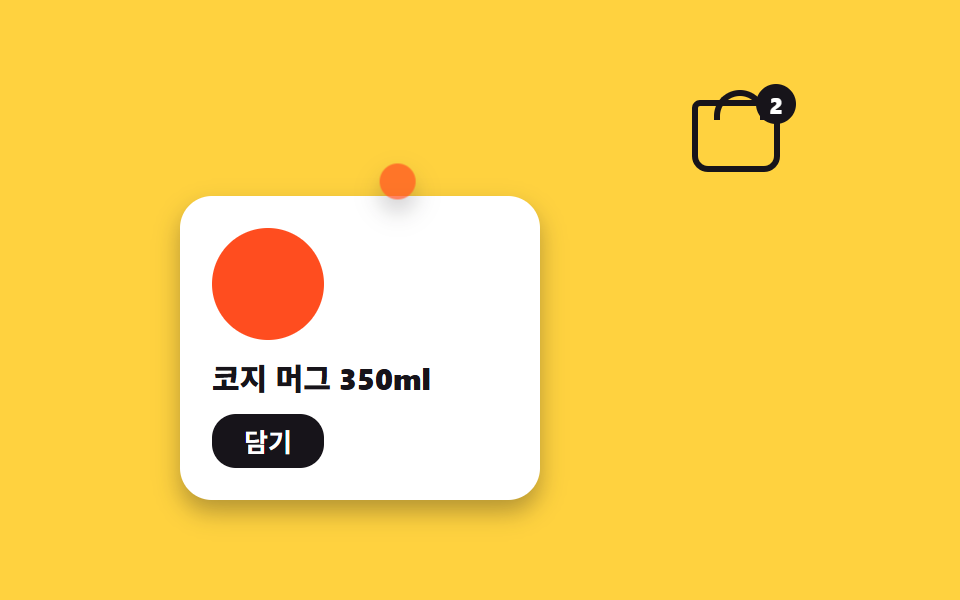
Pressing "Add" sends a product-colored dot flying from the card on an arc to the corner cart mark, fading away as it lands while the cart badge bounces to signal the count went up.
Best forShop add-to-cart, wishlist saves
translateX translateY 포물선scale 축소배지 바운스
<main class="stage">
  <section class="cart is-demo" aria-label="Pressing Add flies a product dot on an arc to the cart">
    <input class="cart__check" type="checkbox" id="cart-add">
    <div class="cart__bag" aria-hidden="true">
      <span class="cart__basket"></span>
      <span class="cart__badge">2</span>
    </div>
    <article class="cart__product">
      <span class="cart__swatch" aria-hidden="true"></span>
      <h2 class="cart__name">Cozy mug 350ml</h2>
      <label class="cart__btn" for="cart-add">Add</label>
    </article>
    <span class="cart__fly" aria-hidden="true"><span class="cart__fly-y"></span></span>
  </section>
</main>
@use "../../../../site/static/demo-tokens" as *;
$duration: 700ms; // 점이 카트까지 날아가는 시간
$easing: $ease-out;
$color: $stage-orange; // 상품·점 색
@include stage($stage-yellow);
.cart { position: relative; width: min(300px, 90vw); }
.cart__check { position: absolute; opacity: 0; pointer-events: none; }
// ── 오른쪽 위 장바구니 표시 + 개수 배지
.cart__bag { position: absolute; top: 0; right: 0; }
.cart__basket {
position: relative; // 손잡이 ::before 가 바구니에 붙게
display: block;
width: 44px; height: 36px;
box-sizing: border-box;
border: 3px solid $stage-ink;
border-radius: $r-xs $r-xs $r-sm $r-sm; // 바구니 몸통
}
.cart__basket::before { // 손잡이
content: "";
position: absolute; top: -8px; left: 8px;
width: 20px; height: 12px;
border: 3px solid $stage-ink;
border-bottom: 0;
border-radius: $r-pill $r-pill 0 0;
}
.cart__badge {
position: absolute; top: -8px; right: -8px;
display: grid; place-items: center;
min-width: 20px; height: 20px;
padding: 0 4px;
box-sizing: border-box;
border-radius: $r-pill;
background: $stage-ink;
font-weight: 800;
font-size: 11px;
font-family: inherit;
color: $stage-paper;
transition: transform $dur-quick $ease-pop;
}
#cart-add:checked ~ .cart__bag .cart__badge { transform: scale(1.35); }
// ── 상품 카드
.cart__product {
display: grid;
gap: $sp-2;
justify-items: start;
margin-top: $sp-12;
padding: $sp-4;
width: 180px;
box-sizing: border-box;
border-radius: $r-card;
background: $stage-paper;
box-shadow: $shadow-press;
}
.cart__swatch {
width: 56px; height: 56px;
border-radius: 50%;
background: $color;
}
.cart__name {
margin: 0;
font-weight: 800;
font-size: clamp(13px, 3.8vw, 15px);
font-family: inherit;
color: $stage-ink;
}
.cart__btn {
padding: $sp-1 $sp-4;
border-radius: $r-control;
background: $stage-ink;
font-weight: 700;
font-size: 13px;
font-family: inherit;
color: $stage-paper;
cursor: pointer;
transition: transform $dur-quick $easing;
}
.cart__btn:active { transform: scale(.94); }
// ── 날아가는 점: 겹 요소 2개로 포물선 (x 는 등속, y 는 느렸다 빨라짐)
.cart__fly {
position: absolute; left: 16px; top: 64px; // 상품 스와치 위치
opacity: 0;
transition: opacity $dur-quick linear;
pointer-events: none;
z-index: 2;
}
.cart__fly-y {
display: block;
width: 18px; height: 18px;
border-radius: 50%;
background: $color;
box-shadow: $shadow-press;
}
#cart-add:checked ~ .cart__fly { transform: translateX(273px); opacity: 0; transition: transform $duration $easing, opacity $dur-quick linear $duration; }
#cart-add:checked ~ .cart__fly .cart__fly-y { transform: translateY(-71px); transition: transform $duration $easing; }
// 렌더·갤러리용 자동 루프: 대기 → 비행 → 배지 바운스 → 리셋
.cart.is-demo .cart__fly { animation: fly-x $dur-loop linear infinite; opacity: 1; }
.cart.is-demo .cart__fly-y { animation: fly-y $dur-loop $easing infinite; }
.cart.is-demo .cart__badge { animation: badge-loop $dur-loop $easing infinite; }
@keyframes fly-x {
0%, 30% { transform: translateX(0); opacity: 1; }
68%, 100% { transform: translateX(273px); opacity: 0; }
}
@keyframes fly-y {
0%, 30% { transform: translateY(0); }
68%, 100% { transform: translateY(-71px); }
}
@keyframes badge-loop {
0%, 66% { transform: scale(1); }
74% { transform: scale(1.35); }
84%, 100% { transform: scale(1); }
}
@media (max-width: 360px) { // 320×200 아이프레임 대응 — 카드를 위로 붙인다
.cart__product { margin-top: 8px; padding: 8px; width: 148px; gap: 4px; }
.cart__swatch { width: 36px; height: 36px; }
.cart__name { font-size: 12px; }
.cart__btn { padding: 4px 12px; font-size: 11px; }
.cart__fly { top: 40px; left: 12px; }
}
@media (prefers-reduced-motion: reduce) {
.cart__badge, .cart__btn { transition: none; }
.cart.is-demo .cart__fly,
.cart.is-demo .cart__fly-y,
.cart.is-demo .cart__badge { animation: none; } // 점이 순간 이동, 배지는 고정
.cart.is-demo .cart__fly { opacity: 0; }
#cart-add:checked ~ .cart__fly { transform: translateX(273px); }
}html, body {
margin: 0;
overflow: hidden;
}
.stage {
box-sizing: border-box;
min-height: 100vh;
display: grid;
place-items: center;
margin: 0;
background: #ffd23f;
font-family: -apple-system, "Segoe UI", "Noto Sans KR", sans-serif;
padding: clamp(8px, 4vw, 24px);
}
.cart {
position: relative;
width: min(300px, 90vw);
}
.cart__check {
position: absolute;
opacity: 0;
pointer-events: none;
}
.cart__bag {
position: absolute;
top: 0;
right: 0;
}
.cart__basket {
position: relative;
display: block;
width: 44px;
height: 36px;
box-sizing: border-box;
border: 3px solid #17141a;
border-radius: 4px 4px 8px 8px;
}
.cart__basket::before {
content: "";
position: absolute;
top: -8px;
left: 8px;
width: 20px;
height: 12px;
border: 3px solid #17141a;
border-bottom: 0;
border-radius: 999px 999px 0 0;
}
.cart__badge {
position: absolute;
top: -8px;
right: -8px;
display: grid;
place-items: center;
min-width: 20px;
height: 20px;
padding: 0 4px;
box-sizing: border-box;
border-radius: 999px;
background: #17141a;
font-weight: 800;
font-size: 11px;
font-family: inherit;
color: #ffffff;
transition: transform 220ms cubic-bezier(0.2, 1.4, 0.4, 1);
}
#cart-add:checked ~ .cart__bag .cart__badge {
transform: scale(1.35);
}
.cart__product {
display: grid;
gap: 8px;
justify-items: start;
margin-top: 48px;
padding: 16px;
width: 180px;
box-sizing: border-box;
border-radius: 16px;
background: #ffffff;
box-shadow: 0 6px 12px rgba(23, 20, 26, 0.32);
}
.cart__swatch {
width: 56px;
height: 56px;
border-radius: 50%;
background: #ff4d1f;
}
.cart__name {
margin: 0;
font-weight: 800;
font-size: clamp(13px, 3.8vw, 15px);
font-family: inherit;
color: #17141a;
}
.cart__btn {
padding: 4px 16px;
border-radius: 12px;
background: #17141a;
font-weight: 700;
font-size: 13px;
font-family: inherit;
color: #ffffff;
cursor: pointer;
transition: transform 220ms ease-out;
}
.cart__btn:active {
transform: scale(0.94);
}
.cart__fly {
position: absolute;
left: 16px;
top: 64px;
opacity: 0;
transition: opacity 220ms linear;
pointer-events: none;
z-index: 2;
}
.cart__fly-y {
display: block;
width: 18px;
height: 18px;
border-radius: 50%;
background: #ff4d1f;
box-shadow: 0 6px 12px rgba(23, 20, 26, 0.32);
}
#cart-add:checked ~ .cart__fly {
transform: translateX(273px);
opacity: 0;
transition: transform 700ms ease-out, opacity 220ms linear 700ms;
}
#cart-add:checked ~ .cart__fly .cart__fly-y {
transform: translateY(-71px);
transition: transform 700ms ease-out;
}
.cart.is-demo .cart__fly {
animation: fly-x 2s linear infinite;
opacity: 1;
}
.cart.is-demo .cart__fly-y {
animation: fly-y 2s ease-out infinite;
}
.cart.is-demo .cart__badge {
animation: badge-loop 2s ease-out infinite;
}
@keyframes fly-x {
0%, 30% {
transform: translateX(0);
opacity: 1;
}
68%, 100% {
transform: translateX(273px);
opacity: 0;
}
}
@keyframes fly-y {
0%, 30% {
transform: translateY(0);
}
68%, 100% {
transform: translateY(-71px);
}
}
@keyframes badge-loop {
0%, 66% {
transform: scale(1);
}
74% {
transform: scale(1.35);
}
84%, 100% {
transform: scale(1);
}
}
@media (max-width: 360px) {
.cart__product {
margin-top: 8px;
padding: 8px;
width: 148px;
gap: 4px;
}
.cart__swatch {
width: 36px;
height: 36px;
}
.cart__name {
font-size: 12px;
}
.cart__btn {
padding: 4px 12px;
font-size: 11px;
}
.cart__fly {
top: 40px;
left: 12px;
}
}
@media (prefers-reduced-motion: reduce) {
.cart__badge, .cart__btn {
transition: none;
}
.cart.is-demo .cart__fly,
.cart.is-demo .cart__fly-y,
.cart.is-demo .cart__badge {
animation: none;
}
.cart.is-demo .cart__fly {
opacity: 0;
}
#cart-add:checked ~ .cart__fly {
transform: translateX(273px);
}
}import type { CSSProperties } from "react";
import { useEffect, useState } from "react";
import styles from "./FlyToCart.module.scss";
export type FlyToCartProps = {
name: string;
addLabel: string;
/** 점이 카트까지 날아가는 시간 (기본 700ms) */
duration?: number;
easing?: string;
/** 상품·점 색 */
color?: string;
/** 카트에 이미 담겨 있는 개수 */
count?: number;
};
type Vars = CSSProperties & { "--duration"?: string; "--easing"?: string; "--color"?: string };
export default function FlyToCart({
name,
addLabel,
duration = 700,
easing = "ease-out",
color = "#ff4d1f",
count = 2,
}: FlyToCartProps) {
const [flying, setFlying] = useState(false);
const [added, setAdded] = useState(count);
const vars: Vars = { "--duration": `${duration}ms`, "--easing": easing, "--color": color };
useEffect(() => {
if (!flying) return;
const t = setTimeout(() => { setAdded((n) => n + 1); setFlying(false); }, duration);
return () => clearTimeout(t);
}, [flying, duration]);
return (
<section className={styles.cart} style={vars} aria-label={name}>
<div className={styles.bag} aria-hidden="true">
<span className={styles.basket} />
<span className={`${styles.badge} ${flying ? styles.badgeBump : ""}`}>{added}</span>
</div>
<article className={styles.product}>
<span className={styles.swatch} aria-hidden="true" />
<h2 className={styles.name}>{name}</h2>
<button type="button" className={styles.btn} onClick={() => setFlying(true)}>{addLabel}</button>
</article>
<span className={`${styles.fly} ${flying ? styles.flyGo : ""}`} aria-hidden="true">
<span className={styles.flyY} />
</span>
</section>
);
}06 Fly-to-cart add — Measured area 2.603% · moving frames 13/23Original by GODRICH · SCSS and React ship in the zip · 9 CSS Screen Transition Animation Effects
The post this demo lives in
 9 CSS Screen Transition Animation EffectsA CSS screen transition animation smooths every moment the screen changes — an image swap, a confirmed order, a form ste See all demos in this post
If you like this effect - similar demos
 Transitions01 Slide overshoot — a cart panel whose open position value passes its target before settling backCart Drawer UI Patterns: 9 Motion Techniques
 Transitions01 Fade & scale9 CSS Modal Animation Patterns, No Library Needed
 Transitions01 Default cross-fade9 CSS Page Transitions — No Library, Pure CSS