04Thumbnail-synced snap
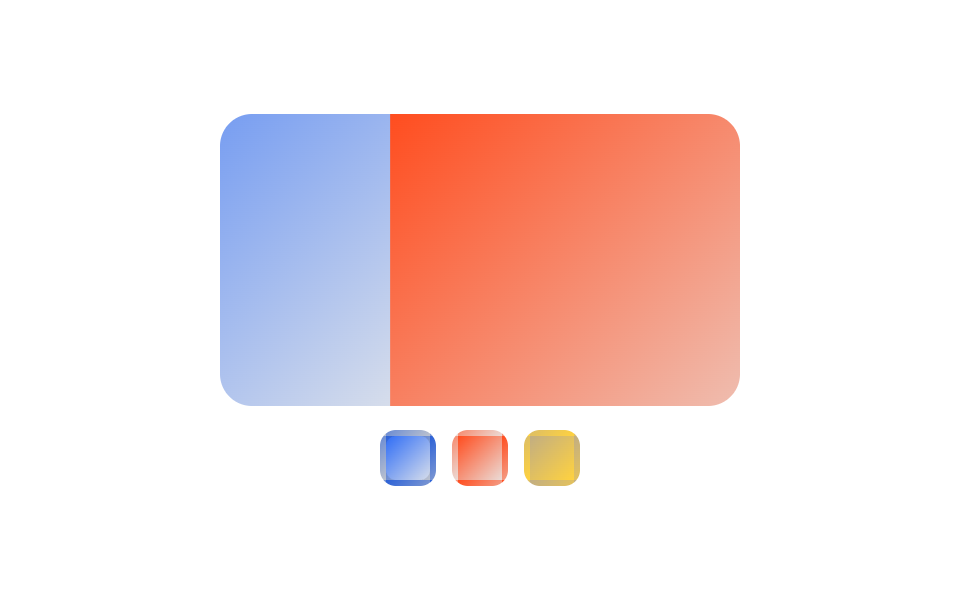
A real row of thumbnail images sits below the main photo, each one an anchor to its matching slide, so :target lights up only the thumbnail of the photo you're viewing.
Best forProduct detail image galleries, multi-shot photo sets
:target형제결합자scroll-snap-align
<main class="stage">
  <div class="tm is-demo">
    <div class="tm__viewport">
      <div class="tm__track">
        <section id="tm-s1" class="tm__slide tm__slide--1"></section>
        <section id="tm-s2" class="tm__slide tm__slide--2"></section>
        <section id="tm-s3" class="tm__slide tm__slide--3"></section>
        <section class="tm__slide tm__slide--1" aria-hidden="true"></section>
      </div>
    </div>
    <nav class="tm__thumbs">
      <a href="#tm-s1" class="tm__thumb tm__thumb--1" aria-label="Slide 1 thumbnail"></a>
      <a href="#tm-s2" class="tm__thumb tm__thumb--2" aria-label="Slide 2 thumbnail"></a>
      <a href="#tm-s3" class="tm__thumb tm__thumb--3" aria-label="Slide 3 thumbnail"></a>
    </nav>
  </div>
</main>
@use "../../../../site/static/demo-tokens" as *;
// ── 변수 3개 ──────────────────────────────────────────
$duration: $dur-base;
$easing: $ease-spring;
$color: $subject-blue;
@include stage($stage-paper);
.tm { width: min(260px, 70vw); }
// ── 실제 동작: 큰 슬라이드 + 진짜 썸네일 이미지 줄, 둘 다 <a href="#id"> + :target (0줄 JS) ──
.tm__viewport {
overflow-x: auto;
scroll-snap-type: x mandatory;
border-radius: $r-card;
scrollbar-width: none;
&::-webkit-scrollbar { display: none; }
}
.tm__track { display: flex; width: max-content; }
.tm__slide {
flex: 0 0 min(260px, 70vw);
aspect-ratio: 16 / 9;
scroll-snap-align: start;
}
.tm__slide--1 { background: linear-gradient(135deg, $color, #d6ddeb); }
.tm__slide--2 { background: linear-gradient(135deg, $stage-orange, #ebdbd6); }
.tm__slide--3 { background: linear-gradient(135deg, #c2ae82, $stage-yellow); }
.tm__thumbs {
display: flex;
justify-content: center;
gap: $sp-2;
margin-top: $sp-3;
}
.tm__thumb {
flex: 0 0 28px;
aspect-ratio: 1 / 1;
box-sizing: border-box;
border-radius: $r-sm;
border: 3px solid transparent;
transition: border-color $duration $easing;
}
.tm__thumb--1 { background: linear-gradient(135deg, $color, #d6ddeb); }
.tm__thumb--2 { background: linear-gradient(135deg, $stage-orange, #ebdbd6); }
.tm__thumb--3 { background: linear-gradient(135deg, #c2ae82, $stage-yellow); }
// 각 슬라이드가 :target 이면 :has() 로 같은 색의 썸네일에만 테두리를 켠다
.tm:has(#tm-s1:target) .tm__thumb--1,
.tm:has(#tm-s2:target) .tm__thumb--2,
.tm:has(#tm-s3:target) .tm__thumb--3 {
border-color: $subject-ink;
}
// ── 데모 루프: 큰 슬라이드와 썸네일 테두리가 미리보기에서 함께 순환한다 ──
// 트랙 끝에는 1번의 복제본(aria-hidden)이 한 장 더 — 그곳까지 정상 속도로 가고 100%→0% 점프는
// 복제본=1번이라 안 보인다 (텔레포트 금지). % 는 트랙(max-content=슬라이드 4장) 기준이라 한 칸 = -25%
.tm.is-demo .tm__track { animation: tm-track $dur-loop $easing infinite; }
.tm.is-demo .tm__thumb--1 { animation: tm-thumb-1 $dur-loop $easing infinite; }
.tm.is-demo .tm__thumb--2 { animation: tm-thumb-2 $dur-loop $easing infinite; }
.tm.is-demo .tm__thumb--3 { animation: tm-thumb-3 $dur-loop $easing infinite; }
@keyframes tm-track {
0%, 8% { transform: translateX(0); }
31%, 39% { transform: translateX(-25%); }
62%, 70% { transform: translateX(-50%); }
92%, 100% { transform: translateX(-75%); }
}
// 썸네일 1번도 루프 끝(92~100%, 복제본=1번이 보이는 구간)에 다시 켜진다 — 경계에서 테두리가 순간이동하지 않는다
@keyframes tm-thumb-1 { 0%, 4% { border-color: $subject-ink; } 29%, 88% { border-color: transparent; } 92%, 100% { border-color: $subject-ink; } }
@keyframes tm-thumb-2 { 0%, 29% { border-color: transparent; } 33%, 62% { border-color: $subject-ink; } 66%, 100% { border-color: transparent; } }
@keyframes tm-thumb-3 { 0%, 62% { border-color: transparent; } 66%, 96% { border-color: $subject-ink; } 100% { border-color: transparent; } }
// ── 접근성 ──────────────────────────────────────────
@media (prefers-reduced-motion: reduce) {
.tm.is-demo .tm__track,
.tm.is-demo .tm__thumb--1,
.tm.is-demo .tm__thumb--2,
.tm.is-demo .tm__thumb--3 { animation: none !important; }
.tm__viewport { scroll-behavior: auto; }
}html, body {
margin: 0;
overflow: hidden;
}
.stage {
box-sizing: border-box;
min-height: 100vh;
display: grid;
place-items: center;
margin: 0;
background: #ffffff;
font-family: -apple-system, "Segoe UI", "Noto Sans KR", sans-serif;
padding: clamp(8px, 4vw, 24px);
}
.tm {
width: min(260px, 70vw);
}
.tm__viewport {
overflow-x: auto;
scroll-snap-type: x mandatory;
border-radius: 16px;
scrollbar-width: none;
}
.tm__viewport::-webkit-scrollbar {
display: none;
}
.tm__track {
display: flex;
width: max-content;
}
.tm__slide {
flex: 0 0 min(260px, 70vw);
aspect-ratio: 16/9;
scroll-snap-align: start;
}
.tm__slide--1 {
background: linear-gradient(135deg, #2f6df6, #d6ddeb);
}
.tm__slide--2 {
background: linear-gradient(135deg, #ff4d1f, #ebdbd6);
}
.tm__slide--3 {
background: linear-gradient(135deg, #c2ae82, #ffd23f);
}
.tm__thumbs {
display: flex;
justify-content: center;
gap: 8px;
margin-top: 12px;
}
.tm__thumb {
flex: 0 0 28px;
aspect-ratio: 1/1;
box-sizing: border-box;
border-radius: 8px;
border: 3px solid transparent;
transition: border-color 300ms cubic-bezier(0.2, 0.8, 0.2, 1);
}
.tm__thumb--1 {
background: linear-gradient(135deg, #2f6df6, #d6ddeb);
}
.tm__thumb--2 {
background: linear-gradient(135deg, #ff4d1f, #ebdbd6);
}
.tm__thumb--3 {
background: linear-gradient(135deg, #c2ae82, #ffd23f);
}
.tm:has(#tm-s1:target) .tm__thumb--1,
.tm:has(#tm-s2:target) .tm__thumb--2,
.tm:has(#tm-s3:target) .tm__thumb--3 {
border-color: #17141a;
}
.tm.is-demo .tm__track {
animation: tm-track 2s cubic-bezier(0.2, 0.8, 0.2, 1) infinite;
}
.tm.is-demo .tm__thumb--1 {
animation: tm-thumb-1 2s cubic-bezier(0.2, 0.8, 0.2, 1) infinite;
}
.tm.is-demo .tm__thumb--2 {
animation: tm-thumb-2 2s cubic-bezier(0.2, 0.8, 0.2, 1) infinite;
}
.tm.is-demo .tm__thumb--3 {
animation: tm-thumb-3 2s cubic-bezier(0.2, 0.8, 0.2, 1) infinite;
}
@keyframes tm-track {
0%, 8% {
transform: translateX(0);
}
31%, 39% {
transform: translateX(-25%);
}
62%, 70% {
transform: translateX(-50%);
}
92%, 100% {
transform: translateX(-75%);
}
}
@keyframes tm-thumb-1 {
0%, 4% {
border-color: #17141a;
}
29%, 88% {
border-color: transparent;
}
92%, 100% {
border-color: #17141a;
}
}
@keyframes tm-thumb-2 {
0%, 29% {
border-color: transparent;
}
33%, 62% {
border-color: #17141a;
}
66%, 100% {
border-color: transparent;
}
}
@keyframes tm-thumb-3 {
0%, 62% {
border-color: transparent;
}
66%, 96% {
border-color: #17141a;
}
100% {
border-color: transparent;
}
}
@media (prefers-reduced-motion: reduce) {
.tm.is-demo .tm__track,
.tm.is-demo .tm__thumb--1,
.tm.is-demo .tm__thumb--2,
.tm.is-demo .tm__thumb--3 {
animation: none !important;
}
.tm__viewport {
scroll-behavior: auto;
}
}// 실제 동작은 큰 슬라이드·작은 썸네일 둘 다 앵커 링크 + :target 만으로 끝난다(0줄 JS).
// 이 3줄은 미리보기 자동 재생만 멈춘다.
document.querySelector('.tm__viewport').addEventListener('pointerdown', function () {
document.querySelector('.tm').classList.remove('is-demo');
});import { useRef, useState } from "react";
import type { CSSProperties } from "react";
import styles from "./ThumbnailSnap.module.scss";
export type ThumbnailSnapProps = {
duration?: number;
easing?: string;
color?: string;
};
type Vars = CSSProperties & { "--duration"?: string; "--easing"?: string; "--color"?: string };
type TrackEl = { children: { item(i: number): { scrollIntoView(opts: { behavior: string; inline: string }): void } | null } } | null;
export default function ThumbnailSnap({ duration = 300, easing = "cubic-bezier(.2,.8,.2,1)", color = "#2f6df6" }: ThumbnailSnapProps) {
const [active, setActive] = useState(0);
const track = useRef<TrackEl>(null);
const vars: Vars = { "--duration": `${duration}ms`, "--easing": easing, "--color": color };
const go = (i: number) => {
setActive(i);
track.current?.children.item(i)?.scrollIntoView({ behavior: "smooth", inline: "start" });
};
return (
<div className={styles.tm} style={vars}>
{/* 원본은 큰 슬라이드·썸네일 둘 다 <a href="#id"> + :target 만으로 끝난다(0줄 JS).
컴포넌트는 아이디 충돌을 피하려 scrollIntoView 로 같은 동작을 낸다 */}
<div className={styles.viewport} ref={track as never}>
<div className={styles.track}>
{[1, 2, 3].map((n) => (
<div key={n} className={`${styles.slide} ${styles["slide" + n]}`} />
))}
</div>
</div>
<nav className={styles.thumbs}>
{[0, 1, 2].map((i) => (
<button
key={i}
type="button"
aria-label={`슬라이드 ${i + 1} 썸네일`}
className={`${styles.thumb} ${styles["thumb" + (i + 1)]} ${i === active ? styles.isActive : ""}`}
onClick={() => go(i)}
/>
))}
</nav>
</div>
);
}04 Thumbnail-synced snap — Measured area 26.853% · moving frames 22/23Original by GODRICH · SCSS and React ship in the zip · 9 CSS Only Carousel Slider Recipes to Copy-Paste
The post this demo lives in
 9 CSS Only Carousel Slider Recipes to Copy-PasteA CSS only carousel slider is a row of photos or cards that steps through one at a time in the same frame, built nine wa See all demos in this post