09Sticker Sheet With Visible Cut Lines
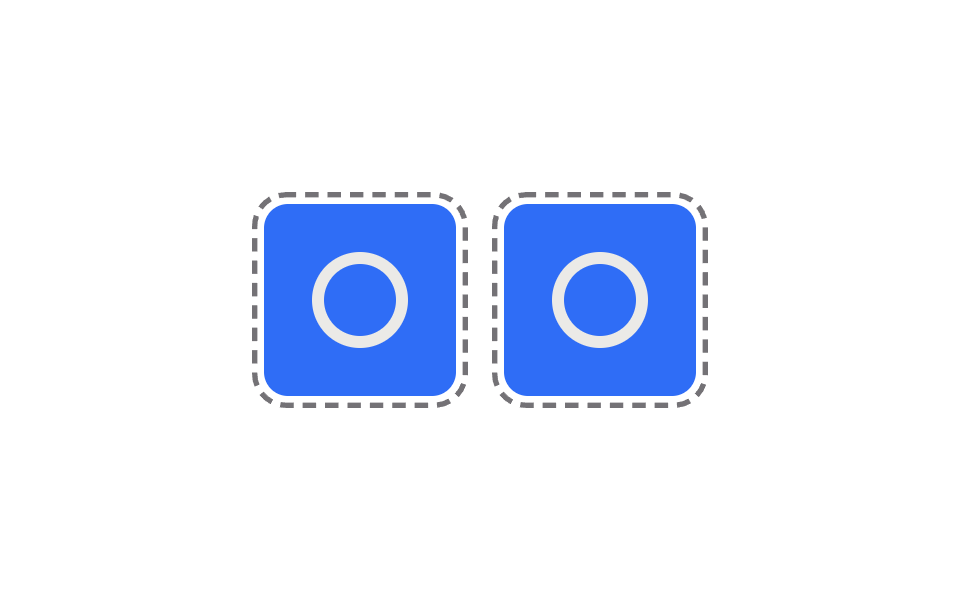
Draws dashed cut lines across a grid sheet of stickers, and clicking one makes it pop slightly forward as if punched out along that dashed line.
Best forSticker-pack landing pages, download previews
strokeDasharraystrokeDashoffsetaria-pressed
<main class="stage">
<div class="wrap is-demo" id="wrap">
  <div class="sheet">
    <button class="die" id="dieA" type="button" aria-pressed="false" aria-label="First sticker; press to punch it out">
      <span class="dieMark" aria-hidden="true"></span>
      <svg class="cutLine" viewBox="0 0 100 100" aria-hidden="true">
        <rect class="cutLineRect" x="3" y="3" width="94" height="94" rx="14" />
      </svg>
    </button>
    <button class="die" id="dieB" type="button" aria-pressed="false" aria-label="Second sticker; press to punch it out">
      <span class="dieMark" aria-hidden="true"></span>
      <svg class="cutLine" viewBox="0 0 100 100" aria-hidden="true">
        <rect class="cutLineRect" x="3" y="3" width="94" height="94" rx="14" />
      </svg>
    </button>
  </div>
</div>
</main>
@use "../../../../site/static/demo-tokens" as *;
// 계산 겹은 index.html 의 loop(ts) 안 offset 산술에 있다 — 경과 시간에 속도를 곱한 값을
// 점선 마디 길이로 모듈로 연산해 끊김 없이 도는 재단선(background-position)을 만든다.
// reduce 는 이 행진만 멈추고, 클릭으로 오려내는 실사용 경로는 그대로 둔다.
@include stage($stage-paper);
.wrap { display: grid; place-items: center; }
.sheet {
display: flex;
gap: $sp-6;
}
.die {
position: relative;
appearance: none;
border: 0;
padding: 0;
cursor: pointer;
width: 96px;
height: 96px;
border-radius: $r-control;
background: $subject-blue;
display: grid;
place-items: center;
transition: transform $dur-base $ease-out, opacity $dur-base $ease-out;
&:focus-visible { outline: 2px solid $subject-blue-deep; outline-offset: 3px; }
&.is-punched {
transform: scale(.9) rotate(-4deg);
opacity: .55;
}
}
.dieMark {
width: 36px;
height: 36px;
border-radius: 50%;
border: 6px solid rgba($subject-cream, .9);
}
.cutLine {
position: absolute;
inset: -8px;
width: calc(100% + 16px);
height: calc(100% + 16px);
pointer-events: none;
opacity: .6;
}
.cutLineRect {
fill: none;
stroke: $subject-ink;
stroke-width: 2.4;
}
@media (max-width: 340px) {
.sheet { gap: $sp-4; }
.die { width: 74px; height: 74px; }
.dieMark { width: 28px; height: 28px; border-width: 5px; }
}
@media (prefers-reduced-motion: reduce) {
.die { transition: none; }
}html, body {
margin: 0;
overflow: hidden;
}
.stage {
box-sizing: border-box;
min-height: 100vh;
display: grid;
place-items: center;
margin: 0;
background: #ffffff;
font-family: -apple-system, "Segoe UI", "Noto Sans KR", sans-serif;
padding: clamp(8px, 4vw, 24px);
}
.wrap {
display: grid;
place-items: center;
}
.sheet {
display: flex;
gap: 24px;
}
.die {
position: relative;
appearance: none;
border: 0;
padding: 0;
cursor: pointer;
width: 96px;
height: 96px;
border-radius: 12px;
background: #2f6df6;
display: grid;
place-items: center;
transition: transform 300ms ease-out, opacity 300ms ease-out;
}
.die:focus-visible {
outline: 2px solid #0a4fe8;
outline-offset: 3px;
}
.die.is-punched {
transform: scale(0.9) rotate(-4deg);
opacity: 0.55;
}
.dieMark {
width: 36px;
height: 36px;
border-radius: 50%;
border: 6px solid rgba(255, 247, 230, 0.9);
}
.cutLine {
position: absolute;
inset: -8px;
width: calc(100% + 16px);
height: calc(100% + 16px);
pointer-events: none;
opacity: 0.6;
}
.cutLineRect {
fill: none;
stroke: #17141a;
stroke-width: 2.4;
}
@media (max-width: 340px) {
.sheet {
gap: 16px;
}
.die {
width: 74px;
height: 74px;
}
.dieMark {
width: 28px;
height: 28px;
border-width: 5px;
}
}
@media (prefers-reduced-motion: reduce) {
.die {
transition: none;
}
}(function () {
var DASH = 6, GAP = 4; // 재단선 점선 한 마디 길이(svg 단위, viewBox 100 기준)
var MARCH_SPEED = 14; // 점선이 도는 속도(단위/s)
var PATTERN = DASH + GAP;
var STEP_MS = 1700;
var reduce = window.matchMedia('(prefers-reduced-motion: reduce)').matches;
var wrap = document.getElementById('wrap');
var dies = [document.getElementById('dieA'), document.getElementById('dieB')];
var rects = Array.prototype.map.call(document.querySelectorAll('.cutLineRect'), function (r) { return r; });
rects.forEach(function (r) { r.style.strokeDasharray = DASH + ' ' + GAP; });
var isDemo = true;
var punched = [false, false];
function human() { if (isDemo) { wrap.classList.remove('is-demo'); isDemo = false; } }
function togglePunch(i) {
punched[i] = !punched[i];
dies[i].setAttribute('aria-pressed', String(punched[i]));
dies[i].classList.toggle('is-punched', punched[i]);
}
dies.forEach(function (die, i) {
die.addEventListener('click', function () { human(); togglePunch(i); });
});
var last = 0, stepLast = 0, autoIdx = 0;
function autoAdvance(ts) {
if (ts - stepLast < STEP_MS) return;
stepLast = ts;
togglePunch(autoIdx);
autoIdx = (autoIdx + 1) % dies.length;
}
// 점선 마디 길이(PATTERN)에 대해 경과 시간을 곱한 오프셋을 모듈로 연산으로 되감아, 끊김 없이
// 도는 재단선(stroke-dashoffset)을 만든다 — 실제 인쇄 재단선의 "개미 행진" 표시와 같은 계산.
function loop(ts) {
if (!last) last = ts;
last = ts;
if (isDemo && !reduce) autoAdvance(ts);
if (!reduce) {
var offset = (ts * MARCH_SPEED / 1000) % PATTERN;
rects.forEach(function (r) { r.style.strokeDashoffset = (-offset).toFixed(2); });
}
requestAnimationFrame(loop);
}
requestAnimationFrame(loop);
})();// PrintCutLine — vanilla 판(run/378/demo/09-sticker-print-cut-line/index.html) 의 React 포트.
// 경과 시간에 속도를 곱한 값을 점선 마디 길이(PATTERN)로 모듈로 연산해 끊김 없이 도는
// 재단선(stroke-dashoffset)을 만든다 — SVG rect 의 stroke-dasharray 기반 마칭 앤츠.
import { useEffect, useRef } from "react";
import styles from "./PrintCutLine.module.scss";
type Box<T> = { current: T };
const DASH = 6, GAP = 4;
const MARCH_SPEED = 14;
const PATTERN = DASH + GAP;
const STEP_MS = 1700;
export default function PrintCutLine() {
const rootRef = useRef(null) as unknown as Box<HTMLDivElement>;
const dieARef = useRef(null) as unknown as Box<HTMLButtonElement>;
const dieBRef = useRef(null) as unknown as Box<HTMLButtonElement>;
const rectARef = useRef(null) as unknown as Box<SVGRectElement>;
const rectBRef = useRef(null) as unknown as Box<SVGRectElement>;
const rafRef = useRef(0) as unknown as Box<number>;
useEffect(() => {
const reduce = window.matchMedia("(prefers-reduced-motion: reduce)").matches;
const wrap = rootRef.current;
const dies = [dieARef.current, dieBRef.current];
const rects = [rectARef.current, rectBRef.current];
if (!wrap || dies.some((d) => !d) || rects.some((r) => !r)) return;
rects.forEach((r) => { r!.style.strokeDasharray = DASH + " " + GAP; });
let isDemo = true;
const punched = [false, false];
function human() { if (isDemo) { wrap!.classList.remove(styles.isDemo); isDemo = false; } }
function togglePunch(i: number) {
punched[i] = !punched[i];
dies[i]!.setAttribute("aria-pressed", String(punched[i]));
dies[i]!.classList.toggle(styles.isPunched, punched[i]);
}
const clickHandlers = dies.map((die, i) => {
const fn = () => { human(); togglePunch(i); };
die!.addEventListener("click", fn);
return fn;
});
let last = 0, stepLast = 0, autoIdx = 0;
function autoAdvance(ts: number) {
if (ts - stepLast < STEP_MS) return;
stepLast = ts;
togglePunch(autoIdx);
autoIdx = (autoIdx + 1) % dies.length;
}
function loop(ts: number) {
if (!last) last = ts;
last = ts;
if (isDemo && !reduce) autoAdvance(ts);
if (!reduce) {
const offset = (ts * MARCH_SPEED / 1000) % PATTERN;
rects.forEach((r) => { r!.style.strokeDashoffset = (-offset).toFixed(2); });
}
rafRef.current = requestAnimationFrame(loop);
}
rafRef.current = requestAnimationFrame(loop);
return () => {
dies.forEach((die, i) => die!.removeEventListener("click", clickHandlers[i]));
cancelAnimationFrame(rafRef.current);
};
}, []);
return (
<main className={styles.stage}>
<div className={styles.wrap + " " + styles.isDemo} ref={rootRef}>
<div className={styles.sheet}>
<button className={styles.die} ref={dieARef} type="button" aria-pressed="false" aria-label="첫 번째 스티커, 눌러서 오려내기">
<span className={styles.dieMark} aria-hidden="true"></span>
<svg className={styles.cutLine} viewBox="0 0 100 100" aria-hidden="true">
<rect ref={rectARef} className={styles.cutLineRect} x={3} y={3} width={94} height={94} rx={14} />
</svg>
</button>
<button className={styles.die} ref={dieBRef} type="button" aria-pressed="false" aria-label="두 번째 스티커, 눌러서 오려내기">
<span className={styles.dieMark} aria-hidden="true"></span>
<svg className={styles.cutLine} viewBox="0 0 100 100" aria-hidden="true">
<rect ref={rectBRef} className={styles.cutLineRect} x={3} y={3} width={94} height={94} rx={14} />
</svg>
</button>
</div>
</div>
</main>
);
}09 Sticker Sheet With Visible Cut Lines — Measured area 8.425% · moving frames 23/23Original by GODRICH · SCSS and React ship in the zip · CSS Sticker Peel Effect: 9 Styles, Border to Holo
The post this demo lives in
 CSS Sticker Peel Effect: 9 Styles, Border to HoloAmong nine css sticker peel effect ideas, one fakes a die-cut look with a white border and shadow, one sweeps rainbow li See all demos in this post