02Icon-only nav collapse
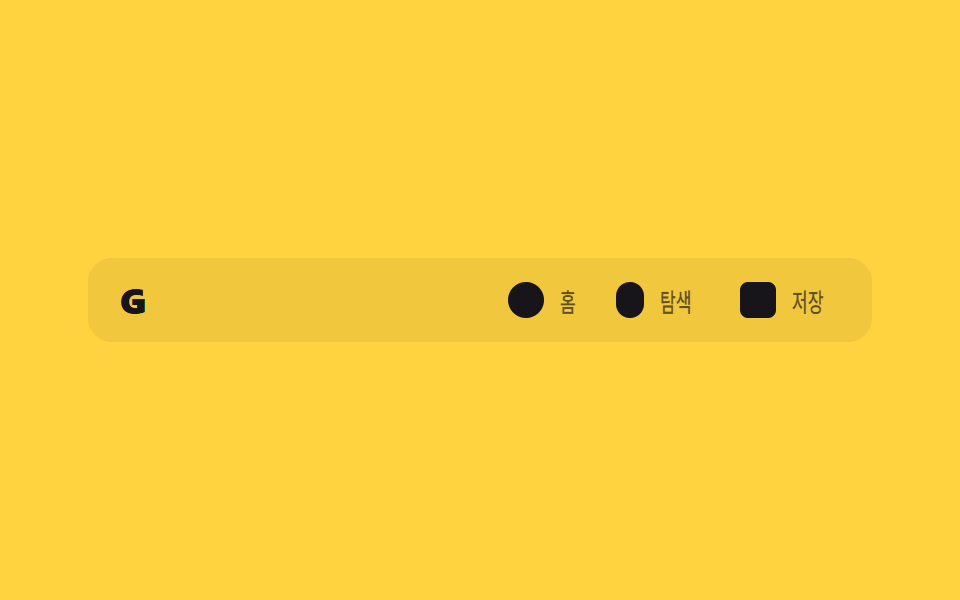
Nav link labels shrink away width-first as you scroll, leaving only icons so the header keeps its width tight.
Best forMobile web-app headers without a sidebar, narrow-viewport SPA top bars
width:0 축소opacity 페이드clip 텍스트
<main class="stage">
  <header class="ioc is-demo">
    <span class="ioc__logo">G</span>
    <nav class="ioc__nav">
      <a class="ioc__item" href="#"><span class="ioc__icon ioc__icon--home" aria-hidden="true"></span><span class="ioc__label">Home</span></a>
      <a class="ioc__item" href="#"><span class="ioc__icon ioc__icon--search" aria-hidden="true"></span><span class="ioc__label">Explore</span></a>
      <a class="ioc__item" href="#"><span class="ioc__icon ioc__icon--save" aria-hidden="true"></span><span class="ioc__label">Save</span></a>
    </nav>
  </header>
</main>
@use "../../../../site/static/demo-tokens" as *;
// ── 변수 3개. 변형은 이것만 바꾼다 ──────────────────────────
$duration: $dur-base; // 라벨이 접히는 시간
// 관성 lerp — p += (목표-p) * .22 를 22스텝 반복한 계산 결과를 커브로 굽는다 (형태 2차, 사용자 2026-09-14)
$easing: linear(0, .22, .392, .525, .63, .711, .775, .824, .863, .893, .917, .935, .949, .96, .969, .976, .981, .985, .989, .991, .993, .995, 1);
$color: $stage-ink; // 아이콘·라벨 색
@include stage($stage-yellow);
// 320px 데모 스테이지: stage() 믹스인은 html,body 에만 overflow:hidden 을 준다 — html(root)은
// 자기 overflow:hidden 이 scrollWidth 를 뷰포트에 눌러주지만 body 는 보통 요소라 그대로 실제 콘텐츠
// 폭을 보고한다. 아이콘 3개 + 라벨(nav gap 포함) 이 90vw 보다 실측 폭이 넓어 320px 에서 13px 넘친다
// (128-02 실측, body.scrollWidth 333 vs innerWidth 320). .stage 를 직접 잘라 위로 전파를 막는다.
.stage { overflow: hidden; }
.ioc {
width: min(360px, 90vw);
display: flex; align-items: center; justify-content: space-between;
padding: $sp-3 $sp-4;
border-radius: $r-control;
background: rgba($stage-ink, .06);
&__logo { color: $color; font-weight: 800; font-size: clamp(15px, 4vw, 18px); line-height: 1; font-family: inherit; letter-spacing: .04em; }
&__nav { display: flex; align-items: center; gap: $sp-4; }
}
.ioc__item {
display: flex; align-items: center; gap: $sp-2;
text-decoration: none;
color: $color;
}
.ioc__icon {
flex: none;
width: 18px; height: 18px;
border-radius: $r-xs;
background: $color;
&--home { border-radius: 50%; }
&--search { border-radius: $r-pill; width: 14px; }
&--save { border-radius: $r-xs; }
}
// 라벨: 항목마다 폭이 다른 텍스트를 진짜로 비켜 줘야(width 축소) 헤더 폭을 아끼는 게 보인다.
// max-width 애니메이션은 이 작은 요소 안에서만 — blog-demo 규칙1 의 예외 (본문 원리 섹션 재료)
.ioc__label {
overflow: hidden;
white-space: nowrap;
max-width: 40px;
transform-origin: left center; // 규칙8: 라벨 좌측 기준 접힘
font-weight: 500;
font-size: clamp(12px, 3.4vw, 13px);
line-height: 1;
font-family: inherit;
color: $color;
transition: max-width $duration $easing, transform $duration $easing, opacity $duration $easing;
}
// 실제 사용: 스크롤하면 라벨이 폭과 함께 접혀 아이콘만 남는다
.ioc.is-scrolled .ioc__label { max-width: 0; transform: scaleX(0); opacity: 0; }
// ── 데모(.is-demo): 접혔다 펼쳐지는 2초 루프 ──────────────
.ioc.is-demo .ioc__label { animation: ioc-label-loop $dur-loop $easing infinite; }
@keyframes ioc-label-loop {
0%, 20% { max-width: 40px; transform: scaleX(1); opacity: 1; }
45%, 70% { max-width: 0; transform: scaleX(0); opacity: 0; }
95%, 100% { max-width: 40px; transform: scaleX(1); opacity: 1; }
}
// ── 접근성 ──────────────────────────────────────────
@media (prefers-reduced-motion: reduce) {
.ioc__label { transition: none; }
.ioc.is-demo .ioc__label { animation: none !important; max-width: 40px; transform: scaleX(1); opacity: 1; }
}html, body {
margin: 0;
overflow: hidden;
}
.stage {
box-sizing: border-box;
min-height: 100vh;
display: grid;
place-items: center;
margin: 0;
background: #ffd23f;
font-family: -apple-system, "Segoe UI", "Noto Sans KR", sans-serif;
padding: clamp(8px, 4vw, 24px);
}
.stage {
overflow: hidden;
}
.ioc {
width: min(360px, 90vw);
display: flex;
align-items: center;
justify-content: space-between;
padding: 12px 16px;
border-radius: 12px;
background: rgba(23, 20, 26, 0.06);
}
.ioc__logo {
color: #17141a;
font-weight: 800;
font-size: clamp(15px, 4vw, 18px);
line-height: 1;
font-family: inherit;
letter-spacing: 0.04em;
}
.ioc__nav {
display: flex;
align-items: center;
gap: 16px;
}
.ioc__item {
display: flex;
align-items: center;
gap: 8px;
text-decoration: none;
color: #17141a;
}
.ioc__icon {
flex: none;
width: 18px;
height: 18px;
border-radius: 4px;
background: #17141a;
}
.ioc__icon--home {
border-radius: 50%;
}
.ioc__icon--search {
border-radius: 999px;
width: 14px;
}
.ioc__icon--save {
border-radius: 4px;
}
.ioc__label {
overflow: hidden;
white-space: nowrap;
max-width: 40px;
transform-origin: left center;
font-weight: 500;
font-size: clamp(12px, 3.4vw, 13px);
line-height: 1;
font-family: inherit;
color: #17141a;
transition: max-width 300ms linear(0, 0.22, 0.392, 0.525, 0.63, 0.711, 0.775, 0.824, 0.863, 0.893, 0.917, 0.935, 0.949, 0.96, 0.969, 0.976, 0.981, 0.985, 0.989, 0.991, 0.993, 0.995, 1), transform 300ms linear(0, 0.22, 0.392, 0.525, 0.63, 0.711, 0.775, 0.824, 0.863, 0.893, 0.917, 0.935, 0.949, 0.96, 0.969, 0.976, 0.981, 0.985, 0.989, 0.991, 0.993, 0.995, 1), opacity 300ms linear(0, 0.22, 0.392, 0.525, 0.63, 0.711, 0.775, 0.824, 0.863, 0.893, 0.917, 0.935, 0.949, 0.96, 0.969, 0.976, 0.981, 0.985, 0.989, 0.991, 0.993, 0.995, 1);
}
.ioc.is-scrolled .ioc__label {
max-width: 0;
transform: scaleX(0);
opacity: 0;
}
.ioc.is-demo .ioc__label {
animation: ioc-label-loop 2s linear(0, 0.22, 0.392, 0.525, 0.63, 0.711, 0.775, 0.824, 0.863, 0.893, 0.917, 0.935, 0.949, 0.96, 0.969, 0.976, 0.981, 0.985, 0.989, 0.991, 0.993, 0.995, 1) infinite;
}
@keyframes ioc-label-loop {
0%, 20% {
max-width: 40px;
transform: scaleX(1);
opacity: 1;
}
45%, 70% {
max-width: 0;
transform: scaleX(0);
opacity: 0;
}
95%, 100% {
max-width: 40px;
transform: scaleX(1);
opacity: 1;
}
}
@media (prefers-reduced-motion: reduce) {
.ioc__label {
transition: none;
}
.ioc.is-demo .ioc__label {
animation: none !important;
max-width: 40px;
transform: scaleX(1);
opacity: 1;
}
}// 실제 페이지: 스크롤하면 라벨 폭이 줄며 사라지고 아이콘만 남는다 (7줄)
var el = document.querySelector('.ioc');
window.addEventListener('scroll', function () {
el.classList.toggle('is-scrolled', window.scrollY > 20);
}, { passive: true });import { useEffect, useRef } from "react";
import type { CSSProperties, ReactNode } from "react";
import styles from "./IconOnlyNav.module.scss";
export type IconOnlyNavItem = {
key: string;
label: string;
icon: ReactNode;
href?: string;
};
export type IconOnlyNavProps = {
logo: string;
items: IconOnlyNavItem[];
/** 라벨이 접히는 시간 (기본 300ms) */
duration?: number;
/** 관성 lerp 커브(p += (목표-p)*.22 를 22스텝 반복해 구운 linear()) — 기본값이 vanilla 와 같다 */
easing?: string;
color?: string;
};
// vanilla 128 과 같은 관성 lerp 커브 — p += (목표-p)*.22 를 22스텝 반복해 구운 linear()
const LERP_EASING = "linear(0, .22, .392, .525, .63, .711, .775, .824, .863, .893, .917, .935, .949, .96, .969, .976, .981, .985, .989, .991, .993, .995, 1)";
type Vars = CSSProperties & { "--duration"?: string; "--easing"?: string; "--color"?: string };
export default function IconOnlyNav({
logo,
items,
duration = 300,
easing = LERP_EASING,
color = "#17141a",
}: IconOnlyNavProps) {
const ref = useRef<HTMLElement>(null);
const vars: Vars = { "--duration": `${duration}ms`, "--easing": easing, "--color": color };
useEffect(() => {
function onScroll() {
ref.current?.classList.toggle("is-scrolled", window.scrollY > 20);
}
window.addEventListener("scroll", onScroll, { passive: true });
return () => window.removeEventListener("scroll", onScroll);
}, []);
return (
<header ref={ref} className={styles.head} style={vars}>
<span className={styles.logo}>{logo}</span>
<nav className={styles.nav}>
{items.map((it) => (
<a key={it.key} className={styles.item} href={it.href ?? "#"}>
<span className={styles.icon}>{it.icon}</span>
<span className={styles.label}>{it.label}</span>
</a>
))}
</nav>
</header>
);
}02 Icon-only nav collapse — Measured area 1.844% · moving frames 14/23Original by GODRICH · SCSS and React ship in the zip · 9 CSS Sticky Header Extras — Search, CTA, Badge
The post this demo lives in
 9 CSS Sticky Header Extras — Search, CTA, BadgeA CSS sticky header keeps a page's menu bar pinned to the top while everything below scrolls past. These nine make piece See all demos in this post