04Multi-line typing
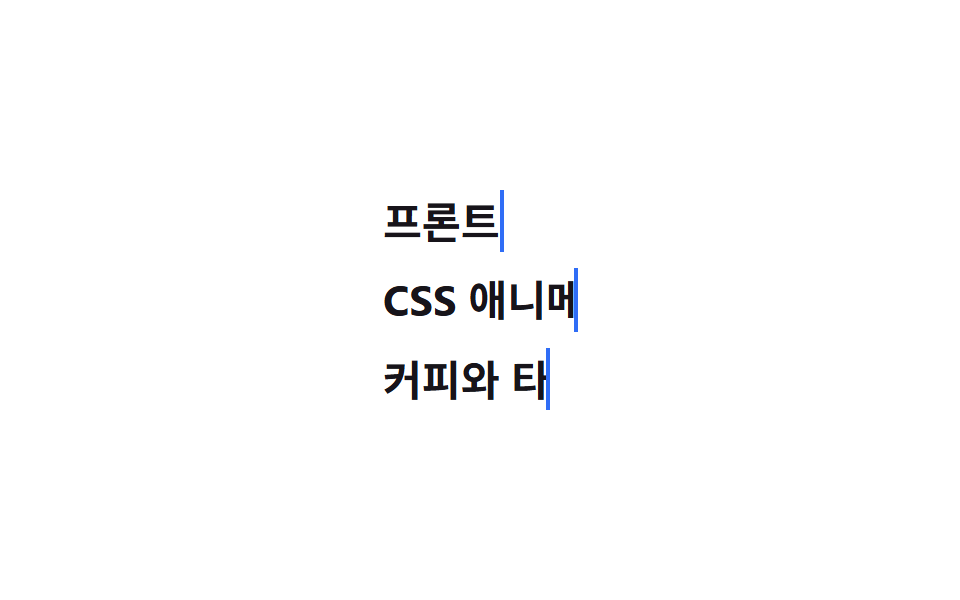
Each line owns its own steps() keyframes, and the wait comes not from animation-delay but from how long each keyframe holds width at 0 (0%, 10%, 34%), so the next line starts typing only after the one above finishes.
Best forCode editor intros, multi-line bio cards
줄마다 steps()퍼센트 구간 분리overflow: hidden
<main class="stage">
  <div class="lines">
    <p class="lines__row"><span class="lines__text lines__text--1">Frontend developer</span></p>
    <p class="lines__row"><span class="lines__text lines__text--2">I love CSS animation</span></p>
    <p class="lines__row"><span class="lines__text lines__text--3">I enjoy coffee and typing</span></p>
  </div>
</main>
@use "../../../../site/static/demo-tokens" as *;
$duration: $dur-loop; // 세 줄이 도는 전체 루프
$easing: $ease-out; // 다 친 뒤 접히는 구간의 곡선 (타이핑 자체는 줄마다 steps())
$color: $subject-blue; // 커서 색
@include stage($stage-paper);
.lines {
display: grid;
gap: clamp(4px, 1.6vw, 10px);
font-weight: 700; font-size: clamp(15px, 4.4vw, 22px); line-height: 1.5; font-family: inherit;
color: $stage-ink;
&__row { margin: 0; }
&__text {
display: inline-block;
overflow: hidden;
white-space: nowrap;
vertical-align: bottom;
width: 0;
border-right: .1em solid $color;
animation-duration: $duration;
animation-timing-function: $easing;
animation-iteration-count: infinite;
&--1 { animation-name: l1-type; }
&--2 { animation-name: l2-type; }
&--3 { animation-name: l3-type; }
}
}
@keyframes l1-type {
0% { width: 0; animation-timing-function: steps(9, end); }
10% { width: var(--full, 9ch); }
88% { width: var(--full, 9ch); }
96%, 100% { width: 0; }
}
@keyframes l2-type {
0%, 10% { width: 0; animation-timing-function: steps(16, end); }
34% { width: var(--full, 16ch); }
88% { width: var(--full, 16ch); }
96%, 100% { width: 0; }
}
@keyframes l3-type {
0%, 34% { width: 0; animation-timing-function: steps(13, end); }
54% { width: var(--full, 13ch); }
88% { width: var(--full, 13ch); }
96%, 100% { width: 0; }
}
@media (prefers-reduced-motion: reduce) {
.lines__text { animation: none; width: var(--full, 16ch); border-right-color: transparent; }
}html, body {
margin: 0;
overflow: hidden;
}
.stage {
box-sizing: border-box;
min-height: 100vh;
display: grid;
place-items: center;
margin: 0;
background: #ffffff;
font-family: -apple-system, "Segoe UI", "Noto Sans KR", sans-serif;
padding: clamp(8px, 4vw, 24px);
}
.lines {
display: grid;
gap: clamp(4px, 1.6vw, 10px);
font-weight: 700;
font-size: clamp(15px, 4.4vw, 22px);
line-height: 1.5;
font-family: inherit;
color: #17141a;
}
.lines__row {
margin: 0;
}
.lines__text {
display: inline-block;
overflow: hidden;
white-space: nowrap;
vertical-align: bottom;
width: 0;
border-right: 0.1em solid #2f6df6;
animation-duration: 2s;
animation-timing-function: ease-out;
animation-iteration-count: infinite;
}
.lines__text--1 {
animation-name: l1-type;
}
.lines__text--2 {
animation-name: l2-type;
}
.lines__text--3 {
animation-name: l3-type;
}
@keyframes l1-type {
0% {
width: 0;
animation-timing-function: steps(9, end);
}
10% {
width: var(--full, 9ch);
}
88% {
width: var(--full, 9ch);
}
96%, 100% {
width: 0;
}
}
@keyframes l2-type {
0%, 10% {
width: 0;
animation-timing-function: steps(16, end);
}
34% {
width: var(--full, 16ch);
}
88% {
width: var(--full, 16ch);
}
96%, 100% {
width: 0;
}
}
@keyframes l3-type {
0%, 34% {
width: 0;
animation-timing-function: steps(13, end);
}
54% {
width: var(--full, 13ch);
}
88% {
width: var(--full, 13ch);
}
96%, 100% {
width: 0;
}
}
@media (prefers-reduced-motion: reduce) {
.lines__text {
animation: none;
width: var(--full, 16ch);
border-right-color: transparent;
}
}(function () {
var cv = document.createElement('canvas').getContext('2d');
document.querySelectorAll('.lines__text').forEach(function (el) {
cv.font = getComputedStyle(el).font;
el.style.setProperty('--full', Math.ceil(cv.measureText(el.textContent).width) + 'px');
});
})();import { useEffect, useRef } from "react";
import type { CSSProperties } from "react";
import styles from "./MultiLineTyping.module.scss";
export type MultiLineTypingProps = {
lines: [string, string, string];
/** 세 줄이 도는 전체 루프 (기본 2000ms) */
duration?: number;
color?: string;
};
export default function MultiLineTyping({ lines, duration = 2000, color = "#2f6df6" }: MultiLineTypingProps) {
const r1 = useRef<HTMLSpanElement | null>(null);
const r2 = useRef<HTMLSpanElement | null>(null);
const r3 = useRef<HTMLSpanElement | null>(null);
useEffect(() => {
const cv = document.createElement("canvas").getContext("2d");
if (!cv) return;
[r1, r2, r3].forEach((r) => {
const el = r.current;
if (!el) return;
cv.font = getComputedStyle(el).font;
el.style.setProperty("--full", Math.ceil(cv.measureText(el.textContent || "").width) + "px");
});
}, [lines]);
const vars = { "--duration": `${duration}ms`, "--color": color } as CSSProperties;
const e = (s: string) => ({ "--easing": `steps(${s.length}, end)` } as CSSProperties);
return (
<div className={styles.lines} style={vars}>
<p className={styles.row}><span ref={r1} className={`${styles.text} ${styles.l1}`} style={e(lines[0])}>{lines[0]}</span></p>
<p className={styles.row}><span ref={r2} className={`${styles.text} ${styles.l2}`} style={e(lines[1])}>{lines[1]}</span></p>
<p className={styles.row}><span ref={r3} className={`${styles.text} ${styles.l3}`} style={e(lines[2])}>{lines[2]}</span></p>
</div>
);
}04 Multi-line typing — Measured area 8.264% · moving frames 15/23Original by GODRICH · SCSS and React ship in the zip · 9 CSS Typing Animation, One Line, Copy-Paste
The post this demo lives in
 9 CSS Typing Animation, One Line, Copy-PasteA css typing animation is a text effect that types itself onto the screen letter by letter, built from a width transitio See all demos in this post