04Count-badge roll toggle — each time the selected-count value rises or falls, the badge digit's position value rolls up or down
Each time the selected-count value goes up or down by one, the badge digit's vertical-position value rolls toward the next number.
Best forA list for picking multiple items, a filter showing the selection count live
ROLL_MStranslateYclip-path
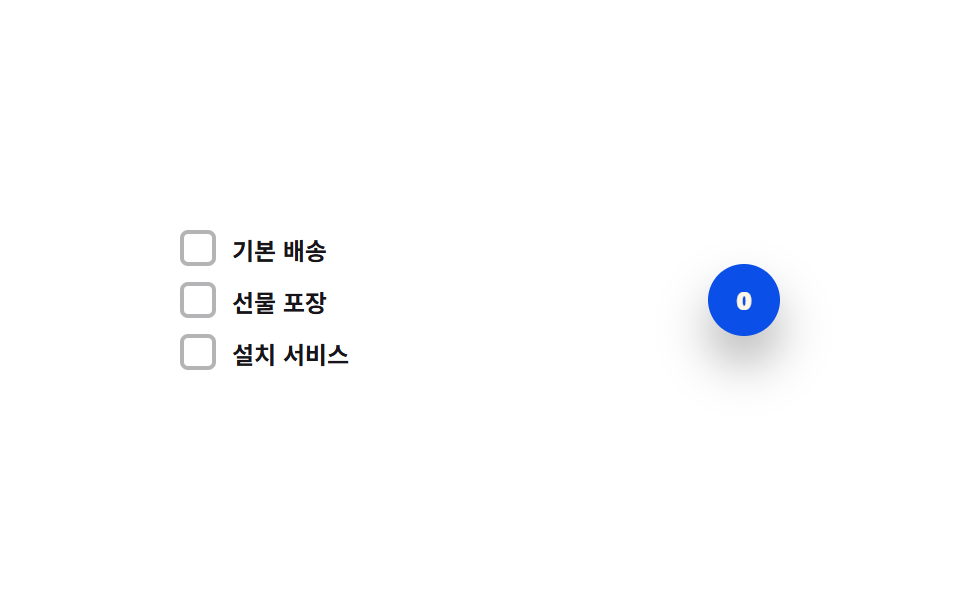
<main class="stage">
<div class="cbc is-demo" id="cbc">
  <div class="cbc__list">
    <label class="cbc__row">
      <input type="checkbox" class="cbc__input" id="cbcItem0">
      <span class="cbc__box" id="cbcBox0" aria-hidden="true">
        <svg viewBox="0 0 20 20" width="12" height="12"><path d="M4 10.5l3.5 3.5L16 5.5" fill="none" stroke="currentColor" stroke-width="2.6" stroke-linecap="round" stroke-linejoin="round"/></svg>
      </span>
      <span class="cbc__text">Standard shipping</span>
    </label>
    <label class="cbc__row">
      <input type="checkbox" class="cbc__input" id="cbcItem1">
      <span class="cbc__box" id="cbcBox1" aria-hidden="true">
        <svg viewBox="0 0 20 20" width="12" height="12"><path d="M4 10.5l3.5 3.5L16 5.5" fill="none" stroke="currentColor" stroke-width="2.6" stroke-linecap="round" stroke-linejoin="round"/></svg>
      </span>
      <span class="cbc__text">Gift wrapping</span>
    </label>
    <label class="cbc__row">
      <input type="checkbox" class="cbc__input" id="cbcItem2">
      <span class="cbc__box" id="cbcBox2" aria-hidden="true">
        <svg viewBox="0 0 20 20" width="12" height="12"><path d="M4 10.5l3.5 3.5L16 5.5" fill="none" stroke="currentColor" stroke-width="2.6" stroke-linecap="round" stroke-linejoin="round"/></svg>
      </span>
      <span class="cbc__text">Installation service</span>
    </label>
  </div>
  <span class="cbc__badge">
    <span class="cbc__window">
      <span class="cbc__strip" id="cbcStrip">
        <span>0</span><span>1</span><span>2</span><span>3</span>
      </span>
    </span>
  </span>
</div>
</main>@use "../../../../site/static/demo-tokens" as *;
// 계산 겹: index.html paint() 가 체크된 개수 → 목표 translateY 값을 만들고, easeOutCubic 을
// rAF 로 직접 적분해 숫자 strip 을 다음 칸으로 굴린다 — clip-path 가 그 칸 하나만 보이는
// 창을 만든다(overflow:hidden 이 아니라 계산된 사각 경계로 자른다).
@include stage($stage-paper);
.cbc {
display: flex;
align-items: center;
gap: $sp-6;
width: 100%;
max-width: 300px;
}
.cbc__list {
display: grid;
gap: $sp-2;
flex: 1 1 auto;
}
.cbc__row {
display: flex;
align-items: center;
gap: $sp-2;
cursor: pointer;
user-select: none;
}
.cbc__input {
position: absolute;
width: 1px;
height: 1px;
opacity: 0;
pointer-events: none;
}
.cbc__box {
flex: 0 0 auto;
width: 18px;
height: 18px;
border-radius: $r-xs;
border: 2px solid rgba($subject-ink, .32);
background: transparent;
color: transparent;
display: grid;
place-items: center;
box-sizing: border-box;
transition: background-color $dur-quick $ease-out, border-color $dur-quick $ease-out, color $dur-quick $ease-out;
}
.cbc__box--on {
background: $subject-blue;
border-color: $subject-blue;
color: $subject-cream;
}
.cbc__input:focus-visible + .cbc__box {
outline: 2px solid $subject-blue-light;
outline-offset: 2px;
}
.cbc__text {
color: $subject-ink;
font-size: 12px;
font-weight: 600;
}
.cbc__badge {
flex: 0 0 auto;
width: 36px;
height: 36px;
border-radius: $r-pill;
background: $subject-blue-deep;
display: grid;
place-items: center;
box-shadow: $shadow-raised;
}
.cbc__window {
display: block;
width: 14px;
height: 18px;
overflow: hidden;
clip-path: inset(0 0 0 0 round $r-xs);
}
.cbc__strip {
display: flex;
flex-direction: column;
align-items: center;
will-change: transform;
span {
height: 18px;
line-height: 18px;
color: $subject-cream;
font-weight: 800;
font-size: 13px;
}
}
@media (max-width: 340px) {
.cbc { gap: $sp-4; }
.cbc__text { font-size: 11px; }
}
@media (prefers-reduced-motion: reduce) {
.cbc__box { transition: none; }
}html, body {
margin: 0;
overflow: hidden;
}
.stage {
box-sizing: border-box;
min-height: 100vh;
display: grid;
place-items: center;
margin: 0;
background: #ffffff;
font-family: -apple-system, "Segoe UI", "Noto Sans KR", sans-serif;
padding: clamp(8px, 4vw, 24px);
}
.cbc {
display: flex;
align-items: center;
gap: 24px;
width: 100%;
max-width: 300px;
}
.cbc__list {
display: grid;
gap: 8px;
flex: 1 1 auto;
}
.cbc__row {
display: flex;
align-items: center;
gap: 8px;
cursor: pointer;
user-select: none;
}
.cbc__input {
position: absolute;
width: 1px;
height: 1px;
opacity: 0;
pointer-events: none;
}
.cbc__box {
flex: 0 0 auto;
width: 18px;
height: 18px;
border-radius: 4px;
border: 2px solid rgba(23, 20, 26, 0.32);
background: transparent;
color: transparent;
display: grid;
place-items: center;
box-sizing: border-box;
transition: background-color 220ms ease-out, border-color 220ms ease-out, color 220ms ease-out;
}
.cbc__box--on {
background: #2f6df6;
border-color: #2f6df6;
color: #fff7e6;
}
.cbc__input:focus-visible + .cbc__box {
outline: 2px solid #5b8cf8;
outline-offset: 2px;
}
.cbc__text {
color: #17141a;
font-size: 12px;
font-weight: 600;
}
.cbc__badge {
flex: 0 0 auto;
width: 36px;
height: 36px;
border-radius: 999px;
background: #0a4fe8;
display: grid;
place-items: center;
box-shadow: 0 14px 24px rgba(23, 20, 26, 0.32);
}
.cbc__window {
display: block;
width: 14px;
height: 18px;
overflow: hidden;
clip-path: inset(0 0 0 0 round 4px);
}
.cbc__strip {
display: flex;
flex-direction: column;
align-items: center;
will-change: transform;
}
.cbc__strip span {
height: 18px;
line-height: 18px;
color: #fff7e6;
font-weight: 800;
font-size: 13px;
}
@media (max-width: 340px) {
.cbc {
gap: 16px;
}
.cbc__text {
font-size: 11px;
}
}
@media (prefers-reduced-motion: reduce) {
.cbc__box {
transition: none;
}
}(function () {
var ROW_H = 18; // px, 숫자 롤 한 칸 높이
var ROLL_MS = 260; // 계산 겹 상수: 숫자가 다음 칸으로 굴러가는 데 걸리는 실제 시간(ms)
var CYCLE_MS = 560; // 자동 루프가 항목을 하나씩 체크하는 간격
var reduce = window.matchMedia('(prefers-reduced-motion: reduce)').matches;
var root = document.getElementById('cbc');
var strip = document.getElementById('cbcStrip');
var inputs = [document.getElementById('cbcItem0'), document.getElementById('cbcItem1'), document.getElementById('cbcItem2')];
var boxes = [document.getElementById('cbcBox0'), document.getElementById('cbcBox1'), document.getElementById('cbcBox2')];
var isDemo = true;
var pos = 0, from = 0, to = 0, rollStart = 0, rolling = false;
function human() {
if (isDemo) { root.classList.remove('is-demo'); isDemo = false; }
}
function easeOutCubic(t) { return 1 - Math.pow(1 - t, 3); }
function currentPos(ts) {
if (!rolling) return to;
var t = Math.min(1, (ts - rollStart) / ROLL_MS);
return from + (to - from) * easeOutCubic(t);
}
function paint(ts) {
inputs.forEach(function (inp, i) { boxes[i].classList.toggle('cbc__box--on', inp.checked); });
var count = inputs.filter(function (i) { return i.checked; }).length;
var target = -count * ROW_H;
if (target !== to) {
from = currentPos(ts);
to = target;
rollStart = ts;
rolling = true;
}
}
inputs.forEach(function (inp) {
inp.addEventListener('change', function () { human(); paint(performance.now()); });
});
var cycleStart = 0;
var lastN = -1;
var SEQ = [[false, false, false], [true, false, false], [true, true, false], [true, true, true], [true, true, false], [true, false, false], [false, false, false]];
function loop(ts) {
if (!cycleStart) cycleStart = ts;
if (isDemo) {
var n = Math.floor((ts - cycleStart) / CYCLE_MS) % SEQ.length;
if (n !== lastN) {
lastN = n;
var state = SEQ[n];
inputs.forEach(function (inp, i) { inp.checked = state[i]; });
paint(ts);
}
}
pos = currentPos(ts);
strip.style.transform = 'translateY(' + pos.toFixed(2) + 'px)';
requestAnimationFrame(loop);
}
if (reduce) { ROLL_MS = 1; }
requestAnimationFrame(loop);
})();// CountBadgeRoll — vanilla 판(run/368/demo/04-custom-checkbox-count-badge-roll/index.html) 의 React 포트.
// 체크된 개수 → 목표 translateY 값을 만들고 easeOutCubic 을 rAF 로 직접 적분해 숫자 strip 을
// 다음 칸으로 굴린다. clip-path 가 그 칸 하나만 보이는 창을 만든다.
import { useEffect, useRef } from "react";
import styles from "./CountBadgeRoll.module.scss";
type Box<T> = { current: T };
const ITEMS = [
{ id: "item0", label: "기본 배송" },
{ id: "item1", label: "선물 포장" },
{ id: "item2", label: "설치 서비스" },
];
export default function CountBadgeRoll() {
const rootRef = useRef(null) as unknown as Box<HTMLDivElement>;
const stripRef = useRef(null) as unknown as Box<HTMLSpanElement>;
const inputRefs = useRef([null, null, null]) as unknown as Box<(HTMLInputElement | null)[]>;
const boxRefs = useRef([null, null, null]) as unknown as Box<(HTMLSpanElement | null)[]>;
const rafRef = useRef(0) as unknown as Box<number>;
useEffect(() => {
const ROW_H = 18; // px, 숫자 롤 한 칸 높이
let ROLL_MS = 260; // 계산 겹 상수: 숫자가 다음 칸으로 굴러가는 데 걸리는 실제 시간(ms)
const CYCLE_MS = 560; // 자동 루프가 항목을 하나씩 체크하는 간격
const reduce = window.matchMedia("(prefers-reduced-motion: reduce)").matches;
const root = rootRef.current;
const strip = stripRef.current;
const inputs = inputRefs.current;
const boxes = boxRefs.current;
if (!root || !strip) return;
let isDemo = true;
let pos = 0, from = 0, to = 0, rollStart = 0, rolling = false;
function human() {
if (isDemo) { root!.classList.remove(styles.isDemo); isDemo = false; }
}
function easeOutCubic(t: number) { return 1 - Math.pow(1 - t, 3); }
function currentPos(ts: number) {
if (!rolling) return to;
const t = Math.min(1, (ts - rollStart) / ROLL_MS);
return from + (to - from) * easeOutCubic(t);
}
function paint(ts: number) {
inputs.forEach((inp, i) => { boxes[i]?.classList.toggle(styles.boxOn, inp ? inp.checked : false); });
const count = inputs.filter((i) => i?.checked).length;
const target = -count * ROW_H;
if (target !== to) {
from = currentPos(ts);
to = target;
rollStart = ts;
rolling = true;
}
}
const handlers = inputs.map((inp) => {
const fn = () => { human(); paint(performance.now()); };
inp?.addEventListener("change", fn);
return fn;
});
let cycleStart = 0;
let lastN = -1;
const SEQ = [
[false, false, false], [true, false, false], [true, true, false], [true, true, true],
[true, true, false], [true, false, false], [false, false, false],
];
function loop(ts: number) {
if (!cycleStart) cycleStart = ts;
if (isDemo) {
const n = Math.floor((ts - cycleStart) / CYCLE_MS) % SEQ.length;
if (n !== lastN) {
lastN = n;
const state = SEQ[n];
inputs.forEach((inp, i) => { if (inp) inp.checked = state[i]; });
paint(ts);
}
}
pos = currentPos(ts);
strip!.style.transform = "translateY(" + pos.toFixed(2) + "px)";
rafRef.current = requestAnimationFrame(loop);
}
if (reduce) { ROLL_MS = 1; }
rafRef.current = requestAnimationFrame(loop);
return () => {
inputs.forEach((inp, i) => inp?.removeEventListener("change", handlers[i]));
cancelAnimationFrame(rafRef.current);
};
}, []);
return (
<main className={styles.stage}>
<div className={styles.cbc + " " + styles.isDemo} ref={rootRef}>
<div className={styles.cbcList}>
{ITEMS.map((it, i) => (
<label className={styles.cbcRow} key={it.id}>
<input
type="checkbox"
className={styles.cbcInput}
ref={(el: HTMLInputElement | null) => { inputRefs.current[i] = el; }}
/>
<span
className={styles.cbcBox}
ref={(el: HTMLSpanElement | null) => { boxRefs.current[i] = el; }}
aria-hidden="true"
>
<svg viewBox="0 0 20 20" width={12} height={12}>
<path d="M4 10.5l3.5 3.5L16 5.5" fill="none" stroke="currentColor" strokeWidth={2.6} strokeLinecap="round" strokeLinejoin="round" />
</svg>
</span>
<span className={styles.cbcText}>{it.label}</span>
</label>
))}
</div>
<span className={styles.cbcBadge}>
<span className={styles.cbcWindow}>
<span className={styles.cbcStrip} ref={stripRef}>
<span>0</span><span>1</span><span>2</span><span>3</span>
</span>
</span>
</span>
</div>
</main>
);
}04 Count-badge roll toggle — each time the selected-count value rises or falls, the badge digit's position value rolls up or down — Measured area 0.765% · moving frames 13/23Original by GODRICH · SCSS and React ship in the zip · CSS Custom Checkbox: 9 Interaction Patterns
The post this demo lives in
 CSS Custom Checkbox: 9 Interaction PatternsCSS Custom Checkbox: One of nine draws its checkmark length to full on check, one bounces the box size then settles on t See all demos in this post
If you like this effect - similar demos
 Inputs05 Live validity value toggle — each time a digit value fills in, the whole number's validity value is recalculated and the display value changesCredit Card Input UI: 9 Patterns
 Inputs01 Length threshold fill — the strength value steps up each time the input's character-count value crosses a set boundary valuePassword Strength Meter UI: 9 Calculation Patterns
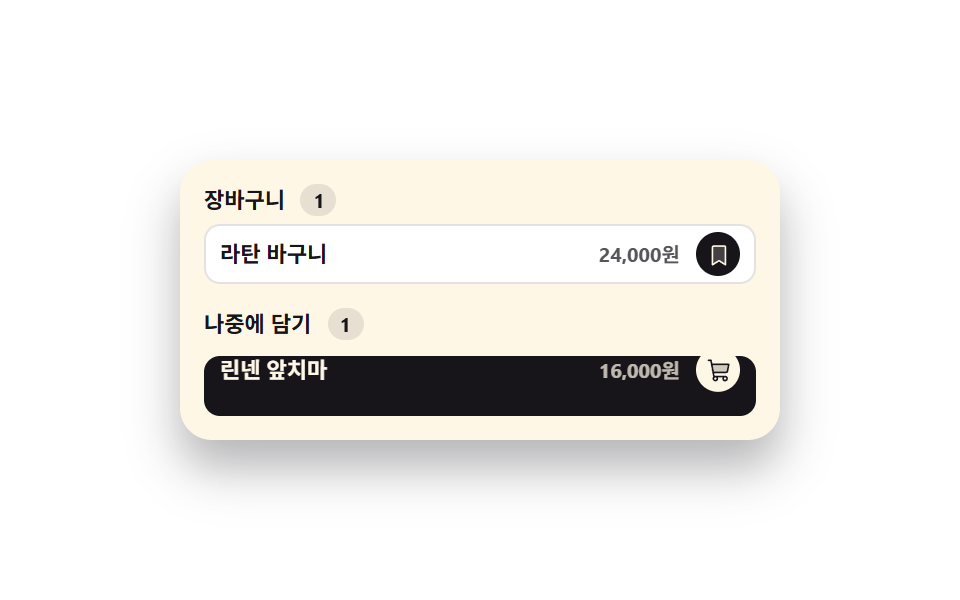 Inputs02 Line item that slides down into the saved-for-later groupCheckout Page Design — 9 Cart Patterns, No Library