06Complementary, analogous and triadic sets from one hue
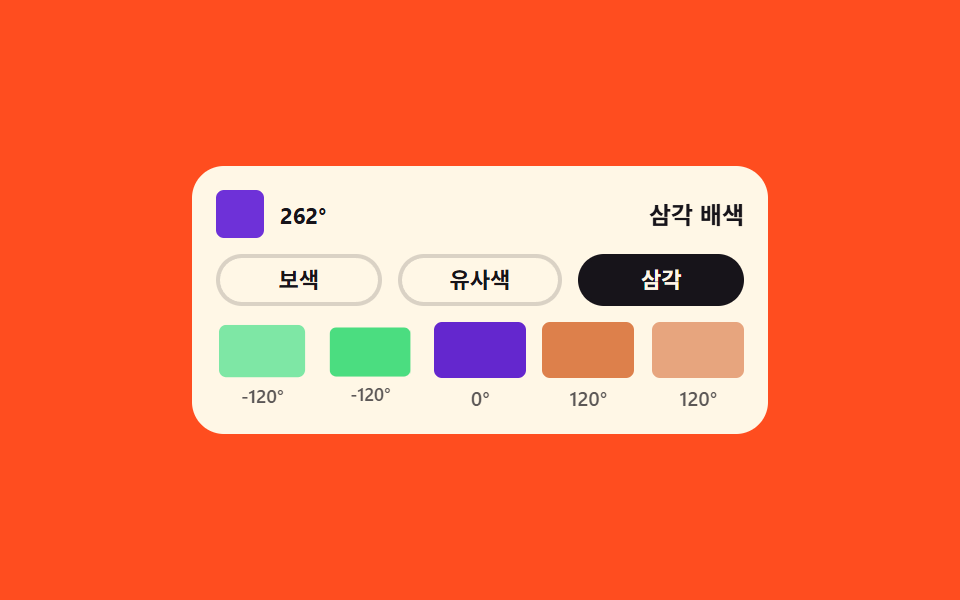
Add 180, plus or minus 30, and plus or minus 120 degrees to the base hue to build three sets, laid out as five chips.
Best forFirst-draft brand palettes, assigning chart colors
hslsteps(1, end)scale
<main class="stage">
  <div class="hm is-demo">
    <div class="hm__top">
      <div class="hm__base" id="hmBase" role="slider" tabindex="0"
           aria-label="Base hue"
           aria-valuemin="0" aria-valuemax="360" aria-valuenow="262"
           aria-valuetext="Base hue 262 degrees"></div>
      <span class="hm__basev" aria-hidden="true"></span>
      <span class="hm__names" aria-hidden="true">
        <b class="hm__name hm__name--1 is-on">Complementary</b>
        <b class="hm__name hm__name--2">Analogous</b>
        <b class="hm__name hm__name--3">Triadic</b>
      </span>
    </div>
    <div class="hm__tabs" role="group" aria-label="Pick a harmony">
      <button type="button" class="hm__tab" data-set="comp" aria-pressed="true">Comp</button>
      <button type="button" class="hm__tab" data-set="ana" aria-pressed="false">Analog</button>
      <button type="button" class="hm__tab" data-set="tri" aria-pressed="false">Triad</button>
    </div>
    <ul class="hm__chips">
      <li class="hm__chip"><span class="hm__sw"></span><span class="hm__deg"></span></li>
      <li class="hm__chip"><span class="hm__sw"></span><span class="hm__deg"></span></li>
      <li class="hm__chip"><span class="hm__sw"></span><span class="hm__deg"></span></li>
      <li class="hm__chip"><span class="hm__sw"></span><span class="hm__deg"></span></li>
      <li class="hm__chip"><span class="hm__sw"></span><span class="hm__deg"></span></li>
    </ul>
  </div>
</main>@use "../../../../site/static/demo-tokens" as *;
// 배색 생성기 — 기준 색상값 하나에서 보색·유사색·삼각 배색을 만든다.
// 색을 다섯 번 계산하지 않는다. 칩마다 "기준에 더할 각도" 하나(--o1 ~ --o5)만 두고
// hsl(calc(var(--base) + var(--o1)) 68% 70%) 로 그 자리에서 색을 만든다. 각도 글자도 같은 값에서
// 계수기가 찍으므로 칩 색과 각도 숫자가 어긋날 수가 없다.
// 배색을 바꾸는 것 = 각도 다섯 개를 한 프레임에 통째로 갈아끼우는 것이라 steps(1, end) 로 컷한다.
// 컷만 있으면 움직인 프레임이 두세 장으로 떨어지니, 칩마다 40ms 씩 밀린 scale 팝을 덧붙여 프레임을 채운다.
$duration: $dur-loop;
$easing: $ease-spring;
$color: $subject-blue;
@include stage($stage-orange);
// inherits: true 로 등록해야 칩(자손)이 물려받아 hsl()·counter-set 에 쓸 수 있다.
// inherits: false 로 등록하면 값이 .hm 자기 자신에만 남아 칩이 못 읽는다
@property --base { syntax: "<integer>"; inherits: true; initial-value: 262; }
@property --o1 { syntax: "<integer>"; inherits: true; initial-value: 0; }
@property --o2 { syntax: "<integer>"; inherits: true; initial-value: 0; }
@property --o3 { syntax: "<integer>"; inherits: true; initial-value: 0; }
@property --o4 { syntax: "<integer>"; inherits: true; initial-value: 180; }
@property --o5 { syntax: "<integer>"; inherits: true; initial-value: 180; }
.hm {
box-sizing: border-box;
width: 288px;
max-width: 100%;
padding: $sp-3;
border-radius: $r-card;
background: $subject-cream;
color: $subject-ink;
font-family: inherit;
}
.hm * { box-sizing: border-box; }
.hm__top {
display: flex;
align-items: center;
gap: $sp-2;
}
.hm__base {
width: 24px;
height: 24px;
border-radius: $r-xs;
cursor: ew-resize;
background: hsl(var(--base) 68% 52%);
}
.hm__base:focus-visible { outline: 3px solid $color; outline-offset: 3px; }
// 기준 색상값 숫자 — 색을 만든 그 값을 그대로 찍는다
.hm__basev {
counter-set: cbs calc(var(--base));
font-size: 11px;
font-weight: 700;
line-height: 1.2;
}
.hm__basev::after { content: counter(cbs) "°"; }
// 배색 이름 셋을 격자 한 칸에 겹쳐 두고 opacity 를 컷한다 (position: absolute 아님 — 칸 폭이 살아 있다)
.hm__names {
margin-left: auto;
display: grid;
justify-items: end;
}
.hm__name {
grid-area: 1 / 1;
opacity: 0;
white-space: nowrap;
font-size: 12px;
font-weight: 700;
line-height: 1.2;
}
.hm__name.is-on { opacity: 1; }
.hm__tabs {
display: grid;
grid-template-columns: repeat(3, 1fr);
gap: $sp-2;
margin-top: $sp-2;
}
.hm__tab {
width: 100%;
padding: $sp-1 0;
border: 2px solid rgba(23, 20, 26, .16);
border-radius: $r-pill;
background: transparent;
color: inherit;
cursor: pointer;
font-family: inherit;
font-size: 11px;
font-weight: 700;
line-height: 1.2;
}
.hm__tab[aria-pressed="true"] {
border-color: $subject-ink;
background: $subject-ink;
color: $subject-cream;
}
.hm__tab:focus-visible { outline: 3px solid $color; outline-offset: 3px; }
.hm__chips {
display: grid;
grid-template-columns: repeat(5, 1fr);
gap: $sp-2;
margin: $sp-2 0 0;
padding: 0;
list-style: none;
}
.hm__chip {
display: grid;
gap: $sp-1;
justify-items: center;
}
.hm__sw {
width: 100%;
height: 28px;
border-radius: $r-xs;
}
.hm__deg {
font-size: 10px;
font-weight: 600;
line-height: 1.2;
color: rgba(23, 20, 26, .7);
}
.hm__deg::after { content: counter(cd) "°"; }
// 칩 다섯 개 — 색도 각도 글자도 같은 --oN 하나에서 나온다
.hm__chip:nth-child(1) .hm__sw { background: hsl(calc(var(--base) + var(--o1)) 68% 70%); }
.hm__chip:nth-child(2) .hm__sw { background: hsl(calc(var(--base) + var(--o2)) 68% 58%); }
.hm__chip:nth-child(3) .hm__sw { background: hsl(calc(var(--base) + var(--o3)) 68% 48%); }
.hm__chip:nth-child(4) .hm__sw { background: hsl(calc(var(--base) + var(--o4)) 68% 58%); }
.hm__chip:nth-child(5) .hm__sw { background: hsl(calc(var(--base) + var(--o5)) 68% 70%); }
.hm__chip:nth-child(1) .hm__deg { counter-set: cd calc(var(--o1)); }
.hm__chip:nth-child(2) .hm__deg { counter-set: cd calc(var(--o2)); }
.hm__chip:nth-child(3) .hm__deg { counter-set: cd calc(var(--o3)); }
.hm__chip:nth-child(4) .hm__deg { counter-set: cd calc(var(--o4)); }
.hm__chip:nth-child(5) .hm__deg { counter-set: cd calc(var(--o5)); }
// ── 미리보기 루프(정적 규칙 먼저, 그 위에 덧씌움) ─────────────────
// 각도 다섯 개와 이름 셋을 같은 퍼센트(0 · 33 · 66 · 90)에서 한 프레임에 컷한다.
// 크로스페이드를 쓰면 그 중간 프레임이 반투명 유령으로 poster 에 뽑힌다
.hm.is-demo {
animation-name: hmSet;
animation-duration: $duration;
animation-timing-function: steps(1, end);
animation-iteration-count: infinite;
}
.hm.is-demo .hm__name--1 { animation-name: hmName1; }
.hm.is-demo .hm__name--2 { animation-name: hmName2; }
.hm.is-demo .hm__name--3 { animation-name: hmName3; }
.hm.is-demo .hm__name {
animation-duration: $duration;
animation-timing-function: steps(1, end);
animation-iteration-count: infinite;
}
// 눌린 탭도 같은 순간에 옮겨 붙는다 — 루프가 보여주는 배색과 눌린 탭이 어긋나면 화면이 거짓말을 한다.
// 애니메이션은 [aria-pressed] 정적 규칙을 이기고, 루프를 떼면 다시 정적 규칙이 보인다
.hm.is-demo .hm__tab:nth-child(1) { animation-name: hmTab1; }
.hm.is-demo .hm__tab:nth-child(2) { animation-name: hmTab2; }
.hm.is-demo .hm__tab:nth-child(3) { animation-name: hmTab3; }
.hm.is-demo .hm__tab {
animation-duration: $duration;
animation-timing-function: steps(1, end);
animation-iteration-count: infinite;
}
// 칩 팝 — 컷 직후 다섯 개가 차례로(0·40·80·120·160ms) 튀어올라 컷 사이 프레임을 채운다.
// 지연이 걸린 루프라 animation-fill-mode: backwards 가 없으면 0프레임에 작성 상태가 한 번 번쩍인다
.hm.is-demo .hm__chip {
animation-name: hmPop;
animation-duration: $duration;
animation-timing-function: $easing;
animation-iteration-count: infinite;
animation-fill-mode: backwards;
}
.hm.is-demo .hm__chip:nth-child(2) { animation-delay: 40ms; }
.hm.is-demo .hm__chip:nth-child(3) { animation-delay: 80ms; }
.hm.is-demo .hm__chip:nth-child(4) { animation-delay: 120ms; }
.hm.is-demo .hm__chip:nth-child(5) { animation-delay: 160ms; }
// 보색(0 0 0 180 180) → 유사색(-60 -30 0 30 60) → 삼각(-120 -120 0 120 120) → 90% 에 보색으로 복귀.
// 24프레임의 마지막 장이 95.8% 지점이라 복귀는 90% 안에 끝내야 촬영된다
@keyframes hmSet {
0% { --o1: 0; --o2: 0; --o3: 0; --o4: 180; --o5: 180; }
33% { --o1: -60; --o2: -30; --o3: 0; --o4: 30; --o5: 60; }
66% { --o1: -120; --o2: -120; --o3: 0; --o4: 120; --o5: 120; }
90%, 100% { --o1: 0; --o2: 0; --o3: 0; --o4: 180; --o5: 180; }
}
@keyframes hmName1 {
0% { opacity: 1; }
33% { opacity: 0; }
90%, 100% { opacity: 1; }
}
@keyframes hmName2 {
0% { opacity: 0; }
33% { opacity: 1; }
66% { opacity: 0; }
100% { opacity: 0; }
}
@keyframes hmName3 {
0% { opacity: 0; }
66% { opacity: 1; }
90% { opacity: 0; }
100% { opacity: 0; }
}
// 탭 셋의 눌림 상태도 같은 퍼센트에서 컷한다. 세 벌을 한 묶음으로 적어 두면 값이 갈릴 일이 없다
@keyframes hmTab1 {
0% { border-color: $subject-ink; background-color: $subject-ink; color: $subject-cream; }
33% { border-color: rgba(23, 20, 26, .16); background-color: transparent; color: $subject-ink; }
90%, 100% { border-color: $subject-ink; background-color: $subject-ink; color: $subject-cream; }
}
@keyframes hmTab2 {
0% { border-color: rgba(23, 20, 26, .16); background-color: transparent; color: $subject-ink; }
33% { border-color: $subject-ink; background-color: $subject-ink; color: $subject-cream; }
66% { border-color: rgba(23, 20, 26, .16); background-color: transparent; color: $subject-ink; }
100% { border-color: rgba(23, 20, 26, .16); background-color: transparent; color: $subject-ink; }
}
@keyframes hmTab3 {
0% { border-color: rgba(23, 20, 26, .16); background-color: transparent; color: $subject-ink; }
66% { border-color: $subject-ink; background-color: $subject-ink; color: $subject-cream; }
90% { border-color: rgba(23, 20, 26, .16); background-color: transparent; color: $subject-ink; }
100% { border-color: rgba(23, 20, 26, .16); background-color: transparent; color: $subject-ink; }
}
// 칩은 자기 중심에서 커진다 — transform-origin 기본값(50% 50%) 그대로 둔다
@keyframes hmPop {
0% { transform: scale(.86); }
7% { transform: scale(1.06); }
13%, 31% { transform: scale(1); }
33% { transform: scale(.86); }
40% { transform: scale(1.06); }
46%, 64% { transform: scale(1); }
66% { transform: scale(.86); }
73% { transform: scale(1.06); }
79%, 88% { transform: scale(1); }
90% { transform: scale(.86); }
96% { transform: scale(1.04); }
100% { transform: scale(1); }
}
@media (prefers-reduced-motion: reduce) {
.hm.is-demo,
.hm.is-demo .hm__name,
.hm.is-demo .hm__tab,
.hm.is-demo .hm__chip {
animation: none !important;
}
.hm.is-demo .hm__name { opacity: 0 !important; }
.hm.is-demo .hm__name.is-on { opacity: 1 !important; }
}@charset "UTF-8";
html, body {
margin: 0;
overflow: hidden;
}
.stage {
box-sizing: border-box;
min-height: 100vh;
display: grid;
place-items: center;
margin: 0;
background: #ff4d1f;
font-family: -apple-system, "Segoe UI", "Noto Sans KR", sans-serif;
padding: clamp(8px, 4vw, 24px);
}
@property --base {
syntax: "<integer>";
inherits: true;
initial-value: 262;
}
@property --o1 {
syntax: "<integer>";
inherits: true;
initial-value: 0;
}
@property --o2 {
syntax: "<integer>";
inherits: true;
initial-value: 0;
}
@property --o3 {
syntax: "<integer>";
inherits: true;
initial-value: 0;
}
@property --o4 {
syntax: "<integer>";
inherits: true;
initial-value: 180;
}
@property --o5 {
syntax: "<integer>";
inherits: true;
initial-value: 180;
}
.hm {
box-sizing: border-box;
width: 288px;
max-width: 100%;
padding: 12px;
border-radius: 16px;
background: #fff7e6;
color: #17141a;
font-family: inherit;
}
.hm * {
box-sizing: border-box;
}
.hm__top {
display: flex;
align-items: center;
gap: 8px;
}
.hm__base {
width: 24px;
height: 24px;
border-radius: 4px;
cursor: ew-resize;
background: hsl(var(--base), 68%, 52%);
}
.hm__base:focus-visible {
outline: 3px solid #2f6df6;
outline-offset: 3px;
}
.hm__basev {
counter-set: cbs calc(var(--base));
font-size: 11px;
font-weight: 700;
line-height: 1.2;
}
.hm__basev::after {
content: counter(cbs) "°";
}
.hm__names {
margin-left: auto;
display: grid;
justify-items: end;
}
.hm__name {
grid-area: 1/1;
opacity: 0;
white-space: nowrap;
font-size: 12px;
font-weight: 700;
line-height: 1.2;
}
.hm__name.is-on {
opacity: 1;
}
.hm__tabs {
display: grid;
grid-template-columns: repeat(3, 1fr);
gap: 8px;
margin-top: 8px;
}
.hm__tab {
width: 100%;
padding: 4px 0;
border: 2px solid rgba(23, 20, 26, 0.16);
border-radius: 999px;
background: transparent;
color: inherit;
cursor: pointer;
font-family: inherit;
font-size: 11px;
font-weight: 700;
line-height: 1.2;
}
.hm__tab[aria-pressed=true] {
border-color: #17141a;
background: #17141a;
color: #fff7e6;
}
.hm__tab:focus-visible {
outline: 3px solid #2f6df6;
outline-offset: 3px;
}
.hm__chips {
display: grid;
grid-template-columns: repeat(5, 1fr);
gap: 8px;
margin: 8px 0 0;
padding: 0;
list-style: none;
}
.hm__chip {
display: grid;
gap: 4px;
justify-items: center;
}
.hm__sw {
width: 100%;
height: 28px;
border-radius: 4px;
}
.hm__deg {
font-size: 10px;
font-weight: 600;
line-height: 1.2;
color: rgba(23, 20, 26, 0.7);
}
.hm__deg::after {
content: counter(cd) "°";
}
.hm__chip:nth-child(1) .hm__sw {
background: hsl(calc(var(--base) + var(--o1)), 68%, 70%);
}
.hm__chip:nth-child(2) .hm__sw {
background: hsl(calc(var(--base) + var(--o2)), 68%, 58%);
}
.hm__chip:nth-child(3) .hm__sw {
background: hsl(calc(var(--base) + var(--o3)), 68%, 48%);
}
.hm__chip:nth-child(4) .hm__sw {
background: hsl(calc(var(--base) + var(--o4)), 68%, 58%);
}
.hm__chip:nth-child(5) .hm__sw {
background: hsl(calc(var(--base) + var(--o5)), 68%, 70%);
}
.hm__chip:nth-child(1) .hm__deg {
counter-set: cd calc(var(--o1));
}
.hm__chip:nth-child(2) .hm__deg {
counter-set: cd calc(var(--o2));
}
.hm__chip:nth-child(3) .hm__deg {
counter-set: cd calc(var(--o3));
}
.hm__chip:nth-child(4) .hm__deg {
counter-set: cd calc(var(--o4));
}
.hm__chip:nth-child(5) .hm__deg {
counter-set: cd calc(var(--o5));
}
.hm.is-demo {
animation-name: hmSet;
animation-duration: 2s;
animation-timing-function: steps(1, end);
animation-iteration-count: infinite;
}
.hm.is-demo .hm__name--1 {
animation-name: hmName1;
}
.hm.is-demo .hm__name--2 {
animation-name: hmName2;
}
.hm.is-demo .hm__name--3 {
animation-name: hmName3;
}
.hm.is-demo .hm__name {
animation-duration: 2s;
animation-timing-function: steps(1, end);
animation-iteration-count: infinite;
}
.hm.is-demo .hm__tab:nth-child(1) {
animation-name: hmTab1;
}
.hm.is-demo .hm__tab:nth-child(2) {
animation-name: hmTab2;
}
.hm.is-demo .hm__tab:nth-child(3) {
animation-name: hmTab3;
}
.hm.is-demo .hm__tab {
animation-duration: 2s;
animation-timing-function: steps(1, end);
animation-iteration-count: infinite;
}
.hm.is-demo .hm__chip {
animation-name: hmPop;
animation-duration: 2s;
animation-timing-function: cubic-bezier(0.2, 0.8, 0.2, 1);
animation-iteration-count: infinite;
animation-fill-mode: backwards;
}
.hm.is-demo .hm__chip:nth-child(2) {
animation-delay: 40ms;
}
.hm.is-demo .hm__chip:nth-child(3) {
animation-delay: 80ms;
}
.hm.is-demo .hm__chip:nth-child(4) {
animation-delay: 120ms;
}
.hm.is-demo .hm__chip:nth-child(5) {
animation-delay: 160ms;
}
@keyframes hmSet {
0% {
--o1: 0;
--o2: 0;
--o3: 0;
--o4: 180;
--o5: 180;
}
33% {
--o1: -60;
--o2: -30;
--o3: 0;
--o4: 30;
--o5: 60;
}
66% {
--o1: -120;
--o2: -120;
--o3: 0;
--o4: 120;
--o5: 120;
}
90%, 100% {
--o1: 0;
--o2: 0;
--o3: 0;
--o4: 180;
--o5: 180;
}
}
@keyframes hmName1 {
0% {
opacity: 1;
}
33% {
opacity: 0;
}
90%, 100% {
opacity: 1;
}
}
@keyframes hmName2 {
0% {
opacity: 0;
}
33% {
opacity: 1;
}
66% {
opacity: 0;
}
100% {
opacity: 0;
}
}
@keyframes hmName3 {
0% {
opacity: 0;
}
66% {
opacity: 1;
}
90% {
opacity: 0;
}
100% {
opacity: 0;
}
}
@keyframes hmTab1 {
0% {
border-color: #17141a;
background-color: #17141a;
color: #fff7e6;
}
33% {
border-color: rgba(23, 20, 26, 0.16);
background-color: transparent;
color: #17141a;
}
90%, 100% {
border-color: #17141a;
background-color: #17141a;
color: #fff7e6;
}
}
@keyframes hmTab2 {
0% {
border-color: rgba(23, 20, 26, 0.16);
background-color: transparent;
color: #17141a;
}
33% {
border-color: #17141a;
background-color: #17141a;
color: #fff7e6;
}
66% {
border-color: rgba(23, 20, 26, 0.16);
background-color: transparent;
color: #17141a;
}
100% {
border-color: rgba(23, 20, 26, 0.16);
background-color: transparent;
color: #17141a;
}
}
@keyframes hmTab3 {
0% {
border-color: rgba(23, 20, 26, 0.16);
background-color: transparent;
color: #17141a;
}
66% {
border-color: #17141a;
background-color: #17141a;
color: #fff7e6;
}
90% {
border-color: rgba(23, 20, 26, 0.16);
background-color: transparent;
color: #17141a;
}
100% {
border-color: rgba(23, 20, 26, 0.16);
background-color: transparent;
color: #17141a;
}
}
@keyframes hmPop {
0% {
transform: scale(0.86);
}
7% {
transform: scale(1.06);
}
13%, 31% {
transform: scale(1);
}
33% {
transform: scale(0.86);
}
40% {
transform: scale(1.06);
}
46%, 64% {
transform: scale(1);
}
66% {
transform: scale(0.86);
}
73% {
transform: scale(1.06);
}
79%, 88% {
transform: scale(1);
}
90% {
transform: scale(0.86);
}
96% {
transform: scale(1.04);
}
100% {
transform: scale(1);
}
}
@media (prefers-reduced-motion: reduce) {
.hm.is-demo,
.hm.is-demo .hm__name,
.hm.is-demo .hm__tab,
.hm.is-demo .hm__chip {
animation: none !important;
}
.hm.is-demo .hm__name {
opacity: 0 !important;
}
.hm.is-demo .hm__name.is-on {
opacity: 1 !important;
}
}(function () {
var root = document.querySelector('.hm');
var base = document.getElementById('hmBase');
var tabs = [].slice.call(root.querySelectorAll('.hm__tab'));
var names = [].slice.call(root.querySelectorAll('.hm__name'));
var baseFormat = 'Base hue %h degrees';
// 배색 = 기준 색상값에 더할 각도 다섯 개. 칩 셋째 칸은 언제나 0 이라 기준 색 그대로다
var sets = { comp: [0, 0, 0, 180, 180], ana: [-60, -30, 0, 30, 60], tri: [-120, -120, 0, 120, 120] };
var hue = 262;
var current = 'comp';
// 글자와 색을 따로 쓰지 않는다 — 각도 다섯 개만 넘기면 hsl() 이 칩 색을, 계수기가 각도 글자를 찍는다
function apply() {
var offsets = sets[current];
for (var i = 0; i < offsets.length; i++) {
root.style.setProperty('--o' + (i + 1), offsets[i]);
}
root.style.setProperty('--base', hue);
base.setAttribute('aria-valuenow', hue);
base.setAttribute('aria-valuetext', baseFormat.replace('%h', hue));
tabs.forEach(function (btn, i) {
var on = btn.getAttribute('data-set') === current;
btn.setAttribute('aria-pressed', on ? 'true' : 'false');
names[i].classList.toggle('is-on', on);
});
}
tabs.forEach(function (btn) {
btn.addEventListener('click', function () {
current = btn.getAttribute('data-set');
root.classList.remove('is-demo');
apply();
});
});
base.addEventListener('keydown', function (e) {
var step = e.shiftKey ? 15 : 3;
if (e.key === 'ArrowRight') { hue = (hue + step) % 360; }
else if (e.key === 'ArrowLeft') { hue = (hue - step + 360) % 360; }
else { return; }
e.preventDefault();
root.classList.remove('is-demo');
apply();
});
apply();
})();// HarmonyGenerator — vanilla 판(run/286/demo/06-color-picker-harmony-generator) 의 React 포트.
// 변수 3개(duration·easing·color)는 props 로 받아 CSS 변수(var(--duration) 등)로 들어온다.
// 상태는 기준 색상값 하나와 고른 배색 이름 하나뿐이다. 칩 색과 각도 글자는 JS 가 쓰지 않는다 —
// "기준에 더할 각도" 다섯 개(--o1 ~ --o5)만 넘기면 hsl() 이 색을, counter-set 이 각도 숫자를 찍는다.
import { useState } from "react";
import type { CSSProperties } from "react";
import styles from "./HarmonyGenerator.module.scss";
type KeyEvt = { key: string; shiftKey: boolean; preventDefault(): void };
/** 배색 = 기준 색상값에 더할 각도 다섯 개. 셋째 칸은 언제나 0 이라 기준 색 그대로다 */
type HarmonyName = "comp" | "ana" | "tri";
export type HarmonyGeneratorProps = {
baseLabel?: string;
/** "기준 색상값 %h도" 처럼 자리표시자 하나를 가진 틀 */
baseFormat?: string;
groupLabel?: string;
/** 탭 라벨 셋 — 보색·유사색·삼각 */
tabLabels?: string[];
/** 배색 이름 셋 — 탭보다 긴 형태 */
setLabels?: string[];
/** 격자 미리보기용 2초 자동 루프. 사람이 손대면 꺼진다 */
demo?: boolean;
duration?: number;
easing?: string;
color?: string;
};
type Vars = CSSProperties & {
"--duration"?: string;
"--easing"?: string;
"--color"?: string;
"--base"?: number;
"--o1"?: number;
"--o2"?: number;
"--o3"?: number;
"--o4"?: number;
"--o5"?: number;
};
const SETS: Record<HarmonyName, number[]> = {
comp: [0, 0, 0, 180, 180],
ana: [-60, -30, 0, 30, 60],
tri: [-120, -120, 0, 120, 120],
};
const ORDER: HarmonyName[] = ["comp", "ana", "tri"];
export default function HarmonyGenerator({
baseLabel = "기준 색상값",
baseFormat = "기준 색상값 %h도",
groupLabel = "배색 고르기",
tabLabels = ["보색", "유사색", "삼각"],
setLabels = ["보색 배색", "유사색 배색", "삼각 배색"],
demo = true,
duration = 2000,
easing = "cubic-bezier(.2, .8, .2, 1)",
color = "#2f6df6",
}: HarmonyGeneratorProps) {
const [live, setLive] = useState(demo);
const [hue, setHue] = useState(262);
const [current, setCurrent] = useState<HarmonyName>("comp");
const offsets = SETS[current];
const vars: Vars = {
"--duration": `${duration}ms`,
"--easing": easing,
"--color": color,
"--base": hue,
"--o1": offsets[0],
"--o2": offsets[1],
"--o3": offsets[2],
"--o4": offsets[3],
"--o5": offsets[4],
};
function pick(name: HarmonyName) {
setLive(false);
setCurrent(name);
}
function keyBase(e: KeyEvt) {
const step = e.shiftKey ? 15 : 3;
if (e.key === "ArrowRight") setHue((hue + step) % 360);
else if (e.key === "ArrowLeft") setHue((hue - step + 360) % 360);
else return;
e.preventDefault();
setLive(false);
}
const baseText = baseFormat.replace("%h", String(hue));
return (
<div className={[styles.hm, live ? styles.isDemo : ""].filter(Boolean).join(" ")} style={vars}>
<div className={styles.top}>
<div
className={styles.base}
role="slider"
tabIndex={0}
aria-label={baseLabel}
aria-valuemin={0}
aria-valuemax={360}
aria-valuenow={hue}
aria-valuetext={baseText}
onKeyDown={keyBase}
/>
<span className={styles.basev} aria-hidden="true" />
<span className={styles.names} aria-hidden="true">
{setLabels.map((label, i) => (
<b
key={label}
className={[styles.name, styles[`name${i + 1}`], ORDER[i] === current ? styles.isOn : ""]
.filter(Boolean)
.join(" ")}
>
{label}
</b>
))}
</span>
</div>
<div className={styles.tabs} role="group" aria-label={groupLabel}>
{tabLabels.map((label, i) => (
<button
key={label}
type="button"
className={styles.tab}
aria-pressed={ORDER[i] === current}
onClick={() => pick(ORDER[i])}
>
{label}
</button>
))}
</div>
<ul className={styles.chips}>
{[0, 1, 2, 3, 4].map((i) => (
<li key={i} className={styles.chip}>
<span className={styles.sw} />
<span className={styles.deg} />
</li>
))}
</ul>
</div>
);
}06 Complementary, analogous and triadic sets from one hue — Measured area 9.759% · moving frames 20/23Original by GODRICH · SCSS and React ship in the zip · Custom Color Picker: 9 JS Parts, No Library
The post this demo lives in
 Custom Color Picker: 9 JS Parts, No LibraryA custom color picker is a control for choosing a color on screen and getting a HEX code back. This page runs nine such See all demos in this post
If you like this effect - similar demos
 Pickers08 Color-temperature track — interpolating hue and saturation from the value ratioCSS Range Slider: 9 Physics-Grade Custom Sliders
 Pickers07 Color swatch grid select9 Select Dropdown Design Patterns That Really Open
 Pickers09 One time read at once by three cities9 time picker ui patterns, from a point to a span