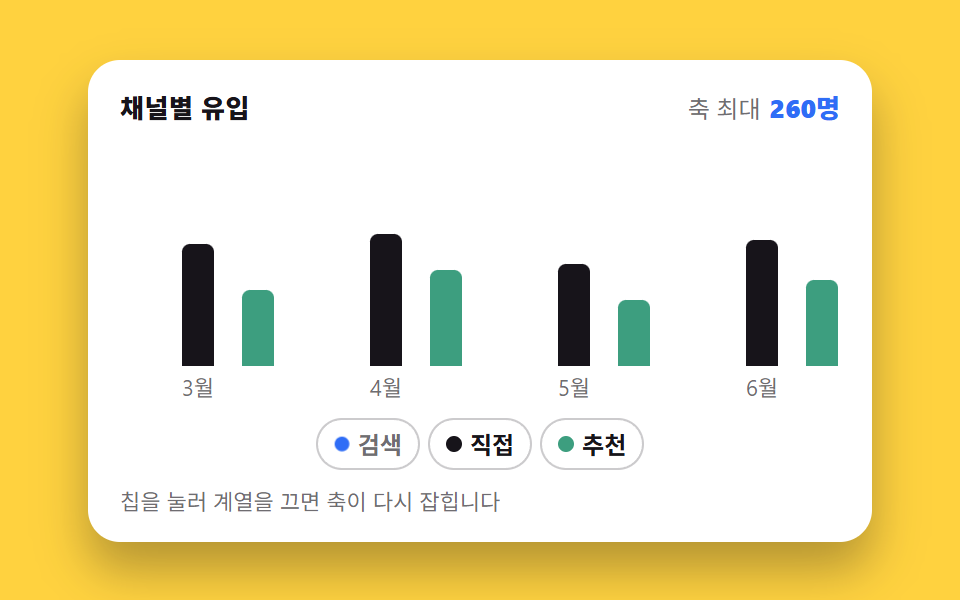
02Turning a legend off regrows the other bars
Pressing a legend chip folds that series down to the baseline, then the remaining maximum is recomputed and every other bar grows taller at once.
Best forChannel comparison charts with three or more series to isolate
aria-pressed@propertytransform-origin
<main class="stage">
  <figure class="lg is-demo" id="lg">
    <figcaption class="lg__head">
      <span class="lg__title">Traffic by channel</span>
      <span class="lg__sum"><span class="lg__lab">Axis max</span> <span class="lg__val" aria-hidden="true"><i class="lg__n"></i> visits</span></span>
    </figcaption>
    <div class="lg__plot" role="img" aria-label="Bar chart of traffic by channel. Search is highest with a peak of 460 in May; Direct tops at 260 and Referral at 190">
      <div class="lg__groups">
        <div class="lg__group">
          <i class="lg__bar" data-s="0" data-m="0" style="--b:91.3%"></i>
          <i class="lg__bar" data-s="1" data-m="0" style="--b:52.2%"></i>
          <i class="lg__bar" data-s="2" data-m="0" style="--b:32.6%"></i>
        </div>
        <div class="lg__group">
          <i class="lg__bar" data-s="0" data-m="1" style="--b:82.6%"></i>
          <i class="lg__bar" data-s="1" data-m="1" style="--b:56.5%"></i>
          <i class="lg__bar" data-s="2" data-m="1" style="--b:41.3%"></i>
        </div>
        <div class="lg__group">
          <i class="lg__bar" data-s="0" data-m="2" style="--b:100%"></i>
          <i class="lg__bar" data-s="1" data-m="2" style="--b:43.5%"></i>
          <i class="lg__bar" data-s="2" data-m="2" style="--b:28.3%"></i>
        </div>
        <div class="lg__group">
          <i class="lg__bar" data-s="0" data-m="3" style="--b:95.7%"></i>
          <i class="lg__bar" data-s="1" data-m="3" style="--b:54.3%"></i>
          <i class="lg__bar" data-s="2" data-m="3" style="--b:37%"></i>
        </div>
      </div>
      <div class="lg__axis" aria-hidden="true">
        <span>Mar</span><span>Apr</span><span>May</span><span>Jun</span>
      </div>
    </div>
    <div class="lg__chips" role="group" aria-label="Choose which series to show">
      <button class="lg__chip" type="button" data-s="0" aria-pressed="true"><i class="lg__dot" aria-hidden="true"></i>Search</button>
      <button class="lg__chip" type="button" data-s="1" aria-pressed="true"><i class="lg__dot" aria-hidden="true"></i>Direct</button>
      <button class="lg__chip" type="button" data-s="2" aria-pressed="true"><i class="lg__dot" aria-hidden="true"></i>Referral</button>
    </div>
    <p class="lg__hint">Tap a chip to drop a series — the axis rescales</p>
    <span class="sr" aria-live="polite" id="lg-live">Axis max 460</span>
    <div class="sr"><table>
      <caption>Monthly traffic by channel</caption>
      <thead><tr><th>Month</th><th>Search</th><th>Direct</th><th>Referral</th></tr></thead>
      <tbody>
        <tr><th>Mar</th><td>420</td><td>240</td><td>150</td></tr>
        <tr><th>Apr</th><td>380</td><td>260</td><td>190</td></tr>
        <tr><th>May</th><td>460</td><td>200</td><td>130</td></tr>
        <tr><th>Jun</th><td>440</td><td>250</td><td>170</td></tr>
      </tbody>
    </table></div>
  </figure>
</main>@use "../../../../site/static/demo-tokens" as *;
// 막대 높이를 <percentage> 로 등록한다. 등록해야만 --h 가 "값"이 되어
// transition 이 숫자를 보간한다 — 등록 안 된 커스텀 속성은 문자열 토큰이라
// 값이 바뀌면 그냥 뛰어넘는다 (이 데모의 주제).
@property --h {
syntax: "<percentage>";
initial-value: 0%;
inherits: false;
}
// 자동 루프가 굴리는 축 배율. 계승되어 모든 막대의 --h 계산에 들어간다.
// 루프에서도 정적 경로와 같은 원리(--h 보간)로 막대가 자란다.
@property --g {
syntax: "<number>";
initial-value: 1;
inherits: true;
}
// 축 최대값. 글자로 두면 루프에서 갈아 끼울 수 없어 「검색을 껐는데 축은 460」 같은
// 프레임이 남는다 — 정수로 등록해 카운터로 그린다
@property --mx {
syntax: "<integer>";
initial-value: 460;
inherits: true;
}
$duration: $dur-base;
$easing: $ease-spring;
$color: $subject-blue;
// 흰 카드 위의 막대는 $subject-mint 그대로는 흰 바탕과 1.86:1 이라
// WCAG 1.4.11(비텍스트 3:1)에 못 미친다. 토큰 두 개를 섞어 3.28:1 로 내린 판을 쓴다
$mint-bar: mix($subject-mint, $subject-ink, 72%);
$axis-max: 460; // 켜진 계열 전체의 최댓값
$axis-next: 260; // 검색을 뺐을 때 남은 계열의 최댓값
$axis-scale: 1.7692; // 460 / 260 — 축이 다시 잡히는 배율 (calc 안에서는 변수 치환이 안 되니 밖에서 계산해 둔다)
@include stage($stage-yellow);
.sr {
position: absolute;
width: 1px;
height: 1px;
overflow: hidden;
clip-path: inset(50%);
white-space: nowrap;
}
.lg {
--g: 1;
--mx: 460;
box-sizing: border-box;
width: min(392px, 88vw);
display: flex;
flex-direction: column;
gap: $sp-2;
margin: 0;
padding: $sp-3;
border-radius: $r-card;
background: $stage-paper;
box-shadow: $shadow-raised;
color: $subject-ink;
font-family: -apple-system, "Segoe UI", "Noto Sans KR", sans-serif;
}
.lg__head {
display: flex;
align-items: baseline;
justify-content: space-between;
gap: $sp-2;
padding: 0 $sp-1;
}
.lg__title { font-size: 13px; line-height: 18px; font-weight: 800; letter-spacing: .02em; }
.lg__lab { font-size: 12px; line-height: 18px; color: rgba(23, 20, 26, .62); }
.lg__n { font-style: normal; counter-reset: mx var(--mx); }
.lg__n::after { content: counter(mx); }
.lg__val { font-size: 13px; line-height: 18px; font-weight: 800; color: $color; font-variant-numeric: tabular-nums; }
.lg__plot { display: flex; flex-direction: column; gap: $sp-1; }
// 칸 배분은 flex 가 아니라 grid 균등 분할 — scaleX 인디케이터 오탐(BD19) 회피이자
// 칸 폭이 정확히 균등해지는 정답
.lg__groups {
display: grid;
grid-template-columns: repeat(4, 1fr);
gap: $sp-2;
height: 112px;
}
.lg__group {
display: grid;
grid-template-columns: repeat(3, 1fr);
gap: $sp-1;
align-items: end;
}
.lg__bar {
--h: var(--b); // 기본 높이 = 축 최댓값(460) 기준 백분율
justify-self: center;
width: 64%;
height: var(--h);
border-radius: $r-xs $r-xs 0 0;
background: $color;
transform-origin: 50% 100%; // 바닥 고정 — 접히면 아래로 사라진다
}
.lg__bar[data-s="1"] { background: $subject-ink; }
.lg__bar[data-s="2"] { background: $mint-bar; }
// 꺼진 계열: 숨기는 게 아니라 바닥으로 접는다 — transform 이라 레이아웃 재계산 없음
.lg__bar[data-fold="1"] { transform: scaleY(0); }
.lg__axis {
display: grid;
grid-template-columns: repeat(4, 1fr);
gap: $sp-2;
}
.lg__axis span { text-align: center; font-size: 11px; line-height: 14px; color: rgba(23, 20, 26, .62); }
.lg__chips {
display: flex;
flex-wrap: wrap;
justify-content: center;
gap: $sp-1;
padding: 0 $sp-1;
}
.lg__chip {
display: inline-flex;
align-items: center;
gap: $sp-1;
margin: 0;
padding: $sp-1 $sp-2;
border: 1.5px solid rgba(23, 20, 26, .22);
border-radius: $r-pill;
background: $stage-paper;
color: $subject-ink;
font-family: inherit;
font-size: 12px;
line-height: 16px;
font-weight: 700;
cursor: pointer;
}
.lg__chip:focus-visible { outline: 2px solid $color; outline-offset: 1px; }
.lg__dot { width: 8px; height: 8px; border-radius: 50%; background: $color; }
.lg__chip[data-s="1"] .lg__dot { background: $subject-ink; }
.lg__chip[data-s="2"] .lg__dot { background: $mint-bar; }
.lg__chip[aria-pressed="false"] { color: rgba(23, 20, 26, .62); }
.lg__chip[aria-pressed="false"] .lg__dot { transform: scale(.55); }
.lg__hint { margin: 0; padding: 0 $sp-1; font-size: 11px; line-height: 16px; color: rgba(23, 20, 26, .62); }
// ── 사람이 만진 뒤(정적 경로) ──
// --h 를 transition 대상에 넣는 게 핵심이다. 등록된 커스텀 속성이라
// 값 자체가 보간되고, height 는 var(--h) 를 매 프레임 따라간다.
.lg:not(.is-demo) .lg__bar {
transition-property: --h, transform;
transition-duration: $duration;
transition-timing-function: $easing;
}
.lg:not(.is-demo) .lg__dot {
transition-property: transform;
transition-duration: $dur-quick;
transition-timing-function: $easing;
}
// ── 자동 루프(2초): 검색을 끄면 남은 막대가 다시 자란다 ──
// --g 는 축 배율(460/260). 루프에서 막대의 --h 는 원본 백분율 × 배율로 계산되고,
// --g 가 부드럽게 굴러가므로 정적 경로와 같은 보간으로 막대가 자란다.
.lg.is-demo .lg__bar { --h: calc(var(--b) * var(--g)); }
.lg.is-demo,
.lg.is-demo .lg__bar[data-s="0"] {
animation-duration: $dur-loop;
animation-iteration-count: infinite;
}
// 키프레임 안의 커스텀 속성에는 sass 변수가 그대로 새겨지지 않는다 — #{} 로 치환해야 한다
@keyframes lg-grow {
0%, 12% { --g: 1; }
30%, 68% { --g: #{$axis-scale}; }
84%, 100% { --g: 1; }
}
// 검색 막대의 접힘/복귀는 컷 — 반쯤 접힌 막대는 거짓말이다
.lg.is-demo .lg__bar[data-s="0"] {
animation-name: lg-fold;
animation-timing-function: steps(1, end);
}
@keyframes lg-fold {
0%, 11.99% { transform: scaleY(1); }
12%, 83.99% { transform: scaleY(0); }
84%, 100% { transform: scaleY(1); }
}
// 칩도 같은 박자로: 점은 컷과 별개로 부드럽게 줄어들며 프레임을 채운다
.lg.is-demo .lg__chip[data-s="0"] {
animation-name: lg-chip;
animation-duration: $dur-loop;
animation-timing-function: steps(1, end);
animation-iteration-count: infinite;
}
// 축 최대 숫자도 칩과 **같은 박자**의 컷 — 상태는 누른 순간 바뀌고 막대가 따라 자란다.
// 숫자만 막대 도착 시각에 두면 「축은 아직 460인데 막대는 260 기준」 프레임이 생긴다
.lg.is-demo { animation-name: lg-grow, lg-mx; animation-timing-function: $ease-out, steps(1, end); }
@keyframes lg-mx {
0%, 11.99% { --mx: #{$axis-max}; }
12%, 83.99% { --mx: #{$axis-next}; }
84%, 100% { --mx: #{$axis-max}; }
}
@keyframes lg-chip {
0%, 11.99% { color: $subject-ink; }
12%, 83.99% { color: rgba(23, 20, 26, .62); }
84%, 100% { color: $subject-ink; }
}
.lg.is-demo .lg__chip[data-s="0"] .lg__dot {
animation-name: lg-dot;
animation-duration: $dur-loop;
animation-timing-function: $ease-pop;
animation-iteration-count: infinite;
}
@keyframes lg-dot {
0%, 12% { transform: scale(1); }
30%, 68% { transform: scale(.55); }
84%, 100% { transform: scale(1); }
}
@media (max-width: 340px) {
.lg { padding: $sp-2; gap: $sp-1; }
.lg__groups { height: 84px; gap: $sp-1; }
.lg__title, .lg__val { font-size: 12px; line-height: 16px; }
.lg__lab { font-size: 11px; line-height: 16px; }
.lg__chip { padding: $sp-1; font-size: 11px; line-height: 14px; }
.lg__hint { display: none; }
}
@media (prefers-reduced-motion: reduce) {
.lg.is-demo,
.lg.is-demo .lg__bar[data-s="0"],
.lg.is-demo .lg__chip[data-s="0"],
.lg.is-demo .lg__chip[data-s="0"] .lg__dot { animation: none !important; }
.lg:not(.is-demo) .lg__bar,
.lg:not(.is-demo) .lg__dot { transition: none !important; }
}@property --h {
syntax: "<percentage>";
initial-value: 0%;
inherits: false;
}
@property --g {
syntax: "<number>";
initial-value: 1;
inherits: true;
}
@property --mx {
syntax: "<integer>";
initial-value: 460;
inherits: true;
}
html, body {
margin: 0;
overflow: hidden;
}
.stage {
box-sizing: border-box;
min-height: 100vh;
display: grid;
place-items: center;
margin: 0;
background: #ffd23f;
font-family: -apple-system, "Segoe UI", "Noto Sans KR", sans-serif;
padding: clamp(8px, 4vw, 24px);
}
.sr {
position: absolute;
width: 1px;
height: 1px;
overflow: hidden;
clip-path: inset(50%);
white-space: nowrap;
}
.lg {
--g: 1;
--mx: 460;
box-sizing: border-box;
width: min(392px, 88vw);
display: flex;
flex-direction: column;
gap: 8px;
margin: 0;
padding: 12px;
border-radius: 16px;
background: #ffffff;
box-shadow: 0 14px 24px rgba(23, 20, 26, 0.32);
color: #17141a;
font-family: -apple-system, "Segoe UI", "Noto Sans KR", sans-serif;
}
.lg__head {
display: flex;
align-items: baseline;
justify-content: space-between;
gap: 8px;
padding: 0 4px;
}
.lg__title {
font-size: 13px;
line-height: 18px;
font-weight: 800;
letter-spacing: 0.02em;
}
.lg__lab {
font-size: 12px;
line-height: 18px;
color: rgba(23, 20, 26, 0.62);
}
.lg__n {
font-style: normal;
counter-reset: mx var(--mx);
}
.lg__n::after {
content: counter(mx);
}
.lg__val {
font-size: 13px;
line-height: 18px;
font-weight: 800;
color: #2f6df6;
font-variant-numeric: tabular-nums;
}
.lg__plot {
display: flex;
flex-direction: column;
gap: 4px;
}
.lg__groups {
display: grid;
grid-template-columns: repeat(4, 1fr);
gap: 8px;
height: 112px;
}
.lg__group {
display: grid;
grid-template-columns: repeat(3, 1fr);
gap: 4px;
align-items: end;
}
.lg__bar {
--h: var(--b);
justify-self: center;
width: 64%;
height: var(--h);
border-radius: 4px 4px 0 0;
background: #2f6df6;
transform-origin: 50% 100%;
}
.lg__bar[data-s="1"] {
background: #17141a;
}
.lg__bar[data-s="2"] {
background: rgb(23.9843137255%, 62.0549019608%, 49.7254901961%);
}
.lg__bar[data-fold="1"] {
transform: scaleY(0);
}
.lg__axis {
display: grid;
grid-template-columns: repeat(4, 1fr);
gap: 8px;
}
.lg__axis span {
text-align: center;
font-size: 11px;
line-height: 14px;
color: rgba(23, 20, 26, 0.62);
}
.lg__chips {
display: flex;
flex-wrap: wrap;
justify-content: center;
gap: 4px;
padding: 0 4px;
}
.lg__chip {
display: inline-flex;
align-items: center;
gap: 4px;
margin: 0;
padding: 4px 8px;
border: 1.5px solid rgba(23, 20, 26, 0.22);
border-radius: 999px;
background: #ffffff;
color: #17141a;
font-family: inherit;
font-size: 12px;
line-height: 16px;
font-weight: 700;
cursor: pointer;
}
.lg__chip:focus-visible {
outline: 2px solid #2f6df6;
outline-offset: 1px;
}
.lg__dot {
width: 8px;
height: 8px;
border-radius: 50%;
background: #2f6df6;
}
.lg__chip[data-s="1"] .lg__dot {
background: #17141a;
}
.lg__chip[data-s="2"] .lg__dot {
background: rgb(23.9843137255%, 62.0549019608%, 49.7254901961%);
}
.lg__chip[aria-pressed=false] {
color: rgba(23, 20, 26, 0.62);
}
.lg__chip[aria-pressed=false] .lg__dot {
transform: scale(0.55);
}
.lg__hint {
margin: 0;
padding: 0 4px;
font-size: 11px;
line-height: 16px;
color: rgba(23, 20, 26, 0.62);
}
.lg:not(.is-demo) .lg__bar {
transition-property: --h, transform;
transition-duration: 300ms;
transition-timing-function: cubic-bezier(0.2, 0.8, 0.2, 1);
}
.lg:not(.is-demo) .lg__dot {
transition-property: transform;
transition-duration: 220ms;
transition-timing-function: cubic-bezier(0.2, 0.8, 0.2, 1);
}
.lg.is-demo .lg__bar {
--h: calc(var(--b) * var(--g));
}
.lg.is-demo,
.lg.is-demo .lg__bar[data-s="0"] {
animation-duration: 2s;
animation-iteration-count: infinite;
}
@keyframes lg-grow {
0%, 12% {
--g: 1;
}
30%, 68% {
--g: 1.7692;
}
84%, 100% {
--g: 1;
}
}
.lg.is-demo .lg__bar[data-s="0"] {
animation-name: lg-fold;
animation-timing-function: steps(1, end);
}
@keyframes lg-fold {
0%, 11.99% {
transform: scaleY(1);
}
12%, 83.99% {
transform: scaleY(0);
}
84%, 100% {
transform: scaleY(1);
}
}
.lg.is-demo .lg__chip[data-s="0"] {
animation-name: lg-chip;
animation-duration: 2s;
animation-timing-function: steps(1, end);
animation-iteration-count: infinite;
}
.lg.is-demo {
animation-name: lg-grow, lg-mx;
animation-timing-function: ease-out, steps(1, end);
}
@keyframes lg-mx {
0%, 11.99% {
--mx: 460;
}
12%, 83.99% {
--mx: 260;
}
84%, 100% {
--mx: 460;
}
}
@keyframes lg-chip {
0%, 11.99% {
color: #17141a;
}
12%, 83.99% {
color: rgba(23, 20, 26, 0.62);
}
84%, 100% {
color: #17141a;
}
}
.lg.is-demo .lg__chip[data-s="0"] .lg__dot {
animation-name: lg-dot;
animation-duration: 2s;
animation-timing-function: cubic-bezier(0.2, 1.4, 0.4, 1);
animation-iteration-count: infinite;
}
@keyframes lg-dot {
0%, 12% {
transform: scale(1);
}
30%, 68% {
transform: scale(0.55);
}
84%, 100% {
transform: scale(1);
}
}
@media (max-width: 340px) {
.lg {
padding: 8px;
gap: 4px;
}
.lg__groups {
height: 84px;
gap: 4px;
}
.lg__title, .lg__val {
font-size: 12px;
line-height: 16px;
}
.lg__lab {
font-size: 11px;
line-height: 16px;
}
.lg__chip {
padding: 4px;
font-size: 11px;
line-height: 14px;
}
.lg__hint {
display: none;
}
}
@media (prefers-reduced-motion: reduce) {
.lg.is-demo,
.lg.is-demo .lg__bar[data-s="0"],
.lg.is-demo .lg__chip[data-s="0"],
.lg.is-demo .lg__chip[data-s="0"] .lg__dot {
animation: none !important;
}
.lg:not(.is-demo) .lg__bar,
.lg:not(.is-demo) .lg__dot {
transition: none !important;
}
}// 범례 토글의 핵심은 "숨기기"가 아니라 "축 다시 잡기"다.
// 칩을 끄면 (1) 그 계열 막대는 scaleY(0) 로 바닥에 접히고(transform-origin: bottom),
// (2) 남은 계열의 최댓값으로 축을 다시 계산해 각 막대의 --h 를 다시 쓴다.
// --h 는 @property 로 등록한 <percentage> 라 transition 이 값을 보간한다 —
// 등록 안 된 커스텀 속성은 문자열이라 값이 바뀌어도 뛰어넘는다.
var lg = document.getElementById('lg');
var live = document.getElementById('lg-live');
var bars = lg.querySelectorAll('.lg__bar');
var chips = lg.querySelectorAll('.lg__chip');
var V = [[420, 380, 460, 440], [240, 260, 200, 250], [150, 190, 130, 170]];
function apply() {
lg.classList.remove('is-demo');
var on = [], max = 0;
for (var k = 0; k < 3; k++) if (chips[k].getAttribute('aria-pressed') === 'true') on.push(k);
on.forEach(function (k) { V[k].forEach(function (v) { if (v > max) max = v; }); });
for (var i = 0; i < bars.length; i++) {
var b = bars[i], s = +b.getAttribute('data-s');
if (on.indexOf(s) < 0) { b.setAttribute('data-fold', '1'); }
else {
b.removeAttribute('data-fold');
b.style.setProperty('--h', (max ? V[s][+b.getAttribute('data-m')] / max * 100 : 0).toFixed(1) + '%');
}
}
lg.style.setProperty('--mx', String(max));
live.textContent = 'Axis max ' + max + ' visits';
}
chips.forEach(function (c) {
c.addEventListener('click', function () {
c.setAttribute('aria-pressed', String(c.getAttribute('aria-pressed') !== 'true'));
apply();
});
});import { useState } from "react";
import type { CSSProperties } from "react";
import styles from "./LegendToggle.module.scss";
// 범례 토글 React 판 — vanilla(run/264/demo/02) 와 같은 동작.
// 상태는 pressed 배열 하나뿐: 파생값(축 최댓값·막대 높이)은 전부 렌더마다 다시 계산한다.
export type LegendToggleProps = {
title?: string;
axisLabel?: string;
unit?: string;
seriesLabels?: string[];
monthLabels?: string[];
values?: number[][]; // [계열][달]
duration?: number; // ms — --duration 으로 transition 에 전달
easing?: string;
color?: string;
};
type Vars = CSSProperties & { "--duration"?: string; "--easing"?: string; "--color"?: string };
type BarVars = CSSProperties & { "--b"?: string; "--h"?: string };
export default function LegendToggle({
title = "채널별 유입",
axisLabel = "축 최대",
unit = "명",
seriesLabels = ["검색", "직접", "추천"],
monthLabels = ["3월", "4월", "5월", "6월"],
values = [[420, 380, 460, 440], [240, 260, 200, 250], [150, 190, 130, 170]],
duration = 300,
easing = "cubic-bezier(.2,.8,.2,1)",
color = "#2f6df6",
}: LegendToggleProps) {
const [demo, setDemo] = useState(true);
const [pressed, setPressed] = useState<boolean[]>([true, true, true]);
const onIdx = pressed.map((p, k) => (p ? k : -1)).filter((k) => k >= 0);
const axisMax = onIdx.length
? Math.max(...onIdx.flatMap((k) => values[k]))
: 0; // 전부 꺼면 0 — 막대는 바닥(0%)으로
const fullMax = Math.max(...values.flat()); // 처음 축(전 계열 최댓값) 기준 백분율
const vars: Vars = { "--duration": `${duration}ms`, "--easing": easing, "--color": color };
function toggle(i: number) {
setDemo(false);
setPressed((prev) => prev.map((p, k) => (k === i ? !p : p)));
}
return (
<figure className={`${styles.lg} ${demo ? styles.isDemo : ""}`} style={vars}>
<figcaption className={styles.head}>
<span className={styles.title}>{title}</span>
<span className={styles.sum}>
<span className={styles.lab}>{axisLabel}</span>{" "}
<span className={styles.val} aria-live="polite">
{axisMax}
{unit}
</span>
</span>
</figcaption>
<div
className={styles.plot}
role="img"
aria-label="채널별 유입 막대 그래프. 검색이 가장 높고 5월 460명이 최대, 직접은 최대 260명, 추천은 최대 190명"
>
<div className={styles.groups}>
{monthLabels.map((m, mi) => (
<div className={styles.group} key={m}>
{seriesLabels.map((s, si) => {
const folded = !pressed[si];
const barVars: BarVars = {
"--b": `${((values[si][mi] / fullMax) * 100).toFixed(1)}%`,
"--h": axisMax ? `${((values[si][mi] / axisMax) * 100).toFixed(1)}%` : "0%",
};
return (
<i
className={styles.bar}
key={s}
data-s={si}
data-fold={folded ? "1" : undefined}
style={barVars}
/>
);
})}
</div>
))}
</div>
<div className={styles.axis} aria-hidden="true">
{monthLabels.map((m) => <span key={m}>{m}</span>)}
</div>
</div>
<div className={styles.chips} role="group" aria-label="보일 계열 고르기">
{seriesLabels.map((s, si) => (
<button
key={s}
type="button"
className={styles.chip}
data-s={si}
aria-pressed={pressed[si]}
onClick={() => toggle(si)}
>
<i className={styles.dot} aria-hidden="true" />
{s}
</button>
))}
</div>
<p className={styles.hint}>칩을 눌러 계열을 끄면 축이 다시 잡힙니다</p>
</figure>
);
}02 Turning a legend off regrows the other bars — Measured area 8.599% · moving frames 11/23Original by GODRICH · SCSS and React ship in the zip · Chart UI Design: 9 Interactions You Can Drag
The post this demo lives in
 Chart UI Design: 9 Interactions You Can DragChart UI design earns its keep once a reader can put a hand on it. All nine run on CSS bars and inline SVG with no chart See all demos in this post