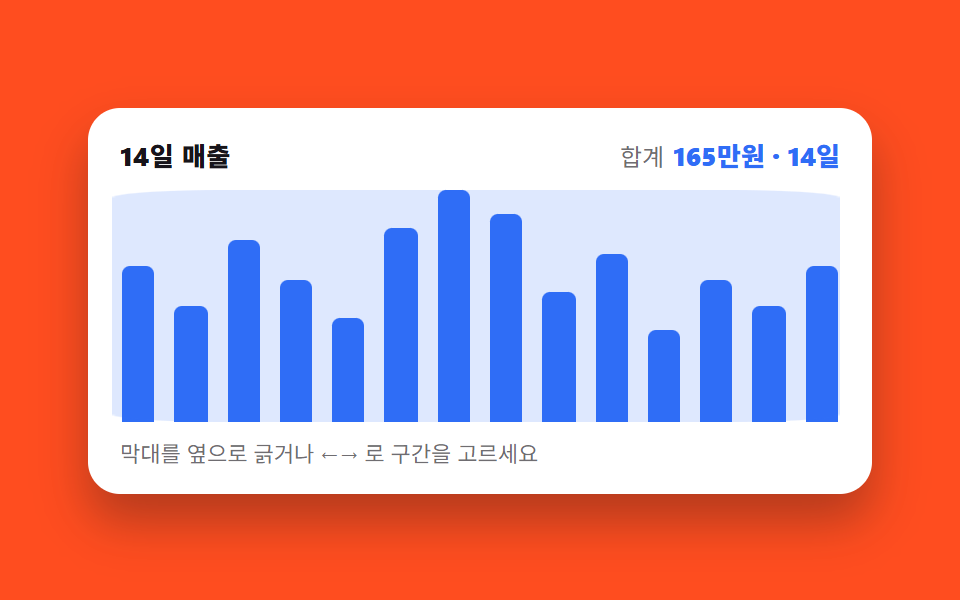
03Drag a range and the summary recounts
Dragging sideways across the plot keeps the swept span bright and sinks the rest, while the total and the day count above recount as you drag.
Best forRevenue or session reports where a period is picked by eye
pointerdownsetPointerCapturearia-live
<main class="stage">
  <figure class="br is-demo" id="br">
    <figcaption class="br__head">
      <span class="br__title">14-day revenue</span>
      <span class="br__sum"><span class="br__lab">Total</span> <span class="br__val" aria-hidden="true"><i class="br__n"></i><span class="br__u">0k KRW</span> · <i class="br__d"></i><span class="br__u"> days</span></span></span>
    </figcaption>
    <div class="br__plot" role="img" aria-label="Bar chart of 14 days of revenue. Day 7 peaks at 180k KRW and day 11 bottoms at 70k KRW">
      <div class="br__track">
        <i class="br__bar" data-far="1" data-in="0" style="--b:66.7%"></i>
        <i class="br__bar" data-far="1" data-in="0" style="--b:50%"></i>
        <i class="br__bar" data-far="1" data-in="0" style="--b:77.8%"></i>
        <i class="br__bar" data-far="1" data-in="0" style="--b:61.1%"></i>
        <i class="br__bar" data-in="1" style="--b:44.4%"></i>
        <i class="br__bar" data-in="1" style="--b:83.3%"></i>
        <i class="br__bar" data-in="1" style="--b:100%"></i>
        <i class="br__bar" data-in="1" style="--b:88.9%"></i>
        <i class="br__bar" data-in="1" style="--b:55.6%"></i>
        <i class="br__bar" data-far="1" data-in="0" style="--b:72.2%"></i>
        <i class="br__bar" data-far="1" data-in="0" style="--b:38.9%"></i>
        <i class="br__bar" data-far="1" data-in="0" style="--b:61.1%"></i>
        <i class="br__bar" data-far="1" data-in="0" style="--b:50%"></i>
        <i class="br__bar" data-far="1" data-in="0" style="--b:66.7%"></i>
      </div>
      <i class="br__band" aria-hidden="true"></i>
      <button class="br__hot" type="button" id="br-hot" aria-label="Brush a range — ←→ moves the end, Shift+←→ moves the start"></button>
    </div>
    <p class="br__hint">Drag sideways or use ←→ to pick a range</p>
    <span class="sr" aria-live="polite" id="br-live">670k KRW · 5 days</span>
    <div class="sr"><table>
      <caption>Daily revenue, 14 days</caption>
      <thead><tr><th>Day</th><th>Revenue</th></tr></thead>
      <tbody>
        <tr><th>1</th><td>12</td></tr><tr><th>2</th><td>9</td></tr><tr><th>3</th><td>14</td></tr><tr><th>4</th><td>11</td></tr>
        <tr><th>5</th><td>8</td></tr><tr><th>6</th><td>15</td></tr><tr><th>7</th><td>18</td></tr><tr><th>8</th><td>16</td></tr>
        <tr><th>9</th><td>10</td></tr><tr><th>10</th><td>13</td></tr><tr><th>11</th><td>7</td></tr><tr><th>12</th><td>11</td></tr>
        <tr><th>13</th><td>9</td></tr><tr><th>14</th><td>12</td></tr>
      </tbody>
    </table></div>
  </figure>
</main>@use "../../../../site/static/demo-tokens" as *;
// 브러시의 상태는 등록된 정수 네 개다. 등록해야 (1) 값이 교체돼도 transition 대상이 되고
// (2) 자동 루프의 keyframes 가 값을 컷으로 갈아끼울 수 있다.
@property --s { syntax: "<integer>"; initial-value: 4; inherits: true; } // 구간 시작칸
@property --e { syntax: "<integer>"; initial-value: 8; inherits: true; } // 구간 끝칸
@property --n { syntax: "<integer>"; initial-value: 67; inherits: true; } // 구간 합계(만원)
@property --d { syntax: "<integer>"; initial-value: 5; inherits: true; } // 구간 일수
$duration: $dur-quick;
$easing: $ease-out;
$color: $subject-blue;
$cell: 14; // 막대(칸) 수 — 띠 계산의 분모
@include stage($stage-orange);
.sr {
position: absolute;
width: 1px;
height: 1px;
overflow: hidden;
clip-path: inset(50%);
white-space: nowrap;
}
.br {
--s: 4;
--e: 8;
box-sizing: border-box;
width: min(392px, 88vw);
display: flex;
flex-direction: column;
gap: $sp-2;
margin: 0;
padding: $sp-3;
border-radius: $r-card;
background: $stage-paper;
box-shadow: $shadow-raised;
color: $subject-ink;
font-family: -apple-system, "Segoe UI", "Noto Sans KR", sans-serif;
}
.br__head {
display: flex;
align-items: baseline;
justify-content: space-between;
gap: $sp-2;
padding: 0 $sp-1;
}
.br__title { font-size: 13px; line-height: 18px; font-weight: 800; letter-spacing: .02em; }
.br__lab { font-size: 12px; line-height: 18px; color: rgba(23, 20, 26, .62); }
.br__val { font-size: 13px; line-height: 18px; font-weight: 800; color: $color; font-variant-numeric: tabular-nums; }
// 숫자는 텍스트가 아니라 카운터 — 루프에서도 --n 이 컷으로 갈아끼워지면 글자가 따라 바뀐다.
// 화면용 숫자라 aria-hidden 하고, 실제 알림은 아래 sr 낱말(aria-live)이 맡는다
.br__n { font-style: normal; counter-reset: n var(--n); }
.br__n::after { content: counter(n); }
.br__d { font-style: normal; counter-reset: d var(--d); }
.br__d::after { content: counter(d); }
.br__u { font-style: normal; }
// plot 은 1×1 격자 — 막대 트랙·밝은 띠·글기 버튼 세 겹을 같은 칸에 explicit 으로 겹친다.
// auto 배치로 두면 띠·버튼이 한 칸을 차지해 막대가 안 보이는 암시적 줄로 밀려난다 (실측)
.br__plot {
display: grid;
height: 116px;
}
.br__track,
.br__band,
.br__hot { grid-area: 1 / 1; }
// 칸 배분은 grid 균등 분할(flex 아님) — 칸 폭이 정확히 1/14 이어야 띠 계산이 맞는다
.br__track {
display: grid;
grid-template-columns: repeat($cell, 1fr);
grid-template-rows: 1fr;
}
.br__bar {
align-self: end;
justify-self: center;
width: 62%;
height: var(--b);
border-radius: $r-xs $r-xs 0 0;
background: $color;
}
// 구간 밖 막대는 가라앉는다 — 상태는 data-in 속성에만 있다
.br__bar[data-in="0"] { opacity: .3; }
// 밝은 띠: 절대배치가 아니라 그리드 칸 위의 겹침 요소. 폭 = 칸 하나 × scaleX(칸 수),
// 위치 = translateX(시작칸 × 칸 폭) — 둘 다 % 라 칸 폭이 몇 px 든 수식이 그대로 맞는다
.br__band {
display: block;
height: 100%;
width: calc(100% / $cell);
border-radius: $r-xs;
background: rgba(47, 109, 246, .16);
transform-origin: left center; // 규칙8: 칸수 scaleX 수식 계산
transform: translateX(calc(var(--s) * 100%)) scaleX(calc(var(--e) - var(--s) + 1));
}
.br__hot {
border: 0;
border-radius: $r-sm;
background: transparent;
cursor: col-resize;
}
.br__hot:focus-visible { outline: 2px solid $color; outline-offset: -2px; }
.br__hint { margin: 0; padding: 0 $sp-1; font-size: 11px; line-height: 16px; color: rgba(23, 20, 26, .62); }
// ── 사람이 만진 뒤(정적 경로): 띠는 짧게 쫓아가고 막대는 살짝 가라앉는다 ──
.br:not(.is-demo) .br__band {
transition-property: transform;
transition-duration: $duration;
transition-timing-function: $easing;
}
.br:not(.is-demo) .br__bar {
transition-property: opacity;
transition-duration: $dur-instant;
transition-timing-function: $easing;
}
// ── 자동 루프(2초): 좁은 구간[5~9일째] ↔ 전체 14일. 복귀는 88% 에 끝난다 ──
// 띠의 폭만 scaleX 로 부드럽게 늘어나고, 바깥 막대의 밝아짐과 합계 숫자는
// 띠가 **다 도착한 시각(40%)** 에 함께 컷 한다 — 세 가지 중 하나라도 시각이 어긋나면
// 「띠는 5칸인데 합계는 14일」 같은 프레임이 그대로 대표 이미지가 된다 (첫 판 실측)
.br.is-demo .br__band {
animation-name: br-band;
animation-duration: $dur-loop;
animation-timing-function: $easing;
animation-iteration-count: infinite;
}
@keyframes br-band {
0%, 15% { transform: translateX(calc(4 * 100%)) scaleX(5); }
40%, 70% { transform: translateX(0) scaleX(#{$cell}); }
88%, 100% { transform: translateX(calc(4 * 100%)) scaleX(5); }
}
// data-far 은 루프 연출용으로 미리 적어둔 표시(초기 구간[4,8] 밖의 막대) —
// 사람이 조작하면 data-in 이 진짜 상태고 이 애니메이션은 .is-demo 를 떼며 사라진다
.br.is-demo .br__bar[data-far="1"] {
animation-name: br-far;
animation-duration: $dur-loop;
animation-timing-function: steps(1, end);
animation-iteration-count: infinite;
}
@keyframes br-far {
0%, 39.99% { opacity: .3; }
40%, 87.99% { opacity: 1; }
88%, 100% { opacity: .3; }
}
// 합계·일수 카운터도 같은 박자의 컷 — 루프의 어느 장면이든 숫자는 그 장면과 맞는 값
.br.is-demo {
animation-name: br-nums;
animation-duration: $dur-loop;
animation-timing-function: steps(1, end);
animation-iteration-count: infinite;
}
@keyframes br-nums {
0%, 39.99% { --n: 67; --d: 5; }
40%, 87.99% { --n: 165; --d: #{$cell}; }
88%, 100% { --n: 67; --d: 5; }
}
@media (max-width: 340px) {
.br { padding: $sp-2; gap: $sp-1; }
.br__plot { height: 88px; }
.br__title, .br__val { font-size: 12px; line-height: 16px; }
.br__lab { font-size: 11px; line-height: 16px; }
.br__hint { display: none; }
}
@media (prefers-reduced-motion: reduce) {
.br.is-demo,
.br.is-demo .br__band,
.br.is-demo .br__bar[data-far="1"] { animation: none !important; }
.br:not(.is-demo) .br__band,
.br:not(.is-demo) .br__bar { transition: none !important; }
}@property --s {
syntax: "<integer>";
initial-value: 4;
inherits: true;
}
@property --e {
syntax: "<integer>";
initial-value: 8;
inherits: true;
}
@property --n {
syntax: "<integer>";
initial-value: 67;
inherits: true;
}
@property --d {
syntax: "<integer>";
initial-value: 5;
inherits: true;
}
html, body {
margin: 0;
overflow: hidden;
}
.stage {
box-sizing: border-box;
min-height: 100vh;
display: grid;
place-items: center;
margin: 0;
background: #ff4d1f;
font-family: -apple-system, "Segoe UI", "Noto Sans KR", sans-serif;
padding: clamp(8px, 4vw, 24px);
}
.sr {
position: absolute;
width: 1px;
height: 1px;
overflow: hidden;
clip-path: inset(50%);
white-space: nowrap;
}
.br {
--s: 4;
--e: 8;
box-sizing: border-box;
width: min(392px, 88vw);
display: flex;
flex-direction: column;
gap: 8px;
margin: 0;
padding: 12px;
border-radius: 16px;
background: #ffffff;
box-shadow: 0 14px 24px rgba(23, 20, 26, 0.32);
color: #17141a;
font-family: -apple-system, "Segoe UI", "Noto Sans KR", sans-serif;
}
.br__head {
display: flex;
align-items: baseline;
justify-content: space-between;
gap: 8px;
padding: 0 4px;
}
.br__title {
font-size: 13px;
line-height: 18px;
font-weight: 800;
letter-spacing: 0.02em;
}
.br__lab {
font-size: 12px;
line-height: 18px;
color: rgba(23, 20, 26, 0.62);
}
.br__val {
font-size: 13px;
line-height: 18px;
font-weight: 800;
color: #2f6df6;
font-variant-numeric: tabular-nums;
}
.br__n {
font-style: normal;
counter-reset: n var(--n);
}
.br__n::after {
content: counter(n);
}
.br__d {
font-style: normal;
counter-reset: d var(--d);
}
.br__d::after {
content: counter(d);
}
.br__u {
font-style: normal;
}
.br__plot {
display: grid;
height: 116px;
}
.br__track,
.br__band,
.br__hot {
grid-area: 1/1;
}
.br__track {
display: grid;
grid-template-columns: repeat(14, 1fr);
grid-template-rows: 1fr;
}
.br__bar {
align-self: end;
justify-self: center;
width: 62%;
height: var(--b);
border-radius: 4px 4px 0 0;
background: #2f6df6;
}
.br__bar[data-in="0"] {
opacity: 0.3;
}
.br__band {
display: block;
height: 100%;
width: 7.1428571429%;
border-radius: 4px;
background: rgba(47, 109, 246, 0.16);
transform-origin: left center;
transform: translateX(calc(var(--s) * 100%)) scaleX(calc(var(--e) - var(--s) + 1));
}
.br__hot {
border: 0;
border-radius: 8px;
background: transparent;
cursor: col-resize;
}
.br__hot:focus-visible {
outline: 2px solid #2f6df6;
outline-offset: -2px;
}
.br__hint {
margin: 0;
padding: 0 4px;
font-size: 11px;
line-height: 16px;
color: rgba(23, 20, 26, 0.62);
}
.br:not(.is-demo) .br__band {
transition-property: transform;
transition-duration: 220ms;
transition-timing-function: ease-out;
}
.br:not(.is-demo) .br__bar {
transition-property: opacity;
transition-duration: 140ms;
transition-timing-function: ease-out;
}
.br.is-demo .br__band {
animation-name: br-band;
animation-duration: 2s;
animation-timing-function: ease-out;
animation-iteration-count: infinite;
}
@keyframes br-band {
0%, 15% {
transform: translateX(400%) scaleX(5);
}
40%, 70% {
transform: translateX(0) scaleX(14);
}
88%, 100% {
transform: translateX(400%) scaleX(5);
}
}
.br.is-demo .br__bar[data-far="1"] {
animation-name: br-far;
animation-duration: 2s;
animation-timing-function: steps(1, end);
animation-iteration-count: infinite;
}
@keyframes br-far {
0%, 39.99% {
opacity: 0.3;
}
40%, 87.99% {
opacity: 1;
}
88%, 100% {
opacity: 0.3;
}
}
.br.is-demo {
animation-name: br-nums;
animation-duration: 2s;
animation-timing-function: steps(1, end);
animation-iteration-count: infinite;
}
@keyframes br-nums {
0%, 39.99% {
--n: 67;
--d: 5;
}
40%, 87.99% {
--n: 165;
--d: 14;
}
88%, 100% {
--n: 67;
--d: 5;
}
}
@media (max-width: 340px) {
.br {
padding: 8px;
gap: 4px;
}
.br__plot {
height: 88px;
}
.br__title, .br__val {
font-size: 12px;
line-height: 16px;
}
.br__lab {
font-size: 11px;
line-height: 16px;
}
.br__hint {
display: none;
}
}
@media (prefers-reduced-motion: reduce) {
.br.is-demo,
.br.is-demo .br__band,
.br.is-demo .br__bar[data-far="1"] {
animation: none !important;
}
.br:not(.is-demo) .br__band,
.br:not(.is-demo) .br__bar {
transition: none !important;
}
}// 브러시의 상태는 정수 두 개(--s 시작칸, --e 끝칸)뿐이다.
// 밝은 띠의 위치·폭은 CSS 가 이 두 값을 transform 으로 계산하고,
// 각 막대의 안팎은 data-in 속성만 읽어 칠한다 — JS 가 스타일을 Direct 만지지 않는다.
var br = document.getElementById('br');
var hot = document.getElementById('br-hot');
var live = document.getElementById('br-live');
var bars = br.querySelectorAll('.br__bar');
var V = [12, 9, 14, 11, 8, 15, 18, 16, 10, 13, 7, 11, 9, 12];
var N = 14, s = 4, e = 8;
function idx(x) {
var r = hot.getBoundingClientRect();
var t = Math.min(Math.max((x - r.left) / r.width, 0), 1);
return Math.min(Math.max(Math.round(t * (N - 1)), 0), N - 1);
}
function apply() {
var sum = 0;
for (var i = 0; i < N; i++) {
var inn = i >= s && i <= e;
bars[i].setAttribute('data-in', inn ? '1' : '0');
if (inn) sum += V[i];
}
br.style.setProperty('--s', String(s));
br.style.setProperty('--e', String(e));
br.style.setProperty('--n', String(sum));
br.style.setProperty('--d', String(e - s + 1));
live.textContent = sum + '0k KRW · ' + (e - s + 1) + ' days';
}
// 마우스·터치 공용: 누른 점을 붙잡고(pointer capture) 옆으로 긁는다
hot.addEventListener('pointerdown', function (ev) {
br.classList.remove('is-demo');
hot.setPointerCapture(ev.pointerId);
var a = idx(ev.clientX);
function move(m) { s = Math.min(a, idx(m.clientX)); e = Math.max(a, idx(m.clientX)); apply(); }
function up() { hot.removeEventListener('pointermove', move); hot.removeEventListener('pointerup', up); }
hot.addEventListener('pointermove', move);
hot.addEventListener('pointerup', up);
move(ev);
});
// 키보드: ←→ 는 끝점, Shift+←→ 는 시작점 — 벗어난 쪽이 반대편을 넘지 못하게 붙잡는다
hot.addEventListener('keydown', function (ev) {
var d = ev.key === 'ArrowRight' ? 1 : ev.key === 'ArrowLeft' ? -1 : 0;
if (!d) { if (ev.key === 'Home' || ev.key === 'End') { ev.preventDefault(); s = e = ev.key === 'Home' ? 0 : N - 1; apply(); } return; }
ev.preventDefault();
if (ev.shiftKey) { s = Math.min(Math.max(s + d, 0), e); } else { e = Math.min(Math.max(e + d, s), N - 1); }
apply();
hot.focus({ preventScroll: true });
});import { useState } from "react";
import type { CSSProperties } from "react";
import styles from "./BrushRange.module.scss";
// 브러시 구간 React 판 — vanilla(run/264/demo/03) 와 같은 동작.
// 상태는 정수 두 개(s, e). 띠의 위치·폭은 CSS 가 --s/--e 로 transform 계산하고,
// 막대의 안팎은 data-in 속성으로만 전달한다.
export type BrushRangeProps = {
title?: string;
totalLabel?: string;
unit?: string;
dayWord?: string;
values?: number[];
initS?: number;
initE?: number;
duration?: number;
easing?: string;
color?: string;
};
// ambient 타입이 빽약하다 — 이벤트는 파일 안에서 로컬 타입으로 선언
type PointerTarget = {
getBoundingClientRect(): DOMRect;
setPointerCapture(id: number): void;
addEventListener(t: string, f: EventListener): void;
removeEventListener(t: string, f: EventListener): void;
};
type PointerLike = {
clientX: number;
pointerId: number;
currentTarget: PointerTarget;
};
type KeyEvt = { key: string; shiftKey: boolean; preventDefault(): void };
type Vars = CSSProperties & {
"--duration"?: string;
"--easing"?: string;
"--color"?: string;
"--s"?: string;
"--e"?: string;
"--n"?: string;
"--d"?: string;
};
type BarVars = CSSProperties & { "--b"?: string };
export default function BrushRange({
title = "14일 매출",
totalLabel = "합계",
unit = "만원",
dayWord = "일",
values = [12, 9, 14, 11, 8, 15, 18, 16, 10, 13, 7, 11, 9, 12],
initS = 4,
initE = 8,
duration = 220,
easing = "ease-out",
color = "#2f6df6",
}: BrushRangeProps) {
const N = values.length;
const maxV = Math.max(...values);
const [demo, setDemo] = useState(true);
const [s, setS] = useState(initS);
const [e, setE] = useState(initE);
const sum = values.reduce((a, v, i) => a + (i >= s && i <= e ? v : 0), 0);
const days = e - s + 1;
const vars: Vars = {
"--duration": `${duration}ms`,
"--easing": easing,
"--color": color,
"--s": String(s),
"--e": String(e),
"--n": String(sum),
"--d": String(days),
};
function idx(clientX: number, r: DOMRect) {
const t = Math.min(Math.max((clientX - r.left) / r.width, 0), 1);
return Math.min(Math.max(Math.round(t * (N - 1)), 0), N - 1);
}
function onDown(ev: PointerLike) {
setDemo(false);
ev.currentTarget.setPointerCapture(ev.pointerId); // 마우스·터치 공용 붙잡기
const r = ev.currentTarget.getBoundingClientRect();
const a = idx(ev.clientX, r);
const move = (m: PointerLike) => {
const c = idx(m.clientX, r);
setS(Math.min(a, c));
setE(Math.max(a, c));
};
const target = ev.currentTarget;
const up = () => {
target.removeEventListener("pointermove", move as unknown as EventListener);
target.removeEventListener("pointerup", up as unknown as EventListener);
};
target.addEventListener("pointermove", move as unknown as EventListener);
target.addEventListener("pointerup", up as unknown as EventListener);
move(ev);
}
function onKey(ev: KeyEvt) {
const d = ev.key === "ArrowRight" ? 1 : ev.key === "ArrowLeft" ? -1 : 0;
if (!d) {
if (ev.key === "Home" || ev.key === "End") {
ev.preventDefault();
setS(ev.key === "Home" ? 0 : N - 1);
setE(ev.key === "Home" ? 0 : N - 1);
}
return;
}
ev.preventDefault();
setDemo(false);
if (ev.shiftKey) setS((v) => Math.min(Math.max(v + d, 0), e));
else setE((v) => Math.min(Math.max(v + d, s), N - 1));
}
return (
<figure className={`${styles.br} ${demo ? styles.isDemo : ""}`} style={vars}>
<figcaption className={styles.head}>
<span className={styles.title}>{title}</span>
<span className={styles.sum}>
<span className={styles.lab}>{totalLabel}</span>{" "}
<span className={styles.val} aria-hidden="true">
<i className={styles.n} />
<span className={styles.u}>{unit}</span> · <i className={styles.d} />
<span className={styles.u}>{dayWord}</span>
</span>
</span>
</figcaption>
<div
className={styles.plot}
role="img"
aria-label="14일 매출 막대 그래프. 7일째 18만원이 가장 높고 11일째 7만원이 가장 낮다"
>
<div className={styles.track}>
{values.map((v, i) => (
<i
className={styles.bar}
key={i}
data-far={i < initS || i > initE ? "1" : undefined}
data-in={i >= s && i <= e ? "1" : "0"}
style={{ "--b": `${((v / maxV) * 100).toFixed(1)}%` } as BarVars}
/>
))}
</div>
<i className={styles.band} aria-hidden="true" />
<button
type="button"
className={styles.hot}
aria-label="구간 긁기 — 끝점은 ←→ · 시작점은 Shift+←→"
onPointerDown={onDown}
onKeyDown={onKey}
/>
</div>
<p className={styles.hint}>막대를 옆으로 긁거나 ←→ 로 구간을 고르세요</p>
<span className={styles.sr} aria-live="polite">
{sum}
{unit} · {days}
{dayWord}
</span>
</figure>
);
}03 Drag a range and the summary recounts — Measured area 19.367% · moving frames 13/23Original by GODRICH · SCSS and React ship in the zip · Chart UI Design: 9 Interactions You Can Drag
The post this demo lives in
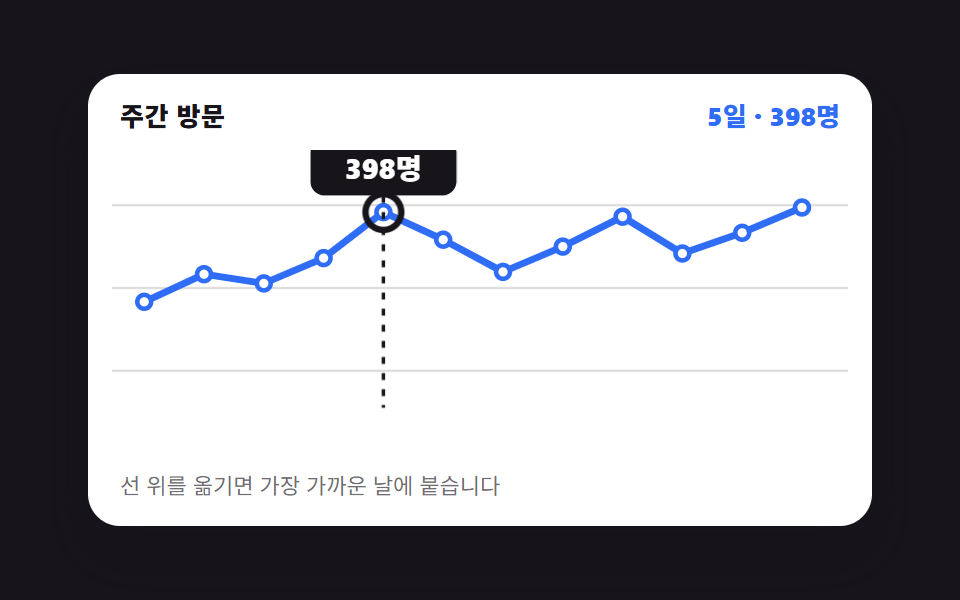 Chart UI Design: 9 Interactions You Can DragChart UI design earns its keep once a reader can put a hand on it. All nine run on CSS bars and inline SVG with no chart See all demos in this post
If you like this effect - similar demos
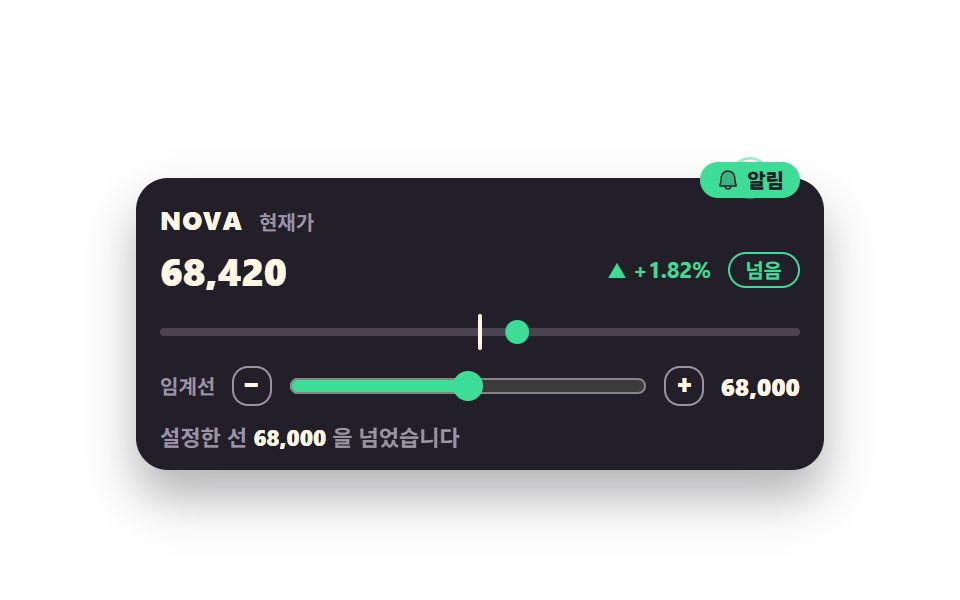 Dashboard UI08 Threshold badge that fires when the line is crossedStock Ticker UI: 9 Live Price Widgets, No API Key
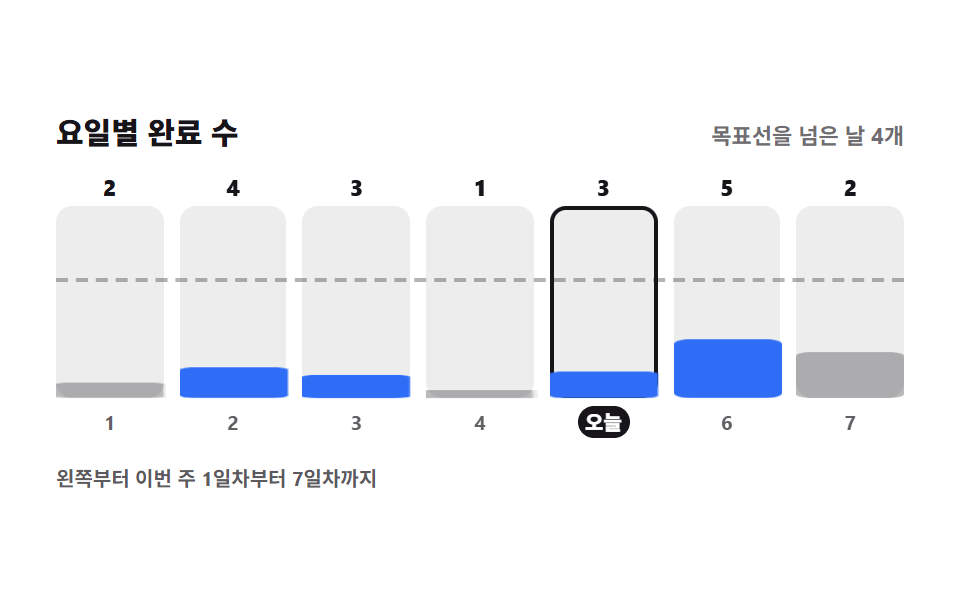 Dashboard UI06 Weekday bar summaryHabit Tracker UI: 9 Parts from Grid to Badge
 Dashboard UI01 A Card That Follows the Cursor and Tilts With Its MotionCSS Kanban Board: 9 Demos With Springs and Lerp