06Weekday bar summary
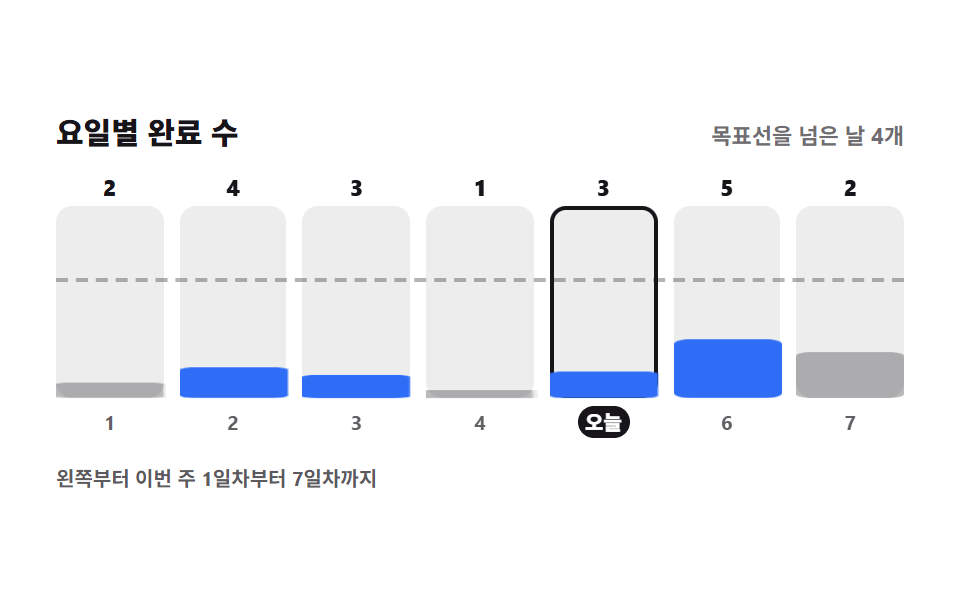
Seven bars grow from their bottom edge to show the count per weekday, and only the bars past the dashed goal line change color. Today's bar is called out with a thick outline.
Best forA weekly report card, the activity summary on an admin dashboard
grid-template-columnstransform-originscaleYaria-live
<main class="stage">
<div class="wb is-demo" id="wb">
  <div class="wb__head">
    <p class="wb__title">Done per day</p>
    <p class="wb__say" id="say" role="status" aria-live="polite">4 days above the goal line</p>
  </div>
  <div class="wb__chart">
    <span class="wb__goal" aria-hidden="true"></span>
    <div class="wb__cols" id="cols"></div>
  </div>
  <p class="wb__cap">Left to right: day 1 through day 7 of this week</p>
</div>
</main>
@use "../../../../site/static/demo-tokens" as *;
// 요일별 막대 요약 — 칸은 grid-template-columns: repeat(7, 1fr) 로 정확히 균등 분할한다
// (flex: 1 1 0 위에 scaleX 로 채우면 BD19 가 탭 인디케이터로 오해한다 — 254-05 계열).
// 막대는 아래 변에 붙어 자라는 것이라 transform-origin 을 bottom 에 두고 scaleY 로만 키운다.
// 목표선을 넘은 막대는 색이 갈리지만 그 위에 숫자를 늘 적어 두므로 색 없이도 읽힌다.
// 미리보기(.is-demo)는 왼쪽 막대부터 차례로 자라고, 사람이 칸을 누르면 그 요일 수가 올라간다.
$duration: $dur-loop;
$easing: $ease-spring;
$color: $subject-blue;
@include stage($stage-paper);
.wb { display: flex; flex-direction: column; gap: $sp-3; width: 100%; max-width: 424px; }
.wb__head { display: flex; align-items: baseline; justify-content: space-between; gap: $sp-2; flex-wrap: wrap; }
.wb__title { margin: 0; font-weight: 800; font-size: clamp(13px, 3.4vw, 15px); color: $subject-ink; }
.wb__say { margin: 0; font-weight: 700; font-size: clamp(9px, 2.4vw, 11px); color: rgba($subject-ink, .62); }
.wb__chart { position: relative; }
// 목표선은 최대 5회 중 3회 자리 — 막대 칸(96px) 의 60%(57.6px) 위, 눈금 줄 높이 20px 을 더해 78px
.wb__goal {
position: absolute; left: 0; right: 0; bottom: 78px; height: 0;
border-top: 2px dashed rgba($subject-ink, .32);
}
.wb__cols { display: grid; grid-template-columns: repeat(7, 1fr); gap: $sp-2; }
.wb__col {
position: relative; width: 100%; display: flex; flex-direction: column; align-items: center; gap: $sp-1;
border: 0; border-radius: $r-sm; padding: 0; background: transparent; cursor: pointer;
font-family: inherit; color: $subject-ink;
}
.wb__num { font-weight: 800; font-size: clamp(9px, 2.4vw, 11px); line-height: 1; }
.wb__slot { display: block; width: 100%; height: 96px; border-radius: $r-sm; background: rgba($subject-ink, .08); }
.wb__bar {
display: block; width: 100%; height: 100%; border-radius: $r-sm;
background: rgba($subject-ink, .3);
transform-origin: bottom; transform: scaleY(var(--v, 0));
}
.wb__bar.is-over { background: $color; }
.wb__tick { font-weight: 700; font-size: clamp(8px, 2.2vw, 10px); line-height: 1.6; color: rgba($subject-ink, .68); }
// 오늘 칸은 눈금 자리에 날짜 대신 「오늘」을 적는다 — 칸 밖에 알약을 띄우면 눈금 글자를 덮는다
.wb__tick.is-today {
border-radius: $r-pill; padding: 0 $sp-1; background: $subject-ink; color: $stage-paper;
font-weight: 800;
}
.wb__col.is-today .wb__slot { box-shadow: inset 0 0 0 2px $subject-ink; }
.wb__col:focus-visible { outline: 2px solid $subject-ink; outline-offset: 2px; }
.wb__cap { margin: 0; font-weight: 700; font-size: clamp(8px, 2.2vw, 10px); color: rgba($subject-ink, .7); }
// ── 격자 미리보기 ───────────────────────────────────────────────
.wb.is-demo .wb__bar {
animation-name: wbGrow; animation-duration: $duration; animation-timing-function: $easing;
animation-iteration-count: infinite; animation-fill-mode: backwards;
animation-delay: calc(var(--i) * 60ms);
}
// 바닥까지 완전히 내리지 않고 20% 만 남긴다 — 어느 프레임을 뽑아도 일곱 막대가 다 보이게
@keyframes wbGrow {
0% { transform: scaleY(calc(var(--v, 0) * .2)); }
24% { transform: scaleY(var(--v, 0)); }
76% { transform: scaleY(var(--v, 0)); }
90% { transform: scaleY(calc(var(--v, 0) * .2)); }
100% { transform: scaleY(calc(var(--v, 0) * .2)); }
}
@media (max-width: 340px) {
.wb { gap: $sp-2; }
.wb__cols { gap: $sp-1; }
.wb__slot { height: 60px; }
.wb__goal { bottom: 53px; }
}
// reduce 에서는 막대가 자라는 장면을 끄고 지금 값 그대로 세워 둔다
@media (prefers-reduced-motion: reduce) {
.wb.is-demo .wb__bar { animation: none !important; transform: scaleY(var(--v, 0)) !important; }
}html, body {
margin: 0;
overflow: hidden;
}
.stage {
box-sizing: border-box;
min-height: 100vh;
display: grid;
place-items: center;
margin: 0;
background: #ffffff;
font-family: -apple-system, "Segoe UI", "Noto Sans KR", sans-serif;
padding: clamp(8px, 4vw, 24px);
}
.wb {
display: flex;
flex-direction: column;
gap: 12px;
width: 100%;
max-width: 424px;
}
.wb__head {
display: flex;
align-items: baseline;
justify-content: space-between;
gap: 8px;
flex-wrap: wrap;
}
.wb__title {
margin: 0;
font-weight: 800;
font-size: clamp(13px, 3.4vw, 15px);
color: #17141a;
}
.wb__say {
margin: 0;
font-weight: 700;
font-size: clamp(9px, 2.4vw, 11px);
color: rgba(23, 20, 26, 0.62);
}
.wb__chart {
position: relative;
}
.wb__goal {
position: absolute;
left: 0;
right: 0;
bottom: 78px;
height: 0;
border-top: 2px dashed rgba(23, 20, 26, 0.32);
}
.wb__cols {
display: grid;
grid-template-columns: repeat(7, 1fr);
gap: 8px;
}
.wb__col {
position: relative;
width: 100%;
display: flex;
flex-direction: column;
align-items: center;
gap: 4px;
border: 0;
border-radius: 8px;
padding: 0;
background: transparent;
cursor: pointer;
font-family: inherit;
color: #17141a;
}
.wb__num {
font-weight: 800;
font-size: clamp(9px, 2.4vw, 11px);
line-height: 1;
}
.wb__slot {
display: block;
width: 100%;
height: 96px;
border-radius: 8px;
background: rgba(23, 20, 26, 0.08);
}
.wb__bar {
display: block;
width: 100%;
height: 100%;
border-radius: 8px;
background: rgba(23, 20, 26, 0.3);
transform-origin: bottom;
transform: scaleY(var(--v, 0));
}
.wb__bar.is-over {
background: #2f6df6;
}
.wb__tick {
font-weight: 700;
font-size: clamp(8px, 2.2vw, 10px);
line-height: 1.6;
color: rgba(23, 20, 26, 0.68);
}
.wb__tick.is-today {
border-radius: 999px;
padding: 0 4px;
background: #17141a;
color: #ffffff;
font-weight: 800;
}
.wb__col.is-today .wb__slot {
box-shadow: inset 0 0 0 2px #17141a;
}
.wb__col:focus-visible {
outline: 2px solid #17141a;
outline-offset: 2px;
}
.wb__cap {
margin: 0;
font-weight: 700;
font-size: clamp(8px, 2.2vw, 10px);
color: rgba(23, 20, 26, 0.7);
}
.wb.is-demo .wb__bar {
animation-name: wbGrow;
animation-duration: 2s;
animation-timing-function: cubic-bezier(0.2, 0.8, 0.2, 1);
animation-iteration-count: infinite;
animation-fill-mode: backwards;
animation-delay: calc(var(--i) * 60ms);
}
@keyframes wbGrow {
0% {
transform: scaleY(calc(var(--v, 0) * 0.2));
}
24% {
transform: scaleY(var(--v, 0));
}
76% {
transform: scaleY(var(--v, 0));
}
90% {
transform: scaleY(calc(var(--v, 0) * 0.2));
}
100% {
transform: scaleY(calc(var(--v, 0) * 0.2));
}
}
@media (max-width: 340px) {
.wb {
gap: 8px;
}
.wb__cols {
gap: 4px;
}
.wb__slot {
height: 60px;
}
.wb__goal {
bottom: 53px;
}
}
@media (prefers-reduced-motion: reduce) {
.wb.is-demo .wb__bar {
animation: none !important;
transform: scaleY(var(--v, 0)) !important;
}
}var STORE = 'godrich-habit-bars';
var MAX = 5, GOAL = 3, TODAY = 4; // 목표 3회, 오늘은 5일차(0부터 세어 4)
var COL_LABEL = 'Day {d}, {n} times';
var SAY_TEXT = '{n} days above the goal line';
var TODAY_TAG = 'Today';
var root = document.getElementById('wb');
var cols = document.getElementById('cols');
var sayEl = document.getElementById('say');
var counts = [2, 4, 3, 1, 3, 5, 2];
var bars = [], nums = [], buttons = [];
function load() {
try {
var raw = window.localStorage.getItem(STORE);
if (raw) { counts = JSON.parse(raw); }
} catch (e) { /* 저장소가 막힌 창에서는 기본 기록 그대로 */ }
}
function save() {
try { window.localStorage.setItem(STORE, JSON.stringify(counts)); } catch (e) { /* 저장만 건너뛴다 */ }
}
function paint() {
var over = 0;
for (var i = 0; i < counts.length; i++) {
var v = Math.min(counts[i] / MAX, 1);
bars[i].style.setProperty('--v', String(v));
bars[i].className = 'wb__bar' + (counts[i] >= GOAL ? ' is-over' : '');
nums[i].textContent = String(counts[i]);
buttons[i].setAttribute('aria-label', COL_LABEL.replace('{d}', String(i + 1)).replace('{n}', String(counts[i])));
if (counts[i] >= GOAL) { over++; }
}
sayEl.textContent = SAY_TEXT.replace('{n}', String(over));
}
function build() {
for (var i = 0; i < counts.length; i++) {
var b = document.createElement('button');
b.type = 'button';
b.className = 'wb__col' + (i === TODAY ? ' is-today' : '');
b.style.setProperty('--i', String(i));
b.setAttribute('data-i', String(i));
b.innerHTML = '<span class="wb__num"></span>'
+ '<span class="wb__slot"><span class="wb__bar"></span></span>'
+ '<span class="wb__tick' + (i === TODAY ? ' is-today' : '') + '">'
+ (i === TODAY ? TODAY_TAG : String(i + 1)) + '</span>';
bars.push(b.querySelector('.wb__bar'));
nums.push(b.querySelector('.wb__num'));
buttons.push(b);
cols.appendChild(b);
}
}
load();
build();
paint();
cols.addEventListener('click', function (e) {
var b = e.target.closest ? e.target.closest('.wb__col') : null;
if (!b) { return; }
root.classList.remove('is-demo');
var i = Number(b.getAttribute('data-i'));
counts[i] = counts[i] >= MAX ? 0 : counts[i] + 1;
save();
paint();
});// WeekdayBars — vanilla 판(run/297/demo/06-habit-weekly-bars/index.html) 의 React 포트.
// 칸은 repeat(7, 1fr) 로 균등 분할하고 막대는 아래 변에서 scaleY 로만 자란다.
import { useEffect, useState } from "react";
import type { CSSProperties } from "react";
import styles from "./WeekdayBars.module.scss";
export type WeekdayBarsProps = {
duration?: number;
easing?: string;
color?: string;
};
type Vars = CSSProperties & { "--duration"?: string; "--easing"?: string; "--color"?: string };
type ColVars = CSSProperties & { "--i"?: string; "--v"?: string };
const STORE = "godrich-habit-bars";
const MAX = 5;
const GOAL = 3;
const TODAY = 4; // 목표 3회, 오늘은 5일차(0부터 세어 4)
const TITLE = "요일별 완료 수";
const COL_LABEL = "{d}일차 {n}회";
const SAY_TEXT = "목표선을 넘은 날 {n}개";
const TODAY_TAG = "오늘";
const CAP_TEXT = "왼쪽부터 이번 주 1일차부터 7일차까지";
const START = [2, 4, 3, 1, 3, 5, 2];
export default function WeekdayBars({
duration = 2000,
easing = "cubic-bezier(.2, .8, .2, 1)",
color = "#2f6df6",
}: WeekdayBarsProps) {
const [counts, setCounts] = useState<number[]>(START);
const [demo, setDemo] = useState(true);
const vars: Vars = { "--duration": `${duration}ms`, "--easing": easing, "--color": color };
useEffect(() => {
try {
const raw = window.localStorage.getItem(STORE);
if (raw) { setCounts(JSON.parse(raw) as number[]); }
} catch (e) { /* 저장소가 막힌 창에서는 기본 기록 그대로 */ }
}, []);
function save(next: number[]) {
try { window.localStorage.setItem(STORE, JSON.stringify(next)); } catch (e) { /* 저장만 건너뛴다 */ }
}
function bump(i: number) {
setDemo(false);
const next = counts.map((v, k) => (k === i ? (v >= MAX ? 0 : v + 1) : v));
setCounts(next);
save(next);
}
const over = counts.filter((n) => n >= GOAL).length;
const cls = [styles.root, demo ? styles.isDemo : ""].filter(Boolean).join(" ");
const colVars = (i: number, n: number): ColVars => ({ "--i": String(i), "--v": String(Math.min(n / MAX, 1)) });
return (
<main className={styles.stage}>
<div className={cls} style={vars}>
<div className={styles.head}>
<p className={styles.title}>{TITLE}</p>
<p className={styles.say} role="status" aria-live="polite">
{SAY_TEXT.replace("{n}", String(over))}
</p>
</div>
<div className={styles.chart}>
<span className={styles.goal} aria-hidden="true" />
<div className={styles.cols}>
{counts.map((n, i) => (
<button
className={[styles.col, i === TODAY ? styles.colToday : ""].filter(Boolean).join(" ")}
key={i}
type="button"
style={colVars(i, n)}
aria-label={COL_LABEL.replace("{d}", String(i + 1)).replace("{n}", String(n))}
onClick={() => bump(i)}
>
<span className={styles.num}>{n}</span>
<span className={styles.slot}>
<span className={[styles.bar, n >= GOAL ? styles.over : ""].filter(Boolean).join(" ")} />
</span>
<span className={[styles.tick, i === TODAY ? styles.tickToday : ""].filter(Boolean).join(" ")}>
{i === TODAY ? TODAY_TAG : String(i + 1)}
</span>
</button>
))}
</div>
</div>
<p className={styles.cap}>{CAP_TEXT}</p>
</div>
</main>
);
}06 Weekday bar summary — Measured area 12.28% · moving frames 15/23Original by GODRICH · SCSS and React ship in the zip · Habit Tracker UI: 9 Parts from Grid to Badge
The post this demo lives in
 Habit Tracker UI: 9 Parts from Grid to BadgeA habit tracker ui is the screen where you tap what you did today and see the shape those taps make. The nine parts here See all demos in this post
If you like this effect - similar demos
 Dashboard UI02 Column bars growing from the baselineCSS Chart Design: 9 SVG Graphs, No Library
 Dashboard UI04 Candle chart whose last bar keeps growingStock Ticker UI: 9 Live Price Widgets, No API Key
 Dashboard UI02 Turning a legend off regrows the other barsChart UI Design: 9 Interactions You Can Drag