06Stacked and grouped show the same numbers twice
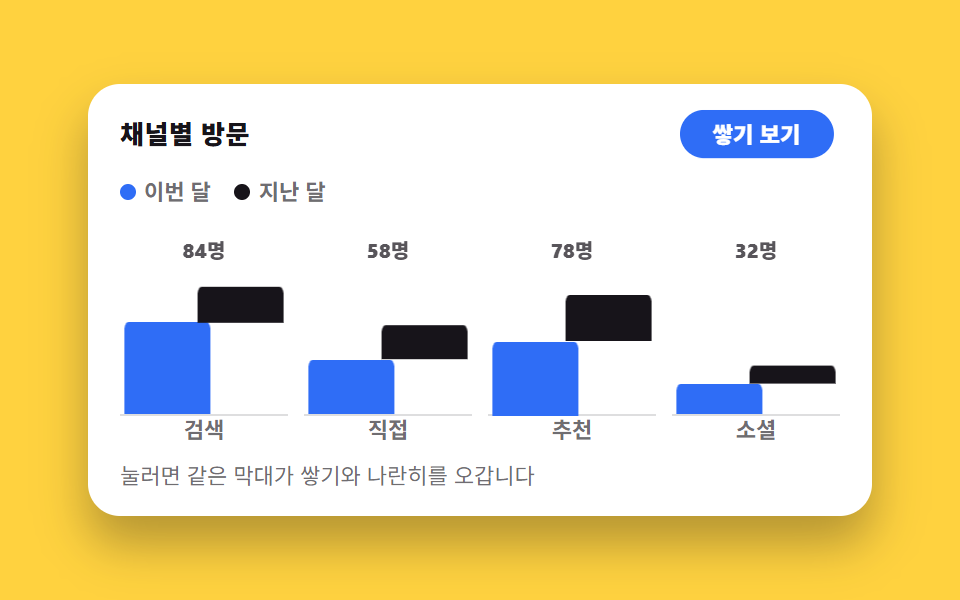
One toggle splits the same data between stacked and grouped bars, and the two series find their places by spreading sideways or folding on top of each other.
Best forMonthly reports where both the total and each series matter
aria-pressedgrid-columnsteps(1, end)
<main class="stage">
  <figure class="sk is-demo" id="sk" data-mode="stack">
    <figcaption class="sk__head">
      <span class="sk__title">Visits by channel</span>
      <button class="sk__btn" type="button" id="sk-btn" aria-pressed="false" aria-label="Change bar arrangement">
        <span class="sk__lab sk__lab--side">Show side by side</span>
        <span class="sk__lab sk__lab--stack">Show stacked</span>
      </button>
    </figcaption>

    <div class="sk__legend" aria-hidden="true">
      <span class="sk__key"><i class="sk__dot sk__dot--a"></i>This month</span>
      <span class="sk__key"><i class="sk__dot sk__dot--b"></i>Last month</span>
    </div>

    <div class="sk__plot" role="img" aria-label="This-month and last-month visit bars for 4 channels. Search 60·24, Direct 36·22, Referral 48·30, Social 20·12">
      <div class="sk__col">
        <span class="sk__tot">84</span>
        <span class="sk__b sk__b--a"></span><span class="sk__b sk__b--b"></span>
      </div>
      <div class="sk__col">
        <span class="sk__tot">58</span>
        <span class="sk__b sk__b--a"></span><span class="sk__b sk__b--b"></span>
      </div>
      <div class="sk__col">
        <span class="sk__tot">78</span>
        <span class="sk__b sk__b--a"></span><span class="sk__b sk__b--b"></span>
      </div>
      <div class="sk__col">
        <span class="sk__tot">32</span>
        <span class="sk__b sk__b--a"></span><span class="sk__b sk__b--b"></span>
      </div>
      <span class="sk__x">Search</span><span class="sk__x">Direct</span><span class="sk__x">Referral</span><span class="sk__x">Social</span>
    </div>

    <p class="sk__hint">Press it and the same bars swap between stacked and side by side</p>

    <div class="sr">
      <span aria-live="polite" id="sk-live"></span>
      <table>
        <caption>Visitors by channel</caption>
        <thead><tr><th>Channel</th><th>This month</th><th>Last month</th><th>Total</th></tr></thead>
        <tbody>
          <tr><th>Search</th><td>60</td><td>24</td><td>84</td></tr>
          <tr><th>Direct</th><td>36</td><td>22</td><td>58</td></tr>
          <tr><th>Referral</th><td>48</td><td>30</td><td>78</td></tr>
          <tr><th>Social</th><td>20</td><td>12</td><td>32</td></tr>
        </tbody>
      </table>
    </div>
  </figure>
</main>@use "../../../../site/static/demo-tokens" as *;
// 두 계열의 높이(px). 막대 구역이 76px 고정이라 값/100×76 로 정한다 — 84·58·78·32.
// 합계 라벨(84명…)도 이 값에서 나온다. 소수는 그대로 둔다(76px 안에서만 쓰인다)
$ha: 45.6px 27.4px 36.5px 15.2px; // 이번 달 60·36·48·20
$hb: 18.2px 16.7px 22.8px 9.1px; // 지난 달 24·22·30·12
$duration: $dur-quick;
$easing: $ease-spring;
$color: $subject-blue;
@include stage($stage-yellow);
.sr {
position: absolute;
width: 1px;
height: 1px;
overflow: hidden;
clip-path: inset(50%);
white-space: nowrap;
}
.sk {
box-sizing: border-box;
width: min(392px, 88vw);
display: flex;
flex-direction: column;
gap: $sp-2;
margin: 0;
padding: $sp-3;
border-radius: $r-card;
background: $stage-paper;
box-shadow: $shadow-raised;
color: $subject-ink;
font-family: -apple-system, "Segoe UI", "Noto Sans KR", sans-serif;
}
.sk__head {
display: flex;
align-items: center;
justify-content: space-between;
gap: $sp-2;
padding: 0 $sp-1;
}
.sk__title { font-size: 13px; line-height: 18px; font-weight: 800; letter-spacing: .02em; }
// 토글 — aria-pressed 로 눌림을 알린다. 두 라벨을 한 칸에 겹쳐 놓고
// data-mode 가 보여 줄 쪽만 딱 바꾼다(교체지 페이드가 아니다)
.sk__btn {
position: relative;
display: grid;
place-items: center;
margin: 0;
padding: $sp-1 $sp-3;
border: 0;
border-radius: $r-pill;
background: $color;
color: $stage-paper;
font-family: inherit;
font-size: 12px;
line-height: 18px;
font-weight: 800;
cursor: pointer;
}
.sk__btn[aria-pressed="true"] { background: $subject-ink; }
.sk__btn:focus-visible { outline: 2px solid $subject-ink; outline-offset: 2px; }
.sk__lab { grid-area: 1 / 1; white-space: nowrap; }
.sk[data-mode="stack"] .sk__lab--stack,
.sk[data-mode="side"] .sk__lab--side { visibility: hidden; }
.sk__legend {
display: flex;
gap: $sp-3;
padding: 0 $sp-1;
font-size: 11px;
line-height: 16px;
font-weight: 700;
color: rgba(23, 20, 26, .62);
}
.sk__key { display: inline-flex; align-items: center; gap: $sp-1; }
.sk__dot { width: 8px; height: 8px; border-radius: $r-xs; }
.sk__dot--a { background: $color; }
.sk__dot--b { background: $subject-ink; }
// ── 차트: 카테고리 4칸 grid, 아래 축 라벨이 같은 grid 의 둘째 줄 ──
.sk__plot {
display: grid;
grid-template-columns: repeat(4, 1fr);
grid-template-rows: 96px 14px;
column-gap: $sp-2;
padding: 0 $sp-1;
}
.sk__x {
grid-row: 2;
text-align: center;
font-size: 11px;
line-height: 14px;
font-weight: 700;
color: rgba(23, 20, 26, .62);
}
// 칸 하나 — 안은 다시 2열 grid. 막대 둘은 **같은 칸(grid-column: 1 / -1)에 겹쳐** 놓고
// 쌓기/나란히를 전부 transform 으로 갈아입는다. grid 칸 배치를 모드마다 바꾸면
// transition 이 안 되고 레이아웃이 점프한다 — 그래서 칸은 고정, transform 이 움직인다
.sk__col {
grid-row: 1;
display: grid;
grid-template-columns: repeat(2, 1fr);
grid-template-rows: 20px 1fr;
align-items: end;
border-bottom: 1px solid rgba(23, 20, 26, .14);
}
// 합계 라벨은 모드에 따라 자리가 달라진다 — 쌓기에서는 두 계열을 덮는 한 줄,
// 나란히에서는 위 칸 반쪽(grid-column: 1)으로 물러난 뒤 감춘다. 어차피 컷으로
// 사라지니 점프는 보이지 않는다
.sk__tot {
grid-row: 1;
grid-column: 1 / -1;
align-self: end;
justify-self: center;
font-size: 10px;
line-height: 14px;
font-weight: 800;
font-variant-numeric: tabular-nums;
color: rgba(23, 20, 26, .72);
}
.sk[data-mode="side"] .sk__tot { grid-column: 1; grid-row: 2; justify-self: start; visibility: hidden; }
.sk__b {
grid-row: 2;
grid-column: 1 / -1;
align-self: end;
transform-origin: 0 100%; // 왼쪽 아래 고정 — scaleX 로 폭을 줄여도 바닥은 그대로
border-radius: $r-xs $r-xs 0 0;
}
.sk__b--a { background: $color; }
.sk__b--b { background: $subject-ink; }
@for $i from 1 through 4 {
.sk__col:nth-child(#{$i}) .sk__b--a { height: nth($ha, $i); }
.sk__col:nth-child(#{$i}) .sk__b--b { height: nth($hb, $i); }
}
// ── 정적 경로(사람이 만진 뒤). 쌓기 ↔ 나란히 전부 transform ──
// 나란히: 두 계열이 각자 반쪽으로 폭을 줄고(sX .44) 좌우로 벌어진다(tX 3%·53%).
// 쌓기: b 계열이 a 위로 올라탄다(tY −a높이). 함수 목록 순서는 언제나 동일해야 보간된다
.sk[data-mode="side"] .sk__b--a { transform: translateX(3%) scaleX(.44); }
.sk[data-mode="side"] .sk__b--b { transform: translateX(53%) translateY(0) scaleX(.44); }
.sk[data-mode="stack"] .sk__b--a { transform: translateX(0) scaleX(1); }
@for $i from 1 through 4 {
.sk[data-mode="stack"] .sk__col:nth-child(#{$i}) .sk__b--b {
transform: translateX(0) translateY(#{-1 * nth($ha, $i)}) scaleX(1);
}
}
.sk:not(.is-demo) .sk__b {
transition-property: transform;
transition-duration: $duration;
transition-timing-function: $easing;
}
.sk__hint { margin: 0; padding: 0 $sp-1; font-size: 11px; line-height: 16px; color: rgba(23, 20, 26, .62); }
// ── 자동 루프(2초): 쌓기 → 나란히 → 쌓기. 복귀는 88% 안에 끝난다 ──
// 막대는 부드러운 transform, 라벨 교체는 steps(1, end) 컷(움직임 시작점에서 갈아입는다)
@for $i from 1 through 4 {
@keyframes sk-a#{$i} {
0%, 34% { transform: translateX(0) scaleX(1); }
44%, 76% { transform: translateX(3%) scaleX(.44); }
86%, 100% { transform: translateX(0) scaleX(1); }
}
// 지난 달 계열은 **가로로 먼저 비켜난 뒤에** 내려앉는다(그 반대로 올라탄다).
// 가로·세로를 한꺼번에 보간하면 검은 막대가 파란 막대를 대각선으로 뚫고 지나가
// 두 계열이 겹친 프레임이 생기고, 그 장이 곧 대표 이미지가 된다 (첫 판 실측)
@keyframes sk-b#{$i} {
0%, 34% { transform: translateX(0) translateY(#{-1 * nth($ha, $i)}) scaleX(1); }
44% { transform: translateX(53%) translateY(#{-1 * nth($ha, $i)}) scaleX(.44); }
52%, 76% { transform: translateX(53%) translateY(0) scaleX(.44); }
82% { transform: translateX(53%) translateY(#{-1 * nth($ha, $i)}) scaleX(.44); }
86%, 100% { transform: translateX(0) translateY(#{-1 * nth($ha, $i)}) scaleX(1); }
}
.sk.is-demo .sk__col:nth-child(#{$i}) .sk__b--a {
animation-name: sk-a#{$i};
animation-duration: $dur-loop;
animation-timing-function: $easing;
animation-iteration-count: infinite;
}
.sk.is-demo .sk__col:nth-child(#{$i}) .sk__b--b {
animation-name: sk-b#{$i};
animation-duration: $dur-loop;
animation-timing-function: $easing;
animation-iteration-count: infinite;
}
}
// 합계 라벨 — 쌓기에서만 보인다(컷). 컷은 막대가 움직이기 시작하는 36% 가 아니라
// **다 도착한 52%**(복귀는 86%)에 둔다. 시작에 두면 막대가 아직 겹쳐 미끄러지는 중인
// 프레임이 「가장 크게 달라진 장」이 되어 대표 이미지로 뽑힌다 (첫 판 실측)
.sk.is-demo .sk__tot {
animation-name: sk-tot;
animation-duration: $dur-loop;
animation-timing-function: steps(1, end);
animation-iteration-count: infinite;
}
@keyframes sk-tot {
0% { opacity: 1; }
52% { opacity: 0; }
86%, 100% { opacity: 1; }
}
// 버튼 라벨도 같은 박자의 컷 — 두 라벨이 겹치지 않는다
.sk.is-demo .sk__lab--side {
animation-name: sk-lside;
animation-duration: $dur-loop;
animation-timing-function: steps(1, end);
animation-iteration-count: infinite;
}
@keyframes sk-lside {
0% { visibility: visible; }
36% { visibility: hidden; }
80%, 100% { visibility: visible; }
}
.sk.is-demo .sk__lab--stack {
animation-name: sk-lstack;
animation-duration: $dur-loop;
animation-timing-function: steps(1, end);
animation-iteration-count: infinite;
}
@keyframes sk-lstack {
0% { visibility: hidden; }
36% { visibility: visible; }
80%, 100% { visibility: hidden; }
}
// 컷 옆의 보조 움직임 — 버튼이 살짝 눌렸다 돌아온다(페이드가 아닌 transform)
.sk.is-demo .sk__btn {
animation-name: sk-press;
animation-duration: $dur-loop;
animation-timing-function: $ease-pop;
animation-iteration-count: infinite;
}
@keyframes sk-press {
0%, 36%, 80% { transform: scale(1); }
40%, 84% { transform: scale(.93); }
46%, 90% { transform: scale(1); }
}
@media (max-width: 340px) {
.sk { padding: $sp-2; gap: $sp-1; }
.sk__hint { display: none; }
.sk__title { font-size: 12px; line-height: 16px; }
.sk__legend { font-size: 10px; line-height: 14px; }
.sk__btn { padding: $sp-1 $sp-2; font-size: 11px; }
.sk__plot { grid-template-rows: 88px 14px; }
}
@media (prefers-reduced-motion: reduce) {
.sk.is-demo .sk__b,
.sk.is-demo .sk__tot,
.sk.is-demo .sk__lab--side,
.sk.is-demo .sk__lab--stack,
.sk.is-demo .sk__btn { animation: none !important; }
.sk:not(.is-demo) .sk__b { transition: none !important; }
}html, body {
margin: 0;
overflow: hidden;
}
.stage {
box-sizing: border-box;
min-height: 100vh;
display: grid;
place-items: center;
margin: 0;
background: #ffd23f;
font-family: -apple-system, "Segoe UI", "Noto Sans KR", sans-serif;
padding: clamp(8px, 4vw, 24px);
}
.sr {
position: absolute;
width: 1px;
height: 1px;
overflow: hidden;
clip-path: inset(50%);
white-space: nowrap;
}
.sk {
box-sizing: border-box;
width: min(392px, 88vw);
display: flex;
flex-direction: column;
gap: 8px;
margin: 0;
padding: 12px;
border-radius: 16px;
background: #ffffff;
box-shadow: 0 14px 24px rgba(23, 20, 26, 0.32);
color: #17141a;
font-family: -apple-system, "Segoe UI", "Noto Sans KR", sans-serif;
}
.sk__head {
display: flex;
align-items: center;
justify-content: space-between;
gap: 8px;
padding: 0 4px;
}
.sk__title {
font-size: 13px;
line-height: 18px;
font-weight: 800;
letter-spacing: 0.02em;
}
.sk__btn {
position: relative;
display: grid;
place-items: center;
margin: 0;
padding: 4px 12px;
border: 0;
border-radius: 999px;
background: #2f6df6;
color: #ffffff;
font-family: inherit;
font-size: 12px;
line-height: 18px;
font-weight: 800;
cursor: pointer;
}
.sk__btn[aria-pressed=true] {
background: #17141a;
}
.sk__btn:focus-visible {
outline: 2px solid #17141a;
outline-offset: 2px;
}
.sk__lab {
grid-area: 1/1;
white-space: nowrap;
}
.sk[data-mode=stack] .sk__lab--stack,
.sk[data-mode=side] .sk__lab--side {
visibility: hidden;
}
.sk__legend {
display: flex;
gap: 12px;
padding: 0 4px;
font-size: 11px;
line-height: 16px;
font-weight: 700;
color: rgba(23, 20, 26, 0.62);
}
.sk__key {
display: inline-flex;
align-items: center;
gap: 4px;
}
.sk__dot {
width: 8px;
height: 8px;
border-radius: 4px;
}
.sk__dot--a {
background: #2f6df6;
}
.sk__dot--b {
background: #17141a;
}
.sk__plot {
display: grid;
grid-template-columns: repeat(4, 1fr);
grid-template-rows: 96px 14px;
column-gap: 8px;
padding: 0 4px;
}
.sk__x {
grid-row: 2;
text-align: center;
font-size: 11px;
line-height: 14px;
font-weight: 700;
color: rgba(23, 20, 26, 0.62);
}
.sk__col {
grid-row: 1;
display: grid;
grid-template-columns: repeat(2, 1fr);
grid-template-rows: 20px 1fr;
align-items: end;
border-bottom: 1px solid rgba(23, 20, 26, 0.14);
}
.sk__tot {
grid-row: 1;
grid-column: 1/-1;
align-self: end;
justify-self: center;
font-size: 10px;
line-height: 14px;
font-weight: 800;
font-variant-numeric: tabular-nums;
color: rgba(23, 20, 26, 0.72);
}
.sk[data-mode=side] .sk__tot {
grid-column: 1;
grid-row: 2;
justify-self: start;
visibility: hidden;
}
.sk__b {
grid-row: 2;
grid-column: 1/-1;
align-self: end;
transform-origin: 0 100%;
border-radius: 4px 4px 0 0;
}
.sk__b--a {
background: #2f6df6;
}
.sk__b--b {
background: #17141a;
}
.sk__col:nth-child(1) .sk__b--a {
height: 45.6px;
}
.sk__col:nth-child(1) .sk__b--b {
height: 18.2px;
}
.sk__col:nth-child(2) .sk__b--a {
height: 27.4px;
}
.sk__col:nth-child(2) .sk__b--b {
height: 16.7px;
}
.sk__col:nth-child(3) .sk__b--a {
height: 36.5px;
}
.sk__col:nth-child(3) .sk__b--b {
height: 22.8px;
}
.sk__col:nth-child(4) .sk__b--a {
height: 15.2px;
}
.sk__col:nth-child(4) .sk__b--b {
height: 9.1px;
}
.sk[data-mode=side] .sk__b--a {
transform: translateX(3%) scaleX(0.44);
}
.sk[data-mode=side] .sk__b--b {
transform: translateX(53%) translateY(0) scaleX(0.44);
}
.sk[data-mode=stack] .sk__b--a {
transform: translateX(0) scaleX(1);
}
.sk[data-mode=stack] .sk__col:nth-child(1) .sk__b--b {
transform: translateX(0) translateY(-45.6px) scaleX(1);
}
.sk[data-mode=stack] .sk__col:nth-child(2) .sk__b--b {
transform: translateX(0) translateY(-27.4px) scaleX(1);
}
.sk[data-mode=stack] .sk__col:nth-child(3) .sk__b--b {
transform: translateX(0) translateY(-36.5px) scaleX(1);
}
.sk[data-mode=stack] .sk__col:nth-child(4) .sk__b--b {
transform: translateX(0) translateY(-15.2px) scaleX(1);
}
.sk:not(.is-demo) .sk__b {
transition-property: transform;
transition-duration: 220ms;
transition-timing-function: cubic-bezier(0.2, 0.8, 0.2, 1);
}
.sk__hint {
margin: 0;
padding: 0 4px;
font-size: 11px;
line-height: 16px;
color: rgba(23, 20, 26, 0.62);
}
@keyframes sk-a1 {
0%, 34% {
transform: translateX(0) scaleX(1);
}
44%, 76% {
transform: translateX(3%) scaleX(0.44);
}
86%, 100% {
transform: translateX(0) scaleX(1);
}
}
@keyframes sk-b1 {
0%, 34% {
transform: translateX(0) translateY(-45.6px) scaleX(1);
}
44% {
transform: translateX(53%) translateY(-45.6px) scaleX(0.44);
}
52%, 76% {
transform: translateX(53%) translateY(0) scaleX(0.44);
}
82% {
transform: translateX(53%) translateY(-45.6px) scaleX(0.44);
}
86%, 100% {
transform: translateX(0) translateY(-45.6px) scaleX(1);
}
}
.sk.is-demo .sk__col:nth-child(1) .sk__b--a {
animation-name: sk-a1;
animation-duration: 2s;
animation-timing-function: cubic-bezier(0.2, 0.8, 0.2, 1);
animation-iteration-count: infinite;
}
.sk.is-demo .sk__col:nth-child(1) .sk__b--b {
animation-name: sk-b1;
animation-duration: 2s;
animation-timing-function: cubic-bezier(0.2, 0.8, 0.2, 1);
animation-iteration-count: infinite;
}
@keyframes sk-a2 {
0%, 34% {
transform: translateX(0) scaleX(1);
}
44%, 76% {
transform: translateX(3%) scaleX(0.44);
}
86%, 100% {
transform: translateX(0) scaleX(1);
}
}
@keyframes sk-b2 {
0%, 34% {
transform: translateX(0) translateY(-27.4px) scaleX(1);
}
44% {
transform: translateX(53%) translateY(-27.4px) scaleX(0.44);
}
52%, 76% {
transform: translateX(53%) translateY(0) scaleX(0.44);
}
82% {
transform: translateX(53%) translateY(-27.4px) scaleX(0.44);
}
86%, 100% {
transform: translateX(0) translateY(-27.4px) scaleX(1);
}
}
.sk.is-demo .sk__col:nth-child(2) .sk__b--a {
animation-name: sk-a2;
animation-duration: 2s;
animation-timing-function: cubic-bezier(0.2, 0.8, 0.2, 1);
animation-iteration-count: infinite;
}
.sk.is-demo .sk__col:nth-child(2) .sk__b--b {
animation-name: sk-b2;
animation-duration: 2s;
animation-timing-function: cubic-bezier(0.2, 0.8, 0.2, 1);
animation-iteration-count: infinite;
}
@keyframes sk-a3 {
0%, 34% {
transform: translateX(0) scaleX(1);
}
44%, 76% {
transform: translateX(3%) scaleX(0.44);
}
86%, 100% {
transform: translateX(0) scaleX(1);
}
}
@keyframes sk-b3 {
0%, 34% {
transform: translateX(0) translateY(-36.5px) scaleX(1);
}
44% {
transform: translateX(53%) translateY(-36.5px) scaleX(0.44);
}
52%, 76% {
transform: translateX(53%) translateY(0) scaleX(0.44);
}
82% {
transform: translateX(53%) translateY(-36.5px) scaleX(0.44);
}
86%, 100% {
transform: translateX(0) translateY(-36.5px) scaleX(1);
}
}
.sk.is-demo .sk__col:nth-child(3) .sk__b--a {
animation-name: sk-a3;
animation-duration: 2s;
animation-timing-function: cubic-bezier(0.2, 0.8, 0.2, 1);
animation-iteration-count: infinite;
}
.sk.is-demo .sk__col:nth-child(3) .sk__b--b {
animation-name: sk-b3;
animation-duration: 2s;
animation-timing-function: cubic-bezier(0.2, 0.8, 0.2, 1);
animation-iteration-count: infinite;
}
@keyframes sk-a4 {
0%, 34% {
transform: translateX(0) scaleX(1);
}
44%, 76% {
transform: translateX(3%) scaleX(0.44);
}
86%, 100% {
transform: translateX(0) scaleX(1);
}
}
@keyframes sk-b4 {
0%, 34% {
transform: translateX(0) translateY(-15.2px) scaleX(1);
}
44% {
transform: translateX(53%) translateY(-15.2px) scaleX(0.44);
}
52%, 76% {
transform: translateX(53%) translateY(0) scaleX(0.44);
}
82% {
transform: translateX(53%) translateY(-15.2px) scaleX(0.44);
}
86%, 100% {
transform: translateX(0) translateY(-15.2px) scaleX(1);
}
}
.sk.is-demo .sk__col:nth-child(4) .sk__b--a {
animation-name: sk-a4;
animation-duration: 2s;
animation-timing-function: cubic-bezier(0.2, 0.8, 0.2, 1);
animation-iteration-count: infinite;
}
.sk.is-demo .sk__col:nth-child(4) .sk__b--b {
animation-name: sk-b4;
animation-duration: 2s;
animation-timing-function: cubic-bezier(0.2, 0.8, 0.2, 1);
animation-iteration-count: infinite;
}
.sk.is-demo .sk__tot {
animation-name: sk-tot;
animation-duration: 2s;
animation-timing-function: steps(1, end);
animation-iteration-count: infinite;
}
@keyframes sk-tot {
0% {
opacity: 1;
}
52% {
opacity: 0;
}
86%, 100% {
opacity: 1;
}
}
.sk.is-demo .sk__lab--side {
animation-name: sk-lside;
animation-duration: 2s;
animation-timing-function: steps(1, end);
animation-iteration-count: infinite;
}
@keyframes sk-lside {
0% {
visibility: visible;
}
36% {
visibility: hidden;
}
80%, 100% {
visibility: visible;
}
}
.sk.is-demo .sk__lab--stack {
animation-name: sk-lstack;
animation-duration: 2s;
animation-timing-function: steps(1, end);
animation-iteration-count: infinite;
}
@keyframes sk-lstack {
0% {
visibility: hidden;
}
36% {
visibility: visible;
}
80%, 100% {
visibility: hidden;
}
}
.sk.is-demo .sk__btn {
animation-name: sk-press;
animation-duration: 2s;
animation-timing-function: cubic-bezier(0.2, 1.4, 0.4, 1);
animation-iteration-count: infinite;
}
@keyframes sk-press {
0%, 36%, 80% {
transform: scale(1);
}
40%, 84% {
transform: scale(0.93);
}
46%, 90% {
transform: scale(1);
}
}
@media (max-width: 340px) {
.sk {
padding: 8px;
gap: 4px;
}
.sk__hint {
display: none;
}
.sk__title {
font-size: 12px;
line-height: 16px;
}
.sk__legend {
font-size: 10px;
line-height: 14px;
}
.sk__btn {
padding: 4px 8px;
font-size: 11px;
}
.sk__plot {
grid-template-rows: 88px 14px;
}
}
@media (prefers-reduced-motion: reduce) {
.sk.is-demo .sk__b,
.sk.is-demo .sk__tot,
.sk.is-demo .sk__lab--side,
.sk.is-demo .sk__lab--stack,
.sk.is-demo .sk__btn {
animation: none !important;
}
.sk:not(.is-demo) .sk__b {
transition: none !important;
}
}// 실제 동작: JS 는 data-mode 와 aria-pressed 에만 적는다. 막대가 어디 붙는지는
// CSS 가 data-mode 를 읽어 transform 으로 정한다 — grid 칸은 그대로다.
var sk = document.getElementById('sk');
var btn = document.getElementById('sk-btn');
var live = document.getElementById('sk-live');
btn.addEventListener('click', function () {
var side = sk.dataset.mode !== 'side';
sk.classList.remove('is-demo');
sk.dataset.mode = side ? 'side' : 'stack';
btn.setAttribute('aria-pressed', side ? 'true' : 'false');
live.textContent = side ? 'Show side by side' : 'Show stacked';
});import { useState } from "react";
import type { CSSProperties } from "react";
import styles from "./StackGroupSwitch.module.scss";
export type StackGroupSwitchProps = {
title?: string;
toggleLabel?: string;
sideLabel?: string;
stackLabel?: string;
seriesA?: string;
seriesB?: string;
categories?: string[];
totals?: string[];
hint?: string;
chartLabel?: string;
tableCaption?: string;
headChannel?: string;
headTotal?: string;
rows?: [number, number][];
duration?: number;
easing?: string;
color?: string;
};
// 값은 vanilla(run/264/demo/06) 의 표와 같다 — 합계 84·58·78·32
export default function StackGroupSwitch({
title = "채널별 방문",
toggleLabel = "막대 배열 바꾸기",
sideLabel = "나란히 보기",
stackLabel = "쌓기 보기",
seriesA = "이번 달",
seriesB = "지난 달",
categories = ["검색", "직접", "추천", "소셜"],
totals = ["84명", "58명", "78명", "32명"],
hint = "눌러면 같은 막대가 쌓기와 나란히를 오갑니다",
chartLabel = "채널 4개의 이번 달·지난 달 방문 막대. 검색 60·24, 직접 36·22, 추천 48·30, 소셜 20·12",
tableCaption = "채널별 방문자 수",
headChannel = "채널",
headTotal = "합계",
rows = [[60, 24], [36, 22], [48, 30], [20, 12]],
duration = 220,
easing = "cubic-bezier(.2,.8,.2,1)",
color = "#2f6df6",
}: StackGroupSwitchProps) {
const [demo, setDemo] = useState(true);
const [side, setSide] = useState(false);
const vars: CSSProperties = { "--duration": `${duration}ms`, "--easing": easing, "--color": color } as CSSProperties;
function toggle() {
setDemo(false);
setSide((v) => !v);
}
return (
<div
className={`${styles.sk} ${demo ? styles.isDemo : ""}`}
data-mode={side ? "side" : "stack"}
style={vars}
>
<div className={styles.head}>
<span className={styles.title}>{title}</span>
<button
type="button"
className={styles.btn}
aria-pressed={side}
aria-label={toggleLabel}
onClick={toggle}
>
<span className={styles.labSide}>{sideLabel}</span>
<span className={styles.labStack}>{stackLabel}</span>
</button>
</div>
<div className={styles.legend} aria-hidden="true">
<span className={styles.key}><i className={styles.dotA} />{seriesA}</span>
<span className={styles.key}><i className={styles.dotB} />{seriesB}</span>
</div>
<div className={styles.plot} role="img" aria-label={chartLabel}>
{categories.map((c, i) => (
<div className={styles.col} key={c}>
<span className={styles.tot}>{totals[i]}</span>
<span className={`${styles.b} ${styles.bA}`} />
<span className={`${styles.b} ${styles.bB}`} />
</div>
))}
{categories.map((c) => <span className={styles.x} key={"x" + c}>{c}</span>)}
</div>
<p className={styles.hint}>{hint}</p>
<div className={styles.sr}>
<span aria-live="polite">{side ? sideLabel : stackLabel}</span>
<table>
<caption>{tableCaption}</caption>
<thead>
<tr><th>{headChannel}</th><th>{seriesA}</th><th>{seriesB}</th><th>{headTotal}</th></tr>
</thead>
<tbody>
{rows.map((r, i) => (
<tr key={i}><th>{categories[i]}</th><td>{r[0]}</td><td>{r[1]}</td><td>{r[0] + r[1]}</td></tr>
))}
</tbody>
</table>
</div>
</div>
);
}06 Stacked and grouped show the same numbers twice — Measured area 9.367% · moving frames 9/23Original by GODRICH · SCSS and React ship in the zip · Chart UI Design: 9 Interactions You Can Drag
The post this demo lives in
 Chart UI Design: 9 Interactions You Can DragChart UI design earns its keep once a reader can put a hand on it. All nine run on CSS bars and inline SVG with no chart See all demos in this post