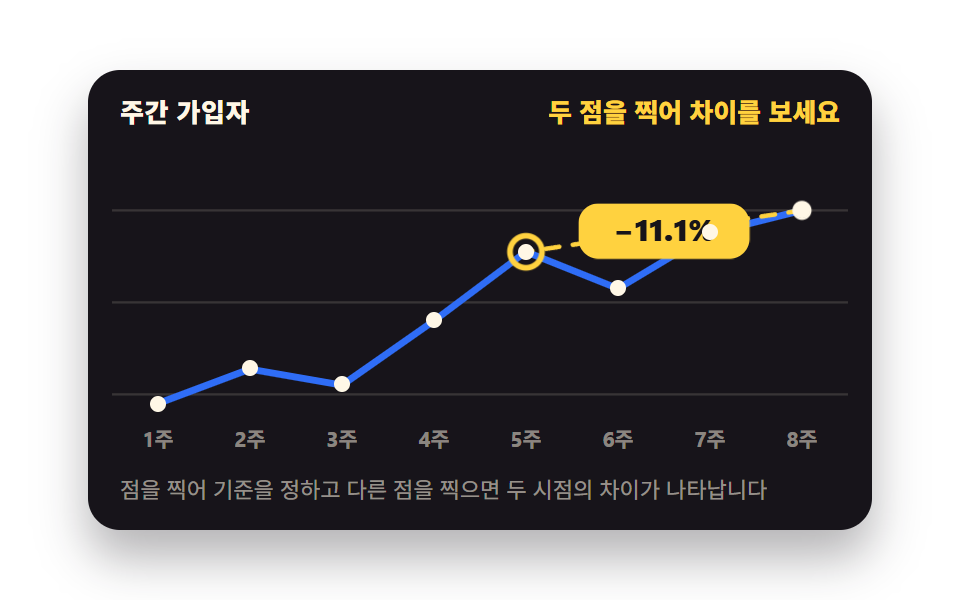
08Pin two points and the gap appears
The first click pins a baseline, the second draws a dashed span with the difference between them, and a third moves the baseline to that point.
Best forTrend charts where two moments are compared directly
aria-pressedstroke-dasharrayaria-live
<main class="stage">
  <figure class="cmp is-demo" id="cmp" data-a="0">
    <figcaption class="cmp__head">
      <span class="cmp__title">Weekly signups</span>
      <span class="cmp__val" aria-live="polite" id="cmp-live">Pin two points to compare</span>
    </figcaption>
    <div class="cmp__plot">
      <svg class="cmp__svg" viewBox="0 0 320 136" role="img" aria-label="Signup trend over 8 weeks, up from 128 in week 1 to 262 in week 8">
        <g class="cmp__grid" aria-hidden="true">
          <line x1="0" y1="28" x2="320" y2="28"/><line x1="0" y1="68" x2="320" y2="68"/><line x1="0" y1="108" x2="320" y2="108"/>
        </g>
        <g class="cmp__labels" aria-hidden="true">
          <text x="20" y="131">W1</text><text x="60" y="131">W2</text><text x="100" y="131">W3</text><text x="140" y="131">W4</text><text x="180" y="131">W5</text><text x="220" y="131">W6</text><text x="260" y="131">W7</text><text x="300" y="131">W8</text>
        </g>
        <polyline class="cmp__line" points="20,112 60,97 100,104 140,76 180,46 220,62 260,38 300,28"/>
        <g class="cmp__link" aria-hidden="true">
          <g class="cmp__linkpos">
            <g class="cmp__draw1"><line class="cmp__l1" id="cmp-line" x1="0" y1="0" x2="280" y2="-84"/></g>
            <g class="cmp__draw2"><line class="cmp__l2" x1="0" y1="0" x2="-120" y2="18"/></g>
          </g>
        </g>
        <g class="cmp__pinB" aria-hidden="true">
          <g class="cmp__pinBIn"><circle class="cmp__bring" r="7"/><circle class="cmp__bdot" r="2.5"/></g>
        </g>
        <g class="cmp__badge cmp__badge1" aria-hidden="true">
          <g class="cmp__badgeIn"><rect x="-34" y="-11" width="68" height="22" rx="8"/><text x="0" y="4" text-anchor="middle">+104.7%</text></g>
        </g>
        <g class="cmp__badge cmp__badge2" aria-hidden="true">
          <g class="cmp__badgeIn"><rect x="-34" y="-11" width="68" height="22" rx="8"/><text x="0" y="4" text-anchor="middle">−11.1%</text></g>
        </g>
        <g class="cmp__base" aria-hidden="true">
          <g class="cmp__baseIn"><circle class="cmp__aring" r="7.5"/><circle class="cmp__adot" r="2.5"/></g>
        </g>
      </svg>
      <button class="cmp__pt" type="button" tabindex="0" aria-pressed="true" aria-label="W1 · 128" style="left:6.25%;top:82.4%"><span class="cmp__dot" aria-hidden="true"></span></button>
      <button class="cmp__pt" type="button" tabindex="-1" aria-pressed="false" aria-label="W2 · 152" style="left:18.75%;top:71.3%"><span class="cmp__dot" aria-hidden="true"></span></button>
      <button class="cmp__pt" type="button" tabindex="-1" aria-pressed="false" aria-label="W3 · 141" style="left:31.25%;top:76.5%"><span class="cmp__dot" aria-hidden="true"></span></button>
      <button class="cmp__pt" type="button" tabindex="-1" aria-pressed="false" aria-label="W4 · 186" style="left:43.75%;top:55.9%"><span class="cmp__dot" aria-hidden="true"></span></button>
      <button class="cmp__pt" type="button" tabindex="-1" aria-pressed="false" aria-label="W5 · 233" style="left:56.25%;top:33.8%"><span class="cmp__dot" aria-hidden="true"></span></button>
      <button class="cmp__pt" type="button" tabindex="-1" aria-pressed="false" aria-label="W6 · 208" style="left:68.75%;top:45.6%"><span class="cmp__dot" aria-hidden="true"></span></button>
      <button class="cmp__pt" type="button" tabindex="-1" aria-pressed="false" aria-label="W7 · 246" style="left:81.25%;top:27.9%"><span class="cmp__dot" aria-hidden="true"></span></button>
      <button class="cmp__pt" type="button" tabindex="-1" aria-pressed="false" aria-label="W8 · 262" style="left:93.75%;top:20.6%"><span class="cmp__dot" aria-hidden="true"></span></button>
    </div>
    <p class="cmp__hint">Pin one point as the baseline, then another to reveal the gap</p>
    <div class="sr"><table>
      <caption>Weekly signups</caption>
      <tbody><tr><th>W1</th><td>128</td></tr><tr><th>W2</th><td>152</td></tr><tr><th>W3</th><td>141</td></tr><tr><th>W4</th><td>186</td></tr><tr><th>W5</th><td>233</td></tr><tr><th>W6</th><td>208</td></tr><tr><th>W7</th><td>246</td></tr><tr><th>W8</th><td>262</td></tr></tbody>
    </table></div>
  </figure>
</main>@use "../../../../site/static/demo-tokens" as *;
// ── 핀 좌표 여섯 개를 등록한다 ──
// 등록하지 않으면 문자열 취급이라 값이 바뀌어도 transform transition 이 못 탄다.
// 기본값 = 자동 루프 첫 장(기준 1주, 비교 8주)과 같은 상태 — .is-demo 를 떼도 화면이 안 튄다
@property --ax {
syntax: "<length>";
initial-value: 20px;
inherits: true;
}
@property --ay {
syntax: "<length>";
initial-value: 112px;
inherits: true;
}
@property --bx {
syntax: "<length>";
initial-value: 300px;
inherits: true;
}
@property --by {
syntax: "<length>";
initial-value: 28px;
inherits: true;
}
@property --mx {
syntax: "<length>";
initial-value: 160px;
inherits: true;
}
@property --my {
syntax: "<length>";
initial-value: 70px;
inherits: true;
}
$duration: $dur-quick;
$easing: $ease-out;
$color: $subject-blue;
@include stage($stage-paper);
.sr {
position: absolute;
width: 1px;
height: 1px;
overflow: hidden;
clip-path: inset(50%);
white-space: nowrap;
}
// 페이퍼 무대 → 잉크 카드. 카드 안이라 글자 대비가 WCAG 안전하다
.cmp {
--ax: 20px; --ay: 112px;
--bx: 300px; --by: 28px;
--mx: 160px; --my: 70px;
box-sizing: border-box;
width: min(392px, 88vw);
display: flex;
flex-direction: column;
gap: $sp-2;
margin: 0;
padding: $sp-3;
border-radius: $r-card;
background: $subject-ink;
box-shadow: $shadow-raised;
color: $subject-cream;
font-family: -apple-system, "Segoe UI", "Noto Sans KR", sans-serif;
}
.cmp__head {
display: flex;
align-items: baseline;
justify-content: space-between;
gap: $sp-2;
padding: 0 $sp-1;
}
.cmp__title { font-size: 13px; line-height: 18px; font-weight: 800; letter-spacing: .02em; }
.cmp__val { font-size: 13px; line-height: 18px; font-weight: 800; color: $stage-yellow; font-variant-numeric: tabular-nums; text-align: right; }
.cmp__plot { position: relative; }
.cmp__svg { display: block; width: 100%; height: auto; }
.cmp__grid line { stroke: rgba(255, 247, 230, .14); stroke-width: 1; }
.cmp__labels text { fill: rgba(255, 247, 230, .5); font-size: 9px; font-weight: 700; text-anchor: middle; }
.cmp__line {
fill: none;
stroke: $color;
stroke-width: 3;
stroke-linecap: round;
stroke-linejoin: round;
}
// ── 두 점을 잇는 점선 (stroke-dasharray) ──
// draw 그룹의 scale 은 균등라서 선이 자기 방향을 따라 뻗는다. 원점은 기준 쪽 끝:
// l1 은 bbox 의 왼쪽 아래(0,0), l2 는 오른쪽 위(0,0) — 각각 기준점이 거기 있다
.cmp__l1, .cmp__l2 {
fill: none;
stroke: $stage-yellow;
stroke-width: 2;
stroke-dasharray: 6 6;
stroke-linecap: round;
}
.cmp__draw1 { transform-box: fill-box; transform-origin: 0% 100%; } // 규칙8: 점선 기준 끝점서 뻗음
.cmp__draw2 { transform-box: fill-box; transform-origin: 100% 0%; } // 규칙8: 점선 기준 끝점서 뻗음
// ── 핀 마커 ── 기준(크림) · 비교(옐로). 안쪽 그룹의 scale 팝을 위해 fill-box 중심
.cmp__baseIn, .cmp__pinBIn, .cmp__badgeIn {
transform-box: fill-box;
transform-origin: center;
}
.cmp__aring { fill: none; stroke: $subject-cream; stroke-width: 2.5; }
.cmp__adot { fill: $subject-cream; }
.cmp__bring { fill: none; stroke: $stage-yellow; stroke-width: 2.5; }
.cmp__bdot { fill: $stage-yellow; }
.cmp__badgeIn rect { fill: $stage-yellow; }
.cmp__badgeIn text { fill: $subject-ink; font-size: 12px; font-weight: 800; }
// ── 점 버튼 (HTML 오버레이 — 실제 키보드 포커스·aria-pressed 를 얻는다) ──
.cmp__pt {
position: absolute;
box-sizing: border-box;
margin: 0;
padding: 0;
width: 24px;
height: 24px;
border: 0;
border-radius: 50%;
background: transparent;
transform: translate(-50%, -50%);
cursor: pointer;
}
.cmp__pt:focus-visible { outline: 2px solid $stage-yellow; outline-offset: 2px; }
.cmp__dot {
display: block;
width: 8px;
height: 8px;
margin: 0 auto;
border-radius: 50%;
background: $subject-cream;
transition-property: transform, background-color;
transition-duration: $duration;
transition-timing-function: $easing;
}
.cmp__pt:hover .cmp__dot { transform: scale(1.35); }
.cmp__pt[aria-pressed="true"] .cmp__dot { background: $stage-yellow; transform: scale(1.2); }
// 루프 동안에는 HTML 기본값(1주 pressed) 노란 점이 기준 링과 어긋난다 —
// 루프에서는 점을 전부 중립색으로 두고 기준 위치는 링에게만 맡긴다
.cmp.is-demo .cmp__pt[aria-pressed="true"] .cmp__dot { background: $subject-cream; transform: none; }
.cmp__hint { margin: 0; padding: 0 $sp-1; font-size: 11px; line-height: 16px; color: rgba(255, 247, 230, .55); }
// ══ 정적 경로 (사람이 만진 뒤) — 먼저 쓰고 루프를 그 위에 덧씌운다 ══
// 기준 핀은 항상 보이고, [data-b] 가 있어야 점선·둘째 핀·배지가 뜬다
.cmp__base { transform: translate(var(--ax), var(--ay)); }
.cmp__link, .cmp__pinB, .cmp__badge1 { opacity: 0; }
.cmp__badge2 { opacity: 0; transform: translate(240px, 37px); } // 루프 전용(두 번째 구간 배지) — 정적에선 안 씀
.cmp__linkpos { transform: translate(var(--ax), var(--ay)); }
.cmp__draw1 { transform: scale(0); }
.cmp__pinB { transform: translate(var(--bx), var(--by)); }
.cmp__pinBIn { transform: scale(.5); }
.cmp__badge1 { transform: translate(var(--mx), var(--my)); }
.cmp__badgeIn { transform: scale(1); }
.cmp__l1 { opacity: 0; }
.cmp__l2 { opacity: 0; }
.cmp[data-b] .cmp__link,
.cmp[data-b] .cmp__pinB,
.cmp[data-b] .cmp__badge1 { opacity: 1; }
.cmp[data-b] .cmp__l1 { opacity: 1; }
.cmp[data-b] .cmp__draw1 { transform: scale(1); }
.cmp[data-b] .cmp__pinBIn { transform: scale(1); }
.cmp:not(.is-demo) .cmp__base,
.cmp:not(.is-demo) .cmp__linkpos,
.cmp:not(.is-demo) .cmp__draw1,
.cmp:not(.is-demo) .cmp__pinB,
.cmp:not(.is-demo) .cmp__pinBIn,
.cmp:not(.is-demo) .cmp__badge1 {
transition-property: transform, opacity;
transition-duration: $duration;
transition-timing-function: $easing;
}
// 배지 팝은 살짝 튀게
.cmp:not(.is-demo) .cmp__badge1 { transform: translate(var(--mx), var(--my)) scale(.7); }
.cmp[data-b]:not(.is-demo) .cmp__badge1 { transform: translate(var(--mx), var(--my)) scale(1); }
// ══ 자동 루프(2초) ══
// 이야기: 1주 핀 고정 → 8주 핀 + 점선 뻗음 + 배지(+104.7%) → 기준을 8주로 옮김
// → 5주 핀 + 점선 + 배지(−11.1%) → 처음으로. 핀이 전부 사라지는 프레임은 없다
.cmp.is-demo .cmp__base {
animation-name: cp-base-pos;
animation-duration: $dur-loop;
animation-timing-function: steps(1, end);
animation-iteration-count: infinite;
}
@keyframes cp-base-pos {
0% { transform: translate(20px, 112px); }
46% { transform: translate(300px, 28px); }
84% { transform: translate(20px, 112px); }
100% { transform: translate(20px, 112px); }
}
.cmp.is-demo .cmp__baseIn {
animation-name: cp-base-pop;
animation-duration: $dur-loop;
animation-timing-function: $ease-pop;
animation-iteration-count: infinite;
}
@keyframes cp-base-pop {
0%, 46%, 84% { transform: scale(.5); }
8%, 54%, 92% { transform: scale(1.15); }
14%, 60%, 98%, 100% { transform: scale(1); }
}
.cmp.is-demo .cmp__link {
animation-name: cp-link-face;
animation-duration: $dur-loop;
animation-timing-function: steps(1, end);
animation-iteration-count: infinite;
}
@keyframes cp-link-face {
0% { opacity: 0; }
12% { opacity: 1; }
46% { opacity: 0; }
58% { opacity: 1; }
84% { opacity: 0; }
100% { opacity: 0; }
}
.cmp.is-demo .cmp__linkpos {
animation-name: cp-link-pos;
animation-duration: $dur-loop;
animation-timing-function: steps(1, end);
animation-iteration-count: infinite;
}
@keyframes cp-link-pos {
0% { transform: translate(20px, 112px); }
46% { transform: translate(300px, 28px); }
100% { transform: translate(300px, 28px); }
}
.cmp.is-demo .cmp__l1 {
animation-name: cp-l1-face;
animation-duration: $dur-loop;
animation-timing-function: steps(1, end);
animation-iteration-count: infinite;
}
@keyframes cp-l1-face {
0% { opacity: 0; }
12% { opacity: 1; }
46% { opacity: 0; }
100% { opacity: 0; }
}
.cmp.is-demo .cmp__l2 {
animation-name: cp-l2-face;
animation-duration: $dur-loop;
animation-timing-function: steps(1, end);
animation-iteration-count: infinite;
}
@keyframes cp-l2-face {
0% { opacity: 0; }
58% { opacity: 1; }
84% { opacity: 0; }
100% { opacity: 0; }
}
// 점선 뻗음 — 등장은 컷, 자라남은 균등 scale 이라 중간 프레임이 유령이 안 된다
.cmp.is-demo .cmp__draw1 {
animation-name: cp-draw1;
animation-duration: $dur-loop;
animation-timing-function: $easing;
animation-iteration-count: infinite;
}
@keyframes cp-draw1 {
0%, 12% { transform: scale(0); }
26%, 100% { transform: scale(1); }
}
.cmp.is-demo .cmp__draw2 {
animation-name: cp-draw2;
animation-duration: $dur-loop;
animation-timing-function: $easing;
animation-iteration-count: infinite;
}
@keyframes cp-draw2 {
0%, 58% { transform: scale(0); }
72%, 100% { transform: scale(1); }
}
.cmp.is-demo .cmp__pinB {
animation-name: cp-pinb-pos, cp-pinb-face;
animation-duration: $dur-loop, $dur-loop;
animation-timing-function: steps(1, end), steps(1, end);
animation-iteration-count: infinite, infinite;
}
@keyframes cp-pinb-pos {
0% { transform: translate(300px, 28px); }
58% { transform: translate(180px, 46px); }
100% { transform: translate(180px, 46px); }
}
@keyframes cp-pinb-face {
0% { opacity: 0; }
12% { opacity: 1; }
46% { opacity: 0; }
58% { opacity: 1; }
84% { opacity: 0; }
100% { opacity: 0; }
}
.cmp.is-demo .cmp__pinBIn {
animation-name: cp-pinb-pop;
animation-duration: $dur-loop;
animation-timing-function: $ease-pop;
animation-iteration-count: infinite;
}
@keyframes cp-pinb-pop {
0%, 12% { transform: scale(.4); }
20% { transform: scale(1.15); }
28%, 46% { transform: scale(1); }
58% { transform: scale(.4); }
66% { transform: scale(1.15); }
74%, 100% { transform: scale(1); }
}
.cmp.is-demo .cmp__badge1 {
animation-name: cp-b1-face;
animation-duration: $dur-loop;
animation-timing-function: steps(1, end);
animation-iteration-count: infinite;
}
@keyframes cp-b1-face {
0% { opacity: 0; }
24% { opacity: 1; }
42% { opacity: 0; } // 배지 혼자 먼저 컷 — 46% 대컷과 겹치면 poster 가 컷 뒤 빈 장면을 고른다
100% { opacity: 0; }
}
.cmp.is-demo .cmp__badge1 .cmp__badgeIn {
animation-name: cp-b1-pop;
animation-duration: $dur-loop;
animation-timing-function: $ease-pop;
animation-iteration-count: infinite;
}
@keyframes cp-b1-pop {
0%, 24% { transform: scale(.55); }
32% { transform: scale(1.08); }
40%, 100% { transform: scale(1); }
}
.cmp.is-demo .cmp__badge2 {
animation-name: cp-b2-face;
animation-duration: $dur-loop;
animation-timing-function: steps(1, end);
animation-iteration-count: infinite;
}
@keyframes cp-b2-face {
0% { opacity: 0; }
68% { opacity: 1; }
80% { opacity: 0; } // 첫 배지와 같은 이유로 대컷(84%) 보다 먼저
100% { opacity: 0; }
}
.cmp.is-demo .cmp__badge2 .cmp__badgeIn {
animation-name: cp-b2-pop;
animation-duration: $dur-loop;
animation-timing-function: $ease-pop;
animation-iteration-count: infinite;
}
@keyframes cp-b2-pop {
0%, 68% { transform: scale(.55); }
76% { transform: scale(1.08); }
84%, 100% { transform: scale(1); }
}
@media (max-width: 340px) {
.cmp { padding: $sp-2; gap: $sp-1; }
.cmp__hint { display: none; }
.cmp__title, .cmp__val { font-size: 12px; line-height: 16px; }
}
@media (prefers-reduced-motion: reduce) {
.cmp.is-demo .cmp__base,
.cmp.is-demo .cmp__baseIn,
.cmp.is-demo .cmp__link,
.cmp.is-demo .cmp__linkpos,
.cmp.is-demo .cmp__l1,
.cmp.is-demo .cmp__l2,
.cmp.is-demo .cmp__draw1,
.cmp.is-demo .cmp__draw2,
.cmp.is-demo .cmp__pinB,
.cmp.is-demo .cmp__pinBIn,
.cmp.is-demo .cmp__badge1,
.cmp.is-demo .cmp__badge2 { animation: none !important; }
.cmp:not(.is-demo) .cmp__base,
.cmp:not(.is-demo) .cmp__linkpos,
.cmp:not(.is-demo) .cmp__draw1,
.cmp:not(.is-demo) .cmp__pinB,
.cmp:not(.is-demo) .cmp__pinBIn,
.cmp:not(.is-demo) .cmp__badge1,
.cmp:not(.is-demo) .cmp__badgeIn,
.cmp__dot { transition: none !important; }
}@property --ax {
syntax: "<length>";
initial-value: 20px;
inherits: true;
}
@property --ay {
syntax: "<length>";
initial-value: 112px;
inherits: true;
}
@property --bx {
syntax: "<length>";
initial-value: 300px;
inherits: true;
}
@property --by {
syntax: "<length>";
initial-value: 28px;
inherits: true;
}
@property --mx {
syntax: "<length>";
initial-value: 160px;
inherits: true;
}
@property --my {
syntax: "<length>";
initial-value: 70px;
inherits: true;
}
html, body {
margin: 0;
overflow: hidden;
}
.stage {
box-sizing: border-box;
min-height: 100vh;
display: grid;
place-items: center;
margin: 0;
background: #ffffff;
font-family: -apple-system, "Segoe UI", "Noto Sans KR", sans-serif;
padding: clamp(8px, 4vw, 24px);
}
.sr {
position: absolute;
width: 1px;
height: 1px;
overflow: hidden;
clip-path: inset(50%);
white-space: nowrap;
}
.cmp {
--ax: 20px;
--ay: 112px;
--bx: 300px;
--by: 28px;
--mx: 160px;
--my: 70px;
box-sizing: border-box;
width: min(392px, 88vw);
display: flex;
flex-direction: column;
gap: 8px;
margin: 0;
padding: 12px;
border-radius: 16px;
background: #17141a;
box-shadow: 0 14px 24px rgba(23, 20, 26, 0.32);
color: #fff7e6;
font-family: -apple-system, "Segoe UI", "Noto Sans KR", sans-serif;
}
.cmp__head {
display: flex;
align-items: baseline;
justify-content: space-between;
gap: 8px;
padding: 0 4px;
}
.cmp__title {
font-size: 13px;
line-height: 18px;
font-weight: 800;
letter-spacing: 0.02em;
}
.cmp__val {
font-size: 13px;
line-height: 18px;
font-weight: 800;
color: #ffd23f;
font-variant-numeric: tabular-nums;
text-align: right;
}
.cmp__plot {
position: relative;
}
.cmp__svg {
display: block;
width: 100%;
height: auto;
}
.cmp__grid line {
stroke: rgba(255, 247, 230, 0.14);
stroke-width: 1;
}
.cmp__labels text {
fill: rgba(255, 247, 230, 0.5);
font-size: 9px;
font-weight: 700;
text-anchor: middle;
}
.cmp__line {
fill: none;
stroke: #2f6df6;
stroke-width: 3;
stroke-linecap: round;
stroke-linejoin: round;
}
.cmp__l1, .cmp__l2 {
fill: none;
stroke: #ffd23f;
stroke-width: 2;
stroke-dasharray: 6 6;
stroke-linecap: round;
}
.cmp__draw1 {
transform-box: fill-box;
transform-origin: 0% 100%;
}
.cmp__draw2 {
transform-box: fill-box;
transform-origin: 100% 0%;
}
.cmp__baseIn, .cmp__pinBIn, .cmp__badgeIn {
transform-box: fill-box;
transform-origin: center;
}
.cmp__aring {
fill: none;
stroke: #fff7e6;
stroke-width: 2.5;
}
.cmp__adot {
fill: #fff7e6;
}
.cmp__bring {
fill: none;
stroke: #ffd23f;
stroke-width: 2.5;
}
.cmp__bdot {
fill: #ffd23f;
}
.cmp__badgeIn rect {
fill: #ffd23f;
}
.cmp__badgeIn text {
fill: #17141a;
font-size: 12px;
font-weight: 800;
}
.cmp__pt {
position: absolute;
box-sizing: border-box;
margin: 0;
padding: 0;
width: 24px;
height: 24px;
border: 0;
border-radius: 50%;
background: transparent;
transform: translate(-50%, -50%);
cursor: pointer;
}
.cmp__pt:focus-visible {
outline: 2px solid #ffd23f;
outline-offset: 2px;
}
.cmp__dot {
display: block;
width: 8px;
height: 8px;
margin: 0 auto;
border-radius: 50%;
background: #fff7e6;
transition-property: transform, background-color;
transition-duration: 220ms;
transition-timing-function: ease-out;
}
.cmp__pt:hover .cmp__dot {
transform: scale(1.35);
}
.cmp__pt[aria-pressed=true] .cmp__dot {
background: #ffd23f;
transform: scale(1.2);
}
.cmp.is-demo .cmp__pt[aria-pressed=true] .cmp__dot {
background: #fff7e6;
transform: none;
}
.cmp__hint {
margin: 0;
padding: 0 4px;
font-size: 11px;
line-height: 16px;
color: rgba(255, 247, 230, 0.55);
}
.cmp__base {
transform: translate(var(--ax), var(--ay));
}
.cmp__link, .cmp__pinB, .cmp__badge1 {
opacity: 0;
}
.cmp__badge2 {
opacity: 0;
transform: translate(240px, 37px);
}
.cmp__linkpos {
transform: translate(var(--ax), var(--ay));
}
.cmp__draw1 {
transform: scale(0);
}
.cmp__pinB {
transform: translate(var(--bx), var(--by));
}
.cmp__pinBIn {
transform: scale(0.5);
}
.cmp__badge1 {
transform: translate(var(--mx), var(--my));
}
.cmp__badgeIn {
transform: scale(1);
}
.cmp__l1 {
opacity: 0;
}
.cmp__l2 {
opacity: 0;
}
.cmp[data-b] .cmp__link,
.cmp[data-b] .cmp__pinB,
.cmp[data-b] .cmp__badge1 {
opacity: 1;
}
.cmp[data-b] .cmp__l1 {
opacity: 1;
}
.cmp[data-b] .cmp__draw1 {
transform: scale(1);
}
.cmp[data-b] .cmp__pinBIn {
transform: scale(1);
}
.cmp:not(.is-demo) .cmp__base,
.cmp:not(.is-demo) .cmp__linkpos,
.cmp:not(.is-demo) .cmp__draw1,
.cmp:not(.is-demo) .cmp__pinB,
.cmp:not(.is-demo) .cmp__pinBIn,
.cmp:not(.is-demo) .cmp__badge1 {
transition-property: transform, opacity;
transition-duration: 220ms;
transition-timing-function: ease-out;
}
.cmp:not(.is-demo) .cmp__badge1 {
transform: translate(var(--mx), var(--my)) scale(0.7);
}
.cmp[data-b]:not(.is-demo) .cmp__badge1 {
transform: translate(var(--mx), var(--my)) scale(1);
}
.cmp.is-demo .cmp__base {
animation-name: cp-base-pos;
animation-duration: 2s;
animation-timing-function: steps(1, end);
animation-iteration-count: infinite;
}
@keyframes cp-base-pos {
0% {
transform: translate(20px, 112px);
}
46% {
transform: translate(300px, 28px);
}
84% {
transform: translate(20px, 112px);
}
100% {
transform: translate(20px, 112px);
}
}
.cmp.is-demo .cmp__baseIn {
animation-name: cp-base-pop;
animation-duration: 2s;
animation-timing-function: cubic-bezier(0.2, 1.4, 0.4, 1);
animation-iteration-count: infinite;
}
@keyframes cp-base-pop {
0%, 46%, 84% {
transform: scale(0.5);
}
8%, 54%, 92% {
transform: scale(1.15);
}
14%, 60%, 98%, 100% {
transform: scale(1);
}
}
.cmp.is-demo .cmp__link {
animation-name: cp-link-face;
animation-duration: 2s;
animation-timing-function: steps(1, end);
animation-iteration-count: infinite;
}
@keyframes cp-link-face {
0% {
opacity: 0;
}
12% {
opacity: 1;
}
46% {
opacity: 0;
}
58% {
opacity: 1;
}
84% {
opacity: 0;
}
100% {
opacity: 0;
}
}
.cmp.is-demo .cmp__linkpos {
animation-name: cp-link-pos;
animation-duration: 2s;
animation-timing-function: steps(1, end);
animation-iteration-count: infinite;
}
@keyframes cp-link-pos {
0% {
transform: translate(20px, 112px);
}
46% {
transform: translate(300px, 28px);
}
100% {
transform: translate(300px, 28px);
}
}
.cmp.is-demo .cmp__l1 {
animation-name: cp-l1-face;
animation-duration: 2s;
animation-timing-function: steps(1, end);
animation-iteration-count: infinite;
}
@keyframes cp-l1-face {
0% {
opacity: 0;
}
12% {
opacity: 1;
}
46% {
opacity: 0;
}
100% {
opacity: 0;
}
}
.cmp.is-demo .cmp__l2 {
animation-name: cp-l2-face;
animation-duration: 2s;
animation-timing-function: steps(1, end);
animation-iteration-count: infinite;
}
@keyframes cp-l2-face {
0% {
opacity: 0;
}
58% {
opacity: 1;
}
84% {
opacity: 0;
}
100% {
opacity: 0;
}
}
.cmp.is-demo .cmp__draw1 {
animation-name: cp-draw1;
animation-duration: 2s;
animation-timing-function: ease-out;
animation-iteration-count: infinite;
}
@keyframes cp-draw1 {
0%, 12% {
transform: scale(0);
}
26%, 100% {
transform: scale(1);
}
}
.cmp.is-demo .cmp__draw2 {
animation-name: cp-draw2;
animation-duration: 2s;
animation-timing-function: ease-out;
animation-iteration-count: infinite;
}
@keyframes cp-draw2 {
0%, 58% {
transform: scale(0);
}
72%, 100% {
transform: scale(1);
}
}
.cmp.is-demo .cmp__pinB {
animation-name: cp-pinb-pos, cp-pinb-face;
animation-duration: 2s, 2s;
animation-timing-function: steps(1, end), steps(1, end);
animation-iteration-count: infinite, infinite;
}
@keyframes cp-pinb-pos {
0% {
transform: translate(300px, 28px);
}
58% {
transform: translate(180px, 46px);
}
100% {
transform: translate(180px, 46px);
}
}
@keyframes cp-pinb-face {
0% {
opacity: 0;
}
12% {
opacity: 1;
}
46% {
opacity: 0;
}
58% {
opacity: 1;
}
84% {
opacity: 0;
}
100% {
opacity: 0;
}
}
.cmp.is-demo .cmp__pinBIn {
animation-name: cp-pinb-pop;
animation-duration: 2s;
animation-timing-function: cubic-bezier(0.2, 1.4, 0.4, 1);
animation-iteration-count: infinite;
}
@keyframes cp-pinb-pop {
0%, 12% {
transform: scale(0.4);
}
20% {
transform: scale(1.15);
}
28%, 46% {
transform: scale(1);
}
58% {
transform: scale(0.4);
}
66% {
transform: scale(1.15);
}
74%, 100% {
transform: scale(1);
}
}
.cmp.is-demo .cmp__badge1 {
animation-name: cp-b1-face;
animation-duration: 2s;
animation-timing-function: steps(1, end);
animation-iteration-count: infinite;
}
@keyframes cp-b1-face {
0% {
opacity: 0;
}
24% {
opacity: 1;
}
42% {
opacity: 0;
}
100% {
opacity: 0;
}
}
.cmp.is-demo .cmp__badge1 .cmp__badgeIn {
animation-name: cp-b1-pop;
animation-duration: 2s;
animation-timing-function: cubic-bezier(0.2, 1.4, 0.4, 1);
animation-iteration-count: infinite;
}
@keyframes cp-b1-pop {
0%, 24% {
transform: scale(0.55);
}
32% {
transform: scale(1.08);
}
40%, 100% {
transform: scale(1);
}
}
.cmp.is-demo .cmp__badge2 {
animation-name: cp-b2-face;
animation-duration: 2s;
animation-timing-function: steps(1, end);
animation-iteration-count: infinite;
}
@keyframes cp-b2-face {
0% {
opacity: 0;
}
68% {
opacity: 1;
}
80% {
opacity: 0;
}
100% {
opacity: 0;
}
}
.cmp.is-demo .cmp__badge2 .cmp__badgeIn {
animation-name: cp-b2-pop;
animation-duration: 2s;
animation-timing-function: cubic-bezier(0.2, 1.4, 0.4, 1);
animation-iteration-count: infinite;
}
@keyframes cp-b2-pop {
0%, 68% {
transform: scale(0.55);
}
76% {
transform: scale(1.08);
}
84%, 100% {
transform: scale(1);
}
}
@media (max-width: 340px) {
.cmp {
padding: 8px;
gap: 4px;
}
.cmp__hint {
display: none;
}
.cmp__title, .cmp__val {
font-size: 12px;
line-height: 16px;
}
}
@media (prefers-reduced-motion: reduce) {
.cmp.is-demo .cmp__base,
.cmp.is-demo .cmp__baseIn,
.cmp.is-demo .cmp__link,
.cmp.is-demo .cmp__linkpos,
.cmp.is-demo .cmp__l1,
.cmp.is-demo .cmp__l2,
.cmp.is-demo .cmp__draw1,
.cmp.is-demo .cmp__draw2,
.cmp.is-demo .cmp__pinB,
.cmp.is-demo .cmp__pinBIn,
.cmp.is-demo .cmp__badge1,
.cmp.is-demo .cmp__badge2 {
animation: none !important;
}
.cmp:not(.is-demo) .cmp__base,
.cmp:not(.is-demo) .cmp__linkpos,
.cmp:not(.is-demo) .cmp__draw1,
.cmp:not(.is-demo) .cmp__pinB,
.cmp:not(.is-demo) .cmp__pinBIn,
.cmp:not(.is-demo) .cmp__badge1,
.cmp:not(.is-demo) .cmp__badgeIn,
.cmp__dot {
transition: none !important;
}
}// 실제 동작: 점 버튼을 찍으면 첫 점이 기준(aria-pressed)이 되고, 두 번째 점을 찍으면
// 두 점을 잇는 점선과 차이 값 배지가 뜬다. 세 번째 찍기는 기준을 그 점으로 옮긴다.
// 좌표는 --ax/--ay(기준) --bx/--by(비교 핀) --mx/--my(배지 중간점) 여섯 값으로만 나가고
// 점선·배지·둘째 핀의 등장은 CSS 가 [data-b] 유무로 결정한다.
var root = document.getElementById('cmp');
var btns = [].slice.call(root.querySelectorAll('.cmp__pt'));
var live = document.getElementById('cmp-live');
var line = document.getElementById('cmp-line');
var badge = root.querySelector('.cmp__badge1 text');
var xs = [20, 60, 100, 140, 180, 220, 260, 300];
var ys = [112, 97, 104, 76, 46, 62, 38, 28];
var vs = [128, 152, 141, 186, 233, 208, 246, 262];
var a = 0, b = null, cur = 0;
function put(k, v) { root.style.setProperty(k, v); }
function draw() {
btns.forEach(function (t, i) {
t.setAttribute('aria-pressed', i === a ? 'true' : 'false');
t.tabIndex = i === cur ? 0 : -1;
});
put('--ax', xs[a] + 'px');
put('--ay', ys[a] + 'px');
if (b === null) {
root.removeAttribute('data-b');
live.textContent = btns[a].getAttribute('aria-label');
return;
}
put('--bx', xs[b] + 'px');
put('--by', ys[b] + 'px');
put('--mx', (xs[a] + xs[b]) / 2 + 'px');
put('--my', (ys[a] + ys[b]) / 2 + 'px');
line.setAttribute('x2', xs[b] - xs[a]);
line.setAttribute('y2', ys[b] - ys[a]);
var d = (vs[b] - vs[a]) / vs[a] * 100;
var pct = (d >= 0 ? '+' : '−') + Math.abs(d).toFixed(1) + '%';
badge.textContent = pct;
root.setAttribute('data-b', '1');
live.textContent = btns[a].getAttribute('aria-label') + ' · ' + btns[b].getAttribute('aria-label') + ' · ' + pct;
}
function pin(i) {
root.classList.remove('is-demo');
if (b !== null) { a = i; b = null; } // 세 번째 찍기: 기준 이동, 둘째 핀 해제
else if (i !== a) { b = i; } // 두 번째 찍기: 비교 핀
draw();
}
btns.forEach(function (t, i) {
t.addEventListener('click', function () { cur = i; pin(i); });
t.addEventListener('focus', function () { cur = i; root.classList.remove('is-demo'); });
});
root.addEventListener('keydown', function (e) {
var d = e.key === 'ArrowRight' ? 1 : e.key === 'ArrowLeft' ? -1 : 0;
if (!d) return;
e.preventDefault();
root.classList.remove('is-demo');
cur = Math.min(Math.max(cur + d, 0), btns.length - 1);
btns[cur].focus({ preventScroll: true });
});import { useState } from "react";
import type { CSSProperties } from "react";
import styles from "./ChartComparePin.module.scss";
// 편 264 · 08 — 두 점을 찍으면 그 사이 차이가 뜬다 (vanilla 와 같은 동작)
// 상태는 React state(a·b·cur) 에, 화면은 CSS 가 --ax/--ay/… 와 [data-b] 로 그린다.
export type ChartComparePinProps = {
title?: string;
liveInitial?: string;
hint?: string;
chartLabel?: string;
caption?: string;
weeks?: string[];
unit?: string;
duration?: number;
easing?: string;
color?: string;
};
type KeyEvt = { key: string; preventDefault(): void };
type Btn = { focus(o: { preventScroll: boolean }): void };
const XS = [20, 60, 100, 140, 180, 220, 260, 300];
const YS = [112, 97, 104, 76, 46, 62, 38, 28];
const VS = [128, 152, 141, 186, 233, 208, 246, 262];
type Vars = CSSProperties & {
"--ax"?: string; "--ay"?: string; "--bx"?: string; "--by"?: string;
"--mx"?: string; "--my"?: string;
"--duration"?: string; "--easing"?: string; "--color"?: string;
};
export default function ChartComparePin({
title = "주간 가입자",
liveInitial = "두 점을 찍어 차이를 보세요",
hint = "점을 찍어 기준을 정하고 다른 점을 찍으면 두 시점의 차이가 나타납니다",
chartLabel = "8주간 가입자 추이, 1주 128명에서 8주 262명으로 증가",
caption = "주간 가입자 수",
weeks = ["1주", "2주", "3주", "4주", "5주", "6주", "7주", "8주"],
unit = "명",
duration = 220,
easing = "ease-out",
color = "#2f6df6",
}: ChartComparePinProps) {
const [demo, setDemo] = useState(true);
const [a, setA] = useState(0);
const [b, setB] = useState<number | null>(null);
const [cur, setCur] = useState(0);
const btns: { current: Btn[] } = { current: [] };
const labels = weeks.map((w, i) => w + " " + VS[i] + unit);
const pct =
b === null
? null
: ((VS[b] - VS[a]) / VS[a]) * 100;
const pctText =
pct === null ? "+104.7%" : (pct >= 0 ? "+" : "−") + Math.abs(pct).toFixed(1) + "%";
const liveText =
b === null
? labels[a]
: labels[a] + " · " + labels[b] + " · " + pctText;
const vars: Vars = {
"--ax": XS[a] + "px", "--ay": YS[a] + "px",
"--bx": XS[b === null ? 7 : b] + "px", "--by": YS[b === null ? 7 : b] + "px",
"--mx": b === null ? "160px" : (XS[a] + XS[b]) / 2 + "px",
"--my": b === null ? "70px" : (YS[a] + YS[b]) / 2 + "px",
"--duration": duration + "ms", "--easing": easing, "--color": color,
};
// 세 번째 찍기는 기준 이동 + 둘째 핀 해제, 두 번째 찍기는 비교 핀
function pin(i: number) {
setDemo(false);
if (b !== null) { setA(i); setB(null); }
else if (i !== a) { setB(i); }
}
function onKey(e: KeyEvt) {
const d = e.key === "ArrowRight" ? 1 : e.key === "ArrowLeft" ? -1 : 0;
if (!d) return;
e.preventDefault();
setDemo(false);
const n = Math.min(Math.max(cur + d, 0), XS.length - 1);
setCur(n);
const t = btns.current[n];
if (t) t.focus({ preventScroll: true });
}
return (
<figure
className={`${styles.cmp} ${demo ? styles.isDemo : ""}`}
data-b={b === null ? undefined : "1"}
style={vars}
onKeyDown={onKey}
>
<figcaption className={styles.head}>
<span className={styles.title}>{title}</span>
<span className={styles.val} aria-live="polite">{demo ? liveInitial : liveText}</span>
</figcaption>
<div className={styles.plot}>
<svg className={styles.svg} viewBox="0 0 320 136" role="img" aria-label={chartLabel}>
<g className={styles.grid} aria-hidden="true">
<line x1="0" y1="28" x2="320" y2="28"/><line x1="0" y1="68" x2="320" y2="68"/><line x1="0" y1="108" x2="320" y2="108"/>
</g>
<g className={styles.labels} aria-hidden="true">
{weeks.map((w, i) => <text key={i} x={XS[i]} y="131">{w}</text>)}
</g>
<polyline className={styles.line} points="20,112 60,97 100,104 140,76 180,46 220,62 260,38 300,28"/>
<g className={styles.link} aria-hidden="true">
<g className={styles.linkpos}>
<g className={styles.draw1}>
<line className={styles.l1} x1="0" y1="0" x2={b === null ? 280 : XS[b] - XS[a]} y2={b === null ? -84 : YS[b] - YS[a]}/>
</g>
<g className={styles.draw2}>
<line className={styles.l2} x1="0" y1="0" x2="-120" y2="18"/>
</g>
</g>
</g>
<g className={styles.pinB} aria-hidden="true">
<g className={styles.pinBIn}><circle className={styles.bring} r="7"/><circle className={styles.bdot} r="2.5"/></g>
</g>
<g className={styles.badge1} aria-hidden="true">
<g className={styles.badgeIn}><rect x="-34" y="-11" width="68" height="22" rx="8"/><text x="0" y="4" text-anchor="middle">{pctText}</text></g>
</g>
<g className={styles.badge2} aria-hidden="true">
<g className={styles.badgeIn}><rect x="-34" y="-11" width="68" height="22" rx="8"/><text x="0" y="4" text-anchor="middle">−11.1%</text></g>
</g>
<g className={styles.base} aria-hidden="true">
<g className={styles.baseIn}><circle className={styles.aring} r="7.5"/><circle className={styles.adot} r="2.5"/></g>
</g>
</svg>
{labels.map((lab, i) => (
<button
key={i}
ref={(el: Btn | null) => { if (el) btns.current[i] = el; }}
className={styles.pt}
type="button"
tabIndex={i === cur ? 0 : -1}
aria-pressed={i === a}
aria-label={lab}
style={{ left: (XS[i] / 320) * 100 + "%", top: (YS[i] / 136) * 100 + "%" }}
onClick={() => { setCur(i); pin(i); }}
onFocus={() => { setDemo(false); setCur(i); }}
><span className={styles.dot} aria-hidden="true"></span></button>
))}
</div>
<p className={styles.hint}>{hint}</p>
<div className={styles.sr}><table>
<caption>{caption}</caption>
<tbody>{weeks.map((w, i) => (<tr key={i}><th>{w}</th><td>{VS[i]}</td></tr>))}</tbody>
</table></div>
</figure>
);
}08 Pin two points and the gap appears — Measured area 4.678% · moving frames 23/23Original by GODRICH · SCSS and React ship in the zip · Chart UI Design: 9 Interactions You Can Drag
The post this demo lives in
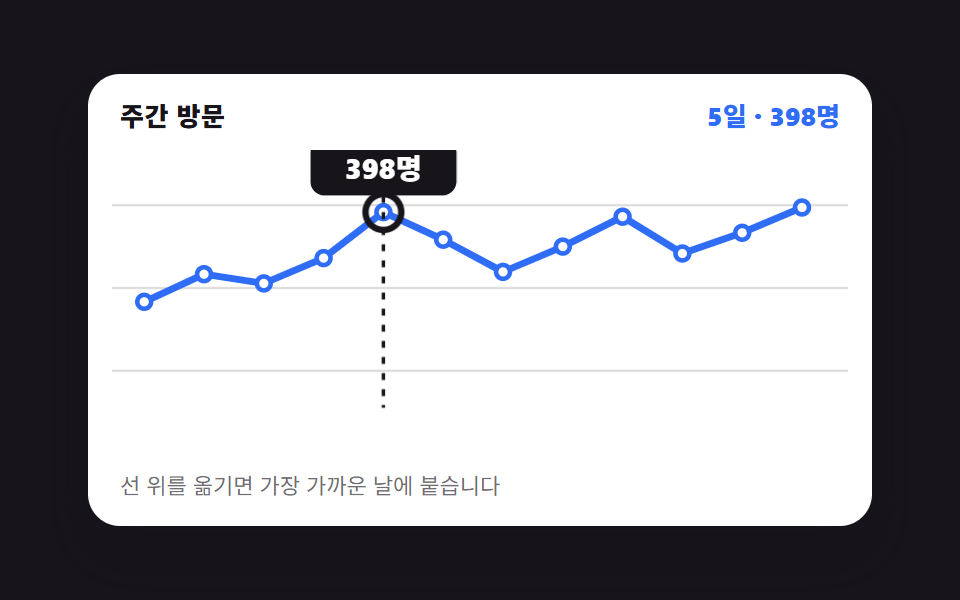 Chart UI Design: 9 Interactions You Can DragChart UI design earns its keep once a reader can put a hand on it. All nine run on CSS bars and inline SVG with no chart See all demos in this post
If you like this effect - similar demos
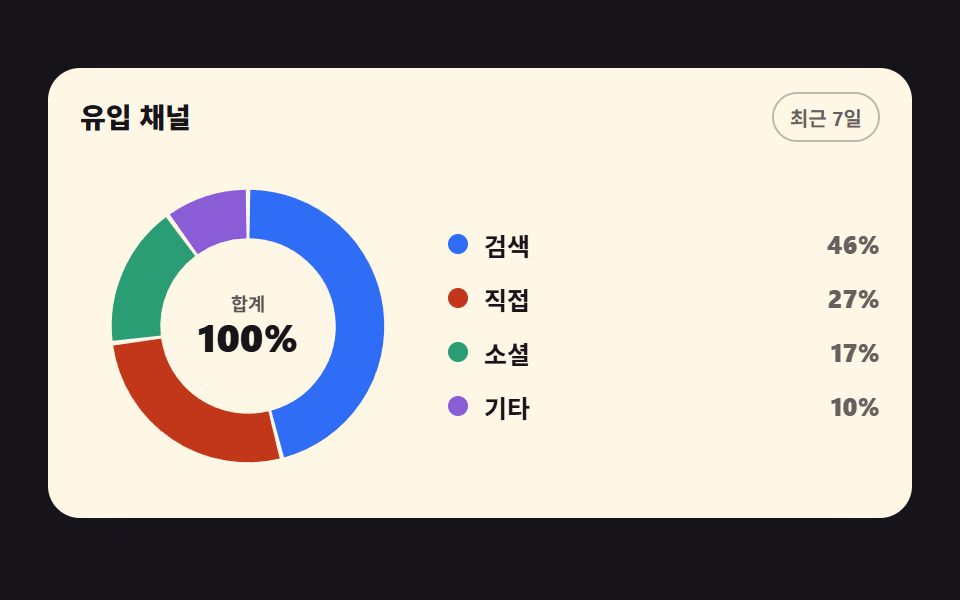 Dashboard UI03 Donut chart filling one segment at a timeCSS Chart Design: 9 SVG Graphs, No Library
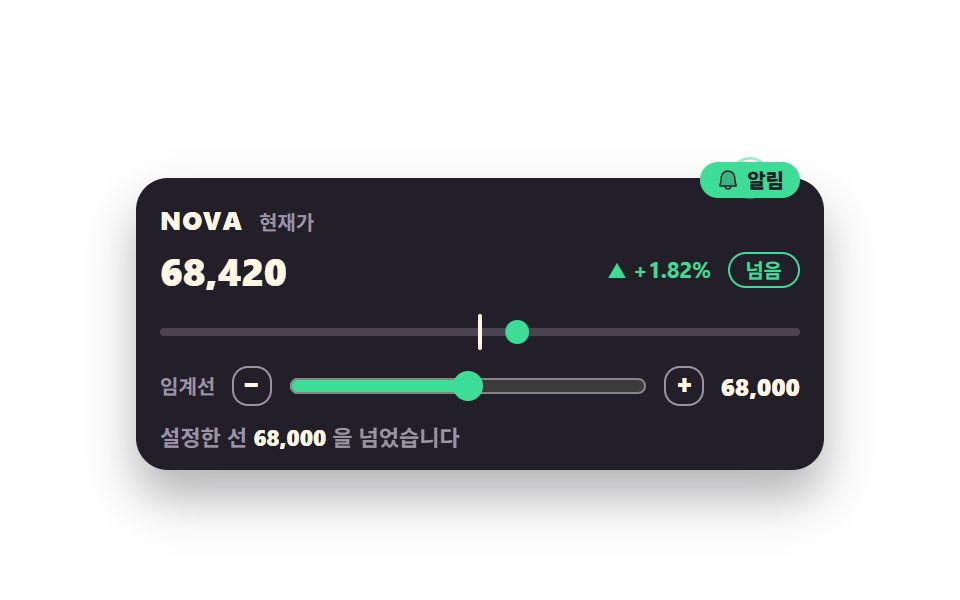 Dashboard UI08 Threshold badge that fires when the line is crossedStock Ticker UI: 9 Live Price Widgets, No API Key
 Dashboard UI03 A 3D Pie Chart That Tilts the Disc and Draws Its Side WallPie Chart CSS: 9 Slices That Pop, Tilt and Morph