04Mini kanban board widget
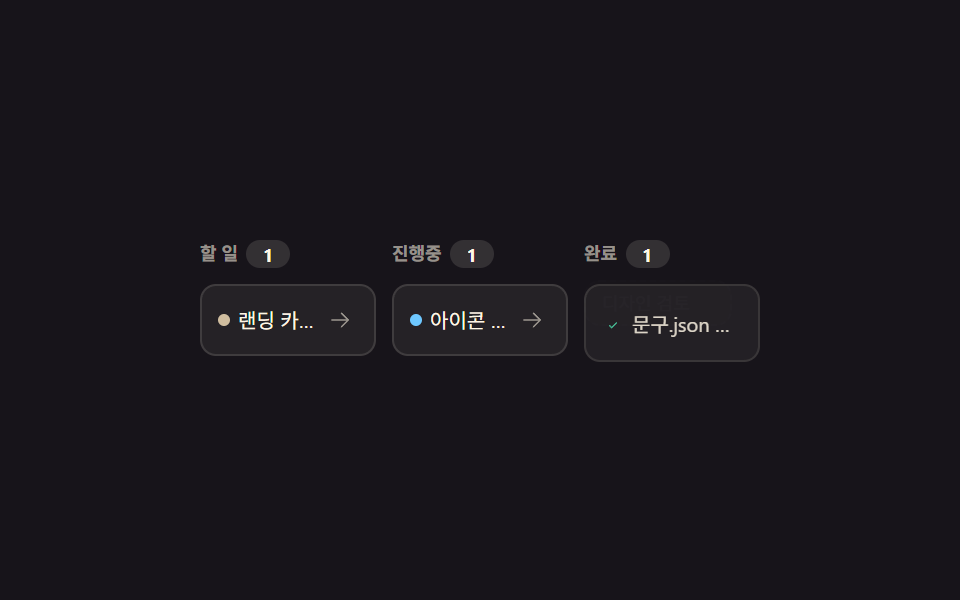
Clicking a card's arrow button actually moves that card into the next column, lifting and sliding briefly as it goes.
Best forWhen tasks just need three progress columns, without a drag-and-drop library
transformappendChildclick
<main class="stage">
  <div class="kb">
    <div class="kb__ghost is-demo" aria-hidden="true">Design review</div>
    <div class="kb__col" data-col="0">
      <p class="kb__head">To do <span class="kb__count">1</span></p>
      <div class="kb__cards">
        <div class="kb__card">
          <span class="kb__dot kb__dot--warn"></span>
          <span class="kb__label">Write landing copy</span>
          <button class="kb__move" type="button" aria-label="Move to next column">
            <svg viewBox="0 0 256 256" width="12" height="12"><g fill="currentColor"><path d="M221.66 133.66l-72 72a8 8 0 0 1-11.32-11.32L196.69 136H40a8 8 0 0 1 0-16h156.69l-58.35-58.34a8 8 0 0 1 11.32-11.32l72 72a8 8 0 0 1 0 11.32"/></g></svg>
          </button>
        </div>
      </div>
    </div>
    <div class="kb__col" data-col="1">
      <p class="kb__head">In progress <span class="kb__count">1</span></p>
      <div class="kb__cards">
        <div class="kb__card">
          <span class="kb__dot kb__dot--info"></span>
          <span class="kb__label">Organize icon set</span>
          <button class="kb__move" type="button" aria-label="Move to next column">
            <svg viewBox="0 0 256 256" width="12" height="12"><g fill="currentColor"><path d="M221.66 133.66l-72 72a8 8 0 0 1-11.32-11.32L196.69 136H40a8 8 0 0 1 0-16h156.69l-58.35-58.34a8 8 0 0 1 11.32-11.32l72 72a8 8 0 0 1 0 11.32"/></g></svg>
          </button>
        </div>
      </div>
    </div>
    <div class="kb__col kb__col--done" data-col="2">
      <p class="kb__head">Done <span class="kb__count">1</span></p>
      <div class="kb__cards">
        <div class="kb__card kb__card--done">
          <span class="kb__ic">
            <svg viewBox="0 0 256 256" width="11" height="11"><g fill="currentColor"><path d="M173.66 98.34a8 8 0 0 1 0 11.32l-56 56a8 8 0 0 1-11.32 0l-24-24a8 8 0 0 1 11.32-11.32L112 148.69l50.34-50.35a8 8 0 0 1 11.32 0"/></g></svg>
          </span>
          <span class="kb__label">Clean up copy.json</span>
        </div>
      </div>
    </div>
  </div>
</main>@use "../../../../site/static/demo-tokens" as *;
$duration: $dur-quick;
$easing: $ease-pop;
$color: $subject-cream;
@include stage($stage-ink);
.kb {
position: relative;
box-sizing: border-box;
width: min(280px, 88vw);
display: flex;
gap: $sp-2;
font-family: -apple-system, "Segoe UI", "Noto Sans KR", sans-serif;
}
.kb__col {
box-sizing: border-box;
flex: 1 1 0;
min-width: 0;
}
.kb__head {
margin: 0 0 $sp-2;
font-size: 9px; font-weight: 700;
color: rgba(255, 247, 230, .55);
display: flex; align-items: center; gap: $sp-1;
}
.kb__count {
display: inline-flex; align-items: center; justify-content: center;
min-width: 14px; height: 14px; padding: 0 $sp-1;
border-radius: $r-pill;
background: rgba(255, 247, 230, .12);
font-size: 9px; color: $color;
}
.kb__cards { display: flex; flex-direction: column; gap: $sp-2; }
.kb__card {
box-sizing: border-box;
display: flex; align-items: center; gap: $sp-1;
background: rgba(255, 247, 230, .06);
border: 1px solid rgba(255, 247, 230, .12);
border-radius: $r-sm;
padding: $sp-2;
transition: opacity $duration $easing, transform $duration $easing;
}
.kb__card--moving { opacity: 0; transform: scale(.9); }
.kb__dot { flex: 0 0 auto; width: 6px; height: 6px; border-radius: 50%; }
.kb__dot--warn { background: #d0bd9f; }
.kb__dot--info { background: $subject-sky; }
.kb__label { flex: 1 1 auto; min-width: 0; font-size: 10px; color: $color; overflow: hidden; text-overflow: ellipsis; white-space: nowrap; }
.kb__move {
flex: 0 0 auto;
width: 18px; height: 18px; padding: 0;
border: 0; background: transparent; color: rgba(255, 247, 230, .55);
display: grid; place-items: center; cursor: pointer;
border-radius: $r-xs;
}
.kb__move:hover { background: rgba(255, 247, 230, .12); color: $color; }
.kb__ic { flex: 0 0 auto; color: $subject-mint; }
.kb__card--done { opacity: .85; }
// ── 자동 루프: 유령 카드가 세 칸을 계속 이동한다 (실제 카드와 별개) ──────────────
.kb__ghost {
position: absolute;
top: 20px; left: 0;
box-sizing: border-box;
width: 74px;
padding: $sp-1 $sp-2;
border-radius: $r-sm;
background: rgba(255, 247, 230, .1);
border: 1px dashed rgba(255, 247, 230, .3);
font-size: 9px; color: rgba(255, 247, 230, .7);
white-space: nowrap; overflow: hidden; text-overflow: ellipsis;
pointer-events: none;
opacity: 0;
}
.kb__ghost.is-demo { animation: kb-move 2s linear infinite; }
@keyframes kb-move {
0% { transform: translateX(0) translateY(0); opacity: .9; }
45% { transform: translateX(96px) translateY(-3px); opacity: .9; }
90% { transform: translateX(192px) translateY(0); opacity: .9; }
96% { transform: translateX(192px) translateY(0); opacity: 0; }
100% { transform: translateX(0) translateY(0); opacity: 0; }
}
@media (max-width: 340px) {
.kb__label { font-size: 9px; }
}
@media (prefers-reduced-motion: reduce) {
.kb__ghost.is-demo { animation: none !important; opacity: 0; }
.kb__card { transition: none; }
}html, body {
margin: 0;
overflow: hidden;
}
.stage {
box-sizing: border-box;
min-height: 100vh;
display: grid;
place-items: center;
margin: 0;
background: #17141a;
font-family: -apple-system, "Segoe UI", "Noto Sans KR", sans-serif;
padding: clamp(8px, 4vw, 24px);
}
.kb {
position: relative;
box-sizing: border-box;
width: min(280px, 88vw);
display: flex;
gap: 8px;
font-family: -apple-system, "Segoe UI", "Noto Sans KR", sans-serif;
}
.kb__col {
box-sizing: border-box;
flex: 1 1 0;
min-width: 0;
}
.kb__head {
margin: 0 0 8px;
font-size: 9px;
font-weight: 700;
color: rgba(255, 247, 230, 0.55);
display: flex;
align-items: center;
gap: 4px;
}
.kb__count {
display: inline-flex;
align-items: center;
justify-content: center;
min-width: 14px;
height: 14px;
padding: 0 4px;
border-radius: 999px;
background: rgba(255, 247, 230, 0.12);
font-size: 9px;
color: #fff7e6;
}
.kb__cards {
display: flex;
flex-direction: column;
gap: 8px;
}
.kb__card {
box-sizing: border-box;
display: flex;
align-items: center;
gap: 4px;
background: rgba(255, 247, 230, 0.06);
border: 1px solid rgba(255, 247, 230, 0.12);
border-radius: 8px;
padding: 8px;
transition: opacity 220ms cubic-bezier(0.2, 1.4, 0.4, 1), transform 220ms cubic-bezier(0.2, 1.4, 0.4, 1);
}
.kb__card--moving {
opacity: 0;
transform: scale(0.9);
}
.kb__dot {
flex: 0 0 auto;
width: 6px;
height: 6px;
border-radius: 50%;
}
.kb__dot--warn {
background: #d0bd9f;
}
.kb__dot--info {
background: #6ec8ff;
}
.kb__label {
flex: 1 1 auto;
min-width: 0;
font-size: 10px;
color: #fff7e6;
overflow: hidden;
text-overflow: ellipsis;
white-space: nowrap;
}
.kb__move {
flex: 0 0 auto;
width: 18px;
height: 18px;
padding: 0;
border: 0;
background: transparent;
color: rgba(255, 247, 230, 0.55);
display: grid;
place-items: center;
cursor: pointer;
border-radius: 4px;
}
.kb__move:hover {
background: rgba(255, 247, 230, 0.12);
color: #fff7e6;
}
.kb__ic {
flex: 0 0 auto;
color: #4cd4a6;
}
.kb__card--done {
opacity: 0.85;
}
.kb__ghost {
position: absolute;
top: 20px;
left: 0;
box-sizing: border-box;
width: 74px;
padding: 4px 8px;
border-radius: 8px;
background: rgba(255, 247, 230, 0.1);
border: 1px dashed rgba(255, 247, 230, 0.3);
font-size: 9px;
color: rgba(255, 247, 230, 0.7);
white-space: nowrap;
overflow: hidden;
text-overflow: ellipsis;
pointer-events: none;
opacity: 0;
}
.kb__ghost.is-demo {
animation: kb-move 2s linear infinite;
}
@keyframes kb-move {
0% {
transform: translateX(0) translateY(0);
opacity: 0.9;
}
45% {
transform: translateX(96px) translateY(-3px);
opacity: 0.9;
}
90% {
transform: translateX(192px) translateY(0);
opacity: 0.9;
}
96% {
transform: translateX(192px) translateY(0);
opacity: 0;
}
100% {
transform: translateX(0) translateY(0);
opacity: 0;
}
}
@media (max-width: 340px) {
.kb__label {
font-size: 9px;
}
}
@media (prefers-reduced-motion: reduce) {
.kb__ghost.is-demo {
animation: none !important;
opacity: 0;
}
.kb__card {
transition: none;
}
}// 실제 동작: 화살표를 누르면 그 카드가 실제로 다음 칸(DOM)으로 옮겨간다. 마지막 칸에서는 화살표 대신 체크로 바뀐다.
var cols = document.querySelectorAll('.kb__col');
function refreshCounts() {
cols.forEach(function (c) {
c.querySelector('.kb__count').textContent = String(c.querySelectorAll('.kb__card').length);
});
}
function wire(card) {
var btn = card.querySelector('.kb__move');
if (!btn) return;
btn.addEventListener('click', function () {
document.querySelector('.kb__ghost').classList.remove('is-demo');
var col = card.closest('.kb__col');
var next = cols[Array.prototype.indexOf.call(cols, col) + 1];
if (!next) return;
card.classList.add('kb__card--moving');
setTimeout(function () {
card.classList.remove('kb__card--moving');
if (next.classList.contains('kb__col--done')) {
card.classList.add('kb__card--done');
btn.remove();
var ic = document.createElement('span');
ic.className = 'kb__ic';
ic.innerHTML = '<svg viewBox="0 0 256 256" width="11" height="11"><g fill="currentColor"><path d="M173.66 98.34a8 8 0 0 1 0 11.32l-56 56a8 8 0 0 1-11.32 0l-24-24a8 8 0 0 1 11.32-11.32L112 148.69l50.34-50.35a8 8 0 0 1 11.32 0"/></g></svg>';
card.prepend(ic);
}
next.querySelector('.kb__cards').appendChild(card);
refreshCounts();
}, 160);
});
}
document.querySelectorAll('.kb__card').forEach(wire);import { useState } from "react";
import type { CSSProperties } from "react";
import styles from "./KanbanBoard.module.scss";
export type KanbanBoardProps = {
duration?: number;
easing?: string;
color?: string;
};
type Vars = CSSProperties & { "--duration"?: string; "--easing"?: string; "--color"?: string };
type Card = { id: string; label: string; dot: "warn" | "info" | "none" };
const INITIAL: Card[][] = [
[{ id: "c1", label: "Write landing copy", dot: "warn" }],
[{ id: "c2", label: "Organize icon set", dot: "info" }],
[{ id: "c3", label: "Clean up copy.json", dot: "none" }],
];
const NAMES = ["To do", "In progress", "Done"];
export default function KanbanBoard({ duration = 220, easing = "cubic-bezier(.2,1.4,.4,1)", color = "#fff7e6" }: KanbanBoardProps) {
const [cols, setCols] = useState<Card[][]>(INITIAL);
const vars: Vars = { "--duration": `${duration}ms`, "--easing": easing, "--color": color };
function move(colIndex: number, cardId: string) {
if (colIndex >= cols.length - 1) return;
setCols((prev) => {
const next = prev.map((c) => c.slice());
const idx = next[colIndex].findIndex((c) => c.id === cardId);
const [card] = next[colIndex].splice(idx, 1);
next[colIndex + 1].push(card);
return next;
});
}
return (
<div className={styles.kb} style={vars}>
{cols.map((col, i) => (
<div key={NAMES[i]} className={styles.col}>
<p className={styles.head}>{NAMES[i]} <span className={styles.count}>{col.length}</span></p>
<div className={styles.cards}>
{col.map((card) => (
<div key={card.id} className={styles.card}>
{i === cols.length - 1 ? (
<span className={styles.ic}>✓</span>
) : (
<span className={`${styles.dot} ${styles[card.dot]}`} />
)}
<span className={styles.label}>{card.label}</span>
{i < cols.length - 1 && (
<button type="button" className={styles.move} aria-label="Move to next column" onClick={() => move(i, card.id)}>→</button>
)}
</div>
))}
</div>
</div>
))}
</div>
);
}04 Mini kanban board widget — Measured area 4.341% · moving frames 23/23Original by GODRICH · SCSS and React ship in the zip · 9 Dashboard Components, Not the Whole Page
The post this demo lives in
 9 Dashboard Components, Not the Whole PageDashboard components are UI pieces — a header, a feed, a calendar — you drop in one at a time instead of wiring a whole See all demos in this post