05Chip filter bar
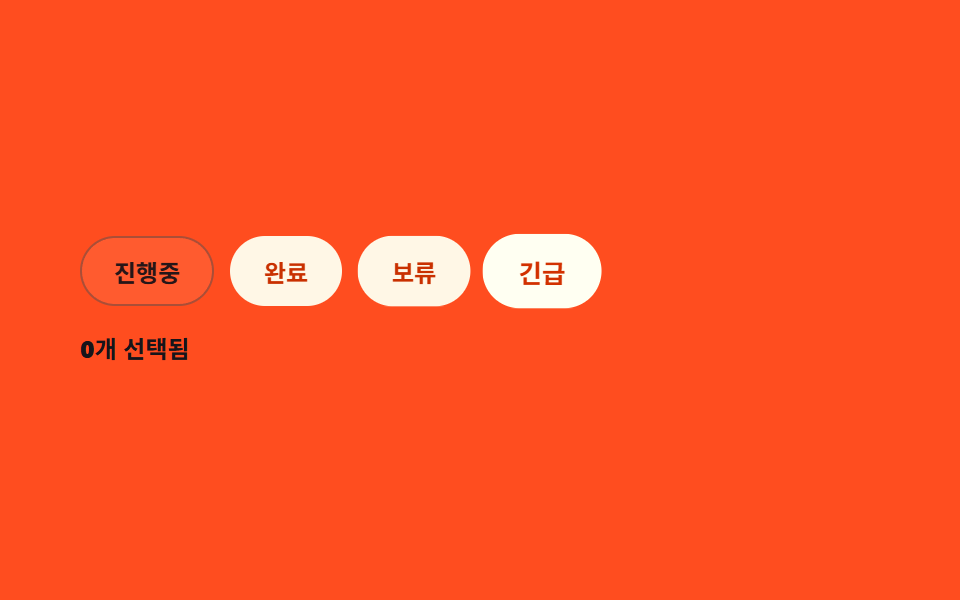
칩을 누르면 실제로 눌린 상태(색·아이콘)로 바뀌고 오른쪽에 선택 개수가 올라가며, 하나라도 선택되면 '전체 해제' 칩이 나타납니다.
Best for
aria-pressedtransformclick
<main class="stage">
  <div class="fl">
    <div class="fl__row">
      <button class="fl__chip is-demo" type="button" aria-pressed="false">In progress</button>
      <button class="fl__chip is-demo" type="button" aria-pressed="false">Done</button>
      <button class="fl__chip is-demo" type="button" aria-pressed="false">On hold</button>
      <button class="fl__chip is-demo" type="button" aria-pressed="false">Urgent</button>
      <button class="fl__clear" type="button" hidden>Clear all ✕</button>
    </div>
    <p class="fl__count"><span class="fl__count-num">0</span> selected</p>
  </div>
</main>
@use "../../../../site/static/demo-tokens" as *;
$duration: $dur-quick;
$easing: $ease-pop;
$color: $subject-blue;
@include stage($stage-orange);
.fl {
box-sizing: border-box;
width: min(400px, 90vw);
font-family: -apple-system, "Segoe UI", "Noto Sans KR", sans-serif;
}
.fl__row { display: flex; flex-wrap: wrap; gap: $sp-2; align-items: center; }
.fl__chip {
box-sizing: border-box;
border: 1px solid rgba(23, 20, 26, .4);
background: transparent;
color: $subject-ink;
padding: $sp-2 $sp-4;
border-radius: $r-pill;
font: inherit; font-weight: 700; font-size: 12px;
cursor: pointer;
transition: background $duration $easing, border-color $duration $easing, transform $duration $easing;
}
.fl__chip[aria-pressed="true"] {
background: $subject-cream;
border-color: $subject-cream;
color: $subject-orange-deep;
} // 크림 면 위 deep 5.04:1
.fl__clear {
border: 0; background: transparent; cursor: pointer;
color: rgba(23, 20, 26, .8);
font: inherit; font-weight: 700; font-size: 11px;
text-decoration: underline;
padding: $sp-2 $sp-1;
}
.fl__count { margin: $sp-3 0 0; font-size: 12px; font-weight: 600; color: $subject-ink; } // 주황 면 위 알파 잉크 .72 는 3.76:1 — 알파를 빼야 5.50:1 (패턴 ①·주황 면 예외)
.fl__count-num { color: $subject-ink; font-weight: 800; }
// ── 자동 루프: 칩이 하나씩 순서대로 눌렸다 풀린다 ──────────────
.fl__chip.is-demo { animation: fl-press 2s $easing infinite; }
.fl__chip.is-demo:nth-child(1) { animation-delay: 0s; }
.fl__chip.is-demo:nth-child(2) { animation-delay: .3s; }
.fl__chip.is-demo:nth-child(3) { animation-delay: .6s; }
.fl__chip.is-demo:nth-child(4) { animation-delay: .9s; }
@keyframes fl-press {
0%, 100% { transform: scale(1); background: transparent; border-color: rgba(23, 20, 26, .4); color: $subject-ink; }
20% { transform: scale(1.06); background: $subject-cream; border-color: $subject-cream; color: $subject-orange-deep; }
40% { transform: scale(1); background: $subject-cream; border-color: $subject-cream; color: $subject-orange-deep; }
}
@media (max-width: 340px) {
.fl__chip { padding: $sp-1 $sp-3; font-size: 11px; }
}
@media (prefers-reduced-motion: reduce) {
.fl__chip.is-demo { animation: none !important; }
.fl__chip { transition: none; }
}html, body {
margin: 0;
overflow: hidden;
}
.stage {
box-sizing: border-box;
min-height: 100vh;
display: grid;
place-items: center;
margin: 0;
background: #ff4d1f;
font-family: -apple-system, "Segoe UI", "Noto Sans KR", sans-serif;
padding: clamp(8px, 4vw, 24px);
}
.fl {
box-sizing: border-box;
width: min(400px, 90vw);
font-family: -apple-system, "Segoe UI", "Noto Sans KR", sans-serif;
}
.fl__row {
display: flex;
flex-wrap: wrap;
gap: 8px;
align-items: center;
}
.fl__chip {
box-sizing: border-box;
border: 1px solid rgba(23, 20, 26, 0.4);
background: transparent;
color: #17141a;
padding: 8px 16px;
border-radius: 999px;
font: inherit;
font-weight: 700;
font-size: 12px;
cursor: pointer;
transition: background 220ms cubic-bezier(0.2, 1.4, 0.4, 1), border-color 220ms cubic-bezier(0.2, 1.4, 0.4, 1), transform 220ms cubic-bezier(0.2, 1.4, 0.4, 1);
}
.fl__chip[aria-pressed=true] {
background: #fff7e6;
border-color: #fff7e6;
color: #c93000;
}
.fl__clear {
border: 0;
background: transparent;
cursor: pointer;
color: rgba(23, 20, 26, 0.8);
font: inherit;
font-weight: 700;
font-size: 11px;
text-decoration: underline;
padding: 8px 4px;
}
.fl__count {
margin: 12px 0 0;
font-size: 12px;
font-weight: 600;
color: #17141a;
}
.fl__count-num {
color: #17141a;
font-weight: 800;
}
.fl__chip.is-demo {
animation: fl-press 2s cubic-bezier(0.2, 1.4, 0.4, 1) infinite;
}
.fl__chip.is-demo:nth-child(1) {
animation-delay: 0s;
}
.fl__chip.is-demo:nth-child(2) {
animation-delay: 0.3s;
}
.fl__chip.is-demo:nth-child(3) {
animation-delay: 0.6s;
}
.fl__chip.is-demo:nth-child(4) {
animation-delay: 0.9s;
}
@keyframes fl-press {
0%, 100% {
transform: scale(1);
background: transparent;
border-color: rgba(23, 20, 26, 0.4);
color: #17141a;
}
20% {
transform: scale(1.06);
background: #fff7e6;
border-color: #fff7e6;
color: #c93000;
}
40% {
transform: scale(1);
background: #fff7e6;
border-color: #fff7e6;
color: #c93000;
}
}
@media (max-width: 340px) {
.fl__chip {
padding: 4px 12px;
font-size: 11px;
}
}
@media (prefers-reduced-motion: reduce) {
.fl__chip.is-demo {
animation: none !important;
}
.fl__chip {
transition: none;
}
}// 실제 동작: 칩을 누르면 실제로 눌린 상태로 바뀌고 개수가 갱신되며, 하나 이상이면 '전체 해제'가 나타난다.
var chips = document.querySelectorAll('.fl__chip');
var clearBtn = document.querySelector('.fl__clear');
var countEl = document.querySelector('.fl__count-num');
function refresh() {
var n = document.querySelectorAll('.fl__chip[aria-pressed="true"]').length;
countEl.textContent = String(n);
clearBtn.hidden = n === 0;
}
chips.forEach(function (c) {
c.addEventListener('click', function () {
c.classList.remove('is-demo');
var on = c.getAttribute('aria-pressed') === 'true';
c.setAttribute('aria-pressed', String(!on));
refresh();
});
});
clearBtn.addEventListener('click', function () {
chips.forEach(function (c) { c.setAttribute('aria-pressed', 'false'); });
refresh();
});import { useState } from "react";
import type { CSSProperties } from "react";
import styles from "./Filters.module.scss";
export type FiltersProps = {
duration?: number;
easing?: string;
color?: string;
};
type Vars = CSSProperties & { "--duration"?: string; "--easing"?: string; "--color"?: string };
const CHIPS = ["진행중", "완료", "보류", "긴급"];
export default function Filters({ duration = 220, easing = "cubic-bezier(.2,1.4,.4,1)", color = "#2f6df6" }: FiltersProps) {
const [selected, setSelected] = useState<Set<string>>(new Set());
const vars: Vars = { "--duration": `${duration}ms`, "--easing": easing, "--color": color };
function toggle(chip: string) {
setSelected((s) => {
const next = new Set(s);
next.has(chip) ? next.delete(chip) : next.add(chip);
return next;
});
}
return (
<div className={styles.fl} style={vars}>
<div className={styles.row}>
{CHIPS.map((chip) => (
<button
key={chip}
type="button"
className={styles.chip}
aria-pressed={selected.has(chip)}
onClick={() => toggle(chip)}
>
{chip}
</button>
))}
{selected.size > 0 && (
<button type="button" className={styles.clear} onClick={() => setSelected(new Set())}>
전체 해제 ✕
</button>
)}
</div>
<p className={styles.count}><span className={styles.countNum}>{selected.size}</span>개 선택됨</p>
</div>
);
}05 Chip filter bar — Measured area 5.824% · moving frames 23/23Original by GODRICH · SCSS and React ship in the zip · Dashboard Sidebar Design + 9 Widget UI Pieces
The post this demo lives in
 Dashboard Sidebar Design + 9 Widget UI PiecesHere, a dashboard sidebar design means just this one piece, not the whole admin page — plus eight more standalone dashbo See all demos in this post