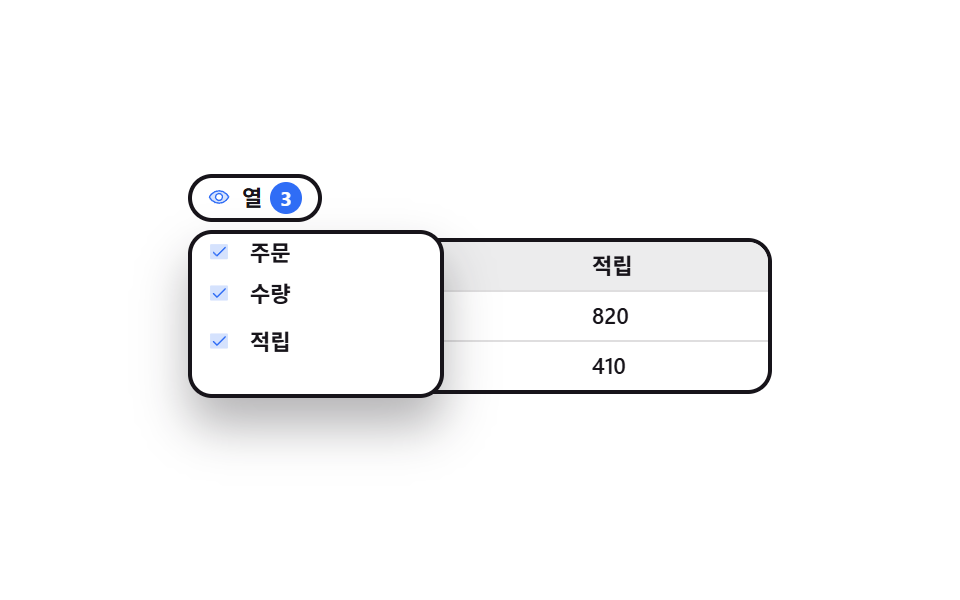
04Menu where unchecking drops a column
The button opens a list of column names, and the moment you uncheck one that column drops out of the table while the number beside the button falls to the count that is left.
Best forWide tables where you keep only the columns you need
aria-expandedpadding-bottomsteps(1, end)
<main class="stage">
  <div class="cv is-demo" id="cv">
    <div class="cv__bar">
      <button class="cv__btn" type="button" id="cv-btn" aria-expanded="false" aria-controls="cv-menu">
        <span class="cv__ic" aria-hidden="true"><svg viewBox="0 0 256 256" width="1em" height="1em" fill="currentColor"><g><path d="M128 56c-80 0-112 72-112 72s32 72 112 72s112-72 112-72s-32-72-112-72m0 112a40 40 0 1 1 40-40a40 40 0 0 1-40 40" opacity=".2"/><path d="M247.31 124.76c-.35-.79-8.82-19.58-27.65-38.41C194.57 61.26 162.88 48 128 48S61.43 61.26 36.34 86.35C17.51 105.18 9 124 8.69 124.76a8 8 0 0 0 0 6.5c.35.79 8.82 19.57 27.65 38.4C61.43 194.74 93.12 208 128 208s66.57-13.26 91.66-38.34c18.83-18.83 27.3-37.61 27.65-38.4a8 8 0 0 0 0-6.5M128 192c-30.78 0-57.67-11.19-79.93-33.25A133.5 133.5 0 0 1 25 128a133.3 133.3 0 0 1 23.07-30.75C70.33 75.19 97.22 64 128 64s57.67 11.19 79.93 33.25A133.5 133.5 0 0 1 231.05 128c-7.21 13.46-38.62 64-103.05 64m0-112a48 48 0 1 0 48 48a48.05 48.05 0 0 0-48-48m0 80a32 32 0 1 1 32-32a32 32 0 0 1-32 32"/></g></svg></span>
        <span class="cv__btn-t">Columns</span>
        <span class="cv__num"><b class="cv__n3">3</b><b class="cv__n2">2</b></span>
      </button>
    </div>

    <div class="cv__menu" id="cv-menu" role="group" aria-label="Choose columns">
     <div class="cv__menu-in">
      <button class="cv__opt" type="button" role="checkbox" aria-checked="true" data-col="1"><span class="cv__box" aria-hidden="true"><svg viewBox="0 0 256 256" width="1em" height="1em" fill="currentColor"><g><path d="M232 56v144a16 16 0 0 1-16 16H40a16 16 0 0 1-16-16V56a16 16 0 0 1 16-16h176a16 16 0 0 1 16 16" opacity=".2"/><path d="m205.66 85.66l-96 96a8 8 0 0 1-11.32 0l-40-40a8 8 0 0 1 11.32-11.32L104 164.69l90.34-90.35a8 8 0 0 1 11.32 11.32"/></g></svg></span>Order</button>
      <button class="cv__opt" type="button" role="checkbox" aria-checked="true" data-col="2"><span class="cv__box" aria-hidden="true"><svg viewBox="0 0 256 256" width="1em" height="1em" fill="currentColor"><g><path d="M232 56v144a16 16 0 0 1-16 16H40a16 16 0 0 1-16-16V56a16 16 0 0 1 16-16h176a16 16 0 0 1 16 16" opacity=".2"/><path d="m205.66 85.66l-96 96a8 8 0 0 1-11.32 0l-40-40a8 8 0 0 1 11.32-11.32L104 164.69l90.34-90.35a8 8 0 0 1 11.32 11.32"/></g></svg></span>Qty</button>
      <button class="cv__opt" type="button" role="checkbox" aria-checked="true" data-col="3"><span class="cv__box" aria-hidden="true"><svg viewBox="0 0 256 256" width="1em" height="1em" fill="currentColor"><g><path d="M232 56v144a16 16 0 0 1-16 16H40a16 16 0 0 1-16-16V56a16 16 0 0 1 16-16h176a16 16 0 0 1 16 16" opacity=".2"/><path d="m205.66 85.66l-96 96a8 8 0 0 1-11.32 0l-40-40a8 8 0 0 1 11.32-11.32L104 164.69l90.34-90.35a8 8 0 0 1 11.32 11.32"/></g></svg></span>Points</button>
     </div>
    </div>

    <div class="cv__grid" id="cv-grid" role="grid" aria-label="Order table">
      <div class="cv__row" role="row"><span class="cv__h" data-col="1" role="columnheader">Order</span><span class="cv__h" data-col="2" role="columnheader">Qty</span><span class="cv__h" data-col="3" role="columnheader">Points</span></div>
      <div class="cv__row" role="row"><span data-col="1" role="gridcell">A-1043</span><span data-col="2" role="gridcell">3</span><span data-col="3" role="gridcell">820</span></div>
      <div class="cv__row" role="row"><span data-col="1" role="gridcell">A-1044</span><span data-col="2" role="gridcell">1</span><span data-col="3" role="gridcell">410</span></div>
    </div>
  </div>
</main>@use "sass:color";
@use "../../../../site/static/demo-tokens" as *;
$duration: $dur-quick;
$easing: $ease-spring;
$color: $subject-blue;
@include stage($stage-paper);
$row-h: 24px;
$ink: $subject-ink;
$line: color.mix($ink, $stage-paper, 14%);
.cv {
position: relative;
box-sizing: border-box;
width: min(292px, 92vw);
// 열 목록이 절대 배치라 레이아웃 높이에 안 잡힌다. 열린 목록이 무대 밖으로
// 삐져나오지 않도록 그 높이만큼을 아래 여백으로 미리 잡아 둔다 (BD9 함정)
padding-bottom: $sp-4;
color: $ink;
font-family: -apple-system, "Segoe UI", "Noto Sans KR", sans-serif;
}
// ── 위 줄 버튼 ────────────────────────────────────────
.cv__bar { display: flex; height: 28px; }
.cv__btn {
display: inline-flex;
align-items: center;
gap: $sp-1;
height: 24px;
padding: 0 $sp-2;
border: 2px solid $ink;
border-radius: $r-pill;
background: $stage-paper;
color: $ink;
font-family: inherit;
font-size: 11px;
line-height: 20px;
font-weight: 700;
cursor: pointer;
}
.cv__btn:focus-visible { outline: 2px solid $color; outline-offset: 2px; }
.cv__ic { display: inline-flex; width: 13px; height: 13px; color: $color; }
.cv__num {
position: relative;
display: inline-flex;
align-items: center;
justify-content: center;
width: 16px;
height: 16px;
border-radius: $r-pill;
background: $color;
color: $stage-paper;
font-size: 10px;
line-height: 16px;
}
.cv__n3, .cv__n2 { position: absolute; font-weight: 700; }
.cv__n2 { opacity: 0; }
// ── 열 목록 (절대 배치) ───────────────────────────────
.cv__menu {
position: absolute;
left: 0; top: 28px;
z-index: 3;
display: flex;
flex-direction: column;
width: 116px;
padding: $sp-1;
border: 2px solid $ink;
border-radius: $r-control;
background: $stage-paper;
box-shadow: $shadow-raised;
opacity: 0;
visibility: hidden;
transform: translateY(-6px);
transition: opacity $duration $easing, transform $duration $easing, visibility 0s $duration;
}
.cv.is-open .cv__menu {
opacity: 1;
visibility: visible;
transform: translateY(0);
transition: opacity $duration $easing, transform $duration $easing, visibility 0s;
}
.cv__menu-in { display: flex; flex-direction: column; }
.cv__opt {
display: flex;
align-items: center;
gap: $sp-2;
height: $row-h;
padding: 0 $sp-1;
border: 0;
border-radius: $r-xs;
background: none;
color: $ink;
font-family: inherit;
font-size: 11px;
line-height: $row-h;
font-weight: 600;
text-align: left;
cursor: pointer;
}
.cv__opt:focus-visible { outline: 2px solid $color; outline-offset: -2px; }
.cv__box { display: inline-flex; width: 13px; height: 13px; color: $color; }
.cv__opt[aria-checked="false"] { color: rgba(23, 20, 26, .38); }
.cv__opt[aria-checked="false"] .cv__box { opacity: 0; }
// ── 표 ───────────────────────────────────────────────
.cv__grid {
margin-top: $sp-1;
border: 2px solid $ink;
border-radius: $r-control;
overflow: hidden;
}
.cv__row {
display: grid;
grid-template-columns: var(--t, 1fr 1fr 1fr);
height: $row-h;
}
.cv__row + .cv__row { border-top: 1px solid $line; }
.cv__row:first-child { background: color.mix($ink, $stage-paper, 8%); }
.cv__row > * {
min-width: 0;
padding: 0 $sp-2;
font-size: 11px;
line-height: $row-h;
font-weight: 500;
white-space: nowrap;
overflow: hidden;
}
.cv__h { font-weight: 700; }
.cv__row > .is-off { opacity: 0; }
// ── 자동 루프 (2s) ───────────────────────────────────
// 10% 목록 컷 등장 → 10~40% 세 줄이 시차를 두고 떠오른다(작은 transform 으로 프레임을 채운다)
// → 46% 셋째 열이 0fr 로 컷 접힘 + 배지 3→2 → 64% 되돌림 → 76~86% 줄이 내려앉고 목록 컷 퇴장.
// 닫힘을 열림과 똑같은 컷으로 두면 **닫히는 장의 변화 면적이 더 커서** 그 프레임이 poster 로
// 뽑힌다(248-09 실측과 같은 계열). 그래서 안쪽 통(.cv__menu-in)을 먼저 흐리게 줄여 두고
// 바깥 통만 컷으로 끈다 — 꺼지는 순간에 사라지는 잉크가 적어진다.
.cv.is-demo .cv__menu {
animation-name: cv-menu;
animation-duration: $dur-loop;
animation-timing-function: steps(1, end);
animation-iteration-count: infinite;
}
.cv.is-demo .cv__menu-in {
animation-name: cv-dim;
animation-duration: $dur-loop;
animation-timing-function: $ease-out;
animation-iteration-count: infinite;
}
.cv.is-demo .cv__opt {
animation-name: cv-opt;
animation-duration: $dur-loop;
animation-timing-function: $easing;
animation-iteration-count: infinite;
animation-fill-mode: backwards;
}
.cv.is-demo .cv__opt:nth-child(2) { animation-delay: 80ms; }
.cv.is-demo .cv__opt:nth-child(3) { animation-delay: 160ms; }
.cv.is-demo .cv__opt:nth-child(3) .cv__box {
animation-name: cv-tick;
animation-duration: $dur-loop;
animation-timing-function: steps(1, end);
animation-iteration-count: infinite;
}
.cv.is-demo .cv__row {
animation-name: cv-cols;
animation-duration: $dur-loop;
animation-timing-function: steps(1, end);
animation-iteration-count: infinite;
}
.cv.is-demo .cv__row > :nth-child(3) {
animation-name: cv-fade;
animation-duration: $dur-loop;
animation-timing-function: steps(1, end);
animation-iteration-count: infinite;
}
.cv.is-demo .cv__n3 {
animation-name: cv-fade;
animation-duration: $dur-loop;
animation-timing-function: steps(1, end);
animation-iteration-count: infinite;
}
.cv.is-demo .cv__n2 {
animation-name: cv-show;
animation-duration: $dur-loop;
animation-timing-function: steps(1, end);
animation-iteration-count: infinite;
}
@keyframes cv-menu {
0% { opacity: 0; visibility: hidden; transform: translateY(0); }
10% { opacity: 1; visibility: visible; transform: translateY(0); }
86% { opacity: 0; visibility: hidden; transform: translateY(0); }
100% { opacity: 0; visibility: hidden; transform: translateY(0); }
}
@keyframes cv-dim {
0% { opacity: 1; }
74% { opacity: 1; }
86% { opacity: .14; }
100% { opacity: .14; }
}
@keyframes cv-opt {
0% { transform: translateY(-10px); }
10% { transform: translateY(-10px); }
40% { transform: translateY(0); }
76% { transform: translateY(0); }
86% { transform: translateY(-10px); }
100% { transform: translateY(-10px); }
}
@keyframes cv-tick {
0% { opacity: 1; }
46% { opacity: 0; }
64% { opacity: 1; }
100% { opacity: 1; }
}
@keyframes cv-cols {
0% { grid-template-columns: 1fr 1fr 1fr; }
46% { grid-template-columns: 1fr 1fr 0fr; }
64% { grid-template-columns: 1fr 1fr 1fr; }
100% { grid-template-columns: 1fr 1fr 1fr; }
}
@keyframes cv-fade {
0% { opacity: 1; }
46% { opacity: 0; }
64% { opacity: 1; }
100% { opacity: 1; }
}
@keyframes cv-show {
0% { opacity: 0; }
46% { opacity: 1; }
64% { opacity: 0; }
100% { opacity: 0; }
}
// 320×200 — 목록 폭과 셀 여백만 줄인다 (세로는 이미 여유가 없다)
@media (max-width: 340px) {
.cv__menu { width: 104px; }
.cv__row > * { padding: 0 $sp-1; }
}
@media (prefers-reduced-motion: reduce) {
.cv.is-demo .cv__menu,
.cv.is-demo .cv__menu-in,
.cv.is-demo .cv__opt,
.cv.is-demo .cv__opt:nth-child(3) .cv__box,
.cv.is-demo .cv__row,
.cv.is-demo .cv__row > :nth-child(3),
.cv.is-demo .cv__n3,
.cv.is-demo .cv__n2 { animation: none !important; }
.cv.is-demo .cv__menu { opacity: 1; visibility: visible; transform: translateY(0); }
.cv__menu { transition: none; }
}html, body {
margin: 0;
overflow: hidden;
}
.stage {
box-sizing: border-box;
min-height: 100vh;
display: grid;
place-items: center;
margin: 0;
background: #ffffff;
font-family: -apple-system, "Segoe UI", "Noto Sans KR", sans-serif;
padding: clamp(8px, 4vw, 24px);
}
.cv {
position: relative;
box-sizing: border-box;
width: min(292px, 92vw);
padding-bottom: 16px;
color: #17141a;
font-family: -apple-system, "Segoe UI", "Noto Sans KR", sans-serif;
}
.cv__bar {
display: flex;
height: 28px;
}
.cv__btn {
display: inline-flex;
align-items: center;
gap: 4px;
height: 24px;
padding: 0 8px;
border: 2px solid #17141a;
border-radius: 999px;
background: #ffffff;
color: #17141a;
font-family: inherit;
font-size: 11px;
line-height: 20px;
font-weight: 700;
cursor: pointer;
}
.cv__btn:focus-visible {
outline: 2px solid #2f6df6;
outline-offset: 2px;
}
.cv__ic {
display: inline-flex;
width: 13px;
height: 13px;
color: #2f6df6;
}
.cv__num {
position: relative;
display: inline-flex;
align-items: center;
justify-content: center;
width: 16px;
height: 16px;
border-radius: 999px;
background: #2f6df6;
color: #ffffff;
font-size: 10px;
line-height: 16px;
}
.cv__n3, .cv__n2 {
position: absolute;
font-weight: 700;
}
.cv__n2 {
opacity: 0;
}
.cv__menu {
position: absolute;
left: 0;
top: 28px;
z-index: 3;
display: flex;
flex-direction: column;
width: 116px;
padding: 4px;
border: 2px solid #17141a;
border-radius: 12px;
background: #ffffff;
box-shadow: 0 14px 24px rgba(23, 20, 26, 0.32);
opacity: 0;
visibility: hidden;
transform: translateY(-6px);
transition: opacity 220ms cubic-bezier(0.2, 0.8, 0.2, 1), transform 220ms cubic-bezier(0.2, 0.8, 0.2, 1), visibility 0s 220ms;
}
.cv.is-open .cv__menu {
opacity: 1;
visibility: visible;
transform: translateY(0);
transition: opacity 220ms cubic-bezier(0.2, 0.8, 0.2, 1), transform 220ms cubic-bezier(0.2, 0.8, 0.2, 1), visibility 0s;
}
.cv__menu-in {
display: flex;
flex-direction: column;
}
.cv__opt {
display: flex;
align-items: center;
gap: 8px;
height: 24px;
padding: 0 4px;
border: 0;
border-radius: 4px;
background: none;
color: #17141a;
font-family: inherit;
font-size: 11px;
line-height: 24px;
font-weight: 600;
text-align: left;
cursor: pointer;
}
.cv__opt:focus-visible {
outline: 2px solid #2f6df6;
outline-offset: -2px;
}
.cv__box {
display: inline-flex;
width: 13px;
height: 13px;
color: #2f6df6;
}
.cv__opt[aria-checked=false] {
color: rgba(23, 20, 26, 0.38);
}
.cv__opt[aria-checked=false] .cv__box {
opacity: 0;
}
.cv__grid {
margin-top: 4px;
border: 2px solid #17141a;
border-radius: 12px;
overflow: hidden;
}
.cv__row {
display: grid;
grid-template-columns: var(--t, 1fr 1fr 1fr);
height: 24px;
}
.cv__row + .cv__row {
border-top: 1px solid rgb(87.262745098%, 87.0980392157%, 87.4274509804%);
}
.cv__row:first-child {
background: rgb(92.7215686275%, 92.6274509804%, 92.8156862745%);
}
.cv__row > * {
min-width: 0;
padding: 0 8px;
font-size: 11px;
line-height: 24px;
font-weight: 500;
white-space: nowrap;
overflow: hidden;
}
.cv__h {
font-weight: 700;
}
.cv__row > .is-off {
opacity: 0;
}
.cv.is-demo .cv__menu {
animation-name: cv-menu;
animation-duration: 2s;
animation-timing-function: steps(1, end);
animation-iteration-count: infinite;
}
.cv.is-demo .cv__menu-in {
animation-name: cv-dim;
animation-duration: 2s;
animation-timing-function: ease-out;
animation-iteration-count: infinite;
}
.cv.is-demo .cv__opt {
animation-name: cv-opt;
animation-duration: 2s;
animation-timing-function: cubic-bezier(0.2, 0.8, 0.2, 1);
animation-iteration-count: infinite;
animation-fill-mode: backwards;
}
.cv.is-demo .cv__opt:nth-child(2) {
animation-delay: 80ms;
}
.cv.is-demo .cv__opt:nth-child(3) {
animation-delay: 160ms;
}
.cv.is-demo .cv__opt:nth-child(3) .cv__box {
animation-name: cv-tick;
animation-duration: 2s;
animation-timing-function: steps(1, end);
animation-iteration-count: infinite;
}
.cv.is-demo .cv__row {
animation-name: cv-cols;
animation-duration: 2s;
animation-timing-function: steps(1, end);
animation-iteration-count: infinite;
}
.cv.is-demo .cv__row > :nth-child(3) {
animation-name: cv-fade;
animation-duration: 2s;
animation-timing-function: steps(1, end);
animation-iteration-count: infinite;
}
.cv.is-demo .cv__n3 {
animation-name: cv-fade;
animation-duration: 2s;
animation-timing-function: steps(1, end);
animation-iteration-count: infinite;
}
.cv.is-demo .cv__n2 {
animation-name: cv-show;
animation-duration: 2s;
animation-timing-function: steps(1, end);
animation-iteration-count: infinite;
}
@keyframes cv-menu {
0% {
opacity: 0;
visibility: hidden;
transform: translateY(0);
}
10% {
opacity: 1;
visibility: visible;
transform: translateY(0);
}
86% {
opacity: 0;
visibility: hidden;
transform: translateY(0);
}
100% {
opacity: 0;
visibility: hidden;
transform: translateY(0);
}
}
@keyframes cv-dim {
0% {
opacity: 1;
}
74% {
opacity: 1;
}
86% {
opacity: 0.14;
}
100% {
opacity: 0.14;
}
}
@keyframes cv-opt {
0% {
transform: translateY(-10px);
}
10% {
transform: translateY(-10px);
}
40% {
transform: translateY(0);
}
76% {
transform: translateY(0);
}
86% {
transform: translateY(-10px);
}
100% {
transform: translateY(-10px);
}
}
@keyframes cv-tick {
0% {
opacity: 1;
}
46% {
opacity: 0;
}
64% {
opacity: 1;
}
100% {
opacity: 1;
}
}
@keyframes cv-cols {
0% {
grid-template-columns: 1fr 1fr 1fr;
}
46% {
grid-template-columns: 1fr 1fr 0fr;
}
64% {
grid-template-columns: 1fr 1fr 1fr;
}
100% {
grid-template-columns: 1fr 1fr 1fr;
}
}
@keyframes cv-fade {
0% {
opacity: 1;
}
46% {
opacity: 0;
}
64% {
opacity: 1;
}
100% {
opacity: 1;
}
}
@keyframes cv-show {
0% {
opacity: 0;
}
46% {
opacity: 1;
}
64% {
opacity: 0;
}
100% {
opacity: 0;
}
}
@media (max-width: 340px) {
.cv__menu {
width: 104px;
}
.cv__row > * {
padding: 0 4px;
}
}
@media (prefers-reduced-motion: reduce) {
.cv.is-demo .cv__menu,
.cv.is-demo .cv__menu-in,
.cv.is-demo .cv__opt,
.cv.is-demo .cv__opt:nth-child(3) .cv__box,
.cv.is-demo .cv__row,
.cv.is-demo .cv__row > :nth-child(3),
.cv.is-demo .cv__n3,
.cv.is-demo .cv__n2 {
animation: none !important;
}
.cv.is-demo .cv__menu {
opacity: 1;
visibility: visible;
transform: translateY(0);
}
.cv__menu {
transition: none;
}
}// 실제 동작: 체크를 떼면 그 열의 셀 전부에 is-off 가 붙어 표에서 빠지고 버튼 옆 숫자가 줄어든다.
var cv = document.getElementById('cv');
var cvBtn = document.getElementById('cv-btn');
var cvGrid = document.getElementById('cv-grid');
var cvOn = { 1: true, 2: true, 3: true };
function cvPaint() {
var live = 0, track = [];
['1', '2', '3'].forEach(function (k) { if (cvOn[k]) live++; track.push(cvOn[k] ? '1fr' : '0fr'); });
[].forEach.call(cvGrid.querySelectorAll('[data-col]'), function (el) {
el.classList.toggle('is-off', !cvOn[el.dataset.col]);
});
cv.style.setProperty('--t', track.join(' '));
cvBtn.querySelector('.cv__n3').textContent = String(live);
}
cvBtn.addEventListener('click', function () {
cv.classList.remove('is-demo');
var open = cvBtn.getAttribute('aria-expanded') === 'true';
cvBtn.setAttribute('aria-expanded', open ? 'false' : 'true');
cv.classList.toggle('is-open', !open);
});
[].forEach.call(cv.querySelectorAll('.cv__opt'), function (opt) {
opt.addEventListener('click', function () {
cv.classList.remove('is-demo');
var next = opt.getAttribute('aria-checked') !== 'true';
var live = 0;
Object.keys(cvOn).forEach(function (k) { if (cvOn[k]) live++; });
if (!next && live < 2) return; // 마지막 한 열은 끄지 않는다
cvOn[opt.dataset.col] = next;
opt.setAttribute('aria-checked', next ? 'true' : 'false');
cvPaint();
});
});
cvPaint();import { useState } from "react";
import type { CSSProperties } from "react";
import styles from "./ColumnVisibilityMenu.module.scss";
export type ColumnVisibilityMenuProps = {
buttonLabel?: string;
menuLabel?: string;
tableLabel?: string;
/** 열 이름 — 목록의 체크 항목이자 표의 머리글 */
columns?: string[];
/** 본문 행 — 열 개수와 길이를 맞춘다 */
rows?: string[][];
/** 자동 재생 루프 (갤러리용). 사람이 손대면 꺼진다 */
demo?: boolean;
duration?: number;
easing?: string;
color?: string;
};
type Vars = CSSProperties & {
"--duration"?: string;
"--easing"?: string;
"--color"?: string;
"--t"?: string;
};
function EyeIcon() {
return (
<svg viewBox="0 0 256 256" width="1em" height="1em" fill="currentColor">
<g>
<path d="M128 56c-80 0-112 72-112 72s32 72 112 72s112-72 112-72s-32-72-112-72m0 112a40 40 0 1 1 40-40a40 40 0 0 1-40 40" opacity=".2" />
<path d="M247.31 124.76c-.35-.79-8.82-19.58-27.65-38.41C194.57 61.26 162.88 48 128 48S61.43 61.26 36.34 86.35C17.51 105.18 9 124 8.69 124.76a8 8 0 0 0 0 6.5c.35.79 8.82 19.57 27.65 38.4C61.43 194.74 93.12 208 128 208s66.57-13.26 91.66-38.34c18.83-18.83 27.3-37.61 27.65-38.4a8 8 0 0 0 0-6.5M128 192c-30.78 0-57.67-11.19-79.93-33.25A133.5 133.5 0 0 1 25 128a133.3 133.3 0 0 1 23.07-30.75C70.33 75.19 97.22 64 128 64s57.67 11.19 79.93 33.25A133.5 133.5 0 0 1 231.05 128c-7.21 13.46-38.62 64-103.05 64m0-112a48 48 0 1 0 48 48a48.05 48.05 0 0 0-48-48m0 80a32 32 0 1 1 32-32a32 32 0 0 1-32 32" />
</g>
</svg>
);
}
function CheckIcon() {
return (
<svg viewBox="0 0 256 256" width="1em" height="1em" fill="currentColor">
<g>
<path d="M232 56v144a16 16 0 0 1-16 16H40a16 16 0 0 1-16-16V56a16 16 0 0 1 16-16h176a16 16 0 0 1 16 16" opacity=".2" />
<path d="m205.66 85.66l-96 96a8 8 0 0 1-11.32 0l-40-40a8 8 0 0 1 11.32-11.32L104 164.69l90.34-90.35a8 8 0 0 1 11.32 11.32" />
</g>
</svg>
);
}
export default function ColumnVisibilityMenu({
buttonLabel = "Columns",
menuLabel = "Choose columns",
tableLabel = "Order table",
columns = ["Order", "Qty", "Points"],
rows = [
["A-1043", "3", "820"],
["A-1044", "1", "410"],
],
demo = true,
duration = 220,
easing = "cubic-bezier(.2,.8,.2,1)",
color = "#2f6df6",
}: ColumnVisibilityMenuProps) {
const [on, setOn] = useState<boolean[]>(columns.map(() => true));
const [open, setOpen] = useState(false);
const [live, setLive] = useState(demo);
const shown = on.filter(Boolean).length;
// 켜진 열만 1fr, 끈 열은 0fr 로 접는다
const track = on.map((v) => (v ? "1fr" : "0fr")).join(" ");
const vars: Vars = {
"--duration": `${duration}ms`,
"--easing": easing,
"--color": color,
"--t": track,
};
const cls = [styles.root, live ? styles.isDemo : "", open ? styles.isOpen : ""].join(" ");
const toggle = (i: number) => {
setLive(false);
if (on[i] && shown < 2) return; // 마지막 한 열은 끄지 않는다
setOn(on.map((v, k) => (k === i ? !v : v)));
};
return (
<div className={cls} style={vars}>
<div className={styles.bar}>
<button
className={styles.btn}
type="button"
aria-expanded={open}
aria-controls="cv-menu"
onClick={() => {
setLive(false);
setOpen(!open);
}}
>
<span className={styles.ic} aria-hidden="true">
<EyeIcon />
</span>
<span className={styles.btnT}>{buttonLabel}</span>
<span className={styles.num}>
<b className={styles.n3}>{shown}</b>
<b className={styles.n2}>2</b>
</span>
</button>
</div>
<div className={styles.menu} id="cv-menu" role="group" aria-label={menuLabel}>
<div className={styles.menuIn}>
{columns.map((name, i) => (
<button
key={name}
className={styles.opt}
type="button"
role="checkbox"
aria-checked={on[i]}
onClick={() => toggle(i)}
>
<span className={styles.box} aria-hidden="true">
<CheckIcon />
</span>
{name}
</button>
))}
</div>
</div>
<div className={styles.grid} role="grid" aria-label={tableLabel}>
<div className={styles.row} role="row">
{columns.map((name, i) => (
<span
key={name}
className={[styles.h, on[i] ? "" : styles.off].join(" ")}
role="columnheader"
>
{name}
</span>
))}
</div>
{rows.map((row, ri) => (
<div className={styles.row} role="row" key={ri}>
{row.map((cell, i) => (
<span key={i} className={on[i] ? "" : styles.off} role="gridcell">
{cell}
</span>
))}
</div>
))}
</div>
</div>
);
}04 Menu where unchecking drops a column — Measured area 7.581% · moving frames 15/23Original by GODRICH · SCSS and React ship in the zip · 9 Data Table UI Patterns — Drag, Resize, Select
The post this demo lives in
 9 Data Table UI Patterns — Drag, Resize, SelectA data table ui is a grid of rows and columns you can reorder, narrow, and pull values out of by hand. All nine sort a r See all demos in this post