9 Data Table UI Patterns — Drag, Resize, Select
A data table ui is a grid of rows and columns you can reorder, narrow, and pull values out of by hand.
 01 table-multi-column-sort
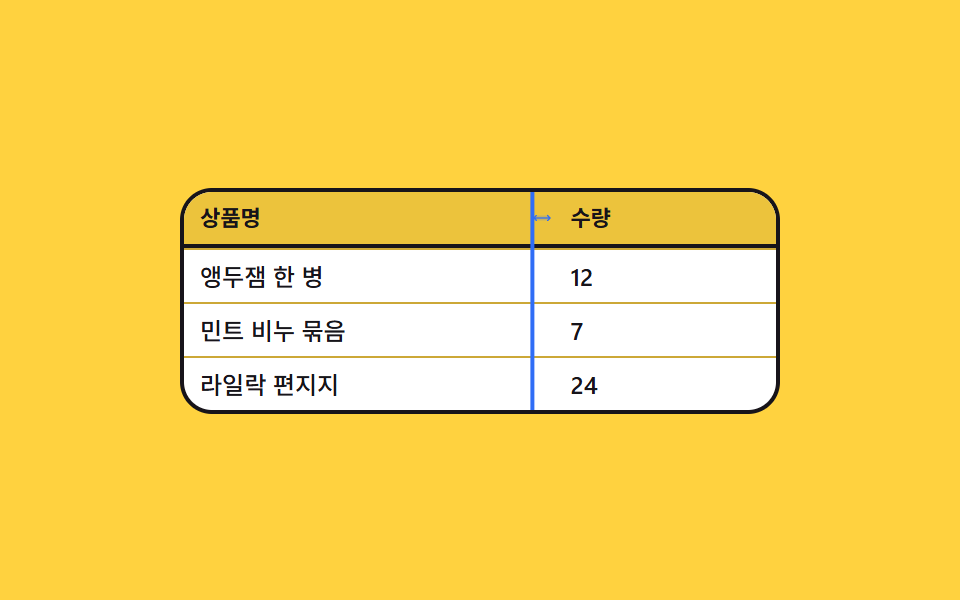 02 table-column-resize-drag
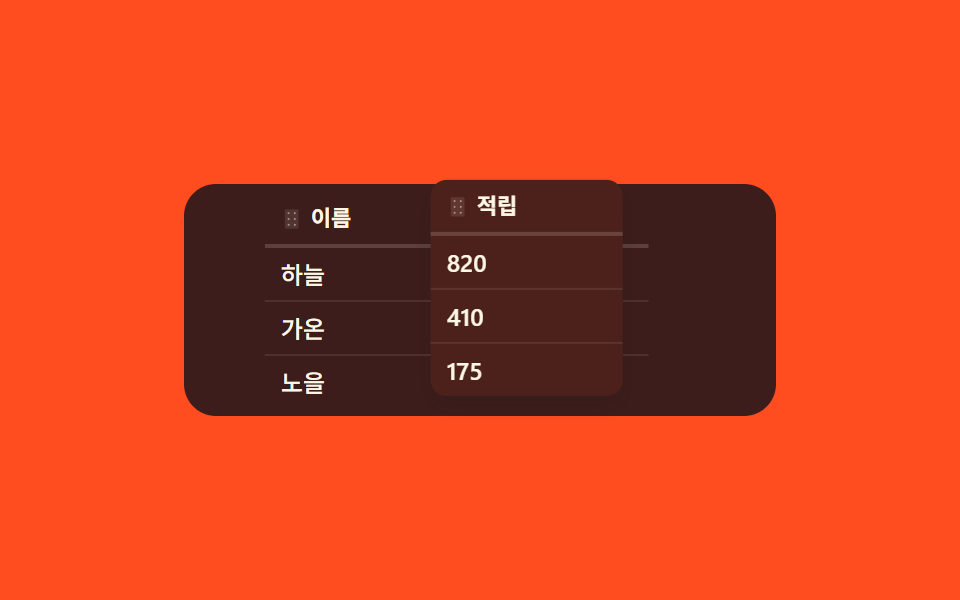 03 table-column-reorder-drag
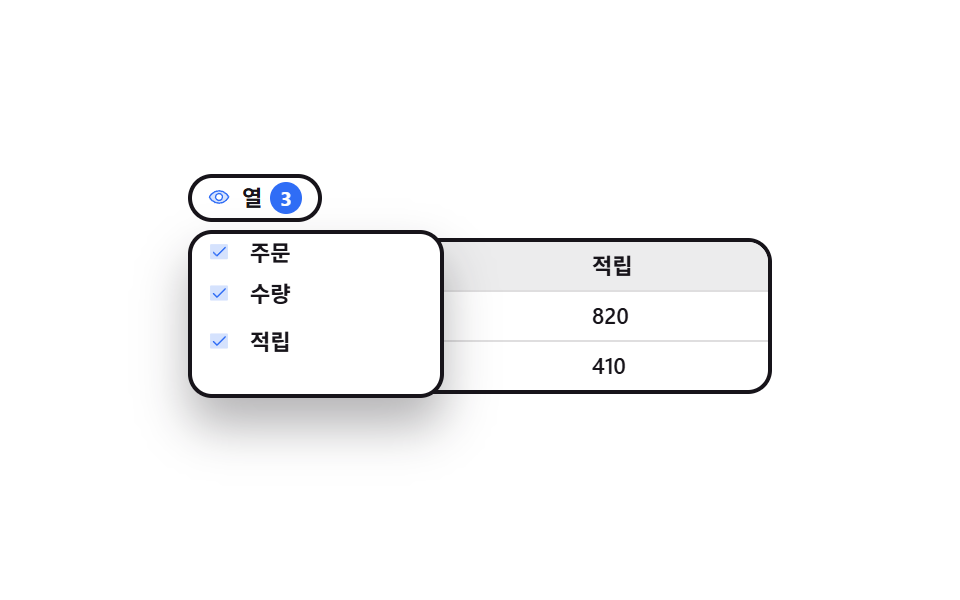 04 table-column-visibility-menu
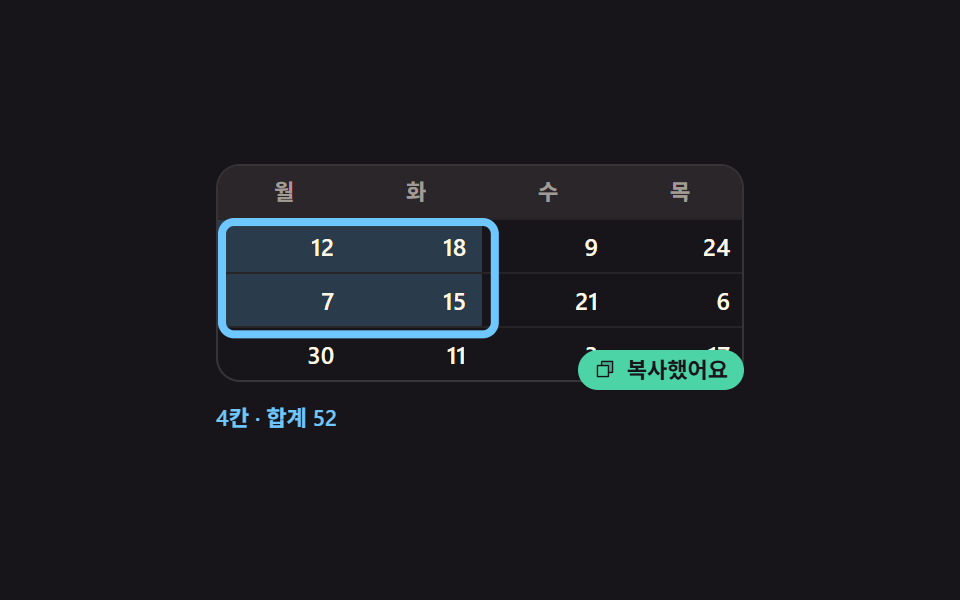 05 table-cell-range-select-copy
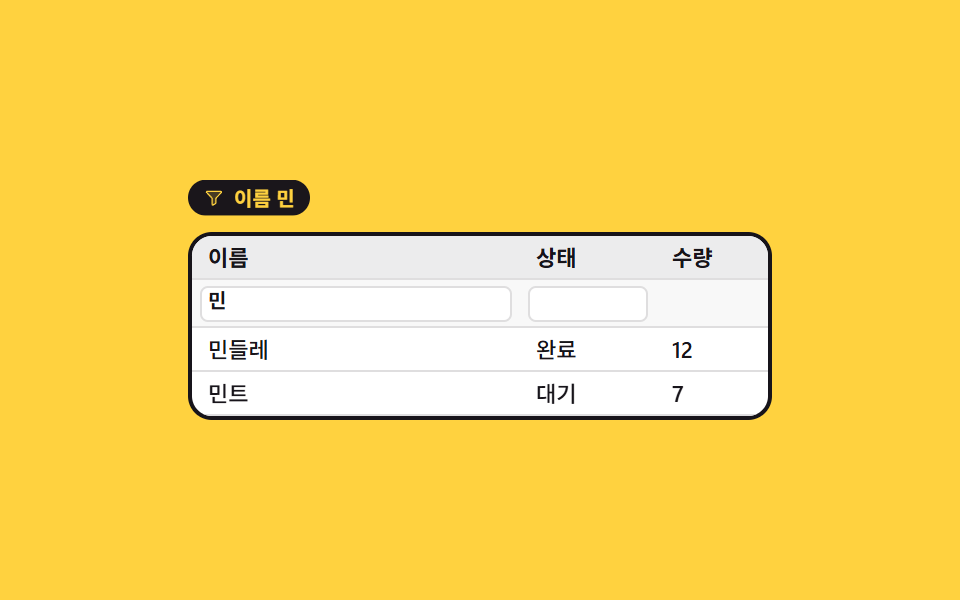 06 table-column-filter-chips
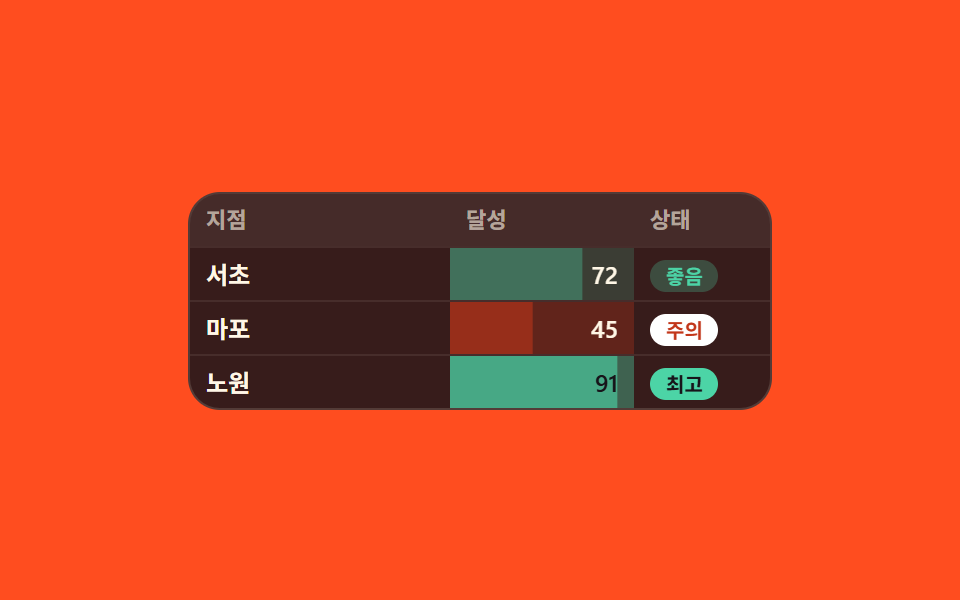 07 table-conditional-cell-format
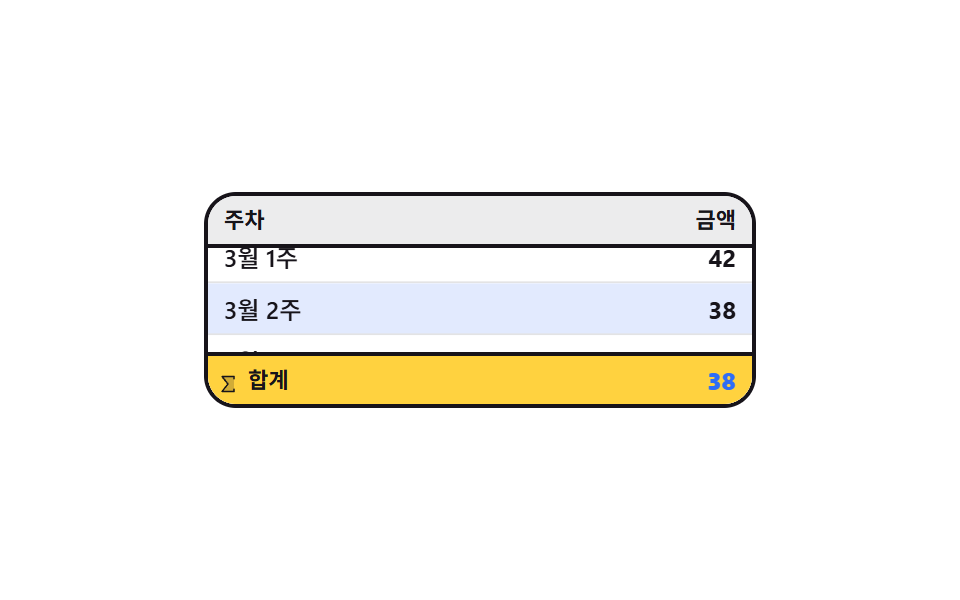 08 table-sticky-summary-row
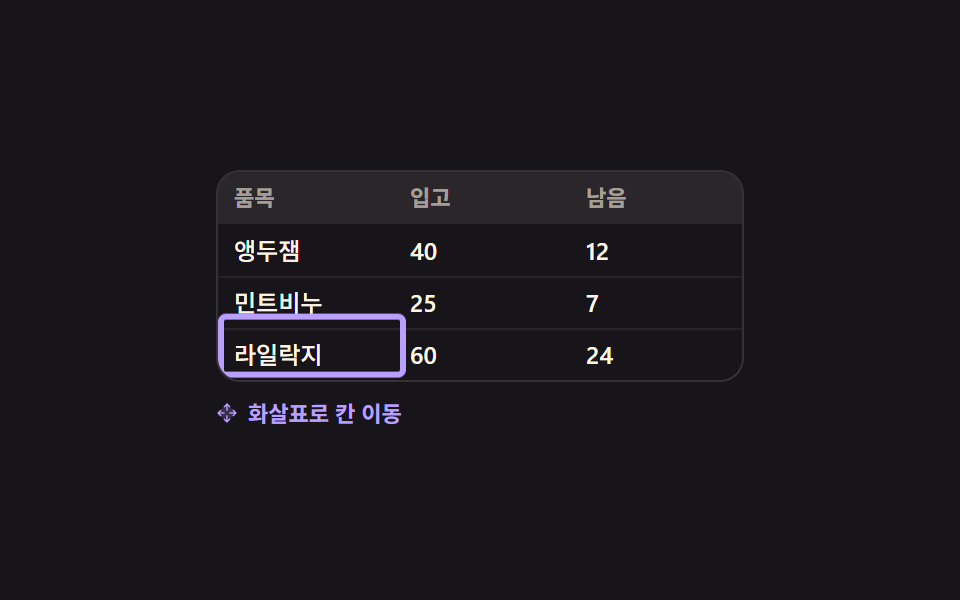 09 table-keyboard-grid-nav
Auto-plays · click a tile to jump to its section · all nine in one zip
- 01 Priority sort that holds two columns at once
- 02 Column width you drag from the header edge
- 03 Column reorder that lifts the header
- 04 Menu where unchecking drops a column
- 05 Drag a rectangle of cells and copy it
- 06 Per-column filters that leave a pill behind
- 07 Cells painted and barred by how big the number is
- 08 Summary row stuck to the floor that recounts
- 09 Focus outline that walks cells with arrow keys
The order is not the order you build a table in. It is the order a reader gets stuck in. There are too many rows, so you change the order first (01). A title is cut off, so you reach for resizable table columns and widen it (02). The column you keep checking is on the far right, so you drag it left (03). It still runs off the side, so you fold away the columns you never read (04). Those four are all about reshaping the table. The next two are about getting values out of it: you fence off the cells you want and take them (05), then you cut the row count down with conditions (06). The last three are the table talking back. Big and small numbers show it in color before you read them (07), the total stays on the floor however far you scroll (08), and the cells can be walked without a mouse (09). When the values are files this table moves into File Tree CSS Views, and when comparison is the point Before After Slider UIs takes the cell.
01Priority sort that holds two columns at once
What these data table ui examples show
When two rows share a score, one column cannot decide the order. Shift-clicking a second header adds it as a tiebreaker and stamps a 1 and a 2 onto the two headers, so you can see which one is read first.
<main class="stage">
  <div class="ms is-demo" id="ms" role="grid" aria-label="Team ranking">
    <div class="ms__head" role="row">
      <span class="ms__h ms__h--text">Team</span>
      <button class="ms__h" type="button" id="ms-score" data-key="score" aria-sort="descending">
        <span class="ms__label">Score</span>
        <span class="ms__ord" aria-hidden="true">1</span>
        <span class="ms__caret" aria-hidden="true"><svg viewBox="0 0 256 256" width="1em" height="1em" fill="currentColor"><g><path d="M208 160H48l80-80Z" opacity=".2"/><path d="m213.66 154.34l-80-80a8 8 0 0 0-11.32 0l-80 80A8 8 0 0 0 48 168h160a8 8 0 0 0 5.66-13.66M67.31 152L128 91.31L188.69 152Z"/></g></svg></span>
      </button>
      <button class="ms__h" type="button" id="ms-date" data-key="date" aria-sort="none">
        <span class="ms__label">Date</span>
        <span class="ms__ord" aria-hidden="true">2</span>
        <span class="ms__caret" aria-hidden="true"><svg viewBox="0 0 256 256" width="1em" height="1em" fill="currentColor"><g><path d="M208 160H48l80-80Z" opacity=".2"/><path d="m213.66 154.34l-80-80a8 8 0 0 0-11.32 0l-80 80A8 8 0 0 0 48 168h160a8 8 0 0 0 5.66-13.66M67.31 152L128 91.31L188.69 152Z"/></g></svg></span>
      </button>
    </div>
    <div class="ms__body" id="ms-body" role="rowgroup"></div>
  </div>
</main>
@use "sass:color";
@use "../../../../site/static/demo-tokens" as *;
$duration: $dur-base;
$easing: $ease-spring;
$color: $subject-blue;
@include stage($stage-ink);
$row-h: 26px;
$line: color.mix($subject-cream, $stage-ink, 14%);
$row-bg: color.mix($subject-cream, $stage-ink, 7%);
.ms {
box-sizing: border-box;
width: min(300px, 92vw);
border: 1px solid $line;
border-radius: $r-card;
background: $stage-ink;
overflow: hidden;
color: $subject-cream;
font-family: -apple-system, "Segoe UI", "Noto Sans KR", sans-serif;
font-size: 12px;
line-height: $row-h;
}
// ── 헤더 ─────────────────────────────────────────────
.ms__head {
display: grid;
grid-template-columns: 1fr 72px 72px;
height: $row-h;
border-bottom: 1px solid $line;
background: $row-bg;
}
.ms__h {
display: inline-flex;
align-items: center;
gap: $sp-1;
margin: 0;
padding: 0 $sp-2;
border: 0;
background: none;
color: rgba(255, 255, 255, .58);
font-family: inherit;
font-size: 11px;
line-height: $row-h;
font-weight: 700;
text-align: left;
cursor: pointer;
}
.ms__h--text { cursor: default; }
.ms__h.is-on { color: $subject-blue-light; }
.ms__h:focus-visible { outline: 2px solid $color; outline-offset: -2px; }
.ms__caret {
display: inline-flex;
width: 10px;
height: 10px;
opacity: .28;
transform: rotate(180deg);
transition: transform $duration $easing, opacity $duration $easing;
}
.ms__h.is-on .ms__caret { opacity: 1; }
.ms__h[aria-sort="ascending"] .ms__caret { transform: rotate(0deg); }
// 순번 배지 — 두 열을 함께 잡았을 때만 나온다
.ms__ord {
display: inline-flex;
align-items: center;
justify-content: center;
width: 12px;
height: 12px;
border-radius: $r-pill;
background: $color;
color: $subject-cream;
font-size: 9px;
line-height: 12px;
font-weight: 700;
}
.ms__ord[hidden] { display: none; }
// ── 행 ───────────────────────────────────────────────
.ms__row {
display: grid;
grid-template-columns: 1fr 72px 72px;
height: $row-h;
background: $stage-ink;
will-change: transform;
}
.ms__row + .ms__row { border-top: 1px solid rgba(255, 255, 255, .06); }
.ms__row > * {
padding: 0 $sp-2;
font-size: 12px;
line-height: $row-h;
font-weight: 500;
overflow: hidden;
white-space: nowrap;
}
.ms__row b { color: $subject-mint; font-weight: 700; }
.ms__row > :last-child { color: rgba(255, 255, 255, .5); }
// ── 자동 루프 (2s) ───────────────────────────────────
// 14% 에 날짜를 보조 열로 더한다(배지 1·2 컷 등장) → 동점 두 쌍이 **시차를 두고** 자리를 바꾼다.
// 두 쌍을 같은 순간에 겹치게 하면 네 줄이 두 줄로 보이는 프레임이 생겨 그 장이 poster 로 뽑힌다
// (실측). 그래서 위로 가는 줄만 z-index 와 그림자로 띄워 어느 줄이 지나가는지 남긴다.
// 복귀는 82% 에 끝나 24장 표본 안에 들어온다.
.ms.is-demo .ms__ord {
display: inline-flex;
animation-name: ms-ord;
animation-duration: $dur-loop;
animation-timing-function: steps(1, end);
animation-iteration-count: infinite;
}
.ms.is-demo #ms-date {
animation-name: ms-date-on;
animation-duration: $dur-loop;
animation-timing-function: steps(1, end);
animation-iteration-count: infinite;
}
.ms.is-demo #ms-date .ms__caret {
transition: none;
animation-name: ms-date-caret;
animation-duration: $dur-loop;
animation-timing-function: $easing;
animation-iteration-count: infinite;
}
.ms.is-demo .ms__row {
animation-duration: $dur-loop;
animation-timing-function: $easing;
animation-iteration-count: infinite;
animation-fill-mode: backwards;
}
.ms.is-demo .ms__row:nth-child(1) { animation-name: ms-down-a; }
.ms.is-demo .ms__row:nth-child(2) { animation-name: ms-up-a; z-index: 2; position: relative; }
.ms.is-demo .ms__row:nth-child(3) { animation-name: ms-down-b; }
.ms.is-demo .ms__row:nth-child(4) { animation-name: ms-up-b; z-index: 2; position: relative; }
@keyframes ms-down-a {
0% { transform: translateY(0); }
14% { transform: translateY(0); }
32% { transform: translateY($row-h); }
62% { transform: translateY($row-h); }
78% { transform: translateY(0); }
100% { transform: translateY(0); }
}
@keyframes ms-up-a {
0% { transform: translateY(0); box-shadow: none; }
14% { transform: translateY(0); box-shadow: $shadow-press; }
32% { transform: translateY(-$row-h); box-shadow: $shadow-press; }
36% { transform: translateY(-$row-h); box-shadow: none; }
62% { transform: translateY(-$row-h); box-shadow: none; }
78% { transform: translateY(0); box-shadow: none; }
100% { transform: translateY(0); box-shadow: none; }
}
@keyframes ms-down-b {
0% { transform: translateY(0); }
34% { transform: translateY(0); }
52% { transform: translateY($row-h); }
66% { transform: translateY($row-h); }
82% { transform: translateY(0); }
100% { transform: translateY(0); }
}
@keyframes ms-up-b {
0% { transform: translateY(0); box-shadow: none; }
34% { transform: translateY(0); box-shadow: $shadow-press; }
52% { transform: translateY(-$row-h); box-shadow: $shadow-press; }
56% { transform: translateY(-$row-h); box-shadow: none; }
66% { transform: translateY(-$row-h); box-shadow: none; }
82% { transform: translateY(0); box-shadow: none; }
100% { transform: translateY(0); box-shadow: none; }
}
@keyframes ms-ord {
0% { opacity: 0; }
14% { opacity: 1; }
60% { opacity: 0; }
100% { opacity: 0; }
}
@keyframes ms-date-on {
0% { color: rgba(255, 255, 255, .58); }
14% { color: $color; }
60% { color: rgba(255, 255, 255, .58); }
100% { color: rgba(255, 255, 255, .58); }
}
@keyframes ms-date-caret {
0% { opacity: .28; transform: rotate(180deg); }
14% { opacity: 1; transform: rotate(180deg); }
30% { opacity: 1; transform: rotate(0deg); }
60% { opacity: 1; transform: rotate(0deg); }
70% { opacity: .28; transform: rotate(180deg); }
100% { opacity: .28; transform: rotate(180deg); }
}
// 320×200 — 세로 여유가 174px 뿐이라 좁은 화면에서는 열 폭만 줄인다
@media (max-width: 340px) {
.ms__head, .ms__row { grid-template-columns: 1fr 56px 60px; }
.ms__h, .ms__row > * { padding: 0 $sp-1; }
}
@media (prefers-reduced-motion: reduce) {
.ms.is-demo .ms__row,
.ms.is-demo .ms__ord,
.ms.is-demo #ms-date,
.ms.is-demo #ms-date .ms__caret { animation: none !important; }
.ms.is-demo .ms__ord { opacity: 1; }
.ms.is-demo #ms-date { color: $color; }
.ms.is-demo #ms-date .ms__caret { opacity: 1; transform: rotate(0deg); }
.ms__caret { transition: none; }
}html, body {
margin: 0;
overflow: hidden;
}
.stage {
box-sizing: border-box;
min-height: 100vh;
display: grid;
place-items: center;
margin: 0;
background: #17141a;
font-family: -apple-system, "Segoe UI", "Noto Sans KR", sans-serif;
padding: clamp(8px, 4vw, 24px);
}
.ms {
box-sizing: border-box;
width: min(300px, 92vw);
border: 1px solid rgb(21.7568627451%, 20.3058823529%, 21.3960784314%);
border-radius: 16px;
background: #17141a;
overflow: hidden;
color: #fff7e6;
font-family: -apple-system, "Segoe UI", "Noto Sans KR", sans-serif;
font-size: 12px;
line-height: 26px;
}
.ms__head {
display: grid;
grid-template-columns: 1fr 72px 72px;
height: 26px;
border-bottom: 1px solid rgb(21.7568627451%, 20.3058823529%, 21.3960784314%);
background: rgb(15.3882352941%, 14.0745098039%, 15.7960784314%);
}
.ms__h {
display: inline-flex;
align-items: center;
gap: 4px;
margin: 0;
padding: 0 8px;
border: 0;
background: none;
color: rgba(255, 255, 255, 0.58);
font-family: inherit;
font-size: 11px;
line-height: 26px;
font-weight: 700;
text-align: left;
cursor: pointer;
}
.ms__h--text {
cursor: default;
}
.ms__h.is-on {
color: #5b8cf8;
}
.ms__h:focus-visible {
outline: 2px solid #2f6df6;
outline-offset: -2px;
}
.ms__caret {
display: inline-flex;
width: 10px;
height: 10px;
opacity: 0.28;
transform: rotate(180deg);
transition: transform 300ms cubic-bezier(0.2, 0.8, 0.2, 1), opacity 300ms cubic-bezier(0.2, 0.8, 0.2, 1);
}
.ms__h.is-on .ms__caret {
opacity: 1;
}
.ms__h[aria-sort=ascending] .ms__caret {
transform: rotate(0deg);
}
.ms__ord {
display: inline-flex;
align-items: center;
justify-content: center;
width: 12px;
height: 12px;
border-radius: 999px;
background: #2f6df6;
color: #fff7e6;
font-size: 9px;
line-height: 12px;
font-weight: 700;
}
.ms__ord[hidden] {
display: none;
}
.ms__row {
display: grid;
grid-template-columns: 1fr 72px 72px;
height: 26px;
background: #17141a;
will-change: transform;
}
.ms__row + .ms__row {
border-top: 1px solid rgba(255, 255, 255, 0.06);
}
.ms__row > * {
padding: 0 8px;
font-size: 12px;
line-height: 26px;
font-weight: 500;
overflow: hidden;
white-space: nowrap;
}
.ms__row b {
color: #4cd4a6;
font-weight: 700;
}
.ms__row > :last-child {
color: rgba(255, 255, 255, 0.5);
}
.ms.is-demo .ms__ord {
display: inline-flex;
animation-name: ms-ord;
animation-duration: 2s;
animation-timing-function: steps(1, end);
animation-iteration-count: infinite;
}
.ms.is-demo #ms-date {
animation-name: ms-date-on;
animation-duration: 2s;
animation-timing-function: steps(1, end);
animation-iteration-count: infinite;
}
.ms.is-demo #ms-date .ms__caret {
transition: none;
animation-name: ms-date-caret;
animation-duration: 2s;
animation-timing-function: cubic-bezier(0.2, 0.8, 0.2, 1);
animation-iteration-count: infinite;
}
.ms.is-demo .ms__row {
animation-duration: 2s;
animation-timing-function: cubic-bezier(0.2, 0.8, 0.2, 1);
animation-iteration-count: infinite;
animation-fill-mode: backwards;
}
.ms.is-demo .ms__row:nth-child(1) {
animation-name: ms-down-a;
}
.ms.is-demo .ms__row:nth-child(2) {
animation-name: ms-up-a;
z-index: 2;
position: relative;
}
.ms.is-demo .ms__row:nth-child(3) {
animation-name: ms-down-b;
}
.ms.is-demo .ms__row:nth-child(4) {
animation-name: ms-up-b;
z-index: 2;
position: relative;
}
@keyframes ms-down-a {
0% {
transform: translateY(0);
}
14% {
transform: translateY(0);
}
32% {
transform: translateY(26px);
}
62% {
transform: translateY(26px);
}
78% {
transform: translateY(0);
}
100% {
transform: translateY(0);
}
}
@keyframes ms-up-a {
0% {
transform: translateY(0);
box-shadow: none;
}
14% {
transform: translateY(0);
box-shadow: 0 6px 12px rgba(23, 20, 26, 0.32);
}
32% {
transform: translateY(-26px);
box-shadow: 0 6px 12px rgba(23, 20, 26, 0.32);
}
36% {
transform: translateY(-26px);
box-shadow: none;
}
62% {
transform: translateY(-26px);
box-shadow: none;
}
78% {
transform: translateY(0);
box-shadow: none;
}
100% {
transform: translateY(0);
box-shadow: none;
}
}
@keyframes ms-down-b {
0% {
transform: translateY(0);
}
34% {
transform: translateY(0);
}
52% {
transform: translateY(26px);
}
66% {
transform: translateY(26px);
}
82% {
transform: translateY(0);
}
100% {
transform: translateY(0);
}
}
@keyframes ms-up-b {
0% {
transform: translateY(0);
box-shadow: none;
}
34% {
transform: translateY(0);
box-shadow: 0 6px 12px rgba(23, 20, 26, 0.32);
}
52% {
transform: translateY(-26px);
box-shadow: 0 6px 12px rgba(23, 20, 26, 0.32);
}
56% {
transform: translateY(-26px);
box-shadow: none;
}
66% {
transform: translateY(-26px);
box-shadow: none;
}
82% {
transform: translateY(0);
box-shadow: none;
}
100% {
transform: translateY(0);
box-shadow: none;
}
}
@keyframes ms-ord {
0% {
opacity: 0;
}
14% {
opacity: 1;
}
60% {
opacity: 0;
}
100% {
opacity: 0;
}
}
@keyframes ms-date-on {
0% {
color: rgba(255, 255, 255, 0.58);
}
14% {
color: #2f6df6;
}
60% {
color: rgba(255, 255, 255, 0.58);
}
100% {
color: rgba(255, 255, 255, 0.58);
}
}
@keyframes ms-date-caret {
0% {
opacity: 0.28;
transform: rotate(180deg);
}
14% {
opacity: 1;
transform: rotate(180deg);
}
30% {
opacity: 1;
transform: rotate(0deg);
}
60% {
opacity: 1;
transform: rotate(0deg);
}
70% {
opacity: 0.28;
transform: rotate(180deg);
}
100% {
opacity: 0.28;
transform: rotate(180deg);
}
}
@media (max-width: 340px) {
.ms__head, .ms__row {
grid-template-columns: 1fr 56px 60px;
}
.ms__h, .ms__row > * {
padding: 0 4px;
}
}
@media (prefers-reduced-motion: reduce) {
.ms.is-demo .ms__row,
.ms.is-demo .ms__ord,
.ms.is-demo #ms-date,
.ms.is-demo #ms-date .ms__caret {
animation: none !important;
}
.ms.is-demo .ms__ord {
opacity: 1;
}
.ms.is-demo #ms-date {
color: #2f6df6;
}
.ms.is-demo #ms-date .ms__caret {
opacity: 1;
transform: rotate(0deg);
}
.ms__caret {
transition: none;
}
}// 실제 동작: 헤더를 누르면 그 열로 정렬하고, Shift 를 누른 채 누르면 보조 열로 더한다.
// 자리 이동은 FLIP — 새 자리에 그린 뒤 옛 자리로 되돌려 놓고 0 으로 달린다.
var ms = document.getElementById('ms');
var msBody = document.getElementById('ms-body');
var MS = [
{ id: 'a', team: 'Amber', score: 92, date: '03-14' },
{ id: 'b', team: 'Blue', score: 92, date: '02-02' },
{ id: 'c', team: 'Mint', score: 88, date: '05-21' },
{ id: 'd', team: 'Pink', score: 88, date: '01-09' }
];
var msKeys = [{ k: 'score', dir: -1 }];
function msRender() {
msBody.innerHTML = MS.map(function (r) {
return '<div class="ms__row" role="row" data-id="' + r.id + '">' +
'<span role="gridcell">' + r.team + '</span>' +
'<b role="gridcell">' + r.score + '</b>' +
'<span role="gridcell">' + r.date + '</span></div>';
}).join('');
}
function msMark() {
[['score', 'ms-score'], ['date', 'ms-date']].forEach(function (p) {
var i = -1;
msKeys.forEach(function (k, n) { if (k.k === p[0]) i = n; });
var el = document.getElementById(p[1]);
el.setAttribute('aria-sort', i < 0 ? 'none' : (msKeys[i].dir < 0 ? 'descending' : 'ascending'));
el.classList.toggle('is-on', i >= 0);
var ord = el.querySelector('.ms__ord');
if (i >= 0) { ord.textContent = String(i + 1); } // 빠진 열의 배지에 0 을 적지 않는다
ord.hidden = i < 0 || msKeys.length < 2;
});
}
function msSort(key, add) {
ms.classList.remove('is-demo');
var was = {};
[].forEach.call(msBody.children, function (el) { was[el.dataset.id] = el.getBoundingClientRect().top; });
var hit = null;
msKeys.forEach(function (k) { if (k.k === key) hit = k; });
if (hit) hit.dir = -hit.dir;
else msKeys = add ? msKeys.concat([{ k: key, dir: 1 }]).slice(-2) : [{ k: key, dir: -1 }];
MS.sort(function (a, b) {
for (var i = 0; i < msKeys.length; i++) {
var k = msKeys[i];
if (a[k.k] < b[k.k]) return -k.dir;
if (a[k.k] > b[k.k]) return k.dir;
}
return 0;
});
msRender(); msMark();
[].forEach.call(msBody.children, function (el) {
var d = was[el.dataset.id] - el.getBoundingClientRect().top;
if (!d) return;
el.style.transition = 'none';
el.style.transform = 'translateY(' + d + 'px)';
requestAnimationFrame(function () {
el.style.transition = 'transform 320ms cubic-bezier(.2, .8, .2, 1)';
el.style.transform = 'translateY(0)';
});
});
}
['ms-score', 'ms-date'].forEach(function (id) {
document.getElementById(id).addEventListener('click', function (e) {
msSort(this.dataset.key, e.shiftKey);
});
});
msRender(); msMark();import { useEffect, useRef, useState } from "react";
import type { CSSProperties } from "react";
import styles from "./MultiColumnSort.module.scss";
export type SortRow = { id: string; team: string; score: number; date: string };
export type MultiColumnSortProps = {
rows?: SortRow[];
tableLabel?: string;
teamLabel?: string;
scoreLabel?: string;
dateLabel?: string;
/** 자동 재생 루프 (갤러리용). 사람이 손대면 꺼진다 */
demo?: boolean;
duration?: number;
easing?: string;
color?: string;
};
type Vars = CSSProperties & { "--duration"?: string; "--easing"?: string; "--color"?: string };
type ClickEvt = { shiftKey: boolean };
type ColKey = "score" | "date";
type SortKey = { k: ColKey; dir: number };
const DEFAULT_ROWS: SortRow[] = [
{ id: "a", team: "Amber", score: 92, date: "03-14" },
{ id: "b", team: "Blue", score: 92, date: "02-02" },
{ id: "c", team: "Mint", score: 88, date: "05-21" },
{ id: "d", team: "Pink", score: 88, date: "01-09" },
];
function Caret() {
return (
<svg viewBox="0 0 256 256" width="1em" height="1em" fill="currentColor">
<g>
<path d="M208 160H48l80-80Z" opacity=".2" />
<path d="m213.66 154.34l-80-80a8 8 0 0 0-11.32 0l-80 80A8 8 0 0 0 48 168h160a8 8 0 0 0 5.66-13.66M67.31 152L128 91.31L188.69 152Z" />
</g>
</svg>
);
}
// 한 열만 비교한다 — 점수는 수, 날짜는 글자. 유니온을 그대로 < 로 재면 tsc 가 막는다
function cmp(a: SortRow, b: SortRow, k: ColKey): number {
if (k === "score") return a.score < b.score ? -1 : a.score > b.score ? 1 : 0;
return a.date < b.date ? -1 : a.date > b.date ? 1 : 0;
}
function sortRows(list: SortRow[], ks: SortKey[]): SortRow[] {
return list.slice().sort((a, b) => {
for (let i = 0; i < ks.length; i++) {
const c = cmp(a, b, ks[i].k);
if (c) return c * ks[i].dir;
}
return 0;
});
}
export default function MultiColumnSort({
rows = DEFAULT_ROWS,
tableLabel = "Team ranking",
teamLabel = "Team",
scoreLabel = "Score",
dateLabel = "Date",
demo = true,
duration = 300,
easing = "cubic-bezier(.2,.8,.2,1)",
color = "#2f6df6",
}: MultiColumnSortProps) {
const [list, setList] = useState<SortRow[]>(rows);
const [keys, setKeys] = useState<SortKey[]>([{ k: "score", dir: -1 }]);
const [live, setLive] = useState(demo);
const bodyRef = useRef<HTMLDivElement>(null);
// ambient useRef 는 항상 T | null 을 돌려준다 — 지역 별칭으로 한 번만 좁혀 쓴다
const wasRef = useRef<{ [id: string]: number }>({});
const vars: Vars = { "--duration": `${duration}ms`, "--easing": easing, "--color": color };
// FLIP — 새 자리에 그린 뒤 옛 자리로 되돌려 놓고 0 으로 달린다
useEffect(() => {
const body = bodyRef.current;
const was = wasRef.current;
if (!body || !was) return;
const kids: HTMLElement[] = Array.prototype.slice.call(body.children);
kids.forEach((el) => {
const id = el.getAttribute("data-id") || "";
const from = was[id];
if (from === undefined) return;
const d = from - el.getBoundingClientRect().top;
if (!d) return;
el.style.transition = "none";
el.style.transform = `translateY(${d}px)`;
requestAnimationFrame(() => {
el.style.transition = `transform 320ms ${easing}`;
el.style.transform = "translateY(0)";
});
});
wasRef.current = {};
}, [list]);
function onSort(key: ColKey, add: boolean) {
setLive(false);
const body = bodyRef.current;
const was: { [id: string]: number } = {};
if (body) {
const kids: HTMLElement[] = Array.prototype.slice.call(body.children);
kids.forEach((el) => { was[el.getAttribute("data-id") || ""] = el.getBoundingClientRect().top; });
}
wasRef.current = was;
let next: SortKey[];
const has = keys.filter((k) => k.k === key).length > 0;
if (has) next = keys.map((k) => (k.k === key ? { k: k.k, dir: -k.dir } : k));
else next = add ? keys.concat([{ k: key, dir: 1 }]).slice(-2) : [{ k: key, dir: -1 }];
setKeys(next);
setList(sortRows(list, next));
}
const heads: { key: ColKey; label: string; ord: string }[] = [
{ key: "score", label: scoreLabel, ord: "1" },
{ key: "date", label: dateLabel, ord: "2" },
];
return (
<div className={`${styles.root} ${live ? styles.isDemo : ""}`} style={vars} role="grid" aria-label={tableLabel}>
<div className={styles.head} role="row">
<span className={`${styles.h} ${styles.hText}`}>{teamLabel}</span>
{heads.map((h) => {
let at = -1;
keys.forEach((k, n) => { if (k.k === h.key) at = n; });
const on = at >= 0;
return (
<button
key={h.key}
className={`${styles.h} ${h.key === "date" ? styles.hDate : ""} ${on ? styles.isOn : ""}`}
type="button"
aria-sort={!on ? "none" : keys[at].dir < 0 ? "descending" : "ascending"}
onClick={(e: ClickEvt) => onSort(h.key, e.shiftKey)}
>
<span className={styles.label}>{h.label}</span>
<span className={styles.ord} aria-hidden="true" hidden={!on || keys.length < 2}>
{on ? String(at + 1) : h.ord}
</span>
<span className={styles.caret} aria-hidden="true"><Caret /></span>
</button>
);
})}
</div>
<div className={styles.body} role="rowgroup" ref={bodyRef}>
{list.map((r) => (
<div className={styles.row} role="row" data-id={r.id} key={r.id}>
<span role="gridcell">{r.team}</span>
<b role="gridcell">{r.score}</b>
<span role="gridcell">{r.date}</span>
</div>
))}
</div>
</div>
);
}01 · Priority sort that holds two columns at once — Measured area 4.558% · moving frames 18/23Original by GODRICH · SCSS and React ship in the zip · See the password
Where to look in the code
The comparator walks the key list from the front and returns on the first key where the two values differ.
function msSort(key, add) {
  var was = {};
  [].forEach.call(msBody.children, function (el) { was[el.dataset.id] = el.getBoundingClientRect().top; });
  var hit = null;
  msKeys.forEach(function (k) { if (k.k === key) hit = k; });
  if (hit) hit.dir = -hit.dir;
  else msKeys = add ? msKeys.concat([{ k: key, dir: 1 }]).slice(-2) : [{ k: key, dir: -1 }];
  MS.sort(function (a, b) {
    for (var i = 0; i < msKeys.length; i++) {
      var k = msKeys[i];
      if (a[k.k] < b[k.k]) return -k.dir;
      if (a[k.k] > b[k.k]) return k.dir;
    }
    return 0;
  });
  msRender(); msMark();
}
02Column width you drag from the header edge
What happens on screen
A column width has to live in exactly one place. This one keeps it in a single length-typed custom property that every row reads, and the guide line that follows your pointer reads the very same value.
<main class="stage">
  <div class="cr is-demo" id="cr">
    <div class="cr__grid" id="cr-grid" role="grid" aria-label="Product list">
      <div class="cr__row cr__row--head" role="row">
        <span class="cr__c cr__c--h" role="columnheader">Product</span>
        <span class="cr__grip" id="cr-grip" role="separator" aria-label="Resize column" tabindex="0" aria-orientation="vertical">
          <svg viewBox="0 0 256 256" width="1em" height="1em" fill="currentColor" aria-hidden="true"><g><path d="m232 128l-32 32H56l-32-32l32-32h144Z" opacity=".2"/><path d="m237.66 133.66l-32 32a8 8 0 0 1-11.32-11.32L212.69 136H43.31l18.35 18.34a8 8 0 0 1-11.32 11.32l-32-32a8 8 0 0 1 0-11.32l32-32a8 8 0 0 1 11.32 11.32L43.31 120h169.38l-18.35-18.34a8 8 0 0 1 11.32-11.32l32 32a8 8 0 0 1 0 11.32"/></g></svg>
        </span>
        <span class="cr__c cr__c--h" role="columnheader">Qty</span>
      </div>
      <div class="cr__row" role="row"><span class="cr__c" role="gridcell">Cherry jam, one jar</span><i></i><span class="cr__c" role="gridcell">12</span></div>
      <div class="cr__row" role="row"><span class="cr__c" role="gridcell">Mint soap bundle</span><i></i><span class="cr__c" role="gridcell">7</span></div>
      <div class="cr__row" role="row"><span class="cr__c" role="gridcell">Lilac letter paper</span><i></i><span class="cr__c" role="gridcell">24</span></div>
    </div>
    <div class="cr__guide" id="cr-guide" aria-hidden="true"></div>
  </div>
</main>
@use "sass:color";
@use "../../../../site/static/demo-tokens" as *;
$duration: $dur-quick;
$easing: $ease-spring;
$color: $subject-blue;
@include stage($stage-yellow);
$row-h: 26px;
$ink: $subject-ink;
$line: color.mix($ink, $stage-yellow, 22%);
// 열 폭은 길이형 커스텀 속성 하나. 등록하지 않으면 keyframes 가 보간하지 못하고 한 번에 튄다
@property --w1 {
syntax: "<length>";
inherits: true;
initial-value: 132px;
}
.cr {
position: relative;
box-sizing: border-box;
width: min(300px, 92vw);
border: 2px solid $ink;
border-radius: $r-card;
background: $stage-paper;
overflow: hidden;
color: $ink;
font-family: -apple-system, "Segoe UI", "Noto Sans KR", sans-serif;
}
.cr__grid { --w1: 132px; display: block; }
.cr__row {
display: grid;
grid-template-columns: var(--w1) 12px 1fr;
align-items: center;
height: $row-h;
}
.cr__row + .cr__row { border-top: 1px solid $line; }
.cr__row--head {
border-bottom: 2px solid $ink;
background: color.mix($ink, $stage-yellow, 8%);
}
.cr__c {
padding: 0 $sp-2;
font-size: 12px;
line-height: $row-h;
font-weight: 500;
white-space: nowrap;
overflow: hidden;
text-overflow: ellipsis;
}
.cr__c--h {
font-size: 11px;
font-weight: 700;
text-transform: none;
}
// ── 손잡이 ────────────────────────────────────────────
.cr__grip {
display: inline-flex;
align-items: center;
justify-content: center;
height: $row-h;
color: rgba(23, 20, 26, .42);
font-size: 10px;
line-height: $row-h;
cursor: col-resize;
touch-action: none;
}
.cr__grip:hover, .cr .cr__grip:focus-visible { color: $color; }
.cr__grip:focus-visible { outline: 2px solid $color; outline-offset: -2px; }
// ── 끄는 동안 따라오는 안내선 ─────────────────────────
.cr__guide {
position: absolute;
left: 0; top: 0;
z-index: 3; // 행 배경이 불투명해서 이게 없으면 머리글 칸에서만 보인다
width: 2px;
height: 100%;
background: $color;
opacity: 0;
transform: translateX(132px);
pointer-events: none;
}
.cr.is-drag .cr__guide { opacity: 1; }
// ── 자동 루프 (2s) ───────────────────────────────────
// 8~34% 넓히고 46~72% 좁히고 72~86% 제자리로. 폭은 --w1 하나만 움직이고
// 안내선은 같은 값을 translateX 로 따라간다 — 두 값을 따로 쓰면 어긋난다.
.cr.is-demo .cr__grid {
animation-name: cr-w;
animation-duration: $dur-loop;
animation-timing-function: $easing;
animation-iteration-count: infinite;
}
.cr.is-demo .cr__guide {
animation-name: cr-guide;
animation-duration: $dur-loop;
animation-timing-function: $easing;
animation-iteration-count: infinite;
animation-fill-mode: backwards;
}
.cr.is-demo .cr__grip {
animation-name: cr-grip;
animation-duration: $dur-loop;
animation-timing-function: steps(1, end);
animation-iteration-count: infinite;
}
@keyframes cr-w {
0% { --w1: 132px; }
8% { --w1: 132px; }
34% { --w1: 180px; }
46% { --w1: 180px; }
72% { --w1: 100px; }
86% { --w1: 132px; }
100% { --w1: 132px; }
}
@keyframes cr-guide {
0% { opacity: 0; transform: translateX(132px); }
8% { opacity: 1; transform: translateX(132px); }
34% { opacity: 1; transform: translateX(180px); }
46% { opacity: 1; transform: translateX(180px); }
72% { opacity: 1; transform: translateX(100px); }
86% { opacity: 0; transform: translateX(132px); }
100% { opacity: 0; transform: translateX(132px); }
}
@keyframes cr-grip {
0% { color: rgba(23, 20, 26, .42); }
8% { color: $color; }
86% { color: rgba(23, 20, 26, .42); }
100% { color: rgba(23, 20, 26, .42); }
}
// 320×200 — 폭이 좁아지므로 시작 폭과 여백만 줄인다
@media (max-width: 340px) {
.cr__grid { --w1: 116px; }
.cr__c { padding: 0 $sp-1; }
}
@media (prefers-reduced-motion: reduce) {
.cr.is-demo .cr__grid,
.cr.is-demo .cr__guide,
.cr.is-demo .cr__grip { animation: none !important; }
.cr.is-demo .cr__grid { --w1: 180px; }
.cr.is-demo .cr__guide { opacity: 1; transform: translateX(180px); }
}html, body {
margin: 0;
overflow: hidden;
}
.stage {
box-sizing: border-box;
min-height: 100vh;
display: grid;
place-items: center;
margin: 0;
background: #ffd23f;
font-family: -apple-system, "Segoe UI", "Noto Sans KR", sans-serif;
padding: clamp(8px, 4vw, 24px);
}
@property --w1 {
syntax: "<length>";
inherits: true;
initial-value: 132px;
}
.cr {
position: relative;
box-sizing: border-box;
width: min(300px, 92vw);
border: 2px solid #17141a;
border-radius: 16px;
background: #ffffff;
overflow: hidden;
color: #17141a;
font-family: -apple-system, "Segoe UI", "Noto Sans KR", sans-serif;
}
.cr__grid {
--w1: 132px;
display: block;
}
.cr__row {
display: grid;
grid-template-columns: var(--w1) 12px 1fr;
align-items: center;
height: 26px;
}
.cr__row + .cr__row {
border-top: 1px solid rgb(79.9843137255%, 65.9607843137%, 21.5137254902%);
}
.cr__row--head {
border-bottom: 2px solid #17141a;
background: rgb(92.7215686275%, 76.3921568627%, 23.5450980392%);
}
.cr__c {
padding: 0 8px;
font-size: 12px;
line-height: 26px;
font-weight: 500;
white-space: nowrap;
overflow: hidden;
text-overflow: ellipsis;
}
.cr__c--h {
font-size: 11px;
font-weight: 700;
text-transform: none;
}
.cr__grip {
display: inline-flex;
align-items: center;
justify-content: center;
height: 26px;
color: rgba(23, 20, 26, 0.42);
font-size: 10px;
line-height: 26px;
cursor: col-resize;
touch-action: none;
}
.cr__grip:hover, .cr .cr__grip:focus-visible {
color: #2f6df6;
}
.cr__grip:focus-visible {
outline: 2px solid #2f6df6;
outline-offset: -2px;
}
.cr__guide {
position: absolute;
left: 0;
top: 0;
z-index: 3;
width: 2px;
height: 100%;
background: #2f6df6;
opacity: 0;
transform: translateX(132px);
pointer-events: none;
}
.cr.is-drag .cr__guide {
opacity: 1;
}
.cr.is-demo .cr__grid {
animation-name: cr-w;
animation-duration: 2s;
animation-timing-function: cubic-bezier(0.2, 0.8, 0.2, 1);
animation-iteration-count: infinite;
}
.cr.is-demo .cr__guide {
animation-name: cr-guide;
animation-duration: 2s;
animation-timing-function: cubic-bezier(0.2, 0.8, 0.2, 1);
animation-iteration-count: infinite;
animation-fill-mode: backwards;
}
.cr.is-demo .cr__grip {
animation-name: cr-grip;
animation-duration: 2s;
animation-timing-function: steps(1, end);
animation-iteration-count: infinite;
}
@keyframes cr-w {
0% {
--w1: 132px;
}
8% {
--w1: 132px;
}
34% {
--w1: 180px;
}
46% {
--w1: 180px;
}
72% {
--w1: 100px;
}
86% {
--w1: 132px;
}
100% {
--w1: 132px;
}
}
@keyframes cr-guide {
0% {
opacity: 0;
transform: translateX(132px);
}
8% {
opacity: 1;
transform: translateX(132px);
}
34% {
opacity: 1;
transform: translateX(180px);
}
46% {
opacity: 1;
transform: translateX(180px);
}
72% {
opacity: 1;
transform: translateX(100px);
}
86% {
opacity: 0;
transform: translateX(132px);
}
100% {
opacity: 0;
transform: translateX(132px);
}
}
@keyframes cr-grip {
0% {
color: rgba(23, 20, 26, 0.42);
}
8% {
color: #2f6df6;
}
86% {
color: rgba(23, 20, 26, 0.42);
}
100% {
color: rgba(23, 20, 26, 0.42);
}
}
@media (max-width: 340px) {
.cr__grid {
--w1: 116px;
}
.cr__c {
padding: 0 4px;
}
}
@media (prefers-reduced-motion: reduce) {
.cr.is-demo .cr__grid,
.cr.is-demo .cr__guide,
.cr.is-demo .cr__grip {
animation: none !important;
}
.cr.is-demo .cr__grid {
--w1: 180px;
}
.cr.is-demo .cr__guide {
opacity: 1;
transform: translateX(180px);
}
}// 실제 동작: 손잡이를 끌면 첫 열의 폭만 바뀐다. 폭은 grid-template-columns 의 첫 값 하나.
var cr = document.getElementById('cr');
var crGrid = document.getElementById('cr-grid');
var crGrip = document.getElementById('cr-grip');
var crGuide = document.getElementById('cr-guide');
var CR_MIN = 88, CR_MAX = 200;
var crW = 132, crFrom = 0, crAt = 0;
function crSet(w) {
crW = Math.max(CR_MIN, Math.min(CR_MAX, w));
crGrid.style.setProperty('--w1', crW + 'px');
}
function crMove(e) {
cr.classList.remove('is-demo');
crSet(crFrom + (e.clientX - crAt));
crGuide.style.transform = 'translateX(' + crW + 'px)';
}
function crUp() {
cr.classList.remove('is-drag');
window.removeEventListener('pointermove', crMove);
window.removeEventListener('pointerup', crUp);
}
crGrip.addEventListener('pointerdown', function (e) {
cr.classList.remove('is-demo');
cr.classList.add('is-drag');
crFrom = crW; crAt = e.clientX;
crGuide.style.transform = 'translateX(' + crW + 'px)';
window.addEventListener('pointermove', crMove);
window.addEventListener('pointerup', crUp);
});
// 손잡이를 두 번 누르면 가장 긴 글자에 맞춰 넓힌다
crGrip.addEventListener('dblclick', function () {
cr.classList.remove('is-demo');
var wide = 0;
[].forEach.call(crGrid.querySelectorAll('.cr__row:not(.cr__row--head) .cr__c:first-child'), function (el) {
wide = Math.max(wide, el.scrollWidth + 20);
});
crSet(wide);
});
crGrip.addEventListener('keydown', function (e) {
if (e.key !== 'ArrowLeft' && e.key !== 'ArrowRight') return;
e.preventDefault(); cr.classList.remove('is-demo');
crSet(crW + (e.key === 'ArrowRight' ? 8 : -8));
});
crSet(crW);import { useEffect, useRef, useState } from "react";
import type { CSSProperties } from "react";
import styles from "./ColumnResizeDrag.module.scss";
export type ResizeRow = { name: string; qty: string };
export type ColumnResizeDragProps = {
rows?: ResizeRow[];
tableLabel?: string;
nameLabel?: string;
qtyLabel?: string;
gripLabel?: string;
/** 자동 재생 루프 (갤러리용). 사람이 손대면 꺼진다 */
demo?: boolean;
duration?: number;
easing?: string;
color?: string;
};
type Vars = CSSProperties & { "--duration"?: string; "--easing"?: string; "--color"?: string };
type WidthVars = CSSProperties & { "--w1"?: string };
type PtrEvt = { clientX: number };
type KeyEvt = { key: string; preventDefault: () => void };
const MIN = 88;
const MAX = 200;
const DEFAULT_ROWS: ResizeRow[] = [
{ name: "Cherry jam, one jar", qty: "12" },
{ name: "Mint soap bundle", qty: "7" },
{ name: "Lilac letter paper", qty: "24" },
];
function Grip() {
return (
<svg viewBox="0 0 256 256" width="1em" height="1em" fill="currentColor" aria-hidden="true">
<g>
<path d="m232 128l-32 32H56l-32-32l32-32h144Z" opacity=".2" />
<path d="m237.66 133.66l-32 32a8 8 0 0 1-11.32-11.32L212.69 136H43.31l18.35 18.34a8 8 0 0 1-11.32 11.32l-32-32a8 8 0 0 1 0-11.32l32-32a8 8 0 0 1 11.32 11.32L43.31 120h169.38l-18.35-18.34a8 8 0 0 1 11.32-11.32l32 32a8 8 0 0 1 0 11.32" />
</g>
</svg>
);
}
function clampW(w: number): number {
return Math.max(MIN, Math.min(MAX, w));
}
export default function ColumnResizeDrag({
rows = DEFAULT_ROWS,
tableLabel = "Product list",
nameLabel = "Product",
qtyLabel = "Qty",
gripLabel = "Resize column",
demo = true,
duration = 220,
easing = "cubic-bezier(.2,.8,.2,1)",
color = "#2f6df6",
}: ColumnResizeDragProps) {
const [w, setW] = useState(132);
const [guideX, setGuideX] = useState(132);
const [dragging, setDragging] = useState(false);
const [live, setLive] = useState(demo);
// ambient useRef 는 항상 T | null 을 돌려준다 — 지역 별칭으로 한 번만 좁혀 쓴다
const dragRef = useRef<{ from: number; at: number }>({ from: 132, at: 0 });
const drag = dragRef.current || { from: 132, at: 0 };
const cellsRef = useRef<(HTMLElement | null)[]>([]);
const cells: (HTMLElement | null)[] = cellsRef.current || [];
const vars: Vars = { "--duration": `${duration}ms`, "--easing": easing, "--color": color };
const gridVars: WidthVars = { "--w1": `${w}px` };
// 끄는 동안에만 창 전체를 듣는다 — 손잡이 밖으로 나가도 폭이 따라온다
useEffect(() => {
if (!dragging) return;
function move(e: PtrEvt) {
const next = clampW(drag.from + (e.clientX - drag.at));
setW(next);
setGuideX(next);
}
function up() { setDragging(false); }
window.addEventListener("pointermove", move);
window.addEventListener("pointerup", up);
return () => {
window.removeEventListener("pointermove", move);
window.removeEventListener("pointerup", up);
};
}, [dragging]);
function onDown(e: PtrEvt) {
setLive(false);
drag.from = w;
drag.at = e.clientX;
setGuideX(w);
setDragging(true);
}
// 손잡이를 두 번 누르면 가장 긴 글자에 맞춰 넓힌다
function onFit() {
setLive(false);
let wide = 0;
cells.forEach((el) => { if (el) wide = Math.max(wide, el.scrollWidth + 20); });
setW(clampW(wide));
}
function onKey(e: KeyEvt) {
if (e.key !== "ArrowLeft" && e.key !== "ArrowRight") return;
e.preventDefault();
setLive(false);
setW(clampW(w + (e.key === "ArrowRight" ? 8 : -8)));
}
const cls = [styles.root, live ? styles.isDemo : "", dragging ? styles.isDrag : ""].join(" ");
return (
<div className={cls} style={vars}>
<div className={styles.grid} style={gridVars} role="grid" aria-label={tableLabel}>
<div className={`${styles.row} ${styles.rowHead}`} role="row">
<span className={`${styles.c} ${styles.cH}`} role="columnheader">{nameLabel}</span>
<span
className={styles.grip}
role="separator"
aria-label={gripLabel}
aria-orientation="vertical"
tabIndex={0}
onPointerDown={onDown}
onDoubleClick={onFit}
onKeyDown={onKey}
>
<Grip />
</span>
<span className={`${styles.c} ${styles.cH}`} role="columnheader">{qtyLabel}</span>
</div>
{rows.map((r, i) => (
<div className={styles.row} role="row" key={r.name}>
<span
className={styles.c}
role="gridcell"
ref={(el: HTMLElement | null) => { cells[i] = el; }}
>
{r.name}
</span>
<i />
<span className={styles.c} role="gridcell">{r.qty}</span>
</div>
))}
</div>
<div className={styles.guide} aria-hidden="true" style={{ transform: `translateX(${guideX}px)` }} />
</div>
);
}02 · Column width you drag from the header edge — Measured area 3.553% · moving frames 18/23Original by GODRICH · SCSS and React ship in the zip · See the password
How to read the code
Write the width twice and the line and the edge will drift apart.
@property --w1 {
  syntax: "<length>";
  inherits: true;
  initial-value: 132px;
}
.cr__row {
  display: grid;
  grid-template-columns: var(--w1) 12px 1fr;
}
@keyframes cr-w {
  0%   { --w1: 132px; }
  8%   { --w1: 132px; }
  34%  { --w1: 180px; }
  46%  { --w1: 180px; }
  72%  { --w1: 100px; }
  86%  { --w1: 132px; }
  100% { --w1: 132px; }
}
03Column reorder that lifts the header
What moves
Build the table out of rows and moving one column becomes a loop over every row. So this one stacks each column into its own vertical block and stands the blocks side by side, then lifts only the block you grabbed by 16px and lightens its background a step.
<main class="stage">
  <div class="rd is-demo" id="rd">
    <div class="rd__slot" aria-hidden="true"></div>
    <div class="rd__cols" id="rd-cols" role="grid" aria-label="Member table">
      <div class="rd__col" role="columnheader">
        <span class="rd__h"><span class="rd__grab" aria-hidden="true"><svg viewBox="0 0 256 256" width="1em" height="1em" fill="currentColor"><g><path d="M208 32v192a16 16 0 0 1-16 16H64a16 16 0 0 1-16-16V32a16 16 0 0 1 16-16h128a16 16 0 0 1 16 16" opacity=".2"/><path d="M104 60a12 12 0 1 1-12-12a12 12 0 0 1 12 12m60 12a12 12 0 1 0-12-12a12 12 0 0 0 12 12m-72 44a12 12 0 1 0 12 12a12 12 0 0 0-12-12m72 0a12 12 0 1 0 12 12a12 12 0 0 0-12-12m-72 68a12 12 0 1 0 12 12a12 12 0 0 0-12-12m72 0a12 12 0 1 0 12 12a12 12 0 0 0-12-12"/></g></svg></span>Name</span>
        <span class="rd__c">Sky</span><span class="rd__c">Gaon</span><span class="rd__c">Sunset</span>
      </div>
      <div class="rd__col" role="columnheader">
        <span class="rd__h"><span class="rd__grab" aria-hidden="true"><svg viewBox="0 0 256 256" width="1em" height="1em" fill="currentColor"><g><path d="M208 32v192a16 16 0 0 1-16 16H64a16 16 0 0 1-16-16V32a16 16 0 0 1 16-16h128a16 16 0 0 1 16 16" opacity=".2"/><path d="M104 60a12 12 0 1 1-12-12a12 12 0 0 1 12 12m60 12a12 12 0 1 0-12-12a12 12 0 0 0 12 12m-72 44a12 12 0 1 0 12 12a12 12 0 0 0-12-12m72 0a12 12 0 1 0 12 12a12 12 0 0 0-12-12m-72 68a12 12 0 1 0 12 12a12 12 0 0 0-12-12m72 0a12 12 0 1 0 12 12a12 12 0 0 0-12-12"/></g></svg></span>Tier</span>
        <span class="rd__c">Gold</span><span class="rd__c">Silver</span><span class="rd__c">Bronze</span>
      </div>
      <div class="rd__col" role="columnheader">
        <span class="rd__h"><span class="rd__grab" aria-hidden="true"><svg viewBox="0 0 256 256" width="1em" height="1em" fill="currentColor"><g><path d="M208 32v192a16 16 0 0 1-16 16H64a16 16 0 0 1-16-16V32a16 16 0 0 1 16-16h128a16 16 0 0 1 16 16" opacity=".2"/><path d="M104 60a12 12 0 1 1-12-12a12 12 0 0 1 12 12m60 12a12 12 0 1 0-12-12a12 12 0 0 0 12 12m-72 44a12 12 0 1 0 12 12a12 12 0 0 0-12-12m72 0a12 12 0 1 0 12 12a12 12 0 0 0-12-12m-72 68a12 12 0 1 0 12 12a12 12 0 0 0-12-12m72 0a12 12 0 1 0 12 12a12 12 0 0 0-12-12"/></g></svg></span>Points</span>
        <span class="rd__c">820</span><span class="rd__c">410</span><span class="rd__c">175</span>
      </div>
    </div>
  </div>
</main>
@use "sass:color";
@use "../../../../site/static/demo-tokens" as *;
$duration: $dur-base;
$easing: $ease-spring;
$color: $subject-cream;
@include stage($stage-orange);
$row-h: 26px;
$col-w: 96px;
$panel: color.mix($subject-ink, $stage-orange, 84%);
$lifted: color.mix($subject-ink, $stage-orange, 66%); // 집어 든 열은 바탕을 한 단계 밝혀 띄운다
$line: rgba(255, 247, 230, .16);
.rd {
position: relative;
box-sizing: border-box;
padding: $sp-1;
border-radius: $r-card;
background: $panel;
color: $color;
font-family: -apple-system, "Segoe UI", "Noto Sans KR", sans-serif;
}
// 놓을 자리 — 열이 비켜난 동안만 보이는 빈 홈
.rd__slot {
position: absolute;
left: 4px; top: 4px;
width: $col-w;
height: calc(100% - 8px);
border: 2px dashed rgba(255, 247, 230, .42);
border-radius: $r-sm;
opacity: 0;
}
.rd__cols {
position: relative;
display: flex;
}
.rd__col {
flex: 0 0 auto;
width: $col-w;
display: flex;
flex-direction: column;
border-radius: $r-sm;
background: $panel;
transition: transform $duration $easing;
}
.rd__col.is-lift {
z-index: 2;
background: $lifted;
box-shadow: $shadow-raised;
transition: none;
}
.rd__h {
display: flex;
align-items: center;
gap: $sp-1;
height: $row-h;
padding: 0 $sp-2;
border-bottom: 2px solid $line;
font-size: 11px;
line-height: $row-h;
font-weight: 700;
cursor: grab;
touch-action: none;
user-select: none;
}
.rd__col.is-lift .rd__h { cursor: grabbing; }
.rd__grab {
display: inline-flex;
width: 11px;
height: 11px;
opacity: .55;
}
.rd__c {
height: $row-h;
padding: 0 $sp-2;
font-size: 12px;
line-height: $row-h;
font-weight: 500;
white-space: nowrap;
overflow: hidden;
}
.rd__c + .rd__c { border-top: 1px solid rgba(255, 247, 230, .09); }
// ── 자동 루프 (2s) ───────────────────────────────────
// 10% 에 셋째 열이 떠오르고(그림자 컷) 10~38% 에 왼쪽 끝으로 옮겨 간다. 나머지 두 열은
// 같은 구간에 한 칸씩 오른쪽으로 비킨다 — 세 열의 이동 거리를 하나의 열 폭으로 묶어 둔다.
// 58~84% 에 되돌아오고 84% 뒤에는 아무것도 움직이지 않는다(복귀는 90% 안).
.rd.is-demo .rd__col {
animation-duration: $dur-loop;
animation-timing-function: $easing;
animation-iteration-count: infinite;
animation-fill-mode: backwards;
}
.rd.is-demo .rd__col:nth-child(1),
.rd.is-demo .rd__col:nth-child(2) { animation-name: rd-aside; }
.rd.is-demo .rd__col:nth-child(3) { animation-name: rd-carry; }
.rd.is-demo .rd__col:nth-child(3) {
z-index: 2;
}
.rd.is-demo .rd__slot {
animation-name: rd-slot;
animation-duration: $dur-loop;
animation-timing-function: steps(1, end);
animation-iteration-count: infinite;
}
@keyframes rd-aside {
0% { transform: translateX(0); }
10% { transform: translateX(0); }
38% { transform: translateX($col-w); }
58% { transform: translateX($col-w); }
84% { transform: translateX(0); }
100% { transform: translateX(0); }
}
@keyframes rd-carry {
0% { transform: translateX(0) translateY(0); box-shadow: none; background: $panel; }
10% { transform: translateX(0) translateY(-16px); box-shadow: $shadow-raised; background: $lifted; }
38% { transform: translateX($col-w * -2) translateY(-16px); box-shadow: $shadow-raised; background: $lifted; }
58% { transform: translateX($col-w * -2) translateY(-16px); box-shadow: $shadow-raised; background: $lifted; }
84% { transform: translateX(0) translateY(0); box-shadow: none; background: $panel; }
100% { transform: translateX(0) translateY(0); box-shadow: none; background: $panel; }
}
@keyframes rd-slot {
0% { opacity: 0; }
10% { opacity: 1; }
58% { opacity: 0; }
100% { opacity: 0; }
}
// 320×200 — 세 열이 288px 이라 여백만 줄이고 열 폭은 그대로 둔다
@media (max-width: 340px) {
.rd { padding: 0; }
.rd__slot { left: 0; top: 0; height: 100%; }
.rd__h, .rd__c { padding: 0 $sp-1; }
}
@media (prefers-reduced-motion: reduce) {
.rd.is-demo .rd__col,
.rd.is-demo .rd__slot { animation: none !important; }
.rd.is-demo .rd__col:nth-child(3) { box-shadow: $shadow-raised; }
.rd__col { transition: none; }
}html, body {
margin: 0;
overflow: hidden;
}
.stage {
box-sizing: border-box;
min-height: 100vh;
display: grid;
place-items: center;
margin: 0;
background: #ff4d1f;
font-family: -apple-system, "Segoe UI", "Noto Sans KR", sans-serif;
padding: clamp(8px, 4vw, 24px);
}
.rd {
position: relative;
box-sizing: border-box;
padding: 4px;
border-radius: 16px;
background: rgb(23.5764705882%, 11.4196078431%, 10.5098039216%);
color: #fff7e6;
font-family: -apple-system, "Segoe UI", "Noto Sans KR", sans-serif;
}
.rd__slot {
position: absolute;
left: 4px;
top: 4px;
width: 96px;
height: calc(100% - 8px);
border: 2px dashed rgba(255, 247, 230, 0.42);
border-radius: 8px;
opacity: 0;
}
.rd__cols {
position: relative;
display: flex;
}
.rd__col {
flex: 0 0 auto;
width: 96px;
display: flex;
flex-direction: column;
border-radius: 8px;
background: rgb(23.5764705882%, 11.4196078431%, 10.5098039216%);
transition: transform 300ms cubic-bezier(0.2, 0.8, 0.2, 1);
}
.rd__col.is-lift {
z-index: 2;
background: rgb(39.9529411765%, 15.4431372549%, 10.862745098%);
box-shadow: 0 14px 24px rgba(23, 20, 26, 0.32);
transition: none;
}
.rd__h {
display: flex;
align-items: center;
gap: 4px;
height: 26px;
padding: 0 8px;
border-bottom: 2px solid rgba(255, 247, 230, 0.16);
font-size: 11px;
line-height: 26px;
font-weight: 700;
cursor: grab;
touch-action: none;
user-select: none;
}
.rd__col.is-lift .rd__h {
cursor: grabbing;
}
.rd__grab {
display: inline-flex;
width: 11px;
height: 11px;
opacity: 0.55;
}
.rd__c {
height: 26px;
padding: 0 8px;
font-size: 12px;
line-height: 26px;
font-weight: 500;
white-space: nowrap;
overflow: hidden;
}
.rd__c + .rd__c {
border-top: 1px solid rgba(255, 247, 230, 0.09);
}
.rd.is-demo .rd__col {
animation-duration: 2s;
animation-timing-function: cubic-bezier(0.2, 0.8, 0.2, 1);
animation-iteration-count: infinite;
animation-fill-mode: backwards;
}
.rd.is-demo .rd__col:nth-child(1),
.rd.is-demo .rd__col:nth-child(2) {
animation-name: rd-aside;
}
.rd.is-demo .rd__col:nth-child(3) {
animation-name: rd-carry;
}
.rd.is-demo .rd__col:nth-child(3) {
z-index: 2;
}
.rd.is-demo .rd__slot {
animation-name: rd-slot;
animation-duration: 2s;
animation-timing-function: steps(1, end);
animation-iteration-count: infinite;
}
@keyframes rd-aside {
0% {
transform: translateX(0);
}
10% {
transform: translateX(0);
}
38% {
transform: translateX(96px);
}
58% {
transform: translateX(96px);
}
84% {
transform: translateX(0);
}
100% {
transform: translateX(0);
}
}
@keyframes rd-carry {
0% {
transform: translateX(0) translateY(0);
box-shadow: none;
background: rgb(23.5764705882%, 11.4196078431%, 10.5098039216%);
}
10% {
transform: translateX(0) translateY(-16px);
box-shadow: 0 14px 24px rgba(23, 20, 26, 0.32);
background: rgb(39.9529411765%, 15.4431372549%, 10.862745098%);
}
38% {
transform: translateX(-192px) translateY(-16px);
box-shadow: 0 14px 24px rgba(23, 20, 26, 0.32);
background: rgb(39.9529411765%, 15.4431372549%, 10.862745098%);
}
58% {
transform: translateX(-192px) translateY(-16px);
box-shadow: 0 14px 24px rgba(23, 20, 26, 0.32);
background: rgb(39.9529411765%, 15.4431372549%, 10.862745098%);
}
84% {
transform: translateX(0) translateY(0);
box-shadow: none;
background: rgb(23.5764705882%, 11.4196078431%, 10.5098039216%);
}
100% {
transform: translateX(0) translateY(0);
box-shadow: none;
background: rgb(23.5764705882%, 11.4196078431%, 10.5098039216%);
}
}
@keyframes rd-slot {
0% {
opacity: 0;
}
10% {
opacity: 1;
}
58% {
opacity: 0;
}
100% {
opacity: 0;
}
}
@media (max-width: 340px) {
.rd {
padding: 0;
}
.rd__slot {
left: 0;
top: 0;
height: 100%;
}
.rd__h, .rd__c {
padding: 0 4px;
}
}
@media (prefers-reduced-motion: reduce) {
.rd.is-demo .rd__col,
.rd.is-demo .rd__slot {
animation: none !important;
}
.rd.is-demo .rd__col:nth-child(3) {
box-shadow: 0 14px 24px rgba(23, 20, 26, 0.32);
}
.rd__col {
transition: none;
}
}// 실제 동작: 헤더를 잡으면 그 열이 통째로 떠오르고, 놓을 자리의 열들이 자리를 비켜 준다.
var rd = document.getElementById('rd');
var rdCols = document.getElementById('rd-cols');
var rdW = 96, rdFrom = 0, rdAt = 0, rdTo = 0, rdEl = null;
function rdList() { return [].slice.call(rdCols.children); }
function rdMove(e) {
  var dx = e.clientX - rdAt;
  rdEl.style.transform = 'translateX(' + dx + 'px)';
  rdTo = Math.max(0, Math.min(rdList().length - 1, rdFrom + Math.round(dx / rdW)));
  rdList().forEach(function (el, i) {
    if (el === rdEl) return;
    var shift = 0;
    if (rdTo > rdFrom && i > rdFrom && i <= rdTo) shift = -rdW;
    if (rdTo < rdFrom && i >= rdTo && i < rdFrom) shift = rdW;
    el.style.transform = 'translateX(' + shift + 'px)';
  });
}
function rdUp() {
var list = rdList();
list.forEach(function (el) { el.style.transition = 'none'; el.style.transform = ''; });
var after = list[rdTo > rdFrom ? rdTo + 1 : rdTo];
rdCols.insertBefore(rdEl, after || null);
rd.classList.remove('is-drag');
rdEl.classList.remove('is-lift');
requestAnimationFrame(function () { list.forEach(function (el) { el.style.transition = ''; }); });
window.removeEventListener('pointermove', rdMove);
window.removeEventListener('pointerup', rdUp);
rdEl = null;
}
rdList().forEach(function (col) {
col.querySelector('.rd__h').addEventListener('pointerdown', function (e) {
rd.classList.remove('is-demo');
rd.classList.add('is-drag');
rdEl = col; rdEl.classList.add('is-lift');
rdW = col.getBoundingClientRect().width;
rdFrom = rdList().indexOf(col); rdTo = rdFrom; rdAt = e.clientX;
window.addEventListener('pointermove', rdMove);
window.addEventListener('pointerup', rdUp);
});
});import { useEffect, useRef, useState } from "react";
import type { CSSProperties } from "react";
import styles from "./ColumnReorderDrag.module.scss";
export type ReorderCol = { key: string; head: string; cells: string[] };
export type ColumnReorderDragProps = {
columns?: ReorderCol[];
tableLabel?: string;
/** 자동 재생 루프 (갤러리용). 사람이 손대면 꺼진다 */
demo?: boolean;
duration?: number;
easing?: string;
color?: string;
};
type Vars = CSSProperties & { "--duration"?: string; "--easing"?: string; "--color"?: string };
type PtrEvt = { clientX: number };
const DEFAULT_COLS: ReorderCol[] = [
{ key: "name", head: "Name", cells: ["Sky", "Gaon", "Sunset"] },
{ key: "tier", head: "Tier", cells: ["Gold", "Silver", "Bronze"] },
{ key: "points", head: "Points", cells: ["820", "410", "175"] },
];
function Grab() {
return (
<svg viewBox="0 0 256 256" width="1em" height="1em" fill="currentColor">
<g>
<path d="M208 32v192a16 16 0 0 1-16 16H64a16 16 0 0 1-16-16V32a16 16 0 0 1 16-16h128a16 16 0 0 1 16 16" opacity=".2" />
<path d="M104 60a12 12 0 1 1-12-12a12 12 0 0 1 12 12m60 12a12 12 0 1 0-12-12a12 12 0 0 0 12 12m-72 44a12 12 0 1 0 12 12a12 12 0 0 0-12-12m72 0a12 12 0 1 0 12 12a12 12 0 0 0-12-12m-72 68a12 12 0 1 0 12 12a12 12 0 0 0-12-12m72 0a12 12 0 1 0 12 12a12 12 0 0 0-12-12" />
</g>
</svg>
);
}
function moveItem(list: ReorderCol[], from: number, to: number): ReorderCol[] {
const next = list.slice();
const it = next.splice(from, 1)[0];
next.splice(to, 0, it);
return next;
}
export default function ColumnReorderDrag({
columns = DEFAULT_COLS,
tableLabel = "Member table",
demo = true,
duration = 300,
easing = "cubic-bezier(.2,.8,.2,1)",
color = "#fff7e6",
}: ColumnReorderDragProps) {
const [cols, setCols] = useState<ReorderCol[]>(columns);
const [lift, setLift] = useState(-1);
const [target, setTarget] = useState(-1);
const [dx, setDx] = useState(0);
// 놓는 순간 한 프레임만 전환을 끈다 — 바닐라의 transition:none → rAF 복구와 같은 뜻
const [settle, setSettle] = useState(false);
const [live, setLive] = useState(demo);
// ambient useRef 는 항상 T | null 을 돌려준다 — 지역 별칭으로 한 번만 좁혀 쓴다
const dragRef = useRef<{ from: number; to: number; at: number; w: number }>({ from: 0, to: 0, at: 0, w: 96 });
const drag = dragRef.current || { from: 0, to: 0, at: 0, w: 96 };
const elsRef = useRef<(HTMLElement | null)[]>([]);
const els: (HTMLElement | null)[] = elsRef.current || [];
const vars: Vars = { "--duration": `${duration}ms`, "--easing": easing, "--color": color };
useEffect(() => {
if (lift < 0) return;
function move(e: PtrEvt) {
const d = e.clientX - drag.at;
setDx(d);
const t = Math.max(0, Math.min(cols.length - 1, drag.from + Math.round(d / drag.w)));
drag.to = t;
setTarget(t);
}
function up() {
setSettle(true);
setCols(moveItem(cols, drag.from, drag.to));
setLift(-1);
setTarget(-1);
setDx(0);
}
window.addEventListener("pointermove", move);
window.addEventListener("pointerup", up);
return () => {
window.removeEventListener("pointermove", move);
window.removeEventListener("pointerup", up);
};
}, [lift, cols]);
useEffect(() => {
if (!settle) return;
const id = requestAnimationFrame(() => setSettle(false));
return () => cancelAnimationFrame(id);
}, [settle]);
function onGrab(i: number, e: PtrEvt) {
setLive(false);
const el = els[i];
drag.w = el ? el.getBoundingClientRect().width : 96;
drag.from = i;
drag.to = i;
drag.at = e.clientX;
setLift(i);
setTarget(i);
setDx(0);
}
function styleOf(i: number): CSSProperties | undefined {
if (settle) return { transition: "none" };
if (lift < 0) return undefined;
if (i === lift) return { transform: `translateX(${dx}px)` };
let shift = 0;
if (target > lift && i > lift && i <= target) shift = -drag.w;
if (target < lift && i >= target && i < lift) shift = drag.w;
return { transform: `translateX(${shift}px)` };
}
return (
<div className={`${styles.root} ${live ? styles.isDemo : ""}`} style={vars}>
<div className={styles.slot} aria-hidden="true" />
<div className={styles.cols} role="grid" aria-label={tableLabel}>
{cols.map((col, i) => (
<div
key={col.key}
className={`${styles.col} ${lift === i ? styles.isLift : ""}`}
style={styleOf(i)}
role="columnheader"
ref={(el: HTMLElement | null) => { els[i] = el; }}
>
<span className={styles.h} onPointerDown={(e: PtrEvt) => onGrab(i, e)}>
<span className={styles.grab} aria-hidden="true"><Grab /></span>
{col.head}
</span>
{col.cells.map((v) => (
<span className={styles.c} key={v}>{v}</span>
))}
</div>
))}
</div>
</div>
);
}03 · Column reorder that lifts the header — Measured area 24.881% · moving frames 18/23Original by GODRICH · SCSS and React ship in the zip · See the password
What to change
The blocks in between step aside by one column width, and a dashed slot marks where it will land.
function rdMove(e) {
var dx = e.clientX - rdAt;
rdEl.style.transform = 'translateX(' + dx + 'px)';
rdTo = Math.max(0, Math.min(rdList().length - 1, rdFrom + Math.round(dx / rdW)));
rdList().forEach(function (el, i) {
if (el === rdEl) return;
var shift = 0;
if (rdTo > rdFrom && i > rdFrom && i <= rdTo) shift = -rdW;
if (rdTo < rdFrom && i >= rdTo && i < rdFrom) shift = rdW;
el.style.transform = 'translateX(' + shift + 'px)';
});
}
04Menu where unchecking drops a column
What you see
Delete a hidden column with display: none and the remaining columns spread out however they like. This one rewrites the row track to 1fr 1fr 0fr instead, folding that one slot to nothing, with min-width: 0 and clipping on the cells so no text leaks out of a zero-width box.
<main class="stage">
  <div class="cv is-demo" id="cv">
    <div class="cv__bar">
      <button class="cv__btn" type="button" id="cv-btn" aria-expanded="false" aria-controls="cv-menu">
        <span class="cv__ic" aria-hidden="true"><svg viewBox="0 0 256 256" width="1em" height="1em" fill="currentColor"><g><path d="M128 56c-80 0-112 72-112 72s32 72 112 72s112-72 112-72s-32-72-112-72m0 112a40 40 0 1 1 40-40a40 40 0 0 1-40 40" opacity=".2"/><path d="M247.31 124.76c-.35-.79-8.82-19.58-27.65-38.41C194.57 61.26 162.88 48 128 48S61.43 61.26 36.34 86.35C17.51 105.18 9 124 8.69 124.76a8 8 0 0 0 0 6.5c.35.79 8.82 19.57 27.65 38.4C61.43 194.74 93.12 208 128 208s66.57-13.26 91.66-38.34c18.83-18.83 27.3-37.61 27.65-38.4a8 8 0 0 0 0-6.5M128 192c-30.78 0-57.67-11.19-79.93-33.25A133.5 133.5 0 0 1 25 128a133.3 133.3 0 0 1 23.07-30.75C70.33 75.19 97.22 64 128 64s57.67 11.19 79.93 33.25A133.5 133.5 0 0 1 231.05 128c-7.21 13.46-38.62 64-103.05 64m0-112a48 48 0 1 0 48 48a48.05 48.05 0 0 0-48-48m0 80a32 32 0 1 1 32-32a32 32 0 0 1-32 32"/></g></svg></span>
        <span class="cv__btn-t">Columns</span>
        <span class="cv__num"><b class="cv__n3">3</b><b class="cv__n2">2</b></span>
      </button>
    </div>

    <div class="cv__menu" id="cv-menu" role="group" aria-label="Choose columns">
     <div class="cv__menu-in">
      <button class="cv__opt" type="button" role="checkbox" aria-checked="true" data-col="1"><span class="cv__box" aria-hidden="true"><svg viewBox="0 0 256 256" width="1em" height="1em" fill="currentColor"><g><path d="M232 56v144a16 16 0 0 1-16 16H40a16 16 0 0 1-16-16V56a16 16 0 0 1 16-16h176a16 16 0 0 1 16 16" opacity=".2"/><path d="m205.66 85.66l-96 96a8 8 0 0 1-11.32 0l-40-40a8 8 0 0 1 11.32-11.32L104 164.69l90.34-90.35a8 8 0 0 1 11.32 11.32"/></g></svg></span>Order</button>
      <button class="cv__opt" type="button" role="checkbox" aria-checked="true" data-col="2"><span class="cv__box" aria-hidden="true"><svg viewBox="0 0 256 256" width="1em" height="1em" fill="currentColor"><g><path d="M232 56v144a16 16 0 0 1-16 16H40a16 16 0 0 1-16-16V56a16 16 0 0 1 16-16h176a16 16 0 0 1 16 16" opacity=".2"/><path d="m205.66 85.66l-96 96a8 8 0 0 1-11.32 0l-40-40a8 8 0 0 1 11.32-11.32L104 164.69l90.34-90.35a8 8 0 0 1 11.32 11.32"/></g></svg></span>Qty</button>
      <button class="cv__opt" type="button" role="checkbox" aria-checked="true" data-col="3"><span class="cv__box" aria-hidden="true"><svg viewBox="0 0 256 256" width="1em" height="1em" fill="currentColor"><g><path d="M232 56v144a16 16 0 0 1-16 16H40a16 16 0 0 1-16-16V56a16 16 0 0 1 16-16h176a16 16 0 0 1 16 16" opacity=".2"/><path d="m205.66 85.66l-96 96a8 8 0 0 1-11.32 0l-40-40a8 8 0 0 1 11.32-11.32L104 164.69l90.34-90.35a8 8 0 0 1 11.32 11.32"/></g></svg></span>Points</button>
     </div>
    </div>

    <div class="cv__grid" id="cv-grid" role="grid" aria-label="Order table">
      <div class="cv__row" role="row"><span class="cv__h" data-col="1" role="columnheader">Order</span><span class="cv__h" data-col="2" role="columnheader">Qty</span><span class="cv__h" data-col="3" role="columnheader">Points</span></div>
      <div class="cv__row" role="row"><span data-col="1" role="gridcell">A-1043</span><span data-col="2" role="gridcell">3</span><span data-col="3" role="gridcell">820</span></div>
      <div class="cv__row" role="row"><span data-col="1" role="gridcell">A-1044</span><span data-col="2" role="gridcell">1</span><span data-col="3" role="gridcell">410</span></div>
    </div>
  </div>
</main>@use "sass:color";
@use "../../../../site/static/demo-tokens" as *;
$duration: $dur-quick;
$easing: $ease-spring;
$color: $subject-blue;
@include stage($stage-paper);
$row-h: 24px;
$ink: $subject-ink;
$line: color.mix($ink, $stage-paper, 14%);
.cv {
position: relative;
box-sizing: border-box;
width: min(292px, 92vw);
// 열 목록이 절대 배치라 레이아웃 높이에 안 잡힌다. 열린 목록이 무대 밖으로
// 삐져나오지 않도록 그 높이만큼을 아래 여백으로 미리 잡아 둔다 (BD9 함정)
padding-bottom: $sp-4;
color: $ink;
font-family: -apple-system, "Segoe UI", "Noto Sans KR", sans-serif;
}
// ── 위 줄 버튼 ────────────────────────────────────────
.cv__bar { display: flex; height: 28px; }
.cv__btn {
display: inline-flex;
align-items: center;
gap: $sp-1;
height: 24px;
padding: 0 $sp-2;
border: 2px solid $ink;
border-radius: $r-pill;
background: $stage-paper;
color: $ink;
font-family: inherit;
font-size: 11px;
line-height: 20px;
font-weight: 700;
cursor: pointer;
}
.cv__btn:focus-visible { outline: 2px solid $color; outline-offset: 2px; }
.cv__ic { display: inline-flex; width: 13px; height: 13px; color: $color; }
.cv__num {
position: relative;
display: inline-flex;
align-items: center;
justify-content: center;
width: 16px;
height: 16px;
border-radius: $r-pill;
background: $color;
color: $stage-paper;
font-size: 10px;
line-height: 16px;
}
.cv__n3, .cv__n2 { position: absolute; font-weight: 700; }
.cv__n2 { opacity: 0; }
// ── 열 목록 (절대 배치) ───────────────────────────────
.cv__menu {
position: absolute;
left: 0; top: 28px;
z-index: 3;
display: flex;
flex-direction: column;
width: 116px;
padding: $sp-1;
border: 2px solid $ink;
border-radius: $r-control;
background: $stage-paper;
box-shadow: $shadow-raised;
opacity: 0;
visibility: hidden;
transform: translateY(-6px);
transition: opacity $duration $easing, transform $duration $easing, visibility 0s $duration;
}
.cv.is-open .cv__menu {
opacity: 1;
visibility: visible;
transform: translateY(0);
transition: opacity $duration $easing, transform $duration $easing, visibility 0s;
}
.cv__menu-in { display: flex; flex-direction: column; }
.cv__opt {
display: flex;
align-items: center;
gap: $sp-2;
height: $row-h;
padding: 0 $sp-1;
border: 0;
border-radius: $r-xs;
background: none;
color: $ink;
font-family: inherit;
font-size: 11px;
line-height: $row-h;
font-weight: 600;
text-align: left;
cursor: pointer;
}
.cv__opt:focus-visible { outline: 2px solid $color; outline-offset: -2px; }
.cv__box { display: inline-flex; width: 13px; height: 13px; color: $color; }
.cv__opt[aria-checked="false"] { color: rgba(23, 20, 26, .38); }
.cv__opt[aria-checked="false"] .cv__box { opacity: 0; }
// ── 표 ───────────────────────────────────────────────
.cv__grid {
margin-top: $sp-1;
border: 2px solid $ink;
border-radius: $r-control;
overflow: hidden;
}
.cv__row {
display: grid;
grid-template-columns: var(--t, 1fr 1fr 1fr);
height: $row-h;
}
.cv__row + .cv__row { border-top: 1px solid $line; }
.cv__row:first-child { background: color.mix($ink, $stage-paper, 8%); }
.cv__row > * {
min-width: 0;
padding: 0 $sp-2;
font-size: 11px;
line-height: $row-h;
font-weight: 500;
white-space: nowrap;
overflow: hidden;
}
.cv__h { font-weight: 700; }
.cv__row > .is-off { opacity: 0; }
// ── 자동 루프 (2s) ───────────────────────────────────
// 10% 목록 컷 등장 → 10~40% 세 줄이 시차를 두고 떠오른다(작은 transform 으로 프레임을 채운다)
// → 46% 셋째 열이 0fr 로 컷 접힘 + 배지 3→2 → 64% 되돌림 → 76~86% 줄이 내려앉고 목록 컷 퇴장.
// 닫힘을 열림과 똑같은 컷으로 두면 **닫히는 장의 변화 면적이 더 커서** 그 프레임이 poster 로
// 뽑힌다(248-09 실측과 같은 계열). 그래서 안쪽 통(.cv__menu-in)을 먼저 흐리게 줄여 두고
// 바깥 통만 컷으로 끈다 — 꺼지는 순간에 사라지는 잉크가 적어진다.
.cv.is-demo .cv__menu {
animation-name: cv-menu;
animation-duration: $dur-loop;
animation-timing-function: steps(1, end);
animation-iteration-count: infinite;
}
.cv.is-demo .cv__menu-in {
animation-name: cv-dim;
animation-duration: $dur-loop;
animation-timing-function: $ease-out;
animation-iteration-count: infinite;
}
.cv.is-demo .cv__opt {
animation-name: cv-opt;
animation-duration: $dur-loop;
animation-timing-function: $easing;
animation-iteration-count: infinite;
animation-fill-mode: backwards;
}
.cv.is-demo .cv__opt:nth-child(2) { animation-delay: 80ms; }
.cv.is-demo .cv__opt:nth-child(3) { animation-delay: 160ms; }
.cv.is-demo .cv__opt:nth-child(3) .cv__box {
animation-name: cv-tick;
animation-duration: $dur-loop;
animation-timing-function: steps(1, end);
animation-iteration-count: infinite;
}
.cv.is-demo .cv__row {
animation-name: cv-cols;
animation-duration: $dur-loop;
animation-timing-function: steps(1, end);
animation-iteration-count: infinite;
}
.cv.is-demo .cv__row > :nth-child(3) {
animation-name: cv-fade;
animation-duration: $dur-loop;
animation-timing-function: steps(1, end);
animation-iteration-count: infinite;
}
.cv.is-demo .cv__n3 {
animation-name: cv-fade;
animation-duration: $dur-loop;
animation-timing-function: steps(1, end);
animation-iteration-count: infinite;
}
.cv.is-demo .cv__n2 {
animation-name: cv-show;
animation-duration: $dur-loop;
animation-timing-function: steps(1, end);
animation-iteration-count: infinite;
}
@keyframes cv-menu {
0% { opacity: 0; visibility: hidden; transform: translateY(0); }
10% { opacity: 1; visibility: visible; transform: translateY(0); }
86% { opacity: 0; visibility: hidden; transform: translateY(0); }
100% { opacity: 0; visibility: hidden; transform: translateY(0); }
}
@keyframes cv-dim {
0% { opacity: 1; }
74% { opacity: 1; }
86% { opacity: .14; }
100% { opacity: .14; }
}
@keyframes cv-opt {
0% { transform: translateY(-10px); }
10% { transform: translateY(-10px); }
40% { transform: translateY(0); }
76% { transform: translateY(0); }
86% { transform: translateY(-10px); }
100% { transform: translateY(-10px); }
}
@keyframes cv-tick {
0% { opacity: 1; }
46% { opacity: 0; }
64% { opacity: 1; }
100% { opacity: 1; }
}
@keyframes cv-cols {
0% { grid-template-columns: 1fr 1fr 1fr; }
46% { grid-template-columns: 1fr 1fr 0fr; }
64% { grid-template-columns: 1fr 1fr 1fr; }
100% { grid-template-columns: 1fr 1fr 1fr; }
}
@keyframes cv-fade {
0% { opacity: 1; }
46% { opacity: 0; }
64% { opacity: 1; }
100% { opacity: 1; }
}
@keyframes cv-show {
0% { opacity: 0; }
46% { opacity: 1; }
64% { opacity: 0; }
100% { opacity: 0; }
}
// 320×200 — 목록 폭과 셀 여백만 줄인다 (세로는 이미 여유가 없다)
@media (max-width: 340px) {
.cv__menu { width: 104px; }
.cv__row > * { padding: 0 $sp-1; }
}
@media (prefers-reduced-motion: reduce) {
.cv.is-demo .cv__menu,
.cv.is-demo .cv__menu-in,
.cv.is-demo .cv__opt,
.cv.is-demo .cv__opt:nth-child(3) .cv__box,
.cv.is-demo .cv__row,
.cv.is-demo .cv__row > :nth-child(3),
.cv.is-demo .cv__n3,
.cv.is-demo .cv__n2 { animation: none !important; }
.cv.is-demo .cv__menu { opacity: 1; visibility: visible; transform: translateY(0); }
.cv__menu { transition: none; }
}html, body {
margin: 0;
overflow: hidden;
}
.stage {
box-sizing: border-box;
min-height: 100vh;
display: grid;
place-items: center;
margin: 0;
background: #ffffff;
font-family: -apple-system, "Segoe UI", "Noto Sans KR", sans-serif;
padding: clamp(8px, 4vw, 24px);
}
.cv {
position: relative;
box-sizing: border-box;
width: min(292px, 92vw);
padding-bottom: 16px;
color: #17141a;
font-family: -apple-system, "Segoe UI", "Noto Sans KR", sans-serif;
}
.cv__bar {
display: flex;
height: 28px;
}
.cv__btn {
display: inline-flex;
align-items: center;
gap: 4px;
height: 24px;
padding: 0 8px;
border: 2px solid #17141a;
border-radius: 999px;
background: #ffffff;
color: #17141a;
font-family: inherit;
font-size: 11px;
line-height: 20px;
font-weight: 700;
cursor: pointer;
}
.cv__btn:focus-visible {
outline: 2px solid #2f6df6;
outline-offset: 2px;
}
.cv__ic {
display: inline-flex;
width: 13px;
height: 13px;
color: #2f6df6;
}
.cv__num {
position: relative;
display: inline-flex;
align-items: center;
justify-content: center;
width: 16px;
height: 16px;
border-radius: 999px;
background: #2f6df6;
color: #ffffff;
font-size: 10px;
line-height: 16px;
}
.cv__n3, .cv__n2 {
position: absolute;
font-weight: 700;
}
.cv__n2 {
opacity: 0;
}
.cv__menu {
position: absolute;
left: 0;
top: 28px;
z-index: 3;
display: flex;
flex-direction: column;
width: 116px;
padding: 4px;
border: 2px solid #17141a;
border-radius: 12px;
background: #ffffff;
box-shadow: 0 14px 24px rgba(23, 20, 26, 0.32);
opacity: 0;
visibility: hidden;
transform: translateY(-6px);
transition: opacity 220ms cubic-bezier(0.2, 0.8, 0.2, 1), transform 220ms cubic-bezier(0.2, 0.8, 0.2, 1), visibility 0s 220ms;
}
.cv.is-open .cv__menu {
opacity: 1;
visibility: visible;
transform: translateY(0);
transition: opacity 220ms cubic-bezier(0.2, 0.8, 0.2, 1), transform 220ms cubic-bezier(0.2, 0.8, 0.2, 1), visibility 0s;
}
.cv__menu-in {
display: flex;
flex-direction: column;
}
.cv__opt {
display: flex;
align-items: center;
gap: 8px;
height: 24px;
padding: 0 4px;
border: 0;
border-radius: 4px;
background: none;
color: #17141a;
font-family: inherit;
font-size: 11px;
line-height: 24px;
font-weight: 600;
text-align: left;
cursor: pointer;
}
.cv__opt:focus-visible {
outline: 2px solid #2f6df6;
outline-offset: -2px;
}
.cv__box {
display: inline-flex;
width: 13px;
height: 13px;
color: #2f6df6;
}
.cv__opt[aria-checked=false] {
color: rgba(23, 20, 26, 0.38);
}
.cv__opt[aria-checked=false] .cv__box {
opacity: 0;
}
.cv__grid {
margin-top: 4px;
border: 2px solid #17141a;
border-radius: 12px;
overflow: hidden;
}
.cv__row {
display: grid;
grid-template-columns: var(--t, 1fr 1fr 1fr);
height: 24px;
}
.cv__row + .cv__row {
border-top: 1px solid rgb(87.262745098%, 87.0980392157%, 87.4274509804%);
}
.cv__row:first-child {
background: rgb(92.7215686275%, 92.6274509804%, 92.8156862745%);
}
.cv__row > * {
min-width: 0;
padding: 0 8px;
font-size: 11px;
line-height: 24px;
font-weight: 500;
white-space: nowrap;
overflow: hidden;
}
.cv__h {
font-weight: 700;
}
.cv__row > .is-off {
opacity: 0;
}
.cv.is-demo .cv__menu {
animation-name: cv-menu;
animation-duration: 2s;
animation-timing-function: steps(1, end);
animation-iteration-count: infinite;
}
.cv.is-demo .cv__menu-in {
animation-name: cv-dim;
animation-duration: 2s;
animation-timing-function: ease-out;
animation-iteration-count: infinite;
}
.cv.is-demo .cv__opt {
animation-name: cv-opt;
animation-duration: 2s;
animation-timing-function: cubic-bezier(0.2, 0.8, 0.2, 1);
animation-iteration-count: infinite;
animation-fill-mode: backwards;
}
.cv.is-demo .cv__opt:nth-child(2) {
animation-delay: 80ms;
}
.cv.is-demo .cv__opt:nth-child(3) {
animation-delay: 160ms;
}
.cv.is-demo .cv__opt:nth-child(3) .cv__box {
animation-name: cv-tick;
animation-duration: 2s;
animation-timing-function: steps(1, end);
animation-iteration-count: infinite;
}
.cv.is-demo .cv__row {
animation-name: cv-cols;
animation-duration: 2s;
animation-timing-function: steps(1, end);
animation-iteration-count: infinite;
}
.cv.is-demo .cv__row > :nth-child(3) {
animation-name: cv-fade;
animation-duration: 2s;
animation-timing-function: steps(1, end);
animation-iteration-count: infinite;
}
.cv.is-demo .cv__n3 {
animation-name: cv-fade;
animation-duration: 2s;
animation-timing-function: steps(1, end);
animation-iteration-count: infinite;
}
.cv.is-demo .cv__n2 {
animation-name: cv-show;
animation-duration: 2s;
animation-timing-function: steps(1, end);
animation-iteration-count: infinite;
}
@keyframes cv-menu {
0% {
opacity: 0;
visibility: hidden;
transform: translateY(0);
}
10% {
opacity: 1;
visibility: visible;
transform: translateY(0);
}
86% {
opacity: 0;
visibility: hidden;
transform: translateY(0);
}
100% {
opacity: 0;
visibility: hidden;
transform: translateY(0);
}
}
@keyframes cv-dim {
0% {
opacity: 1;
}
74% {
opacity: 1;
}
86% {
opacity: 0.14;
}
100% {
opacity: 0.14;
}
}
@keyframes cv-opt {
0% {
transform: translateY(-10px);
}
10% {
transform: translateY(-10px);
}
40% {
transform: translateY(0);
}
76% {
transform: translateY(0);
}
86% {
transform: translateY(-10px);
}
100% {
transform: translateY(-10px);
}
}
@keyframes cv-tick {
0% {
opacity: 1;
}
46% {
opacity: 0;
}
64% {
opacity: 1;
}
100% {
opacity: 1;
}
}
@keyframes cv-cols {
0% {
grid-template-columns: 1fr 1fr 1fr;
}
46% {
grid-template-columns: 1fr 1fr 0fr;
}
64% {
grid-template-columns: 1fr 1fr 1fr;
}
100% {
grid-template-columns: 1fr 1fr 1fr;
}
}
@keyframes cv-fade {
0% {
opacity: 1;
}
46% {
opacity: 0;
}
64% {
opacity: 1;
}
100% {
opacity: 1;
}
}
@keyframes cv-show {
0% {
opacity: 0;
}
46% {
opacity: 1;
}
64% {
opacity: 0;
}
100% {
opacity: 0;
}
}
@media (max-width: 340px) {
.cv__menu {
width: 104px;
}
.cv__row > * {
padding: 0 4px;
}
}
@media (prefers-reduced-motion: reduce) {
.cv.is-demo .cv__menu,
.cv.is-demo .cv__menu-in,
.cv.is-demo .cv__opt,
.cv.is-demo .cv__opt:nth-child(3) .cv__box,
.cv.is-demo .cv__row,
.cv.is-demo .cv__row > :nth-child(3),
.cv.is-demo .cv__n3,
.cv.is-demo .cv__n2 {
animation: none !important;
}
.cv.is-demo .cv__menu {
opacity: 1;
visibility: visible;
transform: translateY(0);
}
.cv__menu {
transition: none;
}
}// 실제 동작: 체크를 떼면 그 열의 셀 전부에 is-off 가 붙어 표에서 빠지고 버튼 옆 숫자가 줄어든다.
var cv = document.getElementById('cv');
var cvBtn = document.getElementById('cv-btn');
var cvGrid = document.getElementById('cv-grid');
var cvOn = { 1: true, 2: true, 3: true };
function cvPaint() {
  var live = 0, track = [];
  ['1', '2', '3'].forEach(function (k) { if (cvOn[k]) live++; track.push(cvOn[k] ? '1fr' : '0fr'); });
  [].forEach.call(cvGrid.querySelectorAll('[data-col]'), function (el) {
    el.classList.toggle('is-off', !cvOn[el.dataset.col]);
  });
  cv.style.setProperty('--t', track.join(' '));
  cvBtn.querySelector('.cv__n3').textContent = String(live);
}
cvBtn.addEventListener('click', function () {
cv.classList.remove('is-demo');
var open = cvBtn.getAttribute('aria-expanded') === 'true';
cvBtn.setAttribute('aria-expanded', open ? 'false' : 'true');
cv.classList.toggle('is-open', !open);
});
[].forEach.call(cv.querySelectorAll('.cv__opt'), function (opt) {
opt.addEventListener('click', function () {
cv.classList.remove('is-demo');
var next = opt.getAttribute('aria-checked') !== 'true';
var live = 0;
Object.keys(cvOn).forEach(function (k) { if (cvOn[k]) live++; });
if (!next && live < 2) return; // 마지막 한 열은 끄지 않는다
cvOn[opt.dataset.col] = next;
opt.setAttribute('aria-checked', next ? 'true' : 'false');
cvPaint();
});
});
cvPaint();import { useState } from "react";
import type { CSSProperties } from "react";
import styles from "./ColumnVisibilityMenu.module.scss";
export type ColumnVisibilityMenuProps = {
buttonLabel?: string;
menuLabel?: string;
tableLabel?: string;
/** 열 이름 — 목록의 체크 항목이자 표의 머리글 */
columns?: string[];
/** 본문 행 — 열 개수와 길이를 맞춘다 */
rows?: string[][];
/** 자동 재생 루프 (갤러리용). 사람이 손대면 꺼진다 */
demo?: boolean;
duration?: number;
easing?: string;
color?: string;
};
type Vars = CSSProperties & {
"--duration"?: string;
"--easing"?: string;
"--color"?: string;
"--t"?: string;
};
function EyeIcon() {
return (
<svg viewBox="0 0 256 256" width="1em" height="1em" fill="currentColor">
<g>
<path d="M128 56c-80 0-112 72-112 72s32 72 112 72s112-72 112-72s-32-72-112-72m0 112a40 40 0 1 1 40-40a40 40 0 0 1-40 40" opacity=".2" />
<path d="M247.31 124.76c-.35-.79-8.82-19.58-27.65-38.41C194.57 61.26 162.88 48 128 48S61.43 61.26 36.34 86.35C17.51 105.18 9 124 8.69 124.76a8 8 0 0 0 0 6.5c.35.79 8.82 19.57 27.65 38.4C61.43 194.74 93.12 208 128 208s66.57-13.26 91.66-38.34c18.83-18.83 27.3-37.61 27.65-38.4a8 8 0 0 0 0-6.5M128 192c-30.78 0-57.67-11.19-79.93-33.25A133.5 133.5 0 0 1 25 128a133.3 133.3 0 0 1 23.07-30.75C70.33 75.19 97.22 64 128 64s57.67 11.19 79.93 33.25A133.5 133.5 0 0 1 231.05 128c-7.21 13.46-38.62 64-103.05 64m0-112a48 48 0 1 0 48 48a48.05 48.05 0 0 0-48-48m0 80a32 32 0 1 1 32-32a32 32 0 0 1-32 32" />
</g>
</svg>
);
}
function CheckIcon() {
return (
<svg viewBox="0 0 256 256" width="1em" height="1em" fill="currentColor">
<g>
<path d="M232 56v144a16 16 0 0 1-16 16H40a16 16 0 0 1-16-16V56a16 16 0 0 1 16-16h176a16 16 0 0 1 16 16" opacity=".2" />
<path d="m205.66 85.66l-96 96a8 8 0 0 1-11.32 0l-40-40a8 8 0 0 1 11.32-11.32L104 164.69l90.34-90.35a8 8 0 0 1 11.32 11.32" />
</g>
</svg>
);
}
export default function ColumnVisibilityMenu({
buttonLabel = "Columns",
menuLabel = "Choose columns",
tableLabel = "Order table",
columns = ["Order", "Qty", "Points"],
rows = [
["A-1043", "3", "820"],
["A-1044", "1", "410"],
],
demo = true,
duration = 220,
easing = "cubic-bezier(.2,.8,.2,1)",
color = "#2f6df6",
}: ColumnVisibilityMenuProps) {
const [on, setOn] = useState<boolean[]>(columns.map(() => true));
const [open, setOpen] = useState(false);
const [live, setLive] = useState(demo);
const shown = on.filter(Boolean).length;
// 켜진 열만 1fr, 끈 열은 0fr 로 접는다
const track = on.map((v) => (v ? "1fr" : "0fr")).join(" ");
const vars: Vars = {
"--duration": `${duration}ms`,
"--easing": easing,
"--color": color,
"--t": track,
};
const cls = [styles.root, live ? styles.isDemo : "", open ? styles.isOpen : ""].join(" ");
const toggle = (i: number) => {
setLive(false);
if (on[i] && shown < 2) return; // 마지막 한 열은 끄지 않는다
setOn(on.map((v, k) => (k === i ? !v : v)));
};
return (
<div className={cls} style={vars}>
<div className={styles.bar}>
<button
className={styles.btn}
type="button"
aria-expanded={open}
aria-controls="cv-menu"
onClick={() => {
setLive(false);
setOpen(!open);
}}
>
<span className={styles.ic} aria-hidden="true">
<EyeIcon />
</span>
<span className={styles.btnT}>{buttonLabel}</span>
<span className={styles.num}>
<b className={styles.n3}>{shown}</b>
<b className={styles.n2}>2</b>
</span>
</button>
</div>
<div className={styles.menu} id="cv-menu" role="group" aria-label={menuLabel}>
<div className={styles.menuIn}>
{columns.map((name, i) => (
<button
key={name}
className={styles.opt}
type="button"
role="checkbox"
aria-checked={on[i]}
onClick={() => toggle(i)}
>
<span className={styles.box} aria-hidden="true">
<CheckIcon />
</span>
{name}
</button>
))}
</div>
</div>
<div className={styles.grid} role="grid" aria-label={tableLabel}>
<div className={styles.row} role="row">
{columns.map((name, i) => (
<span
key={name}
className={[styles.h, on[i] ? "" : styles.off].join(" ")}
role="columnheader"
>
{name}
</span>
))}
</div>
{rows.map((row, ri) => (
<div className={styles.row} role="row" key={ri}>
{row.map((cell, i) => (
<span key={i} className={on[i] ? "" : styles.off} role="gridcell">
{cell}
</span>
))}
</div>
))}
</div>
</div>
);
}04 · Menu where unchecking drops a column — Measured area 7.581% · moving frames 15/23Original by GODRICH · SCSS and React ship in the zip · See the password
Where to look in the code
The last remaining column refuses to switch off.
function cvPaint() {
var live = 0, track = [];
['1', '2', '3'].forEach(function (k) { if (cvOn[k]) live++; track.push(cvOn[k] ? '1fr' : '0fr'); });
[].forEach.call(cvGrid.querySelectorAll('[data-col]'), function (el) {
el.classList.toggle('is-off', !cvOn[el.dataset.col]);
});
cv.style.setProperty('--t', track.join(' '));
cvBtn.querySelector('.cv__n3').textContent = String(live);
}
05Drag a rectangle of cells and copy it
What happens on screen
The cell you pressed is the anchor and the cell under the pointer is the opposite corner, so the rectangle is just the min and max of the two row numbers and the two column numbers. The outline is one cell-sized element stretched with scale(columns, rows) rather than four edges computed separately.
<main class="stage">
  <div class="rs is-demo" id="rs">
    <div class="rs__grid" id="rs-grid" role="grid" aria-label="Weekly sales">
      <div class="rs__row rs__row--head" role="row">
        <span role="columnheader">Mon</span><span role="columnheader">Tue</span><span role="columnheader">Wed</span><span role="columnheader">Thu</span>
      </div>
      <div class="rs__row" role="row"><b data-r="0" data-c="0" role="gridcell">12</b><b data-r="0" data-c="1" role="gridcell">18</b><b data-r="0" data-c="2" role="gridcell">9</b><b data-r="0" data-c="3" role="gridcell">24</b></div>
      <div class="rs__row" role="row"><b data-r="1" data-c="0" role="gridcell">7</b><b data-r="1" data-c="1" role="gridcell">15</b><b data-r="1" data-c="2" role="gridcell">21</b><b data-r="1" data-c="3" role="gridcell">6</b></div>
      <div class="rs__row" role="row"><b data-r="2" data-c="0" role="gridcell">30</b><b data-r="2" data-c="1" role="gridcell">11</b><b data-r="2" data-c="2" role="gridcell">3</b><b data-r="2" data-c="3" role="gridcell">17</b></div>
      <div class="rs__box" id="rs-box" aria-hidden="true"></div>
    </div>
    <p class="rs__foot" id="rs-foot" role="status">
      <span class="rs__s0">Drag to select</span>
      <span class="rs__s1">1 cell · sum 12</span>
      <span class="rs__s2">4 cells · sum 52</span>
      <span class="rs__s3">9 cells · sum 126</span>
    </p>
    <span class="rs__toast" aria-hidden="true"><span class="rs__toast-in"><span class="rs__ic"><svg viewBox="0 0 256 256" width="1em" height="1em" fill="currentColor"><g><path d="M216 40v128h-48V88H88V40Z" opacity=".2"/><path d="M216 32H88a8 8 0 0 0-8 8v40H40a8 8 0 0 0-8 8v128a8 8 0 0 0 8 8h128a8 8 0 0 0 8-8v-40h40a8 8 0 0 0 8-8V40a8 8 0 0 0-8-8m-56 176H48V96h112Zm48-48h-32V88a8 8 0 0 0-8-8H96V48h112Z"/></g></svg></span>Copied</span></span>
  </div>
</main>
@use "sass:color";
@use "../../../../site/static/demo-tokens" as *;
$duration: $dur-quick;
$easing: $ease-spring;
$color: $subject-sky;
@include stage($stage-ink);
$cell-w: 66px;
$cell-h: 26px;
$line: color.mix($subject-cream, $stage-ink, 14%);
.rs {
position: relative;
box-sizing: border-box;
width: 264px;
color: $subject-cream;
font-family: -apple-system, "Segoe UI", "Noto Sans KR", sans-serif;
}
.rs__grid {
position: relative;
border: 1px solid $line;
border-radius: $r-control;
background: $stage-ink;
overflow: hidden;
}
.rs__row {
display: grid;
grid-template-columns: repeat(4, $cell-w);
height: $cell-h;
}
.rs__row + .rs__row { border-top: 1px solid rgba(255, 247, 230, .07); }
.rs__row > * {
padding: 0 $sp-2;
font-size: 12px;
line-height: $cell-h;
font-weight: 600;
text-align: right;
overflow: hidden;
white-space: nowrap;
transition: background $duration $easing;
}
.rs__row--head {
background: color.mix($subject-cream, $stage-ink, 8%);
}
.rs__row--head > * {
color: rgba(255, 247, 230, .56);
font-size: 11px;
font-weight: 700;
text-align: center;
}
.rs__row > .is-sel { background: rgba(110, 200, 255, .22); }
// ── 범위 네모 — 셀 하나 크기를 기준으로 늘린다 ────────
.rs__box {
position: absolute;
left: 0; top: 0;
width: $cell-w;
height: $cell-h;
border: 2px solid $color;
border-radius: $r-xs;
opacity: 0;
transform-origin: left top; // 규칙8: 앵커셀 좌표 계산 기준
transform: translate(0, $cell-h) scale(1, 1);
pointer-events: none;
}
// ── 아래 띠 ──────────────────────────────────────────
.rs__foot {
position: relative;
height: 20px;
margin: $sp-2 0 0;
font-size: 11px;
line-height: 20px;
font-weight: 600;
}
.rs__s0, .rs__s1, .rs__s2, .rs__s3 {
position: absolute;
left: 0; top: 0;
color: rgba(255, 247, 230, .62);
}
.rs__s1, .rs__s2, .rs__s3 { opacity: 0; color: $color; }
// ── 복사 쪽지 ────────────────────────────────────────
.rs__toast {
position: absolute;
right: 0; bottom: 24px;
opacity: 0;
}
.rs.is-copied .rs__toast { opacity: 1; }
.rs__toast-in {
display: inline-flex;
align-items: center;
gap: $sp-1;
padding: 0 $sp-2;
border-radius: $r-pill;
background: $subject-mint;
color: $subject-ink;
font-size: 11px;
line-height: 20px;
font-weight: 700;
transform: translateY(0);
}
.rs__ic { display: inline-flex; width: 12px; height: 12px; }
// ── 자동 루프 (2s) ───────────────────────────────────
// 10% 에 한 칸에서 시작해 44% 까지 세 칸 × 세 줄로 자란다(scale 하나로 — 네 변을 따로 재면 어긋난다).
// 칸 색과 아래 띠 문구는 네모가 그 칸에 닿는 순간마다 컷으로 바뀐다. 62% 에 쪽지가 튀어오르고
// 78~88% 에 한 칸으로 되돌아온다 — 복귀가 90% 안이라 24장 표본에 다 잡힌다.
.rs.is-demo .rs__box {
animation-name: rs-box;
animation-duration: $dur-loop;
animation-timing-function: $easing;
animation-iteration-count: infinite;
}
.rs.is-demo .rs__row > b {
animation-duration: $dur-loop;
animation-timing-function: steps(1, end);
animation-iteration-count: infinite;
}
// 네모가 1×1 → 2×2 → 3×3 으로 자라며 덮는 칸만 그 순간에 켠다
.rs.is-demo .rs__row:nth-child(2) > b:nth-child(1) { animation-name: rs-lit-a; }
.rs.is-demo .rs__row:nth-child(2) > b:nth-child(2),
.rs.is-demo .rs__row:nth-child(3) > b:nth-child(1),
.rs.is-demo .rs__row:nth-child(3) > b:nth-child(2) { animation-name: rs-lit-b; }
.rs.is-demo .rs__row:nth-child(2) > b:nth-child(3),
.rs.is-demo .rs__row:nth-child(3) > b:nth-child(3),
.rs.is-demo .rs__row:nth-child(4) > b:nth-child(1),
.rs.is-demo .rs__row:nth-child(4) > b:nth-child(2),
.rs.is-demo .rs__row:nth-child(4) > b:nth-child(3) { animation-name: rs-lit-c; }
.rs.is-demo .rs__s0 {
animation-name: rs-hide;
animation-duration: $dur-loop;
animation-timing-function: steps(1, end);
animation-iteration-count: infinite;
}
.rs.is-demo .rs__s1 {
animation-name: rs-s1;
animation-duration: $dur-loop;
animation-timing-function: steps(1, end);
animation-iteration-count: infinite;
}
.rs.is-demo .rs__s2 {
animation-name: rs-s2;
animation-duration: $dur-loop;
animation-timing-function: steps(1, end);
animation-iteration-count: infinite;
}
.rs.is-demo .rs__s3 {
animation-name: rs-s3;
animation-duration: $dur-loop;
animation-timing-function: steps(1, end);
animation-iteration-count: infinite;
}
.rs.is-demo .rs__toast {
animation-name: rs-toast;
animation-duration: $dur-loop;
animation-timing-function: steps(1, end);
animation-iteration-count: infinite;
}
.rs.is-demo .rs__toast-in {
animation-name: rs-pop;
animation-duration: $dur-loop;
animation-timing-function: $ease-pop;
animation-iteration-count: infinite;
animation-fill-mode: backwards;
}
// 줄어드는 구간에도 네모 크기와 아래 띠 문구가 **같은 순간에** 한 단계씩 내려간다.
// 네모만 줄이고 문구를 늦게 끄면 「2×2 네모 옆에 9칸·합계 126」 같은 거짓 장이 poster 로 뽑힌다 (실측)
@keyframes rs-box {
0% { opacity: 0; transform: translate(0, $cell-h) scale(1, 1); }
10% { opacity: 1; transform: translate(0, $cell-h) scale(1, 1); }
44% { opacity: 1; transform: translate(0, $cell-h) scale(3, 3); }
76% { opacity: 1; transform: translate(0, $cell-h) scale(3, 3); }
80% { opacity: 1; transform: translate(0, $cell-h) scale(2, 2); }
84% { opacity: 1; transform: translate(0, $cell-h) scale(1, 1); }
86% { opacity: 0; transform: translate(0, $cell-h) scale(1, 1); }
100% { opacity: 0; transform: translate(0, $cell-h) scale(1, 1); }
}
// 켜는 것과 끄는 것이 같은 크기면 아홉 칸이 한꺼번에 꺼지는 장이 제일 크게 변해 poster 가 된다.
// 그래서 끄는 쪽은 켠 순서의 역순으로 흩어 둔다 — 한 장에서 꺼지는 칸 수를 다섯 → 넷 → 하나로.
@keyframes rs-lit-a {
0% { background: none; }
10% { background: rgba(110, 200, 255, .22); }
86% { background: none; }
100% { background: none; }
}
@keyframes rs-s1 {
0% { opacity: 0; }
10% { opacity: 1; }
26% { opacity: 0; }
82% { opacity: 1; }
86% { opacity: 0; }
100% { opacity: 0; }
}
@keyframes rs-lit-b {
0% { background: none; }
26% { background: rgba(110, 200, 255, .22); }
81% { background: none; }
100% { background: none; }
}
@keyframes rs-lit-c {
0% { background: none; }
40% { background: rgba(110, 200, 255, .22); }
78% { background: none; }
100% { background: none; }
}
@keyframes rs-hide {
0% { opacity: 1; }
10% { opacity: 0; }
88% { opacity: 1; }
100% { opacity: 1; }
}
@keyframes rs-s2 {
0% { opacity: 0; }
26% { opacity: 1; }
40% { opacity: 0; }
78% { opacity: 1; }
82% { opacity: 0; }
100% { opacity: 0; }
}
@keyframes rs-s3 {
0% { opacity: 0; }
40% { opacity: 1; }
78% { opacity: 0; }
100% { opacity: 0; }
}
@keyframes rs-toast {
0% { opacity: 0; }
62% { opacity: 1; }
80% { opacity: 0; }
100% { opacity: 0; }
}
@keyframes rs-pop {
0% { transform: translateY(10px); }
62% { transform: translateY(10px); }
70% { transform: translateY(0); }
80% { transform: translateY(0); }
100% { transform: translateY(0); }
}
// 320×200 — 264px 격자가 그대로 들어가므로 아래 띠 여백만 줄인다
@media (max-width: 340px) {
.rs__foot { margin-top: $sp-1; }
}
@media (prefers-reduced-motion: reduce) {
.rs.is-demo .rs__box,
.rs.is-demo .rs__row > b,
.rs.is-demo .rs__s0,
.rs.is-demo .rs__s1,
.rs.is-demo .rs__s2,
.rs.is-demo .rs__s3,
.rs.is-demo .rs__toast,
.rs.is-demo .rs__toast-in { animation: none !important; }
.rs.is-demo .rs__box { opacity: 1; transform: translate(0, $cell-h) scale(3, 3); }
.rs.is-demo .rs__s0 { opacity: 0; }
.rs.is-demo .rs__s3 { opacity: 1; }
.rs__row > * { transition: none; }
}html, body {
margin: 0;
overflow: hidden;
}
.stage {
box-sizing: border-box;
min-height: 100vh;
display: grid;
place-items: center;
margin: 0;
background: #17141a;
font-family: -apple-system, "Segoe UI", "Noto Sans KR", sans-serif;
padding: clamp(8px, 4vw, 24px);
}
.rs {
position: relative;
box-sizing: border-box;
width: 264px;
color: #fff7e6;
font-family: -apple-system, "Segoe UI", "Noto Sans KR", sans-serif;
}
.rs__grid {
position: relative;
border: 1px solid rgb(21.7568627451%, 20.3058823529%, 21.3960784314%);
border-radius: 12px;
background: #17141a;
overflow: hidden;
}
.rs__row {
display: grid;
grid-template-columns: repeat(4, 66px);
height: 26px;
}
.rs__row + .rs__row {
border-top: 1px solid rgba(255, 247, 230, 0.07);
}
.rs__row > * {
padding: 0 8px;
font-size: 12px;
line-height: 26px;
font-weight: 600;
text-align: right;
overflow: hidden;
white-space: nowrap;
transition: background 220ms cubic-bezier(0.2, 0.8, 0.2, 1);
}
.rs__row--head {
background: rgb(16.2980392157%, 14.9647058824%, 16.5960784314%);
}
.rs__row--head > * {
color: rgba(255, 247, 230, 0.56);
font-size: 11px;
font-weight: 700;
text-align: center;
}
.rs__row > .is-sel {
background: rgba(110, 200, 255, 0.22);
}
.rs__box {
position: absolute;
left: 0;
top: 0;
width: 66px;
height: 26px;
border: 2px solid #6ec8ff;
border-radius: 4px;
opacity: 0;
transform-origin: left top;
transform: translate(0, 26px) scale(1, 1);
pointer-events: none;
}
.rs__foot {
position: relative;
height: 20px;
margin: 8px 0 0;
font-size: 11px;
line-height: 20px;
font-weight: 600;
}
.rs__s0, .rs__s1, .rs__s2, .rs__s3 {
position: absolute;
left: 0;
top: 0;
color: rgba(255, 247, 230, 0.62);
}
.rs__s1, .rs__s2, .rs__s3 {
opacity: 0;
color: #6ec8ff;
}
.rs__toast {
position: absolute;
right: 0;
bottom: 24px;
opacity: 0;
}
.rs.is-copied .rs__toast {
opacity: 1;
}
.rs__toast-in {
display: inline-flex;
align-items: center;
gap: 4px;
padding: 0 8px;
border-radius: 999px;
background: #4cd4a6;
color: #17141a;
font-size: 11px;
line-height: 20px;
font-weight: 700;
transform: translateY(0);
}
.rs__ic {
display: inline-flex;
width: 12px;
height: 12px;
}
.rs.is-demo .rs__box {
animation-name: rs-box;
animation-duration: 2s;
animation-timing-function: cubic-bezier(0.2, 0.8, 0.2, 1);
animation-iteration-count: infinite;
}
.rs.is-demo .rs__row > b {
animation-duration: 2s;
animation-timing-function: steps(1, end);
animation-iteration-count: infinite;
}
.rs.is-demo .rs__row:nth-child(2) > b:nth-child(1) {
animation-name: rs-lit-a;
}
.rs.is-demo .rs__row:nth-child(2) > b:nth-child(2),
.rs.is-demo .rs__row:nth-child(3) > b:nth-child(1),
.rs.is-demo .rs__row:nth-child(3) > b:nth-child(2) {
animation-name: rs-lit-b;
}
.rs.is-demo .rs__row:nth-child(2) > b:nth-child(3),
.rs.is-demo .rs__row:nth-child(3) > b:nth-child(3),
.rs.is-demo .rs__row:nth-child(4) > b:nth-child(1),
.rs.is-demo .rs__row:nth-child(4) > b:nth-child(2),
.rs.is-demo .rs__row:nth-child(4) > b:nth-child(3) {
animation-name: rs-lit-c;
}
.rs.is-demo .rs__s0 {
animation-name: rs-hide;
animation-duration: 2s;
animation-timing-function: steps(1, end);
animation-iteration-count: infinite;
}
.rs.is-demo .rs__s1 {
animation-name: rs-s1;
animation-duration: 2s;
animation-timing-function: steps(1, end);
animation-iteration-count: infinite;
}
.rs.is-demo .rs__s2 {
animation-name: rs-s2;
animation-duration: 2s;
animation-timing-function: steps(1, end);
animation-iteration-count: infinite;
}
.rs.is-demo .rs__s3 {
animation-name: rs-s3;
animation-duration: 2s;
animation-timing-function: steps(1, end);
animation-iteration-count: infinite;
}
.rs.is-demo .rs__toast {
animation-name: rs-toast;
animation-duration: 2s;
animation-timing-function: steps(1, end);
animation-iteration-count: infinite;
}
.rs.is-demo .rs__toast-in {
animation-name: rs-pop;
animation-duration: 2s;
animation-timing-function: cubic-bezier(0.2, 1.4, 0.4, 1);
animation-iteration-count: infinite;
animation-fill-mode: backwards;
}
@keyframes rs-box {
0% {
opacity: 0;
transform: translate(0, 26px) scale(1, 1);
}
10% {
opacity: 1;
transform: translate(0, 26px) scale(1, 1);
}
44% {
opacity: 1;
transform: translate(0, 26px) scale(3, 3);
}
76% {
opacity: 1;
transform: translate(0, 26px) scale(3, 3);
}
80% {
opacity: 1;
transform: translate(0, 26px) scale(2, 2);
}
84% {
opacity: 1;
transform: translate(0, 26px) scale(1, 1);
}
86% {
opacity: 0;
transform: translate(0, 26px) scale(1, 1);
}
100% {
opacity: 0;
transform: translate(0, 26px) scale(1, 1);
}
}
@keyframes rs-lit-a {
0% {
background: none;
}
10% {
background: rgba(110, 200, 255, 0.22);
}
86% {
background: none;
}
100% {
background: none;
}
}
@keyframes rs-s1 {
0% {
opacity: 0;
}
10% {
opacity: 1;
}
26% {
opacity: 0;
}
82% {
opacity: 1;
}
86% {
opacity: 0;
}
100% {
opacity: 0;
}
}
@keyframes rs-lit-b {
0% {
background: none;
}
26% {
background: rgba(110, 200, 255, 0.22);
}
81% {
background: none;
}
100% {
background: none;
}
}
@keyframes rs-lit-c {
0% {
background: none;
}
40% {
background: rgba(110, 200, 255, 0.22);
}
78% {
background: none;
}
100% {
background: none;
}
}
@keyframes rs-hide {
0% {
opacity: 1;
}
10% {
opacity: 0;
}
88% {
opacity: 1;
}
100% {
opacity: 1;
}
}
@keyframes rs-s2 {
0% {
opacity: 0;
}
26% {
opacity: 1;
}
40% {
opacity: 0;
}
78% {
opacity: 1;
}
82% {
opacity: 0;
}
100% {
opacity: 0;
}
}
@keyframes rs-s3 {
0% {
opacity: 0;
}
40% {
opacity: 1;
}
78% {
opacity: 0;
}
100% {
opacity: 0;
}
}
@keyframes rs-toast {
0% {
opacity: 0;
}
62% {
opacity: 1;
}
80% {
opacity: 0;
}
100% {
opacity: 0;
}
}
@keyframes rs-pop {
0% {
transform: translateY(10px);
}
62% {
transform: translateY(10px);
}
70% {
transform: translateY(0);
}
80% {
transform: translateY(0);
}
100% {
transform: translateY(0);
}
}
@media (max-width: 340px) {
.rs__foot {
margin-top: 4px;
}
}
@media (prefers-reduced-motion: reduce) {
.rs.is-demo .rs__box,
.rs.is-demo .rs__row > b,
.rs.is-demo .rs__s0,
.rs.is-demo .rs__s1,
.rs.is-demo .rs__s2,
.rs.is-demo .rs__s3,
.rs.is-demo .rs__toast,
.rs.is-demo .rs__toast-in {
animation: none !important;
}
.rs.is-demo .rs__box {
opacity: 1;
transform: translate(0, 26px) scale(3, 3);
}
.rs.is-demo .rs__s0 {
opacity: 0;
}
.rs.is-demo .rs__s3 {
opacity: 1;
}
.rs__row > * {
transition: none;
}
}// 실제 동작: 셀에서 셀로 끌면 두 지점이 만드는 네모가 선택 범위다. 놓으면 탭으로 이어 붙여 복사한다.
var rs = document.getElementById('rs');
var rsGrid = document.getElementById('rs-grid');
var rsBox = document.getElementById('rs-box');
var rsFoot = document.getElementById('rs-foot');
var RS_W = 66, RS_H = 26;
var rsAnchor = null, rsOn = false;
function rsCells() { return [].slice.call(rsGrid.querySelectorAll('[data-r]')); }
function rsPaint(to) {
var r0 = Math.min(rsAnchor.r, to.r), r1 = Math.max(rsAnchor.r, to.r);
var c0 = Math.min(rsAnchor.c, to.c), c1 = Math.max(rsAnchor.c, to.c);
var sum = 0, n = 0, text = [];
rsCells().forEach(function (el) {
var r = +el.dataset.r, c = +el.dataset.c;
var inside = r >= r0 && r <= r1 && c >= c0 && c <= c1;
el.classList.toggle('is-sel', inside);
if (inside) { sum += +el.textContent; n++; }
});
rsBox.style.opacity = '1';
rsBox.style.transform = 'translate(' + (c0 * RS_W) + 'px, ' + ((r0 + 1) * RS_H) + 'px) scale(' + (c1 - c0 + 1) + ', ' + (r1 - r0 + 1) + ')';
rsFoot.querySelector('.rs__s0').textContent = n + ' cells · sum ' + sum;
return text;
}
rsGrid.addEventListener('pointerdown', function (e) {
var el = e.target.closest('[data-r]');
if (!el) return;
rs.classList.remove('is-demo');
rsAnchor = { r: +el.dataset.r, c: +el.dataset.c };
rsOn = true; rsPaint(rsAnchor);
});
rsGrid.addEventListener('pointermove', function (e) {
if (!rsOn) return;
var el = document.elementFromPoint(e.clientX, e.clientY);
el = el && el.closest ? el.closest('[data-r]') : null;
if (el) rsPaint({ r: +el.dataset.r, c: +el.dataset.c });
});
window.addEventListener('pointerup', function () {
if (!rsOn) return;
rsOn = false;
var rows = {};
rsCells().forEach(function (el) {
if (!el.classList.contains('is-sel')) return;
(rows[el.dataset.r] = rows[el.dataset.r] || []).push(el.textContent);
});
var text = Object.keys(rows).map(function (k) { return rows[k].join('\t'); }).join('\n');
if (navigator.clipboard) { navigator.clipboard.writeText(text).catch(function () {}); }
rs.classList.add('is-copied');
setTimeout(function () { rs.classList.remove('is-copied'); }, 1200);
});import { useEffect, useState } from "react";
import type { CSSProperties } from "react";
import styles from "./CellRangeSelect.module.scss";
export type CellRangeSelectProps = {
tableLabel?: string;
/** 머리글 — 열 개수와 데이터 폭을 맞춘다 */
head?: string[];
/** 본문 숫자 */
data?: number[][];
hint?: string;
cellWord?: string;
cellsWord?: string;
sumWord?: string;
copiedLabel?: string;
/** 자동 재생 루프 (갤러리용). 사람이 손대면 꺼진다 */
demo?: boolean;
duration?: number;
easing?: string;
color?: string;
};
type Vars = CSSProperties & { "--duration"?: string; "--easing"?: string; "--color"?: string };
type PtrEvt = { clientX: number; clientY: number; target: any };
type Cell = { r: number; c: number };
type Rect = { r0: number; r1: number; c0: number; c1: number };
// 셀 한 칸의 크기 — 범위 네모를 scale 로 늘릴 때의 기준
const CELL_W = 66;
const CELL_H = 26;
function CopyIcon() {
return (
<svg viewBox="0 0 256 256" width="1em" height="1em" fill="currentColor">
<g>
<path d="M216 40v128h-48V88H88V40Z" opacity=".2" />
<path d="M216 32H88a8 8 0 0 0-8 8v40H40a8 8 0 0 0-8 8v128a8 8 0 0 0 8 8h128a8 8 0 0 0 8-8v-40h40a8 8 0 0 0 8-8V40a8 8 0 0 0-8-8m-56 176H48V96h112Zm48-48h-32V88a8 8 0 0 0-8-8H96V48h112Z" />
</g>
</svg>
);
}
// 이벤트가 떨어진 자리의 셀 좌표 — data-r · data-c 를 읽는다
function cellOf(node: any): Cell | null {
const el = node && node.closest ? node.closest("[data-r]") : null;
if (!el) return null;
return { r: Number(el.getAttribute("data-r")), c: Number(el.getAttribute("data-c")) };
}
export default function CellRangeSelect({
tableLabel = "Weekly sales",
head = ["Mon", "Tue", "Wed", "Thu"],
data = [
[12, 18, 9, 24],
[7, 15, 21, 6],
[30, 11, 3, 17],
],
hint = "Drag to select",
cellWord = "cell",
cellsWord = "cells",
sumWord = "sum",
copiedLabel = "Copied",
demo = true,
duration = 220,
easing = "cubic-bezier(.2,.8,.2,1)",
color = "#6ec8ff",
}: CellRangeSelectProps) {
const [anchor, setAnchor] = useState<Cell | null>(null);
const [sel, setSel] = useState<Rect | null>(null);
const [dragging, setDragging] = useState(false);
const [copied, setCopied] = useState(false);
const [live, setLive] = useState(demo);
const vars: Vars = { "--duration": `${duration}ms`, "--easing": easing, "--color": color };
const cls = [styles.root, live ? styles.isDemo : "", copied ? styles.isCopied : ""].join(" ");
const inside = (r: number, c: number) =>
!!sel && r >= sel.r0 && r <= sel.r1 && c >= sel.c0 && c <= sel.c1;
// 놓는 순간 탭·줄바꿈으로 이어 붙여 클립보드에 넣는다
useEffect(() => {
if (!dragging) return;
const up = () => {
setDragging(false);
if (!sel) return;
const lines: string[] = [];
for (let r = sel.r0; r <= sel.r1; r++) {
lines.push(data[r].slice(sel.c0, sel.c1 + 1).map((n) => String(n)).join("\t"));
}
if (navigator.clipboard) navigator.clipboard.writeText(lines.join("\n")).catch(() => {});
setCopied(true);
window.setTimeout(() => setCopied(false), 1200);
};
window.addEventListener("pointerup", up);
return () => window.removeEventListener("pointerup", up);
}, [dragging, sel, data]);
const paint = (from: Cell, to: Cell) => {
setSel({
r0: Math.min(from.r, to.r),
r1: Math.max(from.r, to.r),
c0: Math.min(from.c, to.c),
c1: Math.max(from.c, to.c),
});
};
const onDown = (e: PtrEvt) => {
const cell = cellOf(e.target);
if (!cell) return;
setLive(false);
setAnchor(cell);
setDragging(true);
paint(cell, cell);
};
const onMove = (e: PtrEvt) => {
if (!dragging || !anchor) return;
const cell = cellOf(document.elementFromPoint(e.clientX, e.clientY));
if (cell) paint(anchor, cell);
};
let count = 0;
let sum = 0;
data.forEach((row, r) =>
  row.forEach((n, c) => {
    if (inside(r, c)) {
      count += 1;
      sum += n;
    }
  })
);
const fmt = (n: number, s: number) => `${n} ${n === 1 ? cellWord : cellsWord} · ${sumWord} ${s}`;
const boxStyle: CSSProperties = sel
  ? {
      opacity: 1,
      transform: `translate(${sel.c0 * CELL_W}px, ${(sel.r0 + 1) * CELL_H}px) scale(${
        sel.c1 - sel.c0 + 1
      }, ${sel.r1 - sel.r0 + 1})`,
    }
  : {};
return (
<div className={cls} style={vars}>
<div
className={styles.grid}
role="grid"
aria-label={tableLabel}
onPointerDown={onDown}
onPointerMove={onMove}
>
<div className={[styles.row, styles.rowHead].join(" ")} role="row">
{head.map((h) => (
<span key={h} role="columnheader">
{h}
</span>
))}
</div>
{data.map((row, r) => (
<div className={styles.row} role="row" key={r}>
{row.map((n, c) => (
<b
key={c}
data-r={r}
data-c={c}
role="gridcell"
className={inside(r, c) ? styles.sel : ""}
>
{n}
</b>
))}
</div>
))}
<div className={styles.box} style={boxStyle} aria-hidden="true" />
</div>
<p className={styles.foot} role="status">
<span className={styles.s0}>{sel ? fmt(count, sum) : hint}</span>
<span className={styles.s1}>{fmt(1, 12)}</span>
<span className={styles.s2}>{fmt(4, 52)}</span>
<span className={styles.s3}>{fmt(9, 126)}</span>
</p>
<span className={styles.toast} aria-hidden="true">
<span className={styles.toastIn}>
<span className={styles.ic}>
<CopyIcon />
</span>
{copiedLabel}
</span>
</span>
</div>
);
}05 · Drag a rectangle of cells and copy it — Measured area 13.154% · moving frames 18/23Original by GODRICH · SCSS and React ship in the zip · See the password
How to read the code
Let go and the rows join with newlines, the columns with tabs, and the whole block goes to the clipboard.
let count = 0;
let sum = 0;
data.forEach((row, r) =>
row.forEach((n, c) => {
if (inside(r, c)) {
count += 1;
sum += n;
}
})
);
const fmt = (n: number, s: number) => `${n} ${n === 1 ? cellWord : cellsWord} · ${sumWord} ${s}`;
const boxStyle: CSSProperties = sel
? {
opacity: 1,
transform: `translate(${sel.c0 * CELL_W}px, ${(sel.r0 + 1) * CELL_H}px) scale(${
sel.c1 - sel.c0 + 1
}, ${sel.r1 - sel.r0 + 1})`,
}
: {};
06Per-column filters that leave a pill behind
What moves
Once two conditions are on, people forget within seconds why the list got so short. So the conditions in force stack up as pills above the table, and filtered-out rows are folded to zero height rather than deleted.
<main class="stage">
  <div class="mf is-demo" id="mf">
    <div class="mf__chips" id="mf-chips">
      <span class="mf__chip mf__chip--1">
        <span class="mf__fic" aria-hidden="true"><svg viewBox="0 0 256 256" width="1em" height="1em" fill="currentColor"><g><path d="M221.9 61.38L152 136v58.65a8 8 0 0 1-3.56 6.66l-32 21.33A8 8 0 0 1 104 216v-80L34.1 61.38A8 8 0 0 1 40 48h176a8 8 0 0 1 5.9 13.38" opacity=".2"/><path d="M230.6 49.53A15.81 15.81 0 0 0 216 40H40a16 16 0 0 0-11.81 26.76l.08.09L96 139.17V216a16 16 0 0 0 24.87 13.32l32-21.34a16 16 0 0 0 7.13-13.32v-55.49l67.74-72.32l.08-.09a15.8 15.8 0 0 0 2.78-17.23m-84.42 81.05A8 8 0 0 0 144 136v58.66L112 216v-80a8 8 0 0 0-2.16-5.47L40 56h176Z"/></g></svg></span>Name: mi</span>
      <span class="mf__chip mf__chip--2">
        <span class="mf__fic" aria-hidden="true"><svg viewBox="0 0 256 256" width="1em" height="1em" fill="currentColor"><g><path d="M221.9 61.38L152 136v58.65a8 8 0 0 1-3.56 6.66l-32 21.33A8 8 0 0 1 104 216v-80L34.1 61.38A8 8 0 0 1 40 48h176a8 8 0 0 1 5.9 13.38" opacity=".2"/><path d="M230.6 49.53A15.81 15.81 0 0 0 216 40H40a16 16 0 0 0-11.81 26.76l.08.09L96 139.17V216a16 16 0 0 0 24.87 13.32l32-21.34a16 16 0 0 0 7.13-13.32v-55.49l67.74-72.32l.08-.09a15.8 15.8 0 0 0 2.78-17.23m-84.42 81.05A8 8 0 0 0 144 136v58.66L112 216v-80a8 8 0 0 0-2.16-5.47L40 56h176Z"/></g></svg></span>Status: done</span>
    </div>

    <div class="mf__grid" role="grid" aria-label="Order list">
      <div class="mf__row mf__row--head" role="row">
        <span role="columnheader">Name</span><span role="columnheader">Status</span><span role="columnheader">Qty</span>
      </div>
      <div class="mf__row mf__row--filter" role="row">
        <span class="mf__f"><input class="mf__in" id="mf-name" data-col="0" aria-label="Filter by name"><span class="mf__ghost mf__ghost--1" aria-hidden="true">mi</span></span>
        <span class="mf__f"><input class="mf__in" id="mf-state" data-col="1" aria-label="Filter by status"><span class="mf__ghost mf__ghost--2" aria-hidden="true">Done</span></span>
        <span class="mf__f"></span>
      </div>
      <div class="mf__body" id="mf-body" role="rowgroup">
        <div class="mf__row" role="row"><span role="gridcell">Mina</span><span role="gridcell">Done</span><span role="gridcell">12</span></div>
        <div class="mf__row" role="row"><span role="gridcell">Mint</span><span role="gridcell">Waiting</span><span role="gridcell">7</span></div>
        <div class="mf__row" role="row"><span role="gridcell">Sky</span><span role="gridcell">Done</span><span role="gridcell">24</span></div>
        <div class="mf__row" role="row"><span role="gridcell">Gaon</span><span role="gridcell">Waiting</span><span role="gridcell">5</span></div>
      </div>
    </div>
  </div>
</main>@use "sass:color";
@use "../../../../site/static/demo-tokens" as *;
$duration: $dur-quick;
$easing: $ease-spring;
$color: $subject-blue;
@include stage($stage-yellow);
$row-h: 22px;
$ink: $subject-ink;
$line: color.mix($ink, $stage-paper, 14%);
.mf {
box-sizing: border-box;
width: min(292px, 92vw);
color: $ink;
font-family: -apple-system, "Segoe UI", "Noto Sans KR", sans-serif;
}
// ── 걸린 조건 알약 ────────────────────────────────────
.mf__chips {
display: flex;
gap: $sp-1;
height: 22px;
margin-bottom: $sp-1;
overflow: hidden;
}
.mf__chip {
display: inline-flex;
align-items: center;
gap: $sp-1;
height: 18px;
padding: 0 $sp-2;
border-radius: $r-pill;
background: $ink;
color: $stage-yellow;
font-size: 10px;
line-height: 18px;
font-weight: 700;
white-space: nowrap;
opacity: 0;
transform: translateY(-14px);
}
.mf__chip.is-live { opacity: 1; transform: translateY(0); }
.mf__fic { display: inline-flex; width: 11px; height: 11px; }
// ── 표 ───────────────────────────────────────────────
.mf__grid {
border: 2px solid $ink;
border-radius: $r-control;
background: $stage-paper;
overflow: hidden;
}
.mf__row {
display: grid;
grid-template-columns: 1fr 68px 56px;
align-items: center;
height: $row-h;
overflow: hidden;
box-shadow: inset 0 -1px 0 $line;
}
.mf__row > * {
padding: 0 $sp-2;
font-size: 11px;
line-height: $row-h;
font-weight: 500;
white-space: nowrap;
overflow: hidden;
}
.mf__row--head {
background: color.mix($ink, $stage-paper, 8%);
}
.mf__row--head > * { font-weight: 700; }
.mf__row--filter { height: 24px; background: color.mix($ink, $stage-paper, 3%); }
.mf__f { position: relative; display: block; padding: 0 $sp-1; }
.mf__in {
box-sizing: border-box;
width: 100%;
height: 18px;
padding: 0 $sp-1;
border: 1px solid $line;
border-radius: $r-xs;
background: $stage-paper;
color: $ink;
font-family: inherit;
font-size: 10px;
line-height: 16px;
font-weight: 600;
}
.mf__in:focus-visible { outline: 2px solid $color; outline-offset: -1px; }
// 자동 루프에서만 보이는 "쳐 넣는 글자". 사람이 치면 진짜 input 값이 대신 보인다
.mf__ghost {
position: absolute;
left: 8px; top: 0;
color: $ink;
font-size: 10px;
line-height: 18px;
font-weight: 600;
pointer-events: none;
opacity: 0;
}
.mf__row--filter .mf__f:last-child { padding: 0; }
.mf__body .mf__row.is-out { height: 0; opacity: 0; }
// ── 자동 루프 (2s) ───────────────────────────────────
// 8~24% 「민」 을 한 자씩 친다 → 26% 에 안 맞는 두 줄이 높이 0 으로 컷 접힘(페이드 교차가
// 없어야 poster 에 반투명 유령이 안 남는다) → 44~56% 「완료」 를 친다 → 58% 에 한 줄 더 접힘
// → 74% 에 전부 되돌아오고 88% 까지 알약이 위로 빠진다.
.mf.is-demo .mf__ghost {
opacity: 1;
animation-duration: $dur-loop;
animation-iteration-count: infinite;
}
.mf.is-demo .mf__ghost--1 {
animation-name: mf-type1;
animation-timing-function: steps(1, end);
}
.mf.is-demo .mf__ghost--2 {
animation-name: mf-type2;
animation-timing-function: steps(2, end);
}
.mf.is-demo .mf__body .mf__row {
animation-duration: $dur-loop;
animation-timing-function: steps(1, end);
animation-iteration-count: infinite;
}
.mf.is-demo .mf__body .mf__row:nth-child(2) { animation-name: mf-out2; }
.mf.is-demo .mf__body .mf__row:nth-child(3) { animation-name: mf-out3; }
.mf.is-demo .mf__body .mf__row:nth-child(4) { animation-name: mf-out4; }
.mf.is-demo .mf__chip {
animation-duration: $dur-loop;
animation-timing-function: $easing;
animation-iteration-count: infinite;
animation-fill-mode: backwards;
}
.mf.is-demo .mf__chip--1 { animation-name: mf-chip1; }
.mf.is-demo .mf__chip--2 { animation-name: mf-chip2; }
// 되돌림을 한 프레임에 몰면 「거른 글자는 그대로인데 네 줄이 다 보이는」 장이 생기고
// 그 장이 제일 크게 변해 poster 로 뽑힌다(실측). 그래서 글자를 먼저 지우고(72%)
// 줄은 한 줄씩(76·80·84%) 되돌린다 — 한 장에서 되살아나는 줄이 언제나 하나뿐이다.
@keyframes mf-type1 {
0% { clip-path: inset(0 100% 0 0); }
8% { clip-path: inset(0 100% 0 0); }
24% { clip-path: inset(0 0 0 0); }
72% { clip-path: inset(0 0 0 0); }
74% { clip-path: inset(0 100% 0 0); }
100% { clip-path: inset(0 100% 0 0); }
}
@keyframes mf-type2 {
0% { clip-path: inset(0 100% 0 0); }
44% { clip-path: inset(0 100% 0 0); }
56% { clip-path: inset(0 0 0 0); }
72% { clip-path: inset(0 0 0 0); }
74% { clip-path: inset(0 100% 0 0); }
100% { clip-path: inset(0 100% 0 0); }
}
@keyframes mf-out2 {
0% { height: $row-h; opacity: 1; }
58% { height: 0; opacity: 0; }
76% { height: $row-h; opacity: 1; }
100% { height: $row-h; opacity: 1; }
}
@keyframes mf-out3 {
0% { height: $row-h; opacity: 1; }
26% { height: 0; opacity: 0; }
80% { height: $row-h; opacity: 1; }
100% { height: $row-h; opacity: 1; }
}
@keyframes mf-out4 {
0% { height: $row-h; opacity: 1; }
26% { height: 0; opacity: 0; }
84% { height: $row-h; opacity: 1; }
100% { height: $row-h; opacity: 1; }
}
@keyframes mf-chip1 {
0% { opacity: 0; transform: translateY(-14px); }
22% { opacity: 0; transform: translateY(-14px); }
32% { opacity: 1; transform: translateY(0); }
72% { opacity: 1; transform: translateY(0); }
82% { opacity: 0; transform: translateY(-14px); }
100% { opacity: 0; transform: translateY(-14px); }
}
@keyframes mf-chip2 {
0% { opacity: 0; transform: translateY(-14px); }
54% { opacity: 0; transform: translateY(-14px); }
64% { opacity: 1; transform: translateY(0); }
70% { opacity: 1; transform: translateY(0); }
78% { opacity: 0; transform: translateY(-14px); }
100% { opacity: 0; transform: translateY(-14px); }
}
// 320×200 — 열 폭과 셀 여백만 줄인다. 세로는 이미 154px 로 꽉 차 있다
@media (max-width: 340px) {
.mf__row { grid-template-columns: 1fr 56px 44px; }
.mf__row > * { padding: 0 $sp-1; }
}
@media (prefers-reduced-motion: reduce) {
.mf.is-demo .mf__ghost,
.mf.is-demo .mf__body .mf__row,
.mf.is-demo .mf__chip { animation: none !important; }
.mf.is-demo .mf__ghost { opacity: 1; clip-path: inset(0 0 0 0); }
.mf.is-demo .mf__body .mf__row:nth-child(2),
.mf.is-demo .mf__body .mf__row:nth-child(3),
.mf.is-demo .mf__body .mf__row:nth-child(4) { height: 0; opacity: 0; }
.mf.is-demo .mf__chip { opacity: 1; transform: translateY(0); }
}html, body {
margin: 0;
overflow: hidden;
}
.stage {
box-sizing: border-box;
min-height: 100vh;
display: grid;
place-items: center;
margin: 0;
background: #ffd23f;
font-family: -apple-system, "Segoe UI", "Noto Sans KR", sans-serif;
padding: clamp(8px, 4vw, 24px);
}
.mf {
box-sizing: border-box;
width: min(292px, 92vw);
color: #17141a;
font-family: -apple-system, "Segoe UI", "Noto Sans KR", sans-serif;
}
.mf__chips {
display: flex;
gap: 4px;
height: 22px;
margin-bottom: 4px;
overflow: hidden;
}
.mf__chip {
display: inline-flex;
align-items: center;
gap: 4px;
height: 18px;
padding: 0 8px;
border-radius: 999px;
background: #17141a;
color: #ffd23f;
font-size: 10px;
line-height: 18px;
font-weight: 700;
white-space: nowrap;
opacity: 0;
transform: translateY(-14px);
}
.mf__chip.is-live {
opacity: 1;
transform: translateY(0);
}
.mf__fic {
display: inline-flex;
width: 11px;
height: 11px;
}
.mf__grid {
border: 2px solid #17141a;
border-radius: 12px;
background: #ffffff;
overflow: hidden;
}
.mf__row {
display: grid;
grid-template-columns: 1fr 68px 56px;
align-items: center;
height: 22px;
overflow: hidden;
box-shadow: inset 0 -1px 0 rgb(87.262745098%, 87.0980392157%, 87.4274509804%);
}
.mf__row > * {
padding: 0 8px;
font-size: 11px;
line-height: 22px;
font-weight: 500;
white-space: nowrap;
overflow: hidden;
}
.mf__row--head {
background: rgb(92.7215686275%, 92.6274509804%, 92.8156862745%);
}
.mf__row--head > * {
font-weight: 700;
}
.mf__row--filter {
height: 24px;
background: rgb(97.2705882353%, 97.2352941176%, 97.3058823529%);
}
.mf__f {
position: relative;
display: block;
padding: 0 4px;
}
.mf__in {
box-sizing: border-box;
width: 100%;
height: 18px;
padding: 0 4px;
border: 1px solid rgb(87.262745098%, 87.0980392157%, 87.4274509804%);
border-radius: 4px;
background: #ffffff;
color: #17141a;
font-family: inherit;
font-size: 10px;
line-height: 16px;
font-weight: 600;
}
.mf__in:focus-visible {
outline: 2px solid #2f6df6;
outline-offset: -1px;
}
.mf__ghost {
position: absolute;
left: 8px;
top: 0;
color: #17141a;
font-size: 10px;
line-height: 18px;
font-weight: 600;
pointer-events: none;
opacity: 0;
}
.mf__row--filter .mf__f:last-child {
padding: 0;
}
.mf__body .mf__row.is-out {
height: 0;
opacity: 0;
}
.mf.is-demo .mf__ghost {
opacity: 1;
animation-duration: 2s;
animation-iteration-count: infinite;
}
.mf.is-demo .mf__ghost--1 {
animation-name: mf-type1;
animation-timing-function: steps(1, end);
}
.mf.is-demo .mf__ghost--2 {
animation-name: mf-type2;
animation-timing-function: steps(2, end);
}
.mf.is-demo .mf__body .mf__row {
animation-duration: 2s;
animation-timing-function: steps(1, end);
animation-iteration-count: infinite;
}
.mf.is-demo .mf__body .mf__row:nth-child(2) {
animation-name: mf-out2;
}
.mf.is-demo .mf__body .mf__row:nth-child(3) {
animation-name: mf-out3;
}
.mf.is-demo .mf__body .mf__row:nth-child(4) {
animation-name: mf-out4;
}
.mf.is-demo .mf__chip {
animation-duration: 2s;
animation-timing-function: cubic-bezier(0.2, 0.8, 0.2, 1);
animation-iteration-count: infinite;
animation-fill-mode: backwards;
}
.mf.is-demo .mf__chip--1 {
animation-name: mf-chip1;
}
.mf.is-demo .mf__chip--2 {
animation-name: mf-chip2;
}
@keyframes mf-type1 {
0% {
clip-path: inset(0 100% 0 0);
}
8% {
clip-path: inset(0 100% 0 0);
}
24% {
clip-path: inset(0 0 0 0);
}
72% {
clip-path: inset(0 0 0 0);
}
74% {
clip-path: inset(0 100% 0 0);
}
100% {
clip-path: inset(0 100% 0 0);
}
}
@keyframes mf-type2 {
0% {
clip-path: inset(0 100% 0 0);
}
44% {
clip-path: inset(0 100% 0 0);
}
56% {
clip-path: inset(0 0 0 0);
}
72% {
clip-path: inset(0 0 0 0);
}
74% {
clip-path: inset(0 100% 0 0);
}
100% {
clip-path: inset(0 100% 0 0);
}
}
@keyframes mf-out2 {
0% {
height: 22px;
opacity: 1;
}
58% {
height: 0;
opacity: 0;
}
76% {
height: 22px;
opacity: 1;
}
100% {
height: 22px;
opacity: 1;
}
}
@keyframes mf-out3 {
0% {
height: 22px;
opacity: 1;
}
26% {
height: 0;
opacity: 0;
}
80% {
height: 22px;
opacity: 1;
}
100% {
height: 22px;
opacity: 1;
}
}
@keyframes mf-out4 {
0% {
height: 22px;
opacity: 1;
}
26% {
height: 0;
opacity: 0;
}
84% {
height: 22px;
opacity: 1;
}
100% {
height: 22px;
opacity: 1;
}
}
@keyframes mf-chip1 {
0% {
opacity: 0;
transform: translateY(-14px);
}
22% {
opacity: 0;
transform: translateY(-14px);
}
32% {
opacity: 1;
transform: translateY(0);
}
72% {
opacity: 1;
transform: translateY(0);
}
82% {
opacity: 0;
transform: translateY(-14px);
}
100% {
opacity: 0;
transform: translateY(-14px);
}
}
@keyframes mf-chip2 {
0% {
opacity: 0;
transform: translateY(-14px);
}
54% {
opacity: 0;
transform: translateY(-14px);
}
64% {
opacity: 1;
transform: translateY(0);
}
70% {
opacity: 1;
transform: translateY(0);
}
78% {
opacity: 0;
transform: translateY(-14px);
}
100% {
opacity: 0;
transform: translateY(-14px);
}
}
@media (max-width: 340px) {
.mf__row {
grid-template-columns: 1fr 56px 44px;
}
.mf__row > * {
padding: 0 4px;
}
}
@media (prefers-reduced-motion: reduce) {
.mf.is-demo .mf__ghost,
.mf.is-demo .mf__body .mf__row,
.mf.is-demo .mf__chip {
animation: none !important;
}
.mf.is-demo .mf__ghost {
opacity: 1;
clip-path: inset(0 0 0 0);
}
.mf.is-demo .mf__body .mf__row:nth-child(2),
.mf.is-demo .mf__body .mf__row:nth-child(3),
.mf.is-demo .mf__body .mf__row:nth-child(4) {
height: 0;
opacity: 0;
}
.mf.is-demo .mf__chip {
opacity: 1;
transform: translateY(0);
}
}// 실제 동작: 열마다 따로 친 글자를 모아 한 번에 걸러 낸다. 맞지 않는 행은 높이를 0 으로 접는다.
var mf = document.getElementById('mf');
var mfBody = document.getElementById('mf-body');
var mfChips = document.getElementById('mf-chips');
var MF_H = ['Name', 'Status'];
function mfApply() {
mf.classList.remove('is-demo');
var q = [].slice.call(mf.querySelectorAll('.mf__in')).map(function (i) { return i.value.trim().toLowerCase(); });
[].forEach.call(mfBody.children, function (row) {
var keep = q.every(function (v, c) {
return !v || row.children[c].textContent.toLowerCase().indexOf(v) >= 0;
});
row.classList.toggle('is-out', !keep);
});
mfChips.innerHTML = q.map(function (v, c) {
return v ? '<span class="mf__chip is-live">' + MF_H[c] + ' ' + v + '</span>' : '';
}).join('');
}
[].forEach.call(mf.querySelectorAll('.mf__in'), function (i) {
i.addEventListener('input', mfApply);
});import { useState } from "react";
import type { CSSProperties } from "react";
import styles from "./ColumnFilterChips.module.scss";
export type ColumnFilterChipsProps = {
tableLabel?: string;
/** 머리글 — 앞의 두 열에만 거르기 칸이 붙는다 */
head?: string[];
rows?: string[][];
/** 거르기 칸의 읽어 주는 이름 */
filterLabels?: string[];
/** 자동 루프에서 한 자씩 쳐 넣는 글자 */
ghosts?: string[];
/** 자동 재생 루프 (갤러리용). 사람이 손대면 꺼진다 */
demo?: boolean;
duration?: number;
easing?: string;
color?: string;
};
type Vars = CSSProperties & { "--duration"?: string; "--easing"?: string; "--color"?: string };
type ChangeEvt = { target: { value: string } };
function FilterIcon() {
return (
<svg viewBox="0 0 256 256" width="1em" height="1em" fill="currentColor">
<g>
<path d="M221.9 61.38L152 136v58.65a8 8 0 0 1-3.56 6.66l-32 21.33A8 8 0 0 1 104 216v-80L34.1 61.38A8 8 0 0 1 40 48h176a8 8 0 0 1 5.9 13.38" opacity=".2" />
<path d="M230.6 49.53A15.81 15.81 0 0 0 216 40H40a16 16 0 0 0-11.81 26.76l.08.09L96 139.17V216a16 16 0 0 0 24.87 13.32l32-21.34a16 16 0 0 0 7.13-13.32v-55.49l67.74-72.32l.08-.09a15.8 15.8 0 0 0 2.78-17.23m-84.42 81.05A8 8 0 0 0 144 136v58.66L112 216v-80a8 8 0 0 0-2.16-5.47L40 56h176Z" />
</g>
</svg>
);
}
export default function ColumnFilterChips({
tableLabel = "Order list",
head = ["Name", "Status", "Qty"],
rows = [
["Mina", "Done", "12"],
["Mint", "Waiting", "7"],
["Sky", "Done", "24"],
["Gaon", "Waiting", "5"],
],
filterLabels = ["Filter by name", "Filter by status"],
ghosts = ["mi", "done"],
demo = true,
duration = 220,
easing = "cubic-bezier(.2,.8,.2,1)",
color = "#2f6df6",
}: ColumnFilterChipsProps) {
const [q, setQ] = useState<string[]>(["", ""]);
const [live, setLive] = useState(demo);
const vars: Vars = { "--duration": `${duration}ms`, "--easing": easing, "--color": color };
const cls = [styles.root, live ? styles.isDemo : ""].join(" ");
// 열마다 따로 친 글자를 모아 한 번에 걸러 낸다
const keeps = (row: string[]) =>
  q.every((v, c) => {
    const t = v.trim().toLowerCase();
    return !t || row[c].toLowerCase().indexOf(t) >= 0;
  });

const onType = (c: number, value: string) => {
  setLive(false);
  setQ(q.map((v, k) => (k === c ? value : v)));
};

const chipText = (c: number, v: string) => `${head[c]} ${v}`;
return (
<div className={cls} style={vars}>
<div className={styles.chips}>
{live
? ghosts.map((g, c) => (
<span key={c} className={[styles.chip, c === 0 ? styles.chip1 : styles.chip2].join(" ")}>
<span className={styles.fic} aria-hidden="true">
<FilterIcon />
</span>
{chipText(c, g)}
</span>
))
: q.map((v, c) =>
v.trim() ? (
<span key={c} className={[styles.chip, styles.isLive].join(" ")}>
{chipText(c, v.trim().toLowerCase())}
</span>
) : null
)}
</div>
<div className={styles.grid} role="grid" aria-label={tableLabel}>
<div className={[styles.row, styles.rowHead].join(" ")} role="row">
{head.map((h) => (
<span key={h} role="columnheader">
{h}
</span>
))}
</div>
<div className={[styles.row, styles.rowFilter].join(" ")} role="row">
{head.map((h, c) => (
<span className={styles.f} key={h}>
{c < q.length ? (
<>
<input
className={styles.input}
data-col={c}
aria-label={filterLabels[c]}
value={q[c]}
onChange={(e: ChangeEvt) => onType(c, e.target.value)}
/>
<span
className={[styles.ghost, c === 0 ? styles.ghost1 : styles.ghost2].join(" ")}
aria-hidden="true"
>
{ghosts[c]}
</span>
</>
) : null}
</span>
))}
</div>
<div className={styles.body} role="rowgroup">
{rows.map((row, r) => (
<div
className={[styles.row, keeps(row) ? "" : styles.isOut].join(" ")}
role="row"
key={r}
>
{row.map((cell, c) => (
<span key={c} role="gridcell">
{cell}
</span>
))}
</div>
))}
</div>
</div>
</div>
);
}06 · Per-column filters that leave a pill behind — Measured area 21.649% · moving frames 12/23Original by GODRICH · SCSS and React ship in the zip · See the password
What to change
The row rules are drawn with an inset shadow instead of a border for the same reason: a border survives a zero height as a stubborn one-pixel line.
const keeps = (row: string[]) =>
q.every((v, c) => {
const t = v.trim().toLowerCase();
return !t || row[c].toLowerCase().indexOf(t) >= 0;
});
const onType = (c: number, value: string) => {
setLive(false);
setQ(q.map((v, k) => (k === c ? value : v)));
};
const chipText = (c: number, v: string) => `${head[c]} ${v}`;
07Cells painted and barred by how big the number is
What you see
Decide the background, the bar length, and the word badge in three separate places and the three will disagree. Here the bands are written once, and one function turns a value into a level that settles all three.
<main class="stage">
  <div class="cf is-demo" id="cf">
    <div class="cf__grid" id="cf-grid" role="grid" aria-label="Attainment">
      <div class="cf__row cf__row--head" role="row">
        <span role="columnheader">Branch</span><span role="columnheader">Rate</span><span role="columnheader">Status</span>
      </div>
      <div class="cf__row" role="row">
        <span role="gridcell">Seocho</span>
        <span class="cf__num" role="gridcell" data-level="2"><span class="cf__bar" style="--v: .72" aria-hidden="true"></span><i>72</i></span>
        <span role="gridcell"><em class="cf__badge" data-level="2">Good</em></span>
      </div>
      <div class="cf__row" role="row">
        <span role="gridcell">Mapo</span>
        <span class="cf__num" role="gridcell" data-level="1"><span class="cf__bar" style="--v: .45" aria-hidden="true"></span><i>45</i></span>
        <span role="gridcell"><em class="cf__badge" data-level="1">Watch</em></span>
      </div>
      <div class="cf__row" role="row">
        <span role="gridcell">Nowon</span>
        <span class="cf__num" role="gridcell" data-level="3"><span class="cf__bar" style="--v: .91" aria-hidden="true"></span><i>91</i></span>
        <span role="gridcell"><em class="cf__badge" data-level="3">Best</em></span>
      </div>
    </div>
  </div>
</main>
@use "sass:color";
@use "../../../../site/static/demo-tokens" as *;
$duration: $dur-base;
$easing: $ease-spring;
$color: $subject-cream;
@include stage($stage-orange);
$row-h: 26px;
$panel: color.mix($subject-ink, $stage-orange, 86%);
$line: rgba(255, 247, 230, .14);
.cf {
box-sizing: border-box;
width: min(292px, 92vw);
color: $color;
font-family: -apple-system, "Segoe UI", "Noto Sans KR", sans-serif;
}
.cf__grid {
border: 1px solid $line;
border-radius: $r-card;
background: $panel;
overflow: hidden;
}
.cf__row {
display: grid;
grid-template-columns: 1fr 92px 68px;
height: $row-h;
}
.cf__row + .cf__row { border-top: 1px solid rgba(255, 247, 230, .08); }
.cf__row > * {
padding: 0 $sp-2;
font-size: 12px;
line-height: $row-h;
font-weight: 600;
white-space: nowrap;
overflow: hidden;
}
.cf__row--head { background: rgba(255, 247, 230, .07); }
.cf__row--head > * {
color: rgba(255, 247, 230, .6);
font-size: 11px;
font-weight: 700;
}
// ── 숫자 칸 — 구간 색 + 값만큼 자란 막대 ──────────────
.cf__num {
position: relative;
text-align: right;
}
.cf__num i { position: relative; font-style: normal; }
.cf__num[data-level="1"] { background: rgba(194, 54, 26, .30); }
.cf__num[data-level="2"] { background: rgba(76, 212, 166, .18); }
.cf__num[data-level="3"] { background: rgba(76, 212, 166, .38); color: $subject-ink; }
.cf__bar {
position: absolute;
left: 0; top: 0;
width: 100%;
height: 100%;
transform-origin: left center; // 규칙8: 값 막대 왼쪽 게이지
transform: scaleX(var(--v, 0));
}
.cf__num[data-level="1"] .cf__bar { background: rgba(194, 54, 26, .55); }
.cf__num[data-level="2"] .cf__bar { background: rgba(76, 212, 166, .34); }
.cf__num[data-level="3"] .cf__bar { background: rgba(76, 212, 166, .62); }
// ── 낱말 배지 — 색만으로 알리지 않는다 ────────────────
.cf__badge {
display: inline-flex;
align-items: center;
height: 16px;
padding: 0 $sp-2;
border-radius: $r-pill;
font-size: 10px;
line-height: 16px;
font-style: normal;
font-weight: 700;
}
.cf__badge[data-level="1"] { background: $stage-paper; color: $error; }
.cf__badge[data-level="2"] { background: rgba(76, 212, 166, .26); color: $subject-mint; }
.cf__badge[data-level="3"] { background: $subject-mint; color: $subject-ink; }
// ── 자동 루프 (2s) ───────────────────────────────────
// 8~40% 막대가 0 에서 제 값까지 자란다(가로만 늘리므로 중간 프레임이 유령이 되지 않는다).
// 구간 색과 배지는 막대가 도착하는 순간마다 줄마다 다른 시각에 컷으로 켜져 프레임을 채운다.
// 64~86% 에 0 으로 되돌아오고 그 뒤로는 아무것도 움직이지 않는다.
.cf.is-demo .cf__bar {
animation-name: cf-fill;
animation-duration: $dur-loop;
animation-timing-function: $easing;
animation-iteration-count: infinite;
animation-fill-mode: backwards;
}
.cf.is-demo .cf__row:nth-child(3) .cf__bar { animation-delay: 60ms; }
.cf.is-demo .cf__row:nth-child(4) .cf__bar { animation-delay: 120ms; }
.cf.is-demo .cf__num {
animation-duration: $dur-loop;
animation-timing-function: steps(1, end);
animation-iteration-count: infinite;
}
.cf.is-demo .cf__row:nth-child(2) .cf__num { animation-name: cf-tint-a; }
.cf.is-demo .cf__row:nth-child(3) .cf__num { animation-name: cf-tint-b; }
.cf.is-demo .cf__row:nth-child(4) .cf__num { animation-name: cf-tint-c; }
.cf.is-demo .cf__badge {
animation-duration: $dur-loop;
animation-timing-function: steps(1, end);
animation-iteration-count: infinite;
}
.cf.is-demo .cf__row:nth-child(2) .cf__badge { animation-name: cf-badge-a; }
.cf.is-demo .cf__row:nth-child(3) .cf__badge { animation-name: cf-badge-b; }
.cf.is-demo .cf__row:nth-child(4) .cf__badge { animation-name: cf-badge-c; }
// 등급은 막대가 다 자란 뒤(44%) 세 줄이 **한꺼번에** 켜진다 — 이 장이 한 판에서 제일 크게
// 변하므로 poster 가 「막대·구간색·배지가 다 있는 완성 화면」이 된다. 끄는 쪽은 72·76·80% 로
// 흩어 한 장에서 꺼지는 칸을 하나로 줄인다 (248-09 와 같은 계열의 함정).
@keyframes cf-fill {
0% { transform: scaleX(0); }
8% { transform: scaleX(0); }
38% { transform: scaleX(var(--v, 0)); }
70% { transform: scaleX(var(--v, 0)); }
82% { transform: scaleX(0); }
100% { transform: scaleX(0); }
}
@keyframes cf-tint-a {
0% { background: none; }
44% { background: rgba(76, 212, 166, .18); }
72% { background: none; }
100% { background: none; }
}
@keyframes cf-tint-b {
0% { background: none; }
44% { background: rgba(194, 54, 26, .30); }
76% { background: none; }
100% { background: none; }
}
@keyframes cf-tint-c {
0% { background: none; }
44% { background: rgba(76, 212, 166, .38); }
80% { background: none; }
100% { background: none; }
}
@keyframes cf-badge-a {
0% { opacity: 0; }
44% { opacity: 1; }
72% { opacity: 0; }
100% { opacity: 0; }
}
@keyframes cf-badge-b {
0% { opacity: 0; }
44% { opacity: 1; }
76% { opacity: 0; }
100% { opacity: 0; }
}
@keyframes cf-badge-c {
0% { opacity: 0; }
44% { opacity: 1; }
80% { opacity: 0; }
100% { opacity: 0; }
}
// 320×200 — 숫자·상태 열 폭과 셀 여백만 줄인다
@media (max-width: 340px) {
.cf__row { grid-template-columns: 1fr 76px 56px; }
.cf__row > * { padding: 0 $sp-1; }
.cf__badge { padding: 0 $sp-1; }
}
@media (prefers-reduced-motion: reduce) {
.cf.is-demo .cf__bar,
.cf.is-demo .cf__num,
.cf.is-demo .cf__badge { animation: none !important; }
.cf.is-demo .cf__bar { transform: scaleX(var(--v, 0)); }
}html, body {
margin: 0;
overflow: hidden;
}
.stage {
box-sizing: border-box;
min-height: 100vh;
display: grid;
place-items: center;
margin: 0;
background: #ff4d1f;
font-family: -apple-system, "Segoe UI", "Noto Sans KR", sans-serif;
padding: clamp(8px, 4vw, 24px);
}
.cf {
box-sizing: border-box;
width: min(292px, 92vw);
color: #fff7e6;
font-family: -apple-system, "Segoe UI", "Noto Sans KR", sans-serif;
}
.cf__grid {
border: 1px solid rgba(255, 247, 230, 0.14);
border-radius: 16px;
background: rgb(21.7568627451%, 10.9725490196%, 10.4705882353%);
overflow: hidden;
}
.cf__row {
display: grid;
grid-template-columns: 1fr 92px 68px;
height: 26px;
}
.cf__row + .cf__row {
border-top: 1px solid rgba(255, 247, 230, 0.08);
}
.cf__row > * {
padding: 0 8px;
font-size: 12px;
line-height: 26px;
font-weight: 600;
white-space: nowrap;
overflow: hidden;
}
.cf__row--head {
background: rgba(255, 247, 230, 0.07);
}
.cf__row--head > * {
color: rgba(255, 247, 230, 0.6);
font-size: 11px;
font-weight: 700;
}
.cf__num {
position: relative;
text-align: right;
}
.cf__num i {
position: relative;
font-style: normal;
}
.cf__num[data-level="1"] {
background: rgba(194, 54, 26, 0.3);
}
.cf__num[data-level="2"] {
background: rgba(76, 212, 166, 0.18);
}
.cf__num[data-level="3"] {
background: rgba(76, 212, 166, 0.38);
color: #17141a;
}
.cf__bar {
position: absolute;
left: 0;
top: 0;
width: 100%;
height: 100%;
transform-origin: left center;
transform: scaleX(var(--v, 0));
}
.cf__num[data-level="1"] .cf__bar {
background: rgba(194, 54, 26, 0.55);
}
.cf__num[data-level="2"] .cf__bar {
background: rgba(76, 212, 166, 0.34);
}
.cf__num[data-level="3"] .cf__bar {
background: rgba(76, 212, 166, 0.62);
}
.cf__badge {
display: inline-flex;
align-items: center;
height: 16px;
padding: 0 8px;
border-radius: 999px;
font-size: 10px;
line-height: 16px;
font-style: normal;
font-weight: 700;
}
.cf__badge[data-level="1"] {
background: #ffffff;
color: #c2361a;
}
.cf__badge[data-level="2"] {
background: rgba(76, 212, 166, 0.26);
color: #4cd4a6;
}
.cf__badge[data-level="3"] {
background: #4cd4a6;
color: #17141a;
}
.cf.is-demo .cf__bar {
animation-name: cf-fill;
animation-duration: 2s;
animation-timing-function: cubic-bezier(0.2, 0.8, 0.2, 1);
animation-iteration-count: infinite;
animation-fill-mode: backwards;
}
.cf.is-demo .cf__row:nth-child(3) .cf__bar {
animation-delay: 60ms;
}
.cf.is-demo .cf__row:nth-child(4) .cf__bar {
animation-delay: 120ms;
}
.cf.is-demo .cf__num {
animation-duration: 2s;
animation-timing-function: steps(1, end);
animation-iteration-count: infinite;
}
.cf.is-demo .cf__row:nth-child(2) .cf__num {
animation-name: cf-tint-a;
}
.cf.is-demo .cf__row:nth-child(3) .cf__num {
animation-name: cf-tint-b;
}
.cf.is-demo .cf__row:nth-child(4) .cf__num {
animation-name: cf-tint-c;
}
.cf.is-demo .cf__badge {
animation-duration: 2s;
animation-timing-function: steps(1, end);
animation-iteration-count: infinite;
}
.cf.is-demo .cf__row:nth-child(2) .cf__badge {
animation-name: cf-badge-a;
}
.cf.is-demo .cf__row:nth-child(3) .cf__badge {
animation-name: cf-badge-b;
}
.cf.is-demo .cf__row:nth-child(4) .cf__badge {
animation-name: cf-badge-c;
}
@keyframes cf-fill {
0% {
transform: scaleX(0);
}
8% {
transform: scaleX(0);
}
38% {
transform: scaleX(var(--v, 0));
}
70% {
transform: scaleX(var(--v, 0));
}
82% {
transform: scaleX(0);
}
100% {
transform: scaleX(0);
}
}
@keyframes cf-tint-a {
0% {
background: none;
}
44% {
background: rgba(76, 212, 166, 0.18);
}
72% {
background: none;
}
100% {
background: none;
}
}
@keyframes cf-tint-b {
0% {
background: none;
}
44% {
background: rgba(194, 54, 26, 0.3);
}
76% {
background: none;
}
100% {
background: none;
}
}
@keyframes cf-tint-c {
0% {
background: none;
}
44% {
background: rgba(76, 212, 166, 0.38);
}
80% {
background: none;
}
100% {
background: none;
}
}
@keyframes cf-badge-a {
0% {
opacity: 0;
}
44% {
opacity: 1;
}
72% {
opacity: 0;
}
100% {
opacity: 0;
}
}
@keyframes cf-badge-b {
0% {
opacity: 0;
}
44% {
opacity: 1;
}
76% {
opacity: 0;
}
100% {
opacity: 0;
}
}
@keyframes cf-badge-c {
0% {
opacity: 0;
}
44% {
opacity: 1;
}
80% {
opacity: 0;
}
100% {
opacity: 0;
}
}
@media (max-width: 340px) {
.cf__row {
grid-template-columns: 1fr 76px 56px;
}
.cf__row > * {
padding: 0 4px;
}
.cf__badge {
padding: 0 4px;
}
}
@media (prefers-reduced-motion: reduce) {
.cf.is-demo .cf__bar,
.cf.is-demo .cf__num,
.cf.is-demo .cf__badge {
animation: none !important;
}
.cf.is-demo .cf__bar {
transform: scaleX(var(--v, 0));
}
}// 실제 동작: 값 하나가 구간표를 지나 등급이 되고, 등급이 배경색·막대 길이·배지를 한꺼번에 정한다.
var cf = document.getElementById('cf');
var CF_BAND = [{ min: 80, level: 3, word: 'Best' }, { min: 60, level: 2, word: 'Good' }, { min: 0, level: 1, word: 'Watch' }];
function cfGrade(v) {
for (var i = 0; i < CF_BAND.length; i++) { if (v >= CF_BAND[i].min) return CF_BAND[i]; }
return CF_BAND[CF_BAND.length - 1];
}
function cfPut(row, v) {
cf.classList.remove('is-demo');
var cell = row.querySelector('.cf__num');
var badge = row.querySelector('.cf__badge');
var g = cfGrade(v);
cell.querySelector('i').textContent = String(v);
cell.querySelector('.cf__bar').style.setProperty('--v', String(v / 100));
cell.setAttribute('data-level', String(g.level));
badge.setAttribute('data-level', String(g.level));
badge.textContent = g.word;
}
// 셀을 누르면 그 줄의 값이 한 단계 올라가며 Tier 전체가 다시 계산된다
[].forEach.call(cf.querySelectorAll('.cf__num'), function (cell) {
cell.addEventListener('click', function () {
var now = +cell.querySelector('i').textContent;
cfPut(cell.closest('.cf__row'), now >= 95 ? 20 : now + 15);
});
});import { useState } from "react";
import type { CSSProperties } from "react";
import styles from "./ConditionalCellFormat.module.scss";
export type CellRow = { name: string; value: number };
export type ConditionalCellFormatProps = {
gridLabel?: string;
branchLabel?: string;
rateLabel?: string;
statusLabel?: string;
bestWord?: string;
goodWord?: string;
watchWord?: string;
rows?: CellRow[];
/** 자동 재생 루프 (갤러리용). 사람이 손대면 꺼진다 */
demo?: boolean;
duration?: number;
easing?: string;
color?: string;
};
type Vars = CSSProperties & { "--duration"?: string; "--easing"?: string; "--color"?: string };
type BarVars = CSSProperties & { "--v"?: string };
const ROWS: CellRow[] = [
{ name: "Seocho", value: 72 },
{ name: "Mapo", value: 45 },
{ name: "Nowon", value: 91 },
];
export default function ConditionalCellFormat({
gridLabel = "Attainment",
branchLabel = "Branch",
rateLabel = "Rate",
statusLabel = "Status",
bestWord = "Best",
goodWord = "Good",
watchWord = "Watch",
rows = ROWS,
demo = true,
duration = 300,
easing = "cubic-bezier(.2,.8,.2,1)",
color = "#fff7e6",
}: ConditionalCellFormatProps) {
const [data, setData] = useState<CellRow[]>(rows);
const [live, setLive] = useState(demo);
const vars: Vars = { "--duration": `${duration}ms`, "--easing": easing, "--color": color };
// 값 하나가 구간표를 지나 등급이 되고, 등급이 배경색·막대 길이·배지를 한꺼번에 정한다
const grade = (v: number) => (v >= 80 ? 3 : v >= 60 ? 2 : 1);
const word = (level: number) => (level === 3 ? bestWord : level === 2 ? goodWord : watchWord);
const barVars = (v: number): BarVars => ({ "--v": String(v / 100) });
// 셀을 누르면 그 줄의 값이 한 단계 올라가며 등급 전체가 다시 계산된다
const bump = (i: number) => {
setLive(false);
setData((prev) =>
prev.map((r, n) => (n === i ? { name: r.name, value: r.value >= 95 ? 20 : r.value + 15 } : r))
);
};
return (
<div className={[styles.root, live ? styles.isDemo : ""].join(" ")} style={vars}>
<div className={styles.grid} role="grid" aria-label={gridLabel}>
<div className={[styles.row, styles.rowHead].join(" ")} role="row">
<span role="columnheader">{branchLabel}</span>
<span role="columnheader">{rateLabel}</span>
<span role="columnheader">{statusLabel}</span>
</div>
{data.map((r, i) => {
const level = grade(r.value);
return (
<div className={styles.row} role="row" key={r.name}>
<span role="gridcell">{r.name}</span>
<span
className={styles.num}
role="gridcell"
data-level={String(level)}
onClick={() => bump(i)}
>
<span className={styles.bar} style={barVars(r.value)} aria-hidden="true" />
<i>{r.value}</i>
</span>
<span role="gridcell">
<em className={styles.badge} data-level={String(level)}>{word(level)}</em>
</span>
</div>
);
})}
</div>
</div>
);
}07 · Cells painted and barred by how big the number is — Measured area 5.962% · moving frames 15/23Original by GODRICH · SCSS and React ship in the zip · See the password
Where to look in the code
The level is stamped on the cell as an attribute, and the stylesheet only ever reads that attribute.
const grade = (v: number) => (v >= 80 ? 3 : v >= 60 ? 2 : 1);
const word = (level: number) => (level === 3 ? bestWord : level === 2 ? goodWord : watchWord);
const barVars = (v: number): BarVars => ({ "--v": String(v / 100) });

const bump = (i: number) => {
  setLive(false);
  setData((prev) =>
    prev.map((r, n) => (n === i ? { name: r.name, value: r.value >= 95 ? 20 : r.value + 15 } : r))
  );
};
08Summary row stuck to the floor that recounts
What happens on screen
The summary row sits inside the scroll box and is pinned with position: sticky. Put it outside and it is just a row sitting underneath, with no relationship to scrolling at all.
<main class="stage">
  <div class="sm is-demo" id="sm">
    <div class="sm__head" role="row">
      <span role="columnheader">Period</span><span role="columnheader">Amount</span>
    </div>
    <div class="sm__view" id="sm-view" role="grid" aria-label="Settlement list" tabindex="0">
      <div class="sm__track" id="sm-track" role="rowgroup">
        <button class="sm__row" type="button" role="row" data-v="42"><span role="gridcell">Mar wk 1</span><span role="gridcell">42</span></button>
        <button class="sm__row" type="button" role="row" data-v="38"><span role="gridcell">Mar wk 2</span><span role="gridcell">38</span></button>
        <button class="sm__row" type="button" role="row" data-v="51"><span role="gridcell">Mar wk 3</span><span role="gridcell">51</span></button>
        <button class="sm__row" type="button" role="row" data-v="27"><span role="gridcell">Mar wk 4</span><span role="gridcell">27</span></button>
        <button class="sm__row" type="button" role="row" data-v="60"><span role="gridcell">Apr wk 1</span><span role="gridcell">60</span></button>
      </div>
      <div class="sm__sum" id="sm-sum" role="row">
        <span class="sm__sic" aria-hidden="true"><svg viewBox="0 0 256 256" width="1em" height="1em" fill="currentColor"><g><path d="M192 48v160H64l64-80l-64-80Z" opacity=".2"/><path d="M184 72V56H80.65l53.6 67a8 8 0 0 1 0 10l-53.6 67H184v-16a8 8 0 0 1 16 0v24a8 8 0 0 1-8 8H64a8 8 0 0 1-6.25-13l60-75l-60-75A8 8 0 0 1 64 40h128a8 8 0 0 1 8 8v24a8 8 0 0 1-16 0"/></g></svg></span>
        <span class="sm__label" role="gridcell">Total</span>
        <span class="sm__v" role="gridcell"><b class="sm__all" id="sm-all">218</b><b class="sm__sel">38</b></span>
      </div>
    </div>
  </div>
</main>
@use "sass:color";
@use "../../../../site/static/demo-tokens" as *;
$duration: $dur-quick;
$easing: $ease-spring;
$color: $subject-blue;
@include stage($stage-paper);
$row-h: 26px;
$ink: $subject-ink;
$line: color.mix($ink, $stage-paper, 12%);
.sm {
box-sizing: border-box;
width: min(276px, 92vw);
border: 2px solid $ink;
border-radius: $r-card;
background: $stage-paper;
overflow: hidden;
color: $ink;
font-family: -apple-system, "Segoe UI", "Noto Sans KR", sans-serif;
}
.sm__head {
display: grid;
grid-template-columns: 1fr 72px;
height: 24px;
border-bottom: 2px solid $ink;
background: color.mix($ink, $stage-paper, 8%);
}
.sm__head > * {
padding: 0 $sp-2;
font-size: 11px;
line-height: 24px;
font-weight: 700;
}
.sm__head > :last-child { text-align: right; }
// ── 스크롤 상자 — 여기에는 transform 을 걸지 않는다 ────
.sm__view {
position: relative;
height: 78px;
overflow-y: auto;
overscroll-behavior: contain;
}
.sm__view:focus-visible { outline: 2px solid $color; outline-offset: -2px; }
.sm__track { display: block; }
.sm__row {
display: grid;
grid-template-columns: 1fr 72px;
width: 100%;
height: $row-h;
padding: 0;
border: 0;
box-shadow: inset 0 -1px 0 $line;
background: $stage-paper;
color: $ink;
font-family: inherit;
text-align: left;
cursor: pointer;
}
.sm__row > * {
padding: 0 $sp-2;
font-size: 12px;
line-height: $row-h;
font-weight: 500;
}
.sm__row > :last-child { text-align: right; font-weight: 700; }
.sm__row.is-pick { background: rgba(47, 109, 246, .14); }
.sm__row:focus-visible { outline: 2px solid $color; outline-offset: -2px; }
// ── 바닥에 붙는 합계 줄 ───────────────────────────────
.sm__sum {
position: sticky;
bottom: 0;
z-index: 2;
display: grid;
grid-template-columns: 16px 1fr 72px;
align-items: center;
height: 24px;
border-top: 2px solid $ink;
background: $stage-yellow;
box-shadow: none;
}
.sm.is-more .sm__sum { box-shadow: 0 -6px 10px rgba(23, 20, 26, .22); }
.sm__sic { display: inline-flex; width: 12px; height: 12px; margin-left: $sp-1; }
.sm__label {
padding: 0 $sp-1;
font-size: 11px;
line-height: 24px;
font-weight: 700;
}
.sm__v {
position: relative;
padding: 0 $sp-2;
font-size: 12px;
line-height: 24px;
text-align: right;
}
.sm__all, .sm__sel { font-weight: 800; }
.sm__sel { position: absolute; right: 8px; top: 0; color: $color; opacity: 0; }
.sm__sum.is-part .sm__label { color: $color; }
// ── 자동 루프 (2s) ───────────────────────────────────
// 스크롤 상자(.sm__view) 자체가 아니라 안쪽 줄묶음(.sm__track)만 옮긴다 — 상자에 transform 을
// 걸면 100% 가 상자 자기 폭 기준이라 내용이 통째로 날아간다(051 실측과 같은 계열).
// 10~44% 내려가고 44% 에 끝에 닿아 그림자를 끈다. 56% 에 한 줄을 골라 합계가 부분합으로 컷 교체.
.sm.is-demo .sm__track {
animation-name: sm-scroll;
animation-duration: $dur-loop;
animation-timing-function: $easing;
animation-iteration-count: infinite;
}
.sm.is-demo .sm__sum {
animation-name: sm-shade;
animation-duration: $dur-loop;
animation-timing-function: steps(1, end);
animation-iteration-count: infinite;
}
.sm.is-demo .sm__row:nth-child(2) {
animation-name: sm-pick;
animation-duration: $dur-loop;
animation-timing-function: steps(1, end);
animation-iteration-count: infinite;
}
.sm.is-demo .sm__all {
animation-name: sm-off;
animation-duration: $dur-loop;
animation-timing-function: steps(1, end);
animation-iteration-count: infinite;
}
.sm.is-demo .sm__sel {
animation-name: sm-on;
animation-duration: $dur-loop;
animation-timing-function: steps(1, end);
animation-iteration-count: infinite;
}
@keyframes sm-scroll {
0% { transform: translateY(0); }
10% { transform: translateY(0); }
44% { transform: translateY(-52px); }
70% { transform: translateY(-52px); }
86% { transform: translateY(0); }
100% { transform: translateY(0); }
}
@keyframes sm-shade {
0% { box-shadow: 0 -6px 10px rgba(23, 20, 26, .22); }
44% { box-shadow: none; }
78% { box-shadow: 0 -6px 10px rgba(23, 20, 26, .22); }
100% { box-shadow: 0 -6px 10px rgba(23, 20, 26, .22); }
}
@keyframes sm-pick {
0% { background: $stage-paper; }
56% { background: rgba(47, 109, 246, .14); }
76% { background: $stage-paper; }
100% { background: $stage-paper; }
}
@keyframes sm-off {
0% { opacity: 1; }
56% { opacity: 0; }
76% { opacity: 1; }
100% { opacity: 1; }
}
@keyframes sm-on {
0% { opacity: 0; }
56% { opacity: 1; }
76% { opacity: 0; }
100% { opacity: 0; }
}
// 320×200 — 금액 열과 셀 여백만 줄인다. 스크롤 상자 높이는 그대로 둔다
@media (max-width: 340px) {
.sm__head, .sm__row { grid-template-columns: 1fr 60px; }
.sm__sum { grid-template-columns: 16px 1fr 60px; }
.sm__head > *, .sm__row > * { padding: 0 $sp-1; }
}
@media (prefers-reduced-motion: reduce) {
.sm.is-demo .sm__track,
.sm.is-demo .sm__sum,
.sm.is-demo .sm__row:nth-child(2),
.sm.is-demo .sm__all,
.sm.is-demo .sm__sel { animation: none !important; }
.sm.is-demo .sm__sum { box-shadow: 0 -6px 10px rgba(23, 20, 26, .22); }
}html, body {
margin: 0;
overflow: hidden;
}
.stage {
box-sizing: border-box;
min-height: 100vh;
display: grid;
place-items: center;
margin: 0;
background: #ffffff;
font-family: -apple-system, "Segoe UI", "Noto Sans KR", sans-serif;
padding: clamp(8px, 4vw, 24px);
}
.sm {
box-sizing: border-box;
width: min(276px, 92vw);
border: 2px solid #17141a;
border-radius: 16px;
background: #ffffff;
overflow: hidden;
color: #17141a;
font-family: -apple-system, "Segoe UI", "Noto Sans KR", sans-serif;
}
.sm__head {
display: grid;
grid-template-columns: 1fr 72px;
height: 24px;
border-bottom: 2px solid #17141a;
background: rgb(92.7215686275%, 92.6274509804%, 92.8156862745%);
}
.sm__head > * {
padding: 0 8px;
font-size: 11px;
line-height: 24px;
font-weight: 700;
}
.sm__head > :last-child {
text-align: right;
}
.sm__view {
position: relative;
height: 78px;
overflow-y: auto;
overscroll-behavior: contain;
}
.sm__view:focus-visible {
outline: 2px solid #2f6df6;
outline-offset: -2px;
}
.sm__track {
display: block;
}
.sm__row {
display: grid;
grid-template-columns: 1fr 72px;
width: 100%;
height: 26px;
padding: 0;
border: 0;
box-shadow: inset 0 -1px 0 rgb(89.0823529412%, 88.9411764706%, 89.2235294118%);
background: #ffffff;
color: #17141a;
font-family: inherit;
text-align: left;
cursor: pointer;
}
.sm__row > * {
padding: 0 8px;
font-size: 12px;
line-height: 26px;
font-weight: 500;
}
.sm__row > :last-child {
text-align: right;
font-weight: 700;
}
.sm__row.is-pick {
background: rgba(47, 109, 246, 0.14);
}
.sm__row:focus-visible {
outline: 2px solid #2f6df6;
outline-offset: -2px;
}
.sm__sum {
position: sticky;
bottom: 0;
z-index: 2;
display: grid;
grid-template-columns: 16px 1fr 72px;
align-items: center;
height: 24px;
border-top: 2px solid #17141a;
background: #ffd23f;
box-shadow: none;
}
.sm.is-more .sm__sum {
box-shadow: 0 -6px 10px rgba(23, 20, 26, 0.22);
}
.sm__sic {
display: inline-flex;
width: 12px;
height: 12px;
margin-left: 4px;
}
.sm__label {
padding: 0 4px;
font-size: 11px;
line-height: 24px;
font-weight: 700;
}
.sm__v {
position: relative;
padding: 0 8px;
font-size: 12px;
line-height: 24px;
text-align: right;
}
.sm__all, .sm__sel {
font-weight: 800;
}
.sm__sel {
position: absolute;
right: 8px;
top: 0;
color: #2f6df6;
opacity: 0;
}
.sm__sum.is-part .sm__label {
color: #2f6df6;
}
.sm.is-demo .sm__track {
animation-name: sm-scroll;
animation-duration: 2s;
animation-timing-function: cubic-bezier(0.2, 0.8, 0.2, 1);
animation-iteration-count: infinite;
}
.sm.is-demo .sm__sum {
animation-name: sm-shade;
animation-duration: 2s;
animation-timing-function: steps(1, end);
animation-iteration-count: infinite;
}
.sm.is-demo .sm__row:nth-child(2) {
animation-name: sm-pick;
animation-duration: 2s;
animation-timing-function: steps(1, end);
animation-iteration-count: infinite;
}
.sm.is-demo .sm__all {
animation-name: sm-off;
animation-duration: 2s;
animation-timing-function: steps(1, end);
animation-iteration-count: infinite;
}
.sm.is-demo .sm__sel {
animation-name: sm-on;
animation-duration: 2s;
animation-timing-function: steps(1, end);
animation-iteration-count: infinite;
}
@keyframes sm-scroll {
0% {
transform: translateY(0);
}
10% {
transform: translateY(0);
}
44% {
transform: translateY(-52px);
}
70% {
transform: translateY(-52px);
}
86% {
transform: translateY(0);
}
100% {
transform: translateY(0);
}
}
@keyframes sm-shade {
0% {
box-shadow: 0 -6px 10px rgba(23, 20, 26, 0.22);
}
44% {
box-shadow: none;
}
78% {
box-shadow: 0 -6px 10px rgba(23, 20, 26, 0.22);
}
100% {
box-shadow: 0 -6px 10px rgba(23, 20, 26, 0.22);
}
}
@keyframes sm-pick {
0% {
background: #ffffff;
}
56% {
background: rgba(47, 109, 246, 0.14);
}
76% {
background: #ffffff;
}
100% {
background: #ffffff;
}
}
@keyframes sm-off {
0% {
opacity: 1;
}
56% {
opacity: 0;
}
76% {
opacity: 1;
}
100% {
opacity: 1;
}
}
@keyframes sm-on {
0% {
opacity: 0;
}
56% {
opacity: 1;
}
76% {
opacity: 0;
}
100% {
opacity: 0;
}
}
@media (max-width: 340px) {
.sm__head, .sm__row {
grid-template-columns: 1fr 60px;
}
.sm__sum {
grid-template-columns: 16px 1fr 60px;
}
.sm__head > *, .sm__row > * {
padding: 0 4px;
}
}
@media (prefers-reduced-motion: reduce) {
.sm.is-demo .sm__track,
.sm.is-demo .sm__sum,
.sm.is-demo .sm__row:nth-child(2),
.sm.is-demo .sm__all,
.sm.is-demo .sm__sel {
animation: none !important;
}
.sm.is-demo .sm__sum {
box-shadow: 0 -6px 10px rgba(23, 20, 26, 0.22);
}
}// 실제 동작: Total 줄은 스크롤 상자 안에서 bottom:0 에 붙어 있고, 끝까지 내려가면 그림자를 끈다.
var sm = document.getElementById('sm');
var smView = document.getElementById('sm-view');
var smAll = document.getElementById('sm-all');
function smRows() { return [].slice.call(document.querySelectorAll('.sm__row')); }
function smSum() {
var picked = smRows().filter(function (r) { return r.classList.contains('is-pick'); });
var list = picked.length ? picked : smRows();
smAll.textContent = String(list.reduce(function (n, r) { return n + (+r.dataset.v); }, 0));
document.getElementById('sm-sum').classList.toggle('is-part', picked.length > 0);
}
function smShade() {
var left = smView.scrollHeight - smView.scrollTop - smView.clientHeight;
sm.classList.toggle('is-more', left > 2);
}
smView.addEventListener('scroll', function () { sm.classList.remove('is-demo'); smShade(); });
smRows().forEach(function (row) {
row.addEventListener('click', function () {
sm.classList.remove('is-demo');
row.classList.toggle('is-pick');
row.setAttribute('aria-selected', row.classList.contains('is-pick') ? 'true' : 'false');
smSum();
});
});
smSum(); smShade();import { useEffect, useRef, useState } from "react";
import type { CSSProperties } from "react";
import styles from "./StickySummaryRow.module.scss";
export type SummaryRow = { name: string; value: number };
export type StickySummaryRowProps = {
gridLabel?: string;
periodLabel?: string;
amountLabel?: string;
totalLabel?: string;
rows?: SummaryRow[];
/** 자동 재생 루프 (갤러리용). 사람이 손대면 꺼진다 */
demo?: boolean;
duration?: number;
easing?: string;
color?: string;
};
type Vars = CSSProperties & { "--duration"?: string; "--easing"?: string; "--color"?: string };
const ROWS: SummaryRow[] = [
{ name: "Mar wk 1", value: 42 },
{ name: "Mar wk 2", value: 38 },
{ name: "Mar wk 3", value: 51 },
{ name: "Mar wk 4", value: 27 },
{ name: "Apr wk 1", value: 60 },
];
export default function StickySummaryRow({
gridLabel = "Settlement list",
periodLabel = "Period",
amountLabel = "Amount",
totalLabel = "Total",
rows = ROWS,
demo = true,
duration = 220,
easing = "cubic-bezier(.2,.8,.2,1)",
color = "#2f6df6",
}: StickySummaryRowProps) {
const [picked, setPicked] = useState<number[]>([]);
const [more, setMore] = useState(true);
const [live, setLive] = useState(demo);
const viewRef = useRef<HTMLDivElement>(null);
const vars: Vars = { "--duration": `${duration}ms`, "--easing": easing, "--color": color };
// 고른 줄이 있으면 그것만, 없으면 전부 더한다
const list = picked.length ? rows.filter((_r, i) => picked.indexOf(i) >= 0) : rows;
const sum = list.reduce((n, r) => n + r.value, 0);
// 루프에서 두 번째 줄만 골랐을 때 컷으로 갈아 끼우는 부분합
const sample = rows.length > 1 ? rows[1].value : sum;
// 끝까지 내려가면 그림자를 끈다
const shade = () => {
const el = viewRef.current;
if (!el) return;
setMore(el.scrollHeight - el.scrollTop - el.clientHeight > 2);
};
useEffect(() => { shade(); }, []);
const toggle = (i: number) => {
setLive(false);
setPicked((prev) => (prev.indexOf(i) >= 0 ? prev.filter((n) => n !== i) : prev.concat([i])));
};
const cls = [styles.root, live ? styles.isDemo : "", more ? styles.isMore : ""].join(" ");
return (
<div className={cls} style={vars}>
<div className={styles.head} role="row">
<span role="columnheader">{periodLabel}</span>
<span role="columnheader">{amountLabel}</span>
</div>
<div
className={styles.view}
role="grid"
aria-label={gridLabel}
tabIndex={0}
ref={viewRef}
onScroll={() => { setLive(false); shade(); }}
>
<div className={styles.track} role="rowgroup">
{rows.map((r, i) => (
<button
key={r.name}
className={[styles.row, picked.indexOf(i) >= 0 ? styles.isPick : ""].join(" ")}
type="button"
role="row"
aria-selected={picked.indexOf(i) >= 0 ? "true" : "false"}
onClick={() => toggle(i)}
>
<span role="gridcell">{r.name}</span>
<span role="gridcell">{r.value}</span>
</button>
))}
</div>
<div className={[styles.sum, picked.length ? styles.isPart : ""].join(" ")} role="row">
<span className={styles.sic} aria-hidden="true">
<svg viewBox="0 0 256 256" width="1em" height="1em" fill="currentColor">
<g>
<path d="M192 48v160H64l64-80l-64-80Z" opacity=".2" />
<path d="M184 72V56H80.65l53.6 67a8 8 0 0 1 0 10l-53.6 67H184v-16a8 8 0 0 1 16 0v24a8 8 0 0 1-8 8H64a8 8 0 0 1-6.25-13l60-75l-60-75A8 8 0 0 1 64 40h128a8 8 0 0 1 8 8v24a8 8 0 0 1-16 0" />
</g>
</svg>
</span>
<span className={styles.label} role="gridcell">{totalLabel}</span>
<span className={styles.v} role="gridcell">
<b className={styles.all}>{sum}</b>
<b className={styles.sel}>{sample}</b>
</span>
</div>
</div>
</div>
);
}08 · Summary row stuck to the floor that recounts — Measured area 9.225% · moving frames 13/23Original by GODRICH · SCSS and React ship in the zip · See the password
How to read the code
The remaining scroll distance decides the shadow: more than 2px left and an upward shadow rests on that row, none at the end.
function smSum() {
  var picked = smRows().filter(function (r) { return r.classList.contains('is-pick'); });
  var list = picked.length ? picked : smRows();
  smAll.textContent = String(list.reduce(function (n, r) { return n + (+r.dataset.v); }, 0));
  document.getElementById('sm-sum').classList.toggle('is-part', picked.length > 0);
}
function smShade() {
  var left = smView.scrollHeight - smView.scrollTop - smView.clientHeight;
  sm.classList.toggle('is-more', left > 2);
}
smView.addEventListener('scroll', smShade);
09Focus outline that walks cells with arrow keys
What moves
Make all nine cells tab stops and one table catches a keyboard user nine times over. Only the current cell is a tab stop here; the rest are taken out of the order, and the arrow keys do the traveling between them.
<main class="stage">
  <div class="kg is-demo" id="kg">
    <div class="kg__grid" id="kg-grid" role="grid" aria-label="Stock table">
      <div class="kg__row" role="row">
        <span class="kg__h" role="columnheader">Item</span><span class="kg__h" role="columnheader">In</span><span class="kg__h" role="columnheader">Left</span>
      </div>
      <div class="kg__body" role="rowgroup">
        <div class="kg__row" role="row">
          <span class="kg__c" role="gridcell" tabindex="0">Cherry jam</span><span class="kg__c" role="gridcell" tabindex="-1">40</span><span class="kg__c" role="gridcell" tabindex="-1">12</span>
        </div>
        <div class="kg__row" role="row">
          <span class="kg__c" role="gridcell" tabindex="-1">Mint soap</span><span class="kg__c" role="gridcell" tabindex="-1">25</span><span class="kg__c" role="gridcell" tabindex="-1">7</span>
        </div>
        <div class="kg__row" role="row">
          <span class="kg__c" role="gridcell" tabindex="-1">Lilac paper</span><span class="kg__c" role="gridcell" tabindex="-1">60</span><span class="kg__c" role="gridcell" tabindex="-1">24</span>
        </div>
      </div>
      <span class="kg__ring" id="kg-ring" aria-hidden="true"></span>
    </div>
    <p class="kg__hint">
      <span class="kg__kic" aria-hidden="true"><svg viewBox="0 0 256 256" width="1em" height="1em" fill="currentColor"><g><path d="M232 128L128 232L24 128L128 24Z" opacity=".2"/><path d="M90.34 61.66a8 8 0 0 1 0-11.32l32-32a8 8 0 0 1 11.32 0l32 32a8 8 0 0 1-11.32 11.32L136 43.31V96a8 8 0 0 1-16 0V43.31l-18.34 18.35a8 8 0 0 1-11.32 0m64 132.68L136 212.69V160a8 8 0 0 0-16 0v52.69l-18.34-18.35a8 8 0 0 0-11.32 11.32l32 32a8 8 0 0 0 11.32 0l32-32a8 8 0 0 0-11.32-11.32m83.32-72l-32-32a8 8 0 0 0-11.32 11.32L212.69 120H160a8 8 0 0 0 0 16h52.69l-18.35 18.34a8 8 0 0 0 11.32 11.32l32-32a8 8 0 0 0 0-11.32M43.31 136H96a8 8 0 0 0 0-16H43.31l18.35-18.34a8 8 0 0 0-11.32-11.32l-32 32a8 8 0 0 0 0 11.32l32 32a8 8 0 0 0 11.32-11.32Z"/></g></svg></span>Arrow keys move cells
    </p>
  </div>
</main>
@use "sass:color";
@use "../../../../site/static/demo-tokens" as *;
$duration: $dur-quick;
$easing: $ease-spring;
$color: $subject-lilac;
@include stage($stage-ink);
$cell-w: 88px;
$cell-h: 26px;
$line: color.mix($subject-cream, $stage-ink, 13%);
.kg {
box-sizing: border-box;
width: 264px;
color: $subject-cream;
font-family: -apple-system, "Segoe UI", "Noto Sans KR", sans-serif;
}
.kg__grid {
position: relative;
border: 1px solid $line;
border-radius: $r-control;
background: $stage-ink;
overflow: hidden;
}
.kg__row {
display: grid;
grid-template-columns: repeat(3, $cell-w);
height: $cell-h;
}
.kg__body .kg__row + .kg__row { box-shadow: inset 0 1px 0 rgba(255, 247, 230, .07); }
.kg__h, .kg__c {
padding: 0 $sp-2;
font-size: 12px;
line-height: $cell-h;
font-weight: 500;
white-space: nowrap;
overflow: hidden;
}
.kg__h {
background: color.mix($subject-cream, $stage-ink, 8%);
color: rgba(255, 247, 230, .58);
font-size: 11px;
font-weight: 700;
}
.kg__c { outline: none; cursor: pointer; }
// ── 옮겨 다니는 테두리 — 칸 하나 크기를 그대로 옮긴다 ──
.kg__ring {
position: absolute;
left: 0; top: 0;
z-index: 2;
width: $cell-w;
height: $cell-h;
border: 3px solid $color;
border-radius: $r-xs;
opacity: 0;
transform: translate(0, $cell-h);
pointer-events: none;
}
.kg__hint {
display: flex;
align-items: center;
gap: $sp-1;
margin: $sp-2 0 0;
color: rgba(255, 247, 230, .5);
font-size: 11px;
line-height: 16px;
font-weight: 600;
}
.kg__kic { display: inline-flex; width: 12px; height: 12px; }
// ── 자동 루프 (2s) ───────────────────────────────────
// 오른쪽 두 번 → 아래 → Home(그 줄 맨 앞) → 아래 → 처음 칸으로. 칸과 칸 사이를 끊지 않고
// 이어서 지나가므로 순간이동처럼 보이지 않는다. 복귀는 88% 에 끝난다.
.kg.is-demo .kg__ring {
animation-name: kg-walk;
animation-duration: $dur-loop;
animation-timing-function: $easing;
animation-iteration-count: infinite;
}
.kg.is-demo .kg__hint {
animation-name: kg-hint;
animation-duration: $dur-loop;
animation-timing-function: steps(1, end);
animation-iteration-count: infinite;
}
@keyframes kg-walk {
0% { opacity: 1; transform: translate(0, $cell-h); }
8% { opacity: 1; transform: translate(0, $cell-h); }
22% { opacity: 1; transform: translate($cell-w, $cell-h); }
36% { opacity: 1; transform: translate($cell-w * 2, $cell-h); }
50% { opacity: 1; transform: translate($cell-w * 2, $cell-h * 2); }
64% { opacity: 1; transform: translate(0, $cell-h * 2); }
76% { opacity: 1; transform: translate(0, $cell-h * 3); }
88% { opacity: 1; transform: translate(0, $cell-h); }
100% { opacity: 1; transform: translate(0, $cell-h); }
}
@keyframes kg-hint {
0% { color: rgba(255, 247, 230, .5); }
50% { color: $color; }
88% { color: rgba(255, 247, 230, .5); }
100% { color: rgba(255, 247, 230, .5); }
}
// 320×200 — 264px 격자가 그대로 들어간다. 안내 줄 여백만 줄인다
@media (max-width: 340px) {
.kg__hint { margin-top: $sp-1; }
.kg__h, .kg__c { padding: 0 $sp-1; }
}
@media (prefers-reduced-motion: reduce) {
.kg.is-demo .kg__ring,
.kg.is-demo .kg__hint { animation: none !important; }
.kg.is-demo .kg__ring { opacity: 1; transform: translate(0, $cell-h); }
}html, body {
margin: 0;
overflow: hidden;
}
.stage {
box-sizing: border-box;
min-height: 100vh;
display: grid;
place-items: center;
margin: 0;
background: #17141a;
font-family: -apple-system, "Segoe UI", "Noto Sans KR", sans-serif;
padding: clamp(8px, 4vw, 24px);
}
.kg {
box-sizing: border-box;
width: 264px;
color: #fff7e6;
font-family: -apple-system, "Segoe UI", "Noto Sans KR", sans-serif;
}
.kg__grid {
position: relative;
border: 1px solid rgb(20.8470588235%, 19.4156862745%, 20.5960784314%);
border-radius: 12px;
background: #17141a;
overflow: hidden;
}
.kg__row {
display: grid;
grid-template-columns: repeat(3, 88px);
height: 26px;
}
.kg__body .kg__row + .kg__row {
box-shadow: inset 0 1px 0 rgba(255, 247, 230, 0.07);
}
.kg__h, .kg__c {
padding: 0 8px;
font-size: 12px;
line-height: 26px;
font-weight: 500;
white-space: nowrap;
overflow: hidden;
}
.kg__h {
background: rgb(16.2980392157%, 14.9647058824%, 16.5960784314%);
color: rgba(255, 247, 230, 0.58);
font-size: 11px;
font-weight: 700;
}
.kg__c {
outline: none;
cursor: pointer;
}
.kg__ring {
position: absolute;
left: 0;
top: 0;
z-index: 2;
width: 88px;
height: 26px;
border: 3px solid #b9a0ff;
border-radius: 4px;
opacity: 0;
transform: translate(0, 26px);
pointer-events: none;
}
.kg__hint {
display: flex;
align-items: center;
gap: 4px;
margin: 8px 0 0;
color: rgba(255, 247, 230, 0.5);
font-size: 11px;
line-height: 16px;
font-weight: 600;
}
.kg__kic {
display: inline-flex;
width: 12px;
height: 12px;
}
.kg.is-demo .kg__ring {
animation-name: kg-walk;
animation-duration: 2s;
animation-timing-function: cubic-bezier(0.2, 0.8, 0.2, 1);
animation-iteration-count: infinite;
}
.kg.is-demo .kg__hint {
animation-name: kg-hint;
animation-duration: 2s;
animation-timing-function: steps(1, end);
animation-iteration-count: infinite;
}
@keyframes kg-walk {
0% {
opacity: 1;
transform: translate(0, 26px);
}
8% {
opacity: 1;
transform: translate(0, 26px);
}
22% {
opacity: 1;
transform: translate(88px, 26px);
}
36% {
opacity: 1;
transform: translate(176px, 26px);
}
50% {
opacity: 1;
transform: translate(176px, 52px);
}
64% {
opacity: 1;
transform: translate(0, 52px);
}
76% {
opacity: 1;
transform: translate(0, 78px);
}
88% {
opacity: 1;
transform: translate(0, 26px);
}
100% {
opacity: 1;
transform: translate(0, 26px);
}
}
@keyframes kg-hint {
0% {
color: rgba(255, 247, 230, 0.5);
}
50% {
color: #b9a0ff;
}
88% {
color: rgba(255, 247, 230, 0.5);
}
100% {
color: rgba(255, 247, 230, 0.5);
}
}
@media (max-width: 340px) {
.kg__hint {
margin-top: 4px;
}
.kg__h, .kg__c {
padding: 0 4px;
}
}
@media (prefers-reduced-motion: reduce) {
.kg.is-demo .kg__ring,
.kg.is-demo .kg__hint {
animation: none !important;
}
.kg.is-demo .kg__ring {
opacity: 1;
transform: translate(0, 26px);
}
}// 실제 동작: 표 안에서 탭 정지점은 늘 하나뿐이고(roving tabindex) 나머지 칸은 화살표로 옮겨 다닌다.
var kg = document.getElementById('kg');
var kgGrid = document.getElementById('kg-grid');
var kgRing = document.getElementById('kg-ring');
var KG_W = 88, KG_H = 26;
var kgAt = { r: 0, c: 0 };
function kgCells() { return [].slice.call(kgGrid.querySelectorAll('.kg__c')); }
function kgGo(r, c) {
kg.classList.remove('is-demo');
kgAt = { r: Math.max(0, Math.min(2, r)), c: Math.max(0, Math.min(2, c)) };
var i = kgAt.r * 3 + kgAt.c;
kgCells().forEach(function (el, n) { el.tabIndex = n === i ? 0 : -1; });
kgRing.style.transform = 'translate(' + (kgAt.c * KG_W) + 'px, ' + ((kgAt.r + 1) * KG_H) + 'px)';
kgRing.style.opacity = '1';
kgCells()[i].focus({ preventScroll: true }); // iframe 안이라 스크롤을 일으키면 부모가 끌려간다
}
kgGrid.addEventListener('keydown', function (e) {
var K = { ArrowRight: [0, 1], ArrowLeft: [0, -1], ArrowDown: [1, 0], ArrowUp: [-1, 0] }[e.key];
if (K) { e.preventDefault(); kgGo(kgAt.r + K[0], kgAt.c + K[1]); return; }
if (e.key === 'Home') { e.preventDefault(); kgGo(kgAt.r, 0); }
if (e.key === 'End') { e.preventDefault(); kgGo(kgAt.r, 2); }
});
kgCells().forEach(function (el, n) {
el.addEventListener('click', function () { kgGo(Math.floor(n / 3), n % 3); });
});import { useRef, useState } from "react";
import type { CSSProperties } from "react";
import styles from "./KeyboardGridNav.module.scss";
export type KeyboardGridNavProps = {
gridLabel?: string;
headers?: string[];
rows?: string[][];
hint?: string;
/** 자동 재생 루프 (갤러리용). 사람이 손대면 꺼진다 */
demo?: boolean;
duration?: number;
easing?: string;
color?: string;
};
type Vars = CSSProperties & { "--duration"?: string; "--easing"?: string; "--color"?: string };
type KeyEvt = { key: string; preventDefault: () => void };
const HEADERS = ["Item", "In", "Left"];
const ROWS: string[][] = [
["Cherry jam", "40", "12"],
["Mint soap", "25", "7"],
["Lilac paper", "60", "24"],
];
const CELL_W = 88;
const CELL_H = 26;
export default function KeyboardGridNav({
gridLabel = "Stock table",
headers = HEADERS,
rows = ROWS,
hint = "Arrow keys move cells",
demo = true,
duration = 220,
easing = "cubic-bezier(.2,.8,.2,1)",
color = "#b9a0ff",
}: KeyboardGridNavProps) {
const [at, setAt] = useState({ r: 0, c: 0 });
const [live, setLive] = useState(demo);
const cells = useRef<(HTMLSpanElement | null)[]>([]);
const vars: Vars = { "--duration": `${duration}ms`, "--easing": easing, "--color": color };
const last = rows.length - 1;
const lastCol = headers.length - 1;
// 표 안에서 탭 정지점은 늘 하나뿐이고(roving tabindex) 나머지 칸은 화살표로 옮겨 다닌다
const go = (r: number, c: number) => {
const rr = Math.max(0, Math.min(last, r));
const cc = Math.max(0, Math.min(lastCol, c));
setLive(false);
setAt({ r: rr, c: cc });
const el = cells.current ? cells.current[rr * headers.length + cc] : null;
if (el) el.focus({ preventScroll: true }); // iframe 안이라 스크롤을 일으키면 부모가 끌려간다
};
const onKey = (e: KeyEvt) => {
const map: { [k: string]: number[] } = {
ArrowRight: [0, 1], ArrowLeft: [0, -1], ArrowDown: [1, 0], ArrowUp: [-1, 0],
};
const step = map[e.key];
if (step) { e.preventDefault(); go(at.r + step[0], at.c + step[1]); return; }
if (e.key === "Home") { e.preventDefault(); go(at.r, 0); }
if (e.key === "End") { e.preventDefault(); go(at.r, lastCol); }
};
const active = at.r * headers.length + at.c;
const ringStyle: CSSProperties | undefined = live
? undefined
: { transform: `translate(${at.c * CELL_W}px, ${(at.r + 1) * CELL_H}px)`, opacity: 1 };
return (
<div className={[styles.root, live ? styles.isDemo : ""].join(" ")} style={vars}>
<div className={styles.grid} role="grid" aria-label={gridLabel} onKeyDown={onKey}>
<div className={styles.row} role="row">
{headers.map((h) => (
<span className={styles.h} role="columnheader" key={h}>{h}</span>
))}
</div>
<div className={styles.body} role="rowgroup">
{rows.map((row, r) => (
<div className={styles.row} role="row" key={row[0]}>
{row.map((cell, c) => {
const n = r * headers.length + c;
return (
<span
className={styles.c}
role="gridcell"
key={cell + String(c)}
tabIndex={n === active ? 0 : -1}
ref={(el: HTMLSpanElement | null) => { if (cells.current) cells.current[n] = el; }}
onClick={() => go(r, c)}
>
{cell}
</span>
);
})}
</div>
))}
</div>
<span className={styles.ring} style={ringStyle} aria-hidden="true" />
</div>
<p className={styles.hint}>
<span className={styles.kic} aria-hidden="true">
<svg viewBox="0 0 256 256" width="1em" height="1em" fill="currentColor">
<g>
<path d="M232 128L128 232L24 128L128 24Z" opacity=".2" />
<path d="M90.34 61.66a8 8 0 0 1 0-11.32l32-32a8 8 0 0 1 11.32 0l32 32a8 8 0 0 1-11.32 11.32L136 43.31V96a8 8 0 0 1-16 0V43.31l-18.34 18.35a8 8 0 0 1-11.32 0m64 132.68L136 212.69V160a8 8 0 0 0-16 0v52.69l-18.34-18.35a8 8 0 0 0-11.32 11.32l32 32a8 8 0 0 0 11.32 0l32-32a8 8 0 0 0-11.32-11.32m83.32-72l-32-32a8 8 0 0 0-11.32 11.32L212.69 120H160a8 8 0 0 0 0 16h52.69l-18.35 18.34a8 8 0 0 0 11.32 11.32l32-32a8 8 0 0 0 0-11.32M43.31 136H96a8 8 0 0 0 0-16H43.31l18.35-18.34a8 8 0 0 0-11.32-11.32l-32 32a8 8 0 0 0 0 11.32l32 32a8 8 0 0 0 11.32-11.32Z" />
</g>
</svg>
</span>
{hint}
</p>
</div>
);
}09 · Focus outline that walks cells with arrow keys — Measured area 5.625% · moving frames 21/23Original by GODRICH · SCSS and React ship in the zip · See the password
What to change
The visible outline is not switched on and off per cell either — it is one element that slides.
function kgGo(r, c) {
  kgAt = { r: Math.max(0, Math.min(2, r)), c: Math.max(0, Math.min(2, c)) };
  var i = kgAt.r * 3 + kgAt.c;
  kgCells().forEach(function (el, n) { el.tabIndex = n === i ? 0 : -1; });
  kgRing.style.transform = 'translate(' + (kgAt.c * KG_W) + 'px, ' + ((kgAt.r + 1) * KG_H) + 'px)';
  kgRing.style.opacity = '1';
  kgCells()[i].focus({ preventScroll: true });
}
kgGrid.addEventListener('keydown', function (e) {
  var K = { ArrowRight: [0, 1], ArrowLeft: [0, -1], ArrowDown: [1, 0], ArrowUp: [-1, 0] }[e.key];
  if (K) { e.preventDefault(); kgGo(kgAt.r + K[0], kgAt.c + K[1]); return; }
  if (e.key === 'Home') { e.preventDefault(); kgGo(kgAt.r, 0); }
  if (e.key === 'End') { e.preventDefault(); kgGo(kgAt.r, 2); }
});
Where it breaks — the trap
The spot that breaks most often is the instant two rows swap and pass through each other. In 01, when both tied pairs trade places at the same moment, there is a frame in the middle where four rows look like two. Both row backgrounds are opaque, so whichever is painted on top hides the other completely. In the 24-frame preview, that frame happens to be the one that changed the most, which is exactly how it got picked as the cover image. The fix was to push the two swaps 20% apart in time and give only the upward-moving row a shadow and a stacking order, so you can see which one is passing.
The second trap is the mirror image. Make switching something on and switching it off equally strong and the off is always the bigger change. Opening the menu in 04 reveals only the menu, but closing it reveals the menu's own area plus all of the table that was hidden behind it. 05 had the same problem: nine cells going dark at once made an empty table with nothing selected the most-changed frame. The remedy is the same in both. Leave the on alone and stagger the off. In 04 the inner box dims first and only then does the outer one cut away, and in 05 the strip under the table steps down through its counts at the same instants the rectangle shrinks from 3×3 to 2×2 to 1×1. Fade the label out later than the box and you are left with a frame claiming nine cells beside a rectangle covering four.
The third trap is keeping a column width in two places. The first draft of 02 tracked the cell width and the guide line as separate values, and every fast drag put the line a few pixels ahead of or behind the edge even though both are painted in the same frame. Merging them into one custom property and feeding the guide from it made the drift vanish. The custom property also has to be registered with @property as a length. Without that registration the browser treats the value as a plain token, so it jumps straight from one keyframe to the next with nothing in between.
Last is the narrow screen. These parts sit in the article at 480×300 and shrink to 320×200 on a phone. Once the stage padding is gone there are only 174px of height to work with, and measuring all nine at 320px wide gave heights between 108px and 164px. The tallest was 06 at 164px, with its filter row and its pill row stacked above the table, leaving 10px of slack. So on a narrow screen the spacing goes down, never up. Column widths shrink and cell side padding drops from 8px to 4px, and the vertical gaps are left alone. The drag-and-drop feel of headers reuses the same hand in the drag sorting of Portfolio Gallery HTML CSS. Keeping nine sets of rules per screen size would be unmaintainable, so they are collected in one folder whose archive password is g445uude, and inside it the vanilla build and the React build you are looking at carry the same values.
Accessibility (reduced-motion)
On a screen with prefers-reduced-motion: reduce turned on, all nine stop looping and keep only the resulting state. The sort indicator stands in its direction without rotating, the bars sit at their length without growing, and the traveling outline stops sliding while still showing which cell it is on. Losing the motion must not mean losing the fact that this is the column being sorted on.
With a table, the markup itself is the accessibility work. All nine sit inside a role="grid", with role="row" and role="gridcell" on the rows and cells and role="columnheader" on the headings. Two of them depart from that to match how they are actually built: 01, whose sortable headings are buttons carrying aria-sort, and 03, which is stacked out of columns rather than rows. Not relying on color alone comes from the same place: 07 puts a word badge next to the background tint, and in 08 the total itself changes rather than only the shadow.
| Item | To the eye | To a screen reader | Input |
|---|---|---|---|
| 01 Priority sort | Triangle direction + order badge | aria-sort toggled between ascending and descending |
Click, shift-click |
| 02 Column width | Guide line and cell width | role="separator" with a name |
Drag, left and right arrows by 8px |
| 03 Column reorder | Lifted column + dashed slot | Header names change order in the document | Pointer drag |
| 04 Column visibility | Slot folding out of the table | aria-expanded and role="checkbox" |
Click |
| 05 Range select | Blue rectangle + cell tint | Strip says the count and the sum in words | Drag and release |
| 06 Column filters | Rows folding + pills | Each filter box has its own aria-label |
Per keystroke |
| 07 Conditional format | Tint, bar, badge | The level word sits beside the cell as text | Cell click |
| 08 Summary row | Pinned floor + shadow | The total switches to the partial sum | Scroll, row click |
| 09 Keyboard walk | Thick outline | Focus really moves to the cell | Arrows, Home, End |
Which roles and states a grid-shaped table needs are set out in the MDN grid role reference. Other list and table parts are collected under the dashboard category, and the parts with real JavaScript behind them under the JS category.
FAQ
Can table sorting javascript be replaced by CSS alone?
Reordering the rows, yes. Give each row an order value with a flex parent and the paint order changes. What CSS cannot do is decide those values, because ranking four scores from first to last is a comparison, and the comparison ends up in JavaScript anyway. There is a worse catch: an order applied that way changes only what is drawn. A screen reader still reads the document order, so the first place you see and the first place you hear are different rows. That is why 01 sorts the real array and redraws. The switch that holds a few views of the table is Segmented Control UI Patterns.
Does storing a column width in pixels break when the window resizes?
It does. That is why 02 clamps the width to a floor of 88px and a ceiling of 200px and never lets a drag past either end. If you plan to persist the value, store a fraction of the table width instead of a pixel count, because a fraction survives a change of screen size. The one thing a fraction cannot do is guarantee a usable minimum, so keep a pixel floor alongside it or a column on a small phone will end up narrower than a single character.
Is this fine with more than a thousand rows?
The filter in 06 walks every row, so it slows down in direct proportion to the row count. A few hundred rows are nothing, but past that you want to draw only the rows currently on screen. The separate scroll box in 08 is where that starts. Knowing the box height and the row height is enough to work out which row is at the top right now, and you render only that window. The single thing to watch is the total: it has to be added up from the whole source array, not from the rows you happened to draw.
You might also like
 Lists & tables9 Swipe to Delete List UI Patterns (Copy-Paste)
 Lists & tables9 Accordion List UI Patterns (Copy-Paste)
 Lists & tablesTodo List UI: 9 Patterns From Ring Gauge to Rewind
 Lists & tables9 File Tree CSS Views — Folders That Really Open
 Lists & tablesInfinite Scroll Implementation — 9 List UI Basics
 Lists & tablesCSS Receipt: 9 Thermal Print and Tear-Off Scenes
 Lists & tables9 Empty State UI Design Cards Drawn in Pure CSS
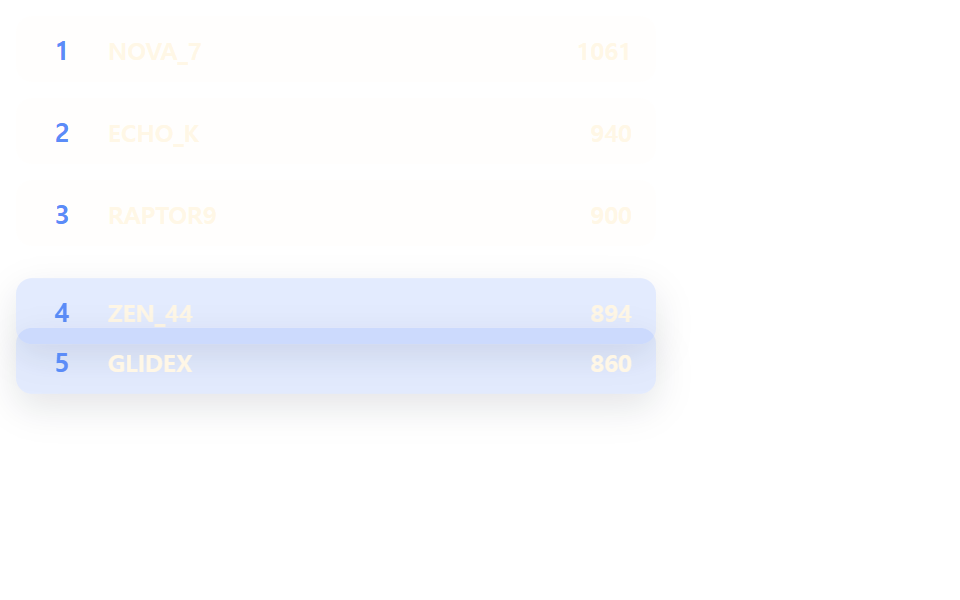 Lists & tablesLeaderboard UI Design: 9 Rank-Change List Patterns
 Lists & tablesComment Section UI: 9 Thread List Patterns
 Lists & tablesPagination CSS: 9 Pagers with Spring Pills