05Drag a rectangle of cells and copy it
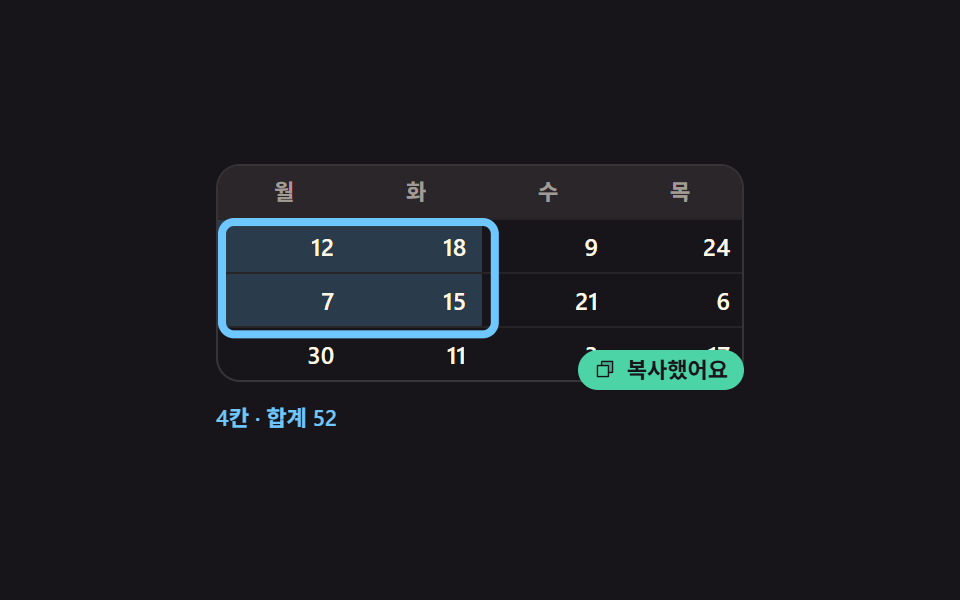
Press one cell and drag diagonally and everything you pass is bound into one rectangle, then a strip below shows the count and the sum before a copied note flashes and fades.
Best forPicking a few cells out of a table to paste into a sheet
pointermovescaleclipboard
<main class="stage">
  <div class="rs is-demo" id="rs">
    <div class="rs__grid" id="rs-grid" role="grid" aria-label="Weekly sales">
      <div class="rs__row rs__row--head" role="row">
        <span role="columnheader">Mon</span><span role="columnheader">Tue</span><span role="columnheader">Wed</span><span role="columnheader">Thu</span>
      </div>
      <div class="rs__row" role="row"><b data-r="0" data-c="0" role="gridcell">12</b><b data-r="0" data-c="1" role="gridcell">18</b><b data-r="0" data-c="2" role="gridcell">9</b><b data-r="0" data-c="3" role="gridcell">24</b></div>
      <div class="rs__row" role="row"><b data-r="1" data-c="0" role="gridcell">7</b><b data-r="1" data-c="1" role="gridcell">15</b><b data-r="1" data-c="2" role="gridcell">21</b><b data-r="1" data-c="3" role="gridcell">6</b></div>
      <div class="rs__row" role="row"><b data-r="2" data-c="0" role="gridcell">30</b><b data-r="2" data-c="1" role="gridcell">11</b><b data-r="2" data-c="2" role="gridcell">3</b><b data-r="2" data-c="3" role="gridcell">17</b></div>
      <div class="rs__box" id="rs-box" aria-hidden="true"></div>
    </div>
    <p class="rs__foot" id="rs-foot" role="status">
      <span class="rs__s0">Drag to select</span>
      <span class="rs__s1">1 cell · sum 12</span>
      <span class="rs__s2">4 cells · sum 52</span>
      <span class="rs__s3">9 cells · sum 126</span>
    </p>
    <span class="rs__toast" aria-hidden="true"><span class="rs__toast-in"><span class="rs__ic"><svg viewBox="0 0 256 256" width="1em" height="1em" fill="currentColor"><g><path d="M216 40v128h-48V88H88V40Z" opacity=".2"/><path d="M216 32H88a8 8 0 0 0-8 8v40H40a8 8 0 0 0-8 8v128a8 8 0 0 0 8 8h128a8 8 0 0 0 8-8v-40h40a8 8 0 0 0 8-8V40a8 8 0 0 0-8-8m-56 176H48V96h112Zm48-48h-32V88a8 8 0 0 0-8-8H96V48h112Z"/></g></svg></span>Copied</span></span>
  </div>
</main>
@use "sass:color";
@use "../../../../site/static/demo-tokens" as *;
$duration: $dur-quick;
$easing: $ease-spring;
$color: $subject-sky;
@include stage($stage-ink);
$cell-w: 66px;
$cell-h: 26px;
$line: color.mix($subject-cream, $stage-ink, 14%);
.rs {
position: relative;
box-sizing: border-box;
width: 264px;
color: $subject-cream;
font-family: -apple-system, "Segoe UI", "Noto Sans KR", sans-serif;
}
.rs__grid {
position: relative;
border: 1px solid $line;
border-radius: $r-control;
background: $stage-ink;
overflow: hidden;
}
.rs__row {
display: grid;
grid-template-columns: repeat(4, $cell-w);
height: $cell-h;
}
.rs__row + .rs__row { border-top: 1px solid rgba(255, 247, 230, .07); }
.rs__row > * {
padding: 0 $sp-2;
font-size: 12px;
line-height: $cell-h;
font-weight: 600;
text-align: right;
overflow: hidden;
white-space: nowrap;
transition: background $duration $easing;
}
.rs__row--head {
background: color.mix($subject-cream, $stage-ink, 8%);
}
.rs__row--head > * {
color: rgba(255, 247, 230, .56);
font-size: 11px;
font-weight: 700;
text-align: center;
}
.rs__row > .is-sel { background: rgba(110, 200, 255, .22); }
// ── 범위 네모 — 셀 하나 크기를 기준으로 늘린다 ────────
.rs__box {
position: absolute;
left: 0; top: 0;
width: $cell-w;
height: $cell-h;
border: 2px solid $color;
border-radius: $r-xs;
opacity: 0;
transform-origin: left top; // 규칙8: 앵커셀 좌표 계산 기준
transform: translate(0, $cell-h) scale(1, 1);
pointer-events: none;
}
// ── 아래 띠 ──────────────────────────────────────────
.rs__foot {
position: relative;
height: 20px;
margin: $sp-2 0 0;
font-size: 11px;
line-height: 20px;
font-weight: 600;
}
.rs__s0, .rs__s1, .rs__s2, .rs__s3 {
position: absolute;
left: 0; top: 0;
color: rgba(255, 247, 230, .62);
}
.rs__s1, .rs__s2, .rs__s3 { opacity: 0; color: $color; }
// ── 복사 쪽지 ────────────────────────────────────────
.rs__toast {
position: absolute;
right: 0; bottom: 24px;
opacity: 0;
}
.rs.is-copied .rs__toast { opacity: 1; }
.rs__toast-in {
display: inline-flex;
align-items: center;
gap: $sp-1;
padding: 0 $sp-2;
border-radius: $r-pill;
background: $subject-mint;
color: $subject-ink;
font-size: 11px;
line-height: 20px;
font-weight: 700;
transform: translateY(0);
}
.rs__ic { display: inline-flex; width: 12px; height: 12px; }
// ── 자동 루프 (2s) ───────────────────────────────────
// 10% 에 한 칸에서 시작해 44% 까지 세 칸 × 세 줄로 자란다(scale 하나로 — 네 변을 따로 재면 어긋난다).
// 칸 색과 아래 띠 문구는 네모가 그 칸에 닿는 순간마다 컷으로 바뀐다. 62% 에 쪽지가 튀어오르고
// 78~88% 에 한 칸으로 되돌아온다 — 복귀가 90% 안이라 24장 표본에 다 잡힌다.
.rs.is-demo .rs__box {
animation-name: rs-box;
animation-duration: $dur-loop;
animation-timing-function: $easing;
animation-iteration-count: infinite;
}
.rs.is-demo .rs__row > b {
animation-duration: $dur-loop;
animation-timing-function: steps(1, end);
animation-iteration-count: infinite;
}
// 네모가 1×1 → 2×2 → 3×3 으로 자라며 덮는 칸만 그 순간에 켠다
.rs.is-demo .rs__row:nth-child(2) > b:nth-child(1) { animation-name: rs-lit-a; }
.rs.is-demo .rs__row:nth-child(2) > b:nth-child(2),
.rs.is-demo .rs__row:nth-child(3) > b:nth-child(1),
.rs.is-demo .rs__row:nth-child(3) > b:nth-child(2) { animation-name: rs-lit-b; }
.rs.is-demo .rs__row:nth-child(2) > b:nth-child(3),
.rs.is-demo .rs__row:nth-child(3) > b:nth-child(3),
.rs.is-demo .rs__row:nth-child(4) > b:nth-child(1),
.rs.is-demo .rs__row:nth-child(4) > b:nth-child(2),
.rs.is-demo .rs__row:nth-child(4) > b:nth-child(3) { animation-name: rs-lit-c; }
.rs.is-demo .rs__s0 {
animation-name: rs-hide;
animation-duration: $dur-loop;
animation-timing-function: steps(1, end);
animation-iteration-count: infinite;
}
.rs.is-demo .rs__s1 {
animation-name: rs-s1;
animation-duration: $dur-loop;
animation-timing-function: steps(1, end);
animation-iteration-count: infinite;
}
.rs.is-demo .rs__s2 {
animation-name: rs-s2;
animation-duration: $dur-loop;
animation-timing-function: steps(1, end);
animation-iteration-count: infinite;
}
.rs.is-demo .rs__s3 {
animation-name: rs-s3;
animation-duration: $dur-loop;
animation-timing-function: steps(1, end);
animation-iteration-count: infinite;
}
.rs.is-demo .rs__toast {
animation-name: rs-toast;
animation-duration: $dur-loop;
animation-timing-function: steps(1, end);
animation-iteration-count: infinite;
}
.rs.is-demo .rs__toast-in {
animation-name: rs-pop;
animation-duration: $dur-loop;
animation-timing-function: $ease-pop;
animation-iteration-count: infinite;
animation-fill-mode: backwards;
}
// 줄어드는 구간에도 네모 크기와 아래 띠 문구가 **같은 순간에** 한 단계씩 내려간다.
// 네모만 줄이고 문구를 늦게 끄면 「2×2 네모 옆에 9칸·합계 126」 같은 거짓 장이 poster 로 뽑힌다 (실측)
@keyframes rs-box {
0% { opacity: 0; transform: translate(0, $cell-h) scale(1, 1); }
10% { opacity: 1; transform: translate(0, $cell-h) scale(1, 1); }
44% { opacity: 1; transform: translate(0, $cell-h) scale(3, 3); }
76% { opacity: 1; transform: translate(0, $cell-h) scale(3, 3); }
80% { opacity: 1; transform: translate(0, $cell-h) scale(2, 2); }
84% { opacity: 1; transform: translate(0, $cell-h) scale(1, 1); }
86% { opacity: 0; transform: translate(0, $cell-h) scale(1, 1); }
100% { opacity: 0; transform: translate(0, $cell-h) scale(1, 1); }
}
// 켜는 것과 끄는 것이 같은 크기면 아홉 칸이 한꺼번에 꺼지는 장이 제일 크게 변해 poster 가 된다.
// 그래서 끄는 쪽은 켠 순서의 역순으로 흩어 둔다 — 한 장에서 꺼지는 칸 수를 다섯 → 넷 → 하나로.
@keyframes rs-lit-a {
0% { background: none; }
10% { background: rgba(110, 200, 255, .22); }
86% { background: none; }
100% { background: none; }
}
@keyframes rs-s1 {
0% { opacity: 0; }
10% { opacity: 1; }
26% { opacity: 0; }
82% { opacity: 1; }
86% { opacity: 0; }
100% { opacity: 0; }
}
@keyframes rs-lit-b {
0% { background: none; }
26% { background: rgba(110, 200, 255, .22); }
81% { background: none; }
100% { background: none; }
}
@keyframes rs-lit-c {
0% { background: none; }
40% { background: rgba(110, 200, 255, .22); }
78% { background: none; }
100% { background: none; }
}
@keyframes rs-hide {
0% { opacity: 1; }
10% { opacity: 0; }
88% { opacity: 1; }
100% { opacity: 1; }
}
@keyframes rs-s2 {
0% { opacity: 0; }
26% { opacity: 1; }
40% { opacity: 0; }
78% { opacity: 1; }
82% { opacity: 0; }
100% { opacity: 0; }
}
@keyframes rs-s3 {
0% { opacity: 0; }
40% { opacity: 1; }
78% { opacity: 0; }
100% { opacity: 0; }
}
@keyframes rs-toast {
0% { opacity: 0; }
62% { opacity: 1; }
80% { opacity: 0; }
100% { opacity: 0; }
}
@keyframes rs-pop {
0% { transform: translateY(10px); }
62% { transform: translateY(10px); }
70% { transform: translateY(0); }
80% { transform: translateY(0); }
100% { transform: translateY(0); }
}
// 320×200 — 264px 격자가 그대로 들어가므로 아래 띠 여백만 줄인다
@media (max-width: 340px) {
.rs__foot { margin-top: $sp-1; }
}
@media (prefers-reduced-motion: reduce) {
.rs.is-demo .rs__box,
.rs.is-demo .rs__row > b,
.rs.is-demo .rs__s0,
.rs.is-demo .rs__s1,
.rs.is-demo .rs__s2,
.rs.is-demo .rs__s3,
.rs.is-demo .rs__toast,
.rs.is-demo .rs__toast-in { animation: none !important; }
.rs.is-demo .rs__box { opacity: 1; transform: translate(0, $cell-h) scale(3, 3); }
.rs.is-demo .rs__s0 { opacity: 0; }
.rs.is-demo .rs__s3 { opacity: 1; }
.rs__row > * { transition: none; }
}html, body {
margin: 0;
overflow: hidden;
}
.stage {
box-sizing: border-box;
min-height: 100vh;
display: grid;
place-items: center;
margin: 0;
background: #17141a;
font-family: -apple-system, "Segoe UI", "Noto Sans KR", sans-serif;
padding: clamp(8px, 4vw, 24px);
}
.rs {
position: relative;
box-sizing: border-box;
width: 264px;
color: #fff7e6;
font-family: -apple-system, "Segoe UI", "Noto Sans KR", sans-serif;
}
.rs__grid {
position: relative;
border: 1px solid rgb(21.7568627451%, 20.3058823529%, 21.3960784314%);
border-radius: 12px;
background: #17141a;
overflow: hidden;
}
.rs__row {
display: grid;
grid-template-columns: repeat(4, 66px);
height: 26px;
}
.rs__row + .rs__row {
border-top: 1px solid rgba(255, 247, 230, 0.07);
}
.rs__row > * {
padding: 0 8px;
font-size: 12px;
line-height: 26px;
font-weight: 600;
text-align: right;
overflow: hidden;
white-space: nowrap;
transition: background 220ms cubic-bezier(0.2, 0.8, 0.2, 1);
}
.rs__row--head {
background: rgb(16.2980392157%, 14.9647058824%, 16.5960784314%);
}
.rs__row--head > * {
color: rgba(255, 247, 230, 0.56);
font-size: 11px;
font-weight: 700;
text-align: center;
}
.rs__row > .is-sel {
background: rgba(110, 200, 255, 0.22);
}
.rs__box {
position: absolute;
left: 0;
top: 0;
width: 66px;
height: 26px;
border: 2px solid #6ec8ff;
border-radius: 4px;
opacity: 0;
transform-origin: left top;
transform: translate(0, 26px) scale(1, 1);
pointer-events: none;
}
.rs__foot {
position: relative;
height: 20px;
margin: 8px 0 0;
font-size: 11px;
line-height: 20px;
font-weight: 600;
}
.rs__s0, .rs__s1, .rs__s2, .rs__s3 {
position: absolute;
left: 0;
top: 0;
color: rgba(255, 247, 230, 0.62);
}
.rs__s1, .rs__s2, .rs__s3 {
opacity: 0;
color: #6ec8ff;
}
.rs__toast {
position: absolute;
right: 0;
bottom: 24px;
opacity: 0;
}
.rs.is-copied .rs__toast {
opacity: 1;
}
.rs__toast-in {
display: inline-flex;
align-items: center;
gap: 4px;
padding: 0 8px;
border-radius: 999px;
background: #4cd4a6;
color: #17141a;
font-size: 11px;
line-height: 20px;
font-weight: 700;
transform: translateY(0);
}
.rs__ic {
display: inline-flex;
width: 12px;
height: 12px;
}
.rs.is-demo .rs__box {
animation-name: rs-box;
animation-duration: 2s;
animation-timing-function: cubic-bezier(0.2, 0.8, 0.2, 1);
animation-iteration-count: infinite;
}
.rs.is-demo .rs__row > b {
animation-duration: 2s;
animation-timing-function: steps(1, end);
animation-iteration-count: infinite;
}
.rs.is-demo .rs__row:nth-child(2) > b:nth-child(1) {
animation-name: rs-lit-a;
}
.rs.is-demo .rs__row:nth-child(2) > b:nth-child(2),
.rs.is-demo .rs__row:nth-child(3) > b:nth-child(1),
.rs.is-demo .rs__row:nth-child(3) > b:nth-child(2) {
animation-name: rs-lit-b;
}
.rs.is-demo .rs__row:nth-child(2) > b:nth-child(3),
.rs.is-demo .rs__row:nth-child(3) > b:nth-child(3),
.rs.is-demo .rs__row:nth-child(4) > b:nth-child(1),
.rs.is-demo .rs__row:nth-child(4) > b:nth-child(2),
.rs.is-demo .rs__row:nth-child(4) > b:nth-child(3) {
animation-name: rs-lit-c;
}
.rs.is-demo .rs__s0 {
animation-name: rs-hide;
animation-duration: 2s;
animation-timing-function: steps(1, end);
animation-iteration-count: infinite;
}
.rs.is-demo .rs__s1 {
animation-name: rs-s1;
animation-duration: 2s;
animation-timing-function: steps(1, end);
animation-iteration-count: infinite;
}
.rs.is-demo .rs__s2 {
animation-name: rs-s2;
animation-duration: 2s;
animation-timing-function: steps(1, end);
animation-iteration-count: infinite;
}
.rs.is-demo .rs__s3 {
animation-name: rs-s3;
animation-duration: 2s;
animation-timing-function: steps(1, end);
animation-iteration-count: infinite;
}
.rs.is-demo .rs__toast {
animation-name: rs-toast;
animation-duration: 2s;
animation-timing-function: steps(1, end);
animation-iteration-count: infinite;
}
.rs.is-demo .rs__toast-in {
animation-name: rs-pop;
animation-duration: 2s;
animation-timing-function: cubic-bezier(0.2, 1.4, 0.4, 1);
animation-iteration-count: infinite;
animation-fill-mode: backwards;
}
@keyframes rs-box {
0% {
opacity: 0;
transform: translate(0, 26px) scale(1, 1);
}
10% {
opacity: 1;
transform: translate(0, 26px) scale(1, 1);
}
44% {
opacity: 1;
transform: translate(0, 26px) scale(3, 3);
}
76% {
opacity: 1;
transform: translate(0, 26px) scale(3, 3);
}
80% {
opacity: 1;
transform: translate(0, 26px) scale(2, 2);
}
84% {
opacity: 1;
transform: translate(0, 26px) scale(1, 1);
}
86% {
opacity: 0;
transform: translate(0, 26px) scale(1, 1);
}
100% {
opacity: 0;
transform: translate(0, 26px) scale(1, 1);
}
}
@keyframes rs-lit-a {
0% {
background: none;
}
10% {
background: rgba(110, 200, 255, 0.22);
}
86% {
background: none;
}
100% {
background: none;
}
}
@keyframes rs-s1 {
0% {
opacity: 0;
}
10% {
opacity: 1;
}
26% {
opacity: 0;
}
82% {
opacity: 1;
}
86% {
opacity: 0;
}
100% {
opacity: 0;
}
}
@keyframes rs-lit-b {
0% {
background: none;
}
26% {
background: rgba(110, 200, 255, 0.22);
}
81% {
background: none;
}
100% {
background: none;
}
}
@keyframes rs-lit-c {
0% {
background: none;
}
40% {
background: rgba(110, 200, 255, 0.22);
}
78% {
background: none;
}
100% {
background: none;
}
}
@keyframes rs-hide {
0% {
opacity: 1;
}
10% {
opacity: 0;
}
88% {
opacity: 1;
}
100% {
opacity: 1;
}
}
@keyframes rs-s2 {
0% {
opacity: 0;
}
26% {
opacity: 1;
}
40% {
opacity: 0;
}
78% {
opacity: 1;
}
82% {
opacity: 0;
}
100% {
opacity: 0;
}
}
@keyframes rs-s3 {
0% {
opacity: 0;
}
40% {
opacity: 1;
}
78% {
opacity: 0;
}
100% {
opacity: 0;
}
}
@keyframes rs-toast {
0% {
opacity: 0;
}
62% {
opacity: 1;
}
80% {
opacity: 0;
}
100% {
opacity: 0;
}
}
@keyframes rs-pop {
0% {
transform: translateY(10px);
}
62% {
transform: translateY(10px);
}
70% {
transform: translateY(0);
}
80% {
transform: translateY(0);
}
100% {
transform: translateY(0);
}
}
@media (max-width: 340px) {
.rs__foot {
margin-top: 4px;
}
}
@media (prefers-reduced-motion: reduce) {
.rs.is-demo .rs__box,
.rs.is-demo .rs__row > b,
.rs.is-demo .rs__s0,
.rs.is-demo .rs__s1,
.rs.is-demo .rs__s2,
.rs.is-demo .rs__s3,
.rs.is-demo .rs__toast,
.rs.is-demo .rs__toast-in {
animation: none !important;
}
.rs.is-demo .rs__box {
opacity: 1;
transform: translate(0, 26px) scale(3, 3);
}
.rs.is-demo .rs__s0 {
opacity: 0;
}
.rs.is-demo .rs__s3 {
opacity: 1;
}
.rs__row > * {
transition: none;
}
}// 실제 동작: 셀에서 셀로 끌면 두 지점이 만드는 네모가 선택 범위다. 놓으면 탭으로 이어 붙여 복사한다.
var rs = document.getElementById('rs');
var rsGrid = document.getElementById('rs-grid');
var rsBox = document.getElementById('rs-box');
var rsFoot = document.getElementById('rs-foot');
var RS_W = 66, RS_H = 26;
var rsAnchor = null, rsOn = false;
function rsCells() { return [].slice.call(rsGrid.querySelectorAll('[data-r]')); }
function rsPaint(to) {
var r0 = Math.min(rsAnchor.r, to.r), r1 = Math.max(rsAnchor.r, to.r);
var c0 = Math.min(rsAnchor.c, to.c), c1 = Math.max(rsAnchor.c, to.c);
var sum = 0, n = 0, text = [];
rsCells().forEach(function (el) {
var r = +el.dataset.r, c = +el.dataset.c;
var inside = r >= r0 && r <= r1 && c >= c0 && c <= c1;
el.classList.toggle('is-sel', inside);
if (inside) { sum += +el.textContent; n++; }
});
rsBox.style.opacity = '1';
rsBox.style.transform = 'translate(' + (c0 * RS_W) + 'px, ' + ((r0 + 1) * RS_H) + 'px) scale(' + (c1 - c0 + 1) + ', ' + (r1 - r0 + 1) + ')';
rsFoot.querySelector('.rs__s0').textContent = n + ' cells · sum ' + sum;
return text;
}
rsGrid.addEventListener('pointerdown', function (e) {
var el = e.target.closest('[data-r]');
if (!el) return;
rs.classList.remove('is-demo');
rsAnchor = { r: +el.dataset.r, c: +el.dataset.c };
rsOn = true; rsPaint(rsAnchor);
});
rsGrid.addEventListener('pointermove', function (e) {
if (!rsOn) return;
var el = document.elementFromPoint(e.clientX, e.clientY);
el = el && el.closest ? el.closest('[data-r]') : null;
if (el) rsPaint({ r: +el.dataset.r, c: +el.dataset.c });
});
window.addEventListener('pointerup', function () {
if (!rsOn) return;
rsOn = false;
var rows = {};
rsCells().forEach(function (el) {
if (!el.classList.contains('is-sel')) return;
(rows[el.dataset.r] = rows[el.dataset.r] || []).push(el.textContent);
});
var text = Object.keys(rows).map(function (k) { return rows[k].join('\t'); }).join('\n');
if (navigator.clipboard) { navigator.clipboard.writeText(text).catch(function () {}); }
rs.classList.add('is-copied');
setTimeout(function () { rs.classList.remove('is-copied'); }, 1200);
});import { useEffect, useState } from "react";
import type { CSSProperties } from "react";
import styles from "./CellRangeSelect.module.scss";
export type CellRangeSelectProps = {
tableLabel?: string;
/** 머리글 — 열 개수와 데이터 폭을 맞춘다 */
head?: string[];
/** 본문 숫자 */
data?: number[][];
hint?: string;
cellWord?: string;
cellsWord?: string;
sumWord?: string;
copiedLabel?: string;
/** 자동 재생 루프 (갤러리용). 사람이 손대면 꺼진다 */
demo?: boolean;
duration?: number;
easing?: string;
color?: string;
};
type Vars = CSSProperties & { "--duration"?: string; "--easing"?: string; "--color"?: string };
type PtrEvt = { clientX: number; clientY: number; target: any };
type Cell = { r: number; c: number };
type Rect = { r0: number; r1: number; c0: number; c1: number };
// 셀 한 칸의 크기 — 범위 네모를 scale 로 늘릴 때의 기준
const CELL_W = 66;
const CELL_H = 26;
function CopyIcon() {
return (
<svg viewBox="0 0 256 256" width="1em" height="1em" fill="currentColor">
<g>
<path d="M216 40v128h-48V88H88V40Z" opacity=".2" />
<path d="M216 32H88a8 8 0 0 0-8 8v40H40a8 8 0 0 0-8 8v128a8 8 0 0 0 8 8h128a8 8 0 0 0 8-8v-40h40a8 8 0 0 0 8-8V40a8 8 0 0 0-8-8m-56 176H48V96h112Zm48-48h-32V88a8 8 0 0 0-8-8H96V48h112Z" />
</g>
</svg>
);
}
// 이벤트가 떨어진 자리의 셀 좌표 — data-r · data-c 를 읽는다
function cellOf(node: any): Cell | null {
const el = node && node.closest ? node.closest("[data-r]") : null;
if (!el) return null;
return { r: Number(el.getAttribute("data-r")), c: Number(el.getAttribute("data-c")) };
}
export default function CellRangeSelect({
tableLabel = "Weekly sales",
head = ["Mon", "Tue", "Wed", "Thu"],
data = [
[12, 18, 9, 24],
[7, 15, 21, 6],
[30, 11, 3, 17],
],
hint = "Drag to select",
cellWord = "cell",
cellsWord = "cells",
sumWord = "sum",
copiedLabel = "Copied",
demo = true,
duration = 220,
easing = "cubic-bezier(.2,.8,.2,1)",
color = "#6ec8ff",
}: CellRangeSelectProps) {
const [anchor, setAnchor] = useState<Cell | null>(null);
const [sel, setSel] = useState<Rect | null>(null);
const [dragging, setDragging] = useState(false);
const [copied, setCopied] = useState(false);
const [live, setLive] = useState(demo);
const vars: Vars = { "--duration": `${duration}ms`, "--easing": easing, "--color": color };
const cls = [styles.root, live ? styles.isDemo : "", copied ? styles.isCopied : ""].join(" ");
const inside = (r: number, c: number) =>
!!sel && r >= sel.r0 && r <= sel.r1 && c >= sel.c0 && c <= sel.c1;
// 놓는 순간 탭·줄바꿈으로 이어 붙여 클립보드에 넣는다
useEffect(() => {
if (!dragging) return;
const up = () => {
setDragging(false);
if (!sel) return;
const lines: string[] = [];
for (let r = sel.r0; r <= sel.r1; r++) {
lines.push(data[r].slice(sel.c0, sel.c1 + 1).map((n) => String(n)).join("\t"));
}
if (navigator.clipboard) navigator.clipboard.writeText(lines.join("\n")).catch(() => {});
setCopied(true);
window.setTimeout(() => setCopied(false), 1200);
};
window.addEventListener("pointerup", up);
return () => window.removeEventListener("pointerup", up);
}, [dragging, sel, data]);
const paint = (from: Cell, to: Cell) => {
setSel({
r0: Math.min(from.r, to.r),
r1: Math.max(from.r, to.r),
c0: Math.min(from.c, to.c),
c1: Math.max(from.c, to.c),
});
};
const onDown = (e: PtrEvt) => {
const cell = cellOf(e.target);
if (!cell) return;
setLive(false);
setAnchor(cell);
setDragging(true);
paint(cell, cell);
};
const onMove = (e: PtrEvt) => {
if (!dragging || !anchor) return;
const cell = cellOf(document.elementFromPoint(e.clientX, e.clientY));
if (cell) paint(anchor, cell);
};
let count = 0;
let sum = 0;
data.forEach((row, r) =>
row.forEach((n, c) => {
if (inside(r, c)) {
count += 1;
sum += n;
}
})
);
const fmt = (n: number, s: number) => `${n} ${n === 1 ? cellWord : cellsWord} · ${sumWord} ${s}`;
const boxStyle: CSSProperties = sel
? {
opacity: 1,
transform: `translate(${sel.c0 * CELL_W}px, ${(sel.r0 + 1) * CELL_H}px) scale(${
sel.c1 - sel.c0 + 1
}, ${sel.r1 - sel.r0 + 1})`,
}
: {};
return (
<div className={cls} style={vars}>
<div
className={styles.grid}
role="grid"
aria-label={tableLabel}
onPointerDown={onDown}
onPointerMove={onMove}
>
<div className={[styles.row, styles.rowHead].join(" ")} role="row">
{head.map((h) => (
<span key={h} role="columnheader">
{h}
</span>
))}
</div>
{data.map((row, r) => (
<div className={styles.row} role="row" key={r}>
{row.map((n, c) => (
<b
key={c}
data-r={r}
data-c={c}
role="gridcell"
className={inside(r, c) ? styles.sel : ""}
>
{n}
</b>
))}
</div>
))}
<div className={styles.box} style={boxStyle} aria-hidden="true" />
</div>
<p className={styles.foot} role="status">
<span className={styles.s0}>{sel ? fmt(count, sum) : hint}</span>
<span className={styles.s1}>{fmt(1, 12)}</span>
<span className={styles.s2}>{fmt(4, 52)}</span>
<span className={styles.s3}>{fmt(9, 126)}</span>
</p>
<span className={styles.toast} aria-hidden="true">
<span className={styles.toastIn}>
<span className={styles.ic}>
<CopyIcon />
</span>
{copiedLabel}
</span>
</span>
</div>
);
}05 Drag a rectangle of cells and copy it — Measured area 13.154% · moving frames 18/23Original by GODRICH · SCSS and React ship in the zip · 9 Data Table UI Patterns — Drag, Resize, Select
The post this demo lives in
 9 Data Table UI Patterns — Drag, Resize, SelectA data table ui is a grid of rows and columns you can reorder, narrow, and pull values out of by hand. All nine sort a r See all demos in this post