03Grid reflow — inverting pointer coordinates into row/column indices
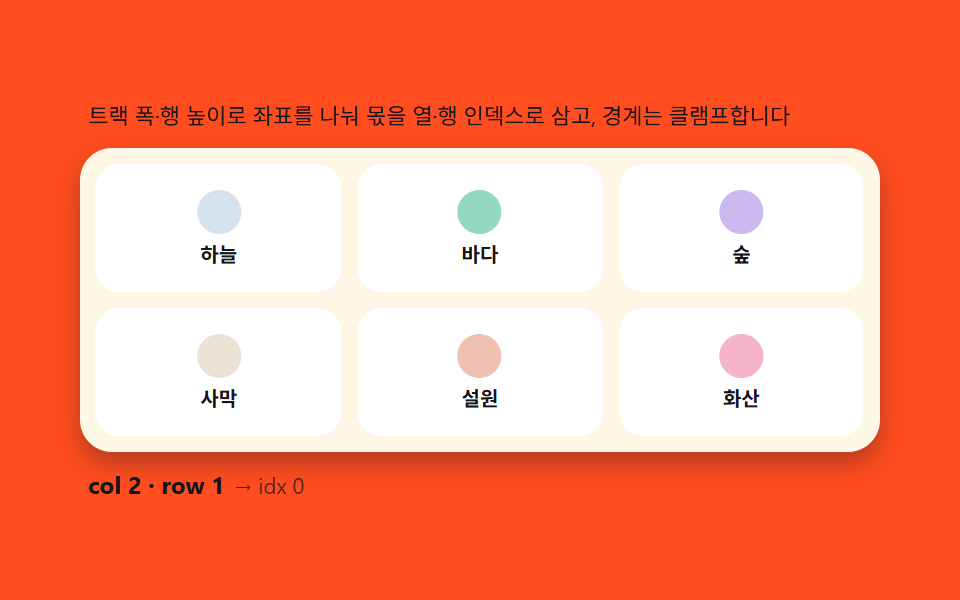
Dividing the pointer's x and y by the grid's track width and row height yields column and row indices via integer division, which are then flattened back into the 1D order array for the splice. Clamping at the edges means dropping outside the grid still lands safely in the last cell.
Best forImage ordering, widget layout boards
CSS custom propertiesgetBoundingClientRecttransition
<main class="stage">
<div class="gr">
  <p class="gr__hint">Coordinates are divided by track width and row height into integer column/row indices, clamped at the edges.</p>
  <div class="gr__board" id="grBoard">
    <div class="gr__cell"><span class="gr__dot gr__dot--a"></span><span class="gr__lbl">sky</span></div>
    <div class="gr__cell"><span class="gr__dot gr__dot--b"></span><span class="gr__lbl">sea</span></div>
    <div class="gr__cell"><span class="gr__dot gr__dot--c"></span><span class="gr__lbl">forest</span></div>
    <div class="gr__cell"><span class="gr__dot gr__dot--d"></span><span class="gr__lbl">desert</span></div>
    <div class="gr__cell"><span class="gr__dot gr__dot--e"></span><span class="gr__lbl">snowfield</span></div>
    <div class="gr__cell"><span class="gr__dot gr__dot--f"></span><span class="gr__lbl">volcano</span></div>
  </div>
  <p class="gr__meta"><b class="gr__state" id="grState">col 0 · row 0</b><span class="gr__unit">→ idx 0</span></p>
</div>
</main>
@use "../../../../site/static/demo-tokens" as *;
$duration: 240ms;
$easing: cubic-bezier(.2,.8,.2,1);
$color: $subject-ink;
// 파스텔 강조(도구/파스텔.py to_pastel 결과: 채도 .34 · 명도 +.11)
$p-pink: #f4b3c6;
$p-mint: #93d9c0;
$p-sky: #d6e2eb;
$p-lilac: #cbb9f0;
$p-sand: #ebe3d6;
$p-rose: #f0c0b3;
@include stage($stage-orange);
.gr {
width: 100%;
max-width: 400px;
display: flex;
flex-direction: column;
gap: $sp-2;
}
.gr__hint {
margin: 0;
padding: 0 $sp-1;
font-weight: 400;
font-size: 11px;
line-height: 1.4;
color: $subject-ink;
}
.gr__board {
display: grid;
grid-template-columns: repeat(3, 1fr);
gap: $sp-2;
padding: $sp-2;
background: $subject-cream;
border-radius: $r-card;
box-shadow: $shadow-press;
}
.gr__cell {
position: relative;
display: flex;
flex-direction: column;
align-items: center;
justify-content: center;
gap: $sp-1;
height: 64px;
border-radius: $r-control;
background: $stage-paper;
cursor: grab;
transition: transform $duration $easing;
}
.gr__cell:hover {
transform: scale(1.05);
transform-origin: center;
}
.gr__dot {
width: 22px;
height: 22px;
border-radius: $r-pill;
}
.gr__dot--a { background: $p-sky; }
.gr__dot--b { background: $p-mint; }
.gr__dot--c { background: $p-lilac; }
.gr__dot--d { background: $p-sand; }
.gr__dot--e { background: $p-rose; }
.gr__dot--f { background: $p-pink; }
.gr__lbl {
font-weight: 700;
font-size: 10px;
line-height: 1.2;
color: $subject-ink;
}
.gr__meta {
margin: 0;
padding: 0 $sp-1;
display: flex;
align-items: baseline;
gap: $sp-1;
}
.gr__state {
font-weight: 700;
font-size: 12px;
color: $subject-ink;
}
.gr__unit {
font-weight: 400;
font-size: 11px;
color: rgba($subject-ink, .72);
}
@media (max-width: 340px) {
.gr { max-width: 280px; gap: $sp-1; }
.gr__hint { font-size: 10px; }
.gr__board { padding: $sp-1; gap: $sp-1; }
.gr__cell { height: 40px; }
.gr__dot { width: 16px; height: 16px; }
}
@media (prefers-reduced-motion: reduce) {
.gr__cell {
transition: none !important;
transform: none !important;
}
}html, body {
margin: 0;
overflow: hidden;
}
.stage {
box-sizing: border-box;
min-height: 100vh;
display: grid;
place-items: center;
margin: 0;
background: #ff4d1f;
font-family: -apple-system, "Segoe UI", "Noto Sans KR", sans-serif;
padding: clamp(8px, 4vw, 24px);
}
.gr {
width: 100%;
max-width: 400px;
display: flex;
flex-direction: column;
gap: 8px;
}
.gr__hint {
margin: 0;
padding: 0 4px;
font-weight: 400;
font-size: 11px;
line-height: 1.4;
color: #17141a;
}
.gr__board {
display: grid;
grid-template-columns: repeat(3, 1fr);
gap: 8px;
padding: 8px;
background: #fff7e6;
border-radius: 16px;
box-shadow: 0 6px 12px rgba(23, 20, 26, 0.32);
}
.gr__cell {
position: relative;
display: flex;
flex-direction: column;
align-items: center;
justify-content: center;
gap: 4px;
height: 64px;
border-radius: 12px;
background: #ffffff;
cursor: grab;
transition: transform 240ms cubic-bezier(0.2, 0.8, 0.2, 1);
}
.gr__cell:hover {
transform: scale(1.05);
transform-origin: center;
}
.gr__dot {
width: 22px;
height: 22px;
border-radius: 999px;
}
.gr__dot--a {
background: #d6e2eb;
}
.gr__dot--b {
background: #93d9c0;
}
.gr__dot--c {
background: #cbb9f0;
}
.gr__dot--d {
background: #ebe3d6;
}
.gr__dot--e {
background: #f0c0b3;
}
.gr__dot--f {
background: #f4b3c6;
}
.gr__lbl {
font-weight: 700;
font-size: 10px;
line-height: 1.2;
color: #17141a;
}
.gr__meta {
margin: 0;
padding: 0 4px;
display: flex;
align-items: baseline;
gap: 4px;
}
.gr__state {
font-weight: 700;
font-size: 12px;
color: #17141a;
}
.gr__unit {
font-weight: 400;
font-size: 11px;
color: rgba(23, 20, 26, 0.72);
}
@media (max-width: 340px) {
.gr {
max-width: 280px;
gap: 4px;
}
.gr__hint {
font-size: 10px;
}
.gr__board {
padding: 4px;
gap: 4px;
}
.gr__cell {
height: 40px;
}
.gr__dot {
width: 16px;
height: 16px;
}
}
@media (prefers-reduced-motion: reduce) {
.gr__cell {
transition: none !important;
transform: none !important;
}
}// 그리드 재배치(03) — 그리드 rect 와 열 수(3)로 포인터 x·y 를 트랙 폭·행 높이로 나눈 몫을
// 열·행 인덱스로 삼고(cellAt), 0..cols-1 · 0..rows-1 로 클램프한 뒤 row*cols+col 로
// 1차원 인덱스를 펴서 순서 배열을 스플라이스한다(applyMove). 이동한 칸들은 FLIP 과 같은
// 전후 좌표차 역산으로 transform 을 되돌렸다가 푼다. 자동 시연은 고정 시나리오 3회전.
(function () {
var board = document.getElementById('grBoard');
var stateEl = document.getElementById('grState');
if (!board || !stateEl) return;
var COLS = 3;
var order = [0, 1, 2, 3, 4, 5]; // 1차원 순서 배열 — 스플라이스 대상
var CELLS = Array.prototype.slice.call(board.children);
// 좌표 → 클램프된 col·row 몫
function cellAt(x, y) {
var r = board.getBoundingClientRect();
var col = Math.floor((x - r.left) / (r.width / COLS));
var row = Math.floor((y - r.top) / (r.height / Math.ceil(CELLS.length / COLS)));
col = Math.max(0, Math.min(COLS - 1, col));
row = Math.max(0, Math.min(Math.ceil(CELLS.length / COLS) - 1, row));
return { col: col, row: row, idx: row * COLS + col };
}
// 1차원 인덱스 두 개로 스플라이스 + FLIP 되돌림
function applyMove(from, to) {
if (from === to || to < 0 || to >= order.length) return;
var first = CELLS.map(function (c) {
var r = c.getBoundingClientRect();
return { x: r.left, y: r.top };
});
order.splice(to, 0, order.splice(from, 1)[0]);
order.forEach(function (ci) { board.appendChild(CELLS[ci]); });
CELLS.forEach(function (c) {
var r = c.getBoundingClientRect();
var me = first[CELLS.indexOf(c)];
var dx = me.x - r.left, dy = me.y - r.top;
if (dx !== 0 || dy !== 0) {
c.style.transition = 'none';
c.style.transform = 'translate(' + dx + 'px,' + dy + 'px)';
requestAnimationFrame(function () {
c.style.transition = 'transform 240ms cubic-bezier(.2,.8,.2,1)';
c.style.transform = 'translate(0,0)';
});
}
});
}
// 포인터 상태 라벨 — 몫 계산을 그대로 보여준다
function labelAt(x, y) {
var c = cellAt(x, y);
stateEl.textContent = 'col ' + c.col + ' · row ' + c.row;
}
// 사람 조작 — 칸 클릭: 첫 칸과 자리 교환(같은 역산 경로)
board.addEventListener('click', function (e) {
stop();
var cell = e.target.closest('.gr__cell');
if (!cell) return;
var r = board.getBoundingClientRect();
var cr = cell.getBoundingClientRect();
labelAt(cr.left + cr.width / 2 - r.left + r.left, cr.top + cr.height / 2);
var target = cellAt(cr.left + cr.width / 2, cr.top + cr.height / 2);
var cur = CELLS.indexOf(cell);
applyMove(cur, target.idx);
});
// 자동 시연 — 보드 좌표를 실측해 몫 계산으로 이동하는 시나리오
var playing = true;
function stop() { playing = false; }
var reduce = window.matchMedia('(prefers-reduced-motion: reduce)').matches;
// 우하단·좌상단을 번갈아 가리켜 매 회 실제로 자리가 바뀌게 한다(같은 칸 반복 시 from===to 무동작 방지)
var swapToggle = 0;
function scenario() {
var r = board.getBoundingClientRect();
var x2, y2;
if (swapToggle === 0) {
x2 = r.left + r.width * 0.9; y2 = r.top + r.height * 0.8; // 우하단
} else {
x2 = r.left + r.width * 0.1; y2 = r.top + r.height * 0.2; // 좌상단
}
swapToggle = 1 - swapToggle;
var t2 = cellAt(x2, y2);
labelAt(x2, y2);
var moving = order[0];
applyMove(order.indexOf(moving), t2.idx);
}
if (reduce) {
scenario();
} else {
var last = 0;
var DELAY = 460;
(function tick(now) {
if (playing && now - last >= DELAY) { last = now; scenario(); }
requestAnimationFrame(tick);
})(performance.now());
}
})();// DragReorderGrid — vanilla 판(run/336/demo/03-drag-reorder-grid/index.html)
// 의 React 포트. 그리드 rect 와 열 수(COLS)로 포인터 x·y 를 트랙 폭·행 높이로 나눈 몫을
// 열·행 인덱스로 삼고(cellAt) 0..cols-1 · 0..rows-1 로 클램프한 뒤 row*cols+col 로 1차원
// 인덱스를 펴서 순서 배열을 스플라이스한다(applyMove). 이동한 칸은 FLIP 좌표차 역산으로
// transform 을 되돌렸다가 푼다.
import { useEffect, useRef } from "react";
import styles from "./DragReorderGrid.module.scss";
export type DragReorderGridProps = {
duration?: string;
easing?: string;
color?: string;
};
const HINT = "트랙 폭·행 높이로 좌표를 나눠 몫을 열·행 인덱스로 삼고, 경계는 클램프합니다";
const COLS = 3;
type CellDef = { dot: string; label: string };
const CELL_DEFS: CellDef[] = [
{ dot: "a", label: "하늘" },
{ dot: "b", label: "바다" },
{ dot: "c", label: "숲" },
{ dot: "d", label: "사막" },
{ dot: "e", label: "설원" },
{ dot: "f", label: "화산" }
];
export default function DragReorderGrid({
duration = "240ms",
easing = "cubic-bezier(.2,.8,.2,1)",
color = "#17141a"
}: DragReorderGridProps) {
const boardRef = useRef<HTMLDivElement | null>(null);
const stateRef = useRef<HTMLElement | null>(null);
useEffect(() => {
const board = boardRef.current;
const stateEl = stateRef.current;
if (!board || !stateEl) return;
const order = [0, 1, 2, 3, 4, 5];
const CELLS: HTMLElement[] = Array.prototype.slice.call(board.children);
function cellAt(x: number, y: number): { col: number; row: number; idx: number } {
const r = board!.getBoundingClientRect();
const rows = Math.ceil(CELLS.length / COLS);
let col = Math.floor((x - r.left) / (r.width / COLS));
let row = Math.floor((y - r.top) / (r.height / rows));
col = Math.max(0, Math.min(COLS - 1, col));
row = Math.max(0, Math.min(rows - 1, row));
return { col, row, idx: row * COLS + col };
}
function applyMove(from: number, to: number): void {
if (from === to || to < 0 || to >= order.length) return;
const first = CELLS.map((c) => {
const r = c.getBoundingClientRect();
return { x: r.left, y: r.top };
});
order.splice(to, 0, order.splice(from, 1)[0]);
order.forEach((ci) => board!.appendChild(CELLS[ci]));
CELLS.forEach((c) => {
const r = c.getBoundingClientRect();
const me = first[CELLS.indexOf(c)];
const dx = me.x - r.left;
const dy = me.y - r.top;
if (dx !== 0 || dy !== 0) {
c.style.transition = "none";
c.style.transform = "translate(" + dx + "px," + dy + "px)";
requestAnimationFrame(() => {
c.style.transition = "transform " + duration + " " + easing;
c.style.transform = "translate(0,0)";
});
}
});
}
function labelAt(x: number, y: number): void {
const c = cellAt(x, y);
stateEl!.textContent = "col " + c.col + " · row " + c.row;
}
function onClick(e: MouseEvent): void {
stop();
const cell = (e.target as HTMLElement).closest("." + styles.cell) as HTMLElement | null;
if (!cell) return;
const cr = cell.getBoundingClientRect();
labelAt(cr.left + cr.width / 2, cr.top + cr.height / 2);
const target = cellAt(cr.left + cr.width / 2, cr.top + cr.height / 2);
const cur = CELLS.indexOf(cell);
applyMove(cur, target.idx);
}
board.addEventListener("click", onClick as EventListener);
let playing = true;
function stop(): void {
playing = false;
}
const reduce = window.matchMedia("(prefers-reduced-motion: reduce)").matches;
let swapToggle = 0;
function scenario(): void {
const r = board!.getBoundingClientRect();
let x2: number, y2: number;
if (swapToggle === 0) {
x2 = r.left + r.width * 0.9;
y2 = r.top + r.height * 0.8;
} else {
x2 = r.left + r.width * 0.1;
y2 = r.top + r.height * 0.2;
}
swapToggle = 1 - swapToggle;
const t2 = cellAt(x2, y2);
labelAt(x2, y2);
const moving = order[0];
applyMove(order.indexOf(moving), t2.idx);
}
let rafId = 0;
if (reduce) {
scenario();
} else {
let last = 0;
const DELAY = 460;
const tick = (now: number): void => {
if (playing && now - last >= DELAY) {
last = now;
scenario();
}
rafId = requestAnimationFrame(tick);
};
rafId = requestAnimationFrame(tick);
}
return () => {
cancelAnimationFrame(rafId);
board.removeEventListener("click", onClick as EventListener);
};
// eslint-disable-next-line react-hooks/exhaustive-deps
}, []);
return (
<main className={styles.stage}>
<div className={styles.gr}>
<p className={styles.hint}>{HINT}</p>
<div className={styles.board} ref={boardRef}>
{CELL_DEFS.map((c, i) => (
<div key={i} className={styles.cell}>
<span className={styles.dot + " " + (styles as Record<string, string>)["dot" + c.dot.toUpperCase()]} />
<span className={styles.lbl}>{c.label}</span>
</div>
))}
</div>
<p className={styles.meta}>
<b className={styles.state} ref={stateRef} style={{ color }}>col 0 · row 0</b>
<span className={styles.unit}>→ idx 0</span>
</p>
</div>
</main>
);
}03 Grid reflow — inverting pointer coordinates into row/column indices — Measured area 21.295% · moving frames 12/23Original by GODRICH · SCSS and React ship in the zip · Drag to Reorder UI: 9 Lists, One Drop Index
The post this demo lives in
 Drag to Reorder UI: 9 Lists, One Drop IndexDrag to reorder UI: Computing the drop index from pointer position reorders lists, kanban boards and grids -- with long- See all demos in this post
If you like this effect - similar demos
 drag09 Reorder after upload — finishing by hand-arranging the completed chipsDrag and Drop File Upload UI: 9 Computed Dropzones
 drag01 Grid-Magnet Drag That Pulls an Item Into a Cell Within RangeDrag and Drop Animation CSS: 9 Physics Patterns
 drag03 A Table Whose Neighbor Column Absorbs the Width You DragCSS Resize Handle: 9 Demos That Follow Your Grip