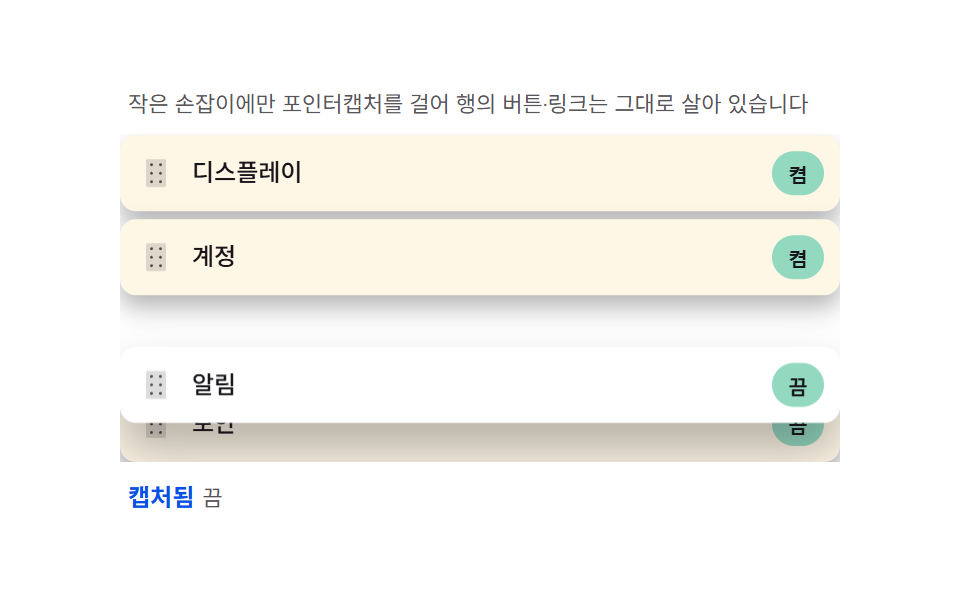
04Handle-only — capturing the pointer on a small grip so the rest of the row stays interactive
Attaching pointerdown only to the grip icon rather than the whole row, then pinning subsequent movement to that element with setPointerCapture, keeps the row's buttons, text selection and links fully alive. Pointers starting outside the grip are filtered out early so they never escalate into a drag.
Best forSettings item lists, widget ordering
setPointerCapturepointerdownCSS custom properties
<main class="stage">
<div class="ho">
  <p class="ho__hint">Pointer capture lives on the small grip only, so row buttons and links stay alive.</p>
  <ul class="ho__list" id="hoList">
    <li class="ho__row" data-id="0">
      <span class="ho__grip" tabindex="-1" aria-hidden="true">
        <svg xmlns="http://www.w3.org/2000/svg" width="16" height="16" viewBox="0 0 256 256"><g fill="currentColor"><path d="M208 32v192a16 16 0 0 1-16 16H64a16 16 0 0 1-16-16V32a16 16 0 0 1 16-16h128a16 16 0 0 1 16 16" opacity=".2"/><path d="M104 60a12 12 0 1 1-12-12a12 12 0 0 1 12 12m60 12a12 12 0 1 0-12-12a12 12 0 0 0 12 12m-72 44a12 12 0 1 0 12 12a12 12 0 0 0-12-12m72 0a12 12 0 1 0 12 12a12 12 0 0 0-12-12m-72 68a12 12 0 1 0 12 12a12 12 0 0 0-12-12m72 0a12 12 0 1 0 12 12a12 12 0 0 0-12-12"/></g></svg>
      </span>
      <span class="ho__txt">Alerts</span>
      <button type="button" class="ho__act">off</button>
    </li>
    <li class="ho__row" data-id="1">
      <span class="ho__grip" tabindex="-1" aria-hidden="true">
        <svg xmlns="http://www.w3.org/2000/svg" width="16" height="16" viewBox="0 0 256 256"><g fill="currentColor"><path d="M208 32v192a16 16 0 0 1-16 16H64a16 16 0 0 1-16-16V32a16 16 0 0 1 16-16h128a16 16 0 0 1 16 16" opacity=".2"/><path d="M104 60a12 12 0 1 1-12-12a12 12 0 0 1 12 12m60 12a12 12 0 1 0-12-12a12 12 0 0 0 12 12m-72 44a12 12 0 1 0 12 12a12 12 0 0 0-12-12m72 0a12 12 0 1 0 12 12a12 12 0 0 0-12-12m-72 68a12 12 0 1 0 12 12a12 12 0 0 0-12-12m72 0a12 12 0 1 0 12 12a12 12 0 0 0-12-12"/></g></svg>
      </span>
      <span class="ho__txt">Display</span>
      <button type="button" class="ho__act">on</button>
    </li>
    <li class="ho__row" data-id="2">
      <span class="ho__grip" tabindex="-1" aria-hidden="true">
        <svg xmlns="http://www.w3.org/2000/svg" width="16" height="16" viewBox="0 0 256 256"><g fill="currentColor"><path d="M208 32v192a16 16 0 0 1-16 16H64a16 16 0 0 1-16-16V32a16 16 0 0 1 16-16h128a16 16 0 0 1 16 16" opacity=".2"/><path d="M104 60a12 12 0 1 1-12-12a12 12 0 0 1 12 12m60 12a12 12 0 1 0-12-12a12 12 0 0 0 12 12m-72 44a12 12 0 1 0 12 12a12 12 0 0 0-12-12m72 0a12 12 0 1 0 12 12a12 12 0 0 0-12-12m-72 68a12 12 0 1 0 12 12a12 12 0 0 0-12-12m72 0a12 12 0 1 0 12 12a12 12 0 0 0-12-12"/></g></svg>
      </span>
      <span class="ho__txt">Account</span>
      <button type="button" class="ho__act">on</button>
    </li>
    <li class="ho__row" data-id="3">
      <span class="ho__grip" tabindex="-1" aria-hidden="true">
        <svg xmlns="http://www.w3.org/2000/svg" width="16" height="16" viewBox="0 0 256 256"><g fill="currentColor"><path d="M208 32v192a16 16 0 0 1-16 16H64a16 16 0 0 1-16-16V32a16 16 0 0 1 16-16h128a16 16 0 0 1 16 16" opacity=".2"/><path d="M104 60a12 12 0 1 1-12-12a12 12 0 0 1 12 12m60 12a12 12 0 1 0-12-12a12 12 0 0 0 12 12m-72 44a12 12 0 1 0 12 12a12 12 0 0 0-12-12m72 0a12 12 0 1 0 12 12a12 12 0 0 0-12-12m-72 68a12 12 0 1 0 12 12a12 12 0 0 0-12-12m72 0a12 12 0 1 0 12 12a12 12 0 0 0-12-12"/></g></svg>
      </span>
      <span class="ho__txt">Security</span>
      <button type="button" class="ho__act">off</button>
    </li>
  </ul>
  <p class="ho__meta"><b class="ho__state" id="hoState">captured</b><span class="ho__unit">off</span></p>
</div>
</main>@use "../../../../site/static/demo-tokens" as *;
$duration: 240ms;
$easing: cubic-bezier(.2,.8,.2,1);
$color: $subject-blue-deep;
// 파스텔 강조(도구/파스텔.py to_pastel 결과: 채도 .34 · 명도 +.11)
$p-mint: #93d9c0;
@include stage($stage-paper);
.ho {
width: 100%;
max-width: 360px;
display: flex;
flex-direction: column;
gap: $sp-2;
}
.ho__hint {
margin: 0;
padding: 0 $sp-1;
font-weight: 400;
font-size: 11px;
line-height: 1.4;
color: rgba($subject-ink, .72);
}
.ho__list {
margin: 0;
padding: 0;
list-style: none;
display: flex;
flex-direction: column;
gap: $sp-1;
overflow-y: auto;
}
.ho__row {
--ty: 0px;
display: flex;
align-items: center;
gap: $sp-2;
padding: $sp-2;
border-radius: $r-sm;
background: $subject-cream;
box-shadow: $shadow-press;
transform: translateY(var(--ty));
will-change: transform;
}
.ho__row--drag {
background: $stage-paper;
box-shadow: $shadow-raised;
z-index: 2;
position: relative;
}
.ho__grip {
display: grid;
place-items: center;
width: 20px;
height: 20px;
color: rgba($subject-ink, .72);
cursor: grab;
touch-action: none;
}
.ho__grip svg {
display: block;
}
.ho__txt {
flex: 1 1 auto;
min-width: 0;
font-weight: 500;
font-size: 12px;
line-height: 1.3;
color: $subject-ink;
overflow: hidden;
white-space: nowrap;
text-overflow: ellipsis;
}
.ho__act {
flex: 0 0 auto;
padding: 0 $sp-2;
height: 22px;
border: 0;
border-radius: $r-pill;
background: $p-mint;
color: $subject-ink;
font-weight: 700;
font-size: 10px;
cursor: pointer;
}
.ho__meta {
margin: 0;
padding: 0 $sp-1;
display: flex;
align-items: baseline;
gap: $sp-1;
}
.ho__state {
font-weight: 700;
font-size: 12px;
color: $color;
}
.ho__unit {
font-weight: 400;
font-size: 11px;
color: rgba($subject-ink, .72);
}
@media (max-width: 340px) {
.ho { max-width: 260px; gap: $sp-1; }
.ho__hint { font-size: 10px; }
.ho__txt { font-size: 11px; }
.ho__row { padding: $sp-1; }
.ho__list { max-height: 88px; }
}
@media (prefers-reduced-motion: reduce) {
.ho__row {
transition: none !important;
transform: none !important;
}
}html, body {
margin: 0;
overflow: hidden;
}
.stage {
box-sizing: border-box;
min-height: 100vh;
display: grid;
place-items: center;
margin: 0;
background: #ffffff;
font-family: -apple-system, "Segoe UI", "Noto Sans KR", sans-serif;
padding: clamp(8px, 4vw, 24px);
}
.ho {
width: 100%;
max-width: 360px;
display: flex;
flex-direction: column;
gap: 8px;
}
.ho__hint {
margin: 0;
padding: 0 4px;
font-weight: 400;
font-size: 11px;
line-height: 1.4;
color: rgba(23, 20, 26, 0.72);
}
.ho__list {
margin: 0;
padding: 0;
list-style: none;
display: flex;
flex-direction: column;
gap: 4px;
overflow-y: auto;
}
.ho__row {
--ty: 0px;
display: flex;
align-items: center;
gap: 8px;
padding: 8px;
border-radius: 8px;
background: #fff7e6;
box-shadow: 0 6px 12px rgba(23, 20, 26, 0.32);
transform: translateY(var(--ty));
will-change: transform;
}
.ho__row--drag {
background: #ffffff;
box-shadow: 0 14px 24px rgba(23, 20, 26, 0.32);
z-index: 2;
position: relative;
}
.ho__grip {
display: grid;
place-items: center;
width: 20px;
height: 20px;
color: rgba(23, 20, 26, 0.72);
cursor: grab;
touch-action: none;
}
.ho__grip svg {
display: block;
}
.ho__txt {
flex: 1 1 auto;
min-width: 0;
font-weight: 500;
font-size: 12px;
line-height: 1.3;
color: #17141a;
overflow: hidden;
white-space: nowrap;
text-overflow: ellipsis;
}
.ho__act {
flex: 0 0 auto;
padding: 0 8px;
height: 22px;
border: 0;
border-radius: 999px;
background: #93d9c0;
color: #17141a;
font-weight: 700;
font-size: 10px;
cursor: pointer;
}
.ho__meta {
margin: 0;
padding: 0 4px;
display: flex;
align-items: baseline;
gap: 4px;
}
.ho__state {
font-weight: 700;
font-size: 12px;
color: #0a4fe8;
}
.ho__unit {
font-weight: 400;
font-size: 11px;
color: rgba(23, 20, 26, 0.72);
}
@media (max-width: 340px) {
.ho {
max-width: 260px;
gap: 4px;
}
.ho__hint {
font-size: 10px;
}
.ho__txt {
font-size: 11px;
}
.ho__row {
padding: 4px;
}
.ho__list {
max-height: 88px;
}
}
@media (prefers-reduced-motion: reduce) {
.ho__row {
transition: none !important;
transform: none !important;
}
}// 손잡이 전용(04) — pointerdown 이 .ho__grip 위에서만 setPointerCapture 를 걸어 행을 든다.
// 든 행은 목표 y(포인터-시작오프셋)를 그대로 따라가지 않고, rAF 마다 현재 위치를 목표로
// lerp(관성)시켜 --ty 커스텀 프로퍼티에 담아 transform: translateY(var(--ty)) 로 그린다.
// 이웃 행은 든 행의 중점이 자기 중점을 넘는 순간 인덱스를 바꾸고 FLIP 되돌림으로 자리를 잡는다.
(function () {
var list = document.getElementById('hoList');
var stateEl = document.getElementById('hoState');
if (!list || !stateEl) return;
var ROWS = Array.prototype.slice.call(list.children);
var LERP = 0.22;
var drag = null; // { row, startY, offsetInRow, pos, target, raf }
function rowsExcept(row) {
return Array.prototype.slice.call(list.children).filter(function (r) { return r !== row; });
}
// 삽입 대상 역산 — 든 행을 뺀 나머지 중 포인터 y 가 중점보다 위인 첫 행 앞에 놓는다
function reflow(row, pointerY) {
var siblings = rowsExcept(row);
var target = null;
for (var i = 0; i < siblings.length; i++) {
var r = siblings[i].getBoundingClientRect();
if (pointerY < r.top + r.height / 2) { target = siblings[i]; break; }
}
if (target === row.nextElementSibling) return;
if (target === null && row === list.lastElementChild) return;
flipInsert(row, target);
}
// FLIP: row 를 target 바로 앞(target=null 이면 끝)으로 옮기고, 옮겨간 이웃들만 되돌림 애니메이션
function flipInsert(row, target) {
var siblings = rowsExcept(row);
var first = siblings.map(function (s) { return s.getBoundingClientRect(); });
list.insertBefore(row, target);
siblings.forEach(function (s, i) {
var r = s.getBoundingClientRect();
var dy = first[i].top - r.top;
if (dy !== 0) {
s.style.transition = 'none';
s.style.transform = 'translateY(' + dy + 'px)';
requestAnimationFrame(function () {
s.style.transition = 'transform 240ms cubic-bezier(.2,.8,.2,1)';
s.style.transform = 'translateY(0)';
});
}
});
}
function beginDrag(row, clientY) {
var r = row.getBoundingClientRect();
row.classList.add('ho__row--drag');
drag = { row: row, offsetInRow: clientY - r.top, pos: 0, target: 0 };
tick();
}
function moveDrag(clientY) {
if (!drag) return;
var listRect = list.getBoundingClientRect();
drag.target = clientY - drag.offsetInRow - listRect.top - drag.row.offsetTop;
reflow(drag.row, clientY);
}
function tick() {
if (!drag) return;
drag.pos += (drag.target - drag.pos) * LERP;
drag.row.style.setProperty('--ty', drag.pos.toFixed(2) + 'px');
drag._raf = requestAnimationFrame(tick);
}
function endDrag() {
if (!drag) return;
var row = drag.row;
if (drag._raf) cancelAnimationFrame(drag._raf);
row.classList.remove('ho__row--drag');
row.style.transition = 'transform 220ms cubic-bezier(.2,.8,.2,1)';
row.style.setProperty('--ty', '0px');
setTimeout(function () { row.style.transition = ''; }, 240);
drag = null;
}
function onGripDown(e) {
var grip = e.target.closest('.ho__grip');
if (!grip) return;
stop();
var row = grip.closest('.ho__row');
if (!row) return;
grip.setPointerCapture(e.pointerId);
beginDrag(row, e.clientY);
}
function onGripMove(e) { moveDrag(e.clientY); }
function onGripUp() { endDrag(); }
list.addEventListener('pointerdown', onGripDown);
list.addEventListener('pointermove', onGripMove);
list.addEventListener('pointerup', onGripUp);
list.addEventListener('pointercancel', onGripUp);
// 진짜 버튼은 그대로 클릭된다 — 손잡이가 아니므로 드래그를 시작하지 않는다
list.addEventListener('click', function (e) {
var btn = e.target.closest('.ho__act');
if (!btn) return;
stop();
btn.textContent = btn.textContent === 'on' ? 'off' : 'on';
});
// 자동 시연 — 실제 pointerdown/move/up 과 같은 함수를 합성 좌표로 호출한다
var playing = true;
function stop() { playing = false; }
var reduce = window.matchMedia('(prefers-reduced-motion: reduce)').matches;
// 홀드 중 목표 위치를 여러 번 바꿔 관성 lerp 가 창 전체에서 계속 수렴하게 한다(수렴 뒤 정지 방지)
function scenario() {
var row0 = ROWS[0];
var r0 = row0.getBoundingClientRect();
beginDrag(row0, r0.top + r0.height / 2);
stateEl.textContent = 'captured';
var r2 = ROWS[2].getBoundingClientRect();
moveDrag(r2.top + r2.height / 2 + 6);
setTimeout(function () {
if (!drag) return;
var r1 = ROWS[1].getBoundingClientRect();
moveDrag(r1.top + r1.height / 2 - 4);
}, 260);
setTimeout(function () {
if (!drag) return;
var r3 = ROWS[3] ? ROWS[3].getBoundingClientRect() : r0;
moveDrag(r3.top + r3.height / 2 + 4);
}, 560);
}
function release() {
endDrag();
stateEl.textContent = 'captured';
}
if (reduce) {
scenario();
release();
} else {
function loopOnce() {
scenario();
setTimeout(release, 820);
}
loopOnce();
setInterval(function () { if (playing) loopOnce(); }, 1700);
}
})();// DragHandleOnly — vanilla 판(run/336/demo/04-drag-handle-only/index.html)
// 의 React 포트. pointerdown 이 손잡이(.grip) 위에서만 setPointerCapture 를 걸어 행을 든다.
// 든 행은 목표 y 를 그대로 따라가지 않고, rAF 마다 현재 위치를 목표로 lerp(관성)시켜
// --ty 커스텀 프로퍼티에 담아 transform: translateY(var(--ty)) 로 그린다. 이웃 행은 든 행의
// 중점이 자기 중점을 넘는 순간 인덱스를 바꾸고 FLIP 되돌림으로 자리를 잡는다.
import { useEffect, useRef } from "react";
import styles from "./DragHandleOnly.module.scss";
export type DragHandleOnlyProps = {
duration?: string;
easing?: string;
color?: string;
};
const HINT = "작은 손잡이에만 포인터캡처를 걸어 행의 버튼·링크는 그대로 살아 있습니다";
type RowDef = { id: number; label: string; act: string };
const ROW_DEFS: RowDef[] = [
{ id: 0, label: "알림", act: "끔" },
{ id: 1, label: "디스플레이", act: "켬" },
{ id: 2, label: "계정", act: "켬" },
{ id: 3, label: "보안", act: "끔" }
];
const GRIP_PATH_BG =
"M208 32v192a16 16 0 0 1-16 16H64a16 16 0 0 1-16-16V32a16 16 0 0 1 16-16h128a16 16 0 0 1 16 16";
const GRIP_PATH_DOTS =
"M104 60a12 12 0 1 1-12-12a12 12 0 0 1 12 12m60 12a12 12 0 1 0-12-12a12 12 0 0 0 12 12m-72 44a12 12 0 1 0 12 12a12 12 0 0 0-12-12m72 0a12 12 0 1 0 12 12a12 12 0 0 0-12-12m-72 68a12 12 0 1 0 12 12a12 12 0 0 0-12-12m72 0a12 12 0 1 0 12 12a12 12 0 0 0-12-12";
type Box<T> = { current: T };
type DragState = { row: HTMLElement; offsetInRow: number; pos: number; target: number; raf: number };
export default function DragHandleOnly({
duration = "240ms",
easing = "cubic-bezier(.2,.8,.2,1)",
color = "#0a4fe8"
}: DragHandleOnlyProps) {
const listRef = useRef<HTMLUListElement | null>(null);
const stateRef = useRef<HTMLElement | null>(null);
const rafRef = useRef(0) as Box<number>;
useEffect(() => {
const list = listRef.current;
const stateEl = stateRef.current;
if (!list || !stateEl) return;
const LERP = 0.22;
const ROWS: HTMLElement[] = Array.prototype.slice.call(list.children);
let drag: DragState | null = null;
function rowsExcept(row: HTMLElement): HTMLElement[] {
return Array.prototype.slice.call(list!.children).filter((r: HTMLElement) => r !== row);
}
function reflow(row: HTMLElement, pointerY: number): void {
const siblings = rowsExcept(row);
let target: HTMLElement | null = null;
for (let i = 0; i < siblings.length; i++) {
const r = siblings[i].getBoundingClientRect();
if (pointerY < r.top + r.height / 2) {
target = siblings[i];
break;
}
}
if (target === row.nextElementSibling) return;
if (target === null && row === list!.lastElementChild) return;
flipInsert(row, target);
}
function flipInsert(row: HTMLElement, target: HTMLElement | null): void {
const siblings = rowsExcept(row);
const first = siblings.map((s) => s.getBoundingClientRect());
list!.insertBefore(row, target);
siblings.forEach((s, i) => {
const r = s.getBoundingClientRect();
const dy = first[i].top - r.top;
if (dy !== 0) {
s.style.transition = "none";
s.style.transform = "translateY(" + dy + "px)";
requestAnimationFrame(() => {
s.style.transition = "transform " + duration + " " + easing;
s.style.transform = "translateY(0)";
});
}
});
}
function beginDrag(row: HTMLElement, clientY: number): void {
const r = row.getBoundingClientRect();
row.classList.add(styles.rowDrag);
drag = { row, offsetInRow: clientY - r.top, pos: 0, target: 0, raf: 0 };
tick();
}
function moveDrag(clientY: number): void {
if (!drag) return;
const listRect = list!.getBoundingClientRect();
drag.target = clientY - drag.offsetInRow - listRect.top - drag.row.offsetTop;
reflow(drag.row, clientY);
}
function tick(): void {
if (!drag) return;
drag.pos += (drag.target - drag.pos) * LERP;
drag.row.style.setProperty("--ty", drag.pos.toFixed(2) + "px");
drag.raf = requestAnimationFrame(tick);
rafRef.current = drag.raf;
}
function endDrag(): void {
if (!drag) return;
const row = drag.row;
if (drag.raf) cancelAnimationFrame(drag.raf);
row.classList.remove(styles.rowDrag);
row.style.transition = "transform 220ms cubic-bezier(.2,.8,.2,1)";
row.style.setProperty("--ty", "0px");
setTimeout(() => {
row.style.transition = "";
}, 240);
drag = null;
}
function onGripDown(e: PointerEvent): void {
const grip = (e.target as HTMLElement).closest("." + styles.grip) as HTMLElement | null;
if (!grip) return;
stop();
const row = grip.closest("." + styles.row) as HTMLElement | null;
if (!row) return;
grip.setPointerCapture(e.pointerId);
beginDrag(row, e.clientY);
}
function onGripMove(e: PointerEvent): void {
moveDrag(e.clientY);
}
function onGripUp(): void {
endDrag();
}
list.addEventListener("pointerdown", onGripDown as EventListener);
list.addEventListener("pointermove", onGripMove as EventListener);
list.addEventListener("pointerup", onGripUp as EventListener);
list.addEventListener("pointercancel", onGripUp as EventListener);
function onClick(e: MouseEvent): void {
const btn = (e.target as HTMLElement).closest("." + styles.act) as HTMLButtonElement | null;
if (!btn) return;
stop();
btn.textContent = btn.textContent === "켬" ? "끔" : "켬";
}
list.addEventListener("click", onClick as EventListener);
let playing = true;
function stop(): void {
playing = false;
}
const reduce = window.matchMedia("(prefers-reduced-motion: reduce)").matches;
function scenario(): void {
const row0 = ROWS[0];
const r0 = row0.getBoundingClientRect();
beginDrag(row0, r0.top + r0.height / 2);
stateEl!.textContent = "캡처됨";
const r2 = ROWS[2].getBoundingClientRect();
moveDrag(r2.top + r2.height / 2 + 6);
setTimeout(() => {
if (!drag) return;
const r1 = ROWS[1].getBoundingClientRect();
moveDrag(r1.top + r1.height / 2 - 4);
}, 260);
setTimeout(() => {
if (!drag) return;
const r3 = ROWS[3] ? ROWS[3].getBoundingClientRect() : r0;
moveDrag(r3.top + r3.height / 2 + 4);
}, 560);
}
function release(): void {
endDrag();
stateEl!.textContent = "캡처됨";
}
const timeouts: number[] = [];
let intervalId = 0;
if (reduce) {
scenario();
release();
} else {
function loopOnce(): void {
scenario();
timeouts.push(window.setTimeout(release, 820));
}
loopOnce();
intervalId = window.setInterval(() => {
if (playing) loopOnce();
}, 1700);
}
return () => {
cancelAnimationFrame(rafRef.current);
timeouts.forEach((t) => clearTimeout(t));
if (intervalId) clearInterval(intervalId);
list.removeEventListener("pointerdown", onGripDown as EventListener);
list.removeEventListener("pointermove", onGripMove as EventListener);
list.removeEventListener("pointerup", onGripUp as EventListener);
list.removeEventListener("pointercancel", onGripUp as EventListener);
list.removeEventListener("click", onClick as EventListener);
};
// eslint-disable-next-line react-hooks/exhaustive-deps
}, []);
return (
<main className={styles.stage}>
<div className={styles.ho}>
<p className={styles.hint}>{HINT}</p>
<ul className={styles.list} ref={listRef}>
{ROW_DEFS.map((row) => (
<li key={row.id} className={styles.row}>
<span className={styles.grip} tabIndex={-1} aria-hidden="true">
<svg xmlns="http://www.w3.org/2000/svg" width="16" height="16" viewBox="0 0 256 256">
<g fill="currentColor">
<path d={GRIP_PATH_BG} opacity=".2" />
<path d={GRIP_PATH_DOTS} />
</g>
</svg>
</span>
<span className={styles.txt}>{row.label}</span>
<button type="button" className={styles.act}>{row.act}</button>
</li>
))}
</ul>
<p className={styles.meta}>
<b className={styles.state} ref={stateRef} style={{ color }}>캡처됨</b>
<span className={styles.unit}>끔</span>
</p>
</div>
</main>
);
}04 Handle-only — capturing the pointer on a small grip so the rest of the row stays interactive — Measured area 34.737% · moving frames 7/23Original by GODRICH · SCSS and React ship in the zip · Drag to Reorder UI: 9 Lists, One Drop Index
The post this demo lives in
 Drag to Reorder UI: 9 Lists, One Drop IndexDrag to reorder UI: Computing the drop index from pointer position reorders lists, kanban boards and grids -- with long- See all demos in this post
If you like this effect - similar demos
 drag05 Orbit-Handle Drag Where Only the Angle Around a Center ChangesDrag and Drop Animation CSS: 9 Physics Patterns
 drag03 Multi-file — a group that counts entries and computes filled slots versus the remainderDrag and Drop File Upload UI: 9 Computed Dropzones
 drag01 A Box That Follows the Corner Grip Like a SpringCSS Resize Handle: 9 Demos That Follow Your Grip