08A Ferrofluid Clock That Raises the Time with a Magnet Grid
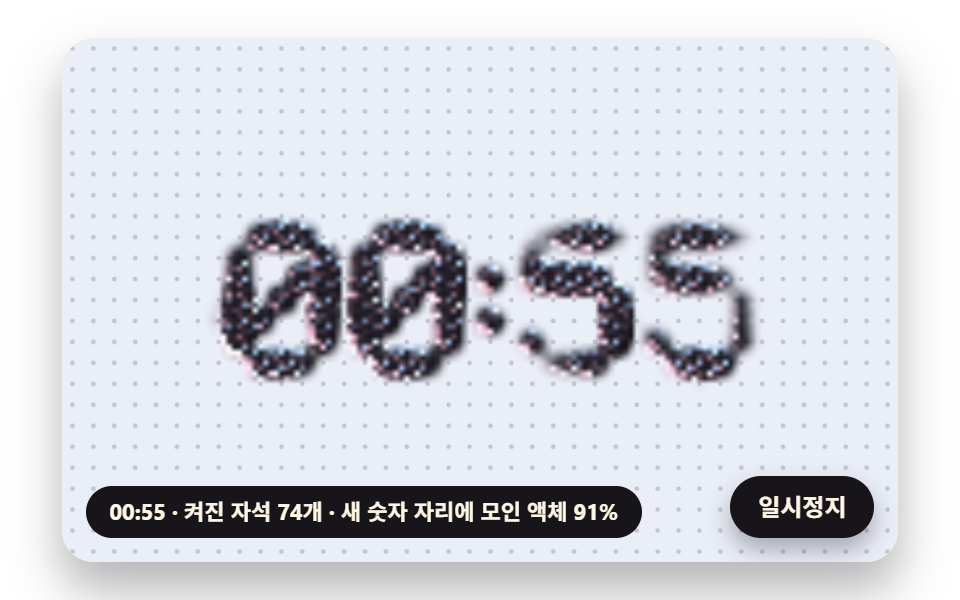
In a grid of small magnets under the fluid only the ones shaped like the current digits switch on, the spikes rise from the summed field of every active magnet, and when the time changes the fluid in switched-off cells seeps into neighboring cells and gathers on the new digits.
Best forClock widget on a lounge waiting screen
POLE_QPULL_RATESTEP_MIN
<main class="stage">
<div class="ff is-demo" id="ff">
  <canvas class="ff__canvas" data-role="canvas" width="480" height="300" role="img" tabindex="0" aria-label="A clock where black liquid gathers over small magnets switched on in the shape of digits and raises the time as spikes, then flows to the new digits when the time changes. Arrow keys or Enter advance the time"></canvas>
  <p class="ff__status" data-role="status" aria-live="off">Raising the time</p>
  <button class="ff__pause" data-role="pause" type="button" aria-pressed="false">Pause</button>
</div>
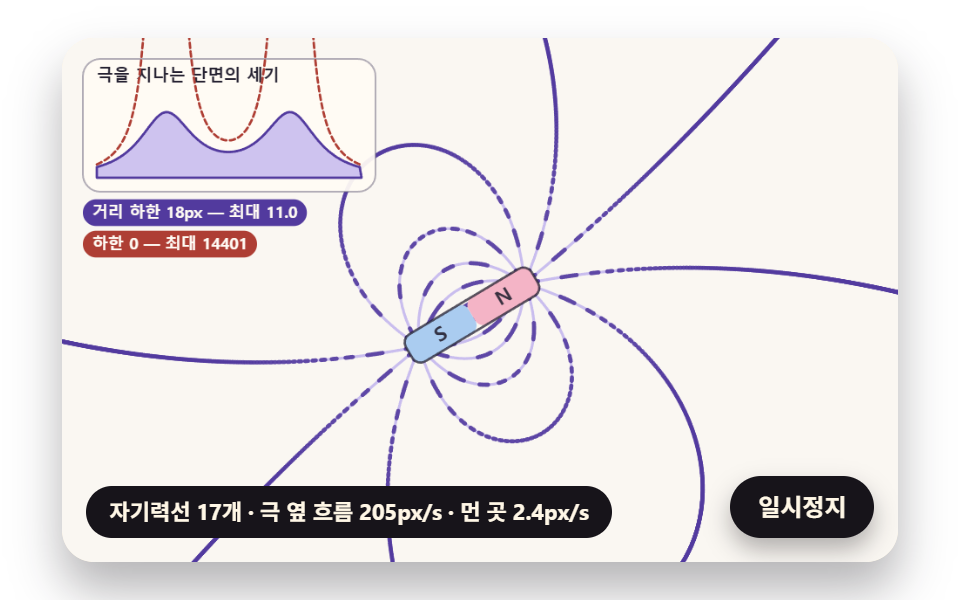
</main>
@use "../../../../site/static/demo-tokens" as *;
@include stage($stage-paper);
.ff {
position: relative;
width: min(92vw, calc(160vh - 12.8vw));
aspect-ratio: 480 / 300;
margin: 0 auto;
border-radius: $r-card;
overflow: hidden;
box-shadow: $shadow-raised;
background: $subject-cream;
}
// 캔버스 — 누른 채 끌어 자석을 옮기므로, 이 위에서만 브라우저 기본 끌기(스크롤·확대)를 끈다
.ff__canvas {
position: absolute;
inset: 0;
display: block;
width: 100%;
height: 100%;
touch-action: none;
cursor: crosshair;
border-radius: $r-card;
}
// 초점 — 키보드로 들어오면 캔버스 안쪽에 진한 테두리
.ff__canvas:focus-visible {
outline: 3px solid $subject-ink;
outline-offset: -3px;
}
.ff__pause {
position: absolute;
right: $sp-3;
bottom: $sp-3;
padding: $sp-1 $sp-3;
border: 2px solid $subject-ink;
border-radius: $r-pill;
background: $subject-ink;
color: $subject-cream;
font-family: inherit;
font-weight: 700;
font-size: 12px;
line-height: 1.6;
cursor: pointer;
box-shadow: $shadow-press;
transition: transform $dur-quick $ease-spring;
}
// 눌린 상태(멈춤) — 바탕과 글자색을 뒤집어 aria-pressed 가 눈에도 보이게
.ff__pause[aria-pressed="true"] {
background: $subject-cream;
color: $subject-ink;
}
.ff__pause:hover {
transform: translateY(-2px);
}
.ff__pause:active {
transform: translateY(1px);
}
.ff__pause:focus-visible {
outline: 3px solid $subject-ink;
outline-offset: 3px;
}
// 상태 줄 — 지금 세기와 가시가 선 범위를 글자로. 시연 중에는 aria-live off, 사람이 처음 손대면 polite
.ff__status {
position: absolute;
left: $sp-3;
bottom: $sp-3;
max-width: calc(100% - 120px);
margin: 0;
padding: $sp-1 $sp-3;
border-radius: $r-pill;
background: $subject-ink;
color: $subject-cream;
font-weight: 700;
font-size: 11px;
line-height: 1.6;
white-space: nowrap;
overflow: hidden;
text-overflow: ellipsis;
pointer-events: none;
}
@media (max-width: 340px) {
.ff__pause,
.ff__status { font-size: 10px; padding: $sp-1 $sp-2; }
}
// 움직임 줄이기 — 판은 스크립트가 멈춘 한 장으로 그린다. 버튼도 떠오르지 않게
@media (prefers-reduced-motion: reduce) {
.ff__pause { transition: none !important; }
.ff__pause:hover,
.ff__pause:active { transform: none !important; }
}html, body {
margin: 0;
overflow: hidden;
}
.stage {
box-sizing: border-box;
min-height: 100vh;
display: grid;
place-items: center;
margin: 0;
background: #ffffff;
font-family: -apple-system, "Segoe UI", "Noto Sans KR", sans-serif;
padding: clamp(8px, 4vw, 24px);
}
.ff {
position: relative;
width: min(92vw, 160vh - 12.8vw);
aspect-ratio: 480/300;
margin: 0 auto;
border-radius: 16px;
overflow: hidden;
box-shadow: 0 14px 24px rgba(23, 20, 26, 0.32);
background: #fff7e6;
}
.ff__canvas {
position: absolute;
inset: 0;
display: block;
width: 100%;
height: 100%;
touch-action: none;
cursor: crosshair;
border-radius: 16px;
}
.ff__canvas:focus-visible {
outline: 3px solid #17141a;
outline-offset: -3px;
}
.ff__pause {
position: absolute;
right: 12px;
bottom: 12px;
padding: 4px 12px;
border: 2px solid #17141a;
border-radius: 999px;
background: #17141a;
color: #fff7e6;
font-family: inherit;
font-weight: 700;
font-size: 12px;
line-height: 1.6;
cursor: pointer;
box-shadow: 0 6px 12px rgba(23, 20, 26, 0.32);
transition: transform 220ms cubic-bezier(0.2, 0.8, 0.2, 1);
}
.ff__pause[aria-pressed=true] {
background: #fff7e6;
color: #17141a;
}
.ff__pause:hover {
transform: translateY(-2px);
}
.ff__pause:active {
transform: translateY(1px);
}
.ff__pause:focus-visible {
outline: 3px solid #17141a;
outline-offset: 3px;
}
.ff__status {
position: absolute;
left: 12px;
bottom: 12px;
max-width: calc(100% - 120px);
margin: 0;
padding: 4px 12px;
border-radius: 999px;
background: #17141a;
color: #fff7e6;
font-weight: 700;
font-size: 11px;
line-height: 1.6;
white-space: nowrap;
overflow: hidden;
text-overflow: ellipsis;
pointer-events: none;
}
@media (max-width: 340px) {
.ff__pause,
.ff__status {
font-size: 10px;
padding: 4px 8px;
}
}
@media (prefers-reduced-motion: reduce) {
.ff__pause {
transition: none !important;
}
.ff__pause:hover,
.ff__pause:active {
transform: none !important;
}
}(function () {
const root = document.getElementById("ff");
if (!root) return;
// 장면 시계(초)와 상태 줄 글자 — 장면 계산이 고치고 화면 쪽이 읽어 그린다
let sceneT = 0;
let simStatus = '';
// 계산 좌표 — 캔버스 안은 늘 480×300. 보이는 크기와 상관없이 계산은 이 좌표로 한다
const W = 480;
const H = 300;
const TAU = Math.PI * 2;
// 사람이 손댔는가 — 손대면 자석(또는 장면의 조절점)이 정해 둔 길 대신 userX·userY 를 따른다
let handsOn = false;
let userX = W / 2;
let userY = H / 2;
function clamp(v, lo, hi) { return v < lo ? lo : (v > hi ? hi : v); }
function lerp(a, b, k) { return a + (b - a) * k; }
// 0~1 을 부드러운 계단(3x² − 2x³)으로
function smooth(x) { const c = clamp(x, 0, 1); return c * c * (3 - 2 * c); }
// 따라가기 비율 1 − e^(−rate·dt) — 프레임 시간이 달라도 1초에 같은 만큼 다가간다
function follow(rate, dt) { return 1 - Math.exp(-rate * dt); }
// 각을 −π ~ π 로 감는다 — 두 각의 차가 한 바퀴를 넘어 돌아가는 길을 고르지 않게
function wrapAngle(a) {
let x = a % TAU;
if (x > Math.PI) {
x -= TAU;
}
if (x < -Math.PI) {
x += TAU;
}
return x;
}
// 시드 고정 난수 — 같은 시드면 같은 시연이 다시 나온다 (32비트 자리 밀기 섞기 세 번)
function makeRng(seed) {
let s = (seed >>> 0) || 1;
return function () {
s ^= s << 13;
s >>>= 0;
s ^= s >>> 17;
s ^= s << 5;
s >>>= 0;
return s / 4294967296;
};
}
// 상태 줄 틀 채우기 — {이름} 자리에 값
function fill(t, v) {
return t.replace(/\{(\w+)\}/g, function (m, k) { return k in v ? String(v[k]) : m; });
}
const SPRING_SUBSTEP = 1 / 240;
function makeSpring(x) { return { x: x, v: 0, to: x }; }
function stepSpring(s, stiffness, damping, dt) {
let left = dt;
while (left > 1e-9) {
const h = Math.min(SPRING_SUBSTEP, left);
s.v += (stiffness * (s.to - s.x) - damping * s.v) * h;
s.x += s.v * h;
left -= h;
}
}
// 스프링을 그 값에 바로 앉힌다(속도 0) — 움직임 줄이기·첫 장면
function snapSpring(s, x) { s.x = x; s.v = 0; s.to = x; }
// 각도 스프링 — 목표와의 차를 −π ~ π 로 감은 뒤 같은 식으로
function stepAngleSpring(s, stiffness, damping, dt) {
let left = dt;
while (left > 1e-9) {
const h = Math.min(SPRING_SUBSTEP, left);
s.v += (stiffness * wrapAngle(s.to - s.x) - damping * s.v) * h;
s.x = wrapAngle(s.x + s.v * h);
left -= h;
}
}
// ── 팔레트 (RGB) — 액체는 거의 검정(기능색), 조명·바탕·자기력선은 파스텔, 글자는 진한 색 ──
const PAPER = [250, 247, 242];
const DISH = [234, 238, 247];
const DISH_DEEP = [214, 220, 236];
const FLUID = [13, 12, 17];
const FLUID_EDGE = [86, 80, 112];
const LIGHT_PINK = [255, 190, 210];
const LIGHT_SKY = [172, 212, 255];
const LAVENDER = [198, 186, 238];
const MINT = [168, 222, 200];
const BUTTER = [248, 228, 162];
const POLE_N = [244, 180, 198];
const POLE_S = [170, 204, 240];
const INK = [38, 34, 50];
const INK_SOFT = [104, 98, 122];
const VIOLET_DEEP = [82, 58, 158];
const CORAL_DEEP = [174, 62, 52];
const CREAM = [255, 251, 244];
const FIELD_REF_PX = 60;
const field = [0, 0, 0];
function fieldAt(poles, x, y, soften) {
let bx = 0;
let by = 0;
let bz = 0;
const ref2 = FIELD_REF_PX * FIELD_REF_PX;
for (const p of poles) {
const dx = x - p.x;
const dy = y - p.y;
const r2 = dx * dx + dy * dy + soften * soften;
const k = p.q * ref2 / (r2 * Math.sqrt(r2));
bx += dx * k;
by += dy * k;
bz += soften * k;
}
field[0] = bx;
field[1] = by;
field[2] = bz;
return Math.sqrt(bx * bx + by * by + bz * bz);
}
// ── 엇갈린 세 물결 ──────────────────────────────────────────
// 방향이 0°·120°·240° 인 cos 물결 셋을 더하면(−1.5 ~ 3) 세 마루가 겹치는 점이 육각 배열로 놓인다.
// 마루 사이 거리 = spacing 이 되도록 물결수 k = 4π / (√3 · spacing). 합을 3 으로 나눈 값에서 HEX_FLOOR 아래는 잘라
// 가시 사이를 평평하게 두고, 남은 윗부분을 0~1 로 늘린다(꼭대기 쪽이 곧게 좁아지는 원뿔 모양)
const HEX_C = 0.5;
const HEX_S = Math.sqrt(3) / 2;
const HEX_FLOOR = 0.3;
function hexWave(x, y, spacing) {
const k = 4 * Math.PI / (Math.sqrt(3) * spacing);
const s = Math.cos(k * x) + Math.cos(k * (-HEX_C * x + HEX_S * y)) + Math.cos(k * (-HEX_C * x - HEX_S * y));
return Math.max(0, (s / 3 - HEX_FLOOR) / (1 - HEX_FLOOR));
}
function makeGrid(ox, oy, w, h, cell) {
const gw = Math.ceil(w / cell) + 1;
const gh = Math.ceil(h / cell) + 1;
const n = gw * gh;
return { gw: gw, gh: gh, cell: cell, ox: ox, oy: oy, z: new Float32Array(n), wet: new Float32Array(n), amp: new Float32Array(n), vel: new Float32Array(n), target: new Float32Array(n), rgba: new Uint8ClampedArray(n * 4) };
}
// 칸마다 가시 높이 스프링을 목표(target)로 — 같은 반암시 적분, 1/240초 잔걸음
function stepGridSprings(g, stiffness, damping, dt) {
let left = dt;
const n = g.gw * g.gh;
while (left > 1e-9) {
const h = Math.min(SPRING_SUBSTEP, left);
for (let i = 0; i < n; i += 1) {
g.vel[i] += (stiffness * (g.target[i] - g.amp[i]) - damping * g.vel[i]) * h;
g.amp[i] += g.vel[i] * h;
}
left -= h;
}
}
function settleGrid(g) {
g.amp.set(g.target);
g.vel.fill(0);
}
// 기울기 색 섞기 — 면이 기운 만큼(1 − n_z) × TILT_MIX 로 가장자리 색을 섞어 가시 옆면이 바탕 검정과 갈리게
const TILT_MIX = 0.5;
function halfVectors(lights) {
return lights.map(function (l) {
const ll = Math.hypot(l.x, l.y, l.z) || 1;
const hx = l.x / ll;
const hy = l.y / ll;
const hz = l.z / ll + 1;
const hl = Math.hypot(hx, hy, hz) || 1;
return { x: hx / hl, y: hy / hl, z: hz / hl, c: l.c, k: l.k };
});
}
// 한 점 칠하기 — 기울기(gx, gy)·덮인 정도 wet·바탕색 bg 로 out[o..o+3] 에 RGBA.
// bg 가 null 이면 바탕과 섞지 않고 액체 색에 투명도 wet 을 준다(아래 그림 위에 겹쳐 붙일 때)
function shadeOne(gx, gy, wet, bg, hv, shine, out, o) {
const inv = 1 / Math.sqrt(gx * gx + gy * gy + 1);
const nx = -gx * inv;
const ny = -gy * inv;
const nz = inv;
const tilt = (1 - nz) * TILT_MIX;
let r = lerp(FLUID[0], FLUID_EDGE[0], tilt);
let g = lerp(FLUID[1], FLUID_EDGE[1], tilt);
let b = lerp(FLUID[2], FLUID_EDGE[2], tilt);
for (const h of hv) {
const d = nx * h.x + ny * h.y + nz * h.z;
if (d <= 0) {
continue;
}
const s = Math.pow(d, shine) * h.k;
r += h.c[0] * s;
g += h.c[1] * s;
b += h.c[2] * s;
}
const a = clamp(wet, 0, 1);
if (!bg) {
out[o] = Math.min(255, r);
out[o + 1] = Math.min(255, g);
out[o + 2] = Math.min(255, b);
out[o + 3] = a * 255;
return;
}
out[o] = lerp(bg[0], Math.min(255, r), a);
out[o + 1] = lerp(bg[1], Math.min(255, g), a);
out[o + 2] = lerp(bg[2], Math.min(255, b), a);
out[o + 3] = 255;
}
// 격자 전체 칠하기 — 칸 하나에 한 번. 끝 칸은 안쪽 이웃으로 한쪽 차
function shadeGrid(g, bg, lights, shine) {
const hv = halfVectors(lights);
const gw = g.gw;
const gh = g.gh;
const z = g.z;
let count = 0;
for (let j = 0; j < gh; j += 1) {
const ju = j > 0 ? j - 1 : j;
const jd = j < gh - 1 ? j + 1 : j;
for (let i = 0; i < gw; i += 1) {
const il = i > 0 ? i - 1 : i;
const ir = i < gw - 1 ? i + 1 : i;
const k = j * gw + i;
const gx = (z[j * gw + ir] - z[j * gw + il]) / ((ir - il) * g.cell);
const gy = (z[jd * gw + i] - z[ju * gw + i]) / ((jd - ju) * g.cell);
shadeOne(gx, gy, g.wet[k], bg, hv, shine, g.rgba, k * 4);
count += 1;
}
}
return count;
}
const TENSION_RATE = 900;
function makeRing(cx, cy, r, n) {
const ring = { n: n, x: [], y: [], vx: [], vy: [], area0: 0 };
for (let i = 0; i < n; i += 1) {
const a = i / n * TAU;
ring.x.push(cx + Math.cos(a) * r);
ring.y.push(cy + Math.sin(a) * r);
ring.vx.push(0);
ring.vy.push(0);
}
ring.area0 = ringArea(ring);
return ring;
}
// 넓이 — 꼭짓점을 차례로 잇는 다각형의 넓이(두 점의 외적을 반씩 더함). makeRing 처럼 각도가 커지는 차례로 놓으면 양수
function ringArea(r) {
let a = 0;
for (let i = 0; i < r.n; i += 1) {
const j = (i + 1) % r.n;
a += r.x[i] * r.y[j] - r.x[j] * r.y[i];
}
return a / 2;
}
function ringCenter(r) {
let x = 0;
let y = 0;
for (let i = 0; i < r.n; i += 1) {
x += r.x[i];
y += r.y[i];
}
return [x / r.n, y / r.n];
}
// Field² 의 기울기 — 1px 떨어진 네 점의 차로
function strength2Grad(poles, x, y, soften) {
const l = fieldAt(poles, x - 1, y, soften);
const r = fieldAt(poles, x + 1, y, soften);
const u = fieldAt(poles, x, y - 1, soften);
const d = fieldAt(poles, x, y + 1, soften);
return [(r * r - l * l) / 2, (d * d - u * u) / 2];
}
const ringAx = [];
const ringAy = [];
function ringAccel(r, poles, p) {
const n = r.n;
const area = ringArea(r);
const squeeze = p.pressure * (r.area0 - area) / Math.max(1, Math.abs(r.area0));
for (let i = 0; i < n; i += 1) {
const a = (i + n - 1) % n;
const b = (i + 1) % n;
const mx = (r.x[a] + r.x[b]) / 2;
const my = (r.y[a] + r.y[b]) / 2;
// 바깥 방향 — 앞뒤 점을 잇는 방향 (tx, ty) 를 (ty, −tx) 로 돌린 쪽. 넓이가 양수가 되는 차례로 놓인 고리에서는 이쪽이 바깥
const tx = r.x[b] - r.x[a];
const ty = r.y[b] - r.y[a];
const tl = Math.hypot(tx, ty) || 1;
const g = strength2Grad(poles, r.x[i], r.y[i], p.soften);
ringAx[i] = p.drag * g[0] + p.tension * TENSION_RATE * (mx - r.x[i]) + squeeze * (ty / tl) - p.viscosity * r.vx[i];
ringAy[i] = p.drag * g[1] + p.tension * TENSION_RATE * (my - r.y[i]) + squeeze * (-tx / tl) - p.viscosity * r.vy[i];
}
}
// 한 걸음 — 넘겨받은 dt 를 그대로 한 번에(속도 먼저, 위치 다음). 자르지도 나누지도 않는다
function stepRingRaw(r, poles, p, dt) {
ringAccel(r, poles, p);
for (let i = 0; i < r.n; i += 1) {
r.vx[i] += ringAx[i] * dt;
r.vy[i] += ringAy[i] * dt;
r.x[i] += r.vx[i] * dt;
r.y[i] += r.vy[i] * dt;
}
}
// 나눠 걷기 — dt 를 PUDDLE_DT_MAX 에서 자르고, 그것을 PUDDLE_SUBSTEP 이하 잔걸음으로 쪼개 위 걸음을 되풀이
const PUDDLE_DT_MAX = 0.05;
const PUDDLE_SUBSTEP = 1 / 240;
function stepRingSafe(r, poles, p, dt) {
let left = Math.min(dt, PUDDLE_DT_MAX);
while (left > 1e-9) {
const h = Math.min(PUDDLE_SUBSTEP, left);
stepRingRaw(r, poles, p, h);
left -= h;
}
}
// 고리 안을 높이 격자의 덮인 정도로 — 줄마다 다각형 변과 만나는 x 를 모아 짝수 번째와 홀수 번째 사이를 채운다
function ringToWet(r, g, out) {
out.fill(0);
const xs = [];
for (let j = 0; j < g.gh; j += 1) {
const y = g.oy + j * g.cell;
xs.length = 0;
for (let i = 0; i < r.n; i += 1) {
const k = (i + 1) % r.n;
const y0 = r.y[i];
const y1 = r.y[k];
if ((y0 <= y && y1 > y) || (y1 <= y && y0 > y)) {
xs.push(r.x[i] + (y - y0) / (y1 - y0) * (r.x[k] - r.x[i]));
}
}
xs.sort(function (a, b) { return a - b; });
for (let m = 0; m + 1 < xs.length; m += 2) {
const i0 = Math.max(0, Math.ceil((xs[m] - g.ox) / g.cell));
const i1 = Math.min(g.gw - 1, Math.floor((xs[m + 1] - g.ox) / g.cell));
for (let i = i0; i <= i1; i += 1) {
out[j * g.gw + i] = 1;
}
}
}
}
// 덮인 정도를 이웃 평균으로 times 번 — 가장자리를 둥글게(돔 높이·부드러운 테두리)
function blurWet(g, src, times, tmp) {
for (let t = 0; t < times; t += 1) {
for (let j = 0; j < g.gh; j += 1) {
for (let i = 0; i < g.gw; i += 1) {
const k = j * g.gw + i;
const l = i > 0 ? src[k - 1] : 0;
const r = i < g.gw - 1 ? src[k + 1] : 0;
const u = j > 0 ? src[k - g.gw] : 0;
const d = j < g.gh - 1 ? src[k + g.gw] : 0;
tmp[k] = (src[k] * 2 + l + r + u + d) / 6;
}
}
src.set(tmp);
}
}
const canvasEl = root.querySelector('[data-role="canvas"]');
const pauseEl = root.querySelector('[data-role="pause"]');
const statusEl = root.querySelector('[data-role="status"]');
const ctxRaw = canvasEl ? canvasEl.getContext('2d') : null;
if (!canvasEl || !ctxRaw || !pauseEl) {
return;
}
const cv = canvasEl;
const ctx = ctxRaw;
const pauseBtn = pauseEl;
// 외부 웹폰트는 부르지 않는다 — 기기에 있는 글꼴 목록만
const FONT_STACK = 'system-ui, -apple-system, "Segoe UI", "Noto Sans KR", sans-serif';
// 화소 배율 — 캔버스 내부 크기에 곱한다. 2 에서 자른다(배율 3 기기에서 화소 수가 2.25배로 늘지 않게)
let dpr = 1;
function fitCanvas() {
dpr = Math.min(window.devicePixelRatio || 1, 2);
cv.width = Math.round(W * dpr);
cv.height = Math.round(H * dpr);
ctx.setTransform(dpr, 0, 0, dpr, 0, 0);
}
function rgba(c, a) {
return 'rgba(' + Math.round(c[0]) + ',' + Math.round(c[1]) + ',' + Math.round(c[2]) + ',' + clamp(a, 0, 1).toFixed(3) + ')';
}
function makeBlitter() {
const off = document.createElement('canvas');
const offCtx = off.getContext('2d');
let img = null;
return function (data, gw, gh, x, y, w, h) {
if (!offCtx) {
return;
}
if (!img || img.width !== gw || img.height !== gh) {
off.width = gw;
off.height = gh;
img = offCtx.createImageData(gw, gh);
}
img.data.set(data);
offCtx.putImageData(img, 0, 0);
ctx.imageSmoothingEnabled = true;
ctx.drawImage(off, 0, 0, gw, gh, x, y, w, h);
};
}
// 높이 격자 한 장 — 칸 가운데가 표본 점이라 반 칸 바깥에서부터 늘린다
const blitMain = makeBlitter();
function drawGrid(g) {
blitMain(g.rgba, g.gw, g.gh, g.ox - g.cell / 2, g.oy - g.cell / 2, g.gw * g.cell, g.gh * g.cell);
}
// ── 그리기 도구 ─────────────────────────────────────────────
function clearStage(c) {
ctx.fillStyle = rgba(c, 1);
ctx.fillRect(0, 0, W, H);
}
function setFont(px, weight) { ctx.font = weight + ' ' + px.toFixed(1) + 'px ' + FONT_STACK; }
function label(s, x, y, c, a, px, weight, align) {
setFont(px, weight);
ctx.textAlign = align;
ctx.textBaseline = 'middle';
ctx.fillStyle = rgba(c, a);
ctx.fillText(s, x, y);
}
function roundRectPath(x, y, w, h, r) {
const rr = Math.max(0, Math.min(r, w / 2, h / 2));
ctx.beginPath();
ctx.moveTo(x + rr, y);
ctx.arcTo(x + w, y, x + w, y + h, rr);
ctx.arcTo(x + w, y + h, x, y + h, rr);
ctx.arcTo(x, y + h, x, y, rr);
ctx.arcTo(x, y, x + w, y, rr);
ctx.closePath();
}
function fillRound(x, y, w, h, r, c, a) {
if (w <= 0.2 || h <= 0.2 || a <= 0) {
return;
}
roundRectPath(x, y, w, h, r);
ctx.fillStyle = rgba(c, a);
ctx.fill();
}
function disc(x, y, r, c, a) {
if (r <= 0.2 || a <= 0) {
return;
}
ctx.beginPath();
ctx.arc(x, y, r, 0, TAU);
ctx.fillStyle = rgba(c, a);
ctx.fill();
}
function ring(x, y, r, width, c, a) {
if (r <= 0.2 || a <= 0) {
return;
}
ctx.beginPath();
ctx.arc(x, y, r, 0, TAU);
ctx.lineWidth = width;
ctx.strokeStyle = rgba(c, a);
ctx.stroke();
}
function line(x0, y0, x1, y1, width, c, a) {
ctx.beginPath();
ctx.moveTo(x0, y0);
ctx.lineTo(x1, y1);
ctx.lineWidth = width;
ctx.strokeStyle = rgba(c, a);
ctx.stroke();
}
// 작은 이름표 — 둥근 바탕 위 글자
function tag(s, x, y, bg, fg, a, px, align) {
setFont(px, 700);
const w = ctx.measureText(s).width + px * 1.2;
const x0 = align === 'left' ? x : (align === 'right' ? x - w : x - w / 2);
fillRound(x0, y - px * 0.85, w, px * 1.7, px * 0.85, bg, a);
label(s, x0 + w / 2, y + 0.5, fg, a, px, 700, 'center');
}
// 자석 막대 — 가운데 (x, y), 방향 각 a, 반 길이 half. 앞쪽(N) 분홍·뒤쪽(S) 하늘색 두 칸
function drawBarMagnet(x, y, a, half, thick, alpha) {
ctx.save();
ctx.translate(x, y);
ctx.rotate(a);
ctx.globalAlpha = alpha;
fillRound(-half, -thick / 2, half, thick, thick * 0.3, POLE_S, 1);
fillRound(0, -thick / 2, half, thick, thick * 0.3, POLE_N, 1);
roundRectPath(-half, -thick / 2, half * 2, thick, thick * 0.3);
ctx.lineWidth = 1.4;
ctx.strokeStyle = rgba(INK, 0.75);
ctx.stroke();
label('N', half * 0.5, 0.5, INK, 0.9, thick * 0.62, 800, 'center');
label('S', -half * 0.5, 0.5, INK, 0.9, thick * 0.62, 800, 'center');
ctx.restore();
}
// ── 사람 손 — 포인터 끌기와 키 ──────────────────────────────
// 캔버스를 누른 채 움직이면 그 자리가 조절점(userX, userY)이 된다. 키보드는 캔버스에 초점이 있을 때만:
// 화살표 8px(Shift 24px) 옮기기 · Enter·Space 가운데로 되돌리기. 항목이 onNudge·onPoint 를 바꿔 끼울 수 있다
let pressing = false;
function eventPoint(e) {
const r = cv.getBoundingClientRect();
return [(e.clientX - r.left) * W / Math.max(1, r.width), (e.clientY - r.top) * H / Math.max(1, r.height)];
}
let onPoint = function (x, y) {
userX = clamp(x, 0, W);
userY = clamp(y, 0, H);
};
let onNudge = function (dx, dy, center) {
if (center) {
userX = W / 2;
userY = H / 2;
return;
}
userX = clamp(userX + dx, 0, W);
userY = clamp(userY + dy, 0, H);
};
function bindInput(signal) {
cv.addEventListener('pointerdown', function (e) {
takeOver();
pressing = true;
cv.setPointerCapture(e.pointerId);
const p = eventPoint(e);
onPoint(p[0], p[1]);
afterInput();
}, { signal: signal });
cv.addEventListener('pointermove', function (e) {
if (!pressing) {
return;
}
const p = eventPoint(e);
onPoint(p[0], p[1]);
if (still || paused) {
afterInput();
}
}, { signal: signal });
const end = function () { pressing = false; };
cv.addEventListener('pointerup', end, { signal: signal });
cv.addEventListener('pointercancel', end, { signal: signal });
cv.addEventListener('keydown', function (e) {
const step = e.shiftKey ? 24 : 8;
let dx = 0;
let dy = 0;
let center = false;
if (e.key === 'ArrowLeft') {
dx = -step;
}
else if (e.key === 'ArrowRight') {
dx = step;
}
else if (e.key === 'ArrowUp') {
dy = -step;
}
else if (e.key === 'ArrowDown') {
dy = step;
}
else if (e.key === 'Enter' || e.key === ' ') {
center = true;
}
else {
return;
}
e.preventDefault();
takeOver();
onNudge(dx, dy, center);
afterInput();
}, { signal: signal });
}
// ── 08 숫자 모양 자석 배열로 시각을 세우는 자성유체 시계 ───────
// 바닥에 DOT_PX 간격으로 깐 작은 자석 격자(40×25 칸). 그 시각 숫자(5×7 점 글자 넷 + 콜론)에 해당하는 칸의 자석만 켠다
const DOT_PX = 12;
const COLS = 40;
const ROWS = 25;
// 켜진 자석 하나 = Field POLE_Q 의 극, 표면 아래 CLOCK_DEPTH_PX. 켜진 자석들의 장을 모두 더한 세기로 가시를 세운다
const POLE_Q = 0.026;
const CLOCK_DEPTH_PX = 8;
const CRITICAL_FIELD = 0.9;
const SPIKE_GAIN_PX = 7;
const SPIKE_SPACING_PX = 8;
const FILM_PX = 3;
const CELL_PX = 3;
// 가상 시계 — 실제 시각이 아니라 시드로 정한 시작 시각에서 STEP_S 초마다 STEP_MIN 분씩 빠르게 넘어간다(측정이 늘 같게)
const CLOCK_SEED = 488;
const STEP_MIN = 7;
const STEP_S = 1.1;
const FIRST_STEP_S = 0.45;
const LOOP_S = 4.4;
// 액체 흐름 — 칸마다 액체 양 L. 시각이 바뀐 뒤 SPREAD_S 초 동안 이웃과 평균을 내 번지고(Field DIFFUSE_RATE, 지수로 줄어든다),
// 늘 세기가 더 센 이웃 칸으로 L × PULL_RATE × (b이웃 − b자기) ÷ (b이웃 + b자기 + PULL_BIAS) 만큼 흘러간다(양은 그대로 보존)
const DIFFUSE_RATE = 4;
const SPREAD_S = 0.25;
const PULL_RATE = 24;
const PULL_BIAS = 0.05;
const FLOW_SUBSTEP = 1 / 60;
const STATUS_CLOCK = '{t} · {n} magnets on · {p}% of the liquid on the new digits';
// 5×7 점 글자 — 줄마다 다섯 칸, 1 이 켜진 자석
const GLYPHS = [
['01110', '10001', '10011', '10101', '11001', '10001', '01110'],
['00100', '01100', '00100', '00100', '00100', '00100', '01110'],
['01110', '10001', '00001', '00010', '00100', '01000', '11111'],
['11110', '00001', '00001', '01110', '00001', '00001', '11110'],
['00010', '00110', '01010', '10010', '11111', '00010', '00010'],
['11111', '10000', '11110', '00001', '00001', '10001', '01110'],
['00110', '01000', '10000', '11110', '10001', '10001', '01110'],
['11111', '00001', '00010', '00100', '01000', '01000', '01000'],
['01110', '10001', '10001', '01110', '10001', '10001', '01110'],
['01110', '10001', '10001', '01111', '00001', '00010', '01100'],
];
// 숫자 넷의 왼쪽 칸과 콜론 칸 — 가운데 정렬(칸 번호 8 ~ 32), 위는 줄 번호 9 부터(둘 다 0 부터 센다)
const DIGIT_COL = [8, 14, 22, 28];
const COLON_COL = 20;
const TOP_ROW = 9;
const rngClock = makeRng(CLOCK_SEED);
const START_MIN = Math.floor(rngClock() * 24) * 60 + Math.floor(rngClock() * 60);
const grid = makeGrid(0, 0, W, H, CELL_PX);
const hex = new Float32Array(grid.gw * grid.gh);
for (let j = 0; j < grid.gh; j += 1) {
for (let i = 0; i < grid.gw; i += 1) {
hex[j * grid.gw + i] = hexWave(i * CELL_PX, j * CELL_PX, SPIKE_SPACING_PX);
}
}
const fineField = new Float32Array(grid.gw * grid.gh);
const lit = new Uint8Array(COLS * ROWS);
const coarseField = new Float32Array(COLS * ROWS);
let liquid = new Float32Array(COLS * ROWS);
let flowTmp = new Float32Array(COLS * ROWS);
let shownMin = -1;
let changedAt = -10;
let litCount = 0;
let frozenSteps = 0;
let manualSteps = 0;
function stepsAt(t) { return t < FIRST_STEP_S ? 0 : 1 + Math.floor((t - FIRST_STEP_S) / STEP_S); }
function clockMinute(t) {
const steps = handsOn ? frozenSteps + manualSteps : stepsAt(t);
return (START_MIN + steps * STEP_MIN) % (24 * 60);
}
// 처음 손대는 순간 지금까지 넘어간 횟수를 붙잡아 둔다 — 그 뒤로는 사람이 넘길 때만 넘어간다
function controlPoint() {
frozenSteps = stepsAt(sceneT);
manualSteps = 0;
return [W / 2, H / 2];
}
function stepManual() { manualSteps += 1; }
function two(n) { return (n < 10 ? '0' : '') + n; }
function timeText(m) { return two(Math.floor(m / 60)) + ':' + two(m % 60); }
// 켤 자석 고르기 → 장 다시 재기(시각이 바뀔 때만 — 자석이 그대로면 장도 그대로라 다시 재지 않는다)
function lightUp(m) {
lit.fill(0);
const digits = [Math.floor(m / 600), Math.floor(m / 60) % 10, Math.floor((m % 60) / 10), m % 10];
digits.forEach(function (d, k) {
GLYPHS[d].forEach(function (row, r) {
for (let c = 0; c < 5; c += 1) {
if (row[c] === '1') {
lit[(TOP_ROW + r) * COLS + DIGIT_COL[k] + c] = 1;
}
}
});
});
lit[(TOP_ROW + 2) * COLS + COLON_COL] = 1;
lit[(TOP_ROW + 4) * COLS + COLON_COL] = 1;
const poles = [];
for (let k = 0; k < COLS * ROWS; k += 1) {
if (lit[k]) {
poles.push({ x: (k % COLS + 0.5) * DOT_PX, y: (Math.floor(k / COLS) + 0.5) * DOT_PX, q: POLE_Q });
}
}
litCount = poles.length;
for (let j = 0; j < grid.gh; j += 1) {
for (let i = 0; i < grid.gw; i += 1) {
fineField[j * grid.gw + i] = fieldAt(poles, i * CELL_PX, j * CELL_PX, CLOCK_DEPTH_PX);
}
}
for (let k = 0; k < COLS * ROWS; k += 1) {
coarseField[k] = fieldAt(poles, (k % COLS + 0.5) * DOT_PX, (Math.floor(k / COLS) + 0.5) * DOT_PX, CLOCK_DEPTH_PX);
}
}
// 액체 한 걸음 — 번짐(이웃과의 차를 서로 나눔) + 끌림(더 센 이웃으로). 칸에서 나가는 양은 그 칸 양의 절반까지
function flowStep(h, spread) {
flowTmp.set(liquid);
for (let r = 0; r < ROWS; r += 1) {
for (let c = 0; c < COLS; c += 1) {
const i = r * COLS + c;
const nb = [c > 0 ? i - 1 : -1, c < COLS - 1 ? i + 1 : -1, r > 0 ? i - COLS : -1, r < ROWS - 1 ? i + COLS : -1];
let outSum = 0;
const outs = [0, 0, 0, 0];
for (let q = 0; q < 4; q += 1) {
const j = nb[q];
if (j < 0) {
continue;
}
const bi = coarseField[i];
const bj = coarseField[j];
let f = liquid[i] * PULL_RATE * h * Math.max(0, bj - bi) / (bj + bi + PULL_BIAS);
// 번짐은 짝마다 한 번만(i < j 쪽에서) 양쪽 차의 반을 옮긴다
if (j > i) {
f += spread * h * (liquid[i] - liquid[j]) / 2;
}
outs[q] = f;
outSum += Math.max(0, f);
}
const cap = outSum > liquid[i] * 0.5 ? liquid[i] * 0.5 / outSum : 1;
for (let q = 0; q < 4; q += 1) {
const j = nb[q];
if (j < 0) {
continue;
}
const f = outs[q] > 0 ? outs[q] * cap : outs[q];
flowTmp[i] -= f;
flowTmp[j] += f;
}
}
}
const t = liquid;
liquid = flowTmp;
flowTmp = t;
}
function totalLiquid() { let s = 0; for (let k = 0; k < liquid.length; k += 1) {
s += liquid[k];
} return s; }
function liquidOnLit() { let s = 0; for (let k = 0; k < liquid.length; k += 1) {
if (lit[k]) {
s += liquid[k];
}
} return s; }
// 액체 양을 높이 격자로 — 칸 가운데 사이를 가로·세로로 섞어(이중 선형) 부드럽게
function compose() {
for (let j = 0; j < grid.gh; j += 1) {
const v = clamp(j * CELL_PX / DOT_PX - 0.5, 0, ROWS - 1.001);
const r0 = Math.floor(v);
const fv = v - r0;
for (let i = 0; i < grid.gw; i += 1) {
const u = clamp(i * CELL_PX / DOT_PX - 0.5, 0, COLS - 1.001);
const c0 = Math.floor(u);
const fu = u - c0;
const a = liquid[r0 * COLS + c0];
const b = liquid[r0 * COLS + c0 + 1];
const c = liquid[(r0 + 1) * COLS + c0];
const d = liquid[(r0 + 1) * COLS + c0 + 1];
const L = lerp(lerp(a, b, fu), lerp(c, d, fu), fv);
const k = j * grid.gw + i;
const spike = SPIKE_GAIN_PX * Math.max(0, fineField[k] - CRITICAL_FIELD) * hex[k] * Math.min(1, L * 1.4);
grid.z[k] = FILM_PX * smooth(L * 2) + spike;
grid.wet[k] = smooth(L * 3 - 0.15);
}
}
}
function report() {
const total = totalLiquid();
simStatus = fill(STATUS_CLOCK, { t: timeText(shownMin), n: litCount, p: Math.round(100 * liquidOnLit() / Math.max(1e-6, total)) });
}
function reset() {
shownMin = clockMinute(0);
lightUp(shownMin);
liquid = new Float32Array(COLS * ROWS);
flowTmp = new Float32Array(COLS * ROWS);
for (let k = 0; k < COLS * ROWS; k += 1) {
liquid[k] = lit[k];
}
changedAt = -10;
compose();
report();
}
function update(dt) {
const m = clockMinute(sceneT);
if (m !== shownMin) {
shownMin = m;
lightUp(m);
changedAt = sceneT;
}
let left = dt;
while (left > 1e-9) {
const h = Math.min(FLOW_SUBSTEP, left);
flowStep(h, DIFFUSE_RATE * Math.exp(-(sceneT - changedAt) / SPREAD_S));
left -= h;
}
compose();
report();
}
// 움직임 줄이기 — 시작 시각 숫자에 액체가 다 모인 모습
function restPose() { sceneT = 0; }
// 손대 넘긴 뒤 멈춘 화면에서는 액체가 새 숫자로 다 모인 모습을 한 번에(3초어치를 미리 돌린다)
function settleNow() {
const m = clockMinute(sceneT);
if (m !== shownMin) {
shownMin = m;
lightUp(m);
for (let k = 0; k < 180; k += 1) {
flowStep(FLOW_SUBSTEP, DIFFUSE_RATE * Math.exp(-k * FLOW_SUBSTEP / SPREAD_S));
}
}
compose();
report();
}
// ── 08 그리기 — 액체 높이 격자를 반사 하이라이트로 칠해 늘려 붙이고, 꺼진 자석 자리는 작은 점으로 ──
// 빛 둘이 LIGHT_SPIN_S 초에 한 바퀴 천천히 돌아 가시 끝 하이라이트가 미끄러진다
const LIGHT_SPIN_S = 6;
const SHINE = 20;
// 손대면 — 누르기·화살표·Enter 모두 시각을 한 번(STEP_MIN 분) 넘긴다
onPoint = function (x, y) { void x; void y; if (!pressing) {
return;
} stepManual(); pressing = false; };
onNudge = function (dx, dy, center) { void dx; void dy; void center; stepManual(); };
function draw() {
const a = sceneT / LIGHT_SPIN_S * TAU;
const lights = [
{ x: Math.cos(a) * 0.8, y: Math.sin(a) * 0.8 - 0.3, z: 0.3, c: LIGHT_PINK, k: 1.8 },
{ x: -Math.cos(a) * 0.8, y: -Math.sin(a) * 0.8 - 0.3, z: 0.32, c: LIGHT_SKY, k: 1.6 },
];
shadeGrid(grid, DISH, lights, SHINE);
drawGrid(grid);
for (let k = 0; k < COLS * ROWS; k += 1) {
if (lit[k] || liquid[k] > 0.2) {
continue;
}
disc((k % COLS + 0.5) * DOT_PX, (Math.floor(k / COLS) + 0.5) * DOT_PX, 1.3, INK_SOFT, 0.3);
}
}
// 상태 줄 — 글자가 바뀔 때만 고친다
let shownStatus = '';
function pushStatus() {
if (!statusEl || simStatus === shownStatus) {
return;
}
shownStatus = simStatus;
statusEl.textContent = simStatus;
}
let paused = false;
const reduceQuery = window.matchMedia('(prefers-reduced-motion: reduce)');
// 페이지를 연 채 움직임 줄이기 설정을 바꿔도 change 리스너가 이 값을 다시 읽는다
let still = reduceQuery.matches;
// 자동 시연 중인가 — 사람이 처음 손대면 시연 표시를 떼고 상태 줄을 polite 로 켠다
let demo = root.classList.contains('is-demo');
// 리스너는 한 묶음으로 달고 정리할 때 한 번에 뗀다
const off = new AbortController();
function wake() {
if (!demo) {
return;
}
demo = false;
root.classList.remove('is-demo');
if (statusEl) {
statusEl.setAttribute('aria-live', 'polite');
}
}
// 처음 손대면 — 조절점을 지금 자석 자리에서 시작해 튀지 않게 하고, 정해 둔 길과 시연 되감기를 멈춘다
function takeOver() {
wake();
if (handsOn) {
return;
}
const c = controlPoint();
userX = c[0];
userY = c[1];
handsOn = true;
}
// 입력 뒤 — 움직임 줄이기면 스프링 없이 바로 그 자리에. 루프가 멈춰 있으면(움직임 줄이기·Pause) 화면과 상태 줄을 한 번 바로 고친다
function afterInput() {
if (still) {
settleNow();
}
if (still || paused) {
draw();
pushStatus();
}
}
// 한 프레임에 넘기는 시간 상한(초) — 탭을 오래 숨겼다 돌아온 첫 프레임에도 50ms 까지만 계산에 넣는다
const DT_MAX = 0.05;
// 장면 시계를 dt 만큼 — 시연 중에는 한 바퀴(LOOP_S)를 넘으면 처음 상태로 되돌려 다시 시연한다
function advance(dt) {
sceneT += dt;
if (!handsOn && sceneT >= LOOP_S) {
sceneT -= LOOP_S;
reset();
}
update(dt);
}
let rafId = 0;
let lastTs = -1;
function frame(ts) {
if (still || paused) {
rafId = 0;
return;
}
if (lastTs < 0) {
lastTs = ts;
}
const dt = Math.min((ts - lastTs) / 1000, DT_MAX);
lastTs = ts;
if (dt > 0) {
advance(dt);
}
draw();
pushStatus();
rafId = window.requestAnimationFrame(frame);
}
function startLoop() {
if (rafId) {
return;
}
// 시계 다시 맞추기 — 멈췄던 사이의 시간을 첫 프레임 dt 로 넘기지 않는다
lastTs = -1;
rafId = window.requestAnimationFrame(frame);
}
function stopLoop() {
if (rafId) {
window.cancelAnimationFrame(rafId);
rafId = 0;
}
}
// 움직임 줄이기 — 루프를 돌리지 않고 정해 둔 세기의 멈춘 한 장만 그린다. 사람이 이미 만졌으면 그 자리 그대로
function showRest() {
stopLoop();
if (!handsOn) {
sceneT = 0;
reset();
restPose();
}
settleNow();
draw();
pushStatus();
}
function play() {
if (!handsOn) {
sceneT = 0;
reset();
}
draw();
pushStatus();
if (!paused) {
startLoop();
}
}
pauseBtn.addEventListener('click', function () {
paused = !paused;
pauseBtn.setAttribute('aria-pressed', paused ? 'true' : 'false');
wake();
if (paused) {
stopLoop();
}
else if (!still) {
startLoop();
}
}, { signal: off.signal });
// 탭이 숨으면 루프를 멈추고, 돌아오면 시계를 다시 맞춰 시작한다 — 숨은 동안의 몇 초가 한 프레임에 몰리지 않게
document.addEventListener('visibilitychange', function () {
if (document.hidden) {
stopLoop();
}
else if (!paused && !still) {
startLoop();
}
}, { signal: off.signal });
// 설정이 페이지를 연 채 바뀌면 — 켜지면 멈춘 한 장으로, 꺼지면 시연을 처음부터
reduceQuery.addEventListener('change', function () {
still = reduceQuery.matches;
if (still) {
showRest();
}
else {
play();
}
}, { signal: off.signal });
// 창 크기나 화소 배율이 바뀌면 — 캔버스 내부 크기를 새 배율로 다시
window.addEventListener('resize', function () {
fitCanvas();
draw();
}, { signal: off.signal });
bindInput(off.signal);
fitCanvas();
if (still) {
showRest();
}
else {
play();
}
return function () {
stopLoop();
off.abort();
};
})();// MagnetGridClockDigits - 같은 항목 vanilla 판 index.html 의 React 포트. 같은 계산을 useEffect 안에서 돌린다.
import { useEffect, useRef } from "react";
import styles from "./MagnetGridClockDigits.module.scss";
const cx = (s: string): string => s.split(" ").map((n) => styles[n] ?? n).join(" ");
export default function MagnetGridClockDigits() {
const rootRef = useRef<HTMLDivElement | null>(null);
useEffect(() => {
const rootEl = rootRef.current;
if (!rootEl) return;
const root: HTMLElement = rootEl;
type RGB = [number, number, number];
// 장면 시계(초)와 상태 줄 글자 — 장면 계산이 고치고 화면 쪽이 읽어 그린다
let sceneT = 0;
let simStatus = '';
// 계산 좌표 — 캔버스 안은 늘 480×300. 보이는 크기와 상관없이 계산은 이 좌표로 한다
const W = 480;
const H = 300;
const TAU = Math.PI * 2;
// 사람이 손댔는가 — 손대면 자석(또는 장면의 조절점)이 정해 둔 길 대신 userX·userY 를 따른다
let handsOn = false;
let userX = W / 2;
let userY = H / 2;
function clamp(v: number, lo: number, hi: number): number { return v < lo ? lo : (v > hi ? hi : v); }
function lerp(a: number, b: number, k: number): number { return a + (b - a) * k; }
// 0~1 을 부드러운 계단(3x² − 2x³)으로
function smooth(x: number): number { const c = clamp(x, 0, 1); return c * c * (3 - 2 * c); }
// 따라가기 비율 1 − e^(−rate·dt) — 프레임 시간이 달라도 1초에 같은 만큼 다가간다
function follow(rate: number, dt: number): number { return 1 - Math.exp(-rate * dt); }
// 각을 −π ~ π 로 감는다 — 두 각의 차가 한 바퀴를 넘어 돌아가는 길을 고르지 않게
function wrapAngle(a: number): number {
let x = a % TAU;
if (x > Math.PI) { x -= TAU; }
if (x < -Math.PI) { x += TAU; }
return x;
}
// 시드 고정 난수 — 같은 시드면 같은 시연이 다시 나온다 (32비트 자리 밀기 섞기 세 번)
function makeRng(seed: number): () => number {
let s = (seed >>> 0) || 1;
return function (): number {
s ^= s << 13; s >>>= 0;
s ^= s >>> 17;
s ^= s << 5; s >>>= 0;
return s / 4294967296;
};
}
// 상태 줄 틀 채우기 — {이름} 자리에 값
function fill(t: string, v: { [k: string]: string | number }): string {
return t.replace(/\{(\w+)\}/g, function (m: string, k: string): string { return k in v ? String(v[k]) : m; });
}
// ── 감쇠 스프링 ──────────────────────────────────────────────
// 가속 = 단단함 × (목표 − 위치) − 감쇠 × 속도. 속도를 먼저 고친 뒤 위치를 옮기고, 1/240초 잔걸음으로 나눠 돈다
type Spring = { x: number; v: number; to: number };
const SPRING_SUBSTEP = 1 / 240;
function makeSpring(x: number): Spring { return { x: x, v: 0, to: x }; }
function stepSpring(s: Spring, stiffness: number, damping: number, dt: number): void {
let left = dt;
while (left > 1e-9) {
const h = Math.min(SPRING_SUBSTEP, left);
s.v += (stiffness * (s.to - s.x) - damping * s.v) * h;
s.x += s.v * h;
left -= h;
}
}
// 스프링을 그 값에 바로 앉힌다(속도 0) — 움직임 줄이기·첫 장면
function snapSpring(s: Spring, x: number): void { s.x = x; s.v = 0; s.to = x; }
// 각도 스프링 — 목표와의 차를 −π ~ π 로 감은 뒤 같은 식으로
function stepAngleSpring(s: Spring, stiffness: number, damping: number, dt: number): void {
let left = dt;
while (left > 1e-9) {
const h = Math.min(SPRING_SUBSTEP, left);
s.v += (stiffness * wrapAngle(s.to - s.x) - damping * s.v) * h;
s.x = wrapAngle(s.x + s.v * h);
left -= h;
}
}
// ── 팔레트 (RGB) — 액체는 거의 검정(기능색), 조명·바탕·자기력선은 파스텔, 글자는 진한 색 ──
const PAPER: RGB = [250, 247, 242];
const DISH: RGB = [234, 238, 247];
const DISH_DEEP: RGB = [214, 220, 236];
const FLUID: RGB = [13, 12, 17];
const FLUID_EDGE: RGB = [86, 80, 112];
const LIGHT_PINK: RGB = [255, 190, 210];
const LIGHT_SKY: RGB = [172, 212, 255];
const LAVENDER: RGB = [198, 186, 238];
const MINT: RGB = [168, 222, 200];
const BUTTER: RGB = [248, 228, 162];
const POLE_N: RGB = [244, 180, 198];
const POLE_S: RGB = [170, 204, 240];
const INK: RGB = [38, 34, 50];
const INK_SOFT: RGB = [104, 98, 122];
const VIOLET_DEEP: RGB = [82, 58, 158];
const CORAL_DEEP: RGB = [174, 62, 52];
const CREAM: RGB = [255, 251, 244];
// ── 쌍극자 장 ───────────────────────────────────────────────
// 극 하나를 부호 있는 점처럼 두고, 극에서 재려는 점까지의 벡터 d = (dx, dy, soften) 로 B += q·d / |d|³ 을 극마다 더한다.
// soften 은 극과 표면 사이의 거리 — |d|² = dx² + dy² + soften² 이라 극 바로 위에서도 거리가 soften 아래로 내려가지 않는다.
// 세기 |B| = q·FIELD_REF_PX² / |d|² (거리 제곱에 반비례, 벡터 꼴로는 거리 세제곱 역수). FIELD_REF_PX 거리에서 극 하나의 세기가 1
type Pole = { x: number; y: number; q: number };
const FIELD_REF_PX = 60;
const field: number[] = [0, 0, 0];
function fieldAt(poles: Pole[], x: number, y: number, soften: number): number {
let bx = 0;
let by = 0;
let bz = 0;
const ref2 = FIELD_REF_PX * FIELD_REF_PX;
for (const p of poles) {
const dx = x - p.x;
const dy = y - p.y;
const r2 = dx * dx + dy * dy + soften * soften;
const k = p.q * ref2 / (r2 * Math.sqrt(r2));
bx += dx * k;
by += dy * k;
bz += soften * k;
}
field[0] = bx;
field[1] = by;
field[2] = bz;
return Math.sqrt(bx * bx + by * by + bz * bz);
}
// ── 엇갈린 세 물결 ──────────────────────────────────────────
// 방향이 0°·120°·240° 인 cos 물결 셋을 더하면(−1.5 ~ 3) 세 마루가 겹치는 점이 육각 배열로 놓인다.
// 마루 사이 거리 = spacing 이 되도록 물결수 k = 4π / (√3 · spacing). 합을 3 으로 나눈 값에서 HEX_FLOOR 아래는 잘라
// 가시 사이를 평평하게 두고, 남은 윗부분을 0~1 로 늘린다(꼭대기 쪽이 곧게 좁아지는 원뿔 모양)
const HEX_C = 0.5;
const HEX_S = Math.sqrt(3) / 2;
const HEX_FLOOR = 0.3;
function hexWave(x: number, y: number, spacing: number): number {
const k = 4 * Math.PI / (Math.sqrt(3) * spacing);
const s = Math.cos(k * x) + Math.cos(k * (-HEX_C * x + HEX_S * y)) + Math.cos(k * (-HEX_C * x - HEX_S * y));
return Math.max(0, (s / 3 - HEX_FLOOR) / (1 - HEX_FLOOR));
}
// ── 높이 격자 ───────────────────────────────────────────────
// 화면을 cell px 칸으로 나눈 낮은 해상도 격자. z = 높이(px), wet = 액체가 덮은 정도(0~1), amp·vel = 칸마다 가시 높이 스프링
type HeightGrid = { gw: number; gh: number; cell: number; ox: number; oy: number; z: Float32Array; wet: Float32Array; amp: Float32Array; vel: Float32Array; target: Float32Array; rgba: Uint8ClampedArray };
function makeGrid(ox: number, oy: number, w: number, h: number, cell: number): HeightGrid {
const gw = Math.ceil(w / cell) + 1;
const gh = Math.ceil(h / cell) + 1;
const n = gw * gh;
return { gw: gw, gh: gh, cell: cell, ox: ox, oy: oy, z: new Float32Array(n), wet: new Float32Array(n), amp: new Float32Array(n), vel: new Float32Array(n), target: new Float32Array(n), rgba: new Uint8ClampedArray(n * 4) };
}
// 칸마다 가시 높이 스프링을 목표(target)로 — 같은 반암시 적분, 1/240초 잔걸음
function stepGridSprings(g: HeightGrid, stiffness: number, damping: number, dt: number): void {
let left = dt;
const n = g.gw * g.gh;
while (left > 1e-9) {
const h = Math.min(SPRING_SUBSTEP, left);
for (let i = 0; i < n; i += 1) {
g.vel[i] += (stiffness * (g.target[i] - g.amp[i]) - damping * g.vel[i]) * h;
g.amp[i] += g.vel[i] * h;
}
left -= h;
}
}
function settleGrid(g: HeightGrid): void {
g.amp.set(g.target);
g.vel.fill(0);
}
// ── 반사 하이라이트 ─────────────────────────────────────────
// 면의 방향 n ≈ (−∂z/∂x, −∂z/∂y, 1) 을 이웃 칸 높이 차로 구하고, 빛 방향과 눈 방향(정면 위)의 가운데 방향 h 와의 내적을
// SHINE 제곱해 하이라이트 세기로. 빛은 두 개(파스텔 두 색). 액체 바탕은 거의 검정이고 기울수록 가장자리 색을 조금 섞는다
type Light = { x: number; y: number; z: number; c: RGB; k: number };
type HalfVec = { x: number; y: number; z: number; c: RGB; k: number };
// 기울기 색 섞기 — 면이 기운 만큼(1 − n_z) × TILT_MIX 로 가장자리 색을 섞어 가시 옆면이 바탕 검정과 갈리게
const TILT_MIX = 0.5;
function halfVectors(lights: Light[]): HalfVec[] {
return lights.map(function (l: Light): HalfVec {
const ll = Math.hypot(l.x, l.y, l.z) || 1;
const hx = l.x / ll;
const hy = l.y / ll;
const hz = l.z / ll + 1;
const hl = Math.hypot(hx, hy, hz) || 1;
return { x: hx / hl, y: hy / hl, z: hz / hl, c: l.c, k: l.k };
});
}
// 한 점 칠하기 — 기울기(gx, gy)·덮인 정도 wet·바탕색 bg 로 out[o..o+3] 에 RGBA.
// bg 가 null 이면 바탕과 섞지 않고 액체 색에 투명도 wet 을 준다(아래 그림 위에 겹쳐 붙일 때)
function shadeOne(gx: number, gy: number, wet: number, bg: RGB | null, hv: HalfVec[], shine: number, out: Uint8ClampedArray, o: number): void {
const inv = 1 / Math.sqrt(gx * gx + gy * gy + 1);
const nx = -gx * inv;
const ny = -gy * inv;
const nz = inv;
const tilt = (1 - nz) * TILT_MIX;
let r = lerp(FLUID[0], FLUID_EDGE[0], tilt);
let g = lerp(FLUID[1], FLUID_EDGE[1], tilt);
let b = lerp(FLUID[2], FLUID_EDGE[2], tilt);
for (const h of hv) {
const d = nx * h.x + ny * h.y + nz * h.z;
if (d <= 0) { continue; }
const s = Math.pow(d, shine) * h.k;
r += h.c[0] * s;
g += h.c[1] * s;
b += h.c[2] * s;
}
const a = clamp(wet, 0, 1);
if (!bg) {
out[o] = Math.min(255, r);
out[o + 1] = Math.min(255, g);
out[o + 2] = Math.min(255, b);
out[o + 3] = a * 255;
return;
}
out[o] = lerp(bg[0], Math.min(255, r), a);
out[o + 1] = lerp(bg[1], Math.min(255, g), a);
out[o + 2] = lerp(bg[2], Math.min(255, b), a);
out[o + 3] = 255;
}
// 격자 전체 칠하기 — 칸 하나에 한 번. 끝 칸은 안쪽 이웃으로 한쪽 차
function shadeGrid(g: HeightGrid, bg: RGB | null, lights: Light[], shine: number): number {
const hv = halfVectors(lights);
const gw = g.gw;
const gh = g.gh;
const z = g.z;
let count = 0;
for (let j = 0; j < gh; j += 1) {
const ju = j > 0 ? j - 1 : j;
const jd = j < gh - 1 ? j + 1 : j;
for (let i = 0; i < gw; i += 1) {
const il = i > 0 ? i - 1 : i;
const ir = i < gw - 1 ? i + 1 : i;
const k = j * gw + i;
const gx = (z[j * gw + ir] - z[j * gw + il]) / ((ir - il) * g.cell);
const gy = (z[jd * gw + i] - z[ju * gw + i]) / ((jd - ju) * g.cell);
shadeOne(gx, gy, g.wet[k], bg, hv, shine, g.rgba, k * 4);
count += 1;
}
}
return count;
}
// ── 점 고리 웅덩이 ──────────────────────────────────────────
// 둘레를 점 n 개 고리로. 힘(가속) = 끌림 drag × ∇(세기²) + 장력 tension × TENSION_RATE × (이웃 두 점의 가운데 − 자기)
// + 넓이 보존 압력 pressure × (처음 넓이 − 지금 넓이) / 처음 넓이 × 바깥 방향 − 점성 viscosity × 속도
type Ring = { n: number; x: number[]; y: number[]; vx: number[]; vy: number[]; area0: number };
type RingParams = { tension: number; pressure: number; drag: number; viscosity: number; soften: number };
const TENSION_RATE = 900;
function makeRing(cx: number, cy: number, r: number, n: number): Ring {
const ring: Ring = { n: n, x: [], y: [], vx: [], vy: [], area0: 0 };
for (let i = 0; i < n; i += 1) {
const a = i / n * TAU;
ring.x.push(cx + Math.cos(a) * r);
ring.y.push(cy + Math.sin(a) * r);
ring.vx.push(0);
ring.vy.push(0);
}
ring.area0 = ringArea(ring);
return ring;
}
// 넓이 — 꼭짓점을 차례로 잇는 다각형의 넓이(두 점의 외적을 반씩 더함). makeRing 처럼 각도가 커지는 차례로 놓으면 양수
function ringArea(r: Ring): number {
let a = 0;
for (let i = 0; i < r.n; i += 1) {
const j = (i + 1) % r.n;
a += r.x[i] * r.y[j] - r.x[j] * r.y[i];
}
return a / 2;
}
function ringCenter(r: Ring): [number, number] {
let x = 0;
let y = 0;
for (let i = 0; i < r.n; i += 1) { x += r.x[i]; y += r.y[i]; }
return [x / r.n, y / r.n];
}
// 세기² 의 기울기 — 1px 떨어진 네 점의 차로
function strength2Grad(poles: Pole[], x: number, y: number, soften: number): [number, number] {
const l = fieldAt(poles, x - 1, y, soften);
const r = fieldAt(poles, x + 1, y, soften);
const u = fieldAt(poles, x, y - 1, soften);
const d = fieldAt(poles, x, y + 1, soften);
return [(r * r - l * l) / 2, (d * d - u * u) / 2];
}
const ringAx: number[] = [];
const ringAy: number[] = [];
function ringAccel(r: Ring, poles: Pole[], p: RingParams): void {
const n = r.n;
const area = ringArea(r);
const squeeze = p.pressure * (r.area0 - area) / Math.max(1, Math.abs(r.area0));
for (let i = 0; i < n; i += 1) {
const a = (i + n - 1) % n;
const b = (i + 1) % n;
const mx = (r.x[a] + r.x[b]) / 2;
const my = (r.y[a] + r.y[b]) / 2;
// 바깥 방향 — 앞뒤 점을 잇는 방향 (tx, ty) 를 (ty, −tx) 로 돌린 쪽. 넓이가 양수가 되는 차례로 놓인 고리에서는 이쪽이 바깥
const tx = r.x[b] - r.x[a];
const ty = r.y[b] - r.y[a];
const tl = Math.hypot(tx, ty) || 1;
const g = strength2Grad(poles, r.x[i], r.y[i], p.soften);
ringAx[i] = p.drag * g[0] + p.tension * TENSION_RATE * (mx - r.x[i]) + squeeze * (ty / tl) - p.viscosity * r.vx[i];
ringAy[i] = p.drag * g[1] + p.tension * TENSION_RATE * (my - r.y[i]) + squeeze * (-tx / tl) - p.viscosity * r.vy[i];
}
}
// 한 걸음 — 넘겨받은 dt 를 그대로 한 번에(속도 먼저, 위치 다음). 자르지도 나누지도 않는다
function stepRingRaw(r: Ring, poles: Pole[], p: RingParams, dt: number): void {
ringAccel(r, poles, p);
for (let i = 0; i < r.n; i += 1) {
r.vx[i] += ringAx[i] * dt;
r.vy[i] += ringAy[i] * dt;
r.x[i] += r.vx[i] * dt;
r.y[i] += r.vy[i] * dt;
}
}
// 나눠 걷기 — dt 를 PUDDLE_DT_MAX 에서 자르고, 그것을 PUDDLE_SUBSTEP 이하 잔걸음으로 쪼개 위 걸음을 되풀이
const PUDDLE_DT_MAX = 0.05;
const PUDDLE_SUBSTEP = 1 / 240;
function stepRingSafe(r: Ring, poles: Pole[], p: RingParams, dt: number): void {
let left = Math.min(dt, PUDDLE_DT_MAX);
while (left > 1e-9) {
const h = Math.min(PUDDLE_SUBSTEP, left);
stepRingRaw(r, poles, p, h);
left -= h;
}
}
// 고리 안을 높이 격자의 덮인 정도로 — 줄마다 다각형 변과 만나는 x 를 모아 짝수 번째와 홀수 번째 사이를 채운다
function ringToWet(r: Ring, g: HeightGrid, out: Float32Array): void {
out.fill(0);
const xs: number[] = [];
for (let j = 0; j < g.gh; j += 1) {
const y = g.oy + j * g.cell;
xs.length = 0;
for (let i = 0; i < r.n; i += 1) {
const k = (i + 1) % r.n;
const y0 = r.y[i];
const y1 = r.y[k];
if ((y0 <= y && y1 > y) || (y1 <= y && y0 > y)) {
xs.push(r.x[i] + (y - y0) / (y1 - y0) * (r.x[k] - r.x[i]));
}
}
xs.sort(function (a: number, b: number): number { return a - b; });
for (let m = 0; m + 1 < xs.length; m += 2) {
const i0 = Math.max(0, Math.ceil((xs[m] - g.ox) / g.cell));
const i1 = Math.min(g.gw - 1, Math.floor((xs[m + 1] - g.ox) / g.cell));
for (let i = i0; i <= i1; i += 1) { out[j * g.gw + i] = 1; }
}
}
}
// 덮인 정도를 이웃 평균으로 times 번 — 가장자리를 둥글게(돔 높이·부드러운 테두리)
function blurWet(g: HeightGrid, src: Float32Array, times: number, tmp: Float32Array): void {
for (let t = 0; t < times; t += 1) {
for (let j = 0; j < g.gh; j += 1) {
for (let i = 0; i < g.gw; i += 1) {
const k = j * g.gw + i;
const l = i > 0 ? src[k - 1] : 0;
const r = i < g.gw - 1 ? src[k + 1] : 0;
const u = j > 0 ? src[k - g.gw] : 0;
const d = j < g.gh - 1 ? src[k + g.gw] : 0;
tmp[k] = (src[k] * 2 + l + r + u + d) / 6;
}
}
src.set(tmp);
}
}
const canvasEl = root.querySelector('[data-role="canvas"]') as HTMLCanvasElement | null;
const pauseEl = root.querySelector('[data-role="pause"]') as HTMLButtonElement | null;
const statusEl = root.querySelector('[data-role="status"]') as HTMLElement | null;
const ctxRaw = canvasEl ? canvasEl.getContext('2d') : null;
if (!canvasEl || !ctxRaw || !pauseEl) { return; }
const cv: HTMLCanvasElement = canvasEl;
const ctx: CanvasRenderingContext2D = ctxRaw;
const pauseBtn: HTMLButtonElement = pauseEl;
// 외부 웹폰트는 부르지 않는다 — 기기에 있는 글꼴 목록만
const FONT_STACK = 'system-ui, -apple-system, "Segoe UI", "Noto Sans KR", sans-serif';
// 화소 배율 — 캔버스 내부 크기에 곱한다. 2 에서 자른다(배율 3 기기에서 화소 수가 2.25배로 늘지 않게)
let dpr = 1;
function fitCanvas(): void {
dpr = Math.min(window.devicePixelRatio || 1, 2);
cv.width = Math.round(W * dpr);
cv.height = Math.round(H * dpr);
ctx.setTransform(dpr, 0, 0, dpr, 0, 0);
}
function rgba(c: RGB, a: number): string {
return 'rgba(' + Math.round(c[0]) + ',' + Math.round(c[1]) + ',' + Math.round(c[2]) + ',' + clamp(a, 0, 1).toFixed(3) + ')';
}
// ── 격자 그림을 화면에 — 칸 하나 = 화소 하나인 숨은 캔버스에 putImageData 로 넣고, drawImage 로 판 크기까지 늘려 붙인다(부드럽게 섞으며)
type Blitter = (rgba: Uint8ClampedArray, gw: number, gh: number, x: number, y: number, w: number, h: number) => void;
function makeBlitter(): Blitter {
const off = document.createElement('canvas');
const offCtx = off.getContext('2d');
let img: ImageData | null = null;
return function (data: Uint8ClampedArray, gw: number, gh: number, x: number, y: number, w: number, h: number): void {
if (!offCtx) { return; }
if (!img || img.width !== gw || img.height !== gh) {
off.width = gw;
off.height = gh;
img = offCtx.createImageData(gw, gh);
}
img.data.set(data);
offCtx.putImageData(img, 0, 0);
ctx.imageSmoothingEnabled = true;
ctx.drawImage(off, 0, 0, gw, gh, x, y, w, h);
};
}
// 높이 격자 한 장 — 칸 가운데가 표본 점이라 반 칸 바깥에서부터 늘린다
const blitMain = makeBlitter();
function drawGrid(g: HeightGrid): void {
blitMain(g.rgba, g.gw, g.gh, g.ox - g.cell / 2, g.oy - g.cell / 2, g.gw * g.cell, g.gh * g.cell);
}
// ── 그리기 도구 ─────────────────────────────────────────────
function clearStage(c: RGB): void {
ctx.fillStyle = rgba(c, 1);
ctx.fillRect(0, 0, W, H);
}
function setFont(px: number, weight: number): void { ctx.font = weight + ' ' + px.toFixed(1) + 'px ' + FONT_STACK; }
function label(s: string, x: number, y: number, c: RGB, a: number, px: number, weight: number, align: CanvasTextAlign): void {
setFont(px, weight);
ctx.textAlign = align;
ctx.textBaseline = 'middle';
ctx.fillStyle = rgba(c, a);
ctx.fillText(s, x, y);
}
function roundRectPath(x: number, y: number, w: number, h: number, r: number): void {
const rr = Math.max(0, Math.min(r, w / 2, h / 2));
ctx.beginPath();
ctx.moveTo(x + rr, y);
ctx.arcTo(x + w, y, x + w, y + h, rr);
ctx.arcTo(x + w, y + h, x, y + h, rr);
ctx.arcTo(x, y + h, x, y, rr);
ctx.arcTo(x, y, x + w, y, rr);
ctx.closePath();
}
function fillRound(x: number, y: number, w: number, h: number, r: number, c: RGB, a: number): void {
if (w <= 0.2 || h <= 0.2 || a <= 0) { return; }
roundRectPath(x, y, w, h, r);
ctx.fillStyle = rgba(c, a);
ctx.fill();
}
function disc(x: number, y: number, r: number, c: RGB, a: number): void {
if (r <= 0.2 || a <= 0) { return; }
ctx.beginPath();
ctx.arc(x, y, r, 0, TAU);
ctx.fillStyle = rgba(c, a);
ctx.fill();
}
function ring(x: number, y: number, r: number, width: number, c: RGB, a: number): void {
if (r <= 0.2 || a <= 0) { return; }
ctx.beginPath();
ctx.arc(x, y, r, 0, TAU);
ctx.lineWidth = width;
ctx.strokeStyle = rgba(c, a);
ctx.stroke();
}
function line(x0: number, y0: number, x1: number, y1: number, width: number, c: RGB, a: number): void {
ctx.beginPath();
ctx.moveTo(x0, y0);
ctx.lineTo(x1, y1);
ctx.lineWidth = width;
ctx.strokeStyle = rgba(c, a);
ctx.stroke();
}
// 작은 이름표 — 둥근 바탕 위 글자
function tag(s: string, x: number, y: number, bg: RGB, fg: RGB, a: number, px: number, align: CanvasTextAlign): void {
setFont(px, 700);
const w = ctx.measureText(s).width + px * 1.2;
const x0 = align === 'left' ? x : (align === 'right' ? x - w : x - w / 2);
fillRound(x0, y - px * 0.85, w, px * 1.7, px * 0.85, bg, a);
label(s, x0 + w / 2, y + 0.5, fg, a, px, 700, 'center');
}
// 자석 막대 — 가운데 (x, y), 방향 각 a, 반 길이 half. 앞쪽(N) 분홍·뒤쪽(S) 하늘색 두 칸
function drawBarMagnet(x: number, y: number, a: number, half: number, thick: number, alpha: number): void {
ctx.save();
ctx.translate(x, y);
ctx.rotate(a);
ctx.globalAlpha = alpha;
fillRound(-half, -thick / 2, half, thick, thick * 0.3, POLE_S, 1);
fillRound(0, -thick / 2, half, thick, thick * 0.3, POLE_N, 1);
roundRectPath(-half, -thick / 2, half * 2, thick, thick * 0.3);
ctx.lineWidth = 1.4;
ctx.strokeStyle = rgba(INK, 0.75);
ctx.stroke();
label('N', half * 0.5, 0.5, INK, 0.9, thick * 0.62, 800, 'center');
label('S', -half * 0.5, 0.5, INK, 0.9, thick * 0.62, 800, 'center');
ctx.restore();
}
// ── 사람 손 — 포인터 끌기와 키 ──────────────────────────────
// 캔버스를 누른 채 움직이면 그 자리가 조절점(userX, userY)이 된다. 키보드는 캔버스에 초점이 있을 때만:
// 화살표 8px(Shift 24px) 옮기기 · Enter·Space 가운데로 되돌리기. 항목이 onNudge·onPoint 를 바꿔 끼울 수 있다
let pressing = false;
function eventPoint(e: PointerEvent): [number, number] {
const r = cv.getBoundingClientRect();
return [(e.clientX - r.left) * W / Math.max(1, r.width), (e.clientY - r.top) * H / Math.max(1, r.height)];
}
let onPoint: (x: number, y: number) => void = function (x: number, y: number): void {
userX = clamp(x, 0, W);
userY = clamp(y, 0, H);
};
let onNudge: (dx: number, dy: number, center: boolean) => void = function (dx: number, dy: number, center: boolean): void {
if (center) { userX = W / 2; userY = H / 2; return; }
userX = clamp(userX + dx, 0, W);
userY = clamp(userY + dy, 0, H);
};
function bindInput(signal: AbortSignal): void {
cv.addEventListener('pointerdown', function (e: PointerEvent): void {
takeOver();
pressing = true;
cv.setPointerCapture(e.pointerId);
const p = eventPoint(e);
onPoint(p[0], p[1]);
afterInput();
}, { signal: signal });
cv.addEventListener('pointermove', function (e: PointerEvent): void {
if (!pressing) { return; }
const p = eventPoint(e);
onPoint(p[0], p[1]);
if (still || paused) { afterInput(); }
}, { signal: signal });
const end = function (): void { pressing = false; };
cv.addEventListener('pointerup', end, { signal: signal });
cv.addEventListener('pointercancel', end, { signal: signal });
cv.addEventListener('keydown', function (e: KeyboardEvent): void {
const step = e.shiftKey ? 24 : 8;
let dx = 0;
let dy = 0;
let center = false;
if (e.key === 'ArrowLeft') { dx = -step; }
else if (e.key === 'ArrowRight') { dx = step; }
else if (e.key === 'ArrowUp') { dy = -step; }
else if (e.key === 'ArrowDown') { dy = step; }
else if (e.key === 'Enter' || e.key === ' ') { center = true; }
else { return; }
e.preventDefault();
takeOver();
onNudge(dx, dy, center);
afterInput();
}, { signal: signal });
}
// ── 08 숫자 모양 자석 배열로 시각을 세우는 자성유체 시계 ───────
// 바닥에 DOT_PX 간격으로 깐 작은 자석 격자(40×25 칸). 그 시각 숫자(5×7 점 글자 넷 + 콜론)에 해당하는 칸의 자석만 켠다
const DOT_PX = 12;
const COLS = 40;
const ROWS = 25;
// 켜진 자석 하나 = 세기 POLE_Q 의 극, 표면 아래 CLOCK_DEPTH_PX. 켜진 자석들의 장을 모두 더한 세기로 가시를 세운다
const POLE_Q = 0.026;
const CLOCK_DEPTH_PX = 8;
const CRITICAL_FIELD = 0.9;
const SPIKE_GAIN_PX = 7;
const SPIKE_SPACING_PX = 8;
const FILM_PX = 3;
const CELL_PX = 3;
// 가상 시계 — 실제 시각이 아니라 시드로 정한 시작 시각에서 STEP_S 초마다 STEP_MIN 분씩 빠르게 넘어간다(측정이 늘 같게)
const CLOCK_SEED = 488;
const STEP_MIN = 7;
const STEP_S = 1.1;
const FIRST_STEP_S = 0.45;
const LOOP_S = 4.4;
// 액체 흐름 — 칸마다 액체 양 L. 시각이 바뀐 뒤 SPREAD_S 초 동안 이웃과 평균을 내 번지고(세기 DIFFUSE_RATE, 지수로 줄어든다),
// 늘 세기가 더 센 이웃 칸으로 L × PULL_RATE × (b이웃 − b자기) ÷ (b이웃 + b자기 + PULL_BIAS) 만큼 흘러간다(양은 그대로 보존)
const DIFFUSE_RATE = 4;
const SPREAD_S = 0.25;
const PULL_RATE = 24;
const PULL_BIAS = 0.05;
const FLOW_SUBSTEP = 1 / 60;
const STATUS_CLOCK = '{t} · 켜진 자석 {n}개 · 새 숫자 자리에 모인 액체 {p}%';
// 5×7 점 글자 — 줄마다 다섯 칸, 1 이 켜진 자석
const GLYPHS: string[][] = [
['01110', '10001', '10011', '10101', '11001', '10001', '01110'],
['00100', '01100', '00100', '00100', '00100', '00100', '01110'],
['01110', '10001', '00001', '00010', '00100', '01000', '11111'],
['11110', '00001', '00001', '01110', '00001', '00001', '11110'],
['00010', '00110', '01010', '10010', '11111', '00010', '00010'],
['11111', '10000', '11110', '00001', '00001', '10001', '01110'],
['00110', '01000', '10000', '11110', '10001', '10001', '01110'],
['11111', '00001', '00010', '00100', '01000', '01000', '01000'],
['01110', '10001', '10001', '01110', '10001', '10001', '01110'],
['01110', '10001', '10001', '01111', '00001', '00010', '01100'],
];
// 숫자 넷의 왼쪽 칸과 콜론 칸 — 가운데 정렬(칸 번호 8 ~ 32), 위는 줄 번호 9 부터(둘 다 0 부터 센다)
const DIGIT_COL = [8, 14, 22, 28];
const COLON_COL = 20;
const TOP_ROW = 9;
const rngClock = makeRng(CLOCK_SEED);
const START_MIN = Math.floor(rngClock() * 24) * 60 + Math.floor(rngClock() * 60);
const grid = makeGrid(0, 0, W, H, CELL_PX);
const hex = new Float32Array(grid.gw * grid.gh);
for (let j = 0; j < grid.gh; j += 1) { for (let i = 0; i < grid.gw; i += 1) { hex[j * grid.gw + i] = hexWave(i * CELL_PX, j * CELL_PX, SPIKE_SPACING_PX); } }
const fineField = new Float32Array(grid.gw * grid.gh);
const lit = new Uint8Array(COLS * ROWS);
const coarseField = new Float32Array(COLS * ROWS);
let liquid = new Float32Array(COLS * ROWS);
let flowTmp = new Float32Array(COLS * ROWS);
let shownMin = -1;
let changedAt = -10;
let litCount = 0;
let frozenSteps = 0;
let manualSteps = 0;
function stepsAt(t: number): number { return t < FIRST_STEP_S ? 0 : 1 + Math.floor((t - FIRST_STEP_S) / STEP_S); }
function clockMinute(t: number): number {
const steps = handsOn ? frozenSteps + manualSteps : stepsAt(t);
return (START_MIN + steps * STEP_MIN) % (24 * 60);
}
// 처음 손대는 순간 지금까지 넘어간 횟수를 붙잡아 둔다 — 그 뒤로는 사람이 넘길 때만 넘어간다
function controlPoint(): [number, number] {
frozenSteps = stepsAt(sceneT);
manualSteps = 0;
return [W / 2, H / 2];
}
function stepManual(): void { manualSteps += 1; }
function two(n: number): string { return (n < 10 ? '0' : '') + n; }
function timeText(m: number): string { return two(Math.floor(m / 60)) + ':' + two(m % 60); }
// 켤 자석 고르기 → 장 다시 재기(시각이 바뀔 때만 — 자석이 그대로면 장도 그대로라 다시 재지 않는다)
function lightUp(m: number): void {
lit.fill(0);
const digits = [Math.floor(m / 600), Math.floor(m / 60) % 10, Math.floor((m % 60) / 10), m % 10];
digits.forEach(function (d: number, k: number): void {
GLYPHS[d].forEach(function (row: string, r: number): void {
for (let c = 0; c < 5; c += 1) { if (row[c] === '1') { lit[(TOP_ROW + r) * COLS + DIGIT_COL[k] + c] = 1; } }
});
});
lit[(TOP_ROW + 2) * COLS + COLON_COL] = 1;
lit[(TOP_ROW + 4) * COLS + COLON_COL] = 1;
const poles: Pole[] = [];
for (let k = 0; k < COLS * ROWS; k += 1) {
if (lit[k]) { poles.push({ x: (k % COLS + 0.5) * DOT_PX, y: (Math.floor(k / COLS) + 0.5) * DOT_PX, q: POLE_Q }); }
}
litCount = poles.length;
for (let j = 0; j < grid.gh; j += 1) {
for (let i = 0; i < grid.gw; i += 1) { fineField[j * grid.gw + i] = fieldAt(poles, i * CELL_PX, j * CELL_PX, CLOCK_DEPTH_PX); }
}
for (let k = 0; k < COLS * ROWS; k += 1) {
coarseField[k] = fieldAt(poles, (k % COLS + 0.5) * DOT_PX, (Math.floor(k / COLS) + 0.5) * DOT_PX, CLOCK_DEPTH_PX);
}
}
// 액체 한 걸음 — 번짐(이웃과의 차를 서로 나눔) + 끌림(더 센 이웃으로). 칸에서 나가는 양은 그 칸 양의 절반까지
function flowStep(h: number, spread: number): void {
flowTmp.set(liquid);
for (let r = 0; r < ROWS; r += 1) {
for (let c = 0; c < COLS; c += 1) {
const i = r * COLS + c;
const nb = [c > 0 ? i - 1 : -1, c < COLS - 1 ? i + 1 : -1, r > 0 ? i - COLS : -1, r < ROWS - 1 ? i + COLS : -1];
let outSum = 0;
const outs = [0, 0, 0, 0];
for (let q = 0; q < 4; q += 1) {
const j = nb[q];
if (j < 0) { continue; }
const bi = coarseField[i];
const bj = coarseField[j];
let f = liquid[i] * PULL_RATE * h * Math.max(0, bj - bi) / (bj + bi + PULL_BIAS);
// 번짐은 짝마다 한 번만(i < j 쪽에서) 양쪽 차의 반을 옮긴다
if (j > i) { f += spread * h * (liquid[i] - liquid[j]) / 2; }
outs[q] = f;
outSum += Math.max(0, f);
}
const cap = outSum > liquid[i] * 0.5 ? liquid[i] * 0.5 / outSum : 1;
for (let q = 0; q < 4; q += 1) {
const j = nb[q];
if (j < 0) { continue; }
const f = outs[q] > 0 ? outs[q] * cap : outs[q];
flowTmp[i] -= f;
flowTmp[j] += f;
}
}
}
const t = liquid;
liquid = flowTmp;
flowTmp = t;
}
function totalLiquid(): number { let s = 0; for (let k = 0; k < liquid.length; k += 1) { s += liquid[k]; } return s; }
function liquidOnLit(): number { let s = 0; for (let k = 0; k < liquid.length; k += 1) { if (lit[k]) { s += liquid[k]; } } return s; }
// 액체 양을 높이 격자로 — 칸 가운데 사이를 가로·세로로 섞어(이중 선형) 부드럽게
function compose(): void {
for (let j = 0; j < grid.gh; j += 1) {
const v = clamp(j * CELL_PX / DOT_PX - 0.5, 0, ROWS - 1.001);
const r0 = Math.floor(v);
const fv = v - r0;
for (let i = 0; i < grid.gw; i += 1) {
const u = clamp(i * CELL_PX / DOT_PX - 0.5, 0, COLS - 1.001);
const c0 = Math.floor(u);
const fu = u - c0;
const a = liquid[r0 * COLS + c0];
const b = liquid[r0 * COLS + c0 + 1];
const c = liquid[(r0 + 1) * COLS + c0];
const d = liquid[(r0 + 1) * COLS + c0 + 1];
const L = lerp(lerp(a, b, fu), lerp(c, d, fu), fv);
const k = j * grid.gw + i;
const spike = SPIKE_GAIN_PX * Math.max(0, fineField[k] - CRITICAL_FIELD) * hex[k] * Math.min(1, L * 1.4);
grid.z[k] = FILM_PX * smooth(L * 2) + spike;
grid.wet[k] = smooth(L * 3 - 0.15);
}
}
}
function report(): void {
const total = totalLiquid();
simStatus = fill(STATUS_CLOCK, { t: timeText(shownMin), n: litCount, p: Math.round(100 * liquidOnLit() / Math.max(1e-6, total)) });
}
function reset(): void {
shownMin = clockMinute(0);
lightUp(shownMin);
liquid = new Float32Array(COLS * ROWS);
flowTmp = new Float32Array(COLS * ROWS);
for (let k = 0; k < COLS * ROWS; k += 1) { liquid[k] = lit[k]; }
changedAt = -10;
compose();
report();
}
function update(dt: number): void {
const m = clockMinute(sceneT);
if (m !== shownMin) {
shownMin = m;
lightUp(m);
changedAt = sceneT;
}
let left = dt;
while (left > 1e-9) {
const h = Math.min(FLOW_SUBSTEP, left);
flowStep(h, DIFFUSE_RATE * Math.exp(-(sceneT - changedAt) / SPREAD_S));
left -= h;
}
compose();
report();
}
// 움직임 줄이기 — 시작 시각 숫자에 액체가 다 모인 모습
function restPose(): void { sceneT = 0; }
// 손대 넘긴 뒤 멈춘 화면에서는 액체가 새 숫자로 다 모인 모습을 한 번에(3초어치를 미리 돌린다)
function settleNow(): void {
const m = clockMinute(sceneT);
if (m !== shownMin) {
shownMin = m;
lightUp(m);
for (let k = 0; k < 180; k += 1) { flowStep(FLOW_SUBSTEP, DIFFUSE_RATE * Math.exp(-k * FLOW_SUBSTEP / SPREAD_S)); }
}
compose();
report();
}
// ── 08 그리기 — 액체 높이 격자를 반사 하이라이트로 칠해 늘려 붙이고, 꺼진 자석 자리는 작은 점으로 ──
// 빛 둘이 LIGHT_SPIN_S 초에 한 바퀴 천천히 돌아 가시 끝 하이라이트가 미끄러진다
const LIGHT_SPIN_S = 6;
const SHINE = 20;
// 손대면 — 누르기·화살표·Enter 모두 시각을 한 번(STEP_MIN 분) 넘긴다
onPoint = function (x: number, y: number): void { void x; void y; if (!pressing) { return; } stepManual(); pressing = false; };
onNudge = function (dx: number, dy: number, center: boolean): void { void dx; void dy; void center; stepManual(); };
function draw(): void {
const a = sceneT / LIGHT_SPIN_S * TAU;
const lights: Light[] = [
{ x: Math.cos(a) * 0.8, y: Math.sin(a) * 0.8 - 0.3, z: 0.3, c: LIGHT_PINK, k: 1.8 },
{ x: -Math.cos(a) * 0.8, y: -Math.sin(a) * 0.8 - 0.3, z: 0.32, c: LIGHT_SKY, k: 1.6 },
];
shadeGrid(grid, DISH, lights, SHINE);
drawGrid(grid);
for (let k = 0; k < COLS * ROWS; k += 1) {
if (lit[k] || liquid[k] > 0.2) { continue; }
disc((k % COLS + 0.5) * DOT_PX, (Math.floor(k / COLS) + 0.5) * DOT_PX, 1.3, INK_SOFT, 0.3);
}
}
// 상태 줄 — 글자가 바뀔 때만 고친다
let shownStatus = '';
function pushStatus(): void {
if (!statusEl || simStatus === shownStatus) { return; }
shownStatus = simStatus;
statusEl.textContent = simStatus;
}
let paused = false;
const reduceQuery = window.matchMedia('(prefers-reduced-motion: reduce)');
// 페이지를 연 채 움직임 줄이기 설정을 바꿔도 change 리스너가 이 값을 다시 읽는다
let still = reduceQuery.matches;
// 자동 시연 중인가 — 사람이 처음 손대면 시연 표시를 떼고 상태 줄을 polite 로 켠다
let demo = root.classList.contains('is-demo');
// 리스너는 한 묶음으로 달고 정리할 때 한 번에 뗀다
const off = new AbortController();
function wake(): void {
if (!demo) { return; }
demo = false;
root.classList.remove('is-demo');
if (statusEl) { statusEl.setAttribute('aria-live', 'polite'); }
}
// 처음 손대면 — 조절점을 지금 자석 자리에서 시작해 튀지 않게 하고, 정해 둔 길과 시연 되감기를 멈춘다
function takeOver(): void {
wake();
if (handsOn) { return; }
const c = controlPoint();
userX = c[0];
userY = c[1];
handsOn = true;
}
// 입력 뒤 — 움직임 줄이기면 스프링 없이 바로 그 자리에. 루프가 멈춰 있으면(움직임 줄이기·일시정지) 화면과 상태 줄을 한 번 바로 고친다
function afterInput(): void {
if (still) { settleNow(); }
if (still || paused) { draw(); pushStatus(); }
}
// 한 프레임에 넘기는 시간 상한(초) — 탭을 오래 숨겼다 돌아온 첫 프레임에도 50ms 까지만 계산에 넣는다
const DT_MAX = 0.05;
// 장면 시계를 dt 만큼 — 시연 중에는 한 바퀴(LOOP_S)를 넘으면 처음 상태로 되돌려 다시 시연한다
function advance(dt: number): void {
sceneT += dt;
if (!handsOn && sceneT >= LOOP_S) {
sceneT -= LOOP_S;
reset();
}
update(dt);
}
let rafId = 0;
let lastTs = -1;
function frame(ts: number): void {
if (still || paused) { rafId = 0; return; }
if (lastTs < 0) { lastTs = ts; }
const dt = Math.min((ts - lastTs) / 1000, DT_MAX);
lastTs = ts;
if (dt > 0) { advance(dt); }
draw();
pushStatus();
rafId = window.requestAnimationFrame(frame);
}
function startLoop(): void {
if (rafId) { return; }
// 시계 다시 맞추기 — 멈췄던 사이의 시간을 첫 프레임 dt 로 넘기지 않는다
lastTs = -1;
rafId = window.requestAnimationFrame(frame);
}
function stopLoop(): void {
if (rafId) { window.cancelAnimationFrame(rafId); rafId = 0; }
}
// 움직임 줄이기 — 루프를 돌리지 않고 정해 둔 세기의 멈춘 한 장만 그린다. 사람이 이미 만졌으면 그 자리 그대로
function showRest(): void {
stopLoop();
if (!handsOn) {
sceneT = 0;
reset();
restPose();
}
settleNow();
draw();
pushStatus();
}
function play(): void {
if (!handsOn) {
sceneT = 0;
reset();
}
draw();
pushStatus();
if (!paused) { startLoop(); }
}
pauseBtn.addEventListener('click', function (): void {
paused = !paused;
pauseBtn.setAttribute('aria-pressed', paused ? 'true' : 'false');
wake();
if (paused) { stopLoop(); } else if (!still) { startLoop(); }
}, { signal: off.signal });
// 탭이 숨으면 루프를 멈추고, 돌아오면 시계를 다시 맞춰 시작한다 — 숨은 동안의 몇 초가 한 프레임에 몰리지 않게
document.addEventListener('visibilitychange', function (): void {
if (document.hidden) { stopLoop(); } else if (!paused && !still) { startLoop(); }
}, { signal: off.signal });
// 설정이 페이지를 연 채 바뀌면 — 켜지면 멈춘 한 장으로, 꺼지면 시연을 처음부터
reduceQuery.addEventListener('change', function (): void {
still = reduceQuery.matches;
if (still) { showRest(); } else { play(); }
}, { signal: off.signal });
// 창 크기나 화소 배율이 바뀌면 — 캔버스 내부 크기를 새 배율로 다시
window.addEventListener('resize', function (): void {
fitCanvas();
draw();
}, { signal: off.signal });
bindInput(off.signal);
fitCanvas();
if (still) { showRest(); } else { play(); }
return function (): void {
stopLoop();
off.abort();
};
}, []);
return (
<div className={cx("ff") + " is-demo"} ref={rootRef}>
<canvas className={cx("ff__canvas")} data-role="canvas" width={480} height={300} role="img" tabIndex={0} aria-label={'숫자 모양으로 켠 작은 자석들 위에 검은 액체가 모여 가시로 시각을 세우고, 시각이 바뀌면 액체가 새 숫자 자리로 흘러가는 시계. 화살표 키나 Enter 로 시각을 넘길 수 있다'}></canvas>
<p className={cx("ff__status")} data-role="status" aria-live="off">{'시각을 세우는 중'}</p>
<button className={cx("ff__pause")} data-role="pause" type="button" aria-pressed="false">{'일시정지'}</button>
</div>
);
}08 A Ferrofluid Clock That Raises the Time with a Magnet Grid — Measured area 14.197% · moving frames 23/23Original by GODRICH · SCSS and React ship in the zip · Ferrofluid Simulation: 9 Canvas Scenes with Spikes
The post this demo lives in
 Ferrofluid Simulation: 9 Canvas Scenes with SpikesFerrofluid simulation: A puddle stays flat as a magnet nears, then all spikes rise at once past a threshold. How? 02 sta See all demos in this post
If you like this effect - similar demos
 Interactions01 Product mockup that turns with the pointer3D Hover Effect CSS: 9 Pointer-Following Scenes
 Interactions04 A Pop That Starts Where You Poke, With the Hole's Rim Peeling Back and Spraying DropletsBubble Animation CSS: 9 Soap-Film Scenes That Pop
 Interactions01 A Wireframe Polyhedron That Eases Toward the Pointer and Fades With DepthJavaScript 3D Animation: 9 Pointer-Led Models