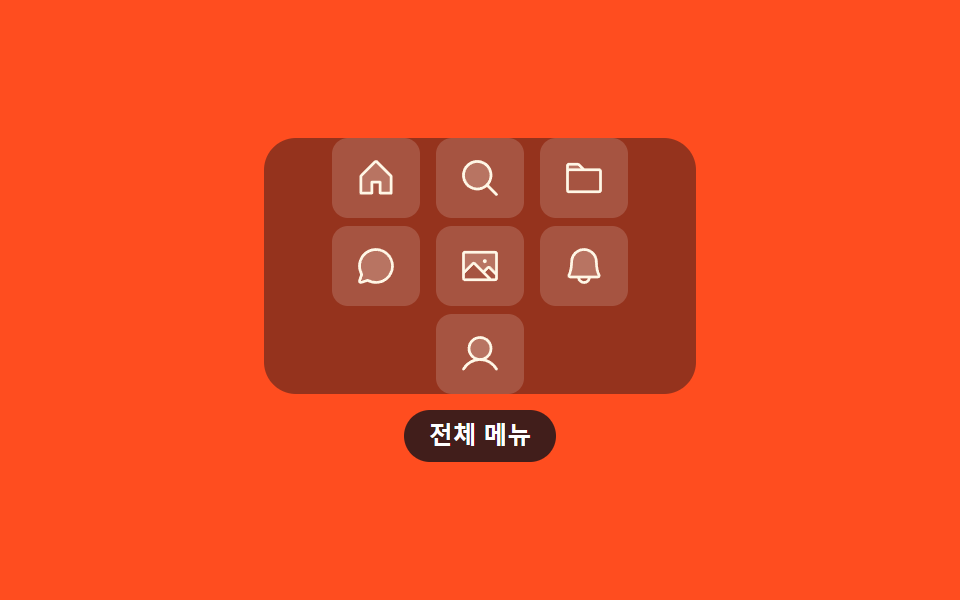
08Launchpad grid expand
Given a press, the icons crowded in one row scatter into a three-column grid, and the four that were hiding fade into the empty slots.
Best forWhen dock space is tight and the full menu must open out on demand
@propertytranslatescale
<main class="stage">
  <div class="lp is-demo" id="lp">
    <div class="lp__grid" id="lp-grid">
      <button class="lp__btn" type="button" aria-label="Home">
        <svg xmlns="http://www.w3.org/2000/svg" viewBox="0 0 256 256" aria-hidden="true"><g fill="currentColor"><path d="M216 120v96h-64v-64h-48v64H40v-96a8 8 0 0 1 2.34-5.66l80-80a8 8 0 0 1 11.32 0l80 80A8 8 0 0 1 216 120" opacity=".2"/><path d="m219.31 108.68l-80-80a16 16 0 0 0-22.62 0l-80 80A15.87 15.87 0 0 0 32 120v96a8 8 0 0 0 8 8h64a8 8 0 0 0 8-8v-56h32v56a8 8 0 0 0 8 8h64a8 8 0 0 0 8-8v-96a15.87 15.87 0 0 0-4.69-11.32M208 208h-48v-56a8 8 0 0 0-8-8h-48a8 8 0 0 0-8 8v56H48v-88l80-80l80 80Z"/></g></svg>
      </button>
      <button class="lp__btn" type="button" aria-label="Search">
        <svg xmlns="http://www.w3.org/2000/svg" viewBox="0 0 256 256" aria-hidden="true"><g fill="currentColor"><path d="M192 112a80 80 0 1 1-80-80a80 80 0 0 1 80 80" opacity=".2"/><path d="m229.66 218.34l-50.06-50.06a88.21 88.21 0 1 0-11.32 11.31l50.06 50.07a8 8 0 0 0 11.32-11.32M40 112a72 72 0 1 1 72 72a72.08 72.08 0 0 1-72-72"/></g></svg>
      </button>
      <button class="lp__btn" type="button" aria-label="Files">
        <svg xmlns="http://www.w3.org/2000/svg" viewBox="0 0 256 256" aria-hidden="true"><g fill="currentColor"><path d="M128 80H32V56a8 8 0 0 1 8-8h52.69a8 8 0 0 1 5.65 2.34Z" opacity=".2"/><path d="M216 72h-84.69L104 44.69A15.86 15.86 0 0 0 92.69 40H40a16 16 0 0 0-16 16v144.62A15.4 15.4 0 0 0 39.38 216h177.51A15.13 15.13 0 0 0 232 200.89V88a16 16 0 0 0-16-16M92.69 56l16 16H40V56ZM216 200H40V88h176Z"/></g></svg>
      </button>
      <button class="lp__btn lp__btn--more" type="button" aria-label="Chat">
        <svg xmlns="http://www.w3.org/2000/svg" viewBox="0 0 256 256" aria-hidden="true"><g fill="currentColor"><path d="M224 128a96 96 0 0 1-144.07 83.11l-37.39 12.47a8 8 0 0 1-10.12-10.12l12.47-37.39A96 96 0 1 1 224 128" opacity=".2"/><path d="M128 24a104 104 0 0 0-91.82 152.88l-11.35 34.05a16 16 0 0 0 20.24 20.24l34.05-11.35A104 104 0 1 0 128 24m0 192a87.87 87.87 0 0 1-44.06-11.81a8 8 0 0 0-6.54-.67L40 216l12.47-37.4a8 8 0 0 0-.66-6.54A88 88 0 1 1 128 216"/></g></svg>
      </button>
      <button class="lp__btn lp__btn--more" type="button" aria-label="Photos">
        <svg xmlns="http://www.w3.org/2000/svg" viewBox="0 0 256 256" aria-hidden="true"><g fill="currentColor"><path d="M224 56v122.06l-39.72-39.72a8 8 0 0 0-11.31 0L147.31 164l-49.65-49.66a8 8 0 0 0-11.32 0L32 168.69V56a8 8 0 0 1 8-8h176a8 8 0 0 1 8 8" opacity=".2"/><path d="M216 40H40a16 16 0 0 0-16 16v144a16 16 0 0 0 16 16h176a16 16 0 0 0 16-16V56a16 16 0 0 0-16-16m0 16v102.75l-26.07-26.06a16 16 0 0 0-22.63 0l-20 20l-44-44a16 16 0 0 0-22.62 0L40 149.37V56ZM40 172l52-52l80 80H40Zm176 28h-21.37l-36-36l20-20L216 181.38zm-72-100a12 12 0 1 1 12 12a12 12 0 0 1-12-12"/></g></svg>
      </button>
      <button class="lp__btn lp__btn--more" type="button" aria-label="Alerts">
        <svg xmlns="http://www.w3.org/2000/svg" viewBox="0 0 256 256" aria-hidden="true"><g fill="currentColor"><path d="M208 192H48a8 8 0 0 1-6.88-12C47.71 168.6 56 139.81 56 104a72 72 0 0 1 144 0c0 35.82 8.3 64.6 14.9 76a8 8 0 0 1-6.9 12" opacity=".2"/><path d="M221.8 175.94c-5.55-9.56-13.8-36.61-13.8-71.94a80 80 0 1 0-160 0c0 35.34-8.26 62.38-13.81 71.94A16 16 0 0 0 48 200h40.81a40 40 0 0 0 78.38 0H208a16 16 0 0 0 13.8-24.06M128 216a24 24 0 0 1-22.62-16h45.24A24 24 0 0 1 128 216m-80-32c7.7-13.24 16-43.92 16-80a64 64 0 1 1 128 0c0 36.05 8.28 66.73 16 80Z"/></g></svg>
      </button>
      <button class="lp__btn lp__btn--more" type="button" aria-label="Profile">
        <svg xmlns="http://www.w3.org/2000/svg" viewBox="0 0 256 256" aria-hidden="true"><g fill="currentColor"><path d="M192 96a64 64 0 1 1-64-64a64 64 0 0 1 64 64" opacity=".2"/><path d="M230.92 212c-15.23-26.33-38.7-45.21-66.09-54.16a72 72 0 1 0-73.66 0c-27.39 8.94-50.86 27.82-66.09 54.16a8 8 0 1 0 13.85 8c18.84-32.56 52.14-52 89.07-52s70.23 19.44 89.07 52a8 8 0 1 0 13.85-8M72 96a56 56 0 1 1 56 56a56.06 56.06 0 0 1-56-56"/></g></svg>
      </button>
    </div>
    <button class="lp__toggle" type="button" id="lp-toggle" aria-expanded="false" aria-controls="lp-grid">All apps</button>
  </div>
</main>@use "../../../../site/static/demo-tokens" as *;
$duration: $dur-base;
$easing: $ease-spring;
$color: $subject-cream;
@include stage($stage-orange);
// 등록해야 자리·배율이 수로 보간된다 — 등록 안 하면 칸 사이를 못 건넌다
@property --x {
syntax: "<length>";
inherits: false;
initial-value: 0px;
}
@property --y {
syntax: "<length>";
inherits: false;
initial-value: 0px;
}
@property --s {
syntax: "<number>";
inherits: false;
initial-value: 1;
}
.lp {
display: flex;
flex-direction: column;
align-items: center;
gap: $sp-2;
}
.lp__grid {
position: relative;
width: 216px;
height: 128px;
border-radius: $r-card;
background: rgba(23, 20, 26, .22);
transition: background-color $duration $easing;
}
/* 펼친 동안 판이 한 단계 짙어진다 — 열렸다는 사실이 판 전체로 보인다 */
.lp.open .lp__grid { background: rgba(23, 20, 26, .46); }
.lp__btn {
--x: 0px;
--y: 0px;
--s: 1;
position: absolute;
top: 50%;
left: 50%;
width: 44px;
height: 40px;
display: grid;
place-items: center;
padding: 0;
border: 0;
border-radius: $r-sm;
background: rgba(255, 255, 255, .16);
color: $color;
cursor: pointer;
translate: calc(-50% + var(--x)) calc(-50% + var(--y));
scale: var(--s);
transition: translate $duration $easing, scale $duration $easing, opacity $dur-instant $easing;
}
.lp__btn svg { width: 22px; height: 22px; display: block; }
.lp__btn:focus-visible { outline: 2px solid #fff; outline-offset: 2px; }
/* 접힌 상태 — 앞 세 개만 한 줄로 */
.lp__btn:nth-child(1) { --x: -52px; }
.lp__btn:nth-child(2) { --x: 0px; }
.lp__btn:nth-child(3) { --x: 52px; }
/* 숨은 넷은 제 빈 칸에서 배율 0 으로 기다린다 — 가운데서 날아오면 앞 세 개와 겹친다 */
.lp__btn:nth-child(4) { --x: -52px; --y: 0px; }
.lp__btn:nth-child(5) { --x: 0px; --y: 0px; }
.lp__btn:nth-child(6) { --x: 52px; --y: 0px; }
.lp__btn:nth-child(7) { --x: 0px; --y: 44px; }
.lp__btn--more { --s: 0; opacity: 0; pointer-events: none; }
/* 펼친 상태 — 앞 세 개가 윗줄로 흩어지고 숨은 넷이 제자리에서 커진다 */
.lp.open .lp__btn--more { --s: 1; opacity: 1; pointer-events: auto; }
.lp.open .lp__btn:nth-child(1) { --y: -44px; }
.lp.open .lp__btn:nth-child(2) { --y: -44px; }
.lp.open .lp__btn:nth-child(3) { --y: -44px; }
.lp__toggle {
padding: $sp-1 $sp-3;
border: 0;
border-radius: $r-pill;
background: rgba(23, 20, 26, .82);
color: #fff;
font-size: 12px;
font-weight: 600;
line-height: 1.5;
cursor: pointer;
}
.lp__toggle:focus-visible { outline: 2px solid #fff; outline-offset: 2px; }
/* 자동 재생 — 한 줄에서 격자로 흩어졌다 84% 에 한 줄로 되돌아온다 */
.is-demo .lp__btn {
animation-duration: 2s;
animation-timing-function: $ease-spring;
animation-iteration-count: infinite;
}
.is-demo .lp__btn:nth-child(1) { animation-name: lp-c1; }
.is-demo .lp__btn:nth-child(2) { animation-name: lp-c2; }
.is-demo .lp__btn:nth-child(3) { animation-name: lp-c3; }
.is-demo .lp__grid {
animation-name: lp-pad;
animation-duration: 2s;
animation-timing-function: linear;
animation-iteration-count: infinite;
}
.is-demo .lp__btn--more { animation-name: lp-grow; }
@keyframes lp-c1 {
0%, 12% { --y: 0px; }
36%, 72% { --y: -44px; }
84%, 100% { --y: 0px; }
}
@keyframes lp-c2 {
0%, 12% { --y: 0px; }
36%, 72% { --y: -44px; }
84%, 100% { --y: 0px; }
}
@keyframes lp-c3 {
0%, 12% { --y: 0px; }
36%, 72% { --y: -44px; }
84%, 100% { --y: 0px; }
}
/* 앞 세 개가 윗줄로 다 올라간 뒤(36%)에야 커지고, 내려오기 전(72%)에 줄어든다 — 겹칠 틈이 없다 */
@keyframes lp-grow {
0%, 36% { --s: 0; opacity: 0; }
36.01% { opacity: 1; }
44%, 60% { --s: 1; opacity: 1; }
71.99% { opacity: 1; }
72%, 100% { --s: 0; opacity: 0; }
}
@keyframes lp-pad {
0%, 43.99% { background-color: rgba(23, 20, 26, .22); }
44%, 60% { background-color: rgba(23, 20, 26, .46); }
72%, 100% { background-color: rgba(23, 20, 26, .22); }
}
@media (max-width: 340px) {
.lp__grid { width: 200px; height: 124px; }
}
@media (prefers-reduced-motion: reduce) {
.is-demo .lp__btn,
.is-demo .lp__grid { animation-name: none; }
.lp__btn { transition: none; }
}@charset "UTF-8";
html, body {
margin: 0;
overflow: hidden;
}
.stage {
box-sizing: border-box;
min-height: 100vh;
display: grid;
place-items: center;
margin: 0;
background: #ff4d1f;
font-family: -apple-system, "Segoe UI", "Noto Sans KR", sans-serif;
padding: clamp(8px, 4vw, 24px);
}
@property --x {
syntax: "<length>";
inherits: false;
initial-value: 0px;
}
@property --y {
syntax: "<length>";
inherits: false;
initial-value: 0px;
}
@property --s {
syntax: "<number>";
inherits: false;
initial-value: 1;
}
.lp {
display: flex;
flex-direction: column;
align-items: center;
gap: 8px;
}
.lp__grid {
position: relative;
width: 216px;
height: 128px;
border-radius: 16px;
background: rgba(23, 20, 26, 0.22);
transition: background-color 300ms cubic-bezier(0.2, 0.8, 0.2, 1);
}
/* 펼친 동안 판이 한 단계 짙어진다 — 열렸다는 사실이 판 전체로 보인다 */
.lp.open .lp__grid {
background: rgba(23, 20, 26, 0.46);
}
.lp__btn {
--x: 0px;
--y: 0px;
--s: 1;
position: absolute;
top: 50%;
left: 50%;
width: 44px;
height: 40px;
display: grid;
place-items: center;
padding: 0;
border: 0;
border-radius: 8px;
background: rgba(255, 255, 255, 0.16);
color: #fff7e6;
cursor: pointer;
translate: calc(-50% + var(--x)) calc(-50% + var(--y));
scale: var(--s);
transition: translate 300ms cubic-bezier(0.2, 0.8, 0.2, 1), scale 300ms cubic-bezier(0.2, 0.8, 0.2, 1), opacity 140ms cubic-bezier(0.2, 0.8, 0.2, 1);
}
.lp__btn svg {
width: 22px;
height: 22px;
display: block;
}
.lp__btn:focus-visible {
outline: 2px solid #fff;
outline-offset: 2px;
}
/* 접힌 상태 — 앞 세 개만 한 줄로 */
.lp__btn:nth-child(1) {
--x: -52px;
}
.lp__btn:nth-child(2) {
--x: 0px;
}
.lp__btn:nth-child(3) {
--x: 52px;
}
/* 숨은 넷은 제 빈 칸에서 배율 0 으로 기다린다 — 가운데서 날아오면 앞 세 개와 겹친다 */
.lp__btn:nth-child(4) {
--x: -52px;
--y: 0px;
}
.lp__btn:nth-child(5) {
--x: 0px;
--y: 0px;
}
.lp__btn:nth-child(6) {
--x: 52px;
--y: 0px;
}
.lp__btn:nth-child(7) {
--x: 0px;
--y: 44px;
}
.lp__btn--more {
--s: 0;
opacity: 0;
pointer-events: none;
}
/* 펼친 상태 — 앞 세 개가 윗줄로 흩어지고 숨은 넷이 제자리에서 커진다 */
.lp.open .lp__btn--more {
--s: 1;
opacity: 1;
pointer-events: auto;
}
.lp.open .lp__btn:nth-child(1) {
--y: -44px;
}
.lp.open .lp__btn:nth-child(2) {
--y: -44px;
}
.lp.open .lp__btn:nth-child(3) {
--y: -44px;
}
.lp__toggle {
padding: 4px 12px;
border: 0;
border-radius: 999px;
background: rgba(23, 20, 26, 0.82);
color: #fff;
font-size: 12px;
font-weight: 600;
line-height: 1.5;
cursor: pointer;
}
.lp__toggle:focus-visible {
outline: 2px solid #fff;
outline-offset: 2px;
}
/* 자동 재생 — 한 줄에서 격자로 흩어졌다 84% 에 한 줄로 되돌아온다 */
.is-demo .lp__btn {
animation-duration: 2s;
animation-timing-function: cubic-bezier(0.2, 0.8, 0.2, 1);
animation-iteration-count: infinite;
}
.is-demo .lp__btn:nth-child(1) {
animation-name: lp-c1;
}
.is-demo .lp__btn:nth-child(2) {
animation-name: lp-c2;
}
.is-demo .lp__btn:nth-child(3) {
animation-name: lp-c3;
}
.is-demo .lp__grid {
animation-name: lp-pad;
animation-duration: 2s;
animation-timing-function: linear;
animation-iteration-count: infinite;
}
.is-demo .lp__btn--more {
animation-name: lp-grow;
}
@keyframes lp-c1 {
0%, 12% {
--y: 0px;
}
36%, 72% {
--y: -44px;
}
84%, 100% {
--y: 0px;
}
}
@keyframes lp-c2 {
0%, 12% {
--y: 0px;
}
36%, 72% {
--y: -44px;
}
84%, 100% {
--y: 0px;
}
}
@keyframes lp-c3 {
0%, 12% {
--y: 0px;
}
36%, 72% {
--y: -44px;
}
84%, 100% {
--y: 0px;
}
}
/* 앞 세 개가 윗줄로 다 올라간 뒤(36%)에야 커지고, 내려오기 전(72%)에 줄어든다 — 겹칠 틈이 없다 */
@keyframes lp-grow {
0%, 36% {
--s: 0;
opacity: 0;
}
36.01% {
opacity: 1;
}
44%, 60% {
--s: 1;
opacity: 1;
}
71.99% {
opacity: 1;
}
72%, 100% {
--s: 0;
opacity: 0;
}
}
@keyframes lp-pad {
0%, 43.99% {
background-color: rgba(23, 20, 26, 0.22);
}
44%, 60% {
background-color: rgba(23, 20, 26, 0.46);
}
72%, 100% {
background-color: rgba(23, 20, 26, 0.22);
}
}
@media (max-width: 340px) {
.lp__grid {
width: 200px;
height: 124px;
}
}
@media (prefers-reduced-motion: reduce) {
.is-demo .lp__btn,
.is-demo .lp__grid {
animation-name: none;
}
.lp__btn {
transition: none;
}
}// 실제 동작: 버튼 누름 → .open 토글. 격자 열 수와 숨은 넷의 표시를 CSS 가 바꾼다.
var root = document.getElementById('lp');
var btn = document.getElementById('lp-toggle');
btn.addEventListener('click', function () {
root.classList.remove('is-demo');
var on = root.classList.toggle('open');
btn.setAttribute('aria-expanded', String(on));
});import { useState } from "react";
import type { CSSProperties } from "react";
import styles from "./LaunchpadGridDock.module.scss";
export type LaunchpadGridDockProps = {
/** 처음부터 펼친 채로 둘지 */
defaultOpen?: boolean;
duration?: number;
easing?: string;
color?: string;
};
type Vars = CSSProperties & { "--duration"?: string; "--easing"?: string; "--color"?: string };
export default function LaunchpadGridDock({
defaultOpen = false,
duration = 300,
easing = "cubic-bezier(.2,.8,.2,1)",
color = "#fff7e6",
}: LaunchpadGridDockProps) {
const [open, setOpen] = useState(defaultOpen);
// aria-controls 가 가리킬 id — 한 화면에 여러 개를 놔도 겹치지 않게
const [gridId] = useState(() => "lp-grid-" + Math.random().toString(36).slice(2, 8));
const vars: Vars = {
"--duration": `${duration}ms`,
"--easing": easing,
"--color": color,
};
// 접힌 동안 숨은 넷은 탭 순서에서도 빠진다 (CSS 의 pointer-events: none 과 짝)
const hidden = open ? 0 : -1;
return (
<div className={open ? `${styles.lp} ${styles.isOpen}` : styles.lp} style={vars}>
<div className={styles.grid} id={gridId}>
<button className={styles.btn} type="button" aria-label="Home">
<svg xmlns="http://www.w3.org/2000/svg" viewBox="0 0 256 256" aria-hidden="true"><g fill="currentColor"><path d="M216 120v96h-64v-64h-48v64H40v-96a8 8 0 0 1 2.34-5.66l80-80a8 8 0 0 1 11.32 0l80 80A8 8 0 0 1 216 120" opacity=".2"/><path d="m219.31 108.68l-80-80a16 16 0 0 0-22.62 0l-80 80A15.87 15.87 0 0 0 32 120v96a8 8 0 0 0 8 8h64a8 8 0 0 0 8-8v-56h32v56a8 8 0 0 0 8 8h64a8 8 0 0 0 8-8v-96a15.87 15.87 0 0 0-4.69-11.32M208 208h-48v-56a8 8 0 0 0-8-8h-48a8 8 0 0 0-8 8v56H48v-88l80-80l80 80Z"/></g></svg>
</button>
<button className={styles.btn} type="button" aria-label="Search">
<svg xmlns="http://www.w3.org/2000/svg" viewBox="0 0 256 256" aria-hidden="true"><g fill="currentColor"><path d="M192 112a80 80 0 1 1-80-80a80 80 0 0 1 80 80" opacity=".2"/><path d="m229.66 218.34l-50.06-50.06a88.21 88.21 0 1 0-11.32 11.31l50.06 50.07a8 8 0 0 0 11.32-11.32M40 112a72 72 0 1 1 72 72a72.08 72.08 0 0 1-72-72"/></g></svg>
</button>
<button className={styles.btn} type="button" aria-label="Files">
<svg xmlns="http://www.w3.org/2000/svg" viewBox="0 0 256 256" aria-hidden="true"><g fill="currentColor"><path d="M128 80H32V56a8 8 0 0 1 8-8h52.69a8 8 0 0 1 5.65 2.34Z" opacity=".2"/><path d="M216 72h-84.69L104 44.69A15.86 15.86 0 0 0 92.69 40H40a16 16 0 0 0-16 16v144.62A15.4 15.4 0 0 0 39.38 216h177.51A15.13 15.13 0 0 0 232 200.89V88a16 16 0 0 0-16-16M92.69 56l16 16H40V56ZM216 200H40V88h176Z"/></g></svg>
</button>
<button className={`${styles.btn} ${styles.more}`} type="button" aria-label="Chat" tabIndex={hidden}>
<svg xmlns="http://www.w3.org/2000/svg" viewBox="0 0 256 256" aria-hidden="true"><g fill="currentColor"><path d="M224 128a96 96 0 0 1-144.07 83.11l-37.39 12.47a8 8 0 0 1-10.12-10.12l12.47-37.39A96 96 0 1 1 224 128" opacity=".2"/><path d="M128 24a104 104 0 0 0-91.82 152.88l-11.35 34.05a16 16 0 0 0 20.24 20.24l34.05-11.35A104 104 0 1 0 128 24m0 192a87.87 87.87 0 0 1-44.06-11.81a8 8 0 0 0-6.54-.67L40 216l12.47-37.4a8 8 0 0 0-.66-6.54A88 88 0 1 1 128 216"/></g></svg>
</button>
<button className={`${styles.btn} ${styles.more}`} type="button" aria-label="Photos" tabIndex={hidden}>
<svg xmlns="http://www.w3.org/2000/svg" viewBox="0 0 256 256" aria-hidden="true"><g fill="currentColor"><path d="M224 56v122.06l-39.72-39.72a8 8 0 0 0-11.31 0L147.31 164l-49.65-49.66a8 8 0 0 0-11.32 0L32 168.69V56a8 8 0 0 1 8-8h176a8 8 0 0 1 8 8" opacity=".2"/><path d="M216 40H40a16 16 0 0 0-16 16v144a16 16 0 0 0 16 16h176a16 16 0 0 0 16-16V56a16 16 0 0 0-16-16m0 16v102.75l-26.07-26.06a16 16 0 0 0-22.63 0l-20 20l-44-44a16 16 0 0 0-22.62 0L40 149.37V56ZM40 172l52-52l80 80H40Zm176 28h-21.37l-36-36l20-20L216 181.38zm-72-100a12 12 0 1 1 12 12a12 12 0 0 1-12-12"/></g></svg>
</button>
<button className={`${styles.btn} ${styles.more}`} type="button" aria-label="Alerts" tabIndex={hidden}>
<svg xmlns="http://www.w3.org/2000/svg" viewBox="0 0 256 256" aria-hidden="true"><g fill="currentColor"><path d="M208 192H48a8 8 0 0 1-6.88-12C47.71 168.6 56 139.81 56 104a72 72 0 0 1 144 0c0 35.82 8.3 64.6 14.9 76a8 8 0 0 1-6.9 12" opacity=".2"/><path d="M221.8 175.94c-5.55-9.56-13.8-36.61-13.8-71.94a80 80 0 1 0-160 0c0 35.34-8.26 62.38-13.81 71.94A16 16 0 0 0 48 200h40.81a40 40 0 0 0 78.38 0H208a16 16 0 0 0 13.8-24.06M128 216a24 24 0 0 1-22.62-16h45.24A24 24 0 0 1 128 216m-80-32c7.7-13.24 16-43.92 16-80a64 64 0 1 1 128 0c0 36.05 8.28 66.73 16 80Z"/></g></svg>
</button>
<button className={`${styles.btn} ${styles.more}`} type="button" aria-label="Profile" tabIndex={hidden}>
<svg xmlns="http://www.w3.org/2000/svg" viewBox="0 0 256 256" aria-hidden="true"><g fill="currentColor"><path d="M192 96a64 64 0 1 1-64-64a64 64 0 0 1 64 64" opacity=".2"/><path d="M230.92 212c-15.23-26.33-38.7-45.21-66.09-54.16a72 72 0 1 0-73.66 0c-27.39 8.94-50.86 27.82-66.09 54.16a8 8 0 1 0 13.85 8c18.84-32.56 52.14-52 89.07-52s70.23 19.44 89.07 52a8 8 0 1 0 13.85-8M72 96a56 56 0 1 1 56 56a56.06 56.06 0 0 1-56-56"/></g></svg>
</button>
</div>
<button
className={styles.toggle}
type="button"
aria-expanded={open}
aria-controls={gridId}
onClick={() => setOpen(!open)}
>
All apps
</button>
</div>
);
}08 Launchpad grid expand — Measured area 19.061% · moving frames 16/23Original by GODRICH · SCSS and React ship in the zip · Mac Dock CSS — 9 Floating Dock Styles, No Library
The post this demo lives in
 Mac Dock CSS — 9 Floating Dock Styles, No LibraryMac dock CSS is the plain-CSS way to rebuild that floating strip of icons at a screen edge: a short bar, a few icon butt See all demos in this post
If you like this effect - similar demos
 Transitions02 Icon fill-swap toggle — when the selected tab changes, that spot's fill-amount value switches from low to fullCSS Bottom Navigation Bar: 9 Transition Patterns
 Transitions09 Notification badge9 CSS Toast Notifications — No Library, Pure CSS
 Transitions05 Icon tabs9 CSS Tab Switch Animations — No Library, Pure CSS