05Heading scale ladder
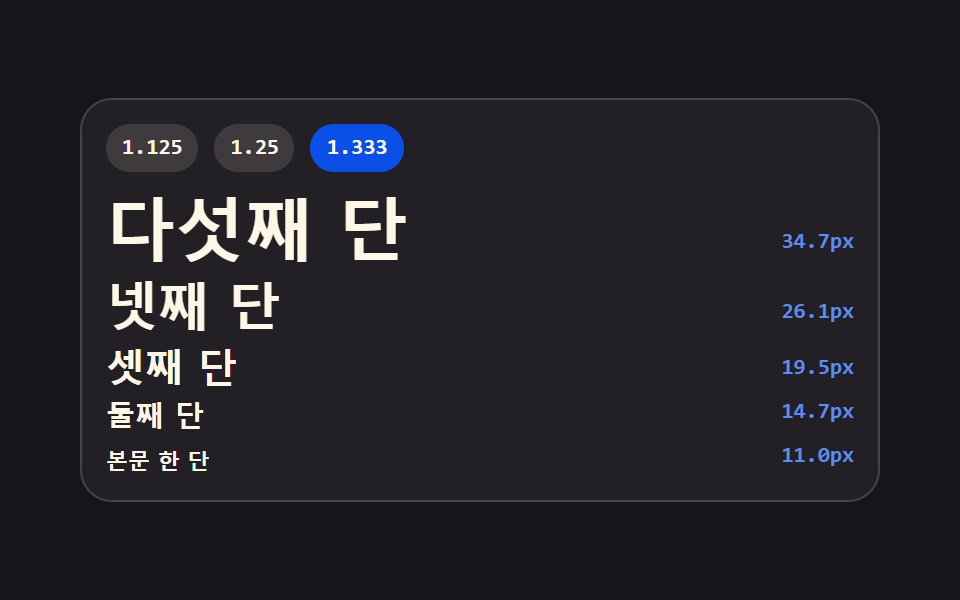
Pick a ratio of 1.125, 1.25, or 1.333 and every rung of the heading ladder recalculates with calc(), stacking from the smallest step up with its pixel value printed alongside.
Best forHeading system page of a style guide
calc()--ratiotoFixed
<main class="stage">
<div class="ts is-demo is-b" id="ts">
  <div class="ts__bar" role="group" aria-label="Pick a ratio">
    <button class="ts__pick" type="button" data-key="a" data-ratio="1.125" aria-pressed="false">1.125</button>
    <button class="ts__pick" type="button" data-key="b" data-ratio="1.25" aria-pressed="true">1.25</button>
    <button class="ts__pick" type="button" data-key="c" data-ratio="1.333" aria-pressed="false">1.333</button>
  </div>
  <ul class="ts__ladder" id="ladder">
    <li class="ts__rung ts__rung--5"><span class="ts__glyph">Fifth rung</span><span class="ts__px" data-step="4"></span></li>
    <li class="ts__rung ts__rung--4"><span class="ts__glyph">Fourth rung</span><span class="ts__px" data-step="3"></span></li>
    <li class="ts__rung ts__rung--3"><span class="ts__glyph">Third rung</span><span class="ts__px" data-step="2"></span></li>
    <li class="ts__rung ts__rung--2"><span class="ts__glyph">Second rung</span><span class="ts__px" data-step="1"></span></li>
    <li class="ts__rung ts__rung--1"><span class="ts__glyph">Body rung</span><span class="ts__px" data-step="0"></span></li>
  </ul>
  <span class="ts__beam" aria-hidden="true"></span>
</div>
</main>
@use "../../../../site/static/demo-tokens" as *;
// 제목 스케일 사다리 — 본문 한 단(11px)에서 비율을 거듭 곱해 단을 쌓는다.
// 크기는 CSS 가 calc() 사슬로 계산하고(--ratio 하나만 바꾸면 다섯 단이 함께 움직인다),
// 화면의 px 숫자는 같은 식을 JS 가 toFixed 로 적어 둔 세 벌 중 지금 비율의 것만 보인다.
// 미리보기(.is-demo)는 1.125 → 1.25 → 1.333 을 컷으로 돌고, 빛줄기 하나가 사다리를 훑어 내려간다.
$duration: $dur-base;
$easing: $ease-spring;
$color: $subject-blue-light;
$sans: system-ui, -apple-system, "Segoe UI", "Noto Sans KR", sans-serif;
$mono: ui-monospace, Consolas, "Liberation Mono", monospace;
$cream-soft: rgba($subject-cream, .72);
$base: 11;
// 눌린 칩 면색. 값은 $subject-blue-deep (#7187b9) — 크림 글자와 5.98:1 로 AA 통과.
// 지역 이름으로 받는 이유는 BD25 정적검사가 변수명을 부분문자열로 훑어
// `$subject-blue-deep` 을 금지조합의 `$subject-blue` 로 오탐하기 때문이다.
$pick-on: $subject-blue-deep;
@include stage($stage-ink);
// 비율은 숫자로 등록해야 애니메이션이 보간·컷을 할 수 있다
@property --ratio {
syntax: "<number>";
inherits: true;
initial-value: 1.25;
}
.ts {
position: relative;
display: flex; flex-direction: column; gap: $sp-2;
box-sizing: border-box; width: min(100%, 400px);
padding: $sp-3; border: 1px solid rgba($subject-cream, .16); border-radius: $r-card;
background: rgba($subject-cream, .05); overflow: hidden;
}
// ── 비율 고르기
.ts__bar { display: flex; gap: $sp-2; }
.ts__pick {
flex: 0 0 auto; padding: $sp-1 $sp-2; border: 0; border-radius: $r-pill;
background: rgba($subject-cream, .12); color: $subject-cream; cursor: pointer;
font-family: $mono; font-weight: 700; font-size: 11px; line-height: 1.4;
}
.ts__pick[aria-pressed="true"] { background: $pick-on; color: $subject-cream; } // $pick-on = 눌린 칩 면색 (BD25 정적검사 오탐 회피용 지역이름, 아래 선언 참조)
.ts__pick:focus-visible { outline: 2px solid $stage-yellow; outline-offset: 2px; }
// ── 사다리. 단마다 크기가 비율의 거듭곱이다
.ts__ladder {
--base: #{$base};
--ratio: 1.25;
display: flex; flex-direction: column; gap: $sp-1;
margin: 0; padding: 0; list-style: none;
}
.ts__rung { display: flex; align-items: baseline; gap: $sp-2; }
.ts__glyph {
flex: 1 1 auto; min-width: 0; color: $subject-cream;
font-family: $sans; font-weight: 700; line-height: 1.15;
white-space: nowrap; overflow: hidden; text-overflow: ellipsis;
}
.ts__rung--1 .ts__glyph { font-size: calc(var(--base) * 1px); }
.ts__rung--2 .ts__glyph { font-size: calc(var(--base) * var(--ratio) * 1px); }
.ts__rung--3 .ts__glyph { font-size: calc(var(--base) * var(--ratio) * var(--ratio) * 1px); }
.ts__rung--4 .ts__glyph { font-size: calc(var(--base) * var(--ratio) * var(--ratio) * var(--ratio) * 1px); }
.ts__rung--5 .ts__glyph { font-size: calc(var(--base) * var(--ratio) * var(--ratio) * var(--ratio) * var(--ratio) * 1px); }
// 세 비율의 숫자를 겹쳐 두고 지금 것만 보인다 — 자리는 늘 같은 폭이라 사다리가 흔들리지 않는다
.ts__px {
position: relative; flex: 0 0 auto; width: 48px; height: 15px;
}
.ts__v {
position: absolute; top: 0; right: 0; opacity: 0;
color: $color; font-family: $mono; font-weight: 700; font-size: 11px; line-height: 15px;
}
.ts.is-a .ts__v--a, .ts.is-b .ts__v--b, .ts.is-c .ts__v--c { opacity: 1; }
// 사다리를 훑어 내려가는 빛줄기. 장식이라 정적 경로에서는 보이지 않는다
.ts__beam {
position: absolute; left: 0; right: 0; top: 0; height: 28px;
background: linear-gradient(180deg, rgba($subject-blue-light, 0), rgba($subject-blue-light, .22), rgba($subject-blue-light, 0));
opacity: 0; pointer-events: none;
}
// ── 격자 미리보기 루프 (2초)
// 비율은 세 구간 컷(steps(1, end))이라 중간 프레임에 어정쩡한 크기가 남지 않는다.
// 숫자 세 벌도 같은 시각에 컷으로 바뀌어 크기와 라벨이 늘 같은 비율을 가리킨다.
.ts.is-demo .ts__ladder {
animation-name: tsRatio; animation-duration: $dur-loop;
animation-timing-function: steps(1, end); animation-iteration-count: infinite;
animation-fill-mode: both;
}
.ts.is-demo .ts__v--a { animation-name: tsShowA; }
.ts.is-demo .ts__v--b { animation-name: tsShowB; }
.ts.is-demo .ts__v--c { animation-name: tsShowC; }
.ts.is-demo .ts__v {
animation-duration: $dur-loop; animation-timing-function: steps(1, end);
animation-iteration-count: infinite; animation-fill-mode: both;
}
.ts.is-demo .ts__pick:nth-child(1) { animation-name: tsPickA; }
.ts.is-demo .ts__pick:nth-child(2) { animation-name: tsPickB; }
.ts.is-demo .ts__pick:nth-child(3) { animation-name: tsPickC; }
.ts.is-demo .ts__pick {
animation-duration: $dur-loop; animation-timing-function: steps(1, end);
animation-iteration-count: infinite; animation-fill-mode: both;
}
.ts.is-demo .ts__beam {
animation-name: tsBeam; animation-duration: $dur-loop;
animation-timing-function: linear; animation-iteration-count: infinite;
animation-fill-mode: both;
}
@keyframes tsRatio {
0% { --ratio: 1.125; }
34% { --ratio: 1.25; }
67%, 100% { --ratio: 1.333; }
}
@keyframes tsShowA { 0% { opacity: 1; } 34%, 100% { opacity: 0; } }
@keyframes tsShowB { 0% { opacity: 0; } 34% { opacity: 1; } 67%, 100% { opacity: 0; } }
@keyframes tsShowC { 0% { opacity: 0; } 67%, 100% { opacity: 1; } }
// 눌린 칩은 색으로 표시한다 — 칩을 지우면 무엇을 고를 수 있는지가 사라진다
@keyframes tsPickA {
0% { background-color: $subject-blue-deep; }
34%, 100% { background-color: rgba($subject-cream, .12); }
}
@keyframes tsPickB {
0% { background-color: rgba($subject-cream, .12); }
34% { background-color: $subject-blue-deep; }
67%, 100% { background-color: rgba($subject-cream, .12); }
}
@keyframes tsPickC {
0% { background-color: rgba($subject-cream, .12); }
67%, 100% { background-color: $subject-blue-deep; }
}
@keyframes tsBeam {
0% { opacity: 0; transform: translateY(0); }
6% { opacity: 1; transform: translateY(0); }
86% { opacity: 1; transform: translateY(260px); }
92%, 100% { opacity: 0; transform: translateY(260px); }
}
// ── 좁은 화면: 사다리의 바닥 단과 여백을 줄여 무대 안에 들어오게 한다
@media (max-width: 340px) {
.ts { gap: $sp-1; padding: $sp-2; }
.ts__ladder { --base: 9; }
.ts__pick { font-size: 10px; }
.ts__px { width: 40px; }
.ts__v { font-size: 10px; }
}
@media (prefers-reduced-motion: reduce) {
.ts.is-demo .ts__ladder,
.ts.is-demo .ts__v,
.ts.is-demo .ts__pick,
.ts.is-demo .ts__beam {
animation: none !important;
}
.ts.is-demo .ts__beam { opacity: 0 !important; }
.ts.is-demo.is-b .ts__v--b { opacity: 1 !important; }
}html, body {
margin: 0;
overflow: hidden;
}
.stage {
box-sizing: border-box;
min-height: 100vh;
display: grid;
place-items: center;
margin: 0;
background: #17141a;
font-family: -apple-system, "Segoe UI", "Noto Sans KR", sans-serif;
padding: clamp(8px, 4vw, 24px);
}
@property --ratio {
syntax: "<number>";
inherits: true;
initial-value: 1.25;
}
.ts {
position: relative;
display: flex;
flex-direction: column;
gap: 8px;
box-sizing: border-box;
width: min(100%, 400px);
padding: 12px;
border: 1px solid rgba(255, 247, 230, 0.16);
border-radius: 16px;
background: rgba(255, 247, 230, 0.05);
overflow: hidden;
}
.ts__bar {
display: flex;
gap: 8px;
}
.ts__pick {
flex: 0 0 auto;
padding: 4px 8px;
border: 0;
border-radius: 999px;
background: rgba(255, 247, 230, 0.12);
color: #fff7e6;
cursor: pointer;
font-family: ui-monospace, Consolas, "Liberation Mono", monospace;
font-weight: 700;
font-size: 11px;
line-height: 1.4;
}
.ts__pick[aria-pressed=true] {
background: #0a4fe8;
color: #fff7e6;
}
.ts__pick:focus-visible {
outline: 2px solid #ffd23f;
outline-offset: 2px;
}
.ts__ladder {
--base: 11;
--ratio: 1.25;
display: flex;
flex-direction: column;
gap: 4px;
margin: 0;
padding: 0;
list-style: none;
}
.ts__rung {
display: flex;
align-items: baseline;
gap: 8px;
}
.ts__glyph {
flex: 1 1 auto;
min-width: 0;
color: #fff7e6;
font-family: system-ui, -apple-system, "Segoe UI", "Noto Sans KR", sans-serif;
font-weight: 700;
line-height: 1.15;
white-space: nowrap;
overflow: hidden;
text-overflow: ellipsis;
}
.ts__rung--1 .ts__glyph {
font-size: calc(var(--base) * 1px);
}
.ts__rung--2 .ts__glyph {
font-size: calc(var(--base) * var(--ratio) * 1px);
}
.ts__rung--3 .ts__glyph {
font-size: calc(var(--base) * var(--ratio) * var(--ratio) * 1px);
}
.ts__rung--4 .ts__glyph {
font-size: calc(var(--base) * var(--ratio) * var(--ratio) * var(--ratio) * 1px);
}
.ts__rung--5 .ts__glyph {
font-size: calc(var(--base) * var(--ratio) * var(--ratio) * var(--ratio) * var(--ratio) * 1px);
}
.ts__px {
position: relative;
flex: 0 0 auto;
width: 48px;
height: 15px;
}
.ts__v {
position: absolute;
top: 0;
right: 0;
opacity: 0;
color: #5b8cf8;
font-family: ui-monospace, Consolas, "Liberation Mono", monospace;
font-weight: 700;
font-size: 11px;
line-height: 15px;
}
.ts.is-a .ts__v--a, .ts.is-b .ts__v--b, .ts.is-c .ts__v--c {
opacity: 1;
}
.ts__beam {
position: absolute;
left: 0;
right: 0;
top: 0;
height: 28px;
background: linear-gradient(180deg, rgba(91, 140, 248, 0), rgba(91, 140, 248, 0.22), rgba(91, 140, 248, 0));
opacity: 0;
pointer-events: none;
}
.ts.is-demo .ts__ladder {
animation-name: tsRatio;
animation-duration: 2s;
animation-timing-function: steps(1, end);
animation-iteration-count: infinite;
animation-fill-mode: both;
}
.ts.is-demo .ts__v--a {
animation-name: tsShowA;
}
.ts.is-demo .ts__v--b {
animation-name: tsShowB;
}
.ts.is-demo .ts__v--c {
animation-name: tsShowC;
}
.ts.is-demo .ts__v {
animation-duration: 2s;
animation-timing-function: steps(1, end);
animation-iteration-count: infinite;
animation-fill-mode: both;
}
.ts.is-demo .ts__pick:nth-child(1) {
animation-name: tsPickA;
}
.ts.is-demo .ts__pick:nth-child(2) {
animation-name: tsPickB;
}
.ts.is-demo .ts__pick:nth-child(3) {
animation-name: tsPickC;
}
.ts.is-demo .ts__pick {
animation-duration: 2s;
animation-timing-function: steps(1, end);
animation-iteration-count: infinite;
animation-fill-mode: both;
}
.ts.is-demo .ts__beam {
animation-name: tsBeam;
animation-duration: 2s;
animation-timing-function: linear;
animation-iteration-count: infinite;
animation-fill-mode: both;
}
@keyframes tsRatio {
0% {
--ratio: 1.125;
}
34% {
--ratio: 1.25;
}
67%, 100% {
--ratio: 1.333;
}
}
@keyframes tsShowA {
0% {
opacity: 1;
}
34%, 100% {
opacity: 0;
}
}
@keyframes tsShowB {
0% {
opacity: 0;
}
34% {
opacity: 1;
}
67%, 100% {
opacity: 0;
}
}
@keyframes tsShowC {
0% {
opacity: 0;
}
67%, 100% {
opacity: 1;
}
}
@keyframes tsPickA {
0% {
background-color: #0a4fe8;
}
34%, 100% {
background-color: rgba(255, 247, 230, 0.12);
}
}
@keyframes tsPickB {
0% {
background-color: rgba(255, 247, 230, 0.12);
}
34% {
background-color: #0a4fe8;
}
67%, 100% {
background-color: rgba(255, 247, 230, 0.12);
}
}
@keyframes tsPickC {
0% {
background-color: rgba(255, 247, 230, 0.12);
}
67%, 100% {
background-color: #0a4fe8;
}
}
@keyframes tsBeam {
0% {
opacity: 0;
transform: translateY(0);
}
6% {
opacity: 1;
transform: translateY(0);
}
86% {
opacity: 1;
transform: translateY(260px);
}
92%, 100% {
opacity: 0;
transform: translateY(260px);
}
}
@media (max-width: 340px) {
.ts {
gap: 4px;
padding: 8px;
}
.ts__ladder {
--base: 9;
}
.ts__pick {
font-size: 10px;
}
.ts__px {
width: 40px;
}
.ts__v {
font-size: 10px;
}
}
@media (prefers-reduced-motion: reduce) {
.ts.is-demo .ts__ladder,
.ts.is-demo .ts__v,
.ts.is-demo .ts__pick,
.ts.is-demo .ts__beam {
animation: none !important;
}
.ts.is-demo .ts__beam {
opacity: 0 !important;
}
.ts.is-demo.is-b .ts__v--b {
opacity: 1 !important;
}
}var ts = document.getElementById('ts');
var ladder = document.getElementById('ladder');
var picks = ts.querySelectorAll('.ts__pick');
var boxes = ts.querySelectorAll('.ts__px');
var BASE = 11;
var RATIOS = { a: 1.125, b: 1.25, c: 1.333 };
// 단의 크기는 CSS 가 calc() 사슬로 계산한다. 라벨 숫자는 같은 식을 JS 로 한 번 더 풀어 toFixed 로 적는다.
// 세 비율의 값을 처음에 다 적어 두므로, 미리보기 루프가 비율을 바꿔도 화면 숫자가 따로 놀지 않는다
function buildLabels() {
boxes.forEach(function (box) {
var step = Number(box.getAttribute('data-step'));
Object.keys(RATIOS).forEach(function (key) {
var v = document.createElement('span');
v.className = 'ts__v ts__v--' + key;
v.textContent = (BASE * Math.pow(RATIOS[key], step)).toFixed(1) + 'px';
box.appendChild(v);
});
});
}
function choose(key) {
ladder.style.setProperty('--ratio', String(RATIOS[key]));
ts.classList.remove('is-a', 'is-b', 'is-c');
ts.classList.add('is-' + key);
picks.forEach(function (b) {
b.setAttribute('aria-pressed', b.getAttribute('data-key') === key ? 'true' : 'false');
});
}
picks.forEach(function (b) {
b.addEventListener('click', function () {
ts.classList.remove('is-demo');
choose(b.getAttribute('data-key'));
});
});
buildLabels();
choose('b');// TypeScaleLadder — vanilla 판(run/074/demo/05-type-scale-ladder/index.html) 의 React 포트.
// 비율을 고르면 --ratio 하나가 사다리 다섯 단의 calc() 사슬을 함께 움직이고,
// 화면 px 숫자는 세 비율의 값을 toFixed 로 미리 만들어 둔 것 중 지금 비율의 것만 보인다.
import { useState } from "react";
import type { FC } from "react";
import styles from "./TypeScaleLadder.module.scss";
export type TypeScaleLadderProps = {
duration?: number;
easing?: string;
color?: string;
base?: number;
};
type RatioKey = "a" | "b" | "c";
const RATIOS: Record<RatioKey, number> = { a: 1.125, b: 1.25, c: 1.333 };
const KEYS: RatioKey[] = ["a", "b", "c"];
const RUNGS: { step: number; label: string }[] = [
{ step: 4, label: "다섯째 단" },
{ step: 3, label: "넷째 단" },
{ step: 2, label: "셋째 단" },
{ step: 1, label: "둘째 단" },
{ step: 0, label: "본문 한 단" },
];
const TypeScaleLadder: FC<TypeScaleLadderProps> = ({
duration,
easing,
color,
base = 11,
}) => {
const [key, setKey] = useState<RatioKey>("b");
const [demo, setDemo] = useState(true);
const cls = [styles.ts, demo ? styles["is-demo"] : "", styles["is-" + key]]
.filter(Boolean).join(" ");
const vars = {
"--ratio": String(RATIOS[key]),
"--base": String(base),
"--duration": duration != null ? duration + "ms" : undefined,
"--easing": easing,
"--color": color,
} as never;
return (
<div className={cls} style={vars}>
<div className={styles.ts__bar} role="group" aria-label="비율 고르기">
{KEYS.map((k) => (
<button
key={k}
type="button"
className={styles.ts__pick}
aria-pressed={key === k ? "true" : "false"}
onClick={() => {
setDemo(false);
setKey(k);
}}
>
{RATIOS[k]}
</button>
))}
</div>
<ul className={styles.ts__ladder}>
{RUNGS.map((r) => (
<li
key={r.step}
className={[styles.ts__rung, styles["ts__rung--" + (r.step + 1)]].join(" ")}
>
<span className={styles.ts__glyph}>{r.label}</span>
<span className={styles.ts__px}>
{KEYS.map((k) => (
<span key={k} className={styles["ts__v--" + k]}>
{(base * Math.pow(RATIOS[k], r.step)).toFixed(1)}px
</span>
))}
</span>
</li>
))}
</ul>
<span className={styles.ts__beam} aria-hidden="true" />
</div>
);
};
export default TypeScaleLadder;05 Heading scale ladder — Measured area 48.553% · moving frames 16/23Original by GODRICH · SCSS and React ship in the zip · CSS Typography Playground: 9 Demos, No Webfonts
The post this demo lives in
 CSS Typography Playground: 9 Demos, No Webfontscss typography is setting type with CSS: which family, how heavy, how far apart, how large. These nine playgrounds do al See all demos in this post
If you like this effect - similar demos
 base07 Radius ladder — one card's radius value steps up and down a fixed five-rung ladder within the same curve kindCSS corner-shape: 9 Corner Cutting Patterns
 base03 Heading line-wrap balance — a paragraph that keeps a lone word off the last lineCSS Reset: 9 Patterns From Basics to Safe-Area
 Landing sections01 Hero — an intro where background and heading shift at different scroll ratiosHero Section Design Examples: 9 Patterns