CSS Typography Playground: 9 Demos, No Webfonts
css typography is setting type with CSS: which family, how heavy, how far apart, how large.
 01 font-stack-compare
 02 font-weight-slider
 03 font-spacing-tuner
 04 text-rhythm-preview
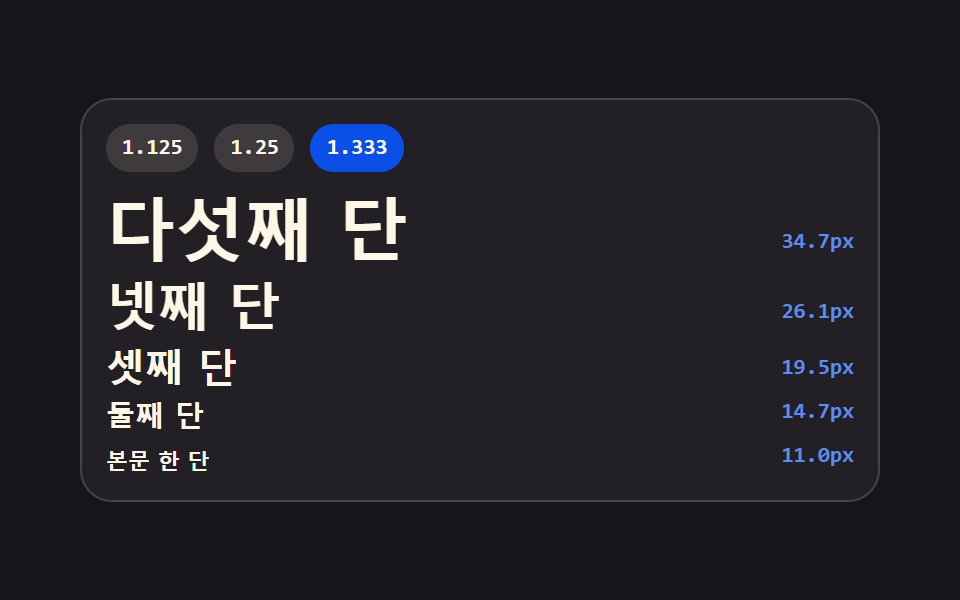 05 type-scale-ladder
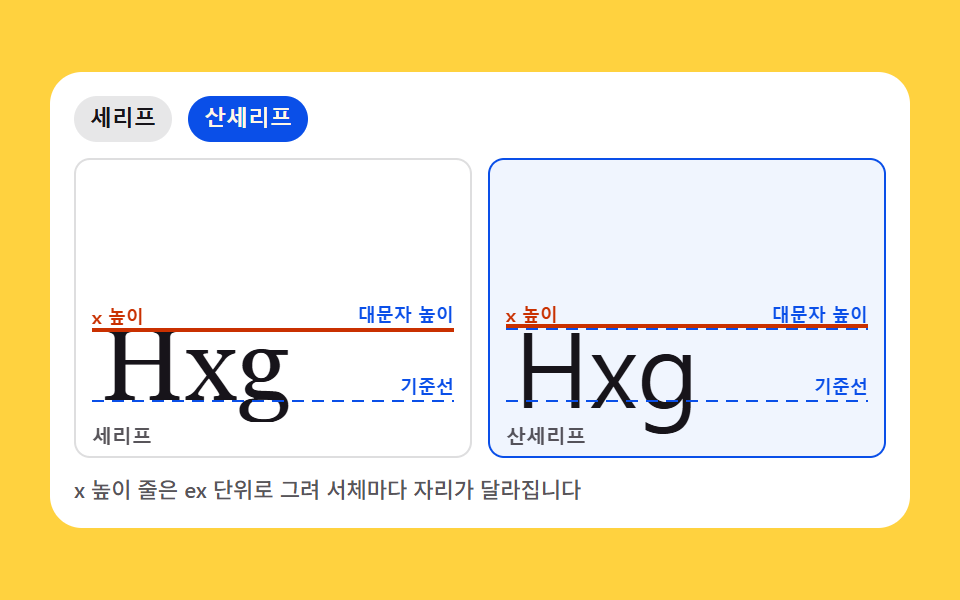 06 font-anatomy-cards
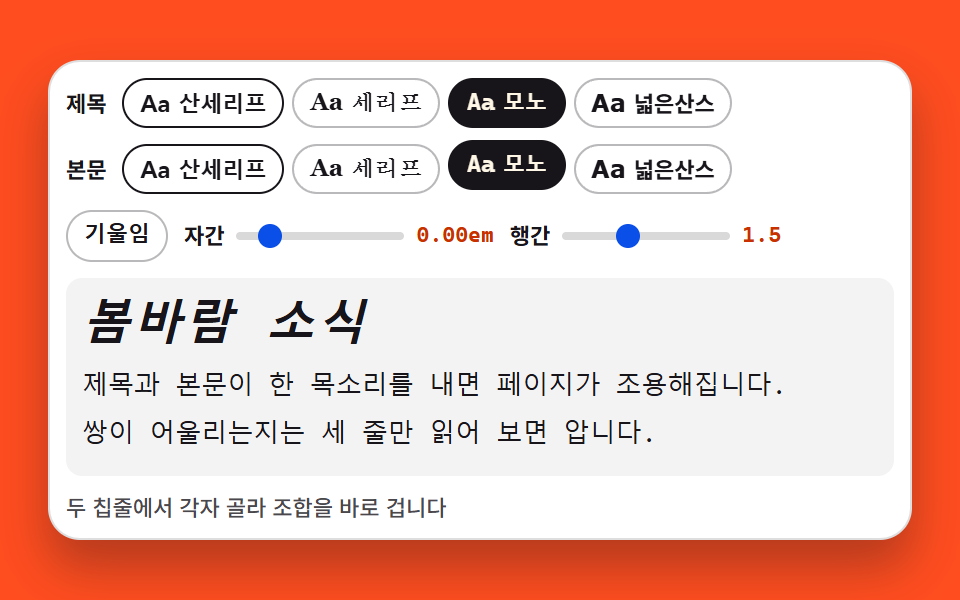 07 font-pairing-preview
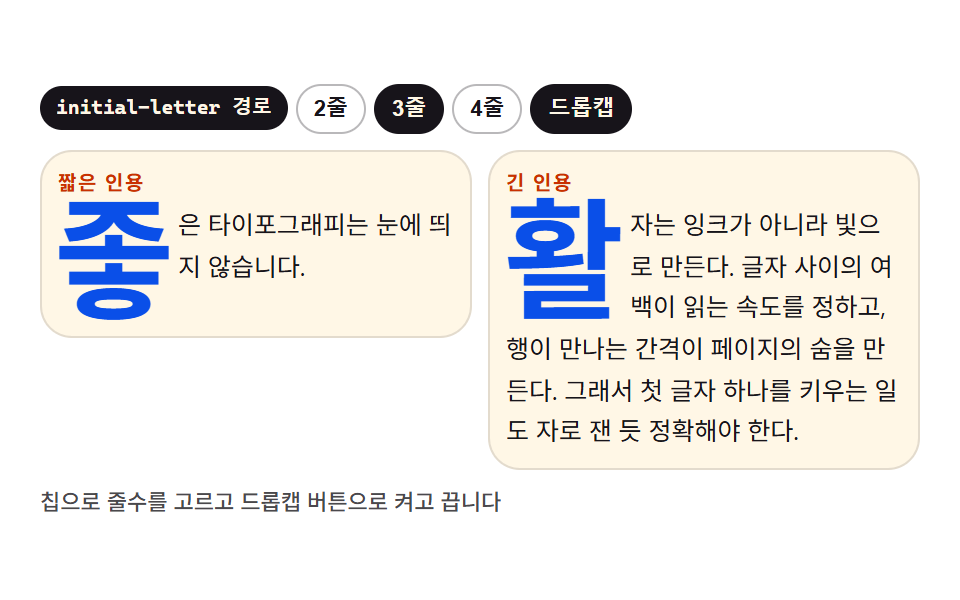 08 dropcap-quote
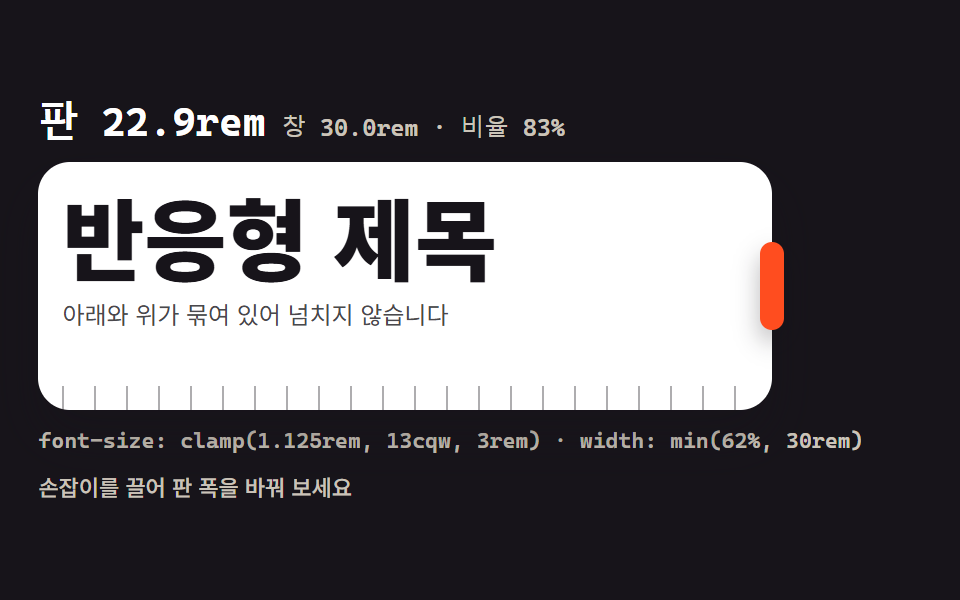 09 clamp-fluid-scale
Auto-plays · click a tile to jump to its section · all nine in one zip
- 01 System font stack comparer
- 02 Weight axis slider (100-900)
- 03 Tracking and leading tuner
- 04 Paragraph rhythm preview
- 05 Heading scale ladder
- 06 Font anatomy cards
- 07 Heading-body pairing preview
- 08 Drop cap and quote styling
- 09 Responsive clamp() scale
The order walks outward from a single glyph to the whole page. First the faces side by side (01), then the weight axis (02), then tracking and leading as two knobs (03), then the measure against a baseline grid (04), then a stepped heading scale (05), then the anatomy under the faces (06), then heading and body as a pair (07), then the opening letter and the quotes (08), and finally size that follows the viewport (09). Each of these css typography examples is a working control panel rather than a static picture, and staying on system faces is the point: nothing to fetch, no flash of invisible text, no layout shift while a webfont arrives, and the file you paste runs the same on every machine. For motion on the glyphs themselves, the css typing text effect and css text animation in nine demos are the neighbors — this page stays with type at rest.
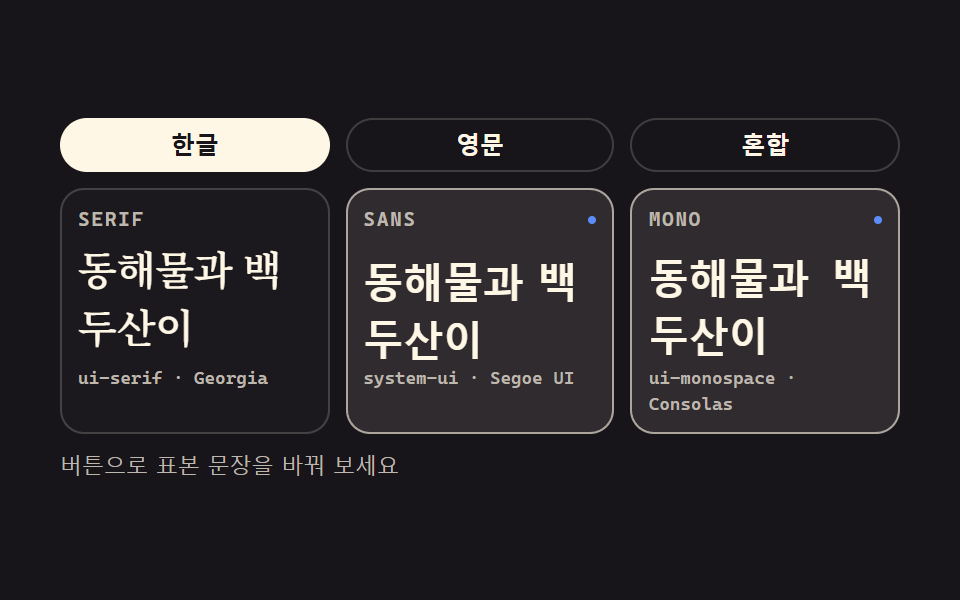
01System font stack comparer
One sentence sits in three panes wearing serif, sans, and mono stacks, and a single tap re-dresses all three at once — the font spec page of a design system.
<main class="stage">
<section class="fs is-demo" id="fs" aria-label="System font stack comparer">
  <div class="fs__tabs">
    <button class="fs__tab" type="button" aria-pressed="true">Korean</button>
    <button class="fs__tab" type="button" aria-pressed="false">English</button>
    <button class="fs__tab" type="button" aria-pressed="false">Mixed</button>
  </div>
  <div class="fs__grid">
    <article class="fs__pane">
      <header class="fs__head">
        <span class="fs__chip">SERIF</span>
        <span class="fs__mark" aria-hidden="true"></span>
      </header>
      <p class="fs__spec fs__spec--serif" id="specSerif">The quick brown fox jumps</p>
      <p class="fs__stack">ui-serif · Georgia</p>
    </article>
    <article class="fs__pane">
      <header class="fs__head">
        <span class="fs__chip">SANS</span>
        <span class="fs__mark" aria-hidden="true"></span>
      </header>
      <p class="fs__spec fs__spec--sans" id="specSans">The quick brown fox jumps</p>
      <p class="fs__stack">system-ui · Segoe UI</p>
    </article>
    <article class="fs__pane">
      <header class="fs__head">
        <span class="fs__chip">MONO</span>
        <span class="fs__mark" aria-hidden="true"></span>
      </header>
      <p class="fs__spec fs__spec--mono" id="specMono">The quick brown fox jumps</p>
      <p class="fs__stack">ui-monospace · Consolas</p>
    </article>
  </div>
  <p class="fs__note">Use the buttons to swap the sample sentence</p>
</section>
</main>@use "../../../../site/static/demo-tokens" as *;
// 시스템 서체 스택 비교 — 같은 문장을 serif·sans·mono 세 판에 나란히 놓는다.
// 스택은 어느 OS 에나 깔려 있는 서체만 담는다: ui-serif·Georgia / system-ui·Segoe UI / ui-monospace·Consolas.
// 웹폰트는 한 줄도 없다 — 이 편의 주제 자체가 그것이다.
// 격자 미리보기(.is-demo)는 세 판을 steps(1, end) 컷으로 돌아가며 강조한다(반투명 유령 프레임 방지).
// 컷만으로는 움직인 프레임이 두세 장에 그치므로(함정표), 활성 판의 표본이 같은 창 안에서
// 살짝 떠오르는 transform 보조를 얹는다. 세 창이 2초를 꽉 채운다.
$duration: $dur-quick;
$easing: $ease-spring;
$color: $subject-blue-light;
$serif: ui-serif, Georgia, "Times New Roman", "Noto Serif KR", serif;
$sans: system-ui, -apple-system, "Segoe UI", "Noto Sans KR", sans-serif;
$mono: ui-monospace, "Cascadia Mono", Consolas, "Liberation Mono", monospace;
$line: rgba($subject-cream, .18);
$dim: #beb7ad;
@include stage($stage-ink);
.fs {
display: flex; flex-direction: column; gap: $sp-2;
box-sizing: border-box; width: min(100%, 420px);
}
// ── 표본 문장 탭 (실사용 경로). 미끄러지는 인디케이터가 없으니 flex 배분은 자유다
.fs__tabs { display: flex; gap: $sp-2; }
.fs__tab {
flex: 1 1 0; appearance: none; cursor: pointer;
padding: $sp-1 $sp-2; border: 1px solid $line; border-radius: $r-pill;
background: transparent; color: $subject-cream;
font-family: $sans; font-weight: 700; font-size: 12px; line-height: 1.4;
transition: background-color $duration $easing, color $duration $easing, border-color $duration $easing;
}
.fs__tab[aria-pressed="true"] {
border-color: $subject-cream; background: $subject-cream; color: $subject-ink;
}
.fs__tab:focus-visible { outline: 2px solid $color; outline-offset: 2px; }
// ── 세 판
.fs__grid { display: grid; grid-template-columns: repeat(3, 1fr); gap: $sp-2; }
.fs__pane {
display: flex; flex-direction: column; gap: $sp-1;
box-sizing: border-box; padding: $sp-2;
border: 1px solid $line; border-radius: $r-control;
background: rgba($subject-cream, .02);
}
.fs__head { display: flex; align-items: center; justify-content: space-between; }
.fs__chip {
font-family: $mono; font-weight: 700; font-size: 10px; line-height: 1.4;
letter-spacing: .08em; color: $dim;
}
// 활성 판 머리의 점 — 미리보기 루프에서만 보인다(정적 경로에서는 숨겨도 화면이 성립한다)
.fs__mark {
width: $sp-1; height: $sp-1; border-radius: 50%; background: $color;
opacity: 0;
}
// 표본. 세 판이 각자의 시스템 스택을 입는다 — 이 세 선언이 이 데모의 본체다
.fs__spec {
margin: 0; color: $subject-cream;
font-size: clamp(13px, 4.6vw, 20px); font-weight: 600; line-height: 1.45;
}
.fs__spec--serif { font-family: $serif; }
.fs__spec--sans { font-family: $sans; }
.fs__spec--mono { font-family: $mono; }
.fs__stack {
margin: 0; color: $dim;
font-family: $mono; font-weight: 500; font-size: 9px; line-height: 1.4;
}
.fs__note {
margin: 0; color: $dim;
font-family: $sans; font-weight: 500; font-size: 11px; line-height: 1.4;
}
// ── 격자 미리보기 루프 (2초). 세 판이 돌아가며 한 칸(약 33%)씩 강조 창을 받는다.
// 강조 교체는 steps(1, end) 컷, 표본의 떠오름은 같은 창 안의 부드러운 transform —
// 컷 + transform 보조 조합(함정표: 컷만 쓰면 움직인 프레임이 2~3장에 그친다).
.fs.is-demo .fs__pane {
animation-name: fsGlow;
animation-duration: $dur-loop;
animation-timing-function: steps(1, end);
animation-iteration-count: infinite;
animation-fill-mode: backwards;
}
.fs.is-demo .fs__pane:nth-child(2) { animation-delay: calc($dur-loop / 3); }
.fs.is-demo .fs__pane:nth-child(3) { animation-delay: calc($dur-loop * 2 / 3); }
.fs.is-demo .fs__spec {
animation-name: fsRise;
animation-duration: $dur-loop;
animation-timing-function: $easing;
animation-iteration-count: infinite;
animation-fill-mode: backwards;
}
.fs.is-demo .fs__pane:nth-child(2) .fs__spec { animation-delay: calc($dur-loop / 3); }
.fs.is-demo .fs__pane:nth-child(3) .fs__spec { animation-delay: calc($dur-loop * 2 / 3); }
.fs.is-demo .fs__mark {
animation-name: fsDot;
animation-duration: $dur-loop;
animation-timing-function: steps(1, end);
animation-iteration-count: infinite;
animation-fill-mode: backwards;
}
.fs.is-demo .fs__pane:nth-child(2) .fs__mark { animation-delay: calc($dur-loop / 3); }
.fs.is-demo .fs__pane:nth-child(3) .fs__mark { animation-delay: calc($dur-loop * 2 / 3); }
// steps(1, end) 는 구간 끝에서만 값이 바뀐다 — 0% 값이 한 창(33%) 내내 보이고 33% 에 내려앉는다.
// 경계 복귀는 루프 시작(0%)에서만 일어나 유령 프레임이 없다.
@keyframes fsGlow {
0% { background: rgba($subject-cream, .10); border-color: rgba($subject-cream, .60); }
33%, 100% { background: rgba($subject-cream, .02); border-color: rgba($subject-cream, .18); }
}
@keyframes fsRise {
0% { transform: translateY(5px); }
33% { transform: translateY(-1px); }
39%, 100% { transform: translateY(5px); }
}
@keyframes fsDot {
0% { opacity: 1; transform: scale(1); }
33%, 100% { opacity: 0; transform: scale(.4); }
}
// ── 좁은 화면: 글자와 여백을 내려 무대 안에 들어오게 한다 (올리지 않는다)
@media (max-width: 340px) {
.fs { gap: $sp-1; }
.fs__tabs { gap: $sp-1; }
.fs__tab { padding: $sp-1; font-size: 11px; }
.fs__pane { gap: 0; }
.fs__spec { font-size: 13px; line-height: 1.4; }
.fs__stack { font-size: 9px; }
.fs__note { font-size: 10px; }
}
@media (prefers-reduced-motion: reduce) {
.fs.is-demo .fs__pane,
.fs.is-demo .fs__spec,
.fs.is-demo .fs__mark {
animation: none !important;
transform: none !important;
opacity: 0 !important;
background: rgba($subject-cream, .02) !important;
border-color: rgba($subject-cream, .18) !important;
}
}html, body {
margin: 0;
overflow: hidden;
}
.stage {
box-sizing: border-box;
min-height: 100vh;
display: grid;
place-items: center;
margin: 0;
background: #17141a;
font-family: -apple-system, "Segoe UI", "Noto Sans KR", sans-serif;
padding: clamp(8px, 4vw, 24px);
}
.fs {
display: flex;
flex-direction: column;
gap: 8px;
box-sizing: border-box;
width: min(100%, 420px);
}
.fs__tabs {
display: flex;
gap: 8px;
}
.fs__tab {
flex: 1 1 0;
appearance: none;
cursor: pointer;
padding: 4px 8px;
border: 1px solid rgba(255, 247, 230, 0.18);
border-radius: 999px;
background: transparent;
color: #fff7e6;
font-family: system-ui, -apple-system, "Segoe UI", "Noto Sans KR", sans-serif;
font-weight: 700;
font-size: 12px;
line-height: 1.4;
transition: background-color 220ms cubic-bezier(0.2, 0.8, 0.2, 1), color 220ms cubic-bezier(0.2, 0.8, 0.2, 1), border-color 220ms cubic-bezier(0.2, 0.8, 0.2, 1);
}
.fs__tab[aria-pressed=true] {
border-color: #fff7e6;
background: #fff7e6;
color: #17141a;
}
.fs__tab:focus-visible {
outline: 2px solid #5b8cf8;
outline-offset: 2px;
}
.fs__grid {
display: grid;
grid-template-columns: repeat(3, 1fr);
gap: 8px;
}
.fs__pane {
display: flex;
flex-direction: column;
gap: 4px;
box-sizing: border-box;
padding: 8px;
border: 1px solid rgba(255, 247, 230, 0.18);
border-radius: 12px;
background: rgba(255, 247, 230, 0.02);
}
.fs__head {
display: flex;
align-items: center;
justify-content: space-between;
}
.fs__chip {
font-family: ui-monospace, "Cascadia Mono", Consolas, "Liberation Mono", monospace;
font-weight: 700;
font-size: 10px;
line-height: 1.4;
letter-spacing: 0.08em;
color: #beb7ad;
}
.fs__mark {
width: 4px;
height: 4px;
border-radius: 50%;
background: #5b8cf8;
opacity: 0;
}
.fs__spec {
margin: 0;
color: #fff7e6;
font-size: clamp(13px, 4.6vw, 20px);
font-weight: 600;
line-height: 1.45;
}
.fs__spec--serif {
font-family: ui-serif, Georgia, "Times New Roman", "Noto Serif KR", serif;
}
.fs__spec--sans {
font-family: system-ui, -apple-system, "Segoe UI", "Noto Sans KR", sans-serif;
}
.fs__spec--mono {
font-family: ui-monospace, "Cascadia Mono", Consolas, "Liberation Mono", monospace;
}
.fs__stack {
margin: 0;
color: #beb7ad;
font-family: ui-monospace, "Cascadia Mono", Consolas, "Liberation Mono", monospace;
font-weight: 500;
font-size: 9px;
line-height: 1.4;
}
.fs__note {
margin: 0;
color: #beb7ad;
font-family: system-ui, -apple-system, "Segoe UI", "Noto Sans KR", sans-serif;
font-weight: 500;
font-size: 11px;
line-height: 1.4;
}
.fs.is-demo .fs__pane {
animation-name: fsGlow;
animation-duration: 2s;
animation-timing-function: steps(1, end);
animation-iteration-count: infinite;
animation-fill-mode: backwards;
}
.fs.is-demo .fs__pane:nth-child(2) {
animation-delay: 0.6666666667s;
}
.fs.is-demo .fs__pane:nth-child(3) {
animation-delay: 1.3333333333s;
}
.fs.is-demo .fs__spec {
animation-name: fsRise;
animation-duration: 2s;
animation-timing-function: cubic-bezier(0.2, 0.8, 0.2, 1);
animation-iteration-count: infinite;
animation-fill-mode: backwards;
}
.fs.is-demo .fs__pane:nth-child(2) .fs__spec {
animation-delay: 0.6666666667s;
}
.fs.is-demo .fs__pane:nth-child(3) .fs__spec {
animation-delay: 1.3333333333s;
}
.fs.is-demo .fs__mark {
animation-name: fsDot;
animation-duration: 2s;
animation-timing-function: steps(1, end);
animation-iteration-count: infinite;
animation-fill-mode: backwards;
}
.fs.is-demo .fs__pane:nth-child(2) .fs__mark {
animation-delay: 0.6666666667s;
}
.fs.is-demo .fs__pane:nth-child(3) .fs__mark {
animation-delay: 1.3333333333s;
}
@keyframes fsGlow {
0% {
background: rgba(255, 247, 230, 0.1);
border-color: rgba(255, 247, 230, 0.6);
}
33%, 100% {
background: rgba(255, 247, 230, 0.02);
border-color: rgba(255, 247, 230, 0.18);
}
}
@keyframes fsRise {
0% {
transform: translateY(5px);
}
33% {
transform: translateY(-1px);
}
39%, 100% {
transform: translateY(5px);
}
}
@keyframes fsDot {
0% {
opacity: 1;
transform: scale(1);
}
33%, 100% {
opacity: 0;
transform: scale(0.4);
}
}
@media (max-width: 340px) {
.fs {
gap: 4px;
}
.fs__tabs {
gap: 4px;
}
.fs__tab {
padding: 4px;
font-size: 11px;
}
.fs__pane {
gap: 0;
}
.fs__spec {
font-size: 13px;
line-height: 1.4;
}
.fs__stack {
font-size: 9px;
}
.fs__note {
font-size: 10px;
}
}
@media (prefers-reduced-motion: reduce) {
.fs.is-demo .fs__pane,
.fs.is-demo .fs__spec,
.fs.is-demo .fs__mark {
animation: none !important;
transform: none !important;
opacity: 0 !important;
background: rgba(255, 247, 230, 0.02) !important;
border-color: rgba(255, 247, 230, 0.18) !important;
}
}var fs = document.getElementById('fs');
var tabs = Array.prototype.slice.call(document.querySelectorAll('.fs__tab'));
var specs = Array.prototype.slice.call(document.querySelectorAll('.fs__spec'));
var SAMPLES = ['The quick brown fox jumps', 'Hello Type 0123', 'CSS Type 2026'];
// 탭을 누르면 세 판의 표본 문장이 한꺼번에 갈아 입는다 — 미리보기 루프는 여기서 뗀다
tabs.forEach(function (tab, i) {
tab.addEventListener('click', function () {
fs.classList.remove('is-demo');
tabs.forEach(function (t) { t.setAttribute('aria-pressed', String(t === tab)); });
specs.forEach(function (spec) { spec.textContent = SAMPLES[i]; });
});
});
fs.addEventListener('pointerdown', function () { fs.classList.remove('is-demo'); });// FontStackCompare — vanilla 판(run/074/demo/01-font-stack-compare/index.html) 의 React 포트.
// 같은 문장을 serif·sans·mono 세 판에 나란히 놓고 탭으로 표본 문장을 바꾼다.
// 스택 목록과 미리보기 루프의 키프레임은 vanilla 와 같은 글자다 (값을 다시 타이핑하지 않는다).
import { useState } from "react";
import type { CSSProperties } from "react";
import styles from "./FontStackCompare.module.scss";
export type FontStackCompareProps = {
duration?: number;
easing?: string;
color?: string;
samples?: string[];
};
type Vars = CSSProperties & { "--duration"?: string; "--easing"?: string; "--color"?: string };
const TAB_LABELS = ["한글", "영문", "혼합"];
const DEFAULT_SAMPLES = ["동해물과 백두산이", "Hello Type 0123", "CSS 타이포 2026"];
const NOTE = "버튼으로 표본 문장을 바꿔 보세요";
const ARIA_LABEL = "시스템 서체 스택 비교";
const PANES = [
{ chip: "SERIF", stack: "ui-serif · Georgia", spec: "serif" },
{ chip: "SANS", stack: "system-ui · Segoe UI", spec: "sans" },
{ chip: "MONO", stack: "ui-monospace · Consolas", spec: "mono" },
];
export default function FontStackCompare(props: FontStackCompareProps) {
const duration = props.duration ?? 220;
const easing = props.easing ?? "cubic-bezier(.2, .8, .2, 1)";
const color = props.color ?? "#5b8cf8";
const samples = props.samples ?? DEFAULT_SAMPLES;
const [active, setActive] = useState<number>(0);
const [preview, setPreview] = useState<boolean>(true);
const vars: Vars = { "--duration": duration + "ms", "--easing": easing, "--color": color };
return (
<main className={styles.stage}>
<section
className={styles.root + (preview ? " " + styles.isDemo : "")}
style={vars}
aria-label={ARIA_LABEL}
onPointerDown={() => setPreview(false)}
>
<div className={styles.tabs}>
{TAB_LABELS.map((label, i) => (
<button
key={label}
type="button"
className={styles.tab}
aria-pressed={String(i === active)}
onClick={() => {
setPreview(false);
setActive(i);
}}
>
{label}
</button>
))}
</div>
<div className={styles.grid}>
{PANES.map((pane) => (
<article key={pane.chip} className={styles.pane}>
<header className={styles.head}>
<span className={styles.chip}>{pane.chip}</span>
<span className={styles.mark} aria-hidden="true"></span>
</header>
<p className={styles.spec + " " + styles["spec--" + pane.spec]}>{samples[active]}</p>
<p className={styles.stack}>{pane.stack}</p>
</article>
))}
</div>
<p className={styles.note}>{NOTE}</p>
</section>
</main>
);
}01 · System font stack comparer — Measured area 23.762% · moving frames 14/23Original by GODRICH · SCSS and React ship in the zip · See the password
The stacks the three panes actually wear
$serif: ui-serif, Georgia, "Times New Roman", "Noto Serif KR", serif;
$sans: system-ui, -apple-system, "Segoe UI", "Noto Sans KR", sans-serif;
$mono: ui-monospace, "Cascadia Mono", Consolas, "Liberation Mono", monospace;

// The three sample panes each wear one of these — these declarations are the body of the demo
.fs__spec {
  margin: 0; color: $subject-cream;
  font-size: clamp(13px, 4.6vw, 20px); font-weight: 600; line-height: 1.45;
}
.fs__spec--serif { font-family: $serif; }
.fs__spec--sans { font-family: $sans; }
.fs__spec--mono { font-family: $mono; }
These three lists are the system font stack CSS gives you for free, and the computed values came back as ui-serif with Georgia, system-ui with Segoe UI, and ui-monospace with Cascadia Mono and Consolas.
One tap re-dresses all three panes
var SAMPLES = ['The quick brown fox jumps', 'Hello Type 0123', 'CSS Type 2026'];
// One tap swaps the sample sentence in all three panes at once — this is also where the preview loop is detached
tabs.forEach(function (tab, i) {
  tab.addEventListener('click', function () {
    fs.classList.remove('is-demo');
    tabs.forEach(function (t) { t.setAttribute('aria-pressed', String(t === tab)); });
    specs.forEach(function (spec) { spec.textContent = SAMPLES[i]; });
  });
});
The English tab rewrote all three panes to Hello Type 0123 with aria-pressed left true only on the pressed tab, and the mixed tab landed on CSS Type 2026 in every pane.
02Weight axis slider (100-900)
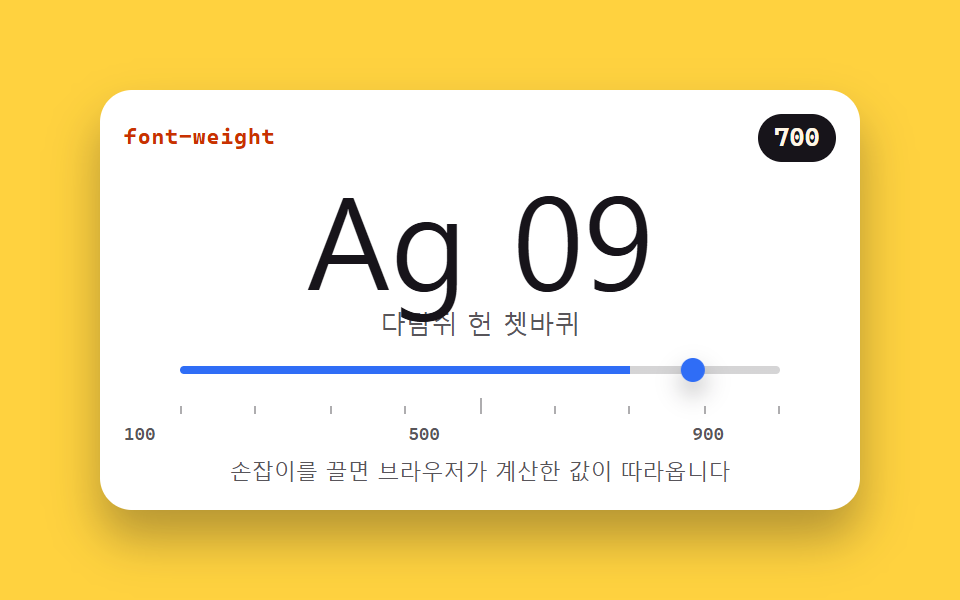
Dragging the slider moves font-weight from 100 to 900 while the readout follows the value the browser actually computed — the font settings panel of an editor or tool.
<main class="stage">
<section class="wt is-demo" id="wt" aria-label="Weight axis slider">
  <header class="wt__bar">
    <span class="wt__name">font-weight</span>
    <span class="wt__out" id="wtOut">700</span>
  </header>
  <div class="wt__spec">
    <p class="wt__big" id="wtBig">Ag 09</p>
    <p class="wt__hangul" id="wtHangul">Sphinx of black quartz</p>
  </div>
  <input class="wt__range" id="wtRange" type="range" min="100" max="900" step="100" value="700"
         aria-label="Weight slider" aria-valuemin="100" aria-valuemax="900" aria-valuenow="700">
  <div class="wt__ruler" aria-hidden="true">
    <i></i><i></i><i></i><i></i><i></i><i></i><i></i><i></i><i></i>
  </div>
  <p class="wt__scale"><span>100</span><span>500</span><span>900</span></p>
  <p class="wt__note">Drag the handle and the browser's computed value follows</p>
</section>
</main>
@use "../../../../site/static/demo-tokens" as *;
// 굵기 축 슬라이더 — font-weight 를 100 에서 900 까지 움직인다.
// 화면 숫자는 브라우저가 실제로 계산한 값(getComputedStyle)을 다시 읽은 것이다.
// 가변 폰트 축은 font-variation-settings 'wght' 를 함께 건다 — 한쪽만 바꾸면
// 가변 서체에서는 다른 쪽 선언이 렌더링을 이긴다. 그래서 미리보기 루프의 키프레임도
// 두 속성을 같이 움직인다. latin(Ag 09)은 가변 축을 따라 부드럽게 움직이고
// 한글은 가변 축이 없는 시스템 서체로 떨어지며 가까운 굵기에 붙는다 — 그 차이가 이 데모의 이야기다.
$duration: $dur-quick;
$easing: $ease-spring;
$color: $subject-blue;
$sans: system-ui, -apple-system, "Segoe UI", "Noto Sans KR", sans-serif;
$mono: ui-monospace, "Cascadia Mono", Consolas, "Liberation Mono", monospace;
@include stage($stage-yellow);
.wt {
display: flex; flex-direction: column; gap: $sp-1;
box-sizing: border-box; width: min(100%, 380px); padding: $sp-3;
border-radius: $r-card; background: $stage-paper;
box-shadow: $shadow-raised;
}
// ── 속성 이름과 계산값 배지
.wt__bar { display: flex; align-items: center; justify-content: space-between; }
.wt__name {
color: $subject-orange-deep;
font-family: $mono; font-weight: 700; font-size: 11px; line-height: 1.4; letter-spacing: .04em;
}
.wt__out {
padding: $sp-1 $sp-2; border-radius: $r-pill;
background: $subject-ink; color: $subject-cream;
font-family: $mono; font-weight: 700; font-size: 13px; line-height: 1.2;
}
// ── 표본. 위 줄은 가변 축을 타는 latin, 아래 줄은 가까운 굵기에 붙는 한글
.wt__spec { margin: 0; display: flex; flex-direction: column; align-items: center; }
.wt__big {
margin: 0; color: $subject-ink;
font-family: $sans; font-weight: 700;
font-size: clamp(38px, 15vw, 64px); line-height: 1.05;
font-variation-settings: 'wght' var(--w, 700);
}
.wt__hangul {
margin: 0; color: rgba($subject-ink, .72);
font-family: $sans; font-weight: 700; font-size: 13px; line-height: 1.5;
font-variation-settings: 'wght' var(--w, 700);
}
// ── 슬라이더. 트랙 채움은 --fill(%) 로, 손잡이 위치는 브라우저가 맡는다
.wt__range {
--fill: 75%;
--travel: 288px;
appearance: none; -webkit-appearance: none;
display: block; width: 300px; max-width: 100%; margin: 0 auto;
height: 20px; background: transparent; cursor: pointer;
}
.wt__range::-webkit-slider-runnable-track {
height: 4px; border-radius: $r-pill;
background: linear-gradient(90deg, $color 0 var(--fill), rgba($subject-ink, .18) var(--fill) 100%);
}
.wt__range::-webkit-slider-thumb {
-webkit-appearance: none; appearance: none;
width: 12px; height: 12px; margin-top: -4px;
border: 0; border-radius: 50%; background: $color;
box-shadow: $shadow-press;
}
.wt__range::-moz-range-track {
height: 4px; border-radius: $r-pill; background: rgba($subject-ink, .18);
}
.wt__range::-moz-range-thumb {
width: 12px; height: 12px; border: 0; border-radius: 50%; background: $color;
}
.wt__range:focus-visible { outline: 2px solid $color; outline-offset: 4px; }
// ── 눈금자 9칸(100 부터 900 까지 100 간격)과 실측 라벨
.wt__ruler {
display: flex; justify-content: space-between; align-items: flex-end;
width: 300px; max-width: 100%; margin: 0 auto; padding: 0 $sp-1;
}
.wt__ruler i { width: 1px; height: 4px; background: rgba($subject-ink, .35); }
.wt__ruler i:nth-child(5) { height: 8px; }
.wt__scale {
display: flex; justify-content: space-between;
width: 300px; max-width: 100%; margin: 0;
color: rgba($subject-ink, .72);
font-family: $mono; font-weight: 500; font-size: 9px; line-height: 1.4;
}
.wt__note {
margin: 0; color: rgba($subject-ink, .72); text-align: center;
font-family: $sans; font-weight: 500; font-size: 11px; line-height: 1.4;
}
// ── 격자 미리보기 루프 (2초). font-weight 는 애니메이션 가능한 속성이다 —
// 100 에서 900 까지 갔다가 되돌아온다. 손잡이도 같은 리듬으로 translateX 하고
// 계산값 배지는 정점에서 한 번 부풀어 "값이 따라온다" 를 알린다(자기 중심).
.wt.is-demo .wt__big,
.wt.is-demo .wt__hangul {
animation-name: wtSweep;
animation-duration: $dur-loop;
animation-timing-function: ease-in-out;
animation-iteration-count: infinite;
}
.wt.is-demo .wt__out {
animation-name: wtPulse;
animation-duration: $dur-loop;
animation-timing-function: $easing;
animation-iteration-count: infinite;
transform-origin: 50% 50%;
}
.wt.is-demo .wt__range::-webkit-slider-thumb {
animation-name: wtThumb;
animation-duration: $dur-loop;
animation-timing-function: ease-in-out;
animation-iteration-count: infinite;
}
@keyframes wtSweep {
0% { font-weight: 100; font-variation-settings: 'wght' 100; }
45% { font-weight: 900; font-variation-settings: 'wght' 900; }
90%, 100% { font-weight: 100; font-variation-settings: 'wght' 100; }
}
@keyframes wtThumb {
0% { transform: translateX(0); }
45% { transform: translateX(var(--travel, 288px)); }
90%, 100% { transform: translateX(0); }
}
@keyframes wtPulse {
0%, 45% { transform: scale(1); }
50% { transform: scale(1.12); }
56%, 100% { transform: scale(1); }
}
// ── 좁은 화면: 표본과 눈금을 내린다 (올리지 않는다)
@media (max-width: 340px) {
.wt { padding: $sp-2; gap: $sp-1; }
.wt__big { font-size: 40px; }
.wt__hangul { font-size: 11px; }
.wt__range, .wt__ruler, .wt__scale { width: 240px; }
.wt__range { --travel: 228px; }
.wt__note { font-size: 10px; }
}
@media (prefers-reduced-motion: reduce) {
.wt.is-demo .wt__big,
.wt.is-demo .wt__hangul,
.wt.is-demo .wt__out,
.wt.is-demo .wt__range::-webkit-slider-thumb {
animation: none !important;
transform: none !important;
}
}html, body {
margin: 0;
overflow: hidden;
}
.stage {
box-sizing: border-box;
min-height: 100vh;
display: grid;
place-items: center;
margin: 0;
background: #ffd23f;
font-family: -apple-system, "Segoe UI", "Noto Sans KR", sans-serif;
padding: clamp(8px, 4vw, 24px);
}
.wt {
display: flex;
flex-direction: column;
gap: 4px;
box-sizing: border-box;
width: min(100%, 380px);
padding: 12px;
border-radius: 16px;
background: #ffffff;
box-shadow: 0 14px 24px rgba(23, 20, 26, 0.32);
}
.wt__bar {
display: flex;
align-items: center;
justify-content: space-between;
}
.wt__name {
color: #c93000;
font-family: ui-monospace, "Cascadia Mono", Consolas, "Liberation Mono", monospace;
font-weight: 700;
font-size: 11px;
line-height: 1.4;
letter-spacing: 0.04em;
}
.wt__out {
padding: 4px 8px;
border-radius: 999px;
background: #17141a;
color: #fff7e6;
font-family: ui-monospace, "Cascadia Mono", Consolas, "Liberation Mono", monospace;
font-weight: 700;
font-size: 13px;
line-height: 1.2;
}
.wt__spec {
margin: 0;
display: flex;
flex-direction: column;
align-items: center;
}
.wt__big {
margin: 0;
color: #17141a;
font-family: system-ui, -apple-system, "Segoe UI", "Noto Sans KR", sans-serif;
font-weight: 700;
font-size: clamp(38px, 15vw, 64px);
line-height: 1.05;
font-variation-settings: "wght" var(--w, 700);
}
.wt__hangul {
margin: 0;
color: rgba(23, 20, 26, 0.72);
font-family: system-ui, -apple-system, "Segoe UI", "Noto Sans KR", sans-serif;
font-weight: 700;
font-size: 13px;
line-height: 1.5;
font-variation-settings: "wght" var(--w, 700);
}
.wt__range {
--fill: 75%;
--travel: 288px;
appearance: none;
-webkit-appearance: none;
display: block;
width: 300px;
max-width: 100%;
margin: 0 auto;
height: 20px;
background: transparent;
cursor: pointer;
}
.wt__range::-webkit-slider-runnable-track {
height: 4px;
border-radius: 999px;
background: linear-gradient(90deg, #2f6df6 0 var(--fill), rgba(23, 20, 26, 0.18) var(--fill) 100%);
}
.wt__range::-webkit-slider-thumb {
-webkit-appearance: none;
appearance: none;
width: 12px;
height: 12px;
margin-top: -4px;
border: 0;
border-radius: 50%;
background: #2f6df6;
box-shadow: 0 6px 12px rgba(23, 20, 26, 0.32);
}
.wt__range::-moz-range-track {
height: 4px;
border-radius: 999px;
background: rgba(23, 20, 26, 0.18);
}
.wt__range::-moz-range-thumb {
width: 12px;
height: 12px;
border: 0;
border-radius: 50%;
background: #2f6df6;
}
.wt__range:focus-visible {
outline: 2px solid #2f6df6;
outline-offset: 4px;
}
.wt__ruler {
display: flex;
justify-content: space-between;
align-items: flex-end;
width: 300px;
max-width: 100%;
margin: 0 auto;
padding: 0 4px;
}
.wt__ruler i {
width: 1px;
height: 4px;
background: rgba(23, 20, 26, 0.35);
}
.wt__ruler i:nth-child(5) {
height: 8px;
}
.wt__scale {
display: flex;
justify-content: space-between;
width: 300px;
max-width: 100%;
margin: 0;
color: rgba(23, 20, 26, 0.72);
font-family: ui-monospace, "Cascadia Mono", Consolas, "Liberation Mono", monospace;
font-weight: 500;
font-size: 9px;
line-height: 1.4;
}
.wt__note {
margin: 0;
color: rgba(23, 20, 26, 0.72);
text-align: center;
font-family: system-ui, -apple-system, "Segoe UI", "Noto Sans KR", sans-serif;
font-weight: 500;
font-size: 11px;
line-height: 1.4;
}
.wt.is-demo .wt__big,
.wt.is-demo .wt__hangul {
animation-name: wtSweep;
animation-duration: 2s;
animation-timing-function: ease-in-out;
animation-iteration-count: infinite;
}
.wt.is-demo .wt__out {
animation-name: wtPulse;
animation-duration: 2s;
animation-timing-function: cubic-bezier(0.2, 0.8, 0.2, 1);
animation-iteration-count: infinite;
transform-origin: 50% 50%;
}
.wt.is-demo .wt__range::-webkit-slider-thumb {
animation-name: wtThumb;
animation-duration: 2s;
animation-timing-function: ease-in-out;
animation-iteration-count: infinite;
}
@keyframes wtSweep {
0% {
font-weight: 100;
font-variation-settings: "wght" 100;
}
45% {
font-weight: 900;
font-variation-settings: "wght" 900;
}
90%, 100% {
font-weight: 100;
font-variation-settings: "wght" 100;
}
}
@keyframes wtThumb {
0% {
transform: translateX(0);
}
45% {
transform: translateX(var(--travel, 288px));
}
90%, 100% {
transform: translateX(0);
}
}
@keyframes wtPulse {
0%, 45% {
transform: scale(1);
}
50% {
transform: scale(1.12);
}
56%, 100% {
transform: scale(1);
}
}
@media (max-width: 340px) {
.wt {
padding: 8px;
gap: 4px;
}
.wt__big {
font-size: 40px;
}
.wt__hangul {
font-size: 11px;
}
.wt__range, .wt__ruler, .wt__scale {
width: 240px;
}
.wt__range {
--travel: 228px;
}
.wt__note {
font-size: 10px;
}
}
@media (prefers-reduced-motion: reduce) {
.wt.is-demo .wt__big,
.wt.is-demo .wt__hangul,
.wt.is-demo .wt__out,
.wt.is-demo .wt__range::-webkit-slider-thumb {
animation: none !important;
transform: none !important;
}
}var wt = document.getElementById('wt');
var big = document.getElementById('wtBig');
var hangul = document.getElementById('wtHangul');
var range = document.getElementById('wtRange');
var out = document.getElementById('wtOut');
// oninput — 손잡이가 붙어 있는 동안 매번 따라온다.
// 화면 숫자는 작성값을 echo 하는 게 아니라 getComputedStyle 로 브라우저가 실제로 계산한
// font-weight 를 다시 읽은 값이다. 가변 축은 font-variation-settings 'wght' 를 함께 건다 —
// 한쪽만 바꾸면 가변 서체에서는 나머지 쪽 선언이 렌더링을 이긴다.
range.oninput = function () {
wt.classList.remove('is-demo');
var v = range.value;
var pct = (v - 100) / 8;
big.style.fontWeight = v;
big.style.setProperty('--w', v);
hangul.style.fontWeight = v;
hangul.style.setProperty('--w', v);
range.style.setProperty('--fill', pct + '%');
range.setAttribute('aria-valuenow', v);
out.textContent = getComputedStyle(big).fontWeight;
};
range.addEventListener('pointerdown', function () { wt.classList.remove('is-demo'); });
// 처음 연 순간의 계산값은 미리보기 루프가 돌던 중이면 보간 중간값(135 같은)을 읽는다 —
// 그때는 HTML 에 적어 둔 초기값(700)이 slider·CSS 와 이미 일치하니 그대로 둔다.
if (!wt.classList.contains('is-demo')) {
out.textContent = getComputedStyle(big).fontWeight;
}// FontWeightSlider — vanilla 판(run/074/demo/02-font-weight-slider/index.html) 의 React 포트.
// 슬라이더가 font-weight 100~900 을 움직이고 화면 숫자는 getComputedStyle 로 브라우저가 실제로
// 계산한 값을 다시 읽어 보여준다(vanilla 의 oninput 경로 대신 React 의 onInput 프롭).
// 가변 축은 font-variation-settings 'wght' 를 함께 건다 — 키프레임은 vanilla 와 같은 글자다.
import { useEffect, useRef, useState } from "react";
import type { CSSProperties } from "react";
import styles from "./FontWeightSlider.module.scss";
export type FontWeightSliderProps = {
duration?: number;
easing?: string;
color?: string;
initialWeight?: number;
};
type Vars = CSSProperties & {
"--duration"?: string;
"--easing"?: string;
"--color"?: string;
"--w"?: string;
};
type Box<T> = { current: T | null };
// 이벤트 핸들러 파라미터는 로컬 타입으로 — ambient 타입이 React 제네릭을 안 준다
type RangeEvt = { target: { value: string } };
const NOTE = "손잡이를 끌면 브라우저가 계산한 값이 따라옵니다";
const ARIA_LABEL = "굵기 슬라이더";
const BIG_TEXT = "Ag 09";
const HANGUL_TEXT = "다람쥐 헌 쳇바퀴";
const SCALE = ["100", "500", "900"];
export default function FontWeightSlider(props: FontWeightSliderProps) {
const duration = props.duration ?? 220;
const easing = props.easing ?? "cubic-bezier(.2, .8, .2, 1)";
const color = props.color ?? "#2f6df6";
const initial = props.initialWeight ?? 700;
const [weight, setWeight] = useState<number>(initial);
const [computed, setComputed] = useState<string>(String(initial));
const [preview, setPreview] = useState<boolean>(true);
const bigRef = useRef<HTMLParagraphElement>(null) as Box<HTMLParagraphElement>;
// 화면 숫자는 작성값이 아니라 브라우저가 계산한 값 — 렌더 뒤에 다시 읽는다.
// 미리보기 루프가 돌던 중이면 계산값이 보간 중간값이니 읽지 않고 초기값(700)을 유지한다.
useEffect(() => {
const big = bigRef.current;
if (big && !preview) setComputed(getComputedStyle(big).fontWeight);
}, [weight, preview]);
const vars: Vars = {
"--duration": duration + "ms",
"--easing": easing,
"--color": color,
"--w": String(weight),
};
const fill = ((weight - 100) / 8).toFixed(1) + "%";
return (
<main className={styles.stage}>
<section className={styles.root + (preview ? " " + styles.isDemo : "")} style={vars} aria-label={ARIA_LABEL}>
<header className={styles.bar}>
<span className={styles.name}>font-weight</span>
<span className={styles.out}>{computed}</span>
</header>
<div className={styles.spec}>
<p className={styles.big} ref={bigRef} style={{ fontWeight: weight }}>{BIG_TEXT}</p>
<p className={styles.hangul} style={{ fontWeight: weight }}>{HANGUL_TEXT}</p>
</div>
<input
className={styles.range}
type="range"
min="100"
max="900"
step="100"
value={weight}
aria-label={ARIA_LABEL}
aria-valuemin="100"
aria-valuemax="900"
aria-valuenow={weight}
style={{ "--fill": fill } as CSSProperties}
onPointerDown={() => setPreview(false)}
onInput={(e: RangeEvt) => {
setPreview(false);
setWeight(Number(e.target.value));
}}
/>
<div className={styles.ruler} aria-hidden="true">
{Array.from({ length: 9 }, (_, i) => (
<i key={i}></i>
))}
</div>
<p className={styles.scale}>
{SCALE.map((s) => (
<span key={s}>{s}</span>
))}
</p>
<p className={styles.note}>{NOTE}</p>
</section>
</main>
);
}02 · Weight axis slider (100-900) — Measured area 5.237% · moving frames 14/23Original by GODRICH · SCSS and React ship in the zip · See the password
The readout reads the value back from the browser
// oninput — the readout follows every step while the handle is held.
// The number on screen is not an echo of the authored value: it re-reads the
// font-weight the browser computed, through getComputedStyle. A variable axis
// needs font-variation-settings 'wght' moved together — change only one side
// and the other declaration wins the render in a variable font.
range.oninput = function () {
  wt.classList.remove('is-demo');
  var v = range.value;
  var pct = (v - 100) / 8;
  big.style.fontWeight = v;
  big.style.setProperty('--w', v);
  hangul.style.fontWeight = v;
  hangul.style.setProperty('--w', v);
  range.style.setProperty('--fill', pct + '%');
  range.setAttribute('aria-valuenow', v);
  out.textContent = getComputedStyle(big).fontWeight;
};
Setting the slider to 100 and then to 900 returned a computed font-weight of exactly 100 and 900, and a single ArrowRight press put the value, the computed style, and the badge all on 600.
Both declarations of one variable weight
// The top line rides the variable axis, the line below snaps to the nearest weight
.wt__big {
  margin: 0; color: $subject-ink;
  font-family: $sans; font-weight: 700;
  font-size: clamp(38px, 15vw, 64px); line-height: 1.05;
  font-variation-settings: 'wght' var(--w, 700);
}
.wt__hangul {
  margin: 0; color: rgba($subject-ink, .72);
  font-family: $sans; font-weight: 700; font-size: 13px; line-height: 1.5;
  font-variation-settings: 'wght' var(--w, 700);
}
The Latin sample rides the variable axis smoothly while the second sample, set in a system face with no such axis, snaps to the nearest weight it has — the split this panel exists to show.
03Tracking and leading tuner
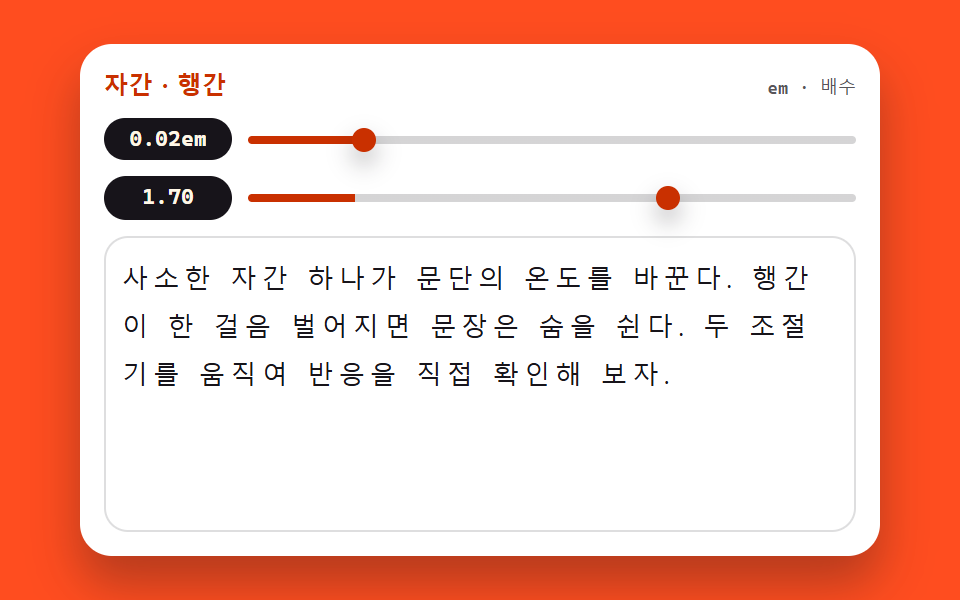
A letter-spacing slider in em and a line-height slider in unitless multiples print their values beside the text — the body-text settings panel of a blog.
<main class="stage">
<section class="st is-demo" id="st" aria-label="Tracking and leading tuner">
  <header class="st__bar">
    <span class="st__name">Tracking · Leading</span>
    <span class="st__hint">em · multiple</span>
  </header>
  <div class="st__ctrl">
    <span class="st__val" id="stTrackVal">0.02em</span>
    <input class="st__range" id="stTrack" type="range" min="-0.04" max="0.3" step="0.01" value="0.02"
           aria-label="Tracking slider">
  </div>
  <div class="st__ctrl">
    <span class="st__val" id="stLeadVal">1.70</span>
    <input class="st__range" id="stLead" type="range" min="1" max="2" step="0.05" value="1.7"
           aria-label="Leading slider">
  </div>
  <div class="st__body">
    <p class="st__text" id="stText">A single point of tracking changes a paragraph's temperature; one step of extra leading and the sentence breathes. Move both knobs and watch it happen.</p>
  </div>
</section>
</main>
@use "../../../../site/static/demo-tokens" as *;
// 자간·행간 조절기 — letter-spacing(em) 과 line-height(단위 없는 배수) 두 손잡이로
// 본문 표본을 직접 움직인다. 값은 textContent 로 글 옆에 즉시 붙는다.
// 이 데모는 layout 속성 자체가 주제라 다른 편의 "transform·opacity 만 움직인다" 원칙에 대한
// 명시적인 예외다 — 미리보기 루프도 두 속성을 키프레임으로 흔든다. 표본 상자를 높이 고정으로
// 두어 행간이 가장 벌어질 때도 무대를 넘지 않게 한다(넘침은 상자 안에서 잘리게).
$duration: $dur-quick;
$easing: $ease-spring;
$color: $subject-orange-deep;
$sans: system-ui, -apple-system, "Segoe UI", "Noto Sans KR", sans-serif;
$mono: ui-monospace, "Cascadia Mono", Consolas, "Liberation Mono", monospace;
@include stage($stage-orange);
.st {
display: flex; flex-direction: column; gap: $sp-2;
box-sizing: border-box; width: min(100%, 400px); padding: $sp-3;
border-radius: $r-card; background: $stage-paper;
box-shadow: $shadow-raised;
}
// ── 제목 줄
.st__bar { display: flex; align-items: baseline; justify-content: space-between; }
.st__name {
color: $subject-orange-deep;
font-family: $sans; font-weight: 800; font-size: 12px; line-height: 1.4; letter-spacing: .02em;
}
.st__hint {
color: rgba($subject-ink, .72);
font-family: $mono; font-weight: 500; font-size: 9px; line-height: 1.4;
}
// ── 조절기 두 줄. 값 배지가 왼쪽에 폭을 고정해 두 슬라이더의 시작이 반듯이 맞는다
.st__ctrl { display: flex; align-items: center; gap: $sp-2; }
.st__val {
flex: 0 0 64px; box-sizing: border-box; text-align: center;
padding: $sp-1 0; border-radius: $r-pill;
background: $subject-ink; color: $subject-cream;
font-family: $mono; font-weight: 700; font-size: 11px; line-height: 1.2;
}
.st__range {
--fill: 17.6%;
flex: 1 1 auto; appearance: none; -webkit-appearance: none;
display: block; height: 20px; margin: 0; background: transparent; cursor: pointer;
}
.st__range::-webkit-slider-runnable-track {
height: 4px; border-radius: $r-pill;
background: linear-gradient(90deg, $color 0 var(--fill), rgba($subject-ink, .18) var(--fill) 100%);
}
.st__range::-webkit-slider-thumb {
-webkit-appearance: none; appearance: none;
width: 12px; height: 12px; margin-top: -4px;
border: 0; border-radius: 50%; background: $color;
box-shadow: $shadow-press;
}
.st__range::-moz-range-track {
height: 4px; border-radius: $r-pill; background: rgba($subject-ink, .18);
}
.st__range::-moz-range-thumb {
width: 12px; height: 12px; border: 0; border-radius: 50%; background: $color;
}
.st__range:focus-visible { outline: 2px solid $color; outline-offset: 4px; }
// ── 본문 표본. 상자 높이를 고정한다 — 행간이 2.0 까지 벌어져도 무대 밖으로 못 나간다
.st__body {
height: 130px; overflow: hidden;
padding: $sp-2; border: 1px solid rgba($subject-ink, .14); border-radius: $r-control;
}
.st__text {
margin: 0; color: $subject-ink;
font-family: $sans; font-weight: 500;
font-size: clamp(10px, 3.2vw, 13px); line-height: 1.7; letter-spacing: 0.02em;
overflow-wrap: break-word;
}
// ── 격자 미리보기 루프 (2초). 두 속성을 같은 주기로 흔든다 —
// 자간이 벌어지며 행이 다시 짜이고 행간이 벌어지며 문단이 숨 쉬는 장면이 한 화면에서 겹친다.
.st.is-demo .st__text {
animation-name: stTrack, stLead;
animation-duration: $dur-loop, $dur-loop;
animation-timing-function: ease-in-out, ease-in-out;
animation-iteration-count: infinite, infinite;
}
@keyframes stTrack {
0% { letter-spacing: -0.02em; }
45% { letter-spacing: 0.24em; }
90%, 100% { letter-spacing: -0.02em; }
}
@keyframes stLead {
0% { line-height: 1.1; }
45% { line-height: 2.0; }
90%, 100% { line-height: 1.1; }
}
// ── 좁은 화면: 표본 상자와 글자를 내린다(올리지 않는다). 루프 폭도 상자에 맞춰 줄인다
@media (max-width: 340px) {
.st { padding: $sp-2; gap: $sp-1; }
.st__name { font-size: 11px; }
.st__val { flex-basis: 52px; font-size: 10px; }
.st__body { height: 78px; padding: $sp-1; }
.st.is-demo .st__text {
animation-name: stTrackN, stLeadN;
}
}
@keyframes stTrackN {
0% { letter-spacing: -0.02em; }
45% { letter-spacing: 0.18em; }
90%, 100% { letter-spacing: -0.02em; }
}
@keyframes stLeadN {
0% { line-height: 1.1; }
45% { line-height: 1.8; }
90%, 100% { line-height: 1.1; }
}
@media (prefers-reduced-motion: reduce) {
.st.is-demo .st__text {
animation: none !important;
letter-spacing: 0.02em !important;
line-height: 1.7 !important;
}
}html, body {
margin: 0;
overflow: hidden;
}
.stage {
box-sizing: border-box;
min-height: 100vh;
display: grid;
place-items: center;
margin: 0;
background: #ff4d1f;
font-family: -apple-system, "Segoe UI", "Noto Sans KR", sans-serif;
padding: clamp(8px, 4vw, 24px);
}
.st {
display: flex;
flex-direction: column;
gap: 8px;
box-sizing: border-box;
width: min(100%, 400px);
padding: 12px;
border-radius: 16px;
background: #ffffff;
box-shadow: 0 14px 24px rgba(23, 20, 26, 0.32);
}
.st__bar {
display: flex;
align-items: baseline;
justify-content: space-between;
}
.st__name {
color: #c93000;
font-family: system-ui, -apple-system, "Segoe UI", "Noto Sans KR", sans-serif;
font-weight: 800;
font-size: 12px;
line-height: 1.4;
letter-spacing: 0.02em;
}
.st__hint {
color: rgba(23, 20, 26, 0.72);
font-family: ui-monospace, "Cascadia Mono", Consolas, "Liberation Mono", monospace;
font-weight: 500;
font-size: 9px;
line-height: 1.4;
}
.st__ctrl {
display: flex;
align-items: center;
gap: 8px;
}
.st__val {
flex: 0 0 64px;
box-sizing: border-box;
text-align: center;
padding: 4px 0;
border-radius: 999px;
background: #17141a;
color: #fff7e6;
font-family: ui-monospace, "Cascadia Mono", Consolas, "Liberation Mono", monospace;
font-weight: 700;
font-size: 11px;
line-height: 1.2;
}
.st__range {
--fill: 17.6%;
flex: 1 1 auto;
appearance: none;
-webkit-appearance: none;
display: block;
height: 20px;
margin: 0;
background: transparent;
cursor: pointer;
}
.st__range::-webkit-slider-runnable-track {
height: 4px;
border-radius: 999px;
background: linear-gradient(90deg, #c93000 0 var(--fill), rgba(23, 20, 26, 0.18) var(--fill) 100%);
}
.st__range::-webkit-slider-thumb {
-webkit-appearance: none;
appearance: none;
width: 12px;
height: 12px;
margin-top: -4px;
border: 0;
border-radius: 50%;
background: #c93000;
box-shadow: 0 6px 12px rgba(23, 20, 26, 0.32);
}
.st__range::-moz-range-track {
height: 4px;
border-radius: 999px;
background: rgba(23, 20, 26, 0.18);
}
.st__range::-moz-range-thumb {
width: 12px;
height: 12px;
border: 0;
border-radius: 50%;
background: #c93000;
}
.st__range:focus-visible {
outline: 2px solid #c93000;
outline-offset: 4px;
}
.st__body {
height: 130px;
overflow: hidden;
padding: 8px;
border: 1px solid rgba(23, 20, 26, 0.14);
border-radius: 12px;
}
.st__text {
margin: 0;
color: #17141a;
font-family: system-ui, -apple-system, "Segoe UI", "Noto Sans KR", sans-serif;
font-weight: 500;
font-size: clamp(10px, 3.2vw, 13px);
line-height: 1.7;
letter-spacing: 0.02em;
overflow-wrap: break-word;
}
.st.is-demo .st__text {
animation-name: stTrack, stLead;
animation-duration: 2s, 2s;
animation-timing-function: ease-in-out, ease-in-out;
animation-iteration-count: infinite, infinite;
}
@keyframes stTrack {
0% {
letter-spacing: -0.02em;
}
45% {
letter-spacing: 0.24em;
}
90%, 100% {
letter-spacing: -0.02em;
}
}
@keyframes stLead {
0% {
line-height: 1.1;
}
45% {
line-height: 2;
}
90%, 100% {
line-height: 1.1;
}
}
@media (max-width: 340px) {
.st {
padding: 8px;
gap: 4px;
}
.st__name {
font-size: 11px;
}
.st__val {
flex-basis: 52px;
font-size: 10px;
}
.st__body {
height: 78px;
padding: 4px;
}
.st.is-demo .st__text {
animation-name: stTrackN, stLeadN;
}
}
@keyframes stTrackN {
0% {
letter-spacing: -0.02em;
}
45% {
letter-spacing: 0.18em;
}
90%, 100% {
letter-spacing: -0.02em;
}
}
@keyframes stLeadN {
0% {
line-height: 1.1;
}
45% {
line-height: 1.8;
}
90%, 100% {
line-height: 1.1;
}
}
@media (prefers-reduced-motion: reduce) {
.st.is-demo .st__text {
animation: none !important;
letter-spacing: 0.02em !important;
line-height: 1.7 !important;
}
}var st = document.getElementById('st');
var text = document.getElementById('stText');
var track = document.getElementById('stTrack');
var lead = document.getElementById('stLead');
var trackVal = document.getElementById('stTrackVal');
var leadVal = document.getElementById('stLeadVal');
// 값은 textContent 로 글자만 즉시 갈아 끼운다 — innerHTML 이 아니라 위조 여지가 없다.
// letter-spacing 은 em 단위, line-height 는 단위 없는 배수로 본문에 바로 닿는다.
track.oninput = function () {
st.classList.remove('is-demo');
var v = Number(track.value).toFixed(2);
text.style.letterSpacing = v + 'em';
track.style.setProperty('--fill', ((track.value + 0.04) / 0.34 * 100) + '%');
trackVal.textContent = v + 'em';
};
lead.oninput = function () {
st.classList.remove('is-demo');
var m = Number(lead.value).toFixed(2);
text.style.lineHeight = m;
lead.style.setProperty('--fill', ((lead.value - 1) / 1 * 100) + '%');
leadVal.textContent = m;
};
track.addEventListener('pointerdown', function () { st.classList.remove('is-demo'); });
lead.addEventListener('pointerdown', function () { st.classList.remove('is-demo'); });// FontSpacingTuner — vanilla 판(run/074/demo/03-font-spacing-tuner/index.html) 의 React 포트.
// letter-spacing(em)·line-height(배수) 두 슬라이더가 본문 표본을 움직이고 값은 글 옆에 즉시 붙는다
// (vanilla 의 textContent 경로 대신 JSX 텍스트 노드로 — 계산식은 같은 글자).
// 미리보기 중에는 keyframes 가 인라인 스타일보다 우선한다(cascade 규칙) — 손이 닿으면 isDemo 를 뗀다.
import { useState } from "react";
import type { CSSProperties } from "react";
import styles from "./FontSpacingTuner.module.scss";
export type FontSpacingTunerProps = {
duration?: number;
easing?: string;
color?: string;
initialTrack?: number;
initialLead?: number;
};
type Vars = CSSProperties & { "--duration"?: string; "--easing"?: string; "--color"?: string };
// 이벤트 핸들러 파라미터는 로컬 타입으로 — ambient 타입이 React 제네릭을 안 준다
type RangeEvt = { target: { value: string } };
const TITLE = "자간 · 행간";
const HINT = "em · 배수";
const TRACK_ARIA = "자간 슬라이더";
const LEAD_ARIA = "행간 슬라이더";
const BODY_TEXT =
"사소한 자간 하나가 문단의 온도를 바꾼다. 행간이 한 걸음 벌어지면 문장은 숨을 쉰다. 두 조절기를 움직여 반응을 직접 확인해 보자.";
export default function FontSpacingTuner(props: FontSpacingTunerProps) {
const duration = props.duration ?? 220;
const easing = props.easing ?? "cubic-bezier(.2, .8, .2, 1)";
const color = props.color ?? "#c93000";
const [track, setTrack] = useState<number>(props.initialTrack ?? 0.02);
const [lead, setLead] = useState<number>(props.initialLead ?? 1.7);
const [preview, setPreview] = useState<boolean>(true);
const vars: Vars = { "--duration": duration + "ms", "--easing": easing, "--color": color };
const trackFill = (((track + 0.04) / 0.34) * 100).toFixed(1) + "%";
const leadFill = (((lead - 1) / 1) * 100).toFixed(1) + "%";
return (
<main className={styles.stage}>
<section className={styles.root + (preview ? " " + styles.isDemo : "")} style={vars} aria-label="자간·행간 조절기">
<header className={styles.bar}>
<span className={styles.name}>{TITLE}</span>
<span className={styles.hint}>{HINT}</span>
</header>
<div className={styles.ctrl}>
<span className={styles.val}>{track.toFixed(2)}em</span>
<input
className={styles.range}
type="range"
min="-0.04"
max="0.3"
step="0.01"
value={track}
aria-label={TRACK_ARIA}
style={{ "--fill": trackFill } as CSSProperties}
onPointerDown={() => setPreview(false)}
onInput={(e: RangeEvt) => {
setPreview(false);
setTrack(Number(e.target.value));
}}
/>
</div>
<div className={styles.ctrl}>
<span className={styles.val}>{lead.toFixed(2)}</span>
<input
className={styles.range}
type="range"
min="1"
max="2"
step="0.05"
value={lead}
aria-label={LEAD_ARIA}
style={{ "--fill": leadFill } as CSSProperties}
onPointerDown={() => setPreview(false)}
onInput={(e: RangeEvt) => {
setPreview(false);
setLead(Number(e.target.value));
}}
/>
</div>
<div className={styles.body}>
<p className={styles.text} style={{ letterSpacing: track.toFixed(2) + "em", lineHeight: String(lead) }}>
{BODY_TEXT}
</p>
</div>
</section>
</main>
);
}03 · Tracking and leading tuner — Measured area 13.345% · moving frames 22/23Original by GODRICH · SCSS and React ship in the zip · See the password
em tracking against unitless leading
// Values go in through textContent only — no innerHTML, nothing to forge.
// letter-spacing reaches the text in em, line-height as a unitless multiple.
track.oninput = function () {
  st.classList.remove('is-demo');
  var v = Number(track.value).toFixed(2);
  text.style.letterSpacing = v + 'em';
  track.style.setProperty('--fill', ((track.value + 0.04) / 0.34 * 100) + '%');
  trackVal.textContent = v + 'em';
};
lead.oninput = function () {
  st.classList.remove('is-demo');
  var m = Number(lead.value).toFixed(2);
  text.style.lineHeight = m;
  lead.style.setProperty('--fill', ((lead.value - 1) / 1 * 100) + '%');
  leadVal.textContent = m;
};
On the 13px sample, tracking of 0.3em computed to 3.9px and -0.04em to -0.52px, while leading of 2.0 spread the same lines to 26px with every step readable in the badges.
A fixed box for a breathing paragraph
// The sample box keeps a fixed height — even leading of 2.0 stays inside the stage
.st__body {
  height: 130px; overflow: hidden;
  padding: $sp-2; border: 1px solid rgba($subject-ink, .14); border-radius: $r-control;
}
.st__text {
  margin: 0; color: $subject-ink;
  font-family: $sans; font-weight: 500;
  font-size: clamp(10px, 3.2vw, 13px); line-height: 1.7; letter-spacing: 0.02em;
  overflow-wrap: break-word;
}
With the box pinned at 130px and overflow hidden, the paragraph breathes inside the stage at leading 2.0 instead of pushing the panel taller, and pressing Home on the leading slider snaps the lines back to a computed 13px.
04Paragraph rhythm preview
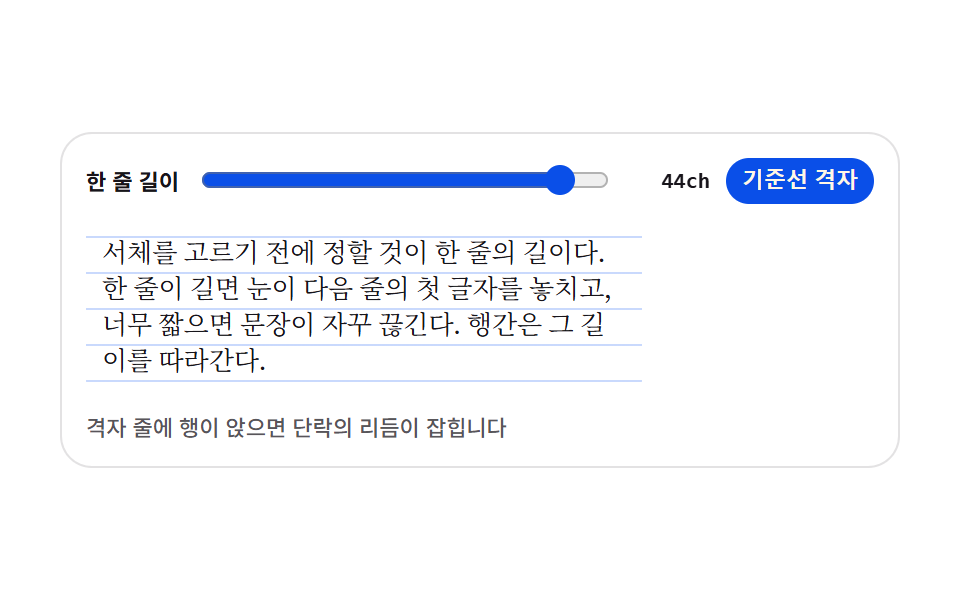
Set the measure with a ch slider, switch on the baseline grid, and watch body copy land on grid rows — a news or magazine body preview.
<main class="stage">
<div class="tr is-demo" id="tr">
  <div class="tr__bar">
    <span class="tr__label">Line length</span>
    <input class="tr__range" id="measure" type="range" min="24" max="46" step="1" value="44" aria-label="Line length">
    <span class="tr__val" id="val">44ch</span>
    <button class="tr__toggle" id="grid" type="button" aria-pressed="true">Baseline grid</button>
  </div>
  <div class="tr__sheet is-grid" id="sheet">
    <p class="tr__p">Before choosing a typeface, settle the line length. Too long and the eye loses the first word of the next line; too short and the sentence keeps breaking. Leading follows that length.</p>
  </div>
  <p class="tr__note">When every line lands on a grid row, the paragraph finds its rhythm</p>
</div>
</main>
@use "../../../../site/static/demo-tokens" as *;
// 단락 리듬 프리뷰 — 한 줄 길이를 ch(그 서체의 0 글자 폭)로 정하고, 바탕에 기준선 격자를 깔아
// 행이 격자 줄에 앉는지 본다. 격자는 이미지가 아니라 repeating-linear-gradient 한 줄이다.
// 행간과 격자 간격은 같은 변수($lh)에서 나온다 — 둘이 어긋나면 격자가 뜻을 잃는다.
// 미리보기(.is-demo)는 한 줄 길이를 44ch ↔ 28ch 로 오가며 글이 다시 흐르는 모습을 보여준다.
$duration: $dur-base;
$easing: $ease-spring;
$color: $subject-blue-deep;
$serif: ui-serif, Georgia, "Times New Roman", "Noto Serif KR", serif;
$ink-soft: rgba($subject-ink, .72);
$lh: 18px;
@include stage($stage-paper);
// 무대의 자동 트랙은 항목의 max-content(표본 문장 44ch)만큼 벌어진다 — 320px 에서 트랙이 화면보다
// 커지며 조용히 넘친다(219 계열). 트랙을 minmax(0,1fr) 로 못박아 항목을 무대 안에 가둔다.
.stage { grid-template-columns: minmax(0, 1fr); }
.tr {
display: flex; flex-direction: column; gap: $sp-2;
box-sizing: border-box; width: 100%; max-width: 420px;
padding: $sp-3; border: 1px solid rgba($subject-ink, .12); border-radius: $r-card;
background: $stage-paper;
}
// ── 손잡이 줄
.tr__bar { display: flex; align-items: center; gap: $sp-2; }
.tr__label {
flex: 0 0 auto; color: $subject-ink;
font-weight: 700; font-size: 11px; line-height: 1.4;
}
.tr__range { flex: 1 1 auto; min-width: 0; accent-color: $color; }
.tr__val {
flex: 0 0 auto; min-width: 40px; color: $subject-ink; text-align: right;
font-family: ui-monospace, Consolas, monospace; font-weight: 700; font-size: 11px; line-height: 1.4;
}
.tr__toggle {
flex: 0 0 auto; padding: $sp-1 $sp-2; border: 0; border-radius: $r-pill;
background: $color; color: $subject-cream; cursor: pointer;
font-weight: 700; font-size: 11px; line-height: 1.4;
}
.tr__toggle[aria-pressed="false"] { background: rgba($subject-ink, .12); color: $subject-ink; }
.tr__toggle:focus-visible { outline: 2px solid $subject-ink; outline-offset: 2px; }
// ── 본문 판. 폭은 ch 배수라 서체가 바뀌면 같은 44ch 도 픽셀 폭이 달라진다
.tr__sheet {
--measure: 44;
box-sizing: border-box; width: calc(var(--measure) * 1ch); max-width: 100%;
padding: $sp-2; border-radius: $r-sm;
}
// 격자 줄은 행간과 같은 $lh 간격으로 반복한다
.tr__sheet.is-grid {
background-image: repeating-linear-gradient(
to bottom,
rgba($subject-blue, .26) 0, rgba($subject-blue, .26) 1px,
transparent 1px, transparent $lh
);
background-position: 0 $sp-2;
}
.tr__p {
margin: 0; color: $subject-ink;
font-family: $serif; font-weight: 400; font-size: 13px; line-height: $lh;
text-wrap: pretty;
}
.tr__note {
margin: 0; color: $ink-soft;
font-weight: 500; font-size: 11px; line-height: 1.4;
}
// ── 격자 미리보기 루프 (2초)
// 폭이 줄었다 늘며 글이 다시 흐른다. 글자가 움직이는 것이라 반투명 유령 프레임이 생기지 않는다
.tr.is-demo .tr__sheet {
animation-name: trMeasure; animation-duration: $dur-loop;
animation-timing-function: $easing; animation-iteration-count: infinite;
animation-fill-mode: both;
}
.tr.is-demo .tr__val {
animation-name: trVal; animation-duration: $dur-loop;
animation-timing-function: steps(1, end); animation-iteration-count: infinite;
animation-fill-mode: both;
}
@keyframes trMeasure {
0%, 8% { width: calc(44 * 1ch); }
46%, 54% { width: calc(28 * 1ch); }
92%, 100% { width: calc(44 * 1ch); }
}
// 숫자가 폭과 따로 놀지 않게 값 칸은 폭이 가장 좁아지는 구간에만 흐려 둔다
@keyframes trVal {
0%, 30% { opacity: 1; }
32%, 68% { opacity: .35; }
70%, 100% { opacity: 1; }
}
// ── 좁은 화면: 글자와 여백을 줄여 무대 안에 들어오게 한다
@media (max-width: 340px) {
.tr { gap: $sp-1; padding: $sp-2; }
.tr__sheet { padding: $sp-1; }
.tr__p { font-size: 12px; line-height: 16px; }
.tr__sheet.is-grid {
background-image: repeating-linear-gradient(
to bottom,
rgba($subject-blue, .26) 0, rgba($subject-blue, .26) 1px,
transparent 1px, transparent 16px
);
background-position: 0 $sp-1;
}
.tr__label, .tr__val, .tr__toggle, .tr__note { font-size: 10px; }
}
@media (prefers-reduced-motion: reduce) {
.tr.is-demo .tr__sheet,
.tr.is-demo .tr__val {
animation: none !important;
width: calc(44 * 1ch) !important;
opacity: 1 !important;
}
}html, body {
margin: 0;
overflow: hidden;
}
.stage {
box-sizing: border-box;
min-height: 100vh;
display: grid;
place-items: center;
margin: 0;
background: #ffffff;
font-family: -apple-system, "Segoe UI", "Noto Sans KR", sans-serif;
padding: clamp(8px, 4vw, 24px);
}
.stage {
grid-template-columns: minmax(0, 1fr);
}
.tr {
display: flex;
flex-direction: column;
gap: 8px;
box-sizing: border-box;
width: 100%;
max-width: 420px;
padding: 12px;
border: 1px solid rgba(23, 20, 26, 0.12);
border-radius: 16px;
background: #ffffff;
}
.tr__bar {
display: flex;
align-items: center;
gap: 8px;
}
.tr__label {
flex: 0 0 auto;
color: #17141a;
font-weight: 700;
font-size: 11px;
line-height: 1.4;
}
.tr__range {
flex: 1 1 auto;
min-width: 0;
accent-color: #0a4fe8;
}
.tr__val {
flex: 0 0 auto;
min-width: 40px;
color: #17141a;
text-align: right;
font-family: ui-monospace, Consolas, monospace;
font-weight: 700;
font-size: 11px;
line-height: 1.4;
}
.tr__toggle {
flex: 0 0 auto;
padding: 4px 8px;
border: 0;
border-radius: 999px;
background: #0a4fe8;
color: #fff7e6;
cursor: pointer;
font-weight: 700;
font-size: 11px;
line-height: 1.4;
}
.tr__toggle[aria-pressed=false] {
background: rgba(23, 20, 26, 0.12);
color: #17141a;
}
.tr__toggle:focus-visible {
outline: 2px solid #17141a;
outline-offset: 2px;
}
.tr__sheet {
--measure: 44;
box-sizing: border-box;
width: calc(var(--measure) * 1ch);
max-width: 100%;
padding: 8px;
border-radius: 8px;
}
.tr__sheet.is-grid {
background-image: repeating-linear-gradient(to bottom, rgba(47, 109, 246, 0.26) 0, rgba(47, 109, 246, 0.26) 1px, transparent 1px, transparent 18px);
background-position: 0 8px;
}
.tr__p {
margin: 0;
color: #17141a;
font-family: ui-serif, Georgia, "Times New Roman", "Noto Serif KR", serif;
font-weight: 400;
font-size: 13px;
line-height: 18px;
text-wrap: pretty;
}
.tr__note {
margin: 0;
color: rgba(23, 20, 26, 0.72);
font-weight: 500;
font-size: 11px;
line-height: 1.4;
}
.tr.is-demo .tr__sheet {
animation-name: trMeasure;
animation-duration: 2s;
animation-timing-function: cubic-bezier(0.2, 0.8, 0.2, 1);
animation-iteration-count: infinite;
animation-fill-mode: both;
}
.tr.is-demo .tr__val {
animation-name: trVal;
animation-duration: 2s;
animation-timing-function: steps(1, end);
animation-iteration-count: infinite;
animation-fill-mode: both;
}
@keyframes trMeasure {
0%, 8% {
width: 44ch;
}
46%, 54% {
width: 28ch;
}
92%, 100% {
width: 44ch;
}
}
@keyframes trVal {
0%, 30% {
opacity: 1;
}
32%, 68% {
opacity: 0.35;
}
70%, 100% {
opacity: 1;
}
}
@media (max-width: 340px) {
.tr {
gap: 4px;
padding: 8px;
}
.tr__sheet {
padding: 4px;
}
.tr__p {
font-size: 12px;
line-height: 16px;
}
.tr__sheet.is-grid {
background-image: repeating-linear-gradient(to bottom, rgba(47, 109, 246, 0.26) 0, rgba(47, 109, 246, 0.26) 1px, transparent 1px, transparent 16px);
background-position: 0 4px;
}
.tr__label, .tr__val, .tr__toggle, .tr__note {
font-size: 10px;
}
}
@media (prefers-reduced-motion: reduce) {
.tr.is-demo .tr__sheet,
.tr.is-demo .tr__val {
animation: none !important;
width: 44ch !important;
opacity: 1 !important;
}
}var tr = document.getElementById('tr');
var range = document.getElementById('measure');
var val = document.getElementById('val');
var sheet = document.getElementById('sheet');
var grid = document.getElementById('grid');
// 실사용 경로 — 슬라이더 값은 ch 배수로 그대로 들어간다. 미리보기 루프는 같은 값을 CSS 키프레임으로 흔든다
function applyMeasure() {
sheet.style.setProperty('--measure', range.value);
val.textContent = range.value + 'ch';
}
function stopLoop() { tr.classList.remove('is-demo'); }
range.addEventListener('input', function () { stopLoop(); applyMeasure(); });
grid.addEventListener('click', function () {
stopLoop();
var on = grid.getAttribute('aria-pressed') === 'true';
grid.setAttribute('aria-pressed', on ? 'false' : 'true');
sheet.classList.toggle('is-grid', !on);
});
applyMeasure();// TextRhythmPreview — vanilla 판(run/074/demo/04-text-rhythm-preview/index.html) 의 React 포트.
// 한 줄 길이를 ch 슬라이더로 정하고 기준선 격자를 토글한다. 슬라이더 값은 상태로, 판 폭은 --measure 로 흀러간다.
import { useState } from "react";
import type { ChangeEvent, FC } from "react";
import styles from "./TextRhythmPreview.module.scss";
export type TextRhythmPreviewProps = {
duration?: number;
easing?: string;
color?: string;
initialMeasure?: number;
initialGrid?: boolean;
};
const NOTE = "격자 줄에 행이 앉으면 단락의 리듬이 잡힙니다";
const SAMPLE =
"서체를 고르기 전에 정할 것이 한 줄의 길이다. 한 줄이 길면 눈이 다음 줄의 첫 글자를 놓치고, 너무 짧으면 문장이 자꾸 끊긴다. 행간은 그 길이를 따라간다.";
const TextRhythmPreview: FC<TextRhythmPreviewProps> = ({
duration,
easing,
color,
initialMeasure = 44,
initialGrid = true,
}) => {
const [measure, setMeasure] = useState(String(initialMeasure));
const [gridOn, setGridOn] = useState(initialGrid);
const [demo, setDemo] = useState(true);
const cls = [styles.tr, demo ? styles["is-demo"] : "", gridOn ? styles["is-grid"] : ""]
.filter(Boolean).join(" ");
const vars = {
"--measure": measure,
"--duration": duration != null ? duration + "ms" : undefined,
"--easing": easing,
"--color": color,
} as never;
return (
<div className={cls} style={vars}>
<div className={styles.tr__bar}>
<span className={styles.tr__label}>한 줄 길이</span>
<input
className={styles.tr__range}
type="range"
min="24"
max="46"
step="1"
value={measure}
aria-label="한 줄 길이"
onInput={() => setDemo(false)}
onChange={(e: ChangeEvent<HTMLInputElement>) => setMeasure(e.currentTarget.value)}
/>
<span className={styles.tr__val}>{measure}ch</span>
<button
type="button"
className={styles.tr__toggle}
aria-pressed={gridOn ? "true" : "false"}
onClick={() => {
setDemo(false);
setGridOn((g) => !g);
}}
>
기준선 격자
</button>
</div>
<div
className={[styles.tr__sheet, gridOn ? styles["is-grid"] : ""].filter(Boolean).join(" ")}
data-sheet
>
<p className={styles.tr__p}>{SAMPLE}</p>
</div>
<p className={styles.tr__note}>{NOTE}</p>
</div>
);
};
export default TextRhythmPreview;04 · Paragraph rhythm preview — Measured area 17.881% · moving frames 17/23Original by GODRICH · SCSS and React ship in the zip · See the password
A measure in ch on a baseline grid
// The sheet's width is a ch multiple — swap the typeface and the same 44ch is a different pixel width
.tr__sheet {
  --measure: 44;
  box-sizing: border-box; width: calc(var(--measure) * 1ch); max-width: 100%;
  padding: $sp-2; border-radius: $r-sm;
}
// Grid rows repeat at the same $lh interval as the line height
.tr__sheet.is-grid {
  background-image: repeating-linear-gradient(
    to bottom,
    rgba($subject-blue, .26) 0, rgba($subject-blue, .26) 1px,
    transparent 1px, transparent $lh
  );
  background-position: 0 $sp-2;
}
.tr__p {
  margin: 0; color: $subject-ink;
  font-family: $serif; font-weight: 400; font-size: 13px; line-height: $lh;
  text-wrap: pretty;
}
Measured on the serif sample, 44ch came out to 326.6px wide, and pulling the slider to 28ch shrank the sheet to 241.5px, with every grid row one $lh tall and text-wrap: pretty tidying the orphan word at the paragraph's end.
One toggle swaps a background
// The real-use path — the slider value goes straight in as a ch multiple.
// The preview loop shakes the same value with CSS keyframes instead.
function applyMeasure() {
  sheet.style.setProperty('--measure', range.value);
  val.textContent = range.value + 'ch';
}
function stopLoop() { tr.classList.remove('is-demo'); }
range.addEventListener('input', function () { stopLoop(); applyMeasure(); });
grid.addEventListener('click', function () {
  stopLoop();
  var on = grid.getAttribute('aria-pressed') === 'true';
  grid.setAttribute('aria-pressed', on ? 'false' : 'true');
  sheet.classList.toggle('is-grid', !on);
});
applyMeasure();
The grid toggle is one background-image and nothing more: switched on, it computed to a repeating-linear-gradient; switched off, to none, with aria-pressed carrying the state.
05Heading scale ladder
Pick a ratio of 1.125, 1.25, or 1.333, and every rung of the ladder recalculates with calc() — the heading system page of a style guide.
<main class="stage">
<div class="ts is-demo is-b" id="ts">
  <div class="ts__bar" role="group" aria-label="Pick a ratio">
    <button class="ts__pick" type="button" data-key="a" data-ratio="1.125" aria-pressed="false">1.125</button>
    <button class="ts__pick" type="button" data-key="b" data-ratio="1.25" aria-pressed="true">1.25</button>
    <button class="ts__pick" type="button" data-key="c" data-ratio="1.333" aria-pressed="false">1.333</button>
  </div>
  <ul class="ts__ladder" id="ladder">
    <li class="ts__rung ts__rung--5"><span class="ts__glyph">Fifth rung</span><span class="ts__px" data-step="4"></span></li>
    <li class="ts__rung ts__rung--4"><span class="ts__glyph">Fourth rung</span><span class="ts__px" data-step="3"></span></li>
    <li class="ts__rung ts__rung--3"><span class="ts__glyph">Third rung</span><span class="ts__px" data-step="2"></span></li>
    <li class="ts__rung ts__rung--2"><span class="ts__glyph">Second rung</span><span class="ts__px" data-step="1"></span></li>
    <li class="ts__rung ts__rung--1"><span class="ts__glyph">Body rung</span><span class="ts__px" data-step="0"></span></li>
  </ul>
  <span class="ts__beam" aria-hidden="true"></span>
</div>
</main>
@use "../../../../site/static/demo-tokens" as *;
// 제목 스케일 사다리 — 본문 한 단(11px)에서 비율을 거듭 곱해 단을 쌓는다.
// 크기는 CSS 가 calc() 사슬로 계산하고(--ratio 하나만 바꾸면 다섯 단이 함께 움직인다),
// 화면의 px 숫자는 같은 식을 JS 가 toFixed 로 적어 둔 세 벌 중 지금 비율의 것만 보인다.
// 미리보기(.is-demo)는 1.125 → 1.25 → 1.333 을 컷으로 돌고, 빛줄기 하나가 사다리를 훑어 내려간다.
$duration: $dur-base;
$easing: $ease-spring;
$color: $subject-blue-light;
$sans: system-ui, -apple-system, "Segoe UI", "Noto Sans KR", sans-serif;
$mono: ui-monospace, Consolas, "Liberation Mono", monospace;
$cream-soft: rgba($subject-cream, .72);
$base: 11;
// 눌린 칩 면색. 값은 $subject-blue-deep (#7187b9) — 크림 글자와 5.98:1 로 AA 통과.
// 지역 이름으로 받는 이유는 BD25 정적검사가 변수명을 부분문자열로 훑어
// `$subject-blue-deep` 을 금지조합의 `$subject-blue` 로 오탐하기 때문이다.
$pick-on: $subject-blue-deep;
@include stage($stage-ink);
// 비율은 숫자로 등록해야 애니메이션이 보간·컷을 할 수 있다
@property --ratio {
syntax: "<number>";
inherits: true;
initial-value: 1.25;
}
.ts {
position: relative;
display: flex; flex-direction: column; gap: $sp-2;
box-sizing: border-box; width: min(100%, 400px);
padding: $sp-3; border: 1px solid rgba($subject-cream, .16); border-radius: $r-card;
background: rgba($subject-cream, .05); overflow: hidden;
}
// ── 비율 고르기
.ts__bar { display: flex; gap: $sp-2; }
.ts__pick {
flex: 0 0 auto; padding: $sp-1 $sp-2; border: 0; border-radius: $r-pill;
background: rgba($subject-cream, .12); color: $subject-cream; cursor: pointer;
font-family: $mono; font-weight: 700; font-size: 11px; line-height: 1.4;
}
.ts__pick[aria-pressed="true"] { background: $pick-on; color: $subject-cream; } // $pick-on = 눌린 칩 면색 (BD25 정적검사 오탐 회피용 지역이름, 아래 선언 참조)
.ts__pick:focus-visible { outline: 2px solid $stage-yellow; outline-offset: 2px; }
// ── 사다리. 단마다 크기가 비율의 거듭곱이다
.ts__ladder {
--base: #{$base};
--ratio: 1.25;
display: flex; flex-direction: column; gap: $sp-1;
margin: 0; padding: 0; list-style: none;
}
.ts__rung { display: flex; align-items: baseline; gap: $sp-2; }
.ts__glyph {
flex: 1 1 auto; min-width: 0; color: $subject-cream;
font-family: $sans; font-weight: 700; line-height: 1.15;
white-space: nowrap; overflow: hidden; text-overflow: ellipsis;
}
.ts__rung--1 .ts__glyph { font-size: calc(var(--base) * 1px); }
.ts__rung--2 .ts__glyph { font-size: calc(var(--base) * var(--ratio) * 1px); }
.ts__rung--3 .ts__glyph { font-size: calc(var(--base) * var(--ratio) * var(--ratio) * 1px); }
.ts__rung--4 .ts__glyph { font-size: calc(var(--base) * var(--ratio) * var(--ratio) * var(--ratio) * 1px); }
.ts__rung--5 .ts__glyph { font-size: calc(var(--base) * var(--ratio) * var(--ratio) * var(--ratio) * var(--ratio) * 1px); }
// 세 비율의 숫자를 겹쳐 두고 지금 것만 보인다 — 자리는 늘 같은 폭이라 사다리가 흔들리지 않는다
.ts__px {
position: relative; flex: 0 0 auto; width: 48px; height: 15px;
}
.ts__v {
position: absolute; top: 0; right: 0; opacity: 0;
color: $color; font-family: $mono; font-weight: 700; font-size: 11px; line-height: 15px;
}
.ts.is-a .ts__v--a, .ts.is-b .ts__v--b, .ts.is-c .ts__v--c { opacity: 1; }
// 사다리를 훑어 내려가는 빛줄기. 장식이라 정적 경로에서는 보이지 않는다
.ts__beam {
position: absolute; left: 0; right: 0; top: 0; height: 28px;
background: linear-gradient(180deg, rgba($subject-blue-light, 0), rgba($subject-blue-light, .22), rgba($subject-blue-light, 0));
opacity: 0; pointer-events: none;
}
// ── 격자 미리보기 루프 (2초)
// 비율은 세 구간 컷(steps(1, end))이라 중간 프레임에 어정쩡한 크기가 남지 않는다.
// 숫자 세 벌도 같은 시각에 컷으로 바뀌어 크기와 라벨이 늘 같은 비율을 가리킨다.
.ts.is-demo .ts__ladder {
animation-name: tsRatio; animation-duration: $dur-loop;
animation-timing-function: steps(1, end); animation-iteration-count: infinite;
animation-fill-mode: both;
}
.ts.is-demo .ts__v--a { animation-name: tsShowA; }
.ts.is-demo .ts__v--b { animation-name: tsShowB; }
.ts.is-demo .ts__v--c { animation-name: tsShowC; }
.ts.is-demo .ts__v {
animation-duration: $dur-loop; animation-timing-function: steps(1, end);
animation-iteration-count: infinite; animation-fill-mode: both;
}
.ts.is-demo .ts__pick:nth-child(1) { animation-name: tsPickA; }
.ts.is-demo .ts__pick:nth-child(2) { animation-name: tsPickB; }
.ts.is-demo .ts__pick:nth-child(3) { animation-name: tsPickC; }
.ts.is-demo .ts__pick {
animation-duration: $dur-loop; animation-timing-function: steps(1, end);
animation-iteration-count: infinite; animation-fill-mode: both;
}
.ts.is-demo .ts__beam {
animation-name: tsBeam; animation-duration: $dur-loop;
animation-timing-function: linear; animation-iteration-count: infinite;
animation-fill-mode: both;
}
@keyframes tsRatio {
0% { --ratio: 1.125; }
34% { --ratio: 1.25; }
67%, 100% { --ratio: 1.333; }
}
@keyframes tsShowA { 0% { opacity: 1; } 34%, 100% { opacity: 0; } }
@keyframes tsShowB { 0% { opacity: 0; } 34% { opacity: 1; } 67%, 100% { opacity: 0; } }
@keyframes tsShowC { 0% { opacity: 0; } 67%, 100% { opacity: 1; } }
// 눌린 칩은 색으로 표시한다 — 칩을 지우면 무엇을 고를 수 있는지가 사라진다
@keyframes tsPickA {
0% { background-color: $subject-blue-deep; }
34%, 100% { background-color: rgba($subject-cream, .12); }
}
@keyframes tsPickB {
0% { background-color: rgba($subject-cream, .12); }
34% { background-color: $subject-blue-deep; }
67%, 100% { background-color: rgba($subject-cream, .12); }
}
@keyframes tsPickC {
0% { background-color: rgba($subject-cream, .12); }
67%, 100% { background-color: $subject-blue-deep; }
}
@keyframes tsBeam {
0% { opacity: 0; transform: translateY(0); }
6% { opacity: 1; transform: translateY(0); }
86% { opacity: 1; transform: translateY(260px); }
92%, 100% { opacity: 0; transform: translateY(260px); }
}
// ── 좁은 화면: 사다리의 바닥 단과 여백을 줄여 무대 안에 들어오게 한다
@media (max-width: 340px) {
.ts { gap: $sp-1; padding: $sp-2; }
.ts__ladder { --base: 9; }
.ts__pick { font-size: 10px; }
.ts__px { width: 40px; }
.ts__v { font-size: 10px; }
}
@media (prefers-reduced-motion: reduce) {
.ts.is-demo .ts__ladder,
.ts.is-demo .ts__v,
.ts.is-demo .ts__pick,
.ts.is-demo .ts__beam {
animation: none !important;
}
.ts.is-demo .ts__beam { opacity: 0 !important; }
.ts.is-demo.is-b .ts__v--b { opacity: 1 !important; }
}html, body {
margin: 0;
overflow: hidden;
}
.stage {
box-sizing: border-box;
min-height: 100vh;
display: grid;
place-items: center;
margin: 0;
background: #17141a;
font-family: -apple-system, "Segoe UI", "Noto Sans KR", sans-serif;
padding: clamp(8px, 4vw, 24px);
}
@property --ratio {
syntax: "<number>";
inherits: true;
initial-value: 1.25;
}
.ts {
position: relative;
display: flex;
flex-direction: column;
gap: 8px;
box-sizing: border-box;
width: min(100%, 400px);
padding: 12px;
border: 1px solid rgba(255, 247, 230, 0.16);
border-radius: 16px;
background: rgba(255, 247, 230, 0.05);
overflow: hidden;
}
.ts__bar {
display: flex;
gap: 8px;
}
.ts__pick {
flex: 0 0 auto;
padding: 4px 8px;
border: 0;
border-radius: 999px;
background: rgba(255, 247, 230, 0.12);
color: #fff7e6;
cursor: pointer;
font-family: ui-monospace, Consolas, "Liberation Mono", monospace;
font-weight: 700;
font-size: 11px;
line-height: 1.4;
}
.ts__pick[aria-pressed=true] {
background: #0a4fe8;
color: #fff7e6;
}
.ts__pick:focus-visible {
outline: 2px solid #ffd23f;
outline-offset: 2px;
}
.ts__ladder {
--base: 11;
--ratio: 1.25;
display: flex;
flex-direction: column;
gap: 4px;
margin: 0;
padding: 0;
list-style: none;
}
.ts__rung {
display: flex;
align-items: baseline;
gap: 8px;
}
.ts__glyph {
flex: 1 1 auto;
min-width: 0;
color: #fff7e6;
font-family: system-ui, -apple-system, "Segoe UI", "Noto Sans KR", sans-serif;
font-weight: 700;
line-height: 1.15;
white-space: nowrap;
overflow: hidden;
text-overflow: ellipsis;
}
.ts__rung--1 .ts__glyph {
font-size: calc(var(--base) * 1px);
}
.ts__rung--2 .ts__glyph {
font-size: calc(var(--base) * var(--ratio) * 1px);
}
.ts__rung--3 .ts__glyph {
font-size: calc(var(--base) * var(--ratio) * var(--ratio) * 1px);
}
.ts__rung--4 .ts__glyph {
font-size: calc(var(--base) * var(--ratio) * var(--ratio) * var(--ratio) * 1px);
}
.ts__rung--5 .ts__glyph {
font-size: calc(var(--base) * var(--ratio) * var(--ratio) * var(--ratio) * var(--ratio) * 1px);
}
.ts__px {
position: relative;
flex: 0 0 auto;
width: 48px;
height: 15px;
}
.ts__v {
position: absolute;
top: 0;
right: 0;
opacity: 0;
color: #5b8cf8;
font-family: ui-monospace, Consolas, "Liberation Mono", monospace;
font-weight: 700;
font-size: 11px;
line-height: 15px;
}
.ts.is-a .ts__v--a, .ts.is-b .ts__v--b, .ts.is-c .ts__v--c {
opacity: 1;
}
.ts__beam {
position: absolute;
left: 0;
right: 0;
top: 0;
height: 28px;
background: linear-gradient(180deg, rgba(91, 140, 248, 0), rgba(91, 140, 248, 0.22), rgba(91, 140, 248, 0));
opacity: 0;
pointer-events: none;
}
.ts.is-demo .ts__ladder {
animation-name: tsRatio;
animation-duration: 2s;
animation-timing-function: steps(1, end);
animation-iteration-count: infinite;
animation-fill-mode: both;
}
.ts.is-demo .ts__v--a {
animation-name: tsShowA;
}
.ts.is-demo .ts__v--b {
animation-name: tsShowB;
}
.ts.is-demo .ts__v--c {
animation-name: tsShowC;
}
.ts.is-demo .ts__v {
animation-duration: 2s;
animation-timing-function: steps(1, end);
animation-iteration-count: infinite;
animation-fill-mode: both;
}
.ts.is-demo .ts__pick:nth-child(1) {
animation-name: tsPickA;
}
.ts.is-demo .ts__pick:nth-child(2) {
animation-name: tsPickB;
}
.ts.is-demo .ts__pick:nth-child(3) {
animation-name: tsPickC;
}
.ts.is-demo .ts__pick {
animation-duration: 2s;
animation-timing-function: steps(1, end);
animation-iteration-count: infinite;
animation-fill-mode: both;
}
.ts.is-demo .ts__beam {
animation-name: tsBeam;
animation-duration: 2s;
animation-timing-function: linear;
animation-iteration-count: infinite;
animation-fill-mode: both;
}
@keyframes tsRatio {
0% {
--ratio: 1.125;
}
34% {
--ratio: 1.25;
}
67%, 100% {
--ratio: 1.333;
}
}
@keyframes tsShowA {
0% {
opacity: 1;
}
34%, 100% {
opacity: 0;
}
}
@keyframes tsShowB {
0% {
opacity: 0;
}
34% {
opacity: 1;
}
67%, 100% {
opacity: 0;
}
}
@keyframes tsShowC {
0% {
opacity: 0;
}
67%, 100% {
opacity: 1;
}
}
@keyframes tsPickA {
0% {
background-color: #0a4fe8;
}
34%, 100% {
background-color: rgba(255, 247, 230, 0.12);
}
}
@keyframes tsPickB {
0% {
background-color: rgba(255, 247, 230, 0.12);
}
34% {
background-color: #0a4fe8;
}
67%, 100% {
background-color: rgba(255, 247, 230, 0.12);
}
}
@keyframes tsPickC {
0% {
background-color: rgba(255, 247, 230, 0.12);
}
67%, 100% {
background-color: #0a4fe8;
}
}
@keyframes tsBeam {
0% {
opacity: 0;
transform: translateY(0);
}
6% {
opacity: 1;
transform: translateY(0);
}
86% {
opacity: 1;
transform: translateY(260px);
}
92%, 100% {
opacity: 0;
transform: translateY(260px);
}
}
@media (max-width: 340px) {
.ts {
gap: 4px;
padding: 8px;
}
.ts__ladder {
--base: 9;
}
.ts__pick {
font-size: 10px;
}
.ts__px {
width: 40px;
}
.ts__v {
font-size: 10px;
}
}
@media (prefers-reduced-motion: reduce) {
.ts.is-demo .ts__ladder,
.ts.is-demo .ts__v,
.ts.is-demo .ts__pick,
.ts.is-demo .ts__beam {
animation: none !important;
}
.ts.is-demo .ts__beam {
opacity: 0 !important;
}
.ts.is-demo.is-b .ts__v--b {
opacity: 1 !important;
}
}var ts = document.getElementById('ts');
var ladder = document.getElementById('ladder');
var picks = ts.querySelectorAll('.ts__pick');
var boxes = ts.querySelectorAll('.ts__px');
var BASE = 11;
var RATIOS = { a: 1.125, b: 1.25, c: 1.333 };
// 단의 크기는 CSS 가 calc() 사슬로 계산한다. 라벨 숫자는 같은 식을 JS 로 한 번 더 풀어 toFixed 로 적는다.
// 세 비율의 값을 처음에 다 적어 두므로, 미리보기 루프가 비율을 바꿔도 화면 숫자가 따로 놀지 않는다
function buildLabels() {
boxes.forEach(function (box) {
var step = Number(box.getAttribute('data-step'));
Object.keys(RATIOS).forEach(function (key) {
var v = document.createElement('span');
v.className = 'ts__v ts__v--' + key;
v.textContent = (BASE * Math.pow(RATIOS[key], step)).toFixed(1) + 'px';
box.appendChild(v);
});
});
}
function choose(key) {
ladder.style.setProperty('--ratio', String(RATIOS[key]));
ts.classList.remove('is-a', 'is-b', 'is-c');
ts.classList.add('is-' + key);
picks.forEach(function (b) {
b.setAttribute('aria-pressed', b.getAttribute('data-key') === key ? 'true' : 'false');
});
}
picks.forEach(function (b) {
b.addEventListener('click', function () {
ts.classList.remove('is-demo');
choose(b.getAttribute('data-key'));
});
});
buildLabels();
choose('b');// TypeScaleLadder — vanilla 판(run/074/demo/05-type-scale-ladder/index.html) 의 React 포트.
// 비율을 고르면 --ratio 하나가 사다리 다섯 단의 calc() 사슬을 함께 움직이고,
// 화면 px 숫자는 세 비율의 값을 toFixed 로 미리 만들어 둔 것 중 지금 비율의 것만 보인다.
import { useState } from "react";
import type { FC } from "react";
import styles from "./TypeScaleLadder.module.scss";
export type TypeScaleLadderProps = {
duration?: number;
easing?: string;
color?: string;
base?: number;
};
type RatioKey = "a" | "b" | "c";
const RATIOS: Record<RatioKey, number> = { a: 1.125, b: 1.25, c: 1.333 };
const KEYS: RatioKey[] = ["a", "b", "c"];
const RUNGS: { step: number; label: string }[] = [
{ step: 4, label: "다섯째 단" },
{ step: 3, label: "넷째 단" },
{ step: 2, label: "셋째 단" },
{ step: 1, label: "둘째 단" },
{ step: 0, label: "본문 한 단" },
];
const TypeScaleLadder: FC<TypeScaleLadderProps> = ({
duration,
easing,
color,
base = 11,
}) => {
const [key, setKey] = useState<RatioKey>("b");
const [demo, setDemo] = useState(true);
const cls = [styles.ts, demo ? styles["is-demo"] : "", styles["is-" + key]]
.filter(Boolean).join(" ");
const vars = {
"--ratio": String(RATIOS[key]),
"--base": String(base),
"--duration": duration != null ? duration + "ms" : undefined,
"--easing": easing,
"--color": color,
} as never;
return (
<div className={cls} style={vars}>
<div className={styles.ts__bar} role="group" aria-label="비율 고르기">
{KEYS.map((k) => (
<button
key={k}
type="button"
className={styles.ts__pick}
aria-pressed={key === k ? "true" : "false"}
onClick={() => {
setDemo(false);
setKey(k);
}}
>
{RATIOS[k]}
</button>
))}
</div>
<ul className={styles.ts__ladder}>
{RUNGS.map((r) => (
<li
key={r.step}
className={[styles.ts__rung, styles["ts__rung--" + (r.step + 1)]].join(" ")}
>
<span className={styles.ts__glyph}>{r.label}</span>
<span className={styles.ts__px}>
{KEYS.map((k) => (
<span key={k} className={styles["ts__v--" + k]}>
{(base * Math.pow(RATIOS[k], r.step)).toFixed(1)}px
</span>
))}
</span>
</li>
))}
</ul>
<span className={styles.ts__beam} aria-hidden="true" />
</div>
);
};
export default TypeScaleLadder;05 · Heading scale ladder — Measured area 48.553% · moving frames 16/23Original by GODRICH · SCSS and React ship in the zip · See the password
One registered number drives five rungs
// A ratio must be registered as a number before an animation can interpolate or cut it
@property --ratio {
  syntax: "<number>";
  inherits: true;
  initial-value: 1.25;
}

// Every rung's size is the base times the ratio to a power
.ts__rung--1 .ts__glyph { font-size: calc(var(--base) * 1px); }
.ts__rung--2 .ts__glyph { font-size: calc(var(--base) * var(--ratio) * 1px); }
.ts__rung--3 .ts__glyph { font-size: calc(var(--base) * var(--ratio) * var(--ratio) * 1px); }
.ts__rung--4 .ts__glyph { font-size: calc(var(--base) * var(--ratio) * var(--ratio) * var(--ratio) * 1px); }
.ts__rung--5 .ts__glyph { font-size: calc(var(--base) * var(--ratio) * var(--ratio) * var(--ratio) * var(--ratio) * 1px); }
With the base at 11px, the top rung measured 17.62px at ratio 1.125, 26.86px at 1.25, and 34.73px at 1.333 — one custom property moves all five rungs together.
Labels solved from the same formula
// Rung sizes are a calc() chain in CSS; the px labels solve the same formula
// once more in JS and print it with toFixed. All three ratios' labels exist
// from the start, so the preview loop can swap ratios without the numbers
// ever lagging behind the ladder.
function buildLabels() {
  boxes.forEach(function (box) {
    var step = Number(box.getAttribute('data-step'));
    Object.keys(RATIOS).forEach(function (key) {
      var v = document.createElement('span');
      v.className = 'ts__v ts__v--' + key;
      v.textContent = (BASE * Math.pow(RATIOS[key], step)).toFixed(1) + 'px';
      box.appendChild(v);
    });
  });
}
The three label sets are stacked in one slot with only the current ratio's set visible, so at 1.333 the top rung reads 34.7px right beside the glyph it belongs to.
06Font anatomy cards
Baseline, x-height, and cap-height rules layer over oversized glyphs, with the x-height rule drawn in ex units — typography guides and course material.
<main class="stage">
<div class="fa is-demo is-serif" id="fa">
  <div class="fa__bar" role="group" aria-label="Pick a specimen">
    <button class="fa__pick" type="button" data-face="serif" aria-pressed="true">Serif</button>
    <button class="fa__pick" type="button" data-face="sans" aria-pressed="false">Sans-serif</button>
  </div>
  <div class="fa__cards">
    <figure class="fa__card fa__card--serif">
      <span class="fa__sample" aria-hidden="true">Hxg</span>
      <span class="fa__rule fa__rule--cap"><span class="fa__tag">Cap height</span></span>
      <span class="fa__rule fa__rule--x"><span class="fa__tag">x-height</span></span>
      <span class="fa__rule fa__rule--base"><span class="fa__tag">Baseline</span></span>
      <figcaption class="fa__name">Serif</figcaption>
    </figure>
    <figure class="fa__card fa__card--sans">
      <span class="fa__sample" aria-hidden="true">Hxg</span>
      <span class="fa__rule fa__rule--cap"><span class="fa__tag">Cap height</span></span>
      <span class="fa__rule fa__rule--x"><span class="fa__tag">x-height</span></span>
      <span class="fa__rule fa__rule--base"><span class="fa__tag">Baseline</span></span>
      <figcaption class="fa__name">Sans-serif</figcaption>
    </figure>
  </div>
  <p class="fa__note">The x-height rule is drawn in ex units, so it sits differently in every typeface</p>
</div>
</main>@use "../../../../site/static/demo-tokens" as *;
// 폰트 해부 카드 — 같은 글자를 세리프와 산세리프로 나란히 놓고 기준선·x 높이·대문자 높이 줄을 겹쳐 그린다.
// 줄은 요소를 더 만들지 않고 `::before` 한 겹에 linear-gradient 로 그린 파선이다.
// x 높이 줄만 진짜 서체 치수다 — `1ex` 는 그 서체의 소문자 x 높이라 카드마다 자리가 다르게 잡힌다.
// 기준선·대문자 높이 줄은 em 비율로 어림한 자리다(대부분의 라틴 서체에서 내림 .21em · 대문자 .70em).
// 미리보기(.is-demo)는 두 카드의 강조를 컷으로 주고받고, 그 사이를 재는 눈금 하나가 위아래로 움직인다.
$duration: $dur-base;
$easing: $ease-spring;
$color: $subject-blue-deep;
$serif: ui-serif, Georgia, "Times New Roman", "Noto Serif KR", serif;
$sans: system-ui, -apple-system, "Segoe UI", "Noto Sans KR", sans-serif;
$ink-soft: rgba($subject-ink, .72);
$desc: .21em;
$cap: .70em;
@include stage($stage-yellow);
.fa {
display: flex; flex-direction: column; gap: $sp-2;
box-sizing: border-box; width: min(100%, 430px);
padding: $sp-3; border-radius: $r-card;
background: $stage-paper;
}
// ── 표본 고르기
.fa__bar { display: flex; gap: $sp-2; }
.fa__pick {
padding: $sp-1 $sp-2; border: 0; border-radius: $r-pill;
background: rgba($subject-ink, .10); color: $subject-ink; cursor: pointer;
font-weight: 700; font-size: 11px; line-height: 1.4;
}
.fa__pick[aria-pressed="true"] { background: $color; color: $subject-cream; }
.fa__pick:focus-visible { outline: 2px solid $subject-ink; outline-offset: 2px; }
// ── 카드 두 장
.fa__cards { display: grid; grid-template-columns: 1fr 1fr; gap: $sp-2; }
.fa__card {
position: relative; box-sizing: border-box;
height: 150px; margin: 0; padding: $sp-2;
border: 1px solid rgba($subject-ink, .14); border-radius: $r-sm;
background: $stage-paper; overflow: hidden;
}
.fa__card--serif { font-family: $serif; }
.fa__card--sans { font-family: $sans; }
// 글자는 카드 아래쪽에 앉는다. line-height 1 이라 상자 바닥이 곧 내림 끝이다
.fa__sample {
position: absolute; left: $sp-3; bottom: $sp-4;
color: $subject-ink; font-weight: 400; font-size: 52px; line-height: 1;
}
// 줄 세 개. 위치는 글자 상자 바닥에서 올라온 거리로 잡는다
.fa__rule {
position: absolute; left: $sp-2; right: $sp-2;
font-size: 52px; // ex 가 이 크기의 서체 치수로 풀리게 한다
pointer-events: none;
}
.fa__rule::before {
content: ""; display: block; height: 1px;
background: linear-gradient(90deg, $color 0 6px, transparent 6px 10px);
background-size: 10px 1px;
}
.fa__rule--base { bottom: calc(#{$sp-4} + #{$desc}); }
.fa__rule--x { bottom: calc(#{$sp-4} + #{$desc} + 1ex); }
.fa__rule--cap { bottom: calc(#{$sp-4} + #{$desc} + #{$cap}); }
// x 높이 줄만 어림이 아니라 실제 서체 치수(ex)다 — 파선이 아니라 실선 한 줄로 갈라 둔다
.fa__rule--x::before {
height: 2px;
background: linear-gradient(90deg, $subject-orange-deep 0 100%);
}
.fa__tag {
position: absolute; right: 0; bottom: 2px;
color: $color; font-family: system-ui, sans-serif; font-weight: 700; font-size: 9px; line-height: 1.2;
}
// 줄 셋이 11px 안에 모이는 서체가 있어 라벨은 좌우로 갈라 놓는다
.fa__rule--x .fa__tag { right: auto; left: 0; color: $subject-orange-deep; }
.fa__name {
position: absolute; left: $sp-2; bottom: $sp-1;
color: $ink-soft; font-family: system-ui, sans-serif; font-weight: 700; font-size: 10px; line-height: 1.2;
}
// 지금 보고 있는 카드에만 테두리가 선다
.fa.is-serif .fa__card--serif,
.fa.is-sans .fa__card--sans { border-color: $color; background: rgba($subject-blue, .07); }
.fa__note {
margin: 0; color: $ink-soft;
font-weight: 500; font-size: 11px; line-height: 1.4;
}
// ── 격자 미리보기 루프 (2초)
// 강조는 steps(1, end) 컷이라 두 카드가 반투명하게 겹치는 프레임이 없다.
// 눈금 하나가 기준선에서 대문자 높이까지 오르내리며 줄 사이의 거리를 가리킨다.
.fa.is-demo .fa__card--serif { animation-name: faHoldA; }
.fa.is-demo .fa__card--sans { animation-name: faHoldB; }
.fa.is-demo .fa__card {
animation-duration: $dur-loop; animation-timing-function: steps(1, end);
animation-iteration-count: infinite; animation-fill-mode: both;
}
.fa.is-demo .fa__pick:nth-child(1) { animation-name: faPickA; }
.fa.is-demo .fa__pick:nth-child(2) { animation-name: faPickB; }
.fa.is-demo .fa__pick {
animation-duration: $dur-loop; animation-timing-function: steps(1, end);
animation-iteration-count: infinite; animation-fill-mode: both;
}
.fa.is-demo .fa__rule--x {
animation-name: faSlide; animation-duration: $dur-loop;
animation-timing-function: $easing; animation-iteration-count: infinite;
animation-fill-mode: both;
}
.fa.is-demo .fa__sample {
animation-name: faLift; animation-duration: $dur-loop;
animation-timing-function: $easing; animation-iteration-count: infinite;
animation-fill-mode: both;
}
@keyframes faHoldA {
0% { border-color: $color; background-color: rgba($subject-blue, .07); }
50%, 100% { border-color: rgba($subject-ink, .14); background-color: $stage-paper; }
}
@keyframes faHoldB {
0% { border-color: rgba($subject-ink, .14); background-color: $stage-paper; }
50%, 100% { border-color: $color; background-color: rgba($subject-blue, .07); }
}
@keyframes faPickA {
0% { background-color: $color; color: $subject-cream; }
50%, 100% { background-color: rgba($subject-ink, .10); color: $subject-ink; }
}
@keyframes faPickB {
0% { background-color: rgba($subject-ink, .10); color: $subject-ink; }
50%, 100% { background-color: $color; color: $subject-cream; }
}
// x 높이 줄이 한 번 짚었다 제자리로 — 두 서체의 x 높이 차이를 눈으로 견주게 한다
@keyframes faSlide {
0%, 10% { transform: translateY(0); }
40%, 60% { transform: translateY(-10px); }
90%, 100% { transform: translateY(0); }
}
@keyframes faLift {
0%, 10% { transform: translateY(0); }
40%, 60% { transform: translateY(-4px); }
90%, 100% { transform: translateY(0); }
}
// ── 좁은 화면: 글자와 카드 높이를 줄여 무대 안에 들어오게 한다
@media (max-width: 340px) {
.fa { gap: $sp-1; padding: $sp-2; }
.fa__card { height: 106px; padding: $sp-1; }
.fa__sample { font-size: 38px; left: $sp-2; bottom: $sp-3; }
.fa__rule { font-size: 38px; left: $sp-1; right: $sp-1; }
.fa__rule--base { bottom: calc(#{$sp-3} + #{$desc}); }
.fa__rule--x { bottom: calc(#{$sp-3} + #{$desc} + 1ex); }
.fa__rule--cap { bottom: calc(#{$sp-3} + #{$desc} + #{$cap}); }
.fa__pick, .fa__note { font-size: 10px; }
.fa__tag { font-size: 8px; }
}
@media (prefers-reduced-motion: reduce) {
.fa.is-demo .fa__card,
.fa.is-demo .fa__pick,
.fa.is-demo .fa__rule--x,
.fa.is-demo .fa__sample {
animation: none !important;
transform: none !important;
}
}html, body {
margin: 0;
overflow: hidden;
}
.stage {
box-sizing: border-box;
min-height: 100vh;
display: grid;
place-items: center;
margin: 0;
background: #ffd23f;
font-family: -apple-system, "Segoe UI", "Noto Sans KR", sans-serif;
padding: clamp(8px, 4vw, 24px);
}
.fa {
display: flex;
flex-direction: column;
gap: 8px;
box-sizing: border-box;
width: min(100%, 430px);
padding: 12px;
border-radius: 16px;
background: #ffffff;
}
.fa__bar {
display: flex;
gap: 8px;
}
.fa__pick {
padding: 4px 8px;
border: 0;
border-radius: 999px;
background: rgba(23, 20, 26, 0.1);
color: #17141a;
cursor: pointer;
font-weight: 700;
font-size: 11px;
line-height: 1.4;
}
.fa__pick[aria-pressed=true] {
background: #0a4fe8;
color: #fff7e6;
}
.fa__pick:focus-visible {
outline: 2px solid #17141a;
outline-offset: 2px;
}
.fa__cards {
display: grid;
grid-template-columns: 1fr 1fr;
gap: 8px;
}
.fa__card {
position: relative;
box-sizing: border-box;
height: 150px;
margin: 0;
padding: 8px;
border: 1px solid rgba(23, 20, 26, 0.14);
border-radius: 8px;
background: #ffffff;
overflow: hidden;
}
.fa__card--serif {
font-family: ui-serif, Georgia, "Times New Roman", "Noto Serif KR", serif;
}
.fa__card--sans {
font-family: system-ui, -apple-system, "Segoe UI", "Noto Sans KR", sans-serif;
}
.fa__sample {
position: absolute;
left: 12px;
bottom: 16px;
color: #17141a;
font-weight: 400;
font-size: 52px;
line-height: 1;
}
.fa__rule {
position: absolute;
left: 8px;
right: 8px;
font-size: 52px;
pointer-events: none;
}
.fa__rule::before {
content: "";
display: block;
height: 1px;
background: linear-gradient(90deg, #0a4fe8 0 6px, transparent 6px 10px);
background-size: 10px 1px;
}
.fa__rule--base {
bottom: calc(16px + 0.21em);
}
.fa__rule--x {
bottom: calc(16px + 0.21em + 1ex);
}
.fa__rule--cap {
bottom: calc(16px + 0.21em + 0.7em);
}
.fa__rule--x::before {
height: 2px;
background: linear-gradient(90deg, #c93000 0 100%);
}
.fa__tag {
position: absolute;
right: 0;
bottom: 2px;
color: #0a4fe8;
font-family: system-ui, sans-serif;
font-weight: 700;
font-size: 9px;
line-height: 1.2;
}
.fa__rule--x .fa__tag {
right: auto;
left: 0;
color: #c93000;
}
.fa__name {
position: absolute;
left: 8px;
bottom: 4px;
color: rgba(23, 20, 26, 0.72);
font-family: system-ui, sans-serif;
font-weight: 700;
font-size: 10px;
line-height: 1.2;
}
.fa.is-serif .fa__card--serif,
.fa.is-sans .fa__card--sans {
border-color: #0a4fe8;
background: rgba(47, 109, 246, 0.07);
}
.fa__note {
margin: 0;
color: rgba(23, 20, 26, 0.72);
font-weight: 500;
font-size: 11px;
line-height: 1.4;
}
.fa.is-demo .fa__card--serif {
animation-name: faHoldA;
}
.fa.is-demo .fa__card--sans {
animation-name: faHoldB;
}
.fa.is-demo .fa__card {
animation-duration: 2s;
animation-timing-function: steps(1, end);
animation-iteration-count: infinite;
animation-fill-mode: both;
}
.fa.is-demo .fa__pick:nth-child(1) {
animation-name: faPickA;
}
.fa.is-demo .fa__pick:nth-child(2) {
animation-name: faPickB;
}
.fa.is-demo .fa__pick {
animation-duration: 2s;
animation-timing-function: steps(1, end);
animation-iteration-count: infinite;
animation-fill-mode: both;
}
.fa.is-demo .fa__rule--x {
animation-name: faSlide;
animation-duration: 2s;
animation-timing-function: cubic-bezier(0.2, 0.8, 0.2, 1);
animation-iteration-count: infinite;
animation-fill-mode: both;
}
.fa.is-demo .fa__sample {
animation-name: faLift;
animation-duration: 2s;
animation-timing-function: cubic-bezier(0.2, 0.8, 0.2, 1);
animation-iteration-count: infinite;
animation-fill-mode: both;
}
@keyframes faHoldA {
0% {
border-color: #0a4fe8;
background-color: rgba(47, 109, 246, 0.07);
}
50%, 100% {
border-color: rgba(23, 20, 26, 0.14);
background-color: #ffffff;
}
}
@keyframes faHoldB {
0% {
border-color: rgba(23, 20, 26, 0.14);
background-color: #ffffff;
}
50%, 100% {
border-color: #0a4fe8;
background-color: rgba(47, 109, 246, 0.07);
}
}
@keyframes faPickA {
0% {
background-color: #0a4fe8;
color: #fff7e6;
}
50%, 100% {
background-color: rgba(23, 20, 26, 0.1);
color: #17141a;
}
}
@keyframes faPickB {
0% {
background-color: rgba(23, 20, 26, 0.1);
color: #17141a;
}
50%, 100% {
background-color: #0a4fe8;
color: #fff7e6;
}
}
@keyframes faSlide {
0%, 10% {
transform: translateY(0);
}
40%, 60% {
transform: translateY(-10px);
}
90%, 100% {
transform: translateY(0);
}
}
@keyframes faLift {
0%, 10% {
transform: translateY(0);
}
40%, 60% {
transform: translateY(-4px);
}
90%, 100% {
transform: translateY(0);
}
}
@media (max-width: 340px) {
.fa {
gap: 4px;
padding: 8px;
}
.fa__card {
height: 106px;
padding: 4px;
}
.fa__sample {
font-size: 38px;
left: 8px;
bottom: 12px;
}
.fa__rule {
font-size: 38px;
left: 4px;
right: 4px;
}
.fa__rule--base {
bottom: calc(12px + 0.21em);
}
.fa__rule--x {
bottom: calc(12px + 0.21em + 1ex);
}
.fa__rule--cap {
bottom: calc(12px + 0.21em + 0.7em);
}
.fa__pick, .fa__note {
font-size: 10px;
}
.fa__tag {
font-size: 8px;
}
}
@media (prefers-reduced-motion: reduce) {
.fa.is-demo .fa__card,
.fa.is-demo .fa__pick,
.fa.is-demo .fa__rule--x,
.fa.is-demo .fa__sample {
animation: none !important;
transform: none !important;
}
}var fa = document.getElementById('fa');
var picks = fa.querySelectorAll('.fa__pick');
// 실사용 경로 — 고른 표본 카드만 앞으로 나온다. 미리보기 루프는 같은 전환을 CSS 컷으로 돈다
picks.forEach(function (b) {
b.addEventListener('click', function () {
fa.classList.remove('is-demo');
var face = b.getAttribute('data-face');
fa.classList.toggle('is-serif', face === 'serif');
fa.classList.toggle('is-sans', face === 'sans');
picks.forEach(function (x) {
x.setAttribute('aria-pressed', x.getAttribute('data-face') === face ? 'true' : 'false');
});
});
});// FontAnatomyCards — vanilla 판(run/074/demo/06-font-anatomy-cards/index.html) 의 React 포트.
// 세리프와 산세리프 카드에 기준선·x 높이·대문자 높이 줄을 겹쳐 그린다.
// x 높이 줄만 1ex 로 그 실제 서체 치수에서 나온다 — 카드마다 자리가 달라진다.
import { useState } from "react";
import type { FC } from "react";
import styles from "./FontAnatomyCards.module.scss";
export type FontAnatomyCardsProps = {
duration?: number;
easing?: string;
color?: string;
};
type Face = "serif" | "sans";
const FACES: Face[] = ["serif", "sans"];
const FACE_LABEL: Record<Face, string> = { serif: "세리프", sans: "산세리프" };
const NOTE = "x 높이 줄은 ex 단위로 그려 서체마다 자리가 달라집니다";
const TAGS = ["대문자 높이", "x 높이", "기준선"] as const;
const RULE_CLASS: Record<(typeof TAGS)[number], string> = {
"대문자 높이": "fa__rule--cap",
"x 높이": "fa__rule--x",
"기준선": "fa__rule--base",
};
const Card: FC<{ face: Face }> = ({ face }) => (
<figure className={styles["fa__card--" + face]}>
<span className={styles.fa__sample} aria-hidden="true">Hxg</span>
{TAGS.map((t) => (
<span key={t} className={[styles.fa__rule, styles[RULE_CLASS[t]]].join(" ")}>
<span className={styles.fa__tag}>{t}</span>
</span>
))}
<figcaption className={styles.fa__name}>{FACE_LABEL[face]}</figcaption>
</figure>
);
const FontAnatomyCards: FC<FontAnatomyCardsProps> = ({ duration, easing, color }) => {
const [face, setFace] = useState<Face>("serif");
const [demo, setDemo] = useState(true);
const cls = [styles.fa, demo ? styles["is-demo"] : "", styles["is-" + face]]
.filter(Boolean).join(" ");
const vars = {
"--duration": duration != null ? duration + "ms" : undefined,
"--easing": easing,
"--color": color,
} as never;
return (
<div className={cls} style={vars}>
<div className={styles.fa__bar} role="group" aria-label="표본 고르기">
{FACES.map((f) => (
<button
key={f}
type="button"
className={styles.fa__pick}
aria-pressed={face === f ? "true" : "false"}
onClick={() => {
setDemo(false);
setFace(f);
}}
>
{FACE_LABEL[f]}
</button>
))}
</div>
<div className={styles.fa__cards}>
<Card face="serif" />
<Card face="sans" />
</div>
<p className={styles.fa__note}>{NOTE}</p>
</div>
);
};
export default FontAnatomyCards;06 · Font anatomy cards — Measured area 41.664% · moving frames 15/23Original by GODRICH · SCSS and React ship in the zip · See the password
Only the x-height rule is a true measure
$desc: .21em;
$cap: .70em;

// The three rules sit at heights measured up from the glyph box's floor
.fa__rule {
  position: absolute; left: $sp-2; right: $sp-2;
  font-size: 52px;                     // so 1ex resolves against this size's face
  pointer-events: none;
}
.fa__rule--base { bottom: calc(#{$sp-4} + #{$desc}); }
.fa__rule--x    { bottom: calc(#{$sp-4} + #{$desc} + 1ex); }
.fa__rule--cap  { bottom: calc(#{$sp-4} + #{$desc} + #{$cap}); }
// Only the x-height rule is a real typeface measure (ex) — a solid line, while the estimates stay dashed
.fa__rule--x::before {
  height: 2px;
  background: linear-gradient(90deg, $subject-orange-deep 0 100%);
}
Because 1ex resolves against each face, the measured x-height rule sat at 176.0px in the serif card and 174.4px in the sans card — a 1.6px gap between faces set at the same font size.
The glyph box floor and the dashed layer
// The glyph sits at line-height 1, so the box floor is the end of its descenders
.fa__sample {
  position: absolute; left: $sp-3; bottom: $sp-4;
  color: $subject-ink; font-weight: 400; font-size: 52px; line-height: 1;
}
// Each rule is one pseudo layer with a 10px dashed gradient — no extra elements
.fa__rule::before {
  content: ""; display: block; height: 1px;
  background: linear-gradient(90deg, $color 0 6px, transparent 6px 10px);
  background-size: 10px 1px;
}
The sample sits at line-height: 1, so the box floor is exactly where its descenders end, and nothing extra is added for the lines themselves — one pseudo layer per rule, a 10px gradient for the dashes, and the card still holds just one sample span, three rule spans, and a caption.
07Heading-body pairing preview
Choose a heading family and a body family separately, and the pair renders instantly, with italic, tracking, and leading knobs in one panel — font pairing review before building a landing page.
<main class="stage">
<div class="pp is-demo" id="pp">
  <div class="pp__row">
    <span class="pp__glabel">Heading</span>
    <div class="pp__chips" role="group" aria-label="Choose heading family">
      <button class="pp__chip pp__chip--sans is-on" type="button" data-row="head" aria-pressed="true"><span class="pp__spec" aria-hidden="true">Aa</span>Sans-serif</button>
      <button class="pp__chip pp__chip--serif" type="button" data-row="head" aria-pressed="false"><span class="pp__spec" aria-hidden="true">Aa</span>Serif</button>
      <button class="pp__chip pp__chip--mono" type="button" data-row="head" aria-pressed="false"><span class="pp__spec" aria-hidden="true">Aa</span>Mono</button>
      <button class="pp__chip pp__chip--wide" type="button" data-row="head" aria-pressed="false"><span class="pp__spec" aria-hidden="true">Aa</span>Wide sans</button>
    </div>
  </div>
  <div class="pp__row">
    <span class="pp__glabel">Body</span>
    <div class="pp__chips" role="group" aria-label="Choose body family">
      <button class="pp__chip pp__chip--sans is-on" type="button" data-row="body" aria-pressed="true"><span class="pp__spec" aria-hidden="true">Aa</span>Sans-serif</button>
      <button class="pp__chip pp__chip--serif" type="button" data-row="body" aria-pressed="false"><span class="pp__spec" aria-hidden="true">Aa</span>Serif</button>
      <button class="pp__chip pp__chip--mono" type="button" data-row="body" aria-pressed="false"><span class="pp__spec" aria-hidden="true">Aa</span>Mono</button>
      <button class="pp__chip pp__chip--wide" type="button" data-row="body" aria-pressed="false"><span class="pp__spec" aria-hidden="true">Aa</span>Wide sans</button>
    </div>
  </div>
  <div class="pp__knobs">
    <button class="pp__ital" id="ital" type="button" aria-pressed="false">Italic</button>
    <label class="pp__knob">Tracking
      <input class="pp__range" id="ls" type="range" min="-0.02" max="0.12" step="0.01" value="0" aria-label="Heading tracking">
      <output class="pp__kval" id="lsVal">0.00em</output>
    </label>
    <label class="pp__knob">Leading
      <input class="pp__range" id="lh" type="range" min="1.2" max="2" step="0.1" value="1.5" aria-label="Body leading">
      <output class="pp__kval" id="lhVal">1.5</output>
    </label>
  </div>
  <div class="pp__sample">
    <h2 class="pp__head" id="head">Spring breeze news</h2>
    <p class="pp__body" id="body"><span class="pp__b1">When the heading and body speak with one voice, the page goes quiet.</span><br><span class="pp__b2">Read three lines and you know whether the pair works.</span></p>
  </div>
  <p class="pp__note">Pick from the two chip rows and the pair renders instantly</p>
</div>
</main>@use "../../../../site/static/demo-tokens" as *;
// 제목·본문 페어링 프리뷰 — 웹폰트 한 줄 없이 시스템 스택만으로 짝을 견준다.
// 두 칩줄(제목·본문)이 각자 font-family 를 고르고, 기울임·자간·행간 손잡이가 한 패널에 붙는다.
// 서체는 보간되지 않는 값이라 미리보기 루프에서도 steps 컷처럼 딱 바뀐다
// (실측 2026-09-13: Chrome 152 에서 font-family 키프레임은 이산 교체, 경계에 중간 유령이 없다).
// 이 편의 주제 자체가 "웹폰트 없이" 이므로 서체는 OS 가 기본으로 주는 스택만 쓴다.
$duration: $dur-quick;
$easing: $ease-spring;
$color: $subject-ink;
$mono: ui-monospace, "Cascadia Mono", Consolas, "Courier New", monospace;
$chip-line: rgba(23, 20, 26, .30);
$track: rgba(23, 20, 26, .16);
@include stage($stage-orange);
.pp {
--f-sans: system-ui, -apple-system, "Segoe UI", "Noto Sans KR", sans-serif;
--f-serif: Georgia, "Times New Roman", ui-serif, serif;
--f-mono: ui-monospace, "Cascadia Mono", Consolas, "Courier New", monospace;
--f-wide: Verdana, "Segoe UI", "Noto Sans KR", sans-serif;
display: flex; flex-direction: column; gap: $sp-2;
box-sizing: border-box; width: min(100%, 432px);
padding: $sp-2; border: 1px solid rgba(23, 20, 26, .14); border-radius: $r-card;
background: $stage-paper; box-shadow: $shadow-raised;
}
// ── 칩줄 두 개 (제목·본문)
.pp__row { display: flex; align-items: center; gap: $sp-2; }
.pp__glabel { flex: 0 0 auto; color: $subject-ink; font-weight: 700; font-size: 11px; line-height: 1.4; }
.pp__chips { display: flex; flex-wrap: wrap; gap: $sp-1; flex: 1 1 auto; min-width: 0; }
.pp__chip {
flex: 0 0 auto; display: inline-flex; align-items: baseline; gap: $sp-1;
padding: $sp-1 $sp-2; border: 1px solid $chip-line; border-radius: $r-pill;
background: transparent; color: $subject-ink; cursor: pointer;
font-weight: 600; font-size: 11px; line-height: 1.4;
}
// 칩 글자는 그 서체 자체로 찍힌다 — 이름과 견본(Aa)이 함께 그 서체의 얼굴이 된다
.pp__chip--sans { font-family: var(--f-sans); }
.pp__chip--serif { font-family: var(--f-serif); }
.pp__chip--mono { font-family: var(--f-mono); }
.pp__chip--wide { font-family: var(--f-wide); }
.pp__spec { font-weight: 700; font-size: 12px; line-height: 1; }
.pp__chip.is-on { background: $color; border-color: $color; color: $subject-cream; }
.pp__chip:focus-visible, .pp__ital:focus-visible { outline: 2px solid $subject-blue; outline-offset: 2px; }
// ── 손잡이 패널: 기울임 토글 + 자간·행간 슬라이더
.pp__knobs { display: flex; flex-wrap: wrap; align-items: center; gap: $sp-2; }
.pp__ital {
flex: 0 0 auto; padding: $sp-1 $sp-2; border: 1px solid $chip-line; border-radius: $r-pill;
background: transparent; color: $subject-ink; cursor: pointer;
font-weight: 600; font-size: 11px; line-height: 1.4;
}
.pp__ital.is-on { background: $color; border-color: $color; color: $subject-cream; }
.pp__knob { display: inline-flex; align-items: center; gap: $sp-1; color: $subject-ink; font-weight: 600; font-size: 11px; line-height: 1.4; }
.pp__kval { font-family: $mono; color: $subject-orange-deep; font-weight: 700; font-size: 11px; line-height: 1.4; }
.pp__range { appearance: none; -webkit-appearance: none; width: 84px; height: 16px; background: transparent; cursor: pointer; }
.pp__range::-webkit-slider-runnable-track { height: 4px; border-radius: $r-pill; background: $track; }
.pp__range::-webkit-slider-thumb {
-webkit-appearance: none; appearance: none; width: 12px; height: 12px; margin-top: -4px;
border: 0; border-radius: 50%; background: $subject-blue-deep;
}
.pp__range::-moz-range-track { height: 4px; border-radius: $r-pill; background: $track; }
.pp__range::-moz-range-thumb { width: 12px; height: 12px; border: 0; border-radius: 50%; background: $subject-blue-deep; }
// ── 견본 판: 고른 짝이 즉시 렌더된다
.pp__sample { display: flex; flex-direction: column; gap: $sp-1; padding: $sp-2; border-radius: $r-sm; background: rgba(23, 20, 26, .05); }
.pp__head {
margin: 0; color: $subject-ink;
font-family: var(--f-sans); font-weight: 800; font-size: clamp(18px, 5vw, 24px);
line-height: 1.25; letter-spacing: 0;
}
.pp__body {
margin: 0; color: $subject-ink;
font-family: var(--f-sans); font-weight: 400; font-size: 13px; line-height: 1.5;
}
.pp__note { margin: 0; color: rgba(23, 20, 26, .78); font-weight: 500; font-size: 11px; line-height: 1.4; }
// ── 격자 미리보기 루프 (2초)
// 여덟 구간마다 짝이 바뀐다: 산/산 → 세리프/산 → 세리프/넓은 → 모노/세리프(기울임) →
// 모노/모노(기울임·자간) → 산/모노(기울임·자간) → 넓은/산(행간) → 산/산.
// 서체·기울임·자간·행간 모두 경계 양쪽에 같은 값을 두 번 찍어 컷으로 바뀌게 한다(0.001% 차이).
.pp.is-demo .pp__head {
animation-name: ppHead; animation-duration: $dur-loop; animation-timing-function: linear;
animation-iteration-count: infinite;
}
.pp.is-demo .pp__body {
animation-name: ppBody; animation-duration: $dur-loop; animation-timing-function: linear;
animation-iteration-count: infinite;
}
// 칩은 켜질 때 배경 반전 + 위로 2px 살짝 떴다 앉는다 — 유령 없이 선택 이동을 보여 준다
.pp.is-demo .pp__chip { animation-duration: $dur-loop; animation-timing-function: $easing; animation-iteration-count: infinite; }
.pp.is-demo .pp__chip--sans[data-row="head"] { animation-name: ppHcSans; }
.pp.is-demo .pp__chip--serif[data-row="head"] { animation-name: ppHcSerif; }
.pp.is-demo .pp__chip--mono[data-row="head"] { animation-name: ppHcMono; }
.pp.is-demo .pp__chip--wide[data-row="head"] { animation-name: ppHcWide; }
.pp.is-demo .pp__chip--sans[data-row="body"] { animation-name: ppBcSans; }
.pp.is-demo .pp__chip--serif[data-row="body"] { animation-name: ppBcSerif; }
.pp.is-demo .pp__chip--mono[data-row="body"] { animation-name: ppBcMono; }
.pp.is-demo .pp__chip--wide[data-row="body"] { animation-name: ppBcWide; }
@keyframes ppHead {
0%, 12.499% { font-family: var(--f-sans); font-style: normal; letter-spacing: 0; }
12.5%, 24.999% { font-family: var(--f-serif); font-style: normal; letter-spacing: 0; }
25%, 37.499% { font-family: var(--f-serif); font-style: normal; letter-spacing: 0; }
37.5%, 49.999% { font-family: var(--f-mono); font-style: italic; letter-spacing: 0; }
50%, 62.499% { font-family: var(--f-mono); font-style: italic; letter-spacing: .06em; }
62.5%, 74.999% { font-family: var(--f-sans); font-style: italic; letter-spacing: .06em; }
75%, 87.499% { font-family: var(--f-wide); font-style: normal; letter-spacing: 0; }
87.5%, 100% { font-family: var(--f-sans); font-style: normal; letter-spacing: 0; }
}
@keyframes ppBody {
0%, 24.999% { font-family: var(--f-sans); line-height: 1.5; }
25%, 37.499% { font-family: var(--f-wide); line-height: 1.5; }
37.5%, 49.999% { font-family: var(--f-serif); line-height: 1.5; }
50%, 74.999% { font-family: var(--f-mono); line-height: 1.9; }
75%, 87.499% { font-family: var(--f-sans); line-height: 1.7; }
87.5%, 100% { font-family: var(--f-sans); line-height: 1.5; }
}
// 제목 칩 넷: 켜지는 구간이 서로 다르다 (산 0·62.5·87.5 / 세리프 12.5 / 모노 37.5 / 넓은 75)
@keyframes ppHcSans {
0%, 12.499% { background-color: $color; color: $subject-cream; transform: none; }
12.5%, 62.499% { background-color: transparent; color: $subject-ink; transform: none; }
62.5% { background-color: $color; color: $subject-cream; transform: translateY(-2px); }
70%, 74.999% { background-color: $color; color: $subject-cream; transform: none; }
75%, 87.499% { background-color: transparent; color: $subject-ink; transform: none; }
87.5% { background-color: $color; color: $subject-cream; transform: translateY(-2px); }
95%, 100% { background-color: $color; color: $subject-cream; transform: none; }
}
@keyframes ppHcSerif {
0%, 12.499% { background-color: transparent; color: $subject-ink; transform: none; }
12.5% { background-color: $color; color: $subject-cream; transform: translateY(-2px); }
20%, 37.499% { background-color: $color; color: $subject-cream; transform: none; }
37.5%, 100% { background-color: transparent; color: $subject-ink; transform: none; }
}
@keyframes ppHcMono {
0%, 37.499% { background-color: transparent; color: $subject-ink; transform: none; }
37.5% { background-color: $color; color: $subject-cream; transform: translateY(-2px); }
45%, 62.499% { background-color: $color; color: $subject-cream; transform: none; }
62.5%, 100% { background-color: transparent; color: $subject-ink; transform: none; }
}
@keyframes ppHcWide {
0%, 74.999% { background-color: transparent; color: $subject-ink; transform: none; }
75% { background-color: $color; color: $subject-cream; transform: translateY(-2px); }
83%, 100% { background-color: $color; color: $subject-cream; transform: none; }
}
// 본문 칩 넷: 산 0·75 / 넓은 25 / 세리프 37.5 / 모노 50
@keyframes ppBcSans {
0%, 24.999% { background-color: $color; color: $subject-cream; transform: none; }
25%, 74.999% { background-color: transparent; color: $subject-ink; transform: none; }
75% { background-color: $color; color: $subject-cream; transform: translateY(-2px); }
83%, 100% { background-color: $color; color: $subject-cream; transform: none; }
}
@keyframes ppBcSerif {
0%, 37.499% { background-color: transparent; color: $subject-ink; transform: none; }
37.5% { background-color: $color; color: $subject-cream; transform: translateY(-2px); }
45%, 49.999% { background-color: $color; color: $subject-cream; transform: none; }
50%, 100% { background-color: transparent; color: $subject-ink; transform: none; }
}
@keyframes ppBcMono {
0%, 49.999% { background-color: transparent; color: $subject-ink; transform: none; }
50% { background-color: $color; color: $subject-cream; transform: translateY(-2px); }
58%, 74.999% { background-color: $color; color: $subject-cream; transform: none; }
75%, 100% { background-color: transparent; color: $subject-ink; transform: none; }
}
@keyframes ppBcWide {
0%, 24.999% { background-color: transparent; color: $subject-ink; transform: none; }
25% { background-color: $color; color: $subject-cream; transform: translateY(-2px); }
33%, 37.499% { background-color: $color; color: $subject-cream; transform: none; }
37.5%, 100% { background-color: transparent; color: $subject-ink; transform: none; }
}
// ── 좁은 화면: 침 견본(Aa)·둘째 줄·안내문을 치우고 칩과 견본을 줄인다 (값을 올리지 않고 내린다)
@media (max-width: 340px) {
.pp { gap: $sp-1; padding: $sp-2; }
.pp__row { gap: $sp-1; }
.pp__glabel { font-size: 10px; }
.pp__chip { padding: $sp-1; font-size: 10px; }
.pp__spec { display: none; }
.pp__knobs { gap: $sp-1; }
.pp__range { width: 48px; }
.pp__kval { font-size: 10px; }
.pp__sample { padding: $sp-1; }
.pp__head { font-size: 15px; }
.pp__body { font-size: 10px; }
.pp__b2, .pp__body br { display: none; }
.pp__note { display: none; }
}
@media (prefers-reduced-motion: reduce) {
.pp.is-demo .pp__head,
.pp.is-demo .pp__body,
.pp.is-demo .pp__chip {
animation: none !important;
transform: none !important;
font-style: normal !important;
letter-spacing: 0 !important;
}
}html, body {
margin: 0;
overflow: hidden;
}
.stage {
box-sizing: border-box;
min-height: 100vh;
display: grid;
place-items: center;
margin: 0;
background: #ff4d1f;
font-family: -apple-system, "Segoe UI", "Noto Sans KR", sans-serif;
padding: clamp(8px, 4vw, 24px);
}
.pp {
--f-sans: system-ui, -apple-system, "Segoe UI", "Noto Sans KR", sans-serif;
--f-serif: Georgia, "Times New Roman", ui-serif, serif;
--f-mono: ui-monospace, "Cascadia Mono", Consolas, "Courier New", monospace;
--f-wide: Verdana, "Segoe UI", "Noto Sans KR", sans-serif;
display: flex;
flex-direction: column;
gap: 8px;
box-sizing: border-box;
width: min(100%, 432px);
padding: 8px;
border: 1px solid rgba(23, 20, 26, 0.14);
border-radius: 16px;
background: #ffffff;
box-shadow: 0 14px 24px rgba(23, 20, 26, 0.32);
}
.pp__row {
display: flex;
align-items: center;
gap: 8px;
}
.pp__glabel {
flex: 0 0 auto;
color: #17141a;
font-weight: 700;
font-size: 11px;
line-height: 1.4;
}
.pp__chips {
display: flex;
flex-wrap: wrap;
gap: 4px;
flex: 1 1 auto;
min-width: 0;
}
.pp__chip {
flex: 0 0 auto;
display: inline-flex;
align-items: baseline;
gap: 4px;
padding: 4px 8px;
border: 1px solid rgba(23, 20, 26, 0.3);
border-radius: 999px;
background: transparent;
color: #17141a;
cursor: pointer;
font-weight: 600;
font-size: 11px;
line-height: 1.4;
}
.pp__chip--sans {
font-family: var(--f-sans);
}
.pp__chip--serif {
font-family: var(--f-serif);
}
.pp__chip--mono {
font-family: var(--f-mono);
}
.pp__chip--wide {
font-family: var(--f-wide);
}
.pp__spec {
font-weight: 700;
font-size: 12px;
line-height: 1;
}
.pp__chip.is-on {
background: #17141a;
border-color: #17141a;
color: #fff7e6;
}
.pp__chip:focus-visible, .pp__ital:focus-visible {
outline: 2px solid #2f6df6;
outline-offset: 2px;
}
.pp__knobs {
display: flex;
flex-wrap: wrap;
align-items: center;
gap: 8px;
}
.pp__ital {
flex: 0 0 auto;
padding: 4px 8px;
border: 1px solid rgba(23, 20, 26, 0.3);
border-radius: 999px;
background: transparent;
color: #17141a;
cursor: pointer;
font-weight: 600;
font-size: 11px;
line-height: 1.4;
}
.pp__ital.is-on {
background: #17141a;
border-color: #17141a;
color: #fff7e6;
}
.pp__knob {
display: inline-flex;
align-items: center;
gap: 4px;
color: #17141a;
font-weight: 600;
font-size: 11px;
line-height: 1.4;
}
.pp__kval {
font-family: ui-monospace, "Cascadia Mono", Consolas, "Courier New", monospace;
color: #c93000;
font-weight: 700;
font-size: 11px;
line-height: 1.4;
}
.pp__range {
appearance: none;
-webkit-appearance: none;
width: 84px;
height: 16px;
background: transparent;
cursor: pointer;
}
.pp__range::-webkit-slider-runnable-track {
height: 4px;
border-radius: 999px;
background: rgba(23, 20, 26, 0.16);
}
.pp__range::-webkit-slider-thumb {
-webkit-appearance: none;
appearance: none;
width: 12px;
height: 12px;
margin-top: -4px;
border: 0;
border-radius: 50%;
background: #0a4fe8;
}
.pp__range::-moz-range-track {
height: 4px;
border-radius: 999px;
background: rgba(23, 20, 26, 0.16);
}
.pp__range::-moz-range-thumb {
width: 12px;
height: 12px;
border: 0;
border-radius: 50%;
background: #0a4fe8;
}
.pp__sample {
display: flex;
flex-direction: column;
gap: 4px;
padding: 8px;
border-radius: 8px;
background: rgba(23, 20, 26, 0.05);
}
.pp__head {
margin: 0;
color: #17141a;
font-family: var(--f-sans);
font-weight: 800;
font-size: clamp(18px, 5vw, 24px);
line-height: 1.25;
letter-spacing: 0;
}
.pp__body {
margin: 0;
color: #17141a;
font-family: var(--f-sans);
font-weight: 400;
font-size: 13px;
line-height: 1.5;
}
.pp__note {
margin: 0;
color: rgba(23, 20, 26, 0.78);
font-weight: 500;
font-size: 11px;
line-height: 1.4;
}
.pp.is-demo .pp__head {
animation-name: ppHead;
animation-duration: 2s;
animation-timing-function: linear;
animation-iteration-count: infinite;
}
.pp.is-demo .pp__body {
animation-name: ppBody;
animation-duration: 2s;
animation-timing-function: linear;
animation-iteration-count: infinite;
}
.pp.is-demo .pp__chip {
animation-duration: 2s;
animation-timing-function: cubic-bezier(0.2, 0.8, 0.2, 1);
animation-iteration-count: infinite;
}
.pp.is-demo .pp__chip--sans[data-row=head] {
animation-name: ppHcSans;
}
.pp.is-demo .pp__chip--serif[data-row=head] {
animation-name: ppHcSerif;
}
.pp.is-demo .pp__chip--mono[data-row=head] {
animation-name: ppHcMono;
}
.pp.is-demo .pp__chip--wide[data-row=head] {
animation-name: ppHcWide;
}
.pp.is-demo .pp__chip--sans[data-row=body] {
animation-name: ppBcSans;
}
.pp.is-demo .pp__chip--serif[data-row=body] {
animation-name: ppBcSerif;
}
.pp.is-demo .pp__chip--mono[data-row=body] {
animation-name: ppBcMono;
}
.pp.is-demo .pp__chip--wide[data-row=body] {
animation-name: ppBcWide;
}
@keyframes ppHead {
0%, 12.499% {
font-family: var(--f-sans);
font-style: normal;
letter-spacing: 0;
}
12.5%, 24.999% {
font-family: var(--f-serif);
font-style: normal;
letter-spacing: 0;
}
25%, 37.499% {
font-family: var(--f-serif);
font-style: normal;
letter-spacing: 0;
}
37.5%, 49.999% {
font-family: var(--f-mono);
font-style: italic;
letter-spacing: 0;
}
50%, 62.499% {
font-family: var(--f-mono);
font-style: italic;
letter-spacing: 0.06em;
}
62.5%, 74.999% {
font-family: var(--f-sans);
font-style: italic;
letter-spacing: 0.06em;
}
75%, 87.499% {
font-family: var(--f-wide);
font-style: normal;
letter-spacing: 0;
}
87.5%, 100% {
font-family: var(--f-sans);
font-style: normal;
letter-spacing: 0;
}
}
@keyframes ppBody {
0%, 24.999% {
font-family: var(--f-sans);
line-height: 1.5;
}
25%, 37.499% {
font-family: var(--f-wide);
line-height: 1.5;
}
37.5%, 49.999% {
font-family: var(--f-serif);
line-height: 1.5;
}
50%, 74.999% {
font-family: var(--f-mono);
line-height: 1.9;
}
75%, 87.499% {
font-family: var(--f-sans);
line-height: 1.7;
}
87.5%, 100% {
font-family: var(--f-sans);
line-height: 1.5;
}
}
@keyframes ppHcSans {
0%, 12.499% {
background-color: #17141a;
color: #fff7e6;
transform: none;
}
12.5%, 62.499% {
background-color: transparent;
color: #17141a;
transform: none;
}
62.5% {
background-color: #17141a;
color: #fff7e6;
transform: translateY(-2px);
}
70%, 74.999% {
background-color: #17141a;
color: #fff7e6;
transform: none;
}
75%, 87.499% {
background-color: transparent;
color: #17141a;
transform: none;
}
87.5% {
background-color: #17141a;
color: #fff7e6;
transform: translateY(-2px);
}
95%, 100% {
background-color: #17141a;
color: #fff7e6;
transform: none;
}
}
@keyframes ppHcSerif {
0%, 12.499% {
background-color: transparent;
color: #17141a;
transform: none;
}
12.5% {
background-color: #17141a;
color: #fff7e6;
transform: translateY(-2px);
}
20%, 37.499% {
background-color: #17141a;
color: #fff7e6;
transform: none;
}
37.5%, 100% {
background-color: transparent;
color: #17141a;
transform: none;
}
}
@keyframes ppHcMono {
0%, 37.499% {
background-color: transparent;
color: #17141a;
transform: none;
}
37.5% {
background-color: #17141a;
color: #fff7e6;
transform: translateY(-2px);
}
45%, 62.499% {
background-color: #17141a;
color: #fff7e6;
transform: none;
}
62.5%, 100% {
background-color: transparent;
color: #17141a;
transform: none;
}
}
@keyframes ppHcWide {
0%, 74.999% {
background-color: transparent;
color: #17141a;
transform: none;
}
75% {
background-color: #17141a;
color: #fff7e6;
transform: translateY(-2px);
}
83%, 100% {
background-color: #17141a;
color: #fff7e6;
transform: none;
}
}
@keyframes ppBcSans {
0%, 24.999% {
background-color: #17141a;
color: #fff7e6;
transform: none;
}
25%, 74.999% {
background-color: transparent;
color: #17141a;
transform: none;
}
75% {
background-color: #17141a;
color: #fff7e6;
transform: translateY(-2px);
}
83%, 100% {
background-color: #17141a;
color: #fff7e6;
transform: none;
}
}
@keyframes ppBcSerif {
0%, 37.499% {
background-color: transparent;
color: #17141a;
transform: none;
}
37.5% {
background-color: #17141a;
color: #fff7e6;
transform: translateY(-2px);
}
45%, 49.999% {
background-color: #17141a;
color: #fff7e6;
transform: none;
}
50%, 100% {
background-color: transparent;
color: #17141a;
transform: none;
}
}
@keyframes ppBcMono {
0%, 49.999% {
background-color: transparent;
color: #17141a;
transform: none;
}
50% {
background-color: #17141a;
color: #fff7e6;
transform: translateY(-2px);
}
58%, 74.999% {
background-color: #17141a;
color: #fff7e6;
transform: none;
}
75%, 100% {
background-color: transparent;
color: #17141a;
transform: none;
}
}
@keyframes ppBcWide {
0%, 24.999% {
background-color: transparent;
color: #17141a;
transform: none;
}
25% {
background-color: #17141a;
color: #fff7e6;
transform: translateY(-2px);
}
33%, 37.499% {
background-color: #17141a;
color: #fff7e6;
transform: none;
}
37.5%, 100% {
background-color: transparent;
color: #17141a;
transform: none;
}
}
@media (max-width: 340px) {
.pp {
gap: 4px;
padding: 8px;
}
.pp__row {
gap: 4px;
}
.pp__glabel {
font-size: 10px;
}
.pp__chip {
padding: 4px;
font-size: 10px;
}
.pp__spec {
display: none;
}
.pp__knobs {
gap: 4px;
}
.pp__range {
width: 48px;
}
.pp__kval {
font-size: 10px;
}
.pp__sample {
padding: 4px;
}
.pp__head {
font-size: 15px;
}
.pp__body {
font-size: 10px;
}
.pp__b2, .pp__body br {
display: none;
}
.pp__note {
display: none;
}
}
@media (prefers-reduced-motion: reduce) {
.pp.is-demo .pp__head,
.pp.is-demo .pp__body,
.pp.is-demo .pp__chip {
animation: none !important;
transform: none !important;
font-style: normal !important;
letter-spacing: 0 !important;
}
}var pp = document.getElementById('pp');
var head = document.getElementById('head');
var body = document.getElementById('body');
var ital = document.getElementById('ital');
var ls = document.getElementById('ls');
var lh = document.getElementById('lh');
var lsVal = document.getElementById('lsVal');
var lhVal = document.getElementById('lhVal');
// 칩은 제 저마다 해당 서체로 그 이름을 쓰고 있다 — 컴퓨티드 font-family 를 그대로 견본에 옮긴다
function stack(btn) { return getComputedStyle(btn).fontFamily; }
function pick(btn) {
pp.classList.remove('is-demo');
var target = btn.getAttribute('data-row') === 'head' ? head : body;
target.style.fontFamily = stack(btn);
var row = btn.parentNode;
var chips = row.querySelectorAll('.pp__chip');
for (var i = 0; i < chips.length; i++) {
var on = chips[i] === btn;
chips[i].classList.toggle('is-on', on);
chips[i].setAttribute('aria-pressed', on ? 'true' : 'false');
}
}
var allChips = document.querySelectorAll('.pp__chip');
for (var i = 0; i < allChips.length; i++) {
allChips[i].addEventListener('click', function () { pick(this); });
}
ital.addEventListener('click', function () {
pp.classList.remove('is-demo');
var on = ital.getAttribute('aria-pressed') !== 'true';
ital.setAttribute('aria-pressed', on ? 'true' : 'false');
ital.classList.toggle('is-on', on);
head.style.fontStyle = on ? 'italic' : 'normal';
});
ls.addEventListener('input', function () {
pp.classList.remove('is-demo');
head.style.letterSpacing = ls.value + 'em';
lsVal.textContent = Number(ls.value).toFixed(2) + 'em';
});
lh.addEventListener('input', function () {
pp.classList.remove('is-demo');
body.style.lineHeight = lh.value;
lhVal.textContent = lh.value;
});// FontPairingPreview — vanilla 판(run/074/demo/07-font-pairing-preview/index.html) 의 React 포트.
// 두 칩줄(제목·본문)이 각자 font-family 를 고르고 기울임·자간·행간 손잡이가 한 패널에 붙는다.
// 칩의 컴퓨티드 font-family 를 견본에 옮기는 방식도 vanilla 와 같다 — 서체 스택을 두 번 쓰지 않는다.
import { useState } from "react";
import type { CSSProperties } from "react";
import styles from "./FontPairingPreview.module.scss";
export type FontPairingPreviewProps = {
duration?: number;
easing?: string;
color?: string;
};
type Vars = CSSProperties & { "--duration"?: string; "--easing"?: string; "--color"?: string };
type ClickEvt = { currentTarget: HTMLButtonElement };
const FAMILIES = ["sans", "serif", "mono", "wide"] as const;
type Family = (typeof FAMILIES)[number];
const FAMILY_LABEL: Record<Family, string> = { sans: "산세리프", serif: "세리프", mono: "모노", wide: "넓은산스" };
const ROW_LABEL: Record<"head" | "body", string> = { head: "제목", body: "본문" };
const HEAD_SAMPLE = "봄바람 소식";
const BODY_SAMPLE = "제목과 본문이 한 목소리를 내면 페이지가 조용해집니다.";
const BODY_SAMPLE2 = "쌍이 어울리는지는 세 줄만 읽어 보면 압니다.";
const NOTE = "두 칩줄에서 각자 골라 조합을 바로 겁니다";
const ITALIC_LABEL = "기울임";
const TRACKING_LABEL = "자간";
const LEADING_LABEL = "행간";
const HEAD_ARIA = "제목 서체 고르기";
const BODY_ARIA = "본문 서체 고르기";
const TRACKING_ARIA = "제목 자간";
const LEADING_ARIA = "본문 행간";
const SPEC = "Aa";
export default function FontPairingPreview(props: FontPairingPreviewProps) {
const duration = props.duration ?? 220;
const easing = props.easing ?? "cubic-bezier(.2, .8, .2, 1)";
const color = props.color ?? "#17141a";
const [preview, setPreview] = useState<boolean>(true);
const [headFamily, setHeadFamily] = useState<Family>("sans");
const [bodyFamily, setBodyFamily] = useState<Family>("sans");
const [italic, setItalic] = useState<boolean>(false);
const [tracking, setTracking] = useState<number>(0);
const [leading, setLeading] = useState<number>(1.5);
const vars: Vars = { "--duration": duration + "ms", "--easing": easing, "--color": color };
const chip = (row: "head" | "body", f: Family) => {
const on = (row === "head" ? headFamily : bodyFamily) === f;
const cls = [
styles.chip,
styles["chip--" + f],
on ? styles.ison : "",
preview ? "" : "",
].filter(Boolean).join(" ");
return (
<button
key={row + f}
className={cls}
type="button"
data-row={row}
aria-pressed={on ? "true" : "false"}
onClick={(e: ClickEvt) => {
setPreview(false);
if (row === "head") setHeadFamily(f);
else setBodyFamily(f);
}}
>
<span className={styles.spec} aria-hidden="true">{SPEC}</span>
{FAMILY_LABEL[f]}
</button>
);
};
return (
<main className={styles.stage}>
<div className={styles.root + (preview ? " " + styles.isDemo : "")} style={vars}>
<div className={styles.row}>
<span className={styles.glabel}>{ROW_LABEL.head}</span>
<div className={styles.chips} role="group" aria-label={HEAD_ARIA}>
{FAMILIES.map((f) => chip("head", f))}
</div>
</div>
<div className={styles.row}>
<span className={styles.glabel}>{ROW_LABEL.body}</span>
<div className={styles.chips} role="group" aria-label={BODY_ARIA}>
{FAMILIES.map((f) => chip("body", f))}
</div>
</div>
<div className={styles.knobs}>
<button
className={styles.ital + (italic ? " " + styles.ison : "")}
type="button"
aria-pressed={italic ? "true" : "false"}
onClick={() => { setPreview(false); setItalic(!italic); }}
>
{ITALIC_LABEL}
</button>
<label className={styles.knob}>
{TRACKING_LABEL}
<input
className={styles.range}
type="range" min="-0.02" max="0.12" step="0.01" value={tracking}
aria-label={TRACKING_ARIA}
onChange={(e: { target: { value: string } }) => { setPreview(false); setTracking(Number(e.target.value)); }}
/>
<output className={styles.kval}>{tracking.toFixed(2) + "em"}</output>
</label>
<label className={styles.knob}>
{LEADING_LABEL}
<input
className={styles.range}
type="range" min="1.2" max="2" step="0.1" value={leading}
aria-label={LEADING_ARIA}
onChange={(e: { target: { value: string } }) => { setPreview(false); setLeading(Number(e.target.value)); }}
/>
<output className={styles.kval}>{String(leading)}</output>
</label>
</div>
<div className={styles.sample}>
<h2
className={styles.head + " " + styles["f-" + headFamily]}
style={{ fontStyle: italic ? "italic" : "normal", letterSpacing: tracking + "em" }}
>
{HEAD_SAMPLE}
</h2>
<p className={styles.body + " " + styles["f-" + bodyFamily]} style={{ lineHeight: String(leading) }}>
<span className={styles.b1}>{BODY_SAMPLE}</span>
<br />
<span className={styles.b2}>{BODY_SAMPLE2}</span>
</p>
</div>
<p className={styles.note}>{NOTE}</p>
</div>
</main>
);
}07 · Heading-body pairing preview — Measured area 26.822% · moving frames 21/23Original by GODRICH · SCSS and React ship in the zip · See the password
Chips set in their own faces
.pp {
  --f-sans: system-ui, -apple-system, "Segoe UI", "Noto Sans KR", sans-serif;
  --f-serif: Georgia, "Times New Roman", ui-serif, serif;
  --f-mono: ui-monospace, "Cascadia Mono", Consolas, "Courier New", monospace;
  --f-wide: Verdana, "Segoe UI", "Noto Sans KR", sans-serif;
}

// Each chip's label is set in that chip's own typeface — the name and the Aa specimen wear the face together
.pp__chip--sans { font-family: var(--f-sans); }
.pp__chip--serif { font-family: var(--f-serif); }
.pp__chip--mono { font-family: var(--f-mono); }
.pp__chip--wide { font-family: var(--f-wide); }
Four families on each row make sixteen possible pairs, and the measured walk through the chips put Georgia, ui-monospace, and Verdana on the heading row and system-ui, Georgia, ui-monospace, and Verdana on the body row.
The computed family moves to the sample
// Each chip is set in its own typeface — the computed font-family is copied verbatim onto the sample
function stack(btn) { return getComputedStyle(btn).fontFamily; }

function pick(btn) {
  pp.classList.remove('is-demo');
  var target = btn.getAttribute('data-row') === 'head' ? head : body;
  target.style.fontFamily = stack(btn);
  var row = btn.parentNode;
  var chips = row.querySelectorAll('.pp__chip');
  for (var i = 0; i < chips.length; i++) {
    var on = chips[i] === btn;
    chips[i].classList.toggle('is-on', on);
    chips[i].setAttribute('aria-pressed', on ? 'true' : 'false');
  }
}
The italic toggle flipped the measured heading between italic and normal, and tracking of 0.08em with leading of 1.9 computed to 1.92px letter-spacing and 24.7px line-height on the sample pair.
08Drop cap and quote styling
::first-letter floats large to open the paragraph while browsers that understand initial-letter take that path instead — magazine-style dressing for a blog body, with a short quote and a long quote side by side.
<main class="stage">
<div class="dq is-demo is-cap" id="dq">
  <div class="dq__bar">
    <span class="dq__badge" id="badge">float path</span>
    <div class="dq__sizes" role="group" aria-label="Drop cap line count">
      <button class="dq__size" type="button" data-lines="2" aria-pressed="false">2 lines</button>
      <button class="dq__size is-on" type="button" data-lines="3" aria-pressed="true">3 lines</button>
      <button class="dq__size" type="button" data-lines="4" aria-pressed="false">4 lines</button>
    </div>
    <button class="dq__cap" id="capBtn" type="button" aria-pressed="true">Drop cap</button>
  </div>
  <div class="dq__board">
    <article class="dq__card dq__card--short">
      <span class="dq__label">Short quote</span>
      <p class="dq__text">Good typography goes unseen.</p>
    </article>
    <article class="dq__card">
      <span class="dq__label">Long quote</span>
      <p class="dq__text">Type is made of light, not ink. The space between letters sets reading speed, the gap between lines gives the page its breath. That is why enlarging a single first letter must stay measured to the pixel.</p>
    </article>
  </div>
  <p class="dq__note">Pick the line count with chips and toggle the drop cap button</p>
</div>
</main>
@use "../../../../site/static/demo-tokens" as *;
// 드롭캡과 인용문 꾸미기 — ::first-letter 를 float 으로 띄워 첫 글자를 키우고,
// initial-letter 를 아는 브라우저에서는 @supports 안에서 그 경로로 넘어간다.
// 줄수는 --cap-lines 하나로 양쪽 경로가 같이 받는다: float 길은 calc(1.65em * 줄수),
// initial-letter 길은 initial-letter: 줄수. @property 에 숫자로 등록했으므로
// 미리보기 루프에서 2줄 → 3줄 → 4줄 로 부드럽게 자란다 (이산 컷이 아니다).
// 실측 2026-09-13: Chrome 152 는 initial-letter: var(--cap-lines) 를 그대로 계산한다.
$duration: $dur-base;
$easing: $ease-spring;
$color: $subject-ink;
$mono: ui-monospace, "Cascadia Mono", Consolas, "Courier New", monospace;
$chip-line: rgba(23, 20, 26, .30);
@property --cap-lines {
syntax: "<number>";
inherits: true;
initial-value: 3;
}
@include stage($stage-paper);
.dq {
--cap-lines: 3;
display: flex; flex-direction: column; gap: $sp-2;
box-sizing: border-box; width: min(100%, 440px);
}
// ── 도구 막대: 경로 배지 + 줄수 침 + 드롭캡 토글
.dq__bar { display: flex; flex-wrap: wrap; align-items: center; gap: $sp-1; }
.dq__badge {
padding: $sp-1 $sp-2; border-radius: $r-pill;
background: $color; color: $subject-cream;
font-family: $mono; font-weight: 700; font-size: 10px; line-height: 1.4;
}
.dq__sizes { display: flex; gap: $sp-1; }
.dq__size, .dq__cap {
flex: 0 0 auto; padding: $sp-1 $sp-2; border: 1px solid $chip-line; border-radius: $r-pill;
background: transparent; color: $subject-ink; cursor: pointer;
font-weight: 600; font-size: 11px; line-height: 1.4;
}
.dq__size.is-on, .dq__cap[aria-pressed="true"] {
background: $color; border-color: $color; color: $subject-cream;
}
.dq__size:focus-visible, .dq__cap:focus-visible { outline: 2px solid $subject-blue; outline-offset: 2px; }
// ── 견준 판: 짧은 인용과 긴 인용 두 벌
.dq__board { display: grid; grid-template-columns: 1fr 1fr; gap: $sp-2; align-items: start; }
.dq__card {
padding: $sp-2; border: 1px solid rgba(23, 20, 26, .12); border-radius: $r-card;
background: $subject-cream;
}
.dq__label { display: block; margin-bottom: $sp-1; color: $subject-orange-deep; font-weight: 700; font-size: 10px; line-height: 1.4; letter-spacing: .08em; }
.dq__text { margin: 0; color: $subject-ink; font-weight: 400; font-size: 12.5px; line-height: 1.65; }
// ── 드롭캡 두 경로. 기본은 float 길(모든 브라우저), 아는 브라우저는 initial-letter 길
.dq.is-cap .dq__text::first-letter {
float: left;
padding-right: $sp-1; padding-top: $sp-1;
line-height: .82;
font-weight: 700;
font-size: calc(1.65em * var(--cap-lines));
color: $subject-blue-deep;
}
@supports (initial-letter: 3) {
.dq.is-cap .dq__text::first-letter {
initial-letter: var(--cap-lines);
float: none;
padding-top: 0;
}
}
.dq__note { margin: 0; color: rgba(23, 20, 26, .78); font-weight: 500; font-size: 11px; line-height: 1.4; }
// ── 격자 미리보기 루프 (2초)
// 줄수가 2 → 3(30%) → 4(70%) 로 자랐다가 100% 에서 2 로 되돌아와 루프가 이어진다.
// 등록된 숫자 속성이라 매 프레임 보간된다 — 첫 글자와 그 주위로 다시 앉는 줄이 함께 움직인다.
.dq.is-demo {
animation-name: dqLines; animation-duration: $dur-loop; animation-timing-function: $easing;
animation-iteration-count: infinite;
}
@keyframes dqLines {
0% { --cap-lines: 2; }
30%, 40% { --cap-lines: 3; }
70%, 80% { --cap-lines: 4; }
100% { --cap-lines: 2; }
}
// ── 좁은 화면: 긴 인용 한 벌만 남기고 판을 한 줄로 펴 여백을 줄인다 (값을 올리지 않고 내린다)
@media (max-width: 340px) {
.dq { gap: $sp-1; }
.dq__board { grid-template-columns: 1fr; }
.dq__card--short, .dq__note { display: none; }
.dq__card { padding: $sp-1; }
.dq__text { font-size: 11px; }
}
@media (prefers-reduced-motion: reduce) {
.dq.is-demo {
animation: none !important;
}
}@property --cap-lines {
syntax: "<number>";
inherits: true;
initial-value: 3;
}
html, body {
margin: 0;
overflow: hidden;
}
.stage {
box-sizing: border-box;
min-height: 100vh;
display: grid;
place-items: center;
margin: 0;
background: #ffffff;
font-family: -apple-system, "Segoe UI", "Noto Sans KR", sans-serif;
padding: clamp(8px, 4vw, 24px);
}
.dq {
--cap-lines: 3;
display: flex;
flex-direction: column;
gap: 8px;
box-sizing: border-box;
width: min(100%, 440px);
}
.dq__bar {
display: flex;
flex-wrap: wrap;
align-items: center;
gap: 4px;
}
.dq__badge {
padding: 4px 8px;
border-radius: 999px;
background: #17141a;
color: #fff7e6;
font-family: ui-monospace, "Cascadia Mono", Consolas, "Courier New", monospace;
font-weight: 700;
font-size: 10px;
line-height: 1.4;
}
.dq__sizes {
display: flex;
gap: 4px;
}
.dq__size, .dq__cap {
flex: 0 0 auto;
padding: 4px 8px;
border: 1px solid rgba(23, 20, 26, 0.3);
border-radius: 999px;
background: transparent;
color: #17141a;
cursor: pointer;
font-weight: 600;
font-size: 11px;
line-height: 1.4;
}
.dq__size.is-on, .dq__cap[aria-pressed=true] {
background: #17141a;
border-color: #17141a;
color: #fff7e6;
}
.dq__size:focus-visible, .dq__cap:focus-visible {
outline: 2px solid #2f6df6;
outline-offset: 2px;
}
.dq__board {
display: grid;
grid-template-columns: 1fr 1fr;
gap: 8px;
align-items: start;
}
.dq__card {
padding: 8px;
border: 1px solid rgba(23, 20, 26, 0.12);
border-radius: 16px;
background: #fff7e6;
}
.dq__label {
display: block;
margin-bottom: 4px;
color: #c93000;
font-weight: 700;
font-size: 10px;
line-height: 1.4;
letter-spacing: 0.08em;
}
.dq__text {
margin: 0;
color: #17141a;
font-weight: 400;
font-size: 12.5px;
line-height: 1.65;
}
.dq.is-cap .dq__text::first-letter {
float: left;
padding-right: 4px;
padding-top: 4px;
line-height: 0.82;
font-weight: 700;
font-size: calc(1.65em * var(--cap-lines));
color: #0a4fe8;
}
@supports (initial-letter: 3) {
.dq.is-cap .dq__text::first-letter {
initial-letter: var(--cap-lines);
float: none;
padding-top: 0;
}
}
.dq__note {
margin: 0;
color: rgba(23, 20, 26, 0.78);
font-weight: 500;
font-size: 11px;
line-height: 1.4;
}
.dq.is-demo {
animation-name: dqLines;
animation-duration: 2s;
animation-timing-function: cubic-bezier(0.2, 0.8, 0.2, 1);
animation-iteration-count: infinite;
}
@keyframes dqLines {
0% {
--cap-lines: 2;
}
30%, 40% {
--cap-lines: 3;
}
70%, 80% {
--cap-lines: 4;
}
100% {
--cap-lines: 2;
}
}
@media (max-width: 340px) {
.dq {
gap: 4px;
}
.dq__board {
grid-template-columns: 1fr;
}
.dq__card--short, .dq__note {
display: none;
}
.dq__card {
padding: 4px;
}
.dq__text {
font-size: 11px;
}
}
@media (prefers-reduced-motion: reduce) {
.dq.is-demo {
animation: none !important;
}
}var dq = document.getElementById('dq');
var capBtn = document.getElementById('capBtn');
var badge = document.getElementById('badge');
// initial-letter 를 아는 브라우저는 그 경로로 넘어간다 — 배지가 어느 쪽인지 알려 준다
if (window.CSS && CSS.supports && CSS.supports('(initial-letter: 3)')) {
badge.textContent = 'initial-letter path';
}
capBtn.addEventListener('click', function () {
dq.classList.remove('is-demo');
var on = dq.classList.toggle('is-cap');
capBtn.setAttribute('aria-pressed', on ? 'true' : 'false');
});
var sizes = document.querySelectorAll('.dq__size');
for (var i = 0; i < sizes.length; i++) {
sizes[i].addEventListener('click', function () {
dq.classList.remove('is-demo');
dq.style.setProperty('--cap-lines', this.getAttribute('data-lines'));
for (var j = 0; j < sizes.length; j++) {
var on = sizes[j] === this;
sizes[j].classList.toggle('is-on', on);
sizes[j].setAttribute('aria-pressed', on ? 'true' : 'false');
}
});
}// DropcapQuote — vanilla 판(run/074/demo/08-dropcap-quote/index.html) 의 React 포트.
// ::first-letter 를 float 으로 띄우고 initial-letter 를 아는 브라우저에서는 @supports 경로로 넘어간다.
// 줄수는 --cap-lines 하나로 양쪽 경로가 같이 받는다 — @property 등록 덕에 부드럽게 보간된다.
import { useEffect, useState } from "react";
import type { CSSProperties } from "react";
import styles from "./DropcapQuote.module.scss";
export type DropcapQuoteProps = {
duration?: number;
easing?: string;
color?: string;
};
type Vars = CSSProperties & { "--duration"?: string; "--easing"?: string; "--color"?: string; "--cap-lines"?: number };
const BADGE_FALLBACK = "float 경로";
const BADGE_INITIAL = "initial-letter 경로";
const SIZES = [2, 3, 4] as const;
const SHORT_LABEL = "짧은 인용";
const LONG_LABEL = "긴 인용";
const SHORT_TEXT = "좋은 타이포그래피는 눈에 띄지 않습니다.";
const LONG_TEXT = "활자는 잉크가 아니라 빛으로 만든다. 글자 사이의 여백이 읽는 속도를 정하고, 행이 만나는 간격이 페이지의 숨을 만든다. 그래서 첫 글자 하나를 키우는 일도 자로 잰 듯 정확해야 한다.";
const NOTE = "칩으로 줄수를 고르고 드롭캡 버튼으로 켜고 끕니다";
const CAP_LABEL = "드롭캡";
const SIZES_ARIA = "드롭캡 줄수";
export default function DropcapQuote(props: DropcapQuoteProps) {
const duration = props.duration ?? 300;
const easing = props.easing ?? "cubic-bezier(.2, .8, .2, 1)";
const color = props.color ?? "#17141a";
const [preview, setPreview] = useState<boolean>(true);
const [cap, setCap] = useState<boolean>(true);
const [lines, setLines] = useState<number>(3);
const [badge, setBadge] = useState<string>(BADGE_FALLBACK);
useEffect(() => {
// initial-letter 를 아는 브라우저는 그 경로로 넘어간다 — 배지가 어느 쪽인지 알려 준다
if (typeof CSS !== "undefined" && CSS.supports && CSS.supports("(initial-letter: 3)")) {
setBadge(BADGE_INITIAL);
}
}, []);
const vars: Vars = {
"--duration": duration + "ms",
"--easing": easing,
"--color": color,
"--cap-lines": lines,
};
return (
<main className={styles.stage}>
<div
className={[styles.root, preview ? " " + styles.isDemo : "", cap ? " " + styles.isCap : ""].filter(Boolean).join("")}
style={vars}
>
<div className={styles.bar}>
<span className={styles.badge}>{badge}</span>
<div className={styles.sizes} role="group" aria-label={SIZES_ARIA}>
{SIZES.map((n) => (
<button
key={n}
className={styles.size + (lines === n ? " " + styles.ison : "")}
type="button"
data-lines={n}
aria-pressed={lines === n ? "true" : "false"}
onClick={() => { setPreview(false); setLines(n); }}
>
{n + "줄"}
</button>
))}
</div>
<button
className={styles.capBtn}
type="button"
aria-pressed={cap ? "true" : "false"}
onClick={() => { setPreview(false); setCap(!cap); }}
>
{CAP_LABEL}
</button>
</div>
<div className={styles.board}>
<article className={styles.card + " " + styles.cardShort}>
<span className={styles.label}>{SHORT_LABEL}</span>
<p className={styles.text}>{SHORT_TEXT}</p>
</article>
<article className={styles.card}>
<span className={styles.label}>{LONG_LABEL}</span>
<p className={styles.text}>{LONG_TEXT}</p>
</article>
</div>
<p className={styles.note}>{NOTE}</p>
</div>
</main>
);
}08 · Drop cap and quote styling — Measured area 48.323% · moving frames 20/23Original by GODRICH · SCSS and React ship in the zip · See the password
Two paths split by a supports check
// Registered as a number, so the preview loop can grow the cap from 2 to 3 to 4 lines smoothly
@property --cap-lines {
  syntax: "<number>";
  inherits: true;
  initial-value: 3;
}

// The two drop cap paths: float by default (every browser), initial-letter where it is understood.
// Both read the same --cap-lines — the float cap sizes itself with calc(1.65em * lines)
.dq.is-cap .dq__text::first-letter {
  float: left;
  padding-right: $sp-1; padding-top: $sp-1;
  line-height: .82;
  font-weight: 700;
  font-size: calc(1.65em * var(--cap-lines));
  color: $subject-blue-deep;
}
@supports (initial-letter: 3) {
  .dq.is-cap .dq__text::first-letter {
    initial-letter: var(--cap-lines);
    float: none;
    padding-top: 0;
  }
}
The probe confirmed CSS.supports('(initial-letter: 3)') as true in this build of Chrome, the badge switched to the initial-letter path, and float computed to none on the first letter.
A number property grows the cap
// Browsers that know initial-letter take that path — the badge says which side is live
if (window.CSS && CSS.supports && CSS.supports('(initial-letter: 3)')) {
  badge.textContent = 'initial-letter path';
}

var sizes = document.querySelectorAll('.dq__size');
for (var i = 0; i < sizes.length; i++) {
  sizes[i].addEventListener('click', function () {
    dq.classList.remove('is-demo');
    dq.style.setProperty('--cap-lines', this.getAttribute('data-lines'));
    for (var j = 0; j < sizes.length; j++) {
      var on = sizes[j] === this;
      sizes[j].classList.toggle('is-on', on);
      sizes[j].setAttribute('aria-pressed', on ? 'true' : 'false');
    }
  });
}
With the cap off, the first letter measured a plain 12.5px in a 12 by 16px box; three lines grew it to 61.875px in a 62 by 83px box, and four lines to 82.5px in an 86 by 110px box.
09Responsive clamp() scale
Drag the frame's edge, and the window width reads out in rem while the heading scales inside its clamp() range — designing a responsive heading scale with no media query in sight.
<main class="stage">
<div class="cf is-demo" id="cf">
  <div class="cf__reads">
    <span class="cf__big" id="big">Panel 17.9rem</span>
    <span class="cf__sub" id="sub">Window 30rem · ratio 62%</span>
  </div>
  <div class="cf__frame" id="frame">
    <div class="cf__inner">
      <h2 class="cf__title">Responsive heading</h2>
      <p class="cf__lede">Bound below and above, so it never overflows</p>
    </div>
    <span class="cf__ruler" aria-hidden="true"></span>
    <button class="cf__grip" id="grip" type="button" aria-label="Adjust panel width"></button>
  </div>
  <p class="cf__formula">font-size: clamp(1.125rem, 13cqw, 3rem) · width: min(62%, 30rem)</p>
  <p class="cf__note">Drag the handle to change the panel width</p>
</div>
</main>
@use "../../../../site/static/demo-tokens" as *;
// 반응형 clamp() 스케일 — 무대는 480×300 고정이라 "창" 대신 판 안의 리사이즈 상자로 흉내 낸다.
// 상자에 container-type: inline-size 를 걸어 제목 크기가 clamp(1.125rem, 13cqw, 3rem) 로
// 상자 폭을 따라가게 한다. 창 폭은 window.innerWidth 를 실제로 읽어 rem 로 환산해 함께 찍는다.
// min() 은 판 폭의 윗묶음(62% 와 30rem 중 작은 쪽)으로 함께 쓴다.
// 미리보기 루프는 판 폭을 % 로 부드럽게 늘였다 줄인다 — cqw 로 잰 제목이 구간 안에서 따라온다.
$duration: $dur-base;
$easing: $ease-spring;
$color: $stage-paper;
$mono: ui-monospace, "Cascadia Mono", Consolas, "Courier New", monospace;
$tick: rgba(23, 20, 26, .35);
@include stage($stage-ink);
.cf {
display: flex; flex-direction: column; gap: $sp-2;
box-sizing: border-box; width: min(100%, 448px);
}
// ── 판 숫자: 판 폭(rem) · 창 폭(innerWidth → rem) · 무대 대비 비율
.cf__reads { display: flex; flex-wrap: wrap; align-items: baseline; gap: $sp-2; }
.cf__big { color: $stage-paper; font-family: $mono; font-weight: 700; font-size: 20px; line-height: 1.2; }
.cf__sub { color: rgba(255, 247, 230, .78); font-family: $mono; font-weight: 500; font-size: 12px; line-height: 1.4; }
// ── 판: 이 상자가 곧 좁은 뷰포트 역할. cqw 단위가 이 상자 폭을 본다
.cf__frame {
position: relative;
container-type: inline-size;
width: min(62%, 30rem);
box-sizing: border-box;
padding: $sp-3 $sp-3 0;
border-radius: $r-card;
background: $stage-paper; box-shadow: $shadow-raised;
}
.cf__inner { min-height: 92px; }
.cf__title {
margin: 0; color: $subject-ink;
font-weight: 800; font-size: clamp(1.125rem, 13cqw, 3rem); line-height: 1.15;
}
.cf__lede { margin: 0; margin-top: $sp-1; color: rgba(23, 20, 26, .78); font-weight: 400; font-size: clamp(.75rem, 3.4cqw, .875rem); line-height: 1.5; }
// 눈금자: 한 눈금이 1rem(16px) — 판이 늘면 눈금이 그만큼 더 보인다
.cf__ruler {
display: block; height: 12px; margin-top: $sp-2;
background: repeating-linear-gradient(90deg, $tick 0 1px, transparent 1px 16px);
}
// ── 끌기 손잡이: 판의 오른쪽 변에 붙는다
.cf__grip {
position: absolute; top: 50%; right: -6px;
width: 12px; height: 44px;
border: 0; border-radius: $r-pill;
background: $stage-orange; box-shadow: $shadow-press;
cursor: ew-resize; touch-action: none;
transform: translateY(-50%);
}
.cf__grip:focus-visible { outline: 2px solid $stage-yellow; outline-offset: 2px; }
.cf__formula { margin: 0; color: rgba(255, 247, 230, .78); font-family: $mono; font-weight: 500; font-size: 11px; line-height: 1.4; }
.cf__note { margin: 0; color: rgba(255, 247, 230, .78); font-weight: 500; font-size: 11px; line-height: 1.4; }
// ── 격자 미리보기 루프 (2초)
// 판 폭이 56% → 100% 로 자라 46% 로 줄어 56% 로 돌아온다. 폭은 % 로 — cqw 제목이 구간 안에서 따라온다.
.cf.is-demo .cf__frame {
animation-name: cfFrame; animation-duration: $dur-loop; animation-timing-function: $ease-out;
animation-iteration-count: infinite;
}
// 손잡이는 폭이 멈춰 있는 구간에 한 번씩 부풀어 "여기가 끌린다" 를 알린다 (자기 중심에서)
.cf.is-demo .cf__grip {
animation-name: cfGrip; animation-duration: $dur-loop; animation-timing-function: $easing;
animation-iteration-count: infinite;
}
@keyframes cfFrame {
0%, 6% { width: 56%; }
40%, 46% { width: 100%; }
86%, 92% { width: 46%; }
100% { width: 56%; }
}
@keyframes cfGrip {
0%, 41% { transform: translateY(-50%) scaleX(1); }
43.5% { transform: translateY(-50%) scaleX(1.4); }
46%, 100% { transform: translateY(-50%) scaleX(1); }
}
// ── 좁은 화면: 읽칸과 크기를 줄인다 (값을 올리지 않고 내린다)
@media (max-width: 340px) {
.cf { gap: $sp-1; }
.cf__big { font-size: 16px; }
.cf__sub, .cf__formula { font-size: 10px; }
.cf__note { display: none; }
.cf__frame { padding: $sp-2 $sp-2 0; }
.cf__inner { min-height: 64px; }
.cf__title { font-size: clamp(1rem, 11cqw, 2.25rem); }
.cf__grip { height: 36px; }
}
@media (prefers-reduced-motion: reduce) {
.cf.is-demo .cf__frame { animation: none !important; }
.cf.is-demo .cf__grip { animation: none !important; transform: translateY(-50%) !important; }
}html, body {
margin: 0;
overflow: hidden;
}
.stage {
box-sizing: border-box;
min-height: 100vh;
display: grid;
place-items: center;
margin: 0;
background: #17141a;
font-family: -apple-system, "Segoe UI", "Noto Sans KR", sans-serif;
padding: clamp(8px, 4vw, 24px);
}
.cf {
display: flex;
flex-direction: column;
gap: 8px;
box-sizing: border-box;
width: min(100%, 448px);
}
.cf__reads {
display: flex;
flex-wrap: wrap;
align-items: baseline;
gap: 8px;
}
.cf__big {
color: #ffffff;
font-family: ui-monospace, "Cascadia Mono", Consolas, "Courier New", monospace;
font-weight: 700;
font-size: 20px;
line-height: 1.2;
}
.cf__sub {
color: rgba(255, 247, 230, 0.78);
font-family: ui-monospace, "Cascadia Mono", Consolas, "Courier New", monospace;
font-weight: 500;
font-size: 12px;
line-height: 1.4;
}
.cf__frame {
position: relative;
container-type: inline-size;
width: min(62%, 30rem);
box-sizing: border-box;
padding: 12px 12px 0;
border-radius: 16px;
background: #ffffff;
box-shadow: 0 14px 24px rgba(23, 20, 26, 0.32);
}
.cf__inner {
min-height: 92px;
}
.cf__title {
margin: 0;
color: #17141a;
font-weight: 800;
font-size: clamp(1.125rem, 13cqw, 3rem);
line-height: 1.15;
}
.cf__lede {
margin: 0;
margin-top: 4px;
color: rgba(23, 20, 26, 0.78);
font-weight: 400;
font-size: clamp(0.75rem, 3.4cqw, 0.875rem);
line-height: 1.5;
}
.cf__ruler {
display: block;
height: 12px;
margin-top: 8px;
background: repeating-linear-gradient(90deg, rgba(23, 20, 26, 0.35) 0 1px, transparent 1px 16px);
}
.cf__grip {
position: absolute;
top: 50%;
right: -6px;
width: 12px;
height: 44px;
border: 0;
border-radius: 999px;
background: #ff4d1f;
box-shadow: 0 6px 12px rgba(23, 20, 26, 0.32);
cursor: ew-resize;
touch-action: none;
transform: translateY(-50%);
}
.cf__grip:focus-visible {
outline: 2px solid #ffd23f;
outline-offset: 2px;
}
.cf__formula {
margin: 0;
color: rgba(255, 247, 230, 0.78);
font-family: ui-monospace, "Cascadia Mono", Consolas, "Courier New", monospace;
font-weight: 500;
font-size: 11px;
line-height: 1.4;
}
.cf__note {
margin: 0;
color: rgba(255, 247, 230, 0.78);
font-weight: 500;
font-size: 11px;
line-height: 1.4;
}
.cf.is-demo .cf__frame {
animation-name: cfFrame;
animation-duration: 2s;
animation-timing-function: ease-out;
animation-iteration-count: infinite;
}
.cf.is-demo .cf__grip {
animation-name: cfGrip;
animation-duration: 2s;
animation-timing-function: cubic-bezier(0.2, 0.8, 0.2, 1);
animation-iteration-count: infinite;
}
@keyframes cfFrame {
0%, 6% {
width: 56%;
}
40%, 46% {
width: 100%;
}
86%, 92% {
width: 46%;
}
100% {
width: 56%;
}
}
@keyframes cfGrip {
0%, 41% {
transform: translateY(-50%) scaleX(1);
}
43.5% {
transform: translateY(-50%) scaleX(1.4);
}
46%, 100% {
transform: translateY(-50%) scaleX(1);
}
}
@media (max-width: 340px) {
.cf {
gap: 4px;
}
.cf__big {
font-size: 16px;
}
.cf__sub, .cf__formula {
font-size: 10px;
}
.cf__note {
display: none;
}
.cf__frame {
padding: 8px 8px 0;
}
.cf__inner {
min-height: 64px;
}
.cf__title {
font-size: clamp(1rem, 11cqw, 2.25rem);
}
.cf__grip {
height: 36px;
}
}
@media (prefers-reduced-motion: reduce) {
.cf.is-demo .cf__frame {
animation: none !important;
}
.cf.is-demo .cf__grip {
animation: none !important;
transform: translateY(-50%) !important;
}
}var cf = document.getElementById('cf');
var frame = document.getElementById('frame');
var big = document.getElementById('big');
var sub = document.getElementById('sub');
var grip = document.getElementById('grip');
var lastW = -1;
// Panel 폭(rem)·Window 폭(innerWidth 을 rem 으로 환산)·무대 대비 비율을 다시 쓴다.
// 루프가 Panel 폭을 움직일 때도 ResizeObserver 가 잡아 숫자가 따라온다.
function update() {
var w = frame.offsetWidth;
if (w === lastW) return;
lastW = w;
var winRem = window.innerWidth / 16;
var ratio = Math.round(w / cf.clientWidth * 100);
big.textContent = 'Panel ' + (w / 16).toFixed(1) + 'rem';
sub.textContent = 'Window ' + winRem.toFixed(1) + 'rem · ratio ' + ratio + '%';
}
if ('ResizeObserver' in window) {
new ResizeObserver(update).observe(frame);
new ResizeObserver(update).observe(cf);
}
window.addEventListener('resize', update);
(function tick() { update(); requestAnimationFrame(tick); })();
update();
// 손잡이 드래그 — 포인터 캡처로 마우스·터치·펜이 같은 길을 쓴다
var dragging = false;
var startX = 0;
var startW = 0;
grip.addEventListener('pointerdown', function (e) {
dragging = true;
startX = e.clientX;
startW = frame.offsetWidth;
cf.classList.remove('is-demo');
grip.setPointerCapture(e.pointerId);
e.preventDefault();
});
grip.addEventListener('pointermove', function (e) {
if (!dragging) return;
var w = Math.min(Math.max(startW + (e.clientX - startX), 176), cf.clientWidth);
frame.style.width = w + 'px';
});
function endDrag() { dragging = false; }
grip.addEventListener('pointerup', endDrag);
grip.addEventListener('pointercancel', endDrag);
// 키보드는 한 칸에 1rem(16px) 씩
grip.addEventListener('keydown', function (e) {
var step = 0;
if (e.key === 'ArrowLeft' || e.key === 'ArrowDown') step = -16;
if (e.key === 'ArrowRight' || e.key === 'ArrowUp') step = 16;
if (!step) return;
cf.classList.remove('is-demo');
e.preventDefault();
var w = Math.min(Math.max(frame.offsetWidth + step, 176), cf.clientWidth);
frame.style.width = w + 'px';
});// ClampFluidScale — vanilla 판(run/074/demo/09-clamp-fluid-scale/index.html) 의 React 포트.
// 판(리사이즈 상자)에 container-type: inline-size 를 걸어 제목이 clamp(1.125rem, 13cqw, 3rem) 로
// 판 폭을 따라가게 한다. 창 폭은 window.innerWidth 를 실제로 읽어 rem 로 환산해 찍는다.
// 미리보기 루프가 판 폭을 움직일 때는 ResizeObserver 가 잡아 숫자가 따라온다.
import { useEffect, useRef, useState } from "react";
import type { CSSProperties } from "react";
import styles from "./ClampFluidScale.module.scss";
export type ClampFluidScaleProps = {
duration?: number;
easing?: string;
color?: string;
};
type Vars = CSSProperties & { "--duration"?: string; "--easing"?: string; "--color"?: string };
// useRef<T> 는 T | null 을 돌려준다 — ambient 타입에 맞춰 상자 타입을 따로 둔다
type Box<T> = { current: T | null };
type DragState = { on: boolean; x: number; w: number };
type DragBox = { current: DragState };
type PtrEvt = { clientX: number; pointerId: number; preventDefault(): void };
type KeyEvt = { key: string; preventDefault(): void };
type RO = { observe(t: unknown): void };
const BIG_PREFIX = "판 ";
const SUB_WIN = "창 ";
const SUB_RATIO = "rem · 비율 ";
const TITLE = "반응형 제목";
const LEDE = "아래와 위가 묶여 있어 넘치지 않습니다";
const FORMULA = "font-size: clamp(1.125rem, 13cqw, 3rem) · width: min(62%, 30rem)";
const NOTE = "손잡이를 끌어 판 폭을 바꿔 보세요";
const GRIP_ARIA = "판 폭 조절";
const MIN_W = 176;
export default function ClampFluidScale(props: ClampFluidScaleProps) {
const duration = props.duration ?? 300;
const easing = props.easing ?? "cubic-bezier(.2, .8, .2, 1)";
const color = props.color ?? "#ffffff";
const [preview, setPreview] = useState<boolean>(true);
const [reads, setReads] = useState<string>("판 17.9rem");
const [subReads, setSubReads] = useState<string>("창 30rem · 비율 62%");
const rootRef = useRef<HTMLDivElement>(null) as Box<HTMLDivElement>;
const frameRef = useRef<HTMLDivElement>(null) as Box<HTMLDivElement>;
const drag = useRef<DragState>({ on: false, x: 0, w: 0 }) as DragBox;
// 판 폭(rem)·창 폭(innerWidth → rem)·무대 대비 비율을 다시 쓴다
useEffect(() => {
const frame = frameRef.current;
const root = rootRef.current;
if (!frame || !root) return;
let lastW = -1;
const update = () => {
const w = frame.offsetWidth;
if (w === lastW || !root) return;
lastW = w;
const winRem = window.innerWidth / 16;
const ratio = Math.round((w / root.clientWidth) * 100);
setReads(BIG_PREFIX + (w / 16).toFixed(1) + "rem");
setSubReads(SUB_WIN + winRem.toFixed(1) + SUB_RATIO + ratio + "%");
};
update();
if (typeof ResizeObserver !== "undefined") {
const ro: RO = new ResizeObserver(update);
ro.observe(frame);
ro.observe(root);
}
window.addEventListener("resize", update);
let raf = 0;
const tick = () => { update(); raf = requestAnimationFrame(tick); };
raf = requestAnimationFrame(tick);
return () => {
window.removeEventListener("resize", update);
cancelAnimationFrame(raf);
};
}, []);
const setWidth = (w: number) => {
const frame = frameRef.current;
const root = rootRef.current;
if (!frame || !root) return;
frame.style.width = Math.min(Math.max(w, MIN_W), root.clientWidth) + "px";
};
const vars: Vars = { "--duration": duration + "ms", "--easing": easing, "--color": color };
return (
<main className={styles.stage}>
<div
ref={rootRef}
className={styles.root + (preview ? " " + styles.isDemo : "")}
style={vars}
>
<div className={styles.reads}>
<span className={styles.big}>{reads}</span>
<span className={styles.sub}>{subReads}</span>
</div>
<div ref={frameRef} className={styles.frame}>
<div className={styles.inner}>
<h2 className={styles.title}>{TITLE}</h2>
<p className={styles.lede}>{LEDE}</p>
</div>
<span className={styles.ruler} aria-hidden="true" />
<button
className={styles.grip}
type="button"
aria-label={GRIP_ARIA}
onPointerDown={(e: PtrEvt) => {
drag.current = { on: true, x: e.clientX, w: (frameRef.current as HTMLDivElement).offsetWidth };
setPreview(false);
e.preventDefault();
}}
onPointerMove={(e: PtrEvt) => {
if (!drag.current.on) return;
setWidth(drag.current.w + (e.clientX - drag.current.x));
}}
onPointerUp={() => { drag.current.on = false; }}
onPointerCancel={() => { drag.current.on = false; }}
onKeyDown={(e: KeyEvt) => {
let step = 0;
if (e.key === "ArrowLeft" || e.key === "ArrowDown") step = -16;
if (e.key === "ArrowRight" || e.key === "ArrowUp") step = 16;
if (!step) return;
setPreview(false);
e.preventDefault();
setWidth((frameRef.current as HTMLDivElement).offsetWidth + step);
}}
/>
</div>
<p className={styles.formula}>{FORMULA}</p>
<p className={styles.note}>{NOTE}</p>
</div>
</main>
);
}09 · Responsive clamp() scale — Measured area 30.844% · moving frames 21/23Original by GODRICH · SCSS and React ship in the zip · See the password
A container the cqw unit can see
// This frame stands in for a narrow viewport: cqw units read this box's width
.cf__frame {
  position: relative;
  container-type: inline-size;
  width: min(62%, 30rem);
  box-sizing: border-box;
  padding: $sp-3 $sp-3 0;
  border-radius: $r-card;
  background: $stage-paper; box-shadow: $shadow-raised;
}
.cf__inner { min-height: 92px; }
.cf__title {
  margin: 0; color: $subject-ink;
  font-weight: 800; font-size: clamp(1.125rem, 13cqw, 3rem); line-height: 1.15;
}
.cf__lede { margin: 0; margin-top: $sp-1; color: rgba(23, 20, 26, .78); font-weight: 400; font-size: clamp(.75rem, 3.4cqw, .875rem); line-height: 1.5; }
Measured at frame widths of 176, 240, 336, and 432px, the title computed to 19.76, 28.08, 40.56, and finally 48px — the 13cqw middle term tracks the frame's content box, and 432px is where the 3rem ceiling takes over.
Numbers read from real measurements
// Rewrites the frame width (rem), the window width (innerWidth in rem),
// and the ratio against the stage. A ResizeObserver catches the preview
// loop's width moves too, so the numbers follow either path.
function update() {
  var w = frame.offsetWidth;
  if (w === lastW) return;
  lastW = w;
  var winRem = window.innerWidth / 16;
  var ratio = Math.round(w / cf.clientWidth * 100);
  big.textContent = 'Panel ' + (w / 16).toFixed(1) + 'rem';
  sub.textContent = 'Window ' + winRem.toFixed(1) + 'rem · ratio ' + ratio + '%';
}

if ('ResizeObserver' in window) {
  new ResizeObserver(update).observe(frame);
  new ResizeObserver(update).observe(cf);
}
window.addEventListener('resize', update);
The readouts divide offsetWidth and window.innerWidth by 16 themselves, so a real 480px window printed 30.0rem beside a panel reading 27.0rem at the 432px frame.
How far does css fluid typography go without media queries?
Far enough that most projects never need a typography breakpoint, with two honest ceilings.
Sixteen pairings from four families
On the pairing panel, four families crossed as heading and body give sixteen pairs before the italic, tracking, and leading knobs multiply the variants inside each one — the classic heavy sans over a serif body and the magazine mono over serif are both within reach, while a display face with a loud personality is the first thing system faces cannot give you, and nudging one side's size by the x-height gap measured in 06 is the last refinement they can offer.
One clamp per heading and no breakpoints
The clamp in 09 carried its title from 19.76px to a 48px ceiling with zero media queries, and the ladder in 05 gives that same approach a stepped scale — the honest limit is that clamp answers size alone, so the moment a layout must reflow around the type, a breakpoint returns for the layout's sake rather than the type's.
Where it breaks — the trap
All three below turned up while measuring rather than being invented for this section.
The loop polluted the computed readout
The preview loop in 02 interpolates font-weight from 100 to 900, and reading the computed value mid-flight returned 135.25, so the readout stays at the HTML's initial 700 until the first pointer contact detaches the loop — only then does the computed style tell the truth.
The stage track that quietly overflowed at 320px
The 44ch sheet in 04 once stretched the stage grid's auto track wide enough to spill off-screen at 320px with no error anywhere, and pinning the track to minmax(0, 1fr) brought the 320px re-measure back to a clean scrollWidth of 320 — the zip carrying all nine sources and their React twins opens with the eight-character password rdv7unke, and the fix is already inside every file in it.
A title at the ceiling stops growing
On 09, growing the frame past 432px — 27.0rem — left the title at exactly 48px, and another 120px of drag to a 27.6rem frame moved the panel numbers while the title never followed, which is the clamp ceiling doing its job rather than a fault.
Three variants and accessibility
| name | value changed | feel |
|---|---|---|
| Ladder ratio | --ratio 1.25 → 1.333 |
the top rung climbs from 26.86px to 34.73px |
| Drop cap depth | --cap-lines 3 → 4 |
the opening letter grows from 61.875px to 82.5px |
| Heading ceiling | clamp() max 3rem → 2.5rem | the widest frame stops the title at 40px |
Every control is a native range input or button, so keyboard and screen-reader support arrives without a patch: 02 refreshes aria-valuenow on every step, 01 and 04 through 08 press aria-pressed for their toggles, and 09's grip is a button that moves 1rem per arrow key. Under prefers-reduced-motion: reduce, all nine stop their loops and keep a chosen still frame — 01 rests on the default three panes, 02 holds the 700 weight, 03 pins tracking to 0.02em and leading to 1.7, 04 pins the sheet to 44ch, 05 hides the sweep beam and shows only the 1.25 labels, 06 rests on the serif card, 07 resets italic and tracking, 08 keeps the three-line cap, and 09 parks the frame. Contrast was measured from rendered pixels across 59 text lines in the nine panels with none below AA — the drop cap's first letter reads 5.98:1 over #fff7e6 and the x-height tag 4.91:1 over #f0f5fe.
Next door, blockquote and pull quote design dresses whole quotations rather than the opening letter; the references are MDN font-family, MDN clamp(), and MDN ::first-letter.
FAQ
Should I use a css typography generator instead of tuning by hand
A generator is handy for a first pass at a scale, but it hands you numbers to paste. These nine panels show the numbers as they happen — you watch 0.3em tracking compute to 3.9px on real text before committing anything.
Why does a thin weight like 100 render in one sample and not the other
The Latin sample in 02 rides a variable wght axis that renders every hundred-step value. A system face without that axis snaps to the nearest weight it actually has, so 100 never appears there — the two samples on one screen make the split visible.
How do I choose the floor and ceiling of a clamp
Pick the floor at the narrowest width where the text must stay readable and the ceiling where the layout stops tolerating the type. Item 09 measured its title growing from 19.76px to the 48px ceiling, and dragging that frame is the quickest way to get a feel for your own pair.
You might also like
 Embeds9 Code Block UI Patterns — No Highlighter Library
 EmbedsTerminal UI Design: 9 Copy-Paste CLI Parts
 baseCSS corner-shape: 9 Corner Cutting Patterns
 Dashboard UICSS Kanban Board: 9 Demos With Springs and Lerp
 Dashboard UIDashboard Sidebar Design + 9 Widget UI Pieces
 Dashboard UI9 Dashboard Components, Not the Whole Page
 Embeds9 Social Share Button Design Embed Widgets
 Dashboard UI9 SVG Progress Ring Widgets, Math Included
 Dashboard UICommand Palette UI Design — 9 That Really Open
 Landing sectionsPricing Table Design: 9 Live Interactions