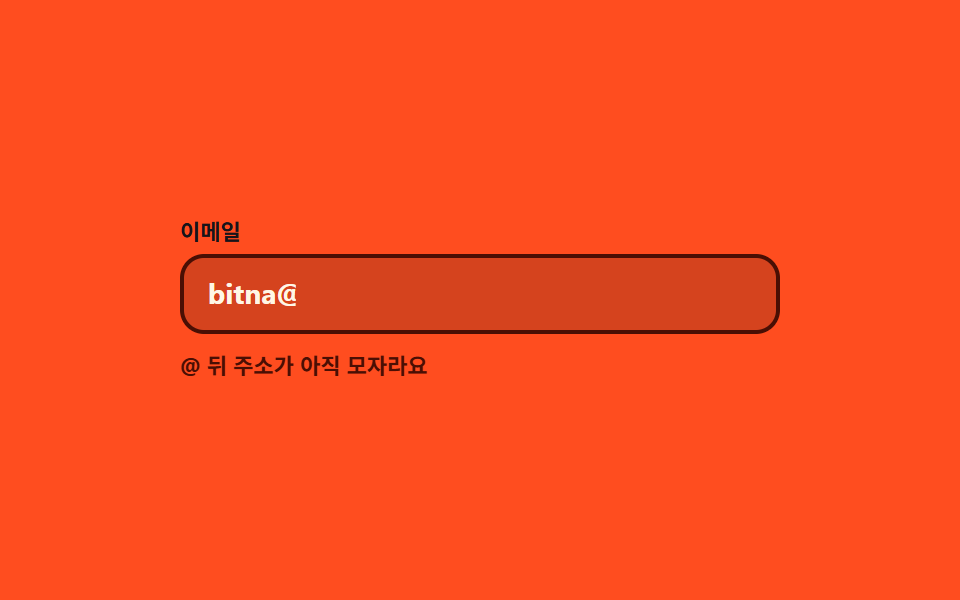
03Inline hint that flips while you type
One pre-reserved line under the email field swaps between a not-yet-valid and a valid message as you type, and the same text reaches screen readers through a polite live region.
Best forEmail fields in logins and newsletter signups
aria-livesteps(1, end)RegExp
<main class="stage">
  <div class="il is-demo" id="il">
    <label class="il__label" for="il-input">Email</label>
    <div class="il__field">
      <input class="il__input" id="il-input" type="email" autocomplete="off" aria-describedby="il-msg" placeholder="Type an email address">
      <span class="il__ghost" aria-hidden="true">[email protected]</span>
    </div>
    <p class="il__msg" id="il-msg" aria-live="polite">
      <span class="il__bad">The part after @ is still missing</span>
      <span class="il__good">This address can receive mail</span>
    </p>
  </div>
</main>
@use "../../../../site/static/demo-tokens" as *;
$duration: $dur-quick;
$easing: $ease-spring;
$color: $subject-cream;
@include stage($stage-orange);
$ok: #479075; // 주황 무대 위에서 읽히는 확정 색
$bad: #4a0f04; // 주황 위 오류는 더 짙게 (코럴은 무대에 묻힌다)
.il {
box-sizing: border-box;
width: min(300px, 86vw);
font-family: -apple-system, "Segoe UI", "Noto Sans KR", sans-serif;
}
.il__label {
display: block;
margin-bottom: $sp-1;
color: $subject-ink; // 주황 무대 위 크림 2.51:1 → 잉크 5.50:1
font-size: 11px; line-height: 14px; font-weight: 700;
}
.il__field { position: relative; }
.il__input {
box-sizing: border-box;
width: 100%; height: 40px;
padding: 0 $sp-3;
border: 2px solid rgba(255, 247, 230, .38);
border-radius: $r-control;
background: rgba(23, 20, 26, .18);
color: $color;
font-family: inherit;
font-size: 14px; line-height: 36px; font-weight: 700;
transition: border-color $duration $easing;
}
.il__input::placeholder { color: rgba(255, 247, 230, .5); font-weight: 600; }
.il__input:focus-visible { outline: 2px solid $color; outline-offset: 2px; }
.il.is-bad .il__input { border-color: $bad; }
.il.is-good .il__input { border-color: $ok; }
// 자동 루프에서만 보이는 "쳐 넣는 글자". 진짜 placeholder 와 겹치지 않게 지운다
.il.is-demo .il__input::placeholder { color: transparent; }
.il__ghost {
position: absolute;
left: 14px; top: 0;
color: $color;
font-size: 14px; line-height: 40px; font-weight: 700;
white-space: nowrap;
pointer-events: none;
opacity: 0;
}
// ── 안내 한 줄 — 자리를 미리 잡아 두고 문구만 갈아 끼운다 ──
.il__msg {
position: relative;
height: 16px;
margin: $sp-2 0 0;
font-size: 11px; line-height: 16px; font-weight: 700;
}
.il__bad, .il__good {
position: absolute;
left: 0; top: 0;
white-space: nowrap;
opacity: 0;
}
.il__bad { color: $bad; }
.il__good { color: $ok; }
.il.is-bad .il__bad { opacity: 1; }
.il.is-good .il__good { opacity: 1; }
// ── 자동 루프 (2s) ────────────────────────────────────
// 0~14% 절반만 친 주소(오류 문구) → 22~58% 한 조각씩 마저 타이핑 → 62% 통과 문구로 교체(컷)
// → 78% 문구 내림 · 84% 되감기. 88% 안에 처음 상태로 돌아온다.
// 문구 교체는 steps(1, end) 로 컷한다 — opacity 로 겹치면 두 문장이 반투명하게 포개진 프레임이 남는다.
.il.is-demo .il__ghost {
opacity: 1;
animation-name: il-type;
animation-duration: $dur-loop;
animation-timing-function: steps(1, end);
animation-iteration-count: infinite;
}
.il.is-demo .il__input {
transition: none;
animation-name: il-input;
animation-duration: $dur-loop;
animation-timing-function: steps(1, end);
animation-iteration-count: infinite;
}
.il.is-demo .il__bad {
animation-name: il-bad;
animation-duration: $dur-loop;
animation-timing-function: steps(1, end);
animation-iteration-count: infinite;
}
.il.is-demo .il__good {
animation-name: il-good;
animation-duration: $dur-loop;
animation-timing-function: steps(1, end);
animation-iteration-count: infinite;
}
@keyframes il-type {
0% { clip-path: inset(0 62% 0 0); }
22% { clip-path: inset(0 46% 0 0); }
38% { clip-path: inset(0 30% 0 0); }
50% { clip-path: inset(0 14% 0 0); }
62% { clip-path: inset(0 0 0 0); }
84% { clip-path: inset(0 62% 0 0); }
100% { clip-path: inset(0 62% 0 0); }
}
@keyframes il-input {
0% { border-color: $bad; }
62% { border-color: $ok; }
84% { border-color: $bad; }
100% { border-color: $bad; }
}
@keyframes il-bad {
0% { opacity: 1; }
62% { opacity: 0; }
84% { opacity: 1; }
100% { opacity: 1; }
}
@keyframes il-good {
0% { opacity: 0; }
62% { opacity: 1; }
78% { opacity: 0; }
100% { opacity: 0; }
}
// 320×200 — 무대 여백을 뺀 174px 안에 들어가도록 간격을 내린다(올리지 않는다)
@media (max-width: 360px) {
.il__input { height: 36px; line-height: 32px; }
.il__ghost { line-height: 36px; }
.il__msg { margin-top: $sp-1; }
}
@media (prefers-reduced-motion: reduce) {
.il.is-demo .il__ghost,
.il.is-demo .il__input,
.il.is-demo .il__bad,
.il.is-demo .il__good { animation: none !important; }
.il.is-demo .il__ghost { opacity: 1; clip-path: inset(0 0 0 0); }
.il.is-demo .il__input { border-color: $ok; }
.il.is-demo .il__good { opacity: 1; }
.il__input { transition: none; }
}html, body {
margin: 0;
overflow: hidden;
}
.stage {
box-sizing: border-box;
min-height: 100vh;
display: grid;
place-items: center;
margin: 0;
background: #ff4d1f;
font-family: -apple-system, "Segoe UI", "Noto Sans KR", sans-serif;
padding: clamp(8px, 4vw, 24px);
}
.il {
box-sizing: border-box;
width: min(300px, 86vw);
font-family: -apple-system, "Segoe UI", "Noto Sans KR", sans-serif;
}
.il__label {
display: block;
margin-bottom: 4px;
color: #17141a;
font-size: 11px;
line-height: 14px;
font-weight: 700;
}
.il__field {
position: relative;
}
.il__input {
box-sizing: border-box;
width: 100%;
height: 40px;
padding: 0 12px;
border: 2px solid rgba(255, 247, 230, 0.38);
border-radius: 12px;
background: rgba(23, 20, 26, 0.18);
color: #fff7e6;
font-family: inherit;
font-size: 14px;
line-height: 36px;
font-weight: 700;
transition: border-color 220ms cubic-bezier(0.2, 0.8, 0.2, 1);
}
.il__input::placeholder {
color: rgba(255, 247, 230, 0.5);
font-weight: 600;
}
.il__input:focus-visible {
outline: 2px solid #fff7e6;
outline-offset: 2px;
}
.il.is-bad .il__input {
border-color: #4a0f04;
}
.il.is-good .il__input {
border-color: #479075;
}
.il.is-demo .il__input::placeholder {
color: transparent;
}
.il__ghost {
position: absolute;
left: 14px;
top: 0;
color: #fff7e6;
font-size: 14px;
line-height: 40px;
font-weight: 700;
white-space: nowrap;
pointer-events: none;
opacity: 0;
}
.il__msg {
position: relative;
height: 16px;
margin: 8px 0 0;
font-size: 11px;
line-height: 16px;
font-weight: 700;
}
.il__bad, .il__good {
position: absolute;
left: 0;
top: 0;
white-space: nowrap;
opacity: 0;
}
.il__bad {
color: #4a0f04;
}
.il__good {
color: #479075;
}
.il.is-bad .il__bad {
opacity: 1;
}
.il.is-good .il__good {
opacity: 1;
}
.il.is-demo .il__ghost {
opacity: 1;
animation-name: il-type;
animation-duration: 2s;
animation-timing-function: steps(1, end);
animation-iteration-count: infinite;
}
.il.is-demo .il__input {
transition: none;
animation-name: il-input;
animation-duration: 2s;
animation-timing-function: steps(1, end);
animation-iteration-count: infinite;
}
.il.is-demo .il__bad {
animation-name: il-bad;
animation-duration: 2s;
animation-timing-function: steps(1, end);
animation-iteration-count: infinite;
}
.il.is-demo .il__good {
animation-name: il-good;
animation-duration: 2s;
animation-timing-function: steps(1, end);
animation-iteration-count: infinite;
}
@keyframes il-type {
0% {
clip-path: inset(0 62% 0 0);
}
22% {
clip-path: inset(0 46% 0 0);
}
38% {
clip-path: inset(0 30% 0 0);
}
50% {
clip-path: inset(0 14% 0 0);
}
62% {
clip-path: inset(0 0 0 0);
}
84% {
clip-path: inset(0 62% 0 0);
}
100% {
clip-path: inset(0 62% 0 0);
}
}
@keyframes il-input {
0% {
border-color: #4a0f04;
}
62% {
border-color: #479075;
}
84% {
border-color: #4a0f04;
}
100% {
border-color: #4a0f04;
}
}
@keyframes il-bad {
0% {
opacity: 1;
}
62% {
opacity: 0;
}
84% {
opacity: 1;
}
100% {
opacity: 1;
}
}
@keyframes il-good {
0% {
opacity: 0;
}
62% {
opacity: 1;
}
78% {
opacity: 0;
}
100% {
opacity: 0;
}
}
@media (max-width: 360px) {
.il__input {
height: 36px;
line-height: 32px;
}
.il__ghost {
line-height: 36px;
}
.il__msg {
margin-top: 4px;
}
}
@media (prefers-reduced-motion: reduce) {
.il.is-demo .il__ghost,
.il.is-demo .il__input,
.il.is-demo .il__bad,
.il.is-demo .il__good {
animation: none !important;
}
.il.is-demo .il__ghost {
opacity: 1;
clip-path: inset(0 0 0 0);
}
.il.is-demo .il__input {
border-color: #479075;
}
.il.is-demo .il__good {
opacity: 1;
}
.il__input {
transition: none;
}
}// 실제 동작: 한 글자마다 정규식을 다시 재고, 미리 확보해 둔 한 줄이 오류 문구와 완료 문구를 갈아 끼운다.
var il = document.getElementById('il');
var ilInput = document.getElementById('il-input');
var IL_MAIL = /^[\w.+-]+@[\w-]+\.[\w.-]{2,}$/;
function ilPaint() {
il.classList.remove('is-demo'); // 사람이 손대면 자동 루프를 멈춘다
var ok = IL_MAIL.test(ilInput.value);
il.classList.toggle('is-good', ok);
il.classList.toggle('is-bad', !ok && ilInput.value.length > 0);
ilInput.setAttribute('aria-invalid', ok ? 'false' : 'true');
}
ilInput.addEventListener('input', ilPaint);
ilInput.addEventListener('focus', ilPaint);import { useState } from "react";
import type { CSSProperties } from "react";
import styles from "./InlineLiveMessage.module.scss";
export type InlineLiveMessageProps = {
label?: string;
placeholder?: string;
badMessage?: string;
goodMessage?: string;
/** 자동 재생 루프 (갤러리용). 사람이 손대면 꺼진다 */
demo?: boolean;
duration?: number;
easing?: string;
color?: string;
};
type Vars = CSSProperties & { "--duration"?: string; "--easing"?: string; "--color"?: string };
type ChangeEvt = { target: { value: string } };
const MAIL: RegExp = /^[\w.+-]+@[\w-]+\.[\w.-]{2,}$/;
export default function InlineLiveMessage({
label = "Email",
placeholder = "Type an email address",
badMessage = "The part after @ is still missing",
goodMessage = "This address can receive mail",
demo = true,
duration = 220,
easing = "cubic-bezier(.2,.8,.2,1)",
color = "#fff7e6",
}: InlineLiveMessageProps) {
const [value, setValue] = useState("");
const [live, setLive] = useState(demo);
const good = MAIL.test(value);
const bad = !good && value.length > 0;
const vars: Vars = { "--duration": `${duration}ms`, "--easing": easing, "--color": color };
const cls = [styles.root, live ? styles.isDemo : "", bad ? styles.isBad : "", good ? styles.isGood : ""].join(" ");
return (
<div className={cls} style={vars}>
<label className={styles.label} htmlFor="il-input">{label}</label>
<div className={styles.field}>
<input
className={styles.input}
id="il-input"
type="email"
autoComplete="off"
placeholder={placeholder}
aria-describedby="il-msg"
aria-invalid={!good}
value={value}
onChange={(e: ChangeEvt) => { setValue(e.target.value); setLive(false); }}
onFocus={() => setLive(false)}
/>
<span className={styles.ghost} aria-hidden="true">[email protected]</span>
</div>
<p className={styles.msg} id="il-msg" aria-live="polite">
<span className={styles.bad}>{badMessage}</span>
<span className={styles.good}>{goodMessage}</span>
</p>
</div>
);
}03 Inline hint that flips while you type — Measured area 1.919% · moving frames 6/23Original by GODRICH · SCSS and React ship in the zip · 9 Form Validation UI Patterns — As You Type
The post this demo lives in
 9 Form Validation UI Patterns — As You TypeForm validation UI is the layer that checks a typed value against a rule and reports the verdict on screen. All nine run See all demos in this post