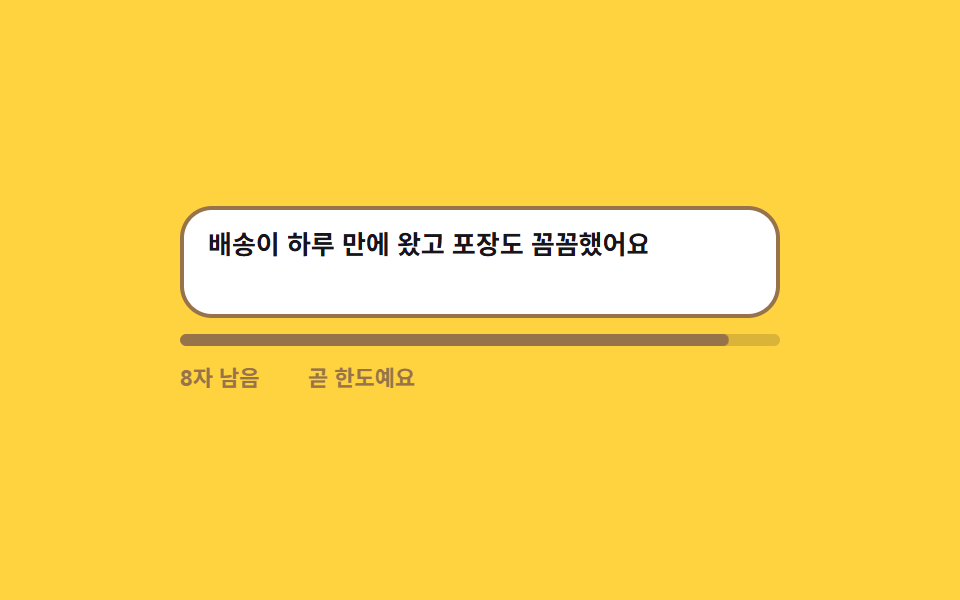
06Character counter that turns warning near the limit
The remaining count ticks down, and the moment it crosses the threshold the digits and the progress bar flip to the warning color, ending with a no-more-room message at the cap.
Best forLength-capped boxes like reviews and bios
maxlengthscaleXsteps(1, end)
<main class="stage">
  <div class="cc is-demo" id="cc" data-level="ok">
    <div class="cc__field">
      <textarea class="cc__input" id="cc-input" rows="2" maxlength="60" aria-describedby="cc-out" placeholder="Leave a one-line review"></textarea>
      <span class="cc__ghost" aria-hidden="true">It arrived in a day and the packaging was careful</span>
    </div>
    <div class="cc__bar" aria-hidden="true"><span class="cc__fill"></span></div>
    <p class="cc__out" id="cc-out">
      <span class="cc__nums" aria-hidden="true">
        <span class="cc__n" data-n="0">44 left</span><span class="cc__n" data-n="1">26 left</span><span class="cc__n" data-n="2">8 left</span><span class="cc__n" data-n="3">0 left</span>
      </span>
      <span class="cc__live" id="cc-left">44 left</span>
      <span class="cc__notes" aria-hidden="true">
        <span class="cc__note" data-note="near">Almost at the limit</span><span class="cc__note" data-note="full">No room left</span>
      </span>
      <span class="cc__say" id="cc-say" role="status" aria-live="polite">16 of 60 characters used</span>
    </p>
  </div>
</main>
@use "../../../../site/static/demo-tokens" as *;
$duration: $dur-quick;
$easing: $ease-out;
$color: $subject-ink;
@include stage($stage-yellow);
$warn: #96734a;
$stop: $error;
.cc {
box-sizing: border-box;
width: min(300px, 86vw);
font-family: -apple-system, "Segoe UI", "Noto Sans KR", sans-serif;
}
.cc__field { position: relative; }
.cc__input {
box-sizing: border-box;
display: block;
width: 100%;
padding: $sp-2 $sp-3;
border: 2px solid rgba(23, 20, 26, .22);
border-radius: $r-card;
background: $stage-paper;
color: $color;
font-family: inherit;
font-size: 13px; line-height: 18px; font-weight: 600;
resize: none;
}
.cc__input::placeholder { color: rgba(23, 20, 26, .38); }
.cc__input:focus-visible { outline: 2px solid $subject-blue; outline-offset: 2px; }
.cc[data-level="near"] .cc__input { border-color: $warn; }
.cc[data-level="full"] .cc__input { border-color: $stop; }
// 자동 루프에서만 보이는 "쳐 넣는 글자". 진짜 placeholder 와 겹치지 않게 지운다
.cc.is-demo .cc__input::placeholder { color: transparent; }
.cc__ghost {
position: absolute;
left: 14px; top: 10px;
width: 268px;
color: $color;
font-size: 13px; line-height: 18px; font-weight: 600;
pointer-events: none;
opacity: 0;
}
// ── 진행 막대 ────────────────────────────────────────
.cc__bar {
position: relative;
height: 6px;
margin-top: $sp-2;
border-radius: $r-pill;
background: rgba(23, 20, 26, .16);
overflow: hidden;
}
.cc__fill {
position: absolute;
inset: 0;
border-radius: $r-pill;
background: $color;
transform: scaleX(.27);
transform-origin: left center; // 규칙8: 진행 막대 좌측 채움
transition: transform $duration $easing, background $duration $easing;
}
.cc[data-level="near"] .cc__fill { background: $warn; }
.cc[data-level="full"] .cc__fill { background: $stop; }
// ── 남은 글자 줄 — 숫자와 경고 문구를 겹쳐 두고 하나만 켠다 ─
.cc__out {
display: flex;
align-items: center;
gap: $sp-2;
height: 16px;
margin: $sp-2 0 0;
font-size: 11px; line-height: 16px; font-weight: 700;
}
.cc__nums, .cc__notes {
position: relative;
display: inline-block;
flex: 0 0 auto;
height: 16px;
}
.cc__nums { width: 56px; }
.cc__notes { width: 88px; }
.cc__n, .cc__note {
position: absolute;
left: 0; top: 0;
white-space: nowrap;
opacity: 0;
}
.cc__n { color: rgba(23, 20, 26, .72); }
.cc__note[data-note="near"] { color: $warn; }
.cc__note[data-note="full"] { color: $stop; }
.cc[data-level="near"] .cc__note[data-note="near"],
.cc[data-level="full"] .cc__note[data-note="full"] { opacity: 1; }
// 자동 루프는 겹쳐 둔 숫자를 갈아 끼우고, 사람이 칠 때는 JS 가 적어 넣는 한 줄만 남긴다
.cc__live {
display: none;
flex: 0 0 auto;
width: 56px;
color: rgba(23, 20, 26, .72);
}
.cc[data-level="near"] .cc__live { color: $warn; }
.cc[data-level="full"] .cc__live { color: $stop; }
.cc:not(.is-demo) .cc__live { display: inline-block; }
.cc:not(.is-demo) .cc__nums { display: none; }
.cc__say {
// 숫자는 눈으로 읽고, 문장은 낭독기 쪽으로만 보낸다
position: absolute;
width: 1px; height: 1px;
overflow: hidden;
clip-path: inset(50%);
}
// ── 자동 루프 (2s) ────────────────────────────────────
// 0~18% 넉넉한 상태 → 26% 절반 → 46% 경계를 지나 경고색(컷) → 62% 한도에 닿아 정지색
// → 76% 경고 문구 내리고 82% 막대·색 되돌린 뒤 86% 글자 되감기. 셋으로 흩어야 복귀 프레임이 poster 를 뺏지 않는다.
.cc.is-demo .cc__ghost {
opacity: 1;
animation-name: cc-type;
animation-duration: $dur-loop;
animation-timing-function: steps(1, end);
animation-iteration-count: infinite;
}
.cc.is-demo .cc__fill {
transition: none;
animation-name: cc-fill;
animation-duration: $dur-loop;
animation-timing-function: $easing;
animation-iteration-count: infinite;
}
.cc.is-demo .cc__input {
animation-name: cc-input;
animation-duration: $dur-loop;
animation-timing-function: steps(1, end);
animation-iteration-count: infinite;
}
.cc.is-demo .cc__n,
.cc.is-demo .cc__note {
animation-duration: $dur-loop;
animation-timing-function: steps(1, end);
animation-iteration-count: infinite;
}
.cc.is-demo .cc__n[data-n="0"] { animation-name: cc-n0; }
.cc.is-demo .cc__n[data-n="1"] { animation-name: cc-n1; }
.cc.is-demo .cc__n[data-n="2"] { animation-name: cc-n2; }
.cc.is-demo .cc__n[data-n="3"] { animation-name: cc-n3; }
.cc.is-demo .cc__note[data-note="near"] { animation-name: cc-near; }
.cc.is-demo .cc__note[data-note="full"] { animation-name: cc-full; }
@keyframes cc-type {
0% { clip-path: inset(0 74% 0 0); }
26% { clip-path: inset(0 46% 0 0); }
46% { clip-path: inset(0 18% 0 0); }
62% { clip-path: inset(0 0 0 0); }
86% { clip-path: inset(0 74% 0 0); }
100% { clip-path: inset(0 74% 0 0); }
}
@keyframes cc-fill {
0% { transform: scaleX(.27); background: $color; }
26% { transform: scaleX(.57); background: $color; }
45.4% { transform: scaleX(.86); background: $color; }
46% { transform: scaleX(.86); background: $warn; }
61.4% { transform: scaleX(1); background: $warn; }
62% { transform: scaleX(1); background: $stop; }
81% { transform: scaleX(1); background: $stop; }
82% { transform: scaleX(.27); background: $color; }
100% { transform: scaleX(.27); background: $color; }
}
@keyframes cc-input {
0% { border-color: rgba(23, 20, 26, .22); }
46% { border-color: $warn; }
62% { border-color: $stop; }
82% { border-color: rgba(23, 20, 26, .22); }
100% { border-color: rgba(23, 20, 26, .22); }
}
@keyframes cc-n0 {
0% { opacity: 1; color: rgba(23, 20, 26, .72); }
26% { opacity: 0; color: rgba(23, 20, 26, .72); }
82% { opacity: 1; color: rgba(23, 20, 26, .72); }
100% { opacity: 1; color: rgba(23, 20, 26, .72); }
}
@keyframes cc-n1 {
0% { opacity: 0; }
26% { opacity: 1; }
46% { opacity: 0; }
100% { opacity: 0; }
}
@keyframes cc-n2 {
0% { opacity: 0; color: $warn; }
46% { opacity: 1; color: $warn; }
62% { opacity: 0; color: $warn; }
100% { opacity: 0; color: $warn; }
}
@keyframes cc-n3 {
0% { opacity: 0; color: $stop; }
62% { opacity: 1; color: $stop; }
82% { opacity: 0; color: $stop; }
100% { opacity: 0; color: $stop; }
}
@keyframes cc-near {
0% { opacity: 0; }
46% { opacity: 1; }
62% { opacity: 0; }
100% { opacity: 0; }
}
@keyframes cc-full {
0% { opacity: 0; }
62% { opacity: 1; }
76% { opacity: 0; }
100% { opacity: 0; }
}
// 320×200 — 무대 여백을 뺀 174px 안에 들어가도록 간격을 내린다(올리지 않는다)
@media (max-width: 360px) {
.cc__ghost { width: 228px; }
.cc__bar { margin-top: $sp-1; }
.cc__out { margin-top: $sp-1; }
}
@media (prefers-reduced-motion: reduce) {
.cc.is-demo .cc__ghost,
.cc.is-demo .cc__fill,
.cc.is-demo .cc__input,
.cc.is-demo .cc__n,
.cc.is-demo .cc__note { animation: none !important; }
.cc.is-demo .cc__ghost { opacity: 1; clip-path: inset(0 0 0 0); }
.cc.is-demo .cc__fill { transform: scaleX(1); background: $stop; }
.cc.is-demo .cc__input { border-color: $stop; }
.cc.is-demo .cc__n[data-n="3"] { opacity: 1; color: $stop; }
.cc.is-demo .cc__note[data-note="full"] { opacity: 1; }
.cc__fill { transition: none; }
}html, body {
margin: 0;
overflow: hidden;
}
.stage {
box-sizing: border-box;
min-height: 100vh;
display: grid;
place-items: center;
margin: 0;
background: #ffd23f;
font-family: -apple-system, "Segoe UI", "Noto Sans KR", sans-serif;
padding: clamp(8px, 4vw, 24px);
}
.cc {
box-sizing: border-box;
width: min(300px, 86vw);
font-family: -apple-system, "Segoe UI", "Noto Sans KR", sans-serif;
}
.cc__field {
position: relative;
}
.cc__input {
box-sizing: border-box;
display: block;
width: 100%;
padding: 8px 12px;
border: 2px solid rgba(23, 20, 26, 0.22);
border-radius: 16px;
background: #ffffff;
color: #17141a;
font-family: inherit;
font-size: 13px;
line-height: 18px;
font-weight: 600;
resize: none;
}
.cc__input::placeholder {
color: rgba(23, 20, 26, 0.38);
}
.cc__input:focus-visible {
outline: 2px solid #2f6df6;
outline-offset: 2px;
}
.cc[data-level=near] .cc__input {
border-color: #96734a;
}
.cc[data-level=full] .cc__input {
border-color: #c2361a;
}
.cc.is-demo .cc__input::placeholder {
color: transparent;
}
.cc__ghost {
position: absolute;
left: 14px;
top: 10px;
width: 268px;
color: #17141a;
font-size: 13px;
line-height: 18px;
font-weight: 600;
pointer-events: none;
opacity: 0;
}
.cc__bar {
position: relative;
height: 6px;
margin-top: 8px;
border-radius: 999px;
background: rgba(23, 20, 26, 0.16);
overflow: hidden;
}
.cc__fill {
position: absolute;
inset: 0;
border-radius: 999px;
background: #17141a;
transform: scaleX(0.27);
transform-origin: left center;
transition: transform 220ms ease-out, background 220ms ease-out;
}
.cc[data-level=near] .cc__fill {
background: #96734a;
}
.cc[data-level=full] .cc__fill {
background: #c2361a;
}
.cc__out {
display: flex;
align-items: center;
gap: 8px;
height: 16px;
margin: 8px 0 0;
font-size: 11px;
line-height: 16px;
font-weight: 700;
}
.cc__nums, .cc__notes {
position: relative;
display: inline-block;
flex: 0 0 auto;
height: 16px;
}
.cc__nums {
width: 56px;
}
.cc__notes {
width: 88px;
}
.cc__n, .cc__note {
position: absolute;
left: 0;
top: 0;
white-space: nowrap;
opacity: 0;
}
.cc__n {
color: rgba(23, 20, 26, 0.72);
}
.cc__note[data-note=near] {
color: #96734a;
}
.cc__note[data-note=full] {
color: #c2361a;
}
.cc[data-level=near] .cc__note[data-note=near],
.cc[data-level=full] .cc__note[data-note=full] {
opacity: 1;
}
.cc__live {
display: none;
flex: 0 0 auto;
width: 56px;
color: rgba(23, 20, 26, 0.72);
}
.cc[data-level=near] .cc__live {
color: #96734a;
}
.cc[data-level=full] .cc__live {
color: #c2361a;
}
.cc:not(.is-demo) .cc__live {
display: inline-block;
}
.cc:not(.is-demo) .cc__nums {
display: none;
}
.cc__say {
position: absolute;
width: 1px;
height: 1px;
overflow: hidden;
clip-path: inset(50%);
}
.cc.is-demo .cc__ghost {
opacity: 1;
animation-name: cc-type;
animation-duration: 2s;
animation-timing-function: steps(1, end);
animation-iteration-count: infinite;
}
.cc.is-demo .cc__fill {
transition: none;
animation-name: cc-fill;
animation-duration: 2s;
animation-timing-function: ease-out;
animation-iteration-count: infinite;
}
.cc.is-demo .cc__input {
animation-name: cc-input;
animation-duration: 2s;
animation-timing-function: steps(1, end);
animation-iteration-count: infinite;
}
.cc.is-demo .cc__n,
.cc.is-demo .cc__note {
animation-duration: 2s;
animation-timing-function: steps(1, end);
animation-iteration-count: infinite;
}
.cc.is-demo .cc__n[data-n="0"] {
animation-name: cc-n0;
}
.cc.is-demo .cc__n[data-n="1"] {
animation-name: cc-n1;
}
.cc.is-demo .cc__n[data-n="2"] {
animation-name: cc-n2;
}
.cc.is-demo .cc__n[data-n="3"] {
animation-name: cc-n3;
}
.cc.is-demo .cc__note[data-note=near] {
animation-name: cc-near;
}
.cc.is-demo .cc__note[data-note=full] {
animation-name: cc-full;
}
@keyframes cc-type {
0% {
clip-path: inset(0 74% 0 0);
}
26% {
clip-path: inset(0 46% 0 0);
}
46% {
clip-path: inset(0 18% 0 0);
}
62% {
clip-path: inset(0 0 0 0);
}
86% {
clip-path: inset(0 74% 0 0);
}
100% {
clip-path: inset(0 74% 0 0);
}
}
@keyframes cc-fill {
0% {
transform: scaleX(0.27);
background: #17141a;
}
26% {
transform: scaleX(0.57);
background: #17141a;
}
45.4% {
transform: scaleX(0.86);
background: #17141a;
}
46% {
transform: scaleX(0.86);
background: #96734a;
}
61.4% {
transform: scaleX(1);
background: #96734a;
}
62% {
transform: scaleX(1);
background: #c2361a;
}
81% {
transform: scaleX(1);
background: #c2361a;
}
82% {
transform: scaleX(0.27);
background: #17141a;
}
100% {
transform: scaleX(0.27);
background: #17141a;
}
}
@keyframes cc-input {
0% {
border-color: rgba(23, 20, 26, 0.22);
}
46% {
border-color: #96734a;
}
62% {
border-color: #c2361a;
}
82% {
border-color: rgba(23, 20, 26, 0.22);
}
100% {
border-color: rgba(23, 20, 26, 0.22);
}
}
@keyframes cc-n0 {
0% {
opacity: 1;
color: rgba(23, 20, 26, 0.72);
}
26% {
opacity: 0;
color: rgba(23, 20, 26, 0.72);
}
82% {
opacity: 1;
color: rgba(23, 20, 26, 0.72);
}
100% {
opacity: 1;
color: rgba(23, 20, 26, 0.72);
}
}
@keyframes cc-n1 {
0% {
opacity: 0;
}
26% {
opacity: 1;
}
46% {
opacity: 0;
}
100% {
opacity: 0;
}
}
@keyframes cc-n2 {
0% {
opacity: 0;
color: #96734a;
}
46% {
opacity: 1;
color: #96734a;
}
62% {
opacity: 0;
color: #96734a;
}
100% {
opacity: 0;
color: #96734a;
}
}
@keyframes cc-n3 {
0% {
opacity: 0;
color: #c2361a;
}
62% {
opacity: 1;
color: #c2361a;
}
82% {
opacity: 0;
color: #c2361a;
}
100% {
opacity: 0;
color: #c2361a;
}
}
@keyframes cc-near {
0% {
opacity: 0;
}
46% {
opacity: 1;
}
62% {
opacity: 0;
}
100% {
opacity: 0;
}
}
@keyframes cc-full {
0% {
opacity: 0;
}
62% {
opacity: 1;
}
76% {
opacity: 0;
}
100% {
opacity: 0;
}
}
@media (max-width: 360px) {
.cc__ghost {
width: 228px;
}
.cc__bar {
margin-top: 4px;
}
.cc__out {
margin-top: 4px;
}
}
@media (prefers-reduced-motion: reduce) {
.cc.is-demo .cc__ghost,
.cc.is-demo .cc__fill,
.cc.is-demo .cc__input,
.cc.is-demo .cc__n,
.cc.is-demo .cc__note {
animation: none !important;
}
.cc.is-demo .cc__ghost {
opacity: 1;
clip-path: inset(0 0 0 0);
}
.cc.is-demo .cc__fill {
transform: scaleX(1);
background: #c2361a;
}
.cc.is-demo .cc__input {
border-color: #c2361a;
}
.cc.is-demo .cc__n[data-n="3"] {
opacity: 1;
color: #c2361a;
}
.cc.is-demo .cc__note[data-note=full] {
opacity: 1;
}
.cc__fill {
transition: none;
}
}// 실제 동작: maxlength 가 더 못 치게 막고, 남은 글자가 경계를 지나면 숫자와 막대가 함께 경고색으로 넘어간다.
var cc = document.getElementById('cc');
var ccInput = document.getElementById('cc-input');
var ccFill = document.querySelector('.cc__fill');
var ccSay = document.getElementById('cc-say');
var ccLeft = document.getElementById('cc-left');
var CC_MAX = 60, CC_NEAR = 12;
function ccPaint() {
cc.classList.remove('is-demo'); // 사람이 손대면 자동 루프를 멈춘다
var used = ccInput.value.length, left = CC_MAX - used;
cc.setAttribute('data-level', left === 0 ? 'full' : left <= CC_NEAR ? 'near' : 'ok');
ccFill.style.transform = 'scaleX(' + (used / CC_MAX).toFixed(3) + ')';
ccLeft.textContent = left + ' left';
ccSay.textContent = CC_MAX + ' characters, ' + used + ' used';
}
ccInput.addEventListener('input', ccPaint);
ccInput.addEventListener('focus', ccPaint);import { useState } from "react";
import type { CSSProperties } from "react";
import styles from "./CharLimitCounter.module.scss";
export type CharLimitCounterProps = {
placeholder?: string;
max?: number;
/** 남은 글자가 이 수 이하로 떨어지면 경고색으로 넘어간다 */
nearAt?: number;
nearNote?: string;
fullNote?: string;
/** 자동 재생 루프 (갤러리용). 사람이 손대면 꺼진다 */
demo?: boolean;
duration?: number;
easing?: string;
color?: string;
};
type Vars = CSSProperties & { "--duration"?: string; "--easing"?: string; "--color"?: string };
type ChangeEvt = { target: { value: string } };
export default function CharLimitCounter({
placeholder = "Leave a one-line review",
max = 60,
nearAt = 12,
nearNote = "Almost at the limit",
fullNote = "No room left",
demo = true,
duration = 220,
easing = "ease-out",
color = "#17141a",
}: CharLimitCounterProps) {
const [value, setValue] = useState("");
const [live, setLive] = useState(demo);
const used = value.length;
const left = max - used;
const level = left === 0 ? "full" : left <= nearAt ? "near" : "ok";
const vars: Vars = { "--duration": `${duration}ms`, "--easing": easing, "--color": color };
const fill: CSSProperties = { transform: `scaleX(${(used / max).toFixed(3)})` };
return (
<div className={`${styles.root} ${live ? styles.isDemo : ""}`} style={vars} data-level={level}>
<div className={styles.field}>
<textarea
className={styles.input}
id="cc-input"
rows={2}
maxLength={max}
placeholder={placeholder}
aria-describedby="cc-out"
value={value}
onChange={(e: ChangeEvt) => { setValue(e.target.value); setLive(false); }}
onFocus={() => setLive(false)}
/>
<span className={styles.ghost} aria-hidden="true">It arrived in a day and the packaging was careful</span>
</div>
<div className={styles.bar} aria-hidden="true"><span className={styles.fill} style={fill} /></div>
<p className={styles.out} id="cc-out">
<span className={styles.nums} aria-hidden="true">
{[44, 26, 8, 0].map((n, i) => (
<span key={n} className={styles.n} data-n={i}>{n} left</span>
))}
</span>
<span className={styles.live}>{`${left} left`}</span>
<span className={styles.notes} aria-hidden="true">
<span className={styles.note} data-note="near">{nearNote}</span>
<span className={styles.note} data-note="full">{fullNote}</span>
</span>
<span className={styles.say} role="status" aria-live="polite">{`${used} of ${max} characters used`}</span>
</p>
</div>
);
}06 Character counter that turns warning near the limit — Measured area 3.722% · moving frames 18/23Original by GODRICH · SCSS and React ship in the zip · 9 Form Validation UI Patterns — As You Type
The post this demo lives in
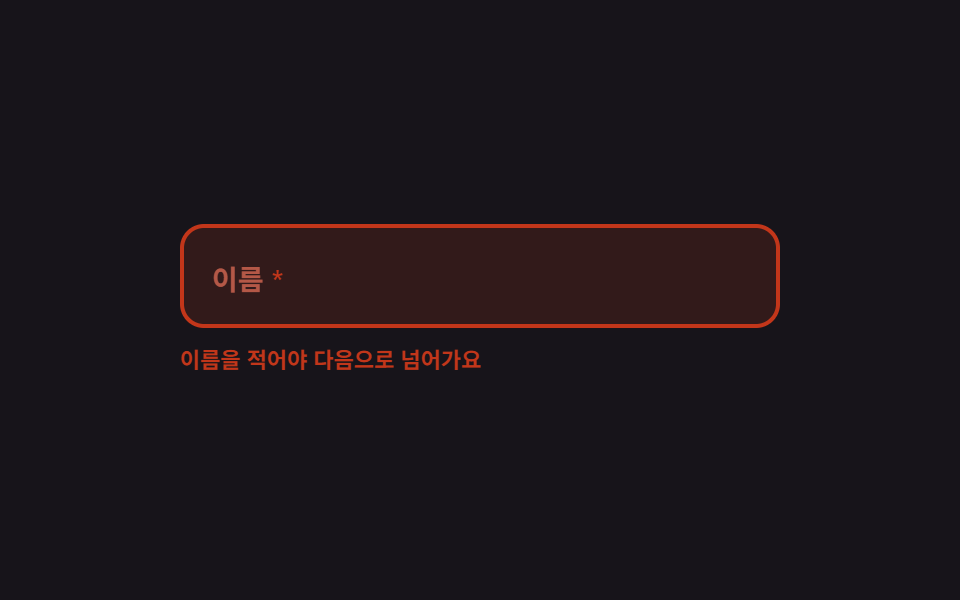 9 Form Validation UI Patterns — As You TypeForm validation UI is the layer that checks a typed value against a rule and reports the verdict on screen. All nine run See all demos in this post
If you like this effect - similar demos
 Inputs01 Next button that stays locked until the rules are met9 Multi Step Form UI Patterns — Branch and Resume
 Inputs02 Spring Ring That Fills with the Characters UsedTextarea Character Counter: 9 Grapheme-Aware UIs
 Inputs04 Quantity that springs back when it passes the stock limitCheckout Page Design — 9 Cart Patterns, No Library