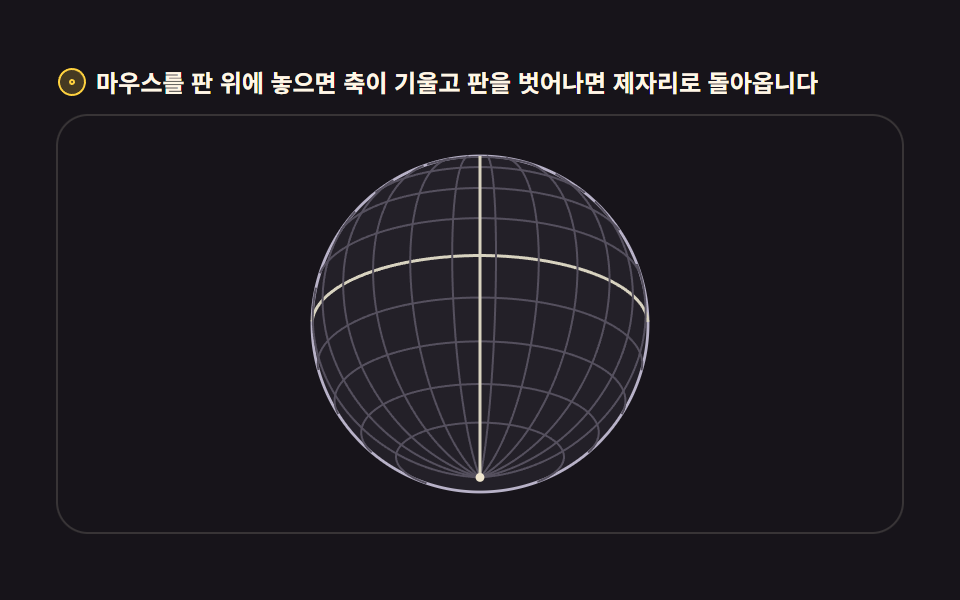
01Rotating globe drawn from latitude/longitude lines
Latitude and longitude lines are computed in spherical coordinates and drawn while the back half stays hidden as it slowly turns.
Best forHero section introducing a global service, background decoration on a shipment tracking page
orthographic projectionbackface cullingrequestAnimationFrame

<main class="stage">
<div class="gw" id="gw">
  <p class="gw__hint">
    <svg class="gw__ico" viewBox="0 0 256 256" aria-hidden="true"><g fill="currentColor"><path d="M128 24a104 104 0 1 0 104 104A104.12 104.12 0 0 0 128 24" opacity=".2"/><path d="M128 32a96 96 0 1 1-96 96a96.1 96.1 0 0 1 96-96m0-16a112 112 0 1 0 112 112A112.12 112.12 0 0 0 128 16"/><path d="M128 152a24 24 0 1 1 24-24a24 24 0 0 1-24 24m8-24a8 8 0 1 0-8 8a8 8 0 0 0 8-8" fill-rule="evenodd"/></g></svg>
    <span>Hover the board to tilt the axis; leave it and the axis settles back</span>
  </p>
  <div class="gw__field" id="field" role="application" aria-label="Wire globe test board" tabindex="0">
    <canvas class="gw__cv" id="cv"></canvas>
  </div>
</div>
</main>
@use "../../../../site/static/demo-tokens" as *;
// 위경도 선 회전 지구본 — 움직임은 전부 캔버스 rAF 루프 안(구면 좌표 → 정사도 투영 → 앞면 세그먼트만 연결).
// CSS 애니메이션이 0개여야 렌더러가 시계를 고정하지 않고 실시간 24장을 찍는다(077·012 선례).
// 색은 파스텔 기본 — 데모 scss 안 vivid 리터럴을 두지 않는다(BD26).
$duration: $dur-loop;
$easing: $ease-spring;
$color: $subject-sky; // 하늘색 파스텔 — 어두운 우주 무대 위 지구본 림
@include stage($stage-ink);
.gw {
// 구 바닥면 — 잉크보다 한 단계 밝은 저채도 우주 톤(채도 .10)
--gw-sphere: #232028;
--gw-deep: #2a272c;
// 위경도 선 — 크림 계열 파스텔. 채도 .10~.20
--gw-line: #d8d3c0;
--gw-dim: #55505e;
--gw-pole: #f0e6cf;
--gw-ring: #b8b2c8;
display: flex; flex-direction: column; gap: $sp-2;
width: 100%; max-width: 424px;
}
.gw__hint {
display: flex; align-items: center; gap: $sp-1; margin: 0;
font-weight: 700; font-size: clamp(10px, 2.8vw, 12px); line-height: 1.35;
color: $subject-cream;
}
.gw__ico { width: 16px; height: 16px; flex: 0 0 auto; color: $stage-yellow; }
.gw__field {
position: relative; height: 210px;
border-radius: $r-card; overflow: hidden;
background: $stage-ink;
box-shadow: inset 0 0 0 1px rgba($subject-cream, .14);
cursor: crosshair; touch-action: none;
}
.gw__field:focus-visible { outline: 2px solid $stage-yellow; outline-offset: 2px; }
.gw__cv { display: block; width: 100%; height: 100%; }
@media (max-width: 340px) {
.gw { gap: $sp-1; }
.gw__field { height: 110px; }
.gw__hint { font-size: 10px; }
}
// reduce — 루프가 아예 안 돌므로 끄고 말고 할 애니메이션이 없다.
// 멈춰 선 한 장이 그대로 남으므로 움직일 것 같은 커서 신호만 거둔다.
@media (prefers-reduced-motion: reduce) {
.gw__field { cursor: default !important; }
}html, body {
margin: 0;
overflow: hidden;
}
.stage {
box-sizing: border-box;
min-height: 100vh;
display: grid;
place-items: center;
margin: 0;
background: #17141a;
font-family: -apple-system, "Segoe UI", "Noto Sans KR", sans-serif;
padding: clamp(8px, 4vw, 24px);
}
.gw {
--gw-sphere: #232028;
--gw-deep: #2a272c;
--gw-line: #d8d3c0;
--gw-dim: #55505e;
--gw-pole: #f0e6cf;
--gw-ring: #b8b2c8;
display: flex;
flex-direction: column;
gap: 8px;
width: 100%;
max-width: 424px;
}
.gw__hint {
display: flex;
align-items: center;
gap: 4px;
margin: 0;
font-weight: 700;
font-size: clamp(10px, 2.8vw, 12px);
line-height: 1.35;
color: #fff7e6;
}
.gw__ico {
width: 16px;
height: 16px;
flex: 0 0 auto;
color: #ffd23f;
}
.gw__field {
position: relative;
height: 210px;
border-radius: 16px;
overflow: hidden;
background: #17141a;
box-shadow: inset 0 0 0 1px rgba(255, 247, 230, 0.14);
cursor: crosshair;
touch-action: none;
}
.gw__field:focus-visible {
outline: 2px solid #ffd23f;
outline-offset: 2px;
}
.gw__cv {
display: block;
width: 100%;
height: 100%;
}
@media (max-width: 340px) {
.gw {
gap: 4px;
}
.gw__field {
height: 110px;
}
.gw__hint {
font-size: 10px;
}
}
@media (prefers-reduced-motion: reduce) {
.gw__field {
cursor: default !important;
}
}// Latitude-longitude wire globe — 경위선 교차점을 구면 좌표(세타·파이)로 계산해 정사도(orthographic)로 눌러 그린다.
// 뒷면 감춤(backface culling)은 z<0 점을 선에서 잘라내는 게 아니라, 세그먼트를 쪼개 앞면 세그먼트만 잇는다.
// sin·cos 테이블은 프레임마다 같은 각도가 반복 계산되므로 미리 심어 둔다.
var field = document.getElementById('field');
var cv = document.getElementById('cv');
var ctx = cv.getContext('2d');
var TAU = Math.PI * 2;
var reduce = window.matchMedia('(prefers-reduced-motion: reduce)').matches;
var W = 0, H = 0, dpr = 1;
// 계층 — 적도·본초자오선 같은 큰 선은 굵게, 촘촘한 눈금은 가늘게
var LATS = []; // 위도선: { lat, segs }
(function () {
for (var lat = -60; lat <= 60; lat += 15) LATS.push(lat * Math.PI / 180);
})();
var LONS = []; // 경도선: { lon }
for (var lon = 0; lon < 180; lon += 15) LONS.push(lon * Math.PI / 180);
var SEG = 96; // 한 원을 쪼개는 세그먼트 수 — 5도 미만이면 곡선이 각진다
var rotY = 0; // 자전 각도(rad)
var tiltAim = -0.42; // 목표 축 기울기
var tilt = -0.42; // 현재 축 기울기 — 매 프레임 목표에 12%씩 다가간다
var last = 0, raf = 0;
function fit() {
var r = field.getBoundingClientRect();
dpr = window.devicePixelRatio || 1;
W = r.width; H = r.height;
cv.width = Math.round(W * dpr);
cv.height = Math.round(H * dpr);
ctx.setTransform(dpr, 0, 0, dpr, 0, 0);
}
// 구면 → 화면. 축 기울기(tilt)로 z축 회전을 먼저, 자전(rotY)을 y축 회전으로 그 다음에.
// cs·sn 은 그 세그먼트의 cos(세타), sin(세타) 다.
function project(sph, cs, sn) {
var lx = sph.x * cs + sph.z * sn; // y축 회전 (자전)
var lz = -sph.x * sn + sph.z * cs;
var ly = sph.y;
var ty = ly * Math.cos(tilt) - lz * Math.sin(tilt); // z축 회전 (기울기)
var tz = ly * Math.sin(tilt) + lz * Math.cos(tilt);
return { x: lx, y: ty, z: tz };
}
function draw() {
ctx.clearRect(0, 0, W, H);
var cx = W / 2, cy = H / 2;
var R = Math.min(W, H) * 0.40;
// 톤은 CSS 변수(scss 토큰)로 받는다 — 색이 어디서 오는지 한 곳에 둔다
var cs = getComputedStyle(document.getElementById('gw'));
var C_sphere = cs.getPropertyValue('--gw-sphere').trim();
var C_deep = cs.getPropertyValue('--gw-deep').trim();
var C_line = cs.getPropertyValue('--gw-line').trim();
var C_dim = cs.getPropertyValue('--gw-dim').trim();
var C_pole = cs.getPropertyValue('--gw-pole').trim();
var C_ring = cs.getPropertyValue('--gw-ring').trim();
// 구 바닥 — 뒷선이 비쳐 보이지 않게 먼저 불투명 원을 깐다
ctx.beginPath();
ctx.arc(cx, cy, R, 0, TAU);
ctx.fillStyle = C_sphere;
ctx.fill();
// 가장자리 림 — 원일구의 horizon. 안 깔면 선이 배경에 뜬다
ctx.beginPath();
ctx.arc(cx, cy, R, 0, TAU);
ctx.strokeStyle = C_ring;
ctx.lineWidth = 1.4;
ctx.stroke();
// 앞면만 그리는 폴리라인 — z<0 구간은 건너뛴다(backface culling)
function polyline(pts, style, width) {
ctx.strokeStyle = style;
ctx.lineWidth = width;
ctx.beginPath();
var pen = false;
for (var i = 0; i < pts.length; i++) {
var p = pts[i];
if (p.z >= 0) {
var x = cx + p.x * R, y = cy - p.y * R;
if (pen) ctx.lineTo(x, y); else { ctx.moveTo(x, y); pen = true; }
} else {
pen = false; // 뒤로 넘어가는 지점에서 펜을 든다
}
}
ctx.stroke();
}
var cyT = Math.cos(tilt), syT = Math.sin(tilt);
// 위도선 — 각 선을 SEG 조각으로 쪼개 앞면 조각만 잇는다
for (var li = 0; li < LATS.length; li++) {
var lat = LATS[li];
var cLat = Math.cos(lat), sLat = Math.sin(lat);
var pts = [];
for (var s = 0; s <= SEG; s++) {
var phi = (s / SEG) * TAU;
var sph = { x: cLat * Math.sin(phi), y: sLat, z: cLat * Math.cos(phi) };
pts.push(project(sph, Math.cos(rotY), Math.sin(rotY)));
}
var major = lat === 0;
polyline(pts, major ? C_line : C_dim, major ? 1.5 : 1);
}
// 경도선 — 반원(앞뒤 세그먼트가 섞인다)을 쪼개 같은 방식으로
for (var gi = 0; gi < LONS.length; gi++) {
var lon = LONS[gi] + rotY;
var pts2 = [];
for (var s2 = 0; s2 <= SEG; s2++) {
var th = (s2 / SEG) * Math.PI; // 0..PI 반원
var sph2 = { x: Math.sin(th) * Math.cos(lon), y: Math.cos(th), z: Math.sin(th) * Math.sin(lon) };
pts2.push(project(sph2, 1, 0));
}
var major2 = Math.abs(((LONS[gi] / Math.PI * 180) % 180)) < 0.01 && false;
polyline(pts2, C_dim, 1);
}
// 본초자오선 — lon=rotY 인 선이 항상 중앙 세로선이 되게 자전각을 더해 그린다
var ptsM = [];
for (var s3 = 0; s3 <= SEG; s3++) {
var th3 = (s3 / SEG) * Math.PI;
var lonM = Math.PI / 2; // 화면 중앙면
var sph3 = { x: Math.sin(th3) * Math.cos(lonM), y: Math.cos(th3), z: Math.sin(th3) * Math.sin(lonM) };
var p3 = project(sph3, Math.cos(0), Math.sin(0));
ptsM.push(p3);
}
polyline(ptsM, C_line, 1.5);
// 극점 — 축이 기울어진 만큼 북극이 보인다
var north = project({ x: 0, y: 1, z: 0 }, 1, 0);
var south = project({ x: 0, y: -1, z: 0 }, 1, 0);
ctx.fillStyle = C_pole;
if (north.z >= 0) { ctx.beginPath(); ctx.arc(cx + north.x * R, cy - north.y * R, 2.2, 0, TAU); ctx.fill(); }
if (south.z >= 0) { ctx.beginPath(); ctx.arc(cx + south.x * R, cy - south.y * R, 2.2, 0, TAU); ctx.fill(); }
}
function frame(now) {
var dt = last ? Math.min((now - last) / 1000, 0.05) : 0.016;
last = now;
rotY += dt * 0.5; // 12.5초에 한 바퀴 — 천천히
tilt += (tiltAim - tilt) * 0.12; // 목표 기울기로 부드럽게
draw();
raf = requestAnimationFrame(frame);
}
// 포인터가 판의 좌우 어디에 있느냐로 목표 기울기를 정한다 — 0.42rad(약 24도) 범위
field.addEventListener('pointermove', function (e) {
var r = field.getBoundingClientRect();
var t = (e.clientX - r.left) / r.width - 0.5;
tiltAim = -0.42 + t * 0.84;
});
field.addEventListener('pointerleave', function () { tiltAim = -0.42; });
window.addEventListener('resize', function () { fit(); draw(); });
fit();
if (reduce) {
// reduce — 루프 없이 기울어진 한 장만 그린다
draw();
} else {
raf = requestAnimationFrame(frame);
}// GlobeWireframe — vanilla 판(run/304/demo/01-globe-wireframe-rotate/index.html) 의 React 포트.
// 위도·경도 대원 와이어 지구본 — 정사도 투영 + y축 자전 + 뒷면(z<0) 선분은 펜을 들어 감춘다(backface culling).
// 움직임은 캔버스 rAF 루프가 전부 그리므로 @keyframes 미리보기가 없다 — props 는 CSS 변수로 무대 격식에만 내려간다.
import { useEffect, useRef } from "react";
import type { CSSProperties } from "react";
import styles from "./GlobeWireframe.module.scss";
export type GlobeWireframeProps = {
duration?: string;
easing?: string;
color?: string;
};
type Vars = CSSProperties & { "--duration"?: string; "--easing"?: string; "--color"?: string };
type Box<T> = { current: T };
type PointerEvt = { clientX: number };
const TAU = Math.PI * 2;
const SEG = 96;
const FIELD_LABEL = "위경도 지구본 실험판";
const LATS = [-60, -30, 0, 30, 60].map((d) => (d * Math.PI) / 180);
const LONS = [0, 30, 60, 90, 120, 150].map((d) => (d * Math.PI) / 180);
export default function GlobeWireframe({
duration = "2s",
easing = "cubic-bezier(.2, .8, .2, 1)",
color = "#6ec8ff",
}: GlobeWireframeProps) {
const fieldRef = useRef<HTMLDivElement | null>(null);
const cvRef = useRef<HTMLCanvasElement | null>(null);
const rootRef = useRef<HTMLDivElement | null>(null);
const ctxRef = useRef<CanvasRenderingContext2D | null>(null);
const sizeRef = useRef({ w: 0, h: 0 }) as Box<{ w: number; h: number }>;
const rotRef = useRef({ y: 0, tiltAim: -0.42, tilt: -0.42 }) as Box<{ y: number; tiltAim: number; tilt: number }>;
const lastRef = useRef(0) as Box<number>;
const rafRef = useRef(0) as Box<number>;
const vars: Vars = { "--duration": duration, "--easing": easing, "--color": color };
function reduced(): boolean {
return window.matchMedia("(prefers-reduced-motion: reduce)").matches;
}
function fit(): void {
const field = fieldRef.current;
const cv = cvRef.current;
const ctx = ctxRef.current;
if (!field || !cv || !ctx) return;
const r = field.getBoundingClientRect();
const dpr = window.devicePixelRatio || 1;
sizeRef.current.w = r.width;
sizeRef.current.h = r.height;
cv.width = Math.round(r.width * dpr);
cv.height = Math.round(r.height * dpr);
ctx.setTransform(dpr, 0, 0, dpr, 0, 0);
}
// 구면 → 화면. 축 기울기(tilt)로 z축 회전을 먼저, 자전(rotY)을 y축 회전으로 그 다음에.
function project(x: number, y: number, z: number, cs: number, sn: number): { x: number; y: number; z: number } {
const lx = x * cs + z * sn; // y축 회전 (자전)
const lz = -x * sn + z * cs;
const ty = y * Math.cos(rotRef.current.tilt) - lz * Math.sin(rotRef.current.tilt); // z축 회전 (기울기)
const tz = y * Math.sin(rotRef.current.tilt) + lz * Math.cos(rotRef.current.tilt);
return { x: lx, y: ty, z: tz };
}
function draw(): void {
const ctx = ctxRef.current;
const root = rootRef.current;
if (!ctx || !root) return;
const W = sizeRef.current.w, H = sizeRef.current.h;
ctx.clearRect(0, 0, W, H);
const cx = W / 2, cy = H / 2;
const R = Math.min(W, H) * 0.40;
const rotY = rotRef.current.y;
const cs2 = getComputedStyle(root);
const C_sphere = cs2.getPropertyValue("--gw-sphere").trim();
const C_line = cs2.getPropertyValue("--gw-line").trim();
const C_dim = cs2.getPropertyValue("--gw-dim").trim();
const C_pole = cs2.getPropertyValue("--gw-pole").trim();
const C_ring = cs2.getPropertyValue("--gw-ring").trim();
// 구 바닥 — 뒷선이 비쳐 보이지 않게 먼저 불투명 원을 깐다
ctx.beginPath();
ctx.arc(cx, cy, R, 0, TAU);
ctx.fillStyle = C_sphere;
ctx.fill();
// 가장자리 림 — 원일구의 horizon
ctx.beginPath();
ctx.arc(cx, cy, R, 0, TAU);
ctx.strokeStyle = C_ring;
ctx.lineWidth = 1.4;
ctx.stroke();
// 앞면만 그리는 폴리라인 — z<0 구간은 건너뛴다(backface culling)
const polyline = (pts: { x: number; y: number; z: number }[], style: string, width: number): void => {
ctx.strokeStyle = style;
ctx.lineWidth = width;
ctx.beginPath();
let pen = false;
for (let i = 0; i < pts.length; i++) {
const p = pts[i];
if (p.z >= 0) {
const x = cx + p.x * R, y = cy - p.y * R;
if (pen) ctx.lineTo(x, y); else { ctx.moveTo(x, y); pen = true; }
} else {
pen = false; // 뒤로 넘어가는 지점에서 펜을 든다
}
}
ctx.stroke();
};
const csRot = Math.cos(rotY), snRot = Math.sin(rotY);
// 위도선 — 각 선을 SEG 조각으로 쪼개 앞면 조각만 잇는다
for (let li = 0; li < LATS.length; li++) {
const lat = LATS[li];
const cLat = Math.cos(lat), sLat = Math.sin(lat);
const pts: { x: number; y: number; z: number }[] = [];
for (let s = 0; s <= SEG; s++) {
const phi = (s / SEG) * TAU;
pts.push(project(cLat * Math.sin(phi), sLat, cLat * Math.cos(phi), csRot, snRot));
}
const major = lat === 0;
polyline(pts, major ? C_line : C_dim, major ? 1.5 : 1);
}
// 경로선 — 반원(앞뒤 세그먼트가 섞인다)을 쪼개 같은 방식으로
for (let gi = 0; gi < LONS.length; gi++) {
const lon = LONS[gi] + rotY;
const pts2: { x: number; y: number; z: number }[] = [];
for (let s2 = 0; s2 <= SEG; s2++) {
const th = (s2 / SEG) * Math.PI; // 0..PI 반원
pts2.push(project(Math.sin(th) * Math.cos(lon), Math.cos(th), Math.sin(th) * Math.sin(lon), 1, 0));
}
polyline(pts2, C_dim, 1);
}
// 본초자오선 — lon=rotY 인 선이 항상 중앙 세로선이 되게 자전각을 더해 그린다
const ptsM: { x: number; y: number; z: number }[] = [];
for (let s3 = 0; s3 <= SEG; s3++) {
const th3 = (s3 / SEG) * Math.PI;
const lonM = Math.PI / 2; // 화면 중앙면
ptsM.push(project(Math.sin(th3) * Math.cos(lonM), Math.cos(th3), Math.sin(th3) * Math.sin(lonM), Math.cos(0), Math.sin(0)));
}
polyline(ptsM, C_line, 1.5);
// 극점 — 축이 기울어진 만큼 북극이 보인다
const north = project(0, 1, 0, 1, 0);
const south = project(0, -1, 0, 1, 0);
ctx.fillStyle = C_pole;
if (north.z >= 0) { ctx.beginPath(); ctx.arc(cx + north.x * R, cy - north.y * R, 2.2, 0, TAU); ctx.fill(); }
if (south.z >= 0) { ctx.beginPath(); ctx.arc(cx + south.x * R, cy - south.y * R, 2.2, 0, TAU); ctx.fill(); }
}
function frame(now: number): void {
const dt = lastRef.current ? Math.min((now - lastRef.current) / 1000, 0.05) : 0.016;
lastRef.current = now;
rotRef.current.y += dt * 0.5; // 12.5초에 한 바퀴 — 천천히
rotRef.current.tilt += (rotRef.current.tiltAim - rotRef.current.tilt) * 0.12; // 목표 기울기로 부드럽게
draw();
rafRef.current = requestAnimationFrame(frame);
}
// 포인터가 판의 좌우 어디에 있느냐로 목표 기울기를 정한다 — 0.42rad(약 24도) 범위
function onPointerMove(e: PointerEvt): void {
const field = fieldRef.current;
if (!field) return;
const r = field.getBoundingClientRect();
const t = (e.clientX - r.left) / r.width - 0.5;
rotRef.current.tiltAim = -0.42 + t * 0.84;
}
function onPointerLeave(): void {
rotRef.current.tiltAim = -0.42;
}
useEffect(() => {
const cv = cvRef.current;
if (!cv) return;
ctxRef.current = cv.getContext("2d");
if (!ctxRef.current) return;
fit();
const field = fieldRef.current;
if (field) {
field.addEventListener("pointermove", onPointerMove as unknown as EventListener);
field.addEventListener("pointerleave", onPointerLeave);
}
const onResize = (): void => { fit(); draw(); };
window.addEventListener("resize", onResize);
if (reduced()) {
// reduce — 루프 없이 기울어진 한 장만 그린다
draw();
} else {
lastRef.current = 0;
rafRef.current = requestAnimationFrame(frame);
}
return () => {
window.removeEventListener("resize", onResize);
cancelAnimationFrame(rafRef.current);
if (field) {
field.removeEventListener("pointermove", onPointerMove as unknown as EventListener);
field.removeEventListener("pointerleave", onPointerLeave);
}
};
}, []);
return (
<main className={styles.stage}>
<div className={styles.root} ref={rootRef} style={vars}>
<p className={styles.hint}>
<svg className={styles.ico} viewBox="0 0 256 256" aria-hidden="true"><g fill="currentColor"><path d="M128 24a104 104 0 1 0 104 104A104.12 104.12 0 0 0 128 24" opacity=".2"/><path d="M128 40a88 88 0 1 0 88 88a88.1 88.1 0 0 0-88-88m0 160a72 72 0 1 1 72-72a72.08 72.08 0 0 1-72 72" fillRule="evenodd"/></g></svg>
<span>마우스를 판 위에 놓으면 축이 기울고 판을 벗어나면 제자리로 돌아옵니다</span>
</p>
<div
className={styles.field}
ref={fieldRef}
role="application"
aria-label={FIELD_LABEL}
tabIndex={0}
>
<canvas className={styles.cv} ref={cvRef}></canvas>
</div>
</div>
</main>
);
}01 Rotating globe drawn from latitude/longitude lines — Measured area 14.28% · moving frames 23/23Original by GODRICH · SCSS and React ship in the zip · 3D Globe Website: 9 Canvas Orbit Scenes
The post this demo lives in
 3D Globe Website: 9 Canvas Orbit ScenesA 3d globe website usually loads Three.js. These nine scenes run with no Three.js — just Canvas 2D math — and the widest See all demos in this post