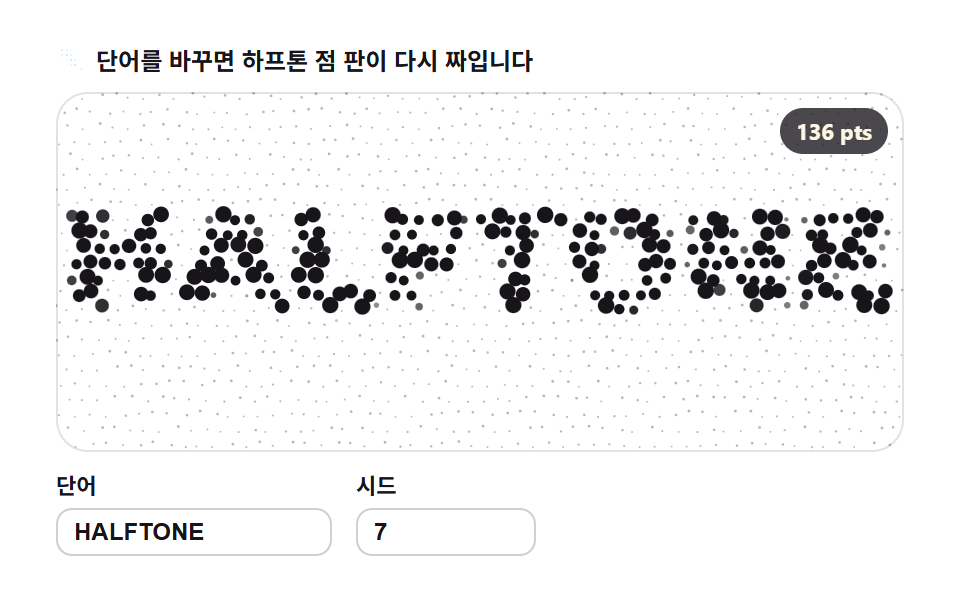
02Grid dot halftone — letters made of sample spacing
The alpha mask is read only at fixed grid intervals and dots are sized by their value, then the interval tightens and loosens over time so the letters densify and rarify.
Best forPrint and publishing concept brand heroes
getImageDataarcrequestAnimationFrame
<main class="stage">
<div class="gh" id="gh">
  <p class="gh__hint">
    <svg class="gh__ico" viewBox="0 0 256 256" aria-hidden="true"><g fill="currentColor"><circle cx="48" cy="48" r="8"/><circle cx="88" cy="48" r="5"/><circle cx="120" cy="48" r="3"/><circle cx="152" cy="48" r="2"/><circle cx="48" cy="88" r="5"/><circle cx="88" cy="88" r="8"/><circle cx="120" cy="88" r="5"/><circle cx="152" cy="88" r="3"/><circle cx="48" cy="128" r="3"/><circle cx="88" cy="128" r="5"/><circle cx="120" cy="128" r="8"/><circle cx="152" cy="128" r="5"/><circle cx="48" cy="168" r="2"/><circle cx="88" cy="168" r="3"/><circle cx="120" cy="168" r="5"/><circle cx="152" cy="168" r="8"/><circle cx="200" cy="200" r="10" opacity=".35"/></g></svg>
    <span>Change the word and the halftone plate re-weaves</span>
  </p>
  <div class="gh__field" id="field" role="application" aria-label="Grid dot halftone playground" tabindex="0">
    <canvas class="gh__cv" id="cv"></canvas>
    <b class="gh__badge" aria-hidden="true" id="badge">0 pts</b>
  </div>
  <div class="gh__bar">
    <label class="gh__dial">Word
      <input type="text" id="word" value="HALFTONE" maxlength="12" spellcheck="false" aria-label="Word">
    </label>
    <label class="gh__dial">Seed
      <input type="number" id="seed" min="1" max="9999" value="7" aria-label="Seed">
    </label>
  </div>
</div>
</main>
@use "../../../../site/static/demo-tokens" as *;
// 격자 점 하프톤 — 움직임은 전부 캔버스 rAF 루프 안에 있다(@keyframes 0개 — 077-03 패턴).
// 점색은 파스텔 변수를 커스텀 프로퍼티로 내려 JS 가 읽어 쓴다. 리터럴 hex 는 없다(BD26).
$glyph-ink: $subject-ink; // 진한 잉크 점 — 하프톤 본색
$glyph-sky: mix($subject-sky, $stage-paper, 42%); // 파스텔 하늘 점
$glyph-mint: mix($subject-mint, $stage-paper, 42%); // 파스텔 민트 점
@include stage($stage-paper);
.gh {
--g0: #{$glyph-ink};
--g1: #{$glyph-sky};
--g2: #{$glyph-mint};
--g3: #{$glyph-sky};
display: flex; flex-direction: column; gap: $sp-2;
width: 100%; max-width: 424px;
}
.gh__hint {
display: flex; align-items: center; gap: $sp-1; margin: 0;
font-weight: 700; font-size: clamp(10px, 2.8vw, 12px); line-height: 1.35;
color: $subject-ink;
}
.gh__ico { width: 16px; height: 16px; flex: 0 0 auto; color: $glyph-sky; }
.gh__field {
position: relative; height: 180px;
border-radius: $r-card; overflow: hidden;
background: $stage-paper;
box-shadow: inset 0 0 0 1px rgba($subject-ink, .12);
}
.gh__field:focus-visible { outline: 2px solid $glyph-sky; outline-offset: 2px; }
.gh__cv { display: block; width: 100%; height: 100%; }
// 격자점(=샘플 칸) 수를 화면에 적는다 — 런타임 샘플링이 이 데모의 요점이다
.gh__badge {
position: absolute; right: $sp-2; top: $sp-2;
padding: $sp-1 $sp-2; border-radius: $r-pill;
background: rgba($subject-ink, .78);
color: $subject-cream; font-weight: 700; font-size: 11px;
}
.gh__bar { display: flex; align-items: flex-end; gap: $sp-3; }
.gh__dial {
display: flex; flex-direction: column; gap: $sp-1;
font-weight: 700; font-size: 11px; color: $subject-ink;
}
.gh__dial input {
width: 120px; margin: 0; padding: $sp-1 $sp-2;
border: 1px solid rgba($subject-ink, .2); border-radius: $r-sm;
background: $stage-paper; color: $subject-ink;
font-weight: 700; font-size: 12px;
}
.gh__dial input[type="number"] { width: 72px; }
.gh__dial input:focus-visible { outline: 2px solid $glyph-sky; outline-offset: 1px; }
@media (max-width: 340px) {
.gh { gap: $sp-1; }
.gh__field { height: 100px; }
.gh__badge { font-size: 10px; padding: 0 $sp-1; }
.gh__dial input { width: 88px; }
.gh__dial input[type="number"] { width: 56px; }
.gh__hint { font-size: 10px; }
}
// reduce — 루프가 아예 안 돈다. 정지 격자 한 장이 남는다.
@media (prefers-reduced-motion: reduce) {
.gh.is-still .gh__field { cursor: default !important; }
}html, body {
margin: 0;
overflow: hidden;
}
.stage {
box-sizing: border-box;
min-height: 100vh;
display: grid;
place-items: center;
margin: 0;
background: #ffffff;
font-family: -apple-system, "Segoe UI", "Noto Sans KR", sans-serif;
padding: clamp(8px, 4vw, 24px);
}
.gh {
--g0: #17141a;
--g1: rgb(76.1176470588%, 90.9411764706%, 100%);
--g2: rgb(70.5176470588%, 92.9176470588%, 85.3411764706%);
--g3: rgb(76.1176470588%, 90.9411764706%, 100%);
display: flex;
flex-direction: column;
gap: 8px;
width: 100%;
max-width: 424px;
}
.gh__hint {
display: flex;
align-items: center;
gap: 4px;
margin: 0;
font-weight: 700;
font-size: clamp(10px, 2.8vw, 12px);
line-height: 1.35;
color: #17141a;
}
.gh__ico {
width: 16px;
height: 16px;
flex: 0 0 auto;
color: rgb(76.1176470588%, 90.9411764706%, 100%);
}
.gh__field {
position: relative;
height: 180px;
border-radius: 16px;
overflow: hidden;
background: #ffffff;
box-shadow: inset 0 0 0 1px rgba(23, 20, 26, 0.12);
}
.gh__field:focus-visible {
outline: 2px solid rgb(76.1176470588%, 90.9411764706%, 100%);
outline-offset: 2px;
}
.gh__cv {
display: block;
width: 100%;
height: 100%;
}
.gh__badge {
position: absolute;
right: 8px;
top: 8px;
padding: 4px 8px;
border-radius: 999px;
background: rgba(23, 20, 26, 0.78);
color: #fff7e6;
font-weight: 700;
font-size: 11px;
}
.gh__bar {
display: flex;
align-items: flex-end;
gap: 12px;
}
.gh__dial {
display: flex;
flex-direction: column;
gap: 4px;
font-weight: 700;
font-size: 11px;
color: #17141a;
}
.gh__dial input {
width: 120px;
margin: 0;
padding: 4px 8px;
border: 1px solid rgba(23, 20, 26, 0.2);
border-radius: 8px;
background: #ffffff;
color: #17141a;
font-weight: 700;
font-size: 12px;
}
.gh__dial input[type=number] {
width: 72px;
}
.gh__dial input:focus-visible {
outline: 2px solid rgb(76.1176470588%, 90.9411764706%, 100%);
outline-offset: 1px;
}
@media (max-width: 340px) {
.gh {
gap: 4px;
}
.gh__field {
height: 100px;
}
.gh__badge {
font-size: 10px;
padding: 0 4px;
}
.gh__dial input {
width: 88px;
}
.gh__dial input[type=number] {
width: 56px;
}
.gh__hint {
font-size: 10px;
}
}
@media (prefers-reduced-motion: reduce) {
.gh.is-still .gh__field {
cursor: default !important;
}
}// 격자 점 하프톤 — 글자를 픽셀로 샘플링해 격자점마다 점 크기로 옮겨 적는다(인쇄 하프톤의 원리).
// 1) 오프스크린 캔버스에 fillText 로 단어를 그려 getImageData 로 알파 마스크를 뽑는다
// 2) 격자점 (x,y) 에서 알파를 읽어 0..1 값으로 정규화한다
// 3) 점 반경 = 값 비례. 격자 간격 자체를 사인으로 6↔10px 오가며 조밀↔성김 — 판 전체가 호흡한다
// 무작위 요소는 격자점 위상 흔들림뿐이고 전부 mulberry32(Seed) 로 돌린다.
var root = document.getElementById('gh');
var field = document.getElementById('field');
var cv = document.getElementById('cv');
var ctx = cv.getContext('2d');
var wordIn = document.getElementById('word');
var seedIn = document.getElementById('seed');
var badge = document.getElementById('badge');
var SW = 252, SH = 108; // 샘플 해상도
var MSZ = 1.4; // 확대 배율 — 글자를 판보다 크게 키워 잉크 면적을 늘린다
var reduce = window.matchMedia('(prefers-reduced-motion: reduce)').matches;
var W = 0, H = 0;
var mask = null; // 현재 단어의 알파 마스크(ImageData.data)
var phas = []; // 격자점마다의 Seed 위상 — 점마다 반짝이는 타이밍이 다르다
var seed = 7, word = 'HALFTONE';
var t0 = 0, raf = 0;
var css = getComputedStyle(root);
function hexOf(name) {
var v = css.getPropertyValue(name).trim().replace('#', '');
if (v.length === 3) v = v.charAt(0) + v.charAt(0) + v.charAt(1) + v.charAt(1) + v.charAt(2) + v.charAt(2);
return '#' + v;
}
var cols = [hexOf('--g0'), hexOf('--g1'), hexOf('--g2'), hexOf('--g3')];
function mulberry32(a) {
return function () {
a |= 0; a = a + 0x6D2B79F5 | 0;
var t = Math.imul(a ^ a >>> 15, 1 | a);
t = t + Math.imul(t ^ t >>> 7, 61 | t) ^ t;
return ((t ^ t >>> 14) >>> 0) / 4294967296;
};
}
// ── 1) 글자 → 알파 마스크 ────────────────────────────────────────
function buildMask(text) {
var off = document.createElement('canvas');
off.width = SW; off.height = SH;
var oc = off.getContext('2d', { willReadFrequently: true });
oc.textAlign = 'center'; oc.textBaseline = 'middle';
var fs = 200 * MSZ;
oc.font = '900 ' + fs + 'px Arial';
var w = oc.measureText(text).width || 1;
fs = Math.min(fs * ((SW - 4) / w), SH * 1.05);
oc.font = '900 ' + Math.round(fs) + 'px Arial';
oc.fillStyle = '#fff';
// 두 줄 겹인쇄(overprint) — 글자 중앙을 두 번 찍어 잉크 면적을 늘리고 명암 단계를 만든다
oc.fillText(text, SW / 2, SH / 2);
oc.globalAlpha = 1;
return oc.getImageData(0, 0, SW, SH).data;
}
// 샘플 간격이 시간에 따라 4.2↔7.8px — 주기 2초. 판이 조밀해졌다 성겨진다
function stepAt(t) { return 6 + 1.8 * Math.sin(t * Math.PI); }
// ── 2)+(3) 매 프레임 격자를 다시 걸어 점을 찍는다 ─────────────────
// 간격이 매끈하게 미끄러지면 점이 격자 위를 떠다닌다 — 마이크로 흔들림(jitter)을 더해
// 점 하나 하나가 프레임마다 살짝 비껴 그려지게 한다. 판 등록 흔들림도 함께.
function paint(t) {
ctx.clearRect(0, 0, W, H);
var sx = W / SW, sy = H / SH;
var s = stepAt(t);
var ox = Math.sin(t * 1.2) * 4.0, oy = Math.cos(t * 0.9) * 3.2;
var rows = Math.ceil((SH + 8) / s) + 2, colsN = Math.ceil((SW + 8) / s) + 2;
var idx = 0;
for (var gy = -2; gy < rows; gy++) {
var y = gy * s + oy;
for (var gx = -2; gx < colsN; gx++) {
var x = gx * s + ((gy & 1) ? s * 0.5 : 0) + ox; // 한 줄 걸러 반 칸 엇갈림 — 하프톤 결
idx = ((gy + 8) * 131 + (gx + 8)) % phas.length; // 격자점 고유 위상(시드로 결정)
var jx = x + Math.sin(t * 5.1 + phas[idx]) * 0.9; // 점마다 마이크로 흔들림
var jy = y + Math.cos(t * 4.7 + phas[idx] * 1.3) * 0.9;
var xi = Math.round(jx), yi = Math.round(jy);
if (xi < 0 || yi < 0 || xi >= SW || yi >= SH) continue;
var a = mask[(yi * SW + xi) * 4 + 3] / 255; // 이 칸의 잉크 농도
var fl = 0.80 + 0.20 * Math.sin(t * 4.4 + phas[idx]); // 점마다 다른 반짝임
// 인쇄판 하프톤 — 빈 칸도 희미한 바탕점을 받는다. 글자는 점이 커지는 곳에서 떠오른다
var r = (0.17 + Math.pow(a, 1.2) * 0.86) * s * 0.52 * fl;
ctx.globalAlpha = 0.30 + a * 0.70;
ctx.fillStyle = cols[a > 0.66 ? 0 : (a > 0.4 ? 1 : 2)];
ctx.beginPath();
ctx.arc(jx * sx, jy * sy, r * sx, 0, 6.2832);
ctx.fill();
}
}
ctx.globalAlpha = 1;
}
function countTargets() {
// probe 계약 — 현재 간격(정지 시각 기준)에서 잉크 칸 수
var s = stepAt(0), n = 0;
for (var y = 0; y < SH; y += s) {
for (var x = 0; x < SW; x += s) {
if (mask[(Math.round(y) * SW + Math.round(x)) * 4 + 3] > 128) n++;
}
}
return n;
}
function resample(nextWord, nextSeed) {
var w = String(nextWord == null ? word : nextWord).trim().toUpperCase();
if (w) word = w;
var sv = Math.floor(Number(nextSeed));
if (sv >= 1) seed = sv;
mask = buildMask(word);
var rnd = mulberry32(seed);
phas = [];
for (var i = 0; i < 617; i++) phas.push(rnd() * 6.2832);
var n = countTargets();
window.__sampleInfo = { targets: n, particles: n };
badge.textContent = n + ' pts';
if (reduce) paint(0);
else t0 = performance.now();
}
function fit() {
var r = field.getBoundingClientRect();
var d = window.devicePixelRatio || 1;
W = r.width; H = r.height;
cv.width = Math.round(W * d); cv.height = Math.round(H * d);
ctx.setTransform(d, 0, 0, d, 0, 0);
}
function frame(now) {
paint((now - t0) / 1000);
raf = requestAnimationFrame(frame);
}
wordIn.addEventListener('input', function () { resample(wordIn.value, seedIn.value); });
seedIn.addEventListener('input', function () { resample(wordIn.value, seedIn.value); });
window.addEventListener('resize', function () { fit(); if (reduce) paint(0); });
fit();
resample(wordIn.value, seedIn.value);
if (reduce) {
root.classList.add('is-still'); // 루프 없이 정지 한 장
} else {
raf = requestAnimationFrame(frame);
}// GlyphGridDotHalftone — vanilla 판(run/310/demo/02-glyph-grid-dot-halftone/index.html) 의 React 포트.
// 오프스크린 캔버스에 fillText 로 단어를 그려 getImageData 로 알파 마스크를 뽑고,
// 격자점마다 알파를 읽어 점 크기로 옮겨 적는다(인쇄 하프톤의 원리). 빈 칸도 희미한 바탕점을 받는다.
// 격자 간격 자체를 사인으로 오가며 판이 조밀해졌다 성겨진다 — 간격·판 흔들림·점 반짝임이 전부 rAF 안에서 계산된다.
// 무작위 요소는 격자점 위상뿐이고 전부 mulberry32(시드) 로 정한다. @keyframes 는 없다.
import { useEffect, useRef, useState } from "react";
import type { CSSProperties } from "react";
import styles from "./GlyphGridDotHalftone.module.scss";
export type GlyphGridDotHalftoneProps = {
duration?: string;
easing?: string;
color?: string;
};
type Vars = CSSProperties & { "--duration"?: string; "--easing"?: string; "--color"?: string };
type Box<T> = { current: T };
type InputEvt = { target: { value: string } };
const SW = 252, SH = 108; // 샘플 해상도
const MSZ = 1.4; // 확대 배율 — 글자를 판보다 크게 키워 잉크 면적을 늘린다
const FIELD_LABEL = "격자 점 하프톤 실험판";
// 결정적 난수 — mulberry32. 같은 시드면 같은 수열을 돌려준다
function mulberry32(a: number): () => number {
return function () {
a |= 0; a = (a + 0x6D2B79F5) | 0;
const t = Math.imul(a ^ (a >>> 15), 1 | a);
const u = (t + Math.imul(t ^ (t >>> 7), 61 | t)) ^ t;
return ((u ^ (u >>> 14)) >>> 0) / 4294967296;
};
}
// 오프스크린 fillText → 알파 마스크 픽셀 배열
function buildMask(text: string): Uint8ClampedArray {
const off = document.createElement("canvas");
off.width = SW; off.height = SH;
const oc = off.getContext("2d", { willReadFrequently: true }) as CanvasRenderingContext2D;
oc.textAlign = "center"; oc.textBaseline = "middle";
let fs = 200 * MSZ;
oc.font = "900 " + fs + "px Arial";
const w = oc.measureText(text).width || 1;
fs = Math.min(fs * ((SW - 4) / w), SH * 1.05);
oc.font = "900 " + Math.round(fs) + "px Arial";
oc.fillStyle = "#fff";
oc.fillText(text, SW / 2, SH / 2);
return oc.getImageData(0, 0, SW, SH).data;
}
// 샘플 간격이 시간에 따라 4.2↔7.8px — 주기 2초. 판이 조밀해졌다 성겨진다
function stepAt(t: number): number {
return 6 + 1.8 * Math.sin(t * Math.PI);
}
export default function GlyphGridDotHalftone({
duration = "2s", // vanilla $duration: $dur-loop
easing = "cubic-bezier(.2, .8, .2, 1)", // vanilla $easing: $ease-spring
color = "#17141a", // vanilla $glyph-ink
}: GlyphGridDotHalftoneProps) {
const rootRef = useRef<HTMLDivElement | null>(null);
const fieldRef = useRef<HTMLDivElement | null>(null);
const cvRef = useRef<HTMLCanvasElement | null>(null);
const ctxRef = useRef<CanvasRenderingContext2D | null>(null);
const maskRef = useRef<Uint8ClampedArray | null>(null);
const phasRef = useRef<number[]>([]) as Box<number[]>;
const colsRef = useRef<string[]>([]) as Box<string[]>;
const sizeRef = useRef({ w: 0, h: 0 }) as Box<{ w: number; h: number }>;
const stateRef = useRef({ word: "HALFTONE", seed: 7, t0: 0 }) as Box<{ word: string; seed: number; t0: number }>;
const rafRef = useRef(0) as Box<number>;
const [count, setCount] = useState(0);
const [still, setStill] = useState(false);
const vars: Vars = { "--duration": duration, "--easing": easing, "--color": color };
function reduced(): boolean {
return window.matchMedia("(prefers-reduced-motion: reduce)").matches;
}
function hex3to6(v: string): string {
if (v.length === 3) return v.charAt(0) + v.charAt(0) + v.charAt(1) + v.charAt(1) + v.charAt(2) + v.charAt(2);
return v;
}
function colors(): string[] {
const root = rootRef.current;
if (!root) return ["#17141a", "#17141a", "#17141a"];
const one = (n: string) => hex3to6(getComputedStyle(root).getPropertyValue(n).trim());
return [one("--g0"), one("--g1"), one("--g2")];
}
// 고DPI 대응 — 배킹 스토어는 devicePixelRatio 배, 그리기 좌표계는 CSS 픽셀 그대로
function fit(): void {
const field = fieldRef.current;
const cv = cvRef.current;
if (!field || !cv) return;
const r = field.getBoundingClientRect();
const dpr = window.devicePixelRatio || 1;
sizeRef.current.w = r.width;
sizeRef.current.h = r.height;
cv.width = Math.round(r.width * dpr);
cv.height = Math.round(r.height * dpr);
const ctx = ctxRef.current;
if (ctx) ctx.setTransform(dpr, 0, 0, dpr, 0, 0);
}
// 매 프레임 격자를 다시 걸어 점을 찍는다 — 판 흔들림 + 점마다 마이크로 흔들림·반짝임
function paint(t: number): void {
const ctx = ctxRef.current;
const mask = maskRef.current;
const phas = phasRef.current;
const cols = colsRef.current;
if (!ctx || !mask || !phas.length) return;
const W = sizeRef.current.w, H = sizeRef.current.h;
ctx.clearRect(0, 0, W, H);
const sx = W / SW, sy = H / SH;
const s = stepAt(t);
const ox = Math.sin(t * 1.2) * 4.0, oy = Math.cos(t * 0.9) * 3.2;
const rows = Math.ceil((SH + 8) / s) + 2, colsN = Math.ceil((SW + 8) / s) + 2;
for (let gy = -2; gy < rows; gy++) {
const y = gy * s + oy;
for (let gx = -2; gx < colsN; gx++) {
const x = gx * s + ((gy & 1) ? s * 0.5 : 0) + ox; // 한 줄 걸러 반 칸 엇갈림 — 하프톤 결
const idx = ((gy + 8) * 131 + (gx + 8)) % phas.length;
const jx = x + Math.sin(t * 5.1 + phas[idx]) * 0.9; // 점마다 마이크로 흔들림
const jy = y + Math.cos(t * 4.7 + phas[idx] * 1.3) * 0.9;
const xi = Math.round(jx), yi = Math.round(jy);
if (xi < 0 || yi < 0 || xi >= SW || yi >= SH) continue;
const a = mask[(yi * SW + xi) * 4 + 3] / 255; // 이 칸의 잉크 농도
const fl = 0.80 + 0.20 * Math.sin(t * 4.4 + phas[idx]); // 점마다 다른 반짝임
// 인쇄판 하프톤 — 빈 칸도 희미한 바탕점을 받는다. 글자는 점이 커지는 곳에서 떠오른다
const r = (0.17 + Math.pow(a, 1.2) * 0.86) * s * 0.52 * fl;
ctx.globalAlpha = 0.30 + a * 0.70;
ctx.fillStyle = cols[a > 0.66 ? 0 : (a > 0.4 ? 1 : 2)] || "#17141a";
ctx.beginPath();
ctx.arc(jx * sx, jy * sy, r * sx, 0, 6.2832);
ctx.fill();
}
}
ctx.globalAlpha = 1;
}
// probe 계약 대응 — 정지 시각 기준 잉크 칸 수
function countTargets(): number {
const mask = maskRef.current;
if (!mask) return 0;
const s = stepAt(0);
let n = 0;
for (let y = 0; y < SH; y += s) {
for (let x = 0; x < SW; x += s) {
if (mask[(Math.round(y) * SW + Math.round(x)) * 4 + 3] > 128) n++;
}
}
return n;
}
// 단어·시드가 바뀌면 마스크와 위상표가 다시 계산된다(런타임 샘플링)
function resample(nextWord: string, nextSeed: number): void {
const st = stateRef.current;
const w = String(nextWord == null ? st.word : nextWord).trim().toUpperCase();
if (w) st.word = w;
if (nextSeed >= 1) st.seed = Math.floor(nextSeed);
maskRef.current = buildMask(st.word);
const rnd = mulberry32(st.seed);
const phas: number[] = [];
for (let i = 0; i < 617; i++) phas.push(rnd() * 6.2832);
phasRef.current = phas;
setCount(countTargets());
if (reduced()) paint(0);
else st.t0 = performance.now();
}
function frame(now: number): void {
paint((now - stateRef.current.t0) / 1000);
rafRef.current = requestAnimationFrame(frame);
}
function onWord(e: InputEvt): void {
resample(e.target.value, stateRef.current.seed);
}
function onSeed(e: InputEvt): void {
const v = Math.floor(Number(e.target.value)) || 1;
resample(stateRef.current.word, v);
}
function onResize(): void {
fit();
if (reduced()) paint(0);
}
useEffect(() => {
const cv = cvRef.current;
if (!cv) return;
ctxRef.current = cv.getContext("2d");
if (!ctxRef.current) return;
colsRef.current = colors();
fit();
resample("HALFTONE", 7);
window.addEventListener("resize", onResize);
if (reduced()) {
// reduce — 루프를 시작하지 않고 정지 격자 한 장만 그린다
setStill(true);
} else {
rafRef.current = requestAnimationFrame(frame);
}
return () => {
window.removeEventListener("resize", onResize);
cancelAnimationFrame(rafRef.current);
};
}, []);
const cls = [styles.root, still ? styles.isStill : ""].filter(Boolean).join(" ");
return (
<main className={styles.stage}>
<div className={cls} ref={rootRef} style={vars}>
<p className={styles.hint}>
<svg className={styles.ico} viewBox="0 0 256 256" aria-hidden="true"><g fill="currentColor"><circle cx="48" cy="48" r="8"/><circle cx="88" cy="48" r="5"/><circle cx="120" cy="48" r="3"/><circle cx="152" cy="48" r="2"/><circle cx="48" cy="88" r="5"/><circle cx="88" cy="88" r="8"/><circle cx="120" cy="88" r="5"/><circle cx="152" cy="88" r="3"/><circle cx="48" cy="128" r="3"/><circle cx="88" cy="128" r="5"/><circle cx="120" cy="128" r="8"/><circle cx="152" cy="128" r="5"/><circle cx="48" cy="168" r="2"/><circle cx="88" cy="168" r="3"/><circle cx="120" cy="168" r="5"/><circle cx="152" cy="168" r="8"/><circle cx="200" cy="200" r="10" opacity=".35"/></g></svg>
<span>단어를 바꾸면 하프톤 점 판이 다시 짜입니다</span>
</p>
<div className={styles.field} ref={fieldRef} role="application" aria-label={FIELD_LABEL} tabIndex={0}>
<canvas className={styles.cv} ref={cvRef} id="cv"></canvas>
<b className={styles.badge} aria-hidden="true">{count} pts</b>
</div>
<div className={styles.bar}>
<label className={styles.dial}>단어
<input type="text" id="word" defaultValue="HALFTONE" maxLength={12} spellCheck={false} aria-label="단어" onInput={onWord} />
</label>
<label className={styles.dial}>시드
<input type="number" id="seed" defaultValue={7} min={1} max={9999} aria-label="시드" onInput={onSeed} />
</label>
</div>
</div>
</main>
);
}02 Grid dot halftone — letters made of sample spacing — Measured area 36.418% · moving frames 23/23Original by GODRICH · SCSS and React ship in the zip · 9 Text Particle Effect CSS Ideas From Pixels
The post this demo lives in
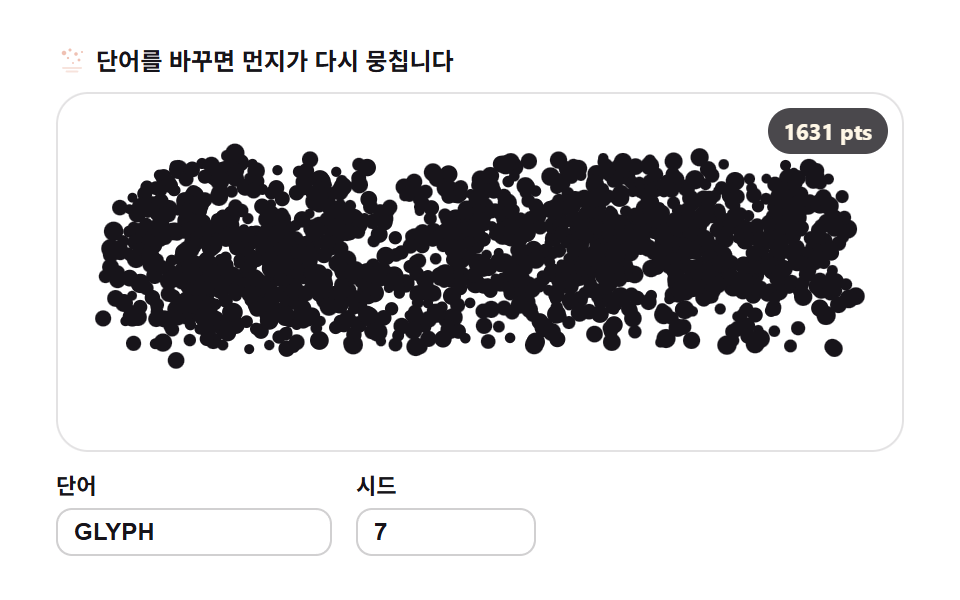 9 Text Particle Effect CSS Ideas From PixelsA text particle effect built with CSS keyframes always drags the whole letter as one block. These nine boards refuse tha See all demos in this post
If you like this effect - similar demos
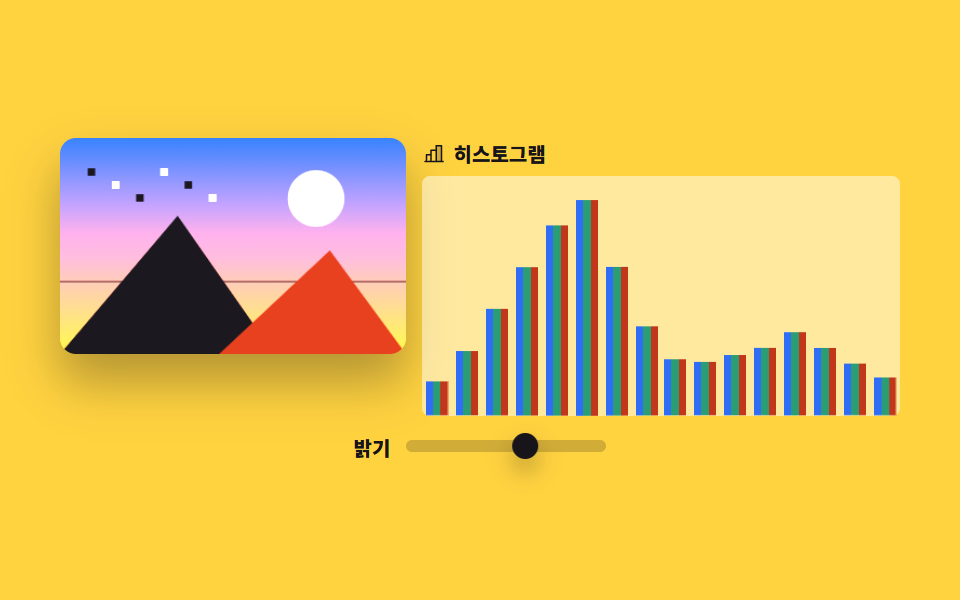 Creative UI08 RGB histogramImage Crop JavaScript: 9 Canvas Editor UIs
 Creative UI01 One field layer — counting threshold-crossing pixels as a first metaball9 Metaball Effect Scenes, Marching Squares Canvas
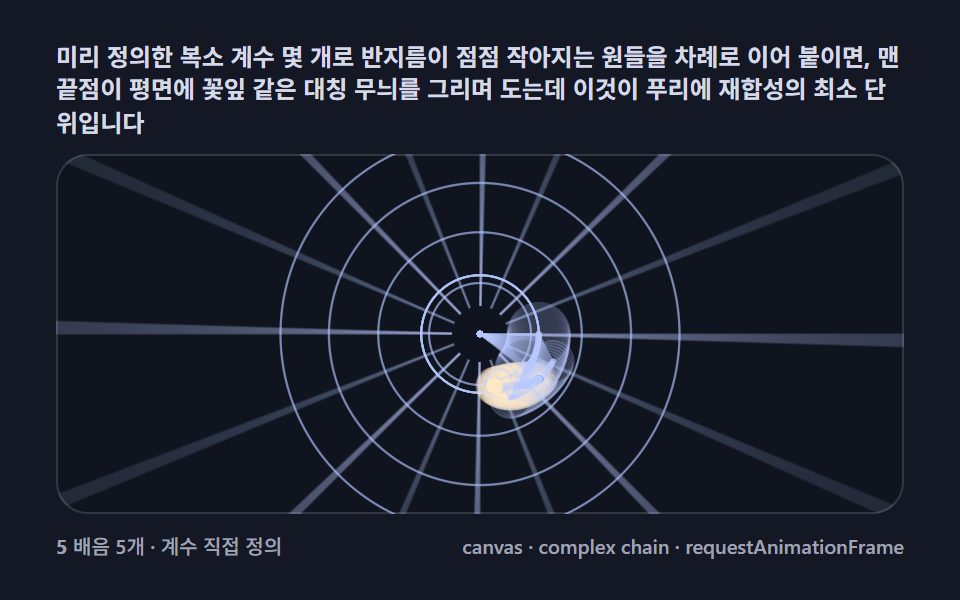 Creative UI01 Basic epicycle chain — circles stacked on circles, orbiting and plotting a pointFourier Epicycles, 9 Ways (No Library)