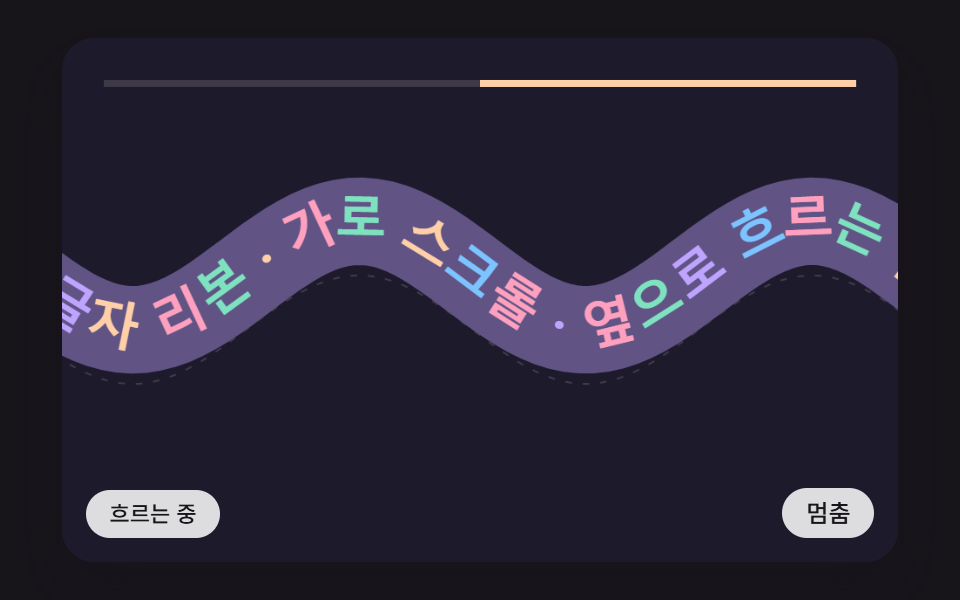
09A Text Ribbon That Flows Sideways Along a Sine Wave, Each Letter Turned to the Slope, With Taller Waves as Speed Builds
Each letter gets a position on the curve, and the slope at that point (its derivative) gives the rotation. Wave height eases after the flow speed, growing as it speeds up.
Best forBrand slogan bands and event banners
WAVE_KAMP_LERPAMP_GAINSPEED_FRICTION
<main class="stage">
<div class="hs is-demo" id="hs">
  <canvas class="hs__canvas" data-role="canvas" width="480" height="300" tabindex="0" aria-label="A ribbon of letters flowing along a wave, each turned by the curve's slope, with the wave growing as it speeds up"></canvas>
  <p class="hs__status" data-role="status" aria-live="off">Flowing</p>
  <div class="hs__tools">
    <button class="hs__btn" data-role="btn" type="button" aria-pressed="false">Stopped</button>
  </div>
</div>
</main>
@use "../../../../site/static/demo-tokens" as *;
@include stage($stage-ink);
.hs {
position: relative;
width: min(92vw, calc(160vh - 12.8vw));
aspect-ratio: 480 / 300;
margin: 0 auto;
border-radius: $r-card;
overflow: hidden;
box-shadow: $shadow-raised;
background: $subject-ink;
}
.hs__canvas {
display: block;
width: 100%;
height: 100%;
cursor: grab;
}
.hs__canvas:active {
cursor: grabbing;
}
.hs__canvas:focus-visible {
outline: 2px solid rgba(255, 255, 255, .85);
outline-offset: -6px;
}
.hs__status {
position: absolute;
left: $sp-3;
bottom: $sp-3;
max-width: 46%;
margin: 0;
padding: $sp-1 $sp-3;
border-radius: $r-control;
background: rgba(255, 255, 255, .85);
color: $subject-ink;
font-weight: 500;
font-size: 11px;
line-height: 1.4;
pointer-events: none;
}
.hs__tools {
position: absolute;
right: $sp-3;
bottom: $sp-3;
display: flex;
gap: $sp-2;
}
.hs__btn {
margin: 0;
padding: $sp-1 $sp-3;
border: 0;
border-radius: $r-pill;
background: rgba(255, 255, 255, .85);
color: $subject-ink;
font: inherit;
font-weight: 500;
font-size: 12px;
line-height: 1.4;
cursor: pointer;
transition: background-color $dur-quick ease-out;
}
.hs__btn:hover {
background: $subject-cream;
}
.hs__btn[aria-pressed="true"] {
background: $subject-mint;
}
.hs__btn:focus-visible {
outline: 2px solid rgba(255, 255, 255, .95);
outline-offset: 2px;
}
// 손가락 가로 끌기는 이 캔버스가 받고, 세로 쓸기는 브라우저에 남겨 페이지 스크롤이 막히지 않게 한다
.hs__canvas { touch-action: pan-y; }
@media (max-width: 340px) {
.hs__btn { font-size: 10px; padding: $sp-1 $sp-2; }
.hs__status { font-size: 10px; padding: $sp-1 $sp-2; }
}
@media (prefers-reduced-motion: reduce) {
.hs__btn { transition: none; }
}html, body {
margin: 0;
overflow: hidden;
}
.stage {
box-sizing: border-box;
min-height: 100vh;
display: grid;
place-items: center;
margin: 0;
background: #17141a;
font-family: -apple-system, "Segoe UI", "Noto Sans KR", sans-serif;
padding: clamp(8px, 4vw, 24px);
}
.hs {
position: relative;
width: min(92vw, 160vh - 12.8vw);
aspect-ratio: 480/300;
margin: 0 auto;
border-radius: 16px;
overflow: hidden;
box-shadow: 0 14px 24px rgba(23, 20, 26, 0.32);
background: #17141a;
}
.hs__canvas {
display: block;
width: 100%;
height: 100%;
cursor: grab;
}
.hs__canvas:active {
cursor: grabbing;
}
.hs__canvas:focus-visible {
outline: 2px solid rgba(255, 255, 255, 0.85);
outline-offset: -6px;
}
.hs__status {
position: absolute;
left: 12px;
bottom: 12px;
max-width: 46%;
margin: 0;
padding: 4px 12px;
border-radius: 12px;
background: rgba(255, 255, 255, 0.85);
color: #17141a;
font-weight: 500;
font-size: 11px;
line-height: 1.4;
pointer-events: none;
}
.hs__tools {
position: absolute;
right: 12px;
bottom: 12px;
display: flex;
gap: 8px;
}
.hs__btn {
margin: 0;
padding: 4px 12px;
border: 0;
border-radius: 999px;
background: rgba(255, 255, 255, 0.85);
color: #17141a;
font: inherit;
font-weight: 500;
font-size: 12px;
line-height: 1.4;
cursor: pointer;
transition: background-color 220ms ease-out;
}
.hs__btn:hover {
background: #fff7e6;
}
.hs__btn[aria-pressed=true] {
background: #4cd4a6;
}
.hs__btn:focus-visible {
outline: 2px solid rgba(255, 255, 255, 0.95);
outline-offset: 2px;
}
.hs__canvas {
touch-action: pan-y;
}
@media (max-width: 340px) {
.hs__btn {
font-size: 10px;
padding: 4px 8px;
}
.hs__status {
font-size: 10px;
padding: 4px 8px;
}
}
@media (prefers-reduced-motion: reduce) {
.hs__btn {
transition: none;
}
}(function () {
const root = document.getElementById("hs");
if (!root) return;
const W = 480;
const H = 300;
const FIXED_DT = 16;
// 파스텔 팔레트 — 어두운 무대 위에 밝은 카드를 얹어 명도 차로 읽힌다
const BG = [29, 26, 44];
const PAPER = [255, 248, 234];
const INK = [58, 48, 76];
const MINT = [126, 226, 192];
const SKY = [124, 196, 255];
const LILAC = [190, 164, 255];
const PINK = [255, 160, 190];
const PEACH = [255, 208, 168];
const TINTS = [SKY, PINK, MINT, LILAC, PEACH];
function clamp(v, lo, hi) { return v < lo ? lo : (v > hi ? hi : v); }
function lerp(a, b, k) { return a + (b - a) * k; }
function smooth(x) { const c = clamp(x, 0, 1); return c * c * (3 - 2 * c); }
function rgba(c, a) {
return 'rgba(' + Math.round(c[0]) + ',' + Math.round(c[1]) + ',' + Math.round(c[2]) + ',' + clamp(a, 0, 1).toFixed(3) + ')';
}
function mix(a, b, k) { return [lerp(a[0], b[0], k), lerp(a[1], b[1], k), lerp(a[2], b[2], k)]; }
const canvasEl = root.querySelector('[data-role="canvas"]');
const statusEl = root.querySelector('[data-role="status"]');
const ctxRaw = canvasEl ? canvasEl.getContext('2d') : null;
if (!canvasEl || !ctxRaw || !statusEl) {
return;
}
const cv = canvasEl;
const ctx = ctxRaw;
const status = statusEl;
const reduceQuery = window.matchMedia('(prefers-reduced-motion: reduce)');
const still = reduceQuery.matches;
// 자동 시연 중인가 — 사람이 처음 만지는 순간 시연을 멈추고 상태 줄을 읽어 주기 시작한다
let demo = root.classList.contains('is-demo');
function wake() {
if (!demo) {
return;
}
demo = false;
root.classList.remove('is-demo');
status.setAttribute('aria-live', 'polite');
}
function say(text) {
if (status.textContent !== text) {
status.textContent = text;
}
}
// 휠 한 번의 이동량을 px 로 — 줄 단위(deltaMode 1)·쪽 단위(deltaMode 2) 장치도 같은 눈금으로 맞춘다.
// 가로·세로 중 큰 쪽을 쓴다: 트랙패드의 가로 쓸기와 마우스 휠의 세로 굴림이 같은 방향으로 들어온다
function wheelPx(ev) {
const unit = ev.deltaMode === 1 ? 16 : (ev.deltaMode === 2 ? W : 1);
const d = Math.abs(ev.deltaX) > Math.abs(ev.deltaY) ? ev.deltaX : ev.deltaY;
return d * unit;
}
// 시연 시계가 loop 주기 안의 at 시각을 이번 스텝에 막 지났는가
function crossed(t, at, loop) {
const p = t % loop;
return p >= at && p - FIXED_DT < at;
}
function fitCanvas() {
const dpr = window.devicePixelRatio || 1;
cv.width = Math.round(W * dpr);
cv.height = Math.round(H * dpr);
ctx.setTransform(dpr, 0, 0, dpr, 0, 0);
}
function onResize() {
fitCanvas();
draw();
}
fitCanvas();
window.addEventListener('resize', onResize);
// 화면 좌표(CSS px) → 장면 좌표(480x300). 리사이즈 뒤에도 늘 현재 크기로 다시 잰다
function toScene(ev) {
const r = cv.getBoundingClientRect();
return [((ev.clientX - r.left) / r.width) * W, ((ev.clientY - r.top) / r.height) * H];
}
function roundRectPath(c, x, y, w, h, r) {
const rr = Math.min(r, w / 2, h / 2);
c.beginPath();
c.moveTo(x + rr, y);
c.lineTo(x + w - rr, y);
c.quadraticCurveTo(x + w, y, x + w, y + rr);
c.lineTo(x + w, y + h - rr);
c.quadraticCurveTo(x + w, y + h, x + w - rr, y + h);
c.lineTo(x + rr, y + h);
c.quadraticCurveTo(x, y + h, x, y + h - rr);
c.lineTo(x, y + rr);
c.quadraticCurveTo(x, y, x + rr, y);
c.closePath();
}
// 카드 한 장 — 사진 대신 계산한 그림 칸(그라디언트 하늘·해·언덕) + 글줄 막대 두 개 + 번호
function drawCard(c, x, y, w, h, i, light) {
const t1 = TINTS[i % TINTS.length];
const t2 = TINTS[(i + 2) % TINTS.length];
const k = clamp(light, 0, 1);
roundRectPath(c, x, y, w, h, 10);
c.fillStyle = rgba(mix(BG, PAPER, k), 1);
c.fill();
const ih = h * 0.58;
const g = c.createLinearGradient(x, y, x + w, y + ih);
g.addColorStop(0, rgba(mix(BG, t1, k), 1));
g.addColorStop(1, rgba(mix(BG, t2, k * 0.92), 1));
c.save();
roundRectPath(c, x + 6, y + 6, w - 12, ih - 6, 7);
c.fillStyle = g;
c.fill();
c.clip();
c.fillStyle = rgba(mix(BG, PAPER, k * 0.9), 0.9);
c.beginPath();
c.arc(x + w * 0.7, y + ih * 0.36, Math.min(w, ih) * 0.13, 0, Math.PI * 2);
c.fill();
c.fillStyle = rgba(mix(BG, INK, k), 0.55);
c.beginPath();
c.moveTo(x, y + ih);
c.lineTo(x + w * 0.32, y + ih * 0.55);
c.lineTo(x + w * 0.55, y + ih * 0.8);
c.lineTo(x + w * 0.78, y + ih * 0.62);
c.lineTo(x + w, y + ih);
c.closePath();
c.fill();
c.restore();
c.fillStyle = rgba(mix(BG, INK, k), 0.75);
c.fillRect(x + 10, y + ih + 12, w * 0.62, 6);
c.fillStyle = rgba(mix(BG, INK, k), 0.4);
c.fillRect(x + 10, y + ih + 24, w * 0.44, 5);
c.fillStyle = rgba(mix(BG, INK, k), 0.9);
c.font = '700 13px sans-serif';
c.textAlign = 'right';
c.textBaseline = 'alphabetic';
c.fillText(String(i + 1).padStart(2, '0'), x + w - 9, y + h - 10);
}
const RIBBON_TEXT = 'A ribbon of letters flowing sideways · horizontal scroll ·';
const FONT_PX = 30;
const BASE_SPEED = 60;
const MAX_SPEED = 720;
const SPEED_GAIN = 3;
const SPEED_FRICTION = 0.965;
const WAVE_K = (Math.PI * 2) / 260;
const WAVE_DRIFT = 1.6;
const AMP_MIN = 10;
const AMP_GAIN = 0.09;
const AMP_MAX = 58;
const AMP_LERP = 0.05;
const CY = 136;
const X0 = -80;
const DEMO_LOOP = 4000;
const TXT_FLOW = 'Flowing';
const TXT_FAST = 'Flowing fast — the wave grows';
const TXT_PAUSE = 'Stopped';
const pauseBtn = root.querySelector('[data-role="btn"]');
let extra = 0;
let flow = 0;
let amp = AMP_MIN;
let phase = 0;
let paused = false;
let fastSaid = false;
ctx.font = '800 ' + FONT_PX + 'px sans-serif';
// 끝에 빈칸 하나를 붙여 되풀이 이음매에 간격을 둔다
const glyphs = Array.from(RIBBON_TEXT + ' ');
const widths = glyphs.map(function (g) { return ctx.measureText(g).width; });
const offsets = [];
let textLen = 0;
for (let i = 0; i < widths.length; i += 1) {
offsets.push(textLen);
textLen += widths[i];
}
function speedNow() { return paused ? 0 : clamp(BASE_SPEED + extra, -MAX_SPEED, MAX_SPEED); }
// 물결 곡선과 그 도함수(기울기) — 글자 회전각은 atan(기울기)
function waveY(x) { return CY + amp * Math.sin(WAVE_K * x + phase); }
function waveSlope(x) { return amp * WAVE_K * Math.cos(WAVE_K * x + phase); }
// 흐름 속도 → 물결 높이 목표. 실제 높이는 이 값을 저역 통과(AMP_LERP)로 천천히 따라간다
function ampTarget(speed) { return clamp(AMP_MIN + AMP_GAIN * Math.abs(speed), AMP_MIN, AMP_MAX); }
function canMove(d) {
const s = speedNow();
return d > 0 ? s < MAX_SPEED : s > -MAX_SPEED;
}
function step() {
const dt = FIXED_DT / 1000;
extra *= SPEED_FRICTION;
const s = speedNow();
flow += s * dt;
phase += WAVE_DRIFT * dt * (paused ? 0 : 1);
amp += (ampTarget(s) - amp) * AMP_LERP;
if (amp > 34 && !fastSaid) {
fastSaid = true;
say(TXT_FAST);
}
if (amp < 20 && fastSaid) {
fastSaid = false;
say(paused ? TXT_PAUSE : TXT_FLOW);
}
}
function settle() {
amp = AMP_MIN;
say(TXT_FLOW);
}
function demoTick(t) {
for (let k = 0; k < 4; k += 1) {
if (crossed(t, 200 + k * 40, DEMO_LOOP)) {
extra += 100 * SPEED_GAIN;
}
}
}
function draw() {
ctx.fillStyle = rgba(BG, 1);
ctx.fillRect(0, 0, W, H);
// 리본 띠 — 곡선을 굵은 선으로 깔아 글자 아래 바탕이 된다
ctx.strokeStyle = rgba(mix(BG, LILAC, 0.42), 1);
ctx.lineWidth = 50;
ctx.lineCap = 'round';
ctx.beginPath();
for (let x = -20; x <= W + 20; x += 6) {
if (x === -20) {
ctx.moveTo(x, waveY(x));
}
else {
ctx.lineTo(x, waveY(x));
}
}
ctx.stroke();
ctx.strokeStyle = rgba(mix(BG, PAPER, 0.25), 0.6);
ctx.lineWidth = 1;
ctx.setLineDash([3, 7]);
ctx.beginPath();
for (let x = -20; x <= W + 20; x += 6) {
if (x === -20) {
ctx.moveTo(x, waveY(x) + 31);
}
else {
ctx.lineTo(x, waveY(x) + 31);
}
}
ctx.stroke();
ctx.setLineDash([]);
// 글자 — 곡선을 따라 호의 길이만큼 걸어가며 놓는다(dx = 걸음 / √(1 + 기울기²))
ctx.font = '800 ' + FONT_PX + 'px sans-serif';
ctx.textAlign = 'center';
ctx.textBaseline = 'middle';
const shift = ((flow % textLen) + textLen) % textLen;
let x = X0;
let arc = 0;
let done = false;
for (let r = 0; r < 8 && !done; r += 1) {
for (let g = 0; g < glyphs.length; g += 1) {
const want = offsets[g] + widths[g] / 2 + r * textLen - shift;
if (want < 0) {
continue;
}
while (arc < want) {
const sl = waveSlope(x);
const ds = Math.min(4, want - arc);
x += ds / Math.sqrt(1 + sl * sl);
arc += ds;
}
if (x > W + 40) {
done = true;
break;
}
ctx.save();
ctx.translate(x, waveY(x));
ctx.rotate(Math.atan(waveSlope(x)));
ctx.fillStyle = rgba(TINTS[(g + r) % TINTS.length], 1);
ctx.fillText(glyphs[g], 0, 0);
ctx.restore();
}
}
// 속도 눈금
const s = speedNow();
ctx.fillStyle = rgba(mix(BG, PAPER, 0.14), 1);
ctx.fillRect(24, 24, W - 48, 4);
ctx.fillStyle = rgba(PEACH, 1);
const sw = ((W - 48) / 2) * (s / MAX_SPEED);
ctx.fillRect(W / 2 + Math.min(0, sw), 24, Math.abs(sw), 4);
}
function onWheel(ev) {
const d = wheelPx(ev);
// 속도가 이미 끝까지 올랐으면 가로채지 않는다
if (d === 0 || !canMove(d)) {
return;
}
ev.preventDefault();
wake();
if (still) {
flow += d;
draw();
return;
}
extra = clamp(extra + d * SPEED_GAIN, -MAX_SPEED * 2, MAX_SPEED * 2);
}
cv.addEventListener('wheel', onWheel, { passive: false });
let dragId = -1;
let dragX = 0;
let dragT = 0;
let dragSpeed = 0;
cv.addEventListener('pointerdown', function (ev) {
wake();
dragId = ev.pointerId;
cv.setPointerCapture(ev.pointerId);
dragX = toScene(ev)[0];
dragT = ev.timeStamp;
dragSpeed = 0;
});
cv.addEventListener('pointermove', function (ev) {
if (ev.pointerId !== dragId) {
return;
}
const sx = toScene(ev)[0];
const dt = Math.max(1, ev.timeStamp - dragT) / 1000;
// 왼쪽으로 끌면 글자가 왼쪽으로 — 흐름 값을 늘린다
flow -= sx - dragX;
dragSpeed = lerp(dragSpeed, -(sx - dragX) / dt, 0.4);
dragX = sx;
dragT = ev.timeStamp;
if (still) {
draw();
}
});
function endDrag(ev) {
if (ev.pointerId !== dragId) {
return;
}
dragId = -1;
if (!still) {
extra = clamp(dragSpeed - BASE_SPEED, -MAX_SPEED * 2, MAX_SPEED * 2);
}
}
cv.addEventListener('pointerup', endDrag);
cv.addEventListener('pointercancel', endDrag);
cv.addEventListener('keydown', function (ev) {
let d = 0;
if (ev.key === 'ArrowRight') {
d = 1;
}
else if (ev.key === 'ArrowLeft') {
d = -1;
}
if (d === 0 || !canMove(d)) {
return;
}
ev.preventDefault();
wake();
if (still) {
flow += d * 60;
draw();
return;
}
extra += d * 240;
});
if (pauseBtn) {
pauseBtn.addEventListener('click', function () {
wake();
paused = !paused;
if (paused) {
extra = 0;
}
pauseBtn.setAttribute('aria-pressed', paused ? 'true' : 'false');
say(paused ? TXT_PAUSE : TXT_FLOW);
});
}
say(TXT_FLOW);
let rafId = 0;
let lastTs = -1;
let acc = 0;
let clock = 0;
function frame(ts) {
if (lastTs < 0) {
lastTs = ts;
}
// 탭이 숨었다 돌아와도 한 번에 100ms 까지만 따라잡는다 — 순간이동 대신 이어서 움직인다
acc += Math.min(ts - lastTs, 100);
lastTs = ts;
let n = 0;
while (acc >= FIXED_DT && n < 6) {
clock += FIXED_DT;
if (demo) {
demoTick(clock);
}
step();
acc -= FIXED_DT;
n += 1;
}
draw();
rafId = window.requestAnimationFrame(frame);
}
if (still) {
settle();
draw();
}
else {
rafId = window.requestAnimationFrame(frame);
}
return function () {
window.cancelAnimationFrame(rafId);
window.removeEventListener('resize', onResize);
};
})();// HscWavePathTextRibbonTangent - vanilla 판(09-hsc-wave-path-text-ribbon-tangent) 의 React 포트. 같은 계산을 useEffect 안에서 돌린다.
import { useEffect, useRef } from "react";
import styles from "./HscWavePathTextRibbonTangent.module.scss";
const cx = (s: string): string => s.split(" ").map((n) => styles[n] ?? n).join(" ");
export default function HscWavePathTextRibbonTangent() {
const rootRef = useRef<HTMLDivElement | null>(null);
useEffect(() => {
const rootEl = rootRef.current;
if (!rootEl) return;
const root: HTMLElement = rootEl;
type RGB = [number, number, number];
const W = 480;
const H = 300;
const FIXED_DT = 16;
// 파스텔 팔레트 — 어두운 무대 위에 밝은 카드를 얹어 명도 차로 읽힌다
const BG: RGB = [29, 26, 44];
const PAPER: RGB = [255, 248, 234];
const INK: RGB = [58, 48, 76];
const MINT: RGB = [126, 226, 192];
const SKY: RGB = [124, 196, 255];
const LILAC: RGB = [190, 164, 255];
const PINK: RGB = [255, 160, 190];
const PEACH: RGB = [255, 208, 168];
const TINTS: RGB[] = [SKY, PINK, MINT, LILAC, PEACH];
function clamp(v: number, lo: number, hi: number): number { return v < lo ? lo : (v > hi ? hi : v); }
function lerp(a: number, b: number, k: number): number { return a + (b - a) * k; }
function smooth(x: number): number { const c = clamp(x, 0, 1); return c * c * (3 - 2 * c); }
function rgba(c: RGB, a: number): string {
return 'rgba(' + Math.round(c[0]) + ',' + Math.round(c[1]) + ',' + Math.round(c[2]) + ',' + clamp(a, 0, 1).toFixed(3) + ')';
}
function mix(a: RGB, b: RGB, k: number): RGB { return [lerp(a[0], b[0], k), lerp(a[1], b[1], k), lerp(a[2], b[2], k)]; }
const canvasEl = root.querySelector('[data-role="canvas"]') as HTMLCanvasElement | null;
const statusEl = root.querySelector('[data-role="status"]') as HTMLElement | null;
const ctxRaw = canvasEl ? canvasEl.getContext('2d') : null;
if (!canvasEl || !ctxRaw || !statusEl) { return; }
const cv: HTMLCanvasElement = canvasEl;
const ctx: CanvasRenderingContext2D = ctxRaw;
const status: HTMLElement = statusEl;
const reduceQuery = window.matchMedia('(prefers-reduced-motion: reduce)');
const still = reduceQuery.matches;
// 자동 시연 중인가 — 사람이 처음 만지는 순간 시연을 멈추고 상태 줄을 읽어 주기 시작한다
let demo = root.classList.contains('is-demo');
function wake(): void {
if (!demo) { return; }
demo = false;
root.classList.remove('is-demo');
status.setAttribute('aria-live', 'polite');
}
function say(text: string): void {
if (status.textContent !== text) { status.textContent = text; }
}
// 휠 한 번의 이동량을 px 로 — 줄 단위(deltaMode 1)·쪽 단위(deltaMode 2) 장치도 같은 눈금으로 맞춘다.
// 가로·세로 중 큰 쪽을 쓴다: 트랙패드의 가로 쓸기와 마우스 휠의 세로 굴림이 같은 방향으로 들어온다
function wheelPx(ev: WheelEvent): number {
const unit = ev.deltaMode === 1 ? 16 : (ev.deltaMode === 2 ? W : 1);
const d = Math.abs(ev.deltaX) > Math.abs(ev.deltaY) ? ev.deltaX : ev.deltaY;
return d * unit;
}
// 시연 시계가 loop 주기 안의 at 시각을 이번 스텝에 막 지났는가
function crossed(t: number, at: number, loop: number): boolean {
const p = t % loop;
return p >= at && p - FIXED_DT < at;
}
function fitCanvas(): void {
const dpr = window.devicePixelRatio || 1;
cv.width = Math.round(W * dpr);
cv.height = Math.round(H * dpr);
ctx.setTransform(dpr, 0, 0, dpr, 0, 0);
}
function onResize(): void {
fitCanvas();
draw();
}
fitCanvas();
window.addEventListener('resize', onResize);
// 화면 좌표(CSS px) → 장면 좌표(480x300). 리사이즈 뒤에도 늘 현재 크기로 다시 잰다
function toScene(ev: PointerEvent): [number, number] {
const r = cv.getBoundingClientRect();
return [((ev.clientX - r.left) / r.width) * W, ((ev.clientY - r.top) / r.height) * H];
}
function roundRectPath(c: CanvasRenderingContext2D, x: number, y: number, w: number, h: number, r: number): void {
const rr = Math.min(r, w / 2, h / 2);
c.beginPath();
c.moveTo(x + rr, y);
c.lineTo(x + w - rr, y);
c.quadraticCurveTo(x + w, y, x + w, y + rr);
c.lineTo(x + w, y + h - rr);
c.quadraticCurveTo(x + w, y + h, x + w - rr, y + h);
c.lineTo(x + rr, y + h);
c.quadraticCurveTo(x, y + h, x, y + h - rr);
c.lineTo(x, y + rr);
c.quadraticCurveTo(x, y, x + rr, y);
c.closePath();
}
// 카드 한 장 — 사진 대신 계산한 그림 칸(그라디언트 하늘·해·언덕) + 글줄 막대 두 개 + 번호
function drawCard(c: CanvasRenderingContext2D, x: number, y: number, w: number, h: number, i: number, light: number): void {
const t1 = TINTS[i % TINTS.length];
const t2 = TINTS[(i + 2) % TINTS.length];
const k = clamp(light, 0, 1);
roundRectPath(c, x, y, w, h, 10);
c.fillStyle = rgba(mix(BG, PAPER, k), 1);
c.fill();
const ih = h * 0.58;
const g = c.createLinearGradient(x, y, x + w, y + ih);
g.addColorStop(0, rgba(mix(BG, t1, k), 1));
g.addColorStop(1, rgba(mix(BG, t2, k * 0.92), 1));
c.save();
roundRectPath(c, x + 6, y + 6, w - 12, ih - 6, 7);
c.fillStyle = g;
c.fill();
c.clip();
c.fillStyle = rgba(mix(BG, PAPER, k * 0.9), 0.9);
c.beginPath();
c.arc(x + w * 0.7, y + ih * 0.36, Math.min(w, ih) * 0.13, 0, Math.PI * 2);
c.fill();
c.fillStyle = rgba(mix(BG, INK, k), 0.55);
c.beginPath();
c.moveTo(x, y + ih);
c.lineTo(x + w * 0.32, y + ih * 0.55);
c.lineTo(x + w * 0.55, y + ih * 0.8);
c.lineTo(x + w * 0.78, y + ih * 0.62);
c.lineTo(x + w, y + ih);
c.closePath();
c.fill();
c.restore();
c.fillStyle = rgba(mix(BG, INK, k), 0.75);
c.fillRect(x + 10, y + ih + 12, w * 0.62, 6);
c.fillStyle = rgba(mix(BG, INK, k), 0.4);
c.fillRect(x + 10, y + ih + 24, w * 0.44, 5);
c.fillStyle = rgba(mix(BG, INK, k), 0.9);
c.font = '700 13px sans-serif';
c.textAlign = 'right';
c.textBaseline = 'alphabetic';
c.fillText(String(i + 1).padStart(2, '0'), x + w - 9, y + h - 10);
}
const RIBBON_TEXT = '옆으로 흐르는 글자 리본 · 가로 스크롤 ·';
const FONT_PX = 30;
const BASE_SPEED = 60;
const MAX_SPEED = 720;
const SPEED_GAIN = 3;
const SPEED_FRICTION = 0.965;
const WAVE_K = (Math.PI * 2) / 260;
const WAVE_DRIFT = 1.6;
const AMP_MIN = 10;
const AMP_GAIN = 0.09;
const AMP_MAX = 58;
const AMP_LERP = 0.05;
const CY = 136;
const X0 = -80;
const DEMO_LOOP = 4000;
const TXT_FLOW = '흐르는 중';
const TXT_FAST = '빨리 흐름 — 물결이 커짐';
const TXT_PAUSE = '멈춤';
const pauseBtn = root.querySelector('[data-role="btn"]') as HTMLButtonElement | null;
let extra = 0;
let flow = 0;
let amp = AMP_MIN;
let phase = 0;
let paused = false;
let fastSaid = false;
ctx.font = '800 ' + FONT_PX + 'px sans-serif';
// 끝에 빈칸 하나를 붙여 되풀이 이음매에 간격을 둔다
const glyphs: string[] = Array.from(RIBBON_TEXT + ' ');
const widths: number[] = glyphs.map(function (g: string): number { return ctx.measureText(g).width; });
const offsets: number[] = [];
let textLen = 0;
for (let i = 0; i < widths.length; i += 1) { offsets.push(textLen); textLen += widths[i]; }
function speedNow(): number { return paused ? 0 : clamp(BASE_SPEED + extra, -MAX_SPEED, MAX_SPEED); }
// 물결 곡선과 그 도함수(기울기) — 글자 회전각은 atan(기울기)
function waveY(x: number): number { return CY + amp * Math.sin(WAVE_K * x + phase); }
function waveSlope(x: number): number { return amp * WAVE_K * Math.cos(WAVE_K * x + phase); }
// 흐름 속도 → 물결 높이 목표. 실제 높이는 이 값을 저역 통과(AMP_LERP)로 천천히 따라간다
function ampTarget(speed: number): number { return clamp(AMP_MIN + AMP_GAIN * Math.abs(speed), AMP_MIN, AMP_MAX); }
function canMove(d: number): boolean {
const s = speedNow();
return d > 0 ? s < MAX_SPEED : s > -MAX_SPEED;
}
function step(): void {
const dt = FIXED_DT / 1000;
extra *= SPEED_FRICTION;
const s = speedNow();
flow += s * dt;
phase += WAVE_DRIFT * dt * (paused ? 0 : 1);
amp += (ampTarget(s) - amp) * AMP_LERP;
if (amp > 34 && !fastSaid) { fastSaid = true; say(TXT_FAST); }
if (amp < 20 && fastSaid) { fastSaid = false; say(paused ? TXT_PAUSE : TXT_FLOW); }
}
function settle(): void {
amp = AMP_MIN;
say(TXT_FLOW);
}
function demoTick(t: number): void {
for (let k = 0; k < 4; k += 1) { if (crossed(t, 200 + k * 40, DEMO_LOOP)) { extra += 100 * SPEED_GAIN; } }
}
function draw(): void {
ctx.fillStyle = rgba(BG, 1);
ctx.fillRect(0, 0, W, H);
// 리본 띠 — 곡선을 굵은 선으로 깔아 글자 아래 바탕이 된다
ctx.strokeStyle = rgba(mix(BG, LILAC, 0.42), 1);
ctx.lineWidth = 50;
ctx.lineCap = 'round';
ctx.beginPath();
for (let x = -20; x <= W + 20; x += 6) {
if (x === -20) { ctx.moveTo(x, waveY(x)); } else { ctx.lineTo(x, waveY(x)); }
}
ctx.stroke();
ctx.strokeStyle = rgba(mix(BG, PAPER, 0.25), 0.6);
ctx.lineWidth = 1;
ctx.setLineDash([3, 7]);
ctx.beginPath();
for (let x = -20; x <= W + 20; x += 6) {
if (x === -20) { ctx.moveTo(x, waveY(x) + 31); } else { ctx.lineTo(x, waveY(x) + 31); }
}
ctx.stroke();
ctx.setLineDash([]);
// 글자 — 곡선을 따라 호의 길이만큼 걸어가며 놓는다(dx = 걸음 / √(1 + 기울기²))
ctx.font = '800 ' + FONT_PX + 'px sans-serif';
ctx.textAlign = 'center';
ctx.textBaseline = 'middle';
const shift = ((flow % textLen) + textLen) % textLen;
let x = X0;
let arc = 0;
let done = false;
for (let r = 0; r < 8 && !done; r += 1) {
for (let g = 0; g < glyphs.length; g += 1) {
const want = offsets[g] + widths[g] / 2 + r * textLen - shift;
if (want < 0) { continue; }
while (arc < want) {
const sl = waveSlope(x);
const ds = Math.min(4, want - arc);
x += ds / Math.sqrt(1 + sl * sl);
arc += ds;
}
if (x > W + 40) { done = true; break; }
ctx.save();
ctx.translate(x, waveY(x));
ctx.rotate(Math.atan(waveSlope(x)));
ctx.fillStyle = rgba(TINTS[(g + r) % TINTS.length], 1);
ctx.fillText(glyphs[g], 0, 0);
ctx.restore();
}
}
// 속도 눈금
const s = speedNow();
ctx.fillStyle = rgba(mix(BG, PAPER, 0.14), 1);
ctx.fillRect(24, 24, W - 48, 4);
ctx.fillStyle = rgba(PEACH, 1);
const sw = ((W - 48) / 2) * (s / MAX_SPEED);
ctx.fillRect(W / 2 + Math.min(0, sw), 24, Math.abs(sw), 4);
}
function onWheel(ev: WheelEvent): void {
const d = wheelPx(ev);
// 속도가 이미 끝까지 올랐으면 가로채지 않는다
if (d === 0 || !canMove(d)) { return; }
ev.preventDefault();
wake();
if (still) { flow += d; draw(); return; }
extra = clamp(extra + d * SPEED_GAIN, -MAX_SPEED * 2, MAX_SPEED * 2);
}
cv.addEventListener('wheel', onWheel, { passive: false });
let dragId = -1;
let dragX = 0;
let dragT = 0;
let dragSpeed = 0;
cv.addEventListener('pointerdown', function (ev: PointerEvent): void {
wake();
dragId = ev.pointerId;
cv.setPointerCapture(ev.pointerId);
dragX = toScene(ev)[0];
dragT = ev.timeStamp;
dragSpeed = 0;
});
cv.addEventListener('pointermove', function (ev: PointerEvent): void {
if (ev.pointerId !== dragId) { return; }
const sx = toScene(ev)[0];
const dt = Math.max(1, ev.timeStamp - dragT) / 1000;
// 왼쪽으로 끌면 글자가 왼쪽으로 — 흐름 값을 늘린다
flow -= sx - dragX;
dragSpeed = lerp(dragSpeed, -(sx - dragX) / dt, 0.4);
dragX = sx;
dragT = ev.timeStamp;
if (still) { draw(); }
});
function endDrag(ev: PointerEvent): void {
if (ev.pointerId !== dragId) { return; }
dragId = -1;
if (!still) { extra = clamp(dragSpeed - BASE_SPEED, -MAX_SPEED * 2, MAX_SPEED * 2); }
}
cv.addEventListener('pointerup', endDrag);
cv.addEventListener('pointercancel', endDrag);
cv.addEventListener('keydown', function (ev: KeyboardEvent): void {
let d = 0;
if (ev.key === 'ArrowRight') { d = 1; }
else if (ev.key === 'ArrowLeft') { d = -1; }
if (d === 0 || !canMove(d)) { return; }
ev.preventDefault();
wake();
if (still) { flow += d * 60; draw(); return; }
extra += d * 240;
});
if (pauseBtn) {
pauseBtn.addEventListener('click', function (): void {
wake();
paused = !paused;
if (paused) { extra = 0; }
pauseBtn.setAttribute('aria-pressed', paused ? 'true' : 'false');
say(paused ? TXT_PAUSE : TXT_FLOW);
});
}
say(TXT_FLOW);
let rafId = 0;
let lastTs = -1;
let acc = 0;
let clock = 0;
function frame(ts: number): void {
if (lastTs < 0) { lastTs = ts; }
// 탭이 숨었다 돌아와도 한 번에 100ms 까지만 따라잡는다 — 순간이동 대신 이어서 움직인다
acc += Math.min(ts - lastTs, 100);
lastTs = ts;
let n = 0;
while (acc >= FIXED_DT && n < 6) {
clock += FIXED_DT;
if (demo) { demoTick(clock); }
step();
acc -= FIXED_DT;
n += 1;
}
draw();
rafId = window.requestAnimationFrame(frame);
}
if (still) {
settle();
draw();
} else {
rafId = window.requestAnimationFrame(frame);
}
return function (): void {
window.cancelAnimationFrame(rafId);
window.removeEventListener('resize', onResize);
};
}, []);
return (
<div className={cx("hs") + " is-demo"} ref={rootRef}>
<canvas className={cx("hs__canvas")} data-role="canvas" width={480} height={300} tabIndex={0} aria-label="물결 곡선을 따라 흐르는 글자들이 곡선 기울기만큼 돌아가고 빨라지면 물결이 커지는 리본"></canvas>
<p className={cx("hs__status")} data-role="status" aria-live="off">흐르는 중</p>
<div className={cx("hs__tools")}>
<button className={cx("hs__btn")} data-role="btn" type="button" aria-pressed="false">멈춤</button>
</div>
</div>
);
}09 A Text Ribbon That Flows Sideways Along a Sine Wave, Each Letter Turned to the Slope, With Taller Waves as Speed Builds — Measured area 30.333% · moving frames 23/23Original by GODRICH · SCSS and React ship in the zip · Horizontal Scroll Animation CSS: 9 Inertia Scenes
The post this demo lives in
 Horizontal Scroll Animation CSS: 9 Inertia ScenesHorizontal scroll animation css is more than turning wheel input sideways — scene 01 glides it on inertia, 06 projects c See all demos in this post