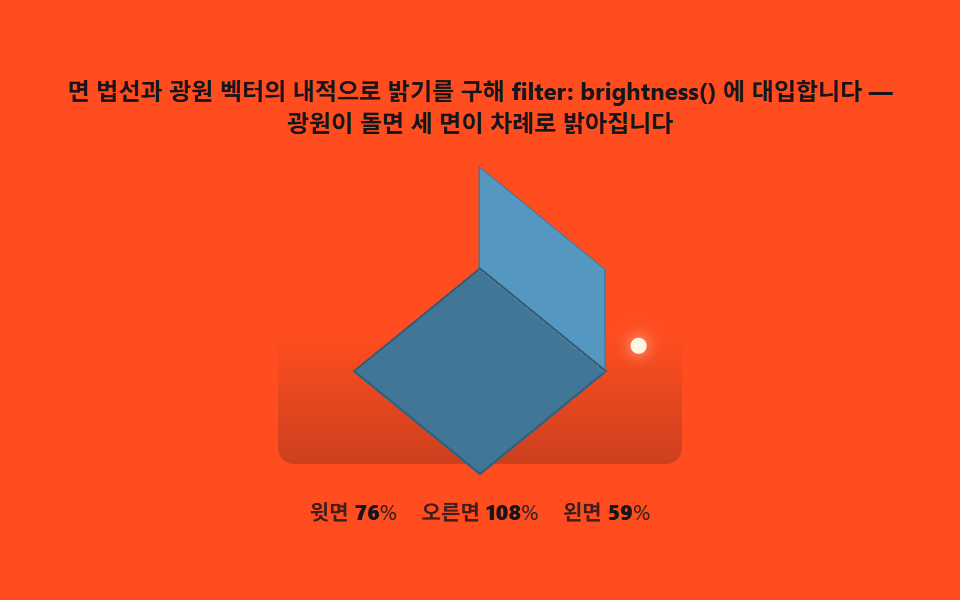
03Face shading — computing three faces' brightness from a light angle
Take the dot product of each face's normal (top, left, right) against a fixed light vector ahead of time to fix brightness ratios (say 100%, 70%, 45%), then feed those into filter: brightness(). Change one light-angle variable and all three faces recompute from the same formula.
Best forProduct mockups, icon sets
filter: brightnessCSS custom propertieslinear-gradient
<main class="stage">
<div class="fs" id="fs">
  <p class="fs__hint">Computes brightness from the dot product of each face normal and the light vector, then applies it via filter: brightness() — as the light orbits, the three faces brighten in turn</p>
  <div class="fs__field" role="img" aria-label="Scene where a light orbits a cube and the brightness of three faces is recalculated live">
    <div class="fs__ground"></div>
    <div class="fs__sun" id="sun"></div>
    <div class="fs__cube3d" id="cube"></div>
  </div>
  <div class="fs__readout">
    <span class="fs__stat">Top  <b id="pTop">100</b>%</span>
    <span class="fs__stat">Right  <b id="pRight">70</b>%</span>
    <span class="fs__stat">Left  <b id="pFront">45</b>%</span>
  </div>
</div>
</main>
@use "../../../../site/static/demo-tokens" as *;
// 면 셰이딩(03) — 무대는 주황. 광원 벡터를 매 프레임 회전시키고 세 면 법선과의 내적을
// filter: brightness() 로 바로 대입한다. 태양점(--sx·--sy)의 위치도 같은 각도에서 계산.
// 바닥의 linear-gradient 는 장식 그림자 — 광원과는 무관한 고정 배경이다.
$duration: $dur-loop;
$easing: $ease-out;
$color: $subject-cream;
@include stage($stage-orange);
.fs {
display: flex; flex-direction: column; align-items: center; gap: $sp-2;
width: 100%; max-width: 420px;
}
.fs__hint {
margin: 0; font-weight: 700; font-size: clamp(10px, 2.6vw, 12px); line-height: 1.35;
color: $subject-ink; text-align: center;
}
.fs__field {
position: relative;
width: clamp(180px, 42vw, 220px); height: clamp(140px, 34vw, 170px);
display: grid; place-items: center;
}
.fs__ground {
position: absolute; left: 0; right: 0; bottom: $sp-2; height: 40%;
background: linear-gradient(180deg, rgba($subject-ink, 0), rgba($subject-ink, .22));
border-radius: $r-sm;
}
.fs__sun {
position: absolute; top: 50%; left: 50%;
width: $sp-2; height: $sp-2; border-radius: $r-pill;
background: $subject-cream;
box-shadow: 0 0 8px rgba($subject-cream, .8);
transform: translate3d(calc(-50% + var(--sx, 0px)), calc(-50% + var(--sy, 0px)), 0);
}
.fs__cube3d {
position: relative; width: 88px; height: 88px;
transform-style: preserve-3d;
transform-origin: center center;
}
.fs__face {
position: absolute; top: 0; left: 0;
backface-visibility: hidden;
border: 1px solid rgba($subject-ink, .28);
background: $subject-sky;
}
.fs__readout { display: flex; gap: $sp-3; flex-wrap: wrap; justify-content: center; }
.fs__stat {
font-weight: 600; font-size: clamp(9px, 2.2vw, 11px);
color: rgba($subject-ink, .82);
font-variant-numeric: tabular-nums;
}
.fs__stat b { font-weight: 800; color: $subject-ink; }
@media (max-width: 340px) {
.fs { gap: $sp-1; }
.fs__field { width: 156px; height: 118px; }
.fs__hint { font-size: 8px; }
.fs__stat { font-size: 7px; }
}
// reduce — 광원 회전이 안 돈다. 35도 지점 밝기로 고정된 정지 큐브만 남긴다.
@media (prefers-reduced-motion: reduce) {
.fs.is-still .fs__cube3d { transition: none; }
}html, body {
margin: 0;
overflow: hidden;
}
.stage {
box-sizing: border-box;
min-height: 100vh;
display: grid;
place-items: center;
margin: 0;
background: #ff4d1f;
font-family: -apple-system, "Segoe UI", "Noto Sans KR", sans-serif;
padding: clamp(8px, 4vw, 24px);
}
.fs {
display: flex;
flex-direction: column;
align-items: center;
gap: 8px;
width: 100%;
max-width: 420px;
}
.fs__hint {
margin: 0;
font-weight: 700;
font-size: clamp(10px, 2.6vw, 12px);
line-height: 1.35;
color: #17141a;
text-align: center;
}
.fs__field {
position: relative;
width: clamp(180px, 42vw, 220px);
height: clamp(140px, 34vw, 170px);
display: grid;
place-items: center;
}
.fs__ground {
position: absolute;
left: 0;
right: 0;
bottom: 8px;
height: 40%;
background: linear-gradient(180deg, rgba(23, 20, 26, 0), rgba(23, 20, 26, 0.22));
border-radius: 8px;
}
.fs__sun {
position: absolute;
top: 50%;
left: 50%;
width: 8px;
height: 8px;
border-radius: 999px;
background: #fff7e6;
box-shadow: 0 0 8px rgba(255, 247, 230, 0.8);
transform: translate3d(calc(-50% + var(--sx, 0px)), calc(-50% + var(--sy, 0px)), 0);
}
.fs__cube3d {
position: relative;
width: 88px;
height: 88px;
transform-style: preserve-3d;
transform-origin: center center;
}
.fs__face {
position: absolute;
top: 0;
left: 0;
backface-visibility: hidden;
border: 1px solid rgba(23, 20, 26, 0.28);
background: #6ec8ff;
}
.fs__readout {
display: flex;
gap: 12px;
flex-wrap: wrap;
justify-content: center;
}
.fs__stat {
font-weight: 600;
font-size: clamp(9px, 2.2vw, 11px);
color: rgba(23, 20, 26, 0.82);
font-variant-numeric: tabular-nums;
}
.fs__stat b {
font-weight: 800;
color: #17141a;
}
@media (max-width: 340px) {
.fs {
gap: 4px;
}
.fs__field {
width: 156px;
height: 118px;
}
.fs__hint {
font-size: 8px;
}
.fs__stat {
font-size: 7px;
}
}
@media (prefers-reduced-motion: reduce) {
.fs.is-still .fs__cube3d {
transition: none;
}
}// 면 셰이딩(03) — 세 면의 법선(top·right·left)과 광원 벡터의 내적(dot product)을 매 프레임
// 계산해 밝기 비율을 구하고 filter: brightness() 에 대입한다. 광원 각도(theta) 하나만
// 회전시켜도 세 면 전부의 명도가 같은 계산식으로 다시 나온다 — CSS @keyframes 는 없다.
(function () {
var root = document.getElementById('fs');
var cube = document.getElementById('cube');
var sun = document.getElementById('sun');
var pTop = document.getElementById('pTop');
var pRight = document.getElementById('pRight');
var pFront = document.getElementById('pFront');
if (!root || !cube || !sun || !pTop || !pRight || !pFront) return;
function buildCube(mount, size) {
var defs = [
{ cls: 'fs__face fs__face--top', t: 'rotateX(90deg) translateZ(' + (size / 2) + 'px)' },
{ cls: 'fs__face fs__face--right', t: 'rotateY(90deg) translateZ(' + (size / 2) + 'px)' },
{ cls: 'fs__face fs__face--front', t: 'translateZ(' + (size / 2) + 'px)' }
];
var out = {};
for (var i = 0; i < defs.length; i++) {
var f = document.createElement('div');
f.className = defs[i].cls;
f.style.width = size + 'px'; f.style.height = size + 'px';
f.style.transform = defs[i].t;
mount.appendChild(f);
out[defs[i].cls.split('--')[1]] = f;
}
return out;
}
var mm = window.matchMedia('(max-width: 340px)').matches;
var SIZE = mm ? 62 : 88;
var TILT = -35.264, SPIN = 45;
cube.style.transform = 'rotateX(' + TILT + 'deg) rotateZ(' + SPIN + 'deg)';
var faces = buildCube(cube, SIZE);
// 세 면의 법선 — 큐브 로컬 좌표계 기준(Top +z, Right +x, Left +y)
var N_TOP = [0, 0, 1], N_RIGHT = [1, 0, 0], N_FRONT = [0, 1, 0];
function dot3(a, b) { return a[0] * b[0] + a[1] * b[1] + a[2] * b[2]; }
function clamp(v, lo, hi) { return v < lo ? lo : (v > hi ? hi : v); }
function shade(theta) {
var r = theta * Math.PI / 180;
var raw = [Math.cos(r), Math.sin(r), 0.55];
var len = Math.sqrt(raw[0] * raw[0] + raw[1] * raw[1] + raw[2] * raw[2]);
var L = [raw[0] / len, raw[1] / len, raw[2] / len];
var bTop = 0.32 + 0.92 * clamp(dot3(N_TOP, L), 0, 1);
var bRight = 0.32 + 0.92 * clamp(dot3(N_RIGHT, L), 0, 1);
var bFront = 0.32 + 0.92 * clamp(dot3(N_FRONT, L), 0, 1);
faces.top.style.filter = 'brightness(' + bTop.toFixed(2) + ')';
faces.right.style.filter = 'brightness(' + bRight.toFixed(2) + ')';
faces.front.style.filter = 'brightness(' + bFront.toFixed(2) + ')';
pTop.textContent = String(Math.round(bTop * 100));
pRight.textContent = String(Math.round(bRight * 100));
pFront.textContent = String(Math.round(bFront * 100));
var R = mm ? 58 : 84;
sun.style.setProperty('--sx', (Math.cos(r) * R).toFixed(1) + 'px');
sun.style.setProperty('--sy', (Math.sin(r) * R * 0.5).toFixed(1) + 'px');
}
var reduce = window.matchMedia('(prefers-reduced-motion: reduce)').matches;
if (reduce) {
shade(35);
root.classList.add('is-still');
} else {
var start = performance.now();
(function step(now) {
var t = (now - start) / 1000;
shade((t * 40) % 360); // 초당 40도 — 9초에 광원이 한 바퀴 돈다
requestAnimationFrame(step);
})(start);
}
})();// IsometricFaceShadingLambert — vanilla 판(run/333/demo/03-isometric-face-shading-lambert/index.html)
// 의 React 포트. 면 법선(top/right/front)과 광원 벡터의 내적(Lambert)으로 밝기를 구해
// filter: brightness() 에 대입한다. 광원이 궤도를 돌며 매 프레임 세 면을 다시 계산한다.
import { useEffect, useRef } from "react";
import type { CSSProperties } from "react";
import styles from "./IsometricFaceShadingLambert.module.scss";
export type IsometricFaceShadingLambertProps = {
duration?: string;
easing?: string;
color?: string;
};
type Vars = CSSProperties & { "--sx"?: string; "--sy"?: string };
type Box<T> = { current: T };
type Faces = { top: HTMLDivElement; right: HTMLDivElement; front: HTMLDivElement };
const HINT = "면 법선과 광원 벡터의 내적으로 밝기를 구해 filter: brightness() 에 대입합니다 — 광원이 돌면 세 면이 차례로 밝아집니다";
const ARIA_SCENE = "광원이 큐브 둘레를 돌며 세 면의 밝기가 계산으로 바뀌는 장면";
const LABEL_TOP = "윗면 ";
const LABEL_RIGHT = "오른면 ";
const LABEL_FRONT = "왼면 ";
const N_TOP = [0, 0, 1];
const N_RIGHT = [1, 0, 0];
const N_FRONT = [0, 1, 0];
function dot3(a: number[], b: number[]): number {
return a[0] * b[0] + a[1] * b[1] + a[2] * b[2];
}
function normalize(v: number[]): number[] {
const len = Math.sqrt(v[0] * v[0] + v[1] * v[1] + v[2] * v[2]) || 1;
return [v[0] / len, v[1] / len, v[2] / len];
}
function clamp01(v: number): number {
return v < 0 ? 0 : v > 1 ? 1 : v;
}
function brightnessOf(n: number[], l: number[]): number {
return 0.32 + 0.92 * clamp01(dot3(n, l));
}
export default function IsometricFaceShadingLambert({
duration = "9s",
easing = "linear",
color = "#6ec8ff"
}: IsometricFaceShadingLambertProps) {
const rootRef = useRef<HTMLDivElement | null>(null);
const cubeRef = useRef<HTMLDivElement | null>(null);
const sunRef = useRef<HTMLDivElement | null>(null);
const pTopRef = useRef<HTMLElement | null>(null);
const pRightRef = useRef<HTMLElement | null>(null);
const pFrontRef = useRef<HTMLElement | null>(null);
const facesRef = useRef<Faces | null>(null) as Box<Faces | null>;
const rafRef = useRef(0) as Box<number>;
useEffect(() => {
const cube = cubeRef.current;
const root = rootRef.current;
if (!cube || !root) return;
const mm = window.matchMedia("(max-width: 340px)").matches;
const size = mm ? 52 : 76;
function buildCube(mount: HTMLDivElement, s: number): Faces {
const top = document.createElement("div");
top.className = styles.face + " " + styles.faceTop;
top.style.width = s + "px";
top.style.height = s + "px";
top.style.transform = "rotateX(90deg) translateZ(" + s / 2 + "px)";
const right = document.createElement("div");
right.className = styles.face + " " + styles.faceRight;
right.style.width = s + "px";
right.style.height = s + "px";
right.style.transform = "rotateY(90deg) translateZ(" + s / 2 + "px)";
const front = document.createElement("div");
front.className = styles.face + " " + styles.faceFront;
front.style.width = s + "px";
front.style.height = s + "px";
front.style.transform = "translateZ(" + s / 2 + "px)";
mount.appendChild(top);
mount.appendChild(right);
mount.appendChild(front);
return { top, right, front };
}
const faces = buildCube(cube, size);
facesRef.current = faces;
cube.style.transform = "rotateX(-35.264deg) rotateZ(45deg)";
function shade(theta: number): void {
const r = (theta * Math.PI) / 180;
const L = normalize([Math.cos(r), Math.sin(r), 0.55]);
const bTop = brightnessOf(N_TOP, L);
const bRight = brightnessOf(N_RIGHT, L);
const bFront = brightnessOf(N_FRONT, L);
const f = facesRef.current;
if (!f) return;
f.top.style.filter = "brightness(" + bTop.toFixed(3) + ")";
f.right.style.filter = "brightness(" + bRight.toFixed(3) + ")";
f.front.style.filter = "brightness(" + bFront.toFixed(3) + ")";
if (pTopRef.current) pTopRef.current.textContent = String(Math.round(bTop * 100));
if (pRightRef.current) pRightRef.current.textContent = String(Math.round(bRight * 100));
if (pFrontRef.current) pFrontRef.current.textContent = String(Math.round(bFront * 100));
if (sunRef.current) {
sunRef.current.style.setProperty("--sx", (Math.cos(r) * 40).toFixed(2) + "px");
sunRef.current.style.setProperty("--sy", (Math.sin(r) * 40).toFixed(2) + "px");
}
}
const reduce = window.matchMedia("(prefers-reduced-motion: reduce)").matches;
if (reduce) {
shade(35);
root.classList.add(styles.isStill);
} else {
const start = performance.now();
const step = (now: number): void => {
const t = (now - start) / 1000;
shade((t * 40) % 360);
rafRef.current = requestAnimationFrame(step);
};
rafRef.current = requestAnimationFrame(step);
}
return () => {
cancelAnimationFrame(rafRef.current);
while (cube.firstChild) cube.removeChild(cube.firstChild);
};
// eslint-disable-next-line react-hooks/exhaustive-deps
}, []);
return (
<main className={styles.stage}>
<div className={styles.fs} ref={rootRef} data-duration={duration} data-easing={easing} data-color={color}>
<p className={styles.hint}>{HINT}</p>
<div className={styles.field} role="img" aria-label={ARIA_SCENE}>
<div className={styles.ground}></div>
<div className={styles.sun} ref={sunRef} style={{} as Vars}></div>
<div className={styles.cube3d} ref={cubeRef}></div>
</div>
<p className={styles.readout}>
<span className={styles.stat}><b>{LABEL_TOP}</b><em ref={pTopRef}>32</em>%</span>
<span className={styles.stat}><b>{LABEL_RIGHT}</b><em ref={pRightRef}>32</em>%</span>
<span className={styles.stat}><b>{LABEL_FRONT}</b><em ref={pFrontRef}>32</em>%</span>
</p>
</div>
</main>
);
}03 Face shading — computing three faces' brightness from a light angle — Measured area 5.965% · moving frames 23/23Original by GODRICH · SCSS and React ship in the zip · Isometric CSS: 9 True-Projection 3D Dioramas
The post this demo lives in
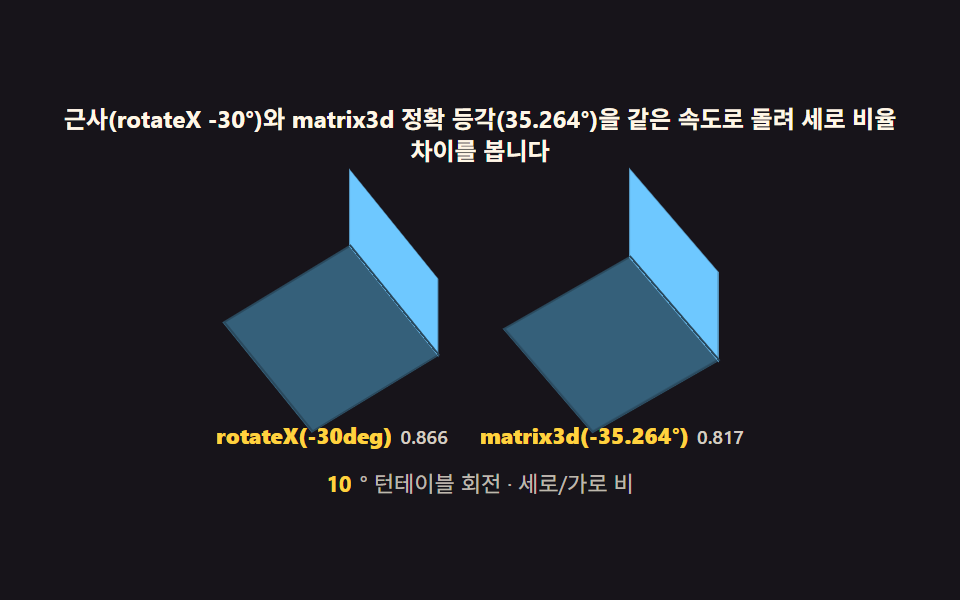 Isometric CSS: 9 True-Projection 3D DioramasIsometric css done right: Each cube face shades by a light-angle calc, grid coords map to screen via the 2:1 isometric f See all demos in this post
If you like this effect - similar demos
 Interactions02 Card stack that shifts by depth3D Hover Effect CSS: 9 Pointer-Following Scenes
 Interactions07 Contrast swap — an overlaid button recomputing icon color from background brightness9 Copy Button CSS UI Patterns (Copy to Clipboard)
 Interactions01 Toast queue — a notification list computing dismiss timing from its stack orderMicro Interactions: 9 Essential UI Patterns