01Three keycap styles
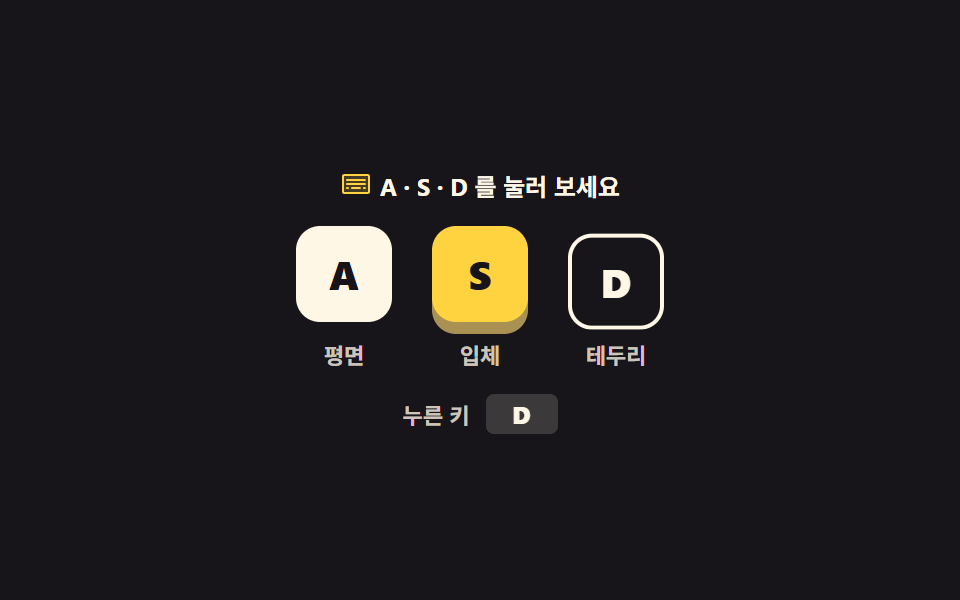
The same letter rendered as three keycaps: flat, raised, and outline. The raised cap gets its thickness from box-shadow, and pressing a real key sinks just that cap with translateY until keyup lets it back up.
Best forShortcut notation in help docs, key hints on an onboarding screen
box-shadowtranslateYkeyup

<svg width="0" height="0" style="position:absolute" aria-hidden="true">
  <defs>
    <symbol id="keyboard" viewBox="0 0 256 256" fill="currentColor"><path d="M232,64V192a8,8,0,0,1-8,8H32a8,8,0,0,1-8-8V64a8,8,0,0,1,8-8H224A8,8,0,0,1,232,64Z" opacity="0.2"/><path d="M224,48H32A16,16,0,0,0,16,64V192a16,16,0,0,0,16,16H224a16,16,0,0,0,16-16V64A16,16,0,0,0,224,48Zm0,144H32V64H224V192Zm-16-64a8,8,0,0,1-8,8H56a8,8,0,0,1,0-16H200A8,8,0,0,1,208,128Zm0-32a8,8,0,0,1-8,8H56a8,8,0,0,1,0-16H200A8,8,0,0,1,208,96ZM72,160a8,8,0,0,1-8,8H56a8,8,0,0,1,0-16h8A8,8,0,0,1,72,160Zm96,0a8,8,0,0,1-8,8H96a8,8,0,0,1,0-16h64A8,8,0,0,1,168,160Zm40,0a8,8,0,0,1-8,8h-8a8,8,0,0,1,0-16h8A8,8,0,0,1,208,160Z"/></symbol>
  </defs>
</svg>
<main class="stage">
<div class="kc is-demo" id="kc">
  <p class="kc__hint"><svg class="kc__ico" aria-hidden="true"><use href="#keyboard"/></svg><span>Press A, S or D</span></p>
  <div class="kc__row">
    <span class="kc__cell"><kbd class="kc__cap kc__cap--flat" data-key="a">A</kbd><span class="kc__tag">Flat</span></span>
    <span class="kc__cell"><kbd class="kc__cap kc__cap--raised" data-key="s">S</kbd><span class="kc__tag">Raised</span></span>
    <span class="kc__cell"><kbd class="kc__cap kc__cap--outline" data-key="d">D</kbd><span class="kc__tag">Outline</span></span>
  </div>
  <p class="kc__read">
    <span class="kc__readLabel">Key down</span>
    <b class="kc__readKey"><span class="kc__readText" id="readText" aria-live="polite">-</span><span class="kc__loop" aria-hidden="true"><i>A</i><i>S</i><i>D</i></span></b>
  </p>
</div>
</main>
@use "../../../../site/static/demo-tokens" as *;
// 키캡 스타일 세 가지 — 평면 · 입체 · 테두리. 입체 키캡의 두께는 box-shadow 로 만든다.
// 누름은 translateY 로만 내린다(scale 로 줄이면 글자까지 눌려 보인다 — blog-demo 규칙 8).
// 격자 미리보기(.is-demo)는 세 키캡이 순서대로 눌리는 2초 CSS 루프. 사람이 실제 키를 누르면 JS 가 루프를 뗀다.
$duration: $dur-instant;
$easing: $ease-spring;
$color: $stage-yellow;
@include stage($stage-ink);
.kc { display: flex; flex-direction: column; align-items: center; gap: $sp-3; width: 100%; }
.kc__hint {
display: flex; align-items: center; gap: $sp-1; margin: 0;
font-weight: 700; font-size: clamp(11px, 3vw, 12px); color: $subject-cream;
}
.kc__ico { width: 16px; height: 16px; color: $stage-yellow; }
.kc__row { display: flex; align-items: flex-end; justify-content: center; gap: $sp-5; }
.kc__cell { display: flex; flex-direction: column; align-items: center; gap: $sp-2; }
.kc__tag { font-weight: 700; font-size: clamp(10px, 2.6vw, 11px); color: rgba(255, 247, 230, .78); }
// 키캡 공통 — <kbd> 의 기본 서체는 monospace 라 크기·굵기를 낱개 속성으로 다시 정한다 (font 단축은 BD20)
.kc__cap {
display: grid; place-items: center; box-sizing: border-box;
width: 48px; height: 48px; border-radius: $r-control;
font-family: inherit; font-weight: 800; font-size: 20px; line-height: 1;
transition: transform $duration $easing, box-shadow $duration $easing;
}
.kc__cap--flat { background: $subject-cream; color: $subject-ink; }
// 두께 6px 은 그림자로만 만든다 — 누를 때 이 값이 2px 로 줄면서 키가 내려앉는다
.kc__cap--raised { background: $color; color: $subject-ink; box-shadow: 0 6px 0 #a89153; }
.kc__cap--outline { background: transparent; color: $subject-cream; border: 2px solid $subject-cream; }
.kc__cap.is-down { transform: translateY(4px); }
.kc__cap--raised.is-down { transform: translateY(4px); box-shadow: 0 2px 0 #a89153; }
.kc__read { margin: 0; display: flex; align-items: center; gap: $sp-2; }
.kc__readLabel { font-weight: 700; font-size: clamp(10px, 2.6vw, 11px); color: rgba(255, 247, 230, .78); }
.kc__readKey {
position: relative; display: grid; place-items: center;
min-width: 28px; height: 20px; border-radius: $r-xs; padding: 0 $sp-1;
background: rgba(255, 247, 230, .16); color: $subject-cream;
font-weight: 800; font-size: clamp(11px, 3vw, 12px); line-height: 1;
}
.kc__loop { position: absolute; inset: 0; display: grid; place-items: center; visibility: hidden; }
.kc__loop i { grid-area: 1 / 1; font-style: normal; visibility: hidden; }
// ── 격자 미리보기 루프: 세 키캡이 0.6s 간격으로 눌렸다 올라온다.
// animation-delay 는 낱개 속성으로 — animation 단축은 delay 를 0s 로 되돌린다 (240 실측).
.kc.is-demo .kc__cap {
animation-name: kcPress; animation-duration: $dur-loop; animation-timing-function: $easing;
animation-iteration-count: infinite; animation-fill-mode: backwards;
}
.kc.is-demo .kc__cap--flat { animation-delay: 0ms; }
.kc.is-demo .kc__cap--raised { animation-name: kcPressRaised; animation-delay: 600ms; }
.kc.is-demo .kc__cap--outline { animation-delay: 1200ms; }
@keyframes kcPress {
0%, 4% { transform: translateY(0); }
9%, 22% { transform: translateY(4px); }
28%, 100% { transform: translateY(0); }
}
@keyframes kcPressRaised {
0%, 4% { transform: translateY(0); box-shadow: 0 6px 0 #a89153; }
9%, 22% { transform: translateY(4px); box-shadow: 0 2px 0 #a89153; }
28%, 100% { transform: translateY(0); box-shadow: 0 6px 0 #a89153; }
}
// 누른 키 칸도 같은 박자로 A → S → D 를 보여준다. 글자 교체는 steps(1, end) 로 한 프레임에 컷.
// 미리보기 전용 글자는 color: transparent 로만 감춘다 — display: none 은 칸 폭까지 없앤다 (274 실측)
.kc.is-demo .kc__readText { color: transparent; }
.kc.is-demo .kc__loop { visibility: visible; }
.kc.is-demo .kc__loop i {
animation-name: kcLetter; animation-duration: $dur-loop; animation-timing-function: steps(1, end);
animation-iteration-count: infinite; animation-fill-mode: backwards;
}
.kc.is-demo .kc__loop i:nth-child(1) { animation-delay: 0ms; }
.kc.is-demo .kc__loop i:nth-child(2) { animation-delay: 600ms; }
.kc.is-demo .kc__loop i:nth-child(3) { animation-delay: 1200ms; }
@keyframes kcLetter {
0%, 27% { visibility: visible; }
28%, 100% { visibility: hidden; }
}
@media (max-width: 340px) {
.kc { gap: $sp-2; }
.kc__row { gap: $sp-3; }
.kc__cap { width: 40px; height: 40px; font-size: 17px; }
.kc__cell { gap: $sp-1; }
}
@media (prefers-reduced-motion: reduce) {
.kc.is-demo .kc__cap,
.kc.is-demo .kc__loop i { animation: none !important; }
.kc.is-demo .kc__readText { color: $subject-cream !important; }
.kc.is-demo .kc__loop { visibility: hidden !important; }
.kc__cap { transition: none !important; }
}html, body {
margin: 0;
overflow: hidden;
}
.stage {
box-sizing: border-box;
min-height: 100vh;
display: grid;
place-items: center;
margin: 0;
background: #17141a;
font-family: -apple-system, "Segoe UI", "Noto Sans KR", sans-serif;
padding: clamp(8px, 4vw, 24px);
}
.kc {
display: flex;
flex-direction: column;
align-items: center;
gap: 12px;
width: 100%;
}
.kc__hint {
display: flex;
align-items: center;
gap: 4px;
margin: 0;
font-weight: 700;
font-size: clamp(11px, 3vw, 12px);
color: #fff7e6;
}
.kc__ico {
width: 16px;
height: 16px;
color: #ffd23f;
}
.kc__row {
display: flex;
align-items: flex-end;
justify-content: center;
gap: 20px;
}
.kc__cell {
display: flex;
flex-direction: column;
align-items: center;
gap: 8px;
}
.kc__tag {
font-weight: 700;
font-size: clamp(10px, 2.6vw, 11px);
color: rgba(255, 247, 230, 0.78);
}
.kc__cap {
display: grid;
place-items: center;
box-sizing: border-box;
width: 48px;
height: 48px;
border-radius: 12px;
font-family: inherit;
font-weight: 800;
font-size: 20px;
line-height: 1;
transition: transform 140ms cubic-bezier(0.2, 0.8, 0.2, 1), box-shadow 140ms cubic-bezier(0.2, 0.8, 0.2, 1);
}
.kc__cap--flat {
background: #fff7e6;
color: #17141a;
}
.kc__cap--raised {
background: #ffd23f;
color: #17141a;
box-shadow: 0 6px 0 #a89153;
}
.kc__cap--outline {
background: transparent;
color: #fff7e6;
border: 2px solid #fff7e6;
}
.kc__cap.is-down {
transform: translateY(4px);
}
.kc__cap--raised.is-down {
transform: translateY(4px);
box-shadow: 0 2px 0 #a89153;
}
.kc__read {
margin: 0;
display: flex;
align-items: center;
gap: 8px;
}
.kc__readLabel {
font-weight: 700;
font-size: clamp(10px, 2.6vw, 11px);
color: rgba(255, 247, 230, 0.78);
}
.kc__readKey {
position: relative;
display: grid;
place-items: center;
min-width: 28px;
height: 20px;
border-radius: 4px;
padding: 0 4px;
background: rgba(255, 247, 230, 0.16);
color: #fff7e6;
font-weight: 800;
font-size: clamp(11px, 3vw, 12px);
line-height: 1;
}
.kc__loop {
position: absolute;
inset: 0;
display: grid;
place-items: center;
visibility: hidden;
}
.kc__loop i {
grid-area: 1/1;
font-style: normal;
visibility: hidden;
}
.kc.is-demo .kc__cap {
animation-name: kcPress;
animation-duration: 2s;
animation-timing-function: cubic-bezier(0.2, 0.8, 0.2, 1);
animation-iteration-count: infinite;
animation-fill-mode: backwards;
}
.kc.is-demo .kc__cap--flat {
animation-delay: 0ms;
}
.kc.is-demo .kc__cap--raised {
animation-name: kcPressRaised;
animation-delay: 600ms;
}
.kc.is-demo .kc__cap--outline {
animation-delay: 1200ms;
}
@keyframes kcPress {
0%, 4% {
transform: translateY(0);
}
9%, 22% {
transform: translateY(4px);
}
28%, 100% {
transform: translateY(0);
}
}
@keyframes kcPressRaised {
0%, 4% {
transform: translateY(0);
box-shadow: 0 6px 0 #a89153;
}
9%, 22% {
transform: translateY(4px);
box-shadow: 0 2px 0 #a89153;
}
28%, 100% {
transform: translateY(0);
box-shadow: 0 6px 0 #a89153;
}
}
.kc.is-demo .kc__readText {
color: transparent;
}
.kc.is-demo .kc__loop {
visibility: visible;
}
.kc.is-demo .kc__loop i {
animation-name: kcLetter;
animation-duration: 2s;
animation-timing-function: steps(1, end);
animation-iteration-count: infinite;
animation-fill-mode: backwards;
}
.kc.is-demo .kc__loop i:nth-child(1) {
animation-delay: 0ms;
}
.kc.is-demo .kc__loop i:nth-child(2) {
animation-delay: 600ms;
}
.kc.is-demo .kc__loop i:nth-child(3) {
animation-delay: 1200ms;
}
@keyframes kcLetter {
0%, 27% {
visibility: visible;
}
28%, 100% {
visibility: hidden;
}
}
@media (max-width: 340px) {
.kc {
gap: 8px;
}
.kc__row {
gap: 12px;
}
.kc__cap {
width: 40px;
height: 40px;
font-size: 17px;
}
.kc__cell {
gap: 4px;
}
}
@media (prefers-reduced-motion: reduce) {
.kc.is-demo .kc__cap,
.kc.is-demo .kc__loop i {
animation: none !important;
}
.kc.is-demo .kc__readText {
color: #fff7e6 !important;
}
.kc.is-demo .kc__loop {
visibility: hidden !important;
}
.kc__cap {
transition: none !important;
}
}var root = document.getElementById('kc');
var readText = document.getElementById('readText');
var caps = Array.prototype.slice.call(document.querySelectorAll('.kc__cap'));
function capFor(key) {
var want = String(key || '').toLowerCase();
for (var i = 0; i < caps.length; i++) {
if (caps[i].getAttribute('data-key') === want) { return caps[i]; }
}
return null;
}
window.addEventListener('keydown', function (e) {
var cap = capFor(e.key);
if (!cap) { return; }
root.classList.remove('is-demo');
cap.classList.add('is-down');
readText.textContent = cap.getAttribute('data-key').toUpperCase();
});
window.addEventListener('keyup', function (e) {
var cap = capFor(e.key);
if (cap) { cap.classList.remove('is-down'); }
});// KeycapStyles — vanilla 판(run/288/demo/01-kbd-keycap-styles/index.html) 의 React 포트.
// 평면·입체·테두리 세 키캡. 실제 키 입력에 반응해 해당 키캡만 translateY 로 내려앉았다가 keyup 에 돌아온다.
import { useEffect, useState } from "react";
import type { CSSProperties } from "react";
import styles from "./KeycapStyles.module.scss";
export type KeycapStylesProps = {
/** 격자 미리보기용 2초 자동 루프. 사람이 키를 누르면 꺼진다 */
demo?: boolean;
duration?: number;
easing?: string;
color?: string;
};
type Vars = CSSProperties & { "--duration"?: string; "--easing"?: string; "--color"?: string };
type Cap = { key: string; label: string; tag: string; face: string };
/** vanilla 의 data-key 세 개와 같은 순서 */
const CAPS: Cap[] = [
{ key: "a", label: "A", tag: "평면", face: "capFlat" },
{ key: "s", label: "S", tag: "입체", face: "capRaised" },
{ key: "d", label: "D", tag: "테두리", face: "capOutline" },
];
export default function KeycapStyles({
demo = true,
duration = 140,
easing = "cubic-bezier(.2, .8, .2, 1)",
color = "#ffd23f",
}: KeycapStylesProps) {
const [live, setLive] = useState(demo);
const [down, setDown] = useState("");
const [readText, setReadText] = useState("-");
const vars: Vars = { "--duration": `${duration}ms`, "--easing": easing, "--color": color };
useEffect(() => {
function handleDown(e: KeyboardEvent) {
const want = e.key.toLowerCase();
if (!CAPS.some((cap) => cap.key === want)) {
return;
}
setLive(false);
setDown(want);
setReadText(want.toUpperCase());
}
function handleUp(e: KeyboardEvent) {
const want = e.key.toLowerCase();
if (CAPS.some((cap) => cap.key === want)) {
setDown("");
}
}
window.addEventListener("keydown", handleDown);
window.addEventListener("keyup", handleUp);
return () => {
window.removeEventListener("keydown", handleDown);
window.removeEventListener("keyup", handleUp);
};
}, []);
const cls = [styles.root, live ? styles.isDemo : ""].filter(Boolean).join(" ");
return (
<main className={styles.stage} style={vars}>
<svg width="0" height="0" style={{ position: "absolute" }} aria-hidden="true">
<defs>
<symbol id="keyboard" viewBox="0 0 256 256" fill="currentColor">
<path d="M232,64V192a8,8,0,0,1-8,8H32a8,8,0,0,1-8-8V64a8,8,0,0,1,8-8H224A8,8,0,0,1,232,64Z" opacity="0.2" />
<path d="M224,48H32A16,16,0,0,0,16,64V192a16,16,0,0,0,16,16H224a16,16,0,0,0,16-16V64A16,16,0,0,0,224,48Zm0,144H32V64H224V192Zm-16-64a8,8,0,0,1-8,8H56a8,8,0,0,1,0-16H200A8,8,0,0,1,208,128Zm0-32a8,8,0,0,1-8,8H56a8,8,0,0,1,0-16H200A8,8,0,0,1,208,96ZM72,160a8,8,0,0,1-8,8H56a8,8,0,0,1,0-16h8A8,8,0,0,1,72,160Zm96,0a8,8,0,0,1-8,8H96a8,8,0,0,1,0-16h64A8,8,0,0,1,168,160Zm40,0a8,8,0,0,1-8,8h-8a8,8,0,0,1,0-16h8A8,8,0,0,1,208,160Z" />
</symbol>
</defs>
</svg>
<div className={cls}>
<p className={styles.hint}>
<svg className={styles.ico} aria-hidden="true"><use href="#keyboard" /></svg>
<span>A · S · D 를 눌러 보세요</span>
</p>
<div className={styles.row}>
{CAPS.map((cap) => (
<span className={styles.cell} key={cap.key}>
<kbd className={[styles.cap, styles[cap.face], down === cap.key ? styles.isDown : ""].filter(Boolean).join(" ")}>
{cap.label}
</kbd>
<span className={styles.tag}>{cap.tag}</span>
</span>
))}
</div>
<p className={styles.read}>
<span className={styles.readLabel}>누른 키</span>
<b className={styles.readKey}>
<span className={styles.readText} aria-live="polite">{readText}</span>
<span className={styles.loop} aria-hidden="true"><i>A</i><i>S</i><i>D</i></span>
</b>
</p>
</div>
</main>
);
}01 Three keycap styles — Measured area 1.499% · moving frames 13/23Original by GODRICH · SCSS and React ship in the zip · Keyboard Shortcuts UI Design: 9 Working Parts
The post this demo lives in
 Keyboard Shortcuts UI Design: 9 Working PartsKeyboard shortcuts UI design is the craft of making a page answer the keyboard: keycaps, hints, recorders, help sheets. See all demos in this post