06Mark-all-read Wave That Follows an Order-index Value
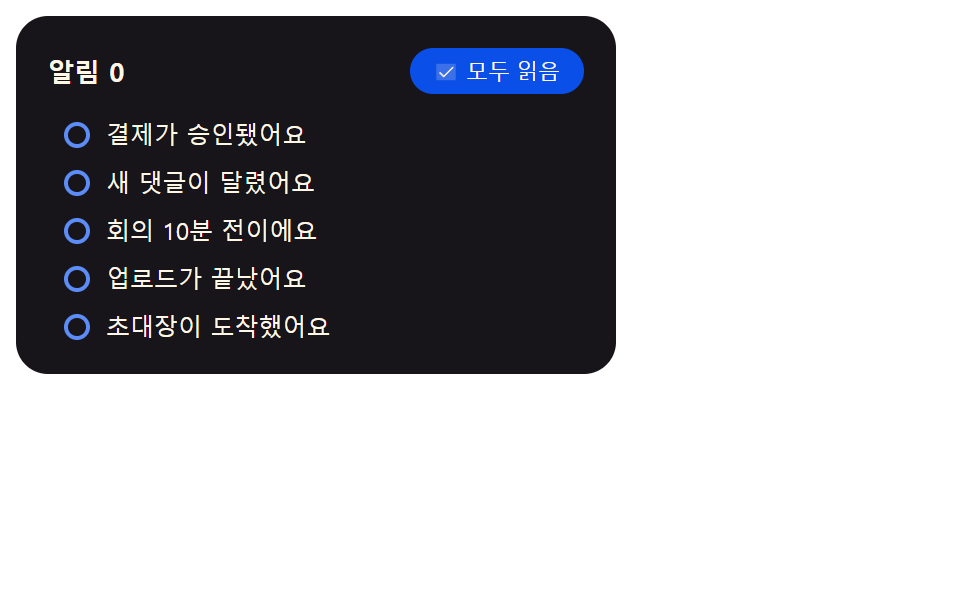
Pressing mark-all-read walks the list-order value from the top, adding a small delay value to each item so the dots turn into rings one after another instead of all at once.
Best for"Mark all as read" action in a notification panel
NOTIF_MARK_ALL_STAGGER_MSmarkAllReadupdateCount
<main class="stage">
  <div class="ma is-demo" id="ma">
    <div class="ma__head">
      <span class="ma__headLabel">Notifications <span id="maCount">5</span></span>
      <button class="ma__all" id="maAllBtn" type="button">
        <svg class="ma__checkIc" viewBox="0 0 256 256" aria-hidden="true" focusable="false">
          <g fill="currentColor">
            <path opacity=".2" d="M232 56v144a16 16 0 0 1-16 16H40a16 16 0 0 1-16-16V56a16 16 0 0 1 16-16h176a16 16 0 0 1 16 16"/>
            <path d="m205.66 85.66l-96 96a8 8 0 0 1-11.32 0l-40-40a8 8 0 0 1 11.32-11.32L104 164.69l90.34-90.35a8 8 0 0 1 11.32 11.32"/>
          </g>
        </svg>
        Mark all read
      </button>
    </div>
    <ul class="ma__list" id="maList" role="list"></ul>
    <p class="ma__sr" id="maSr" aria-live="polite"></p>
  </div>
</main>
@use "../../../../site/static/demo-tokens" as *;
// 계산 겹: index.html markAllRead() 가 항목 순번(index) x NOTIF_MARK_ALL_STAGGER_MS 를
// 각 점의 transitionDelay 로 걸어두고 한꺼번에 목표 상태(채운 점 → 빈 원)를 바꾼다 —
// 항목 수가 늘어나면 번지는 데 걸리는 전체 시간도 그만큼 늘어난다.
.stage { @include stage($stage-yellow); }
.ma {
width: min(100%, 300px);
background: $subject-ink;
border-radius: $r-card;
padding: $sp-4;
box-sizing: border-box;
display: flex;
flex-direction: column;
gap: $sp-3;
}
.ma__head { display: flex; align-items: center; justify-content: space-between; gap: $sp-2; }
.ma__headLabel { font-size: 13px; font-weight: 700; color: $subject-cream; }
.ma__all {
display: flex;
align-items: center;
gap: $sp-1;
border: none;
background: $subject-blue-deep;
color: $subject-cream;
font-size: 11px;
border-radius: $r-pill;
padding: $sp-1 $sp-3;
cursor: pointer;
}
.ma__checkIc { width: 12px; height: 12px; }
.ma__list { list-style: none; margin: 0; padding: 0; display: flex; flex-direction: column; gap: $sp-2; }
.ma__item {
position: relative;
box-sizing: border-box;
display: flex;
align-items: center;
gap: $sp-2;
padding-left: $sp-2;
border-left: 3px solid $subject-blue-light;
border-radius: $r-sm;
transition: border-left-width $dur-quick $ease-out;
}
// 계산 겹: index.html markAllRead()/resetAll() 이 점(fill·ring)에 거는 것과 같은 순번×간격
// transitionDelay 를 이 톤·좌측 굵기에도 건다 — 캐스케이드가 점 하나가 아니라 행 전체로 보인다.
.ma__itemTint {
position: absolute;
inset: 0;
border-radius: $r-sm;
background: $subject-blue-light;
opacity: .12;
pointer-events: none;
transition: opacity $dur-quick $ease-out;
}
.ma__dot { position: relative; z-index: 1; width: 13px; height: 13px; flex: 0 0 auto; }
.ma__dotFill,
.ma__dotRing {
position: absolute;
inset: 0;
border-radius: 50%;
box-sizing: border-box;
transition: opacity $dur-quick $ease-out, border-width $dur-quick $ease-out;
}
.ma__dotFill { background: $subject-blue-light; opacity: 1; }
.ma__dotRing { border: 0 solid $subject-blue-light; }
.ma__name { position: relative; z-index: 1; font-size: 12px; color: $subject-cream; }
.ma__sr {
position: absolute; width: 1px; height: 1px; overflow: hidden;
clip: rect(0 0 0 0); margin: -1px; padding: 0; border: 0;
}
@media (max-width: 340px) {
.ma { width: 100%; }
}
@media (prefers-reduced-motion: reduce) {
.ma__dotFill,
.ma__dotRing { transition: none; }
.ma__item { transition: none; }
.ma__itemTint { transition: none; }
}.stage html, .stage body {
margin: 0;
overflow: hidden;
}
.stage .stage {
box-sizing: border-box;
min-height: 100vh;
display: grid;
place-items: center;
margin: 0;
background: #ffd23f;
font-family: -apple-system, "Segoe UI", "Noto Sans KR", sans-serif;
padding: clamp(8px, 4vw, 24px);
}
.ma {
width: min(100%, 300px);
background: #17141a;
border-radius: 16px;
padding: 16px;
box-sizing: border-box;
display: flex;
flex-direction: column;
gap: 12px;
}
.ma__head {
display: flex;
align-items: center;
justify-content: space-between;
gap: 8px;
}
.ma__headLabel {
font-size: 13px;
font-weight: 700;
color: #fff7e6;
}
.ma__all {
display: flex;
align-items: center;
gap: 4px;
border: none;
background: #0a4fe8;
color: #fff7e6;
font-size: 11px;
border-radius: 999px;
padding: 4px 12px;
cursor: pointer;
}
.ma__checkIc {
width: 12px;
height: 12px;
}
.ma__list {
list-style: none;
margin: 0;
padding: 0;
display: flex;
flex-direction: column;
gap: 8px;
}
.ma__item {
position: relative;
box-sizing: border-box;
display: flex;
align-items: center;
gap: 8px;
padding-left: 8px;
border-left: 3px solid #5b8cf8;
border-radius: 8px;
transition: border-left-width 220ms ease-out;
}
.ma__itemTint {
position: absolute;
inset: 0;
border-radius: 8px;
background: #5b8cf8;
opacity: 0.12;
pointer-events: none;
transition: opacity 220ms ease-out;
}
.ma__dot {
position: relative;
z-index: 1;
width: 13px;
height: 13px;
flex: 0 0 auto;
}
.ma__dotFill,
.ma__dotRing {
position: absolute;
inset: 0;
border-radius: 50%;
box-sizing: border-box;
transition: opacity 220ms ease-out, border-width 220ms ease-out;
}
.ma__dotFill {
background: #5b8cf8;
opacity: 1;
}
.ma__dotRing {
border: 0 solid #5b8cf8;
}
.ma__name {
position: relative;
z-index: 1;
font-size: 12px;
color: #fff7e6;
}
.ma__sr {
position: absolute;
width: 1px;
height: 1px;
overflow: hidden;
clip: rect(0 0 0 0);
margin: -1px;
padding: 0;
border: 0;
}
@media (max-width: 340px) {
.ma {
width: 100%;
}
}
@media (prefers-reduced-motion: reduce) {
.ma__dotFill,
.ma__dotRing {
transition: none;
}
.ma__item {
transition: none;
}
.ma__itemTint {
transition: none;
}
}(function () {
"use strict";
var NOTIF_MARK_ALL_STAGGER_MS = 70; // 모두 읽음을 눌렀을 때 항목 순번마다 이 값씩 늦게 번진다
var NAMES = [
"Payment approved", "New comment added", "Meeting starts in 10 minutes",
"Upload finished", "An invitation arrived"
];
var root = document.getElementById("ma");
var list = document.getElementById("maList");
var sr = document.getElementById("maSr");
var countEl = document.getElementById("maCount");
var allBtn = document.getElementById("maAllBtn");
var reduce = window.matchMedia("(prefers-reduced-motion: reduce)").matches;
var synthetic = false;
function human() {
if (synthetic) return;
if (root.classList.contains("is-demo")) root.classList.remove("is-demo");
}
var rows = [];
NAMES.forEach(function (name, i) {
var li = document.createElement("li");
li.className = "ma__item";
li.setAttribute("role", "listitem");
var tint = document.createElement("span");
tint.className = "ma__itemTint";
tint.setAttribute("aria-hidden", "true");
var dot = document.createElement("span");
dot.className = "ma__dot";
var fill = document.createElement("span");
fill.className = "ma__dotFill";
var ring = document.createElement("span");
ring.className = "ma__dotRing";
dot.appendChild(fill);
dot.appendChild(ring);
var nameEl = document.createElement("span");
nameEl.className = "ma__name";
nameEl.textContent = name;
li.appendChild(tint);
li.appendChild(dot);
li.appendChild(nameEl);
list.appendChild(li);
rows.push({ li: li, tint: tint, fill: fill, ring: ring, read: false });
});
function updateCount() {
var unread = rows.filter(function (r) { return !r.read; }).length;
countEl.textContent = String(unread);
}
function resetAll() {
rows.forEach(function (r) {
r.read = false;
r.fill.style.transitionDelay = "0ms";
r.ring.style.transitionDelay = "0ms";
r.tint.style.transitionDelay = "0ms";
r.li.style.transitionDelay = "0ms";
r.fill.style.opacity = "1";
r.ring.style.borderWidth = "0px";
r.tint.style.opacity = ".12";
r.li.style.borderLeftWidth = "3px";
});
updateCount();
}
// 계산 겹: 각 항목의 순번(index)에 NOTIF_MARK_ALL_STAGGER_MS 를 곱한 값을 그 항목의
// transitionDelay 로 걸어둔 뒤 한꺼번에 목표 상태를 바꾼다 — 항목 수가 늘면 번지는 시간도
// 그만큼 함께 늘어난다(하드코딩된 총 시간이 아니라 항목 수 x 간격으로 계산한다). 같은 지연값을
// 행 톤(tint)·좌측 굵기(border-left)에도 걸어 점 하나가 아니라 행 전체가 캐스케이드로 보인다.
function markAllRead() {
rows.forEach(function (r, i) {
if (r.read) return;
var delay = reduce ? 0 : i * NOTIF_MARK_ALL_STAGGER_MS;
r.fill.style.transitionDelay = delay + "ms";
r.ring.style.transitionDelay = delay + "ms";
r.tint.style.transitionDelay = delay + "ms";
r.li.style.transitionDelay = delay + "ms";
r.read = true;
r.fill.style.opacity = "0";
r.ring.style.borderWidth = "2.4px";
r.tint.style.opacity = "0";
r.li.style.borderLeftWidth = "0px";
});
updateCount();
sr.textContent = "Marked all as read";
}
allBtn.addEventListener("click", function () {
human();
markAllRead();
});
allBtn.addEventListener("keydown", function (e) {
if (e.key === "Enter" || e.key === " ") {
e.preventDefault();
human();
markAllRead();
}
});
if (reduce) {
markAllRead();
} else {
var phase = "mark";
function loop() {
if (!root.classList.contains("is-demo")) return;
synthetic = true;
if (phase === "mark") {
markAllRead();
phase = "reset";
window.setTimeout(loop, rows.length * NOTIF_MARK_ALL_STAGGER_MS + 550);
} else {
resetAll();
phase = "mark";
window.setTimeout(loop, 700);
}
synthetic = false;
}
window.setTimeout(loop, 350);
}
})();// NotifMarkAllReadCascade — vanilla 판(run/405/demo/06-.../index.html) 의 React 포트.
// 계산 겹: 각 항목의 순번(index)에 NOTIF_MARK_ALL_STAGGER_MS 를 곱한 값을 그 항목의
// transitionDelay 로 걸어둔 뒤 한꺼번에 목표 상태를 바꾼다 — 항목 수가 늘면 번지는 시간도
// 그만큼 함께 늘어난다(하드코딩된 총 시간이 아니라 항목 수 x 간격으로 계산한다).
import { useEffect, useRef, useState } from "react";
import styles from "./NotifMarkAllReadCascade.module.scss";
type Box<T> = { current: T };
type KeyEvt = { key: string; preventDefault(): void };
const NOTIF_MARK_ALL_STAGGER_MS = 70; // 모두 읽음을 눌렀을 때 항목 순번마다 이 값씩 늦게 번진다
const NAMES = [
"결제가 승인됐어요", "새 댓글이 달렸어요", "회의 10분 전이에요",
"업로드가 끝났어요", "초대장이 도착했어요",
];
type Row = { li: HTMLLIElement; tint: HTMLElement; fill: HTMLElement; ring: HTMLElement; read: boolean };
export default function NotifMarkAllReadCascade() {
const [isDemo, setIsDemo] = useState(true);
const isDemoRef = useRef(true) as unknown as Box<boolean>;
const synthRef = useRef(false) as unknown as Box<boolean>;
const rootRef = useRef(null) as unknown as Box<HTMLDivElement>;
const listRef = useRef(null) as unknown as Box<HTMLUListElement>;
const srRef = useRef(null) as unknown as Box<HTMLParagraphElement>;
const countRef = useRef(null) as unknown as Box<HTMLSpanElement>;
const rowsRef = useRef([] as Row[]) as unknown as Box<Row[]>;
const reduceRef = useRef(false) as unknown as Box<boolean>;
const loopTimerRef = useRef(0) as unknown as Box<number>;
function human() {
if (synthRef.current) return;
if (isDemoRef.current) { isDemoRef.current = false; setIsDemo(false); }
}
function updateCount() {
const unread = rowsRef.current.filter((r) => !r.read).length;
if (countRef.current) countRef.current.textContent = String(unread);
}
function resetAll() {
rowsRef.current.forEach((r) => {
r.read = false;
r.fill.style.transitionDelay = "0ms";
r.ring.style.transitionDelay = "0ms";
r.tint.style.transitionDelay = "0ms";
r.li.style.transitionDelay = "0ms";
r.fill.style.opacity = "1";
r.ring.style.borderWidth = "0px";
r.tint.style.opacity = ".12";
r.li.style.borderLeftWidth = "3px";
});
updateCount();
}
// 계산 겹: 각 항목의 순번(index)에 NOTIF_MARK_ALL_STAGGER_MS 를 곱한 값을 그 항목의
// transitionDelay 로 걸어둔 뒤 한꺼번에 목표 상태를 바꾼다. 같은 지연값을 행 톤(tint)·좌측
// 굵기(border-left)에도 걸어 점 하나가 아니라 행 전체가 캐스케이드로 보인다.
function markAllRead() {
const reduce = reduceRef.current;
rowsRef.current.forEach((r, i) => {
if (r.read) return;
const delay = reduce ? 0 : i * NOTIF_MARK_ALL_STAGGER_MS;
r.fill.style.transitionDelay = delay + "ms";
r.ring.style.transitionDelay = delay + "ms";
r.tint.style.transitionDelay = delay + "ms";
r.li.style.transitionDelay = delay + "ms";
r.read = true;
r.fill.style.opacity = "0";
r.ring.style.borderWidth = "2.4px";
r.tint.style.opacity = "0";
r.li.style.borderLeftWidth = "0px";
});
updateCount();
if (srRef.current) srRef.current.textContent = "모두 읽음으로 표시했습니다";
}
function onAllClick() {
human();
markAllRead();
}
function onAllKeyDown(e: KeyEvt) {
if (e.key === "Enter" || e.key === " ") {
e.preventDefault();
human();
markAllRead();
}
}
useEffect(() => {
const reduce = window.matchMedia("(prefers-reduced-motion: reduce)").matches;
reduceRef.current = reduce;
const list = listRef.current;
if (!list) return;
const rows: Row[] = [];
NAMES.forEach((name) => {
const li = document.createElement("li");
li.className = styles.item;
li.setAttribute("role", "listitem");
const tint = document.createElement("span");
tint.className = styles.itemTint;
tint.setAttribute("aria-hidden", "true");
const dot = document.createElement("span");
dot.className = styles.dot;
const fill = document.createElement("span");
fill.className = styles.dotFill;
const ring = document.createElement("span");
ring.className = styles.dotRing;
dot.appendChild(fill);
dot.appendChild(ring);
const nameEl = document.createElement("span");
nameEl.className = styles.name;
nameEl.textContent = name;
li.appendChild(tint);
li.appendChild(dot);
li.appendChild(nameEl);
list.appendChild(li);
rows.push({ li, tint, fill, ring, read: false });
});
rowsRef.current = rows;
updateCount();
if (reduce) {
markAllRead();
} else {
let phase = "mark";
function loop() {
if (!isDemoRef.current) return;
synthRef.current = true;
if (phase === "mark") {
markAllRead();
phase = "reset";
loopTimerRef.current = window.setTimeout(loop, rowsRef.current.length * NOTIF_MARK_ALL_STAGGER_MS + 550);
} else {
resetAll();
phase = "mark";
loopTimerRef.current = window.setTimeout(loop, 700);
}
synthRef.current = false;
}
loopTimerRef.current = window.setTimeout(loop, 350);
}
return () => { window.clearTimeout(loopTimerRef.current); };
// eslint-disable-next-line react-hooks/exhaustive-deps
}, []);
return (
<main className={styles.stage}>
<div className={styles.ma + " " + (isDemo ? styles.isDemo : "")} ref={rootRef}>
<div className={styles.head}>
<span className={styles.headLabel}>알림 <span ref={countRef}>5</span></span>
<button className={styles.all} type="button" onClick={onAllClick} onKeyDown={onAllKeyDown}>
<svg className={styles.checkIc} viewBox="0 0 256 256" aria-hidden="true" focusable="false">
<g fill="currentColor">
<path opacity=".2" d="M232 56v144a16 16 0 0 1-16 16H40a16 16 0 0 1-16-16V56a16 16 0 0 1 16-16h176a16 16 0 0 1 16 16" />
<path d="m205.66 85.66l-96 96a8 8 0 0 1-11.32 0l-40-40a8 8 0 0 1 11.32-11.32L104 164.69l90.34-90.35a8 8 0 0 1 11.32 11.32" />
</g>
</svg>
모두 읽음
</button>
</div>
<ul className={styles.list} role="list" ref={listRef} />
<p className={styles.sr} aria-live="polite" ref={srRef} />
</div>
</main>
);
}06 Mark-all-read Wave That Follows an Order-index Value — Measured area 14.643% · moving frames 14/23Original by GODRICH · SCSS and React ship in the zip · Notification Animation CSS: 9 Panel UI Patterns
The post this demo lives in
 Notification Animation CSS: 9 Panel UI PatternsNotification animation css: "How many notifications are left?" This panel answers with one unread-count value. Item 3 ri See all demos in this post
If you like this effect - similar demos
 Transitions04 Clear-all cascade — chips vanishing in order by index times interval9 Filter UI Patterns (Panel Slide to Chip Remove)
 Transitions07 Swipe-follow toggle — while a horizontal drag-distance value grows, the highlight's position value follows toward the side tab by that same ratioCSS Bottom Navigation Bar: 9 Transition Patterns
 Transitions01 Full-width mega panel that opens on hover9 mega menu ui patterns, link list to site map