07Digits Squashed by the Perspective of a Round Drum
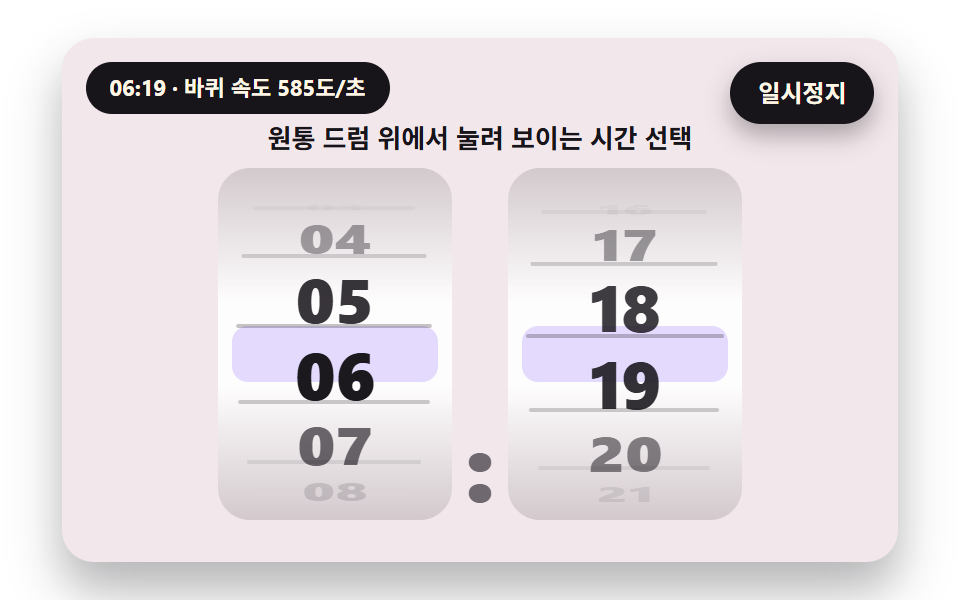
Digits sit around a cylinder and the angle shrinks their height and size, so the ones above and below are squashed and dim while the middle one is big and bright as the drum turns.
Best forHour and minute selection wheel
STEP_DEGRADIUSdistOf
<main class="stage">
<div class="vj is-demo" id="vj">
  <div class="vj__scene" data-role="scene" role="img" aria-label="Two round drums for hours and minutes turn; only the middle number is large and sharp while the numbers above and below are squashed and dimmed by perspective, so they read one step at a time"></div>
  <button class="vj__pad" data-role="pad" type="button" aria-label="Number scene stage: click it, or press Enter or the right or up arrow key, to roll the next value"></button>
  <p class="vj__status" data-role="status" aria-hidden="true">Number rolling scene</p>
  <p class="vj__live" data-role="live" role="status" aria-live="off"></p>
  <button class="vj__pause" data-role="pause" type="button" aria-pressed="false">Pause</button>
</div>
</main>
@use "../../../../site/static/demo-tokens" as *;
@include stage($stage-paper);
// 숫자띠 한 줄 — 창 하나에 0~9 띠(열두 칸)를 세로로 놓고 translateY 로 밀어 올린다. 글자 크기는 무대 폭(cqw)에 비례
$ink-soft: rgba($subject-ink, .6);
$win-bg: rgba(255, 255, 255, .92);
$flap-top: mix($subject-lilac, #ffffff, 24%);
$flap-bot: mix($subject-lilac, #ffffff, 10%);
.vj {
position: relative;
width: min(92vw, calc(160vh - 12.8vw));
aspect-ratio: 480 / 300;
margin: 0 auto;
border-radius: $r-card;
overflow: hidden;
box-shadow: $shadow-raised;
background: mix($subject-cream, $subject-lilac, 82%);
container-type: inline-size;
}
.vj__scene {
position: absolute;
inset: 0;
display: grid;
place-items: center;
}
.stack {
display: grid;
justify-items: center;
gap: 1.6cqw;
padding-top: 5cqw;
}
.cap {
font-size: max(10px, 3.1cqw);
font-weight: 700;
line-height: 1.3;
color: $subject-ink;
text-align: center;
}
.cap--bad { color: $error; }
.odo {
display: inline-flex;
align-items: center;
font-weight: 800;
line-height: 1;
font-variant-numeric: tabular-nums;
color: $subject-ink;
}
.odo.lg { font-size: 16.5cqw; }
.odo.xl { font-size: 19cqw; }
.odo.md { font-size: 6.4cqw; }
.odo.sm { font-size: 6.6cqw; }
.odo__sep {
padding: 0 .04em;
font-size: .7em;
color: $ink-soft;
align-self: flex-end;
margin-bottom: .1em;
}
.odo__sep--unit {
margin-left: .2em;
font-size: .5em;
color: $subject-ink;
}
.dg {
position: relative;
display: inline-block;
width: .64em;
height: 1.12em;
margin: 0 .03em;
overflow: hidden;
border-radius: $r-sm;
background: $win-bg;
box-shadow: inset 0 -.05em 0 rgba($subject-ink, .08);
}
.dg__col {
position: absolute;
left: 0;
right: 0;
top: 0;
height: 1200%;
display: flex;
flex-direction: column;
}
.dg__cell {
flex: 0 0 calc(100% / 12);
display: flex;
align-items: center;
justify-content: center;
}
// 속도가 붙으면 옅은 하늘·라일락 빛이 올라온다 — 불투명도만 움직인다
.dg__glow {
position: absolute;
inset: 0;
opacity: 0;
pointer-events: none;
background: linear-gradient(180deg, rgba($subject-sky, .5), rgba($subject-lilac, .5));
}
// 02 — 목표까지 남은 거리를 알리는 밑줄. 가운데에서 양쪽으로 늘어난다
.dg__bar {
position: absolute;
left: 8%;
right: 8%;
bottom: 4%;
height: 5%;
border-radius: $r-xs;
background: $subject-sky;
transform: scaleX(0);
}
.dg__bar.is-over { background: $subject-pink; }
// 05 — 시세 판. 오르면 박하색, 내리면 분홍색이 판 전체에 번쩍였다 가라앉는다
.panel {
position: relative;
padding: 3cqw 5cqw;
border-radius: $r-card;
overflow: hidden;
background: rgba(255, 255, 255, .7);
box-shadow: $shadow-press;
}
.panel .dg { background: rgba(255, 255, 255, .55); }
.panel__flash {
position: absolute;
inset: 0;
opacity: 0;
pointer-events: none;
}
.panel.is-up .panel__flash { background: rgba($subject-mint, .55); }
.panel.is-down .panel__flash { background: rgba($subject-pink, .6); }
// 06 — 접히는 잎. 위 장은 아래 가장자리에서, 아래 장은 위 가장자리에서 돈다
.fl {
position: relative;
display: inline-block;
width: .66em;
height: 1.12em;
margin: 0 .03em;
perspective: 2.4em;
}
.fl__half {
position: absolute;
left: 0;
right: 0;
height: 50%;
overflow: hidden;
backface-visibility: hidden;
}
.fl__top,
.fl__ft {
top: 0;
border-radius: $r-sm $r-sm 0 0;
background: $flap-top;
}
.fl__bot,
.fl__fb {
bottom: 0;
border-radius: 0 0 $r-sm $r-sm;
background: $flap-bot;
}
.fl__ft { z-index: 2; transform-origin: 50% 100%; }
.fl__fb { z-index: 2; transform-origin: 50% 0; opacity: 0; }
.fl__num {
position: absolute;
left: 0;
right: 0;
height: 200%;
display: flex;
align-items: center;
justify-content: center;
color: $subject-ink;
}
.fl__top .fl__num,
.fl__ft .fl__num { top: 0; }
.fl__bot .fl__num,
.fl__fb .fl__num { bottom: 0; }
.fl__shade {
position: absolute;
left: 0;
right: 0;
bottom: 0;
height: 50%;
z-index: 1;
border-radius: 0 0 $r-sm $r-sm;
background: $subject-ink;
opacity: 0;
pointer-events: none;
}
.fl__seam {
position: absolute;
left: 0;
right: 0;
top: 50%;
height: 2px;
z-index: 3;
background: rgba($subject-ink, .2);
}
// 07 — 원통 드럼. 칸마다 JS 가 높이(scaleY=cos θ)·폭·불투명도를 계산해 준다
.dr {
position: relative;
width: 28cqw;
height: 42cqw;
margin: 0 1cqw;
overflow: hidden;
border-radius: $r-card;
font-size: 8cqw;
background: linear-gradient(180deg, rgba($subject-ink, .14), rgba(255, 255, 255, .9) 38%, rgba(255, 255, 255, .9) 62%, rgba($subject-ink, .14));
}
.dr__band {
position: absolute;
left: 6%;
right: 6%;
top: 50%;
height: 16%;
margin-top: -8%;
border-radius: $r-sm;
background: rgba($subject-lilac, .38);
}
.dr__groove {
position: absolute;
left: 8%;
right: 8%;
top: 50%;
height: 2px;
margin-top: -1px;
border-radius: $r-xs;
background: rgba($subject-ink, .5);
opacity: 0;
}
.dr__item {
position: absolute;
left: 0;
right: 0;
top: 50%;
height: 16%;
margin-top: -8%;
display: flex;
align-items: center;
justify-content: center;
font-weight: 800;
opacity: 0;
}
// 08 — 눈금자. 가운데 바늘은 고정, 눈금 줄이 옆으로 흐른다
.ruler {
position: relative;
width: 90cqw;
height: 9.6cqw;
overflow: hidden;
border-radius: $r-card;
background: rgba(255, 255, 255, .5);
}
.ruler__track {
position: absolute;
left: 50%;
top: 0;
bottom: 0;
}
// 눈금마다 그 자리의 숫자(0~9)를 아래에 적는다 — 5 의 배수 눈금은 길고 진하다
.ruler__tick {
position: absolute;
top: 0;
bottom: 0;
width: 7cqw;
margin-left: -3.5cqw;
padding-top: 4.4cqw;
box-sizing: border-box;
font-size: 3.4cqw;
font-weight: 700;
line-height: 1;
text-align: center;
color: $ink-soft;
}
.ruler__tick::before {
content: "";
position: absolute;
top: 0;
left: 50%;
width: .6cqw;
height: 2.8cqw;
margin-left: -.3cqw;
border-radius: $r-xs;
background: rgba($subject-ink, .4);
}
.ruler__tick.is-major { color: $subject-ink; }
.ruler__tick.is-major::before {
height: 4cqw;
background: $subject-ink;
}
.ruler__needle {
position: absolute;
left: 50%;
top: 0;
bottom: 0;
width: 1cqw;
margin-left: -.5cqw;
border-radius: $r-xs;
background: $subject-pink;
}
// 09 — 첫 화면 통계 한 줄
.hero {
display: flex;
gap: 2.6cqw;
}
.hero__stat {
display: grid;
justify-items: center;
gap: 1cqw;
padding: 2.6cqw 2.8cqw;
border-radius: $r-card;
background: rgba(255, 255, 255, .78);
box-shadow: $shadow-press;
}
.hero__label {
font-size: max(10px, 2.8cqw);
font-weight: 700;
color: $subject-ink;
}
.vj__pad {
position: absolute;
inset: 0;
padding: 0;
border: 0;
border-radius: inherit;
background: transparent;
cursor: pointer;
}
// 바깥 .vj 가 넘침을 자르므로 포커스 테두리는 안쪽으로 들인다
.vj__pad:focus-visible {
outline: 3px solid $subject-ink;
outline-offset: -3px;
}
.vj__pause {
position: absolute;
right: $sp-3;
top: $sp-3;
padding: $sp-1 $sp-3;
border: 2px solid $subject-ink;
border-radius: $r-pill;
background: $subject-ink;
color: $subject-cream;
font-family: inherit;
font-weight: 700;
font-size: 12px;
line-height: 1.6;
cursor: pointer;
box-shadow: $shadow-press;
transition: transform $dur-quick $ease-spring;
}
// 눌린 상태(멈춤) — 바탕과 글자색을 뒤집어 aria-pressed 가 눈에도 보이게
.vj__pause[aria-pressed="true"] {
background: $subject-cream;
color: $subject-ink;
}
.vj__pause:hover { transform: translateY(-2px); }
.vj__pause:active { transform: translateY(1px); }
.vj__pause:focus-visible {
outline: 3px solid $subject-ink;
outline-offset: 3px;
}
// 상태 줄 — 지금 장면의 수치를 글자로. 화면 읽기 프로그램에는 넘기지 않는다(aria-hidden)
.vj__status {
position: absolute;
left: $sp-3;
top: $sp-3;
max-width: calc(100% - 120px);
margin: 0;
padding: $sp-1 $sp-3;
border-radius: $r-pill;
background: $subject-ink;
color: $subject-cream;
font-weight: 700;
font-size: 11px;
line-height: 1.6;
white-space: nowrap;
overflow: hidden;
text-overflow: ellipsis;
pointer-events: none;
}
// 바뀐 최종 값을 읽어 주는 숨은 알림 영역
.vj__live {
position: absolute;
width: 1px;
height: 1px;
margin: -1px;
padding: 0;
overflow: hidden;
clip: rect(0 0 0 0);
white-space: nowrap;
}
@media (max-width: 340px) {
.vj__pause,
.vj__status { font-size: 10px; padding: 0 $sp-2; }
}
// 움직임 줄이기 — 스크립트가 굴림 없이 최종 숫자 한 장으로 멈춘다. 버튼도 떠오르지 않게
@media (prefers-reduced-motion: reduce) {
.vj__pause { transition: none !important; }
.vj__pause:hover,
.vj__pause:active { transform: none !important; }
}html, body {
margin: 0;
overflow: hidden;
}
.stage {
box-sizing: border-box;
min-height: 100vh;
display: grid;
place-items: center;
margin: 0;
background: #ffffff;
font-family: -apple-system, "Segoe UI", "Noto Sans KR", sans-serif;
padding: clamp(8px, 4vw, 24px);
}
.vj {
position: relative;
width: min(92vw, 160vh - 12.8vw);
aspect-ratio: 480/300;
margin: 0 auto;
border-radius: 16px;
overflow: hidden;
box-shadow: 0 14px 24px rgba(23, 20, 26, 0.32);
background: rgb(95.0588235294%, 90.7215686275%, 91.9607843137%);
container-type: inline-size;
}
.vj__scene {
position: absolute;
inset: 0;
display: grid;
place-items: center;
}
.stack {
display: grid;
justify-items: center;
gap: 1.6cqw;
padding-top: 5cqw;
}
.cap {
font-size: max(10px, 3.1cqw);
font-weight: 700;
line-height: 1.3;
color: #17141a;
text-align: center;
}
.cap--bad {
color: #c2361a;
}
.odo {
display: inline-flex;
align-items: center;
font-weight: 800;
line-height: 1;
font-variant-numeric: tabular-nums;
color: #17141a;
}
.odo.lg {
font-size: 16.5cqw;
}
.odo.xl {
font-size: 19cqw;
}
.odo.md {
font-size: 6.4cqw;
}
.odo.sm {
font-size: 6.6cqw;
}
.odo__sep {
padding: 0 0.04em;
font-size: 0.7em;
color: rgba(23, 20, 26, 0.6);
align-self: flex-end;
margin-bottom: 0.1em;
}
.odo__sep--unit {
margin-left: 0.2em;
font-size: 0.5em;
color: #17141a;
}
.dg {
position: relative;
display: inline-block;
width: 0.64em;
height: 1.12em;
margin: 0 0.03em;
overflow: hidden;
border-radius: 8px;
background: rgba(255, 255, 255, 0.92);
box-shadow: inset 0 -0.05em 0 rgba(23, 20, 26, 0.08);
}
.dg__col {
position: absolute;
left: 0;
right: 0;
top: 0;
height: 1200%;
display: flex;
flex-direction: column;
}
.dg__cell {
flex: 0 0 8.3333333333%;
display: flex;
align-items: center;
justify-content: center;
}
.dg__glow {
position: absolute;
inset: 0;
opacity: 0;
pointer-events: none;
background: linear-gradient(180deg, rgba(110, 200, 255, 0.5), rgba(185, 160, 255, 0.5));
}
.dg__bar {
position: absolute;
left: 8%;
right: 8%;
bottom: 4%;
height: 5%;
border-radius: 4px;
background: #6ec8ff;
transform: scaleX(0);
}
.dg__bar.is-over {
background: #ff9ebb;
}
.panel {
position: relative;
padding: 3cqw 5cqw;
border-radius: 16px;
overflow: hidden;
background: rgba(255, 255, 255, 0.7);
box-shadow: 0 6px 12px rgba(23, 20, 26, 0.32);
}
.panel .dg {
background: rgba(255, 255, 255, 0.55);
}
.panel__flash {
position: absolute;
inset: 0;
opacity: 0;
pointer-events: none;
}
.panel.is-up .panel__flash {
background: rgba(76, 212, 166, 0.55);
}
.panel.is-down .panel__flash {
background: rgba(255, 158, 187, 0.6);
}
.fl {
position: relative;
display: inline-block;
width: 0.66em;
height: 1.12em;
margin: 0 0.03em;
perspective: 2.4em;
}
.fl__half {
position: absolute;
left: 0;
right: 0;
height: 50%;
overflow: hidden;
backface-visibility: hidden;
}
.fl__top,
.fl__ft {
top: 0;
border-radius: 8px 8px 0 0;
background: rgb(93.4117647059%, 91.0588235294%, 100%);
}
.fl__bot,
.fl__fb {
bottom: 0;
border-radius: 0 0 8px 8px;
background: rgb(97.2549019608%, 96.2745098039%, 100%);
}
.fl__ft {
z-index: 2;
transform-origin: 50% 100%;
}
.fl__fb {
z-index: 2;
transform-origin: 50% 0;
opacity: 0;
}
.fl__num {
position: absolute;
left: 0;
right: 0;
height: 200%;
display: flex;
align-items: center;
justify-content: center;
color: #17141a;
}
.fl__top .fl__num,
.fl__ft .fl__num {
top: 0;
}
.fl__bot .fl__num,
.fl__fb .fl__num {
bottom: 0;
}
.fl__shade {
position: absolute;
left: 0;
right: 0;
bottom: 0;
height: 50%;
z-index: 1;
border-radius: 0 0 8px 8px;
background: #17141a;
opacity: 0;
pointer-events: none;
}
.fl__seam {
position: absolute;
left: 0;
right: 0;
top: 50%;
height: 2px;
z-index: 3;
background: rgba(23, 20, 26, 0.2);
}
.dr {
position: relative;
width: 28cqw;
height: 42cqw;
margin: 0 1cqw;
overflow: hidden;
border-radius: 16px;
font-size: 8cqw;
background: linear-gradient(180deg, rgba(23, 20, 26, 0.14), rgba(255, 255, 255, 0.9) 38%, rgba(255, 255, 255, 0.9) 62%, rgba(23, 20, 26, 0.14));
}
.dr__band {
position: absolute;
left: 6%;
right: 6%;
top: 50%;
height: 16%;
margin-top: -8%;
border-radius: 8px;
background: rgba(185, 160, 255, 0.38);
}
.dr__groove {
position: absolute;
left: 8%;
right: 8%;
top: 50%;
height: 2px;
margin-top: -1px;
border-radius: 4px;
background: rgba(23, 20, 26, 0.5);
opacity: 0;
}
.dr__item {
position: absolute;
left: 0;
right: 0;
top: 50%;
height: 16%;
margin-top: -8%;
display: flex;
align-items: center;
justify-content: center;
font-weight: 800;
opacity: 0;
}
.ruler {
position: relative;
width: 90cqw;
height: 9.6cqw;
overflow: hidden;
border-radius: 16px;
background: rgba(255, 255, 255, 0.5);
}
.ruler__track {
position: absolute;
left: 50%;
top: 0;
bottom: 0;
}
.ruler__tick {
position: absolute;
top: 0;
bottom: 0;
width: 7cqw;
margin-left: -3.5cqw;
padding-top: 4.4cqw;
box-sizing: border-box;
font-size: 3.4cqw;
font-weight: 700;
line-height: 1;
text-align: center;
color: rgba(23, 20, 26, 0.6);
}
.ruler__tick::before {
content: "";
position: absolute;
top: 0;
left: 50%;
width: 0.6cqw;
height: 2.8cqw;
margin-left: -0.3cqw;
border-radius: 4px;
background: rgba(23, 20, 26, 0.4);
}
.ruler__tick.is-major {
color: #17141a;
}
.ruler__tick.is-major::before {
height: 4cqw;
background: #17141a;
}
.ruler__needle {
position: absolute;
left: 50%;
top: 0;
bottom: 0;
width: 1cqw;
margin-left: -0.5cqw;
border-radius: 4px;
background: #ff9ebb;
}
.hero {
display: flex;
gap: 2.6cqw;
}
.hero__stat {
display: grid;
justify-items: center;
gap: 1cqw;
padding: 2.6cqw 2.8cqw;
border-radius: 16px;
background: rgba(255, 255, 255, 0.78);
box-shadow: 0 6px 12px rgba(23, 20, 26, 0.32);
}
.hero__label {
font-size: max(10px, 2.8cqw);
font-weight: 700;
color: #17141a;
}
.vj__pad {
position: absolute;
inset: 0;
padding: 0;
border: 0;
border-radius: inherit;
background: transparent;
cursor: pointer;
}
.vj__pad:focus-visible {
outline: 3px solid #17141a;
outline-offset: -3px;
}
.vj__pause {
position: absolute;
right: 12px;
top: 12px;
padding: 4px 12px;
border: 2px solid #17141a;
border-radius: 999px;
background: #17141a;
color: #fff7e6;
font-family: inherit;
font-weight: 700;
font-size: 12px;
line-height: 1.6;
cursor: pointer;
box-shadow: 0 6px 12px rgba(23, 20, 26, 0.32);
transition: transform 220ms cubic-bezier(0.2, 0.8, 0.2, 1);
}
.vj__pause[aria-pressed=true] {
background: #fff7e6;
color: #17141a;
}
.vj__pause:hover {
transform: translateY(-2px);
}
.vj__pause:active {
transform: translateY(1px);
}
.vj__pause:focus-visible {
outline: 3px solid #17141a;
outline-offset: 3px;
}
.vj__status {
position: absolute;
left: 12px;
top: 12px;
max-width: calc(100% - 120px);
margin: 0;
padding: 4px 12px;
border-radius: 999px;
background: #17141a;
color: #fff7e6;
font-weight: 700;
font-size: 11px;
line-height: 1.6;
white-space: nowrap;
overflow: hidden;
text-overflow: ellipsis;
pointer-events: none;
}
.vj__live {
position: absolute;
width: 1px;
height: 1px;
margin: -1px;
padding: 0;
overflow: hidden;
clip: rect(0 0 0 0);
white-space: nowrap;
}
@media (max-width: 340px) {
.vj__pause,
.vj__status {
font-size: 10px;
padding: 0 8px;
}
}
@media (prefers-reduced-motion: reduce) {
.vj__pause {
transition: none !important;
}
.vj__pause:hover,
.vj__pause:active {
transform: none !important;
}
}(function () {
const root = document.getElementById("vj");
if (!root) return;
const cls = (s) => s;
function clamp(v, lo, hi) { return v < lo ? lo : (v > hi ? hi : v); }
function lerp(a, b, k) { return a + (b - a) * k; }
function mod(a, n) { return ((a % n) + n) % n; }
// 감속 곡선 — 처음이 가장 빠르고 끝에서 0 으로 닿는다(3제곱)
function easeOut3(x) { const u = 1 - clamp(x, 0, 1); return 1 - u * u * u; }
function easeInOut(x) { const c = clamp(x, 0, 1); return c * c * (3 - 2 * c); }
// 장면 시계(초) — 장면 계산이 고치고 화면 쪽이 읽는다
let sceneT = 0;
// 지금 몇 번째 값인가 — 한 바퀴(LOOP_S)가 돌 때마다 하나 올라 다음 목표 값을 고른다
let cycle = 0;
// 숫자띠 한 줄의 칸 수 — 0 부터 9 까지 열 칸에 0, 1 을 한 번 더 붙여 9 에서 0 으로 넘어가는 경계를 끊김 없이 잇는다
const CELLS = 12;
// 번짐 기준 속도(칸/초) — 이만큼 빠르면 번짐이 최대. 꼬리 한 장의 간격(칸)
const BLUR_REF = 60;
const BLUR_LAG = 0.55;
function mk(tag, name, parent) {
const e = document.createElement(tag);
e.className = cls(name);
if (parent) {
parent.appendChild(e);
}
return e;
}
// 자리 하나 — 창 하나에 0~9 띠(ghosts 장의 꼬리 띠 포함)와 속도 반짝임 층
function makeStrip(parent, extra, ghosts) {
const win = mk('span', 'dg ' + extra, parent);
// 속도 반짝임 층은 띠 뒤에 깐다 — 숫자 글자는 항상 그 위에서 또렷하다
const glow = mk('span', 'dg__glow', win);
const cols = [];
for (let g = 0; g <= ghosts; g += 1) {
const col = mk('span', g === 0 ? 'dg__col' : 'dg__col dg__ghost', win);
for (let i = 0; i < CELLS; i += 1) {
const c = mk('span', 'dg__cell', col);
c.textContent = String(i % 10);
}
cols.push(col);
}
return { win: win, cols: cols, glow: glow };
}
function putCol(col, pos) {
col.style.transform = 'translateY(' + (-mod(pos, 10) / CELLS * 100).toFixed(3) + '%)';
}
// pos = 지금 띠가 밀려 올라온 칸 수(소수), speed = 칸/초(방향 포함). 꼬리 띠가 있으면 속도에 비례해 번진다
function moveStrip(s, pos, speed) {
putCol(s.cols[0], pos);
if (s.cols.length < 2) {
return;
}
const sp = clamp(Math.abs(speed) / BLUR_REF, 0, 1);
const dir = speed < 0 ? -1 : 1;
s.cols[0].style.opacity = (1 - 0.5 * sp).toFixed(3);
for (let g = 1; g < s.cols.length; g += 1) {
putCol(s.cols[g], pos - dir * sp * BLUR_LAG * g);
s.cols[g].style.opacity = (0.5 * sp / g).toFixed(3);
}
}
function glowStrip(s, v) { s.glow.style.opacity = clamp(v, 0, 1).toFixed(3); }
// 칸 패턴 — d 는 숫자띠 한 자리, 그 밖의 글자는 구분 기호(쉼표·점·콜론). 왼쪽부터 순서대로 돌려준다
function buildRow(parent, pattern, extra, ghosts) {
const row = mk('span', 'odo ' + extra, parent);
const out = [];
for (const ch of pattern) {
if (ch === 'd') {
out.push(makeStrip(row, extra, ghosts));
}
else {
const sep = mk('span', 'odo__sep', row);
sep.textContent = ch;
}
}
return out;
}
// 정수를 len 자리 숫자 배열로(왼쪽 자리부터)
function digitsOf(n, len) {
const out = [];
for (let i = 0; i < len; i += 1) {
out.push(Math.floor(n / Math.pow(10, len - 1 - i)) % 10);
}
return out;
}
function fmtNum(n) {
const s = String(Math.round(n));
let out = '';
for (let i = 0; i < s.length; i += 1) {
if (i > 0 && (s.length - i) % 3 === 0) {
out += ',';
}
out += s.charAt(i);
}
return out;
}
function q(role) {
const e = root.querySelector('[data-role="' + role + '"]');
if (!(e instanceof HTMLElement)) {
throw new Error('missing ' + role);
}
return e;
}
const scene = q('scene');
const pad = q('pad');
const pauseBtn = q('pause');
const statusEl = q('status');
const liveEl = q('live');
const LOOP_S = 3.4;
const REST_T = 3.0;
const START_S = 0.25;
// 드럼 한 칸이 원통에서 차지하는 각도(도) — 12 칸이면 한 바퀴(시 바퀴는 열두 칸). 보이는 쪽은 앞면 ±90도 안쪽뿐
const STEP_DEG = 30;
const STEP = STEP_DEG * Math.PI / 180;
// 원통 반지름 — 바퀴 높이에 대한 비율. 각도 θ 의 칸은 가운데에서 반지름×sin θ 만큼 떨어지고 높이는 cos θ 배로 눌린다
const RADIUS = 0.42;
// 바퀴 칸 높이 비율(바퀴 높이 대비 %) — 이 높이 상자를 가운데에 두고 각도만큼 옮긴다
const ITEM_H = 16;
const POOL = 9;
const HOURS = [7, 10, 2, 5];
const MINUTES = [25, 48, 3, 52];
let wheelH;
let wheelM;
let fromH = HOURS[3];
let toH = HOURS[0];
let fromM = MINUTES[3];
let toM = MINUTES[0];
function makeWheel(parent, n, offset) {
const box = mk('span', 'dr', parent);
mk('span', 'dr__band', box);
const items = [];
for (let i = 0; i < POOL; i += 1) {
items.push(mk('span', 'dr__item', box));
}
// 칸 사이 홈 — 원통을 감싼 가는 띠. 칸과 같은 각도 식으로 반 칸 어긋나게 놓여 같이 돈다
const grooves = [];
for (let i = 0; i < POOL; i += 1) {
grooves.push(mk('span', 'dr__groove', box));
}
return { box: box, items: items, grooves: grooves, n: n, offset: offset };
}
function build() {
scene.textContent = '';
const stack = mk('div', 'stack', scene);
mk('span', 'cap', stack).textContent = 'Time picking with digits squashed on a round drum';
const row = mk('span', 'odo lg', stack);
wheelH = makeWheel(row, 12, 1);
mk('span', 'odo__sep', row).textContent = ':';
wheelM = makeWheel(row, 60, 0);
}
function reset() {
toH = HOURS[cycle % HOURS.length];
toM = MINUTES[cycle % MINUTES.length];
fromH = HOURS[(cycle + HOURS.length - 1) % HOURS.length];
fromM = MINUTES[(cycle + MINUTES.length - 1) % MINUTES.length];
}
function update(dt) {
void dt;
}
// 바퀴가 돌아간 칸 수 — 분 바퀴는 12~71 칸, 시 바퀴는 12~23 칸을 돌고 목표 칸에 멈춘다(처음이 가장 빠르다)
const HOUR_S = 1.3;
const MINUTE_S = 1.7;
function distOf(a, b, n, base) { return base + mod(b - a - base, n); }
function posH() {
const u = (sceneT - START_S) / HOUR_S;
return (fromH - 1) + distOf(fromH - 1, toH - 1, 12, 12) * easeOut3(u);
}
function posM() {
const u = (sceneT - START_S) / MINUTE_S;
return fromM + distOf(fromM, toM, 60, 12) * easeOut3(u);
}
function speedM() {
const u = (sceneT - START_S) / MINUTE_S;
return u > 0 && u < 1 ? distOf(fromM, toM, 60, 12) * 3 * (1 - u) * (1 - u) / MINUTE_S : 0;
}
function drawWheel(w, pos, fade) {
const mid = Math.round(pos);
const half = (POOL - 1) / 2;
for (let j = -half; j <= half; j += 1) {
const idx = mid + j;
const th = (idx - pos) * STEP;
// 홈은 칸보다 반 칸 아래(+0.5)에 놓는다
const gth = (idx - pos + 0.5) * STEP;
const gc = Math.cos(gth);
const g = w.grooves[j + half];
if (gc <= 0.05) {
g.style.opacity = '0';
}
else {
g.style.top = (50 + RADIUS * Math.sin(gth) * 100).toFixed(2) + '%';
g.style.transform = 'scaleX(' + (0.72 + 0.28 * gc).toFixed(3) + ')';
g.style.opacity = (0.5 * gc * gc).toFixed(3);
}
const e = w.items[j + half];
const c = Math.cos(th);
if (c <= 0.05) {
e.style.opacity = '0';
continue;
}
const text = String(mod(idx, w.n) + w.offset).padStart(2, '0');
if (e.textContent !== text) {
e.textContent = text;
}
// 높이는 cos θ 배로 눌리고 폭도 조금 줄며, 흐려지는 정도는 cos θ 의 제곱에 속도 번짐을 곱한다
// 가운데에서 떨어진 거리(바퀴 높이 비율)를 칸 자신의 높이 비율(%)로 바꿔 translateY 에 준다
const y = RADIUS * Math.sin(th) * 100 / (ITEM_H / 100);
e.style.transform = 'translateY(' + y.toFixed(2) + '%) scale(' + (0.7 + 0.3 * c).toFixed(3) + ',' + c.toFixed(3) + ')';
e.style.opacity = (c * c * fade).toFixed(3);
}
}
function draw() {
drawWheel(wheelH, posH(), 1);
drawWheel(wheelM, posM(), 1 - 0.35 * clamp(speedM() / 80, 0, 1));
}
function isSettled() { return (sceneT - START_S) / MINUTE_S >= 1; }
function two(v) { return String(v).padStart(2, '0'); }
function statusText() {
return '{h}:{m} · wheel speed {v} deg/s'.replace('{h}', two(mod(Math.round(posH()), 12) + 1)).replace('{m}', two(mod(Math.round(posM()), 60))).replace('{v}', String(Math.round(speedM() * STEP_DEG)));
}
function finalText() {
return 'The selected time is {h}:{m}'.replace('{h}', String(toH)).replace('{m}', String(toM));
}
let shownStatus = '';
function pushStatus(s) {
if (s === shownStatus) {
return;
}
shownStatus = s;
statusEl.textContent = s;
}
// 바뀐 최종 값은 한 번만 알린다 — 굴러가는 중간 숫자는 읽는 쪽으로 보내지 않는다
let wasSettled = false;
function checkSettled() {
const s = isSettled();
if (s && !wasSettled) {
liveEl.textContent = finalText();
}
wasSettled = s;
}
let paused = false;
const reduceQuery = window.matchMedia('(prefers-reduced-motion: reduce)');
// 페이지를 연 채 움직임 줄이기 설정을 바꿔도 change 리스너가 다시 읽는다
let still = reduceQuery.matches;
// 자동 시연 표시 — 사람이 처음 손대면 떼고 알림 영역을 polite 로 켠다
let demo = root.classList.contains('is-demo');
const off = new AbortController();
function wake() {
if (!demo) {
return;
}
demo = false;
root.classList.remove('is-demo');
liveEl.setAttribute('aria-live', 'polite');
}
// 한 프레임에 넘기는 시간 상한(초) — 오래 숨었다 돌아온 첫 프레임도 50ms 까지만 계산에 넣는다
const DT_MAX = 0.05;
function advance(dt) {
sceneT += dt;
if (sceneT >= LOOP_S) {
sceneT -= LOOP_S;
cycle += 1;
reset();
}
update(dt);
}
function paint() {
draw();
pushStatus(statusText());
checkSettled();
}
let rafId = 0;
let lastTs = -1;
function frame(ts) {
if (still || paused) {
rafId = 0;
return;
}
if (lastTs < 0) {
lastTs = ts;
}
const dt = Math.min((ts - lastTs) / 1000, DT_MAX);
lastTs = ts;
if (dt > 0) {
advance(dt);
}
paint();
rafId = window.requestAnimationFrame(frame);
}
function startLoop() {
if (rafId) {
return;
}
// 멈췄던 사이의 시간을 첫 프레임 dt 로 넘기지 않는다
lastTs = -1;
rafId = window.requestAnimationFrame(frame);
}
function stopLoop() {
if (rafId) {
window.cancelAnimationFrame(rafId);
rafId = 0;
}
}
// 움직임 줄이기 — 굴림 없이 이 값의 최종 숫자 한 장
function showRest() {
stopLoop();
sceneT = 0;
reset();
for (let k = 0; k < Math.ceil(REST_T * 60); k += 1) {
sceneT += 1 / 60;
update(1 / 60);
}
paint();
}
function play() {
sceneT = 0;
reset();
paint();
if (!paused) {
startLoop();
}
}
// 다음 값 — 눌렀을 때 바로 다음 목표로 넘어가 처음부터 굴린다(움직임 줄이기에서는 즉시 최종 숫자)
function nextNow() {
wake();
cycle += 1;
wasSettled = false;
if (still) {
showRest();
}
else {
play();
}
}
function togglePause() {
paused = !paused;
pauseBtn.setAttribute('aria-pressed', paused ? 'true' : 'false');
wake();
if (paused) {
stopLoop();
}
else if (!still) {
startLoop();
}
}
pauseBtn.addEventListener('click', togglePause, { signal: off.signal });
// 무대 버튼 — 누르면(Enter·Space·클릭은 브라우저가 click 으로 준다) 다음 값. 오른쪽·위 화살표도 같다
pad.addEventListener('click', nextNow, { signal: off.signal });
pad.addEventListener('keydown', function (e) {
if (e.altKey || e.ctrlKey || e.metaKey) {
return;
}
if (e.key === 'ArrowRight' || e.key === 'ArrowUp') {
e.preventDefault();
nextNow();
}
}, { signal: off.signal });
// 탭이 숨으면 멈추고, 돌아오면 시계를 다시 맞춰 시작 — 숨은 동안의 몇 초가 한 프레임에 몰리지 않게
document.addEventListener('visibilitychange', function () {
if (document.hidden) {
stopLoop();
}
else if (!paused && !still) {
startLoop();
}
}, { signal: off.signal });
// 설정이 바뀌면 — 켜지면 최종 숫자 한 장, 꺼지면 다시 움직인다
reduceQuery.addEventListener('change', function () {
still = reduceQuery.matches;
if (still) {
showRest();
}
else {
play();
}
}, { signal: off.signal });
build();
if (still) {
showRest();
}
else {
play();
}
return function () {
stopLoop();
off.abort();
};
})();// DrumPerspective - 같은 항목 vanilla index.html 의 React 판. 같은 계산을 useEffect 안에서 돌린다
import { useEffect, useRef } from "react";
import styles from "./DrumPerspective.module.scss";
const cx = (s: string): string => s.split(" ").map((n) => styles[n] ?? n).join(" ");
export default function DrumPerspective() {
const rootRef = useRef<HTMLDivElement | null>(null);
useEffect(() => {
const rootEl = rootRef.current;
if (!rootEl) return;
const root: HTMLElement = rootEl;
const cls = cx;
function clamp(v: number, lo: number, hi: number): number { return v < lo ? lo : (v > hi ? hi : v); }
function lerp(a: number, b: number, k: number): number { return a + (b - a) * k; }
function mod(a: number, n: number): number { return ((a % n) + n) % n; }
// 감속 곡선 — 처음이 가장 빠르고 끝에서 0 으로 닿는다(3제곱)
function easeOut3(x: number): number { const u = 1 - clamp(x, 0, 1); return 1 - u * u * u; }
function easeInOut(x: number): number { const c = clamp(x, 0, 1); return c * c * (3 - 2 * c); }
// 장면 시계(초) — 장면 계산이 고치고 화면 쪽이 읽는다
let sceneT = 0;
// 지금 몇 번째 값인가 — 한 바퀴(LOOP_S)가 돌 때마다 하나 올라 다음 목표 값을 고른다
let cycle = 0;
// 숫자띠 한 줄의 칸 수 — 0 부터 9 까지 열 칸에 0, 1 을 한 번 더 붙여 9 에서 0 으로 넘어가는 경계를 끊김 없이 잇는다
const CELLS = 12;
// 번짐 기준 속도(칸/초) — 이만큼 빠르면 번짐이 최대. 꼬리 한 장의 간격(칸)
const BLUR_REF = 60;
const BLUR_LAG = 0.55;
interface Strip { win: HTMLElement; cols: HTMLElement[]; glow: HTMLElement; }
function mk(tag: string, name: string, parent: HTMLElement | null): HTMLElement {
const e = document.createElement(tag);
e.className = cls(name);
if (parent) { parent.appendChild(e); }
return e;
}
// 자리 하나 — 창 하나에 0~9 띠(ghosts 장의 꼬리 띠 포함)와 속도 반짝임 층
function makeStrip(parent: HTMLElement, extra: string, ghosts: number): Strip {
const win = mk('span', 'dg ' + extra, parent);
// 속도 반짝임 층은 띠 뒤에 깐다 — 숫자 글자는 항상 그 위에서 또렷하다
const glow = mk('span', 'dg__glow', win);
const cols: HTMLElement[] = [];
for (let g = 0; g <= ghosts; g += 1) {
const col = mk('span', g === 0 ? 'dg__col' : 'dg__col dg__ghost', win);
for (let i = 0; i < CELLS; i += 1) {
const c = mk('span', 'dg__cell', col);
c.textContent = String(i % 10);
}
cols.push(col);
}
return { win: win, cols: cols, glow: glow };
}
function putCol(col: HTMLElement, pos: number): void {
col.style.transform = 'translateY(' + (-mod(pos, 10) / CELLS * 100).toFixed(3) + '%)';
}
// pos = 지금 띠가 밀려 올라온 칸 수(소수), speed = 칸/초(방향 포함). 꼬리 띠가 있으면 속도에 비례해 번진다
function moveStrip(s: Strip, pos: number, speed: number): void {
putCol(s.cols[0], pos);
if (s.cols.length < 2) { return; }
const sp = clamp(Math.abs(speed) / BLUR_REF, 0, 1);
const dir = speed < 0 ? -1 : 1;
s.cols[0].style.opacity = (1 - 0.5 * sp).toFixed(3);
for (let g = 1; g < s.cols.length; g += 1) {
putCol(s.cols[g], pos - dir * sp * BLUR_LAG * g);
s.cols[g].style.opacity = (0.5 * sp / g).toFixed(3);
}
}
function glowStrip(s: Strip, v: number): void { s.glow.style.opacity = clamp(v, 0, 1).toFixed(3); }
// 칸 패턴 — d 는 숫자띠 한 자리, 그 밖의 글자는 구분 기호(쉼표·점·콜론). 왼쪽부터 순서대로 돌려준다
function buildRow(parent: HTMLElement, pattern: string, extra: string, ghosts: number): Strip[] {
const row = mk('span', 'odo ' + extra, parent);
const out: Strip[] = [];
for (const ch of pattern) {
if (ch === 'd') { out.push(makeStrip(row, extra, ghosts)); } else {
const sep = mk('span', 'odo__sep', row);
sep.textContent = ch;
}
}
return out;
}
// 정수를 len 자리 숫자 배열로(왼쪽 자리부터)
function digitsOf(n: number, len: number): number[] {
const out: number[] = [];
for (let i = 0; i < len; i += 1) { out.push(Math.floor(n / Math.pow(10, len - 1 - i)) % 10); }
return out;
}
function fmtNum(n: number): string {
const s = String(Math.round(n));
let out = '';
for (let i = 0; i < s.length; i += 1) {
if (i > 0 && (s.length - i) % 3 === 0) { out += ','; }
out += s.charAt(i);
}
return out;
}
function q(role: string): HTMLElement {
const e = root.querySelector('[data-role="' + role + '"]');
if (!(e instanceof HTMLElement)) { throw new Error('missing ' + role); }
return e;
}
const scene: HTMLElement = q('scene');
const pad: HTMLElement = q('pad');
const pauseBtn: HTMLElement = q('pause');
const statusEl: HTMLElement = q('status');
const liveEl: HTMLElement = q('live');
const LOOP_S = 3.4;
const REST_T = 3.0;
const START_S = 0.25;
// 드럼 한 칸이 원통에서 차지하는 각도(도) — 12 칸이면 한 바퀴(시 바퀴는 열두 칸). 보이는 쪽은 앞면 ±90도 안쪽뿐
const STEP_DEG = 30;
const STEP = STEP_DEG * Math.PI / 180;
// 원통 반지름 — 바퀴 높이에 대한 비율. 각도 θ 의 칸은 가운데에서 반지름×sin θ 만큼 떨어지고 높이는 cos θ 배로 눌린다
const RADIUS = 0.42;
// 바퀴 칸 높이 비율(바퀴 높이 대비 %) — 이 높이 상자를 가운데에 두고 각도만큼 옮긴다
const ITEM_H = 16;
const POOL = 9;
const HOURS = [7, 10, 2, 5];
const MINUTES = [25, 48, 3, 52];
interface Wheel { box: HTMLElement; items: HTMLElement[]; grooves: HTMLElement[]; n: number; offset: number; }
let wheelH: Wheel;
let wheelM: Wheel;
let fromH = HOURS[3];
let toH = HOURS[0];
let fromM = MINUTES[3];
let toM = MINUTES[0];
function makeWheel(parent: HTMLElement, n: number, offset: number): Wheel {
const box = mk('span', 'dr', parent);
mk('span', 'dr__band', box);
const items: HTMLElement[] = [];
for (let i = 0; i < POOL; i += 1) { items.push(mk('span', 'dr__item', box)); }
// 칸 사이 홈 — 원통을 감싼 가는 띠. 칸과 같은 각도 식으로 반 칸 어긋나게 놓여 같이 돈다
const grooves: HTMLElement[] = [];
for (let i = 0; i < POOL; i += 1) { grooves.push(mk('span', 'dr__groove', box)); }
return { box: box, items: items, grooves: grooves, n: n, offset: offset };
}
function build(): void {
scene.textContent = '';
const stack = mk('div', 'stack', scene);
mk('span', 'cap', stack).textContent = '원통 드럼 위에서 눌려 보이는 시간 선택';
const row = mk('span', 'odo lg', stack);
wheelH = makeWheel(row, 12, 1);
mk('span', 'odo__sep', row).textContent = ':';
wheelM = makeWheel(row, 60, 0);
}
function reset(): void {
toH = HOURS[cycle % HOURS.length];
toM = MINUTES[cycle % MINUTES.length];
fromH = HOURS[(cycle + HOURS.length - 1) % HOURS.length];
fromM = MINUTES[(cycle + MINUTES.length - 1) % MINUTES.length];
}
function update(dt: number): void {
void dt;
}
// 바퀴가 돌아간 칸 수 — 분 바퀴는 12~71 칸, 시 바퀴는 12~23 칸을 돌고 목표 칸에 멈춘다(처음이 가장 빠르다)
const HOUR_S = 1.3;
const MINUTE_S = 1.7;
function distOf(a: number, b: number, n: number, base: number): number { return base + mod(b - a - base, n); }
function posH(): number {
const u = (sceneT - START_S) / HOUR_S;
return (fromH - 1) + distOf(fromH - 1, toH - 1, 12, 12) * easeOut3(u);
}
function posM(): number {
const u = (sceneT - START_S) / MINUTE_S;
return fromM + distOf(fromM, toM, 60, 12) * easeOut3(u);
}
function speedM(): number {
const u = (sceneT - START_S) / MINUTE_S;
return u > 0 && u < 1 ? distOf(fromM, toM, 60, 12) * 3 * (1 - u) * (1 - u) / MINUTE_S : 0;
}
function drawWheel(w: Wheel, pos: number, fade: number): void {
const mid = Math.round(pos);
const half = (POOL - 1) / 2;
for (let j = -half; j <= half; j += 1) {
const idx = mid + j;
const th = (idx - pos) * STEP;
// 홈은 칸보다 반 칸 아래(+0.5)에 놓는다
const gth = (idx - pos + 0.5) * STEP;
const gc = Math.cos(gth);
const g = w.grooves[j + half];
if (gc <= 0.05) { g.style.opacity = '0'; } else {
g.style.top = (50 + RADIUS * Math.sin(gth) * 100).toFixed(2) + '%';
g.style.transform = 'scaleX(' + (0.72 + 0.28 * gc).toFixed(3) + ')';
g.style.opacity = (0.5 * gc * gc).toFixed(3);
}
const e = w.items[j + half];
const c = Math.cos(th);
if (c <= 0.05) { e.style.opacity = '0'; continue; }
const text = String(mod(idx, w.n) + w.offset).padStart(2, '0');
if (e.textContent !== text) { e.textContent = text; }
// 높이는 cos θ 배로 눌리고 폭도 조금 줄며, 흐려지는 정도는 cos θ 의 제곱에 속도 번짐을 곱한다
// 가운데에서 떨어진 거리(바퀴 높이 비율)를 칸 자신의 높이 비율(%)로 바꿔 translateY 에 준다
const y = RADIUS * Math.sin(th) * 100 / (ITEM_H / 100);
e.style.transform = 'translateY(' + y.toFixed(2) + '%) scale(' + (0.7 + 0.3 * c).toFixed(3) + ',' + c.toFixed(3) + ')';
e.style.opacity = (c * c * fade).toFixed(3);
}
}
function draw(): void {
drawWheel(wheelH, posH(), 1);
drawWheel(wheelM, posM(), 1 - 0.35 * clamp(speedM() / 80, 0, 1));
}
function isSettled(): boolean { return (sceneT - START_S) / MINUTE_S >= 1; }
function two(v: number): string { return String(v).padStart(2, '0'); }
function statusText(): string {
return '{h}:{m} · 바퀴 속도 {v}도/초'.replace('{h}', two(mod(Math.round(posH()), 12) + 1)).replace('{m}', two(mod(Math.round(posM()), 60))).replace('{v}', String(Math.round(speedM() * STEP_DEG)));
}
function finalText(): string {
return '선택한 시간은 {h}시 {m}분입니다'.replace('{h}', String(toH)).replace('{m}', String(toM));
}
let shownStatus = '';
function pushStatus(s: string): void {
if (s === shownStatus) { return; }
shownStatus = s;
statusEl.textContent = s;
}
// 바뀐 최종 값은 한 번만 알린다 — 굴러가는 중간 숫자는 읽는 쪽으로 보내지 않는다
let wasSettled = false;
function checkSettled(): void {
const s = isSettled();
if (s && !wasSettled) { liveEl.textContent = finalText(); }
wasSettled = s;
}
let paused = false;
const reduceQuery = window.matchMedia('(prefers-reduced-motion: reduce)');
// 페이지를 연 채 움직임 줄이기 설정을 바꿔도 change 리스너가 다시 읽는다
let still = reduceQuery.matches;
// 자동 시연 표시 — 사람이 처음 손대면 떼고 알림 영역을 polite 로 켠다
let demo = root.classList.contains('is-demo');
const off = new AbortController();
function wake(): void {
if (!demo) { return; }
demo = false;
root.classList.remove('is-demo');
liveEl.setAttribute('aria-live', 'polite');
}
// 한 프레임에 넘기는 시간 상한(초) — 오래 숨었다 돌아온 첫 프레임도 50ms 까지만 계산에 넣는다
const DT_MAX = 0.05;
function advance(dt: number): void {
sceneT += dt;
if (sceneT >= LOOP_S) {
sceneT -= LOOP_S;
cycle += 1;
reset();
}
update(dt);
}
function paint(): void {
draw();
pushStatus(statusText());
checkSettled();
}
let rafId = 0;
let lastTs = -1;
function frame(ts: number): void {
if (still || paused) { rafId = 0; return; }
if (lastTs < 0) { lastTs = ts; }
const dt = Math.min((ts - lastTs) / 1000, DT_MAX);
lastTs = ts;
if (dt > 0) { advance(dt); }
paint();
rafId = window.requestAnimationFrame(frame);
}
function startLoop(): void {
if (rafId) { return; }
// 멈췄던 사이의 시간을 첫 프레임 dt 로 넘기지 않는다
lastTs = -1;
rafId = window.requestAnimationFrame(frame);
}
function stopLoop(): void {
if (rafId) { window.cancelAnimationFrame(rafId); rafId = 0; }
}
// 움직임 줄이기 — 굴림 없이 이 값의 최종 숫자 한 장
function showRest(): void {
stopLoop();
sceneT = 0;
reset();
for (let k = 0; k < Math.ceil(REST_T * 60); k += 1) { sceneT += 1 / 60; update(1 / 60); }
paint();
}
function play(): void {
sceneT = 0;
reset();
paint();
if (!paused) { startLoop(); }
}
// 다음 값 — 눌렀을 때 바로 다음 목표로 넘어가 처음부터 굴린다(움직임 줄이기에서는 즉시 최종 숫자)
function nextNow(): void {
wake();
cycle += 1;
wasSettled = false;
if (still) { showRest(); } else { play(); }
}
function togglePause(): void {
paused = !paused;
pauseBtn.setAttribute('aria-pressed', paused ? 'true' : 'false');
wake();
if (paused) { stopLoop(); } else if (!still) { startLoop(); }
}
pauseBtn.addEventListener('click', togglePause, { signal: off.signal });
// 무대 버튼 — 누르면(Enter·Space·클릭은 브라우저가 click 으로 준다) 다음 값. 오른쪽·위 화살표도 같다
pad.addEventListener('click', nextNow, { signal: off.signal });
pad.addEventListener('keydown', function (e: KeyboardEvent): void {
if (e.altKey || e.ctrlKey || e.metaKey) { return; }
if (e.key === 'ArrowRight' || e.key === 'ArrowUp') {
e.preventDefault();
nextNow();
}
}, { signal: off.signal });
// 탭이 숨으면 멈추고, 돌아오면 시계를 다시 맞춰 시작 — 숨은 동안의 몇 초가 한 프레임에 몰리지 않게
document.addEventListener('visibilitychange', function (): void {
if (document.hidden) { stopLoop(); } else if (!paused && !still) { startLoop(); }
}, { signal: off.signal });
// 설정이 바뀌면 — 켜지면 최종 숫자 한 장, 꺼지면 다시 움직인다
reduceQuery.addEventListener('change', function (): void {
still = reduceQuery.matches;
if (still) { showRest(); } else { play(); }
}, { signal: off.signal });
build();
if (still) { showRest(); } else { play(); }
return function (): void {
stopLoop();
off.abort();
};
}, []);
return (
<div className={cx("vj") + " is-demo"} ref={rootRef}>
<div className={cx("vj__scene")} data-role="scene" role="img" aria-label={'시와 분 두 개의 원통 드럼이 돌며 가운데 숫자만 크고 또렷하고 위아래 숫자는 원근으로 눌리고 흐려져 한 칸씩 읽힌다'} />
<button className={cx("vj__pad")} data-role="pad" type="button" aria-label={'숫자 장면 무대 — 누르거나 Enter, 오른쪽·위 화살표로 다음 값 굴리기'} />
<p className={cx("vj__status")} data-role="status" aria-hidden="true">{'숫자 롤링 장면'}</p>
<p className={cx("vj__live")} data-role="live" role="status" aria-live="off" />
<button className={cx("vj__pause")} data-role="pause" type="button" aria-pressed="false">{'일시정지'}</button>
</div>
);
}07 Digits Squashed by the Perspective of a Round Drum — Measured area 13.901% · moving frames 16/23Original by GODRICH · SCSS and React ship in the zip · Number Rolling Animation JS: 9 Odometer Scenes
The post this demo lives in
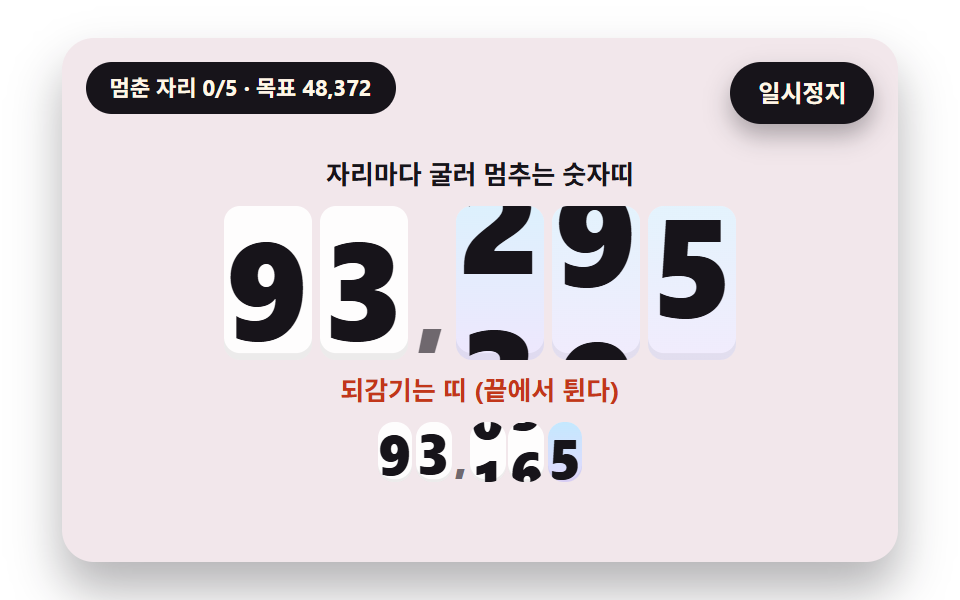 Number Rolling Animation JS: 9 Odometer ScenesNumber rolling animation js: Why does a number feel more trustworthy rolling than jumping? 02 overshoots its target and See all demos in this post