05Progress strip
Five step segments sit in a row and fill from the left one at a time, with only the segment that just filled brightening briefly before settling, so the eye keeps track of how far along it is.
Best forProgress headers on signup flows and step indicators for surveys and checkouts
5칸 세그먼트채워진 칸 점등radius 999
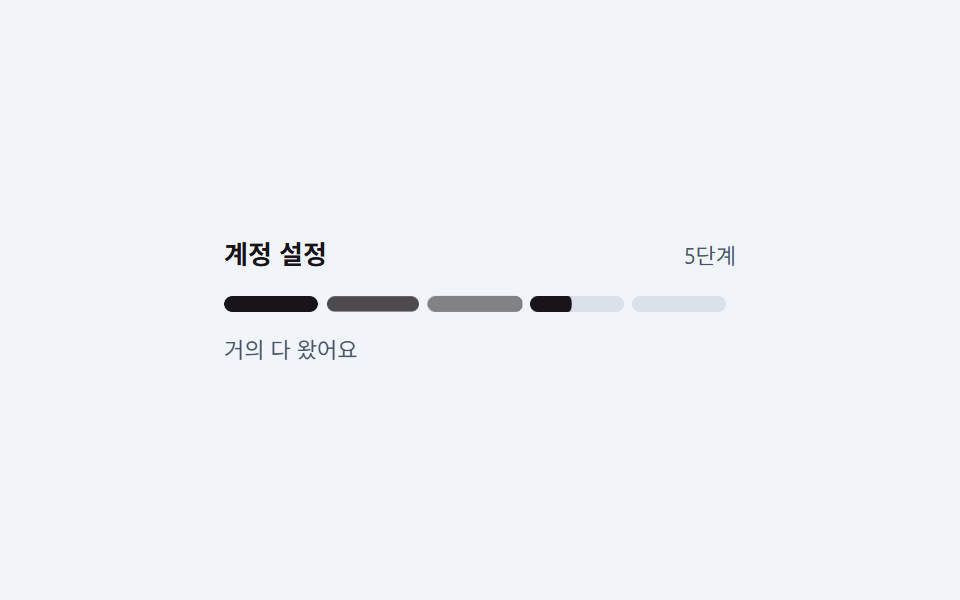
<main class="stage is-demo">
  <div class="wrap">
    <div class="head">
      <span class="h">Account setup</span>
      <span class="p">5 steps</span>
    </div>
    <div class="strip" aria-label="Setup progress steps">
      <span class="seg s1"><i class="fill"></i><i class="flash"></i></span>
      <span class="seg s2"><i class="fill"></i><i class="flash"></i></span>
      <span class="seg s3"><i class="fill"></i><i class="flash"></i></span>
      <span class="seg s4"><i class="fill"></i><i class="flash"></i></span>
      <span class="seg s5"><i class="fill"></i><i class="flash"></i></span>
    </div>
    <p class="cap">Almost there</p>
  </div>
</main>
@use "../../../../site/static/demo-tokens" as *;
// ── 변수 3개 ──────────────────────────────────────────
$duration: $dur-loop; // 2s — 다섯 칸이 왼쪽부터 차례로 차는 한 바퀴
$easing: $ease-out;
$color: $subject-ink; // 잉크 계열 — 흰 바탕에서 본문·표시 모두 대비를 번다
@include stage(#f1f5f9);
.wrap { box-sizing: border-box; width: min(100%, 256px); }
.head { display: flex; align-items: baseline; justify-content: space-between; gap: $sp-2; }
.h { font-size: 13px; font-weight: 700; color: $subject-ink; }
.p { font-size: 11px; color: #475569; }
.strip { display: flex; gap: $sp-1; margin: $sp-3 0 0; }
// 칸은 균등분배(flex:1 1 0)가 아니라 고정 폭이다. 채움이 scaleX 인 지오메트리에서
// 균등분배를 섞으면 실제 렌더 폭이 계산값과 어긋난다 (BD19)
.seg {
position: relative;
flex: 0 0 auto;
width: 47px;
height: 8px;
border-radius: $r-pill;
background: #dbe1e8;
overflow: hidden;
scale: 1; // 3차 탄성 개별 속성 중립 자세 — seg 자체는 지금까지 애니메이션이 없었다
}
// ⛔ 낱개 속성으로 쓴다 — .s2~.s5 의 animation-delay 가 아래에서 재정의되므로
// 단축을 쓰면 이 규칙에서 리셋된다
.stage.is-demo .seg {
animation-name: seg-pop;
animation-duration: $duration;
animation-timing-function: $ease-lerp-settle;
animation-iteration-count: infinite;
}
.strip .s2 { animation-delay: .2s; }
.strip .s3 { animation-delay: .4s; }
.strip .s4 { animation-delay: .6s; }
.strip .s5 { animation-delay: .8s; }
// 채움 — width 가 아니라 scaleX. 칸마다 시차를 둬 왼쪽부터 하나씩 찬다
.fill {
position: absolute; inset: 0;
border-radius: $r-pill;
background: $color;
transform: scaleX(0);
transform-origin: left center; // 규칙8: 칸 왼쪽부터 순차 채움
}
// 방금 찬 칸만 잠깐 밝아졌다 가라앉는다
.flash {
position: absolute; inset: 0;
border-radius: $r-pill;
background: #fff;
opacity: 0;
}
// ⛔ 낱개 속성으로 쓴다. `animation:` 단축으로 쓰면 아래 .s2~.s5 의 animation-delay 가
// 같이 초기화돼 다섯 칸이 한꺼번에 찬다 (실측 2026-09-11)
.stage.is-demo .fill {
animation-name: fill;
animation-duration: $duration;
animation-timing-function: $easing;
animation-iteration-count: infinite;
}
.stage.is-demo .flash {
animation-name: flash;
animation-duration: $duration;
animation-timing-function: $easing;
animation-iteration-count: infinite;
}
.s2 .fill, .s2 .flash { animation-delay: .2s; }
.s3 .fill, .s3 .flash { animation-delay: .4s; }
.s4 .fill, .s4 .flash { animation-delay: .6s; }
.s5 .fill, .s5 .flash { animation-delay: .8s; }
.cap { margin: $sp-3 0 0; font-size: 11px; color: #475569; }
// 한 겹(채움 오버슛 + 캡션 감쇠 진자) — 2026-09-15 형태 2차
// 칸을 꽉 채운 뒤 1.15 로 살짝 넘치려다 overflow:hidden 에 클립되는 탄성.
// s5 마지막 칸은 .8s 딜레이 + 16% ≈ $duration 의 40~48% 지점에 차니
// cap-bob 도 40% 피크로 맞춘다
@keyframes fill {
0% { transform: scaleX(0); }
13% { transform: scaleX(1.15); }
16%, 100% { transform: scaleX(1); }
}
// 마지막 칸이 차는 순간 "거의 다 왔어요" 가 한 번 가볍게 들렸다 가라앉는다
.stage.is-demo .cap {
animation: cap-bob $duration $ease-lerp-settle infinite;
}
@keyframes cap-bob {
0%, 30% { transform: translateY(0); }
40% { transform: translateY(-2px); }
55% { transform: translateY(1px); }
70%, 100% { transform: translateY(0); }
}
@keyframes flash {
0%, 8% { opacity: 0; }
16% { opacity: .55; }
34%,100% { opacity: 0; }
}
// 3차: 칸(.seg)이 채워지는 시점(각자 delay + 16% 지점)에 개별 속성(scale:)으로
// 통째로 한 번 탄성 팝. fill 은 내부 자식(scaleX)이라 이 층과 축이 달라
// 순수 병렬 합성 — 47px 칸 + 4px 갭 안에서 안 겹치는 상한 1.06
@keyframes seg-pop {
0%, 13% { scale: 1; }
16% { scale: 1.06; }
24% { scale: .98; }
32%, 100% { scale: 1; }
}
@media (prefers-reduced-motion: reduce) {
.stage.is-demo .fill { animation: none; transform: scaleX(1); }
.stage.is-demo .flash { animation: none; opacity: 0; }
.stage.is-demo .cap { animation: none; }
.stage.is-demo .seg { animation: none; scale: 1; }
}html, body {
margin: 0;
overflow: hidden;
}
.stage {
box-sizing: border-box;
min-height: 100vh;
display: grid;
place-items: center;
margin: 0;
background: #f1f5f9;
font-family: -apple-system, "Segoe UI", "Noto Sans KR", sans-serif;
padding: clamp(8px, 4vw, 24px);
}
.wrap {
box-sizing: border-box;
width: min(100%, 256px);
}
.head {
display: flex;
align-items: baseline;
justify-content: space-between;
gap: 8px;
}
.h {
font-size: 13px;
font-weight: 700;
color: #17141a;
}
.p {
font-size: 11px;
color: #475569;
}
.strip {
display: flex;
gap: 4px;
margin: 12px 0 0;
}
.seg {
position: relative;
flex: 0 0 auto;
width: 47px;
height: 8px;
border-radius: 999px;
background: #dbe1e8;
overflow: hidden;
scale: 1;
}
.stage.is-demo .seg {
animation-name: seg-pop;
animation-duration: 2s;
animation-timing-function: linear(0, 0.051, 0.176, 0.341, 0.518, 0.685, 0.831, 0.947, 1.032, 1.087, 1.117, 1.126, 1.121, 1.105, 1.085, 1.062, 1.041, 1.022, 1.008, 0.997, 1);
animation-iteration-count: infinite;
}
.strip .s2 {
animation-delay: 0.2s;
}
.strip .s3 {
animation-delay: 0.4s;
}
.strip .s4 {
animation-delay: 0.6s;
}
.strip .s5 {
animation-delay: 0.8s;
}
.fill {
position: absolute;
inset: 0;
border-radius: 999px;
background: #17141a;
transform: scaleX(0);
transform-origin: left center;
}
.flash {
position: absolute;
inset: 0;
border-radius: 999px;
background: #fff;
opacity: 0;
}
.stage.is-demo .fill {
animation-name: fill;
animation-duration: 2s;
animation-timing-function: ease-out;
animation-iteration-count: infinite;
}
.stage.is-demo .flash {
animation-name: flash;
animation-duration: 2s;
animation-timing-function: ease-out;
animation-iteration-count: infinite;
}
.s2 .fill, .s2 .flash {
animation-delay: 0.2s;
}
.s3 .fill, .s3 .flash {
animation-delay: 0.4s;
}
.s4 .fill, .s4 .flash {
animation-delay: 0.6s;
}
.s5 .fill, .s5 .flash {
animation-delay: 0.8s;
}
.cap {
margin: 12px 0 0;
font-size: 11px;
color: #475569;
}
@keyframes fill {
0% {
transform: scaleX(0);
}
13% {
transform: scaleX(1.15);
}
16%, 100% {
transform: scaleX(1);
}
}
.stage.is-demo .cap {
animation: cap-bob 2s linear(0, 0.051, 0.176, 0.341, 0.518, 0.685, 0.831, 0.947, 1.032, 1.087, 1.117, 1.126, 1.121, 1.105, 1.085, 1.062, 1.041, 1.022, 1.008, 0.997, 1) infinite;
}
@keyframes cap-bob {
0%, 30% {
transform: translateY(0);
}
40% {
transform: translateY(-2px);
}
55% {
transform: translateY(1px);
}
70%, 100% {
transform: translateY(0);
}
}
@keyframes flash {
0%, 8% {
opacity: 0;
}
16% {
opacity: 0.55;
}
34%, 100% {
opacity: 0;
}
}
@keyframes seg-pop {
0%, 13% {
scale: 1;
}
16% {
scale: 1.06;
}
24% {
scale: 0.98;
}
32%, 100% {
scale: 1;
}
}
@media (prefers-reduced-motion: reduce) {
.stage.is-demo .fill {
animation: none;
transform: scaleX(1);
}
.stage.is-demo .flash {
animation: none;
opacity: 0;
}
.stage.is-demo .cap {
animation: none;
}
.stage.is-demo .seg {
animation: none;
scale: 1;
}
}import type { CSSProperties } from "react";
import styles from "./ProgressStrip.module.scss";
export type ProgressStripProps = {
duration?: number;
easing?: string;
color?: string;
title?: string;
caption?: string;
steps?: number;
/** 칸 사이 시차 (ms) */
stagger?: number;
};
export default function ProgressStrip({
duration = 2000,
easing = "ease-out",
color = "#17141a",
title = "Account setup",
caption = "Almost there",
steps = 5,
stagger = 200,
}: ProgressStripProps) {
const vars: CSSProperties = {
"--duration": `${duration}ms`,
"--easing": easing,
"--color": color,
} as CSSProperties;
return (
<div className={styles.wrap} style={vars}>
<div className={styles.head}>
<span className={styles.h}>{title}</span>
<span className={styles.p}>{steps} steps</span>
</div>
<div className={styles.strip} aria-label={title}>
{Array.from({ length: steps }, (_, i) => {
// 시차는 인라인으로. scss 에서 animation 단축 속성을 쓰면 이 값이 리셋된다
const delay = { animationDelay: `${stagger * i}ms` } as CSSProperties;
return (
<span className={styles.seg} key={i}>
<i className={styles.fill} style={delay} />
<i className={styles.flash} style={delay} />
</span>
);
})}
</div>
<p className={styles.cap}>{caption}</p>
</div>
);
}05 Progress strip — Measured area 1.842% · moving frames 18/23Original by GODRICH · SCSS and React ship in the zip · Onboarding UI Design — 9 Copy-Paste Tour Widgets
The post this demo lives in
 Onboarding UI Design — 9 Copy-Paste Tour WidgetsGood onboarding ui design points to the next thing to click, on the screen the user already sees. The shapes are fixed — See all demos in this post
If you like this effect - similar demos
 Feedback02 steps() typewriter9 CSS Typing Animation, One Line, Copy-Paste
 Feedback03 Progress bar with hover pauseToast Notification UI: 9 Stacking Patterns
 Feedback01 Saving-label pulse — the saving label's brightness value rises and falls repeatedly while a save is in progressAutosave Indicator: 9 Save-Status Patterns