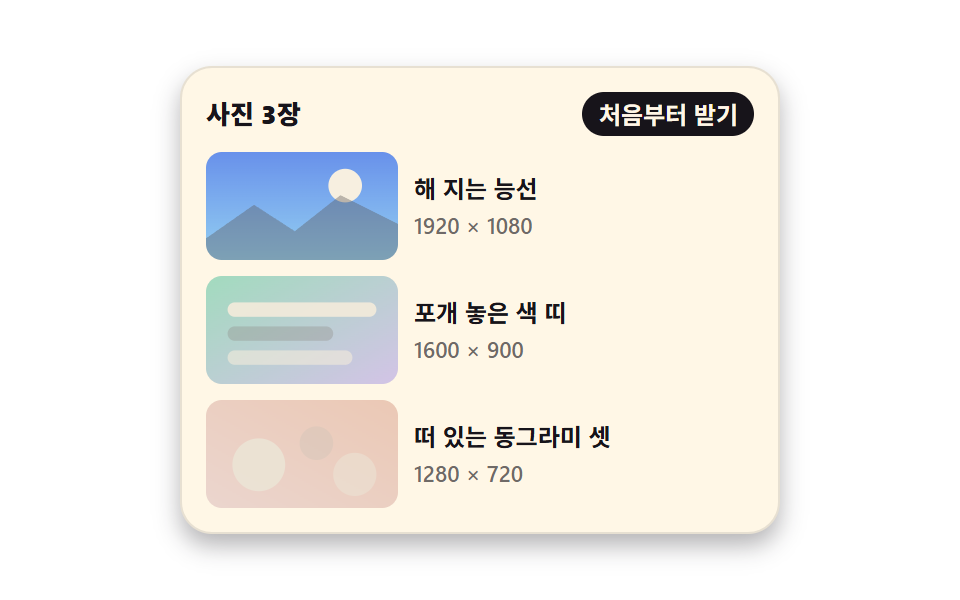
08Picture that arrives late into a ratio box already holding its place
Before the picture arrives, aspect-ratio reserves an empty box of the same size so the text never shifts, and the arriving picture is parsed with decoding="async" and then rises with opacity alone.
Best forArticle and gallery bodies full of photos where text shifts while scrolling
aspect-ratiodecoding="async"opacity
<main class="stage">
  <section class="lz is-demo" id="lz" aria-label="List where the photos arrive late">
    <header class="lz__head">
      <p class="lz__title">3 photos</p>
      <button class="lz__again" type="button" id="lz-again">Fetch again</button>
    </header>

    <ul class="lz__list">
      <li class="lz__row">
        <div class="lz__box">
          <span class="lz__ph" aria-hidden="true"></span>
          <img class="lz__img" width="160" height="90" loading="lazy" decoding="async" alt="Ridge at sunset"
               src="data:image/svg+xml,%3Csvg%20xmlns='http://www.w3.org/2000/svg'%20viewBox='0%200%20160%2090'%3E%3Cdefs%3E%3ClinearGradient%20id='g1'%20x1='0'%20y1='0'%20x2='0'%20y2='1'%3E%3Cstop%20offset='0'%20stop-color='%232f6df6'/%3E%3Cstop%20offset='1'%20stop-color='%236ec8ff'/%3E%3C/linearGradient%3E%3C/defs%3E%3Crect%20width='160'%20height='90'%20fill='url%28%23g1%29'/%3E%3Ccircle%20cx='116'%20cy='28'%20r='14'%20fill='%23fff7e6'/%3E%3Cpath%20d='M0%2072%2040%2044%2074%2066%20112%2036%20160%2060%20160%2090%200%2090Z'%20fill='%2317141a'%20opacity='.38'/%3E%3C/svg%3E">
        </div>
        <div class="lz__text">
          <p class="lz__name">Ridge at sunset</p>
          <p class="lz__meta">1920 × 1080</p>
        </div>
      </li>
      <li class="lz__row">
        <div class="lz__box">
          <span class="lz__ph" aria-hidden="true"></span>
          <img class="lz__img" width="160" height="90" loading="lazy" decoding="async" alt="Stacked color bands"
               src="data:image/svg+xml,%3Csvg%20xmlns='http://www.w3.org/2000/svg'%20viewBox='0%200%20160%2090'%3E%3Cdefs%3E%3ClinearGradient%20id='g2'%20x1='0'%20y1='0'%20x2='1'%20y2='1'%3E%3Cstop%20offset='0'%20stop-color='%234cd4a6'/%3E%3Cstop%20offset='1'%20stop-color='%23b9a0ff'/%3E%3C/linearGradient%3E%3C/defs%3E%3Crect%20width='160'%20height='90'%20fill='url%28%23g2%29'/%3E%3Crect%20x='18'%20y='22'%20width='124'%20height='12'%20rx='6'%20fill='%23fff7e6'%20opacity='.92'/%3E%3Crect%20x='18'%20y='42'%20width='88'%20height='12'%20rx='6'%20fill='%2317141a'%20opacity='.32'/%3E%3Crect%20x='18'%20y='62'%20width='104'%20height='12'%20rx='6'%20fill='%23fff7e6'%20opacity='.62'/%3E%3C/svg%3E">
        </div>
        <div class="lz__text">
          <p class="lz__name">Stacked color bands</p>
          <p class="lz__meta">1600 × 900</p>
        </div>
      </li>
      <li class="lz__row">
        <div class="lz__box">
          <span class="lz__ph" aria-hidden="true"></span>
          <img class="lz__img" width="160" height="90" loading="lazy" decoding="async" alt="Three floating circles"
               src="data:image/svg+xml,%3Csvg%20xmlns='http://www.w3.org/2000/svg'%20viewBox='0%200%20160%2090'%3E%3Cdefs%3E%3ClinearGradient%20id='g3'%20x1='0'%20y1='1'%20x2='1'%20y2='0'%3E%3Cstop%20offset='0'%20stop-color='%23ff9ebb'/%3E%3Cstop%20offset='1'%20stop-color='%23ff4d1f'/%3E%3C/linearGradient%3E%3C/defs%3E%3Crect%20width='160'%20height='90'%20fill='url%28%23g3%29'/%3E%3Ccircle%20cx='44'%20cy='54'%20r='22'%20fill='%23fff7e6'%20opacity='.9'/%3E%3Ccircle%20cx='92'%20cy='36'%20r='14'%20fill='%2317141a'%20opacity='.3'/%3E%3Ccircle%20cx='124'%20cy='62'%20r='18'%20fill='%23fff7e6'%20opacity='.55'/%3E%3C/svg%3E">
        </div>
        <div class="lz__text">
          <p class="lz__name">Three floating circles</p>
          <p class="lz__meta">1280 × 720</p>
        </div>
      </li>
    </ul>
  </section>
</main>@use "../../../../site/static/demo-tokens" as *;
// 지연 로드 페이드인 + 비율 상자 — aspect-ratio 가 그림과 같은 크기의 빈 상자를 먼저 잡아
// 그림이 늦게 와도 아래 글이 밀리지 않는다. 도착한 그림은 흐림 없이 opacity 로만 떠오른다.
$duration: $dur-enter;
$easing: $ease-out;
$color: $subject-blue;
@include stage($stage-paper);
$ink-soft: rgba(23, 20, 26, .62);
$ink-box: rgba(23, 20, 26, .10);
$ink-line: rgba(23, 20, 26, .10);
.lz {
box-sizing: border-box;
display: grid;
gap: $sp-2;
width: min(300px, 92vw);
padding: $sp-3;
border: 1px solid $ink-line;
border-radius: $r-card;
background: $subject-cream;
color: $subject-ink;
box-shadow: $shadow-press;
}
.lz * { box-sizing: border-box; }
.lz__head {
display: flex;
align-items: center;
justify-content: space-between;
gap: $sp-2;
margin: 0;
}
.lz__title {
margin: 0;
font-size: 13px;
font-weight: 800;
line-height: 1.2;
}
.lz__again {
margin: 0;
padding: $sp-1 $sp-2;
border: 0;
border-radius: $r-pill;
background: $subject-ink; // 파랑 바탕 크림 글자는 4.25:1 로 4.5 에 못 미쳐 먹색 바탕으로 쓴다 (17.1:1)
color: $subject-cream;
font-family: inherit;
font-size: 12px;
font-weight: 700;
line-height: 1.2;
cursor: pointer;
}
.lz__again:focus-visible { outline: 2px solid $subject-ink; outline-offset: 2px; }
.lz__list {
display: grid;
gap: $sp-2;
margin: 0;
padding: 0;
list-style: none;
}
.lz__row {
display: grid;
grid-template-columns: 96px 1fr;
gap: $sp-2;
align-items: center;
}
// ── 비율 상자: 빈 상자와 그림을 같은 칸에 겹쳐 둔다 ──
// aspect-ratio 가 높이를 먼저 정하므로 그림이 도착해도 레이아웃이 한 번도 움직이지 않는다.
.lz__box {
display: grid;
aspect-ratio: 16 / 9;
border-radius: $r-sm;
overflow: hidden;
}
.lz__ph,
.lz__img {
grid-area: 1 / 1;
width: 100%;
height: 100%;
}
.lz__ph { background: $ink-box; }
.lz__img {
display: block;
object-fit: cover;
opacity: 1;
transition: opacity $duration $easing;
}
// 손으로 다시 받을 때: 그림만 사라졌다 순서대로 떠오른다. 상자 크기는 그대로다
.lz.is-waiting .lz__img { opacity: 0; transition: none; }
.lz__row:nth-child(1) .lz__img { transition-delay: 0ms; }
.lz__row:nth-child(2) .lz__img { transition-delay: 120ms; }
.lz__row:nth-child(3) .lz__img { transition-delay: 240ms; }
.lz__text { display: grid; gap: $sp-1; }
.lz__name {
margin: 0;
font-size: 12px;
font-weight: 700;
line-height: 1.3;
}
.lz__meta {
margin: 0;
color: $ink-soft;
font-size: 11px;
font-weight: 500;
line-height: 1.2;
}
// ── 격자 미리보기 전용 2초 루프 ──
// 지연을 준 애니메이션이므로 animation-fill-mode: backwards 가 있어야
// 지연 구간에 요소의 기본 상태(다 보이는 그림)가 한 프레임 번쩍이지 않는다.
@keyframes lz-in {
0%, 10% { opacity: 0; }
40%, 74% { opacity: 1; }
78%, 100% { opacity: 0; }
}
.lz.is-demo {
.lz__img {
animation-name: lz-in;
animation-duration: $dur-loop;
animation-timing-function: $easing;
animation-iteration-count: infinite;
animation-fill-mode: backwards;
}
.lz__row:nth-child(1) .lz__img { animation-delay: 0ms; }
.lz__row:nth-child(2) .lz__img { animation-delay: 120ms; }
.lz__row:nth-child(3) .lz__img { animation-delay: 240ms; }
}
@media (max-width: 340px) {
.lz { gap: $sp-1; width: min(292px, 96vw); padding: $sp-2; }
.lz__list { gap: $sp-1; }
.lz__row { grid-template-columns: 64px 1fr; gap: $sp-1; }
.lz__title { font-size: 11px; }
.lz__again { padding: 0 $sp-1; font-size: 10px; }
.lz__text { gap: 0; }
.lz__name { font-size: 10px; }
.lz__meta { font-size: 9px; }
}
@media (prefers-reduced-motion: reduce) {
.lz.is-demo .lz__img,
.lz .lz__img { animation: none !important; transition: none !important; }
// 움직임만 끄고 그림이 다 도착한 결과는 남긴다
.lz.is-demo .lz__img { opacity: 1 !important; }
}html, body {
margin: 0;
overflow: hidden;
}
.stage {
box-sizing: border-box;
min-height: 100vh;
display: grid;
place-items: center;
margin: 0;
background: #ffffff;
font-family: -apple-system, "Segoe UI", "Noto Sans KR", sans-serif;
padding: clamp(8px, 4vw, 24px);
}
.lz {
box-sizing: border-box;
display: grid;
gap: 8px;
width: min(300px, 92vw);
padding: 12px;
border: 1px solid rgba(23, 20, 26, 0.1);
border-radius: 16px;
background: #fff7e6;
color: #17141a;
box-shadow: 0 6px 12px rgba(23, 20, 26, 0.32);
}
.lz * {
box-sizing: border-box;
}
.lz__head {
display: flex;
align-items: center;
justify-content: space-between;
gap: 8px;
margin: 0;
}
.lz__title {
margin: 0;
font-size: 13px;
font-weight: 800;
line-height: 1.2;
}
.lz__again {
margin: 0;
padding: 4px 8px;
border: 0;
border-radius: 999px;
background: #17141a;
color: #fff7e6;
font-family: inherit;
font-size: 12px;
font-weight: 700;
line-height: 1.2;
cursor: pointer;
}
.lz__again:focus-visible {
outline: 2px solid #17141a;
outline-offset: 2px;
}
.lz__list {
display: grid;
gap: 8px;
margin: 0;
padding: 0;
list-style: none;
}
.lz__row {
display: grid;
grid-template-columns: 96px 1fr;
gap: 8px;
align-items: center;
}
.lz__box {
display: grid;
aspect-ratio: 16/9;
border-radius: 8px;
overflow: hidden;
}
.lz__ph,
.lz__img {
grid-area: 1/1;
width: 100%;
height: 100%;
}
.lz__ph {
background: rgba(23, 20, 26, 0.1);
}
.lz__img {
display: block;
object-fit: cover;
opacity: 1;
transition: opacity 600ms ease-out;
}
.lz.is-waiting .lz__img {
opacity: 0;
transition: none;
}
.lz__row:nth-child(1) .lz__img {
transition-delay: 0ms;
}
.lz__row:nth-child(2) .lz__img {
transition-delay: 120ms;
}
.lz__row:nth-child(3) .lz__img {
transition-delay: 240ms;
}
.lz__text {
display: grid;
gap: 4px;
}
.lz__name {
margin: 0;
font-size: 12px;
font-weight: 700;
line-height: 1.3;
}
.lz__meta {
margin: 0;
color: rgba(23, 20, 26, 0.62);
font-size: 11px;
font-weight: 500;
line-height: 1.2;
}
@keyframes lz-in {
0%, 10% {
opacity: 0;
}
40%, 74% {
opacity: 1;
}
78%, 100% {
opacity: 0;
}
}
.lz.is-demo .lz__img {
animation-name: lz-in;
animation-duration: 2s;
animation-timing-function: ease-out;
animation-iteration-count: infinite;
animation-fill-mode: backwards;
}
.lz.is-demo .lz__row:nth-child(1) .lz__img {
animation-delay: 0ms;
}
.lz.is-demo .lz__row:nth-child(2) .lz__img {
animation-delay: 120ms;
}
.lz.is-demo .lz__row:nth-child(3) .lz__img {
animation-delay: 240ms;
}
@media (max-width: 340px) {
.lz {
gap: 4px;
width: min(292px, 96vw);
padding: 8px;
}
.lz__list {
gap: 4px;
}
.lz__row {
grid-template-columns: 64px 1fr;
gap: 4px;
}
.lz__title {
font-size: 11px;
}
.lz__again {
padding: 0 4px;
font-size: 10px;
}
.lz__text {
gap: 0;
}
.lz__name {
font-size: 10px;
}
.lz__meta {
font-size: 9px;
}
}
@media (prefers-reduced-motion: reduce) {
.lz.is-demo .lz__img,
.lz .lz__img {
animation: none !important;
transition: none !important;
}
.lz.is-demo .lz__img {
opacity: 1 !important;
}
}// 비율 상자는 늘 같은 자리를 차지하므로, 그림을 다시 받아도 아래 글이 밀리지 않는다.
var lz = document.getElementById('lz');
var lzAgain = document.getElementById('lz-again');
lzAgain.addEventListener('click', function () {
lz.classList.remove('is-demo');
lz.classList.add('is-waiting');
// 다음 프레임에 클래스를 떼면 그때부터 opacity 트랜지션이 걸린다
requestAnimationFrame(function () {
requestAnimationFrame(function () { lz.classList.remove('is-waiting'); });
});
});import { useState } from "react";
import type { CSSProperties } from "react";
import styles from "./LazyFadeRatio.module.scss";
export type LazyFadeRatioItem = { name: string; meta: string; alt: string; src: string };
export type LazyFadeRatioProps = {
/** 목록 항목. src 는 외부 의존 0 을 위해 인라인 data URI 를 기본으로 쓴다 */
items?: LazyFadeRatioItem[];
title?: string;
againLabel?: string;
groupLabel?: string;
/** 격자 미리보기용 2초 자동 루프. 사람이 손대면 꺼진다 */
demo?: boolean;
duration?: number;
easing?: string;
color?: string;
};
type Vars = CSSProperties & { "--duration"?: string; "--easing"?: string; "--color"?: string };
// ambient 가 얇다 — 브라우저 전역 중 쓰는 것만 로컬 타입으로 좁혀 받는다
type Host = { requestAnimationFrame(cb: () => void): number };
const RIDGE =
"data:image/svg+xml,%3Csvg%20xmlns='http://www.w3.org/2000/svg'%20viewBox='0%200%20160%2090'%3E%3Cdefs%3E%3ClinearGradient%20id='g1'%20x1='0'%20y1='0'%20x2='0'%20y2='1'%3E%3Cstop%20offset='0'%20stop-color='%232f6df6'/%3E%3Cstop%20offset='1'%20stop-color='%236ec8ff'/%3E%3C/linearGradient%3E%3C/defs%3E%3Crect%20width='160'%20height='90'%20fill='url%28%23g1%29'/%3E%3Ccircle%20cx='116'%20cy='28'%20r='14'%20fill='%23fff7e6'/%3E%3Cpath%20d='M0%2072%2040%2044%2074%2066%20112%2036%20160%2060%20160%2090%200%2090Z'%20fill='%2317141a'%20opacity='.38'/%3E%3C/svg%3E";
const BANDS =
"data:image/svg+xml,%3Csvg%20xmlns='http://www.w3.org/2000/svg'%20viewBox='0%200%20160%2090'%3E%3Cdefs%3E%3ClinearGradient%20id='g2'%20x1='0'%20y1='0'%20x2='1'%20y2='1'%3E%3Cstop%20offset='0'%20stop-color='%234cd4a6'/%3E%3Cstop%20offset='1'%20stop-color='%23b9a0ff'/%3E%3C/linearGradient%3E%3C/defs%3E%3Crect%20width='160'%20height='90'%20fill='url%28%23g2%29'/%3E%3Crect%20x='18'%20y='22'%20width='124'%20height='12'%20rx='6'%20fill='%23fff7e6'%20opacity='.92'/%3E%3Crect%20x='18'%20y='42'%20width='88'%20height='12'%20rx='6'%20fill='%2317141a'%20opacity='.32'/%3E%3Crect%20x='18'%20y='62'%20width='104'%20height='12'%20rx='6'%20fill='%23fff7e6'%20opacity='.62'/%3E%3C/svg%3E";
const DOTS =
"data:image/svg+xml,%3Csvg%20xmlns='http://www.w3.org/2000/svg'%20viewBox='0%200%20160%2090'%3E%3Cdefs%3E%3ClinearGradient%20id='g3'%20x1='0'%20y1='1'%20x2='1'%20y2='0'%3E%3Cstop%20offset='0'%20stop-color='%23ff9ebb'/%3E%3Cstop%20offset='1'%20stop-color='%23ff4d1f'/%3E%3C/linearGradient%3E%3C/defs%3E%3Crect%20width='160'%20height='90'%20fill='url%28%23g3%29'/%3E%3Ccircle%20cx='44'%20cy='54'%20r='22'%20fill='%23fff7e6'%20opacity='.9'/%3E%3Ccircle%20cx='92'%20cy='36'%20r='14'%20fill='%2317141a'%20opacity='.3'/%3E%3Ccircle%20cx='124'%20cy='62'%20r='18'%20fill='%23fff7e6'%20opacity='.55'/%3E%3C/svg%3E";
const DEFAULT_ITEMS: LazyFadeRatioItem[] = [
{ name: "Ridge at sunset", meta: "1920 × 1080", alt: "Ridge at sunset", src: RIDGE },
{ name: "Stacked color bands", meta: "1600 × 900", alt: "Stacked color bands", src: BANDS },
{ name: "Three floating circles", meta: "1280 × 720", alt: "Three floating circles", src: DOTS },
];
export default function LazyFadeRatio({
items = DEFAULT_ITEMS,
title = "3 photos",
againLabel = "Fetch again",
groupLabel = "List where the photos arrive late",
demo = true,
duration = 600,
easing = "ease-out",
color = "#2f6df6",
}: LazyFadeRatioProps) {
const [live, setLive] = useState(demo);
const [waiting, setWaiting] = useState(false);
const vars: Vars = { "--duration": `${duration}ms`, "--easing": easing, "--color": color };
function again() {
// 상자 크기는 그대로 두고 그림만 다시 떠오르게 한다 — 아래 글은 한 번도 밀리지 않는다
setLive(false);
setWaiting(true);
const host = globalThis as unknown as Host;
host.requestAnimationFrame(() => {
host.requestAnimationFrame(() => setWaiting(false));
});
}
const cls = [styles.lz, live ? styles.isDemo : "", waiting ? styles.isWaiting : ""]
.filter(Boolean)
.join(" ");
return (
<section className={cls} style={vars} aria-label={groupLabel}>
<header className={styles.head}>
<p className={styles.title}>{title}</p>
<button className={styles.again} type="button" onClick={again}>
{againLabel}
</button>
</header>
<ul className={styles.list}>
{items.map((it) => (
<li className={styles.row} key={it.name}>
{/* 빈 상자와 그림을 같은 칸에 겹친다 — aspect-ratio 가 높이를 먼저 정한다 */}
<div className={styles.box}>
<span className={styles.ph} aria-hidden="true" />
<img
className={styles.img}
src={it.src}
alt={it.alt}
width={160}
height={90}
loading="lazy"
decoding="async"
/>
</div>
<div className={styles.text}>
<p className={styles.name}>{it.name}</p>
<p className={styles.meta}>{it.meta}</p>
</div>
</li>
))}
</ul>
</section>
);
}08 Picture that arrives late into a ratio box already holding its place — Measured area 10.714% · moving frames 14/23Original by GODRICH · SCSS and React ship in the zip · Page Loading Animation CSS: 9 Route-Change Demos
The post this demo lives in
 Page Loading Animation CSS: 9 Route-Change DemosPage loading animation css is the feedback layer covering the moment one screen gives way to the next. The nine here are See all demos in this post
If you like this effect - similar demos
 Loaders08 Mute toggle — a switch interpolating opacity by its state value9 Typing Indicator CSS Patterns (Chat UI)
 Loaders03 Image Fade-in Where a Scroll-position Value Computes an Intersection RatioLazy Loading Images: 9 CSS Placeholder Patterns
 Loaders01 Bottom spinner fade — a loading indicator computing its opacity from the remaining scroll distanceInfinite Scroll Loading: 9 Essential UI Patterns