07Button Whose Grid Pattern Shifts With Every Tilt Value
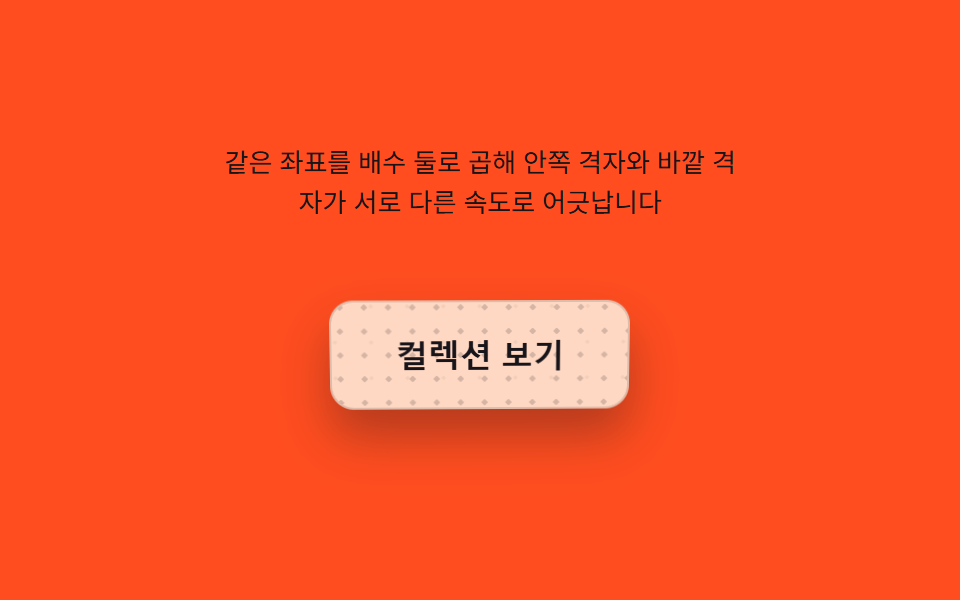
The grid pattern on the button surface shifts further than the background in proportion to the tilt value, making the pattern look like it floats under glass, and it realigns once the tilt disappears.
Best forGlassmorphism buttons and card-header buttons
FAR_DEPTHNEAR_DEPTHbackgroundPosition
<main class="stage">
<div class="gp is-demo" id="gp">
  <p class="gp__hint"><span>The same coordinates are multiplied by two different factors, so the inner and outer grids shift at different speeds</span></p>
  <div class="gp__scene" id="scene">
    <button class="gp__btn" id="btn" type="button" aria-label="View collection — button whose two grid layers drift apart in parallax">
      <span class="gp__grid gp__grid--far" id="gridFar" aria-hidden="true"></span>
      <span class="gp__grid gp__grid--near" id="gridNear" aria-hidden="true"></span>
      <span class="gp__label">View collection</span>
    </button>
  </div>
</div>
</main>
@use "../../../../site/static/demo-tokens" as *;
@include stage($stage-orange);
.gp {
display: grid;
gap: $sp-4;
justify-items: center;
}
.gp__hint {
margin: 0;
font-size: 13px;
line-height: 1.5;
text-align: center;
max-width: 260px;
color: $subject-ink;
}
.gp__scene {
perspective: 640px;
padding: $sp-6;
}
.gp__btn {
position: relative;
border: 1px solid rgba($subject-ink, .14);
cursor: pointer;
padding: $sp-4 $sp-8;
border-radius: $r-control;
background: rgba(255, 247, 230, .82);
color: $subject-ink;
font-size: 16px;
font-weight: 700;
transform-style: preserve-3d;
box-shadow: $shadow-raised;
overflow: hidden;
will-change: transform;
}
.gp__btn:focus-visible {
outline: 2px solid $subject-ink;
outline-offset: 3px;
}
.gp__grid {
position: absolute;
inset: -30%;
pointer-events: none;
background-repeat: repeat;
background-size: 18px 18px;
}
.gp__grid--far {
background-image: radial-gradient(rgba(23, 20, 26, .1) 1px, transparent 1px);
opacity: .5;
}
.gp__grid--near {
background-image: radial-gradient(rgba(23, 20, 26, .18) 1.4px, transparent 1.4px);
background-size: 12px 12px;
}
.gp__label {
position: relative;
z-index: 1;
}
@media (prefers-reduced-motion: reduce) {
.gp__btn { transition: none; }
}html, body {
margin: 0;
overflow: hidden;
}
.stage {
box-sizing: border-box;
min-height: 100vh;
display: grid;
place-items: center;
margin: 0;
background: #ff4d1f;
font-family: -apple-system, "Segoe UI", "Noto Sans KR", sans-serif;
padding: clamp(8px, 4vw, 24px);
}
.gp {
display: grid;
gap: 16px;
justify-items: center;
}
.gp__hint {
margin: 0;
font-size: 13px;
line-height: 1.5;
text-align: center;
max-width: 260px;
color: #17141a;
}
.gp__scene {
perspective: 640px;
padding: 24px;
}
.gp__btn {
position: relative;
border: 1px solid rgba(23, 20, 26, 0.14);
cursor: pointer;
padding: 16px 32px;
border-radius: 12px;
background: rgba(255, 247, 230, 0.82);
color: #17141a;
font-size: 16px;
font-weight: 700;
transform-style: preserve-3d;
box-shadow: 0 14px 24px rgba(23, 20, 26, 0.32);
overflow: hidden;
will-change: transform;
}
.gp__btn:focus-visible {
outline: 2px solid #17141a;
outline-offset: 3px;
}
.gp__grid {
position: absolute;
inset: -30%;
pointer-events: none;
background-repeat: repeat;
background-size: 18px 18px;
}
.gp__grid--far {
background-image: radial-gradient(rgba(23, 20, 26, 0.1) 1px, transparent 1px);
opacity: 0.5;
}
.gp__grid--near {
background-image: radial-gradient(rgba(23, 20, 26, 0.18) 1.4px, transparent 1.4px);
background-size: 12px 12px;
}
.gp__label {
position: relative;
z-index: 1;
}
@media (prefers-reduced-motion: reduce) {
.gp__btn {
transition: none;
}
}(function () {
var root = document.getElementById('gp');
var scene = document.getElementById('scene');
var btn = document.getElementById('btn');
var gridFar = document.getElementById('gridFar');
var gridNear = document.getElementById('gridNear');
var reduce = window.matchMedia('(prefers-reduced-motion: reduce)').matches;
var MAX_DEG = 9;
var LERP = 0.16;
var FAR_DEPTH = 10;
var NEAR_DEPTH = 26;
var targetNX = 0, targetNY = 0, curNX = 0, curNY = 0;
var hasPointer = false;
function clamp(v, lo, hi) { return Math.max(lo, Math.min(hi, v)); }
function syntheticTarget(t) { return [Math.sin(t * 0.9), Math.sin(t * 1.4 + 1.6)]; }
function render(nx, ny) {
btn.style.transform = 'rotateX(' + (-ny * MAX_DEG).toFixed(2) + 'deg) rotateY(' + (nx * MAX_DEG).toFixed(2) + 'deg)';
gridFar.style.backgroundPosition = (nx * FAR_DEPTH).toFixed(1) + 'px ' + (ny * FAR_DEPTH).toFixed(1) + 'px';
gridNear.style.backgroundPosition = (-nx * NEAR_DEPTH).toFixed(1) + 'px ' + (-ny * NEAR_DEPTH).toFixed(1) + 'px';
}
var t0 = null;
function loop(now) {
if (t0 === null) t0 = now;
var t = (now - t0) / 1000;
if (!hasPointer && !reduce) {
var s = syntheticTarget(t);
targetNX = s[0]; targetNY = s[1];
}
curNX += (targetNX - curNX) * LERP;
curNY += (targetNY - curNY) * LERP;
render(curNX, curNY);
requestAnimationFrame(loop);
}
function pointFromEvent(e) {
var r = scene.getBoundingClientRect();
var nx = ((e.clientX - r.left) / r.width) * 2 - 1;
var ny = ((e.clientY - r.top) / r.height) * 2 - 1;
return [clamp(nx, -1, 1), clamp(ny, -1, 1)];
}
scene.addEventListener('pointermove', function (e) {
hasPointer = true;
root.classList.remove('is-demo');
var p = pointFromEvent(e);
targetNX = p[0]; targetNY = p[1];
});
scene.addEventListener('pointerleave', function () {
hasPointer = false;
targetNX = 0; targetNY = 0;
});
btn.addEventListener('click', function () {
root.classList.remove('is-demo');
hasPointer = true;
targetNX = -0.85; targetNY = -0.4;
if (reduce) { render(targetNX, targetNY); }
setTimeout(function () { if (!hasPointer) { targetNX = 0; targetNY = 0; if (reduce) { render(targetNX, targetNY); } } }, 240);
});
btn.addEventListener('keydown', function (e) {
var step = 0.24;
var moves = { ArrowLeft: [-step, 0], ArrowRight: [step, 0], ArrowUp: [0, -step], ArrowDown: [0, step] };
var m = moves[e.key];
if (!m) return;
e.preventDefault();
root.classList.remove('is-demo');
hasPointer = true;
targetNX = clamp(targetNX + m[0], -1, 1);
targetNY = clamp(targetNY + m[1], -1, 1);
if (reduce) { render(targetNX, targetNY); }
});
if (reduce) {
render(0.4, -0.3);
} else {
requestAnimationFrame(loop);
}
})();// GridParallaxButton — vanilla 판(run/393/demo/07-pointer-tilt-3d-grid-parallax/index.html) 의 React 포트.
// 같은 정규화 좌표를 두 격자 층에 서로 다른 배수·부호로 곱해 배경 위치를 옮긴다 — 두 층이
// 다른 속도로 어긋나며 시차(parallax) 깊이를 만든다. 값·수치는 vanilla 와 같다.
import { useEffect, useRef, useState } from "react";
import type { PointerEvent as ReactPointerEvent } from "react";
import styles from "./GridParallaxButton.module.scss";
type Box<T> = { current: T };
type KeyEvt = { key: string; preventDefault(): void };
const MAX_DEG = 9;
const LERP = 0.16;
const FAR_DEPTH = 10;
const NEAR_DEPTH = 26;
const LABEL = "컬렉션 보기 — 격자 두 겹이 시차로 어긋나는 버튼";
function clamp(v: number, lo: number, hi: number): number {
return Math.max(lo, Math.min(hi, v));
}
function syntheticTarget(t: number): [number, number] {
return [Math.sin(t * 0.9), Math.sin(t * 1.4 + 1.6)];
}
export default function GridParallaxButton() {
const sceneRef = useRef<HTMLDivElement | null>(null);
const btnRef = useRef<HTMLButtonElement | null>(null);
const gridFarRef = useRef<HTMLSpanElement | null>(null);
const gridNearRef = useRef<HTMLSpanElement | null>(null);
const targetXRef = useRef<number>(0) as Box<number>;
const targetYRef = useRef<number>(0) as Box<number>;
const curXRef = useRef<number>(0) as Box<number>;
const curYRef = useRef<number>(0) as Box<number>;
const hasPointerRef = useRef<boolean>(false) as Box<boolean>;
const frameRef = useRef<number>(0) as Box<number>;
const t0Ref = useRef<number>(0) as Box<number>;
const [demo, setDemo] = useState(true);
const [reduce, setReduce] = useState(false);
function render(nx: number, ny: number): void {
const btn = btnRef.current;
const gridFar = gridFarRef.current;
const gridNear = gridNearRef.current;
if (!btn || !gridFar || !gridNear) return;
btn.style.transform = "rotateX(" + (-ny * MAX_DEG).toFixed(2) + "deg) rotateY(" + (nx * MAX_DEG).toFixed(2) + "deg)";
gridFar.style.backgroundPosition = (nx * FAR_DEPTH).toFixed(1) + "px " + (ny * FAR_DEPTH).toFixed(1) + "px";
gridNear.style.backgroundPosition = (-nx * NEAR_DEPTH).toFixed(1) + "px " + (-ny * NEAR_DEPTH).toFixed(1) + "px";
}
useEffect(() => {
setReduce(window.matchMedia("(prefers-reduced-motion: reduce)").matches);
}, []);
useEffect(() => {
if (reduce) {
render(0.4, -0.3);
return;
}
function loop(now: number): void {
if (t0Ref.current === 0) t0Ref.current = now;
const t = (now - t0Ref.current) / 1000;
if (!hasPointerRef.current) {
const s = syntheticTarget(t);
targetXRef.current = s[0];
targetYRef.current = s[1];
}
curXRef.current += (targetXRef.current - curXRef.current) * LERP;
curYRef.current += (targetYRef.current - curYRef.current) * LERP;
render(curXRef.current, curYRef.current);
frameRef.current = requestAnimationFrame(loop);
}
frameRef.current = requestAnimationFrame(loop);
return () => cancelAnimationFrame(frameRef.current);
}, [reduce]);
function pointFromEvent(event: ReactPointerEvent<HTMLDivElement>): [number, number] {
const scene = sceneRef.current;
if (!scene) return [0, 0];
const r = scene.getBoundingClientRect();
const nx = ((event.clientX - r.left) / r.width) * 2 - 1;
const ny = ((event.clientY - r.top) / r.height) * 2 - 1;
return [clamp(nx, -1, 1), clamp(ny, -1, 1)];
}
function onPointerMove(event: ReactPointerEvent<HTMLDivElement>): void {
hasPointerRef.current = true;
setDemo(false);
const p = pointFromEvent(event);
targetXRef.current = p[0];
targetYRef.current = p[1];
}
function onPointerLeave(): void {
hasPointerRef.current = false;
targetXRef.current = 0;
targetYRef.current = 0;
}
function onClick(): void {
setDemo(false);
hasPointerRef.current = true;
targetXRef.current = -0.85;
targetYRef.current = -0.4;
if (reduce) render(targetXRef.current, targetYRef.current);
window.setTimeout(() => {
if (!hasPointerRef.current) {
targetXRef.current = 0;
targetYRef.current = 0;
if (reduce) render(targetXRef.current, targetYRef.current);
}
}, 240);
}
function onKeyDown(event: KeyEvt): void {
const step = 0.24;
const moves: { [key: string]: [number, number] } = {
ArrowLeft: [-step, 0],
ArrowRight: [step, 0],
ArrowUp: [0, -step],
ArrowDown: [0, step],
};
const m = moves[event.key];
if (!m) return;
event.preventDefault();
setDemo(false);
hasPointerRef.current = true;
targetXRef.current = clamp(targetXRef.current + m[0], -1, 1);
targetYRef.current = clamp(targetYRef.current + m[1], -1, 1);
if (reduce) render(targetXRef.current, targetYRef.current);
}
const cls = [styles.gp, demo ? styles.isDemo : ""].filter(Boolean).join(" ");
return (
<main className={styles.stage}>
<div className={cls}>
<p className={styles.hint}>
<span>같은 좌표를 배수 둘로 곱해 안쪽 격자와 바깥 격자가 서로 다른 속도로 어긋납니다</span>
</p>
<div className={styles.scene} ref={sceneRef} onPointerMove={onPointerMove} onPointerLeave={onPointerLeave}>
<button className={styles.btn} ref={btnRef} type="button" aria-label={LABEL} onClick={onClick} onKeyDown={onKeyDown}>
<span className={`${styles.grid} ${styles.gridFar}`} ref={gridFarRef} aria-hidden="true" />
<span className={`${styles.grid} ${styles.gridNear}`} ref={gridNearRef} aria-hidden="true" />
<span className={styles.label}>컬렉션 보기</span>
</button>
</div>
</div>
</main>
);
}07 Button Whose Grid Pattern Shifts With Every Tilt Value — Measured area 4.097% · moving frames 23/23Original by GODRICH · SCSS and React ship in the zip · 9 CSS 3D Button Effects — Copy-paste Ready
The post this demo lives in
 9 CSS 3D Button Effects — Copy-paste ReadyNine css 3d button effect demos. What turns a flat button into depth? A cursor-driven angle value sets rotateX/rotateY, See all demos in this post
If you like this effect - similar demos
 Buttons01 Long-shadow retro — a button whose trailing shadow length value extends and retracts with hover stateCTA Button Design: 9 Interaction Patterns
 Buttons09 Disabled ripple block — pressing a button whose disabled value is on stops the ripple-spread value midway and answers with a shake value insteadButton Group CSS: 9 Adjoined Patterns
 Buttons04 Liquid-metal Button That Merges and Spreads With a Pointer-distance ValueButton Click Effect CSS: 9 Canvas Pixel Patterns