03Usage slider recalculates the price
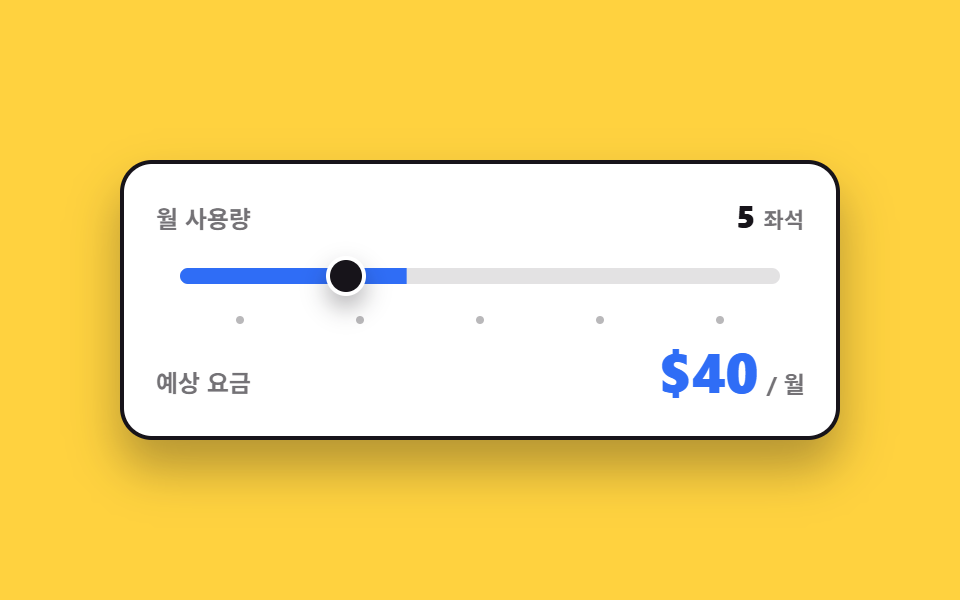
Dragging the handle changes the usage step, the fee is recalculated on the spot, and a readable sentence is sent to screen readers instead of the bare number.
Best forMetered pricing pages where the fee follows seats or API calls
aria-valuetextscaleXtransform-origin
<main class="stage">
  <div class="us is-demo">
    <div class="us__row">
      <span class="us__lab">Monthly usage</span>
      <span class="us__slot">
        <span class="us__live"><span class="us__n" id="us-seatn">3</span><span class="us__u">seats</span></span>
        <span class="us__f" data-step="1"><span class="us__n">3</span><span class="us__u">seats</span></span>
        <span class="us__f" data-step="2"><span class="us__n">5</span><span class="us__u">seats</span></span>
        <span class="us__f" data-step="3"><span class="us__n">10</span><span class="us__u">seats</span></span>
        <span class="us__f" data-step="4"><span class="us__n">20</span><span class="us__u">seats</span></span>
        <span class="us__f" data-step="5"><span class="us__n">50</span><span class="us__u">seats</span></span>
      </span>
    </div>
    <div class="us__track">
      <span class="us__rail" aria-hidden="true"><span class="us__fill"></span></span>
      <input class="us__range" type="range" min="1" max="5" step="1" value="1" id="us-range" aria-label="Monthly usage" aria-valuetext="3 seats">
      <span class="us__knobrail" aria-hidden="true"><span class="us__knob"></span></span>
    </div>
    <div class="us__ticks" aria-hidden="true">
      <i class="us__tick"></i><i class="us__tick"></i><i class="us__tick"></i><i class="us__tick"></i><i class="us__tick"></i>
    </div>
    <div class="us__row">
      <span class="us__lab">Estimated fee</span>
      <span class="us__slot us__slot--fee" aria-live="polite">
        <span class="us__live"><span class="us__n" id="us-fee">$24</span><span class="us__u">/ mo</span></span>
        <span class="us__f" data-step="1"><span class="us__n">$24</span><span class="us__u">/ mo</span></span>
        <span class="us__f" data-step="2"><span class="us__n">$40</span><span class="us__u">/ mo</span></span>
        <span class="us__f" data-step="3"><span class="us__n">$80</span><span class="us__u">/ mo</span></span>
        <span class="us__f" data-step="4"><span class="us__n">$160</span><span class="us__u">/ mo</span></span>
        <span class="us__f" data-step="5"><span class="us__n">$400</span><span class="us__u">/ mo</span></span>
      </span>
    </div>
  </div>
</main>@use "../../../../site/static/demo-tokens" as *;
// 단계(1~5)를 담는 자리 — 등록해 두면 루프에서 단계 사이가 부드럽게 채워진다.
// 요금 숫자 자체는 이 값으로 만들지 않는다 (그건 JS 가 글자로 갈아 끼운다)
@property --p {
syntax: "<number>";
initial-value: 1;
inherits: true;
}
$duration: $dur-quick;
$easing: $ease-spring;
$color: $subject-blue;
@include stage($stage-yellow);
.us {
--p: 1;
box-sizing: border-box;
width: min(360px, 88vw);
display: flex;
flex-direction: column;
gap: $sp-2;
padding: $sp-4;
border: 2px solid $subject-ink;
border-radius: $r-card;
background: $stage-paper;
box-shadow: $shadow-raised;
font-family: -apple-system, "Segoe UI", "Noto Sans KR", sans-serif;
color: $subject-ink;
}
.us__row {
display: flex;
align-items: baseline;
justify-content: space-between;
gap: $sp-2;
}
.us__lab {
font-size: 12px;
line-height: 18px;
font-weight: 700;
opacity: .6;
}
// 값 자리 — 사람이 만진 뒤엔 JS 가 쓰는 .us__live 한 장, 루프에서는 겹쳐 둔 얼굴 다섯 장
.us__slot {
position: relative;
display: flex;
justify-content: flex-end;
transform-origin: right center; // 규칙8: 오른쪽 정렬 금액 — 정렬 변을 고정해야 팝이 자리를 안 흔든다
}
.us__live,
.us__f {
display: flex;
align-items: baseline;
gap: $sp-1;
white-space: nowrap;
}
.us__f {
position: absolute;
right: 0;
top: 0;
opacity: 0;
}
.us__n {
font-size: 16px;
line-height: 20px;
font-weight: 800;
}
.us__u {
font-size: 11px;
line-height: 16px;
font-weight: 700;
opacity: .6;
}
.us__slot--fee .us__n {
color: $color;
font-size: 26px;
line-height: 32px;
}
.us__track {
position: relative;
height: 24px;
}
// 채움은 네이티브 range 위가 아니라 따로 그린 트랙에 그린다 — scaleX 는 폭 계산 없이 0~1 로 끝난다
.us__rail {
position: absolute;
left: 12px;
right: 12px;
top: 8px;
height: 8px;
overflow: hidden;
border-radius: $r-pill;
background: rgba($subject-ink, .12);
}
.us__fill {
position: absolute;
left: 0;
top: 0;
bottom: 0;
width: 100%;
transform-origin: left center; // 규칙8: 슬라이더 채움 좌측 기준
transform: scaleX(calc(var(--p) * .2)); // 단계 1~5 → 0.2~1.0
background: $color;
}
// 진짜 입력은 트랙 위에 투명하게 겹쳐 둔다 — 끌기·클릭·키보드가 전부 살아 있다
.us__range {
position: absolute;
left: 0;
right: 0;
top: 0;
bottom: 0;
width: 100%;
margin: 0;
opacity: 0;
cursor: pointer;
accent-color: $color;
}
.us__knobrail {
position: absolute;
left: 12px;
right: 12px;
top: 0;
bottom: 0;
}
.us__knob {
position: absolute;
top: 50%;
left: calc(100% * (var(--p) - .5) * .2); // 칸 한가운데 — 채움이 덮은 칸의 중심에 선다
width: 20px;
height: 20px;
box-sizing: border-box;
border: 2px solid $stage-paper;
border-radius: 50%;
background: $subject-ink;
box-shadow: $shadow-press;
transform: translate(-50%, -50%);
}
.us__range:focus-visible ~ .us__knobrail .us__knob {
outline: 2px solid $color;
outline-offset: 2px;
}
// 눈금 다섯 칸은 균등 그리드로 — 칸마다 고정 px 로 밀면 실제 폭과 어긋난다
.us__ticks {
display: grid;
grid-template-columns: repeat(5, 1fr);
padding: 0 $sp-3;
}
.us__tick {
justify-self: center;
width: 4px;
height: 4px;
border-radius: 50%;
background: rgba($subject-ink, .3);
}
// ── 사람이 만진 뒤(정적 경로) — 단계는 --p 하나에만 들어 있다 ──
.us:not(.is-demo) .us__fill,
.us:not(.is-demo) .us__knob {
transition-property: transform, left;
transition-duration: $duration;
transition-timing-function: $easing;
}
// ── 자동 루프(2초) — 손잡이와 채움은 1→5 로 부드럽게, 값 얼굴은 컷. 복귀는 86% 에 끝난다 ──
.us.is-demo {
animation-name: us-p;
animation-duration: $dur-loop;
animation-timing-function: $easing;
animation-iteration-count: infinite;
}
@keyframes us-p {
0%, 6% { --p: 1; }
22% { --p: 2; }
38% { --p: 3; }
54% { --p: 4; }
70% { --p: 5; }
74% { --p: 5; animation-timing-function: linear; }
86%, 100% { --p: 1; }
}
.us.is-demo .us__live { opacity: 0; }
.us.is-demo .us__f {
animation-duration: $dur-loop;
animation-timing-function: steps(1, end);
animation-iteration-count: infinite;
}
.us.is-demo .us__f[data-step="1"] { animation-name: us-f1; }
.us.is-demo .us__f[data-step="2"] { animation-name: us-f2; }
.us.is-demo .us__f[data-step="3"] { animation-name: us-f3; }
.us.is-demo .us__f[data-step="4"] { animation-name: us-f4; }
.us.is-demo .us__f[data-step="5"] { animation-name: us-f5; }
// 되돌아가는 구간(74~86%)에서도 얼굴이 손잡이를 따라간다 — --p 가 선형으로 5→1 로 내려가며
// 4·3·2 를 지나는 시각(77·80·83%)에 맞춰 컷한다. 이 컷을 안 두면 손잡이는 왼쪽으로 미끄러지는데
// 숫자만 「50 좌석 · $400」에 멈춰 있는 어긋난 장면이 대표 이미지로 뽑힌다 (242-06 계열)
// 컷은 손잡이가 **눈금과 눈금의 한가운데**를 지나는 순간에 둔다 — step 슬라이더가 실제로 값을 바꾸는
// 지점이 그 중간이기 때문이다. 도착 시각(22·38·54·70%)에 맞추면 미끄러지는 네 프레임 내내 숫자만
// 뒤처져 「손잡이는 5번 눈금, 숫자는 20 좌석」인 어긋난 장면이 대표 이미지로 뽑힌다 (242-06 계열)
@keyframes us-f1 {
0% { opacity: 1; }
14% { opacity: 0; }
84.5% { opacity: 1; }
100% { opacity: 1; }
}
@keyframes us-f2 {
0% { opacity: 0; }
14% { opacity: 1; }
30% { opacity: 0; }
81.5% { opacity: 1; }
84.5% { opacity: 0; }
100% { opacity: 0; }
}
@keyframes us-f3 {
0% { opacity: 0; }
30% { opacity: 1; }
46% { opacity: 0; }
78.5% { opacity: 1; }
81.5% { opacity: 0; }
100% { opacity: 0; }
}
@keyframes us-f4 {
0% { opacity: 0; }
46% { opacity: 1; }
62% { opacity: 0; }
75.5% { opacity: 1; }
78.5% { opacity: 0; }
100% { opacity: 0; }
}
@keyframes us-f5 {
0% { opacity: 0; }
62% { opacity: 1; }
75.5% { opacity: 0; }
100% { opacity: 0; }
}
// 요금이 갈릴 때마다 그 자리가 한 번 튄다 — 컷 옆에 움직인 프레임을 채운다
.us.is-demo .us__slot--fee {
animation-name: us-pop;
animation-duration: $dur-loop;
animation-timing-function: $ease-pop;
animation-iteration-count: infinite;
}
@keyframes us-pop {
0%, 10% { transform: scale(1); }
16% { transform: scale(1.07); }
22%, 26% { transform: scale(1); }
32% { transform: scale(1.07); }
38%, 42% { transform: scale(1); }
48% { transform: scale(1.07); }
54%, 58% { transform: scale(1); }
64% { transform: scale(1.07); }
70%, 82% { transform: scale(1); }
86% { transform: scale(1.05); }
92%, 100% { transform: scale(1); }
}
@media (max-width: 340px) {
.us {
width: min(280px, 90vw);
gap: $sp-1;
padding: $sp-3;
}
.us__lab { font-size: 11px; line-height: 16px; }
.us__n { font-size: 14px; line-height: 18px; }
.us__slot--fee .us__n { font-size: 21px; line-height: 26px; }
.us__track { height: 20px; }
.us__rail { top: 6px; }
.us__knob { width: 16px; height: 16px; }
}
@media (prefers-reduced-motion: reduce) {
.us.is-demo,
.us.is-demo .us__f,
.us.is-demo .us__slot--fee { animation: none !important; }
.us:not(.is-demo) .us__fill,
.us:not(.is-demo) .us__knob { transition: none !important; }
.us.is-demo .us__f[data-step="1"] { opacity: 1; }
}@property --p {
syntax: "<number>";
initial-value: 1;
inherits: true;
}
html, body {
margin: 0;
overflow: hidden;
}
.stage {
box-sizing: border-box;
min-height: 100vh;
display: grid;
place-items: center;
margin: 0;
background: #ffd23f;
font-family: -apple-system, "Segoe UI", "Noto Sans KR", sans-serif;
padding: clamp(8px, 4vw, 24px);
}
.us {
--p: 1;
box-sizing: border-box;
width: min(360px, 88vw);
display: flex;
flex-direction: column;
gap: 8px;
padding: 16px;
border: 2px solid #17141a;
border-radius: 16px;
background: #ffffff;
box-shadow: 0 14px 24px rgba(23, 20, 26, 0.32);
font-family: -apple-system, "Segoe UI", "Noto Sans KR", sans-serif;
color: #17141a;
}
.us__row {
display: flex;
align-items: baseline;
justify-content: space-between;
gap: 8px;
}
.us__lab {
font-size: 12px;
line-height: 18px;
font-weight: 700;
opacity: 0.6;
}
.us__slot {
position: relative;
display: flex;
justify-content: flex-end;
transform-origin: right center;
}
.us__live,
.us__f {
display: flex;
align-items: baseline;
gap: 4px;
white-space: nowrap;
}
.us__f {
position: absolute;
right: 0;
top: 0;
opacity: 0;
}
.us__n {
font-size: 16px;
line-height: 20px;
font-weight: 800;
}
.us__u {
font-size: 11px;
line-height: 16px;
font-weight: 700;
opacity: 0.6;
}
.us__slot--fee .us__n {
color: #2f6df6;
font-size: 26px;
line-height: 32px;
}
.us__track {
position: relative;
height: 24px;
}
.us__rail {
position: absolute;
left: 12px;
right: 12px;
top: 8px;
height: 8px;
overflow: hidden;
border-radius: 999px;
background: rgba(23, 20, 26, 0.12);
}
.us__fill {
position: absolute;
left: 0;
top: 0;
bottom: 0;
width: 100%;
transform-origin: left center;
transform: scaleX(calc(var(--p) * 0.2));
background: #2f6df6;
}
.us__range {
position: absolute;
left: 0;
right: 0;
top: 0;
bottom: 0;
width: 100%;
margin: 0;
opacity: 0;
cursor: pointer;
accent-color: #2f6df6;
}
.us__knobrail {
position: absolute;
left: 12px;
right: 12px;
top: 0;
bottom: 0;
}
.us__knob {
position: absolute;
top: 50%;
left: calc(100% * (var(--p) - 0.5) * 0.2);
width: 20px;
height: 20px;
box-sizing: border-box;
border: 2px solid #ffffff;
border-radius: 50%;
background: #17141a;
box-shadow: 0 6px 12px rgba(23, 20, 26, 0.32);
transform: translate(-50%, -50%);
}
.us__range:focus-visible ~ .us__knobrail .us__knob {
outline: 2px solid #2f6df6;
outline-offset: 2px;
}
.us__ticks {
display: grid;
grid-template-columns: repeat(5, 1fr);
padding: 0 12px;
}
.us__tick {
justify-self: center;
width: 4px;
height: 4px;
border-radius: 50%;
background: rgba(23, 20, 26, 0.3);
}
.us:not(.is-demo) .us__fill,
.us:not(.is-demo) .us__knob {
transition-property: transform, left;
transition-duration: 220ms;
transition-timing-function: cubic-bezier(0.2, 0.8, 0.2, 1);
}
.us.is-demo {
animation-name: us-p;
animation-duration: 2s;
animation-timing-function: cubic-bezier(0.2, 0.8, 0.2, 1);
animation-iteration-count: infinite;
}
@keyframes us-p {
0%, 6% {
--p: 1;
}
22% {
--p: 2;
}
38% {
--p: 3;
}
54% {
--p: 4;
}
70% {
--p: 5;
}
74% {
--p: 5;
animation-timing-function: linear;
}
86%, 100% {
--p: 1;
}
}
.us.is-demo .us__live {
opacity: 0;
}
.us.is-demo .us__f {
animation-duration: 2s;
animation-timing-function: steps(1, end);
animation-iteration-count: infinite;
}
.us.is-demo .us__f[data-step="1"] {
animation-name: us-f1;
}
.us.is-demo .us__f[data-step="2"] {
animation-name: us-f2;
}
.us.is-demo .us__f[data-step="3"] {
animation-name: us-f3;
}
.us.is-demo .us__f[data-step="4"] {
animation-name: us-f4;
}
.us.is-demo .us__f[data-step="5"] {
animation-name: us-f5;
}
@keyframes us-f1 {
0% {
opacity: 1;
}
14% {
opacity: 0;
}
84.5% {
opacity: 1;
}
100% {
opacity: 1;
}
}
@keyframes us-f2 {
0% {
opacity: 0;
}
14% {
opacity: 1;
}
30% {
opacity: 0;
}
81.5% {
opacity: 1;
}
84.5% {
opacity: 0;
}
100% {
opacity: 0;
}
}
@keyframes us-f3 {
0% {
opacity: 0;
}
30% {
opacity: 1;
}
46% {
opacity: 0;
}
78.5% {
opacity: 1;
}
81.5% {
opacity: 0;
}
100% {
opacity: 0;
}
}
@keyframes us-f4 {
0% {
opacity: 0;
}
46% {
opacity: 1;
}
62% {
opacity: 0;
}
75.5% {
opacity: 1;
}
78.5% {
opacity: 0;
}
100% {
opacity: 0;
}
}
@keyframes us-f5 {
0% {
opacity: 0;
}
62% {
opacity: 1;
}
75.5% {
opacity: 0;
}
100% {
opacity: 0;
}
}
.us.is-demo .us__slot--fee {
animation-name: us-pop;
animation-duration: 2s;
animation-timing-function: cubic-bezier(0.2, 1.4, 0.4, 1);
animation-iteration-count: infinite;
}
@keyframes us-pop {
0%, 10% {
transform: scale(1);
}
16% {
transform: scale(1.07);
}
22%, 26% {
transform: scale(1);
}
32% {
transform: scale(1.07);
}
38%, 42% {
transform: scale(1);
}
48% {
transform: scale(1.07);
}
54%, 58% {
transform: scale(1);
}
64% {
transform: scale(1.07);
}
70%, 82% {
transform: scale(1);
}
86% {
transform: scale(1.05);
}
92%, 100% {
transform: scale(1);
}
}
@media (max-width: 340px) {
.us {
width: min(280px, 90vw);
gap: 4px;
padding: 12px;
}
.us__lab {
font-size: 11px;
line-height: 16px;
}
.us__n {
font-size: 14px;
line-height: 18px;
}
.us__slot--fee .us__n {
font-size: 21px;
line-height: 26px;
}
.us__track {
height: 20px;
}
.us__rail {
top: 6px;
}
.us__knob {
width: 16px;
height: 16px;
}
}
@media (prefers-reduced-motion: reduce) {
.us.is-demo,
.us.is-demo .us__f,
.us.is-demo .us__slot--fee {
animation: none !important;
}
.us:not(.is-demo) .us__fill,
.us:not(.is-demo) .us__knob {
transition: none !important;
}
.us.is-demo .us__f[data-step="1"] {
opacity: 1;
}
}// 실제 동작: 진짜 range 입력이다. input 마다 단계(1~5)를 --p 로 넘겨 채움·손잡이 자리를 정하고,
// seats 수와 요금 글자는 JS 가 갈아 끼운다(01 처럼 CSS 로 보간하지 않는다).
// 화면을 못 보는 사람에게는 눈금 숫자 대신 aria-valuetext 로 읽을 문장을 준다
var root = document.querySelector('.us');
var range = document.getElementById('us-range');
var seatn = document.getElementById('us-seatn');
var fee = document.getElementById('us-fee');
var SEATS = [3, 5, 10, 20, 50];
function apply(v) {
var seats = SEATS[v - 1];
root.style.setProperty('--p', String(v));
seatn.textContent = String(seats);
fee.textContent = '$' + (seats * 8);
range.setAttribute('aria-valuetext', seats + ' ' + 'seats');
}
range.addEventListener('input', function () {
root.classList.remove('is-demo');
apply(parseInt(range.value, 10));
});import { useState } from "react";
import type { CSSProperties } from "react";
import styles from "./UsageSlider.module.scss";
export type UsageSliderProps = {
usageLabel?: string;
feeLabel?: string;
seatUnit?: string;
unit?: string;
currency?: string;
seats?: number[];
perSeat?: number;
duration?: number;
easing?: string;
color?: string;
};
// React 이벤트 타입은 import 하지 않는다 — 필요한 모양만 여기서 적는다
type RangeEvt = { currentTarget: { value: string } };
type Vars = CSSProperties & {
"--p"?: string;
"--duration"?: string;
"--easing"?: string;
"--color"?: string;
};
export default function UsageSlider({
usageLabel = "Monthly usage",
feeLabel = "Estimated fee",
seatUnit = "seats",
unit = "/ mo",
currency = "$",
seats = [3, 5, 10, 20, 50],
perSeat = 8,
duration = 220,
easing = "cubic-bezier(.2,.8,.2,1)",
color = "#2f6df6",
}: UsageSliderProps) {
const [demo, setDemo] = useState(true);
const [step, setStep] = useState(1);
const now = seats[step - 1];
const vars: Vars = {
"--p": String(step),
"--duration": `${duration}ms`,
"--easing": easing,
"--color": color,
};
// 요금 숫자는 CSS 보간이 아니라 여기서 글자로 만든다
function fee(n: number) {
return `${currency}${n * perSeat}`;
}
function onInput(e: RangeEvt) {
setDemo(false);
setStep(parseInt(e.currentTarget.value, 10));
}
return (
<div className={`${styles.us} ${demo ? styles.isDemo : ""}`} style={vars}>
<div className={styles.row}>
<span className={styles.lab}>{usageLabel}</span>
<span className={styles.slot}>
<span className={styles.live}>
<span className={styles.n}>{now}</span>
<span className={styles.u}>{seatUnit}</span>
</span>
{seats.map((s, i) => (
<span key={s} className={styles.f} data-step={i + 1}>
<span className={styles.n}>{s}</span>
<span className={styles.u}>{seatUnit}</span>
</span>
))}
</span>
</div>
<div className={styles.track}>
<span className={styles.rail} aria-hidden="true">
<span className={styles.fill} />
</span>
<input
className={styles.range}
type="range"
min={1}
max={seats.length}
step={1}
value={step}
aria-label={usageLabel}
aria-valuetext={`${now} ${seatUnit}`}
onChange={onInput}
/>
<span className={styles.knobrail} aria-hidden="true">
<span className={styles.knob} />
</span>
</div>
<div className={styles.ticks} aria-hidden="true">
{seats.map((s) => (
<i key={s} className={styles.tick} />
))}
</div>
<div className={styles.row}>
<span className={styles.lab}>{feeLabel}</span>
<span className={`${styles.slot} ${styles.slotFee}`} aria-live="polite">
<span className={styles.live}>
<span className={styles.n}>{fee(now)}</span>
<span className={styles.u}>{unit}</span>
</span>
{seats.map((s, i) => (
<span key={s} className={styles.f} data-step={i + 1}>
<span className={styles.n}>{fee(s)}</span>
<span className={styles.u}>{unit}</span>
</span>
))}
</span>
</div>
</div>
);
}03 Usage slider recalculates the price — Measured area 5.301% · moving frames 21/23Original by GODRICH · SCSS and React ship in the zip · Pricing Table Design: 9 Live Interactions
The post this demo lives in
 Pricing Table Design: 9 Live InteractionsIn pricing table design, the work happens on top of the cards, not inside them. All nine run on vanilla JS and SCSS, and See all demos in this post