02CRT scanlines and curved vignette
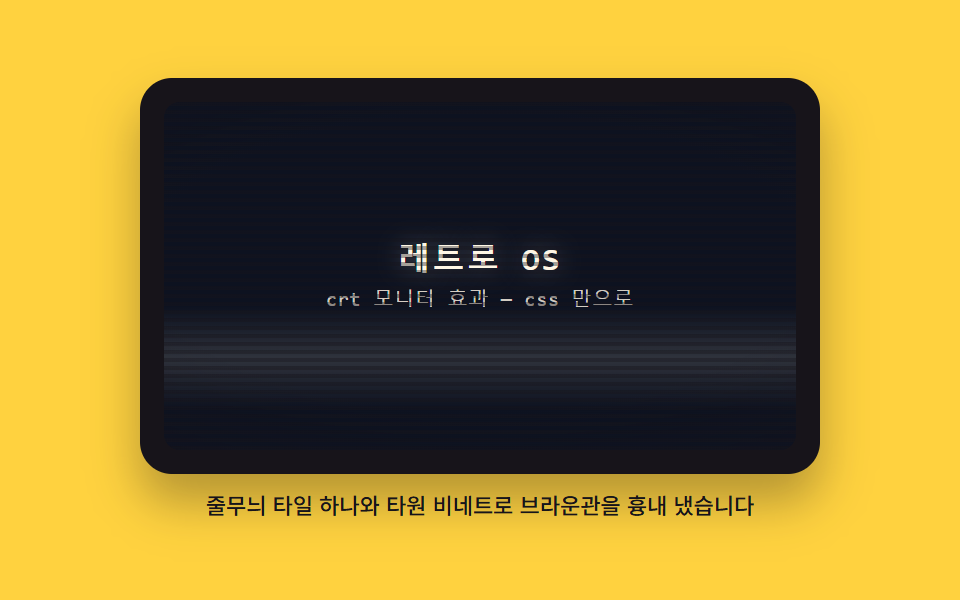
A single tile of horizontal stripes repeats across the screen, and an elliptical shadow that darkens toward the edges sits on top to fake curved glass. One bright band drifts from top to bottom.
Best forHero background that needs a retro tone
repeating-linear-gradientradial-gradientbackground-size
<main class="stage">
<figure class="crt">
  <div class="crt__bezel">
    <div class="crt__screen">
      <div class="crt__content">
        <p class="crt__title">Retro OS</p>
        <p class="crt__sub">CRT monitor effect — CSS only</p>
      </div>
      <span class="crt__band" aria-hidden="true"></span>
      <span class="crt__lines" aria-hidden="true"></span>
      <span class="crt__vig" aria-hidden="true"></span>
    </div>
  </div>
  <figcaption class="crt__cap">One stripe tile and an elliptical vignette fake a CRT tube</figcaption>
</figure>
</main>
@use "../../../../site/static/demo-tokens" as *;
// CRT 스캔라인과 곡면 비네트 — 가로 줄무늬를 타일 하나(4px, 그 안 줄 위치 0 부터 2px)로 정의해
// background-size 로 반복시키고, radial-gradient 타원으로 가장자리로 갈수록 어두워지는 유리를 얹는다.
// 밝은 띠 하나가 translateY 로 위에서 아래로 흐른다. 화면 안쪽 바탕은 비토큰 배경 픽셀(짙은 남색)이다.
$duration: $dur-loop;
$easing: $ease-out;
$color: $subject-cream;
$mono: ui-monospace, SFMono-Regular, "SF Mono", Consolas, "Liberation Mono", monospace;
$glass: #0d1220; // 비토큰 배경 픽셀 — 브라운관 형광면의 짙은 남색 바탕(주변 토큰으로는 없는 색)
@include stage($stage-yellow);
.crt {
display: flex; flex-direction: column; gap: $sp-2;
width: min(100%, 340px); margin: 0;
}
// ── 모니터 껍데기
.crt__bezel {
box-sizing: border-box; padding: $sp-3;
background: $subject-ink; border-radius: $r-card;
box-shadow: $shadow-raised;
}
// ── 유리면 — 안의 도형은 전부 이 상자에 absolute 로 겹친다. 밖으로 나가면 잘린다
.crt__screen {
position: relative; overflow: hidden;
display: grid; place-items: center;
height: clamp(112px, 58vh, 196px);
background: $glass;
border-radius: $r-sm;
}
.crt__content {
position: relative; z-index: 1;
display: grid; gap: $sp-1; justify-items: center;
padding: $sp-2; text-align: center;
}
.crt__title {
margin: 0; color: $color;
font-family: $mono; font-weight: 700;
font-size: clamp(16px, 4.2vh, 22px); line-height: 1.2;
letter-spacing: .08em;
text-shadow: 0 0 12px rgba($subject-cream, .35); // 형광체 빛 번짐
}
.crt__sub {
margin: 0; color: rgba($subject-cream, .82);
font-family: $mono; font-weight: 500;
font-size: clamp(10px, 2.6vh, 12px); line-height: 1.4;
letter-spacing: .04em;
}
// ── 위에서 아래로 흐르는 밝은 띠 — transform 만 움직인다
.crt__band {
position: absolute; left: 0; right: 0; top: 0; z-index: 2;
height: 30%; pointer-events: none;
background: linear-gradient(to bottom,
transparent,
rgba($subject-cream, .08) 28%,
rgba($subject-cream, .14) 50%,
rgba($subject-cream, .08) 72%,
transparent);
animation-name: crtBand;
animation-duration: $duration;
animation-timing-function: linear;
animation-iteration-count: infinite;
}
// ── 스캔라인 — 타일(4px)을 background-size 로 정의하고 그 안에 줄 위치를 둔다
.crt__lines {
position: absolute; inset: 0; z-index: 3; pointer-events: none;
background-image: repeating-linear-gradient(to bottom,
rgba($subject-ink, .38) 0 2px,
transparent 2px 4px);
background-size: 100% 4px;
}
// ── 곡면 비네트 — 타원으로 가장자리가 감아 들어가는 유리
.crt__vig {
position: absolute; inset: 0; z-index: 4; pointer-events: none;
border-radius: inherit;
background: radial-gradient(ellipse 130% 105% at 50% 46%,
transparent 40%,
rgba($subject-ink, .18) 64%,
rgba($subject-ink, .55) 100%);
}
.crt__cap {
margin: 0; color: $subject-ink;
font-weight: 500; font-size: 11px; line-height: 1.4;
text-align: center;
}
// 띠는 화면 높이의 넉 배 남짓을 지나가므로 시작과 끝이 모두 화면 밖 — 루프 이음새가 보이지 않는다
@keyframes crtBand {
0% { transform: translateY(-110%); }
100% { transform: translateY(500%); }
}
// ── 좁은 화면: 껍데기와 캡션을 줄인다(화면 높이는 vh 기준이라 함께 줄어든다)
@media (max-width: 340px) {
.crt { gap: $sp-1; }
.crt__bezel { padding: $sp-2; }
.crt__cap { font-size: 10px; }
}
@media (prefers-reduced-motion: reduce) {
.crt__band { animation: none !important; }
}html, body {
margin: 0;
overflow: hidden;
}
.stage {
box-sizing: border-box;
min-height: 100vh;
display: grid;
place-items: center;
margin: 0;
background: #ffd23f;
font-family: -apple-system, "Segoe UI", "Noto Sans KR", sans-serif;
padding: clamp(8px, 4vw, 24px);
}
.crt {
display: flex;
flex-direction: column;
gap: 8px;
width: min(100%, 340px);
margin: 0;
}
.crt__bezel {
box-sizing: border-box;
padding: 12px;
background: #17141a;
border-radius: 16px;
box-shadow: 0 14px 24px rgba(23, 20, 26, 0.32);
}
.crt__screen {
position: relative;
overflow: hidden;
display: grid;
place-items: center;
height: clamp(112px, 58vh, 196px);
background: #0d1220;
border-radius: 8px;
}
.crt__content {
position: relative;
z-index: 1;
display: grid;
gap: 4px;
justify-items: center;
padding: 8px;
text-align: center;
}
.crt__title {
margin: 0;
color: #fff7e6;
font-family: ui-monospace, SFMono-Regular, "SF Mono", Consolas, "Liberation Mono", monospace;
font-weight: 700;
font-size: clamp(16px, 4.2vh, 22px);
line-height: 1.2;
letter-spacing: 0.08em;
text-shadow: 0 0 12px rgba(255, 247, 230, 0.35);
}
.crt__sub {
margin: 0;
color: rgba(255, 247, 230, 0.82);
font-family: ui-monospace, SFMono-Regular, "SF Mono", Consolas, "Liberation Mono", monospace;
font-weight: 500;
font-size: clamp(10px, 2.6vh, 12px);
line-height: 1.4;
letter-spacing: 0.04em;
}
.crt__band {
position: absolute;
left: 0;
right: 0;
top: 0;
z-index: 2;
height: 30%;
pointer-events: none;
background: linear-gradient(to bottom, transparent, rgba(255, 247, 230, 0.08) 28%, rgba(255, 247, 230, 0.14) 50%, rgba(255, 247, 230, 0.08) 72%, transparent);
animation-name: crtBand;
animation-duration: 2s;
animation-timing-function: linear;
animation-iteration-count: infinite;
}
.crt__lines {
position: absolute;
inset: 0;
z-index: 3;
pointer-events: none;
background-image: repeating-linear-gradient(to bottom, rgba(23, 20, 26, 0.38) 0 2px, transparent 2px 4px);
background-size: 100% 4px;
}
.crt__vig {
position: absolute;
inset: 0;
z-index: 4;
pointer-events: none;
border-radius: inherit;
background: radial-gradient(ellipse 130% 105% at 50% 46%, transparent 40%, rgba(23, 20, 26, 0.18) 64%, rgba(23, 20, 26, 0.55) 100%);
}
.crt__cap {
margin: 0;
color: #17141a;
font-weight: 500;
font-size: 11px;
line-height: 1.4;
text-align: center;
}
@keyframes crtBand {
0% {
transform: translateY(-110%);
}
100% {
transform: translateY(500%);
}
}
@media (max-width: 340px) {
.crt {
gap: 4px;
}
.crt__bezel {
padding: 8px;
}
.crt__cap {
font-size: 10px;
}
}
@media (prefers-reduced-motion: reduce) {
.crt__band {
animation: none !important;
}
}// CrtScreen — vanilla 판(run/023/demo/02-os-crt-scanline-curve/index.html) 의 React 포트.
// 가로 줄무늬를 타일 하나(4px)로 정의해 background-size 로 반복하고 radial-gradient 타원 비네트를
// 얹는다. 밝은 띠가 translateY 로 위에서 아래로 흐른다. 조작 상태가 없어 그림만 그린다.
import type { CSSProperties } from "react";
import styles from "./CrtScreen.module.scss";
export type CrtScreenProps = {
duration?: number;
easing?: string;
color?: string;
title?: string;
subtitle?: string;
caption?: string;
};
type Vars = CSSProperties & { "--duration"?: string; "--easing"?: string; "--color"?: string };
export default function CrtScreen(props: CrtScreenProps) {
const vars: Vars = {
"--duration": (props.duration ?? 2000) + "ms",
"--easing": props.easing ?? "ease-out",
"--color": props.color ?? "#fff7e6"
};
return (
<main className={styles.stage}>
<figure className={styles.crt} style={vars}>
<div className={styles.bezel}>
<div className={styles.screen}>
<div className={styles.content}>
<p className={styles.title}>{props.title ?? "레트로 OS"}</p>
<p className={styles.sub}>{props.subtitle ?? "crt 모니터 효과 — css 만으로"}</p>
</div>
<span className={styles.band} aria-hidden="true" />
<span className={styles.lines} aria-hidden="true" />
<span className={styles.vig} aria-hidden="true" />
</div>
</div>
<figcaption className={styles.cap}>
{props.caption ?? "줄무늬 타일 하나와 타원 비네트로 브라운관을 흉내 냈습니다"}
</figcaption>
</figure>
</main>
);
}02 CRT scanlines and curved vignette — Measured area 37.75% · moving frames 16/23Original by GODRICH · SCSS and React ship in the zip · Windows 98 CSS: 9 Retro OS Parts, No Library
The post this demo lives in
 Windows 98 CSS: 9 Retro OS Parts, No LibraryWindows 98 CSS rebuilds a 1998 desktop out of one stylesheet and a little script — nine parts where the windows really d See all demos in this post