Windows 98 CSS: 9 Retro OS Parts, No Library
Windows 98 CSS rebuilds a 1998 desktop out of one stylesheet and a little script — nine parts where the windows really drag and minimize.
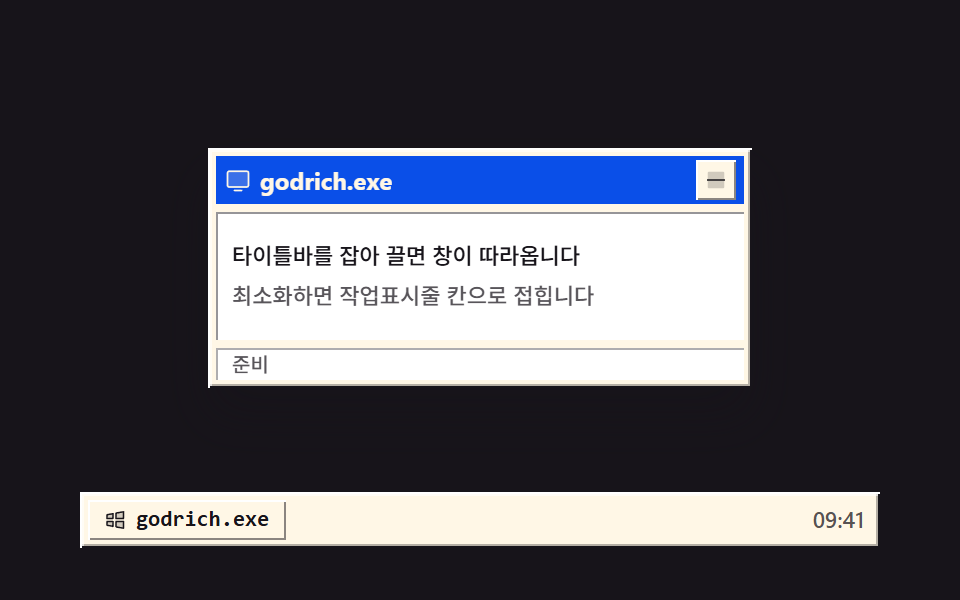 01 os-window-titlebar-minimize
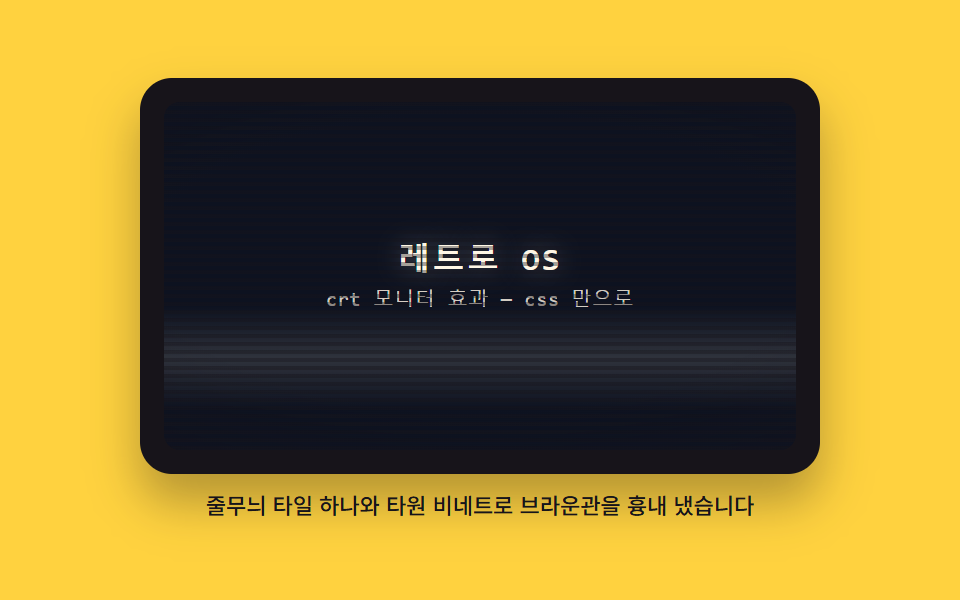 02 os-crt-scanline-curve
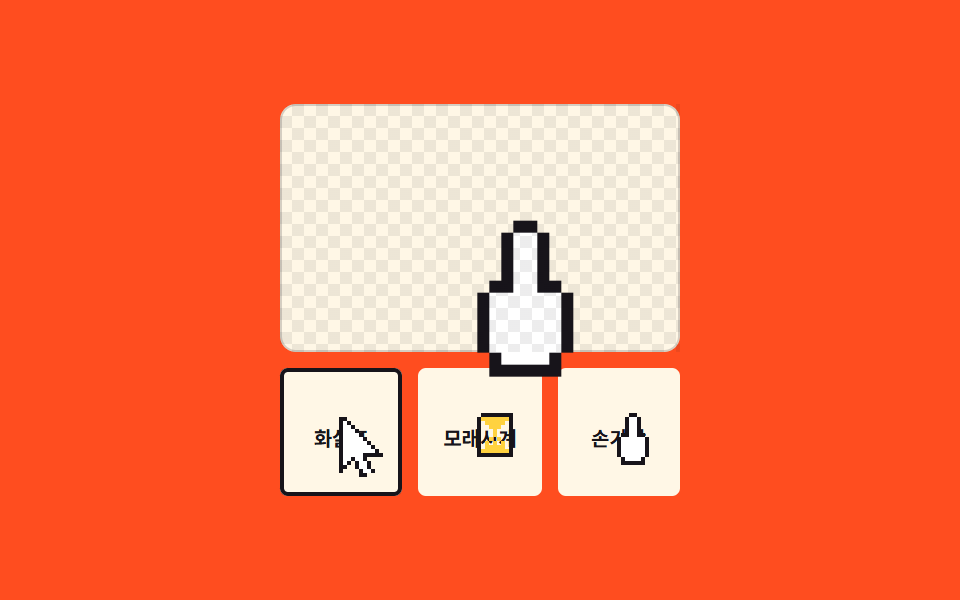 03 os-pixel-cursor-set
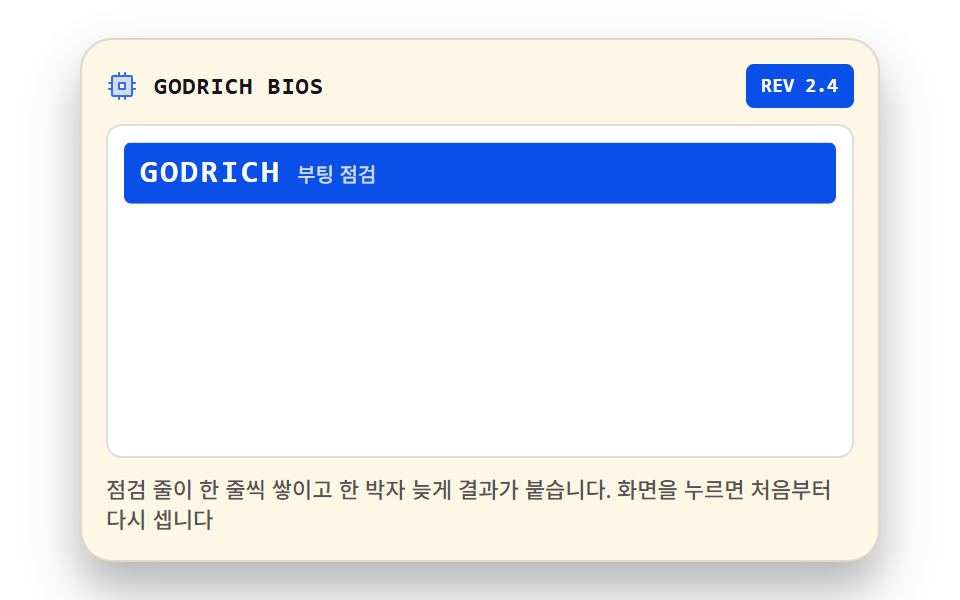 04 os-boot-sequence-lines
 05 os-desktop-icon-doubleclick
 06 os-start-menu-accordion
 07 os-taskbar-clock-tray
 08 os-install-progress-steps
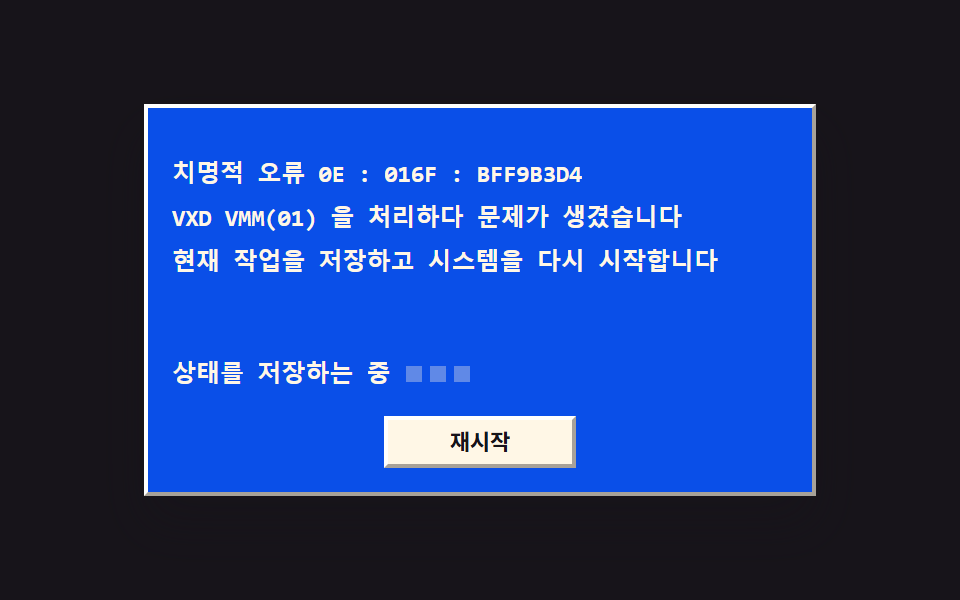 09 os-bluescreen-reboot
Auto-plays · click a tile to jump to its section · all nine in one zip
- 01 Draggable window, minimize
- 02 CRT scanlines and curved vignette
- 03 Three pixel cursors
- 04 Boot check line output
- 05 Double-click desktop icons
- 06 Start menu flyout
- 07 Taskbar clock and tray
- 08 Install progress and step text
- 09 Blue error screen and restart
The order follows a session rather than a popularity list. A window has to exist before anything can sit on it (01), the glass it sits behind sets the tone (02), and the pointer you move across it is the third thing your eye lands on (03). Then the machine starts talking: it counts its devices at boot (04), hands you a desktop you can double-click (05), opens the menu those programs live in (06), and parks a clock in the corner (07). The last two are the screens nobody designs and everybody remembers — a setup wizard that never seems to finish (08) and the blue panel that ends the session (09). None of the nine loads an image file or a web font; a windows 98 css theme is usually a framework you install, while these are nine folders you copy. Next door sit Terminal UI Design for the command line that came before this desktop and Y2K Web Design for the chrome and gradients that came after it.
01Draggable window, minimize
Grab the title bar and the window follows the pointer; the minimize button folds the panel into the taskbar slot and the slot spits it back out, a two-second preview that carries motion on 15 of 23 frames.
<main class="stage">
<div class="dt is-demo" id="dt">
  <div class="dt__area" id="area">
    <section class="win" id="win" aria-label="Sample window">
      <header class="win__bar" id="bar" tabindex="0" aria-label="Move window — drag it or use arrow keys">
        <span class="win__ico" aria-hidden="true"><svg xmlns="http://www.w3.org/2000/svg" width="1em" height="1em" viewBox="0 0 256 256"><g fill="currentColor"><path d="M224 64v112a16 16 0 0 1-16 16H48a16 16 0 0 1-16-16V64a16 16 0 0 1 16-16h160a16 16 0 0 1 16 16" opacity=".2"/><path d="M208 40H48a24 24 0 0 0-24 24v112a24 24 0 0 0 24 24h160a24 24 0 0 0 24-24V64a24 24 0 0 0-24-24m8 136a8 8 0 0 1-8 8H48a8 8 0 0 1-8-8V64a8 8 0 0 1 8-8h160a8 8 0 0 1 8 8Zm-48 48a8 8 0 0 1-8 8H96a8 8 0 0 1 0-16h64a8 8 0 0 1 8 8"/></g></svg></span>
        <span class="win__title">godrich.exe</span>
        <button class="win__min" id="minBtn" type="button" aria-label="Minimize"><svg xmlns="http://www.w3.org/2000/svg" width="1em" height="1em" viewBox="0 0 256 256"><g fill="currentColor"><path d="M216 56v144a16 16 0 0 1-16 16H56a16 16 0 0 1-16-16V56a16 16 0 0 1 16-16h144a16 16 0 0 1 16 16" opacity=".2"/><path d="M224 128a8 8 0 0 1-8 8H40a8 8 0 0 1 0-16h176a8 8 0 0 1 8 8"/></g></svg></button>
      </header>
      <div class="win__panel">
        <p class="win__line">Grab the title bar and the window follows</p>
        <p class="win__line win__line--dim">Minimize folds it into the taskbar slot</p>
      </div>
      <p class="win__status" aria-hidden="true">Ready</p>
    </section>
  </div>
  <nav class="dt__bar" aria-label="Taskbar">
    <button class="dt__slot" id="slot" type="button" aria-label="Restore window">
      <span class="dt__slotIco" aria-hidden="true"><svg xmlns="http://www.w3.org/2000/svg" width="1em" height="1em" viewBox="0 0 256 256"><g fill="currentColor"><path d="M128 144h80v72l-80-14.55Zm-96 40l64 11.64V144H32Zm96-129.45V112h80V40ZM32 112h64V60.36L32 72Z" opacity=".2"/><path d="M208 136h-80a8 8 0 0 0-8 8v57.45a8 8 0 0 0 6.57 7.88l80 14.54a7.6 7.6 0 0 0 1.43.13a8 8 0 0 0 8-8v-72a8 8 0 0 0-8-8m-8 70.41l-64-11.63V152h64ZM96 136H32a8 8 0 0 0-8 8v40a8 8 0 0 0 6.57 7.87l64 11.64a8.5 8.5 0 0 0 1.43.13a8 8 0 0 0 8-8V144a8 8 0 0 0-8-8m-8 50.05l-48-8.73V152h48ZM213.13 33.86a8 8 0 0 0-6.56-1.73l-80 14.55a8 8 0 0 0-6.57 7.87V112a8 8 0 0 0 8 8h80a8 8 0 0 0 8-8V40a8 8 0 0 0-2.87-6.14M200 104h-64V61.22l64-11.63Zm-98.87-49.78a8 8 0 0 0-6.56-1.73l-64 11.64A8 8 0 0 0 24 72v40a8 8 0 0 0 8 8h64a8 8 0 0 0 8-8V60.36a8 8 0 0 0-2.87-6.14M88 104H40V78.68L88 70Z"/></g></svg></span>
      <span class="dt__slotTitle">godrich.exe</span>
    </button>
    <span class="dt__clock" aria-hidden="true">09:41</span>
  </nav>
</div>
</main>@use "../../../../site/static/demo-tokens" as *;
// 끌어 옮기는 창과 최소화 — 타이틀바를 setPointerCapture 로 잡아 pointermove 마다 translate 로 옮기고,
// 최소화하면 창이 작업표시줄 칸 중심으로 scale .12 로 접혔다가 칸을 누르면 원래 자리로 돌아온다.
// 바깥 테두리는 밝은 면과 어두운 면을 두 겹 쌓은 box-shadow 로 튀어나온 느낌을 낸다.
// 격자 미리보기(.is-demo)는 오른쪽 아래로 끌었다가 칸으로 접히고 다시 펴지는 컷을 2초에 한 바퀴 돌린다.
$duration: $dur-base;
$easing: $ease-spring;
$color: $subject-blue-deep;
$mono: ui-monospace, SFMono-Regular, "SF Mono", Consolas, "Liberation Mono", monospace;
$bevel-l1: $stage-paper; // 바깥 밝은 면
$bevel-d1: $subject-ink; // 바깥 어두운 면
$bevel-l2: rgba($stage-paper, .6); // 안쪽 밝은 면
$bevel-d2: rgba($subject-ink, .32); // 안쪽 어두운 면
$bevel-raise: inset 1px 1px 0 0 $bevel-l1, inset -1px -1px 0 0 $bevel-d1, inset 2px 2px 0 0 $bevel-l2, inset -2px -2px 0 0 $bevel-d2;
$bevel-btn: inset 1px 1px 0 0 $bevel-l1, inset -1px -1px 0 0 rgba($subject-ink, .5);
$bevel-btn-press: inset 1px 1px 0 0 rgba($subject-ink, .5), inset -1px -1px 0 0 $bevel-l1;
$muted: rgba($subject-ink, .72);
@include stage($stage-ink);
// ── 바탕화면: 창이 다니는 영역(여기서 벗어나면 잘린다)과 작업표시줄
.dt {
display: flex; flex-direction: column; gap: $sp-1;
width: min(100%, 400px); height: 248px;
}
.dt__area {
position: relative; flex: 1 1 auto;
display: grid; place-items: center;
overflow: hidden; // 창이 영역 밖으로 나가면 화면 끝에서 잘린다 — 문서 넘침으로 새지 않는다
}
.dt__bar {
display: flex; align-items: center; gap: $sp-1;
box-sizing: border-box; height: 28px; padding: 0 $sp-1; flex: 0 0 auto;
background: $subject-cream;
box-shadow: $bevel-raise;
}
.dt__slot {
display: inline-flex; align-items: center; gap: $sp-1;
box-sizing: border-box; height: 20px; padding: 0 $sp-2; border: 0;
background: $subject-cream; color: $subject-ink;
font-family: $mono; font-weight: 700; font-size: 11px; line-height: 1.4;
white-space: nowrap; cursor: pointer;
box-shadow: $bevel-btn;
}
.dt__slot:active { box-shadow: $bevel-btn-press; }
// 창이 접혀 있을 때 칸 — 눌린 오목한 면과 파란 배경으로 켜진다
.dt__slot.is-min {
background: $color; color: $subject-cream;
box-shadow: $bevel-btn-press;
}
.dt__slotIco { display: grid; place-items: center; font-size: 12px; }
.dt__slotTitle { white-space: nowrap; }
.dt__clock { margin-left: auto; padding-right: $sp-1; color: $muted; font-weight: 500; font-size: 11px; line-height: 1.4; }
// ── 창 — translate 로만 움직인다(top/left 를 다시 계산하지 않는다)
.win {
position: relative; box-sizing: border-box;
width: min(100%, 272px); height: 120px; padding: $sp-1;
display: flex; flex-direction: column; gap: $sp-1;
background: $subject-cream;
box-shadow: $bevel-raise, $shadow-raised;
}
// 접기/펴기 트랜지션은 이 상태일 때만 — 드래그 중에는 translate 가 즉시 따라와야 한다
.win.is-flying { transition: translate $duration $easing, scale $duration $easing, opacity $duration $easing; }
.win.is-min { opacity: 0; scale: .12; pointer-events: none; }
.win__bar {
display: flex; align-items: center; gap: $sp-1;
height: 24px; padding: 0 $sp-1; flex: 0 0 auto;
background: $color; color: $subject-cream;
cursor: grab; user-select: none; touch-action: none;
}
.win__bar:active { cursor: grabbing; }
.win__bar:focus-visible { outline: 2px solid $stage-paper; outline-offset: -2px; }
.win__ico { display: grid; place-items: center; font-size: 14px; }
.win__title {
flex: 1 1 auto; font-weight: 700; font-size: 12px; line-height: 1.4;
white-space: nowrap; overflow: hidden;
}
.win__min {
display: grid; place-items: center; width: 20px; height: 20px;
box-sizing: border-box; padding: 0; border: 0; flex: 0 0 auto;
background: $subject-cream; color: $subject-ink;
font-size: 12px; line-height: 1; cursor: pointer;
box-shadow: $bevel-btn;
}
.win__min:active { box-shadow: $bevel-btn-press; }
.win__panel {
flex: 1 1 auto; display: flex; flex-direction: column; justify-content: center; gap: $sp-1;
padding: $sp-2; background: $stage-paper;
box-shadow: inset 1px 1px 0 0 rgba($subject-ink, .45), inset -1px -1px 0 0 $stage-paper;
}
.win__line { margin: 0; color: $subject-ink; font-weight: 500; font-size: 11px; line-height: 1.5; }
.win__line--dim { color: $muted; }
.win__status {
margin: 0; flex: 0 0 auto; height: 16px; padding: 0 $sp-2;
display: flex; align-items: center;
background: $stage-paper; color: $muted;
font-weight: 500; font-size: 10px; line-height: 1.4;
box-shadow: inset 1px 1px 0 0 rgba($subject-ink, .35), inset -1px -1px 0 0 $stage-paper;
}
// ── 격자 미리보기 루프 (2초)
// 8% 에 끌기 시작해 30% 까지 오른쪽 아래로 이동, 41% 부터 칸 쪽으로 접혀 51% 에 사라지고,
// 74% 에 다시 펴져 86% 에 제자리로 돌아온다(복귀는 90% 안에 끝난다). 칸 상태는 steps 컷으로 갈아 낀다.
.dt.is-demo .win {
animation-name: winFly;
animation-duration: $dur-loop;
animation-timing-function: $ease-out;
animation-iteration-count: infinite;
animation-fill-mode: backwards;
}
.dt.is-demo .dt__slot {
animation-name: dtSlotCut;
animation-duration: $dur-loop;
animation-timing-function: steps(1, end);
animation-iteration-count: infinite;
animation-fill-mode: backwards;
}
@keyframes winFly {
0%, 8% { translate: 0 0; scale: 1; opacity: 1; }
30%, 41% { translate: 24px 12px; scale: 1; opacity: 1; }
51%, 74% { translate: -104px 64px; scale: .12; opacity: 0; }
86%, 100% { translate: 0 0; scale: 1; opacity: 1; }
}
// 칸의 켜짐 교체 — 배경·글자색이지만 steps(1, end) 컷이라 중간값이 없다(두 번의 이산 전환)
@keyframes dtSlotCut {
0%, 50% {
background: $subject-cream; color: $subject-ink; box-shadow: $bevel-btn;
}
51%, 85% {
background: $color; color: $subject-cream; box-shadow: $bevel-btn-press;
}
86%, 100% {
background: $subject-cream; color: $subject-ink; box-shadow: $bevel-btn;
}
}
// ── 좁은 화면: 창과 표시줄을 줄여 무대 안에 들어온다
@media (max-width: 340px) {
.dt { height: 174px; }
.win { height: 104px; }
.win__bar { height: 20px; }
.win__line { font-size: 10px; }
.win__status { font-size: 9px; }
.dt__slot { height: 18px; font-size: 10px; }
.dt__clock { font-size: 10px; }
}
@media (prefers-reduced-motion: reduce) {
.dt.is-demo .win, .dt.is-demo .dt__slot { animation: none !important; }
.win.is-flying { transition: none !important; }
}html, body {
margin: 0;
overflow: hidden;
}
.stage {
box-sizing: border-box;
min-height: 100vh;
display: grid;
place-items: center;
margin: 0;
background: #17141a;
font-family: -apple-system, "Segoe UI", "Noto Sans KR", sans-serif;
padding: clamp(8px, 4vw, 24px);
}
.dt {
display: flex;
flex-direction: column;
gap: 4px;
width: min(100%, 400px);
height: 248px;
}
.dt__area {
position: relative;
flex: 1 1 auto;
display: grid;
place-items: center;
overflow: hidden;
}
.dt__bar {
display: flex;
align-items: center;
gap: 4px;
box-sizing: border-box;
height: 28px;
padding: 0 4px;
flex: 0 0 auto;
background: #fff7e6;
box-shadow: inset 1px 1px 0 0 #ffffff, inset -1px -1px 0 0 #17141a, inset 2px 2px 0 0 rgba(255, 255, 255, 0.6), inset -2px -2px 0 0 rgba(23, 20, 26, 0.32);
}
.dt__slot {
display: inline-flex;
align-items: center;
gap: 4px;
box-sizing: border-box;
height: 20px;
padding: 0 8px;
border: 0;
background: #fff7e6;
color: #17141a;
font-family: ui-monospace, SFMono-Regular, "SF Mono", Consolas, "Liberation Mono", monospace;
font-weight: 700;
font-size: 11px;
line-height: 1.4;
white-space: nowrap;
cursor: pointer;
box-shadow: inset 1px 1px 0 0 #ffffff, inset -1px -1px 0 0 rgba(23, 20, 26, 0.5);
}
.dt__slot:active {
box-shadow: inset 1px 1px 0 0 rgba(23, 20, 26, 0.5), inset -1px -1px 0 0 #ffffff;
}
.dt__slot.is-min {
background: #0a4fe8;
color: #fff7e6;
box-shadow: inset 1px 1px 0 0 rgba(23, 20, 26, 0.5), inset -1px -1px 0 0 #ffffff;
}
.dt__slotIco {
display: grid;
place-items: center;
font-size: 12px;
}
.dt__slotTitle {
white-space: nowrap;
}
.dt__clock {
margin-left: auto;
padding-right: 4px;
color: rgba(23, 20, 26, 0.72);
font-weight: 500;
font-size: 11px;
line-height: 1.4;
}
.win {
position: relative;
box-sizing: border-box;
width: min(100%, 272px);
height: 120px;
padding: 4px;
display: flex;
flex-direction: column;
gap: 4px;
background: #fff7e6;
box-shadow: inset 1px 1px 0 0 #ffffff, inset -1px -1px 0 0 #17141a, inset 2px 2px 0 0 rgba(255, 255, 255, 0.6), inset -2px -2px 0 0 rgba(23, 20, 26, 0.32), 0 14px 24px rgba(23, 20, 26, 0.32);
}
.win.is-flying {
transition: translate 300ms cubic-bezier(0.2, 0.8, 0.2, 1), scale 300ms cubic-bezier(0.2, 0.8, 0.2, 1), opacity 300ms cubic-bezier(0.2, 0.8, 0.2, 1);
}
.win.is-min {
opacity: 0;
scale: 0.12;
pointer-events: none;
}
.win__bar {
display: flex;
align-items: center;
gap: 4px;
height: 24px;
padding: 0 4px;
flex: 0 0 auto;
background: #0a4fe8;
color: #fff7e6;
cursor: grab;
user-select: none;
touch-action: none;
}
.win__bar:active {
cursor: grabbing;
}
.win__bar:focus-visible {
outline: 2px solid #ffffff;
outline-offset: -2px;
}
.win__ico {
display: grid;
place-items: center;
font-size: 14px;
}
.win__title {
flex: 1 1 auto;
font-weight: 700;
font-size: 12px;
line-height: 1.4;
white-space: nowrap;
overflow: hidden;
}
.win__min {
display: grid;
place-items: center;
width: 20px;
height: 20px;
box-sizing: border-box;
padding: 0;
border: 0;
flex: 0 0 auto;
background: #fff7e6;
color: #17141a;
font-size: 12px;
line-height: 1;
cursor: pointer;
box-shadow: inset 1px 1px 0 0 #ffffff, inset -1px -1px 0 0 rgba(23, 20, 26, 0.5);
}
.win__min:active {
box-shadow: inset 1px 1px 0 0 rgba(23, 20, 26, 0.5), inset -1px -1px 0 0 #ffffff;
}
.win__panel {
flex: 1 1 auto;
display: flex;
flex-direction: column;
justify-content: center;
gap: 4px;
padding: 8px;
background: #ffffff;
box-shadow: inset 1px 1px 0 0 rgba(23, 20, 26, 0.45), inset -1px -1px 0 0 #ffffff;
}
.win__line {
margin: 0;
color: #17141a;
font-weight: 500;
font-size: 11px;
line-height: 1.5;
}
.win__line--dim {
color: rgba(23, 20, 26, 0.72);
}
.win__status {
margin: 0;
flex: 0 0 auto;
height: 16px;
padding: 0 8px;
display: flex;
align-items: center;
background: #ffffff;
color: rgba(23, 20, 26, 0.72);
font-weight: 500;
font-size: 10px;
line-height: 1.4;
box-shadow: inset 1px 1px 0 0 rgba(23, 20, 26, 0.35), inset -1px -1px 0 0 #ffffff;
}
.dt.is-demo .win {
animation-name: winFly;
animation-duration: 2s;
animation-timing-function: ease-out;
animation-iteration-count: infinite;
animation-fill-mode: backwards;
}
.dt.is-demo .dt__slot {
animation-name: dtSlotCut;
animation-duration: 2s;
animation-timing-function: steps(1, end);
animation-iteration-count: infinite;
animation-fill-mode: backwards;
}
@keyframes winFly {
0%, 8% {
translate: 0 0;
scale: 1;
opacity: 1;
}
30%, 41% {
translate: 24px 12px;
scale: 1;
opacity: 1;
}
51%, 74% {
translate: -104px 64px;
scale: 0.12;
opacity: 0;
}
86%, 100% {
translate: 0 0;
scale: 1;
opacity: 1;
}
}
@keyframes dtSlotCut {
0%, 50% {
background: #fff7e6;
color: #17141a;
box-shadow: inset 1px 1px 0 0 #ffffff, inset -1px -1px 0 0 rgba(23, 20, 26, 0.5);
}
51%, 85% {
background: #0a4fe8;
color: #fff7e6;
box-shadow: inset 1px 1px 0 0 rgba(23, 20, 26, 0.5), inset -1px -1px 0 0 #ffffff;
}
86%, 100% {
background: #fff7e6;
color: #17141a;
box-shadow: inset 1px 1px 0 0 #ffffff, inset -1px -1px 0 0 rgba(23, 20, 26, 0.5);
}
}
@media (max-width: 340px) {
.dt {
height: 174px;
}
.win {
height: 104px;
}
.win__bar {
height: 20px;
}
.win__line {
font-size: 10px;
}
.win__status {
font-size: 9px;
}
.dt__slot {
height: 18px;
font-size: 10px;
}
.dt__clock {
font-size: 10px;
}
}
@media (prefers-reduced-motion: reduce) {
.dt.is-demo .win, .dt.is-demo .dt__slot {
animation: none !important;
}
.win.is-flying {
transition: none !important;
}
}var dt = document.getElementById('dt');
var area = document.getElementById('area');
var win = document.getElementById('win');
var bar = document.getElementById('bar');
var minBtn = document.getElementById('minBtn');
var slot = document.getElementById('slot');
var px = 0, py = 0, savedX = 0, savedY = 0, min = false;
function place() { win.style.translate = px + 'px ' + py + 'px'; }
function clampNum(v, lo, hi) { return Math.max(lo, Math.min(hi, v)); }
function dragBounds() {
return {
x: Math.max(0, (area.clientWidth - win.offsetWidth) / 2),
y: Math.max(0, (area.clientHeight - win.offsetHeight) / 2)
};
}
// 접기/펴기 — 접힐 때 칸 중심으로 translate 를 옮기고 scale 을 줄인다. 원래 자리는 saved 에 둔다
function setMin(on) {
min = on;
win.classList.toggle('is-min', on);
slot.classList.toggle('is-min', on);
win.classList.add('is-flying');
if (on) {
savedX = px; savedY = py;
var wr = win.getBoundingClientRect(), sr = slot.getBoundingClientRect();
px += (sr.left + sr.width / 2) - (wr.left + wr.width / 2);
py += (sr.top + sr.height / 2) - (wr.top + wr.height / 2);
} else {
px = savedX; py = savedY;
}
place();
window.setTimeout(function () { win.classList.remove('is-flying'); }, 320);
}
dt.addEventListener('pointerdown', function () { dt.classList.remove('is-demo'); });
bar.addEventListener('pointerdown', function (e) {
if (min || e.target.closest('.win__min')) return;
e.preventDefault();
bar.setPointerCapture(e.pointerId);
var ox = px - e.clientX, oy = py - e.clientY;
function mv(ev) {
var b = dragBounds();
px = clampNum(ev.clientX + ox, -b.x, b.x);
py = clampNum(ev.clientY + oy, -b.y, b.y);
place();
}
bar.addEventListener('pointermove', mv);
bar.addEventListener('pointerup', function () { bar.removeEventListener('pointermove', mv); }, { once: true });
bar.addEventListener('pointercancel', function () { bar.removeEventListener('pointermove', mv); }, { once: true });
});
bar.addEventListener('keydown', function (e) {
if (e.key === 'Escape') { dt.classList.remove('is-demo'); setMin(true); return; }
if (min || e.key.indexOf('Arrow') !== 0) return;
e.preventDefault();
dt.classList.remove('is-demo');
var b = dragBounds(), d = e.shiftKey ? 16 : 4;
if (e.key === 'ArrowLeft') px = clampNum(px - d, -b.x, b.x);
if (e.key === 'ArrowRight') px = clampNum(px + d, -b.x, b.x);
if (e.key === 'ArrowUp') py = clampNum(py - d, -b.y, b.y);
if (e.key === 'ArrowDown') py = clampNum(py + d, -b.y, b.y);
place();
});
minBtn.addEventListener('click', function () { dt.classList.remove('is-demo'); setMin(true); });
slot.addEventListener('click', function () { dt.classList.remove('is-demo'); setMin(false); });// RetroWindow — vanilla 판(run/023/demo/01-os-window-titlebar-minimize/index.html) 의 React 포트.
// 타이틀바를 setPointerCapture 로 잡아 pointermove 마다 translate 로 옮기고, 최소화하면 창이
// 작업표시줄 칸 중심으로 scale .12 로 접혔다가 칸을 누르면 원래 자리로 돌아온다.
// 이동량은 ref 하나가 들고 있고 상태는 미리보기·접힘 두 개뿐이다(드래그마다 재렌더하지 않는다).
import { useRef, useState } from "react";
import type { CSSProperties } from "react";
import styles from "./RetroWindow.module.scss";
export type RetroWindowProps = {
duration?: number;
easing?: string;
color?: string;
};
type Vars = CSSProperties & { "--duration"?: string; "--easing"?: string; "--color"?: string };
// ambient 타입에 React 이벤트 제네릭이 없다 — 쓰는 것만 로컬 타입으로 선언한다
type PtrEvt = {
pointerId: number;
clientX: number;
clientY: number;
target: { closest(sel: string): Element | null };
preventDefault(): void;
};
type KeyEvt = { key: string; shiftKey?: boolean; preventDefault(): void };
// 초기값을 준 useRef 는 실제로 null 이 되지 않는다 — 값 상자(Box)로 좁혀 쓴다
type XY = { x: number; y: number };
type Box<T> = { current: T };
const TITLE = "godrich.exe";
const STATUS = "준비";
const CLOCK = "09:41";
const LINE1 = "타이틀바를 잡아 끌면 창이 따라옵니다";
const LINE2 = "최소화하면 작업표시줄 칸으로 접힙니다";
const ARIA_WIN = "예제 창";
const ARIA_BAR = "창 이동 — 잡아 끌거나 방향키로 옮기세요";
const ARIA_MIN = "최소화";
const ARIA_SLOT = "창 다시 펼치기";
const ARIA_TASKBAR = "작업표시줄";
const ICON_WIN = (
<svg xmlns="http://www.w3.org/2000/svg" width="1em" height="1em" viewBox="0 0 256 256"><g fill="currentColor"><path d="M224 64v112a16 16 0 0 1-16 16H48a16 16 0 0 1-16-16V64a16 16 0 0 1 16-16h160a16 16 0 0 1 16 16" opacity=".2"/><path d="M208 40H48a24 24 0 0 0-24 24v112a24 24 0 0 0 24 24h160a24 24 0 0 0 24-24V64a24 24 0 0 0-24-24m8 136a8 8 0 0 1-8 8H48a8 8 0 0 1-8-8V64a8 8 0 0 1 8-8h160a8 8 0 0 1 8 8Zm-48 48a8 8 0 0 1-8 8H96a8 8 0 0 1 0-16h64a8 8 0 0 1 8 8"/></g></svg>
);
const ICON_MIN = (
<svg xmlns="http://www.w3.org/2000/svg" width="1em" height="1em" viewBox="0 0 256 256"><g fill="currentColor"><path d="M216 56v144a16 16 0 0 1-16 16H56a16 16 0 0 1-16-16V56a16 16 0 0 1 16-16h144a16 16 0 0 1 16 16" opacity=".2"/><path d="M224 128a8 8 0 0 1-8 8H40a8 8 0 0 1 0-16h176a8 8 0 0 1 8 8"/></g></svg>
);
const ICON_LOGO = (
<svg xmlns="http://www.w3.org/2000/svg" width="1em" height="1em" viewBox="0 0 256 256"><g fill="currentColor"><path d="M128 144h80v72l-80-14.55Zm-96 40l64 11.64V144H32Zm96-129.45V112h80V40ZM32 112h64V60.36L32 72Z" opacity=".2"/><path d="M208 136h-80a8 8 0 0 0-8 8v57.45a8 8 0 0 0 6.57 7.88l80 14.54a7.6 7.6 0 0 0 1.43.13a8 8 0 0 0 8-8v-72a8 8 0 0 0-8-8m-8 70.41l-64-11.63V152h64ZM96 136H32a8 8 0 0 0-8 8v40a8 8 0 0 0 6.57 7.87l64 11.64a8.5 8.5 0 0 0 1.43.13a8 8 0 0 0 8-8V144a8 8 0 0 0-8-8m-8 50.05l-48-8.73V152h48ZM213.13 33.86a8 8 0 0 0-6.56-1.73l-80 14.55a8 8 0 0 0-6.57 7.87V112a8 8 0 0 0 8 8h80a8 8 0 0 0 8-8V40a8 8 0 0 0-2.87-6.14M200 104h-64V61.22l64-11.63Zm-98.87-49.78a8 8 0 0 0-6.56-1.73l-64 11.64A8 8 0 0 0 24 72v40a8 8 0 0 0 8 8h64a8 8 0 0 0 8-8V60.36a8 8 0 0 0-2.87-6.14M88 104H40V78.68L88 70Z"/></g></svg>
);
function clampNum(v: number, lo: number, hi: number) {
return Math.max(lo, Math.min(hi, v));
}
export default function RetroWindow(props: RetroWindowProps) {
const duration = props.duration ?? 300;
const easing = props.easing ?? "cubic-bezier(.2, .8, .2, 1)";
const color = props.color ?? "#0a4fe8";
const vars: Vars = { "--duration": duration + "ms", "--easing": easing, "--color": color };
const [preview, setPreview] = useState<boolean>(true);
const [min, setMin] = useState<boolean>(false);
const [flying, setFlying] = useState<boolean>(false);
const pos = useRef<XY>({ x: 0, y: 0 }) as Box<XY>;
const saved = useRef<XY>({ x: 0, y: 0 }) as Box<XY>;
const areaRef = useRef<HTMLDivElement>(null);
const winRef = useRef<HTMLElement>(null);
const barRef = useRef<HTMLElement>(null);
const slotRef = useRef<HTMLButtonElement>(null);
const flyTimer = useRef<number | null>(null);
const place = () => {
const win = winRef.current;
if (win) win.style.translate = pos.current.x + "px " + pos.current.y + "px";
};
const dragBounds = () => {
const area = areaRef.current;
const win = winRef.current;
if (!area || !win) return { x: 0, y: 0 };
return {
x: Math.max(0, (area.clientWidth - win.offsetWidth) / 2),
y: Math.max(0, (area.clientHeight - win.offsetHeight) / 2)
};
};
// 접기/펴기 — 접힐 때 칸 중심으로 translate 를 옮기고 scale 을 줄인다. 원래 자리는 saved 에 둔다
const setMinState = (on: boolean) => {
const win = winRef.current;
const slot = slotRef.current;
setMin(on);
setFlying(true);
if (on) {
saved.current = { ...pos.current };
if (win && slot) {
const wr = win.getBoundingClientRect();
const sr = slot.getBoundingClientRect();
pos.current.x += sr.left + sr.width / 2 - (wr.left + wr.width / 2);
pos.current.y += sr.top + sr.height / 2 - (wr.top + wr.height / 2);
}
} else {
pos.current = { ...saved.current };
}
place();
if (flyTimer.current !== null) window.clearTimeout(flyTimer.current);
flyTimer.current = window.setTimeout(() => setFlying(false), duration + 20);
};
const onBarDown = (e: PtrEvt) => {
setPreview(false);
if (min || e.target.closest("." + (styles.winMin || "winMin"))) return;
e.preventDefault();
const bar = barRef.current;
if (!bar) return;
bar.setPointerCapture(e.pointerId);
const ox = pos.current.x - e.clientX;
const oy = pos.current.y - e.clientY;
// 여기서부터는 React 합성 이벤트가 아니라 DOM 이 직접 주는 PointerEvent 다
const mv = (ev: PointerEvent) => {
const b = dragBounds();
pos.current.x = clampNum(ev.clientX + ox, -b.x, b.x);
pos.current.y = clampNum(ev.clientY + oy, -b.y, b.y);
place();
};
bar.addEventListener("pointermove", mv);
bar.addEventListener(
"pointerup",
() => bar.removeEventListener("pointermove", mv),
{ once: true } as AddEventListenerOptions
);
bar.addEventListener(
"pointercancel",
() => bar.removeEventListener("pointermove", mv),
{ once: true } as AddEventListenerOptions
);
};
const onBarKey = (e: KeyEvt) => {
if (e.key === "Escape") {
setPreview(false);
setMinState(true);
return;
}
if (min || e.key.indexOf("Arrow") !== 0) return;
e.preventDefault();
setPreview(false);
const b = dragBounds();
const d = e.shiftKey ? 16 : 4;
if (e.key === "ArrowLeft") pos.current.x = clampNum(pos.current.x - d, -b.x, b.x);
if (e.key === "ArrowRight") pos.current.x = clampNum(pos.current.x + d, -b.x, b.x);
if (e.key === "ArrowUp") pos.current.y = clampNum(pos.current.y - d, -b.y, b.y);
if (e.key === "ArrowDown") pos.current.y = clampNum(pos.current.y + d, -b.y, b.y);
place();
};
return (
<main className={styles.stage}>
<div
className={styles.dt + (preview ? " " + styles.isDemo : "")}
style={vars}
onPointerDown={() => setPreview(false)}
>
<div className={styles.area} ref={areaRef}>
<section
className={
styles.win + (min ? " " + styles.isMin : "") + (flying ? " " + styles.isFlying : "")
}
ref={winRef}
aria-label={ARIA_WIN}
>
<header
className={styles.bar}
ref={barRef}
tabIndex={0}
aria-label={ARIA_BAR}
onPointerDown={onBarDown}
onKeyDown={onBarKey}
>
<span className={styles.ico} aria-hidden="true">{ICON_WIN}</span>
<span className={styles.title}>{TITLE}</span>
<button
className={styles.winMin}
type="button"
aria-label={ARIA_MIN}
onClick={() => {
setPreview(false);
setMinState(true);
}}
>
{ICON_MIN}
</button>
</header>
<div className={styles.panel}>
<p className={styles.line}>{LINE1}</p>
<p className={styles.lineDim}>{LINE2}</p>
</div>
<p className={styles.status} aria-hidden="true">{STATUS}</p>
</section>
</div>
<nav className={styles.taskbar} aria-label={ARIA_TASKBAR}>
<button
className={styles.slot + (min ? " " + styles.slotOn : "")}
ref={slotRef}
type="button"
aria-label={ARIA_SLOT}
onClick={() => {
setPreview(false);
setMinState(false);
}}
>
<span className={styles.slotIco} aria-hidden="true">{ICON_LOGO}</span>
<span className={styles.slotTitle}>{TITLE}</span>
</button>
<span className={styles.clock} aria-hidden="true">{CLOCK}</span>
</nav>
</div>
</main>
);
}01 · Draggable window, minimize — Measured area 28.026% · moving frames 15/23Original by GODRICH · SCSS and React ship in the zip · See the password
Pointer capture on the title bar
// The title bar keeps the pointer even when it leaves the element — the offset is stored once at pointerdown
bar.addEventListener('pointerdown', function (e) {
  if (min || e.target.closest('.win__min')) return;
  e.preventDefault();
  bar.setPointerCapture(e.pointerId);
  var ox = px - e.clientX, oy = py - e.clientY;
  function mv(ev) {
    var b = dragBounds();
    px = clampNum(ev.clientX + ox, -b.x, b.x);
    py = clampNum(ev.clientY + oy, -b.y, b.y);
    place();
  }
  bar.addEventListener('pointermove', mv);
  bar.addEventListener('pointerup', function () { bar.removeEventListener('pointermove', mv); }, { once: true });
  bar.addEventListener('pointercancel', function () { bar.removeEventListener('pointermove', mv); }, { once: true });
});
The handler writes only translate and never touches top or left, while dragBounds clamps both axes to half the free space so the panel cannot walk out of the desktop area.
Two bevels stacked in one shadow
$bevel-l1: $stage-paper;               // outer light face
$bevel-d1: $subject-ink;               // outer dark face
$bevel-l2: rgba($stage-paper, .6);     // inner light face
$bevel-d2: rgba($subject-ink, .32);    // inner dark face
$bevel-raise: inset 1px 1px 0 0 $bevel-l1, inset -1px -1px 0 0 $bevel-d1, inset 2px 2px 0 0 $bevel-l2, inset -2px -2px 0 0 $bevel-d2;
$bevel-btn: inset 1px 1px 0 0 $bevel-l1, inset -1px -1px 0 0 rgba($subject-ink, .5);
$bevel-btn-press: inset 1px 1px 0 0 rgba($subject-ink, .5), inset -1px -1px 0 0 $bevel-l1;
Four inset shadows in one variable build the raised frame with light on the top-left and dark on the bottom-right, and the pressed variant is the same list with those two colors traded, so a button reads as pushed in without moving a pixel.
02CRT scanlines and curved vignette
One tile of horizontal stripes repeats over the whole screen while an elliptical shadow darkens the edges, and a single bright band drifting downward is the only thing that actually animates.
<main class="stage">
<figure class="crt">
  <div class="crt__bezel">
    <div class="crt__screen">
      <div class="crt__content">
        <p class="crt__title">Retro OS</p>
        <p class="crt__sub">CRT monitor effect — CSS only</p>
      </div>
      <span class="crt__band" aria-hidden="true"></span>
      <span class="crt__lines" aria-hidden="true"></span>
      <span class="crt__vig" aria-hidden="true"></span>
    </div>
  </div>
  <figcaption class="crt__cap">One stripe tile and an elliptical vignette fake a CRT tube</figcaption>
</figure>
</main>
@use "../../../../site/static/demo-tokens" as *;
// CRT 스캔라인과 곡면 비네트 — 가로 줄무늬를 타일 하나(4px, 그 안 줄 위치 0 부터 2px)로 정의해
// background-size 로 반복시키고, radial-gradient 타원으로 가장자리로 갈수록 어두워지는 유리를 얹는다.
// 밝은 띠 하나가 translateY 로 위에서 아래로 흐른다. 화면 안쪽 바탕은 비토큰 배경 픽셀(짙은 남색)이다.
$duration: $dur-loop;
$easing: $ease-out;
$color: $subject-cream;
$mono: ui-monospace, SFMono-Regular, "SF Mono", Consolas, "Liberation Mono", monospace;
$glass: #0d1220; // 비토큰 배경 픽셀 — 브라운관 형광면의 짙은 남색 바탕(주변 토큰으로는 없는 색)
@include stage($stage-yellow);
.crt {
display: flex; flex-direction: column; gap: $sp-2;
width: min(100%, 340px); margin: 0;
}
// ── 모니터 껍데기
.crt__bezel {
box-sizing: border-box; padding: $sp-3;
background: $subject-ink; border-radius: $r-card;
box-shadow: $shadow-raised;
}
// ── 유리면 — 안의 도형은 전부 이 상자에 absolute 로 겹친다. 밖으로 나가면 잘린다
.crt__screen {
position: relative; overflow: hidden;
display: grid; place-items: center;
height: clamp(112px, 58vh, 196px);
background: $glass;
border-radius: $r-sm;
}
.crt__content {
position: relative; z-index: 1;
display: grid; gap: $sp-1; justify-items: center;
padding: $sp-2; text-align: center;
}
.crt__title {
margin: 0; color: $color;
font-family: $mono; font-weight: 700;
font-size: clamp(16px, 4.2vh, 22px); line-height: 1.2;
letter-spacing: .08em;
text-shadow: 0 0 12px rgba($subject-cream, .35); // 형광체 빛 번짐
}
.crt__sub {
margin: 0; color: rgba($subject-cream, .82);
font-family: $mono; font-weight: 500;
font-size: clamp(10px, 2.6vh, 12px); line-height: 1.4;
letter-spacing: .04em;
}
// ── 위에서 아래로 흐르는 밝은 띠 — transform 만 움직인다
.crt__band {
position: absolute; left: 0; right: 0; top: 0; z-index: 2;
height: 30%; pointer-events: none;
background: linear-gradient(to bottom,
transparent,
rgba($subject-cream, .08) 28%,
rgba($subject-cream, .14) 50%,
rgba($subject-cream, .08) 72%,
transparent);
animation-name: crtBand;
animation-duration: $duration;
animation-timing-function: linear;
animation-iteration-count: infinite;
}
// ── 스캔라인 — 타일(4px)을 background-size 로 정의하고 그 안에 줄 위치를 둔다
.crt__lines {
position: absolute; inset: 0; z-index: 3; pointer-events: none;
background-image: repeating-linear-gradient(to bottom,
rgba($subject-ink, .38) 0 2px,
transparent 2px 4px);
background-size: 100% 4px;
}
// ── 곡면 비네트 — 타원으로 가장자리가 감아 들어가는 유리
.crt__vig {
position: absolute; inset: 0; z-index: 4; pointer-events: none;
border-radius: inherit;
background: radial-gradient(ellipse 130% 105% at 50% 46%,
transparent 40%,
rgba($subject-ink, .18) 64%,
rgba($subject-ink, .55) 100%);
}
.crt__cap {
margin: 0; color: $subject-ink;
font-weight: 500; font-size: 11px; line-height: 1.4;
text-align: center;
}
// 띠는 화면 높이의 넉 배 남짓을 지나가므로 시작과 끝이 모두 화면 밖 — 루프 이음새가 보이지 않는다
@keyframes crtBand {
0% { transform: translateY(-110%); }
100% { transform: translateY(500%); }
}
// ── 좁은 화면: 껍데기와 캡션을 줄인다(화면 높이는 vh 기준이라 함께 줄어든다)
@media (max-width: 340px) {
.crt { gap: $sp-1; }
.crt__bezel { padding: $sp-2; }
.crt__cap { font-size: 10px; }
}
@media (prefers-reduced-motion: reduce) {
.crt__band { animation: none !important; }
}html, body {
margin: 0;
overflow: hidden;
}
.stage {
box-sizing: border-box;
min-height: 100vh;
display: grid;
place-items: center;
margin: 0;
background: #ffd23f;
font-family: -apple-system, "Segoe UI", "Noto Sans KR", sans-serif;
padding: clamp(8px, 4vw, 24px);
}
.crt {
display: flex;
flex-direction: column;
gap: 8px;
width: min(100%, 340px);
margin: 0;
}
.crt__bezel {
box-sizing: border-box;
padding: 12px;
background: #17141a;
border-radius: 16px;
box-shadow: 0 14px 24px rgba(23, 20, 26, 0.32);
}
.crt__screen {
position: relative;
overflow: hidden;
display: grid;
place-items: center;
height: clamp(112px, 58vh, 196px);
background: #0d1220;
border-radius: 8px;
}
.crt__content {
position: relative;
z-index: 1;
display: grid;
gap: 4px;
justify-items: center;
padding: 8px;
text-align: center;
}
.crt__title {
margin: 0;
color: #fff7e6;
font-family: ui-monospace, SFMono-Regular, "SF Mono", Consolas, "Liberation Mono", monospace;
font-weight: 700;
font-size: clamp(16px, 4.2vh, 22px);
line-height: 1.2;
letter-spacing: 0.08em;
text-shadow: 0 0 12px rgba(255, 247, 230, 0.35);
}
.crt__sub {
margin: 0;
color: rgba(255, 247, 230, 0.82);
font-family: ui-monospace, SFMono-Regular, "SF Mono", Consolas, "Liberation Mono", monospace;
font-weight: 500;
font-size: clamp(10px, 2.6vh, 12px);
line-height: 1.4;
letter-spacing: 0.04em;
}
.crt__band {
position: absolute;
left: 0;
right: 0;
top: 0;
z-index: 2;
height: 30%;
pointer-events: none;
background: linear-gradient(to bottom, transparent, rgba(255, 247, 230, 0.08) 28%, rgba(255, 247, 230, 0.14) 50%, rgba(255, 247, 230, 0.08) 72%, transparent);
animation-name: crtBand;
animation-duration: 2s;
animation-timing-function: linear;
animation-iteration-count: infinite;
}
.crt__lines {
position: absolute;
inset: 0;
z-index: 3;
pointer-events: none;
background-image: repeating-linear-gradient(to bottom, rgba(23, 20, 26, 0.38) 0 2px, transparent 2px 4px);
background-size: 100% 4px;
}
.crt__vig {
position: absolute;
inset: 0;
z-index: 4;
pointer-events: none;
border-radius: inherit;
background: radial-gradient(ellipse 130% 105% at 50% 46%, transparent 40%, rgba(23, 20, 26, 0.18) 64%, rgba(23, 20, 26, 0.55) 100%);
}
.crt__cap {
margin: 0;
color: #17141a;
font-weight: 500;
font-size: 11px;
line-height: 1.4;
text-align: center;
}
@keyframes crtBand {
0% {
transform: translateY(-110%);
}
100% {
transform: translateY(500%);
}
}
@media (max-width: 340px) {
.crt {
gap: 4px;
}
.crt__bezel {
padding: 8px;
}
.crt__cap {
font-size: 10px;
}
}
@media (prefers-reduced-motion: reduce) {
.crt__band {
animation: none !important;
}
}// CrtScreen — vanilla 판(run/023/demo/02-os-crt-scanline-curve/index.html) 의 React 포트.
// 가로 줄무늬를 타일 하나(4px)로 정의해 background-size 로 반복하고 radial-gradient 타원 비네트를
// 얹는다. 밝은 띠가 translateY 로 위에서 아래로 흐른다. 조작 상태가 없어 그림만 그린다.
import type { CSSProperties } from "react";
import styles from "./CrtScreen.module.scss";
export type CrtScreenProps = {
duration?: number;
easing?: string;
color?: string;
title?: string;
subtitle?: string;
caption?: string;
};
type Vars = CSSProperties & { "--duration"?: string; "--easing"?: string; "--color"?: string };
export default function CrtScreen(props: CrtScreenProps) {
const vars: Vars = {
"--duration": (props.duration ?? 2000) + "ms",
"--easing": props.easing ?? "ease-out",
"--color": props.color ?? "#fff7e6"
};
return (
<main className={styles.stage}>
<figure className={styles.crt} style={vars}>
<div className={styles.bezel}>
<div className={styles.screen}>
<div className={styles.content}>
<p className={styles.title}>{props.title ?? "레트로 OS"}</p>
<p className={styles.sub}>{props.subtitle ?? "crt 모니터 효과 — css 만으로"}</p>
</div>
<span className={styles.band} aria-hidden="true" />
<span className={styles.lines} aria-hidden="true" />
<span className={styles.vig} aria-hidden="true" />
</div>
</div>
<figcaption className={styles.cap}>
{props.caption ?? "줄무늬 타일 하나와 타원 비네트로 브라운관을 흉내 냈습니다"}
</figcaption>
</figure>
</main>
);
}02 · CRT scanlines and curved vignette — Measured area 37.75% · moving frames 16/23Original by GODRICH · SCSS and React ship in the zip · See the password
One tile, repeated by background-size
// Scanlines — the tile (4px) is defined by background-size and the stripe sits inside it
.crt__lines {
  position: absolute; inset: 0; z-index: 3; pointer-events: none;
  background-image: repeating-linear-gradient(to bottom,
    rgba($subject-ink, .38) 0 2px,
    transparent 2px 4px);
  background-size: 100% 4px;
}
The stripe is 2px of ink and 2px of nothing inside a 4px tile, and because the pattern is a background rather than a stack of elements, one animation is enough to reach 37.75% cumulative moved area over the loop.
The curve is a radial gradient
// Curved vignette — an ellipse that pulls the edges in, laid over the stripes
.crt__vig {
  position: absolute; inset: 0; z-index: 4; pointer-events: none;
  border-radius: inherit;
  background: radial-gradient(ellipse 130% 105% at 50% 46%,
    transparent 40%,
    rgba($subject-ink, .18) 64%,
    rgba($subject-ink, .55) 100%);
}
An ellipse 130% wide and 105% tall, centered slightly high at 50% 46%, keeps the corners dark while the middle stays clear, which is what makes a flat rectangle read as bulging glass.
03Three pixel cursors
Arrow, hourglass, and pointing hand are drawn as grids of 1px shadows and scaled by whole numbers only, so the edges stay hard at six times the size.
<main class="stage">
<div class="pxc is-demo" id="pxc">
  <div class="pxc__slot" id="slot" data-cur="arrow" aria-label="Cursor preview">
    <span class="px pxc__cur pxc__cur--arrow" aria-hidden="true"></span>
    <span class="px pxc__cur pxc__cur--hour" aria-hidden="true"></span>
    <span class="px pxc__cur pxc__cur--hand" aria-hidden="true"></span>
    <span class="pxc__grid" aria-hidden="true"></span>
  </div>
  <div class="pxc__row" role="group" aria-label="Pick a cursor">
    <button class="pxc__pick is-on" type="button" data-set="arrow" aria-pressed="true">
      <span class="px pxc__mini pxc__mini--arrow" aria-hidden="true"></span>
      <span class="pxc__lbl">Arrow</span>
    </button>
    <button class="pxc__pick" type="button" data-set="hour" aria-pressed="false">
      <span class="px pxc__mini pxc__mini--hour" aria-hidden="true"></span>
      <span class="pxc__lbl">Hourglass</span>
    </button>
    <button class="pxc__pick" type="button" data-set="hand" aria-pressed="false">
      <span class="px pxc__mini pxc__mini--hand" aria-hidden="true"></span>
      <span class="pxc__lbl">Hand</span>
    </button>
  </div>
</div>
</main>
@use "sass:list";
@use "../../../../site/static/demo-tokens" as *;
// 픽셀 커서 세 종류 — 화살표·모래시계·손가락을 1px 칸의 격자 그림(box-shadow 픽셀)으로 그리고
// scale 로 정수배만 확대해 픽셀 경계를 그대로 지킨다. 칸의 격자 무늬는 conic-gradient 체커보드다.
// 미리보기(.is-demo)에서는 세 커서가 steps(1, end) 컷으로 차례로 바뀌고 모래시계는 제자리에서 뒤집힌다.
$duration: $dur-loop;
$easing: $ease-out;
$color: $stage-yellow;
// ── 픽셀 그림 — 가로 줄 runs (x y 폭). K 는 검은 외곽선, W 는 흰 채움, S 는 모래
@function pxRuns($runs, $c) {
$s: ();
@each $r in $runs {
@for $i from 0 through list.nth($r, 3) - 1 {
$s: list.append($s, ((list.nth($r, 1) + $i) * 1px) (list.nth($r, 2) * 1px) 0 0 $c, comma);
}
}
@return $s;
}
// 화살표 11x16
$arrow-k: (0 0 1), (0 1 2), (0 2 1), (2 2 1), (0 3 1), (3 3 1), (0 4 1), (4 4 1), (0 5 1), (5 5 1),
(0 6 1), (6 6 1), (0 7 1), (7 7 1), (0 8 1), (8 8 1), (0 9 1), (9 9 1),
(0 10 1), (6 10 5), (0 11 1), (3 11 1), (6 11 1), (0 12 1), (2 12 1), (4 12 1), (7 12 1),
(0 13 2), (4 13 1), (7 13 1), (0 14 1), (5 14 1), (8 14 1), (5 15 2);
$arrow-w: (1 2 1), (1 3 2), (1 4 3), (1 5 4), (1 6 5), (1 7 6), (1 8 7), (1 9 8), (1 10 5),
(1 11 2), (4 11 2), (1 12 1), (5 12 2), (5 13 2), (6 14 2);
// 모래시계 9x11
$hour-k: (0 0 9), (0 1 1), (8 1 1), (0 2 1), (8 2 1), (0 3 1), (8 3 1), (0 4 1), (8 4 1),
(0 5 1), (8 5 1), (0 6 1), (8 6 1), (0 7 1), (8 7 1), (0 8 1), (8 8 1), (0 9 1), (8 9 1), (0 10 9);
$hour-s: (1 1 7), (2 2 5), (3 3 3), (4 4 1), (4 5 1), (3 6 1), (5 6 1),
(2 7 1), (4 7 1), (6 7 1), (2 8 5), (1 9 7);
// 손가락 8x13
$hand-k: (3 0 2), (2 1 1), (5 1 1), (2 2 1), (5 2 1), (2 3 1), (5 3 1), (2 4 1), (5 4 1),
(1 5 2), (5 5 2), (0 6 1), (7 6 1), (0 7 1), (7 7 1), (0 8 1), (7 8 1), (0 9 1), (7 9 1),
(0 10 1), (7 10 1), (1 11 1), (6 11 1), (1 12 6);
$hand-w: (3 1 2), (3 2 2), (3 3 2), (3 4 2), (3 5 2), (1 6 6), (1 7 6), (1 8 6), (1 9 6),
(1 10 6), (2 11 4);
$arrow-art: list.join(pxRuns($arrow-k, $subject-ink), pxRuns($arrow-w, $stage-paper));
$hour-art: list.join(pxRuns($hour-k, $subject-ink), pxRuns($hour-s, $color));
$hand-art: list.join(pxRuns($hand-k, $subject-ink), pxRuns($hand-w, $stage-paper));
@include stage($stage-orange);
.pxc {
display: flex; flex-direction: column; gap: $sp-2;
width: min(100%, 200px);
}
// ── 픽셀 그림 바탕 — 1px 칸 하나. 픽셀 그림 요소에는 image-rendering: pixelated 를 기본으로 심는다
// (그림을 배경 이미지·캔버스로 바꿔 확대해도 보간으로 흐려지지 않는다)
.px {
display: block; width: 1px; height: 1px;
image-rendering: pixelated;
}
// ── 큰 미리보기 칸 — conic-gradient 체커보드 격자 위에 세 커서를 한 칸에 겹쳐 둔다
.pxc__slot {
position: relative;
display: grid; place-items: center;
height: 124px;
background: $subject-cream; border-radius: $r-sm;
box-shadow: inset 0 0 0 1px rgba($subject-ink, .18);
}
.pxc__slot > .px { grid-area: 1 / 1; }
.pxc__grid {
position: absolute; inset: 0; pointer-events: none;
background-image: conic-gradient(
rgba($subject-ink, .08) 25%,
transparent 0 50%,
rgba($subject-ink, .08) 0 75%,
transparent 0);
background-size: 12px 12px; // 격자 한 칸 12px = 커서 픽셀(6px) 두 칸
}
.pxc__cur { scale: 6; opacity: 0; }
.pxc__cur--arrow { box-shadow: $arrow-art; }
.pxc__cur--hour { box-shadow: $hour-art; }
.pxc__cur--hand { box-shadow: $hand-art; }
// 정적 경로(사람이 고른 커서) — data-cur 값이 곧 보이는 커서다
.pxc__slot[data-cur="arrow"] .pxc__cur--arrow { opacity: 1; }
.pxc__slot[data-cur="hour"] .pxc__cur--hour { opacity: 1; }
.pxc__slot[data-cur="hand"] .pxc__cur--hand { opacity: 1; }
// ── 고르기 단추 — 실제 크기(2배) 커서와 이름
.pxc__row { display: grid; grid-template-columns: repeat(3, 1fr); gap: $sp-2; }
.pxc__pick {
display: grid; justify-items: center; align-content: center; gap: $sp-1;
box-sizing: border-box; height: 64px; padding: $sp-1; border: 0;
background: $subject-cream; color: $subject-ink; border-radius: $r-xs;
font-family: inherit; font-weight: 700; font-size: 10px; line-height: 1.4;
cursor: pointer;
}
.pxc__pick.is-on { box-shadow: inset 0 0 0 2px $subject-ink; }
.pxc__mini { scale: 2; }
.pxc__mini--arrow { box-shadow: $arrow-art; }
.pxc__mini--hour { box-shadow: $hour-art; }
.pxc__mini--hand { box-shadow: $hand-art; }
// ── 격자 미리보기 루프 (2초)
// 0-29% 화살표(마우스를 옮기듯 작게 배회), 30-62% 모래시계(제자리에서 180 도 뒤집힘),
// 63-88% 손가락(살짝 흔들림). 교체는 전부 steps(1, end) 컷이고 89% 안에 화살표로 돌아온다.
.pxc.is-demo .pxc__cur {
animation-duration: $duration;
animation-iteration-count: infinite;
animation-fill-mode: backwards;
}
.pxc.is-demo .pxc__cur--arrow {
animation-name: pxcArrowO, pxcArrowM;
animation-timing-function: steps(1, end), $easing;
}
.pxc.is-demo .pxc__cur--hour {
animation-name: pxcHourO, pxcHourR;
animation-timing-function: steps(1, end), linear;
}
.pxc.is-demo .pxc__cur--hand {
animation-name: pxcHandO, pxcHandM;
animation-timing-function: steps(1, end), $easing;
}
@keyframes pxcArrowO {
0%, 29% { opacity: 1; }
30%, 88% { opacity: 0; }
89%, 100% { opacity: 1; }
}
@keyframes pxcArrowM {
0% { translate: 0 0; }
10% { translate: 3px 2px; }
20% { translate: -2px 4px; }
29%, 100% { translate: 0 0; }
}
@keyframes pxcHourO {
0%, 29% { opacity: 0; }
30%, 62% { opacity: 1; }
63%, 100% { opacity: 0; }
}
@keyframes pxcHourR {
0%, 30% { rotate: 0deg; }
62%, 100% { rotate: 180deg; }
}
@keyframes pxcHandO {
0%, 62% { opacity: 0; }
63%, 88% { opacity: 1; }
89%, 100% { opacity: 0; }
}
@keyframes pxcHandM {
0%, 63% { translate: 0 0; }
72% { translate: 2px -2px; }
80% { translate: -2px 0; }
88%, 100% { translate: 0 0; }
}
// ── 좁은 화면: 큰 칸과 그림 배율을 줄인다(정수 배율만 — 픽셀 경계 유지)
@media (max-width: 340px) {
.pxc { gap: $sp-1; }
.pxc__slot { height: 88px; }
.pxc__cur { scale: 4; }
.pxc__grid { background-size: 8px 8px; }
.pxc__pick { height: 52px; }
.pxc__mini { scale: 1; }
}
@media (prefers-reduced-motion: reduce) {
.pxc.is-demo .pxc__cur { animation: none !important; }
}html, body {
margin: 0;
overflow: hidden;
}
.stage {
box-sizing: border-box;
min-height: 100vh;
display: grid;
place-items: center;
margin: 0;
background: #ff4d1f;
font-family: -apple-system, "Segoe UI", "Noto Sans KR", sans-serif;
padding: clamp(8px, 4vw, 24px);
}
.pxc {
display: flex;
flex-direction: column;
gap: 8px;
width: min(100%, 200px);
}
.px {
display: block;
width: 1px;
height: 1px;
image-rendering: pixelated;
}
.pxc__slot {
position: relative;
display: grid;
place-items: center;
height: 124px;
background: #fff7e6;
border-radius: 8px;
box-shadow: inset 0 0 0 1px rgba(23, 20, 26, 0.18);
}
.pxc__slot > .px {
grid-area: 1/1;
}
.pxc__grid {
position: absolute;
inset: 0;
pointer-events: none;
background-image: conic-gradient(rgba(23, 20, 26, 0.08) 25%, transparent 0 50%, rgba(23, 20, 26, 0.08) 0 75%, transparent 0);
background-size: 12px 12px;
}
.pxc__cur {
scale: 6;
opacity: 0;
}
.pxc__cur--arrow {
box-shadow: 0px 0px 0 0 #17141a, 0px 1px 0 0 #17141a, 1px 1px 0 0 #17141a, 0px 2px 0 0 #17141a, 2px 2px 0 0 #17141a, 0px 3px 0 0 #17141a, 3px 3px 0 0 #17141a, 0px 4px 0 0 #17141a, 4px 4px 0 0 #17141a, 0px 5px 0 0 #17141a, 5px 5px 0 0 #17141a, 0px 6px 0 0 #17141a, 6px 6px 0 0 #17141a, 0px 7px 0 0 #17141a, 7px 7px 0 0 #17141a, 0px 8px 0 0 #17141a, 8px 8px 0 0 #17141a, 0px 9px 0 0 #17141a, 9px 9px 0 0 #17141a, 0px 10px 0 0 #17141a, 6px 10px 0 0 #17141a, 7px 10px 0 0 #17141a, 8px 10px 0 0 #17141a, 9px 10px 0 0 #17141a, 10px 10px 0 0 #17141a, 0px 11px 0 0 #17141a, 3px 11px 0 0 #17141a, 6px 11px 0 0 #17141a, 0px 12px 0 0 #17141a, 2px 12px 0 0 #17141a, 4px 12px 0 0 #17141a, 7px 12px 0 0 #17141a, 0px 13px 0 0 #17141a, 1px 13px 0 0 #17141a, 4px 13px 0 0 #17141a, 7px 13px 0 0 #17141a, 0px 14px 0 0 #17141a, 5px 14px 0 0 #17141a, 8px 14px 0 0 #17141a, 5px 15px 0 0 #17141a, 6px 15px 0 0 #17141a, 1px 2px 0 0 #ffffff, 1px 3px 0 0 #ffffff, 2px 3px 0 0 #ffffff, 1px 4px 0 0 #ffffff, 2px 4px 0 0 #ffffff, 3px 4px 0 0 #ffffff, 1px 5px 0 0 #ffffff, 2px 5px 0 0 #ffffff, 3px 5px 0 0 #ffffff, 4px 5px 0 0 #ffffff, 1px 6px 0 0 #ffffff, 2px 6px 0 0 #ffffff, 3px 6px 0 0 #ffffff, 4px 6px 0 0 #ffffff, 5px 6px 0 0 #ffffff, 1px 7px 0 0 #ffffff, 2px 7px 0 0 #ffffff, 3px 7px 0 0 #ffffff, 4px 7px 0 0 #ffffff, 5px 7px 0 0 #ffffff, 6px 7px 0 0 #ffffff, 1px 8px 0 0 #ffffff, 2px 8px 0 0 #ffffff, 3px 8px 0 0 #ffffff, 4px 8px 0 0 #ffffff, 5px 8px 0 0 #ffffff, 6px 8px 0 0 #ffffff, 7px 8px 0 0 #ffffff, 1px 9px 0 0 #ffffff, 2px 9px 0 0 #ffffff, 3px 9px 0 0 #ffffff, 4px 9px 0 0 #ffffff, 5px 9px 0 0 #ffffff, 6px 9px 0 0 #ffffff, 7px 9px 0 0 #ffffff, 8px 9px 0 0 #ffffff, 1px 10px 0 0 #ffffff, 2px 10px 0 0 #ffffff, 3px 10px 0 0 #ffffff, 4px 10px 0 0 #ffffff, 5px 10px 0 0 #ffffff, 1px 11px 0 0 #ffffff, 2px 11px 0 0 #ffffff, 4px 11px 0 0 #ffffff, 5px 11px 0 0 #ffffff, 1px 12px 0 0 #ffffff, 5px 12px 0 0 #ffffff, 6px 12px 0 0 #ffffff, 5px 13px 0 0 #ffffff, 6px 13px 0 0 #ffffff, 6px 14px 0 0 #ffffff, 7px 14px 0 0 #ffffff;
}
.pxc__cur--hour {
box-shadow: 0px 0px 0 0 #17141a, 1px 0px 0 0 #17141a, 2px 0px 0 0 #17141a, 3px 0px 0 0 #17141a, 4px 0px 0 0 #17141a, 5px 0px 0 0 #17141a, 6px 0px 0 0 #17141a, 7px 0px 0 0 #17141a, 8px 0px 0 0 #17141a, 0px 1px 0 0 #17141a, 8px 1px 0 0 #17141a, 0px 2px 0 0 #17141a, 8px 2px 0 0 #17141a, 0px 3px 0 0 #17141a, 8px 3px 0 0 #17141a, 0px 4px 0 0 #17141a, 8px 4px 0 0 #17141a, 0px 5px 0 0 #17141a, 8px 5px 0 0 #17141a, 0px 6px 0 0 #17141a, 8px 6px 0 0 #17141a, 0px 7px 0 0 #17141a, 8px 7px 0 0 #17141a, 0px 8px 0 0 #17141a, 8px 8px 0 0 #17141a, 0px 9px 0 0 #17141a, 8px 9px 0 0 #17141a, 0px 10px 0 0 #17141a, 1px 10px 0 0 #17141a, 2px 10px 0 0 #17141a, 3px 10px 0 0 #17141a, 4px 10px 0 0 #17141a, 5px 10px 0 0 #17141a, 6px 10px 0 0 #17141a, 7px 10px 0 0 #17141a, 8px 10px 0 0 #17141a, 1px 1px 0 0 #ffd23f, 2px 1px 0 0 #ffd23f, 3px 1px 0 0 #ffd23f, 4px 1px 0 0 #ffd23f, 5px 1px 0 0 #ffd23f, 6px 1px 0 0 #ffd23f, 7px 1px 0 0 #ffd23f, 2px 2px 0 0 #ffd23f, 3px 2px 0 0 #ffd23f, 4px 2px 0 0 #ffd23f, 5px 2px 0 0 #ffd23f, 6px 2px 0 0 #ffd23f, 3px 3px 0 0 #ffd23f, 4px 3px 0 0 #ffd23f, 5px 3px 0 0 #ffd23f, 4px 4px 0 0 #ffd23f, 4px 5px 0 0 #ffd23f, 3px 6px 0 0 #ffd23f, 5px 6px 0 0 #ffd23f, 2px 7px 0 0 #ffd23f, 4px 7px 0 0 #ffd23f, 6px 7px 0 0 #ffd23f, 2px 8px 0 0 #ffd23f, 3px 8px 0 0 #ffd23f, 4px 8px 0 0 #ffd23f, 5px 8px 0 0 #ffd23f, 6px 8px 0 0 #ffd23f, 1px 9px 0 0 #ffd23f, 2px 9px 0 0 #ffd23f, 3px 9px 0 0 #ffd23f, 4px 9px 0 0 #ffd23f, 5px 9px 0 0 #ffd23f, 6px 9px 0 0 #ffd23f, 7px 9px 0 0 #ffd23f;
}
.pxc__cur--hand {
box-shadow: 3px 0px 0 0 #17141a, 4px 0px 0 0 #17141a, 2px 1px 0 0 #17141a, 5px 1px 0 0 #17141a, 2px 2px 0 0 #17141a, 5px 2px 0 0 #17141a, 2px 3px 0 0 #17141a, 5px 3px 0 0 #17141a, 2px 4px 0 0 #17141a, 5px 4px 0 0 #17141a, 1px 5px 0 0 #17141a, 2px 5px 0 0 #17141a, 5px 5px 0 0 #17141a, 6px 5px 0 0 #17141a, 0px 6px 0 0 #17141a, 7px 6px 0 0 #17141a, 0px 7px 0 0 #17141a, 7px 7px 0 0 #17141a, 0px 8px 0 0 #17141a, 7px 8px 0 0 #17141a, 0px 9px 0 0 #17141a, 7px 9px 0 0 #17141a, 0px 10px 0 0 #17141a, 7px 10px 0 0 #17141a, 1px 11px 0 0 #17141a, 6px 11px 0 0 #17141a, 1px 12px 0 0 #17141a, 2px 12px 0 0 #17141a, 3px 12px 0 0 #17141a, 4px 12px 0 0 #17141a, 5px 12px 0 0 #17141a, 6px 12px 0 0 #17141a, 3px 1px 0 0 #ffffff, 4px 1px 0 0 #ffffff, 3px 2px 0 0 #ffffff, 4px 2px 0 0 #ffffff, 3px 3px 0 0 #ffffff, 4px 3px 0 0 #ffffff, 3px 4px 0 0 #ffffff, 4px 4px 0 0 #ffffff, 3px 5px 0 0 #ffffff, 4px 5px 0 0 #ffffff, 1px 6px 0 0 #ffffff, 2px 6px 0 0 #ffffff, 3px 6px 0 0 #ffffff, 4px 6px 0 0 #ffffff, 5px 6px 0 0 #ffffff, 6px 6px 0 0 #ffffff, 1px 7px 0 0 #ffffff, 2px 7px 0 0 #ffffff, 3px 7px 0 0 #ffffff, 4px 7px 0 0 #ffffff, 5px 7px 0 0 #ffffff, 6px 7px 0 0 #ffffff, 1px 8px 0 0 #ffffff, 2px 8px 0 0 #ffffff, 3px 8px 0 0 #ffffff, 4px 8px 0 0 #ffffff, 5px 8px 0 0 #ffffff, 6px 8px 0 0 #ffffff, 1px 9px 0 0 #ffffff, 2px 9px 0 0 #ffffff, 3px 9px 0 0 #ffffff, 4px 9px 0 0 #ffffff, 5px 9px 0 0 #ffffff, 6px 9px 0 0 #ffffff, 1px 10px 0 0 #ffffff, 2px 10px 0 0 #ffffff, 3px 10px 0 0 #ffffff, 4px 10px 0 0 #ffffff, 5px 10px 0 0 #ffffff, 6px 10px 0 0 #ffffff, 2px 11px 0 0 #ffffff, 3px 11px 0 0 #ffffff, 4px 11px 0 0 #ffffff, 5px 11px 0 0 #ffffff;
}
.pxc__slot[data-cur=arrow] .pxc__cur--arrow {
opacity: 1;
}
.pxc__slot[data-cur=hour] .pxc__cur--hour {
opacity: 1;
}
.pxc__slot[data-cur=hand] .pxc__cur--hand {
opacity: 1;
}
.pxc__row {
display: grid;
grid-template-columns: repeat(3, 1fr);
gap: 8px;
}
.pxc__pick {
display: grid;
justify-items: center;
align-content: center;
gap: 4px;
box-sizing: border-box;
height: 64px;
padding: 4px;
border: 0;
background: #fff7e6;
color: #17141a;
border-radius: 4px;
font-family: inherit;
font-weight: 700;
font-size: 10px;
line-height: 1.4;
cursor: pointer;
}
.pxc__pick.is-on {
box-shadow: inset 0 0 0 2px #17141a;
}
.pxc__mini {
scale: 2;
}
.pxc__mini--arrow {
box-shadow: 0px 0px 0 0 #17141a, 0px 1px 0 0 #17141a, 1px 1px 0 0 #17141a, 0px 2px 0 0 #17141a, 2px 2px 0 0 #17141a, 0px 3px 0 0 #17141a, 3px 3px 0 0 #17141a, 0px 4px 0 0 #17141a, 4px 4px 0 0 #17141a, 0px 5px 0 0 #17141a, 5px 5px 0 0 #17141a, 0px 6px 0 0 #17141a, 6px 6px 0 0 #17141a, 0px 7px 0 0 #17141a, 7px 7px 0 0 #17141a, 0px 8px 0 0 #17141a, 8px 8px 0 0 #17141a, 0px 9px 0 0 #17141a, 9px 9px 0 0 #17141a, 0px 10px 0 0 #17141a, 6px 10px 0 0 #17141a, 7px 10px 0 0 #17141a, 8px 10px 0 0 #17141a, 9px 10px 0 0 #17141a, 10px 10px 0 0 #17141a, 0px 11px 0 0 #17141a, 3px 11px 0 0 #17141a, 6px 11px 0 0 #17141a, 0px 12px 0 0 #17141a, 2px 12px 0 0 #17141a, 4px 12px 0 0 #17141a, 7px 12px 0 0 #17141a, 0px 13px 0 0 #17141a, 1px 13px 0 0 #17141a, 4px 13px 0 0 #17141a, 7px 13px 0 0 #17141a, 0px 14px 0 0 #17141a, 5px 14px 0 0 #17141a, 8px 14px 0 0 #17141a, 5px 15px 0 0 #17141a, 6px 15px 0 0 #17141a, 1px 2px 0 0 #ffffff, 1px 3px 0 0 #ffffff, 2px 3px 0 0 #ffffff, 1px 4px 0 0 #ffffff, 2px 4px 0 0 #ffffff, 3px 4px 0 0 #ffffff, 1px 5px 0 0 #ffffff, 2px 5px 0 0 #ffffff, 3px 5px 0 0 #ffffff, 4px 5px 0 0 #ffffff, 1px 6px 0 0 #ffffff, 2px 6px 0 0 #ffffff, 3px 6px 0 0 #ffffff, 4px 6px 0 0 #ffffff, 5px 6px 0 0 #ffffff, 1px 7px 0 0 #ffffff, 2px 7px 0 0 #ffffff, 3px 7px 0 0 #ffffff, 4px 7px 0 0 #ffffff, 5px 7px 0 0 #ffffff, 6px 7px 0 0 #ffffff, 1px 8px 0 0 #ffffff, 2px 8px 0 0 #ffffff, 3px 8px 0 0 #ffffff, 4px 8px 0 0 #ffffff, 5px 8px 0 0 #ffffff, 6px 8px 0 0 #ffffff, 7px 8px 0 0 #ffffff, 1px 9px 0 0 #ffffff, 2px 9px 0 0 #ffffff, 3px 9px 0 0 #ffffff, 4px 9px 0 0 #ffffff, 5px 9px 0 0 #ffffff, 6px 9px 0 0 #ffffff, 7px 9px 0 0 #ffffff, 8px 9px 0 0 #ffffff, 1px 10px 0 0 #ffffff, 2px 10px 0 0 #ffffff, 3px 10px 0 0 #ffffff, 4px 10px 0 0 #ffffff, 5px 10px 0 0 #ffffff, 1px 11px 0 0 #ffffff, 2px 11px 0 0 #ffffff, 4px 11px 0 0 #ffffff, 5px 11px 0 0 #ffffff, 1px 12px 0 0 #ffffff, 5px 12px 0 0 #ffffff, 6px 12px 0 0 #ffffff, 5px 13px 0 0 #ffffff, 6px 13px 0 0 #ffffff, 6px 14px 0 0 #ffffff, 7px 14px 0 0 #ffffff;
}
.pxc__mini--hour {
box-shadow: 0px 0px 0 0 #17141a, 1px 0px 0 0 #17141a, 2px 0px 0 0 #17141a, 3px 0px 0 0 #17141a, 4px 0px 0 0 #17141a, 5px 0px 0 0 #17141a, 6px 0px 0 0 #17141a, 7px 0px 0 0 #17141a, 8px 0px 0 0 #17141a, 0px 1px 0 0 #17141a, 8px 1px 0 0 #17141a, 0px 2px 0 0 #17141a, 8px 2px 0 0 #17141a, 0px 3px 0 0 #17141a, 8px 3px 0 0 #17141a, 0px 4px 0 0 #17141a, 8px 4px 0 0 #17141a, 0px 5px 0 0 #17141a, 8px 5px 0 0 #17141a, 0px 6px 0 0 #17141a, 8px 6px 0 0 #17141a, 0px 7px 0 0 #17141a, 8px 7px 0 0 #17141a, 0px 8px 0 0 #17141a, 8px 8px 0 0 #17141a, 0px 9px 0 0 #17141a, 8px 9px 0 0 #17141a, 0px 10px 0 0 #17141a, 1px 10px 0 0 #17141a, 2px 10px 0 0 #17141a, 3px 10px 0 0 #17141a, 4px 10px 0 0 #17141a, 5px 10px 0 0 #17141a, 6px 10px 0 0 #17141a, 7px 10px 0 0 #17141a, 8px 10px 0 0 #17141a, 1px 1px 0 0 #ffd23f, 2px 1px 0 0 #ffd23f, 3px 1px 0 0 #ffd23f, 4px 1px 0 0 #ffd23f, 5px 1px 0 0 #ffd23f, 6px 1px 0 0 #ffd23f, 7px 1px 0 0 #ffd23f, 2px 2px 0 0 #ffd23f, 3px 2px 0 0 #ffd23f, 4px 2px 0 0 #ffd23f, 5px 2px 0 0 #ffd23f, 6px 2px 0 0 #ffd23f, 3px 3px 0 0 #ffd23f, 4px 3px 0 0 #ffd23f, 5px 3px 0 0 #ffd23f, 4px 4px 0 0 #ffd23f, 4px 5px 0 0 #ffd23f, 3px 6px 0 0 #ffd23f, 5px 6px 0 0 #ffd23f, 2px 7px 0 0 #ffd23f, 4px 7px 0 0 #ffd23f, 6px 7px 0 0 #ffd23f, 2px 8px 0 0 #ffd23f, 3px 8px 0 0 #ffd23f, 4px 8px 0 0 #ffd23f, 5px 8px 0 0 #ffd23f, 6px 8px 0 0 #ffd23f, 1px 9px 0 0 #ffd23f, 2px 9px 0 0 #ffd23f, 3px 9px 0 0 #ffd23f, 4px 9px 0 0 #ffd23f, 5px 9px 0 0 #ffd23f, 6px 9px 0 0 #ffd23f, 7px 9px 0 0 #ffd23f;
}
.pxc__mini--hand {
box-shadow: 3px 0px 0 0 #17141a, 4px 0px 0 0 #17141a, 2px 1px 0 0 #17141a, 5px 1px 0 0 #17141a, 2px 2px 0 0 #17141a, 5px 2px 0 0 #17141a, 2px 3px 0 0 #17141a, 5px 3px 0 0 #17141a, 2px 4px 0 0 #17141a, 5px 4px 0 0 #17141a, 1px 5px 0 0 #17141a, 2px 5px 0 0 #17141a, 5px 5px 0 0 #17141a, 6px 5px 0 0 #17141a, 0px 6px 0 0 #17141a, 7px 6px 0 0 #17141a, 0px 7px 0 0 #17141a, 7px 7px 0 0 #17141a, 0px 8px 0 0 #17141a, 7px 8px 0 0 #17141a, 0px 9px 0 0 #17141a, 7px 9px 0 0 #17141a, 0px 10px 0 0 #17141a, 7px 10px 0 0 #17141a, 1px 11px 0 0 #17141a, 6px 11px 0 0 #17141a, 1px 12px 0 0 #17141a, 2px 12px 0 0 #17141a, 3px 12px 0 0 #17141a, 4px 12px 0 0 #17141a, 5px 12px 0 0 #17141a, 6px 12px 0 0 #17141a, 3px 1px 0 0 #ffffff, 4px 1px 0 0 #ffffff, 3px 2px 0 0 #ffffff, 4px 2px 0 0 #ffffff, 3px 3px 0 0 #ffffff, 4px 3px 0 0 #ffffff, 3px 4px 0 0 #ffffff, 4px 4px 0 0 #ffffff, 3px 5px 0 0 #ffffff, 4px 5px 0 0 #ffffff, 1px 6px 0 0 #ffffff, 2px 6px 0 0 #ffffff, 3px 6px 0 0 #ffffff, 4px 6px 0 0 #ffffff, 5px 6px 0 0 #ffffff, 6px 6px 0 0 #ffffff, 1px 7px 0 0 #ffffff, 2px 7px 0 0 #ffffff, 3px 7px 0 0 #ffffff, 4px 7px 0 0 #ffffff, 5px 7px 0 0 #ffffff, 6px 7px 0 0 #ffffff, 1px 8px 0 0 #ffffff, 2px 8px 0 0 #ffffff, 3px 8px 0 0 #ffffff, 4px 8px 0 0 #ffffff, 5px 8px 0 0 #ffffff, 6px 8px 0 0 #ffffff, 1px 9px 0 0 #ffffff, 2px 9px 0 0 #ffffff, 3px 9px 0 0 #ffffff, 4px 9px 0 0 #ffffff, 5px 9px 0 0 #ffffff, 6px 9px 0 0 #ffffff, 1px 10px 0 0 #ffffff, 2px 10px 0 0 #ffffff, 3px 10px 0 0 #ffffff, 4px 10px 0 0 #ffffff, 5px 10px 0 0 #ffffff, 6px 10px 0 0 #ffffff, 2px 11px 0 0 #ffffff, 3px 11px 0 0 #ffffff, 4px 11px 0 0 #ffffff, 5px 11px 0 0 #ffffff;
}
.pxc.is-demo .pxc__cur {
animation-duration: 2s;
animation-iteration-count: infinite;
animation-fill-mode: backwards;
}
.pxc.is-demo .pxc__cur--arrow {
animation-name: pxcArrowO, pxcArrowM;
animation-timing-function: steps(1, end), ease-out;
}
.pxc.is-demo .pxc__cur--hour {
animation-name: pxcHourO, pxcHourR;
animation-timing-function: steps(1, end), linear;
}
.pxc.is-demo .pxc__cur--hand {
animation-name: pxcHandO, pxcHandM;
animation-timing-function: steps(1, end), ease-out;
}
@keyframes pxcArrowO {
0%, 29% {
opacity: 1;
}
30%, 88% {
opacity: 0;
}
89%, 100% {
opacity: 1;
}
}
@keyframes pxcArrowM {
0% {
translate: 0 0;
}
10% {
translate: 3px 2px;
}
20% {
translate: -2px 4px;
}
29%, 100% {
translate: 0 0;
}
}
@keyframes pxcHourO {
0%, 29% {
opacity: 0;
}
30%, 62% {
opacity: 1;
}
63%, 100% {
opacity: 0;
}
}
@keyframes pxcHourR {
0%, 30% {
rotate: 0deg;
}
62%, 100% {
rotate: 180deg;
}
}
@keyframes pxcHandO {
0%, 62% {
opacity: 0;
}
63%, 88% {
opacity: 1;
}
89%, 100% {
opacity: 0;
}
}
@keyframes pxcHandM {
0%, 63% {
translate: 0 0;
}
72% {
translate: 2px -2px;
}
80% {
translate: -2px 0;
}
88%, 100% {
translate: 0 0;
}
}
@media (max-width: 340px) {
.pxc {
gap: 4px;
}
.pxc__slot {
height: 88px;
}
.pxc__cur {
scale: 4;
}
.pxc__grid {
background-size: 8px 8px;
}
.pxc__pick {
height: 52px;
}
.pxc__mini {
scale: 1;
}
}
@media (prefers-reduced-motion: reduce) {
.pxc.is-demo .pxc__cur {
animation: none !important;
}
}var pxc = document.getElementById('pxc');
var slot = document.getElementById('slot');
var picks = [].slice.call(document.querySelectorAll('.pxc__pick'));
picks.forEach(function (btn) {
btn.addEventListener('click', function () {
pxc.classList.remove('is-demo');
slot.dataset.cur = btn.dataset.set;
picks.forEach(function (other) {
var on = other === btn;
other.classList.toggle('is-on', on);
other.setAttribute('aria-pressed', on ? 'true' : 'false');
});
});
});// PixelCursors — vanilla 판(run/023/demo/03-os-pixel-cursor-set/index.html) 의 React 포트.
// 화살표·모래시계·손가락을 1px 격자 그림으로 그려 scale 로 정수배 확대한다. 고르기 단추가
// data-cur 값을 바꿔 큰 칸의 커서를 갈아 낀다. 미리보기 루프는 CSS keyframes 그대로다.
import { useState } from "react";
import type { CSSProperties } from "react";
import styles from "./PixelCursors.module.scss";
export type PixelCursorsProps = {
duration?: number;
easing?: string;
color?: string;
};
type Vars = CSSProperties & { "--duration"?: string; "--easing"?: string; "--color"?: string };
const PICKS: { set: string; label: string }[] = [
{ set: "arrow", label: "화살표" },
{ set: "hour", label: "모래시계" },
{ set: "hand", label: "손가락" }
];
const ARIA_SLOT = "커서 미리보기";
const ARIA_GROUP = "커서 고르기";
export default function PixelCursors(props: PixelCursorsProps) {
const vars: Vars = {
"--duration": (props.duration ?? 2000) + "ms",
"--easing": props.easing ?? "ease-out",
"--color": props.color ?? "#ffd23f"
};
const [preview, setPreview] = useState<boolean>(true);
const [cur, setCur] = useState<string>("arrow");
return (
<main className={styles.stage}>
<div
className={styles.pxc + (preview ? " " + styles.isDemo : "")}
style={vars}
onPointerDown={() => setPreview(false)}
>
<div className={styles.slot} data-cur={cur} aria-label={ARIA_SLOT}>
<span className={styles.px + " " + styles.curArrow} aria-hidden="true" />
<span className={styles.px + " " + styles.curHour} aria-hidden="true" />
<span className={styles.px + " " + styles.curHand} aria-hidden="true" />
<span className={styles.grid} aria-hidden="true" />
</div>
<div className={styles.row} role="group" aria-label={ARIA_GROUP}>
{PICKS.map((p) => (
<button
key={p.set}
type="button"
className={styles.pick + (cur === p.set ? " " + styles.pickOn : "")}
aria-pressed={cur === p.set}
onClick={() => {
setPreview(false);
setCur(p.set);
}}
>
<span
className={
styles.px + " " + styles.mini + " " + styles["mini" + p.set.charAt(0).toUpperCase() + p.set.slice(1)]
}
aria-hidden="true"
/>
<span className={styles.lbl}>{p.label}</span>
</button>
))}
</div>
</div>
</main>
);
}03 · Three pixel cursors — Measured area 9.179% · moving frames 22/23Original by GODRICH · SCSS and React ship in the zip · See the password
Pixels drawn as box-shadow runs
// Pixel art — horizontal runs (x y width). K is the black outline, W the white fill, S the sand
@function pxRuns($runs, $c) {
  $s: ();
  @each $r in $runs {
    @for $i from 0 through list.nth($r, 3) - 1 {
      $s: list.append($s, ((list.nth($r, 1) + $i) * 1px) (list.nth($r, 2) * 1px) 0 0 $c, comma);
    }
  }
  @return $s;
}
.px {
  display: block; width: 1px; height: 1px;
  image-rendering: pixelated;
}
A single 1px box carries the entire drawing as a shadow list, image-rendering: pixelated keeps the scaling nearest-neighbor, and six animations move the three cursors on 22 of 23 frames.
Cuts, not fades, between the three
@keyframes pxcArrowO {
  0%, 29% { opacity: 1; }
  30%, 88% { opacity: 0; }
  89%, 100% { opacity: 1; }
}
@keyframes pxcHourR {
  0%, 30% { rotate: 0deg; }
  62%, 100% { rotate: 180deg; }
}
Every swap runs on steps(1, end), so no cursor is ever caught half-faded, and the hourglass is the one part that interpolates with a linear 180-degree turn between 30% and 62% of the loop.
04Boot check line output
Device check lines stack downward one at a time, and each result word lands a beat after its label; then the screen clears once and starts counting again.
<main class="stage">
<div class="bl is-demo" id="bl">
  <div class="bl__bar">
    <span class="bl__ico" aria-hidden="true"><svg xmlns="http://www.w3.org/2000/svg" width="1em" height="1em" viewBox="0 0 256 256"><g fill="currentColor"><path d="M200 48H56a8 8 0 0 0-8 8v144a8 8 0 0 0 8 8h144a8 8 0 0 0 8-8V56a8 8 0 0 0-8-8m-48 104h-48v-48h48Z" opacity=".2"/><path d="M152 96h-48a8 8 0 0 0-8 8v48a8 8 0 0 0 8 8h48a8 8 0 0 0 8-8v-48a8 8 0 0 0-8-8m-8 48h-32v-32h32Zm88 0h-16v-32h16a8 8 0 0 0 0-16h-16V56a16 16 0 0 0-16-16h-40V24a8 8 0 0 0-16 0v16h-32V24a8 8 0 0 0-16 0v16H56a16 16 0 0 0-16 16v40H24a8 8 0 0 0 0 16h16v32H24a8 8 0 0 0 0 16h16v40a16 16 0 0 0 16 16h40v16a8 8 0 0 0 16 0v-16h32v16a8 8 0 0 0 16 0v-16h40a16 16 0 0 0 16-16v-40h16a8 8 0 0 0 0-16m-32 56H56V56h144z"/></g></svg></span>
    <span class="bl__name">GODRICH BIOS</span>
    <span class="bl__rev">REV 2.4</span>
  </div>
  <div class="bl__scr" id="scr" tabindex="0" role="button" aria-label="Restart boot check">
    <div class="bl__logo" aria-hidden="true">
      <span class="bl__lg1">GODRICH</span>
      <span class="bl__lg2">Boot check</span>
    </div>
    <ul class="bl__lines">
      <li class="bl__row bl__row--1"><span class="bl__lab">Memory test</span><span class="bl__res">65,536 KB</span></li>
      <li class="bl__row bl__row--2"><span class="bl__lab">Main disk</span><span class="bl__res">Ready</span></li>
      <li class="bl__row bl__row--3"><span class="bl__lab">Keyboard</span><span class="bl__res">Found</span></li>
      <li class="bl__row bl__row--4"><span class="bl__lab">Display</span><span class="bl__res">640×480</span></li>
      <li class="bl__row bl__row--5"><span class="bl__lab">Boot device</span><span class="bl__res">OK</span></li>
    </ul>
  </div>
  <p class="bl__note">Lines stack one by one and each result lands a beat later. Click the screen to start over</p>
</div>
</main>
@use "../../../../site/static/demo-tokens" as *;
// 부팅 점검 줄 출력 — 장치 점검 줄이 한 줄씩 아래로 쌓이고, 각 줄 오른쪽 끝에 결과 글자가
// 한 박자 늦게 붙는다. 마지막 줄까지 차면 화면이 한 번 비워지고(로고가 컷으로 돌아온 뒤 사라진다)
// 처음부터 다시 센다. 줄 등장은 clip-path 오른쪽 밀기, 결과는 컷 + 8px transform 정착.
// 타이핑 커서 점멸이나 아스키 진행바는 쓰지 않는다(294 터미널 편과 겹치지 않게).
$duration: $dur-loop;
$easing: $ease-out;
$color: $subject-blue-deep;
$mono: ui-monospace, SFMono-Regular, "SF Mono", Consolas, "Liberation Mono", monospace;
$edge: rgba(23, 20, 26, .14);
$muted: rgba(23, 20, 26, .72);
$fs: 13px;
$lh: 22px;
@include stage($stage-paper);
.bl {
display: flex; flex-direction: column; gap: $sp-2;
box-sizing: border-box; width: min(100%, 400px);
padding: $sp-3; border: 1px solid $edge; border-radius: $r-card;
background: $subject-cream; box-shadow: $shadow-raised;
}
// ── 머리 줄: BIOS 이름과 판번호
.bl__bar { display: flex; align-items: center; gap: $sp-2; }
.bl__ico { display: grid; place-items: center; color: $subject-blue; font-size: 16px; }
.bl__name {
flex: 1 1 auto; color: $subject-ink;
font-family: $mono; font-weight: 700; font-size: 12px; line-height: 1.4;
letter-spacing: 0.04em;
}
.bl__rev {
padding: $sp-1 $sp-2; border-radius: $r-xs;
background: $color; color: $stage-paper;
font-family: $mono; font-weight: 700; font-size: 10px; line-height: 1.4;
}
// ── 화면: 로고 블록과 점검 줄이 사는 곳. 누르면 처음부터 다시 센다
.bl__scr {
display: flex; flex-direction: column; gap: $sp-2;
box-sizing: border-box; padding: $sp-2;
background: $stage-paper; border: 1px solid $edge; border-radius: $r-sm;
}
.bl__scr:focus-visible { outline: 2px solid $color; outline-offset: 2px; }
// 로고 블록 — 루프에서만 잠깐 보이는 상태이므로 기본은 가려둔다(정적 경로는 줄이 채운다)
.bl__logo {
display: flex; align-items: baseline; gap: $sp-2;
padding: $sp-1 $sp-2; border-radius: $r-xs;
background: $color; color: $stage-paper;
clip-path: inset(0 100% 0 0);
}
.bl__lg1 {
font-family: $mono; font-weight: 700; font-size: 16px; line-height: 1.4;
letter-spacing: 0.08em;
}
.bl__lg2 { color: rgba(255, 255, 255, .8); font-weight: 500; font-size: 10px; line-height: 1.4; }
// ── 점검 줄: 왼쪽 장치 이름, 오른쪽 끝 결과 글자
.bl__lines { display: flex; flex-direction: column; margin: 0; padding: 0; list-style: none; }
.bl__row {
display: flex; align-items: center; justify-content: space-between;
height: $lh;
font-family: $mono; font-weight: 500; font-size: $fs; line-height: $lh;
}
.bl__lab { color: $subject-ink; white-space: nowrap; }
.bl__res { color: $color; font-weight: 700; white-space: nowrap; }
.bl__note { margin: 0; color: $muted; font-weight: 500; font-size: 11px; line-height: 1.4; }
// ── 격자 미리보기 루프(2초)
// 0% 로고가 오른쪽에서 밀려 들어오고 6% 에 완전히 나타난다. 8% 부터 왼쪽으로 빠지며
// 줄이 한 줄씩 쌓인다(12·24·36·48·60%), 결과는 각 줄이 끝난 한 박자 뒤에 컷으로 붙고
// 8px 옆에서 제자리로 미끄러져 정착한다. 75% 에 마지막 줄까지 찼다면 76% 에 줄 전체가
// 비워지며 로고가 다시 컷 인 — 이 프레임이 poster 다. 88% 부터 로고는 오른쪽으로 빠져
// 90% 이후 잠깐 빈 화면(한 번 비워지는 박자)이 되고 100% 에 이르러 처음으로 돌아온다.
.bl.is-demo .bl__logo {
animation-name: blLogo;
animation-duration: $duration; animation-timing-function: $easing;
animation-iteration-count: infinite; animation-fill-mode: backwards;
}
.bl.is-demo .bl__row {
animation-duration: $duration; animation-timing-function: $easing;
animation-iteration-count: infinite; animation-fill-mode: backwards;
}
.bl.is-demo .bl__res {
animation-duration: $duration; animation-timing-function: $easing;
animation-iteration-count: infinite; animation-fill-mode: backwards;
}
// 줄마다 등장 시각은 nth-child 지연 대신 개별 키프레임으로 나눈다 — 애니메이션 단축은
// delay 를 0 으로 되돌리므로 낱개 속성만 쓴다(240 실측)
.bl.is-demo .bl__row--1 { animation-name: blRow1; }
.bl.is-demo .bl__row--1 .bl__res { animation-name: blRes1; }
.bl.is-demo .bl__row--2 { animation-name: blRow2; }
.bl.is-demo .bl__row--2 .bl__res { animation-name: blRes2; }
.bl.is-demo .bl__row--3 { animation-name: blRow3; }
.bl.is-demo .bl__row--3 .bl__res { animation-name: blRes3; }
.bl.is-demo .bl__row--4 { animation-name: blRow4; }
.bl.is-demo .bl__row--4 .bl__res { animation-name: blRes4; }
.bl.is-demo .bl__row--5 { animation-name: blRow5; }
.bl.is-demo .bl__row--5 .bl__res { animation-name: blRes5; }
@keyframes blLogo {
0% { clip-path: inset(0 100% 0 0); }
6%, 8% { clip-path: inset(0 0 0 0); }
14%, 75% { clip-path: inset(0 0 0 100%); }
76%, 88% { clip-path: inset(0 0 0 0); }
90%, 100% { clip-path: inset(0 100% 0 0); }
}
@keyframes blRow1 {
0%, 12% { clip-path: inset(0 100% 0 0); }
17%, 75% { clip-path: inset(0 0 0 0); }
76%, 100% { clip-path: inset(0 100% 0 0); }
}
@keyframes blRow2 {
0%, 24% { clip-path: inset(0 100% 0 0); }
29%, 75% { clip-path: inset(0 0 0 0); }
76%, 100% { clip-path: inset(0 100% 0 0); }
}
@keyframes blRow3 {
0%, 36% { clip-path: inset(0 100% 0 0); }
41%, 75% { clip-path: inset(0 0 0 0); }
76%, 100% { clip-path: inset(0 100% 0 0); }
}
@keyframes blRow4 {
0%, 48% { clip-path: inset(0 100% 0 0); }
53%, 75% { clip-path: inset(0 0 0 0); }
76%, 100% { clip-path: inset(0 100% 0 0); }
}
@keyframes blRow5 {
0%, 60% { clip-path: inset(0 100% 0 0); }
65%, 75% { clip-path: inset(0 0 0 0); }
76%, 100% { clip-path: inset(0 100% 0 0); }
}
// 결과 — 컷으로 붙고(1% 안에 opacity 0→1) 이어서 8px 옆에서 제자리로 정착한다
@keyframes blRes1 {
0%, 17% { opacity: 0; transform: translateX(8px); }
18% { opacity: 1; transform: translateX(8px); }
21%, 75% { opacity: 1; transform: translateX(0); }
76%, 100% { opacity: 0; transform: translateX(0); }
}
@keyframes blRes2 {
0%, 29% { opacity: 0; transform: translateX(8px); }
30% { opacity: 1; transform: translateX(8px); }
33%, 75% { opacity: 1; transform: translateX(0); }
76%, 100% { opacity: 0; transform: translateX(0); }
}
@keyframes blRes3 {
0%, 41% { opacity: 0; transform: translateX(8px); }
42% { opacity: 1; transform: translateX(8px); }
45%, 75% { opacity: 1; transform: translateX(0); }
76%, 100% { opacity: 0; transform: translateX(0); }
}
@keyframes blRes4 {
0%, 53% { opacity: 0; transform: translateX(8px); }
54% { opacity: 1; transform: translateX(8px); }
57%, 75% { opacity: 1; transform: translateX(0); }
76%, 100% { opacity: 0; transform: translateX(0); }
}
@keyframes blRes5 {
0%, 65% { opacity: 0; transform: translateX(8px); }
66% { opacity: 1; transform: translateX(8px); }
69%, 75% { opacity: 1; transform: translateX(0); }
76%, 100% { opacity: 0; transform: translateX(0); }
}
// ── 좁은 화면: 글자와 줄 높이를 줄여 무대 안에 들어온다
@media (max-width: 340px) {
.bl { gap: $sp-1; padding: $sp-2; }
.bl__ico { font-size: 13px; }
.bl__name { font-size: 10px; }
.bl__rev { padding: 0 $sp-1; font-size: 9px; }
.bl__scr { gap: $sp-1; padding: $sp-1; }
.bl__logo { padding: 0 $sp-1; }
.bl__lg1 { font-size: 12px; }
.bl__lg2 { font-size: 9px; }
.bl__row { height: 13px; font-size: 10px; line-height: 13px; }
.bl__note { font-size: 9px; line-height: 1.3; }
}
@media (prefers-reduced-motion: reduce) {
.bl.is-demo .bl__logo, .bl.is-demo .bl__row, .bl.is-demo .bl__res {
animation: none !important;
}
// 줄은 그대로 보이고(정적 경로와 같은 모습) 로고만 가려진 채 머무른다
.bl.is-demo .bl__row { clip-path: none !important; }
.bl.is-demo .bl__res { opacity: 1 !important; transform: none !important; }
.bl.is-demo .bl__logo { clip-path: inset(0 100% 0 0) !important; }
}html, body {
margin: 0;
overflow: hidden;
}
.stage {
box-sizing: border-box;
min-height: 100vh;
display: grid;
place-items: center;
margin: 0;
background: #ffffff;
font-family: -apple-system, "Segoe UI", "Noto Sans KR", sans-serif;
padding: clamp(8px, 4vw, 24px);
}
.bl {
display: flex;
flex-direction: column;
gap: 8px;
box-sizing: border-box;
width: min(100%, 400px);
padding: 12px;
border: 1px solid rgba(23, 20, 26, 0.14);
border-radius: 16px;
background: #fff7e6;
box-shadow: 0 14px 24px rgba(23, 20, 26, 0.32);
}
.bl__bar {
display: flex;
align-items: center;
gap: 8px;
}
.bl__ico {
display: grid;
place-items: center;
color: #2f6df6;
font-size: 16px;
}
.bl__name {
flex: 1 1 auto;
color: #17141a;
font-family: ui-monospace, SFMono-Regular, "SF Mono", Consolas, "Liberation Mono", monospace;
font-weight: 700;
font-size: 12px;
line-height: 1.4;
letter-spacing: 0.04em;
}
.bl__rev {
padding: 4px 8px;
border-radius: 4px;
background: #0a4fe8;
color: #ffffff;
font-family: ui-monospace, SFMono-Regular, "SF Mono", Consolas, "Liberation Mono", monospace;
font-weight: 700;
font-size: 10px;
line-height: 1.4;
}
.bl__scr {
display: flex;
flex-direction: column;
gap: 8px;
box-sizing: border-box;
padding: 8px;
background: #ffffff;
border: 1px solid rgba(23, 20, 26, 0.14);
border-radius: 8px;
}
.bl__scr:focus-visible {
outline: 2px solid #0a4fe8;
outline-offset: 2px;
}
.bl__logo {
display: flex;
align-items: baseline;
gap: 8px;
padding: 4px 8px;
border-radius: 4px;
background: #0a4fe8;
color: #ffffff;
clip-path: inset(0 100% 0 0);
}
.bl__lg1 {
font-family: ui-monospace, SFMono-Regular, "SF Mono", Consolas, "Liberation Mono", monospace;
font-weight: 700;
font-size: 16px;
line-height: 1.4;
letter-spacing: 0.08em;
}
.bl__lg2 {
color: rgba(255, 255, 255, 0.8);
font-weight: 500;
font-size: 10px;
line-height: 1.4;
}
.bl__lines {
display: flex;
flex-direction: column;
margin: 0;
padding: 0;
list-style: none;
}
.bl__row {
display: flex;
align-items: center;
justify-content: space-between;
height: 22px;
font-family: ui-monospace, SFMono-Regular, "SF Mono", Consolas, "Liberation Mono", monospace;
font-weight: 500;
font-size: 13px;
line-height: 22px;
}
.bl__lab {
color: #17141a;
white-space: nowrap;
}
.bl__res {
color: #0a4fe8;
font-weight: 700;
white-space: nowrap;
}
.bl__note {
margin: 0;
color: rgba(23, 20, 26, 0.72);
font-weight: 500;
font-size: 11px;
line-height: 1.4;
}
.bl.is-demo .bl__logo {
animation-name: blLogo;
animation-duration: 2s;
animation-timing-function: ease-out;
animation-iteration-count: infinite;
animation-fill-mode: backwards;
}
.bl.is-demo .bl__row {
animation-duration: 2s;
animation-timing-function: ease-out;
animation-iteration-count: infinite;
animation-fill-mode: backwards;
}
.bl.is-demo .bl__res {
animation-duration: 2s;
animation-timing-function: ease-out;
animation-iteration-count: infinite;
animation-fill-mode: backwards;
}
.bl.is-demo .bl__row--1 {
animation-name: blRow1;
}
.bl.is-demo .bl__row--1 .bl__res {
animation-name: blRes1;
}
.bl.is-demo .bl__row--2 {
animation-name: blRow2;
}
.bl.is-demo .bl__row--2 .bl__res {
animation-name: blRes2;
}
.bl.is-demo .bl__row--3 {
animation-name: blRow3;
}
.bl.is-demo .bl__row--3 .bl__res {
animation-name: blRes3;
}
.bl.is-demo .bl__row--4 {
animation-name: blRow4;
}
.bl.is-demo .bl__row--4 .bl__res {
animation-name: blRes4;
}
.bl.is-demo .bl__row--5 {
animation-name: blRow5;
}
.bl.is-demo .bl__row--5 .bl__res {
animation-name: blRes5;
}
@keyframes blLogo {
0% {
clip-path: inset(0 100% 0 0);
}
6%, 8% {
clip-path: inset(0 0 0 0);
}
14%, 75% {
clip-path: inset(0 0 0 100%);
}
76%, 88% {
clip-path: inset(0 0 0 0);
}
90%, 100% {
clip-path: inset(0 100% 0 0);
}
}
@keyframes blRow1 {
0%, 12% {
clip-path: inset(0 100% 0 0);
}
17%, 75% {
clip-path: inset(0 0 0 0);
}
76%, 100% {
clip-path: inset(0 100% 0 0);
}
}
@keyframes blRow2 {
0%, 24% {
clip-path: inset(0 100% 0 0);
}
29%, 75% {
clip-path: inset(0 0 0 0);
}
76%, 100% {
clip-path: inset(0 100% 0 0);
}
}
@keyframes blRow3 {
0%, 36% {
clip-path: inset(0 100% 0 0);
}
41%, 75% {
clip-path: inset(0 0 0 0);
}
76%, 100% {
clip-path: inset(0 100% 0 0);
}
}
@keyframes blRow4 {
0%, 48% {
clip-path: inset(0 100% 0 0);
}
53%, 75% {
clip-path: inset(0 0 0 0);
}
76%, 100% {
clip-path: inset(0 100% 0 0);
}
}
@keyframes blRow5 {
0%, 60% {
clip-path: inset(0 100% 0 0);
}
65%, 75% {
clip-path: inset(0 0 0 0);
}
76%, 100% {
clip-path: inset(0 100% 0 0);
}
}
@keyframes blRes1 {
0%, 17% {
opacity: 0;
transform: translateX(8px);
}
18% {
opacity: 1;
transform: translateX(8px);
}
21%, 75% {
opacity: 1;
transform: translateX(0);
}
76%, 100% {
opacity: 0;
transform: translateX(0);
}
}
@keyframes blRes2 {
0%, 29% {
opacity: 0;
transform: translateX(8px);
}
30% {
opacity: 1;
transform: translateX(8px);
}
33%, 75% {
opacity: 1;
transform: translateX(0);
}
76%, 100% {
opacity: 0;
transform: translateX(0);
}
}
@keyframes blRes3 {
0%, 41% {
opacity: 0;
transform: translateX(8px);
}
42% {
opacity: 1;
transform: translateX(8px);
}
45%, 75% {
opacity: 1;
transform: translateX(0);
}
76%, 100% {
opacity: 0;
transform: translateX(0);
}
}
@keyframes blRes4 {
0%, 53% {
opacity: 0;
transform: translateX(8px);
}
54% {
opacity: 1;
transform: translateX(8px);
}
57%, 75% {
opacity: 1;
transform: translateX(0);
}
76%, 100% {
opacity: 0;
transform: translateX(0);
}
}
@keyframes blRes5 {
0%, 65% {
opacity: 0;
transform: translateX(8px);
}
66% {
opacity: 1;
transform: translateX(8px);
}
69%, 75% {
opacity: 1;
transform: translateX(0);
}
76%, 100% {
opacity: 0;
transform: translateX(0);
}
}
@media (max-width: 340px) {
.bl {
gap: 4px;
padding: 8px;
}
.bl__ico {
font-size: 13px;
}
.bl__name {
font-size: 10px;
}
.bl__rev {
padding: 0 4px;
font-size: 9px;
}
.bl__scr {
gap: 4px;
padding: 4px;
}
.bl__logo {
padding: 0 4px;
}
.bl__lg1 {
font-size: 12px;
}
.bl__lg2 {
font-size: 9px;
}
.bl__row {
height: 13px;
font-size: 10px;
line-height: 13px;
}
.bl__note {
font-size: 9px;
line-height: 1.3;
}
}
@media (prefers-reduced-motion: reduce) {
.bl.is-demo .bl__logo, .bl.is-demo .bl__row, .bl.is-demo .bl__res {
animation: none !important;
}
.bl.is-demo .bl__row {
clip-path: none !important;
}
.bl.is-demo .bl__res {
opacity: 1 !important;
transform: none !important;
}
.bl.is-demo .bl__logo {
clip-path: inset(0 100% 0 0) !important;
}
}var bl = document.getElementById('bl');
var scr = document.getElementById('scr');
// 화면을 누르면(또는 Enter·Space) 루프를 처음부터 다시 돌린다 — 클래스를 떼었다 붙이며 Restart
function restart() {
bl.classList.remove('is-demo');
void bl.offsetWidth;
bl.classList.add('is-demo');
}
scr.addEventListener('click', restart);
scr.addEventListener('keydown', function (e) {
if (e.key === 'Enter' || e.key === ' ') { e.preventDefault(); restart(); }
});// BootLines — vanilla 판(run/023/demo/04-os-boot-sequence-lines/index.html) 의 React 포트.
// 점검 줄이 한 줄씩 쌓이고 결과가 한 박자 늦게 붙는다. 마지막 줄 뒤 화면이 한 번 비워지고
// 다시 센다. 화면을 누르면 key 를 바꿔 통째로 다시 마운트해 루프를 처음부터 돌린다.
import { useState } from "react";
import type { CSSProperties } from "react";
import styles from "./BootLines.module.scss";
export type BootLinesProps = {
duration?: number;
easing?: string;
color?: string;
};
type Vars = CSSProperties & { "--duration"?: string; "--easing"?: string; "--color"?: string };
// ambient 타입에 React 이벤트 제네릭이 없다 — 쓰는 것만 로컬 타입으로 선언한다
type KeyEvt = { key: string; preventDefault(): void };
const SCR_ARIA = "부팅 점검 다시 시작";
const LOGO_SUB = "부팅 점검";
const NOTE = "점검 줄이 한 줄씩 쌓이고 한 박자 늦게 결과가 붙습니다. 화면을 누르면 처음부터 다시 셉니다";
const ROWS = [
{ lab: "메모리 검사", res: "65,536 KB" },
{ lab: "주 디스크", res: "준비" },
{ lab: "키보드 연결", res: "확인" },
{ lab: "디스플레이", res: "640×480" },
{ lab: "부팅 장치", res: "OK" }
];
const CPU_ICON = (
<svg xmlns="http://www.w3.org/2000/svg" width="1em" height="1em" viewBox="0 0 256 256">
<g fill="currentColor">
<path d="M200 48H56a8 8 0 0 0-8 8v144a8 8 0 0 0 8 8h144a8 8 0 0 0 8-8V56a8 8 0 0 0-8-8m-48 104h-48v-48h48Z" opacity=".2" />
<path d="M152 96h-48a8 8 0 0 0-8 8v48a8 8 0 0 0 8 8h48a8 8 0 0 0 8-8v-48a8 8 0 0 0-8-8m-8 48h-32v-32h32Zm88 0h-16v-32h16a8 8 0 0 0 0-16h-16V56a16 16 0 0 0-16-16h-40V24a8 8 0 0 0-16 0v16h-32V24a8 8 0 0 0-16 0v16H56a16 16 0 0 0-16 16v40H24a8 8 0 0 0 0 16h16v32H24a8 8 0 0 0 0 16h16v40a16 16 0 0 0 16 16h40v16a8 8 0 0 0 16 0v-16h32v16a8 8 0 0 0 16 0v-16h40a16 16 0 0 0 16-16v-40h16a8 8 0 0 0 0-16m-32 56H56V56h144z" />
</g>
</svg>
);
export default function BootLines(props: BootLinesProps) {
const duration = props.duration ?? 2000;
const easing = props.easing ?? "cubic-bezier(.2, .8, .2, 1)";
const color = props.color ?? "#0a4fe8";
const [run, setRun] = useState(0);
const vars: Vars = { "--duration": duration + "ms", "--easing": easing, "--color": color };
const restart = () => setRun((r: number) => r + 1);
const onKeyDown = (e: KeyEvt) => {
if (e.key === "Enter" || e.key === " ") {
e.preventDefault();
restart();
}
};
return (
<main className={styles.stage}>
<div key={run} className={styles.root + " " + styles.isDemo} style={vars}>
<div className={styles.bar}>
<span className={styles.ico} aria-hidden="true">{CPU_ICON}</span>
<span className={styles.name}>GODRICH BIOS</span>
<span className={styles.rev}>REV 2.4</span>
</div>
<div className={styles.scr} tabIndex={0} role="button" aria-label={SCR_ARIA}
onClick={restart} onKeyDown={onKeyDown}>
<div className={styles.logo} aria-hidden="true">
<span className={styles.lg1}>GODRICH</span>
<span className={styles.lg2}>{LOGO_SUB}</span>
</div>
<ul className={styles.lines}>
{ROWS.map((row, i) => (
<li key={i} className={styles.row + " " + styles["row" + (i + 1)]}>
<span className={styles.lab}>{row.lab}</span>
<span className={styles.res}>{row.res}</span>
</li>
))}
</ul>
</div>
<p className={styles.note}>{NOTE}</p>
</div>
</main>
);
}04 · Boot check line output — Measured area 9.339% · moving frames 19/23Original by GODRICH · SCSS and React ship in the zip · See the password
Rows uncovered by clip-path
@keyframes blRow3 {
  0%, 36% { clip-path: inset(0 100% 0 0); }
  41%, 75% { clip-path: inset(0 0 0 0); }
  76%, 100% { clip-path: inset(0 100% 0 0); }
}
@keyframes blRes3 {
  0%, 41% { opacity: 0; transform: translateX(8px); }
  42% { opacity: 1; transform: translateX(8px); }
  45%, 75% { opacity: 1; transform: translateX(0); }
  76%, 100% { opacity: 0; transform: translateX(0); }
}
Each row is wiped in from the left by clip-path while its result cuts in one beat later and settles into place from 8px to the right, which is how 11 separate animations end up moving 19 of 23 frames.
Five rows, five named keyframes
// Row timing is split into named keyframes instead of nth-child delays — the animation
// shorthand resets delay to 0, so only longhand properties are used here
.bl.is-demo .bl__row {
  animation-duration: $duration; animation-timing-function: $easing;
  animation-iteration-count: infinite; animation-fill-mode: backwards;
}
.bl.is-demo .bl__row--1 { animation-name: blRow1; }
.bl.is-demo .bl__row--2 { animation-name: blRow2; }
.bl.is-demo .bl__row--3 { animation-name: blRow3; }
.bl.is-demo .bl__row--4 { animation-name: blRow4; }
.bl.is-demo .bl__row--5 { animation-name: blRow5; }
animation-fill-mode: backwards holds every row in its first frame until its own turn arrives, so no line flashes on screen before the loop reaches it.
05Double-click desktop icons
One click tints only the label, two quick clicks pop the icon and open a panel, and the arrow keys walk the selection between icons without a mouse.
<main class="stage">
<div class="dt is-demo" id="dt">
  <div class="dt__icons" id="list" role="listbox" aria-label="Desktop icons" tabindex="0">
    <button type="button" class="dt__ico dt__ico--0" role="option" aria-selected="false" tabindex="-1">
      <span class="dt__glyph" aria-hidden="true"><svg xmlns="http://www.w3.org/2000/svg" width="1em" height="1em" viewBox="0 0 256 256"><g fill="currentColor"><path d="M128 80H32V56a8 8 0 0 1 8-8h52.69a8 8 0 0 1 5.65 2.34Z" opacity=".2"/><path d="M216 72h-84.69L104 44.69A15.86 15.86 0 0 0 92.69 40H40a16 16 0 0 0-16 16v144.62A15.4 15.4 0 0 0 39.38 216h177.51A15.13 15.13 0 0 0 232 200.89V88a16 16 0 0 0-16-16M92.69 56l16 16H40V56ZM216 200H40V88h176Z"/></g></svg></span>
      <span class="dt__label">My docs</span>
    </button>
    <button type="button" class="dt__ico dt__ico--1" role="option" aria-selected="false" tabindex="-1">
      <span class="dt__glyph" aria-hidden="true"><svg xmlns="http://www.w3.org/2000/svg" width="1em" height="1em" viewBox="0 0 256 256"><g fill="currentColor"><path d="M224 56v122.06l-39.72-39.72a8 8 0 0 0-11.31 0L147.31 164l-49.65-49.66a8 8 0 0 0-11.32 0L32 168.69V56a8 8 0 0 1 8-8h176a8 8 0 0 1 8 8" opacity=".2"/><path d="M216 40H40a16 16 0 0 0-16 16v144a16 16 0 0 0 16 16h176a16 16 0 0 0 16-16V56a16 16 0 0 0-16-16m0 16v102.75l-26.07-26.06a16 16 0 0 0-22.63 0l-20 20l-44-44a16 16 0 0 0-22.62 0L40 149.37V56ZM40 172l52-52l80 80H40Zm176 28h-21.37l-36-36l20-20L216 181.38zm-72-100a12 12 0 1 1 12 12a12 12 0 0 1-12-12"/></g></svg></span>
      <span class="dt__label">Photos</span>
    </button>
    <button type="button" class="dt__ico dt__ico--2" role="option" aria-selected="false" tabindex="-1">
      <span class="dt__glyph" aria-hidden="true"><svg xmlns="http://www.w3.org/2000/svg" width="1em" height="1em" viewBox="0 0 256 256"><g fill="currentColor"><path d="m230.1 108.76l-31.85-18.14c-.64-1.16-1.31-2.29-2-3.41l-.12-36A104.6 104.6 0 0 0 162 32l-32 17.89h-4L94 32a104.6 104.6 0 0 0-34.11 19.25l-.16 36c-.7 1.12-1.37 2.26-2 3.41l-31.84 18.1a99.2 99.2 0 0 0 0 38.46l31.85 18.14c.64 1.16 1.31 2.29 2 3.41l.12 36A104.6 104.6 0 0 0 94 224l32-17.87h4L162 224a104.6 104.6 0 0 0 34.08-19.25l.16-36c.7-1.12 1.37-2.26 2-3.41l31.84-18.1a99.2 99.2 0 0 0 .02-38.48M128 168a40 40 0 1 1 40-40a40 40 0 0 1-40 40" opacity=".2"/><path d="M128 80a48 48 0 1 0 48 48a48.05 48.05 0 0 0-48-48m0 80a32 32 0 1 1 32-32a32 32 0 0 1-32 32m109.94-52.79a8 8 0 0 0-3.89-5.4l-29.83-17l-.12-33.62a8 8 0 0 0-2.83-6.08a111.9 111.9 0 0 0-36.72-20.67a8 8 0 0 0-6.46.59L128 41.85L97.88 25a8 8 0 0 0-6.47-.6a111.9 111.9 0 0 0-36.68 20.75a8 8 0 0 0-2.83 6.07l-.15 33.65l-29.83 17a8 8 0 0 0-3.89 5.4a106.5 106.5 0 0 0 0 41.56a8 8 0 0 0 3.89 5.4l29.83 17l.12 33.63a8 8 0 0 0 2.83 6.08a111.9 111.9 0 0 0 36.72 20.67a8 8 0 0 0 6.46-.59L128 214.15L158.12 231a7.9 7.9 0 0 0 3.9 1a8.1 8.1 0 0 0 2.57-.42a112.1 112.1 0 0 0 36.68-20.73a8 8 0 0 0 2.83-6.07l.15-33.65l29.83-17a8 8 0 0 0 3.89-5.4a106.5 106.5 0 0 0-.03-41.52m-15 34.91l-28.57 16.25a8 8 0 0 0-3 3c-.58 1-1.19 2.06-1.81 3.06a7.94 7.94 0 0 0-1.22 4.21l-.15 32.25a95.9 95.9 0 0 1-25.37 14.3L134 199.13a8 8 0 0 0-3.91-1h-3.83a8.1 8.1 0 0 0-4.1 1l-28.84 16.1A96 96 0 0 1 67.88 201l-.11-32.2a8 8 0 0 0-1.22-4.22c-.62-1-1.23-2-1.8-3.06a8.1 8.1 0 0 0-3-3.06l-28.6-16.29a90.5 90.5 0 0 1 0-28.26l28.52-16.28a8 8 0 0 0 3-3c.58-1 1.19-2.06 1.81-3.06a7.94 7.94 0 0 0 1.22-4.21l.15-32.25a95.9 95.9 0 0 1 25.37-14.3L122 56.87a8 8 0 0 0 4.1 1h3.64a8 8 0 0 0 4.1-1l28.84-16.1A96 96 0 0 1 188.12 55l.11 32.2a8 8 0 0 0 1.22 4.22c.62 1 1.23 2 1.8 3.06a8.1 8.1 0 0 0 3 3.06l28.6 16.29a90.5 90.5 0 0 1 .05 28.29Z"/></g></svg></span>
      <span class="dt__label">Settings</span>
    </button>
  </div>
  <section class="dt__win" id="win" aria-hidden="true">
    <header class="dt__tbar">
      <span class="dt__tico" aria-hidden="true"><svg xmlns="http://www.w3.org/2000/svg" width="1em" height="1em" viewBox="0 0 256 256"><g fill="currentColor"><path d="M128 80H32V56a8 8 0 0 1 8-8h52.69a8 8 0 0 1 5.65 2.34Z" opacity=".2"/><path d="M216 72h-84.69L104 44.69A15.86 15.86 0 0 0 92.69 40H40a16 16 0 0 0-16 16v144.62A15.4 15.4 0 0 0 39.38 216h177.51A15.13 15.13 0 0 0 232 200.89V88a16 16 0 0 0-16-16M92.69 56l16 16H40V56ZM216 200H40V88h176Z"/></g></svg></span>
      <span class="dt__ttl" id="ttl">My docs</span>
      <button type="button" class="dt__x" id="x" aria-label="Close window"><svg xmlns="http://www.w3.org/2000/svg" width="1em" height="1em" viewBox="0 0 256 256"><g fill="currentColor"><path d="M216 56v144a16 16 0 0 1-16 16H56a16 16 0 0 1-16-16V56a16 16 0 0 1 16-16h144a16 16 0 0 1 16 16" opacity=".2"/><path d="M205.66 194.34a8 8 0 0 1-11.32 11.32L128 139.31l-66.34 66.35a8 8 0 0 1-11.32-11.32L116.69 128L50.34 61.66a8 8 0 0 1 11.32-11.32L128 116.69l66.34-66.35a8 8 0 0 1 11.32 11.32L139.31 128Z"/></g></svg></button>
    </header>
    <p class="dt__body" id="wbody">This window opened by double-clicking the docs icon</p>
  </section>
  <p class="dt__hint">One click selects, two quick clicks open. Arrow keys also move the selection</p>
</div>
</main>@use "../../../../site/static/demo-tokens" as *;
// 두 번 눌러 여는 바탕화면 아이콘 — 한 번 누르면 이름표만 선택 색으로 바뀌고, 짧은 사이에
// 두 번 누르면 아이콘이 자기 중심에서 한 번 커졌다가 창이 열린다. 방향키로도 선택이 옮겨 다닌다.
// 두 번 누르기 판정은 click 이벤트의 e.detail(같은 자리 연달아 누른 횟수) — 터치는 시간차로 보조한다.
$duration: $dur-quick;
$easing: $ease-pop;
$color: $subject-blue-deep;
$cream: rgba(255, 247, 230, .72);
@include stage($stage-ink);
.dt {
position: relative; box-sizing: border-box;
width: min(100%, 432px); padding: $sp-3;
}
// ── 아이콘 세로줄
.dt__icons { display: flex; flex-direction: column; gap: $sp-3; width: max-content; }
.dt__ico {
display: flex; flex-direction: column; align-items: center; gap: $sp-1;
width: 80px; padding: $sp-1 0; margin: 0;
border: 0; border-radius: $r-xs; background: transparent; cursor: pointer;
font-family: inherit;
}
.dt__ico:focus-visible { outline: 2px solid $subject-blue-light; outline-offset: 2px; }
// 아이콘 몸 — 커질 땐 반드시 자기 중심에서(규칙 8: 스스로 완결한 요소의 기본 원점)
.dt__glyph {
display: block; color: $subject-cream; font-size: 30px; line-height: 1;
transform-origin: 50% 50%;
}
.dt__label {
padding: 0 $sp-1; border-radius: $r-xs;
color: $subject-cream; font-weight: 700; font-size: 11px; line-height: 16px;
white-space: nowrap;
}
// 한 번 누르기 — 이름표만 선택 색으로
.dt__ico[aria-selected="true"] .dt__label {
background: $color; color: $stage-paper;
}
// 두 번 누르기 — 아이콘이 한 번 커졌다가 제자리로(원점은 중심 그대로)
.dt__ico.is-pop .dt__glyph {
animation-name: dtPopOnce;
animation-duration: 300ms; animation-timing-function: $easing;
animation-iteration-count: 1;
}
// ── 열리는 창
.dt__win {
position: absolute; top: $sp-3; right: $sp-3; width: min(58%, 236px);
border-radius: $r-card; background: $stage-paper; box-shadow: $shadow-raised;
opacity: 0; pointer-events: none;
transition: opacity $duration $easing, transform $duration $easing;
}
.dt__win.is-open { opacity: 1; pointer-events: auto; }
.dt__tbar {
display: flex; align-items: center; gap: $sp-2;
padding: $sp-1 $sp-2; border-radius: $r-card $r-card 0 0;
background: $color; color: $stage-paper;
}
.dt__tico { display: grid; place-items: center; font-size: 13px; }
.dt__ttl { flex: 1 1 auto; font-weight: 700; font-size: 12px; line-height: 1.4; }
.dt__x {
display: grid; place-items: center; width: 20px; height: 20px; margin: 0;
border: 0; border-radius: $r-xs; background: rgba(255, 255, 255, .18);
color: $stage-paper; font-family: inherit; font-size: 11px; line-height: 1; cursor: pointer;
}
.dt__x:hover { background: rgba(255, 255, 255, .32); }
.dt__x:focus-visible { outline: 2px solid $stage-paper; outline-offset: 1px; }
.dt__body { margin: 0; padding: $sp-3; color: $subject-ink; font-weight: 500; font-size: 12px; line-height: 1.6; }
.dt__hint { margin: $sp-2 0 0; color: $cream; font-weight: 500; font-size: 11px; line-height: 1.4; }
// ── 격자 미리보기 루프(2초)
// 8% 첫 아이콘 이름표가 선택 색으로 컷, 16% 아이콘이 한 번 커졌다가, 22% 창이 컷으로 열리며
// 14px 아래에서 제자리로 정착한다. 60% 창이 닫히고 68% 방향키로 옮긴 듯 둘째 아이콘이 선택,
// 84% 선택이 풀려 처음 모습으로 돌아온다. 창이 열리는 프레임이 닫히는 프레임보다 앞이라
// poster 는 열린 창이 잡힌다.
.dt.is-demo .dt__ico--0 .dt__label {
animation-name: dtSelA;
animation-duration: $dur-loop; animation-timing-function: steps(1, end);
animation-iteration-count: infinite; animation-fill-mode: backwards;
}
.dt.is-demo .dt__ico--1 .dt__label {
animation-name: dtSelB;
animation-duration: $dur-loop; animation-timing-function: steps(1, end);
animation-iteration-count: infinite; animation-fill-mode: backwards;
}
.dt.is-demo .dt__ico--0 .dt__glyph {
animation-name: dtPopLoop;
animation-duration: $dur-loop; animation-timing-function: $easing;
animation-iteration-count: infinite; animation-fill-mode: backwards;
}
.dt.is-demo .dt__win {
animation-name: dtWinO, dtWinY;
animation-duration: $dur-loop, $dur-loop;
animation-timing-function: steps(1, end), $easing;
animation-iteration-count: infinite, infinite;
animation-fill-mode: backwards, backwards;
transition: none;
}
@keyframes dtSelA {
0%, 7.9% { background: transparent; color: $subject-cream; }
8%, 59.9% { background: $color; color: $stage-paper; }
60%, 100% { background: transparent; color: $subject-cream; }
}
@keyframes dtSelB {
0%, 67% { background: transparent; color: $subject-cream; }
68%, 83% { background: $color; color: $stage-paper; }
84%, 100% { background: transparent; color: $subject-cream; }
}
@keyframes dtPopLoop {
0%, 16% { transform: scale(1); }
19% { transform: scale(1.16); }
23%, 100% { transform: scale(1); }
}
@keyframes dtPopOnce {
0% { transform: scale(1); }
40% { transform: scale(1.18); }
100% { transform: scale(1); }
}
@keyframes dtWinO {
0%, 21% { opacity: 0; }
22%, 59% { opacity: 1; }
60%, 100% { opacity: 0; }
}
@keyframes dtWinY {
0%, 22% { transform: translateY(14px); }
29%, 100% { transform: translateY(0); }
}
// ── 좁은 화면: 아이콘 줄을 가로로 눕히고 창을 아이콘 위에 겹쳐 연다.
// 세로 한 줄이면 아이콘 셋만으로 155px — 320×200 무대에 남는 높이가 없다(2026-09-13 실측).
@media (max-width: 340px) {
.dt { padding: $sp-2; }
.dt__icons { flex-direction: row; justify-content: center; width: 100%; gap: $sp-2; }
.dt__ico { width: 64px; padding: 0; }
.dt__glyph { font-size: 20px; }
.dt__label { font-size: 11px; line-height: 13px; }
.dt__win { top: $sp-2; right: $sp-2; left: $sp-2; width: auto; }
.dt__body { padding: $sp-2; font-size: 11px; }
.dt__hint { margin-top: $sp-1; font-size: 10px; }
}
@media (prefers-reduced-motion: reduce) {
.dt.is-demo .dt__label, .dt.is-demo .dt__glyph, .dt.is-demo .dt__win {
animation: none !important;
transition: none !important;
}
// 루프를 끊으면 정적 모습 — 첫 아이콘이 선택돼 있고 창은 열려 있다(화면이 비지 않게)
.dt.is-demo .dt__ico--0 .dt__label { background: $color !important; color: $stage-paper !important; }
.dt.is-demo .dt__win { opacity: 1 !important; transform: none !important; }
}html, body {
margin: 0;
overflow: hidden;
}
.stage {
box-sizing: border-box;
min-height: 100vh;
display: grid;
place-items: center;
margin: 0;
background: #17141a;
font-family: -apple-system, "Segoe UI", "Noto Sans KR", sans-serif;
padding: clamp(8px, 4vw, 24px);
}
.dt {
position: relative;
box-sizing: border-box;
width: min(100%, 432px);
padding: 12px;
}
.dt__icons {
display: flex;
flex-direction: column;
gap: 12px;
width: max-content;
}
.dt__ico {
display: flex;
flex-direction: column;
align-items: center;
gap: 4px;
width: 80px;
padding: 4px 0;
margin: 0;
border: 0;
border-radius: 4px;
background: transparent;
cursor: pointer;
font-family: inherit;
}
.dt__ico:focus-visible {
outline: 2px solid #5b8cf8;
outline-offset: 2px;
}
.dt__glyph {
display: block;
color: #fff7e6;
font-size: 30px;
line-height: 1;
transform-origin: 50% 50%;
}
.dt__label {
padding: 0 4px;
border-radius: 4px;
color: #fff7e6;
font-weight: 700;
font-size: 11px;
line-height: 16px;
white-space: nowrap;
}
.dt__ico[aria-selected=true] .dt__label {
background: #0a4fe8;
color: #ffffff;
}
.dt__ico.is-pop .dt__glyph {
animation-name: dtPopOnce;
animation-duration: 300ms;
animation-timing-function: cubic-bezier(0.2, 1.4, 0.4, 1);
animation-iteration-count: 1;
}
.dt__win {
position: absolute;
top: 12px;
right: 12px;
width: min(58%, 236px);
border-radius: 16px;
background: #ffffff;
box-shadow: 0 14px 24px rgba(23, 20, 26, 0.32);
opacity: 0;
pointer-events: none;
transition: opacity 220ms cubic-bezier(0.2, 1.4, 0.4, 1), transform 220ms cubic-bezier(0.2, 1.4, 0.4, 1);
}
.dt__win.is-open {
opacity: 1;
pointer-events: auto;
}
.dt__tbar {
display: flex;
align-items: center;
gap: 8px;
padding: 4px 8px;
border-radius: 16px 16px 0 0;
background: #0a4fe8;
color: #ffffff;
}
.dt__tico {
display: grid;
place-items: center;
font-size: 13px;
}
.dt__ttl {
flex: 1 1 auto;
font-weight: 700;
font-size: 12px;
line-height: 1.4;
}
.dt__x {
display: grid;
place-items: center;
width: 20px;
height: 20px;
margin: 0;
border: 0;
border-radius: 4px;
background: rgba(255, 255, 255, 0.18);
color: #ffffff;
font-family: inherit;
font-size: 11px;
line-height: 1;
cursor: pointer;
}
.dt__x:hover {
background: rgba(255, 255, 255, 0.32);
}
.dt__x:focus-visible {
outline: 2px solid #ffffff;
outline-offset: 1px;
}
.dt__body {
margin: 0;
padding: 12px;
color: #17141a;
font-weight: 500;
font-size: 12px;
line-height: 1.6;
}
.dt__hint {
margin: 8px 0 0;
color: rgba(255, 247, 230, 0.72);
font-weight: 500;
font-size: 11px;
line-height: 1.4;
}
.dt.is-demo .dt__ico--0 .dt__label {
animation-name: dtSelA;
animation-duration: 2s;
animation-timing-function: steps(1, end);
animation-iteration-count: infinite;
animation-fill-mode: backwards;
}
.dt.is-demo .dt__ico--1 .dt__label {
animation-name: dtSelB;
animation-duration: 2s;
animation-timing-function: steps(1, end);
animation-iteration-count: infinite;
animation-fill-mode: backwards;
}
.dt.is-demo .dt__ico--0 .dt__glyph {
animation-name: dtPopLoop;
animation-duration: 2s;
animation-timing-function: cubic-bezier(0.2, 1.4, 0.4, 1);
animation-iteration-count: infinite;
animation-fill-mode: backwards;
}
.dt.is-demo .dt__win {
animation-name: dtWinO, dtWinY;
animation-duration: 2s, 2s;
animation-timing-function: steps(1, end), cubic-bezier(0.2, 1.4, 0.4, 1);
animation-iteration-count: infinite, infinite;
animation-fill-mode: backwards, backwards;
transition: none;
}
@keyframes dtSelA {
0%, 7.9% {
background: transparent;
color: #fff7e6;
}
8%, 59.9% {
background: #0a4fe8;
color: #ffffff;
}
60%, 100% {
background: transparent;
color: #fff7e6;
}
}
@keyframes dtSelB {
0%, 67% {
background: transparent;
color: #fff7e6;
}
68%, 83% {
background: #0a4fe8;
color: #ffffff;
}
84%, 100% {
background: transparent;
color: #fff7e6;
}
}
@keyframes dtPopLoop {
0%, 16% {
transform: scale(1);
}
19% {
transform: scale(1.16);
}
23%, 100% {
transform: scale(1);
}
}
@keyframes dtPopOnce {
0% {
transform: scale(1);
}
40% {
transform: scale(1.18);
}
100% {
transform: scale(1);
}
}
@keyframes dtWinO {
0%, 21% {
opacity: 0;
}
22%, 59% {
opacity: 1;
}
60%, 100% {
opacity: 0;
}
}
@keyframes dtWinY {
0%, 22% {
transform: translateY(14px);
}
29%, 100% {
transform: translateY(0);
}
}
@media (max-width: 340px) {
.dt {
padding: 8px;
}
.dt__icons {
flex-direction: row;
justify-content: center;
width: 100%;
gap: 8px;
}
.dt__ico {
width: 64px;
padding: 0;
}
.dt__glyph {
font-size: 20px;
}
.dt__label {
font-size: 11px;
line-height: 13px;
}
.dt__win {
top: 8px;
right: 8px;
left: 8px;
width: auto;
}
.dt__body {
padding: 8px;
font-size: 11px;
}
.dt__hint {
margin-top: 4px;
font-size: 10px;
}
}
@media (prefers-reduced-motion: reduce) {
.dt.is-demo .dt__label, .dt.is-demo .dt__glyph, .dt.is-demo .dt__win {
animation: none !important;
transition: none !important;
}
.dt.is-demo .dt__ico--0 .dt__label {
background: #0a4fe8 !important;
color: #ffffff !important;
}
.dt.is-demo .dt__win {
opacity: 1 !important;
transform: none !important;
}
}var dt = document.getElementById('dt');
var list = document.getElementById('list');
var icons = [].slice.call(document.querySelectorAll('.dt__ico'));
var win = document.getElementById('win');
var ttl = document.getElementById('ttl');
var wbody = document.getElementById('wbody');
var lastTap = 0;
var lastIdx = -1;
var META = [
{ t: 'My docs', b: 'This window opened by double-clicking the docs icon' },
{ t: 'Photos', b: 'This window opened by double-clicking the photos icon' },
{ t: 'Settings', b: 'This window opened by double-clicking the settings icon' }
];
function select(i, grab) {
icons.forEach(function (b, k) { b.setAttribute('aria-selected', k === i ? 'true' : 'false'); });
if (grab && icons[i]) icons[i].focus({ preventScroll: true });
}
function openWin(i) {
ttl.textContent = META[i].t;
wbody.textContent = META[i].b;
win.classList.add('is-open');
win.setAttribute('aria-hidden', 'false');
icons[i].classList.remove('is-pop');
void icons[i].offsetWidth;
icons[i].classList.add('is-pop');
}
function closeWin() {
win.classList.remove('is-open');
win.setAttribute('aria-hidden', 'true');
}
icons.forEach(function (b, i) {
b.addEventListener('click', function (e) {
dt.classList.remove('is-demo');
select(i, false);
// e.detail 은 같은 자리에서 연달아 누른 횟수 — 2 이상이면 두 번 누르기다.
// 터치는 detail 이 항상 1 이라 시간차(400ms)로 판정한다
if (e.detail >= 2 || (i === lastIdx && Date.now() - lastTap < 400)) openWin(i);
lastTap = Date.now();
lastIdx = i;
});
});
list.addEventListener('keydown', function (e) {
dt.classList.remove('is-demo');
var k = e.key;
var cur = -1;
icons.forEach(function (b, i) { if (b.getAttribute('aria-selected') === 'true') cur = i; });
if (k === 'ArrowDown' || k === 'ArrowRight') { e.preventDefault(); select((cur + 1) % icons.length, true); }
else if (k === 'ArrowUp' || k === 'ArrowLeft') { e.preventDefault(); select((cur - 1 + icons.length) % icons.length, true); }
else if (k === 'Enter' || k === ' ') { e.preventDefault(); if (cur < 0) cur = 0; select(cur, false); openWin(cur); }
else if (k === 'Escape') closeWin();
});
document.getElementById('x').addEventListener('click', closeWin);
dt.addEventListener('pointerdown', function (e) {
if (e.target === dt) { dt.classList.remove('is-demo'); select(-1, false); closeWin(); }
});// DesktopIcons — vanilla 판(run/023/demo/05-os-desktop-icon-doubleclick/index.html) 의 React 포트.
// 한 번 누르면 이름표만 선택 샅, 짧은 사이 두 번 누르면 아이콘이 한 번 커졌다가 창이 열린다.
// 두 번 누르기 판정은 click 이벤트의 e.detail — 터치는 시간차(400ms)로 보조한다.
// 방향키로 선택이 옮겨 다니고 Enter 로 연다.
import { useRef, useState } from "react";
import type { CSSProperties, ReactNode } from "react";
import styles from "./DesktopIcons.module.scss";
export type DesktopIconsProps = {
duration?: number;
easing?: string;
color?: string;
};
type Vars = CSSProperties & { "--duration"?: string; "--easing"?: string; "--color"?: string };
// ambient 타입에 React 이벤트 제네릭이 없다 — 쓰는 것만 로컬 타입으로 선언한다
type KeyEvt = { key: string; preventDefault(): void };
type ClickEvt = { detail: number; stopPropagation(): void };
type PtrEvt = { target: Node | null; currentTarget: Node | null };
type BtnBox = { current: Array<HTMLButtonElement | null> };
type NumBox = { current: number };
const LIST_ARIA = "바탕화면 아이콘";
const CLOSE_ARIA = "창 닫기";
const HINT = "한 번 누르면 선택, 빠르게 두 번 누르면 열립니다. 방향키로도 옮깁니다";
const META = [
{ icon: "folder", t: "내 문서", b: "문서 아이콘을 두 번 눌러 연 창입니다" },
{ icon: "image", t: "사진첩", b: "사진첩 아이콘을 두 번 눌러 연 창입니다" },
{ icon: "gear", t: "설정", b: "설정 아이콘을 두 번 눌러 연 창입니다" }
];
const ICONS: { [k: string]: ReactNode } = {
folder: (
<svg xmlns="http://www.w3.org/2000/svg" width="1em" height="1em" viewBox="0 0 256 256"><g fill="currentColor"><path d="M128 80H32V56a8 8 0 0 1 8-8h52.69a8 8 0 0 1 5.65 2.34Z" opacity=".2" /><path d="M216 72h-84.69L104 44.69A15.86 15.86 0 0 0 92.69 40H40a16 16 0 0 0-16 16v144.62A15.4 15.4 0 0 0 39.38 216h177.51A15.13 15.13 0 0 0 232 200.89V88a16 16 0 0 0-16-16M92.69 56l16 16H40V56ZM216 200H40V88h176Z" /></g></svg>
),
image: (
<svg xmlns="http://www.w3.org/2000/svg" width="1em" height="1em" viewBox="0 0 256 256"><g fill="currentColor"><path d="M224 56v122.06l-39.72-39.72a8 8 0 0 0-11.31 0L147.31 164l-49.65-49.66a8 8 0 0 0-11.32 0L32 168.69V56a8 8 0 0 1 8-8h176a8 8 0 0 1 8 8" opacity=".2" /><path d="M216 40H40a16 16 0 0 0-16 16v144a16 16 0 0 0 16 16h176a16 16 0 0 0 16-16V56a16 16 0 0 0-16-16m0 16v102.75l-26.07-26.06a16 16 0 0 0-22.63 0l-20 20l-44-44a16 16 0 0 0-22.62 0L40 149.37V56ZM40 172l52-52l80 80H40Zm176 28h-21.37l-36-36l20-20L216 181.38zm-72-100a12 12 0 1 1 12 12a12 12 0 0 1-12-12" /></g></svg>
),
gear: (
<svg xmlns="http://www.w3.org/2000/svg" width="1em" height="1em" viewBox="0 0 256 256"><g fill="currentColor"><path d="m230.1 108.76l-31.85-18.14c-.64-1.16-1.31-2.29-2-3.41l-.12-36A104.6 104.6 0 0 0 162 32l-32 17.89h-4L94 32a104.6 104.6 0 0 0-34.11 19.25l-.16 36c-.7 1.12-1.37 2.26-2 3.41l-31.84 18.1a99.2 99.2 0 0 0 0 38.46l31.85 18.14c.64 1.16 1.31 2.29 2 3.41l.12 36A104.6 104.6 0 0 0 94 224l32-17.87h4L162 224a104.6 104.6 0 0 0 34.08-19.25l.16-36c.7-1.12 1.37-2.26 2-3.41l31.84-18.1a99.2 99.2 0 0 0 .02-38.48M128 168a40 40 0 1 1 40-40a40 40 0 0 1-40 40" opacity=".2" /><path d="M128 80a48 48 0 1 0 48 48a48.05 48.05 0 0 0-48-48m0 80a32 32 0 1 1 32-32a32 32 0 0 1-32 32m109.94-52.79a8 8 0 0 0-3.89-5.4l-29.83-17l-.12-33.62a8 8 0 0 0-2.83-6.08a111.9 111.9 0 0 0-36.72-20.67a8 8 0 0 0-6.46.59L128 41.85L97.88 25a8 8 0 0 0-6.47-.6a111.9 111.9 0 0 0-36.68 20.75a8 8 0 0 0-2.83 6.07l-.15 33.65l-29.83 17a8 8 0 0 0-3.89 5.4a106.5 106.5 0 0 0 0 41.56a8 8 0 0 0 3.89 5.4l29.83 17l.12 33.63a8 8 0 0 0 2.83 6.08a111.9 111.9 0 0 0 36.72 20.67a8 8 0 0 0 6.46-.59L128 214.15L158.12 231a7.9 7.9 0 0 0 3.9 1a8.1 8.1 0 0 0 2.57-.42a112.1 112.1 0 0 0 36.68-20.73a8 8 0 0 0 2.83-6.07l.15-33.65l29.83-17a8 8 0 0 0 3.89-5.4a106.5 106.5 0 0 0-.03-41.52m-15 34.91l-28.57 16.25a8 8 0 0 0-3 3c-.58 1-1.19 2.06-1.81 3.06a7.94 7.94 0 0 0-1.22 4.21l-.15 32.25a95.9 95.9 0 0 1-25.37 14.3L134 199.13a8 8 0 0 0-3.91-1h-3.83a8.1 8.1 0 0 0-4.1 1l-28.84 16.1A96 96 0 0 1 67.88 201l-.11-32.2a8 8 0 0 0-1.22-4.22c-.62-1-1.23-2-1.8-3.06a8.1 8.1 0 0 0-3-3.06l-28.6-16.29a90.5 90.5 0 0 1 0-28.26l28.52-16.28a8 8 0 0 0 3-3c.58-1 1.19-2.06 1.81-3.06a7.94 7.94 0 0 0 1.22-4.21l.15-32.25a95.9 95.9 0 0 1 25.37-14.3L122 56.87a8 8 0 0 0 4.1 1h3.64a8 8 0 0 0 4.1-1l28.84-16.1A96 96 0 0 1 188.12 55l.11 32.2a8 8 0 0 0 1.22 4.22c.62 1 1.23 2 1.8 3.06a8.1 8.1 0 0 0 3 3.06l28.6 16.29a90.5 90.5 0 0 1 .05 28.29Z" /></g></svg>
)
};
export default function DesktopIcons(props: DesktopIconsProps) {
const duration = props.duration ?? 220;
const easing = props.easing ?? "cubic-bezier(.2, 1.4, .4, 1)";
const color = props.color ?? "#0a4fe8";
const [preview, setPreview] = useState(true);
const [sel, setSel] = useState(-1);
const [winIdx, setWinIdx] = useState(-1);
const [pop, setPop] = useState({ idx: -1, key: 0 });
const btnBox = useRef<Array<HTMLButtonElement | null>>([]) as BtnBox;
const lastTap = useRef(0) as NumBox;
const lastIdx = useRef(-1) as NumBox;
const vars: Vars = { "--duration": duration + "ms", "--easing": easing, "--color": color };
const select = (i: number, grab: boolean) => {
setSel(i);
if (grab && btnBox.current[i]) btnBox.current[i].focus({ preventScroll: true });
};
const openWin = (i: number) => {
setWinIdx(i);
setPop((p: { idx: number; key: number }) => ({ idx: i, key: p.key + 1 }));
};
const closeWin = () => setWinIdx(-1);
const onClick = (i: number, e: ClickEvt) => {
setPreview(false);
select(i, false);
// e.detail 은 같은 자리에서 연달아 누른 횟수 — 2 이상이면 두 번 누르기다
if (e.detail >= 2 || (i === lastIdx.current && Date.now() - lastTap.current < 400)) openWin(i);
lastTap.current = Date.now();
lastIdx.current = i;
};
const onKeyDown = (e: KeyEvt) => {
setPreview(false);
const k = e.key;
if (k === "ArrowDown" || k === "ArrowRight") {
e.preventDefault();
select((sel + 1) % META.length, true);
} else if (k === "ArrowUp" || k === "ArrowLeft") {
e.preventDefault();
select((sel - 1 + META.length) % META.length, true);
} else if (k === "Enter" || k === " ") {
e.preventDefault();
const cur = sel < 0 ? 0 : sel;
select(cur, false);
openWin(cur);
} else if (k === "Escape") {
closeWin();
}
};
return (
<main className={styles.stage}>
<div
className={styles.root + (preview ? " " + styles.isDemo : "")}
style={vars}
onPointerDown={(e: PtrEvt) => {
if (e.target === e.currentTarget) {
setPreview(false);
select(-1, false);
closeWin();
}
}}
>
<div className={styles.icons} role="listbox" aria-label={LIST_ARIA} tabIndex={0} onKeyDown={onKeyDown}>
{META.map((m, i) => (
<button
key={i}
type="button"
ref={(el: HTMLButtonElement | null) => { btnBox.current[i] = el; }}
className={styles.ico + " " + styles["i" + i]}
role="option"
aria-selected={sel === i}
tabIndex={-1}
onClick={(e: ClickEvt) => onClick(i, e)}
>
<span key={pop.idx === i ? pop.key : "idle"} className={styles.glyph + (pop.idx === i ? " " + styles.isPop : "")} aria-hidden="true">
{ICONS[m.icon]}
</span>
<span className={styles.label}>{m.t}</span>
</button>
))}
</div>
<section className={styles.win + (winIdx >= 0 ? " " + styles.isOpen : "")} aria-hidden={winIdx < 0}>
<header className={styles.tbar}>
<span className={styles.tico} aria-hidden="true">{ICONS.folder}</span>
<span className={styles.ttl}>{winIdx >= 0 ? META[winIdx].t : META[0].t}</span>
<button type="button" className={styles.x} aria-label={CLOSE_ARIA} onClick={closeWin}>
<svg xmlns="http://www.w3.org/2000/svg" width="1em" height="1em" viewBox="0 0 256 256"><g fill="currentColor"><path d="M216 56v144a16 16 0 0 1-16 16H56a16 16 0 0 1-16-16V56a16 16 0 0 1 16-16h144a16 16 0 0 1 16 16" opacity=".2" /><path d="M205.66 194.34a8 8 0 0 1-11.32 11.32L128 139.31l-66.34 66.35a8 8 0 0 1-11.32-11.32L116.69 128L50.34 61.66a8 8 0 0 1 11.32-11.32L128 116.69l66.34-66.35a8 8 0 0 1 11.32 11.32L139.31 128Z" /></g></svg>
</button>
</header>
<p className={styles.body}>{winIdx >= 0 ? META[winIdx].b : META[0].b}</p>
</section>
<p className={styles.hint}>{HINT}</p>
</div>
</main>
);
}05 · Double-click desktop icons — Measured area 12.865% · moving frames 8/23Original by GODRICH · SCSS and React ship in the zip · See the password
Counting clicks with e.detail
icons.forEach(function (b, i) {
  b.addEventListener('click', function (e) {
    dt.classList.remove('is-demo');
    select(i, false);
    // e.detail is the click count at the same spot — 2 or more is a double-click.
    // Touch always reports 1, so a 400ms gap is the fallback test
    if (e.detail >= 2 || (i === lastIdx && Date.now() - lastTap < 400)) openWin(i);
    lastTap = Date.now();
    lastIdx = i;
  });
});
The browser already counts repeat clicks in e.detail, so no timer is needed on a mouse, and the 400ms comparison exists only because touch events always report a count of one.
The pop starts from the icon's own center
.dt__glyph {
  display: block; color: $subject-cream; font-size: 30px; line-height: 1;
  transform-origin: 50% 50%;
}
.dt__ico.is-pop .dt__glyph {
  animation-name: dtPopOnce;
  animation-duration: 300ms; animation-timing-function: $easing;
  animation-iteration-count: 1;
}
@keyframes dtPopOnce {
  0% { transform: scale(1); }
  40% { transform: scale(1.18); }
  100% { transform: scale(1); }
}
The glyph swells to 1.18 from its own center and comes back in 300ms, a beat short enough that five animations still register movement on only 8 of 23 frames.
06Start menu flyout
A menu with a vertical band down its left side grows upward out of the bar, and a row with an arrow opens its submenu to the right unless the right edge has run out of room, in which case it folds to the left.
<main class="stage">
<div class="sm is-demo" id="sm">
  <p class="sm__hint">Hover an arrow row to open its submenu to the right. Off screen? It folds left</p>
  <div class="sm__desk" aria-hidden="true">
    <div class="sm__dwin">
      <div class="sm__dttl">Admin console</div>
      <div class="sm__drow"></div>
      <div class="sm__drow sm__drow--s"></div>
      <div class="sm__drow sm__drow--m"></div>
    </div>
  </div>
  <nav class="sm__menu" id="menu" aria-label="Start menu">
    <div class="sm__band" aria-hidden="true">GODRICH 98</div>
    <div class="sm__rows">
      <button type="button" class="sm__row" data-sub="0">
        <span class="sm__rico" aria-hidden="true"><svg xmlns="http://www.w3.org/2000/svg" width="1em" height="1em" viewBox="0 0 256 256"><g fill="currentColor"><path d="M128 80H32V56a8 8 0 0 1 8-8h52.69a8 8 0 0 1 5.65 2.34Z" opacity=".2"/><path d="M216 72h-84.69L104 44.69A15.86 15.86 0 0 0 92.69 40H40a16 16 0 0 0-16 16v144.62A15.4 15.4 0 0 0 39.38 216h177.51A15.13 15.13 0 0 0 232 200.89V88a16 16 0 0 0-16-16M92.69 56l16 16H40V56ZM216 200H40V88h176Z"/></g></svg></span>
        <span class="sm__rtxt">Programs</span>
        <span class="sm__rarr" aria-hidden="true"><svg xmlns="http://www.w3.org/2000/svg" width="1em" height="1em" viewBox="0 0 256 256"><g fill="currentColor"><path d="m176 128l-80 80V48Z" opacity=".2"/><path d="m181.66 122.34l-80-80A8 8 0 0 0 88 48v160a8 8 0 0 0 13.66 5.66l80-80a8 8 0 0 0 0-11.32M104 188.69V67.31L164.69 128Z"/></g></svg></span>
      </button>
      <button type="button" class="sm__row">
        <span class="sm__rico" aria-hidden="true"><svg xmlns="http://www.w3.org/2000/svg" width="1em" height="1em" viewBox="0 0 256 256"><g fill="currentColor"><path d="M224 56v122.06l-39.72-39.72a8 8 0 0 0-11.31 0L147.31 164l-49.65-49.66a8 8 0 0 0-11.32 0L32 168.69V56a8 8 0 0 1 8-8h176a8 8 0 0 1 8 8" opacity=".2"/><path d="M216 40H40a16 16 0 0 0-16 16v144a16 16 0 0 0 16 16h176a16 16 0 0 0 16-16V56a16 16 0 0 0-16-16m0 16v102.75l-26.07-26.06a16 16 0 0 0-22.63 0l-20 20l-44-44a16 16 0 0 0-22.62 0L40 149.37V56ZM40 172l52-52l80 80H40Zm176 28h-21.37l-36-36l20-20L216 181.38zm-72-100a12 12 0 1 1 12 12a12 12 0 0 1-12-12"/></g></svg></span>
        <span class="sm__rtxt">Documents</span>
      </button>
      <button type="button" class="sm__row" data-sub="1">
        <span class="sm__rico" aria-hidden="true"><svg xmlns="http://www.w3.org/2000/svg" width="1em" height="1em" viewBox="0 0 256 256"><g fill="currentColor"><path d="m230.1 108.76l-31.85-18.14c-.64-1.16-1.31-2.29-2-3.41l-.12-36A104.6 104.6 0 0 0 162 32l-32 17.89h-4L94 32a104.6 104.6 0 0 0-34.11 19.25l-.16 36c-.7 1.12-1.37 2.26-2 3.41l-31.84 18.1a99.2 99.2 0 0 0 0 38.46l31.85 18.14c.64 1.16 1.31 2.29 2 3.41l.12 36A104.6 104.6 0 0 0 94 224l32-17.87h4L162 224a104.6 104.6 0 0 0 34.08-19.25l.16-36c.7-1.12 1.37-2.26 2-3.41l31.84-18.1a99.2 99.2 0 0 0 .02-38.48M128 168a40 40 0 1 1 40-40a40 40 0 0 1-40 40" opacity=".2"/><path d="M128 80a48 48 0 1 0 48 48a48.05 48.05 0 0 0-48-48m0 80a32 32 0 1 1 32-32a32 32 0 0 1-32 32m109.94-52.79a8 8 0 0 0-3.89-5.4l-29.83-17l-.12-33.62a8 8 0 0 0-2.83-6.08a111.9 111.9 0 0 0-36.72-20.67a8 8 0 0 0-6.46.59L128 41.85L97.88 25a8 8 0 0 0-6.47-.6a111.9 111.9 0 0 0-36.68 20.75a8 8 0 0 0-2.83 6.07l-.15 33.65l-29.83 17a8 8 0 0 0-3.89 5.4a106.5 106.5 0 0 0 0 41.56a8 8 0 0 0 3.89 5.4l29.83 17l.12 33.63a8 8 0 0 0 2.83 6.08a111.9 111.9 0 0 0 36.72 20.67a8 8 0 0 0 6.46-.59L128 214.15L158.12 231a7.9 7.9 0 0 0 3.9 1a8.1 8.1 0 0 0 2.57-.42a112.1 112.1 0 0 0 36.68-20.73a8 8 0 0 0 2.83-6.07l.15-33.65l29.83-17a8 8 0 0 0 3.89-5.4a106.5 106.5 0 0 0-.03-41.52m-15 34.91l-28.57 16.25a8 8 0 0 0-3 3c-.58 1-1.19 2.06-1.81 3.06a7.94 7.94 0 0 0-1.22 4.21l-.15 32.25a95.9 95.9 0 0 1-25.37 14.3L134 199.13a8 8 0 0 0-3.91-1h-3.83a8.1 8.1 0 0 0-4.1 1l-28.84 16.1A96 96 0 0 1 67.88 201l-.11-32.2a8 8 0 0 0-1.22-4.22c-.62-1-1.23-2-1.8-3.06a8.1 8.1 0 0 0-3-3.06l-28.6-16.29a90.5 90.5 0 0 1 0-28.26l28.52-16.28a8 8 0 0 0 3-3c.58-1 1.19-2.06 1.81-3.06a7.94 7.94 0 0 0 1.22-4.21l.15-32.25a95.9 95.9 0 0 1 25.37-14.3L122 56.87a8 8 0 0 0 4.1 1h3.64a8 8 0 0 0 4.1-1l28.84-16.1A96 96 0 0 1 188.12 55l.11 32.2a8 8 0 0 0 1.22 4.22c.62 1 1.23 2 1.8 3.06a8.1 8.1 0 0 0 3 3.06l28.6 16.29a90.5 90.5 0 0 1 .05 28.29Z"/></g></svg></span>
        <span class="sm__rtxt">Settings</span>
        <span class="sm__rarr" aria-hidden="true"><svg xmlns="http://www.w3.org/2000/svg" width="1em" height="1em" viewBox="0 0 256 256"><g fill="currentColor"><path d="m176 128l-80 80V48Z" opacity=".2"/><path d="m181.66 122.34l-80-80A8 8 0 0 0 88 48v160a8 8 0 0 0 13.66 5.66l80-80a8 8 0 0 0 0-11.32M104 188.69V67.31L164.69 128Z"/></g></svg></span>
      </button>
      <div class="sm__sep" aria-hidden="true"></div>
      <button type="button" class="sm__row sm__row--power">
        <span class="sm__rico" aria-hidden="true"><svg xmlns="http://www.w3.org/2000/svg" width="1em" height="1em" viewBox="0 0 256 256"><g fill="currentColor"><path d="M216 128a88 88 0 1 1-88-88a88 88 0 0 1 88 88" opacity=".2"/><path d="M120 128V48a8 8 0 0 1 16 0v80a8 8 0 0 1-16 0m60.37-78.7a8 8 0 0 0-8.74 13.4C194.74 77.77 208 101.57 208 128a80 80 0 0 1-160 0c0-26.43 13.26-50.23 36.37-65.3a8 8 0 0 0-8.74-13.4C47.9 67.38 32 96.06 32 128a96 96 0 0 0 192 0c0-31.94-15.9-60.62-43.63-78.7"/></g></svg></span>
        <span class="sm__rtxt">Power</span>
      </button>
    </div>
    <div class="sm__sub sm__sub--1" id="sub0">
      <button type="button" class="sm__sitem">Notepad</button>
      <button type="button" class="sm__sitem">Paint</button>
      <button type="button" class="sm__sitem">Calculator</button>
    </div>
    <div class="sm__sub sm__sub--2" id="sub1">
      <button type="button" class="sm__sitem">Display</button>
      <button type="button" class="sm__sitem">Users</button>
      <button type="button" class="sm__sitem">Network</button>
    </div>
  </nav>
  <div class="sm__bar">
    <span class="sm__app" aria-hidden="true"><svg xmlns="http://www.w3.org/2000/svg" width="1em" height="1em" viewBox="0 0 256 256"><g fill="currentColor"><path d="M200 48H56a8 8 0 0 0-8 8v144a8 8 0 0 0 8 8h144a8 8 0 0 0 8-8V56a8 8 0 0 0-8-8m-48 104h-48v-48h48Z" opacity=".2"/><path d="M152 96h-48a8 8 0 0 0-8 8v48a8 8 0 0 0 8 8h48a8 8 0 0 0 8-8v-48a8 8 0 0 0-8-8m-8 48h-32v-32h32Zm88 0h-16v-32h16a8 8 0 0 0 0-16h-16V56a16 16 0 0 0-16-16h-40V24a8 8 0 0 0-16 0v16h-32V24a8 8 0 0 0-16 0v16H56a16 16 0 0 0-16 16v40H24a8 8 0 0 0 0 16h16v32H24a8 8 0 0 0 0 16h16v40a16 16 0 0 0 16 16h40v16a8 8 0 0 0 16 0v-16h32v16a8 8 0 0 0 16 0v-16h40a16 16 0 0 0 16-16v-40h16a8 8 0 0 0 0-16m-32 56H56V56h144z"/></g></svg></span>
    <span class="sm__app" aria-hidden="true"><svg xmlns="http://www.w3.org/2000/svg" width="1em" height="1em" viewBox="0 0 256 256"><g fill="currentColor"><path d="M192 96a64 64 0 1 1-64-64a64 64 0 0 1 64 64" opacity=".2"/><path d="M230.92 212c-15.23-26.33-38.7-45.21-66.09-54.16a72 72 0 1 0-73.66 0c-27.39 8.94-50.86 27.82-66.09 54.16a8 8 0 1 0 13.85 8c18.84-32.56 52.14-52 89.07-52s70.23 19.44 89.07 52a8 8 0 1 0 13.85-8M72 96a56 56 0 1 1 56 56a56.06 56.06 0 0 1-56-56"/></g></svg></span>
    <button type="button" class="sm__start" id="start" aria-expanded="false" aria-haspopup="true">
      <span class="sm__sico" aria-hidden="true"><svg xmlns="http://www.w3.org/2000/svg" width="1em" height="1em" viewBox="0 0 256 256"><g fill="currentColor"><path d="M128 144h80v72l-80-14.55Zm-96 40l64 11.64V144H32Zm96-129.45V112h80V40ZM32 112h64V60.36L32 72Z" opacity=".2"/><path d="M208 136h-80a8 8 0 0 0-8 8v57.45a8 8 0 0 0 6.57 7.88l80 14.54a7.6 7.6 0 0 0 1.43.13a8 8 0 0 0 8-8v-72a8 8 0 0 0-8-8m-8 70.41l-64-11.63V152h64ZM96 136H32a8 8 0 0 0-8 8v40a8 8 0 0 0 6.57 7.87l64 11.64a8.5 8.5 0 0 0 1.43.13a8 8 0 0 0 8-8V144a8 8 0 0 0-8-8m-8 50.05l-48-8.73V152h48ZM213.13 33.86a8 8 0 0 0-6.56-1.73l-80 14.55a8 8 0 0 0-6.57 7.87V112a8 8 0 0 0 8 8h80a8 8 0 0 0 8-8V40a8 8 0 0 0-2.87-6.14M200 104h-64V61.22l64-11.63Zm-98.87-49.78a8 8 0 0 0-6.56-1.73l-64 11.64A8 8 0 0 0 24 72v40a8 8 0 0 0 8 8h64a8 8 0 0 0 8-8V60.36a8 8 0 0 0-2.87-6.14M88 104H40V78.68L88 70Z"/></g></svg></span>
      <span class="sm__stxt">Start</span>
    </button>
    <span class="sm__grow" aria-hidden="true"></span>
    <span class="sm__clock" aria-hidden="true">12:04</span>
  </div>
</div>
</main>@use "../../../../site/static/demo-tokens" as *;
// 시작 메뉴 펼침 — 왼쪽 세로 띠(writing-mode 로 세로 글자)가 붙은 메뉴가 작업줄 위에서
// 아래에서 위로 열린다. 화살표가 있는 줄에 올리면 하위 메뉴가 오른쪽으로 이어 열리고,
// 펼친 뒤 실측해 오른쪽이 화면을 나갈 방향이면 왼쪽으로 접어 넣는다(JS 가 is-flip 을 단다).
// 미리보기 루프는 두 방향을 모두 보여준다: 첫 하위 메뉴는 오른쪽, 둘째는 왼쪽 접힘.
$duration: $dur-quick;
$easing: $ease-out;
$color: $subject-blue-deep;
$mono: ui-monospace, SFMono-Regular, "SF Mono", Consolas, "Liberation Mono", monospace;
$edge: rgba(23, 20, 26, .14);
$muted: rgba(23, 20, 26, .72);
$cream: rgba(255, 247, 230, .72);
@include stage($stage-yellow);
.sm {
--menu-w: 176px;
position: relative; box-sizing: border-box;
width: min(100%, 448px); height: 236px; padding: $sp-3;
border: 1px solid $edge; border-radius: $r-card;
background: $stage-paper; box-shadow: $shadow-raised;
}
// ── 뒤에 깔린 관리 화면(장식)과 안내 문구
.sm__desk { position: absolute; top: $sp-3; right: $sp-3; width: 180px; }
.sm__dwin { padding: $sp-2; border: 1px solid $edge; border-radius: $r-sm; background: $subject-cream; }
.sm__dttl { color: $subject-ink; font-weight: 700; font-size: 11px; line-height: 1.4; }
.sm__drow { height: 8px; margin-top: $sp-2; border-radius: $r-xs; background: rgba(23, 20, 26, .12); }
.sm__drow--s { width: 72%; }
.sm__drow--m { width: 48%; }
.sm__hint {
position: absolute; top: $sp-3; left: $sp-3; width: 192px; margin: 0;
color: $muted; font-weight: 500; font-size: 10px; line-height: 1.5;
}
// ── 메뉴 본체: 세로 띠 + 줄. 작업줄에 붙어 위로 열리므로 원점은 아래 변(규칙 8 예외: 붙는 지점)
.sm__menu {
position: absolute; left: 120px; bottom: 56px; width: var(--menu-w);
display: none; z-index: 3;
border: 1px solid $edge; border-radius: $r-sm;
background: $stage-paper; box-shadow: $shadow-raised;
transform-origin: 50% 100%;
}
.sm__menu.is-open { display: flex; }
// 실제로 열릴 때(사람 조작) — 아래 변을 원점으로 한 번 자라난다
.sm__menu.is-open {
animation-name: smMenuOnce;
animation-duration: $duration; animation-timing-function: $easing;
animation-iteration-count: 1;
}
.sm__band {
display: grid; place-items: center; width: 28px;
padding: $sp-1 0; border-radius: $r-sm 0 0 $r-sm;
background: $color; color: $stage-paper;
writing-mode: vertical-rl;
font-weight: 700; font-size: 10px; line-height: 1.4; letter-spacing: 0.14em;
white-space: nowrap;
}
.sm__rows { display: flex; flex-direction: column; flex: 1 1 auto; padding: $sp-2; }
.sm__row {
display: flex; align-items: center; gap: $sp-2;
height: 32px; padding: 0 $sp-2; margin: 0;
border: 0; border-radius: $r-xs; background: transparent;
color: $subject-ink; font-family: inherit; font-weight: 500; font-size: 13px; line-height: 1;
cursor: pointer; text-align: left;
}
.sm__row:hover, .sm__row:focus-visible, .sm__row.is-hot { background: $color; color: $stage-paper; }
.sm__row:focus-visible { outline: 2px solid $subject-blue; outline-offset: -2px; }
.sm__rico { display: grid; place-items: center; font-size: 15px; }
.sm__rtxt { flex: 1 1 auto; }
.sm__rarr { display: grid; place-items: center; font-size: 12px; }
.sm__sep { height: 1px; margin: $sp-1 $sp-2; background: $edge; }
.sm__row--power { color: $error; }
.sm__row--power:hover, .sm__row--power:focus-visible, .sm__row--power.is-hot {
background: $error; color: $stage-paper;
}
// ── 하위 메뉴: 메뉴의 오른쪽 변에 붙는다(원점은 붙는 쪽 변 — 규칙 8 예외)
.sm__sub {
position: absolute; top: 6px; left: 100%; width: 104px;
display: none; padding: $sp-1;
border: 1px solid $edge; border-radius: $r-sm;
background: $stage-paper; box-shadow: $shadow-raised;
}
.sm__sub--1 { top: 6px; transform-origin: 0 50%; }
.sm__sub--2 { top: 64px; transform-origin: 100% 50%; }
.sm__sub.is-on { display: block; }
.sm__sub.is-on {
animation-name: smSubOnce;
animation-duration: $duration; animation-timing-function: $easing;
animation-iteration-count: 1;
}
.sm__sub.is-flip { left: auto; right: 100%; }
.sm__sitem {
display: block; width: 100%; height: 28px; padding: 0 $sp-2; margin: 0;
border: 0; border-radius: $r-xs; background: transparent;
color: $subject-ink; font-family: inherit; font-weight: 500; font-size: 12px; line-height: 28px;
cursor: pointer; text-align: left; white-space: nowrap;
}
.sm__sitem:hover, .sm__sitem:focus-visible { background: $color; color: $stage-paper; }
.sm__sitem:focus-visible { outline: 2px solid $subject-blue; outline-offset: -2px; }
// ── 작업줄
.sm__bar {
position: absolute; left: $sp-3; right: $sp-3; bottom: $sp-3; height: 40px;
display: flex; align-items: center; gap: $sp-1; padding: 0 $sp-2;
border-radius: $r-xs; background: $subject-ink; z-index: 2;
}
.sm__app {
display: grid; place-items: center; width: 46px; height: 28px;
border-radius: $r-xs; color: $subject-cream; font-size: 14px;
}
.sm__start {
display: flex; align-items: center; gap: $sp-1;
height: 28px; padding: 0 $sp-3; margin: 0;
border: 0; border-radius: $r-xs; background: $color;
color: $stage-paper; font-family: inherit; font-weight: 700; font-size: 12px; line-height: 1;
cursor: pointer;
}
.sm__start:focus-visible { outline: 2px solid $stage-paper; outline-offset: 1px; }
.sm__sico { display: grid; place-items: center; font-size: 14px; }
.sm__grow { flex: 1 1 auto; }
.sm__clock {
padding-right: $sp-1; color: $cream;
font-family: $mono; font-weight: 500; font-size: 11px; line-height: 1;
}
// ── 격자 미리보기 루프(2초)
// 6% 시작 단추가 눌리고 메뉴가 아래에서 위로 열린다(12%). 18% 첫째 줄이 두드러지며 하위 메뉴가
// 오른쪽으로 이어 열리고, 46% 셋째 줄로 옮겨 하위 메뉴가 왼쪽으로 접혀 열린다(방향 전환 시연).
// 77% 메뉴가 아래로 접히고 83% 부터 닫힌 모습으로 쉰다.
.sm.is-demo .sm__menu {
display: flex;
animation-name: smMenuO;
animation-duration: $dur-loop; animation-timing-function: $easing;
animation-iteration-count: infinite; animation-fill-mode: backwards;
}
.sm.is-demo .sm__sub { display: block; opacity: 0; }
.sm.is-demo .sm__sub--1 {
animation-name: smSub1O, smSub1X;
animation-duration: $dur-loop, $dur-loop;
animation-timing-function: steps(1, end), $easing;
animation-iteration-count: infinite, infinite;
animation-fill-mode: backwards, backwards;
}
.sm.is-demo .sm__sub--2 {
animation-name: smSub2O, smSub2F;
animation-duration: $dur-loop, $dur-loop;
animation-timing-function: steps(1, end), $easing;
animation-iteration-count: infinite, infinite;
animation-fill-mode: backwards, backwards;
}
.sm.is-demo .sm__rows .sm__row:nth-child(1) {
animation-name: smRowA;
animation-duration: $dur-loop; animation-timing-function: steps(1, end);
animation-iteration-count: infinite; animation-fill-mode: backwards;
}
.sm.is-demo .sm__rows .sm__row:nth-child(3) {
animation-name: smRowB;
animation-duration: $dur-loop; animation-timing-function: steps(1, end);
animation-iteration-count: infinite; animation-fill-mode: backwards;
}
.sm.is-demo .sm__start {
animation-name: smBtnY;
animation-duration: $dur-loop; animation-timing-function: $easing;
animation-iteration-count: infinite; animation-fill-mode: backwards;
}
@keyframes smMenuO {
0%, 6% { clip-path: inset(100% 0 0 0); }
12%, 77% { clip-path: inset(0 0 0 0); }
83%, 100% { clip-path: inset(100% 0 0 0); }
}
@keyframes smMenuOnce {
0% { transform: scaleY(0.6); }
100% { transform: scaleY(1); }
}
@keyframes smRowA {
0%, 17.9% { background: transparent; color: $subject-ink; }
18%, 43.9% { background: $color; color: $stage-paper; }
44%, 100% { background: transparent; color: $subject-ink; }
}
@keyframes smRowB {
0%, 45.9% { background: transparent; color: $subject-ink; }
46%, 67.9% { background: $color; color: $stage-paper; }
68%, 100% { background: transparent; color: $subject-ink; }
}
@keyframes smSub1O {
0%, 17.9% { opacity: 0; clip-path: inset(0 100% 0 0); }
18%, 43.9% { opacity: 1; clip-path: inset(0 0 0 0); }
44%, 100% { opacity: 0; clip-path: inset(0 100% 0 0); }
}
@keyframes smSub1X {
0%, 18% { transform: translateX(-10px) scaleX(0.92); }
25%, 100% { transform: translateX(0) scaleX(1); }
}
// 둘째 하위 메뉴는 왼쪽 접힘 — 오른쪽 변(100% 50%) 을 원점으로 왼쪽으로 자라며,
// 이동량은 제 폭(100%) 에 메뉴 폭(var(--menu-w)) 을 더한 만큼이라 calc 로 묶는다
@keyframes smSub2O {
0%, 45.9% { opacity: 0; clip-path: inset(0 0 0 100%); }
46%, 67.9% { opacity: 1; clip-path: inset(0 0 0 0); }
68%, 100% { opacity: 0; clip-path: inset(0 0 0 100%); }
}
@keyframes smSub2F {
0%, 46% { transform: translateX(calc(-100% - var(--menu-w) + 12px)) scaleX(0.92); }
53%, 100% { transform: translateX(calc(-100% - var(--menu-w))) scaleX(1); }
}
@keyframes smBtnY {
0%, 5.9% { transform: translateY(0); }
6%, 8% { transform: translateY(1px); }
9%, 100% { transform: translateY(0); }
}
@keyframes smSubOnce {
0% { opacity: 0; clip-path: inset(0 100% 0 0); }
100% { opacity: 1; clip-path: inset(0 0 0 0); }
}
// ── 좁은 화면: 관리 화면 장식을 치우고 메뉴·하위 메뉴를 줄인다.
// 하위 메뉴 폭까지 합쳐 무대 안에 들어온다(시작 단추가 왼쪽 끝으로 붙으므로 오른쪽 펼침이 기본)
@media (max-width: 340px) {
.sm { --menu-w: 136px; height: 166px; padding: $sp-2; }
.sm__desk { display: none; }
.sm__hint { top: $sp-2; left: $sp-2; width: 150px; font-size: 9px; }
.sm__menu { left: 16px; bottom: 34px; }
.sm__row { height: 22px; gap: $sp-1; padding: 0 $sp-1; font-size: 11px; }
.sm__rico { font-size: 12px; }
.sm__rarr { font-size: 10px; }
.sm__band { width: 18px; font-size: 8px; }
.sm__sub { width: 84px; }
.sm__sub--2 { top: 44px; }
.sm__sitem { height: 22px; padding: 0 $sp-1; font-size: 10px; line-height: 22px; }
.sm__bar { left: $sp-2; right: $sp-2; bottom: $sp-2; height: 26px; padding: 0 $sp-1; }
.sm__app { display: none; }
.sm__start { height: 22px; padding: 0 $sp-2; font-size: 11px; }
.sm__sico { font-size: 12px; }
.sm__clock { font-size: 10px; }
}
@media (prefers-reduced-motion: reduce) {
.sm.is-demo .sm__menu, .sm.is-demo .sm__sub--1, .sm.is-demo .sm__sub--2,
.sm.is-demo .sm__rows .sm__row:nth-child(1), .sm.is-demo .sm__rows .sm__row:nth-child(3),
.sm.is-demo .sm__start {
animation: none !important;
}
// 루프를 끊으면 정적 모습 — 메뉴는 열린 채 머물고 하위 메뉴는 감춘다(화면이 비지 않게)
.sm.is-demo .sm__menu { clip-path: none !important; }
.sm.is-demo .sm__sub { opacity: 0 !important; clip-path: inset(0 100% 0 0) !important; }
}html, body {
margin: 0;
overflow: hidden;
}
.stage {
box-sizing: border-box;
min-height: 100vh;
display: grid;
place-items: center;
margin: 0;
background: #ffd23f;
font-family: -apple-system, "Segoe UI", "Noto Sans KR", sans-serif;
padding: clamp(8px, 4vw, 24px);
}
.sm {
--menu-w: 176px;
position: relative;
box-sizing: border-box;
width: min(100%, 448px);
height: 236px;
padding: 12px;
border: 1px solid rgba(23, 20, 26, 0.14);
border-radius: 16px;
background: #ffffff;
box-shadow: 0 14px 24px rgba(23, 20, 26, 0.32);
}
.sm__desk {
position: absolute;
top: 12px;
right: 12px;
width: 180px;
}
.sm__dwin {
padding: 8px;
border: 1px solid rgba(23, 20, 26, 0.14);
border-radius: 8px;
background: #fff7e6;
}
.sm__dttl {
color: #17141a;
font-weight: 700;
font-size: 11px;
line-height: 1.4;
}
.sm__drow {
height: 8px;
margin-top: 8px;
border-radius: 4px;
background: rgba(23, 20, 26, 0.12);
}
.sm__drow--s {
width: 72%;
}
.sm__drow--m {
width: 48%;
}
.sm__hint {
position: absolute;
top: 12px;
left: 12px;
width: 192px;
margin: 0;
color: rgba(23, 20, 26, 0.72);
font-weight: 500;
font-size: 10px;
line-height: 1.5;
}
.sm__menu {
position: absolute;
left: 120px;
bottom: 56px;
width: var(--menu-w);
display: none;
z-index: 3;
border: 1px solid rgba(23, 20, 26, 0.14);
border-radius: 8px;
background: #ffffff;
box-shadow: 0 14px 24px rgba(23, 20, 26, 0.32);
transform-origin: 50% 100%;
}
.sm__menu.is-open {
display: flex;
}
.sm__menu.is-open {
animation-name: smMenuOnce;
animation-duration: 220ms;
animation-timing-function: ease-out;
animation-iteration-count: 1;
}
.sm__band {
display: grid;
place-items: center;
width: 28px;
padding: 4px 0;
border-radius: 8px 0 0 8px;
background: #0a4fe8;
color: #ffffff;
writing-mode: vertical-rl;
font-weight: 700;
font-size: 10px;
line-height: 1.4;
letter-spacing: 0.14em;
white-space: nowrap;
}
.sm__rows {
display: flex;
flex-direction: column;
flex: 1 1 auto;
padding: 8px;
}
.sm__row {
display: flex;
align-items: center;
gap: 8px;
height: 32px;
padding: 0 8px;
margin: 0;
border: 0;
border-radius: 4px;
background: transparent;
color: #17141a;
font-family: inherit;
font-weight: 500;
font-size: 13px;
line-height: 1;
cursor: pointer;
text-align: left;
}
.sm__row:hover, .sm__row:focus-visible, .sm__row.is-hot {
background: #0a4fe8;
color: #ffffff;
}
.sm__row:focus-visible {
outline: 2px solid #2f6df6;
outline-offset: -2px;
}
.sm__rico {
display: grid;
place-items: center;
font-size: 15px;
}
.sm__rtxt {
flex: 1 1 auto;
}
.sm__rarr {
display: grid;
place-items: center;
font-size: 12px;
}
.sm__sep {
height: 1px;
margin: 4px 8px;
background: rgba(23, 20, 26, 0.14);
}
.sm__row--power {
color: #c2361a;
}
.sm__row--power:hover, .sm__row--power:focus-visible, .sm__row--power.is-hot {
background: #c2361a;
color: #ffffff;
}
.sm__sub {
position: absolute;
top: 6px;
left: 100%;
width: 104px;
display: none;
padding: 4px;
border: 1px solid rgba(23, 20, 26, 0.14);
border-radius: 8px;
background: #ffffff;
box-shadow: 0 14px 24px rgba(23, 20, 26, 0.32);
}
.sm__sub--1 {
top: 6px;
transform-origin: 0 50%;
}
.sm__sub--2 {
top: 64px;
transform-origin: 100% 50%;
}
.sm__sub.is-on {
display: block;
}
.sm__sub.is-on {
animation-name: smSubOnce;
animation-duration: 220ms;
animation-timing-function: ease-out;
animation-iteration-count: 1;
}
.sm__sub.is-flip {
left: auto;
right: 100%;
}
.sm__sitem {
display: block;
width: 100%;
height: 28px;
padding: 0 8px;
margin: 0;
border: 0;
border-radius: 4px;
background: transparent;
color: #17141a;
font-family: inherit;
font-weight: 500;
font-size: 12px;
line-height: 28px;
cursor: pointer;
text-align: left;
white-space: nowrap;
}
.sm__sitem:hover, .sm__sitem:focus-visible {
background: #0a4fe8;
color: #ffffff;
}
.sm__sitem:focus-visible {
outline: 2px solid #2f6df6;
outline-offset: -2px;
}
.sm__bar {
position: absolute;
left: 12px;
right: 12px;
bottom: 12px;
height: 40px;
display: flex;
align-items: center;
gap: 4px;
padding: 0 8px;
border-radius: 4px;
background: #17141a;
z-index: 2;
}
.sm__app {
display: grid;
place-items: center;
width: 46px;
height: 28px;
border-radius: 4px;
color: #fff7e6;
font-size: 14px;
}
.sm__start {
display: flex;
align-items: center;
gap: 4px;
height: 28px;
padding: 0 12px;
margin: 0;
border: 0;
border-radius: 4px;
background: #0a4fe8;
color: #ffffff;
font-family: inherit;
font-weight: 700;
font-size: 12px;
line-height: 1;
cursor: pointer;
}
.sm__start:focus-visible {
outline: 2px solid #ffffff;
outline-offset: 1px;
}
.sm__sico {
display: grid;
place-items: center;
font-size: 14px;
}
.sm__grow {
flex: 1 1 auto;
}
.sm__clock {
padding-right: 4px;
color: rgba(255, 247, 230, 0.72);
font-family: ui-monospace, SFMono-Regular, "SF Mono", Consolas, "Liberation Mono", monospace;
font-weight: 500;
font-size: 11px;
line-height: 1;
}
.sm.is-demo .sm__menu {
display: flex;
animation-name: smMenuO;
animation-duration: 2s;
animation-timing-function: ease-out;
animation-iteration-count: infinite;
animation-fill-mode: backwards;
}
.sm.is-demo .sm__sub {
display: block;
opacity: 0;
}
.sm.is-demo .sm__sub--1 {
animation-name: smSub1O, smSub1X;
animation-duration: 2s, 2s;
animation-timing-function: steps(1, end), ease-out;
animation-iteration-count: infinite, infinite;
animation-fill-mode: backwards, backwards;
}
.sm.is-demo .sm__sub--2 {
animation-name: smSub2O, smSub2F;
animation-duration: 2s, 2s;
animation-timing-function: steps(1, end), ease-out;
animation-iteration-count: infinite, infinite;
animation-fill-mode: backwards, backwards;
}
.sm.is-demo .sm__rows .sm__row:nth-child(1) {
animation-name: smRowA;
animation-duration: 2s;
animation-timing-function: steps(1, end);
animation-iteration-count: infinite;
animation-fill-mode: backwards;
}
.sm.is-demo .sm__rows .sm__row:nth-child(3) {
animation-name: smRowB;
animation-duration: 2s;
animation-timing-function: steps(1, end);
animation-iteration-count: infinite;
animation-fill-mode: backwards;
}
.sm.is-demo .sm__start {
animation-name: smBtnY;
animation-duration: 2s;
animation-timing-function: ease-out;
animation-iteration-count: infinite;
animation-fill-mode: backwards;
}
@keyframes smMenuO {
0%, 6% {
clip-path: inset(100% 0 0 0);
}
12%, 77% {
clip-path: inset(0 0 0 0);
}
83%, 100% {
clip-path: inset(100% 0 0 0);
}
}
@keyframes smMenuOnce {
0% {
transform: scaleY(0.6);
}
100% {
transform: scaleY(1);
}
}
@keyframes smRowA {
0%, 17.9% {
background: transparent;
color: #17141a;
}
18%, 43.9% {
background: #0a4fe8;
color: #ffffff;
}
44%, 100% {
background: transparent;
color: #17141a;
}
}
@keyframes smRowB {
0%, 45.9% {
background: transparent;
color: #17141a;
}
46%, 67.9% {
background: #0a4fe8;
color: #ffffff;
}
68%, 100% {
background: transparent;
color: #17141a;
}
}
@keyframes smSub1O {
0%, 17.9% {
opacity: 0;
clip-path: inset(0 100% 0 0);
}
18%, 43.9% {
opacity: 1;
clip-path: inset(0 0 0 0);
}
44%, 100% {
opacity: 0;
clip-path: inset(0 100% 0 0);
}
}
@keyframes smSub1X {
0%, 18% {
transform: translateX(-10px) scaleX(0.92);
}
25%, 100% {
transform: translateX(0) scaleX(1);
}
}
@keyframes smSub2O {
0%, 45.9% {
opacity: 0;
clip-path: inset(0 0 0 100%);
}
46%, 67.9% {
opacity: 1;
clip-path: inset(0 0 0 0);
}
68%, 100% {
opacity: 0;
clip-path: inset(0 0 0 100%);
}
}
@keyframes smSub2F {
0%, 46% {
transform: translateX(calc(-100% - var(--menu-w) + 12px)) scaleX(0.92);
}
53%, 100% {
transform: translateX(calc(-100% - var(--menu-w))) scaleX(1);
}
}
@keyframes smBtnY {
0%, 5.9% {
transform: translateY(0);
}
6%, 8% {
transform: translateY(1px);
}
9%, 100% {
transform: translateY(0);
}
}
@keyframes smSubOnce {
0% {
opacity: 0;
clip-path: inset(0 100% 0 0);
}
100% {
opacity: 1;
clip-path: inset(0 0 0 0);
}
}
@media (max-width: 340px) {
.sm {
--menu-w: 136px;
height: 166px;
padding: 8px;
}
.sm__desk {
display: none;
}
.sm__hint {
top: 8px;
left: 8px;
width: 150px;
font-size: 9px;
}
.sm__menu {
left: 16px;
bottom: 34px;
}
.sm__row {
height: 22px;
gap: 4px;
padding: 0 4px;
font-size: 11px;
}
.sm__rico {
font-size: 12px;
}
.sm__rarr {
font-size: 10px;
}
.sm__band {
width: 18px;
font-size: 8px;
}
.sm__sub {
width: 84px;
}
.sm__sub--2 {
top: 44px;
}
.sm__sitem {
height: 22px;
padding: 0 4px;
font-size: 10px;
line-height: 22px;
}
.sm__bar {
left: 8px;
right: 8px;
bottom: 8px;
height: 26px;
padding: 0 4px;
}
.sm__app {
display: none;
}
.sm__start {
height: 22px;
padding: 0 8px;
font-size: 11px;
}
.sm__sico {
font-size: 12px;
}
.sm__clock {
font-size: 10px;
}
}
@media (prefers-reduced-motion: reduce) {
.sm.is-demo .sm__menu, .sm.is-demo .sm__sub--1, .sm.is-demo .sm__sub--2,
.sm.is-demo .sm__rows .sm__row:nth-child(1), .sm.is-demo .sm__rows .sm__row:nth-child(3),
.sm.is-demo .sm__start {
animation: none !important;
}
.sm.is-demo .sm__menu {
clip-path: none !important;
}
.sm.is-demo .sm__sub {
opacity: 0 !important;
clip-path: inset(0 100% 0 0) !important;
}
}var sm = document.getElementById('sm');
var btn = document.getElementById('start');
var menu = document.getElementById('menu');
var rows = [].slice.call(document.querySelectorAll('.sm__row'));
var subs = [].slice.call(document.querySelectorAll('.sm__sub'));
function hideSubs() {
subs.forEach(function (s) { s.classList.remove('is-on', 'is-flip'); });
}
function setOpen(on) {
menu.classList.toggle('is-open', on);
btn.setAttribute('aria-expanded', on ? 'true' : 'false');
if (!on) hideSubs();
}
// 하위 메뉴를 펼친 뒤 실측해 오른쪽이 화면 밖으로 나가면 왼쪽으로 접어 넣는다.
// 왼쪽마저 잘리면 원래 방향을 지킨다(양쪽 다 못 채우는 좁이는 없다고 본다)
function showSub(sub) {
hideSubs();
sub.classList.add('is-on');
var r = sub.getBoundingClientRect();
if (r.right > window.innerWidth - 8) {
sub.classList.add('is-flip');
if (sub.getBoundingClientRect().left < 8) sub.classList.remove('is-flip');
}
}
function touch() { sm.classList.remove('is-demo'); }
btn.addEventListener('click', function () { touch(); setOpen(!menu.classList.contains('is-open')); });
rows.forEach(function (row) {
var idx = row.getAttribute('data-sub');
var sub = idx ? subs[+idx] : null;
function activate() {
if (!menu.classList.contains('is-open')) return;
if (sub) showSub(sub); else hideSubs();
}
row.addEventListener('pointerenter', activate);
row.addEventListener('focus', activate);
row.addEventListener('click', function (e) {
touch();
if (!menu.classList.contains('is-open')) setOpen(true);
activate();
e.stopPropagation();
});
});
menu.addEventListener('keydown', function (e) {
if (e.key !== 'ArrowDown' && e.key !== 'ArrowUp') return;
e.preventDefault();
var k = 0;
rows.forEach(function (r, i) { if (document.activeElement === r) k = i; });
var n = (k + (e.key === 'ArrowDown' ? 1 : -1) + rows.length) % rows.length;
rows[n].focus({ preventScroll: true });
});
document.addEventListener('click', function (e) { if (!sm.contains(e.target)) setOpen(false); });
document.addEventListener('keydown', function (e) { if (e.key === 'Escape') setOpen(false); });// StartMenu — vanilla 판(run/023/demo/06-os-start-menu-accordion/index.html) 의 React 포트.
// 세로 띠가 붙은 메뉴가 작업줄 위에서 아래로 열린다. 화살표 줄에 올리면 하위 메뉴가 오른쪽으로,
// 펼친 뒤 실측해 오른쪽이 화면을 나갈 방향이면 왼쪽으로 접어 넣는다(useEffect 에서 재 측정).
import { useEffect, useRef, useState } from "react";
import type { CSSProperties, ReactNode } from "react";
import styles from "./StartMenu.module.scss";
export type StartMenuProps = {
duration?: number;
easing?: string;
color?: string;
};
type Vars = CSSProperties & { "--duration"?: string; "--easing"?: string; "--color"?: string };
// ambient 타입에 React 이벤트 제네릭이 없다 — 쓰는 것만 로컬 타입으로 선언한다
type KeyEvt = { key: string; preventDefault(): void };
type ClickEvt = { stopPropagation(): void };
type SubBox = { current: Array<HTMLDivElement | null> };
type RootBox = { current: HTMLDivElement | null };
const MENU_ARIA = "시작 메뉴";
const START = "시작";
const HINT = "화살표가 있는 줄에 올리면 하위 메뉴가 오른쪽으로 이어 열리고, 그 방향이 화면을 나가면 왼쪽으로 접어 넣습니다";
const CONSOLE = "관리 콘솔";
// 줄: 화살표가 있으면 sub 인덱스, 없으면 null
const ROWS: Array<{ icon: string; t: string; sub: number | null }> = [
{ icon: "folder", t: "프로그램", sub: 0 },
{ icon: "image", t: "문서", sub: null },
{ icon: "gear", t: "설정", sub: 1 },
{ icon: "power", t: "전원", sub: null }
];
const SUBS: Array<Array<string>> = [
["메모장", "그림판", "계산기"],
["디스플레이", "사용자", "네트워크"]
];
const SVG: { [k: string]: ReactNode } = {
folder: <svg xmlns="http://www.w3.org/2000/svg" width="1em" height="1em" viewBox="0 0 256 256"><g fill="currentColor"><path d="M128 80H32V56a8 8 0 0 1 8-8h52.69a8 8 0 0 1 5.65 2.34Z" opacity=".2" /><path d="M216 72h-84.69L104 44.69A15.86 15.86 0 0 0 92.69 40H40a16 16 0 0 0-16 16v144.62A15.4 15.4 0 0 0 39.38 216h177.51A15.13 15.13 0 0 0 232 200.89V88a16 16 0 0 0-16-16M92.69 56l16 16H40V56ZM216 200H40V88h176Z" /></g></svg>,
image: <svg xmlns="http://www.w3.org/2000/svg" width="1em" height="1em" viewBox="0 0 256 256"><g fill="currentColor"><path d="M224 56v122.06l-39.72-39.72a8 8 0 0 0-11.31 0L147.31 164l-49.65-49.66a8 8 0 0 0-11.32 0L32 168.69V56a8 8 0 0 1 8-8h176a8 8 0 0 1 8 8" opacity=".2" /><path d="M216 40H40a16 16 0 0 0-16 16v144a16 16 0 0 0 16 16h176a16 16 0 0 0 16-16V56a16 16 0 0 0-16-16m0 16v102.75l-26.07-26.06a16 16 0 0 0-22.63 0l-20 20l-44-44a16 16 0 0 0-22.62 0L40 149.37V56ZM40 172l52-52l80 80H40Zm176 28h-21.37l-36-36l20-20L216 181.38zm-72-100a12 12 0 1 1 12 12a12 12 0 0 1-12-12" /></g></svg>,
gear: <svg xmlns="http://www.w3.org/2000/svg" width="1em" height="1em" viewBox="0 0 256 256"><g fill="currentColor"><path d="m230.1 108.76l-31.85-18.14c-.64-1.16-1.31-2.29-2-3.41l-.12-36A104.6 104.6 0 0 0 162 32l-32 17.89h-4L94 32a104.6 104.6 0 0 0-34.11 19.25l-.16 36c-.7 1.12-1.37 2.26-2 3.41l-31.84 18.1a99.2 99.2 0 0 0 0 38.46l31.85 18.14c.64 1.16 1.31 2.29 2 3.41l.12 36A104.6 104.6 0 0 0 94 224l32-17.87h4L162 224a104.6 104.6 0 0 0 34.08-19.25l.16-36c.7-1.12 1.37-2.26 2-3.41l31.84-18.1a99.2 99.2 0 0 0 .02-38.48M128 168a40 40 0 1 1 40-40a40 40 0 0 1-40 40" opacity=".2" /><path d="M128 80a48 48 0 1 0 48 48a48.05 48.05 0 0 0-48-48m0 80a32 32 0 1 1 32-32a32 32 0 0 1-32 32m109.94-52.79a8 8 0 0 0-3.89-5.4l-29.83-17l-.12-33.62a8 8 0 0 0-2.83-6.08a111.9 111.9 0 0 0-36.72-20.67a8 8 0 0 0-6.46.59L128 41.85L97.88 25a8 8 0 0 0-6.47-.6a111.9 111.9 0 0 0-36.68 20.75a8 8 0 0 0-2.83 6.07l-.15 33.65l-29.83 17a8 8 0 0 0-3.89 5.4a106.5 106.5 0 0 0 0 41.56a8 8 0 0 0 3.89 5.4l29.83 17l.12 33.63a8 8 0 0 0 2.83 6.08a111.9 111.9 0 0 0 36.72 20.67a8 8 0 0 0 6.46-.59L128 214.15L158.12 231a7.9 7.9 0 0 0 3.9 1a8.1 8.1 0 0 0 2.57-.42a112.1 112.1 0 0 0 36.68-20.73a8 8 0 0 0 2.83-6.07l.15-33.65l29.83-17a8 8 0 0 0 3.89-5.4a106.5 106.5 0 0 0-.03-41.52m-15 34.91l-28.57 16.25a8 8 0 0 0-3 3c-.58 1-1.19 2.06-1.81 3.06a7.94 7.94 0 0 0-1.22 4.21l-.15 32.25a95.9 95.9 0 0 1-25.37 14.3L134 199.13a8 8 0 0 0-3.91-1h-3.83a8.1 8.1 0 0 0-4.1 1l-28.84 16.1A96 96 0 0 1 67.88 201l-.11-32.2a8 8 0 0 0-1.22-4.22c-.62-1-1.23-2-1.8-3.06a8.1 8.1 0 0 0-3-3.06l-28.6-16.29a90.5 90.5 0 0 1 0-28.26l28.52-16.28a8 8 0 0 0 3-3c.58-1 1.19-2.06 1.81-3.06a7.94 7.94 0 0 0 1.22-4.21l.15-32.25a95.9 95.9 0 0 1 25.37-14.3L122 56.87a8 8 0 0 0 4.1 1h3.64a8 8 0 0 0 4.1-1l28.84-16.1A96 96 0 0 1 188.12 55l.11 32.2a8 8 0 0 0 1.22 4.22c.62 1 1.23 2 1.8 3.06a8.1 8.1 0 0 0 3 3.06l28.6 16.29a90.5 90.5 0 0 1 .05 28.29Z" /></g></svg>,
power: <svg xmlns="http://www.w3.org/2000/svg" width="1em" height="1em" viewBox="0 0 256 256"><g fill="currentColor"><path d="M216 128a88 88 0 1 1-88-88a88 88 0 0 1 88 88" opacity=".2" /><path d="M120 128V48a8 8 0 0 1 16 0v80a8 8 0 0 1-16 0m60.37-78.7a8 8 0 0 0-8.74 13.4C194.74 77.77 208 101.57 208 128a80 80 0 0 1-160 0c0-26.43 13.26-50.23 36.37-65.3a8 8 0 0 0-8.74-13.4C47.9 67.38 32 96.06 32 128a96 96 0 0 0 192 0c0-31.94-15.9-60.62-43.63-78.7" /></g></svg>,
cpu: <svg xmlns="http://www.w3.org/2000/svg" width="1em" height="1em" viewBox="0 0 256 256"><g fill="currentColor"><path d="M200 48H56a8 8 0 0 0-8 8v144a8 8 0 0 0 8 8h144a8 8 0 0 0 8-8V56a8 8 0 0 0-8-8m-48 104h-48v-48h48Z" opacity=".2" /><path d="M152 96h-48a8 8 0 0 0-8 8v48a8 8 0 0 0 8 8h48a8 8 0 0 0 8-8v-48a8 8 0 0 0-8-8m-8 48h-32v-32h32Zm88 0h-16v-32h16a8 8 0 0 0 0-16h-16V56a16 16 0 0 0-16-16h-40V24a8 8 0 0 0-16 0v16h-32V24a8 8 0 0 0-16 0v16H56a16 16 0 0 0-16 16v40H24a8 8 0 0 0 0 16h16v32H24a8 8 0 0 0 0 16h16v40a16 16 0 0 0 16 16h40v16a8 8 0 0 0 16 0v-16h32v16a8 8 0 0 0 16 0v-16h40a16 16 0 0 0 16-16v-40h16a8 8 0 0 0 0-16m-32 56H56V56h144z" /></g></svg>,
user: <svg xmlns="http://www.w3.org/2000/svg" width="1em" height="1em" viewBox="0 0 256 256"><g fill="currentColor"><path d="M192 96a64 64 0 1 1-64-64a64 64 0 0 1 64 64" opacity=".2" /><path d="M230.92 212c-15.23-26.33-38.7-45.21-66.09-54.16a72 72 0 1 0-73.66 0c-27.39 8.94-50.86 27.82-66.09 54.16a8 8 0 1 0 13.85 8c18.84-32.56 52.14-52 89.07-52s70.23 19.44 89.07 52a8 8 0 1 0 13.85-8M72 96a56 56 0 1 1 56 56a56.06 56.06 0 0 1-56-56" /></g></svg>,
win: <svg xmlns="http://www.w3.org/2000/svg" width="1em" height="1em" viewBox="0 0 256 256"><g fill="currentColor"><path d="M128 144h80v72l-80-14.55Zm-96 40l64 11.64V144H32Zm96-129.45V112h80V40ZM32 112h64V60.36L32 72Z" opacity=".2" /><path d="M208 136h-80a8 8 0 0 0-8 8v57.45a8 8 0 0 0 6.57 7.88l80 14.54a7.6 7.6 0 0 0 1.43.13a8 8 0 0 0 8-8v-72a8 8 0 0 0-8-8m-8 70.41l-64-11.63V152h64ZM96 136H32a8 8 0 0 0-8 8v40a8 8 0 0 0 6.57 7.87l64 11.64a8.5 8.5 0 0 0 1.43.13a8 8 0 0 0 8-8V144a8 8 0 0 0-8-8m-8 50.05l-48-8.73V152h48ZM213.13 33.86a8 8 0 0 0-6.56-1.73l-80 14.55a8 8 0 0 0-6.57 7.87V112a8 8 0 0 0 8 8h80a8 8 0 0 0 8-8V40a8 8 0 0 0-2.87-6.14M200 104h-64V61.22l64-11.63Zm-98.87-49.78a8 8 0 0 0-6.56-1.73l-64 11.64A8 8 0 0 0 24 72v40a8 8 0 0 0 8 8h64a8 8 0 0 0 8-8V60.36a8 8 0 0 0-2.87-6.14M88 104H40V78.68L88 70Z" /></g></svg>,
caret: <svg xmlns="http://www.w3.org/2000/svg" width="1em" height="1em" viewBox="0 0 256 256"><g fill="currentColor"><path d="m176 128l-80 80V48Z" opacity=".2" /><path d="m181.66 122.34l-80-80A8 8 0 0 0 88 48v160a8 8 0 0 0 13.66 5.66l80-80a8 8 0 0 0 0-11.32M104 188.69V67.31L164.69 128Z" /></g></svg>
};
export default function StartMenu(props: StartMenuProps) {
const duration = props.duration ?? 300;
const easing = props.easing ?? "ease-out";
const color = props.color ?? "#0a4fe8";
const [preview, setPreview] = useState(true);
const [open, setOpen] = useState(false);
const [subOn, setSubOn] = useState<number | null>(null);
const [flip, setFlip] = useState(false);
const subBox = useRef<Array<HTMLDivElement | null>>([]) as SubBox;
const rootBox = useRef<HTMLDivElement>(null) as RootBox;
// 하위 메뉴를 펼친 뒤 실측해 오른쪽이 화면 밖으로 나가면 왼쪽으로 접어 넣는다
useEffect(() => {
if (subOn === null) return;
const el = subBox.current[subOn];
if (!el) return;
if (el.getBoundingClientRect().right > window.innerWidth - 8) setFlip(true);
else setFlip(false);
}, [subOn]);
// 왼쪽마저 잘리면 원래 방향을 지킨다
useEffect(() => {
if (!flip || subOn === null) return;
const el = subBox.current[subOn];
if (el && el.getBoundingClientRect().left < 8) setFlip(false);
}, [flip]);
// 바깥 클릭과 Esc 로 닫는다
useEffect(() => {
const onDoc = (e: MouseEvent) => {
if (rootBox.current && e.target instanceof Node && !rootBox.current.contains(e.target)) setOpen(false);
};
const onKey = (e: KeyboardEvent) => { if (e.key === "Escape") setOpen(false); };
document.addEventListener("click", onDoc);
document.addEventListener("keydown", onKey);
return () => {
document.removeEventListener("click", onDoc);
document.removeEventListener("keydown", onKey);
};
}, []);
const activate = (rowIdx: number) => {
if (!open) return;
const sub = ROWS[rowIdx].sub;
if (sub === null) setSubOn(null);
else setSubOn(sub);
};
const toggleMenu = () => {
setPreview(false);
const next = !open;
setOpen(next);
if (!next) setSubOn(null);
};
const onRowKey = (e: KeyEvt) => {
if (e.key !== "ArrowDown" && e.key !== "ArrowUp") return;
e.preventDefault();
let k = 0;
rowBtns.forEach((b, i) => { if (b === document.activeElement) k = i; });
const n = (k + (e.key === "ArrowDown" ? 1 : -1) + rowBtns.length) % rowBtns.length;
if (rowBtns[n]) rowBtns[n].focus({ preventScroll: true });
};
// 줄 단추들을 담아 두는 배열 — roving 초점용
const rowBtns: Array<HTMLButtonElement | null> = [];
const vars: Vars = { "--duration": duration + "ms", "--easing": easing, "--color": color };
return (
<main className={styles.stage}>
<div ref={rootBox} className={styles.root + (preview ? " " + styles.isDemo : "")} style={vars}>
<p className={styles.hint}>{HINT}</p>
<div className={styles.desk} aria-hidden="true">
<div className={styles.dwin}>
<div className={styles.dttl}>{CONSOLE}</div>
<div className={styles.drow}></div>
<div className={styles.drow + " " + styles.drowS}></div>
<div className={styles.drow + " " + styles.drowM}></div>
</div>
</div>
<nav className={styles.menu + (open ? " " + styles.isOpen : "")} aria-label={MENU_ARIA}>
<div className={styles.band} aria-hidden="true">GODRICH 98</div>
<div className={styles.rows} onKeyDown={onRowKey}>
{ROWS.map((row, i) => [
i === ROWS.length - 1 ? (
<div key={"sep" + i} className={styles.sep} aria-hidden="true"></div>
) : null,
<button
key={i}
type="button"
ref={(el: HTMLButtonElement | null) => { rowBtns[i] = el; }}
className={styles.row + (row.icon === "power" ? " " + styles.power : "")}
onClick={(e: ClickEvt) => {
setPreview(false);
if (!open) setOpen(true);
const sub = ROWS[i].sub;
if (sub === null) setSubOn(null); else setSubOn(sub);
e.stopPropagation();
}}
onPointerEnter={() => activate(i)}
onFocus={() => activate(i)}
>
<span className={styles.rico} aria-hidden="true">{SVG[row.icon]}</span>
<span className={styles.rtxt}>{row.t}</span>
{row.sub !== null ? <span className={styles.rarr} aria-hidden="true">{SVG.caret}</span> : null}
</button>
])}
</div>
{SUBS.map((items, i) => (
<div
key={i}
ref={(el: HTMLDivElement | null) => { subBox.current[i] = el; }}
className={styles.sub + " " + styles["sub" + (i + 1)] + (subOn === i ? " " + styles.on : "") + (subOn === i && flip ? " " + styles.flipped : "")}
>
{items.map((t, j) => (
<button key={j} type="button" className={styles.sitem}>{t}</button>
))}
</div>
))}
</nav>
<div className={styles.bar}>
<span className={styles.app} aria-hidden="true">{SVG.cpu}</span>
<span className={styles.app} aria-hidden="true">{SVG.user}</span>
<button
type="button"
className={styles.start}
aria-expanded={open}
aria-haspopup="true"
onClick={toggleMenu}
>
<span className={styles.sico} aria-hidden="true">{SVG.win}</span>
<span className={styles.stxt}>{START}</span>
</button>
<span className={styles.grow} aria-hidden="true"></span>
<span className={styles.clock} aria-hidden="true">12:04</span>
</div>
</div>
</main>
);
}06 · Start menu flyout — Measured area 11.544% · moving frames 10/23Original by GODRICH · SCSS and React ship in the zip · See the password
Measuring before choosing a side
// Open the submenu, then measure — if the right edge runs past the window, fold it to the left.
// If the left side would be clipped too, keep the original direction
function showSub(sub) {
  hideSubs();
  sub.classList.add('is-on');
  var r = sub.getBoundingClientRect();
  if (r.right > window.innerWidth - 8) {
    sub.classList.add('is-flip');
    if (sub.getBoundingClientRect().left < 8) sub.classList.remove('is-flip');
  }
}
The submenu is shown first and measured second, because getBoundingClientRect on a hidden box returns zeros, and the flip itself is one class that swaps left: 100% for right: 100%.
The band is vertical text, not an image
.sm__band {
  display: grid; place-items: center; width: 28px;
  padding: $sp-1 0; border-radius: $r-sm 0 0 $r-sm;
  background: $color; color: $stage-paper;
  writing-mode: vertical-rl;
  font-weight: 700; font-size: 10px; line-height: 1.4; letter-spacing: 0.14em;
  white-space: nowrap;
}
writing-mode: vertical-rl turns the label on its side while it stays selectable text, and the menu grows from transform-origin: 50% 100% because it is hinged to the bar below it rather than to its own middle.
07Taskbar clock and tray
The clock at the right end counts real minutes, the bell in the tray raises a balloon above itself, and the window buttons reverse their bevel between the pressed and the raised state.
<main class="stage">
<div class="tb is-demo" id="tb">
  <div class="tb__desk">
    <div class="tb__win">
      <div class="tb__title">
        <span class="tb__tico" aria-hidden="true"><svg xmlns="http://www.w3.org/2000/svg" width="14" height="14" viewBox="0 0 256 256"><g fill="currentColor"><path d="M128 144h80v72l-80-14.55Zm-96 40l64 11.64V144H32Zm96-129.45V112h80V40ZM32 112h64V60.36L32 72Z" opacity=".2"/><path d="M208 136h-80a8 8 0 0 0-8 8v57.45a8 8 0 0 0 6.57 7.88l80 14.54a7.6 7.6 0 0 0 1.43.13a8 8 0 0 0 8-8v-72a8 8 0 0 0-8-8m-8 70.41l-64-11.63V152h64ZM96 136H32a8 8 0 0 0-8 8v40a8 8 0 0 0 6.57 7.87l64 11.64a8.5 8.5 0 0 0 1.43.13a8 8 0 0 0 8-8V144a8 8 0 0 0-8-8m-8 50.05l-48-8.73V152h48ZM213.13 33.86a8 8 0 0 0-6.56-1.73l-80 14.55a8 8 0 0 0-6.57 7.87V112a8 8 0 0 0 8 8h80a8 8 0 0 0 8-8V40a8 8 0 0 0-2.87-6.14M200 104h-64V61.22l64-11.63Zm-98.87-49.78a8 8 0 0 0-6.56-1.73l-64 11.64A8 8 0 0 0 24 72v40a8 8 0 0 0 8 8h64a8 8 0 0 0 8-8V60.36a8 8 0 0 0-2.87-6.14M88 104H40V78.68L88 70Z"/></g></svg></span>
        <span class="tb__tname">Notepad</span>
        <span class="tb__tbtns" aria-hidden="true"><span class="tb__gb tb__gb--min"></span><span class="tb__gb"></span></span>
      </div>
      <div class="tb__body">
        <p class="tb__line">The bar clock counts the current time by the minute</p>
        <p class="tb__line tb__line--mute">Press the bell in the tray and a balloon pops up</p>
      </div>
    </div>
  </div>
  <div class="tb__bar">
    <span class="tb__start" aria-hidden="true"><svg xmlns="http://www.w3.org/2000/svg" width="16" height="16" viewBox="0 0 256 256"><g fill="currentColor"><path d="M128 144h80v72l-80-14.55Zm-96 40l64 11.64V144H32Zm96-129.45V112h80V40ZM32 112h64V60.36L32 72Z" opacity=".2"/><path d="M208 136h-80a8 8 0 0 0-8 8v57.45a8 8 0 0 0 6.57 7.88l80 14.54a7.6 7.6 0 0 0 1.43.13a8 8 0 0 0 8-8v-72a8 8 0 0 0-8-8m-8 70.41l-64-11.63V152h64ZM96 136H32a8 8 0 0 0-8 8v40a8 8 0 0 0 6.57 7.87l64 11.64a8.5 8.5 0 0 0 1.43.13a8 8 0 0 0 8-8V144a8 8 0 0 0-8-8m-8 50.05l-48-8.73V152h48ZM213.13 33.86a8 8 0 0 0-6.56-1.73l-80 14.55a8 8 0 0 0-6.57 7.87V112a8 8 0 0 0 8 8h80a8 8 0 0 0 8-8V40a8 8 0 0 0-2.87-6.14M200 104h-64V61.22l64-11.63Zm-98.87-49.78a8 8 0 0 0-6.56-1.73l-64 11.64A8 8 0 0 0 24 72v40a8 8 0 0 0 8 8h64a8 8 0 0 0 8-8V60.36a8 8 0 0 0-2.87-6.14M88 104H40V78.68L88 70Z"/></g></svg></span>
    <button type="button" class="tb__task" id="task1" aria-pressed="true">Notepad</button>
    <button type="button" class="tb__task" id="task2" aria-pressed="false">Paint</button>
    <div class="tb__tray">
      <span class="tb__spk" aria-hidden="true"><svg xmlns="http://www.w3.org/2000/svg" width="14" height="14" viewBox="0 0 256 256"><g fill="currentColor"><path d="M80 88v80H32a8 8 0 0 1-8-8V96a8 8 0 0 1 8-8Z" opacity=".2"/><path d="M155.51 24.81a8 8 0 0 0-8.42.88L77.25 80H32a16 16 0 0 0-16 16v64a16 16 0 0 0 16 16h45.25l69.84 54.31A8 8 0 0 0 160 224V32a8 8 0 0 0-4.49-7.19M32 96h40v64H32Zm112 111.64l-56-43.55V91.91l56-43.55Zm54-106.08a40 40 0 0 1 0 52.88a8 8 0 0 1-12-10.58a24 24 0 0 0 0-31.72a8 8 0 0 1 12-10.58M248 128a79.9 79.9 0 0 1-20.37 53.34a8 8 0 0 1-11.92-10.67a64 64 0 0 0 0-85.33a8 8 0 1 1 11.92-10.67A79.83 79.83 0 0 1 248 128"/></g></svg></span>
      <button type="button" class="tb__bell" id="bell" aria-pressed="false" aria-label="Notifications"><svg xmlns="http://www.w3.org/2000/svg" width="14" height="14" viewBox="0 0 256 256"><g fill="currentColor"><path d="M208 192H48a8 8 0 0 1-6.88-12C47.71 168.6 56 139.81 56 104a72 72 0 0 1 144 0c0 35.82 8.3 64.6 14.9 76a8 8 0 0 1-6.9 12" opacity=".2"/><path d="M221.8 175.94c-5.55-9.56-13.8-36.61-13.8-71.94a80 80 0 1 0-160 0c0 35.34-8.26 62.38-13.81 71.94A16 16 0 0 0 48 200h40.81a40 40 0 0 0 78.38 0H208a16 16 0 0 0 13.8-24.06M128 216a24 24 0 0 1-22.62-16h45.24A24 24 0 0 1 128 216m-80-32c7.7-13.24 16-43.92 16-80a64 64 0 1 1 128 0c0 36.05 8.28 66.73 16 80Z"/></g></svg></button>
      <span class="tb__clock">
        <span class="tb__clockreal" id="clockreal">9:41 PM</span>
        <span class="tb__clockpre" aria-hidden="true"><span class="tb__ck tb__ck--1">9:41 PM</span><span class="tb__ck tb__ck--2">9:42 PM</span></span>
      </span>
      <span class="tb__balloon">An update is ready</span>
    </div>
  </div>
</div>
</main>@use "../../../../site/static/demo-tokens" as *;
// 작업표시줄 시계와 알림 칸 — 오른쪽 끝 시계가 toLocaleTimeString 으로 실제 시각을 분 단위로 세고,
// 종 모양 알림 칸을 누르면 그 위로 말풍선이 오른다. 창 단추는 눌림(어두운 면이 위·왼쪽)과
// 올라옴(밝은 면이 위·왼쪽)에서 border-color 의 밝은 면과 어두운 면 방향이 서로 반대로 뒤집힌다.
// 격자 미리보기(.is-demo)는 종이 켜지고 말풍선이 떴다 지는 2초 루프다.
$duration: $dur-quick;
$easing: $ease-pop;
$color: $subject-blue-deep;
$mono: ui-monospace, SFMono-Regular, "SF Mono", Consolas, "Liberation Mono", monospace;
$edge: rgba(23, 20, 26, .38);
$lite: rgba(255, 255, 255, .95);
$muted: rgba(23, 20, 26, .72);
@include stage($stage-orange);
// ── 화면 패널: 먹 바탕 화면 + 크림 작업표시줄
.tb {
position: relative; display: flex; flex-direction: column;
box-sizing: border-box; width: min(100%, 392px);
height: 204px; max-height: calc(100vh - 32px);
border: 2px solid; border-color: $lite $edge $edge $lite;
background: $subject-ink;
}
.tb button { font-family: inherit; cursor: pointer; }
.tb button:focus-visible { outline: 2px solid $color; outline-offset: 1px; }
// ── 화면 안의 창
.tb__desk { flex: 1 1 auto; display: grid; place-items: center; padding: $sp-2; min-height: 0; }
.tb__win { width: min(100%, 236px); }
.tb__title {
display: flex; align-items: center; gap: $sp-1;
height: 24px; padding: 0 $sp-1; box-sizing: border-box;
background: $color; color: $subject-cream;
}
.tb__tico { display: grid; place-items: center; }
.tb__tname { flex: 1 1 auto; font-weight: 700; font-size: 12px; line-height: 1.4; white-space: nowrap; overflow: hidden; }
// 제목줄 장식 글리프 — 밑줄(최소화)과 네모(최대화). 누르면 변하는 게 아니므로 장식이다
.tb__tbtns { display: flex; align-items: center; gap: $sp-1; }
.tb__gb { width: 14px; height: 13px; box-sizing: border-box; border: 2px solid rgba(255, 247, 230, .85); }
.tb__gb--min { border: 0; border-bottom: 2px solid rgba(255, 247, 230, .85); width: 12px; align-self: flex-end; }
.tb__body {
padding: $sp-2;
border: 2px solid; border-color: $lite $edge $edge $lite;
background: $subject-cream;
}
.tb__line { margin: 0; font-weight: 500; font-size: 11px; line-height: 1.45; color: $subject-ink; }
.tb__line + .tb__line { margin-top: $sp-1; }
.tb__line--mute { color: $muted; }
// ── 작업표시줄
.tb__bar {
display: flex; align-items: center; gap: $sp-1;
height: 34px; padding: 0 $sp-1; box-sizing: border-box;
background: $subject-cream; border-top: 1px solid rgba(23, 20, 26, .3);
}
.tb__start { display: grid; place-items: center; width: 26px; height: 26px; color: $subject-ink; }
// 창 단추 — 올라온 상태는 밝은 면이 위·왼쪽
.tb__task {
height: 26px; padding: 0 $sp-2; box-sizing: border-box;
background: $subject-cream; color: $subject-ink;
border: 2px solid; border-color: $lite $edge $edge $lite;
font-weight: 500; font-size: 11px; line-height: 1.4; white-space: nowrap;
transition: transform $duration $ease-out, background-color $duration $ease-out;
}
// 눌린 상태는 border-color 의 밝은 면과 어두운 면이 반대 방향
.tb__task[aria-pressed="true"] {
border-color: $edge $lite $lite $edge;
background: rgba(23, 20, 26, .07);
font-weight: 700; transform: translateY(1px);
}
// ── 트레이 — 눌려 들어간 칸에 소리·알림·시계가 산다
.tb__tray {
position: relative; display: flex; align-items: center; gap: $sp-1;
margin-left: auto; height: 26px; padding: 0 $sp-1; box-sizing: border-box;
border: 2px solid; border-color: $edge $lite $lite $edge;
background: rgba(23, 20, 26, .05);
}
.tb__spk { display: grid; place-items: center; color: $subject-ink; }
.tb__bell {
display: grid; place-items: center; padding: 0; border: 0; background: none;
color: $subject-ink; transition: color $duration $ease-out;
}
.tb__bell[aria-pressed="true"] { color: $subject-orange-deep; }
// 시계 — 실제 값은 JS 가 채우고, 미리보기에서는 겹켜진 값 장이 컷으로 갈아 끼운다
.tb__clock { display: grid; justify-items: center; min-width: 62px; }
.tb__clock > * { grid-area: 1 / 1; }
.tb__clockreal, .tb__ck {
font-family: $mono; font-weight: 700; font-size: 12px; line-height: 1.4;
color: $subject-ink; white-space: nowrap;
}
.tb__clockpre { display: grid; justify-items: center; }
.tb__ck { opacity: 0; }
// 말풍선 — 트레이 위로 오른다. 종이 켜지면(via 형제 선택자) 보인다
.tb__balloon {
position: absolute; inset: auto 0 calc(100% + #{$sp-1}) auto;
box-sizing: border-box; padding: $sp-1 $sp-2;
background: $stage-paper; border: 1px solid $subject-ink; border-radius: $r-sm;
box-shadow: $shadow-press;
font-weight: 600; font-size: 11px; line-height: 1.4; color: $subject-ink; white-space: nowrap;
opacity: 0; visibility: hidden; pointer-events: none;
transform: translateY(5px) scale(.94);
transition: opacity $duration $easing, transform $duration $easing, visibility $duration;
}
.tb__bell[aria-pressed="true"] ~ .tb__balloon { opacity: 1; visibility: visible; transform: none; }
.tb__balloon::after {
content: ""; position: absolute; right: 20px; bottom: -4px;
width: 8px; height: 8px; background: $stage-paper;
border-right: 1px solid $subject-ink; border-bottom: 1px solid $subject-ink;
transform: rotate(45deg);
}
// ── 격자 미리보기 루프 (2초): 16% 에 종이 켜지며 말풍선이 뜨고, 40% 에 창 단추 두 개의
// 눌림이 서로 맞바뀌고, 76% 에 말풍선이 지고 80% 에 종이 꺼진 뒤 90% 안에 처음으로 돌아온다.
.tb.is-demo .tb__clockreal { color: transparent; }
.tb.is-demo .tb__ck {
animation-duration: $dur-loop; animation-timing-function: steps(1, end);
animation-iteration-count: infinite; animation-fill-mode: backwards;
}
.tb.is-demo .tb__ck--1 { animation-name: tbCk1; }
.tb.is-demo .tb__ck--2 { animation-name: tbCk2; }
.tb.is-demo .tb__bell {
animation-name: tbBell;
animation-duration: $dur-loop; animation-timing-function: steps(1, end);
animation-iteration-count: infinite; animation-fill-mode: backwards;
}
// 말풍선 — 보임은 steps 컷, 자리 잡음은 transform 팝: 두 애니메이션을 나란히 돌린다
.tb.is-demo .tb__balloon {
visibility: visible; transition: none;
animation-name: tbBalO, tbBalX;
animation-duration: $dur-loop, $dur-loop;
animation-timing-function: steps(1, end), $easing;
animation-iteration-count: infinite, infinite;
animation-fill-mode: backwards, backwards;
}
.tb.is-demo .tb__task {
transition: none;
animation-duration: $dur-loop; animation-timing-function: steps(1, end);
animation-iteration-count: infinite; animation-fill-mode: backwards;
}
.tb.is-demo #task1 { animation-name: tbT1; }
.tb.is-demo #task2 { animation-name: tbT2; }
@keyframes tbCk1 {
0%, 29% { opacity: 1; }
30%, 100% { opacity: 0; }
}
@keyframes tbCk2 {
0%, 29% { opacity: 0; }
30%, 100% { opacity: 1; }
}
@keyframes tbBell {
0%, 15% { color: $subject-ink; }
16%, 79% { color: $subject-orange-deep; }
80%, 100% { color: $subject-ink; }
}
@keyframes tbBalO {
0%, 15% { opacity: 0; }
16%, 75% { opacity: 1; }
76%, 100% { opacity: 0; }
}
@keyframes tbBalX {
0%, 16% { transform: translateY(5px) scale(.94); }
24%, 75% { transform: none; }
76%, 100% { transform: translateY(5px) scale(.94); }
}
@keyframes tbT1 {
0%, 39% { border-color: $edge $lite $lite $edge; background: rgba(23, 20, 26, .07); font-weight: 700; transform: translateY(1px); }
40%, 86% { border-color: $lite $edge $edge $lite; background: $subject-cream; font-weight: 500; transform: translateY(0); }
87%, 100% { border-color: $edge $lite $lite $edge; background: rgba(23, 20, 26, .07); font-weight: 700; transform: translateY(1px); }
}
@keyframes tbT2 {
0%, 39% { border-color: $lite $edge $edge $lite; background: $subject-cream; font-weight: 500; transform: translateY(0); }
40%, 86% { border-color: $edge $lite $lite $edge; background: rgba(23, 20, 26, .07); font-weight: 700; transform: translateY(1px); }
87%, 100% { border-color: $lite $edge $edge $lite; background: $subject-cream; font-weight: 500; transform: translateY(0); }
}
// ── 좁은 화면: 창과 시계 칸을 줄여 무대 안에 들어온다
@media (max-width: 340px) {
.tb { height: 168px; }
.tb__win { width: min(100%, 216px); }
.tb__task { padding: 0 $sp-1; }
.tb__clock { min-width: 54px; }
}
@media (prefers-reduced-motion: reduce) {
.tb.is-demo .tb__ck, .tb.is-demo .tb__bell, .tb.is-demo .tb__balloon, .tb.is-demo .tb__task {
animation: none !important;
}
.tb.is-demo .tb__clockreal { color: $subject-ink !important; }
.tb.is-demo .tb__ck { opacity: 0 !important; }
.tb.is-demo .tb__balloon { opacity: 0 !important; visibility: hidden !important; }
.tb.is-demo .tb__task { transition: none !important; }
}html, body {
margin: 0;
overflow: hidden;
}
.stage {
box-sizing: border-box;
min-height: 100vh;
display: grid;
place-items: center;
margin: 0;
background: #ff4d1f;
font-family: -apple-system, "Segoe UI", "Noto Sans KR", sans-serif;
padding: clamp(8px, 4vw, 24px);
}
.tb {
position: relative;
display: flex;
flex-direction: column;
box-sizing: border-box;
width: min(100%, 392px);
height: 204px;
max-height: calc(100vh - 32px);
border: 2px solid;
border-color: rgba(255, 255, 255, 0.95) rgba(23, 20, 26, 0.38) rgba(23, 20, 26, 0.38) rgba(255, 255, 255, 0.95);
background: #17141a;
}
.tb button {
font-family: inherit;
cursor: pointer;
}
.tb button:focus-visible {
outline: 2px solid #0a4fe8;
outline-offset: 1px;
}
.tb__desk {
flex: 1 1 auto;
display: grid;
place-items: center;
padding: 8px;
min-height: 0;
}
.tb__win {
width: min(100%, 236px);
}
.tb__title {
display: flex;
align-items: center;
gap: 4px;
height: 24px;
padding: 0 4px;
box-sizing: border-box;
background: #0a4fe8;
color: #fff7e6;
}
.tb__tico {
display: grid;
place-items: center;
}
.tb__tname {
flex: 1 1 auto;
font-weight: 700;
font-size: 12px;
line-height: 1.4;
white-space: nowrap;
overflow: hidden;
}
.tb__tbtns {
display: flex;
align-items: center;
gap: 4px;
}
.tb__gb {
width: 14px;
height: 13px;
box-sizing: border-box;
border: 2px solid rgba(255, 247, 230, 0.85);
}
.tb__gb--min {
border: 0;
border-bottom: 2px solid rgba(255, 247, 230, 0.85);
width: 12px;
align-self: flex-end;
}
.tb__body {
padding: 8px;
border: 2px solid;
border-color: rgba(255, 255, 255, 0.95) rgba(23, 20, 26, 0.38) rgba(23, 20, 26, 0.38) rgba(255, 255, 255, 0.95);
background: #fff7e6;
}
.tb__line {
margin: 0;
font-weight: 500;
font-size: 11px;
line-height: 1.45;
color: #17141a;
}
.tb__line + .tb__line {
margin-top: 4px;
}
.tb__line--mute {
color: rgba(23, 20, 26, 0.72);
}
.tb__bar {
display: flex;
align-items: center;
gap: 4px;
height: 34px;
padding: 0 4px;
box-sizing: border-box;
background: #fff7e6;
border-top: 1px solid rgba(23, 20, 26, 0.3);
}
.tb__start {
display: grid;
place-items: center;
width: 26px;
height: 26px;
color: #17141a;
}
.tb__task {
height: 26px;
padding: 0 8px;
box-sizing: border-box;
background: #fff7e6;
color: #17141a;
border: 2px solid;
border-color: rgba(255, 255, 255, 0.95) rgba(23, 20, 26, 0.38) rgba(23, 20, 26, 0.38) rgba(255, 255, 255, 0.95);
font-weight: 500;
font-size: 11px;
line-height: 1.4;
white-space: nowrap;
transition: transform 220ms ease-out, background-color 220ms ease-out;
}
.tb__task[aria-pressed=true] {
border-color: rgba(23, 20, 26, 0.38) rgba(255, 255, 255, 0.95) rgba(255, 255, 255, 0.95) rgba(23, 20, 26, 0.38);
background: rgba(23, 20, 26, 0.07);
font-weight: 700;
transform: translateY(1px);
}
.tb__tray {
position: relative;
display: flex;
align-items: center;
gap: 4px;
margin-left: auto;
height: 26px;
padding: 0 4px;
box-sizing: border-box;
border: 2px solid;
border-color: rgba(23, 20, 26, 0.38) rgba(255, 255, 255, 0.95) rgba(255, 255, 255, 0.95) rgba(23, 20, 26, 0.38);
background: rgba(23, 20, 26, 0.05);
}
.tb__spk {
display: grid;
place-items: center;
color: #17141a;
}
.tb__bell {
display: grid;
place-items: center;
padding: 0;
border: 0;
background: none;
color: #17141a;
transition: color 220ms ease-out;
}
.tb__bell[aria-pressed=true] {
color: #c93000;
}
.tb__clock {
display: grid;
justify-items: center;
min-width: 62px;
}
.tb__clock > * {
grid-area: 1/1;
}
.tb__clockreal, .tb__ck {
font-family: ui-monospace, SFMono-Regular, "SF Mono", Consolas, "Liberation Mono", monospace;
font-weight: 700;
font-size: 12px;
line-height: 1.4;
color: #17141a;
white-space: nowrap;
}
.tb__clockpre {
display: grid;
justify-items: center;
}
.tb__ck {
opacity: 0;
}
.tb__balloon {
position: absolute;
inset: auto 0 calc(100% + 4px) auto;
box-sizing: border-box;
padding: 4px 8px;
background: #ffffff;
border: 1px solid #17141a;
border-radius: 8px;
box-shadow: 0 6px 12px rgba(23, 20, 26, 0.32);
font-weight: 600;
font-size: 11px;
line-height: 1.4;
color: #17141a;
white-space: nowrap;
opacity: 0;
visibility: hidden;
pointer-events: none;
transform: translateY(5px) scale(0.94);
transition: opacity 220ms cubic-bezier(0.2, 1.4, 0.4, 1), transform 220ms cubic-bezier(0.2, 1.4, 0.4, 1), visibility 220ms;
}
.tb__bell[aria-pressed=true] ~ .tb__balloon {
opacity: 1;
visibility: visible;
transform: none;
}
.tb__balloon::after {
content: "";
position: absolute;
right: 20px;
bottom: -4px;
width: 8px;
height: 8px;
background: #ffffff;
border-right: 1px solid #17141a;
border-bottom: 1px solid #17141a;
transform: rotate(45deg);
}
.tb.is-demo .tb__clockreal {
color: transparent;
}
.tb.is-demo .tb__ck {
animation-duration: 2s;
animation-timing-function: steps(1, end);
animation-iteration-count: infinite;
animation-fill-mode: backwards;
}
.tb.is-demo .tb__ck--1 {
animation-name: tbCk1;
}
.tb.is-demo .tb__ck--2 {
animation-name: tbCk2;
}
.tb.is-demo .tb__bell {
animation-name: tbBell;
animation-duration: 2s;
animation-timing-function: steps(1, end);
animation-iteration-count: infinite;
animation-fill-mode: backwards;
}
.tb.is-demo .tb__balloon {
visibility: visible;
transition: none;
animation-name: tbBalO, tbBalX;
animation-duration: 2s, 2s;
animation-timing-function: steps(1, end), cubic-bezier(0.2, 1.4, 0.4, 1);
animation-iteration-count: infinite, infinite;
animation-fill-mode: backwards, backwards;
}
.tb.is-demo .tb__task {
transition: none;
animation-duration: 2s;
animation-timing-function: steps(1, end);
animation-iteration-count: infinite;
animation-fill-mode: backwards;
}
.tb.is-demo #task1 {
animation-name: tbT1;
}
.tb.is-demo #task2 {
animation-name: tbT2;
}
@keyframes tbCk1 {
0%, 29% {
opacity: 1;
}
30%, 100% {
opacity: 0;
}
}
@keyframes tbCk2 {
0%, 29% {
opacity: 0;
}
30%, 100% {
opacity: 1;
}
}
@keyframes tbBell {
0%, 15% {
color: #17141a;
}
16%, 79% {
color: #c93000;
}
80%, 100% {
color: #17141a;
}
}
@keyframes tbBalO {
0%, 15% {
opacity: 0;
}
16%, 75% {
opacity: 1;
}
76%, 100% {
opacity: 0;
}
}
@keyframes tbBalX {
0%, 16% {
transform: translateY(5px) scale(0.94);
}
24%, 75% {
transform: none;
}
76%, 100% {
transform: translateY(5px) scale(0.94);
}
}
@keyframes tbT1 {
0%, 39% {
border-color: rgba(23, 20, 26, 0.38) rgba(255, 255, 255, 0.95) rgba(255, 255, 255, 0.95) rgba(23, 20, 26, 0.38);
background: rgba(23, 20, 26, 0.07);
font-weight: 700;
transform: translateY(1px);
}
40%, 86% {
border-color: rgba(255, 255, 255, 0.95) rgba(23, 20, 26, 0.38) rgba(23, 20, 26, 0.38) rgba(255, 255, 255, 0.95);
background: #fff7e6;
font-weight: 500;
transform: translateY(0);
}
87%, 100% {
border-color: rgba(23, 20, 26, 0.38) rgba(255, 255, 255, 0.95) rgba(255, 255, 255, 0.95) rgba(23, 20, 26, 0.38);
background: rgba(23, 20, 26, 0.07);
font-weight: 700;
transform: translateY(1px);
}
}
@keyframes tbT2 {
0%, 39% {
border-color: rgba(255, 255, 255, 0.95) rgba(23, 20, 26, 0.38) rgba(23, 20, 26, 0.38) rgba(255, 255, 255, 0.95);
background: #fff7e6;
font-weight: 500;
transform: translateY(0);
}
40%, 86% {
border-color: rgba(23, 20, 26, 0.38) rgba(255, 255, 255, 0.95) rgba(255, 255, 255, 0.95) rgba(23, 20, 26, 0.38);
background: rgba(23, 20, 26, 0.07);
font-weight: 700;
transform: translateY(1px);
}
87%, 100% {
border-color: rgba(255, 255, 255, 0.95) rgba(23, 20, 26, 0.38) rgba(23, 20, 26, 0.38) rgba(255, 255, 255, 0.95);
background: #fff7e6;
font-weight: 500;
transform: translateY(0);
}
}
@media (max-width: 340px) {
.tb {
height: 168px;
}
.tb__win {
width: min(100%, 216px);
}
.tb__task {
padding: 0 4px;
}
.tb__clock {
min-width: 54px;
}
}
@media (prefers-reduced-motion: reduce) {
.tb.is-demo .tb__ck, .tb.is-demo .tb__bell, .tb.is-demo .tb__balloon, .tb.is-demo .tb__task {
animation: none !important;
}
.tb.is-demo .tb__clockreal {
color: #17141a !important;
}
.tb.is-demo .tb__ck {
opacity: 0 !important;
}
.tb.is-demo .tb__balloon {
opacity: 0 !important;
visibility: hidden !important;
}
.tb.is-demo .tb__task {
transition: none !important;
}
}var root = document.getElementById('tb');
var clockReal = document.getElementById('clockreal');
// 시계 — 페이지 언어를 따라가는 toLocaleTimeString 으로 실제 시각을 분 단위로 찍는다
function tick() {
var lang = document.documentElement.lang || 'ko';
var text = new Date().toLocaleTimeString(lang, { hour: 'numeric', minute: '2-digit' });
if (clockReal.textContent !== text) clockReal.textContent = text;
}
tick();
setInterval(tick, 5000);
// 사람 손이 닿으면 격자 미리보기 루프를 끊고 실제 조작 경로로 돌아간다
root.addEventListener('pointerdown', function () { root.classList.remove('is-demo'); });
// 단추 상태 토글 — 눌림/올라옴은 aria-pressed 로 CSS 가 읽는다
function flip(btn) {
var on = btn.getAttribute('aria-pressed') === 'true';
btn.setAttribute('aria-pressed', on ? 'false' : 'true');
}
document.getElementById('bell').addEventListener('click', function () { flip(this); });
document.getElementById('task1').addEventListener('click', function () { flip(this); });
document.getElementById('task2').addEventListener('click', function () { flip(this); });// TaskbarTray — vanilla 판(run/023/demo/07-os-taskbar-clock-tray/index.html) 의 React 포트.
// 오른쪽 끝 시계가 toLocaleTimeString 으로 실제 시각을 분 단위로 세고, 종 모양 알림 칸을
// 누르면 그 위로 말풍선이 오른다. 창 단추는 눌림과 올라옴에서 border-color 의 밝은 면과
// 어두운 면 방향이 서로 반대로 뒤집힌다(상태는 aria-pressed 로 CSS 가 읽는다).
import { useEffect, useState } from "react";
import type { CSSProperties } from "react";
import styles from "./TaskbarTray.module.scss";
export type TaskbarTrayProps = {
duration?: number;
easing?: string;
color?: string;
winName?: string;
taskA?: string;
taskB?: string;
balloonText?: string;
};
type Vars = CSSProperties & { "--duration"?: string; "--easing"?: string; "--color"?: string };
const NOTE_A = "하단 바의 시계는 지금 시각을 분 단위로 셉니다";
const NOTE_B = "종 모양 알림을 누르면 말풍선이 뜹니다";
const CLOCK_FALLBACK = "오후 9:41";
const CLOCK_PREVIEW_1 = "오후 9:41";
const CLOCK_PREVIEW_2 = "오후 9:42";
const ARIA_ALERT = "알림";
function nowText(): string {
const lang = document.documentElement.lang || "ko";
return new Date().toLocaleTimeString(lang, { hour: "numeric", minute: "2-digit" });
}
export default function TaskbarTray(props: TaskbarTrayProps) {
const duration = props.duration ?? 220;
const easing = props.easing ?? "cubic-bezier(.2, 1.4, .4, 1)";
const color = props.color ?? "#0a4fe8";
const winName = props.winName ?? "메모장";
const taskA = props.taskA ?? "메모장";
const taskB = props.taskB ?? "그림판";
const balloonText = props.balloonText ?? "업데이트가 준비되었습니다";
const [preview, setPreview] = useState<boolean>(true);
const [time, setTime] = useState<string>(CLOCK_FALLBACK);
const [alertOn, setAlertOn] = useState<boolean>(false);
const [aOn, setAOn] = useState<boolean>(true);
const [bOn, setBOn] = useState<boolean>(false);
useEffect(() => {
setTime(nowText());
const timer = window.setInterval(() => setTime(nowText()), 5000);
return () => window.clearInterval(timer);
}, []);
const leave = () => setPreview(false);
const vars: Vars = { "--duration": duration + "ms", "--easing": easing, "--color": color };
return (
<main className={styles.stage}>
<div
className={styles.root + (preview ? " " + styles.isDemo : "")}
style={vars}
onPointerDown={leave}
>
<div className={styles.desk}>
<div className={styles.win}>
<div className={styles.title}>
<span className={styles.tico} aria-hidden="true">
<svg xmlns="http://www.w3.org/2000/svg" width="14" height="14" viewBox="0 0 256 256">
<g fill="currentColor">
<path d="M128 144h80v72l-80-14.55Zm-96 40l64 11.64V144H32Zm96-129.45V112h80V40ZM32 112h64V60.36L32 72Z" opacity=".2" />
<path d="M208 136h-80a8 8 0 0 0-8 8v57.45a8 8 0 0 0 6.57 7.88l80 14.54a7.6 7.6 0 0 0 1.43.13a8 8 0 0 0 8-8v-72a8 8 0 0 0-8-8m-8 70.41l-64-11.63V152h64ZM96 136H32a8 8 0 0 0-8 8v40a8 8 0 0 0 6.57 7.87l64 11.64a8.5 8.5 0 0 0 1.43.13a8 8 0 0 0 8-8V144a8 8 0 0 0-8-8m-8 50.05l-48-8.73V152h48ZM213.13 33.86a8 8 0 0 0-6.56-1.73l-80 14.55a8 8 0 0 0-6.57 7.87V112a8 8 0 0 0 8 8h80a8 8 0 0 0 8-8V40a8 8 0 0 0-2.87-6.14M200 104h-64V61.22l64-11.63Zm-98.87-49.78a8 8 0 0 0-6.56-1.73l-64 11.64A8 8 0 0 0 24 72v40a8 8 0 0 0 8 8h64a8 8 0 0 0 8-8V60.36a8 8 0 0 0-2.87-6.14M88 104H40V78.68L88 70Z" />
</g>
</svg>
</span>
<span className={styles.tname}>{winName}</span>
<span className={styles.tbtns} aria-hidden="true">
<span className={styles.gb + " " + styles.gbMin} />
<span className={styles.gb} />
</span>
</div>
<div className={styles.wbody}>
<p className={styles.line}>{NOTE_A}</p>
<p className={styles.line + " " + styles.lineMute}>{NOTE_B}</p>
</div>
</div>
</div>
<div className={styles.bar}>
<span className={styles.start} aria-hidden="true">
<svg xmlns="http://www.w3.org/2000/svg" width="16" height="16" viewBox="0 0 256 256">
<g fill="currentColor">
<path d="M128 144h80v72l-80-14.55Zm-96 40l64 11.64V144H32Zm96-129.45V112h80V40ZM32 112h64V60.36L32 72Z" opacity=".2" />
<path d="M208 136h-80a8 8 0 0 0-8 8v57.45a8 8 0 0 0 6.57 7.88l80 14.54a7.6 7.6 0 0 0 1.43.13a8 8 0 0 0 8-8v-72a8 8 0 0 0-8-8m-8 70.41l-64-11.63V152h64ZM96 136H32a8 8 0 0 0-8 8v40a8 8 0 0 0 6.57 7.87l64 11.64a8.5 8.5 0 0 0 1.43.13a8 8 0 0 0 8-8V144a8 8 0 0 0-8-8m-8 50.05l-48-8.73V152h48ZM213.13 33.86a8 8 0 0 0-6.56-1.73l-80 14.55a8 8 0 0 0-6.57 7.87V112a8 8 0 0 0 8 8h80a8 8 0 0 0 8-8V40a8 8 0 0 0-2.87-6.14M200 104h-64V61.22l64-11.63Zm-98.87-49.78a8 8 0 0 0-6.56-1.73l-64 11.64A8 8 0 0 0 24 72v40a8 8 0 0 0 8 8h64a8 8 0 0 0 8-8V60.36a8 8 0 0 0-2.87-6.14M88 104H40V78.68L88 70Z" />
</g>
</svg>
</span>
<button type="button" className={styles.task} aria-pressed={aOn} onClick={() => setAOn((v) => !v)}>
{taskA}
</button>
<button type="button" className={styles.task} aria-pressed={bOn} onClick={() => setBOn((v) => !v)}>
{taskB}
</button>
<div className={styles.tray}>
<span className={styles.spk} aria-hidden="true">
<svg xmlns="http://www.w3.org/2000/svg" width="14" height="14" viewBox="0 0 256 256">
<g fill="currentColor">
<path d="M80 88v80H32a8 8 0 0 1-8-8V96a8 8 0 0 1 8-8Z" opacity=".2" />
<path d="M155.51 24.81a8 8 0 0 0-8.42.88L77.25 80H32a16 16 0 0 0-16 16v64a16 16 0 0 0 16 16h45.25l69.84 54.31A8 8 0 0 0 160 224V32a8 8 0 0 0-4.49-7.19M32 96h40v64H32Zm112 111.64l-56-43.55V91.91l56-43.55Zm54-106.08a40 40 0 0 1 0 52.88a8 8 0 0 1-12-10.58a24 24 0 0 0 0-31.72a8 8 0 0 1 12-10.58M248 128a79.9 79.9 0 0 1-20.37 53.34a8 8 0 0 1-11.92-10.67a64 64 0 0 0 0-85.33a8 8 0 1 1 11.92-10.67A79.83 79.83 0 0 1 248 128" />
</g>
</svg>
</span>
<button
type="button"
className={styles.bell}
aria-pressed={alertOn}
aria-label={ARIA_ALERT}
onClick={() => setAlertOn((v) => !v)}
>
<svg xmlns="http://www.w3.org/2000/svg" width="14" height="14" viewBox="0 0 256 256">
<g fill="currentColor">
<path d="M208 192H48a8 8 0 0 1-6.88-12C47.71 168.6 56 139.81 56 104a72 72 0 0 1 144 0c0 35.82 8.3 64.6 14.9 76a8 8 0 0 1-6.9 12" opacity=".2" />
<path d="M221.8 175.94c-5.55-9.56-13.8-36.61-13.8-71.94a80 80 0 1 0-160 0c0 35.34-8.26 62.38-13.81 71.94A16 16 0 0 0 48 200h40.81a40 40 0 0 0 78.38 0H208a16 16 0 0 0 13.8-24.06M128 216a24 24 0 0 1-22.62-16h45.24A24 24 0 0 1 128 216m-80-32c7.7-13.24 16-43.92 16-80a64 64 0 1 1 128 0c0 36.05 8.28 66.73 16 80Z" />
</g>
</svg>
</button>
<span className={styles.clock}>
<span className={styles.clockReal}>{time}</span>
<span className={styles.clockPre} aria-hidden="true">
<span className={styles.ck + " " + styles.ck1}>{CLOCK_PREVIEW_1}</span>
<span className={styles.ck + " " + styles.ck2}>{CLOCK_PREVIEW_2}</span>
</span>
</span>
<span className={styles.balloon}>{balloonText}</span>
</div>
</div>
</div>
</main>
);
}07 · Taskbar clock and tray — Measured area 5.797% · moving frames 8/23Original by GODRICH · SCSS and React ship in the zip · See the password
A clock that follows the page language
// The clock follows the page language through toLocaleTimeString and ticks by the minute
function tick() {
  var lang = document.documentElement.lang || 'ko';
  var text = new Date().toLocaleTimeString(lang, { hour: 'numeric', minute: '2-digit' });
  if (clockReal.textContent !== text) clockReal.textContent = text;
}
tick();
setInterval(tick, 5000);
The same call prints 9:41 PM on the English page and a 24-hour form wherever the locale asks for one, and a five-second interval is plenty because only the minute is ever shown.
Pressed and raised are the same four colors
// Raised — the light face sits on the top and left
.tb__task {
  height: 26px; padding: 0 $sp-2; box-sizing: border-box;
  background: $subject-cream; color: $subject-ink;
  border: 2px solid; border-color: $lite $edge $edge $lite;
  font-weight: 500; font-size: 11px; line-height: 1.4; white-space: nowrap;
  transition: transform $duration $ease-out, background-color $duration $ease-out;
}
// Pressed — the light and dark faces swap places
.tb__task[aria-pressed="true"] {
  border-color: $edge $lite $lite $edge;
  background: rgba(23, 20, 26, .07);
  font-weight: 700; transform: translateY(1px);
}
One border-color shorthand written in the opposite order is the whole pressed state, aria-pressed carries that state for assistive tech as well as for the selector, and a 1px nudge is all the movement seven animations need across 8 of 23 frames.
08Install progress and step text
The bar does not glide — it fills one square block at a time, swapping the line below it and the remaining-size number on the same beat, and a done mark pops when the last block lands.
<main class="stage">
<div class="ip is-demo" id="ip">
  <div class="ip__title">
    <span class="ip__tico" aria-hidden="true"><svg xmlns="http://www.w3.org/2000/svg" width="14" height="14" viewBox="0 0 256 256"><g fill="currentColor"><path d="M216 152v48a8 8 0 0 1-8 8H48a8 8 0 0 1-8-8v-48a8 8 0 0 1 8-8h160a8 8 0 0 1 8 8m-8-104H48a8 8 0 0 0-8 8v48a8 8 0 0 0 8 8h160a8 8 0 0 0 8-8V56a8 8 0 0 0-8-8" opacity=".2"/><path d="M208 136H48a16 16 0 0 0-16 16v48a16 16 0 0 0 16 16h160a16 16 0 0 0 16-16v-48a16 16 0 0 0-16-16m0 64H48v-48h160zm0-160H48a16 16 0 0 0-16 16v48a16 16 0 0 0 16 16h160a16 16 0 0 0 16-16V56a16 16 0 0 0-16-16m0 64H48V56h160zm-16-24a12 12 0 1 1-12-12a12 12 0 0 1 12 12m0 96a12 12 0 1 1-12-12a12 12 0 0 1 12 12"/></g></svg></span>
    <span class="ip__tname">Setup wizard</span>
    <span class="ip__tbtns" aria-hidden="true"><span class="ip__gb ip__gb--min"></span><span class="ip__gb"></span></span>
  </div>
  <div class="ip__body">
    <div class="ip__track">
      <span class="ip__fill" aria-hidden="true"></span>
      <span class="ip__cover" aria-hidden="true"></span>
      <span class="ip__done" aria-hidden="true"><svg xmlns="http://www.w3.org/2000/svg" width="14" height="14" viewBox="0 0 256 256"><g fill="currentColor"><path d="M224 128a96 96 0 1 1-96-96a96 96 0 0 1 96 96" opacity=".2"/><path d="M173.66 98.34a8 8 0 0 1 0 11.32l-56 56a8 8 0 0 1-11.32 0l-24-24a8 8 0 0 1 11.32-11.32L112 148.69l50.34-50.35a8 8 0 0 1 11.32 0M232 128A104 104 0 1 1 128 24a104.11 104.11 0 0 1 104 104m-16 0a88 88 0 1 0-88 88a88.1 88.1 0 0 0 88-88"/></g></svg></span>
    </div>
    <div class="ip__meta">
      <span class="ip__phrases" aria-hidden="true">
        <span class="ip__sv ip__sv--1">Preparing files</span>
        <span class="ip__sv ip__sv--2">Copying</span>
        <span class="ip__sv ip__sv--3">Saving settings</span>
        <span class="ip__sv ip__sv--4">Finishing up</span>
        <span class="ip__sv ip__sv--5">Install complete</span>
      </span>
      <span class="ip__nums" aria-hidden="true">
        <span class="ip__nm ip__nm--1">812 MB</span>
        <span class="ip__nm ip__nm--2">744 MB</span>
        <span class="ip__nm ip__nm--3">663 MB</span>
        <span class="ip__nm ip__nm--4">581 MB</span>
        <span class="ip__nm ip__nm--5">502 MB</span>
        <span class="ip__nm ip__nm--6">421 MB</span>
        <span class="ip__nm ip__nm--7">340 MB</span>
        <span class="ip__nm ip__nm--8">262 MB</span>
        <span class="ip__nm ip__nm--9">183 MB</span>
        <span class="ip__nm ip__nm--10">102 MB</span>
        <span class="ip__nm ip__nm--11">47 MB</span>
        <span class="ip__nm ip__nm--12">0 MB</span>
      </span>
    </div>
    <div class="ip__actions">
      <button type="button" class="ip__btn" id="retry">Install again</button>
    </div>
  </div>
</div>
</main>@use "../../../../site/static/demo-tokens" as *;
// 설치 진행 막대와 단계 문구 — 막대가 매끄럽게 늘지 않는다. linear-gradient 하나를
// 칸(타일) 도안으로 정의하고 background-size 로 타일 폭을 박은 뒤(정지점은 타일 비율:
// 80% 블록 + 20% 줄), 그 위에 트랙색 덮개를 transform: scaleX 로 steps(12, end) 만큼
// 줄여 칸을 하나씩 드러낸다. 칸이 넘어갈 때마다 문구와 남은 용량 숫자가 같은 박자로 컷으로
// 갈아 끼워지고(음수 animation-delay 로 위상을 밀어 한 줄의 키프레임을 열두 장이 나눠 쓴다),
// 다 차면 완료 표시가 한 번 튀어오른다.
$duration: $dur-quick;
$easing: $ease-pop;
$color: $subject-blue-deep;
$tile: 20px; // 칸 한 칸 = 블록 16px + 줄 4px
$cells: 12; // 트랙 안 칸 수 — steps(12, end) 의 박자와 1:1 이다
$mono: ui-monospace, SFMono-Regular, "SF Mono", Consolas, "Liberation Mono", monospace;
$edge: rgba(23, 20, 26, .38);
$lite: rgba(255, 255, 255, .95);
$muted: rgba(23, 20, 26, .72);
@include stage($stage-paper);
// ── 설치 대화상자
.ip {
box-sizing: border-box; width: min(100%, 276px);
border: 2px solid; border-color: $lite $edge $edge $lite;
background: $subject-cream; box-shadow: $shadow-raised;
}
.ip button { font-family: inherit; cursor: pointer; }
.ip button:focus-visible { outline: 2px solid $color; outline-offset: 1px; }
// ── 제목줄
.ip__title {
display: flex; align-items: center; gap: $sp-1;
height: 24px; padding: 0 $sp-1; box-sizing: border-box;
background: $color; color: $subject-cream;
}
.ip__tico { display: grid; place-items: center; }
.ip__tname { flex: 1 1 auto; font-weight: 700; font-size: 12px; line-height: 1.4; white-space: nowrap; overflow: hidden; }
.ip__tbtns { display: flex; align-items: center; gap: $sp-1; }
.ip__gb { width: 14px; height: 13px; box-sizing: border-box; border: 2px solid rgba(255, 247, 230, .85); }
.ip__gb--min { border: 0; border-bottom: 2px solid rgba(255, 247, 230, .85); width: 12px; align-self: flex-end; }
// ── 본문
.ip__body { display: flex; flex-direction: column; gap: $sp-2; padding: $sp-3; }
// 진행 트랙 — 눌려 들어간 칸(어두운 면이 위·왼쪽). 안은 정확히 칸 12개 폭이다
.ip__track {
position: relative; align-self: center; box-sizing: content-box;
width: $tile * $cells; height: 20px;
border: 2px solid; border-color: $edge $lite $lite $edge;
background: $stage-paper;
}
// 칸 도안 — 타일 하나(20px)를 background-size 로 정의하고 정지점은 타일 비율로 준다.
// 정지점만 픽셀로 주면 타일이 아니라 요소 전체 폭의 그라디언트가 된다(실패표 269).
.ip__fill {
position: absolute; inset: 0;
background-image: linear-gradient(90deg, $color 0 80%, transparent 80% 100%);
background-size: $tile 100%;
background-repeat: repeat-x;
}
// 트랙색 덮개 — 오른쪽에 붙어 scaleX 로 줄어들며 칸을 왼쪽부터 드러낸다.
// 채움 시작 변에 붙어야 하므로 transform-origin 을 오른쪽 가운데로 둔다(중심 아님의 이유)
.ip__cover {
position: absolute; inset: 0;
background: $stage-paper;
transform-origin: right center;
transform: scaleX(0);
}
// 완료 표시 — 트랙 오른쪽 끝에 얹힌 체크. 정적 기본값은 보임(완료 상태)
.ip__done {
position: absolute; top: 2px; right: 2px; width: 16px; height: 16px;
display: grid; place-items: center; color: $stage-paper; z-index: 1;
}
// ── 문구·숫자 줄 — 겹켜진 값 장을 컷으로 갈아 끼운다(정적 기본값은 마지막 장)
.ip__meta {
display: flex; align-items: baseline; justify-content: space-between;
align-self: center; width: $tile * $cells;
}
.ip__phrases, .ip__nums { display: grid; }
.ip__phrases > *, .ip__nums > * { grid-area: 1 / 1; }
.ip__phrases { justify-items: start; }
.ip__nums { justify-items: end; }
.ip__sv { font-weight: 700; font-size: 11px; line-height: 1.4; color: $subject-ink; white-space: nowrap; }
.ip__nm { font-family: $mono; font-weight: 700; font-size: 11px; line-height: 1.4; color: $muted; white-space: nowrap; }
.ip__sv, .ip__nm { opacity: 0; }
.ip__sv--5, .ip__nm--12 { opacity: 1; }
// ── 단추
.ip__actions { display: flex; justify-content: flex-end; }
.ip__btn {
min-width: 88px; height: 26px; box-sizing: border-box; padding: 0 $sp-2;
background: $subject-cream; color: $subject-ink;
border: 2px solid; border-color: $lite $edge $edge $lite;
font-weight: 700; font-size: 11px; line-height: 1.4;
transition: transform $duration $ease-out;
}
.ip__btn:active { border-color: $edge $lite $lite $edge; transform: translateY(1px); }
// ── 격자 미리보기 루프 (2초): 덮개가 steps(12, end) 로 0 부터 75% 사이에 칸을 하나씩 드러내고
// (칸 박자 6.25% 간격), 문구는 네 박자, 숫자는 칸 박자에 맞춘다. 75% 부터 88% 사이에 완료 표시가
// 튀고, 90% 안에 모든 연출이 빠져 다음 바퀴를 준비한다.
.ip.is-demo .ip__cover {
animation-name: ipCover;
animation-duration: $dur-loop; animation-timing-function: steps(12, end);
animation-iteration-count: infinite; animation-fill-mode: backwards;
}
.ip.is-demo .ip__sv, .ip.is-demo .ip__nm {
animation-name: ipSv; // 문구 장: 제자리에서 18.75% 동안 켜진다(네 박자)
animation-duration: $dur-loop; animation-timing-function: steps(1, end);
animation-iteration-count: infinite; animation-fill-mode: backwards;
}
.ip.is-demo .ip__nm { animation-name: ipNm; } // 숫자 장: 6.25% 동안 켜진다(칸 박자)
// 음수 animation-delay — 같은 키프레임을 각자의 박자로 위상 이동해 쓴다(루프마다 같은 간격 유지)
.ip.is-demo .ip__sv--1 { animation-delay: 0ms; }
.ip.is-demo .ip__sv--2 { animation-delay: -1625ms; }
.ip.is-demo .ip__sv--3 { animation-delay: -1250ms; }
.ip.is-demo .ip__sv--4 { animation-delay: -875ms; }
.ip.is-demo .ip__sv--5 { animation-delay: -500ms; }
.ip.is-demo .ip__nm--1 { animation-delay: 0ms; }
.ip.is-demo .ip__nm--2 { animation-delay: -1875ms; }
.ip.is-demo .ip__nm--3 { animation-delay: -1750ms; }
.ip.is-demo .ip__nm--4 { animation-delay: -1625ms; }
.ip.is-demo .ip__nm--5 { animation-delay: -1500ms; }
.ip.is-demo .ip__nm--6 { animation-delay: -1375ms; }
.ip.is-demo .ip__nm--7 { animation-delay: -1250ms; }
.ip.is-demo .ip__nm--8 { animation-delay: -1125ms; }
.ip.is-demo .ip__nm--9 { animation-delay: -1000ms; }
.ip.is-demo .ip__nm--10 { animation-delay: -875ms; }
.ip.is-demo .ip__nm--11 { animation-delay: -750ms; }
.ip.is-demo .ip__nm--12 { animation-delay: -625ms; }
// 완료 표시 — 스스로 완결한 요소라 자기 중심에서 커진다
.ip.is-demo .ip__done {
animation-name: ipDone;
animation-duration: $dur-loop; animation-timing-function: $easing;
animation-iteration-count: infinite; animation-fill-mode: backwards;
}
@keyframes ipCover {
0% { transform: scaleX(1); }
75%, 100% { transform: scaleX(0); }
}
@keyframes ipSv {
0%, 18.75% { opacity: 1; }
18.76%, 100% { opacity: 0; }
}
@keyframes ipNm {
0%, 6.25% { opacity: 1; }
6.26%, 100% { opacity: 0; }
}
@keyframes ipDone {
0%, 74% { opacity: 0; transform: scale(.3); }
75% { opacity: 1; transform: scale(.4); }
80% { transform: scale(1.3); }
84%, 86% { opacity: 1; transform: scale(1); }
87%, 100% { opacity: 0; transform: scale(1); }
}
// ── 좁은 화면: 본문 여백을 줄인다(트랙 폭 240px 는 고정 — 칸 도안의 기준이라 못 줄인다)
@media (max-width: 340px) {
.ip__body { gap: $sp-1; padding: $sp-2; }
}
@media (prefers-reduced-motion: reduce) {
.ip.is-demo .ip__cover, .ip.is-demo .ip__sv, .ip.is-demo .ip__nm, .ip.is-demo .ip__done {
animation: none !important;
}
.ip.is-demo .ip__cover { transform: scaleX(0) !important; }
.ip.is-demo .ip__sv, .ip.is-demo .ip__nm { opacity: 0 !important; }
.ip.is-demo .ip__sv--5, .ip.is-demo .ip__nm--12 { opacity: 1 !important; }
.ip.is-demo .ip__done { opacity: 1 !important; transform: none !important; }
}html, body {
margin: 0;
overflow: hidden;
}
.stage {
box-sizing: border-box;
min-height: 100vh;
display: grid;
place-items: center;
margin: 0;
background: #ffffff;
font-family: -apple-system, "Segoe UI", "Noto Sans KR", sans-serif;
padding: clamp(8px, 4vw, 24px);
}
.ip {
box-sizing: border-box;
width: min(100%, 276px);
border: 2px solid;
border-color: rgba(255, 255, 255, 0.95) rgba(23, 20, 26, 0.38) rgba(23, 20, 26, 0.38) rgba(255, 255, 255, 0.95);
background: #fff7e6;
box-shadow: 0 14px 24px rgba(23, 20, 26, 0.32);
}
.ip button {
font-family: inherit;
cursor: pointer;
}
.ip button:focus-visible {
outline: 2px solid #0a4fe8;
outline-offset: 1px;
}
.ip__title {
display: flex;
align-items: center;
gap: 4px;
height: 24px;
padding: 0 4px;
box-sizing: border-box;
background: #0a4fe8;
color: #fff7e6;
}
.ip__tico {
display: grid;
place-items: center;
}
.ip__tname {
flex: 1 1 auto;
font-weight: 700;
font-size: 12px;
line-height: 1.4;
white-space: nowrap;
overflow: hidden;
}
.ip__tbtns {
display: flex;
align-items: center;
gap: 4px;
}
.ip__gb {
width: 14px;
height: 13px;
box-sizing: border-box;
border: 2px solid rgba(255, 247, 230, 0.85);
}
.ip__gb--min {
border: 0;
border-bottom: 2px solid rgba(255, 247, 230, 0.85);
width: 12px;
align-self: flex-end;
}
.ip__body {
display: flex;
flex-direction: column;
gap: 8px;
padding: 12px;
}
.ip__track {
position: relative;
align-self: center;
box-sizing: content-box;
width: 240px;
height: 20px;
border: 2px solid;
border-color: rgba(23, 20, 26, 0.38) rgba(255, 255, 255, 0.95) rgba(255, 255, 255, 0.95) rgba(23, 20, 26, 0.38);
background: #ffffff;
}
.ip__fill {
position: absolute;
inset: 0;
background-image: linear-gradient(90deg, #0a4fe8 0 80%, transparent 80% 100%);
background-size: 20px 100%;
background-repeat: repeat-x;
}
.ip__cover {
position: absolute;
inset: 0;
background: #ffffff;
transform-origin: right center;
transform: scaleX(0);
}
.ip__done {
position: absolute;
top: 2px;
right: 2px;
width: 16px;
height: 16px;
display: grid;
place-items: center;
color: #ffffff;
z-index: 1;
}
.ip__meta {
display: flex;
align-items: baseline;
justify-content: space-between;
align-self: center;
width: 240px;
}
.ip__phrases, .ip__nums {
display: grid;
}
.ip__phrases > *, .ip__nums > * {
grid-area: 1/1;
}
.ip__phrases {
justify-items: start;
}
.ip__nums {
justify-items: end;
}
.ip__sv {
font-weight: 700;
font-size: 11px;
line-height: 1.4;
color: #17141a;
white-space: nowrap;
}
.ip__nm {
font-family: ui-monospace, SFMono-Regular, "SF Mono", Consolas, "Liberation Mono", monospace;
font-weight: 700;
font-size: 11px;
line-height: 1.4;
color: rgba(23, 20, 26, 0.72);
white-space: nowrap;
}
.ip__sv, .ip__nm {
opacity: 0;
}
.ip__sv--5, .ip__nm--12 {
opacity: 1;
}
.ip__actions {
display: flex;
justify-content: flex-end;
}
.ip__btn {
min-width: 88px;
height: 26px;
box-sizing: border-box;
padding: 0 8px;
background: #fff7e6;
color: #17141a;
border: 2px solid;
border-color: rgba(255, 255, 255, 0.95) rgba(23, 20, 26, 0.38) rgba(23, 20, 26, 0.38) rgba(255, 255, 255, 0.95);
font-weight: 700;
font-size: 11px;
line-height: 1.4;
transition: transform 220ms ease-out;
}
.ip__btn:active {
border-color: rgba(23, 20, 26, 0.38) rgba(255, 255, 255, 0.95) rgba(255, 255, 255, 0.95) rgba(23, 20, 26, 0.38);
transform: translateY(1px);
}
.ip.is-demo .ip__cover {
animation-name: ipCover;
animation-duration: 2s;
animation-timing-function: steps(12, end);
animation-iteration-count: infinite;
animation-fill-mode: backwards;
}
.ip.is-demo .ip__sv, .ip.is-demo .ip__nm {
animation-name: ipSv;
animation-duration: 2s;
animation-timing-function: steps(1, end);
animation-iteration-count: infinite;
animation-fill-mode: backwards;
}
.ip.is-demo .ip__nm {
animation-name: ipNm;
}
.ip.is-demo .ip__sv--1 {
animation-delay: 0ms;
}
.ip.is-demo .ip__sv--2 {
animation-delay: -1625ms;
}
.ip.is-demo .ip__sv--3 {
animation-delay: -1250ms;
}
.ip.is-demo .ip__sv--4 {
animation-delay: -875ms;
}
.ip.is-demo .ip__sv--5 {
animation-delay: -500ms;
}
.ip.is-demo .ip__nm--1 {
animation-delay: 0ms;
}
.ip.is-demo .ip__nm--2 {
animation-delay: -1875ms;
}
.ip.is-demo .ip__nm--3 {
animation-delay: -1750ms;
}
.ip.is-demo .ip__nm--4 {
animation-delay: -1625ms;
}
.ip.is-demo .ip__nm--5 {
animation-delay: -1500ms;
}
.ip.is-demo .ip__nm--6 {
animation-delay: -1375ms;
}
.ip.is-demo .ip__nm--7 {
animation-delay: -1250ms;
}
.ip.is-demo .ip__nm--8 {
animation-delay: -1125ms;
}
.ip.is-demo .ip__nm--9 {
animation-delay: -1000ms;
}
.ip.is-demo .ip__nm--10 {
animation-delay: -875ms;
}
.ip.is-demo .ip__nm--11 {
animation-delay: -750ms;
}
.ip.is-demo .ip__nm--12 {
animation-delay: -625ms;
}
.ip.is-demo .ip__done {
animation-name: ipDone;
animation-duration: 2s;
animation-timing-function: cubic-bezier(0.2, 1.4, 0.4, 1);
animation-iteration-count: infinite;
animation-fill-mode: backwards;
}
@keyframes ipCover {
0% {
transform: scaleX(1);
}
75%, 100% {
transform: scaleX(0);
}
}
@keyframes ipSv {
0%, 18.75% {
opacity: 1;
}
18.76%, 100% {
opacity: 0;
}
}
@keyframes ipNm {
0%, 6.25% {
opacity: 1;
}
6.26%, 100% {
opacity: 0;
}
}
@keyframes ipDone {
0%, 74% {
opacity: 0;
transform: scale(0.3);
}
75% {
opacity: 1;
transform: scale(0.4);
}
80% {
transform: scale(1.3);
}
84%, 86% {
opacity: 1;
transform: scale(1);
}
87%, 100% {
opacity: 0;
transform: scale(1);
}
}
@media (max-width: 340px) {
.ip__body {
gap: 4px;
padding: 8px;
}
}
@media (prefers-reduced-motion: reduce) {
.ip.is-demo .ip__cover, .ip.is-demo .ip__sv, .ip.is-demo .ip__nm, .ip.is-demo .ip__done {
animation: none !important;
}
.ip.is-demo .ip__cover {
transform: scaleX(0) !important;
}
.ip.is-demo .ip__sv, .ip.is-demo .ip__nm {
opacity: 0 !important;
}
.ip.is-demo .ip__sv--5, .ip.is-demo .ip__nm--12 {
opacity: 1 !important;
}
.ip.is-demo .ip__done {
opacity: 1 !important;
transform: none !important;
}
}var root = document.getElementById('ip');
var retry = document.getElementById('retry');
// 사람 손이 닿으면 격자 미리보기 루프를 끊고 완료 상태(정적 기본값)로 돌아간다
root.addEventListener('pointerdown', function () { root.classList.remove('is-demo'); });
// Install again — 같은 2초 루프를 한 바퀴 돌게 했다가 95% 지점(막대가 다 찬 뒤)에 뗀다
retry.addEventListener('click', function () {
root.classList.add('is-demo');
clearTimeout(retry.timer);
retry.timer = setTimeout(function () { root.classList.remove('is-demo'); }, 1900);
});// InstallProgress — vanilla 판(run/023/demo/08-os-install-progress-steps/index.html) 의 React 포트.
// 칸 도안은 linear-gradient 하나가 background-size 타일(20px)로 정의하고, 트랙색 덮개가
// transform: scaleX 를 steps(12, end) 만큼 줄여 칸을 하나씩 드러낸다. 문구와 남은 용량 숫자는
// 겹켜진 값 장을 음수 animation-delay 위상으로 컷 갈아 끼운다. 다시 설치 단추는 같은 루프를
// 한 바퀴 돌게 했다가 95% 지점에 뗀다.
import { useEffect, useRef, useState } from "react";
import type { CSSProperties } from "react";
import styles from "./InstallProgress.module.scss";
export type InstallProgressProps = {
duration?: number;
easing?: string;
color?: string;
titleText?: string;
retryText?: string;
};
type Vars = CSSProperties & { "--duration"?: string; "--easing"?: string; "--color"?: string };
// useRef<number> 는 { current: number | null } 을 돌려준다 — ambient 타입에 맞춘 상자 타입
type Box<T> = { current: T | null };
const TITLE = "설치 마법사";
const RETRY = "다시 설치";
const PHRASES = ["파일 준비", "복사 중", "설정 저장", "마무리 중", "설치 완료"];
const REMAINS = ["812 MB", "744 MB", "663 MB", "581 MB", "502 MB", "421 MB", "340 MB", "262 MB", "183 MB", "102 MB", "47 MB", "0 MB"];
const REPLAY_MS = 1900;
export default function InstallProgress(props: InstallProgressProps) {
const duration = props.duration ?? 220;
const easing = props.easing ?? "cubic-bezier(.2, 1.4, .4, 1)";
const color = props.color ?? "#0a4fe8";
const titleText = props.titleText ?? TITLE;
const retryText = props.retryText ?? RETRY;
const [preview, setPreview] = useState<boolean>(true);
const timer = useRef<number>(null) as Box<number>;
useEffect(() => {
return () => {
if (timer.current !== null) window.clearTimeout(timer.current);
};
}, []);
const leave = () => setPreview(false);
const onRetry = () => {
// 같은 2초 루프를 한 바퀴 돌게 했다가 95% 지점(막대가 다 찬 뒤)에 뗀다
setPreview(true);
if (timer.current !== null) window.clearTimeout(timer.current);
timer.current = window.setTimeout(() => setPreview(false), REPLAY_MS);
};
const vars: Vars = { "--duration": duration + "ms", "--easing": easing, "--color": color };
return (
<main className={styles.stage}>
<div
className={styles.root + (preview ? " " + styles.isDemo : "")}
style={vars}
onPointerDown={leave}
>
<div className={styles.title}>
<span className={styles.tico} aria-hidden="true">
<svg xmlns="http://www.w3.org/2000/svg" width="14" height="14" viewBox="0 0 256 256">
<g fill="currentColor">
<path d="M216 152v48a8 8 0 0 1-8 8H48a8 8 0 0 1-8-8v-48a8 8 0 0 1 8-8h160a8 8 0 0 1 8 8m-8-104H48a8 8 0 0 0-8 8v48a8 8 0 0 0 8 8h160a8 8 0 0 0 8-8V56a8 8 0 0 0-8-8" opacity=".2" />
<path d="M208 136H48a16 16 0 0 0-16 16v48a16 16 0 0 0 16 16h160a16 16 0 0 0 16-16v-48a16 16 0 0 0-16-16m0 64H48v-48h160zm0-160H48a16 16 0 0 0-16 16v48a16 16 0 0 0 16 16h160a16 16 0 0 0 16-16V56a16 16 0 0 0-16-16m0 64H48V56h160zm-16-24a12 12 0 1 1-12-12a12 12 0 0 1 12 12m0 96a12 12 0 1 1-12-12a12 12 0 0 1 12 12" />
</g>
</svg>
</span>
<span className={styles.tname}>{titleText}</span>
<span className={styles.tbtns} aria-hidden="true">
<span className={styles.gb + " " + styles.gbMin} />
<span className={styles.gb} />
</span>
</div>
<div className={styles.body}>
<div className={styles.track}>
<span className={styles.fill} aria-hidden="true" />
<span className={styles.cover} aria-hidden="true" />
<span className={styles.done} aria-hidden="true">
<svg xmlns="http://www.w3.org/2000/svg" width="14" height="14" viewBox="0 0 256 256">
<g fill="currentColor">
<path d="M224 128a96 96 0 1 1-96-96a96 96 0 0 1 96 96" opacity=".2" />
<path d="M173.66 98.34a8 8 0 0 1 0 11.32l-56 56a8 8 0 0 1-11.32 0l-24-24a8 8 0 0 1 11.32-11.32L112 148.69l50.34-50.35a8 8 0 0 1 11.32 0M232 128A104 104 0 1 1 128 24a104.11 104.11 0 0 1 104 104m-16 0a88 88 0 1 0-88 88a88.1 88.1 0 0 0 88-88" />
</g>
</svg>
</span>
</div>
<div className={styles.meta}>
<span className={styles.phrases} aria-hidden="true">
{PHRASES.map((text, i) => (
<span key={i} className={styles.sv + " " + styles["sv" + (i + 1)]}>
{text}
</span>
))}
</span>
<span className={styles.nums} aria-hidden="true">
{REMAINS.map((text, i) => (
<span key={i} className={styles.nm + " " + styles["nm" + (i + 1)]}>
{text}
</span>
))}
</span>
</div>
<div className={styles.actions}>
<button type="button" className={styles.btn} onClick={onRetry}>
{retryText}
</button>
</div>
</div>
</div>
</main>
);
}08 · Install progress and step text — Measured area 2.866% · moving frames 20/23Original by GODRICH · SCSS and React ship in the zip · See the password
A tile drawing plus a shrinking cover
// Block pattern — one tile (20px) defined by background-size, stops given as tile ratios.
// Pixel stops would stretch the gradient across the whole element instead of tiling it
.ip__fill {
  position: absolute; inset: 0;
  background-image: linear-gradient(90deg, $color 0 80%, transparent 80% 100%);
  background-size: $tile 100%;
  background-repeat: repeat-x;
}
// Track-colored cover — anchored right, shrinks by scaleX to reveal blocks from the left
.ip__cover {
  position: absolute; inset: 0;
  background: $stage-paper;
  transform-origin: right center;
  transform: scaleX(0);
}
The blocks are painted once as a repeating tile and never animated at all; what moves is a cover of track color shrinking toward the right, and that is why twelve visible steps cost only 2.866% cumulative moved area, the quietest of the nine.
Twelve numbers sharing one keyframe
@keyframes ipNm {
  0%, 6.25% { opacity: 1; }
  6.26%, 100% { opacity: 0; }
}
.ip.is-demo .ip__nm--1 { animation-delay: 0ms; }
.ip.is-demo .ip__nm--2 { animation-delay: -1875ms; }
.ip.is-demo .ip__nm--3 { animation-delay: -1750ms; }
.ip.is-demo .ip__nm--4 { animation-delay: -1625ms; }
.ip.is-demo .ip__nm--5 { animation-delay: -1500ms; }
.ip.is-demo .ip__nm--6 { animation-delay: -1375ms; }
.ip.is-demo .ip__nm--7 { animation-delay: -1250ms; }
.ip.is-demo .ip__nm--8 { animation-delay: -1125ms; }
.ip.is-demo .ip__nm--9 { animation-delay: -1000ms; }
.ip.is-demo .ip__nm--10 { animation-delay: -875ms; }
.ip.is-demo .ip__nm--11 { animation-delay: -750ms; }
.ip.is-demo .ip__nm--12 { animation-delay: -625ms; }
All twelve numbers share the same 6.25% flash, and a negative animation-delay shifts each one into its own slot, which is how 19 animations produce motion on 20 of 23 frames while the layout never reflows.
09Blue error screen and restart
The error text arrives on a blue field in a single frame, three dots light one after another, and restart wipes the panel away from top to bottom to reveal the window underneath.
<main class="stage">
<div class="bs is-demo" id="bs">
  <div class="bs__win">
    <div class="bs__title">
      <span class="bs__tico" aria-hidden="true"><svg xmlns="http://www.w3.org/2000/svg" width="14" height="14" viewBox="0 0 256 256"><g fill="currentColor"><path d="M128 144h80v72l-80-14.55Zm-96 40l64 11.64V144H32Zm96-129.45V112h80V40ZM32 112h64V60.36L32 72Z" opacity=".2"/><path d="M208 136h-80a8 8 0 0 0-8 8v57.45a8 8 0 0 0 6.57 7.88l80 14.54a7.6 7.6 0 0 0 1.43.13a8 8 0 0 0 8-8v-72a8 8 0 0 0-8-8m-8 70.41l-64-11.63V152h64ZM96 136H32a8 8 0 0 0-8 8v40a8 8 0 0 0 6.57 7.87l64 11.64a8.5 8.5 0 0 0 1.43.13a8 8 0 0 0 8-8V144a8 8 0 0 0-8-8m-8 50.05l-48-8.73V152h48ZM213.13 33.86a8 8 0 0 0-6.56-1.73l-80 14.55a8 8 0 0 0-6.57 7.87V112a8 8 0 0 0 8 8h80a8 8 0 0 0 8-8V40a8 8 0 0 0-2.87-6.14M200 104h-64V61.22l64-11.63Zm-98.87-49.78a8 8 0 0 0-6.56-1.73l-64 11.64A8 8 0 0 0 24 72v40a8 8 0 0 0 8 8h64a8 8 0 0 0 8-8V60.36a8 8 0 0 0-2.87-6.14M88 104H40V78.68L88 70Z"/></g></svg></span>
      <span class="bs__tname">System info</span>
      <span class="bs__tbtns" aria-hidden="true"><span class="bs__gb bs__gb--min"></span><span class="bs__gb"></span></span>
    </div>
    <div class="bs__body">
      <p class="bs__row"><span class="bs__k">Processor</span><span class="bs__v">486DX2 66MHz</span></p>
      <p class="bs__row"><span class="bs__k">Memory</span><span class="bs__v">16 MB</span></p>
      <p class="bs__row"><span class="bs__k">Disk</span><span class="bs__v">540 MB</span></p>
      <div class="bs__actions">
        <button type="button" class="bs__btn" id="crash">System error</button>
      </div>
    </div>
  </div>
  <div class="bs__screen" id="screen">
    <div class="bs__err">
      <p class="bs__eline">Fatal error 0E : 016F : BFF9B3D4</p>
      <p class="bs__eline">A problem occurred while handling VXD VMM(01)</p>
      <p class="bs__eline">Save your work and restart the system</p>
    </div>
    <div class="bs__guide">
      <span class="bs__gtext">Saving state</span>
      <span class="bs__dots" aria-hidden="true"><span class="bs__dot"></span><span class="bs__dot"></span><span class="bs__dot"></span></span>
    </div>
    <div class="bs__sact">
      <button type="button" class="bs__btn bs__btn--s" id="restart">Restart</button>
    </div>
  </div>
</div>
</main>@use "../../../../site/static/demo-tokens" as *;
// 파란 오류 화면과 재시작 — 오류 문구는 steps(1, end) 컷으로 한 프레임에 통째로 나타난다
// (0%{A} 100%{B} 한 구간이면 end 타이밍이 구간 끝에서만 바뀌어 2초 내내 A 만 보이므로
// 컷 지점을 7%·8% 중간 키프레임으로 넣는다). 안내 줄의 점 세 개는 음수 animation-delay 로
// 위상을 밀어 20%·30%·40% 에 차례로 켜지고 켜진 채로 남는다. 재시작을 누르면 화면이
// clip-path 위프로 위에서 아래로 쓸려 사라지는데, 위프는 steps 와 섞지 않고 이징 짝
// 애니메이션으로 분리했다(실패표 266). 루프에서는 쓸려 나간 자리에 원래 창이 그대로
// 드러나 화면이 비지 않는다(실패표 255).
$duration: $dur-enter;
$easing: $ease-spring;
$color: $subject-blue-deep; // 크림 글자를 얹는 파란 면은 한 단계 진한 쪽(5.98:1)
$mono: ui-monospace, SFMono-Regular, "SF Mono", Consolas, "Liberation Mono", monospace;
$edge: rgba(23, 20, 26, .38);
$lite: rgba(255, 255, 255, .95);
$muted: rgba(23, 20, 26, .72);
@include stage($stage-ink);
// ── 원래 창
.bs {
position: relative;
box-sizing: border-box; width: min(100%, 336px); height: 196px;
max-height: calc(100vh - 32px);
border: 2px solid; border-color: $lite $edge $edge $lite;
background: $subject-cream; box-shadow: $shadow-raised;
}
.bs button { font-family: inherit; cursor: pointer; }
.bs button:focus-visible { outline: 2px solid $stage-yellow; outline-offset: 1px; }
.bs__win { display: flex; flex-direction: column; height: 100%; }
.bs__title {
display: flex; align-items: center; gap: $sp-1;
height: 24px; padding: 0 $sp-1; box-sizing: border-box;
background: $color; color: $subject-cream;
}
.bs__tico { display: grid; place-items: center; }
.bs__tname { flex: 1 1 auto; font-weight: 700; font-size: 12px; line-height: 1.4; white-space: nowrap; overflow: hidden; }
.bs__tbtns { display: flex; align-items: center; gap: $sp-1; }
.bs__gb { width: 14px; height: 13px; box-sizing: border-box; border: 2px solid rgba(255, 247, 230, .85); }
.bs__gb--min { border: 0; border-bottom: 2px solid rgba(255, 247, 230, .85); width: 12px; align-self: flex-end; }
.bs__body { display: flex; flex-direction: column; gap: $sp-1; padding: $sp-3; }
.bs__row { margin: 0; display: flex; align-items: baseline; justify-content: space-between; gap: $sp-2; }
.bs__k { font-weight: 500; font-size: 12px; line-height: 1.5; color: $muted; }
.bs__v { font-family: $mono; font-weight: 700; font-size: 12px; line-height: 1.5; color: $subject-ink; }
.bs__actions { display: flex; justify-content: flex-end; margin-top: $sp-2; }
// ── 단추 — 올라온 상태는 밝은 면이 위·왼쪽, 눌림은 반대
.bs__btn {
min-width: 96px; height: 26px; box-sizing: border-box; padding: 0 $sp-2;
background: $subject-cream; color: $subject-ink;
border: 2px solid; border-color: $lite $edge $edge $lite;
font-weight: 700; font-size: 11px; line-height: 1.4;
transition: transform $dur-quick $ease-out;
}
.bs__btn:active { border-color: $edge $lite $lite $edge; transform: translateY(1px); }
// ── 파란 오류 화면 — 창을 통째로 덮는다. 숨김은 visibility 로(탭 순서에서도 빠진다)
.bs__screen {
position: absolute; inset: 0; z-index: 2; box-sizing: border-box;
display: flex; flex-direction: column; gap: $sp-3; padding: $sp-3;
background: $color; clip-path: inset(0 0 0 0);
opacity: 0; visibility: hidden; pointer-events: none;
}
.bs__screen.is-crash { opacity: 1; visibility: visible; pointer-events: auto; transition: clip-path $duration $easing; }
// 재시작 — 위쪽 inset 이 100% 로 자라며 파란 면이 위에서 아래로 쓸려 나간다
.bs__screen.is-crash.is-wiped { clip-path: inset(100% 0 0 0); }
.bs__err { margin-top: $sp-3; display: flex; flex-direction: column; gap: $sp-1; }
.bs__eline { margin: 0; font-family: $mono; font-weight: 600; font-size: 12px; line-height: 1.5; color: $subject-cream; }
.bs__guide { display: flex; align-items: center; gap: $sp-2; margin-top: auto; }
.bs__gtext { font-family: $mono; font-weight: 600; font-size: 12px; line-height: 1.5; color: $subject-cream; }
.bs__dots { display: flex; align-items: center; gap: $sp-1; }
.bs__dot { width: 8px; height: 8px; background: rgba(255, 247, 230, .35); }
.bs__sact { display: flex; justify-content: center; }
// ── 격자 미리보기 루프 (2초): 8% 에 파란 화면이 컷으로 들어오고, 점이 20%·30%·40% 에
// 차례로 켜진 뒤 켜진 채로 남는다. 58% 부터 70% 까지 위프로 쓸려 나가 원래 창이 드러나고,
// 바퀴가 돌아갈 동안 화면이 비는 순간은 없다.
.bs.is-demo .bs__screen {
visibility: visible; opacity: 1; pointer-events: none;
animation-name: bsCut, bsWipe;
animation-duration: $dur-loop, $dur-loop;
animation-timing-function: steps(1, end), $easing;
animation-iteration-count: infinite, infinite;
animation-fill-mode: backwards, backwards;
}
// 점 세 개 — 같은 키프레임을 음수 animation-delay 로 위상 이동해 차례로 켠다.
// 켜진 뒤에는 자기 위상의 50% 까지(=화면이 쓸려 나간 뒤까지) 켜진 채로 남는다
.bs.is-demo .bs__dot {
animation-name: bsDot;
animation-duration: $dur-loop; animation-timing-function: steps(1, end);
animation-iteration-count: infinite; animation-fill-mode: backwards;
}
.bs.is-demo .bs__dot:nth-child(1) { animation-delay: -1600ms; }
.bs.is-demo .bs__dot:nth-child(2) { animation-delay: -1400ms; }
.bs.is-demo .bs__dot:nth-child(3) { animation-delay: -1200ms; }
// 등장 컷 — 중간 키프레임(7%)을 둬야 8% 지점에서 한 프레임에 바뀐다
@keyframes bsCut {
0%, 7% { opacity: 0; }
8%, 100% { opacity: 1; }
}
// 퇴장 위프 — steps 가 아니라 이징으로 보간되는 짝 애니메이션이다
@keyframes bsWipe {
0%, 58% { clip-path: inset(0 0 0 0); }
70%, 100% { clip-path: inset(100% 0 0 0); }
}
@keyframes bsDot {
0%, 50% { background: $stage-yellow; }
51%, 100% { background: rgba(255, 247, 230, .35); }
}
// ── 좁은 화면: 줄 글자를 한 단계 줄여 무대 안에 들어온다
@media (max-width: 340px) {
.bs { height: 168px; }
.bs__k, .bs__v { font-size: 11px; }
.bs__eline, .bs__gtext { font-size: 11px; }
.bs__err { margin-top: 0; }
.bs__body { padding: $sp-2; gap: 0; }
.bs__row + .bs__row { margin-top: $sp-1; }
}
@media (prefers-reduced-motion: reduce) {
.bs.is-demo .bs__screen, .bs.is-demo .bs__dot {
animation: none !important;
}
.bs.is-demo .bs__screen { opacity: 0 !important; visibility: hidden !important; clip-path: none !important; }
.bs.is-demo .bs__dot { background: rgba(255, 247, 230, .35) !important; }
}html, body {
margin: 0;
overflow: hidden;
}
.stage {
box-sizing: border-box;
min-height: 100vh;
display: grid;
place-items: center;
margin: 0;
background: #17141a;
font-family: -apple-system, "Segoe UI", "Noto Sans KR", sans-serif;
padding: clamp(8px, 4vw, 24px);
}
.bs {
position: relative;
box-sizing: border-box;
width: min(100%, 336px);
height: 196px;
max-height: calc(100vh - 32px);
border: 2px solid;
border-color: rgba(255, 255, 255, 0.95) rgba(23, 20, 26, 0.38) rgba(23, 20, 26, 0.38) rgba(255, 255, 255, 0.95);
background: #fff7e6;
box-shadow: 0 14px 24px rgba(23, 20, 26, 0.32);
}
.bs button {
font-family: inherit;
cursor: pointer;
}
.bs button:focus-visible {
outline: 2px solid #ffd23f;
outline-offset: 1px;
}
.bs__win {
display: flex;
flex-direction: column;
height: 100%;
}
.bs__title {
display: flex;
align-items: center;
gap: 4px;
height: 24px;
padding: 0 4px;
box-sizing: border-box;
background: #0a4fe8;
color: #fff7e6;
}
.bs__tico {
display: grid;
place-items: center;
}
.bs__tname {
flex: 1 1 auto;
font-weight: 700;
font-size: 12px;
line-height: 1.4;
white-space: nowrap;
overflow: hidden;
}
.bs__tbtns {
display: flex;
align-items: center;
gap: 4px;
}
.bs__gb {
width: 14px;
height: 13px;
box-sizing: border-box;
border: 2px solid rgba(255, 247, 230, 0.85);
}
.bs__gb--min {
border: 0;
border-bottom: 2px solid rgba(255, 247, 230, 0.85);
width: 12px;
align-self: flex-end;
}
.bs__body {
display: flex;
flex-direction: column;
gap: 4px;
padding: 12px;
}
.bs__row {
margin: 0;
display: flex;
align-items: baseline;
justify-content: space-between;
gap: 8px;
}
.bs__k {
font-weight: 500;
font-size: 12px;
line-height: 1.5;
color: rgba(23, 20, 26, 0.72);
}
.bs__v {
font-family: ui-monospace, SFMono-Regular, "SF Mono", Consolas, "Liberation Mono", monospace;
font-weight: 700;
font-size: 12px;
line-height: 1.5;
color: #17141a;
}
.bs__actions {
display: flex;
justify-content: flex-end;
margin-top: 8px;
}
.bs__btn {
min-width: 96px;
height: 26px;
box-sizing: border-box;
padding: 0 8px;
background: #fff7e6;
color: #17141a;
border: 2px solid;
border-color: rgba(255, 255, 255, 0.95) rgba(23, 20, 26, 0.38) rgba(23, 20, 26, 0.38) rgba(255, 255, 255, 0.95);
font-weight: 700;
font-size: 11px;
line-height: 1.4;
transition: transform 220ms ease-out;
}
.bs__btn:active {
border-color: rgba(23, 20, 26, 0.38) rgba(255, 255, 255, 0.95) rgba(255, 255, 255, 0.95) rgba(23, 20, 26, 0.38);
transform: translateY(1px);
}
.bs__screen {
position: absolute;
inset: 0;
z-index: 2;
box-sizing: border-box;
display: flex;
flex-direction: column;
gap: 12px;
padding: 12px;
background: #0a4fe8;
clip-path: inset(0 0 0 0);
opacity: 0;
visibility: hidden;
pointer-events: none;
}
.bs__screen.is-crash {
opacity: 1;
visibility: visible;
pointer-events: auto;
transition: clip-path 600ms cubic-bezier(0.2, 0.8, 0.2, 1);
}
.bs__screen.is-crash.is-wiped {
clip-path: inset(100% 0 0 0);
}
.bs__err {
margin-top: 12px;
display: flex;
flex-direction: column;
gap: 4px;
}
.bs__eline {
margin: 0;
font-family: ui-monospace, SFMono-Regular, "SF Mono", Consolas, "Liberation Mono", monospace;
font-weight: 600;
font-size: 12px;
line-height: 1.5;
color: #fff7e6;
}
.bs__guide {
display: flex;
align-items: center;
gap: 8px;
margin-top: auto;
}
.bs__gtext {
font-family: ui-monospace, SFMono-Regular, "SF Mono", Consolas, "Liberation Mono", monospace;
font-weight: 600;
font-size: 12px;
line-height: 1.5;
color: #fff7e6;
}
.bs__dots {
display: flex;
align-items: center;
gap: 4px;
}
.bs__dot {
width: 8px;
height: 8px;
background: rgba(255, 247, 230, 0.35);
}
.bs__sact {
display: flex;
justify-content: center;
}
.bs.is-demo .bs__screen {
visibility: visible;
opacity: 1;
pointer-events: none;
animation-name: bsCut, bsWipe;
animation-duration: 2s, 2s;
animation-timing-function: steps(1, end), cubic-bezier(0.2, 0.8, 0.2, 1);
animation-iteration-count: infinite, infinite;
animation-fill-mode: backwards, backwards;
}
.bs.is-demo .bs__dot {
animation-name: bsDot;
animation-duration: 2s;
animation-timing-function: steps(1, end);
animation-iteration-count: infinite;
animation-fill-mode: backwards;
}
.bs.is-demo .bs__dot:nth-child(1) {
animation-delay: -1600ms;
}
.bs.is-demo .bs__dot:nth-child(2) {
animation-delay: -1400ms;
}
.bs.is-demo .bs__dot:nth-child(3) {
animation-delay: -1200ms;
}
@keyframes bsCut {
0%, 7% {
opacity: 0;
}
8%, 100% {
opacity: 1;
}
}
@keyframes bsWipe {
0%, 58% {
clip-path: inset(0 0 0 0);
}
70%, 100% {
clip-path: inset(100% 0 0 0);
}
}
@keyframes bsDot {
0%, 50% {
background: #ffd23f;
}
51%, 100% {
background: rgba(255, 247, 230, 0.35);
}
}
@media (max-width: 340px) {
.bs {
height: 168px;
}
.bs__k, .bs__v {
font-size: 11px;
}
.bs__eline, .bs__gtext {
font-size: 11px;
}
.bs__err {
margin-top: 0;
}
.bs__body {
padding: 8px;
gap: 0;
}
.bs__row + .bs__row {
margin-top: 4px;
}
}
@media (prefers-reduced-motion: reduce) {
.bs.is-demo .bs__screen, .bs.is-demo .bs__dot {
animation: none !important;
}
.bs.is-demo .bs__screen {
opacity: 0 !important;
visibility: hidden !important;
clip-path: none !important;
}
.bs.is-demo .bs__dot {
background: rgba(255, 247, 230, 0.35) !important;
}
}var root = document.getElementById('bs');
var screen = document.getElementById('screen');
var crash = document.getElementById('crash');
var restart = document.getElementById('restart');
// 사람 손이 닿으면 격자 미리보기 루프를 끊고 실제 조작 경로로 돌아간다
root.addEventListener('pointerdown', function () { root.classList.remove('is-demo'); });
// System error — 파란 화면이 한 프레임에 통째로 뜬다(전환이라 트랜지션 없이 클래스만)
crash.addEventListener('click', function () {
screen.classList.remove('is-wiped');
screen.classList.add('is-crash');
restart.focus({ preventScroll: true });
});
// Restart — 화면이 위에서 아래로 쓸려 사라지고 원래 창이 드러난다
restart.addEventListener('click', function () { screen.classList.add('is-wiped'); });
screen.addEventListener('transitionend', function (e) {
if (e.propertyName !== 'clip-path') return;
screen.classList.remove('is-crash', 'is-wiped');
});// BlueScreen — vanilla 판(run/023/demo/09-os-bluescreen-reboot/index.html) 의 React 포트.
// 오류 문구는 steps(1, end) 컷으로 한 프레임에 통째로 나타나고(중간 키프레임 7%·8% 가 컷 지점),
// 안내 줄의 점 세 개는 음수 animation-delay 로 위상을 밀어 차례로 켜진 뒤 켜진 채로 남는다.
// 재시작을 누르면 clip-path 위프(이징 짝 애니메이션)로 위에서 아래로 쓸려 사라지고 원래 창이
// 드러난다 — 퇴장이 주제여도 루프에서 화면이 비는 순간은 없다.
import { useRef, useState } from "react";
import type { CSSProperties } from "react";
import styles from "./BlueScreen.module.scss";
export type BlueScreenProps = {
duration?: number;
easing?: string;
color?: string;
winTitle?: string;
crashText?: string;
restartText?: string;
};
type Vars = CSSProperties & { "--duration"?: string; "--easing"?: string; "--color"?: string };
// ambient 타입에 TransitionEvent 가 없다 — 쓰는 속성만 로컬 타입으로 선언한다
type TransEvt = { propertyName: string };
// useRef<T> 는 { current: T | null } 을 돌려준다 — ambient 타입에 맞춘 상자 타입
type Box<T> = { current: T | null };
const WIN_TITLE = "시스템 정보";
const CRASH = "시스템 오류";
const RESTART = "재시작";
const ROWS: { k: string; v: string }[] = [
{ k: "프로세서", v: "486DX2 66MHz" },
{ k: "메모리", v: "16 MB" },
{ k: "디스크", v: "540 MB" },
];
const ERR_LINES = [
"치명적 오류 0E : 016F : BFF9B3D4",
"VXD VMM(01) 을 처리하다 문제가 생겼습니다",
"현재 작업을 저장하고 시스템을 다시 시작합니다",
];
const GUIDE = "상태를 저장하는 중";
export default function BlueScreen(props: BlueScreenProps) {
const duration = props.duration ?? 600;
const easing = props.easing ?? "cubic-bezier(.2, .8, .2, 1)";
const color = props.color ?? "#0a4fe8";
const winTitle = props.winTitle ?? WIN_TITLE;
const crashText = props.crashText ?? CRASH;
const restartText = props.restartText ?? RESTART;
const [preview, setPreview] = useState<boolean>(true);
const [crashed, setCrashed] = useState<boolean>(false);
const [wiped, setWiped] = useState<boolean>(false);
const restartRef = useRef<HTMLButtonElement>(null) as Box<HTMLButtonElement>;
const leave = () => setPreview(false);
// 시스템 오류 — 파란 화면이 한 프레임에 통째로 뜬다(전환이라 트랜지션 없이 상태만).
// 포커스는 iframe 안 데모라 부모 스크롤을 밀지 않도록 preventScroll 과 함께
const onCrash = () => {
setWiped(false);
setCrashed(true);
if (restartRef.current) restartRef.current.focus({ preventScroll: true });
};
// 재시작 — 화면이 위에서 아래로 쓸려 사라지고 원래 창이 드러난다
const onRestart = () => setWiped(true);
const onWipeEnd = (e: TransEvt) => {
if (e.propertyName !== "clip-path") return;
setCrashed(false);
setWiped(false);
};
const vars: Vars = { "--duration": duration + "ms", "--easing": easing, "--color": color };
return (
<main className={styles.stage}>
<div
className={styles.root + (preview ? " " + styles.isDemo : "")}
style={vars}
onPointerDown={leave}
>
<div className={styles.win}>
<div className={styles.title}>
<span className={styles.tico} aria-hidden="true">
<svg xmlns="http://www.w3.org/2000/svg" width="14" height="14" viewBox="0 0 256 256">
<g fill="currentColor">
<path d="M128 144h80v72l-80-14.55Zm-96 40l64 11.64V144H32Zm96-129.45V112h80V40ZM32 112h64V60.36L32 72Z" opacity=".2" />
<path d="M208 136h-80a8 8 0 0 0-8 8v57.45a8 8 0 0 0 6.57 7.88l80 14.54a7.6 7.6 0 0 0 1.43.13a8 8 0 0 0 8-8v-72a8 8 0 0 0-8-8m-8 70.41l-64-11.63V152h64ZM96 136H32a8 8 0 0 0-8 8v40a8 8 0 0 0 6.57 7.87l64 11.64a8.5 8.5 0 0 0 1.43.13a8 8 0 0 0 8-8V144a8 8 0 0 0-8-8m-8 50.05l-48-8.73V152h48ZM213.13 33.86a8 8 0 0 0-6.56-1.73l-80 14.55a8 8 0 0 0-6.57 7.87V112a8 8 0 0 0 8 8h80a8 8 0 0 0 8-8V40a8 8 0 0 0-2.87-6.14M200 104h-64V61.22l64-11.63Zm-98.87-49.78a8 8 0 0 0-6.56-1.73l-64 11.64A8 8 0 0 0 24 72v40a8 8 0 0 0 8 8h64a8 8 0 0 0 8-8V60.36a8 8 0 0 0-2.87-6.14M88 104H40V78.68L88 70Z" />
</g>
</svg>
</span>
<span className={styles.tname}>{winTitle}</span>
<span className={styles.tbtns} aria-hidden="true">
<span className={styles.gb + " " + styles.gbMin} />
<span className={styles.gb} />
</span>
</div>
<div className={styles.wbody}>
{ROWS.map((row, i) => (
<p key={i} className={styles.row + (i > 0 ? " " + styles.rowGap : "")}>
<span className={styles.k}>{row.k}</span>
<span className={styles.v}>{row.v}</span>
</p>
))}
<div className={styles.actions}>
<button type="button" className={styles.btn} onClick={onCrash}>
{crashText}
</button>
</div>
</div>
</div>
<div
className={
styles.screen +
(crashed ? " " + styles.isCrash : "") +
(wiped ? " " + styles.isWiped : "")
}
onTransitionEnd={onWipeEnd}
>
<div className={styles.err}>
{ERR_LINES.map((text, i) => (
<p key={i} className={styles.eline}>
{text}
</p>
))}
</div>
<div className={styles.guide}>
<span className={styles.gtext}>{GUIDE}</span>
<span className={styles.dots} aria-hidden="true">
<span className={styles.dot} />
<span className={styles.dot} />
<span className={styles.dot} />
</span>
</div>
<div className={styles.sact}>
<button
type="button"
className={styles.btn + " " + styles.btnS}
ref={restartRef}
onClick={onRestart}
>
{restartText}
</button>
</div>
</div>
</div>
</main>
);
}09 · Blue error screen and restart — Measured area 36.953% · moving frames 8/23Original by GODRICH · SCSS and React ship in the zip · See the password
A one-step cut needs a keyframe before it
// Entry cut — the middle keyframe at 7% is what makes the change land in one frame at 8%
@keyframes bsCut {
  0%, 7% { opacity: 0; }
  8%, 100% { opacity: 1; }
}
// Exit wipe — a paired animation that interpolates with an easing instead of steps
@keyframes bsWipe {
  0%, 58% { clip-path: inset(0 0 0 0); }
  70%, 100% { clip-path: inset(100% 0 0 0); }
}
A steps(1, end) animation changes value at the end of its step, so a plain two-keyframe cut would leave the blue field invisible for the entire loop, and splitting the cut and the wipe into two animations lets one be discrete while the other eases.
Restart as a clip-path wipe
// System error — the blue screen arrives whole, so there is no transition, only a class
crash.addEventListener('click', function () {
  screen.classList.remove('is-wiped');
  screen.classList.add('is-crash');
  restart.focus({ preventScroll: true });
});
// Restart — the screen is wiped from top to bottom and the original window is revealed
restart.addEventListener('click', function () { screen.classList.add('is-wiped'); });
screen.addEventListener('transitionend', function (e) {
  if (e.propertyName !== 'clip-path') return;
  screen.classList.remove('is-crash', 'is-wiped');
});
Focus jumps to the restart button the moment the panel appears, so the keyboard never ends up stranded behind it, cleanup waits for transitionend on clip-path alone, and at its widest the blue field covers 36.953% of the stage.
How far does a windows 98 taskbar css go without images?
Further than the frameworks make it look. The raised and pressed edges are border-color written in two orders, the icons are inline SVG, the stripes and the progress blocks are gradients, and the cursors are shadow grids — there is no sprite sheet anywhere in the nine. The ceiling shows up in two places: a true bitmap typeface, which needs a real font file to look right at 11px, and window management past a single panel, where z-order, focus return, and resize handles start asking for a state model instead of a class. A css crt monitor effect has the same ceiling, since three stacked layers give you the tube while genuine barrel distortion of the content wants an SVG filter or WebGL. The properties doing the work are documented on MDN: image-rendering, repeating-linear-gradient, radial-gradient, and Pointer events. For a pointer that leaves the retro frame behind, 9 Custom Cursor CSS Effects picks up the modern side.
Where it breaks — the trap
The preview in the grid and the thing under your hands are two different code paths. The loop is CSS keyframes attached to .is-demo, and the real behavior is JavaScript that only starts once that class is removed, so a part can look perfect in a poster while its interactive half is dead.
Cuts that never cut
A cut driven by a single step changes value at the end of that step, which means a bare pair of keyframes under steps(1, end) shows the old value for the whole two seconds. 09 carries an explicit keyframe at 7% for exactly that reason, and 03 gives each cursor two named animations so the opacity cut and the movement can run on different timing functions instead of fighting over one. The password for the nine zip folders is sqx22eqz, and it is worth typing because every folder holds the plain build and the React build side by side.
Three icons that did not fit
05 stacks its icons in a column, and at 320px that column alone takes 155px of height, which leaves nothing for the window it is supposed to open on a 320×200 stage. The narrow layout turns the column into a row and lets the panel cover the icons instead of sitting beside them, and 06 does the same kind of surrender by hiding its background console entirely below 340px.
Static states that must never be empty
Removing the loop cannot leave a blank rectangle, so each part declares what it looks like when nothing moves. 04 keeps all five check rows filled with the logo hidden, 05 keeps the first icon selected with its window open, 08 stays at the finished state with the completion mark visible, and 09 hides the blue field so the system window is what remains on screen.
Three variants and accessibility
Halve $dur-loop, swap $ease-spring for $ease-pop, or trade the subject blue for the stage orange, and the whole nine changes feel together.
| name | changed value | feel |
|---|---|---|
| duration | $dur-loop 2s → 1s |
boot lines and install blocks run twice as fast |
| easing | $ease-spring → $ease-pop |
windows and menus bounce once more as they open |
| color | $subject-blue → $stage-orange |
selection color and title bars move from blue to orange |
Every control is a real <button>, so Enter and Space work with no key handler of our own. The title bar in 01 takes focus and moves 4px per arrow press or 16px with Shift held, 05 walks its icon grid with the arrow keys and reports the choice through aria-selected, 06 keeps aria-expanded on the start button, and 07 flips aria-pressed rather than a private class. Contrast was measured on the static path across 38 text samples with none below AA, the lowest being the small BIOS subtitle at 4.62:1 on #0a4fe8 and the cream title-bar text on that same blue at 5.98:1.
What reduced motion leaves on screen
Under prefers-reduced-motion: reduce every preview loop stops and the drag transition in 01 goes with it, leaving each part on the one frame that reads best. The band in 02 parks out of sight instead of sweeping, the cursors in 03 hold the arrow, and nothing on the page animates by itself after that.
FAQ
What makes windows 98 border css look raised instead of flat
Two faces instead of one. A light color on the top and left with a dark color on the bottom and right reads as a lamp above and behind the viewer, and the very same four values written in the opposite order read as pressed in. 01 needs four inset shadows because its frame has two rings, while 07, 08, and 09 get there with a single border-color.
Is there a React version of the nine parts
Yes. The zip carries a react/ folder beside the plain build, with a .tsx component and a .module.scss stylesheet for each of the nine, and the compile check reports no type errors. The markup and the handlers are the ones printed above, moved into refs and state.
Do the pixel cursors stay sharp when the page is zoomed
They stay sharp while the scale is a whole number: image-rendering: pixelated asks for nearest-neighbor sampling, and the preview scales by 6 with the narrow layout dropping to 4 rather than to something fractional. Browser zoom multiplies that by its own factor, so at 110% the edges soften a little, which is the one place a real cursor file still wins.
You might also like
 Transitions9 mega menu ui patterns, link list to site map
 Buttons9 CSS Button Animations (SCSS + React, copy-paste)
 Transitions9 CSS Modal Animation Patterns, No Library Needed
 Design trendsBento Grid Design: 9 Ready-to-Copy Sections
 Design trendsLinear Style Landing Page: 9 Dark SaaS Sections
 Design trendsI Took Kinetic Typography Apart in CSS
 Design trendsClaymorphism UI Kit: 9 Puffy Landing Sections
 Design trendsMesh Gradient CSS, Grain Left In on Purpose
 Design trendsNeobrutalism UI Kit: 9 Landing Sections, No Blur
 Design trendsY2K Web Design: 9 Chrome Holographic Sections