08Install progress and step text
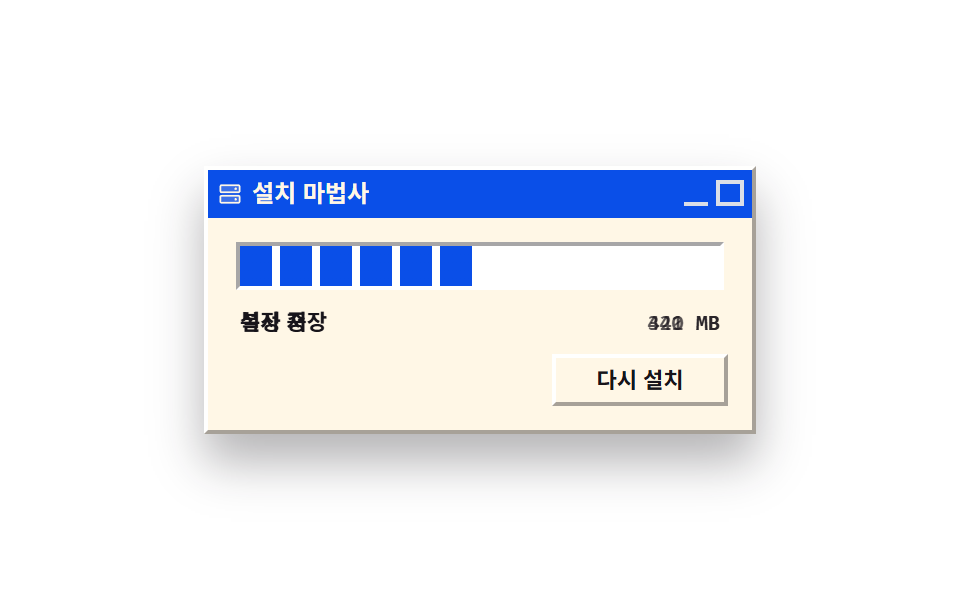
The progress bar does not glide; it fills one square block at a time, and each block that lands swaps both the line below it and the remaining-size number. When it fills, a done mark pops once.
Best forWaiting screen for a long job
steps(12, end)linear-gradientbackground-size
<main class="stage">
<div class="ip is-demo" id="ip">
  <div class="ip__title">
    <span class="ip__tico" aria-hidden="true"><svg xmlns="http://www.w3.org/2000/svg" width="14" height="14" viewBox="0 0 256 256"><g fill="currentColor"><path d="M216 152v48a8 8 0 0 1-8 8H48a8 8 0 0 1-8-8v-48a8 8 0 0 1 8-8h160a8 8 0 0 1 8 8m-8-104H48a8 8 0 0 0-8 8v48a8 8 0 0 0 8 8h160a8 8 0 0 0 8-8V56a8 8 0 0 0-8-8" opacity=".2"/><path d="M208 136H48a16 16 0 0 0-16 16v48a16 16 0 0 0 16 16h160a16 16 0 0 0 16-16v-48a16 16 0 0 0-16-16m0 64H48v-48h160zm0-160H48a16 16 0 0 0-16 16v48a16 16 0 0 0 16 16h160a16 16 0 0 0 16-16V56a16 16 0 0 0-16-16m0 64H48V56h160zm-16-24a12 12 0 1 1-12-12a12 12 0 0 1 12 12m0 96a12 12 0 1 1-12-12a12 12 0 0 1 12 12"/></g></svg></span>
    <span class="ip__tname">Setup wizard</span>
    <span class="ip__tbtns" aria-hidden="true"><span class="ip__gb ip__gb--min"></span><span class="ip__gb"></span></span>
  </div>
  <div class="ip__body">
    <div class="ip__track">
      <span class="ip__fill" aria-hidden="true"></span>
      <span class="ip__cover" aria-hidden="true"></span>
      <span class="ip__done" aria-hidden="true"><svg xmlns="http://www.w3.org/2000/svg" width="14" height="14" viewBox="0 0 256 256"><g fill="currentColor"><path d="M224 128a96 96 0 1 1-96-96a96 96 0 0 1 96 96" opacity=".2"/><path d="M173.66 98.34a8 8 0 0 1 0 11.32l-56 56a8 8 0 0 1-11.32 0l-24-24a8 8 0 0 1 11.32-11.32L112 148.69l50.34-50.35a8 8 0 0 1 11.32 0M232 128A104 104 0 1 1 128 24a104.11 104.11 0 0 1 104 104m-16 0a88 88 0 1 0-88 88a88.1 88.1 0 0 0 88-88"/></g></svg></span>
    </div>
    <div class="ip__meta">
      <span class="ip__phrases" aria-hidden="true">
        <span class="ip__sv ip__sv--1">Preparing files</span>
        <span class="ip__sv ip__sv--2">Copying</span>
        <span class="ip__sv ip__sv--3">Saving settings</span>
        <span class="ip__sv ip__sv--4">Finishing up</span>
        <span class="ip__sv ip__sv--5">Install complete</span>
      </span>
      <span class="ip__nums" aria-hidden="true">
        <span class="ip__nm ip__nm--1">812 MB</span>
        <span class="ip__nm ip__nm--2">744 MB</span>
        <span class="ip__nm ip__nm--3">663 MB</span>
        <span class="ip__nm ip__nm--4">581 MB</span>
        <span class="ip__nm ip__nm--5">502 MB</span>
        <span class="ip__nm ip__nm--6">421 MB</span>
        <span class="ip__nm ip__nm--7">340 MB</span>
        <span class="ip__nm ip__nm--8">262 MB</span>
        <span class="ip__nm ip__nm--9">183 MB</span>
        <span class="ip__nm ip__nm--10">102 MB</span>
        <span class="ip__nm ip__nm--11">47 MB</span>
        <span class="ip__nm ip__nm--12">0 MB</span>
      </span>
    </div>
    <div class="ip__actions">
      <button type="button" class="ip__btn" id="retry">Install again</button>
    </div>
  </div>
</div>
</main>@use "../../../../site/static/demo-tokens" as *;
// 설치 진행 막대와 단계 문구 — 막대가 매끄럽게 늘지 않는다. linear-gradient 하나를
// 칸(타일) 도안으로 정의하고 background-size 로 타일 폭을 박은 뒤(정지점은 타일 비율:
// 80% 블록 + 20% 줄), 그 위에 트랙색 덮개를 transform: scaleX 로 steps(12, end) 만큼
// 줄여 칸을 하나씩 드러낸다. 칸이 넘어갈 때마다 문구와 남은 용량 숫자가 같은 박자로 컷으로
// 갈아 끼워지고(음수 animation-delay 로 위상을 밀어 한 줄의 키프레임을 열두 장이 나눠 쓴다),
// 다 차면 완료 표시가 한 번 튀어오른다.
$duration: $dur-quick;
$easing: $ease-pop;
$color: $subject-blue-deep;
$tile: 20px; // 칸 한 칸 = 블록 16px + 줄 4px
$cells: 12; // 트랙 안 칸 수 — steps(12, end) 의 박자와 1:1 이다
$mono: ui-monospace, SFMono-Regular, "SF Mono", Consolas, "Liberation Mono", monospace;
$edge: rgba(23, 20, 26, .38);
$lite: rgba(255, 255, 255, .95);
$muted: rgba(23, 20, 26, .72);
@include stage($stage-paper);
// ── 설치 대화상자
.ip {
box-sizing: border-box; width: min(100%, 276px);
border: 2px solid; border-color: $lite $edge $edge $lite;
background: $subject-cream; box-shadow: $shadow-raised;
}
.ip button { font-family: inherit; cursor: pointer; }
.ip button:focus-visible { outline: 2px solid $color; outline-offset: 1px; }
// ── 제목줄
.ip__title {
display: flex; align-items: center; gap: $sp-1;
height: 24px; padding: 0 $sp-1; box-sizing: border-box;
background: $color; color: $subject-cream;
}
.ip__tico { display: grid; place-items: center; }
.ip__tname { flex: 1 1 auto; font-weight: 700; font-size: 12px; line-height: 1.4; white-space: nowrap; overflow: hidden; }
.ip__tbtns { display: flex; align-items: center; gap: $sp-1; }
.ip__gb { width: 14px; height: 13px; box-sizing: border-box; border: 2px solid rgba(255, 247, 230, .85); }
.ip__gb--min { border: 0; border-bottom: 2px solid rgba(255, 247, 230, .85); width: 12px; align-self: flex-end; }
// ── 본문
.ip__body { display: flex; flex-direction: column; gap: $sp-2; padding: $sp-3; }
// 진행 트랙 — 눌려 들어간 칸(어두운 면이 위·왼쪽). 안은 정확히 칸 12개 폭이다
.ip__track {
position: relative; align-self: center; box-sizing: content-box;
width: $tile * $cells; height: 20px;
border: 2px solid; border-color: $edge $lite $lite $edge;
background: $stage-paper;
}
// 칸 도안 — 타일 하나(20px)를 background-size 로 정의하고 정지점은 타일 비율로 준다.
// 정지점만 픽셀로 주면 타일이 아니라 요소 전체 폭의 그라디언트가 된다(실패표 269).
.ip__fill {
position: absolute; inset: 0;
background-image: linear-gradient(90deg, $color 0 80%, transparent 80% 100%);
background-size: $tile 100%;
background-repeat: repeat-x;
}
// 트랙색 덮개 — 오른쪽에 붙어 scaleX 로 줄어들며 칸을 왼쪽부터 드러낸다.
// 채움 시작 변에 붙어야 하므로 transform-origin 을 오른쪽 가운데로 둔다(중심 아님의 이유)
.ip__cover {
position: absolute; inset: 0;
background: $stage-paper;
transform-origin: right center;
transform: scaleX(0);
}
// 완료 표시 — 트랙 오른쪽 끝에 얹힌 체크. 정적 기본값은 보임(완료 상태)
.ip__done {
position: absolute; top: 2px; right: 2px; width: 16px; height: 16px;
display: grid; place-items: center; color: $stage-paper; z-index: 1;
}
// ── 문구·숫자 줄 — 겹켜진 값 장을 컷으로 갈아 끼운다(정적 기본값은 마지막 장)
.ip__meta {
display: flex; align-items: baseline; justify-content: space-between;
align-self: center; width: $tile * $cells;
}
.ip__phrases, .ip__nums { display: grid; }
.ip__phrases > *, .ip__nums > * { grid-area: 1 / 1; }
.ip__phrases { justify-items: start; }
.ip__nums { justify-items: end; }
.ip__sv { font-weight: 700; font-size: 11px; line-height: 1.4; color: $subject-ink; white-space: nowrap; }
.ip__nm { font-family: $mono; font-weight: 700; font-size: 11px; line-height: 1.4; color: $muted; white-space: nowrap; }
.ip__sv, .ip__nm { opacity: 0; }
.ip__sv--5, .ip__nm--12 { opacity: 1; }
// ── 단추
.ip__actions { display: flex; justify-content: flex-end; }
.ip__btn {
min-width: 88px; height: 26px; box-sizing: border-box; padding: 0 $sp-2;
background: $subject-cream; color: $subject-ink;
border: 2px solid; border-color: $lite $edge $edge $lite;
font-weight: 700; font-size: 11px; line-height: 1.4;
transition: transform $duration $ease-out;
}
.ip__btn:active { border-color: $edge $lite $lite $edge; transform: translateY(1px); }
// ── 격자 미리보기 루프 (2초): 덮개가 steps(12, end) 로 0 부터 75% 사이에 칸을 하나씩 드러내고
// (칸 박자 6.25% 간격), 문구는 네 박자, 숫자는 칸 박자에 맞춘다. 75% 부터 88% 사이에 완료 표시가
// 튀고, 90% 안에 모든 연출이 빠져 다음 바퀴를 준비한다.
.ip.is-demo .ip__cover {
animation-name: ipCover;
animation-duration: $dur-loop; animation-timing-function: steps(12, end);
animation-iteration-count: infinite; animation-fill-mode: backwards;
}
.ip.is-demo .ip__sv, .ip.is-demo .ip__nm {
animation-name: ipSv; // 문구 장: 제자리에서 18.75% 동안 켜진다(네 박자)
animation-duration: $dur-loop; animation-timing-function: steps(1, end);
animation-iteration-count: infinite; animation-fill-mode: backwards;
}
.ip.is-demo .ip__nm { animation-name: ipNm; } // 숫자 장: 6.25% 동안 켜진다(칸 박자)
// 음수 animation-delay — 같은 키프레임을 각자의 박자로 위상 이동해 쓴다(루프마다 같은 간격 유지)
.ip.is-demo .ip__sv--1 { animation-delay: 0ms; }
.ip.is-demo .ip__sv--2 { animation-delay: -1625ms; }
.ip.is-demo .ip__sv--3 { animation-delay: -1250ms; }
.ip.is-demo .ip__sv--4 { animation-delay: -875ms; }
.ip.is-demo .ip__sv--5 { animation-delay: -500ms; }
.ip.is-demo .ip__nm--1 { animation-delay: 0ms; }
.ip.is-demo .ip__nm--2 { animation-delay: -1875ms; }
.ip.is-demo .ip__nm--3 { animation-delay: -1750ms; }
.ip.is-demo .ip__nm--4 { animation-delay: -1625ms; }
.ip.is-demo .ip__nm--5 { animation-delay: -1500ms; }
.ip.is-demo .ip__nm--6 { animation-delay: -1375ms; }
.ip.is-demo .ip__nm--7 { animation-delay: -1250ms; }
.ip.is-demo .ip__nm--8 { animation-delay: -1125ms; }
.ip.is-demo .ip__nm--9 { animation-delay: -1000ms; }
.ip.is-demo .ip__nm--10 { animation-delay: -875ms; }
.ip.is-demo .ip__nm--11 { animation-delay: -750ms; }
.ip.is-demo .ip__nm--12 { animation-delay: -625ms; }
// 완료 표시 — 스스로 완결한 요소라 자기 중심에서 커진다
.ip.is-demo .ip__done {
animation-name: ipDone;
animation-duration: $dur-loop; animation-timing-function: $easing;
animation-iteration-count: infinite; animation-fill-mode: backwards;
}
@keyframes ipCover {
0% { transform: scaleX(1); }
75%, 100% { transform: scaleX(0); }
}
@keyframes ipSv {
0%, 18.75% { opacity: 1; }
18.76%, 100% { opacity: 0; }
}
@keyframes ipNm {
0%, 6.25% { opacity: 1; }
6.26%, 100% { opacity: 0; }
}
@keyframes ipDone {
0%, 74% { opacity: 0; transform: scale(.3); }
75% { opacity: 1; transform: scale(.4); }
80% { transform: scale(1.3); }
84%, 86% { opacity: 1; transform: scale(1); }
87%, 100% { opacity: 0; transform: scale(1); }
}
// ── 좁은 화면: 본문 여백을 줄인다(트랙 폭 240px 는 고정 — 칸 도안의 기준이라 못 줄인다)
@media (max-width: 340px) {
.ip__body { gap: $sp-1; padding: $sp-2; }
}
@media (prefers-reduced-motion: reduce) {
.ip.is-demo .ip__cover, .ip.is-demo .ip__sv, .ip.is-demo .ip__nm, .ip.is-demo .ip__done {
animation: none !important;
}
.ip.is-demo .ip__cover { transform: scaleX(0) !important; }
.ip.is-demo .ip__sv, .ip.is-demo .ip__nm { opacity: 0 !important; }
.ip.is-demo .ip__sv--5, .ip.is-demo .ip__nm--12 { opacity: 1 !important; }
.ip.is-demo .ip__done { opacity: 1 !important; transform: none !important; }
}html, body {
margin: 0;
overflow: hidden;
}
.stage {
box-sizing: border-box;
min-height: 100vh;
display: grid;
place-items: center;
margin: 0;
background: #ffffff;
font-family: -apple-system, "Segoe UI", "Noto Sans KR", sans-serif;
padding: clamp(8px, 4vw, 24px);
}
.ip {
box-sizing: border-box;
width: min(100%, 276px);
border: 2px solid;
border-color: rgba(255, 255, 255, 0.95) rgba(23, 20, 26, 0.38) rgba(23, 20, 26, 0.38) rgba(255, 255, 255, 0.95);
background: #fff7e6;
box-shadow: 0 14px 24px rgba(23, 20, 26, 0.32);
}
.ip button {
font-family: inherit;
cursor: pointer;
}
.ip button:focus-visible {
outline: 2px solid #0a4fe8;
outline-offset: 1px;
}
.ip__title {
display: flex;
align-items: center;
gap: 4px;
height: 24px;
padding: 0 4px;
box-sizing: border-box;
background: #0a4fe8;
color: #fff7e6;
}
.ip__tico {
display: grid;
place-items: center;
}
.ip__tname {
flex: 1 1 auto;
font-weight: 700;
font-size: 12px;
line-height: 1.4;
white-space: nowrap;
overflow: hidden;
}
.ip__tbtns {
display: flex;
align-items: center;
gap: 4px;
}
.ip__gb {
width: 14px;
height: 13px;
box-sizing: border-box;
border: 2px solid rgba(255, 247, 230, 0.85);
}
.ip__gb--min {
border: 0;
border-bottom: 2px solid rgba(255, 247, 230, 0.85);
width: 12px;
align-self: flex-end;
}
.ip__body {
display: flex;
flex-direction: column;
gap: 8px;
padding: 12px;
}
.ip__track {
position: relative;
align-self: center;
box-sizing: content-box;
width: 240px;
height: 20px;
border: 2px solid;
border-color: rgba(23, 20, 26, 0.38) rgba(255, 255, 255, 0.95) rgba(255, 255, 255, 0.95) rgba(23, 20, 26, 0.38);
background: #ffffff;
}
.ip__fill {
position: absolute;
inset: 0;
background-image: linear-gradient(90deg, #0a4fe8 0 80%, transparent 80% 100%);
background-size: 20px 100%;
background-repeat: repeat-x;
}
.ip__cover {
position: absolute;
inset: 0;
background: #ffffff;
transform-origin: right center;
transform: scaleX(0);
}
.ip__done {
position: absolute;
top: 2px;
right: 2px;
width: 16px;
height: 16px;
display: grid;
place-items: center;
color: #ffffff;
z-index: 1;
}
.ip__meta {
display: flex;
align-items: baseline;
justify-content: space-between;
align-self: center;
width: 240px;
}
.ip__phrases, .ip__nums {
display: grid;
}
.ip__phrases > *, .ip__nums > * {
grid-area: 1/1;
}
.ip__phrases {
justify-items: start;
}
.ip__nums {
justify-items: end;
}
.ip__sv {
font-weight: 700;
font-size: 11px;
line-height: 1.4;
color: #17141a;
white-space: nowrap;
}
.ip__nm {
font-family: ui-monospace, SFMono-Regular, "SF Mono", Consolas, "Liberation Mono", monospace;
font-weight: 700;
font-size: 11px;
line-height: 1.4;
color: rgba(23, 20, 26, 0.72);
white-space: nowrap;
}
.ip__sv, .ip__nm {
opacity: 0;
}
.ip__sv--5, .ip__nm--12 {
opacity: 1;
}
.ip__actions {
display: flex;
justify-content: flex-end;
}
.ip__btn {
min-width: 88px;
height: 26px;
box-sizing: border-box;
padding: 0 8px;
background: #fff7e6;
color: #17141a;
border: 2px solid;
border-color: rgba(255, 255, 255, 0.95) rgba(23, 20, 26, 0.38) rgba(23, 20, 26, 0.38) rgba(255, 255, 255, 0.95);
font-weight: 700;
font-size: 11px;
line-height: 1.4;
transition: transform 220ms ease-out;
}
.ip__btn:active {
border-color: rgba(23, 20, 26, 0.38) rgba(255, 255, 255, 0.95) rgba(255, 255, 255, 0.95) rgba(23, 20, 26, 0.38);
transform: translateY(1px);
}
.ip.is-demo .ip__cover {
animation-name: ipCover;
animation-duration: 2s;
animation-timing-function: steps(12, end);
animation-iteration-count: infinite;
animation-fill-mode: backwards;
}
.ip.is-demo .ip__sv, .ip.is-demo .ip__nm {
animation-name: ipSv;
animation-duration: 2s;
animation-timing-function: steps(1, end);
animation-iteration-count: infinite;
animation-fill-mode: backwards;
}
.ip.is-demo .ip__nm {
animation-name: ipNm;
}
.ip.is-demo .ip__sv--1 {
animation-delay: 0ms;
}
.ip.is-demo .ip__sv--2 {
animation-delay: -1625ms;
}
.ip.is-demo .ip__sv--3 {
animation-delay: -1250ms;
}
.ip.is-demo .ip__sv--4 {
animation-delay: -875ms;
}
.ip.is-demo .ip__sv--5 {
animation-delay: -500ms;
}
.ip.is-demo .ip__nm--1 {
animation-delay: 0ms;
}
.ip.is-demo .ip__nm--2 {
animation-delay: -1875ms;
}
.ip.is-demo .ip__nm--3 {
animation-delay: -1750ms;
}
.ip.is-demo .ip__nm--4 {
animation-delay: -1625ms;
}
.ip.is-demo .ip__nm--5 {
animation-delay: -1500ms;
}
.ip.is-demo .ip__nm--6 {
animation-delay: -1375ms;
}
.ip.is-demo .ip__nm--7 {
animation-delay: -1250ms;
}
.ip.is-demo .ip__nm--8 {
animation-delay: -1125ms;
}
.ip.is-demo .ip__nm--9 {
animation-delay: -1000ms;
}
.ip.is-demo .ip__nm--10 {
animation-delay: -875ms;
}
.ip.is-demo .ip__nm--11 {
animation-delay: -750ms;
}
.ip.is-demo .ip__nm--12 {
animation-delay: -625ms;
}
.ip.is-demo .ip__done {
animation-name: ipDone;
animation-duration: 2s;
animation-timing-function: cubic-bezier(0.2, 1.4, 0.4, 1);
animation-iteration-count: infinite;
animation-fill-mode: backwards;
}
@keyframes ipCover {
0% {
transform: scaleX(1);
}
75%, 100% {
transform: scaleX(0);
}
}
@keyframes ipSv {
0%, 18.75% {
opacity: 1;
}
18.76%, 100% {
opacity: 0;
}
}
@keyframes ipNm {
0%, 6.25% {
opacity: 1;
}
6.26%, 100% {
opacity: 0;
}
}
@keyframes ipDone {
0%, 74% {
opacity: 0;
transform: scale(0.3);
}
75% {
opacity: 1;
transform: scale(0.4);
}
80% {
transform: scale(1.3);
}
84%, 86% {
opacity: 1;
transform: scale(1);
}
87%, 100% {
opacity: 0;
transform: scale(1);
}
}
@media (max-width: 340px) {
.ip__body {
gap: 4px;
padding: 8px;
}
}
@media (prefers-reduced-motion: reduce) {
.ip.is-demo .ip__cover, .ip.is-demo .ip__sv, .ip.is-demo .ip__nm, .ip.is-demo .ip__done {
animation: none !important;
}
.ip.is-demo .ip__cover {
transform: scaleX(0) !important;
}
.ip.is-demo .ip__sv, .ip.is-demo .ip__nm {
opacity: 0 !important;
}
.ip.is-demo .ip__sv--5, .ip.is-demo .ip__nm--12 {
opacity: 1 !important;
}
.ip.is-demo .ip__done {
opacity: 1 !important;
transform: none !important;
}
}var root = document.getElementById('ip');
var retry = document.getElementById('retry');
// 사람 손이 닿으면 격자 미리보기 루프를 끊고 완료 상태(정적 기본값)로 돌아간다
root.addEventListener('pointerdown', function () { root.classList.remove('is-demo'); });
// Install again — 같은 2초 루프를 한 바퀴 돌게 했다가 95% 지점(막대가 다 찬 뒤)에 뗀다
retry.addEventListener('click', function () {
root.classList.add('is-demo');
clearTimeout(retry.timer);
retry.timer = setTimeout(function () { root.classList.remove('is-demo'); }, 1900);
});// InstallProgress — vanilla 판(run/023/demo/08-os-install-progress-steps/index.html) 의 React 포트.
// 칸 도안은 linear-gradient 하나가 background-size 타일(20px)로 정의하고, 트랙색 덮개가
// transform: scaleX 를 steps(12, end) 만큼 줄여 칸을 하나씩 드러낸다. 문구와 남은 용량 숫자는
// 겹켜진 값 장을 음수 animation-delay 위상으로 컷 갈아 끼운다. 다시 설치 단추는 같은 루프를
// 한 바퀴 돌게 했다가 95% 지점에 뗀다.
import { useEffect, useRef, useState } from "react";
import type { CSSProperties } from "react";
import styles from "./InstallProgress.module.scss";
export type InstallProgressProps = {
duration?: number;
easing?: string;
color?: string;
titleText?: string;
retryText?: string;
};
type Vars = CSSProperties & { "--duration"?: string; "--easing"?: string; "--color"?: string };
// useRef<number> 는 { current: number | null } 을 돌려준다 — ambient 타입에 맞춘 상자 타입
type Box<T> = { current: T | null };
const TITLE = "설치 마법사";
const RETRY = "다시 설치";
const PHRASES = ["파일 준비", "복사 중", "설정 저장", "마무리 중", "설치 완료"];
const REMAINS = ["812 MB", "744 MB", "663 MB", "581 MB", "502 MB", "421 MB", "340 MB", "262 MB", "183 MB", "102 MB", "47 MB", "0 MB"];
const REPLAY_MS = 1900;
export default function InstallProgress(props: InstallProgressProps) {
const duration = props.duration ?? 220;
const easing = props.easing ?? "cubic-bezier(.2, 1.4, .4, 1)";
const color = props.color ?? "#0a4fe8";
const titleText = props.titleText ?? TITLE;
const retryText = props.retryText ?? RETRY;
const [preview, setPreview] = useState<boolean>(true);
const timer = useRef<number>(null) as Box<number>;
useEffect(() => {
return () => {
if (timer.current !== null) window.clearTimeout(timer.current);
};
}, []);
const leave = () => setPreview(false);
const onRetry = () => {
// 같은 2초 루프를 한 바퀴 돌게 했다가 95% 지점(막대가 다 찬 뒤)에 뗀다
setPreview(true);
if (timer.current !== null) window.clearTimeout(timer.current);
timer.current = window.setTimeout(() => setPreview(false), REPLAY_MS);
};
const vars: Vars = { "--duration": duration + "ms", "--easing": easing, "--color": color };
return (
<main className={styles.stage}>
<div
className={styles.root + (preview ? " " + styles.isDemo : "")}
style={vars}
onPointerDown={leave}
>
<div className={styles.title}>
<span className={styles.tico} aria-hidden="true">
<svg xmlns="http://www.w3.org/2000/svg" width="14" height="14" viewBox="0 0 256 256">
<g fill="currentColor">
<path d="M216 152v48a8 8 0 0 1-8 8H48a8 8 0 0 1-8-8v-48a8 8 0 0 1 8-8h160a8 8 0 0 1 8 8m-8-104H48a8 8 0 0 0-8 8v48a8 8 0 0 0 8 8h160a8 8 0 0 0 8-8V56a8 8 0 0 0-8-8" opacity=".2" />
<path d="M208 136H48a16 16 0 0 0-16 16v48a16 16 0 0 0 16 16h160a16 16 0 0 0 16-16v-48a16 16 0 0 0-16-16m0 64H48v-48h160zm0-160H48a16 16 0 0 0-16 16v48a16 16 0 0 0 16 16h160a16 16 0 0 0 16-16V56a16 16 0 0 0-16-16m0 64H48V56h160zm-16-24a12 12 0 1 1-12-12a12 12 0 0 1 12 12m0 96a12 12 0 1 1-12-12a12 12 0 0 1 12 12" />
</g>
</svg>
</span>
<span className={styles.tname}>{titleText}</span>
<span className={styles.tbtns} aria-hidden="true">
<span className={styles.gb + " " + styles.gbMin} />
<span className={styles.gb} />
</span>
</div>
<div className={styles.body}>
<div className={styles.track}>
<span className={styles.fill} aria-hidden="true" />
<span className={styles.cover} aria-hidden="true" />
<span className={styles.done} aria-hidden="true">
<svg xmlns="http://www.w3.org/2000/svg" width="14" height="14" viewBox="0 0 256 256">
<g fill="currentColor">
<path d="M224 128a96 96 0 1 1-96-96a96 96 0 0 1 96 96" opacity=".2" />
<path d="M173.66 98.34a8 8 0 0 1 0 11.32l-56 56a8 8 0 0 1-11.32 0l-24-24a8 8 0 0 1 11.32-11.32L112 148.69l50.34-50.35a8 8 0 0 1 11.32 0M232 128A104 104 0 1 1 128 24a104.11 104.11 0 0 1 104 104m-16 0a88 88 0 1 0-88 88a88.1 88.1 0 0 0 88-88" />
</g>
</svg>
</span>
</div>
<div className={styles.meta}>
<span className={styles.phrases} aria-hidden="true">
{PHRASES.map((text, i) => (
<span key={i} className={styles.sv + " " + styles["sv" + (i + 1)]}>
{text}
</span>
))}
</span>
<span className={styles.nums} aria-hidden="true">
{REMAINS.map((text, i) => (
<span key={i} className={styles.nm + " " + styles["nm" + (i + 1)]}>
{text}
</span>
))}
</span>
</div>
<div className={styles.actions}>
<button type="button" className={styles.btn} onClick={onRetry}>
{retryText}
</button>
</div>
</div>
</div>
</main>
);
}08 Install progress and step text — Measured area 2.866% · moving frames 20/23Original by GODRICH · SCSS and React ship in the zip · Windows 98 CSS: 9 Retro OS Parts, No Library
The post this demo lives in
 Windows 98 CSS: 9 Retro OS Parts, No LibraryWindows 98 CSS rebuilds a 1998 desktop out of one stylesheet and a little script — nine parts where the windows really d See all demos in this post