02Project grid
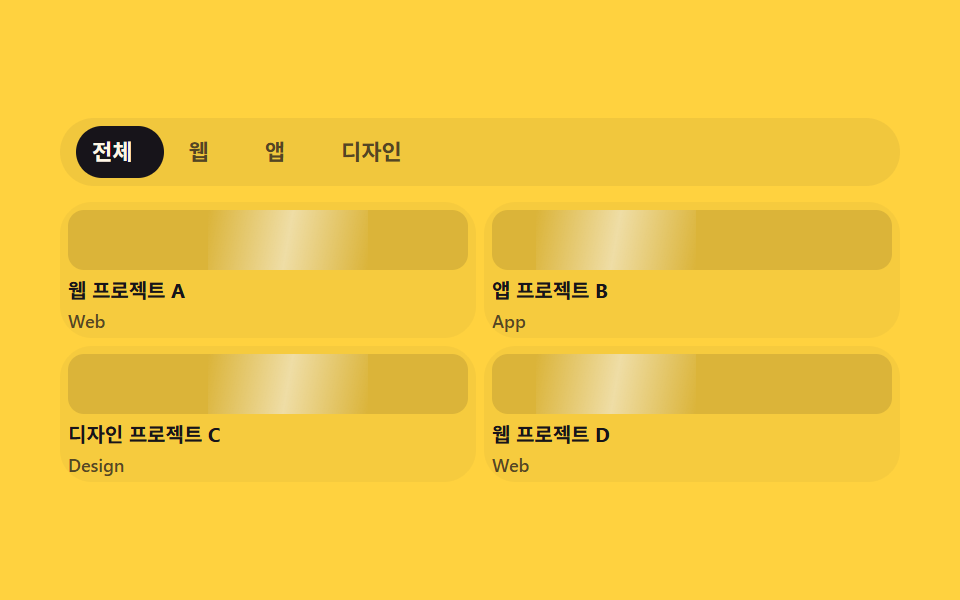
프로젝트 카드 네 장이 격자로 놓이고, 위쪽 분류 탭(전체·웹·앱·디자인)을 클릭하면 인디케이터가 실제 탭 폭만큼 getBoundingClientRect로 실측 이동하며 그 분류가 아닌 카드는 실제로 흐려집니다.
Best for
getBoundingClientRecttranslateXclick
<main class="stage">
  <section class="pg is-demo">
    <div class="pg__tabs" role="tablist" aria-label="Project category">
      <span class="pg__indicator" aria-hidden="true"></span>
      <button class="pg__tab" type="button" role="tab" data-cat="all" aria-selected="true">All</button>
      <button class="pg__tab" type="button" role="tab" data-cat="web" aria-selected="false">Web</button>
      <button class="pg__tab" type="button" role="tab" data-cat="app" aria-selected="false">App</button>
      <button class="pg__tab" type="button" role="tab" data-cat="design" aria-selected="false">Design</button>
    </div>
    <div class="pg__grid">
      <article class="pg__card" data-cat="web"><span class="pg__thumb" aria-hidden="true"></span><p class="pg__title">Web Project A</p><p class="pg__tag">Web</p></article>
      <article class="pg__card" data-cat="app"><span class="pg__thumb" aria-hidden="true"></span><p class="pg__title">App Project B</p><p class="pg__tag">App</p></article>
      <article class="pg__card" data-cat="design"><span class="pg__thumb" aria-hidden="true"></span><p class="pg__title">Design Project C</p><p class="pg__tag">Design</p></article>
      <article class="pg__card" data-cat="web"><span class="pg__thumb" aria-hidden="true"></span><p class="pg__title">Web Project D</p><p class="pg__tag">Web</p></article>
    </div>
  </section>
</main>
@use "../../../../site/static/demo-tokens" as *;
// ── 변수 3개 ──────────────────────────────────────────
$duration: $dur-base; // 인디케이터·카드 필터 전환
$easing: $ease-spring;
$color: $subject-blue; // 인디케이터·활성 탭 색
@include stage($stage-yellow);
.pg { width: min(420px, 95vw); }
// ── 탭 + 인디케이터: 폭은 짐작하지 않고 클릭마다 getBoundingClientRect 로 실측(BD19) ──────────────
.pg__tabs {
position: relative;
display: flex;
gap: $sp-1;
margin: 0 0 $sp-2;
padding: $sp-1;
border-radius: $r-pill;
background: rgba(23, 20, 26, .06);
box-sizing: border-box;
}
.pg__indicator {
position: absolute;
left: $sp-1; top: $sp-1; bottom: $sp-1;
border-radius: $r-pill;
background: $subject-ink;
transition: transform $duration $easing, width $duration $easing;
}
.pg__tab {
position: relative;
flex: 0 0 auto;
padding: $sp-1 $sp-3;
border: 0;
background: none;
border-radius: $r-pill;
color: rgba($subject-ink, .72); // 옐로 면 위 5.70:1
font-weight: 700; font-size: 11px; line-height: 1.6; font-family: inherit;
cursor: pointer;
transition: color $duration $easing;
}
.pg__tab[aria-selected="true"] { color: $subject-cream; }
.pg__grid {
display: grid;
grid-template-columns: repeat(2, 1fr);
gap: $sp-1;
}
.pg__card {
overflow: hidden;
border-radius: $r-card;
background: rgba(23, 20, 26, .04);
padding: $sp-1;
box-sizing: border-box;
transition: opacity $duration $easing, transform $duration $easing;
}
.pg__card.is-hidden { opacity: .18; transform: scale(.94); }
.pg__thumb {
position: relative;
display: block;
overflow: hidden;
height: 30px;
border-radius: $r-sm;
margin: 0 0 $sp-1;
background: rgba(23, 20, 26, .12);
}
// ── 썸네일 위 대각선 하이라이트가 계속 스치는 장식(항상 재생) ──────────────
.pg__thumb::after {
content: "";
position: absolute;
top: 0; bottom: 0; left: -60%;
width: 40%;
background: linear-gradient(100deg, transparent, rgba(255, 255, 255, .55), transparent);
animation: pg-shimmer 2s linear infinite;
}
.pg__card:nth-child(2n) .pg__thumb::after { animation-delay: 400ms; }
@keyframes pg-shimmer {
0% { transform: translateX(0); }
100% { transform: translateX(300%); }
}
.pg__title { margin: 0; font-weight: 700; font-size: 10px; line-height: 1.3; font-family: inherit; color: $subject-ink; }
.pg__tag { margin: $sp-1 0 0; font-weight: 600; font-size: 9px; line-height: 1; font-family: inherit; color: rgba($subject-ink, .72); } // 카드 면 위 5.85:1
// ── 반응형(BD9) ──────────────────────────────────────────
@media (max-width: 340px), (max-height: 220px) {
.pg__tabs { margin-bottom: $sp-1; }
.pg__tab { padding: 4px $sp-2; font-size: 10px; line-height: 1.2; }
.pg__thumb { height: 26px; }
.pg__grid { gap: $sp-1; }
}
// ── 접근성 ──────────────────────────────────────────
@media (prefers-reduced-motion: reduce) {
.pg__indicator, .pg__tab, .pg__card { transition: none; }
.pg__thumb::after { animation: none !important; }
}html, body {
margin: 0;
overflow: hidden;
}
.stage {
box-sizing: border-box;
min-height: 100vh;
display: grid;
place-items: center;
margin: 0;
background: #ffd23f;
font-family: -apple-system, "Segoe UI", "Noto Sans KR", sans-serif;
padding: clamp(8px, 4vw, 24px);
}
.pg {
width: min(420px, 95vw);
}
.pg__tabs {
position: relative;
display: flex;
gap: 4px;
margin: 0 0 8px;
padding: 4px;
border-radius: 999px;
background: rgba(23, 20, 26, 0.06);
box-sizing: border-box;
}
.pg__indicator {
position: absolute;
left: 4px;
top: 4px;
bottom: 4px;
border-radius: 999px;
background: #17141a;
transition: transform 300ms cubic-bezier(0.2, 0.8, 0.2, 1), width 300ms cubic-bezier(0.2, 0.8, 0.2, 1);
}
.pg__tab {
position: relative;
flex: 0 0 auto;
padding: 4px 12px;
border: 0;
background: none;
border-radius: 999px;
color: rgba(23, 20, 26, 0.72);
font-weight: 700;
font-size: 11px;
line-height: 1.6;
font-family: inherit;
cursor: pointer;
transition: color 300ms cubic-bezier(0.2, 0.8, 0.2, 1);
}
.pg__tab[aria-selected=true] {
color: #fff7e6;
}
.pg__grid {
display: grid;
grid-template-columns: repeat(2, 1fr);
gap: 4px;
}
.pg__card {
overflow: hidden;
border-radius: 16px;
background: rgba(23, 20, 26, 0.04);
padding: 4px;
box-sizing: border-box;
transition: opacity 300ms cubic-bezier(0.2, 0.8, 0.2, 1), transform 300ms cubic-bezier(0.2, 0.8, 0.2, 1);
}
.pg__card.is-hidden {
opacity: 0.18;
transform: scale(0.94);
}
.pg__thumb {
position: relative;
display: block;
overflow: hidden;
height: 30px;
border-radius: 8px;
margin: 0 0 4px;
background: rgba(23, 20, 26, 0.12);
}
.pg__thumb::after {
content: "";
position: absolute;
top: 0;
bottom: 0;
left: -60%;
width: 40%;
background: linear-gradient(100deg, transparent, rgba(255, 255, 255, 0.55), transparent);
animation: pg-shimmer 2s linear infinite;
}
.pg__card:nth-child(2n) .pg__thumb::after {
animation-delay: 400ms;
}
@keyframes pg-shimmer {
0% {
transform: translateX(0);
}
100% {
transform: translateX(300%);
}
}
.pg__title {
margin: 0;
font-weight: 700;
font-size: 10px;
line-height: 1.3;
font-family: inherit;
color: #17141a;
}
.pg__tag {
margin: 4px 0 0;
font-weight: 600;
font-size: 9px;
line-height: 1;
font-family: inherit;
color: rgba(23, 20, 26, 0.72);
}
@media (max-width: 340px), (max-height: 220px) {
.pg__tabs {
margin-bottom: 4px;
}
.pg__tab {
padding: 4px 8px;
font-size: 10px;
line-height: 1.2;
}
.pg__thumb {
height: 26px;
}
.pg__grid {
gap: 4px;
}
}
@media (prefers-reduced-motion: reduce) {
.pg__indicator, .pg__tab, .pg__card {
transition: none;
}
.pg__thumb::after {
animation: none !important;
}
}// 실제 동작: 탭을 클릭하면 인디케이터가 실제 탭 폭·위치(getBoundingClientRect)로 이동하고, 그 분류가 아닌 카드는 실제로 흐려진다.
var root = document.querySelector('.pg');
var tabs = root.querySelectorAll('.pg__tab');
var indicator = root.querySelector('.pg__indicator');
var cards = root.querySelectorAll('.pg__card');
function moveIndicator(tab) {
var wrapBox = tab.parentElement.getBoundingClientRect();
var box = tab.getBoundingClientRect();
indicator.style.width = box.width + 'px';
indicator.style.transform = 'translateX(' + (box.left - wrapBox.left) + 'px)';
}
tabs.forEach(function (tab) {
tab.addEventListener('click', function () {
root.classList.remove('is-demo');
tabs.forEach(function (t) { t.setAttribute('aria-selected', 'false'); });
tab.setAttribute('aria-selected', 'true');
moveIndicator(tab);
var cat = tab.getAttribute('data-cat');
cards.forEach(function (card) {
var show = cat === 'all' || card.getAttribute('data-cat') === cat;
card.classList.toggle('is-hidden', !show);
});
});
});
moveIndicator(tabs[0]);
window.addEventListener('resize', function () {
var activeTab = root.querySelector('.pg__tab[aria-selected="true"]');
if (activeTab) moveIndicator(activeTab);
});import { useEffect, useRef, useState } from "react";
import type { CSSProperties } from "react";
import styles from "./ProjectGrid.module.scss";
export type ProjectGridProps = { duration?: number; easing?: string; color?: string };
type Vars = CSSProperties & { "--duration"?: string; "--easing"?: string; "--color"?: string };
const TABS = [
{ cat: "all", label: "전체" },
{ cat: "web", label: "웹" },
{ cat: "app", label: "앱" },
{ cat: "design", label: "디자인" },
];
const CARDS = [
{ cat: "web", title: "웹 프로젝트 A", tag: "Web" },
{ cat: "app", title: "앱 프로젝트 B", tag: "App" },
{ cat: "design", title: "디자인 프로젝트 C", tag: "Design" },
{ cat: "web", title: "웹 프로젝트 D", tag: "Web" },
];
export default function ProjectGrid({ duration = 300, easing = "cubic-bezier(.2,.8,.2,1)", color = "#2f6df6" }: ProjectGridProps) {
const [active, setActive] = useState("all");
const [indicator, setIndicator] = useState<{ left: number; width: number } | null>(null);
const wrapRef = useRef<HTMLDivElement>(null);
const vars: Vars = { "--duration": `${duration}ms`, "--easing": easing, "--color": color };
// 실제 동작: 탭을 클릭하면 인디케이터가 실제 탭 폭·위치(getBoundingClientRect)로 이동한다(BD19 — 값을 짐작하지 않는다).
function moveIndicator(el: HTMLButtonElement) {
const wrap = wrapRef.current;
if (!wrap) return;
const wrapBox = wrap.getBoundingClientRect();
const box = el.getBoundingClientRect();
setIndicator({ left: box.left - wrapBox.left, width: box.width });
}
useEffect(() => {
const first = wrapRef.current?.querySelector<HTMLButtonElement>('[aria-selected="true"]');
if (first) moveIndicator(first);
}, []);
return (
<section className={styles.pg} style={vars}>
<div className={styles.tabs} role="tablist" aria-label="프로젝트 분류" ref={wrapRef}>
{indicator && (
<span className={styles.indicator} style={{ transform: `translateX(${indicator.left}px)`, width: indicator.width }} aria-hidden="true" />
)}
{TABS.map((t) => (
<button
key={t.cat}
type="button"
role="tab"
className={styles.tab}
aria-selected={active === t.cat}
onClick={(e: any) => { setActive(t.cat); moveIndicator(e.currentTarget); }}
>
{t.label}
</button>
))}
</div>
<div className={styles.grid}>
{CARDS.map((c, i) => (
<article key={i} className={`${styles.card} ${active !== "all" && active !== c.cat ? styles.hidden : ""}`}>
<span className={styles.thumb} aria-hidden="true" />
<p className={styles.title}>{c.title}</p>
<p className={styles.tag}>{c.tag}</p>
</article>
))}
</div>
</section>
);
}02 Project grid — Measured area 14.028% · moving frames 23/23Original by GODRICH · SCSS and React ship in the zip · 9 Project Showcase Section Templates — Copy-Paste
The post this demo lives in
 9 Project Showcase Section Templates — Copy-PasteA project showcase section template bundles the blocks a portfolio page runs through — hero, grid, case study, contact f See all demos in this post