09A Chat Bubble That Arcs From the Send Button and Lands in the Thread
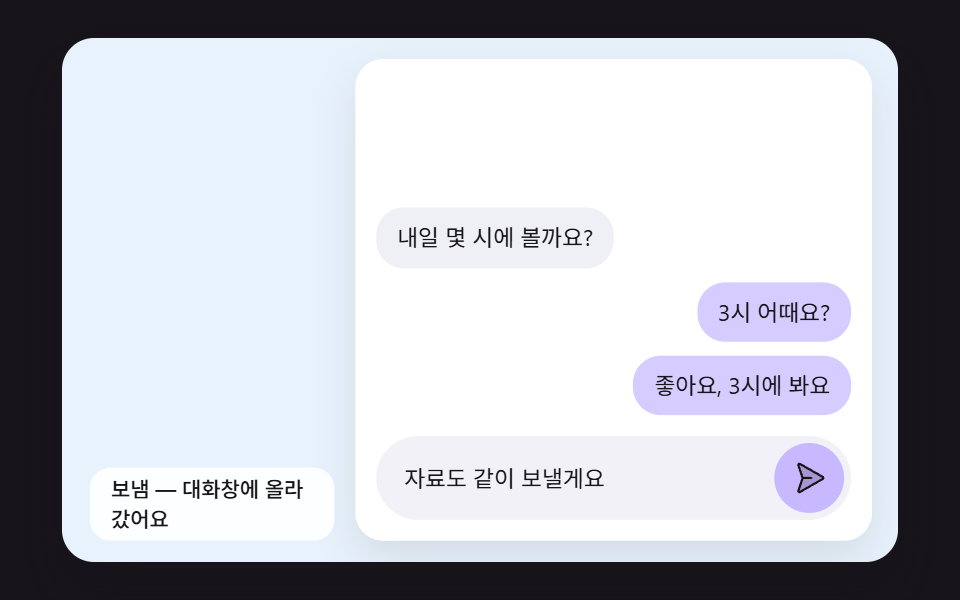
It measures the input position and the landing spot in the thread, offsets the bubble back by the difference, flies it along a parabola, and on landing squashes and recovers while keeping its area.
Best forChat widgets and support windows
ARC_HEIGHTFLIP_MSLAND_SQUASH
<main class="stage">
<div class="sb is-demo" id="sb">
  <div class="sb__scene" data-role="scene">
    <div class="ch__panel">
      <div class="ch__thread" data-role="thread" data-bubble="ch__bubble ch__bubble--me">
        <p class="ch__bubble">What time tomorrow?</p>
        <p class="ch__bubble ch__bubble--me">How about 3?</p>
      </div>
      <div class="ch__composer">
        <span class="ch__draft" data-role="draft">Great, see you at 3</span>
        <button class="ch__send" data-role="send" type="button" aria-label="Send: Great, see you at 3"><svg xmlns="http://www.w3.org/2000/svg" class="ch__icon" aria-hidden="true" focusable="false" viewBox="0 0 256 256"><g fill="currentColor"><path d="M227.91 134.86L59.93 231a8 8 0 0 1-11.44-9.67L80 128L48.49 34.72a8 8 0 0 1 11.44-9.67l168 95.85a8 8 0 0 1-.02 13.96" opacity=".2"/><path d="m231.87 114l-168-95.89a16 16 0 0 0-22.95 19.23L71.55 128l-30.63 90.67A16 16 0 0 0 56 240a16.15 16.15 0 0 0 7.93-2.1l167.92-96.05a16 16 0 0 0 .05-27.89ZM56 224a.6.6 0 0 0 0-.12L85.74 136H144a8 8 0 0 0 0-16H85.74L56.06 32.16A.5.5 0 0 0 56 32l168 95.83Z"/></g></svg></button>
      </div>
    </div>
    <p class="sb__status sb__status--side" data-role="status" aria-live="off">Ready to send</p>
  </div>
</div>
</main>
@use "../../../../site/static/demo-tokens" as *;
@include stage($stage-ink);
.sb {
position: relative;
width: min(92vw, calc(160vh - 12.8vw));
aspect-ratio: 480 / 300;
margin: 0 auto;
border-radius: $r-card;
overflow: hidden;
box-shadow: $shadow-raised;
}
// 장면 판 — 480×300 좌표로 짜 두고 스크립트가 상자 폭에 맞춰 scale 한다.
// 기준점이 왼쪽 위 모서리인 이유: 판이 상자 왼쪽 위에 붙어 있어 모서리 기준으로 줄여야 줄인 판이 상자와 겹친다
.sb__scene {
position: absolute;
left: 0;
top: 0;
width: 480px;
height: 300px;
transform-origin: 0 0;
}
.sb__canvas {
position: absolute;
left: 0;
top: 0;
width: 480px;
height: 300px;
pointer-events: none;
}
.sb__status {
position: absolute;
left: $sp-4;
bottom: $sp-3;
box-sizing: border-box;
max-width: 260px;
margin: 0;
padding: $sp-1 $sp-3;
border-radius: $r-pill;
background: rgba(255, 255, 255, .9);
color: $subject-ink;
font-weight: 500;
font-size: 12px;
line-height: 1.4;
pointer-events: none;
}
.sb__status--top {
top: $sp-3;
bottom: auto;
}
.sb__status--side {
max-width: 140px;
border-radius: $r-control;
}
.sb { background: #e8f2fc; }
.ch__panel {
position: absolute;
left: 168px;
top: 12px;
width: 296px;
height: 276px;
border-radius: $r-card;
overflow: hidden;
background: #ffffff;
box-shadow: 0 10px 24px rgba(23, 20, 26, .1);
}
// 말풍선 줄 — 아래(최신)부터 쌓는다. 날아오는 말풍선이 판 밖에서 출발하므로 여기서는 자르지 않는다
.ch__thread {
position: absolute;
left: $sp-3;
right: $sp-3;
top: $sp-3;
bottom: 72px;
display: flex;
flex-direction: column;
justify-content: flex-end;
gap: $sp-2;
}
.ch__bubble {
align-self: flex-start;
max-width: 200px;
margin: 0;
padding: $sp-2 $sp-3;
border-radius: $r-card;
background: #eef0f5;
color: $subject-ink;
font-size: 13px;
line-height: 1.4;
}
// 내 말풍선은 아래 변으로 내려앉는다 — 납작해질 때 바닥에 붙은 채 눌려야 해서 기준점을 아래 가운데에 둔다
.ch__bubble--me {
align-self: flex-end;
background: #d6ccff;
transform-origin: 50% 100%;
}
.ch__composer {
position: absolute;
left: $sp-3;
right: $sp-3;
bottom: $sp-3;
height: 48px;
box-sizing: border-box;
padding: 0 $sp-1 0 $sp-4;
border-radius: $r-pill;
background: #f3f1f8;
display: flex;
align-items: center;
gap: $sp-2;
}
.ch__draft {
flex: 1 1 auto;
min-width: 0;
overflow: hidden;
color: $subject-ink;
font-size: 13px;
line-height: 1.3;
white-space: nowrap;
text-overflow: ellipsis;
}
.ch__send {
position: relative;
flex: none;
width: 40px;
height: 40px;
margin: 0;
padding: 0;
border: 0;
border-radius: 50%;
background: #c8b8ff;
color: $subject-ink;
cursor: pointer;
}
.ch__send:focus-visible {
outline: 3px solid $subject-ink;
outline-offset: 2px;
}
.ch__icon {
position: absolute;
left: 10px;
top: 10px;
width: 20px;
height: 20px;
}
@media (max-width: 340px) {
// 이 폭에서는 장면이 0.6 배 남짓으로 줄어든다 — 상태 줄 글자를 키워 줄인 뒤에도 읽히게 한다
.sb__status { font-size: 16px; }
}
@media (prefers-reduced-motion: reduce) {
// 움직임은 전부 스크립트가 그리고, 스크립트는 reduce 에서 루프를 돌리지 않고 결과 상태만 둔다. CSS 쪽 전환도 막아 둔다
.sb__scene * {
transition: none !important;
animation: none !important;
}
}html, body {
margin: 0;
overflow: hidden;
}
.stage {
box-sizing: border-box;
min-height: 100vh;
display: grid;
place-items: center;
margin: 0;
background: #17141a;
font-family: -apple-system, "Segoe UI", "Noto Sans KR", sans-serif;
padding: clamp(8px, 4vw, 24px);
}
.sb {
position: relative;
width: min(92vw, 160vh - 12.8vw);
aspect-ratio: 480/300;
margin: 0 auto;
border-radius: 16px;
overflow: hidden;
box-shadow: 0 14px 24px rgba(23, 20, 26, 0.32);
}
.sb__scene {
position: absolute;
left: 0;
top: 0;
width: 480px;
height: 300px;
transform-origin: 0 0;
}
.sb__canvas {
position: absolute;
left: 0;
top: 0;
width: 480px;
height: 300px;
pointer-events: none;
}
.sb__status {
position: absolute;
left: 16px;
bottom: 12px;
box-sizing: border-box;
max-width: 260px;
margin: 0;
padding: 4px 12px;
border-radius: 999px;
background: rgba(255, 255, 255, 0.9);
color: #17141a;
font-weight: 500;
font-size: 12px;
line-height: 1.4;
pointer-events: none;
}
.sb__status--top {
top: 12px;
bottom: auto;
}
.sb__status--side {
max-width: 140px;
border-radius: 12px;
}
.sb {
background: #e8f2fc;
}
.ch__panel {
position: absolute;
left: 168px;
top: 12px;
width: 296px;
height: 276px;
border-radius: 16px;
overflow: hidden;
background: #ffffff;
box-shadow: 0 10px 24px rgba(23, 20, 26, 0.1);
}
.ch__thread {
position: absolute;
left: 12px;
right: 12px;
top: 12px;
bottom: 72px;
display: flex;
flex-direction: column;
justify-content: flex-end;
gap: 8px;
}
.ch__bubble {
align-self: flex-start;
max-width: 200px;
margin: 0;
padding: 8px 12px;
border-radius: 16px;
background: #eef0f5;
color: #17141a;
font-size: 13px;
line-height: 1.4;
}
.ch__bubble--me {
align-self: flex-end;
background: #d6ccff;
transform-origin: 50% 100%;
}
.ch__composer {
position: absolute;
left: 12px;
right: 12px;
bottom: 12px;
height: 48px;
box-sizing: border-box;
padding: 0 4px 0 16px;
border-radius: 999px;
background: #f3f1f8;
display: flex;
align-items: center;
gap: 8px;
}
.ch__draft {
flex: 1 1 auto;
min-width: 0;
overflow: hidden;
color: #17141a;
font-size: 13px;
line-height: 1.3;
white-space: nowrap;
text-overflow: ellipsis;
}
.ch__send {
position: relative;
flex: none;
width: 40px;
height: 40px;
margin: 0;
padding: 0;
border: 0;
border-radius: 50%;
background: #c8b8ff;
color: #17141a;
cursor: pointer;
}
.ch__send:focus-visible {
outline: 3px solid #17141a;
outline-offset: 2px;
}
.ch__icon {
position: absolute;
left: 10px;
top: 10px;
width: 20px;
height: 20px;
}
@media (max-width: 340px) {
.sb__status {
font-size: 16px;
}
}
@media (prefers-reduced-motion: reduce) {
.sb__scene * {
transition: none !important;
animation: none !important;
}
}(function () {
const root = document.getElementById("sb");
if (!root) return;
const W = 480;
const H = 300;
const FIXED_DT = 16;
// 파스텔 팔레트 — 캔버스와 스크립트가 칠하는 색은 여기서만 고른다 (scss 쪽 색은 demo-tokens)
const INK = [38, 33, 52];
const PAPER = [255, 252, 246];
const CREAM = [255, 243, 224];
const SKY = [158, 208, 255];
const LILAC = [200, 184, 255];
const MINT = [156, 228, 204];
const PINK = [255, 182, 204];
const PEACH = [255, 214, 184];
function clamp(v, lo, hi) { return v < lo ? lo : (v > hi ? hi : v); }
function lerp(a, b, t) { return a + (b - a) * t; }
function easeOut(x) { const c = clamp(x, 0, 1); return 1 - Math.pow(1 - c, 3); }
function easeInOut(x) {
const c = clamp(x, 0, 1);
return c < 0.5 ? 4 * c * c * c : 1 - Math.pow(-2 * c + 2, 3) / 2;
}
function rgba(c, a) {
return 'rgba(' + Math.round(c[0]) + ',' + Math.round(c[1]) + ',' + Math.round(c[2]) + ',' + clamp(a, 0, 1).toFixed(3) + ')';
}
function mix(a, b, t) { return [lerp(a[0], b[0], t), lerp(a[1], b[1], t), lerp(a[2], b[2], t)]; }
// 시드 고정 난수 — 같은 시드면 같은 값이 다시 나온다 (32비트 정수 섞기)
function makeRng(seed) {
let s = seed >>> 0;
return function () {
s = (s + 0x6d2b79f5) >>> 0;
let t = s;
t = Math.imul(t ^ (t >>> 15), t | 1);
t ^= t + Math.imul(t ^ (t >>> 7), t | 61);
return ((t ^ (t >>> 14)) >>> 0) / 4294967296;
};
}
const sceneEl = root.querySelector('[data-role="scene"]');
const statusEl = root.querySelector('[data-role="status"]');
if (!sceneEl || !statusEl) {
return;
}
const scene = sceneEl;
const status = statusEl;
const reduceQuery = window.matchMedia('(prefers-reduced-motion: reduce)');
const still = reduceQuery.matches;
const resizeHooks = [];
// 자동 시연 중인가 — 사람이 처음 만지는 순간 시연을 멈추고 처음 상태로 돌린 뒤 상태 줄을 읽어 주기 시작한다
let demo = root.classList.contains('is-demo');
function wake() {
if (!demo) {
return;
}
demo = false;
root.classList.remove('is-demo');
status.setAttribute('aria-live', 'polite');
resetIdle();
}
function say(text) {
if (status.textContent !== text) {
status.textContent = text;
}
}
// 장면 배율 — 480×300 좌표로 짠 판을 상자 폭에 맞춰 통째로 줄인다
let k = 1;
function fitScene() {
const w = root.clientWidth;
k = w > 0 ? w / W : 1;
scene.style.transform = 'scale(' + k.toFixed(4) + ')';
}
// 화면 좌표(CSS px) → 장면 좌표(480×300). 줄인 배율 k 로 나눠야 판 안의 위치가 된다
function toScene(clientX, clientY) {
const r = root.getBoundingClientRect();
return [(clientX - r.left) / k, (clientY - r.top) / k];
}
// 캡처 단계에서 듣는다 — 버튼 자신의 pointerdown 보다 먼저 시연을 끝내야 사람의 첫 누름이 처음 상태에서 시작한다
root.addEventListener('pointerdown', wake, true);
root.addEventListener('keydown', wake, true);
// 포물선 꼭대기가 직선 경로보다 위로 솟는 높이(px)
const ARC_HEIGHT = 80;
// 입력창에서 대화창 도착 자리까지 날아가는 시간
const FLIP_MS = 560;
// 착지 납작함 — 내려앉는 순간 세로 비율이 1 − LAND_SQUASH, 가로는 넓이를 지키게 1/(1 − LAND_SQUASH)
const LAND_SQUASH = 0.22;
const SQUASH_MS = 300;
const SHIFT_MS = 260;
const MAX_MINE = 3;
const DEMO_CYCLE = 1250;
const MESSAGES = ['Great, see you at 3', 'I will send the files too', 'I will text when I arrive'];
const TXT_READY = 'Ready to send';
const TXT_FLY = 'The bubble is flying into the thread';
const TXT_DONE = 'Sent — it is in the thread';
const threadEl = root.querySelector('[data-role="thread"]');
const draftEl = root.querySelector('[data-role="draft"]');
const sendEl = root.querySelector('[data-role="send"]');
if (!threadEl || !draftEl || !sendEl) {
return;
}
const thread = threadEl;
const draft = draftEl;
const send = sendEl;
const bubbleClass = thread.getAttribute('data-bubble') || '';
let flights = [];
let shifts = [];
let mine = [];
let msgIndex = 0;
let draftT = 9999;
let demoNext = 200;
// 날아가는 동안의 자리 — 가로는 시간에 정비례, 세로는 직선 위에 4h·p(1−p) 를 더해 포물선이 된다
function arcOffset(dx, dy, p) {
return [dx * (1 - p), dy * (1 - p) - ARC_HEIGHT * 4 * p * (1 - p)];
}
// 착지 뒤 tau(ms) 의 납작함 — 감쇠 코사인. 처음엔 납작, 1/3 지점에서 살짝 길쭉, 끝에 0
function squashAt(tau) {
if (tau < 0 || tau >= SQUASH_MS) {
return 0;
}
return LAND_SQUASH * Math.exp(-5 * tau / SQUASH_MS) * Math.cos(3 * Math.PI * tau / SQUASH_MS);
}
function centerOf(el) {
const r = el.getBoundingClientRect();
return [(r.left + r.width / 2) / k, (r.top + r.height / 2) / k];
}
function setDraft(text) {
draft.textContent = text;
send.setAttribute('aria-label', 'Send: ' + text);
}
function sendNow() {
const text = draft.textContent || '';
if (!text) {
return;
}
// 오래된 내 말풍선은 측정 전에 뺀다 — 빼고 나서 재야 남은 말풍선의 위치 변화가 한 번에 잡힌다
if (mine.length >= MAX_MINE) {
const old = mine.shift();
if (old && old.parentNode) {
old.parentNode.removeChild(old);
}
flights = flights.filter(function (f) { return f.el !== old; });
shifts = shifts.filter(function (s) { return s.el !== old; });
}
// First — 입력창 글자 자리와 지금 말풍선들의 세로 위치
const first = centerOf(draft);
const before = [];
const kids = thread.children;
for (let i = 0; i < kids.length; i += 1) {
const el = kids[i];
before.push([el, centerOf(el)[1]]);
}
const b = document.createElement('p');
b.className = bubbleClass;
b.textContent = text;
thread.appendChild(b);
mine.push(b);
// Last — 대화창에 들어간 자리. Invert — 그 차이만큼 거꾸로 옮겨 두고, Play — 0 으로 풀어 준다
const last = centerOf(b);
for (const pair of before) {
const dy = pair[1] - centerOf(pair[0])[1];
if (Math.abs(dy) > 0.5) {
shifts = shifts.filter(function (s) { return s.el !== pair[0]; });
shifts.push({ el: pair[0], dy: dy, t: still ? SHIFT_MS : 0 });
}
}
flights.push({ el: b, dx: first[0] - last[0], dy: first[1] - last[1], t: still ? FLIP_MS + SQUASH_MS : 0 });
msgIndex = (msgIndex + 1) % MESSAGES.length;
setDraft(MESSAGES[msgIndex]);
draftT = still ? 9999 : 0;
say(still ? TXT_DONE : TXT_FLY);
}
function clearMine() {
for (const el of mine) {
if (el.parentNode) {
el.parentNode.removeChild(el);
}
}
mine = [];
flights = [];
shifts = [];
}
function resetIdle() {
clearMine();
msgIndex = 0;
draftT = 9999;
setDraft(MESSAGES[0]);
draft.style.opacity = '';
say(TXT_READY);
}
function settle() {
resetIdle();
sendNow();
draw();
}
function step() {
for (const f of flights) {
f.t += FIXED_DT;
}
for (const s of shifts) {
s.t += FIXED_DT;
}
draftT += FIXED_DT;
const before = flights.length;
flights = flights.filter(function (f) {
if (f.t < FLIP_MS + SQUASH_MS) {
return true;
}
f.el.style.transform = '';
return false;
});
shifts = shifts.filter(function (s) {
if (s.t < SHIFT_MS) {
return true;
}
s.el.style.transform = '';
return false;
});
if (before > 0 && flights.length === 0) {
say(TXT_DONE);
}
}
function demoTick(t) {
if (t < demoNext) {
return;
}
demoNext += DEMO_CYCLE;
if (mine.length >= MAX_MINE) {
resetIdle();
}
sendNow();
}
function draw() {
for (const s of shifts) {
const e = 1 - easeOut(s.t / SHIFT_MS);
s.el.style.transform = 'translateY(' + (s.dy * e).toFixed(2) + 'px)';
}
for (const f of flights) {
if (f.t < FLIP_MS) {
const p = f.t / FLIP_MS;
const o = arcOffset(f.dx, f.dy, p);
f.el.style.transform = 'translate(' + o[0].toFixed(2) + 'px,' + o[1].toFixed(2) + 'px) scale(' + lerp(0.86, 1, p).toFixed(3) + ')';
}
else {
const s = squashAt(f.t - FLIP_MS);
f.el.style.transform = 'scale(' + (1 / (1 - s)).toFixed(4) + ',' + (1 - s).toFixed(4) + ')';
}
}
if (draftT < 300) {
draft.style.opacity = clamp(draftT / 300, 0, 1).toFixed(3);
}
else if (draft.style.opacity !== '') {
draft.style.opacity = '';
}
}
send.addEventListener('click', function () { sendNow(); });
resetIdle();
let rafId = 0;
let lastTs = -1;
let acc = 0;
let clock = 0;
function onResize() {
fitScene();
for (const f of resizeHooks) {
f();
}
draw();
}
fitScene();
window.addEventListener('resize', onResize);
function frame(ts) {
if (lastTs < 0) {
lastTs = ts;
}
// 탭이 숨었다 돌아와도 한 번에 100ms 까지만 따라잡는다 — 순간이동 대신 이어서 움직인다
acc += Math.min(ts - lastTs, 100);
lastTs = ts;
let n = 0;
while (acc >= FIXED_DT && n < 6) {
clock += FIXED_DT;
if (demo) {
demoTick(clock);
}
step();
acc -= FIXED_DT;
n += 1;
}
draw();
rafId = window.requestAnimationFrame(frame);
}
if (still) {
settle();
draw();
}
else {
rafId = window.requestAnimationFrame(frame);
}
return function () {
window.cancelAnimationFrame(rafId);
window.removeEventListener('resize', onResize);
};
})();// SendBubbleArcToThread - vanilla 판(09-send-btn-bubble-arc-to-thread) 의 React 포트. 같은 계산을 useEffect 안에서 돌린다.
import { useEffect, useRef } from "react";
import styles from "./SendBubbleArcToThread.module.scss";
const cx = (s: string): string => s.split(" ").map((n) => styles[n] ?? n).join(" ");
export default function SendBubbleArcToThread() {
const rootRef = useRef<HTMLDivElement | null>(null);
useEffect(() => {
const rootEl = rootRef.current;
if (!rootEl) return;
const root: HTMLElement = rootEl;
type RGB = [number, number, number];
const W = 480;
const H = 300;
const FIXED_DT = 16;
// 파스텔 팔레트 — 캔버스와 스크립트가 칠하는 색은 여기서만 고른다 (scss 쪽 색은 demo-tokens)
const INK: RGB = [38, 33, 52];
const PAPER: RGB = [255, 252, 246];
const CREAM: RGB = [255, 243, 224];
const SKY: RGB = [158, 208, 255];
const LILAC: RGB = [200, 184, 255];
const MINT: RGB = [156, 228, 204];
const PINK: RGB = [255, 182, 204];
const PEACH: RGB = [255, 214, 184];
function clamp(v: number, lo: number, hi: number): number { return v < lo ? lo : (v > hi ? hi : v); }
function lerp(a: number, b: number, t: number): number { return a + (b - a) * t; }
function easeOut(x: number): number { const c = clamp(x, 0, 1); return 1 - Math.pow(1 - c, 3); }
function easeInOut(x: number): number {
const c = clamp(x, 0, 1);
return c < 0.5 ? 4 * c * c * c : 1 - Math.pow(-2 * c + 2, 3) / 2;
}
function rgba(c: RGB, a: number): string {
return 'rgba(' + Math.round(c[0]) + ',' + Math.round(c[1]) + ',' + Math.round(c[2]) + ',' + clamp(a, 0, 1).toFixed(3) + ')';
}
function mix(a: RGB, b: RGB, t: number): RGB { return [lerp(a[0], b[0], t), lerp(a[1], b[1], t), lerp(a[2], b[2], t)]; }
// 시드 고정 난수 — 같은 시드면 같은 값이 다시 나온다 (32비트 정수 섞기)
function makeRng(seed: number): () => number {
let s = seed >>> 0;
return function (): number {
s = (s + 0x6d2b79f5) >>> 0;
let t = s;
t = Math.imul(t ^ (t >>> 15), t | 1);
t ^= t + Math.imul(t ^ (t >>> 7), t | 61);
return ((t ^ (t >>> 14)) >>> 0) / 4294967296;
};
}
const sceneEl = root.querySelector('[data-role="scene"]') as HTMLElement | null;
const statusEl = root.querySelector('[data-role="status"]') as HTMLElement | null;
if (!sceneEl || !statusEl) { return; }
const scene: HTMLElement = sceneEl;
const status: HTMLElement = statusEl;
const reduceQuery = window.matchMedia('(prefers-reduced-motion: reduce)');
const still = reduceQuery.matches;
const resizeHooks: Array<() => void> = [];
// 자동 시연 중인가 — 사람이 처음 만지는 순간 시연을 멈추고 처음 상태로 돌린 뒤 상태 줄을 읽어 주기 시작한다
let demo = root.classList.contains('is-demo');
function wake(): void {
if (!demo) { return; }
demo = false;
root.classList.remove('is-demo');
status.setAttribute('aria-live', 'polite');
resetIdle();
}
function say(text: string): void {
if (status.textContent !== text) { status.textContent = text; }
}
// 장면 배율 — 480×300 좌표로 짠 판을 상자 폭에 맞춰 통째로 줄인다
let k = 1;
function fitScene(): void {
const w = root.clientWidth;
k = w > 0 ? w / W : 1;
scene.style.transform = 'scale(' + k.toFixed(4) + ')';
}
// 화면 좌표(CSS px) → 장면 좌표(480×300). 줄인 배율 k 로 나눠야 판 안의 위치가 된다
function toScene(clientX: number, clientY: number): [number, number] {
const r = root.getBoundingClientRect();
return [(clientX - r.left) / k, (clientY - r.top) / k];
}
// 캡처 단계에서 듣는다 — 버튼 자신의 pointerdown 보다 먼저 시연을 끝내야 사람의 첫 누름이 처음 상태에서 시작한다
root.addEventListener('pointerdown', wake, true);
root.addEventListener('keydown', wake, true);
type Flight = { el: HTMLElement; dx: number; dy: number; t: number };
type Shift = { el: HTMLElement; dy: number; t: number };
// 포물선 꼭대기가 직선 경로보다 위로 솟는 높이(px)
const ARC_HEIGHT = 80;
// 입력창에서 대화창 도착 자리까지 날아가는 시간
const FLIP_MS = 560;
// 착지 납작함 — 내려앉는 순간 세로 비율이 1 − LAND_SQUASH, 가로는 넓이를 지키게 1/(1 − LAND_SQUASH)
const LAND_SQUASH = 0.22;
const SQUASH_MS = 300;
const SHIFT_MS = 260;
const MAX_MINE = 3;
const DEMO_CYCLE = 1250;
const MESSAGES = ['좋아요, 3시에 봐요', '자료도 같이 보낼게요', '도착하면 연락할게요'];
const TXT_READY = '보낼 준비 됨';
const TXT_FLY = '말풍선이 대화창으로 날아가는 중';
const TXT_DONE = '보냄 — 대화창에 올라갔어요';
const threadEl = root.querySelector('[data-role="thread"]') as HTMLElement | null;
const draftEl = root.querySelector('[data-role="draft"]') as HTMLElement | null;
const sendEl = root.querySelector('[data-role="send"]') as HTMLButtonElement | null;
if (!threadEl || !draftEl || !sendEl) { return; }
const thread: HTMLElement = threadEl;
const draft: HTMLElement = draftEl;
const send: HTMLButtonElement = sendEl;
const bubbleClass = thread.getAttribute('data-bubble') || '';
let flights: Flight[] = [];
let shifts: Shift[] = [];
let mine: HTMLElement[] = [];
let msgIndex = 0;
let draftT = 9999;
let demoNext = 200;
// 날아가는 동안의 자리 — 가로는 시간에 정비례, 세로는 직선 위에 4h·p(1−p) 를 더해 포물선이 된다
function arcOffset(dx: number, dy: number, p: number): [number, number] {
return [dx * (1 - p), dy * (1 - p) - ARC_HEIGHT * 4 * p * (1 - p)];
}
// 착지 뒤 tau(ms) 의 납작함 — 감쇠 코사인. 처음엔 납작, 1/3 지점에서 살짝 길쭉, 끝에 0
function squashAt(tau: number): number {
if (tau < 0 || tau >= SQUASH_MS) { return 0; }
return LAND_SQUASH * Math.exp(-5 * tau / SQUASH_MS) * Math.cos(3 * Math.PI * tau / SQUASH_MS);
}
function centerOf(el: HTMLElement): [number, number] {
const r = el.getBoundingClientRect();
return [(r.left + r.width / 2) / k, (r.top + r.height / 2) / k];
}
function setDraft(text: string): void {
draft.textContent = text;
send.setAttribute('aria-label', '보내기: ' + text);
}
function sendNow(): void {
const text = draft.textContent || '';
if (!text) { return; }
// 오래된 내 말풍선은 측정 전에 뺀다 — 빼고 나서 재야 남은 말풍선의 위치 변화가 한 번에 잡힌다
if (mine.length >= MAX_MINE) {
const old = mine.shift();
if (old && old.parentNode) { old.parentNode.removeChild(old); }
flights = flights.filter(function (f: Flight): boolean { return f.el !== old; });
shifts = shifts.filter(function (s: Shift): boolean { return s.el !== old; });
}
// First — 입력창 글자 자리와 지금 말풍선들의 세로 위치
const first = centerOf(draft);
const before: Array<[HTMLElement, number]> = [];
const kids = thread.children;
for (let i = 0; i < kids.length; i += 1) {
const el = kids[i] as HTMLElement;
before.push([el, centerOf(el)[1]]);
}
const b = document.createElement('p');
b.className = bubbleClass;
b.textContent = text;
thread.appendChild(b);
mine.push(b);
// Last — 대화창에 들어간 자리. Invert — 그 차이만큼 거꾸로 옮겨 두고, Play — 0 으로 풀어 준다
const last = centerOf(b);
for (const pair of before) {
const dy = pair[1] - centerOf(pair[0])[1];
if (Math.abs(dy) > 0.5) {
shifts = shifts.filter(function (s: Shift): boolean { return s.el !== pair[0]; });
shifts.push({ el: pair[0], dy: dy, t: still ? SHIFT_MS : 0 });
}
}
flights.push({ el: b, dx: first[0] - last[0], dy: first[1] - last[1], t: still ? FLIP_MS + SQUASH_MS : 0 });
msgIndex = (msgIndex + 1) % MESSAGES.length;
setDraft(MESSAGES[msgIndex]);
draftT = still ? 9999 : 0;
say(still ? TXT_DONE : TXT_FLY);
}
function clearMine(): void {
for (const el of mine) { if (el.parentNode) { el.parentNode.removeChild(el); } }
mine = [];
flights = [];
shifts = [];
}
function resetIdle(): void {
clearMine();
msgIndex = 0;
draftT = 9999;
setDraft(MESSAGES[0]);
draft.style.opacity = '';
say(TXT_READY);
}
function settle(): void {
resetIdle();
sendNow();
draw();
}
function step(): void {
for (const f of flights) { f.t += FIXED_DT; }
for (const s of shifts) { s.t += FIXED_DT; }
draftT += FIXED_DT;
const before = flights.length;
flights = flights.filter(function (f: Flight): boolean {
if (f.t < FLIP_MS + SQUASH_MS) { return true; }
f.el.style.transform = '';
return false;
});
shifts = shifts.filter(function (s: Shift): boolean {
if (s.t < SHIFT_MS) { return true; }
s.el.style.transform = '';
return false;
});
if (before > 0 && flights.length === 0) { say(TXT_DONE); }
}
function demoTick(t: number): void {
if (t < demoNext) { return; }
demoNext += DEMO_CYCLE;
if (mine.length >= MAX_MINE) { resetIdle(); }
sendNow();
}
function draw(): void {
for (const s of shifts) {
const e = 1 - easeOut(s.t / SHIFT_MS);
s.el.style.transform = 'translateY(' + (s.dy * e).toFixed(2) + 'px)';
}
for (const f of flights) {
if (f.t < FLIP_MS) {
const p = f.t / FLIP_MS;
const o = arcOffset(f.dx, f.dy, p);
f.el.style.transform = 'translate(' + o[0].toFixed(2) + 'px,' + o[1].toFixed(2) + 'px) scale(' + lerp(0.86, 1, p).toFixed(3) + ')';
} else {
const s = squashAt(f.t - FLIP_MS);
f.el.style.transform = 'scale(' + (1 / (1 - s)).toFixed(4) + ',' + (1 - s).toFixed(4) + ')';
}
}
if (draftT < 300) {
draft.style.opacity = clamp(draftT / 300, 0, 1).toFixed(3);
} else if (draft.style.opacity !== '') {
draft.style.opacity = '';
}
}
send.addEventListener('click', function (): void { sendNow(); });
resetIdle();
let rafId = 0;
let lastTs = -1;
let acc = 0;
let clock = 0;
function onResize(): void {
fitScene();
for (const f of resizeHooks) { f(); }
draw();
}
fitScene();
window.addEventListener('resize', onResize);
function frame(ts: number): void {
if (lastTs < 0) { lastTs = ts; }
// 탭이 숨었다 돌아와도 한 번에 100ms 까지만 따라잡는다 — 순간이동 대신 이어서 움직인다
acc += Math.min(ts - lastTs, 100);
lastTs = ts;
let n = 0;
while (acc >= FIXED_DT && n < 6) {
clock += FIXED_DT;
if (demo) { demoTick(clock); }
step();
acc -= FIXED_DT;
n += 1;
}
draw();
rafId = window.requestAnimationFrame(frame);
}
if (still) {
settle();
draw();
} else {
rafId = window.requestAnimationFrame(frame);
}
return function (): void {
window.cancelAnimationFrame(rafId);
window.removeEventListener('resize', onResize);
};
}, []);
return (
<div className={cx("sb") + " is-demo"} ref={rootRef}>
<div className={cx("sb__scene")} data-role="scene">
<div className={cx("ch__panel")}>
<div className={cx("ch__thread")} data-role="thread" data-bubble={cx("ch__bubble ch__bubble--me")}>
<p className={cx("ch__bubble")}>내일 몇 시에 볼까요?</p>
<p className={cx("ch__bubble ch__bubble--me")}>3시 어때요?</p>
</div>
<div className={cx("ch__composer")}>
<span className={cx("ch__draft")} data-role="draft">좋아요, 3시에 봐요</span>
<button className={cx("ch__send")} data-role="send" type="button" aria-label="보내기: 좋아요, 3시에 봐요"><svg xmlns="http://www.w3.org/2000/svg" className={cx("ch__icon")} aria-hidden="true" focusable="false" viewBox="0 0 256 256"><g fill="currentColor"><path d="M227.91 134.86L59.93 231a8 8 0 0 1-11.44-9.67L80 128L48.49 34.72a8 8 0 0 1 11.44-9.67l168 95.85a8 8 0 0 1-.02 13.96" opacity=".2"/><path d="m231.87 114l-168-95.89a16 16 0 0 0-22.95 19.23L71.55 128l-30.63 90.67A16 16 0 0 0 56 240a16.15 16.15 0 0 0 7.93-2.1l167.92-96.05a16 16 0 0 0 .05-27.89ZM56 224a.6.6 0 0 0 0-.12L85.74 136H144a8 8 0 0 0 0-16H85.74L56.06 32.16A.5.5 0 0 0 56 32l168 95.83Z"/></g></svg></button>
</div>
</div>
<p className={cx("sb__status sb__status--side")} data-role="status" aria-live="off">보낼 준비 됨</p>
</div>
</div>
);
}09 A Chat Bubble That Arcs From the Send Button and Lands in the Thread — Measured area 22.231% · moving frames 18/23Original by GODRICH · SCSS and React ship in the zip · Send Button Animation CSS: 9 Fold-and-Fly Buttons
The post this demo lives in
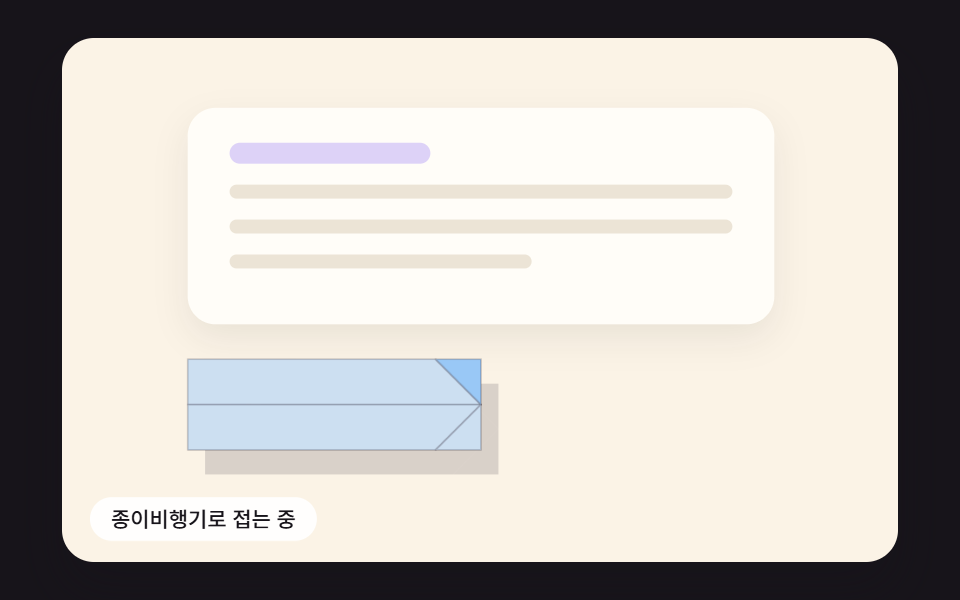 Send Button Animation CSS: 9 Fold-and-Fly ButtonsA send button should show that something left — 01 folds into a paper plane that banks along a curve, 02 springs back as See all demos in this post
If you like this effect - similar demos
 Buttons01 Ink-diffusion Button That Spreads From the Click PointButton Click Effect CSS: 9 Canvas Pixel Patterns
 Buttons02 Button that unlocks when the form is valid9 button state css patterns, loading to done
 Buttons05 Theme button where the sun and moon trade places9 Icon Button CSS Patterns — Press, Drag, Expand