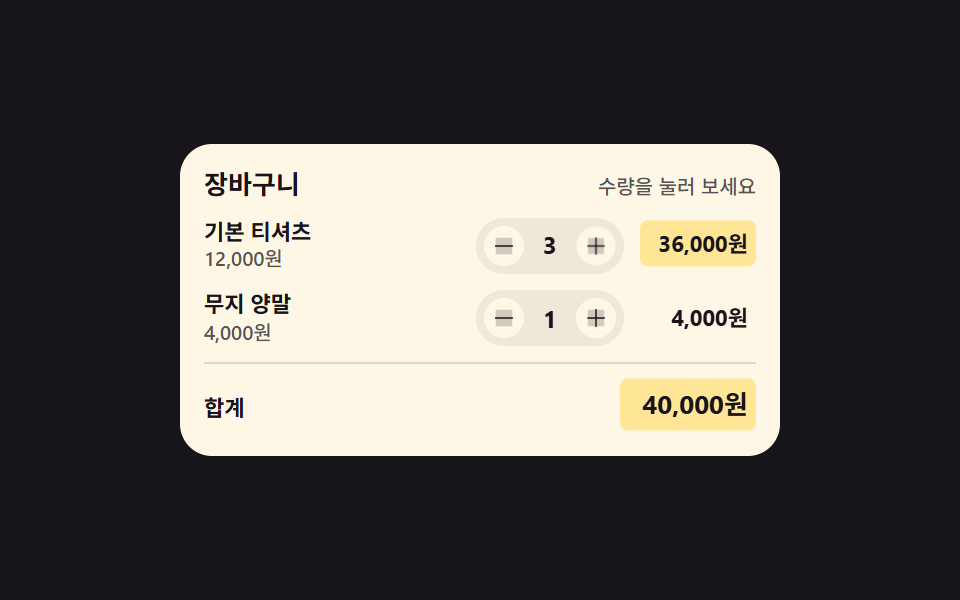
01Quantity change that tints the line total and the grand total together
Changing the quantity recalculates the line subtotal and the grand total in the same tick, and only those two number cells tint and cool back down.
Best forShopping cart line items, booking screens where the head count changes
background-colortransitiontabular-nums

<main class="stage">
  <section class="qs is-demo" id="qs" aria-label="Cart quantity and totals">
    <header class="qs__head">
      <p class="qs__title">Cart</p>
      <p class="qs__hint">Tap the quantity</p>
    </header>
    <ul class="qs__list">
      <li class="qs__row" data-qty="2">
        <span class="qs__info">
          <span class="qs__name">Basic tee</span>
          <span class="qs__unit">12,000 KRW</span>
        </span>
        <span class="qs__step">
          <button class="qs__b qs__b--down" type="button" data-step="-1" aria-label="Decrease Basic tee quantity"><svg viewBox="0 0 256 256" width="12" height="12" fill="currentColor" aria-hidden="true"><path d="M216,56V200a16,16,0,0,1-16,16H56a16,16,0,0,1-16-16V56A16,16,0,0,1,56,40H200A16,16,0,0,1,216,56Z" opacity="0.2"/><path d="M224,128a8,8,0,0,1-8,8H40a8,8,0,0,1,0-16H216A8,8,0,0,1,224,128Z"/></svg></button>
          <output class="qs__q qs__swap"><span class="qs__v">2</span><span class="qs__alt" aria-hidden="true">3</span></output>
          <button class="qs__b qs__b--up" type="button" data-step="1" aria-label="Increase Basic tee quantity"><svg viewBox="0 0 256 256" width="12" height="12" fill="currentColor" aria-hidden="true"><path d="M216,56V200a16,16,0,0,1-16,16H56a16,16,0,0,1-16-16V56A16,16,0,0,1,56,40H200A16,16,0,0,1,216,56Z" opacity="0.2"/><path d="M224,128a8,8,0,0,1-8,8H136v80a8,8,0,0,1-16,0V136H40a8,8,0,0,1,0-16h80V40a8,8,0,0,1,16,0v80h80A8,8,0,0,1,224,128Z"/></svg></button>
        </span>
        <span class="qs__sum qs__swap"><span class="qs__v qs__money">24,000 KRW</span><span class="qs__alt" aria-hidden="true">36,000 KRW</span></span>
      </li>
      <li class="qs__row" data-qty="1">
        <span class="qs__info">
          <span class="qs__name">Plain socks</span>
          <span class="qs__unit">4,000 KRW</span>
        </span>
        <span class="qs__step">
          <button class="qs__b qs__b--down" type="button" data-step="-1" aria-label="Decrease Plain socks quantity"><svg viewBox="0 0 256 256" width="12" height="12" fill="currentColor" aria-hidden="true"><path d="M216,56V200a16,16,0,0,1-16,16H56a16,16,0,0,1-16-16V56A16,16,0,0,1,56,40H200A16,16,0,0,1,216,56Z" opacity="0.2"/><path d="M224,128a8,8,0,0,1-8,8H40a8,8,0,0,1,0-16H216A8,8,0,0,1,224,128Z"/></svg></button>
          <output class="qs__q"><span class="qs__v">1</span></output>
          <button class="qs__b qs__b--up" type="button" data-step="1" aria-label="Increase Plain socks quantity"><svg viewBox="0 0 256 256" width="12" height="12" fill="currentColor" aria-hidden="true"><path d="M216,56V200a16,16,0,0,1-16,16H56a16,16,0,0,1-16-16V56A16,16,0,0,1,56,40H200A16,16,0,0,1,216,56Z" opacity="0.2"/><path d="M224,128a8,8,0,0,1-8,8H136v80a8,8,0,0,1-16,0V136H40a8,8,0,0,1,0-16h80V40a8,8,0,0,1,16,0v80h80A8,8,0,0,1,224,128Z"/></svg></button>
        </span>
        <span class="qs__sum"><span class="qs__v qs__money">4,000 KRW</span></span>
      </li>
    </ul>
    <p class="qs__total">
      <span class="qs__tlabel">Total</span>
      <output class="qs__sum qs__sum--grand qs__swap" id="qs-grand"><span class="qs__v" id="qs-grandv">28,000 KRW</span><span class="qs__alt" aria-hidden="true">40,000 KRW</span></output>
    </p>
  </section>
</main>@use "../../../../site/static/demo-tokens" as *;
// 수량을 바꾸면 그 줄 소계와 아래 합계가 같은 순간에 다시 계산되고,
// 바뀐 숫자 칸 두 곳만 background-color 가 켜졌다 transition 으로 식는다.
// 숫자는 font-variant-numeric: tabular-nums 라 자릿수가 늘어도 칸이 흔들리지 않는다.
$duration: $dur-loop;
$easing: $ease-spring;
$color: $stage-yellow;
@include stage($stage-ink);
.qs {
box-sizing: border-box;
width: min(300px, 92vw);
padding: $sp-3;
border-radius: $r-card;
background: $subject-cream;
color: $subject-ink;
font-family: -apple-system, "Segoe UI", "Noto Sans KR", sans-serif;
}
.qs * { box-sizing: border-box; }
.qs__head {
display: flex;
align-items: baseline;
justify-content: space-between;
gap: $sp-2;
}
.qs__title {
margin: 0;
font-size: 13px;
font-weight: 700;
line-height: 1.3;
}
.qs__hint {
margin: 0;
font-size: 10px;
font-weight: 500;
line-height: 1.3;
color: rgba($subject-ink, .72);
}
.qs__list {
display: grid;
gap: $sp-2;
margin: $sp-2 0 0;
padding: 0;
list-style: none;
}
.qs__row {
display: grid;
grid-template-columns: 1fr auto auto;
align-items: center;
gap: $sp-2;
}
.qs__info {
display: grid;
min-width: 0;
}
.qs__name {
font-size: 11px;
font-weight: 700;
line-height: 1.35;
white-space: nowrap;
overflow: hidden;
text-overflow: ellipsis;
}
.qs__unit {
font-size: 10px;
font-weight: 500;
line-height: 1.35;
color: rgba($subject-ink, .72);
font-variant-numeric: tabular-nums;
}
.qs__step {
display: inline-flex;
align-items: center;
gap: $sp-1;
padding: $sp-1;
border-radius: $r-pill;
background: rgba(23, 20, 26, .07);
}
.qs__b {
display: inline-grid;
place-items: center;
width: 20px;
height: 20px;
padding: 0;
margin: 0;
border: 0;
border-radius: 50%;
background: $subject-cream;
color: $subject-ink;
cursor: pointer;
&:focus-visible { outline: 2px solid $subject-blue; outline-offset: 2px; }
}
// 숫자 칸 — 자릿수가 바뀌어도 폭이 흔들리지 않게 tabular-nums + min-width
.qs__q {
position: relative;
min-width: 18px;
text-align: center;
font-size: 12px;
font-weight: 700;
line-height: 1.4;
font-variant-numeric: tabular-nums;
}
.qs__sum {
position: relative;
justify-self: end;
min-width: 58px;
padding: $sp-1;
border-radius: $r-xs;
text-align: right;
font-size: 11px;
font-weight: 700;
line-height: 1.4;
font-variant-numeric: tabular-nums;
// 실제 클릭 경로: 배경을 한 번 켜고(transition: none) 클래스를 떼면 이 transition 이 식힌다
background-color: rgba($stage-yellow, 0);
transition: background-color $dur-enter $ease-out;
&.is-hot {
background-color: rgba($stage-yellow, .62);
transition: none;
}
}
// 미리보기 루프에서만 쓰는 두 번째 숫자 — 정적 경로에서는 자리를 차지하지 않고 보이지도 않는다
.qs__alt {
position: absolute;
inset: 0;
display: grid;
place-items: center;
opacity: 0;
}
.qs__sum .qs__alt {
place-items: center end;
padding: $sp-1;
}
.qs__total {
display: flex;
align-items: center;
justify-content: space-between;
gap: $sp-2;
margin: $sp-2 0 0;
padding: $sp-2 0 0;
border-top: 1px solid rgba(23, 20, 26, .14);
}
.qs__tlabel {
font-size: 11px;
font-weight: 700;
line-height: 1.4;
}
.qs__sum--grand {
min-width: 68px;
font-size: 13px;
}
// ── 격자 미리보기 루프 (2초) ──
// 숫자 교체는 steps(1, end) 컷이다 — 크로스페이드로 겹치면 대표 이미지에 두 숫자가 반투명하게 겹친다.
// 컷만으로는 움직인 프레임이 모자라니 칸이 살짝 솟았다 내려오는 translateY 를 곁들인다.
@keyframes qs-a {
0%, 24% { opacity: 1; }
25%, 62% { opacity: 0; }
63%, 100% { opacity: 1; }
}
@keyframes qs-b {
0%, 24% { opacity: 0; }
25%, 62% { opacity: 1; }
63%, 100% { opacity: 0; }
}
@keyframes qs-tint {
0%, 24% { background-color: rgba($stage-yellow, 0); }
25% { background-color: rgba($stage-yellow, .62); }
54% { background-color: rgba($stage-yellow, 0); }
62% { background-color: rgba($stage-yellow, 0); }
63% { background-color: rgba($stage-yellow, .62); }
88%, 100% { background-color: rgba($stage-yellow, 0); }
}
@keyframes qs-pop {
0%, 24% { transform: translateY(0); }
25% { transform: translateY(-4px); }
40% { transform: translateY(0); }
62% { transform: translateY(0); }
63% { transform: translateY(-4px); }
78%, 100% { transform: translateY(0); }
}
@keyframes qs-press-up {
0%, 21% { transform: scale(1); }
25% { transform: scale(.78); }
37%, 100% { transform: scale(1); }
}
@keyframes qs-press-down {
0%, 59% { transform: scale(1); }
63% { transform: scale(.78); }
75%, 100% { transform: scale(1); }
}
.qs.is-demo {
.qs__swap .qs__v { animation-name: qs-a; }
.qs__swap .qs__alt { animation-name: qs-b; }
.qs__swap .qs__v,
.qs__swap .qs__alt {
animation-duration: $duration;
animation-timing-function: steps(1, end);
animation-iteration-count: infinite;
animation-fill-mode: backwards;
}
.qs__sum.qs__swap {
animation-name: qs-tint, qs-pop;
animation-duration: $duration, $duration;
animation-timing-function: $ease-out, $easing;
animation-iteration-count: infinite, infinite;
animation-fill-mode: backwards, backwards;
}
.qs__row:first-child .qs__b--up { animation-name: qs-press-up; }
.qs__row:first-child .qs__b--down { animation-name: qs-press-down; }
.qs__row:first-child .qs__b {
animation-duration: $duration;
animation-timing-function: $easing;
animation-iteration-count: infinite;
animation-fill-mode: backwards;
}
}
@media (max-width: 340px) {
.qs { padding: $sp-2; }
.qs__sum { min-width: 52px; }
.qs__sum--grand { min-width: 60px; }
.qs__b { width: 18px; height: 18px; }
}
@media (prefers-reduced-motion: reduce) {
.qs.is-demo .qs__v,
.qs.is-demo .qs__b,
.qs.is-demo .qs__sum {
animation: none !important;
transform: none !important;
}
.qs.is-demo .qs__v { opacity: 1 !important; }
// 정지 상태에서도 값은 보인다 — 겹쳐 둔 두 번째 숫자만 계속 감춘다
.qs.is-demo .qs__alt { animation: none !important; opacity: 0 !important; }
.qs.is-demo .qs__sum { background-color: rgba($stage-yellow, 0) !important; }
.qs__sum { transition: none !important; }
}html, body {
margin: 0;
overflow: hidden;
}
.stage {
box-sizing: border-box;
min-height: 100vh;
display: grid;
place-items: center;
margin: 0;
background: #17141a;
font-family: -apple-system, "Segoe UI", "Noto Sans KR", sans-serif;
padding: clamp(8px, 4vw, 24px);
}
.qs {
box-sizing: border-box;
width: min(300px, 92vw);
padding: 12px;
border-radius: 16px;
background: #fff7e6;
color: #17141a;
font-family: -apple-system, "Segoe UI", "Noto Sans KR", sans-serif;
}
.qs * {
box-sizing: border-box;
}
.qs__head {
display: flex;
align-items: baseline;
justify-content: space-between;
gap: 8px;
}
.qs__title {
margin: 0;
font-size: 13px;
font-weight: 700;
line-height: 1.3;
}
.qs__hint {
margin: 0;
font-size: 10px;
font-weight: 500;
line-height: 1.3;
color: rgba(23, 20, 26, 0.72);
}
.qs__list {
display: grid;
gap: 8px;
margin: 8px 0 0;
padding: 0;
list-style: none;
}
.qs__row {
display: grid;
grid-template-columns: 1fr auto auto;
align-items: center;
gap: 8px;
}
.qs__info {
display: grid;
min-width: 0;
}
.qs__name {
font-size: 11px;
font-weight: 700;
line-height: 1.35;
white-space: nowrap;
overflow: hidden;
text-overflow: ellipsis;
}
.qs__unit {
font-size: 10px;
font-weight: 500;
line-height: 1.35;
color: rgba(23, 20, 26, 0.72);
font-variant-numeric: tabular-nums;
}
.qs__step {
display: inline-flex;
align-items: center;
gap: 4px;
padding: 4px;
border-radius: 999px;
background: rgba(23, 20, 26, 0.07);
}
.qs__b {
display: inline-grid;
place-items: center;
width: 20px;
height: 20px;
padding: 0;
margin: 0;
border: 0;
border-radius: 50%;
background: #fff7e6;
color: #17141a;
cursor: pointer;
}
.qs__b:focus-visible {
outline: 2px solid #2f6df6;
outline-offset: 2px;
}
.qs__q {
position: relative;
min-width: 18px;
text-align: center;
font-size: 12px;
font-weight: 700;
line-height: 1.4;
font-variant-numeric: tabular-nums;
}
.qs__sum {
position: relative;
justify-self: end;
min-width: 58px;
padding: 4px;
border-radius: 4px;
text-align: right;
font-size: 11px;
font-weight: 700;
line-height: 1.4;
font-variant-numeric: tabular-nums;
background-color: rgba(255, 210, 63, 0);
transition: background-color 600ms ease-out;
}
.qs__sum.is-hot {
background-color: rgba(255, 210, 63, 0.62);
transition: none;
}
.qs__alt {
position: absolute;
inset: 0;
display: grid;
place-items: center;
opacity: 0;
}
.qs__sum .qs__alt {
place-items: center end;
padding: 4px;
}
.qs__total {
display: flex;
align-items: center;
justify-content: space-between;
gap: 8px;
margin: 8px 0 0;
padding: 8px 0 0;
border-top: 1px solid rgba(23, 20, 26, 0.14);
}
.qs__tlabel {
font-size: 11px;
font-weight: 700;
line-height: 1.4;
}
.qs__sum--grand {
min-width: 68px;
font-size: 13px;
}
@keyframes qs-a {
0%, 24% {
opacity: 1;
}
25%, 62% {
opacity: 0;
}
63%, 100% {
opacity: 1;
}
}
@keyframes qs-b {
0%, 24% {
opacity: 0;
}
25%, 62% {
opacity: 1;
}
63%, 100% {
opacity: 0;
}
}
@keyframes qs-tint {
0%, 24% {
background-color: rgba(255, 210, 63, 0);
}
25% {
background-color: rgba(255, 210, 63, 0.62);
}
54% {
background-color: rgba(255, 210, 63, 0);
}
62% {
background-color: rgba(255, 210, 63, 0);
}
63% {
background-color: rgba(255, 210, 63, 0.62);
}
88%, 100% {
background-color: rgba(255, 210, 63, 0);
}
}
@keyframes qs-pop {
0%, 24% {
transform: translateY(0);
}
25% {
transform: translateY(-4px);
}
40% {
transform: translateY(0);
}
62% {
transform: translateY(0);
}
63% {
transform: translateY(-4px);
}
78%, 100% {
transform: translateY(0);
}
}
@keyframes qs-press-up {
0%, 21% {
transform: scale(1);
}
25% {
transform: scale(0.78);
}
37%, 100% {
transform: scale(1);
}
}
@keyframes qs-press-down {
0%, 59% {
transform: scale(1);
}
63% {
transform: scale(0.78);
}
75%, 100% {
transform: scale(1);
}
}
.qs.is-demo .qs__swap .qs__v {
animation-name: qs-a;
}
.qs.is-demo .qs__swap .qs__alt {
animation-name: qs-b;
}
.qs.is-demo .qs__swap .qs__v,
.qs.is-demo .qs__swap .qs__alt {
animation-duration: 2s;
animation-timing-function: steps(1, end);
animation-iteration-count: infinite;
animation-fill-mode: backwards;
}
.qs.is-demo .qs__sum.qs__swap {
animation-name: qs-tint, qs-pop;
animation-duration: 2s, 2s;
animation-timing-function: ease-out, cubic-bezier(0.2, 0.8, 0.2, 1);
animation-iteration-count: infinite, infinite;
animation-fill-mode: backwards, backwards;
}
.qs.is-demo .qs__row:first-child .qs__b--up {
animation-name: qs-press-up;
}
.qs.is-demo .qs__row:first-child .qs__b--down {
animation-name: qs-press-down;
}
.qs.is-demo .qs__row:first-child .qs__b {
animation-duration: 2s;
animation-timing-function: cubic-bezier(0.2, 0.8, 0.2, 1);
animation-iteration-count: infinite;
animation-fill-mode: backwards;
}
@media (max-width: 340px) {
.qs {
padding: 8px;
}
.qs__sum {
min-width: 52px;
}
.qs__sum--grand {
min-width: 60px;
}
.qs__b {
width: 18px;
height: 18px;
}
}
@media (prefers-reduced-motion: reduce) {
.qs.is-demo .qs__v,
.qs.is-demo .qs__b,
.qs.is-demo .qs__sum {
animation: none !important;
transform: none !important;
}
.qs.is-demo .qs__v {
opacity: 1 !important;
}
.qs.is-demo .qs__alt {
animation: none !important;
opacity: 0 !important;
}
.qs.is-demo .qs__sum {
background-color: rgba(255, 210, 63, 0) !important;
}
.qs__sum {
transition: none !important;
}
}// 수량을 바꾸면 그 줄 소계와 아래 합계를 같은 순간에 다시 계산한다.
// 금액 서식은 화면에 이미 있는 단가 글자에서 뽑는다 — 언어팩이 바꿔 둔 통화 표기를 그대로 따라간다
var qsRoot = document.getElementById('qs');
var qsRows = qsRoot.querySelectorAll('.qs__row');
var qsGrand = document.getElementById('qs-grand');
var qsGrandValue = document.getElementById('qs-grandv');
function qsComma(n) { return String(n).replace(/\B(?=(\d{3})+$)/g, ','); }
function qsUnitText(row) { return row.querySelector('.qs__unit').textContent.trim(); }
function qsAmount(text) { return Number(text.replace(/[^\d]/g, '')); }
function qsMoney(row, n) { return qsUnitText(row).replace(/[\d,]+/, qsComma(n)); }
function qsPaint(row) {
var qty = Number(row.getAttribute('data-qty'));
row.querySelector('.qs__q .qs__v').textContent = String(qty);
row.querySelector('.qs__money').textContent = qsMoney(row, qty * qsAmount(qsUnitText(row)));
}
function qsTotal() {
var sum = 0;
for (var i = 0; i < qsRows.length; i++) {
sum += Number(qsRows[i].getAttribute('data-qty')) * qsAmount(qsUnitText(qsRows[i]));
}
qsGrandValue.textContent = qsMoney(qsRows[0], sum);
}
// 물들었다 식는다 — 배경만 한 번 켜고 transition 이 되돌린다
function qsTint(cell) {
cell.classList.add('is-hot');
setTimeout(function () { cell.classList.remove('is-hot'); }, 80);
}
function qsBump(row, step) {
qsRoot.classList.remove('is-demo');
var qty = Math.min(9, Math.max(1, Number(row.getAttribute('data-qty')) + step));
row.setAttribute('data-qty', String(qty));
qsPaint(row);
qsTotal();
qsTint(row.querySelector('.qs__sum'));
qsTint(qsGrand);
}
qsRoot.addEventListener('click', function (e) {
var btn = e.target.closest('.qs__b');
if (btn) { qsBump(btn.closest('.qs__row'), Number(btn.getAttribute('data-step'))); }
});import { useState } from "react";
import type { CSSProperties } from "react";
import styles from "./CartQtySubtotalSync.module.scss";
export type CartQtyLine = {
id: string;
name: string;
/** 단가 글자 그대로 — 금액 서식(통화 기호·자릿점)을 여기서 뽑아 쓴다 */
unit: string;
qty: number;
downLabel: string;
upLabel: string;
};
export type CartQtySubtotalSyncProps = {
title?: string;
hint?: string;
totalLabel?: string;
groupLabel?: string;
lines?: CartQtyLine[];
/** 격자 미리보기용 2초 자동 루프. 사람이 손대면 꺼진다 */
demo?: boolean;
duration?: number;
easing?: string;
color?: string;
};
type Vars = CSSProperties & { "--duration"?: string; "--easing"?: string; "--color"?: string };
const DEFAULT_LINES: CartQtyLine[] = [
{ id: "tee", name: "기본 티셔츠", unit: "12,000원", qty: 2, downLabel: "기본 티셔츠 수량 줄이기", upLabel: "기본 티셔츠 수량 늘리기" },
{ id: "socks", name: "무지 양말", unit: "4,000원", qty: 1, downLabel: "무지 양말 수량 줄이기", upLabel: "무지 양말 수량 늘리기" },
];
function comma(n: number): string {
return String(n).replace(/\B(?=(\d{3})+$)/g, ",");
}
function amount(text: string): number {
return Number(text.replace(/[^\d]/g, ""));
}
// 금액 서식은 단가 글자를 그대로 본떠 만든다 — 언어팩이 바꿔 둔 통화 표기를 따라간다
function money(unit: string, n: number): string {
return unit.replace(/[\d,]+/, comma(n));
}
function MinusIcon() {
return (
<svg viewBox="0 0 256 256" width="12" height="12" fill="currentColor" aria-hidden="true"><path d="M216,56V200a16,16,0,0,1-16,16H56a16,16,0,0,1-16-16V56A16,16,0,0,1,56,40H200A16,16,0,0,1,216,56Z" opacity="0.2"/><path d="M224,128a8,8,0,0,1-8,8H40a8,8,0,0,1,0-16H216A8,8,0,0,1,224,128Z"/></svg>
);
}
function PlusIcon() {
return (
<svg viewBox="0 0 256 256" width="12" height="12" fill="currentColor" aria-hidden="true"><path d="M216,56V200a16,16,0,0,1-16,16H56a16,16,0,0,1-16-16V56A16,16,0,0,1,56,40H200A16,16,0,0,1,216,56Z" opacity="0.2"/><path d="M224,128a8,8,0,0,1-8,8H136v80a8,8,0,0,1-16,0V136H40a8,8,0,0,1,0-16h80V40a8,8,0,0,1,16,0v80h80A8,8,0,0,1,224,128Z"/></svg>
);
}
export default function CartQtySubtotalSync({
title = "장바구니",
hint = "수량을 눌러 보세요",
totalLabel = "합계",
groupLabel = "장바구니 수량과 합계",
lines = DEFAULT_LINES,
demo = true,
duration = 2000,
easing = "cubic-bezier(.2,.8,.2,1)",
color = "#ffd23f",
}: CartQtySubtotalSyncProps) {
const [qty, setQty] = useState<number[]>(lines.map((l) => l.qty));
const [hot, setHot] = useState<string[]>([]);
const [live, setLive] = useState(demo);
const vars: Vars = { "--duration": `${duration}ms`, "--easing": easing, "--color": color };
const grand = lines.reduce((sum, l, i) => sum + qty[i] * amount(l.unit), 0);
// 미리보기 루프가 컷으로 갈아 끼우는 두 번째 값 — 첫 줄 수량이 하나 늘었을 때의 숫자
const altQty = lines[0].qty + 1;
const altGrand = lines.reduce((sum, l, i) => sum + (i === 0 ? altQty : l.qty) * amount(l.unit), 0);
// 수량·소계·합계를 같은 순간에 다시 계산하고, 바뀐 숫자 칸 두 곳만 배경을 한 번 켠다
function bump(index: number, step: number) {
setLive(false);
setQty((prev: number[]) => prev.map((q, k) => (k === index ? Math.min(9, Math.max(1, q + step)) : q)));
setHot([lines[index].id, "grand"]);
setTimeout(() => setHot([]), 80);
}
const cls = [styles.qs, live ? styles.isDemo : ""].filter(Boolean).join(" ");
const grandCls = [styles.sum, styles.grand, styles.swap, hot.indexOf("grand") >= 0 ? styles.isHot : ""].filter(Boolean).join(" ");
return (
<section className={cls} style={vars} aria-label={groupLabel}>
<header className={styles.head}>
<p className={styles.title}>{title}</p>
<p className={styles.hint}>{hint}</p>
</header>
<ul className={styles.list}>
{lines.map((line, i) => {
const swap = i === 0;
const sumCls = [styles.sum, swap ? styles.swap : "", hot.indexOf(line.id) >= 0 ? styles.isHot : ""].filter(Boolean).join(" ");
return (
<li className={styles.row} key={line.id}>
<span className={styles.info}>
<span className={styles.name}>{line.name}</span>
<span className={styles.unit}>{line.unit}</span>
</span>
<span className={styles.step}>
<button className={`${styles.btn} ${styles.btnDown}`} type="button" onClick={() => bump(i, -1)} aria-label={line.downLabel}><MinusIcon /></button>
<output className={`${styles.qty} ${swap ? styles.swap : ""}`}>
<span className={styles.value}>{qty[i]}</span>
{swap && live ? <span className={styles.alt} aria-hidden="true">{altQty}</span> : null}
</output>
<button className={`${styles.btn} ${styles.btnUp}`} type="button" onClick={() => bump(i, 1)} aria-label={line.upLabel}><PlusIcon /></button>
</span>
<span className={sumCls}>
<span className={styles.value}>{money(line.unit, qty[i] * amount(line.unit))}</span>
{swap && live ? <span className={styles.alt} aria-hidden="true">{money(line.unit, altQty * amount(line.unit))}</span> : null}
</span>
</li>
);
})}
</ul>
<p className={styles.total}>
<span className={styles.tlabel}>{totalLabel}</span>
<output className={grandCls}>
<span className={styles.value}>{money(lines[0].unit, grand)}</span>
{live ? <span className={styles.alt} aria-hidden="true">{money(lines[0].unit, altGrand)}</span> : null}
</output>
</p>
</section>
);
}01 Quantity change that tints the line total and the grand total together — Measured area 2.699% · moving frames 11/23Original by GODRICH · SCSS and React ship in the zip · Checkout Page Design — 9 Cart Patterns, No Library
The post this demo lives in
 Checkout Page Design — 9 Cart Patterns, No LibraryCheckout page design covers every screen between "I want this" and the pay button. These nine patterns are plain HTML, S See all demos in this post
If you like this effect - similar demos
 Inputs09 Reduced motion — killing shimmer and stagger for a list that appears instantlyAutocomplete Input: 9 Search Dropdowns
 Inputs09 Reduced-motion comparison toggle — the same checked-value change draws its line-length value on the normal panel, and jumps straight to target with no in-between step on the reduced panelCSS Custom Checkbox: 9 Interaction Patterns
 Inputs07 Live criteria-ratio reflection — the strength value follows the ratio of condition values that turn true out of the totalPassword Strength Meter UI: 9 Calculation Patterns