01Snowflake Layers That Read Size as Depth
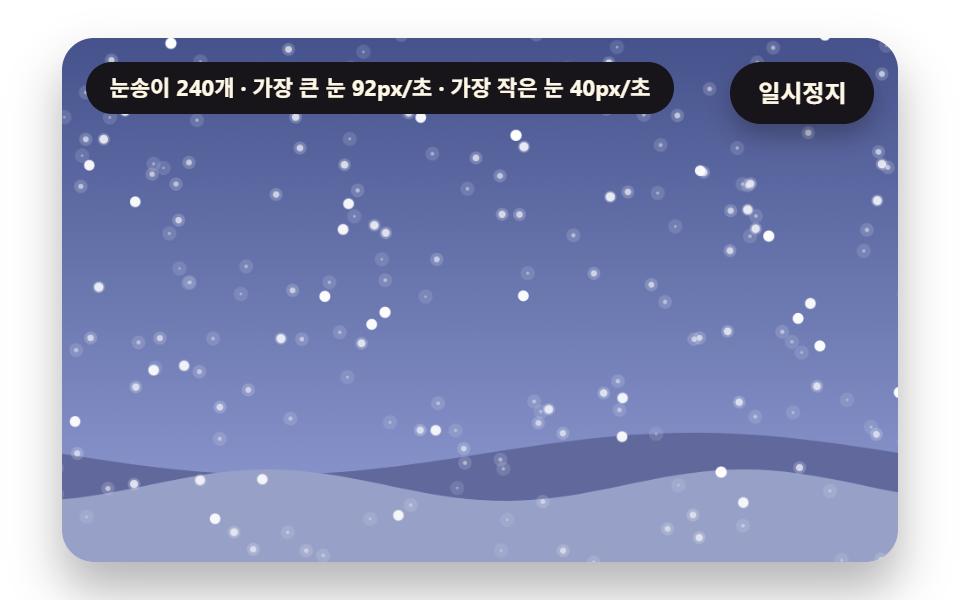
One flake size sets fall speed, blur radius and sway width together, so big flakes sweep fast and sharp up front while small ones sink slow and soft far back.
Best forFirst-screen background of a winter event landing page
Z_SPREADS_MAXspeedK
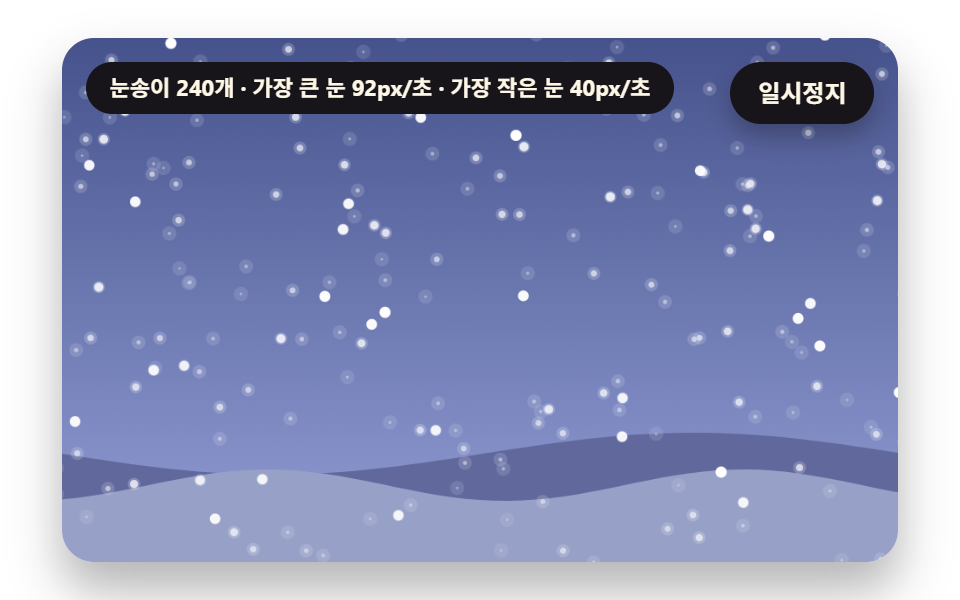
<main class="stage">
<div class="vj is-demo" id="vj">
  <div class="vj__pad" data-role="pad" tabindex="0" role="application" aria-label="Snow scene stage: click it, then change the wind with the left and right arrow keys, press Enter to pause">
    <canvas class="vj__canvas" data-role="canvas" width="480" height="300" role="img" aria-label="A snowy evening where one flake size sets fall speed, blur and sway, so big flakes sweep fast and sharp up front while small ones sink slow and soft far back"></canvas>
  </div>
  <p class="vj__status" data-role="status" aria-live="off">Snowy scene</p>
  <button class="vj__pause" data-role="pause" type="button" aria-pressed="false">Pause</button>
</div>
</main>
@use "../../../../site/static/demo-tokens" as *;
@include stage($stage-paper);
.vj {
position: relative;
width: min(92vw, calc(160vh - 12.8vw));
aspect-ratio: 480 / 300;
margin: 0 auto;
border-radius: $r-card;
overflow: hidden;
box-shadow: $shadow-raised;
background: $subject-cream;
}
// 무대 상자 — 여기서 시작한 터치만 바람 끌기로 읽는다(touch-action: none 은 이 상자에만). 무대 밖 터치는 페이지 스크롤 그대로
.vj__pad {
position: absolute;
inset: 0;
border-radius: inherit;
outline: none;
touch-action: none;
cursor: grab;
}
// 바깥 .vj 가 넘침을 자르므로 포커스 테두리는 안쪽으로 들인다
.vj__pad:focus-visible {
outline: 3px solid $subject-ink;
outline-offset: -3px;
}
.vj__canvas {
position: absolute;
inset: 0;
display: block;
width: 100%;
height: 100%;
}
.vj__pause {
position: absolute;
right: $sp-3;
top: $sp-3;
padding: $sp-1 $sp-3;
border: 2px solid $subject-ink;
border-radius: $r-pill;
background: $subject-ink;
color: $subject-cream;
font-family: inherit;
font-weight: 700;
font-size: 12px;
line-height: 1.6;
cursor: pointer;
box-shadow: $shadow-press;
transition: transform $dur-quick $ease-spring;
}
// 눌린 상태(멈춤) — 바탕과 글자색을 뒤집어 aria-pressed 가 눈에도 보이게
.vj__pause[aria-pressed="true"] {
background: $subject-cream;
color: $subject-ink;
}
.vj__pause:hover {
transform: translateY(-2px);
}
.vj__pause:active {
transform: translateY(1px);
}
.vj__pause:focus-visible {
outline: 3px solid $subject-ink;
outline-offset: 3px;
}
// 상태 줄 — 지금 장면의 수치를 글자로. 시연 중에는 aria-live off, 사람이 처음 손대면 polite
.vj__status {
position: absolute;
left: $sp-3;
top: $sp-3;
max-width: calc(100% - 120px);
margin: 0;
padding: $sp-1 $sp-3;
border-radius: $r-pill;
background: $subject-ink;
color: $subject-cream;
font-weight: 700;
font-size: 11px;
line-height: 1.6;
white-space: nowrap;
overflow: hidden;
text-overflow: ellipsis;
pointer-events: none;
}
@media (max-width: 340px) {
.vj__pause,
.vj__status { font-size: 10px; padding: 0 $sp-2; }
}
// 움직임 줄이기 — 장면은 스크립트가 정지 장면 한 장으로 멈춘다. 버튼도 떠오르지 않게
@media (prefers-reduced-motion: reduce) {
.vj__pause { transition: none !important; }
.vj__pause:hover,
.vj__pause:active { transform: none !important; }
}html, body {
margin: 0;
overflow: hidden;
}
.stage {
box-sizing: border-box;
min-height: 100vh;
display: grid;
place-items: center;
margin: 0;
background: #ffffff;
font-family: -apple-system, "Segoe UI", "Noto Sans KR", sans-serif;
padding: clamp(8px, 4vw, 24px);
}
.vj {
position: relative;
width: min(92vw, 160vh - 12.8vw);
aspect-ratio: 480/300;
margin: 0 auto;
border-radius: 16px;
overflow: hidden;
box-shadow: 0 14px 24px rgba(23, 20, 26, 0.32);
background: #fff7e6;
}
.vj__pad {
position: absolute;
inset: 0;
border-radius: inherit;
outline: none;
touch-action: none;
cursor: grab;
}
.vj__pad:focus-visible {
outline: 3px solid #17141a;
outline-offset: -3px;
}
.vj__canvas {
position: absolute;
inset: 0;
display: block;
width: 100%;
height: 100%;
}
.vj__pause {
position: absolute;
right: 12px;
top: 12px;
padding: 4px 12px;
border: 2px solid #17141a;
border-radius: 999px;
background: #17141a;
color: #fff7e6;
font-family: inherit;
font-weight: 700;
font-size: 12px;
line-height: 1.6;
cursor: pointer;
box-shadow: 0 6px 12px rgba(23, 20, 26, 0.32);
transition: transform 220ms cubic-bezier(0.2, 0.8, 0.2, 1);
}
.vj__pause[aria-pressed=true] {
background: #fff7e6;
color: #17141a;
}
.vj__pause:hover {
transform: translateY(-2px);
}
.vj__pause:active {
transform: translateY(1px);
}
.vj__pause:focus-visible {
outline: 3px solid #17141a;
outline-offset: 3px;
}
.vj__status {
position: absolute;
left: 12px;
top: 12px;
max-width: calc(100% - 120px);
margin: 0;
padding: 4px 12px;
border-radius: 999px;
background: #17141a;
color: #fff7e6;
font-weight: 700;
font-size: 11px;
line-height: 1.6;
white-space: nowrap;
overflow: hidden;
text-overflow: ellipsis;
pointer-events: none;
}
@media (max-width: 340px) {
.vj__pause,
.vj__status {
font-size: 10px;
padding: 0 8px;
}
}
@media (prefers-reduced-motion: reduce) {
.vj__pause {
transition: none !important;
}
.vj__pause:hover,
.vj__pause:active {
transform: none !important;
}
}(function () {
const root = document.getElementById("vj");
if (!root) return;
// 무대 좌표 — 캔버스 안 계산은 늘 480×300. 화면에 보이는 크기와 상관없다
const W = 480;
const H = 300;
const TAU = Math.PI * 2;
function clamp(v, lo, hi) { return v < lo ? lo : (v > hi ? hi : v); }
function lerp(a, b, k) { return a + (b - a) * k; }
function ease(x) { const c = clamp(x, 0, 1); return c * c * (3 - 2 * c); }
// 시드 고정 난수 — 같은 시드면 같은 눈 (32비트 xorshift 에 곱셈 섞기 한 번)
function seeded(seed) {
let s = (seed * 2654435761) >>> 0 || 1;
return function () {
s ^= s << 13;
s >>>= 0;
s ^= s >>> 17;
s ^= s << 5;
s >>>= 0;
return (Math.imul(s, 0x9e3779b1) >>> 0) / 4294967296;
};
}
// 장면 시계(초) — 장면 계산이 고치고 화면 쪽이 읽는다
let sceneT = 0;
// 자동 시연이 장면을 움직이는가 — 사람이 무대에서 처음 손대면 꺼진다
let autoOn = true;
// 사람이 주는 바람(−1 왼쪽 ~ 1 오른쪽) — 방향키·무대 위 가로 끌기. 자동 시연 중에는 0
let windUser = 0;
function userWind() { return autoOn ? 0 : windUser; }
// 파스텔 팔레트 — 눈은 흰색 계열(기능색), 하늘·땅은 낮은 채도의 해질녘 청보라
const SNOW = [255, 255, 255];
const SNOW_SHADE = [208, 222, 246];
const SKY_TOP = [70, 82, 140];
const SKY_BOT = [146, 158, 212];
const NIGHT_TOP = [38, 44, 86];
const NIGHT_BOT = [78, 88, 140];
const GROUND = [196, 206, 232];
const DUSK = [96, 104, 156];
const DUSK_DEEP = [60, 66, 112];
const INK = [40, 36, 54];
const PAPER = [250, 246, 240];
const LAMP = [255, 232, 168];
const BUTTER = [247, 226, 156];
const ROSE = [232, 164, 178];
const MINT = [166, 220, 200];
const WATER = [190, 222, 248];
function mix(a, b, k) { return [lerp(a[0], b[0], k), lerp(a[1], b[1], k), lerp(a[2], b[2], k)]; }
function rgba(c, a) {
return 'rgba(' + Math.round(clamp(c[0], 0, 255)) + ',' + Math.round(clamp(c[1], 0, 255)) + ',' + Math.round(clamp(c[2], 0, 255)) + ',' + clamp(a, 0, 1).toFixed(3) + ')';
}
const canvasEl = root.querySelector('[data-role="canvas"]');
const padEl = root.querySelector('[data-role="pad"]');
const pauseEl = root.querySelector('[data-role="pause"]');
const statusEl = root.querySelector('[data-role="status"]');
const ctxRaw = canvasEl ? canvasEl.getContext('2d') : null;
if (!canvasEl || !ctxRaw || !pauseEl || !padEl) {
return;
}
const cv = canvasEl;
const ctx = ctxRaw;
const pauseBtn = pauseEl;
const pad = padEl;
// 외부 웹폰트는 부르지 않는다 — 기기에 있는 글꼴 목록만
const FONT_STACK = 'system-ui, -apple-system, "Segoe UI", "Noto Sans KR", sans-serif';
let dpr = 1;
function fitCanvas() {
// 배율은 2 에서 자른다 — 배율 3 기기에서 화소가 2.25배로 늘지 않게
dpr = Math.min(window.devicePixelRatio || 1, 2);
cv.width = Math.round(W * dpr);
cv.height = Math.round(H * dpr);
ctx.setTransform(dpr, 0, 0, dpr, 0, 0);
}
function skyFill(top, bot) {
const g = ctx.createLinearGradient(0, 0, 0, H);
g.addColorStop(0, rgba(top, 1));
g.addColorStop(1, rgba(bot, 1));
ctx.fillStyle = g;
ctx.fillRect(0, 0, W, H);
}
function disc(x, y, r, c, a) {
if (r <= 0.2 || a <= 0) {
return;
}
ctx.beginPath();
ctx.arc(x, y, r, 0, TAU);
ctx.fillStyle = rgba(c, a);
ctx.fill();
}
function ring(x, y, r, width, c, a) {
if (r <= 0.2 || a <= 0) {
return;
}
ctx.beginPath();
ctx.arc(x, y, r, 0, TAU);
ctx.lineWidth = width;
ctx.strokeStyle = rgba(c, a);
ctx.stroke();
}
function seg(x1, y1, x2, y2, width, c, a) {
if (a <= 0) {
return;
}
ctx.beginPath();
ctx.moveTo(x1, y1);
ctx.lineTo(x2, y2);
ctx.lineWidth = width;
ctx.lineCap = 'round';
ctx.strokeStyle = rgba(c, a);
ctx.stroke();
}
function box(x, y, w, h, r, c, a) {
if (w <= 0.2 || h <= 0.2 || a <= 0) {
return;
}
ctx.beginPath();
ctx.roundRect(x, y, w, h, Math.max(0, Math.min(r, w / 2, h / 2)));
ctx.fillStyle = rgba(c, a);
ctx.fill();
}
function text(s, x, y, c, a, px, weight, align) {
ctx.font = weight + ' ' + px + 'px ' + FONT_STACK;
ctx.textAlign = align;
ctx.textBaseline = 'middle';
ctx.fillStyle = rgba(c, a);
ctx.fillText(s, x, y);
}
// 글자 이름표 — 바탕 알약 위에 글자
function tag(s, x, y, bg, fg, px, align) {
ctx.font = '700 ' + px + 'px ' + FONT_STACK;
const w = ctx.measureText(s).width + px * 1.1;
const left = align === 'center' ? x - w / 2 : (align === 'right' ? x - w : x);
box(left, y - px * 0.82, w, px * 1.64, px * 0.82, bg, 0.92);
text(s, left + w / 2, y + 0.5, fg, 1, px, 700, 'center');
}
// 눈송이 한 알 — 번짐 반지름(blur)만큼 옅은 후광을 먼저 깔고 가운데를 또렷하게
function flakeDot(x, y, r, blur, c, a) {
if (blur > 0.3) {
disc(x, y, r + blur, c, a * 0.3);
}
disc(x, y, r, c, a);
}
// ── 01 크기로 깊이를 읽는 눈송이 층 ───────────────────────────
// 깊이 간격 — 0 이면 모든 눈이 같은 빠르기·같은 선명도. 값이 클수록 가까운 눈과 먼 눈의 차가 커진다
const Z_SPREAD = 0.5;
// 기준 낙하 빠르기(px/초)
const FALL = 66;
// 가장 먼 눈의 번짐 반지름 바탕값(px)
const BLUR = 3.4;
// 가로 흔들림 진폭 바탕값(px)
const SWAY = 15;
const FLAKES = 240;
const S_MIN = 1.1;
const S_MAX = 5.2;
const LOOP_S = 6;
const REST_STEPS = 60;
let flakes = [];
let rng = seeded(101);
// 크기에서 깊이 — 가장 작은 눈 0, 가장 큰 눈 1
function depthOf(s) { return (s - S_MIN) / (S_MAX - S_MIN); }
// 깊이에서 속도 배율 — Z_SPREAD 가 0.5 면 0.6 ~ 1.4 배, 1.0 이면 0.2 ~ 1.8 배
function speedK(z) { return lerp(1 - 0.8 * Z_SPREAD, 1 + 0.8 * Z_SPREAD, z); }
function blurOf(z) { return (1 - z) * BLUR * (0.5 + Z_SPREAD); }
function fallOf(f) { return FALL * speedK(f.z); }
function reset() {
rng = seeded(101);
flakes = [];
for (let i = 0; i < FLAKES; i += 1) {
const s = S_MIN + Math.pow(rng(), 1.7) * (S_MAX - S_MIN);
flakes.push({ bx: rng() * (W + 60) - 30, y: rng() * (H + 20) - 10, s: s, z: depthOf(s), ph: rng() * TAU });
}
// 먼 것부터 그린다 — 가까운 눈이 위에 놓이게 크기 순으로 한 번만 정렬
flakes.sort(function (a, b) { return a.s - b.s; });
}
function update(dt) {
// 자동 시연 바람 — 천천히 오가는 사인. 사람이 만지면 그 값으로 바뀐다
const wind = autoOn ? Math.sin(sceneT * 1.1) * 0.6 : userWind();
for (const f of flakes) {
f.y += fallOf(f) * dt;
f.bx += wind * 34 * (0.3 + f.z) * dt;
if (f.y > H + 8) {
f.y -= H + 16;
}
if (f.bx > W + 30) {
f.bx -= W + 60;
}
if (f.bx < -30) {
f.bx += W + 60;
}
}
}
function draw() {
skyFill(SKY_TOP, SKY_BOT);
// 먼 언덕 둘 — 깊이 층이 겹쳐 보이는 바탕
for (let layer = 0; layer < 2; layer += 1) {
ctx.beginPath();
ctx.moveTo(0, H);
for (let x = 0; x <= W; x += 8) {
const y = 238 + layer * 18 + Math.sin(x * (0.013 + layer * 0.01) + layer * 2) * (12 - layer * 3);
ctx.lineTo(x, y);
}
ctx.lineTo(W, H);
ctx.closePath();
ctx.fillStyle = rgba(mix(DUSK, GROUND, layer * 0.55), 1);
ctx.fill();
}
for (const f of flakes) {
const sway = Math.sin(sceneT * 1.3 + f.ph) * SWAY * (0.3 + f.z);
const tint = mix(SNOW, SKY_BOT, (1 - f.z) * 0.35);
flakeDot(f.bx + sway, f.y, f.s * 0.62, blurOf(f.z), tint, lerp(0.5, 1, f.z));
}
}
function statusText() {
let fast = 0;
let slow = 1e9;
for (const f of flakes) {
const v = fallOf(f);
if (v > fast) {
fast = v;
}
if (v < slow) {
slow = v;
}
}
return '{n} flakes · biggest {a}px/s · smallest {b}px/s'.replace('{n}', String(flakes.length)).replace('{a}', String(Math.round(fast))).replace('{b}', String(Math.round(slow)));
}
let shownStatus = '';
function pushStatus(s) {
if (!statusEl || s === shownStatus) {
return;
}
shownStatus = s;
statusEl.textContent = s;
}
let paused = false;
const reduceQuery = window.matchMedia('(prefers-reduced-motion: reduce)');
// 페이지를 연 채 움직임 줄이기 설정을 바꿔도 change 리스너가 다시 읽는다
let still = reduceQuery.matches;
// 자동 시연 표시 — 사람이 처음 손대면 떼고 상태 줄을 polite 로 켠다
let demo = root.classList.contains('is-demo');
const off = new AbortController();
function wake() {
if (!demo) {
return;
}
demo = false;
root.classList.remove('is-demo');
if (statusEl) {
statusEl.setAttribute('aria-live', 'polite');
}
}
// 사람이 바람을 만지면 자동 시연의 바람은 손을 뗀다
function takeOver() {
wake();
autoOn = false;
}
// 한 프레임에 넘기는 시간 상한(초) — 오래 숨었다 돌아온 첫 프레임도 50ms 까지만 계산에 넣는다
const DT_MAX = 0.05;
// 방향키 한 번에 바뀌는 바람 몫
const WIND_STEP = 0.25;
function showNow() {
if (still || paused) {
draw();
pushStatus(statusText());
}
}
function advance(dt) {
sceneT += dt;
if (sceneT >= LOOP_S) {
sceneT -= LOOP_S;
reset();
}
update(dt);
}
let rafId = 0;
let lastTs = -1;
function frame(ts) {
if (still || paused) {
rafId = 0;
return;
}
if (lastTs < 0) {
lastTs = ts;
}
const dt = Math.min((ts - lastTs) / 1000, DT_MAX);
lastTs = ts;
if (dt > 0) {
advance(dt);
}
draw();
pushStatus(statusText());
rafId = window.requestAnimationFrame(frame);
}
function startLoop() {
if (rafId) {
return;
}
// 멈췄던 사이의 시간을 첫 프레임 dt 로 넘기지 않는다
lastTs = -1;
rafId = window.requestAnimationFrame(frame);
}
function stopLoop() {
if (rafId) {
window.cancelAnimationFrame(rafId);
rafId = 0;
}
}
// 움직임 줄이기 — 루프 없이 눈이 이미 내려 쌓인 정지 장면 한 장
function showRest() {
stopLoop();
sceneT = 0;
reset();
for (let k = 0; k < REST_STEPS; k += 1) {
update(1 / 30);
}
draw();
pushStatus(statusText());
}
function play() {
sceneT = 0;
reset();
draw();
pushStatus(statusText());
if (!paused) {
startLoop();
}
}
function togglePause() {
paused = !paused;
pauseBtn.setAttribute('aria-pressed', paused ? 'true' : 'false');
wake();
if (paused) {
stopLoop();
}
else if (!still) {
startLoop();
}
}
pauseBtn.addEventListener('click', togglePause, { signal: off.signal });
// 방향키 — 무대에 포커스가 있을 때만. 왼쪽·오른쪽은 바람, Enter·Space 는 Pause. 무대 밖에서는 화살표가 페이지를 스크롤한다
pad.addEventListener('keydown', function (e) {
if (e.altKey || e.ctrlKey || e.metaKey) {
return;
}
if (e.key === 'ArrowLeft' || e.key === 'ArrowRight') {
e.preventDefault();
takeOver();
windUser = clamp(windUser + (e.key === 'ArrowRight' ? WIND_STEP : -WIND_STEP), -1, 1);
showNow();
}
else if (e.key === 'Enter' || e.key === ' ') {
e.preventDefault();
togglePause();
}
}, { signal: off.signal });
// 포인터 — 무대 안에서 누른 채 가로로 끌면 그 위치가 바람(가운데 0, 가장자리 ±1)
let dragging = -1;
function windAt(e) {
const r = pad.getBoundingClientRect();
windUser = clamp(((e.clientX - r.left) / r.width - 0.5) * 2.4, -1, 1);
}
pad.addEventListener('pointerdown', function (e) {
takeOver();
pad.setPointerCapture(e.pointerId);
dragging = e.pointerId;
windAt(e);
showNow();
}, { signal: off.signal });
pad.addEventListener('pointermove', function (e) {
if (dragging !== e.pointerId) {
return;
}
windAt(e);
showNow();
}, { signal: off.signal });
function release(e) {
if (dragging !== e.pointerId) {
return;
}
dragging = -1;
windUser = 0;
showNow();
}
pad.addEventListener('pointerup', release, { signal: off.signal });
pad.addEventListener('pointercancel', release, { signal: off.signal });
// 탭이 숨으면 멈추고, 돌아오면 시계를 다시 맞춰 시작 — 숨은 동안의 몇 초가 한 프레임에 몰리지 않게
document.addEventListener('visibilitychange', function () {
if (document.hidden) {
stopLoop();
}
else if (!paused && !still) {
startLoop();
}
}, { signal: off.signal });
// 설정이 바뀌면 — 켜지면 정지 장면, 꺼지면 다시 움직인다
reduceQuery.addEventListener('change', function () {
still = reduceQuery.matches;
if (still) {
showRest();
}
else {
play();
}
}, { signal: off.signal });
window.addEventListener('resize', function () {
fitCanvas();
draw();
}, { signal: off.signal });
fitCanvas();
if (still) {
showRest();
}
else {
play();
}
return function () {
stopLoop();
off.abort();
};
})();// DepthParallaxFlakes - 같은 항목 vanilla index.html 의 React 판. 같은 계산을 useEffect 안에서 돌린다
import { useEffect, useRef } from "react";
import styles from "./DepthParallaxFlakes.module.scss";
const cx = (s: string): string => s.split(" ").map((n) => styles[n] ?? n).join(" ");
export default function DepthParallaxFlakes() {
const rootRef = useRef<HTMLDivElement | null>(null);
useEffect(() => {
const rootEl = rootRef.current;
if (!rootEl) return;
const root: HTMLElement = rootEl;
type RGB = [number, number, number];
// 무대 좌표 — 캔버스 안 계산은 늘 480×300. 화면에 보이는 크기와 상관없다
const W = 480;
const H = 300;
const TAU = Math.PI * 2;
function clamp(v: number, lo: number, hi: number): number { return v < lo ? lo : (v > hi ? hi : v); }
function lerp(a: number, b: number, k: number): number { return a + (b - a) * k; }
function ease(x: number): number { const c = clamp(x, 0, 1); return c * c * (3 - 2 * c); }
// 시드 고정 난수 — 같은 시드면 같은 눈 (32비트 xorshift 에 곱셈 섞기 한 번)
function seeded(seed: number): () => number {
let s = (seed * 2654435761) >>> 0 || 1;
return function (): number {
s ^= s << 13; s >>>= 0;
s ^= s >>> 17;
s ^= s << 5; s >>>= 0;
return (Math.imul(s, 0x9e3779b1) >>> 0) / 4294967296;
};
}
// 장면 시계(초) — 장면 계산이 고치고 화면 쪽이 읽는다
let sceneT = 0;
// 자동 시연이 장면을 움직이는가 — 사람이 무대에서 처음 손대면 꺼진다
let autoOn = true;
// 사람이 주는 바람(−1 왼쪽 ~ 1 오른쪽) — 방향키·무대 위 가로 끌기. 자동 시연 중에는 0
let windUser = 0;
function userWind(): number { return autoOn ? 0 : windUser; }
// 파스텔 팔레트 — 눈은 흰색 계열(기능색), 하늘·땅은 낮은 채도의 해질녘 청보라
const SNOW: RGB = [255, 255, 255];
const SNOW_SHADE: RGB = [208, 222, 246];
const SKY_TOP: RGB = [70, 82, 140];
const SKY_BOT: RGB = [146, 158, 212];
const NIGHT_TOP: RGB = [38, 44, 86];
const NIGHT_BOT: RGB = [78, 88, 140];
const GROUND: RGB = [196, 206, 232];
const DUSK: RGB = [96, 104, 156];
const DUSK_DEEP: RGB = [60, 66, 112];
const INK: RGB = [40, 36, 54];
const PAPER: RGB = [250, 246, 240];
const LAMP: RGB = [255, 232, 168];
const BUTTER: RGB = [247, 226, 156];
const ROSE: RGB = [232, 164, 178];
const MINT: RGB = [166, 220, 200];
const WATER: RGB = [190, 222, 248];
function mix(a: RGB, b: RGB, k: number): RGB { return [lerp(a[0], b[0], k), lerp(a[1], b[1], k), lerp(a[2], b[2], k)]; }
function rgba(c: RGB, a: number): string {
return 'rgba(' + Math.round(clamp(c[0], 0, 255)) + ',' + Math.round(clamp(c[1], 0, 255)) + ',' + Math.round(clamp(c[2], 0, 255)) + ',' + clamp(a, 0, 1).toFixed(3) + ')';
}
const canvasEl = root.querySelector('[data-role="canvas"]') as HTMLCanvasElement | null;
const padEl = root.querySelector('[data-role="pad"]') as HTMLElement | null;
const pauseEl = root.querySelector('[data-role="pause"]') as HTMLButtonElement | null;
const statusEl = root.querySelector('[data-role="status"]') as HTMLElement | null;
const ctxRaw = canvasEl ? canvasEl.getContext('2d') : null;
if (!canvasEl || !ctxRaw || !pauseEl || !padEl) { return; }
const cv: HTMLCanvasElement = canvasEl;
const ctx: CanvasRenderingContext2D = ctxRaw;
const pauseBtn: HTMLButtonElement = pauseEl;
const pad: HTMLElement = padEl;
// 외부 웹폰트는 부르지 않는다 — 기기에 있는 글꼴 목록만
const FONT_STACK = 'system-ui, -apple-system, "Segoe UI", "Noto Sans KR", sans-serif';
let dpr = 1;
function fitCanvas(): void {
// 배율은 2 에서 자른다 — 배율 3 기기에서 화소가 2.25배로 늘지 않게
dpr = Math.min(window.devicePixelRatio || 1, 2);
cv.width = Math.round(W * dpr);
cv.height = Math.round(H * dpr);
ctx.setTransform(dpr, 0, 0, dpr, 0, 0);
}
function skyFill(top: RGB, bot: RGB): void {
const g = ctx.createLinearGradient(0, 0, 0, H);
g.addColorStop(0, rgba(top, 1));
g.addColorStop(1, rgba(bot, 1));
ctx.fillStyle = g;
ctx.fillRect(0, 0, W, H);
}
function disc(x: number, y: number, r: number, c: RGB, a: number): void {
if (r <= 0.2 || a <= 0) { return; }
ctx.beginPath();
ctx.arc(x, y, r, 0, TAU);
ctx.fillStyle = rgba(c, a);
ctx.fill();
}
function ring(x: number, y: number, r: number, width: number, c: RGB, a: number): void {
if (r <= 0.2 || a <= 0) { return; }
ctx.beginPath();
ctx.arc(x, y, r, 0, TAU);
ctx.lineWidth = width;
ctx.strokeStyle = rgba(c, a);
ctx.stroke();
}
function seg(x1: number, y1: number, x2: number, y2: number, width: number, c: RGB, a: number): void {
if (a <= 0) { return; }
ctx.beginPath();
ctx.moveTo(x1, y1);
ctx.lineTo(x2, y2);
ctx.lineWidth = width;
ctx.lineCap = 'round';
ctx.strokeStyle = rgba(c, a);
ctx.stroke();
}
function box(x: number, y: number, w: number, h: number, r: number, c: RGB, a: number): void {
if (w <= 0.2 || h <= 0.2 || a <= 0) { return; }
ctx.beginPath();
ctx.roundRect(x, y, w, h, Math.max(0, Math.min(r, w / 2, h / 2)));
ctx.fillStyle = rgba(c, a);
ctx.fill();
}
function text(s: string, x: number, y: number, c: RGB, a: number, px: number, weight: number, align: CanvasTextAlign): void {
ctx.font = weight + ' ' + px + 'px ' + FONT_STACK;
ctx.textAlign = align;
ctx.textBaseline = 'middle';
ctx.fillStyle = rgba(c, a);
ctx.fillText(s, x, y);
}
// 글자 이름표 — 바탕 알약 위에 글자
function tag(s: string, x: number, y: number, bg: RGB, fg: RGB, px: number, align: CanvasTextAlign): void {
ctx.font = '700 ' + px + 'px ' + FONT_STACK;
const w = ctx.measureText(s).width + px * 1.1;
const left = align === 'center' ? x - w / 2 : (align === 'right' ? x - w : x);
box(left, y - px * 0.82, w, px * 1.64, px * 0.82, bg, 0.92);
text(s, left + w / 2, y + 0.5, fg, 1, px, 700, 'center');
}
// 눈송이 한 알 — 번짐 반지름(blur)만큼 옅은 후광을 먼저 깔고 가운데를 또렷하게
function flakeDot(x: number, y: number, r: number, blur: number, c: RGB, a: number): void {
if (blur > 0.3) { disc(x, y, r + blur, c, a * 0.3); }
disc(x, y, r, c, a);
}
// ── 01 크기로 깊이를 읽는 눈송이 층 ───────────────────────────
// 깊이 간격 — 0 이면 모든 눈이 같은 빠르기·같은 선명도. 값이 클수록 가까운 눈과 먼 눈의 차가 커진다
const Z_SPREAD = 0.5;
// 기준 낙하 빠르기(px/초)
const FALL = 66;
// 가장 먼 눈의 번짐 반지름 바탕값(px)
const BLUR = 3.4;
// 가로 흔들림 진폭 바탕값(px)
const SWAY = 15;
const FLAKES = 240;
const S_MIN = 1.1;
const S_MAX = 5.2;
const LOOP_S = 6;
const REST_STEPS = 60;
type Flake = { bx: number; y: number; s: number; z: number; ph: number };
let flakes: Flake[] = [];
let rng = seeded(101);
// 크기에서 깊이 — 가장 작은 눈 0, 가장 큰 눈 1
function depthOf(s: number): number { return (s - S_MIN) / (S_MAX - S_MIN); }
// 깊이에서 속도 배율 — Z_SPREAD 가 0.5 면 0.6 ~ 1.4 배, 1.0 이면 0.2 ~ 1.8 배
function speedK(z: number): number { return lerp(1 - 0.8 * Z_SPREAD, 1 + 0.8 * Z_SPREAD, z); }
function blurOf(z: number): number { return (1 - z) * BLUR * (0.5 + Z_SPREAD); }
function fallOf(f: Flake): number { return FALL * speedK(f.z); }
function reset(): void {
rng = seeded(101);
flakes = [];
for (let i = 0; i < FLAKES; i += 1) {
const s = S_MIN + Math.pow(rng(), 1.7) * (S_MAX - S_MIN);
flakes.push({ bx: rng() * (W + 60) - 30, y: rng() * (H + 20) - 10, s: s, z: depthOf(s), ph: rng() * TAU });
}
// 먼 것부터 그린다 — 가까운 눈이 위에 놓이게 크기 순으로 한 번만 정렬
flakes.sort(function (a: Flake, b: Flake): number { return a.s - b.s; });
}
function update(dt: number): void {
// 자동 시연 바람 — 천천히 오가는 사인. 사람이 만지면 그 값으로 바뀐다
const wind = autoOn ? Math.sin(sceneT * 1.1) * 0.6 : userWind();
for (const f of flakes) {
f.y += fallOf(f) * dt;
f.bx += wind * 34 * (0.3 + f.z) * dt;
if (f.y > H + 8) { f.y -= H + 16; }
if (f.bx > W + 30) { f.bx -= W + 60; }
if (f.bx < -30) { f.bx += W + 60; }
}
}
function draw(): void {
skyFill(SKY_TOP, SKY_BOT);
// 먼 언덕 둘 — 깊이 층이 겹쳐 보이는 바탕
for (let layer = 0; layer < 2; layer += 1) {
ctx.beginPath();
ctx.moveTo(0, H);
for (let x = 0; x <= W; x += 8) {
const y = 238 + layer * 18 + Math.sin(x * (0.013 + layer * 0.01) + layer * 2) * (12 - layer * 3);
ctx.lineTo(x, y);
}
ctx.lineTo(W, H);
ctx.closePath();
ctx.fillStyle = rgba(mix(DUSK, GROUND, layer * 0.55), 1);
ctx.fill();
}
for (const f of flakes) {
const sway = Math.sin(sceneT * 1.3 + f.ph) * SWAY * (0.3 + f.z);
const tint = mix(SNOW, SKY_BOT, (1 - f.z) * 0.35);
flakeDot(f.bx + sway, f.y, f.s * 0.62, blurOf(f.z), tint, lerp(0.5, 1, f.z));
}
}
function statusText(): string {
let fast = 0;
let slow = 1e9;
for (const f of flakes) {
const v = fallOf(f);
if (v > fast) { fast = v; }
if (v < slow) { slow = v; }
}
return '눈송이 {n}개 · 가장 큰 눈 {a}px/초 · 가장 작은 눈 {b}px/초'.replace('{n}', String(flakes.length)).replace('{a}', String(Math.round(fast))).replace('{b}', String(Math.round(slow)));
}
let shownStatus = '';
function pushStatus(s: string): void {
if (!statusEl || s === shownStatus) { return; }
shownStatus = s;
statusEl.textContent = s;
}
let paused = false;
const reduceQuery = window.matchMedia('(prefers-reduced-motion: reduce)');
// 페이지를 연 채 움직임 줄이기 설정을 바꿔도 change 리스너가 다시 읽는다
let still = reduceQuery.matches;
// 자동 시연 표시 — 사람이 처음 손대면 떼고 상태 줄을 polite 로 켠다
let demo = root.classList.contains('is-demo');
const off = new AbortController();
function wake(): void {
if (!demo) { return; }
demo = false;
root.classList.remove('is-demo');
if (statusEl) { statusEl.setAttribute('aria-live', 'polite'); }
}
// 사람이 바람을 만지면 자동 시연의 바람은 손을 뗀다
function takeOver(): void {
wake();
autoOn = false;
}
// 한 프레임에 넘기는 시간 상한(초) — 오래 숨었다 돌아온 첫 프레임도 50ms 까지만 계산에 넣는다
const DT_MAX = 0.05;
// 방향키 한 번에 바뀌는 바람 몫
const WIND_STEP = 0.25;
function showNow(): void {
if (still || paused) {
draw();
pushStatus(statusText());
}
}
function advance(dt: number): void {
sceneT += dt;
if (sceneT >= LOOP_S) {
sceneT -= LOOP_S;
reset();
}
update(dt);
}
let rafId = 0;
let lastTs = -1;
function frame(ts: number): void {
if (still || paused) { rafId = 0; return; }
if (lastTs < 0) { lastTs = ts; }
const dt = Math.min((ts - lastTs) / 1000, DT_MAX);
lastTs = ts;
if (dt > 0) { advance(dt); }
draw();
pushStatus(statusText());
rafId = window.requestAnimationFrame(frame);
}
function startLoop(): void {
if (rafId) { return; }
// 멈췄던 사이의 시간을 첫 프레임 dt 로 넘기지 않는다
lastTs = -1;
rafId = window.requestAnimationFrame(frame);
}
function stopLoop(): void {
if (rafId) { window.cancelAnimationFrame(rafId); rafId = 0; }
}
// 움직임 줄이기 — 루프 없이 눈이 이미 내려 쌓인 정지 장면 한 장
function showRest(): void {
stopLoop();
sceneT = 0;
reset();
for (let k = 0; k < REST_STEPS; k += 1) { update(1 / 30); }
draw();
pushStatus(statusText());
}
function play(): void {
sceneT = 0;
reset();
draw();
pushStatus(statusText());
if (!paused) { startLoop(); }
}
function togglePause(): void {
paused = !paused;
pauseBtn.setAttribute('aria-pressed', paused ? 'true' : 'false');
wake();
if (paused) { stopLoop(); } else if (!still) { startLoop(); }
}
pauseBtn.addEventListener('click', togglePause, { signal: off.signal });
// 방향키 — 무대에 포커스가 있을 때만. 왼쪽·오른쪽은 바람, Enter·Space 는 일시정지. 무대 밖에서는 화살표가 페이지를 스크롤한다
pad.addEventListener('keydown', function (e: KeyboardEvent): void {
if (e.altKey || e.ctrlKey || e.metaKey) { return; }
if (e.key === 'ArrowLeft' || e.key === 'ArrowRight') {
e.preventDefault();
takeOver();
windUser = clamp(windUser + (e.key === 'ArrowRight' ? WIND_STEP : -WIND_STEP), -1, 1);
showNow();
} else if (e.key === 'Enter' || e.key === ' ') {
e.preventDefault();
togglePause();
}
}, { signal: off.signal });
// 포인터 — 무대 안에서 누른 채 가로로 끌면 그 위치가 바람(가운데 0, 가장자리 ±1)
let dragging = -1;
function windAt(e: PointerEvent): void {
const r = pad.getBoundingClientRect();
windUser = clamp(((e.clientX - r.left) / r.width - 0.5) * 2.4, -1, 1);
}
pad.addEventListener('pointerdown', function (e: PointerEvent): void {
takeOver();
pad.setPointerCapture(e.pointerId);
dragging = e.pointerId;
windAt(e);
showNow();
}, { signal: off.signal });
pad.addEventListener('pointermove', function (e: PointerEvent): void {
if (dragging !== e.pointerId) { return; }
windAt(e);
showNow();
}, { signal: off.signal });
function release(e: PointerEvent): void {
if (dragging !== e.pointerId) { return; }
dragging = -1;
windUser = 0;
showNow();
}
pad.addEventListener('pointerup', release, { signal: off.signal });
pad.addEventListener('pointercancel', release, { signal: off.signal });
// 탭이 숨으면 멈추고, 돌아오면 시계를 다시 맞춰 시작 — 숨은 동안의 몇 초가 한 프레임에 몰리지 않게
document.addEventListener('visibilitychange', function (): void {
if (document.hidden) { stopLoop(); } else if (!paused && !still) { startLoop(); }
}, { signal: off.signal });
// 설정이 바뀌면 — 켜지면 정지 장면, 꺼지면 다시 움직인다
reduceQuery.addEventListener('change', function (): void {
still = reduceQuery.matches;
if (still) { showRest(); } else { play(); }
}, { signal: off.signal });
window.addEventListener('resize', function (): void {
fitCanvas();
draw();
}, { signal: off.signal });
fitCanvas();
if (still) { showRest(); } else { play(); }
return function (): void {
stopLoop();
off.abort();
};
}, []);
return (
<div className={cx("vj") + " is-demo"} ref={rootRef}>
<div className={cx("vj__pad")} data-role="pad" tabIndex={0} role="application" aria-label={'눈 장면 무대 — 누른 뒤 왼쪽·오른쪽 방향키로 바람 바꾸기, Enter 로 일시정지'}>
<canvas className={cx("vj__canvas")} data-role="canvas" width={480} height={300} role="img" aria-label={'눈송이 크기 하나로 낙하 속도와 흐림과 흔들림이 정해져, 큰 눈은 빠르고 또렷하게 앞에서 흔들리고 작은 눈은 느리고 흐릿하게 멀리서 가라앉는 눈 내리는 저녁 풍경'}></canvas>
</div>
<p className={cx("vj__status")} data-role="status" aria-live="off">{'눈 내리는 장면'}</p>
<button className={cx("vj__pause")} data-role="pause" type="button" aria-pressed="false">{'일시정지'}</button>
</div>
);
}01 Snowflake Layers That Read Size as Depth — Measured area 46.611% · moving frames 23/23Original by GODRICH · SCSS and React ship in the zip · Snow Animation CSS: 9 Snowfall Scenes in Canvas
The post this demo lives in
 Snow Animation CSS: 9 Snowfall Scenes in CanvasSnow animation css: Why do big snowflakes look faster and sharper? 01 reads size as depth for speed and blur, 03 keeps p See all demos in this post
If you like this effect - similar demos
 Galleries08 Layered Smoke Where Each Layer Moves at a Different SpeedCSS Smoke Effect: 9 Canvas Noise Patterns
 Galleries01 Rain Streaks Parallaxing at a Different Thickness and Speed Per Depth Layer9 CSS Rain Animation Layers for a Storm Window
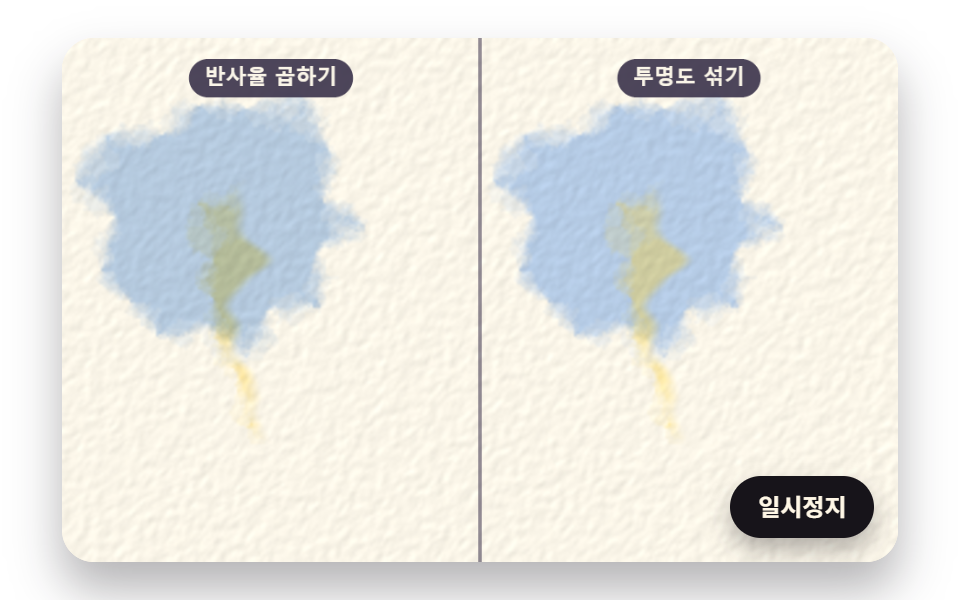 Galleries08 Glazed Color Mixing That Filters Light by Multiplying Transparent LayersWatercolor Effect CSS: 9 Bleeding Paint Scenes