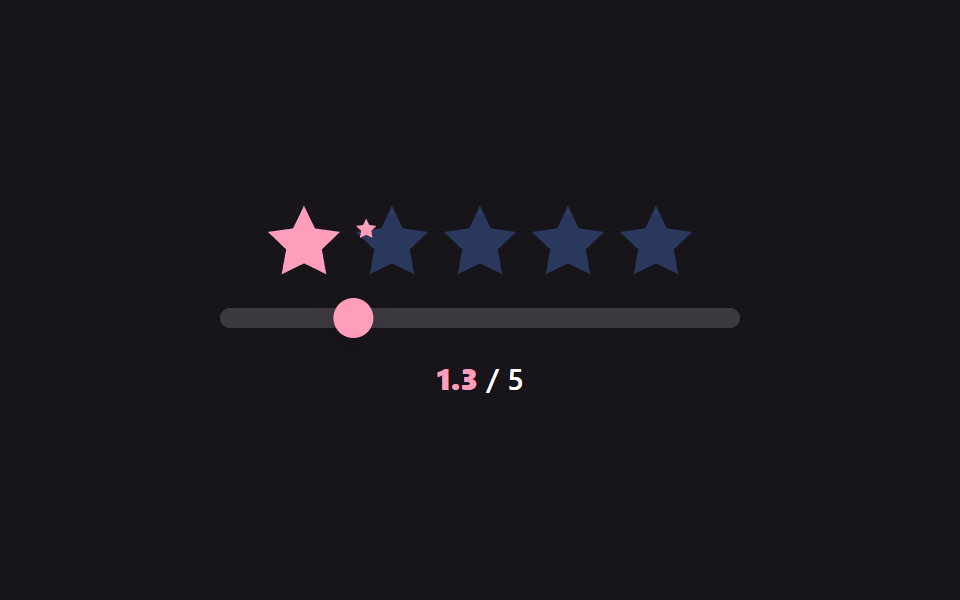
09Touch drag scrub — the filled value updates in real time following the finger's horizontal position value
While a finger stays pressed and moves across the star row, the filled value follows that changing horizontal position value on the same screen, and once the finger lifts, the value locks in as the selected value.
Best forFast star rating input on a mobile screen, a review form rated by scrubbing a finger across it
runInertia() — velocity *= 0.945Math.abs(velocity) > 0.015onDown/onMove — pointerId capture
<main class="stage">
<div class="sr is-demo" id="sr">
  <div class="sr__row" id="srRow">
    <span class="sr__star"><svg class="sr__base" viewBox="0 0 24 24"><path d="M12 .587l3.668 7.568 8.332 1.151-6.064 5.828 1.48 8.279L12 19.771l-7.416 3.642 1.48-8.279-6.064-5.828 8.332-1.151z"/></svg><span class="sr__fillclip" data-fc><svg class="sr__fill" viewBox="0 0 24 24"><path d="M12 .587l3.668 7.568 8.332 1.151-6.064 5.828 1.48 8.279L12 19.771l-7.416 3.642 1.48-8.279-6.064-5.828 8.332-1.151z"/></svg></span></span>
    <span class="sr__star"><svg class="sr__base" viewBox="0 0 24 24"><path d="M12 .587l3.668 7.568 8.332 1.151-6.064 5.828 1.48 8.279L12 19.771l-7.416 3.642 1.48-8.279-6.064-5.828 8.332-1.151z"/></svg><span class="sr__fillclip" data-fc><svg class="sr__fill" viewBox="0 0 24 24"><path d="M12 .587l3.668 7.568 8.332 1.151-6.064 5.828 1.48 8.279L12 19.771l-7.416 3.642 1.48-8.279-6.064-5.828 8.332-1.151z"/></svg></span></span>
    <span class="sr__star"><svg class="sr__base" viewBox="0 0 24 24"><path d="M12 .587l3.668 7.568 8.332 1.151-6.064 5.828 1.48 8.279L12 19.771l-7.416 3.642 1.48-8.279-6.064-5.828 8.332-1.151z"/></svg><span class="sr__fillclip" data-fc><svg class="sr__fill" viewBox="0 0 24 24"><path d="M12 .587l3.668 7.568 8.332 1.151-6.064 5.828 1.48 8.279L12 19.771l-7.416 3.642 1.48-8.279-6.064-5.828 8.332-1.151z"/></svg></span></span>
    <span class="sr__star"><svg class="sr__base" viewBox="0 0 24 24"><path d="M12 .587l3.668 7.568 8.332 1.151-6.064 5.828 1.48 8.279L12 19.771l-7.416 3.642 1.48-8.279-6.064-5.828 8.332-1.151z"/></svg><span class="sr__fillclip" data-fc><svg class="sr__fill" viewBox="0 0 24 24"><path d="M12 .587l3.668 7.568 8.332 1.151-6.064 5.828 1.48 8.279L12 19.771l-7.416 3.642 1.48-8.279-6.064-5.828 8.332-1.151z"/></svg></span></span>
    <span class="sr__star"><svg class="sr__base" viewBox="0 0 24 24"><path d="M12 .587l3.668 7.568 8.332 1.151-6.064 5.828 1.48 8.279L12 19.771l-7.416 3.642 1.48-8.279-6.064-5.828 8.332-1.151z"/></svg><span class="sr__fillclip" data-fc><svg class="sr__fill" viewBox="0 0 24 24"><path d="M12 .587l3.668 7.568 8.332 1.151-6.064 5.828 1.48 8.279L12 19.771l-7.416 3.642 1.48-8.279-6.064-5.828 8.332-1.151z"/></svg></span></span>
  </div>
  <div class="sr__track" id="srTrack"><span class="sr__thumb" id="srThumb"></span></div>
  <div class="sr__readout"><b id="srNum">0.0</b> / 5</div>
</div>
</main>
@use "../../../../site/static/demo-tokens" as *;
// 계산 겹: 손을 뗀 시점의 속도(px/ms)를 매 프레임 0.92배로 감쇠시키며 위치를 계속 옮기는
// 관성(runInertia()) — 드래그가 끝나도 값이 즉시 멈추지 않고 흐르다 멈춘다.
@include stage($stage-ink);
.sr {
display: grid;
gap: $sp-4;
place-items: center;
width: 100%;
}
.sr__row { display: flex; gap: $sp-2; }
.sr__star {
position: relative;
width: 36px;
height: 36px;
}
.sr__base,
.sr__fill svg {
position: absolute;
inset: 0;
width: 100%;
height: 100%;
}
.sr__base { fill: $subject-blue-light; opacity: .3; }
.sr__fillclip {
position: absolute;
inset: 0;
width: 0%;
overflow: hidden;
}
.sr__fill { fill: $subject-pink; }
.sr__track {
position: relative;
width: clamp(200px, 60vw, 260px);
height: 10px;
border-radius: $r-pill;
background: rgba($stage-paper, .16);
touch-action: none;
cursor: grab;
}
.sr__thumb {
position: absolute;
top: 50%;
left: 0;
width: 20px;
height: 20px;
margin-top: -10px;
margin-left: -10px;
border-radius: 50%;
background: $subject-pink;
box-shadow: $shadow-press;
}
.sr__readout {
font: 600 15px/1.2 -apple-system, "Segoe UI", "Noto Sans KR", sans-serif;
color: $stage-paper;
b { color: $subject-pink; font-variant-numeric: tabular-nums; }
}
@media (max-width: 340px) {
.sr__star { width: 28px; height: 28px; }
.sr__row { gap: $sp-1; }
.sr__track { width: 84vw; }
}
@media (prefers-reduced-motion: reduce) {
.sr__thumb { transition: none; }
}html, body {
margin: 0;
overflow: hidden;
}
.stage {
box-sizing: border-box;
min-height: 100vh;
display: grid;
place-items: center;
margin: 0;
background: #17141a;
font-family: -apple-system, "Segoe UI", "Noto Sans KR", sans-serif;
padding: clamp(8px, 4vw, 24px);
}
.sr {
display: grid;
gap: 16px;
place-items: center;
width: 100%;
}
.sr__row {
display: flex;
gap: 8px;
}
.sr__star {
position: relative;
width: 36px;
height: 36px;
}
.sr__base,
.sr__fill svg {
position: absolute;
inset: 0;
width: 100%;
height: 100%;
}
.sr__base {
fill: #5b8cf8;
opacity: 0.3;
}
.sr__fillclip {
position: absolute;
inset: 0;
width: 0%;
overflow: hidden;
}
.sr__fill {
fill: #ff9ebb;
}
.sr__track {
position: relative;
width: clamp(200px, 60vw, 260px);
height: 10px;
border-radius: 999px;
background: rgba(255, 255, 255, 0.16);
touch-action: none;
cursor: grab;
}
.sr__thumb {
position: absolute;
top: 50%;
left: 0;
width: 20px;
height: 20px;
margin-top: -10px;
margin-left: -10px;
border-radius: 50%;
background: #ff9ebb;
box-shadow: 0 6px 12px rgba(23, 20, 26, 0.32);
}
.sr__readout {
font: 600 15px/1.2 -apple-system, "Segoe UI", "Noto Sans KR", sans-serif;
color: #ffffff;
}
.sr__readout b {
color: #ff9ebb;
font-variant-numeric: tabular-nums;
}
@media (max-width: 340px) {
.sr__star {
width: 28px;
height: 28px;
}
.sr__row {
gap: 4px;
}
.sr__track {
width: 84vw;
}
}
@media (prefers-reduced-motion: reduce) {
.sr__thumb {
transition: none;
}
}(function () {
var root = document.getElementById('sr');
var track = document.getElementById('srTrack');
var thumb = document.getElementById('srThumb');
var clips = Array.prototype.slice.call(document.querySelectorAll('[data-fc]'));
var numEl = document.getElementById('srNum');
var pos = 0;
var velocity = 0;
var lastX = 0, lastT = 0;
var dragging = false;
var inertiaRaf = null;
function width() { return track.getBoundingClientRect().width; }
function paintFromPos(p) {
var w = width();
var v = Math.max(0, Math.min(5, (p / w) * 5));
clips.forEach(function (el, idx) {
var starVal = Math.max(0, Math.min(1, v - idx));
el.style.width = (starVal * 100).toFixed(1) + '%';
});
numEl.textContent = v.toFixed(1);
thumb.style.transform = 'translateX(' + p.toFixed(1) + 'px)';
}
function setPos(p) { pos = Math.max(0, Math.min(width(), p)); paintFromPos(pos); }
function onDown(e) {
root.classList.remove('is-demo'); stopAutoplay();
if (inertiaRaf) { cancelAnimationFrame(inertiaRaf); inertiaRaf = null; }
dragging = true;
track.setPointerCapture(e.pointerId);
lastX = e.clientX; lastT = performance.now();
var r = track.getBoundingClientRect();
setPos(e.clientX - r.left);
}
function onMove(e) {
if (!dragging) return;
var now = performance.now();
var dt = Math.max(1, now - lastT);
velocity = (e.clientX - lastX) / dt;
lastX = e.clientX; lastT = now;
var r = track.getBoundingClientRect();
setPos(e.clientX - r.left);
}
// 계산 겹: 손을 뗀 시점의 속도(px/ms)를 그대로 이어받아 매 프레임 감쇠(마찰 0.945배)시키며
// 위치를 계속 옮기는 관성 스크럽 — 손을 뗀 순간 값이 뚝 멈추지 않고 흐르다 멈춘다.
function onUp() {
if (!dragging) return;
dragging = false;
runInertia();
}
function runInertia() {
velocity *= 0.945;
setPos(pos + velocity * 16);
if (Math.abs(velocity) > 0.015 && pos > 0 && pos < width()) {
inertiaRaf = requestAnimationFrame(runInertia);
} else {
inertiaRaf = null;
}
}
track.addEventListener('pointerdown', onDown);
track.addEventListener('pointermove', onMove);
track.addEventListener('pointerup', onUp);
setPos(0);
// 자동 루프: 드래그로 오른쪽까지 훑은 뒤 손을 뗀 상태를 흉내내 관성으로 더 흐르다 멈추는 것을
// 반복한다 — 매 구간마다 방향을 바꿔 찔러 넣어(impulse) 감쇠 구간이 항상 겹쳐 흐르게 한다.
var phase = 0;
var autoTimer = null;
function autoTick() {
if (phase === 0) { setPos(width() * 0.08); velocity = 0.85; }
else if (phase === 1) { velocity = 0.7; }
else if (phase === 2) { velocity = -0.75; }
else if (phase === 3) { velocity = -0.4; }
runInertia();
phase = (phase + 1) % 4;
}
var reduce = window.matchMedia('(prefers-reduced-motion: reduce)').matches;
function stopAutoplay() { if (autoTimer) { clearInterval(autoTimer); autoTimer = null; } }
if (!reduce) { autoTimer = setInterval(autoTick, 460); autoTick(); }
})();import { useEffect, useRef } from "react";
import styles from "./TouchDragScrub.module.scss";
const STAR_PATH =
"M12 .587l3.668 7.568 8.332 1.151-6.064 5.828 1.48 8.279L12 19.771l-7.416 3.642 1.48-8.279-6.064-5.828 8.332-1.151z";
export default function TouchDragScrub() {
const rootRef = useRef<HTMLDivElement | null>(null);
useEffect(() => {
const root = rootRef.current;
if (!root) return;
const track = root.querySelector<HTMLDivElement>(`.${styles.track}`);
const thumb = root.querySelector<HTMLElement>(`.${styles.thumb}`);
const numEl = root.querySelector<HTMLElement>(`.${styles.num}`);
if (!track || !thumb || !numEl) return;
const clips = Array.prototype.slice.call(
root.querySelectorAll(`.${styles.fillclip}`)
) as HTMLElement[];
let pos = 0;
let velocity = 0;
let lastX = 0, lastT = 0;
let dragging = false;
let inertiaRaf: number | null = null;
function width() { return track!.getBoundingClientRect().width; }
function paintFromPos(p: number) {
const w = width();
const v = Math.max(0, Math.min(5, (p / w) * 5));
clips.forEach((el, idx) => {
const starVal = Math.max(0, Math.min(1, v - idx));
el.style.width = (starVal * 100).toFixed(1) + "%";
});
numEl!.textContent = v.toFixed(1);
thumb!.style.transform = "translateX(" + p.toFixed(1) + "px)";
}
function setPos(p: number) { pos = Math.max(0, Math.min(width(), p)); paintFromPos(pos); }
function onDown(e: PointerEvent) {
stopAutoplay();
if (inertiaRaf !== null) { cancelAnimationFrame(inertiaRaf); inertiaRaf = null; }
dragging = true;
track!.setPointerCapture(e.pointerId);
lastX = e.clientX; lastT = performance.now();
const r = track!.getBoundingClientRect();
setPos(e.clientX - r.left);
}
function onMove(e: PointerEvent) {
if (!dragging) return;
const now = performance.now();
const dt = Math.max(1, now - lastT);
velocity = (e.clientX - lastX) / dt;
lastX = e.clientX; lastT = now;
const r = track!.getBoundingClientRect();
setPos(e.clientX - r.left);
}
// 계산 겹: 손을 뗀 시점의 속도(px/ms)를 그대로 이어받아 매 프레임 감쇠(마찰 0.945배)시키며
// 위치를 계속 옮기는 관성 스크럽 — 손을 뗀 순간 값이 뚝 멈추지 않고 흐르다 멈춘다.
function onUp() {
if (!dragging) return;
dragging = false;
runInertia();
}
function runInertia() {
velocity *= 0.945;
setPos(pos + velocity * 16);
if (Math.abs(velocity) > 0.015 && pos > 0 && pos < width()) {
inertiaRaf = requestAnimationFrame(runInertia);
} else {
inertiaRaf = null;
}
}
track.addEventListener("pointerdown", onDown);
track.addEventListener("pointermove", onMove);
track.addEventListener("pointerup", onUp);
setPos(0);
// 자동 루프: 드래그로 오른쪽까지 훑은 뒤 손을 뗀 상태를 흉내내 관성으로 더 흐르다 멈추는 것을
// 반복한다 — 매 구간마다 방향을 바꿔 찔러 넣어(impulse) 감쇠 구간이 항상 겹쳐 흐르게 한다.
let phase = 0;
let autoTimer: number | null = null;
function autoTick() {
if (phase === 0) { setPos(width() * 0.08); velocity = 0.85; }
else if (phase === 1) { velocity = 0.7; }
else if (phase === 2) { velocity = -0.75; }
else if (phase === 3) { velocity = -0.4; }
runInertia();
phase = (phase + 1) % 4;
}
function stopAutoplay() { if (autoTimer !== null) { window.clearInterval(autoTimer); autoTimer = null; } }
const reduce = window.matchMedia("(prefers-reduced-motion: reduce)").matches;
if (!reduce) { autoTimer = window.setInterval(autoTick, 460); autoTick(); }
return () => {
stopAutoplay();
if (inertiaRaf !== null) cancelAnimationFrame(inertiaRaf);
track.removeEventListener("pointerdown", onDown);
track.removeEventListener("pointermove", onMove);
track.removeEventListener("pointerup", onUp);
};
}, []);
return (
<div ref={rootRef} className={styles.stage}>
<div className={styles.sr}>
<div className={styles.row}>
{[0, 1, 2, 3, 4].map((i) => (
<span key={i} className={styles.star}>
<svg className={styles.base} viewBox="0 0 24 24"><path d={STAR_PATH} /></svg>
<span className={styles.fillclip}>
<svg className={styles.fill} viewBox="0 0 24 24"><path d={STAR_PATH} /></svg>
</span>
</span>
))}
</div>
<div className={styles.track}><span className={styles.thumb} /></div>
<div className={styles.readout}><b className={styles.num}>0.0</b> / 5</div>
</div>
</div>
);
}09 Touch drag scrub — the filled value updates in real time following the finger's horizontal position value — Measured area 4.96% · moving frames 17/23Original by GODRICH · SCSS and React ship in the zip · Star Rating UI: 9 Interactive Rating Patterns
The post this demo lives in
 Star Rating UI: 9 Interactive Rating PatternsOne fill value follows the finger's position value in real time, one overlays an average's decimal part on a star, and o See all demos in this post
If you like this effect - similar demos
 Pickers01 Value bubble — converting track position to a percentage the label followsCSS Range Slider: 9 Physics-Grade Custom Sliders
 Pickers03 Keyboard-arrow value toggle — each time a direction value changes, a highlighted-cell value moves across the gridDate Picker UI: 9 Popover & Calendar Patterns
 Pickers06 Picker That Fills Waveform Bars Up to the Scrubbed Position9 Graph Animation CSS Pickers With Live Recompute